
CareStyle Compact IS 2058 BK - Iron BRAUN - Free user manual and instructions
Find the device manual for free CareStyle Compact IS 2058 BK BRAUN in PDF.

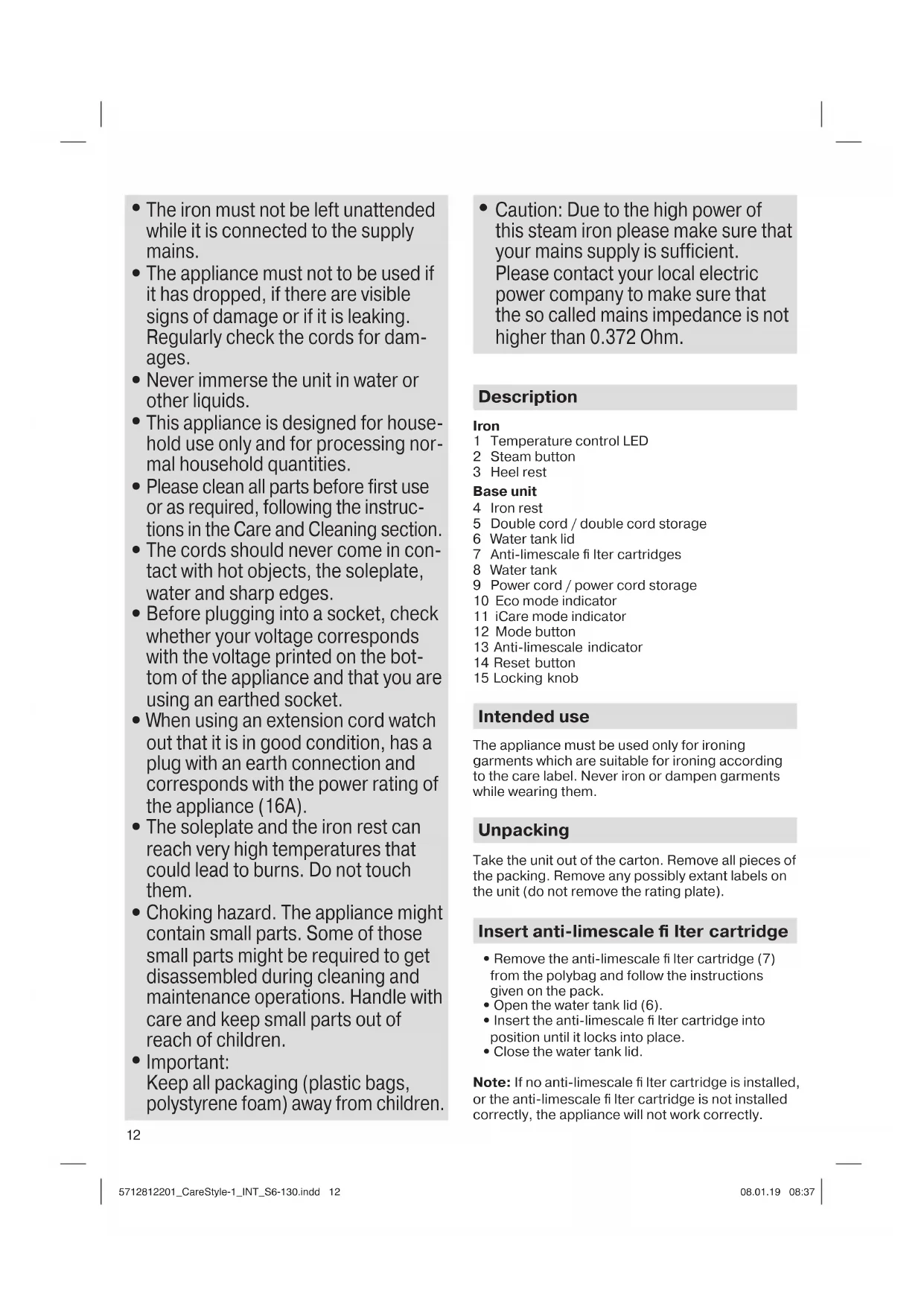


| Brand | Braun |
| Model | CareStyle Compact IS 2058 BK |
| Product type | Steam generator iron |
| Power supply | 220-240 V, 50-60 Hz |
| Power | Approximately 2400 W |
| Water tank capacity | Approximately 1.2 L |
| Ironing modes | iCare, eco, turbo |
| Vertical steam function | Yes (iCare mode) |
| Double steam trigger | Yes (turbo mode) |
| Soleplate | Rounded 3D soleplate for optimal glide |
| Auto shut-off | Yes, after 10 minutes of inactivity |
| Anti-calc system | Anti-calc filter cartridge (replaceable) |
| Cartridge change indicator | Illuminated anti-calc indicator |
| Locking system | Yes, for transport and storage |
| Integrated iron rest | Yes, on the base |
| Care and cleaning | Clean the soleplate with a damp cloth; do not use chemicals |
| Safety | Hot surfaces, do not immerse, keep out of reach of children under 8 years |
| Spare parts available | CareStyle anti-calc filter cartridges |
| Repairability | Contact an authorized Braun after-sales service |
| Country of origin | Not specified |
Frequently Asked Questions - CareStyle Compact IS 2058 BK BRAUN
User questions about CareStyle Compact IS 2058 BK BRAUN
0 question about this device. Answer the ones you know or ask your own.
Ask a new question about this device
Download the instructions for your Iron in PDF format for free! Find your manual CareStyle Compact IS 2058 BK - BRAUN and take your electronic device back in hand. On this page are published all the documents necessary for the use of your device. CareStyle Compact IS 2058 BK by BRAUN.
USER MANUAL CareStyle Compact IS 2058 BK BRAUN
Register your product www.braunhousehold.com/register
Steam generator iron
Deutsch 6
English 11
Francais 17
Espanol 23
Portugues 28
Italiano 33
Nederlands 39
Dansk 44
Norsk 49
Svenska 54
Suomi 59
Polski 63
Český 69
Slovak 74
Hungarian 79
Croatian 84
Slovenian 90
Turkish 95
Romanian (RO/MD) 100
Greek 105
Kazakh 110
Russian 116
Ukrainian 123
131
Copyright 2018. All rights reserved
De'Longhi Braun Household GmbH
Carl-Ulrich-Straße 4
63263 Neu-Isenburg/Germany
5712812201/01.19-IS 2044, IS 2043 INT
DE/UK/FR/ES/PT/IT/NL/DK/NO/SE/FI/PL/CZ/SK/HU/HR/
SI/TR/RO/MD/GR/KZ/RU/UA/Arab
A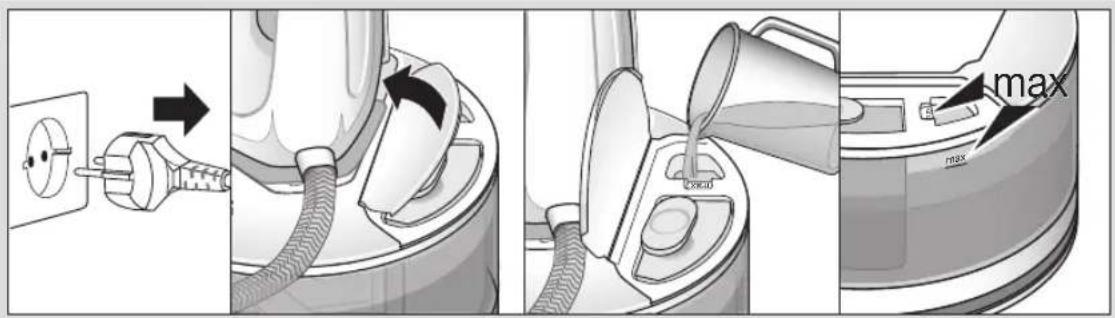
B
C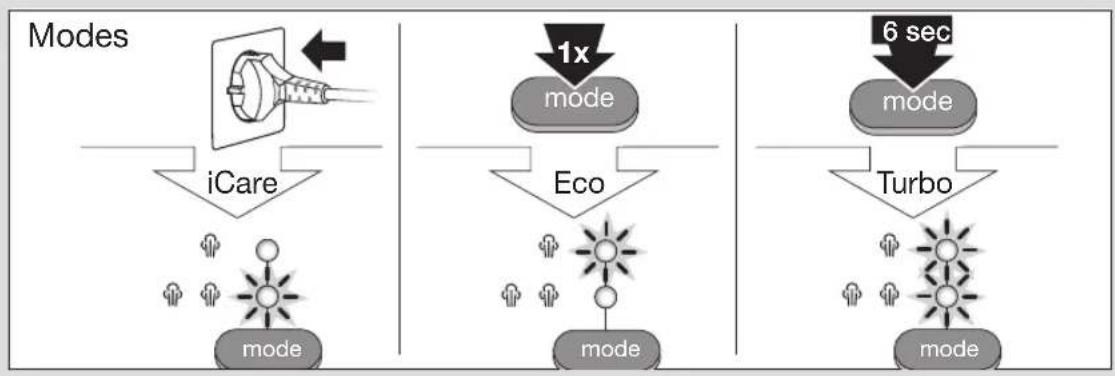
D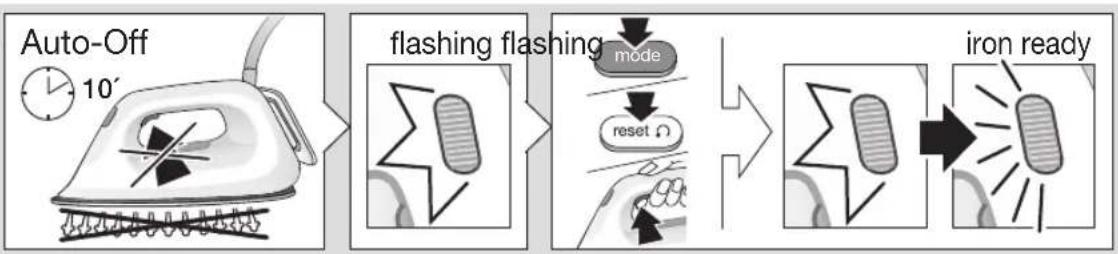
E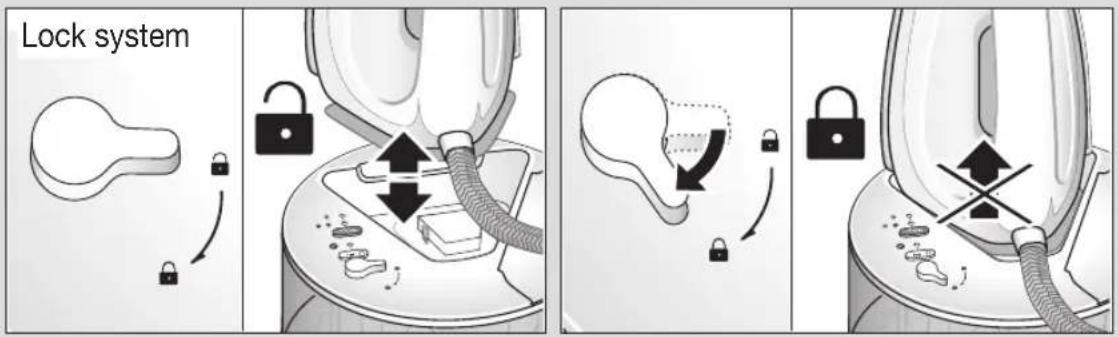
F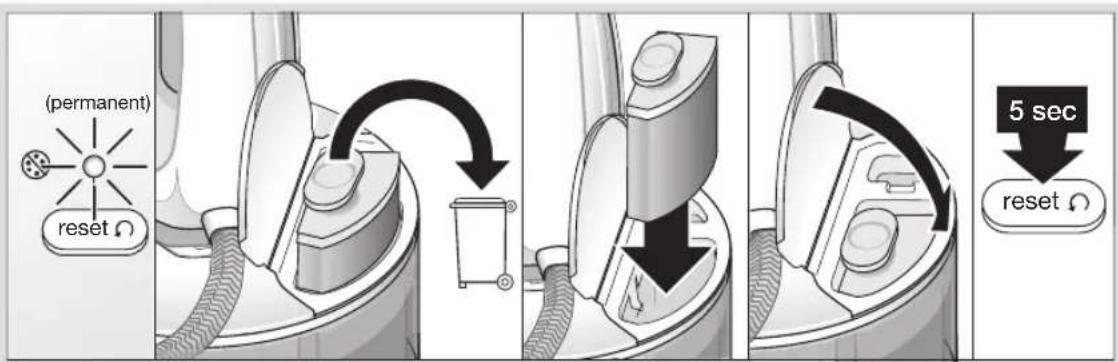
G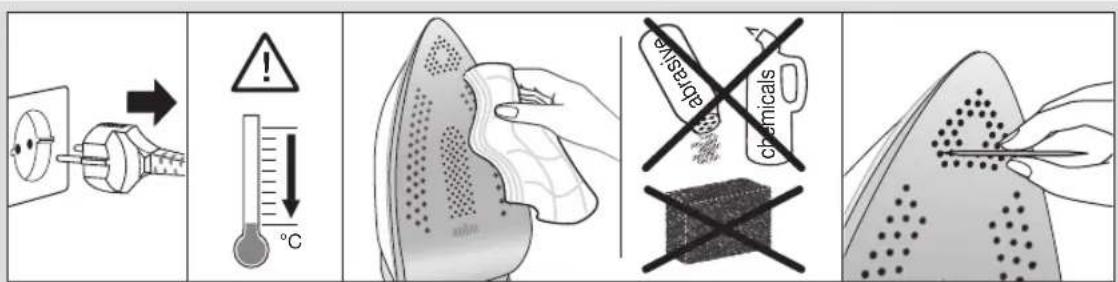
Deutsch
Our products are engineered to meet the highest standards of quality, functionality and design. We hope you thoroughly enjoy the new Braun appliance.
Before use
Please read instructions carefully and completely before using the appliance.
Caution

Caution: Hot surfaces! Electric steam stations combine high temperatures and hot steam that could cause burns.
- This appliance can be used by children aged from 8 years and above and persons with reduced physical, sensory or mental capabilities or lack of experience and knowledge if they have been given supervision or instruction concerning use of the appliance in a safe way and understand the hazards involved.
Children shall not play with the appliance. - Cleaning and user maintenance shall not be made by children without supervision. - During operation and cool-down the appliance and its mains cord shall be kept out of reach of children under 8 years. - If the supply cord is damaged, it must be replaced by the manufacturer, its service agent or similarly qualified persons in order to avoid a hazard. - Always unplug the station/iron before filling with water. - The appliance must be used and rested on a stable surface. - During ironing pauses, place the iron upright on its heel rest or on the iron rest. Ensure that the heel rest is placed on a stable surface.
- The iron must not be left unattended while it is connected to the supply mains.
- The appliance must not be used if it has dropped, if there are visible signs of damage or if it is leaking. Regularly check the cords for damages.
- Never immerse the unit in water or other liquids.
- This appliance is designed for household use only and for processing normal household quantities.
- Please clean all parts before first use or as required, following the instructions in the Care and Cleaning section.
- The cords should never come in contact with hot objects, the soleplate, water and sharp edges.
- Before plugging into a socket, check whether your voltage corresponds with the voltage printed on the bottom of the appliance and that you are using an earthed socket.
- When using an extension cord watch out that it is in good condition, has a plug with an earth connection and corresponds with the power rating of the appliance (16A).
- The soleplate and the iron rest can reach very high temperatures that could lead to burns. Do not touch them.
- Choking hazard. The appliance might contain small parts. Some of those small parts might be required to get disassembled during cleaning and maintenance operations. Handle with care and keep small parts out of reach of children.
- Important: Keep all packaging (plastic bags, polystyrene foam) away from children.
- Caution: Due to the high power of this steam iron, please make sure that your mains supply is sufficient. Please contact your local electric power company to make sure that the so-called mains impedance is not higher than 0.372 Ohm.
Description
Iron
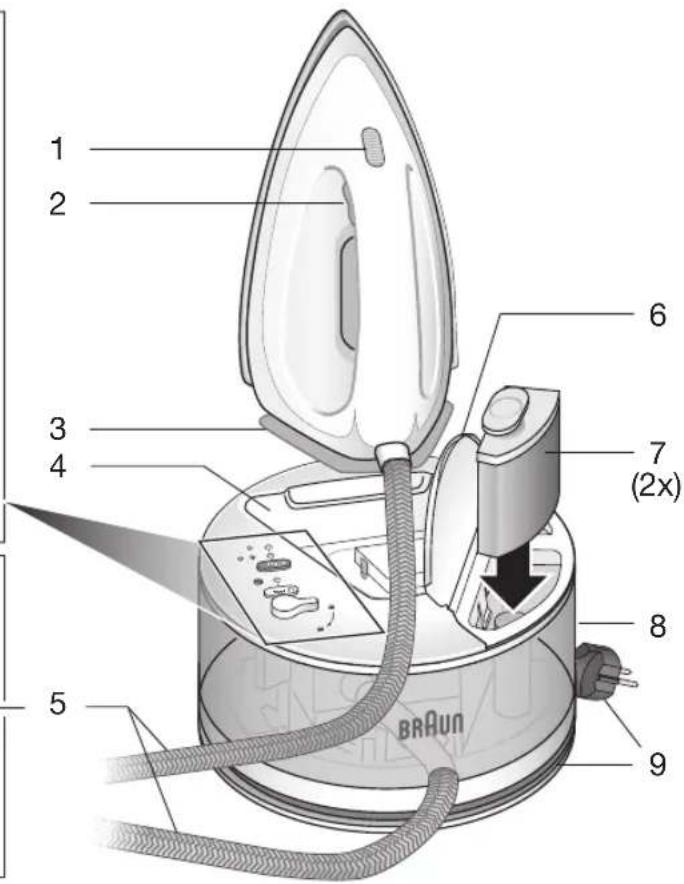
1 Temperature control LED 2 Steam button 3 Heel rest
Base unit
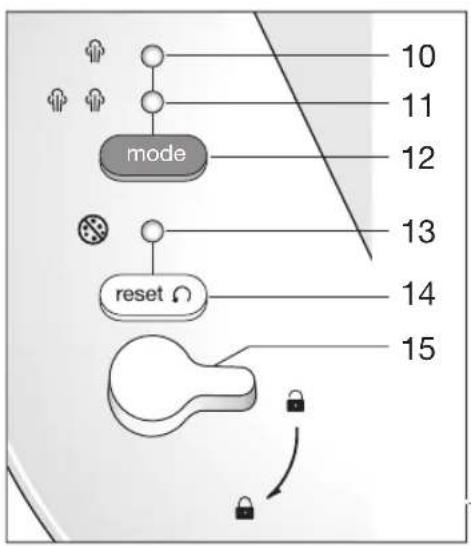
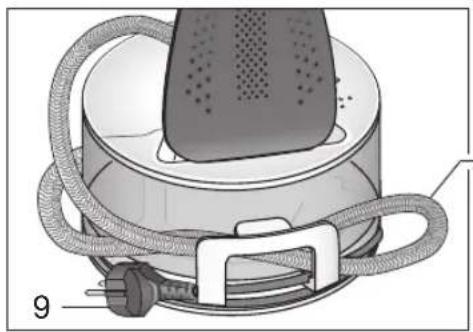
4 Iron rest 5 Double cord / double cord storage 6 Water tank lid 7 Anti-limescale filter cartridges 8 Water tank 9 Power cord / power cord storage 10 Eco mode indicator 11 iCare mode indicator 12 Mode button 13 Anti-limescale indicator 14 Reset button 15 Locking knob
Intended use
The appliance must be used only for ironing garments which are suitable for ironing according to the care label. Never iron or dampen garments while wearing them.
Unpacking
Take the unit out of the carton. Remove all pieces of the packing. Remove any possibly extant labels on the unit (do not remove the rating plate).
Insert anti-limescale filter cartridge
- Remove the anti-limescale filter cartridge (7) from the polybag and follow the instructions given on the pack.
- Open the water tank lid (6).
- Insert the anti-limescale filter cartridge into position until it locks into place.
- Close the water tank lid.
Note: If no anti-limescale filter cartridge is installed, or the anti-limescale filter cartridge is not installed correctly, the appliance will not work correctly.
(A) Filling the water tank
- Make sure that the iron is unplugged.
- Open the tank lid (6) and fill the water tank with tap water, taking care not to exceed the «max» level. If you have extremely hard water, we recommend that you use a mixture of 50% tap water and 50% demineralised water. Do not add any additives (e.g. perfumes and other chemical materials). Do not use condensation water from a tumble dryer.
- Place the appliance on a stable, level surface.
Before first use
When you use the appliance for the first time, press the steam button (2) for about 60 seconds and hold the iron horizontally to pull the steam through to the soleplate.
When steam is ready for the first time we recommend to iron for a few minutes over a rag to avoid manufacturing residues can dirty your garments.
(B) Start into operation
Before start ironing follow the garment care label instructions carefully. Fabrics with this symbol are not ironable.
- Place the iron on the iron rest (4), unwind completely the power cord and plug in.
- The iron will start to heat up and the temperature control LED (1) on the iron will flash. Once the iron is ready the temperature control LED is permanently on.
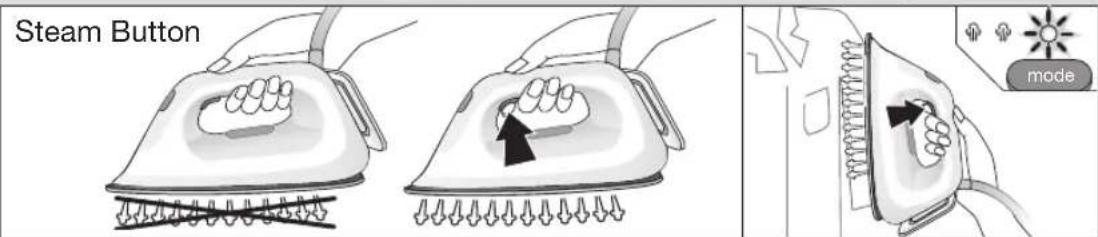
- For ironing with steam, press the steam button (2) below the iron handle. Steam will come out from the holes in the soleplate.
- For dry ironing, iron without pressing the steam button. Please note that after 10 minutes of dry ironing, the iron switches to the auto-off mode.
For best results
Always iron black and dark garments inside out to avoid getting a sheen on the fabrics from the iron. - When ironing a shirt, start with the more difficult parts like collar, cuffs and sleeves. Then iron the bigger parts like front and back, so you can prevent wrinkling the bigger parts when you are ironing the other parts. - When you iron a collar, start on its underside and work from the outside (the pointy end) inwards. Turn over and repeat. Fold down the collar and press the edge for a more crisp finish. - When ironing garments with imprints, applications or even more sensitive fabric parts
(i.e. embroidery), turn them inside out and, if necessary, lay a cotton cloth between the iron and the fabric. This way you avoid damage and get the volume of fabric designs that are not to be ironed flat.
- In order to prevent new creases while ironing with steam, make sure that the garment shows no residual moisture before going on ironing other parts of it.
(C) Settings
iCare
The iCare mode is automatically chosen when the appliance is plugged in. The iCare mode indicator (11) is on.
This mode is suggested for garments like wool, polyester and cotton/linen.
eco
The eco mode is suggested for most delicate garments like synthetics, silk and blended fabrics for which you need less steam. This mode allows less power consumption.
To select the eco mode, press the mode button (12). The eco mode indicator (10) turns on.
P turbo
The turbo mode is suggested for garments that need more powerful steam, like thick cotton/linen and jeans.
To select the turbo mode, hold down the mode button (12) until the eco mode indicator (10) and the iCare mode indicator (11) turn on.
Double trigger (turbo mode only)
Use the double trigger function to remove stubborn creases.
Press the steam button (2) twice quickly. There will be a continuous steam emission for a few seconds. Press the steam button once again during steam emission to stop the function.
To repeat the steam boost wait about 12 seconds before pressing again the steam button.
Vertical steam (iCare mode only)
The iron can also be used for steaming hanging clothes for a quick refreshment. However, this function does not replace ironing.
Ensure the iCare mode is selected and hold the iron in a vertical position, tilted slightly forwards.
Press repeatedly the steam button (2) while moving the iron from top to the bottom. Then place the iron on the iron rest.
Steam is very hot: never iron or dampen garment while wearing them.
3D soleplate
The unique round shape of the 3D soleplate ensures best gliding results on difficult parts (e.g. buttons, pockets etc.)
(D) Auto-off
This function is activated if after 10 minutes there has been no steam emission.
- When the appliance is in the auto-off mode the temperature control LED (1) is flashing in a faster interval. To turn the iron on again press the reset button (14), the mode button (12) or the steam button (2).
- Before start ironing again wait until the temperature control LED is permanently on.
(E) Lock system / storage
The appliance is equipped with a lock system for convenient transportation and easy storage. It is possible to lift and carry the appliance by the handle of the locked iron.
NOTE: Before transportation, make sure the iron is properly locked and has cooled down completely. If you do not use the appliance for a longer time (more than 1 month), empty the water tank before storage.
- Place the iron on its heel rest (3) into the iron rest (4) on the base unit. To lock the iron, turn the locking knob (15) to the lock position. To unlock the iron, turn the locking knob to the unlock position. The iron will be released.
Unplug and let the appliance cool down (the soleplate is hot) before winding the cords for storage.
(F) Anti-limescale filter cartridge replacement
To maintain optimum performance of your appliance, it is important to exchange regularly the anti-limescale filter cartridge or use demineralised water.
When the anti-limescale filter cartridge requires changing, the anti-limescale indicator (13) turns on. a. Unplug the appliance.
b. Remove the old anti-limescale filter cartridge (7) by lifting it out of the water tank (8) and dispose of it. c. Follow the instructions given on the foil and insert the new anti-limescale filter cartridge into position until it locks into place. d. Close the tank lid, plug in and press the reset button (14) for 5 seconds until the LED turns off.
NOTE: After the replacement of the anti-limescale filter cartridge, press the steam button (2) for about 60 seconds and hold the iron horizontally to pull the steam through to the soleplate.
If using demineralised water, you need to leave the filter cartridge in the compartment and press the reset button (14) for 5 seconds each time the anti-limescale indicator turns permanently on until the LED turns off.
We recommend using the CareStyle anti-limescale filter cartridge (can be purchased in stores, through www.braunhousehold.com or by calling Customer Service).
Do not use any chemicals, additives or descaler to rinse the water tank.
(G) Care and cleaning
Before cleaning, always make sure that the appliance is unplugged and has cooled down completely. To clean the soleplate, it is suggested to use a damp cloth. Never use chemicals, vinegar or scouring pads (e.g., sponges with coarse nylon fabrics, etc.).
Please do not dispose of the product in the household waste at the end of its useful life. Disposal can take place at a Braun Service Centre or at appropriate collection points provided in your country.

For UK Only
Guarantee Information
All Braun Household products carry a minimum guarantee period of two years. The rights and benefits under this guarantee are additional to your statutory rights which are not affected.
Please keep your receipt as this will form the basis of your guarantee.
In the unlikely event of a breakdown you have access to professional help from our team simply by calling: 02392 392333
For service in the Republic of Ireland please call: 012475471
Braun Household undertakes within the specified period to repair or replace any part of the appliance, free of charge (with the exception of any glass or porcelain-ware incorporated in the product) found to be defective provided that;
We are promptly informed of the defect. The product is used and maintained in accordance with the User Instructions. - The appliance has not been altered in any way or subjected to misuse or repair by a person other than an authorised service agent for Braun Household. - No rights are given under this guarantee to a person acquiring the appliance second hand or for commercial or communal use.
- Any repaired or replaced appliance will be guaranteed on these terms for the unexpired portion of the guarantee. The need for repair has not been caused by insufficient aftercare or cleaning: or damage caused by the chemical or electrochemical effects of water.
Troubleshooting guide
| PROBLEM CAUSE REMEDY | ||
| The appliance does not produce any steam. | There is not enough water in the water tank. | Unplug the appliance; check if the anti-limescale fi liter cartridge has been well prepared and is placed properly; fi II water up to max. level; close the lid of the water tank; plug in and wait until the temperature control LED is permanently on; press the steam button until steam comes out of the soleplate. In case above procedure does not solve the problem take the following steps: press RESET + steam buttons together until steam comes out. Once steam comes out, release the buttons. |
| The steam button has not been pressed. | ||
| A new anti-limescale fi liter cartridge has just been installed. | ||
| The anti-limescale fi liter cartridge is not placed properly. | ||
| The anti-limescale indicator is on and less or no steam comes out of the iron when pressing the steam button. | The anti-limescale fi liter cartridge needs to be replaced. | Replace the anti-limescale fi liter cartridge and press the reset button for 5 seconds until the LED turns off. You can also use demineralised water. In that case, you need to leave the anti-limescale fi liter cartridge in the compartment and press the reset button for 5 seconds each time the the antilimescale indicator turns on. |
| The appliance emits a loud noise associated with vibrations (subtle pumping sound is normal). | A new anti-limescale fi liter cartridge has just been installed. | Continue to press the steam button until the loud noise stops and steam comes out of the soleplate. |
| The water tank is empty. | Refi ll the water tank and press the steam button until the loud noise stops and steam comes out of the soleplate. | |
| The anti-limescale fi liter cartridge is not in place. | Place the anti-limescale fi liter cartridge in the compartment. | |
| The anti-limescale fi liter cartridge is damaged or shows cracks. | Inspect the anti-limescale fi liter cartridge thoroughly. If you see any sign of damage or cracks, replace the anti-limescale fi liter cartridge with a new one. | |
| The fi rst time the appliance is turned on, you notice smoke / smell. | Some parts have been treated with sealer/lubricant which evaporates the fi rst time the iron heats up. | This is normal and will stop when you have used the iron a few times. If the smoke/smell is still present after turning off the appliance, contact an authorised Braun Customer Service. |
| There is too much steam coming out of the iron. | Mode turbo is on. | Activate the iCare or eco mode by pressing the mode button. |
| Water (dirty) droplets and impurities come out of the soleplate. | After the anti-limescale fi liter cartridge replacement, remaining water may drip out of the sole-plate. | Take the iron out of the base and position it horizontally on a thick towel or cloth. Press the steam button and the reset button at the same time until the Temperature Control LED on the iron starts flashing. Release the 2 buttons and wipe the soleplate dry with a cloth. Watch out - the soleplate is hot. |
| All LEDs are fl ashing. System error. | Unplug the system, plug in again. If the problem is still present turn the appliance off immediately and contact an authorised Braun Customer Service. |
Français
1 Temperature setting button 2 Steam button 3 Steam
Steam setting
4 Water tank 5 Soleplate / Soleplate cleaning 6 Water tank, capacity
7 Water tank capacity 8 Water tank filling 9 Soleplate / Soleplate cleaning 10 Temperature indicator lights 11 Steam setting indicator lights 12 Steam setting 13 Water tank indicator 14 Cleaning button 15 Cleaning function
Before starting the device, read the safety instructions carefully and follow them. If the device is used improperly or by unqualified persons, it may cause harm.
Cleaning
Remove the dust container. Empty the dust container. If there are any blockages in the dust container, remove them (do not use water).
Cleaning the HEPA filter
Remove the HEPA filter (7) from the device and clean it with a brush. Rinse it under running water (6). Let the HEPA filter dry completely before reinstalling. Do not use the device without the HEPA filter.
NOTE: If the HEPA filter is damaged or cannot be cleaned, replace it with a new one.
(A) Rinsing the dust container with water
Unplug the device from the electrical outlet. Remove the dust container and rinse it under running water (6). If the dust container is very dirty, you can use a mixture of 50% water and 50% vinegar to clean it. Do not use any cleaning agents (soap, detergent, or other household chemicals). Let the dust container dry completely before reattaching. Do not use the device without the dust container.
First use
Before first use, press the button (2) for 60 seconds to charge the device fully.
When the device is first used, the battery may not be fully charged. To ensure maximum battery life, charge it for at least 4 hours.
(B) Adding accessories
Before using the device, read the safety instructions carefully.
Aderen TaH6acb6ap MaTanapnbyYtIKteyRe 60JMaJnbl.
- YtikTiYtIK KOiFbIuKa (4) KOiBHi3, Kyat CbIMbHbIHOpaybiTOnbIK Xa3bHb3 Da, PO3eTKaF CyfBiHbI3. Ytik Kbl3a BactaIbI XaHe TEMnepaTpaHbI 6akblay Tymeci (1) kblibkTaIbI. Ytik DaIbIH 6oIfAHa, TemepaTpaHbI backapaTBH KapbIK DNOJ WAM TpyaKbTI TypDe XaHaDbI.
- Bymeh ytktey yin Hytkih tyKacbHbH actbHaBfby Tymecih (2) 6acbH3. By ytKa TaabaHdaftb TeciktpdeH bfaDbI. Kypfak Ytiktey yuH 6y tymecin 6acnactah YtIKTeH3. Kypfak Ytiktey 6actaHaHH KeiH 10 MNHT apaIbIbIHDA Kypblfbl «ABTOwY KyiHe ayBCaTbTIbH ECKepiH3.
Hətnxkei tamaa 60ny yuih
Kapa Hemece kyHript TcyTki KIMdi Ytik XbIbIpaTbIN xi6epmec yuIH OApDb iUki XaFbHaH YtIKTeHi3. -KeiIeHiYtIKTeReH Ke3Je apKaUaH XaFacbl, KaeHHKaiBIPmacblXeHe XeHi CnRAKTb KNUBH 6eJIikTepeHbAcTaHbI.CoHaH KeiH aJbMe H apTb CnRAKTb YJIkeHIpeK 6eJIikTePIH YtIKTeHi3, COHa baca6eJIikTePiYtIKTeReH Ke3e YJIkeHIpeK 6eJIikTePiMbKbImMaJDbI. Xa facbH yTikTeReH Ke3De OHbIH actbHaH 6actaHbI da, cbiptbHaH (yUbIHah) iWine KapaJ XaNFActbPbHbI3. AyapbICTpbHbI3 da, KaTanaHbI3. XaFaHbI KaBpIn 6yKTEHi3 De, KaTbIN TpybI yWIn XnERiH IN YCTHeH yTikTeHi3. - BacIFaH cypTepi, jANCbIpMaIapbl Hemece OaHa Ha3ik 6eIKTepei (MbCaIb, KeCTe) 6ap KIM-KeWeKTI yTKTeReH Ke3de OApDbH iHi CBtBHa ayDapbHbI3 Da, KaXeT BoJcA, MaTaHbH YCTHeH MaKTa MaTaeCehI3. CoHa MaTaHbH 6yInIyIe XoJ BePMeNci3 XHe yTKTeJmeyre Tnic 6eIKTePiH KeJIeMH CaKaTcbI3. -БуMuH yTikTeR eKe3e KeHa KbIpTbIcTapDbH naJa bOnybHa Jc0n 6epMey YuH OHbH BaKa bEJIkTePiYyIKTeYdi KaNFaCTbIpaPdAn 6pybH KNIMde bUfAkanMaFaHbH TeKcepH3.
(C) NapameTpnep

iCare
Acnantbpo3etkafKaJNFAfAHKe3e iCare pexmimi ABTOMaTTbType TaHJaIaIb.iCare pexmiH INHdkaTopb1(11)XaHaIbI.
By np pekxim kyn, noinctep kHe MaKta/3bIfbip CnKtbl MaTadaH TiriInreH KIM-KeWeKTI YTIkTey yUHH Cyblhbla.

eco
3ko pexnmi cInTeTnka, x6eK xe He apanac MaepnAndapAn TiriInre H3iK 3aTTapDbI YtIKteyRe K0laJIb. ByI peXIM KyATbI a3bIpaK XymcayFa MymKiHdk6epei.
3ko pexmiH TaHday yuih pexmmHIn TYmecin (12) 6acbHb3.3ko pexmiH INHnKATOpbl (10) KaHaDbI.


turbo
Typ6o pexim MaKaTa/3bIbIp kHe DxHNC CnKtbl Kywi 6ybl KaKet eTeTIN MaTePnAndapDaH XacanFaH 3aTTapDbYtIKTeY yWIn YcBnHJaDbl. Typ6o peximTi TaHday yWIn peXIMHi TymMeCIn (12) 3ko pexim INHdkaTopbl (10) Mei iCare pexmi INHdkaTopbl (11) XaHFaHwa 6acbl YCTan TypbHb3.
Koc Tytkbii (Tek Typ6o peXmme)
The functions of the iron are intended for ironing. This knob (2) has two positions. First, set the steam switch to the off position. To use the function, turn this knob to the required setting.
To start ironing, press this knob and hold it for 12 seconds, then release.
Press this button (steam only mode)
To remove stubborn wrinkles from thick fabrics, use the steam button. This function is especially effective for vertical steaming.
In steam mode, press the steam button repeatedly, holding it down, and set the temperature to high. With the iron held vertically, press this knob (12) several times. Then, turn the iron to the horizontal position.
This is a high temperature: do not use on delicate fabrics or those that cannot be ironed.
3D steam soleplate
The 3D soleplate allows steam to be directed to the items being ironed (clothes, curtains, etc.) more effectively.
(D) Auto-off
If the iron has been inactive for 10 minutes, this function will automatically turn it off.
When the iron is in auto-off mode, the temperature indicator light (1) will blink slowly. To resume ironing, press the steam button (14), the mode button (12), or this knob (2). Before ironing again, wait until the temperature indicator light stops blinking.
(E) Anti-drip / self-cleaning
To prevent water from leaking during ironing, use the anti-drip function. Do not use any additives or perfumed water.
If water leaks: Before ironing, empty the water tank and let it cool down. If the water tank is not empty (less than 1 cup), water may leak from the soleplate. Stop using the iron and let it cool before storing.
- Place the iron on its heel (4) with the soleplate facing up. To clean the iron, press the self-cleaning button (15). Press and hold the self-cleaning button. The iron will release steam and water. Do not touch the soleplate; wait until it cools down before storing (the soleplate is hot).
(F) Replacing the water filter
To ensure the appliance functions correctly, the water filter must be replaced regularly. The water filter should be replaced at least every two months.
When replacing the water filter, the water filter indicator (3) lights up.
a. Unplug the appliance from the power outlet. b. Remove the old water filter (7) from the water tank (8) and dispose of it. c. Insert the new water filter into the correct position and secure it. d. Fill the water tank with water, plug the appliance back in, and press the steam button (14) for about 5 seconds.
CAUTION: After replacing the water filter, press the steam button (2) for about 60 seconds to flush the system before using the appliance.
When the water filter indicator lights up, replace the water filter as described above, then press the steam button (14) for about 5 seconds.
You can purchase replacement water filters from our service centers, on our website www.braunhousehold.com, or from authorized dealers.
Use only clean water, without any additives or chemicals.
(G) Cleaning and maintenance
Before cleaning, always unplug the appliance and let it cool down completely. To clean the soleplate, use a soft cloth. Do not use abrasive cleaners, scouring pads, or harsh chemicals (e.g., cleaners containing bleach).
If the appliance is not working properly, contact our service center or visit our website for support.

Disposal
This product is marked with the symbol of a crossed-out wheeled bin. This means that the product must not be disposed of with normal household waste. It must be taken to a collection point for recycling of electrical and electronic equipment. By doing this, you help protect the environment.
Example: 30421-This product was manufactured in April 2013.
EAC
Implementation: Product implementation rules are not established by the manufacturer.
Manufacturer:
De'Longhi Braun Household GmbH,
Carl-Ulrich-Strasse 4,
63263 Neu Isenburg, Germany
Troubleshooting Guide
Preparation for first use
When using the appliance for the first time, press the steam button (2) and hold the iron horizontally for about 60 seconds so that water flows through the soleplate.
During first use, it is recommended to iron for a few minutes through the steam function to remove any manufacturing residues.
Fabrics with this symbol should not be ironed.
Place the iron on the stand (4), fully unwind the power cord and plug it into the socket. - The iron will start heating up; the temperature control indicator light (1) on the iron will illuminate. As soon as the iron is heated, the temperature control indicator light will turn off. For steam ironing, press the steam button (2), located under the iron handle. Steam will start coming out of the holes in the soleplate. - For dry ironing, do not press the steam button. Note: after about 10 minutes of dry ironing, the iron will automatically switch to steam mode.
For best results
Iron dark and heavy fabrics from the reverse side to avoid shiny marks on the fabric. - When ironing shirts, start with the most delicate parts, such as the collar, cuffs, and sleeves. Then iron larger parts, such as the back, to avoid creases on the larger parts during ironing of the delicate parts. - When ironing a shirt, start from the reverse side, moving from the edge (pointed end) to the center. Turn the shirt over and repeat the same. Fold the shirt and iron the edge to achieve a "crisp" effect. - When ironing garments with prints, appliqués, or more delicate parts (e.g., with embroidery), turn them inside out and, if necessary, place a cotton cloth over them before ironing. This way you will avoid damaging the garment and give volume to the parts that cannot be ironed directly. - To avoid shiny marks, make sure there is no residual water on the garment before ironing the next parts.
(C) Settings
The “iCare” mode is set automatically when the iron is moved. The “iCare” mode indicator (11) will light up. It is recommended to iron wool, polyester and mixed fabrics.
eco
The “eco” mode is recommended for ironing cotton, linen, or mixed-type fabrics. This mode allows you to save more energy. To set the “eco” mode, press the mode selection button (12). The “eco” mode indicator (10) will light up.
The “eco” mode is recommended for ironing cotton, linen, or mixed-type fabrics. This mode allows you to save more energy. To set the “eco” mode, press the mode selection button (12). The “eco” mode indicator (10) will light up.

turbo
The “turbo” mode is recommended for fabrics that require more steam, such as thick wool, denim, and cotton. To set the “turbo” mode, press and hold the mode selection button (12) until the “eco” (10) and “iCare” (11) indicators turn on.
The iron can also be used for dry ironing without steam. The function does not affect ironing.
Make sure the “iCare” mode is set, then move the iron in a vertical position, sliding it back and forth.
Move the iron from top to bottom, periodically pressing the steam boost button (2). Then place the iron on the stand.
A pair with the iron is dangerous: never iron or steam clothes while they are on you.
3D soleplate
The unique 3D soleplate of round shape ensures the best ironing results on difficult areas (e.g., buttons, pockets, etc.).
(D) Automatic shut-off function
This function activates in the absence of steam supply for 10 minutes.
When the iron is in automatic shut-off mode, the temperature control indicator (1) will blink.
- Press the power button (14), the mode selection button (12), or the pause button (2) to turn on the iron.
- Before starting to iron, wait until the temperature control indicator light goes out.
(E) Locking/Storage System
The iron is equipped with a locking system for easy handling and simple storage. The locked iron can be lifted and carried by the handle.
NOTE: Before moving the iron, make sure it is locked and completely cool. If you do not use the iron for a long period (more than 1 month), empty the water from the reservoir before storing.
Place the iron on the heel (3) on the base (4) in a horizontal position. - To lock the iron, turn the locking knob (15) to the lock position. To unlock the iron, set the locking knob to the unlock position. The iron will unlock.
To disconnect the power for storage, unplug the iron from the outlet and let it cool down (at least 30 minutes).
.
- DEUTSCH
- BEFORE USE
- CAUTION
- DESCRIPTION
- IRON
- BASE UNIT
- INTENDED USE
- UNPACKING
- INSERT ANTI-LIMESCALE FILTER CARTRIDGE
- FILLING THE WATER TANK
- BEFORE FIRST USE
- START INTO OPERATION
- FOR BEST RESULTS
- SETTINGS
- ICARE
- ECO
- P TURBO
- DOUBLE TRIGGER (TURBO MODE ONLY)
- VERTICAL STEAM (ICARE MODE ONLY)
- D SOLEPLATE
- AUTO-OFF
- LOCK SYSTEM / STORAGE
- ANTI-LIMESCALE FILTER CARTRIDGE REPLACEMENT
- CARE AND CLEANING
- FOR UK ONLY
- PLEASE KEEP YOUR RECEIPT AS THIS WILL FORM THE BASIS OF YOUR GUARANTEE
- FRANÇAIS
- STEAM SETTING
- CLEANING
- CLEANING THE HEPA FILTER
- RINSING THE DUST CONTAINER WITH WATER
- FIRST USE
- ADDING ACCESSORIES
- HƏTNXKEI TAMAA 60NY YUIH
- NAPAMETPNEP
- TURBO
- KOC TYTKBII (TEK TYP6O PEXMME)
- PRESS THIS BUTTON (STEAM ONLY MODE)
- D STEAM SOLEPLATE
- ANTI-DRIP / SELF-CLEANING
- REPLACING THE WATER FILTER
- CLEANING AND MAINTENANCE
- DISPOSAL
- MANUFACTURER
- PREPARATION FOR FIRST USE
- AUTOMATIC SHUT-OFF FUNCTION
- LOCKING/STORAGE SYSTEM
Brand : BRAUN
Model : CareStyle Compact IS 2058 BK
Category : Iron