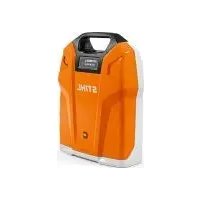
AR 3000 L - Battery charger STIHL - Free user manual and instructions
Find the device manual for free AR 3000 L STIHL in PDF.

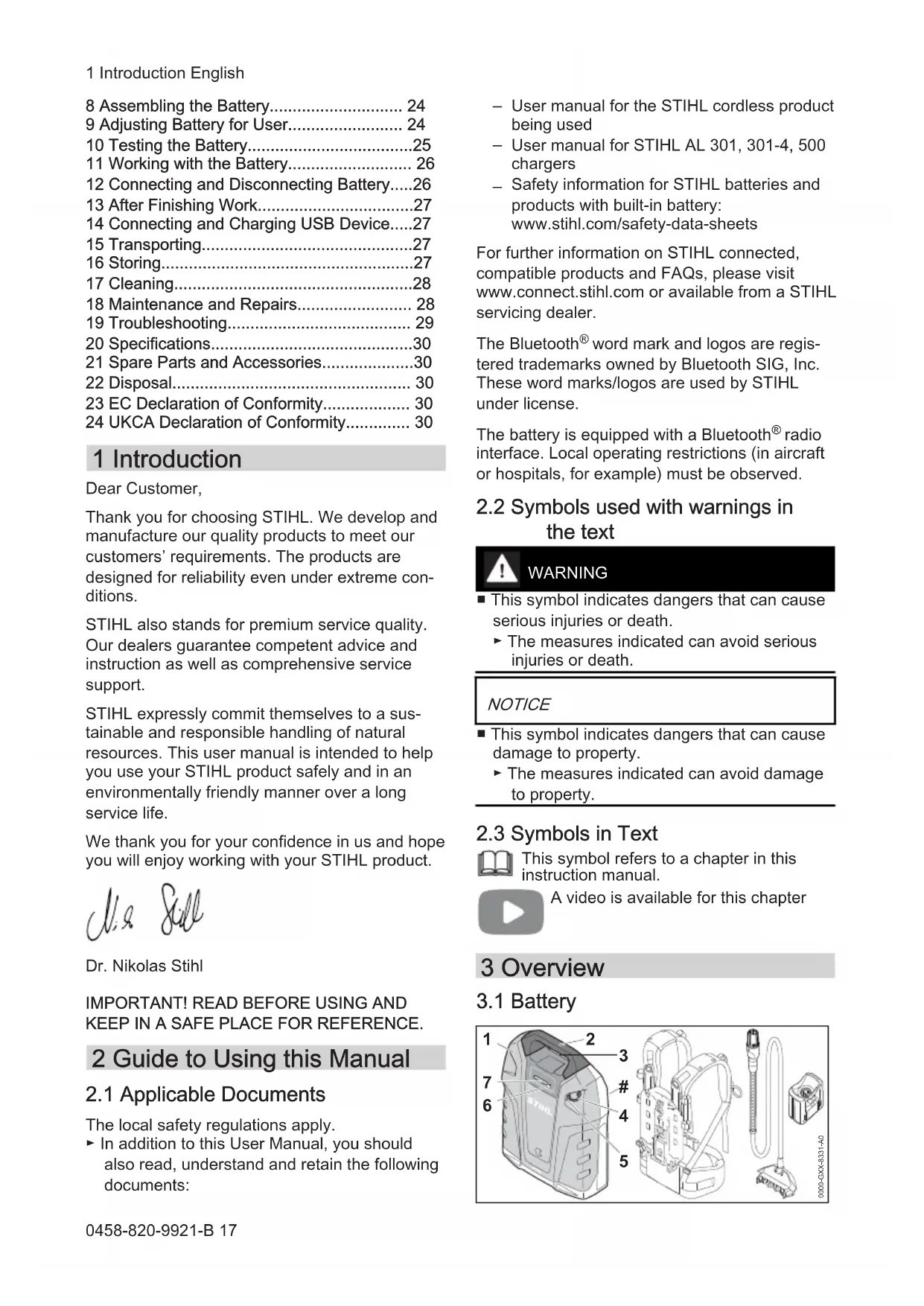


| Product type | Rechargeable lithium-ion battery |
| Brand | STIHL |
| Model | AR 3000 L |
| Nominal voltage | 36 V |
| Weight | 9.5 kg |
| Operating temperature range | -10 °C to +50 °C |
| USB port | Yes, type A, 5 V, 1.5 A max |
| Bluetooth® radio interface | Bluetooth 4.2, range approx. 10 m |
| Compatible chargers | STIHL AL 301, AL 301-4, AL 500 |
| Carrying system | Back harness with size adjustment (S, M, L) |
| Charge level display | 4 green LEDs + audible signal |
| Fault indications | Red LEDs and audible signals |
| USB device charging | Yes, via USB port |
| Connection to STIHL connected app | Yes, via Bluetooth |
| Maintenance and cleaning | Clean with a damp cloth; no user maintenance |
| Spare parts and accessories | Use only genuine STIHL parts |
| Disposal | Do not dispose of with household waste; recycle in accordance with regulations |
| Safety standards | Compliant with EU and UKCA directives |
Frequently Asked Questions - AR 3000 L STIHL
User questions about AR 3000 L STIHL
0 question about this device. Answer the ones you know or ask your own.
Ask a new question about this device
Download the instructions for your Battery charger in PDF format for free! Find your manual AR 3000 L - STIHL and take your electronic device back in hand. On this page are published all the documents necessary for the use of your device. AR 3000 L by STIHL.
USER MANUAL AR 3000 L STIHL
natural_image
Exterior view of a StiHL brand air purifier device (no signage or text visible on body)1 Tragsystem
1 Anschlussleitung
natural_image
Technical illustration of a portable backpack with attached equipment and a magnified inset showing a mechanical component (no text or symbols)natural_image
Line drawing of a person carrying two backpacks, viewed from front and side (no text or symbols)natural_image
Close-up of a cable connector with a magnified inset showing a cable being inserted (no text or symbols visible)1 Introduction.... 17
2 Guide to Using this Manual....17
3 Overview.... 18
4 Safety Precautions....19
5 Preparing Battery for Operation.... 22
6 Charging the Battery, LEDS and Signals..22
7 Activating and Deactivating Bluetooth® Radio Interface....23
1 Introduction English
8 Assembling the Battery.... 24
9 Adjusting Battery for User.... 24
10 Testing the Battery....25
11 Working with the Battery.... 26
12 Connecting and Disconnecting Battery.....26
13 After Finishing Work....27
14 Connecting and Charging USB Device.....27
15 Transporting....27
16 Storing....27
17 Cleaning....28
18 Maintenance and Repairs.... 28
19 Troubleshooting.... 29
20 Specifications....30
21 Spare Parts and Accessories....30
22 Disposal.... 30
23 EC Declaration of Conformity.... 30
24 UKCA Declaration of Conformity.... 30
1 Introduction
Dear Customer,
Thank you for choosing STIHL. We develop and manufacture our quality products to meet our customers' requirements. The products are designed for reliability even under extreme conditions.
STIHL also stands for premium service quality. Our dealers guarantee competent advice and instruction as well as comprehensive service support.
STIHL expressly commit themselves to a sustainable and responsible handling of natural resources. This user manual is intended to help you use your STIHL product safely and in an environmentally friendly manner over a long service life.
We thank you for your confidence in us and hope you will enjoy working with your STIHL product.
Dr. Nikolas Stihl
IMPORTANT! READ BEFORE USING AND KEEP IN A SAFE PLACE FOR REFERENCE.
2 Guide to Using this Manual
2.1 Applicable Documents
The local safety regulations apply.
▶ In addition to this User Manual, you should also read, understand and retain the following documents:
- User manual for the STIHL cordless product being used
- User manual for STIHL AL 301, 301-4, 500 chargers
- Safety information for STIHL batteries and products with built-in battery: www.stihl.com/safety-data-sheets
For further information on STIHL connected, compatible products and FAQs, please visit www.connect.stihl.com or available from a STIHL servicing dealer.
The Bluetooth ^® word mark and logos are registered trademarks owned by Bluetooth SIG, Inc. These word marks/logos are used by STIHL under license.
The battery is equipped with a Bluetooth ^® radio interface. Local operating restrictions (in aircraft or hospitals, for example) must be observed.
2.2 Symbols used with warnings in the text

WARNING
■ This symbol indicates dangers that can cause serious injuries or death.
▶ The measures indicated can avoid serious injuries or death.
NOTICE
■ This symbol indicates dangers that can cause damage to property.
▶ The measures indicated can avoid damage to property.
2.3 Symbols in Text

This symbol refers to a chapter in this instruction manual.

A video is available for this chapter
3 Overview
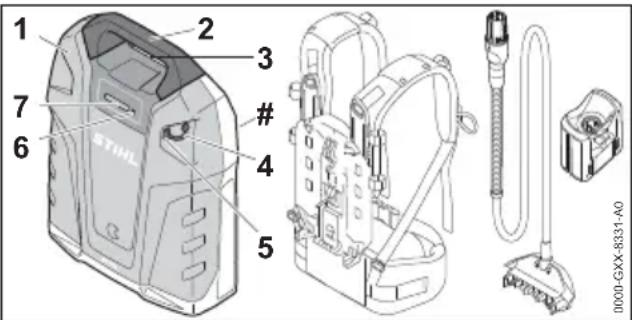
3.1 Battery
English 4 Safety Precautions
1 Battery
Supplies power to the STIHL cordless product.
2 Handle
Serves to carry the battery.
3 Socket
Receptacle for cable's plug.
4 Dust Cap
Closes the USB port.
5 USB Port
For connecting a USB cable or USB adapter.
6 Button
Activates the LEDs and signal on battery. Activates and deactivates Bluetooth® radio interface.
7 LEDs
Indicate battery charge status, malfunctions, activation and deactivation of Bluetooth® radio interface.
# Rating Label with Serial Number
3.2 Carrying System
The battery's scope of supply does not include the carrying system.
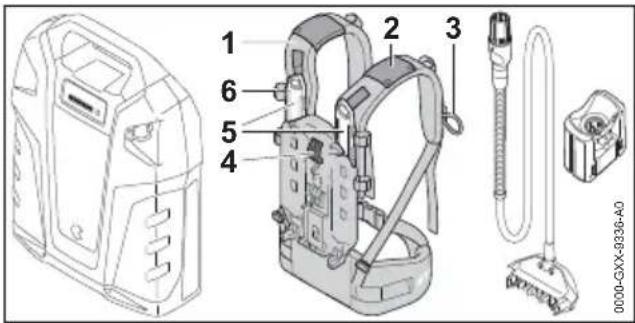
1 Carrying System
Distributes weight of battery over shoulders and holds the connecting cable.
2 Guide
Keeps the connecting cable in position on carrying system.
3 Loop
Keeps cable plug in position on carrying system.
4 Lever
Secures battery to carrying system.
5 Slide
Enables backpack to be adjusted to suit user's height.
6 Fastener
Keeps the connecting cable in position on carrying system.
18 0458-820-9921-B
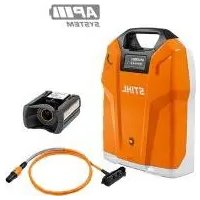
3.3 Connecting Cable and AP Adapter
The battery's scope of supply does not include the connecting cable or the AP adapter.
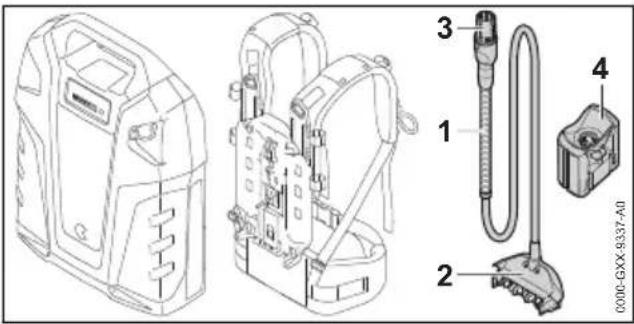
1 Connecting Cable
Connects battery to a STIHL cordless product with socket or AP adapter.
2 Connector
Connects cable to battery.
3 Connecting Cable Plug
Connects the connecting cable to a STIHL cordless product with socket or the AP adapter.
4 AP Adapter
Connects battery to a STIHL cordless product with a battery compartment for STIHL AP batteries.
3.4 Symbols
Meanings of symbols that may be on the battery:
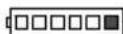
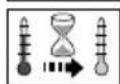
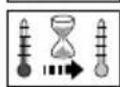
1 LED lights up red. The battery is too warm or too cold.
4 LEDs flash red. There is a fault in the battery.
The battery has a Bluetooth® radio interface and can be linked up with the STIHL connected app.

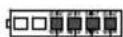
The information next to the symbol indicates the energy content of the battery according to the cell manufacturer's specification. The energy content available in operation is lower.

Do not dispose of the product with domestic waste.
4 Safety Precautions
4.1 Warning Signs
Meanings of warning signs on the battery:
4 Safety Precautions English

Observe safety notices and take the necessary precautions.

Read, understand and save the instruction manual.

Protect battery from heat and fire.

Do not immerse battery in fluids.
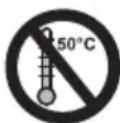
Observe battery's permissible temperature range.
4.2 Intended Use
A STIHL AR L battery supplies the following STIHL cordless products with energy:
– Cordless product with socket.
– Cordless product with battery compartment for STIHL AP batteries.
- Cordless product with battery holder for STIHL AR L batteries.
The battery may be used in the rain.
The battery may be used only for work performed while standing on the ground or in a lift bucket.
The battery must not be used for cordless lawnmowers with a battery compartment for STIHL AP batteries.
During operation the battery on the carrying system is carried on the user's back or connected to a cordless product as described in that product's user manual.
The battery must be recharged with a STIHL AL 301, AL 301-4 or AL 500 charger.
The battery in combination with the STIHL connected app enables customization and the transfer of information to the battery using Bluetooth® technology.
WARNING
■ Products and chargers not explicitly approved for the battery by STIHL may cause accidents, a fire or an explosion. Persons may be seriously or fatally injured, and property may be damaged.
▶ Use the battery only with the following STIHL cordless products:
– Cordless product with socket.
– Cordless product with battery compartment for STIHL AP batteries.
- Cordless product with battery holder for STIHL AR L batteries.
▶ Recharge the battery with a STIHL AL 301, AL 301-4 or AL 500 charger.
■ Using the battery for purposes for which it is not designed may result in serious or fatal injuries or damage to property.
▶ Use the battery as described in this User Manual, the STIHL connected app and at www.connect.stihl.com.
4.3 The Operator
WARNING
■ Users without adequate instruction cannot recognize or assess the risks involved in using the battery, carrying system, connecting cable and AP adapter. The user or other persons may sustain serious or fatal injuries.

▶ Read, understand and save the instruction manual.
▶ If you lend the battery, carrying system, connecting cable or AP adapter to another person: Always give them the instruction manual.
▶ If you have any queries: Contact a STIHL servicing dealer for assistance.
▶ Make sure the user meets the following requirements:
- The user must be rested.
- The user must be in good physical condition and mental health to operate and work with the battery, carrying system, connecting cable and AP adapter. If the user's physical, sensory or mental ability is restricted, he or she may work only under the supervision of or as instructed by a responsible person.
- The user is able to recognize and assess the risks involved in using the battery, carrying system, connecting cable and AP adapter.
- The user must be of legal age or is being trained in a trade under supervision in accordance with national rules and regulations.
- The user has received instruction from a STIHL servicing dealer or other experienced user before using the battery, carrying system, connecting cable or AP adapter the first time.
- The user must not be under the influence of alcohol, medication or drugs.
4.4 Working Area and Surroundings
WARNING
■ Bystanders, children and animals cannot recognize or assess the dangers of the battery, carrying system, connecting cable and AP adapter. Bystanders, children and animals may be seriously injured.
- Keep bystanders, children and animals away from the work area.
▶ Do not leave the battery unattended.
▶ Make sure that children cannot play with the battery, carrying system, connecting cable or AP adapter.
■ The battery is not protected against all ambient conditions. If the battery is exposed to certain ambient conditions, the battery may catch fire, explode or be irreparably damaged. This may result in serious injury to people and damage to property.

▶ Protect battery from heat and fire.
▶ Do not throw the battery into a fire.

▶ Use and store the battery at temperatures between - 10 °C and + 50 °C.

- Do not immerse the battery in fluids.
- Keep battery away from small metal parts.
- Do not expose the battery to high pressure.
- Do not expose the battery to microwaves.
- Protect the battery against chemicals and salts.
4.5 Safe condition
The battery, carrying system, connecting cable and AP adapter are in a safe condition if the following points apply:
- The battery, carrying system, connecting cable and AP adapter are not damaged.
- The battery, carrying system, connecting cable and AP adapter are clean and dry.
- Battery functions properly and has not been modified.
- The battery, carrying system, connecting cable and AP adapter have not been modified.
- Original STIHL accessories designed for this battery and carrying system are fitted.
- The accessories are correctly attached.
WARNING
■ A battery that is not in a safe condition cannot operate safely. They may cause serious injury to persons.
▶ Never work with a damaged battery.
▶ Never attempt to charge a damaged or defective battery.
▶ Work only with an undamaged carrying system, an undamaged connecting cable and an undamaged AP adapter.
▶ If the battery, carrying system, connecting cable or AP adapter is dirty or wet: Clean the battery, carrying system, connecting cable or AP adapter and allow to dry.
▶ Never modify the battery, carrying system, connecting cable or AP adapter.
▶ Never insert objects in any openings in the battery or AP adapter.
▶ Never bridge a battery's or AP adapter's contacts with metallic objects (short circuit).
▶ Do not open the battery.
▶ Use original STIHL accessories designed for this battery and carrying system.
▶ Attach accessories as described in this User Manual or in the User Manual for the accessories.
▶ Replace worn or damaged labels.
■ Fluid may escape from a damaged battery. If that liquid comes into contact with the skin or eyes, the skin or eyes may be irritated.
- Avoid contact with the liquid.
▶ If skin contact occurs: Wash affected areas of skin with plenty of water and soap.
▶ If eye contact occurs: Flush eyes with plenty of water for at least 15 minutes and consult a doctor.
■ A damaged or defective battery may smell unusual, emit smoke or burn. Persons may be seriously or fatally injured and property may be damaged.
▶ If the battery smells unusual or emits smoke: Take the battery off your back. Do not use the battery and keep it away from combustible substances.
▶ If the battery catches fire: Attempt to extinguish the battery with a fire extinguisher or water.
Contact with live components may occur for the following reasons:
– The connecting cable is damaged.
- Connecting cable plug or plug on battery damaged.
– The AP adapter is damaged.
WARNING
■ Contact with live parts may result in electric shock. This may result in serious or fatal injury to the user.
▶ Make sure the connecting cable, its plug, the plug on the battery and the AP adapter are not damaged.
■ Connecting cable can be damaged if it is not fitted properly. This may result in injury to persons and damage to the connecting cable.
- Position the connecting cable so that it cannot be touched by the tool of the cordless product being used.
- Position the connecting cable so that it cannot be kinked or damaged.
▶ If the connecting cable is twisted: Straighten it out.
4.6 Operation
WARNING
■ The user cannot concentrate on the work in certain situations. The user may stumble, fall and be seriously injured.
▶ Work calmly and carefully.
▶ If light and visibility are poor: Do not work with the battery.
▶ Watch out for obstacles.
▶ Stand on the ground while working and keep a good balance. If it is necessary to work at heights: Use a lift bucket.
▶ If you begin to feel tired: Take a break.
■ If you notice any change in the battery during operation, if it behaves unusually or there is a quick succession of short beeps, the battery may be in an unsafe condition. This can result in serious injuries and damage to property.
- Stop work, take the battery off your back and contact your STIHL servicing dealer.
▶ If the battery smells unusual or emits smoke: Take the battery off your back. Do not use the battery and keep it away from combustible substances.
In an emergency, the user may panic and not put the carrying system down. This can result in serious injuries.
- Practice removing and putting down the carrying system.
4.7 Transport
WARNING
■ The battery is not protected against all ambient conditions. The battery may be damaged if
it is exposed to certain ambient conditions, and damage to property may occur.
▶ Never transport a damaged battery.
■ The battery may turn over or shift during transport. This may result in injury to people and damage to property.
- Pack the battery in packaging in such a way that it cannot move.
- Secure the packaging so that it cannot move.
4.8 Storage
WARNING
■ Children are not aware of and cannot assess the dangers of the battery. Children may be seriously injured.
- Store the battery out of the reach of children.
■ The battery is not protected against all ambient conditions. If the battery is exposed to certain ambient conditions, the battery may be irreparably damaged.
- Store the battery in a clean and dry condition.
- Store the battery in an enclosed space.
- Store the battery separately from the product.
▶ If the battery is stored in the charger, disconnect the mains plug and store the rechargeable battery at a battery charge status between 30 % and 45 % (2 lit green LEDs).
- Store the battery at a temperature range between - 10 °C and + 50 °C.
■ The connecting cable must not be used for carrying or suspending the battery. The connecting cable and the battery may be damaged.
- Wind up the connecting cable and secure it to the battery.
4.9 Cleaning, Maintenance and Repair
WARNING
■ Aggressive cleaning agents, cleaning with a jet of water or pointed objects can damage the battery, carrying system, connecting cable and AP adapter. If the battery, carrying system, connecting cable and AP adapter are not cleaned correctly, components may no longer function properly or safety devices may be rendered inoperative. They may cause serious injury to persons.
English 5 Preparing Battery for Operation
- Clean the battery, carrying system, connecting cable and AP adapter as described in this instruction manual.
■ If the battery, carrying system, connecting cable and AP adapter are not serviced or repaired correctly, components may no longer function properly or safety devices may be rendered inoperative. This may result in serous or fatal injury to people.
▶ Never attempt to service or repair the battery, carrying system, connecting cable or AP adapter.
▶ If the battery, carrying system, connecting cable or AP adapter need to be serviced or repaired: Contact a STIHL servicing dealer for assistance.
5 Preparing Battery for Operation
5.1 Preparing Battery for Operation
The following steps must be performed before commencing work:
▶ Check the LEDs and beeps, 6.3
▶ Fully charge the battery, ☐6.1
▶ Clean the battery, 17.1
▶ If you use the connecting cable:
▶ Clean contacts of the connecting cable, 17.2
▶ Fit the connecting cable or battery and connecting cable on the carrying system, 8
▶ Make sure the battery is in a safe condition, 4.5.
▶ If the support system, the connecting cable and the AP adapter are used: Check that the carrying system, connecting cable and AP adapter are in a safe condition, 4.5.
▶ If you cannot carry out these steps: Do not use the battery and contact your STIHL dealer for assistance.
5.2 Connecting the Battery to the STIHL connected App
- Activate Bluetooth® radio interface on mobile device.
▶ Activate Bluetooth® radio interface on battery, 7.1.
▶ Download the STIHL connected app to the mobile device from the App Store and create an account.
▶ Open and sign in to the STIHL connected app. - Add the battery in the STIHL connected app and follow the instructions on the screen.
For contacts and other information, please visit https://support.stihl.com or see the STIHL connected app.
The STIHL connected app is available in certain markets.
6 Charging the Battery, LEDS and Signals
6.1 Charging the Battery
The charging time depends on various factors, e.g. the battery temperature or the ambient temperature. The actual charging time may vary from the charging time indicated. The charging time is indicated at www.stihl.com/charging-times.
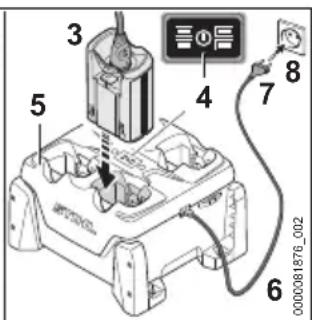
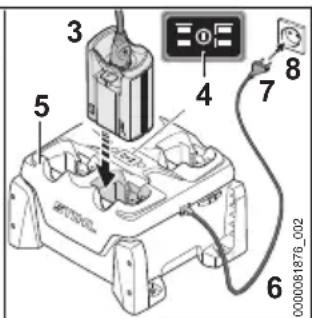
The charging process starts automatically when the mains plug is inserted in a wall outlet and the AP adapter is fitted in the charger. The charger switches off automatically when the battery is fully charged.
The battery and the charger warm up during charging.
The STIHL AL 301, 301-4 and AL 500 chargers have a built-in fan which may cut in and out during the charging process.
▶ Fit the connecting cable, or battery and connecting cable, on the carrying system.
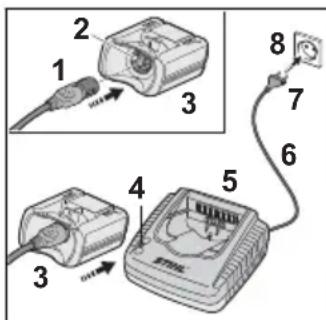
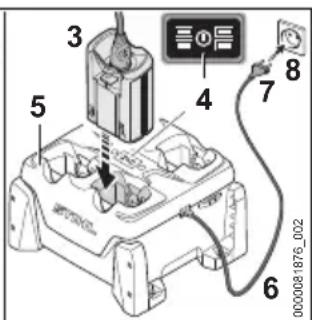
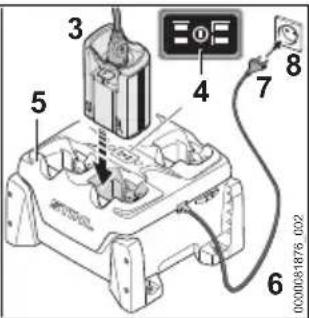
- Insert the mains plug (7) into a convenient power outlet (8).
The charger (5) runs a self test. The LED (4) will glow green for about 1 second and red for about 1 second.
▶ Fit the connecting cable (6).
▶ Insert the battery cable plug (1) in the socket (2) on the AP adapter (3). - Insert the AP adapter (3) in the guides in the charger (5) and press it home as far as the limit stop.
The LED (4) glows green. The LEDs on the battery glow green and the battery charges.
▶ When the LED (4) and the LEDs on the battery stop glowing: The battery is fully charged. The AP adapter (3) can be taken out of the charger (5).
▶ If the charger (5) is no longer required. Disconnect the mains plug (7) from the wall outlet (8).
6.2 Displaying State of Charge
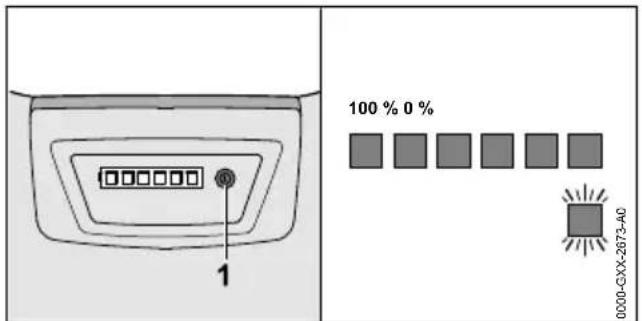
▶ Press the button (1).
The LEDs (5) glow green for about 5 seconds and indicate the state of charge. There is a short beep.
▶ If the right-hand LED flashes green and there are six long beeps: Charge the battery.
6.3 LEDs and Beeps
The LEDs and beeps can indicate the following information about the battery:
- State of charge
- Activation and deactivation of Bluetooth® interface.
- Malfunctions
The LEDs can glow or flash green or red. The right-hand LED can also glow or flash blue. Beeps may be short or long.
The state charge is indicated when the LEDs glow or flash green and there is a short beep.
▶ If the right-hand LED flashes green and there are four long beeps: Charge the battery.
▶ If the LEDs glow or flash red or there are no beeps: Rectify the malfunction.19.1 There is a malfunction in the cordless product or battery.
▶ If the four right-hand LEDs on the battery flash red and short beeps sound in quick succession: Troubleshooting, 19.1.
There is a malfunction in the battery.
If the right-hand LED on the battery glows blue and there are three short beeps: The Bluetooth® radio interface on the battery is activated, 7.1.
If the right-hand LED on the battery flashes blue and there are three short beeps: The Bluetooth® radio interface on the battery is deactivated, 7.2.
7 Activating and Deactivating Bluetooth® Radio Interface
7.1 Activating the Bluetooth® Radio Interface
▶ Press the button and keep it pressed until the right LED lights up blue for about three seconds and three short beeps sound.
The Bluetooth ^® radio interface on the battery is activated.
7.2 Deactivating the Bluetooth® Radio Interface
- Press the button and keep it pressed until the right LED flashes blue six times and three short beeps sound.
The Bluetooth ^® radio interface on the battery is deactivated.
8 Assembling the Battery
8.1 Fitting the Connecting Cable
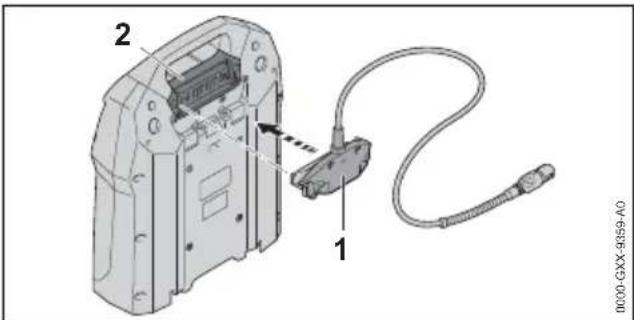
- Position the connector (1) with the connecting cable facing up.
- Insert the connector (1) in the socket (2).
8.2 Fitting and Removing Battery and Cable on Carrying System
8.2.1 Fitting Battery and Cable on Carrying System
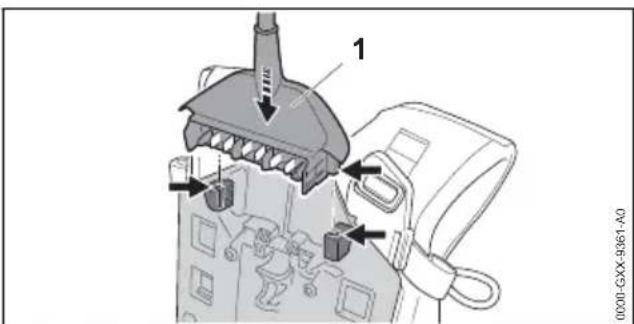
▶ Insert the connector (1).
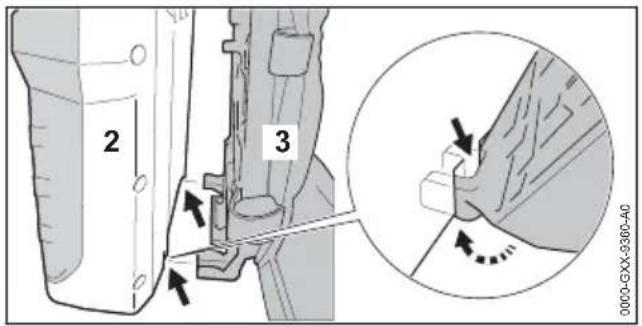
▶ Position the battery (2) on the carrying system (3) so that the guides on the carrying system engage the recesses in the battery.
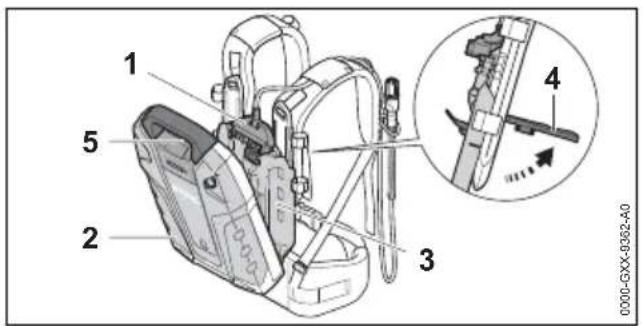
▶ Open the lever (4) and hold it there.
▶ Press the carrying system (3) against the battery (2) until the connector (1) locates against the socket (5).
natural_image
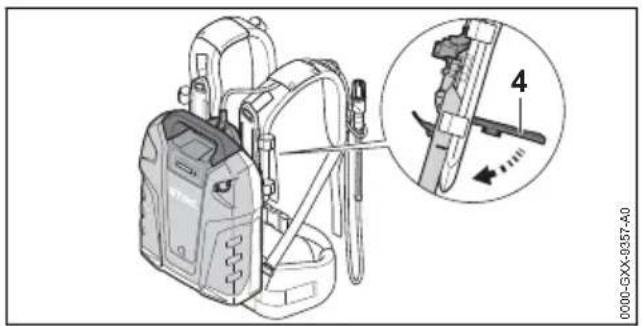
Technical illustration of a portable device with attached hardware and a magnified inset showing a mechanical component (no text or symbols)- Swing the lever (4) down. It must snap into place.
8.2.2 Removing Battery and Cable from Carrying System
▶ Open the lever.
▶ Remove the battery.
▶ Remove the connector.
9 Adjusting Battery for User
9.1 Adjusting Carrying System to Suit User's Height
The carrying system can be set to positions S, M or L to suit the user's height.
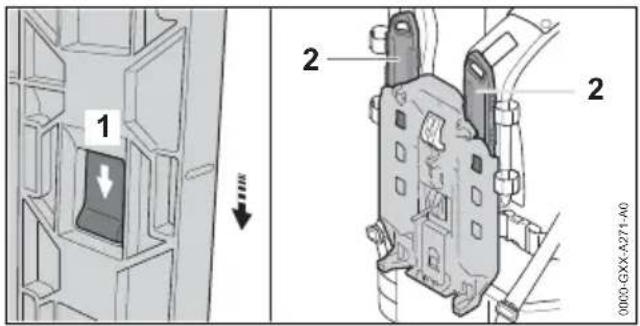
▶ Depress the locking tab (1) and push it in direction of arrow.
▶ Remove the slide (2).
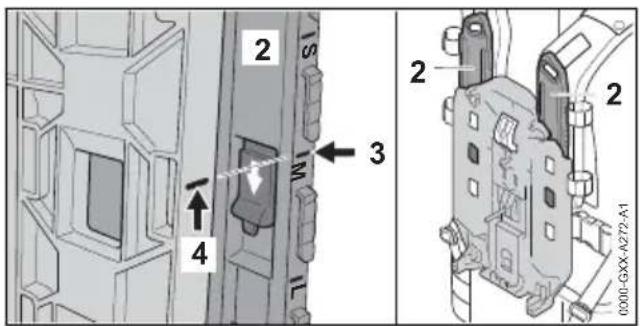
▶ Line up mark (3) with mark (4).
▶ Fit the slide (2).
▶ Pull the slide (2) up (in opposite direction to arrow).
The slide (2) engages with a click.
▶ Set slide (2) to same position on left and right shoulder straps.
9.2 Fitting and Adjusting the Connecting Cable
The connecting cable can be fitted and adjusted to suit the user's height, different cordless products and the application.
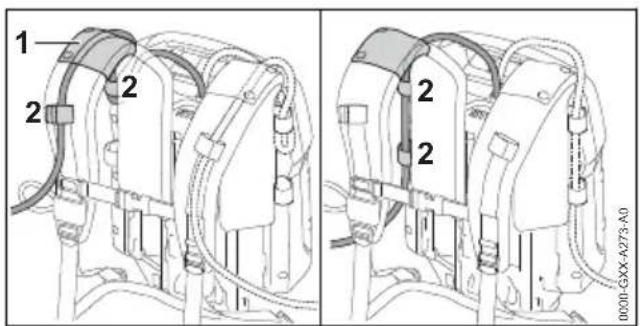
The connecting cable can be secured in position by the guide (1) on the harness and the fasteners (2), or on the side of the backplate with the fasteners (2).
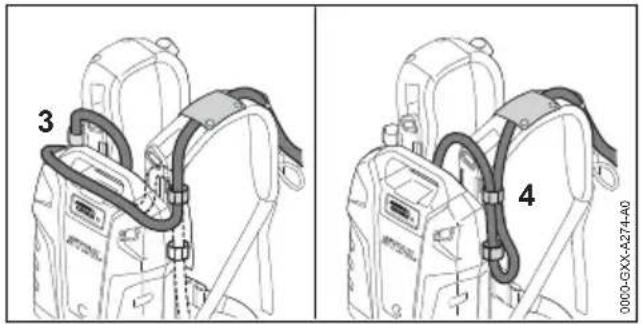
The length of the connecting cable can be adjusted by making a loop on the battery (3) or at one side (4).
▶ Fit the connecting cable so that has no kinks and is as short as possible without hindering your work.
9.3 Fitting and Removing Harness
9.3.1 Fitting and Adjusting the Carrying System
▶ Put the battery on your back.
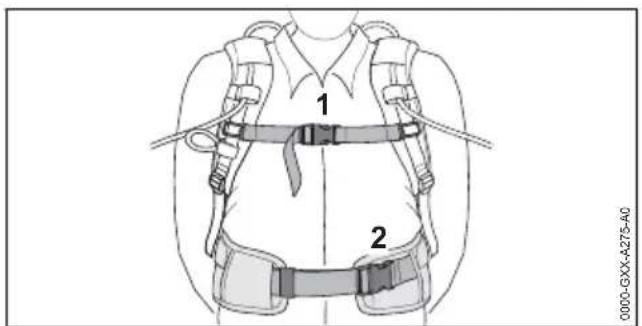
▶ Close buckle (2) on the waist belt.
▶ Close buckle (1) on the chest strap.
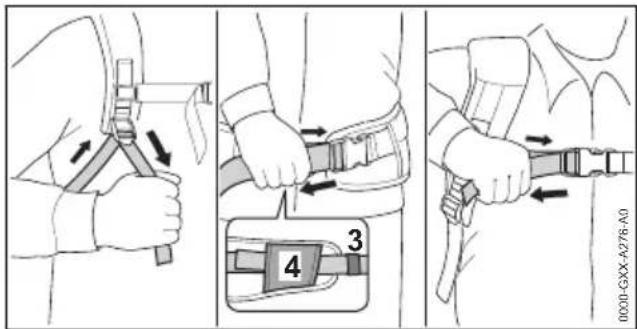
▶ Tighten the straps until the waist belt fits snugly on your hips and the back padding is against your back.
- Thread the end of the waist belt through the loops (3 and 4).
9.3.2 Removing the Carrying System
▶ Loosen the straps.
▶ Open the buckles on the chest strap and waist belt.
▶ Take the battery off your back.
10 Testing the Battery
10.1 Checking LEDs and Beeps
▶ Press button on battery.
The LEDs glow green and a short beep sounds. The state of charge is indicated.
▶ If the right-hand LED flashes green and there are six long beeps: Charge the battery.
▶ If the LEDs do not glow or flash or there are no beeps: Do not use the battery and contact your STIHL dealer for assistance.
There is a malfunction in the battery.
11 Working with the Battery
11.1 Working with the Battery
| A | 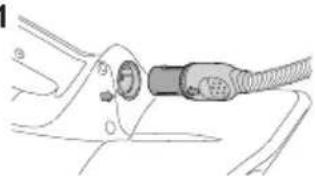 | 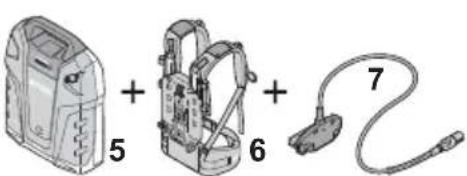 | 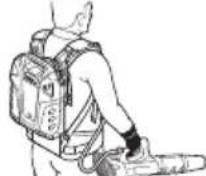 |
| B | 2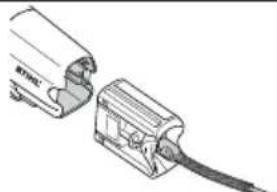 | 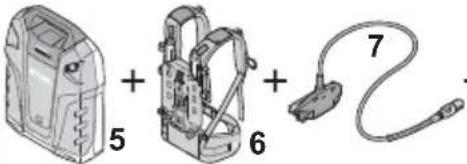 + +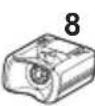 | 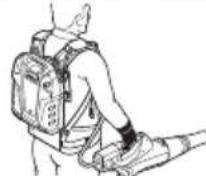 |
| C | 3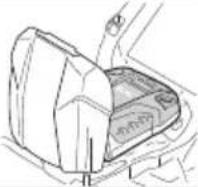 | 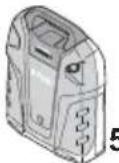 ; ; | 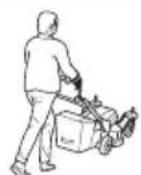 |
| D | 4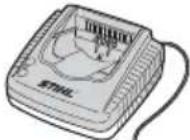 | 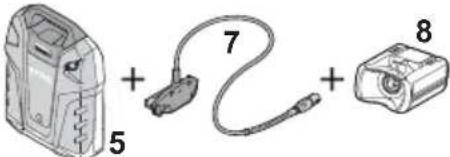 |  |
A: If a cordless product with socket (1) is to be supplied with energy:
Use battery (5), carrying system (6) and connecting cable (7). The battery is carried on the carrying system as a backpack.
B: If a cordless product with battery compartment for STIHL AP batteries (2) is to be supplied with energy:
Use battery (5), carrying system (6), connecting cable (7) and AP adapter (8). The battery is carried on the carrying system as a backpack.
C: If a cordless product for STIHL AR L batteries (3) is to be supplied with energy:
Use the battery (5) alone. The battery is connected directly to the cordless product.
D: If the battery is to be recharged with a charger (4):
Use battery (5), connecting cable (7) and AP adapter (8). The AP adapter is inserted in the charger.
12 Connecting and Disconnecting Battery
12.1 Connecting battery to a STIHL cordless product with a socket
- Connect the battery as described in the instruction manual supplied with the cordless product.
12.2 Connecting battery to a STIHL cordless product with a battery compartment for STIHL AP batteries
13 After Finishing Work English
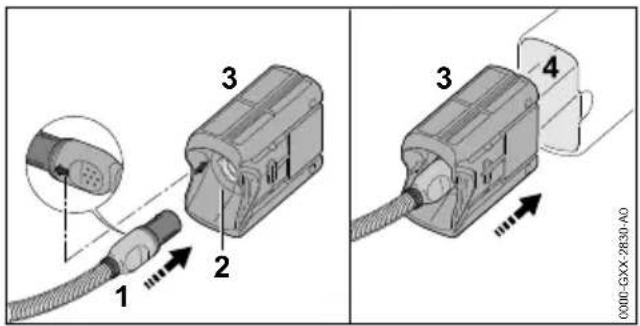
- Hold connecting cable plug (1) so that the arrow on its side lines up with the arrow point on the AP adapter's socket (2).
▶ Insert the connecting cable plug (1) in the socket (2) on the AP adapter (3).
▶ Push AP adapter (3) into the battery compartment (4).
12.3 Connecting battery to a STIHL cordless product for STIHL AR L batteries
- Connect the battery as described in the instruction manual supplied with the cordless product.
12.4 Disconnecting the battery
▶ Switch off the cordless product.
▶ If you are using a cordless product with a socket: Connect the battery as described in the instruction manual supplied with the cordless product.
▶ If you are using an AP adapter: Take the AP adapter out of the battery compartment.
▶ If you are using a cordless product for STIHL AR L batteries: Disconnect the battery as described in the instruction manual supplied with the cordless product.
13 After Finishing Work
13.1 After Finishing Work
▶ Switch off the cordless product.
▶ Disconnect the battery.
▶ If the battery, carrying system, connecting cable or AP adapter is dirty or wet: Clean the battery, carrying system, connecting cable or AP adapter and allow to dry.
- Clean the battery, carrying system, connecting cable and AP adapter.
14 Connecting and Charging USB Device
14.1 Connecting and Charging USB Device
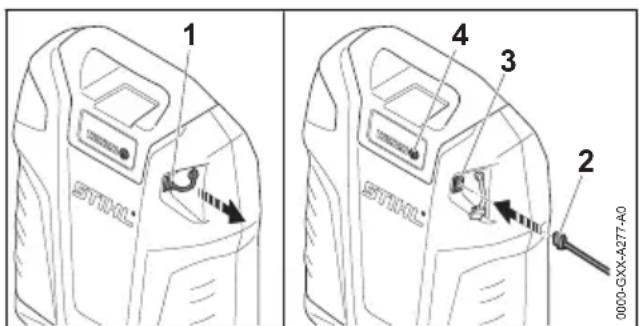
▶ Pull out the dust cap (1).
- Insert the plug (2) in the USB port (3).
▶ Press the button (4).
USB device is being charged. If the USB device is not being charged, the charging current supplied by the battery is too low, 20.1. The USB device cannot be charged.
The USB cable must be unplugged before starting work. The dust plug (1) protects the USB port (3) from moisture and dirt.
15 Transporting
15.1 Transporting the Battery
▶ Switch off the cordless product.
▶ Disconnect the battery.
▶ Check that the battery is in a safe condition.
natural_image
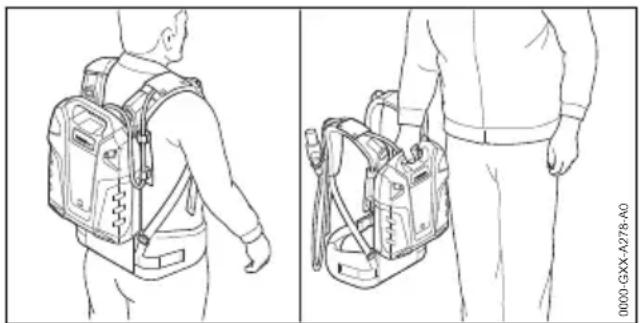
Line drawing of a person carrying two backpacks, viewed from front and side (no text or symbols)- Carry the battery on your back or by the handle.
▶ If the battery is transported in a vehicle: Secure the battery so that it cannot move.
▶ If the battery is to be packaged: Package the battery in such a way that it cannot move inside its packaging and secure the packaging in such a way that it cannot move.
The battery is subject to the Carriage of Dangerous Goods regulations. The battery is classified as UN 3480 (lithium ion batteries) and has been tested pursuant to UN Manual Tests and Criteria Part III, Subsection 38.3.
The transport regulations can be found at www.stihl.com/safety-data-sheets.
16 Storing
16.1 Storing the Battery
STIHL recommends keeping the battery in a charging state between 30% and 45% (2 green LEDs lit).
English 17 Cleaning
▶ The battery should be stored in such a way that the following conditions are fulfilled:
- The battery is out of the reach of children.
- The battery is clean and dry.
- The battery is in an enclosed space.
- The battery is stored separately from the product.
- If the battery is stored in the charger, disconnect the mains plug and store the rechargeable battery at a battery charge status between 30 % and 45 % (2 lit green LEDs).
- The battery is in a temperature range between - 10 °C and + 50 °C.
NOTICE
■ If the battery is not stored as described in this user manual, the battery may become deeply discharged and irreparably damaged.
▶ Charge a discharged battery before storing it. STIHL recommends keeping the battery in a charging state between 30% and 45% (2 lit green LEDs).
- Store the battery separately from the product.
16.2 Storing the Carrying System, Connecting Cable and AP Adapter
▶ Observe the following points when storing the carrying system, connecting cable and AP adapter:
- The carrying system, connecting cable and AP adapter are out of the reach of children.
- The carrying system, connecting cable and AP adapter are clean and dry.
- The battery, carrying system and AP adapter are not hanging on the connecting cable.
17 Cleaning
17.1 Cleaning the Battery, Carrying System, Connecting Cable and AP Adapter
- Clean the battery, carrying system, connecting cable and AP adapter with a damp cloth.
17.2 Cleaning Contacts of the Connecting Cable

A video is available for this chapter.
www.stihl.com/sxwjNw
▶ Pull connecting cable plug out of the socket or the AP adapter.
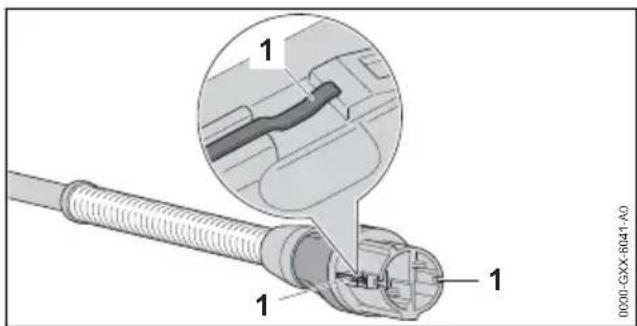
▶ Clean the contacts (1) with a dry cloth.
natural_image
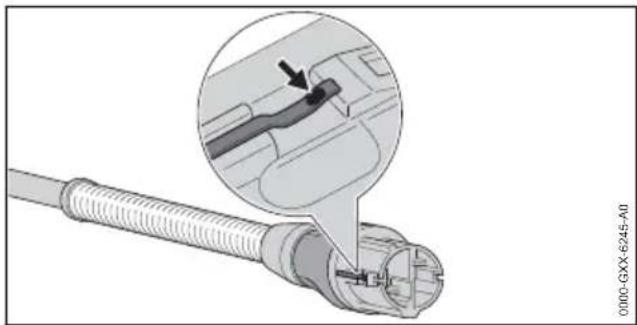
Close-up of a cable connector with a magnified inset showing a mechanical component detail (no text or symbols visible)▶ If the contacts are discolored (arrow):. Use a fine sandpaper (grade P600) to remove the discoloration and clean the contacts until they are bright.
18 Maintenance and Repairs
18.1 Servicing and Repairing Battery, Carrying System, Connecting Cable and AP Adapter
The battery, carrying system, connecting cable and AP adapter require no servicing and cannot be repaired by the user.
▶ If the battery, carrying system, connecting cable or AP adapter is defective or damaged: Do not use the battery, carrying system, connecting cable or AP adapter and contact a STIHL servicing dealer for assistance.
19 Troubleshooting
19.1 Troubleshooting the Battery or Cordless Product
| Fault LEDs and | Beeps | Cause Remedy | |
| Cordless product does not run after switch-on or cuts out during operation. | 1 LED flashes green and 6 long beeps sound. | State of charge of the battery is too low. | ▸ Recharge the battery fully as described in this user manual and in the user manual for the STIHL AL 301, 301-4 and AL 500 chargers. |
| 1 LED emits red light. | The battery is too warm or too cold. | ▸ Disconnect the battery.▸ Allow the battery to cool down or warm up. | |
| 3 LEDs flash red. | There is a malfunction in the battery. | ▸ Disconnect battery and reconnect.▸ Switch on the cordless product.▸ If 3 LEDs continue to flash red: Contact your STIHL servicing dealer for assistance. | |
| 3 LEDs light up red. | Cordless product too hot. | ▸ Disconnect the battery.▸ Wait for cordless product to cool down. | |
| 4 LEDs flash red and short beeps sound in quick succession. | There is a fault in the battery. | ▸ Take the battery off your back.▸ Disconnect battery and reconnect.▸ Switch on the cordless product.▸ If 4 LEDs continue to flash red and short beeps sound in quick succession: Do not use or transport the battery, contact your STIHL servicing dealer. | |
| No electrical contact between cordless product and battery. | ▸ Disconnect battery and reconnect.▸ If the cordless product still does not run when switched on or cuts out during operation: Clean contacts of the connecting cable. | ||
| Cordless product or battery damp. | ▸ Allow cordless product / battery to dry. | ||
| Runtime of cordless product is too short. | The battery is not fully charged. | ▸ Fully charge the battery as described in the user manual for the STIHL AL 301, 301-4 and 500 chargers. | |
| The battery service life has been exceeded. | ▸ Replace battery. | ||
| The STIHL connected app is unable to find the battery. | Bluetooth®radio interface on the battery or mobile device is deactivated. | ▸ Activate Bluetooth®radio interface on the battery or mobile device. | |
| Distance between battery and mobile device is too long. | ▸ Reduce distance, 20.1.▸ If the battery still cannot be found with the STIHL connected app: Contact a STIHL authorized dealer for assistance. | ||
| Charge process does not start when AP adapter is inserted in the charger. | 1 LED emits red light. | The battery is too warm or too cold. | ▸ Leave AP adapter in the charger.Charging starts automatically as soon as the permitted temperature range is reached. |
19.2 Product Support and Assistance on Use
For contacts and other information, please visit https://support.stihl.com or www.stihl.com.
Product support and assistance on use are available from STIHL servicing dealers.
20 Specifications
20.1 STIHL AR 2000 L, 3000 Battery
– Battery Technology: Lithium-ion
- Voltage: 36 V
– Capacity in Ah: see rating label
– Energy content in Wh: see rating label
- Permissible temperature range for operation and storage: + 10 °C to + 50 °C
- Weight
- AR 2000 L: 7.4 kg
- AR 3000 L: 9.5 kg
- USB port: Plug type A
- BC1.2 (DCP)
- Output voltage: 5 V
– maximum charging current:1.5 A
- Bluetooth® radio interface:
- Data link: Bluetooth® 4.2. The mobile appliance must be compatible with Bluetooth® Low Energy 4.0 and support Generic Access Profile (GAP).
– Frequency band: ISM band 2.4 GHz
– Maximum RF power transmitted: 1 mW
– Signal range: approx. 10 m. The signal strength depends on the ambient conditions and the mobile terminal. Signal range can vary greatly depending on local conditions, including the receiver. The range may be perceptibly reduced inside enclosed rooms and through metal barriers (such as walls, shelves or cases). - Mobile appliance operating system requirements: Android or iOS (current version or higher)
20.2 REACH
REACH is an EC regulation and stands for the Registration, Evaluation, Authorisation and Restriction of Chemical substances.
For information on compliance with the REACH regulation see www.stihl.com/reach.
21 Spare Parts and Accessories
21.1 Spare parts and accessories
STIHL G
These symbols indicate original STIHL spare parts and original STIHL accessories.
STIHL recommends the use of original STIHL spare parts and accessories.
Despite ongoing market observation, STIHL is unable to judge the reliability, safety and suitability of other manufacturers' spare parts and accessories; accordingly, STIHL cannot warrant for the use of those parts.
Original STIHL spare parts and original STIHL accessories are available from STIHL dealers.
22 Disposal
22.1 Disposing of Battery, Carrying System, Connecting Cable and AP Adapter
Contact the local authorities or your STIHL dealer for information on disposal.
Improper disposal can be harmful to health and pollute the environment.
▶ Take STIHL products including packaging to a suitable collection point for recycling in accordance with local regulations.
▶ Do not dispose with domestic waste.
23 EC Declaration of Con- formity
23.1 STIHL AR 2000 L, AR 3000 L Battery
ANDREAS STIHL AG & Co. KG hereby declares that the radio communication unit type 4871 – STIHL AR 2000 L, AR 3000 L complies with Directive 2014/53/EU.
For the full text of the EU Declaration of Conformity, refer to the following web address: www.stihl.com/conformity
24 UKCA Declaration of Conformity
24.1 STIHL AR 2000 L, AR 3000 L Battery
Hereby, ANDREAS STIHL AG & Co. KG declares that the radio equipment type 4871 – STIHL AR 2000 L, AR 3000 L is in compliance with the relevant statutory requirements.
The full text of the declaration of conformity is available at the following internet address: www.stihl.com/conformity
Table des matières
1 Préface français
2.1 Documents applicables
▶ Faire attention aux obstacles.
natural_image
Line drawing of a person carrying two backpacks, viewed from front and side (no text or symbols)natural_image
Close-up of a cable connector with an inset showing a close-up of a cable being inserted (no text or symbols visible)1 Cable de conexión
natural_image
Line drawing of a person wearing a backpack and carrying a belt (no text or symbols)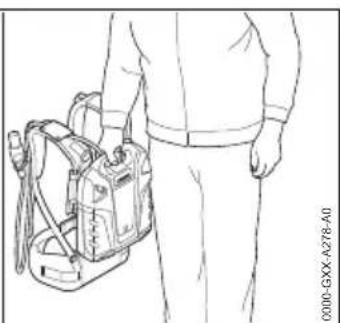
natural_image
Line drawing of a person carrying a backpack and two bags, no text or symbols presentnatural_image
Close-up of a cable connector with a magnified inset showing a detail of a cable being inserted (no text or symbols visible)1 Anslutningskabel
natural_image
Technical illustration of a portable air purifier device with an inset showing a mechanical component (no text or symbols present)10 Kontrollera batteriet svenska
natural_image
Line drawing of a person wearing a backpack and safety harness (no text or symbols)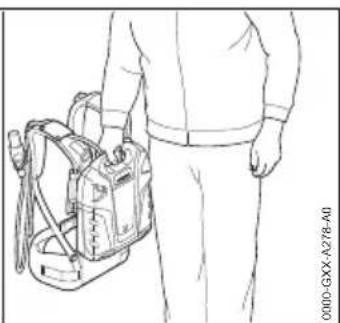
natural_image
Line drawing of a person holding a portable backpack (no text or symbols)natural_image
Close-up of a cable connector with a magnified inset showing a detail of a plug or socket (no text or symbols visible)1 Liitoskaapeli
natural_image
Line drawing of a person carrying two backpacks, viewed from front and side (no text or symbols)natural_image
Close-up of a cable connector with a magnified inset showing a mechanical component detail (no text or symbols visible)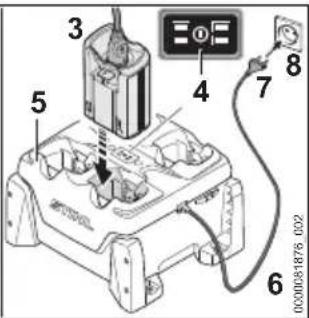
natural_image
Diagram of a device panel with a labeled pin (1) and internal components, no text or symbols present.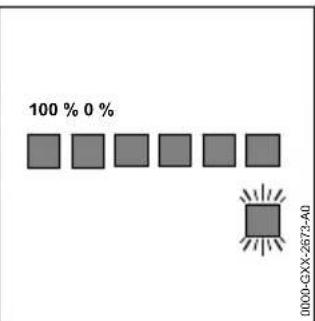
natural_image
Technical illustration of a portable device with attached cable, showing internal components and a close-up inset of a mechanical component (no text or symbols)natural_image
Line drawing of a person carrying a backpack, viewed from front and side (no text or symbols)natural_image
Close-up of a cable connector with a magnified inset showing a detail of a cable being inserted (no text or symbols visible)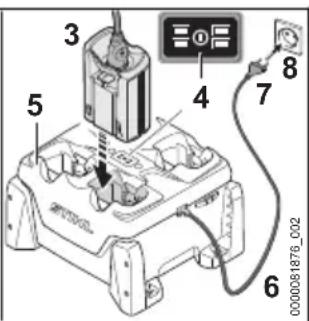
natural_image
Technical illustration of a portable air purifier with a magnified inset showing internal components (no text or symbols)- Stram selerne, indtil hofteselen ligger mod hoften, og rygpolstringen ligger mod ryggen.
natural_image
Line drawing of a person carrying a backpack, viewed from front and side (no text or symbols)natural_image
Close-up of a cable connector with a magnified inset showing a detail of a mechanical component (no text or symbols visible)1 Tilkoblingsledning
Tilkoblingsledningen kobler batteriet til det batteridrevne STIHL-produktet til kontakten eller AP-adapteren.
2 Plugg
natural_image
Technical illustration of a portable air purifier with a magnified inset showing internal components (no text or symbols)natural_image
Line drawing of a person carrying two backpacks, viewed from front and side (no text or symbols)natural_image
Close-up of a connector with a cable and connector, showing a magnified detail of the cable's internal structure (no text or symbols visible)natural_image
Line drawing of a person carrying two backpacks, viewed from front and side (no text or symbols)natural_image
Close-up of a cable connector with a magnified inset showing a mechanical component (no text or symbols visible)1 Csatlakozóvezeték
natural_image
Diagram of a device rear panel with labeled pin (1) and internal ports (no text or symbols beyond label)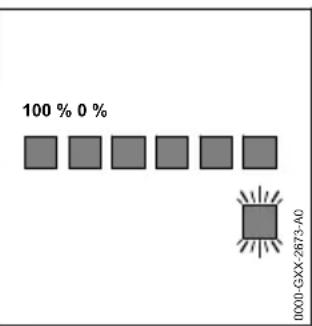
bar
| Category | Value (%) | |---|---| | Top Bar | 100 | | Bottom Bar | 0 | | Right Bar | 100 | | Bottom Left Bar | 100 | | Bottom Right Bar | 100 | | Bottom Left Square | 100 | | Bottom Right Square | 100 | | Bottom Right Square | 100 |natural_image
Technical illustration of a portable air purifier with attached device and component detail (no text or symbols)natural_image
Line drawing of a person carrying a backpack, shown from front and side views (no text or symbols)natural_image
Diagram of a connector with a cable and connector inserted, showing a close-up view of the internal structure (no text or symbols present)1 Linha de conexão
natural_image
Line drawing of a person carrying a backpack, shown from front and side views (no text or symbols)natural_image
Close-up of a connector with a cable and connector, showing a close-up detail (no text or symbols visible)1 Aansluitkabel
1 led brandt rood. De accu is te warm of te koud.
natural_image
Technical illustration of a portable air purifier device with an inset close-up showing internal components (no text or symbols)natural_image
Line drawing of a person carrying a backpack, shown from front and side views (no text or symbols)natural_image
Close-up of a cable connector with a magnified inset showing a detail of a cable being inserted (no text or symbols visible)1 Кабель питания
natural_image
Diagram of a device rear panel with a labeled pin (no text or symbols beyond the number 1)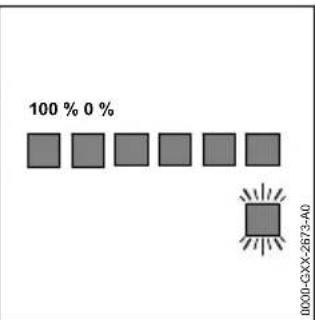
bar
| Category | Value (%) | |---|---| | 100% | 0 | | 0000-GXX-2873-A0 | (value not labeled) |natural_image
Technical illustration of a portable air purifier with a magnified inset showing internal components (no text or symbols)natural_image
Line drawing of a person carrying a backpack, shown from front and side views (no text or symbols)natural_image
Close-up of a cable connector with a magnified inset showing a detail of a cable being inserted (no text or symbols visible)natural_image
Line drawing of a person carrying two backpacks, viewed from front and side (no text or symbols)natural_image
Close-up of a cable connector with a magnified inset showing a cable being inserted (no text or symbols visible)1 Система за носене
1 Захранващ кабел
natural_image
Technical illustration of a portable air purifier device with an inset showing a mechanical component (no text or symbols present)natural_image
Line drawing of a person carrying two backpacks, viewed from front and side (no text or symbols)natural_image
Close-up of a USB cable connector with an inset showing a cable being inserted (no text or symbols visible)1 Sistem de transport
1 Cablu de racord
natural_image
Line drawing of a person carrying two backpacks, viewed from front and side (no text or symbols)natural_image
Close-up of a connector with a magnified inset showing a cable detail (no text or symbols visible)
- Introduction English
- Introduction
- Guide to Using this Manual
- Applicable Documents
- Symbols used with warnings in the text
- WARNING
- NOTICE
- Symbols in Text
- Overview
- Battery
- Carrying System
- Connecting Cable and AP Adapter
- Symbols
- Safety Precautions
- Warning Signs
- Safety Precautions English
- Intended Use
- The Operator
- Working Area and Surroundings
- Safe condition
- Operation
- Transport
- Storage
- Cleaning, Maintenance and Repair
- English 5 Preparing Battery for Operation
- Preparing Battery for Operation
- Preparing Battery for Operation
- Connecting the Battery to the STIHL connected App
- Charging the Battery, LEDS and Signals
- Charging the Battery
- Displaying State of Charge
- LEDs and Beeps
- Activating and Deactivating Bluetooth® Radio Interface
- Activating the Bluetooth® Radio Interface
- Deactivating the Bluetooth® Radio Interface
- Assembling the Battery
- Fitting the Connecting Cable
- Fitting and Removing Battery and Cable on Carrying System
- Fitting Battery and Cable on Carrying System
- Removing Battery and Cable from Carrying System
- Adjusting Battery for User
- Adjusting Carrying System to Suit User's Height
- Fitting and Adjusting the Connecting Cable
- Fitting and Removing Harness
- Fitting and Adjusting the Carrying System
- Removing the Carrying System
- Testing the Battery
- Checking LEDs and Beeps
- Working with the Battery
- Working with the Battery
- Connecting and Disconnecting Battery
- Connecting battery to a STIHL cordless product with a socket
- After Finishing Work English
- Connecting battery to a STIHL cordless product for STIHL AR L batteries
- Disconnecting the battery
- After Finishing Work
- After Finishing Work
- Connecting and Charging USB Device
- Connecting and Charging USB Device
- Transporting
- Transporting the Battery
- Storing
- Storing the Battery
- English 17 Cleaning
- Storing the Carrying System, Connecting Cable and AP Adapter
- Cleaning
- Cleaning the Battery, Carrying System, Connecting Cable and AP Adapter
- Cleaning Contacts of the Connecting Cable
- Maintenance and Repairs
- Servicing and Repairing Battery, Carrying System, Connecting Cable and AP Adapter
- Troubleshooting
- Troubleshooting the Battery or Cordless Product
- Product Support and Assistance on Use
- Specifications
- STIHL AR 2000 L, 3000 Battery
- REACH
- Spare Parts and Accessories
- Spare parts and accessories
- Disposal
- Disposing of Battery, Carrying System, Connecting Cable and AP Adapter
- EC Declaration of Con- formity
- STIHL AR 2000 L, AR 3000 L Battery
- UKCA Declaration of Conformity
- STIHL AR 2000 L, AR 3000 L Battery
- Table des matières
- Documents applicables
- Cable de conexión
- Kontrollera batteriet svenska
- Csatlakozóvezeték
- Linha de conexão
- Aansluitkabel
- Система за носене
- Захранващ кабел
Brand : STIHL
Model : AR 3000 L
Category : Battery charger