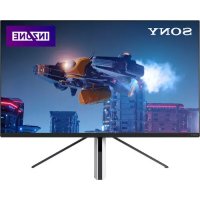
INZONE M3 - Monitor SONY - Free user manual and instructions
Find the device manual for free INZONE M3 SONY in PDF.



| Product Type | LCD Monitor with LED backlight |
| Brand | Sony |
| Model | INZONE M3 (SDM-U27M90) |
| Screen Size | 68.4 cm (27 inches) diagonal |
| Display Resolution | 3840 x 2160 pixels (4K Ultra HD) |
| Connectivity | 2 x HDMI 2.1 (HDCP 2.3), 1 x DisplayPort 1.4, 1 x mini-stereo jack, 1 x power adapter input |
| Audio Output | 2 W + 2 W |
| Power Supply | 19.5 V DC via power adapter, input 100–240 V AC, 50/60 Hz |
| Standby Power Consumption | 0.5 W |
| Dimensions with Stand (W x H x D) | 61.5 x 47.9 x 24.8 cm |
| Dimensions without Stand (W x H x D) | 61.5 x 36.3 x 7.3 cm |
| Stand Width | 45.3 cm |
| Weight with Stand | 6.8 kg |
| Weight without Stand | 4.6 kg |
| Operating Temperature | 0 °C to 40 °C |
| Operating Humidity | 10 % to 80 % RH (non-condensing) |
| Energy Efficiency Class (EU) | G |
| Wall Mounting | VESA standard 100 x 100 mm |
| Special Features | NVIDIA G-SYNC Compatible, HDMI 2.1, DisplayPort 1.4 |
| Screen Cleaning | Use a soft, slightly damp cloth, without solvent or abrasive |
| Safety | Do not block ventilation openings, use only the Sony power cord |
Frequently Asked Questions - INZONE M3 SONY
User questions about INZONE M3 SONY
0 question about this device. Answer the ones you know or ask your own.
Ask a new question about this device
Download the instructions for your Monitor in PDF format for free! Find your manual INZONE M3 - SONY and take your electronic device back in hand. On this page are published all the documents necessary for the use of your device. INZONE M3 by SONY.
USER MANUAL INZONE M3 SONY
This LCD Monitor comes with the following manuals. Please retain the manuals for future reference.
Setup Guide
Operating Instructions (This manual)
Help Guide (Web manual)
Provides information including advanced usage.
https://rd1.sony.net/help/tv/u27m90/h_zz/
Note
Images and illustrations used in the Setup Guide and this manual are for reference only and may differ from the actual product.
Location of the identification label
Labels for the LCD Monitor Model No., Production Date (year/month) and Power Supply rating are located on the rear of the LCD Monitor or package.
For models with supplied mains adaptor: Labels for mains adaptor Model No. and Serial No. are located on the bottom of mains adaptor.
WARNING
TO PREVENT THE SPREAD OF FIRE, KEEP CANDLES OR OTHER OPEN FLAMES AWAY FROM THIS PRODUCT AT ALL TIMES.

CAUTION
RISK OF ELECTRIC SHOCK DO NOT OPEN

NOTICE FOR CUSTOMERS IN THE UNITED KINGDOM
A moulded plug complying with BS1363 is fitted to this equipment for your safety and convenience.
Should the fuse in the plug supplied need to be replaced with the same rating of fuse approved by ASTA or BSI to BS 1362 (i.e., marked with 念 or must be used.
If the plug supplied with this equipment has a detachable fuse cover, be sure to attach the fuse cover after you change the fuse. Never use the plug without the fuse cover. If you should lose the fuse cover, please contact your nearest Sony service station.
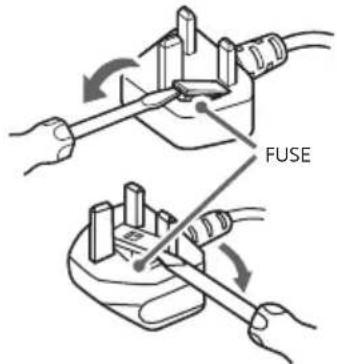
How to replace the fuse
Open the fuse compartment with a blade screwdriver, and replace the fuse. Please refer to the illustration that actually equipped with the product.
IMPORTANT NOTICE
This product has been manufactured by or on behalf of Sony Corporation.
EU and UK Importer: Sony Europe B.V.
Inquiries to the EU Importer or related to product compliance in Europe should be sent to the manufacturer's authorized representative, Sony Belgium, bijkantoor van Sony Europe B.V., Da Vincilaan 7-D1, 1930 Zaventem, Belgium.
Inquiries to the UK Importer or related to product compliance in the UK should be sent to the manufacturer's authorized representative, Sony Europe B.V., The Heights, Brooklands, Weybridge, Surrey KT13 0XW, United Kingdom.
Energy consumption and other information for the power supply, as required by Commission Regulation (EU) 2019/1782, is available at the following website: https://compliance.sony.eu and https://compliance.sony.co.uk for the United Kingdom
Safety Information
WARNING
Ventilation
- Never cover the ventilation holes or insert anything into the cabinet.
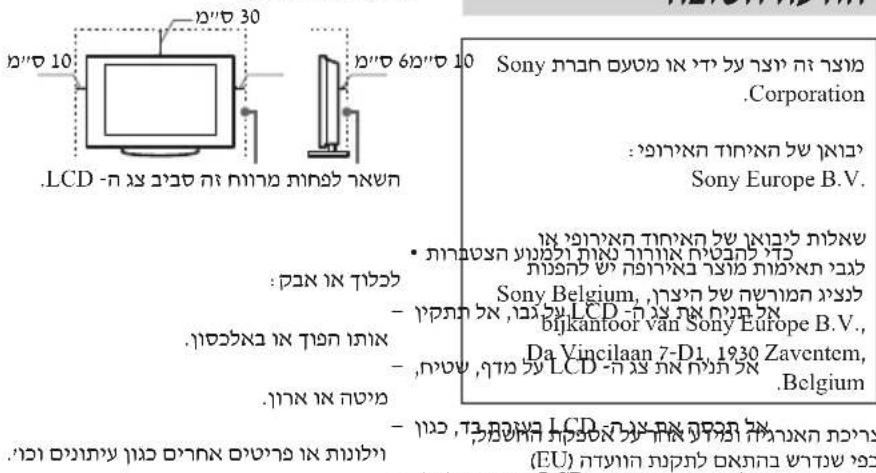
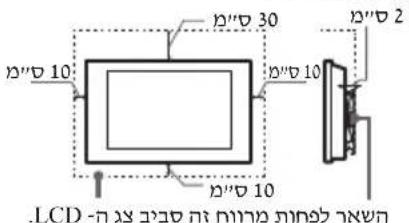
- Leave space around the LCD Monitor as shown below.
Installed on the wall
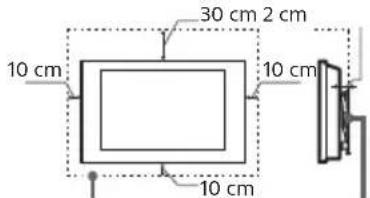
Leave at least this space around the set.
Installed with stand
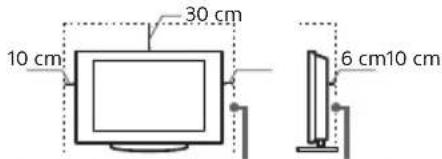
Leave at least this space around the set.
To ensure proper ventilation and prevent the collection of dirt or dust:
-
Do not lay the LCD Monitor flat, install upside down, backwards, or sideways.
-
Do not place the LCD Monitor on a shelf, rug, bed or in a closet.
-
Do not cover the LCD Monitor with a cloth, such as curtains, or items such as newspapers, etc.
-
Do not install the LCD Monitor as shown below.
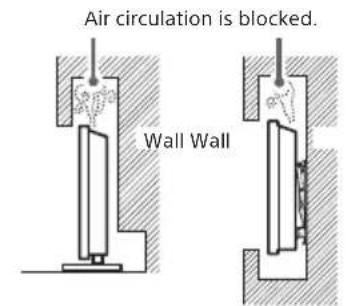
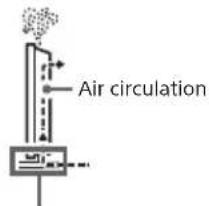
Do not block the air circulation area.
Mains lead
Handle the mains lead and socket as follows in order to avoid any risk of fire, electric shock or damage and/or injuries:
- Use only mains leads supplied by Sony, not other suppliers.
- Insert the plug fully into the mains socket.
- Operate the LCD Monitor on a 100 V - 240 V AC supply only.
- When wiring cables, be sure to unplug the mains lead for your safety and take care not to catch your feet on the cables.
- Disconnect the mains lead from the mains socket before working on or moving the LCD Monitor.
- Keep the mains lead away from heat sources.
- Unplug the mains plug and clean it regularly. If the plug is covered with dust and it picks up moisture, its insulation may deteriorate, which could result in a fire.
Note
- Do not use the supplied mains lead on any other equipment.
- Do not pinch, bend, or twist the mains lead excessively. The core conductors may be exposed or broken.
- Do not modify the mains lead.
- Do not put anything heavy on the mains lead.
- Do not pull on the mains lead itself when disconnecting the mains lead.
- Do not connect too many appliances to the same mains socket.
- Do not use a poor fitting mains socket.
Never insert USB plug when the product or charging cable is wet condition
- When the USB plug is inserted in a wet condition, a short circuit occurs due to the liquid (tap water, salt water, refreshing drink etc.) attached to the main unit and charging cable or foreign matter, it may cause abnormal heat generation or malfunction.
NOTE ON MAINS ADAPTOR
Warning
To reduce the risk of fire or electric shock, do not expose this apparatus to rain or moisture.
To prevent fire or shock hazard, do not place objects filled with liquids, such as vases, on the apparatus. Do not install this equipment in a confined space, such as a bookshelf or similar unit.
-
Please ensure that the mains socket is installed near the equipment and shall be easily accessible.
-
Be sure to use the supplied mains adaptor and mains lead. Otherwise it may cause a malfunction.
-
Connect the mains adaptor to an easily accessible mains socket.
-
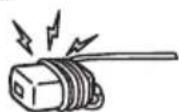
Do not coil the mains lead around the mains adaptor. The core wire may be cut and/or it may cause a malfunction of the me
- Do not touch the mains adaptor with wet hands.
- If you notice an abnormality in the mains adaptor, disconnect it from the mains socket immediately.
The set is not disconnected from the mains source as long as it is connected to the mains socket, even if the set itself has been turned off. - As the mains adaptor will become warm when it is used for a long time, you may feel hot when touching it by hand.
Prohibited Usage
Do not install/use the LCD Monitor in locations, environments or situations such as those listed below, or the LCD Monitor may malfunction and cause a fire, electric shock, damage and/or injuries.
Locations:
- Outdoors (in direct sunlight), at the seashore, on a ship or other vessel, inside a vehicle, in medical institutions, unstable locations, near water, rain, moisture or smoke.
Environments:
- Places that are hot, humid, or excessively dusty; where insects may enter; where it might be exposed to mechanical vibration, near the source of naked flame, such as lighted candle, which is placed on a LCD Monitor. The LCD Monitor shall not be exposed to dripping or splashing and no objects filled with liquids, such as vases, shall be placed on the LCD Monitor.
Situations:
- Use when your hands are wet, with the cabinet removed, or with attachments not recommended by the manufacturer. Disconnect the LCD Monitor from mains socket during lightning storms.
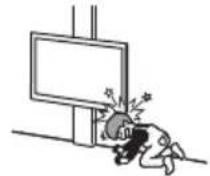
Install the LCD Monitor so that it sticks out into an open space. Injury or damage from a person or object bumping into the LCD Monitor may result.
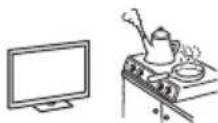
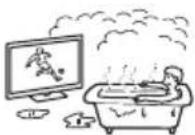
- Place the LCD Monitor in a humid or dusty space, or in a room with oily smoke or steam
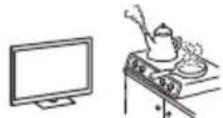
(near cooking tables or humidifiers). Fire, electric shock, or warping may result.
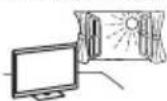
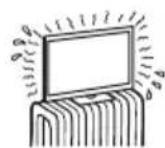
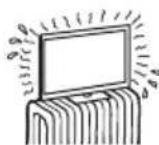
- Install the LCD Monitor in places subject to extreme temperature such as in direct sunlight, near a radiator or a heating vent. The LCD Monitor may overheat in such condition which can cause deformation of the enclosure and/or LCD Monitor malfunction.
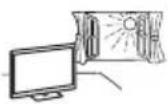
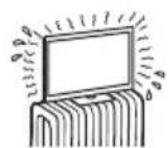
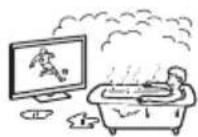
- If the LCD Monitor is placed in the changing room of a public bath or hot spring, the LCD Monitor may be
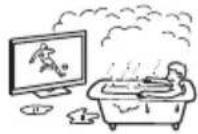
damaged by airborne sulfur, etc.
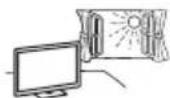
- For best picture quality, do not expose the screen to direct illumination or sunlight.
- Avoid moving the LCD Monitor from a cold area to a warm area. Sudden room temperature changes may cause moisture condensation. This may cause the LCD Monitor to show poor picture and/or poor colour. Should this occur, allow moisture to evaporate completely before powering the LCD Monitor on.
Broken pieces:
- Do not put through a thick cable or many cables to the hole on the stand. It may damage the cable and cause trouble or malfunction. The

LCD Monitor may not be able to move smoothly under such cable conditions.
- Do not throw anything at the LCD Monitor. The screen glass may break by the impact and cause serious injury.
- If the surface of the LCD Monitor cracks, do not touch it until you have unplugged the mains lead. Otherwise this may cause an electric shock.
When not in use
If you will not be using the LCD Monitor for several days, the LCD Monitor should be disconnected from the mains for environmental and safety reasons.
- As the LCD Monitor is not disconnected from the mains when the LCD Monitor is just turned off, pull the plug from the mains socket to disconnect the LCD Monitor completely.
For children
- Do not allow children to climb on the LCD Monitor.
- Keep small accessories out of the reach of children, so that they are not mistakenly swallowed.
If the following problems occur...
Turn off the LCD Monitor and unplug the mains lead immediately if any of the following problems occur. Ask your dealer or Sony service centre to have it checked by qualified service personnel.
When:
- Mains lead is damaged.
- Poor fitting of mains socket.
- LCD Monitor is damaged by being dropped, hit or having something thrown at it.
- Any liquid or solid object falls through openings in the cabinet.
About LCD Monitor Temperature
When the LCD Monitor is used for an extended period, the panel surrounds become warm. You may feel hot when touching there by the hand.
Do not place this product close to medical devices
This product (including accessories) has magnet(s) which may interfere with pacemakers, programmable shunt valves for hydrocephalus treatment, or other medical devices. Do not place this product close to persons who use such medical devices. Consult your doctor before using this product if you use any such medical device.
Keep out of the reach of children or the supervised individuals
This product (including accessories) has magnet(s). Swallowing magnet(s) could cause serious harm, such as choking hazard or intestinal injuries. If magnets (or a magnet) were swallowed, consult a doctor immediately.
Magnetic influence
This product (including accessories such as covers) uses magnets. Do not place magnetically sensitive objects (cash cards, credit cards with magnetic coding, etc.) near this product.
Precautions
View the LCD Monitor in moderate light, as viewing the LCD Monitor in poor light or during long period of time, strains your eyes.
- When using headphones, adjust the volume so as to avoid excessive levels, as hearing damage may result.
Screen:
- Although the screen is made with high precision technology and 99.99% or more of the pixels are effective, black dots may appear or bright points of light (red, blue, or green) may appear constantly on the screen. This is a structural property of the screen and is not a malfunction.
- Do not push or scratch the front filter, or place objects on top of this LCD Monitor. The image may be uneven or the screen may be damaged.
- If this LCD Monitor is used in a cold place, a smear may occur in the picture or the picture may become dark. This does not indicate a failure. These phenomena disappear as the temperature rises.
- Ghosting may occur when still pictures are displayed continuously. It may disappear after a few moments.
- The screen and cabinet get warm when this LCD Monitor is in use. This is not a malfunction.
- The screen contains a small amount of liquid crystal. Follow your local ordinances and regulations for disposal.
Handling and cleaning the screen surface/cabinet of the LCD Monitor
Be sure to unplug the mains lead connected to the LCD Monitor from mains socket before cleaning.
To avoid material degradation or screen coating degradation, observe the following precautions.
-
To remove dust from the screen surface/ cabinet, wipe gently with a soft cloth. If dust is persistent, wipe with a soft cloth slightly moistened with a diluted mild detergent solution.
-
Never spray water or detergent directly on the LCD Monitor. It may drip to the bottom of the screen or exterior parts and enter the LCD Monitor, and may cause damage to the LCD Monitor.
-
Never use any type of abrasive pad, alkaline/acid cleaner, scouring powder, or volatile solvent, such as alcohol, benzene, thinner or insecticide. Using such materials or maintaining prolonged contact with rubber or vinyl materials may result in damage to the screen surface and cabinet material.
-
Do not touch the LCD Monitor if your hand is covered in any chemical substance such as hand cream or sunblock.
Periodic vacuuming of the ventilation openings is recommended to ensure proper ventilation. - When adjusting the angle of the LCD Monitor, move it slowly so as to prevent the LCD Monitor from moving or slipping off from its table stand.
Optional Equipment
- Keep optional components or any equipment emitting electromagnetic radiation away from the LCD Monitor. Otherwise picture distortion and/or noisy sound may occur.
- This equipment has been tested and found to comply with the limits set out in the EMC Standards using a connection signal cable shorter than 3 meters.
Disposal of the LCD Monitor
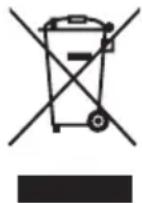
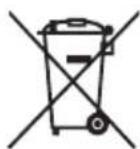
Disposal of old electrical & electronic equipment (applicable in the European Union and other countries with separate collection systems)
This symbol on the product
or on its packaging indicates that this product shall not be treated as household waste. Instead it shall be handed over to the appropriate collection point for the recycling of electrical and electronic equipment. By ensuring that this product is disposed of correctly, you will help to prevent potential negative consequences for the environment and human health, which could be caused by inappropriate waste handling of this product. The recycling of materials will help to conserve natural resources. For more detailed information about recycling of this product, please contact your local Civic Office, your household waste disposal service or the shop where you purchased the product.
Installation/Set-up
- Install and use the LCD Monitor in accordance with the instructions below in order to avoid any risk of fire, electric shock or damage and/or injuries.
Installation
- The LCD Monitor should be installed near an easily accessible mains socket.
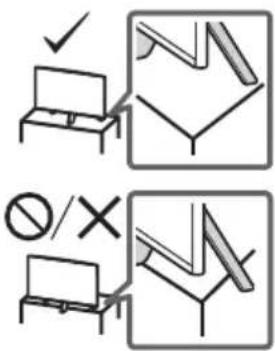
- Place the LCD Monitor on a stable, level surface to prevent it from falling over and causing personal injury or property damage.
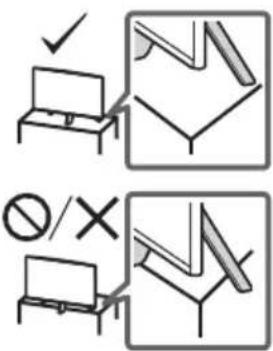
Install the LCD Monitor where it cannot be pulled, pushed, or knocked over. - Install the LCD Monitor so that the LCD Monitor's Table-Top Stand does not protrude out from the LCD Monitor stand (not supplied). If the Table-Top Stand protrudes out from the LCD Monitor stand, it may cause LCD Monitor set to topple over, fall down, and cause personal injury or damage to the LCD Monitor.
Transporting
- Before transporting the LCD Monitor, disconnect all cables.
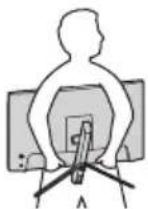
- When transporting the LCD Monitor by hand, hold it as shown below. Do not put stress on the LCD panel and the frame around the screen.

- When lifting or moving the LCD Monitor, hold it firmly from the bottom.
- When transporting the LCD Monitor, do not subject it to jolts or excessive vibration.
- When transporting the LCD Monitor for repairs or when moving, pack it using the original carton and packing material.
Installing the LCD Monitor to the Wall
This LCD Monitor's instruction manual only provides the steps to prepare the LCD Monitor for Wall-Mount installation before it is installed on the wall.
Your LCD Monitor can be mounted to a wall using a suitable Wall-Mount Bracket (not supplied). If the Table-Top Stand is attached to the LCD Monitor, the LCD Monitor may require detaching the Table-Top Stand. Prepare the LCD Monitor for the Wall-Mount Bracket before making cable connections.
For product protection and safety reasons, Sony strongly recommends that installation of your LCD Monitor on the wall be performed by qualified professionals. Do not attempt to install it yourself.
- Follow the instruction guide provided with the Wall-Mount Bracket for your model. Sufficient expertise is required in installing this LCD Monitor, especially to determine the strength of the wall for withstanding the LCD Monitor's weight.
-
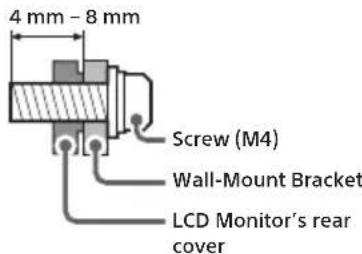
The screws for installing the Wall-Mount Bracket to the LCD Monitor are not supplied.
-
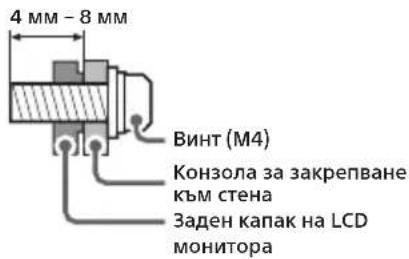
The length of the screw for Wall-Mount Bracket differs depending on the Wall-Mount Bracket thickness. Please refer to below illustration.
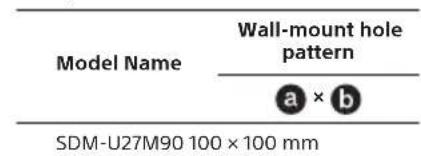
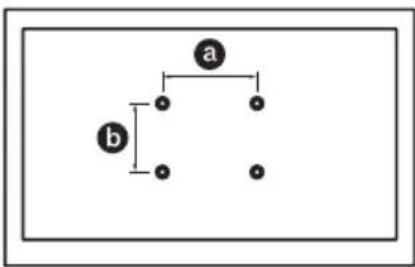
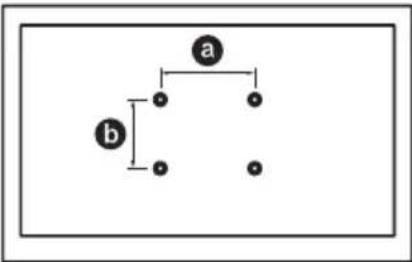
Refer to the following table for wall-mount hole pattern.
Specifications
System
Panel system: LCD (Liquid Crystal Display)
Panel, LED Backlight
Sound output: 2 W + 2 W
Input/Output jacks
HDMI IN 1/2 (HDMI 2.1, HDCP 2.3)
(Stereo mini jack)
Headphone 1,2,3
USB Type-A
PC) USB Type-B DP
USB Type-C, DP Alt mode
DisplayPort (Ve)
Mains adaptor input
Power, Product Fiche and others
Power requirements
19.5 V DC with AC adapter
Rating: Input 100 V - 240 V AC, 50/60 Hz
Energy Efficiency Class* G
Screen size (measured diagonally) (Approx.) 68.4 cm / 27 inches
Standby power consumption*0.5 W
Display resolution (horizontal × vertical) (pixels)
3840× 2160
Dimensions (Approx.) (w× h× d) cm
with Table-Top Stand 61.5 × 47.9 × 24.8
without Table-Top Stand 61.5 × 36.3 × 7.3
Stand width (Approx.) (cm) 45.3
Mass (Approx.) (kg)
with Table-Top Stand 6.8
without Table-Top Sta 4.6
Others
Operating temperature: 0^ - 40^ Operating humidity: 10% -80% RH (non-condensing)
^1 This information is for EU and other countries whose relevant regulation is based on EU energy labelling regulation.
2 Specified standby power is reached after the LCD Monitor finishes necessary internal processes.
Note
- Design and specifications are subject to change without notice.
Some of the on-screen instructions may not apply to your LCD Monitor model.
Product fiche in this manual is for COMMISSION DELEGATED REGULATION (EU) 1062/2010. Refer to its website for (EU) 2019/2013 information.
Product registration number (COMMISSION DELEGATED REGULATION (EU) 2019/2013)
SDM-U27M90 (1125537)
Trademark Information
The terms HDMI, HDMI High-Definition Multimedia Interface, and the HDMI Logo are trademarks or registered trademarks of HDMI Licensing Administrator, Inc.
- DisplayPort™, the DisplayPort™ logo and the DisplayHDR™ logo are trademarks owned by the Video Electronics Standards Association (VESA®) in the United States and other countries.
© 2021 NVIDIA, the NVIDIA logo, and NVIDIA G-SYNC Compatible are trademarks and/or registered trademarks of NVIDIA Corporation in the U.S. and other countries.
- USB Type-C® and USB-C® are registered trademarks of USB Implementers Forum.
PRODUKTET SKAL HOLDES VAEK FRA

TAENDTE LYS ELLER ANDEN FORM FOR ABEN ILD FOR AT UNDGAB BRAND.

FORSIGHT
RISKIO FOR EFLIKTRISK STDB ARN IKKRE

VIGTIG BESKED
MaToHaNdeHTnΦnKaUOHHn eTUKET
EtKETTE3aHOMepHaMOeJa,daTaHa npOn3BOJCTBO(rOINHa/Mecu)N KlaC Ha 3axpaHbAHe,ca pa3nONoXeHN Ha Tbp6aHa LCD MOHTopaNNOnaKOBkata.
3a MoDJIe, KOITo Ce IOCTaBRT CbC 3axpaHbaa aanTOp:
ETNKeTTe 3a HOpE Ha MoDen I cepnEH OHMe Ha 3axpaHbAun aanTOp ca pa3noJoxEn OTdony Ha 3axpaHbAun aanTOp.
PPEyPExKdEHN
3A DA
ПЕДOTВРАTE
ИЗБУХBAHE
HA NOЖAP, BИHA
ДрьжTE CBELI
ДPyгИ N3TOUHIN
Огьн ДАЛECH OT
ПОДУКТ.


BHIMAHIVE
OTACOHCTO TOKORVAP
TE OTRAPBRII

BAKHA 3A6EJIEXKA
To3n npOdyKT e npOn3BedeH OT nIe OTHmEto Ha Sony Corporation.
Bhocnten B EC: Sony Europe B.V.
3aNTBaHn DO BHocnte
Hn 3aNTBaHn CBp3aHn CbC
cBtBcTCTBnTo Ha npOyKTnTe cbfNaCHO
3aKHOdaTeNCTBOTo HA EBponeckn
cb03, CneBA Da ce OTnpABRT KbM
YbIbHOMoUeHn PpeCTaBnTe
Ha npOn3BoDInTe Nsory Belgium,
bijkantoor van Sony Europe B.V., Da
Vincilaan 7-D1, 1930 Zaventem, BeRnra.
KohcymaunraHa eheprnna
dpyra HNFPOMaun OTHOCHO
eJeKTPO3axpaHbAHeTO, KaTc Ce n3ncKaBcbrNaCHO PerlanMeHT (EC) 2019/1782 Ha
KomucnTa, eOCTbHa Ha CneDnHa
ye6caIt: https://compliance.sony.eu
OCTaBeTe HAI-MaJIKO TOJIKOBAMrCTO OKJIO YCTPOIYCTBOTO.
3a da NOCTHNE TpaBnHa BEHTINaunna n 3a da npedeOTbPAnte CbupaHeto Ha npaxnn MPscOTTHA
-He cnaaTe LCD moHToPA JerHaJI, He ro MOHTnpaTe o6bphAT C rOpHnK paH aOny, Haonaku nn CTpaHmHo.
-He cnaraTe LCD moHntopa Bbpxy paΦtoBe,KnIM,JeIIO NnB DpeWHNK.
-He noKpBaIe LCD moHITopa c npaeta nlat, kato nepeta nnC npynpneMetn, kato BECTnUu n dp.
-He MoHTnpaIte LCD MOHITopa, KaKTo e NOKa3aHO No-DoJy.
UπpkynauηraHaBaB3dyx e6noknpaHa.
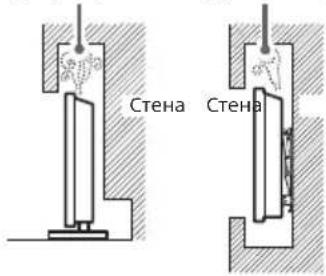
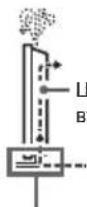
UnpkynauuHaBb3dyxa
He 6IoknpaTe 3oHaTa 3a IuPKynaHn Ha Bb3Dyxa.
3axpaHbau Ka6eI
3a da npedotbpaTne pnc OT noxap, TOKOB ydp, NOBpea HnHn HapaHbHaHe, paOBeTe cbc 3axpaHbaunKaebn KaTo cnEBA:
Изпольвай само оригнален
Зхранвац кабел Ha Sony. He
Изпольвай дугл марки.
BkapaTe 电eCena nIbTHo IdoKpaB KOHTaTa.
BKNIOVAIe LCD MOHITOPa cMo KbM npOMeHINBOBOTOKOBO 3axpaHBAHe OT 100V-240V.
Korato npokapBaTe KaBEn, 3a BaAa
Be3oNaChOCT Ce YBepeTe, 4e Cte
N3KIOUHN 3axpaHbAAuKaBEn;
BHIMaBAIte Da He Ce CnBHeTe B KaBEnTe.
-ИЗкlioуete 3axpaHbuaиka6eIOTmpexkata, npdI da paobotne nIMecTe LCD moHITopa.
- Na3ete 3axpaHbauNk6eI daJeO Tn3TOUHNHa HToNJHa.
-ИЗклоче 3axpaHbuaЯKa6eN nroNoocTbaTepeoBHO.AK0 3axpaHaBaIaRr Ka6e e 3aMbpcen NnnpaUeHnNo Hero ce o6pa3yBa Bnara, nOlaunrMaMy Moze Da ce Hapuyn ToBa MoKe Da DOBeDe Do noXkap.
3a6eJekka
He n3no3BaIte npinloKeHn 3axpaHbaKaben c dpyro o6OpyBahe.
He dynyete, He orbaTne Hc ycykBaTe npekomepHO xapaHbAunna Ka6en. BtpseHNHT npOBDoHNu Moar da ce oronrnnn ppeKcbat.
-He npenpaBraTe 3axpaHbauNka6eJ.
He noctabraTe TeKKn npEmdTe N Bbpxy 3axpaHbuaNka6n.
He DbpnaTe camn 3axpaHbau Ka6en, KOrato rO u3KIOUbATE oT KOHTaKaTA.
He Cbbp3BaTte TBbpDe MHORO yCTPOINCTBa KbM eINH N CbUN KOHTAKT.
He m3no3BaIte KOHTK, KOITo He 3axBaIa CtaBnHIO qencena.
Hnkora He nbxaute USB, korato npodykTBnJn Ka6eIbT 3a 3apeKdahe ca Mokpn
-ПипьханHa MOKbp USKoHKeTOp ьнсвп Кбco CbeINHeHnE nopaД NKT KaTeuHOCTTa (YeMnHa BOda, COJIeHa BOda, OCBekBaAua HaNtKa n Dp.) C TlaBHOTo YcTpoIcBO n 3apeXdauN KAbEN IUNyJDa MaTePnI, KoTeO MoKeJa DA DoBeDeNo HeObMaHnO rHeRpeNaH e ToNInHa NII HeN3npaBHOCT.
БЕLEЖKA OTHOCHO 3AXPAHBAUINAДANTOP
PpeynpeKdHne
3a da HamaJnte onachocTta OT noXap nnneKtpnuecknyap, He n3laarTe anapataHa DbXk Nnn BnaTa.
3a da npedToBpaTne noxapnn TOKOB ydap, He nocTaBnTe npedMeTn, nblnC BOda, HapnpMep BaN, Bbpxy anapata. He MOHTnpaHte TOBA o6OpyDbaHe B 3aTBopeHo npocTpaHCTBO, HapnpMep 6n6nOteKa nn nnoo6Ha Me6eN.
MOny, yBepTe ce, ye eneKeTpuecknT KOHTaKT e MOHTnpaH 6n3o Do obOpdyBaHeTo n e necho DoCTbneH.
- YBepeTe ce, Ye n3NoJ3BaTe DocTaBeHnTe 3axpaHbAa aanTOp n Ka6en. B npOTuBHe cIyau ToBa MoKe Ja pNpUHn He3npaBOCT.
CbpxTe 3aXpaHbAunna aanTOp KbM necho doctbne H eektpueeckn KOHTaKT.
He HABBaTe 3axpaHbuaaKa6eI OKoIO 3axpaHbaua aadTOp. BbTpueHHa TPOBOdNkoMKe Da npeKbChe N TOBa da HeH3npaBHOCT Ha pme
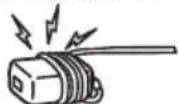
He doKocBaIte 3axpaHbAunra aanTOp c BnaJxH pBue.
-Ak03a6e9KtneN3MeHEnnB 3axpaHbUuia aadTOp, N3KnIOyTe RoOT eNEKTpUmecckN KOHTAKT He3a6abHO.
LCDMOHHTOpBtHeeN3KIOUeyOH 3axpaHbHaTeO,IOKaTOeCBbp3aH KbM eEKeTpuecknKOHTAKT,IOPNAOKaMnT LCD MOHHTOp eN3KIOUeyH.
-Понже зхраньшпгаадпогс ce 3aToTnla,akOce nI3NoI3Ba npOdbJxNKeTHeHo,MOKe Da NOyBCTBaTe TOnnHa,KORAto rO DOKoCHete CpbKa.
3a6paHena ynoTpe6a
He nHCTaIpaIte/u3noJI3BaIte LCD MOHTOPa Ha cIeHNITE MeCTa NII B CnTyauINTE, OONCAHn NO-DOJy. B npOTuBEH Cnyauh LCD MOHTOpTbM OMOE da CE NOBpeN I Da pNmHn POxAp, TOKOB yap, NOBpeN I/nn HapaHbaHe.
MectoHaxOxKeHne:
Ha OTKPnTO (npka CbHueBa CBeTInHa), Ha MOpckn86pR, Ha KopaB nIN dpyr nIaBaTeJenH CbD, BbB BbTpEHHOCTTa HA NpeBO3HO CpEDCTBO, B MEINCHKN 3abeEHN, Ha HeCTaBnHN NOBbpxHOCTn, 6bnIO DO BOda, INLOKeH Ha DbXKn, Bnara nnIpyeK.
OkoJHa cpea:
MecTa, konTo ca ropeu, BnaXHH uHn npekaneHo npaun; TaM, KbTeTo MoKeJa dA Bn3at Hacekomu; KbTeTo MoKe Ja 6bJe n3Noxeh HA MexaHUnn BV6paunn, B 6JN3OCT Do n3TOUHNK Ha OTkPNT PnAmBk KaTo 3aIanaHe CBeU, NoCTaBeHa BpXy LCD MOHntopa. LCD MOHtOpBt TprBaDa 6bJe npednaeH ot noINBaHe c TeHuOCTn; He noCTabRrTe B 6n3OCT Do HERO npedmetn, BJIHN C TeHuOCTn, KaTOn HapnMpE BaH.
Cunyaunn:
He n3no3BaIte, aKO cTe C MOKpn pBue, KORATO KAaKbT Ha YcTPOINCTBOTo e CBAJIEN C AKeCEcoApN KOIO He Ca npenOpBuHaOn I pOIN3BoDInTeN. No BpeMe HA rPbMOTeBmHn 6pyn n3KnIOuBaIte LCD MOHITopa O KOTAKTa.
He MoHTnpaTe LCD MOHITOPa Taka,Ye Da CTbpH. MoKe Da BB3HnKHe HapaHaBaHe NIN NOBpeDa OT C6lbcKa HA YoBeK NIn npedMeT B LCD MOHITOPa
He noctabYte LCD MOHITopa Ha BnaXHo mI npaH0 MCTO,IMB CTaC Ma3eH
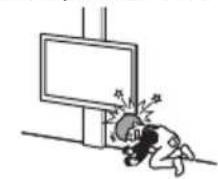
dIM m nnpa (6n3o Do KxHHeHckn IIOTOBE mOBnaxKnTei).Mooe da Bb3HNKHe NoXap, eNeKtpueckn ydp a nn Deopmaua.
He nocTabraTe LCD MoHITopa Ha MeCTa, H3IOXeHN Ha BnCOKN Tempepatypn, HAnPIMep DnPeKTHa CbHueBa CBETNIHa, 6Bn3O da pAnatop NnO OTnHTenHO TaNo. B TAKNBa YcNOBna LCD MoHITopbT MoKe Da npErpee, KoTo Da npuHn DeΦOpMaunHa KOpNyca N/nn NobpeDa Ha LCD MoHITopa.
Ako LCD MOHITOpbT 6bJe noCTaBEN B cbNeKajnHa Ha 06eCTBeHa 6aHa NN MNHepaHa 6aHa, TOI MoKe Jc ce NOBpeDN OT Cpa
-3a HAI-DI6pO KaueCTBO Ha KapTHHaTAta, HeN3narrteEeKpaHAnDpeKTHo OCBETBAHe NIN CbHueBa CBETnHa
-368raBnTe npemecBaHeto Ha LCD MOHITOPa OT cTyEHO HA TOnNo MRCTo. BHe3aHNHeIe npomeHb Temnepatypata Ha CTaTARoTdApnpuHHT KOHEnH ha Blara.Toba MoKeJa e npuHa LCD MOHITOPa Da NOKa3Ba LoWa KapTHa n/nnn loOnu CBetObE.B TaKb CnyuaH n3YaKaTe BnArata Da ce n3napu HAnbHnO, ppeDn da BKlnouHte LCD MOHITOPa.
Cynennapeta:
He npokapbaite de6en Ka6en nInn MHORO Ka6en npe3 OTBopa Ha noctabkata. Toba moKe da nOBpeNn Ka6ena n da npuynHn npo6Jem LCD MOHITOpbT MoDIBKNIJIABHO,AK CbCTOHNHe.
He XbpbnIte HnIO KbM LCD MoHITopa. CbKnToHa eKpaHa MoKe Da ce Cyyni N da ekCnIoOpna npu Ydapa N da npuHN cepno3N HapAHBaHNA.
Ako nobbpxhocTHa LCD moHntopace nponyka, He JOKOCBaIte, DOKaToHe n3KIOUHTe 3axpaHbaunKa6en. BnpOTIBEN CnyaT ToBA MoKeJa npuHHTOKOB ydap.
Korato He n3no3BaTe yCTpoiCTBOTO
IopapnnpuHnCbbp3aHn C 6eOanChocTtNOKoHnata cpea,Bn npenopbYBaMe Da n3KnOyBaTe LCD MOHTopaOT MPekaT, KoraTo He PnaHpaTe da Ro n3No3BaTe HkOJko DnH.
LCDMOHHTOpbTHeeN3KIOUoyenOT MpeXATA,KoTaOeN3KIOUoyeHOTKOUYTo. 3aJaN3KIOUoyteHaBbIHOYCTPOIcTBOTO, N3KIOUoyeKa6eHa3axpaHbAHeTO eJNEKTPuueckataMpeXa.
OTHOCHO DeuTa
HeNo3B0JBaBnTeHaDeuaDaCeKaUBaT Bbpxy LCD MoHtOpa.
- Na3eTe MaJIKeIte akCeCoapn DaJeU OT Deua, 3a Da He 6bDaT NoBJIHaTn OT TReX NO HEBHIMaHHe.
Ako Bb3HnKnat CneHnTe npo6Iemn...
He3a6abH0 n3KIOUeTe LCD MOHTopapn 13BaDeTe 3axpaHbAunna KaBcB Cnya, Ye B3HNKe HRAKOI OT CNEADHTe IPO6JIEMN KoHCyTTnpaTte Ce C BaWUNo DocTaBvNK nn Sony cepBn3e NcETbp dann e HAOXnTEJHo LCD MOHTOpBt Da 6bJe npOBepeh ON KBAANΦuPAn cEPBN3.
Korato:
3axpaHbauTkaBe enoBpehen.
-He3dOHa KOHTaKaTa He 3axBauaCTa6nHIO uenceJa.
LCDMOHITOpbTe nOBpeDeH, NOHEKe e H3nycHaT, ydaPeH nn Heo e XbPJeHo no Hero.
TeHn nn TBbpnn npeMeTn ca nonaHaJIbN B OTBOpNTe Ha Kopnyca.
OTHOCHO Temnepaypata Ha LCD MOHITOPA
Korato LCD MOHITOpbT ce n3nO3Ba npoBJIKNHTeJHO Bpeme, pAMKaTa OKOJOnaHena Ce 3aToJMa. MoKe Da ycTeNTe TOONHa, KOraTo JDOKOChETe CpbKa.
He noctabraye To3n npodykT B 6n3oCT Do MeuHcNyCTPOICTBa
To3 npOyKT (BKn. akcecoapnTe)
cbIbPka MaHHTN, KOINTo MOraT Da
nonpeat Ha pabotata Ha neiCmeKbpy,
npOgrpAmnpyeM baiNaC KJIaNN 3a
XnDpoUeФaJIY N dpyrMeuINHcKn
yCTpoICTBa. He NoctABaTte To3 npOyKT
B 6bn3OCT Do IInCe c TAKIBa yCTpoICTBa.
KOnCytnpaIte ce c Jekap, npEJa
n3nON3BaTe TO3 npOyKT, aKo n3nON3BaTe
TaKIBa MeNuHcKN yCTpoICTBa.
ДрькTe npODYкТа Ha МяСTO, Kыдeto He можеда 6бдe ДocTHrHAT OT Deca nIи Лицa noI Na3Op
To3n npOdyKT (BKn. akcecoapnte) cbDbpka MaHHTN. NOrIbUaHaTe Ho MaHHTN MoKe Ja pRnuHH Cepno3HN Bpei, HApPIMep 3aDaBAHe n 3aDywaBaHe, nn HapaHraBe Ha cepBaTa. Ako ca NoBbHaTn MaHHTN (nnMaHHT), BeDHara Ce KOHCytnpaTe c Jekap.
MarHnTHoBInaHne
To3n npOdyKT n HerOBHTe akcecoapn, KaTO HnnpIMep KanaUa, n3NOJ3BaT MaHHTN. He noCTabYIte npEdmTeu, yBcTBNTenHn HaMaHHTN,(KAPTN,KpeDTHN KAPTN C MarHHTN KOIOBE n dp.) B 6bn3oCt Do npOdykTa.
Ppepa3Hm Mepkn
- IeJaTe KbM LCD MoHToPa B cpeHo OCBTeHa CTa, Tb KaTO IeJaHETO KbM LCD MOHToPb Cnabo OcBeTaHa CTa an 3a DJIro Bpeme HaTobapBa DOIbJIHInTeJHO OHte Bt.
Korato n3nonBate cnlywankn, HacTpoTe cnilaTa Ha 3ByKa TaKa, Ye da npedOTbpatnte yBpekdahe Ha cnLyxa.
EkpaH:
BbnpeknuekpaHbTe n3pa6oTeH NO BnCOKO-npeu3Ha TexHOLOrna N NoboeyOT 99,99%OT NIKCeJIte My ca eΦeKTHBN,BpxyEkpHa Moke TpaHOn Da ce NoBRT YepHN Nc CBETN TOck (YepBHeN,CINN Nn 3eNeH).Toba e CTpyKTPha OOCeHOCT Ha ekpaHa N He npEcdTabraBa HEn3npaBHocT.
He HATnckaIte He IpaKaNTE npEDHnA FmTbp Hne NoCTABNTE npEDMeTN BpXY LCD MoHTOpa. N3oPaxKeHnTo MOKe Da e HepaBHomePHO NIN ekPaHbT MOKe da ce NOBpeDN.
Ako n3no3BaTe LCD moHntopa Ha CTyDEHO MRCTo, KAPTHaTA MOKeJa ce 3AmbIIN Nm Da CTAHe No- TbMHa. ToBa He HEn3PpAbHOCT. To3n FehOMeN 3ue3Ba, KORATO TEMNEPATypata Ce NOBIMn.
KoraTo Ha ekpaHa IpoDblnxTeHNO BpeMe Ca noka3aHn HenoDBHXHN 13o6paXeHn, Bb3MOxHO e da Ce NOBRT OCTaTbUHN o6pa3n. Te MoRaT da N3ue3HaT cNeI d HAKOJKO CEkyHdN.
EkpaHbT N KopnyCbT ce 3aToNJIr, KORAto H3No3BaTe LCD MoHtOpa. ToBa He e HEn3nPaBHOCT.
EkpaHbT CbIbPxa MaIko KOJIneCTBO TeuHN KpIcTaII. CJeIbAITe MeCTHITe npaBnI a 3aKOH 3a I3XbPJIHe Ha noDobHn OTNaDbuN.
Iopdpbxxka n nouictBahe Ha NOBbpxHocTtHa eKpaHa/Kopnyca Ha LCD MoHITopa
YBepTe ce, ye cTe N3KJIQUHnCbbp3aHnN KbM LCD MOHNTopa 3axpaHbau Ka6en, npdei Da 3aoHHTe NOUcTBAhe. 3a da ppeoTbpaNTe NOpeHa Na OKpntMeTo Ha ekPana, CneJaBte HNCTpyKcunTE, n36poEHn No-DOJy.
3a Da npemaxHe Te npaxo OT NOBbpxHocTtHa ekpaha/Kopnyca, NouchTaBaiTe C MekoCyxo Napue NlaT. Ako NonoHnAInr T npaxHe Moxke Da Ce NouchTu, NouchTaBaiTe ekpaha C Meko Napue NlaT, NkoHabnaXHeOcb Cna6 NouchTaBau, pa3TBop.
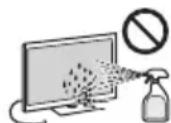
HnKora He npbckaTe Boda nn pa3TBoP dIpeKTHo Bbpxy LCD MoHTOpA. No ekpaHa NN BbHUnHe TaCtn MOKe da ce 6pa3yBaT
KANKN, KOINTa Na NOTeKaT, Da npOHnKHAT B DOHnHa Ta CHT Ha LCD MoHnTopa N da ro NOBpeJr.
He n3no3BaIe rpaanBn napyeTa nlaT, noocCTbaa npenapatn Ha aKaNHa/ KcEJIHHa OCHOBa, NOcHCTBaN paxoBe IIN pa3TBOpN, KATO HApnpMe aKkoXoJ, BEN3OJ, pa3peNTe Nnn INCEKTNUID, IN3no3BaHeTo Ha TaKbA BeueCTBa NIN npoDbJNXITNEHT KOtAKT C rMa NN BUNHMOKe Da NOBpeDN NobBpXHOCTTa Ha ekpaHa NIN NOBbPxHOCTTa HA KOPnyca Ha yCTpoiCTBOTO.
He nnaTe LCD MOHTopa, ako pbKaTa Bn e NOKpTa C XMMNHO BeueCTBO KaTo Kpem 3a pBue INI CNBHcE3aUNTe H Kpem.
-Ппелорьва ce nepиоюнho поиства сnpaxocmykaч ha OTbOpnte 3a npobTePraBa c zen ocriypЯBaHa npabINHa BENTInaJia.
Korato perynpate bbrha Ha LCD MOHOTOPa, ro MeCTe 6abHO, 3a da npDoTbpaNTe N3MeCTBaHe Ha LCD MOHOTOPa NN paahe OT Macata NN NOCTaKaTa.
DonbJIHNTeIHO o6OpyDbAHe
He npbXte 6n3o do LCD moHntopa DOnbHHTeJIHNTe KOMnoHEHTN NnKAKBOI n Da e bNO oBOpYBaHne, n3bYBaIoo eNeKTPomarTHTN Bblnn. BnpotINBe Cnyau e BbMOxHO KapTnHaTa n/nn 3ByKbT Da 6bDaT Cbc CMyeHN.
ToBaObOpyDbaHe e TectBaHo n CbOTBETcBa Ha N3NCKBaHNrTa Ha CTaHdaptnte 3a EMC, KaTo N3non3Ba CBbp3BaU cunHanJe HKa6eNo-KbcOT 3 MeTpA.
U3XBpnaHe Ha LCD MOHnTopa
MxBpnaHe Ha CTapn eKtpnueckn n eKtpoHHypeu (npnoXMO B Ebponeckn CbIO H npyn Dpbkabn Cbc CNCTeM 3a pa3deJHo cb6upaHe Ha OTpaDbu)
To3n CmB0Jb Bpy npOykTa nn Bpyx HeOBATA ONaKOBKa NOKa3Ba, Ye To3n npOyKT He TpRbA Da Ce TpeTnpa KaTO bHTOB OTnabK. BMeCTo TOB TaOn TpRbDa aB6Be npEpaEN B cBoTBTHN Cb6npaTeH eNYHK 3a peuKNPnHa He aneKTPueckn n EneKTPoHN ypeD. Kato npEpaTe To3n npOyKT Ha npaBnHOTo MCTo, Bne 1e NOMOrHeTe 3a npEDoTbPaTBAHe Ha HeratNBHTe NocDeCTBn 3a OKONHata cpeDa n OBeewKOTo 3dApBe, KOtTO 6bNx Bb3NHKnHAn npn HnepaBnHOTo 1X3XBpIe Ha To3n npOyKT. PeuKNPnHaTo Ha MaTepnJIte 1e CNOMOrHe Da ce cbxpanr npnpOdnHe pecypc. 3a NoDpo6Ha INHOpMaun OTHOCHO peuKNPnHaTo HA To3n npOyKT MoKeTe Da ce obpHeTe KbM MeCThata rpaDcKa ynpBa, CnyK6aTa 3a Cb6npaHe Ha 6bTOBn OTnAbBuN mMaFa3HnA, OTkbTe Ote 3akynnn npOykTA.
HCTanaa/HacpoKa
- INCTaIInpaTne n ⅢnOJI3BaIte LCD MOHITOPA B CbOTBeTCTBNE c INCTpyKUInTE, ONICAH NIO-DONY, 3a Da IN3BeHrTe PnCK OT NoXap, TOKOB YdAp INN NOBpeA H/INn HapaRABaHN.
HCTaIau
LCDMOHITOpB TpR6Ba Da 6bde HnCTaINpaH 6n3o Do neCHO DocTBneH KOHTAKT.
- NocTabete LCD MOHITOPa Ha CTabuHa, paBaHa NOBpXHOCT, 3a Da N36erHeTe NaDaHETo MY, KOETO MOKe Da PnHiHu HapAraBaHa He YA OBeK INN NOBpeDa Ha IMyUeCTBO.
- MoHTnpaIte LCD MOHTopA Ha MrcTo, KbTeTo He MoKe Da 6bDe DpbHAt, 6yThaT nn npeo6bphat.
Noctabete LCD MOHITOPa Taka,Ye NOCTABkata 3a Maca Ha LCD MOHITOp Da He e CTbpNOT MacaTa,Ha KOrTo NoCTABeH LCD MOHITOpbT (He ce DoCTAB).Ako NOCTABkata 3a Maca e N3daHeHa HABh Cnpmao MaCATA,Ha KOrTo e NOCTABeH LCD MOHITOpbT,TOBa MoKe Da IOBede Do npeo6pbuane He nn NaaHe HA LCD MOHITopa N da DOBeDe Do HapAHBaHe Ha OOBek Nn NobpeDa Ha LCD MOHITOpa.
Ppehahe
-П配电Да мсгnte LCD MOHITopa, m3KIOUeTE BCNUK KAbEN OT Hero.
Korato MeCTte LCD MOHITopa Ha pbue, dpjkTe ro, kAKTo e NOKa3aHO no-dony. He HATnCKaTe LCD nahena n pamkata OKO NO ekpHa.
3a cxema Ha OTbOpnte 3a MOHTaK HaCTeha BnIXTe CneDbauata TabInua.
HMeHaMoDena
Cxema Ha
OTBOPUTE 3a
MOHTaX Ha CTeHa
a×b
SDM-U27M90100×100 MM
HOMnHaHO BxOJHO HAppeKeHne: BxOJHO HAppeKeHne 100 V - 240 V AC, 50/60 Hz
EheprnEHKnac* G
PamepHaekpaa(H3mpeHnDnaRoHa) (np6n.) 68.4cm/27HHa
KohcymaHa eheprnB pexmI TOTOBHOCT**2
0.5W
Pe3oJIOUHaDnCnIeR(noXOpu3OHTana X noBepTikana)(nKceni) 3840× 2160
Pa3mepn (npn6n.) (u x B x d) (cm)
C NOCTaBka 3a MaCa
61,5×47,9×24,8
6e3 NOCTaBka 3a Maca 61,5×36,3×7,3
UnpHa Ha cToiKaTa (npn6n.) (cm) 45,3
Tero (np6.) (kg)
C NOCTABKa 3a MaCa
6,8
6e3 NOCTaBka 3a Maca
4.6
Дугн
Pa6oTha TemnepaTypa: 0^ - 40^
Pa60THa BnaXHOCT: OTHOCHTJIHa BnAaXHOCT
KYNNOY HAEKPTOHAIIA MHN ANGIFETE

Eupwnakn Eyyunon Sony
Ayantne nEaatn
Sac euxapiotoue tou ayopaoate auto
to npoiov tnc Sony. Eanicoue va meivete
kavotounnevol an to xponon tou. TnV
aniOavn nepiTwnou to npoiov ac
xpeiaotei oepic (enikaeun) kat a tn
diapkeia tnc evynong, papaakaleote
va etikovuvnoTe ME TO KAOTNmu
ayopac n m eva hoc tou diktouo
Egouioodntuevov aePbcic mac (ASN) nC
Eupwtaikc Oikovouknc Zwvcn (EOZ) n
kai Aawv Xwpovnu ov avapeovtal o
autn tvnv yyunan n ot auvodeovvtar
autnv pfuaiaia (Pepoxh Kauuync
tnc Evynong).Mtopeite va Bperte
Aentoupeie cya ta ma lnou Tou kdtouu mac
ASN, atouc tnaefwviokuc kataloyouc,
otouc kataloyouc npoiovtwu mac kai
otic tooeaelec mac fia v anofoyete
kthe neptt Taalainwpi, oac ouviotoume
va diaabeetpe npoektka to eyxipidio
xponc npotou va epheTE OE etaH
me ToV npouneut onc n to kktuo
Eouioodntveuv oepic mac.
H Eyyunon Σας
H npouo a evyunon toxuei yia to npoiov tnc Sony nou ayopaoate, eof oosov kati TETOIO avapepetai Ota fuAldiaou ovuvoeau TO npoiov oac, uno TnV npounoean ot iyopaoatnek Evtoc nC nepioxnc KaLusnc nC Evyunanc. Me nTnpouo,a, n Sony evyuaTai ot To npoiov elvai ataaalaymevo ano kaeEaattuva oxeticopevo me ta uika nTv kataokeui, ia mia nepiodo AYO ETQN aTO nTV nupeounvia nC apxiknc ayopac, H apuodia yia va npooepei kalva ekntnpawei tv npouo aevyunon etaipelia Sony, elvai autn tou avapepetai o' autnv nTv evyunon nto auvobeeuv ouhnuafuaio stxwpoa otou eniswketai n tiokuekn katan diapkeia tnc evyunanc.
Eav, evtoc ntc nepioou eyyunonc,
anoeixe ielattwmuatko to npoiov
(anto tvn nepoounia tnc apxiknc
ayopac) loyw akataaannw uukiw
nkataakevcn, n Sony n eva mloc tou
dktuou EEouoiobotneevow Eepic ASN
tnc neploync Kaawnc nnc Eyyunoc 0
etikueaoi n th avtikataotnoei (Kat'
etlioyn tnc Sony) xwoic enbpapvOn yia
epyatika n avtaalakntka, to poiov n
ta eattwutkai eapntmuatou, evtoc
euloyou xpovou, baoei tw opwv kai
ouwnkowou ektiEvtal npakatw.
H Sony kai ta aeNtou dktou
Eeouaiodotneevuv Eepic ASN mtopoov
va atukataotnoov Eaattwmuatka
npoiovn n eapntmuata me vae n
avakukwvea npoiovn n eapntmuata.
Ola a npoiovtka kai eapntmuata cou
exouv atkataotaeeiyiovtau idoktnia
tnc Sony.
'Opoi
-
Etnokuecduvapei tnc npouac
eyunanc thnpexovta movo evn pookoaei topotaotuno tmoaloyio n anodei nwnanoc (me tnv evdei n tnc nepoouniac ayopac, tou mvteauou Tou poiovtoc kai ntc enwuviaac Tou emtropou) maiz me to eaattuatako npoiov evtoc tnc nepiobou eyunoc. H Sony kal a nauou Tou dktou EEouolodotnuevuvsePBCAsNptopouva apvnbouTn dwepeav eniokeun kata nTv nepiado yuvunewc avd sev npookoaoou v Ta npovaavepepuveva eyypaafn avd ve npokuttou AVa auta nnepounviayopac, to npoiov n to ovoTeLo Tou poiovtoc n n enwvmua Tou emtropou. H npapuae yvunon dev loxueiv avoTuTOC tou moteau no oeiipakoc aptouc to npoiovctexie aaLoothei, daypaoei, aphipeei n kataotei duavaywtoct. -
Tα vα απoΦeuxθei βλαβn n απωλεια/δiaypaΦn Ε Εαφαρομενα nαπσπωμενα μεδα n ΕξαρτηματααπθκεuΩκ δεδομενων, oΦελετεν tα αφαρεθε Πριν παρδωεθΕ Φποισκ aγ iα επιοκευκ κατα ηιν περιδό Εγγύŋος.
- H npouo aeyunon dev kauutel ta
Ee0a ka touc kivduovuc metapopac
Tou ouvdeovtae n tetafopa Tou
Poiovtoc oac poc kal aio tn Sony
leao tsou dktou ASN. -
H npoovox eyyunon dev kauuTet ta E\xi:
-
NeptoiokouvtnponkaiEIOkeun navtkataaon EApntmuatwvwc anotéeoua fuioIooyikn cOhopac.
Avaawua (ouotatika eepn yia ta onoia npoBAnetai neplodkn avikataoan kat aTn diapkeia cwc evoc npoiovtoc onw mc n etavaopoptcuevee matapeic, fuoyiye kertwnoc, ypaifdc, λaumec, kaawdelta knt.)
Znua n eAattwata nou
ptokAnBkav loaw xphanc,
AEtoupviac n xeipouo auuBatwv
Me tnv kavovikn atouki n oikiakn
xhon.
Znmuic n aaayec oTo poiov TpuoknKav aTio
Kakn xpno, oupiaplaaavouevou: -tou xeiipouoou eupiepel fuoikn, aohtukn n eupaiveaek nmu a n aaayec oto pioov nbaaon o ovecu pvowkpuotaxawv -m kavovikn n m uouphiwn me tic oyniec tnc Sonye ykataotan n xpn on tou npoiovtoc -m ouvtnpon ton ppoiovtoc ouwva e tic oyniec owotnc ouvtnpnnc ts Sony
- EYkataaTao n XpnoTou
TPOIOVTOE TPOO m OuMFOV O
TcTexvike PPOBIApyaPec KAI TA
TPOUNA aOaFaeiaCnou IOXUOV
OTN XoA OTOEEXI EYkATAOaTei
KAI XPOANOTOEITAOIOV.
MoLvoeic ano Iouc n xpnoan Tou pioovtoc me loyioikotou dev npexetai me to piov h avoaoevn eykataotaon tou loyiaikou.
Tny katataan n ta eattwata twv ouotnauw vmu ta onoia xpoiantoieita n otoia evowatuveta t npoiov ektoc an aaaa npoiovta tnC Sony elika oxediouva yia va xpoiantoiouovta u to ev loywnpoiov.
XpnnTou npoiovtoc me EApntmaT a, TepiPepeiaKo EgonlauMo kai dAa Kaipovta Twv Otoiwv o TuOc, n Kataotaon kai To npoturod ev ouviotwvralnoTNSony.
Etiokun n tixieipnoeioa eiokeun aTo atoua Tou dev evival μeltnc Sony n tou sktuou ASN.
PuOmuic n npooapoyec xwoic tvnpoyoumeyn ypantn oukyataeon tnc Sony, otioiec oupeipaaabavovtai:
- E E W T E P K O U C X W P O U C (A N E U O E I A C)
O T O N L A K O F U C), A K T E C, P L O A I N A L A
O K A F H, M E O A E O X N M A T A, O E V O O K O U E I A, O E M N O T A B E P E C E N I F A D I E C, K O V T A O E V E P O, B P O X N, U P A O I N K A N V O.
περιβαλλον:
npoiovtoc (KAT' EOYsIOAOTHsH
KANONIEMOZ (EE) 2019/2013
SDM-U27M90 (1125337)
IInpoopiec yia to eunopiko onua
Oi opoiHDMI KAI HDMI High-Definition Multimedia Interface, KaTheta KaT o loyotuno HDMI eivai Emuopka Onmuata n Onmuata kataeVtnc HDMI Licensing Administrator, Inc. otic Hvwwuec Noliteies KAI OE aAee xwpe.
Hovouaia DisplayPortTM, to loyotuno DisplayPort kai to loyotuno DisplayHDR eivai emopika onmu Ka avkouv otny Video Electronics Standards Association (VESA) otic Hwuev c Nlitec kal o aee xpec.
H ovuaia 2021 NVIDIA, to loyotuno NVIDIA ka n ovoaia NVIDIA G-SYNC Compatible eivai eumopka onmuata /kai onmuata kataehevtanC NVIDIA Corporation atc Hwueve cnoiTeie cKa oAaAecxwpec.
Oi eWuue USB Type-C kU USB-C Eiva anata kataeEvta Tou opaviaou USB Implementers Forum
Kilavuzlar Hakkinda
ELEKTROS SMUGIO PAVOULIS
NEATDABYTI

SVARBUS PRANEŠIMAS
24.8 × 47.9 × 61.5
y
7.3× 36.3× 61.5
()(y)y
45.3
(p)(17p)bpun
y
6.8
4.6
DPCLCD-2n nnnn nn nnnn nnnn nnnn nnnn nnnn nnnn nnnn nnnn nnnn nnnn nnnn nnnn nnnn nnnn nnnn nnnn nnnn nnnn nnnn nnnn nnnn nnnn nnnn nnnn nnnn nnnn nnnn nnnn nnnn nnnn nnnn nnnn nnnn nnnn nn
:
ybnynn 100000000000000000000000000000000000000000
LCD-nnnn nny
nynnnn nnnn nn nnnn nn nnnn .nnp
yannnnn nn nnnnnnnnnnn
wWnLCD-
PNN,nnn by nnm nnnn 7y,0nna LCD-nnnnn
NNN NNN, pnnn nn nnnnnnnnnnnnnnnnnnnnnnnnnnnnnnnnnnnnnnnnnnnnnnnnnnnnnnnnnnnnnnnnnnnnnnnnnnnnnnnnnnnnnnnnnnnnnnnnnnnnnnnnn
077
y07y07y07y07y07n pnn .nnn nn n nn
...nna nna nna nnnn
Dn nn n nn LCD -nn nn nn nn nn nn nn nn nn nn nn nn nn nn nn nn nn nn nn nn nn nn nn nn nn nn nn nn nn nn nn nn nn nn nn nn nn nn nn nn nn nn nn nn nn nn nn nn nn nn nn nn nn nn nn nn nn nn nn nn nn nn nn nn nn nn nn nn nn nn nn nn nn nn nn nn nn nn nn nn nn nn nn nn nn nn nn nn nn nn nn nn nn nn nn nn nn nn nn nn nn
:VND
LCD-nn nnnn nn nnnn nnnn nnnn nnnn nnnn nnnn nnnn nnnn nnnn nnnn nnnn nnnn nnnn nnnn nnnn nnnn nnnn nnnn nnnn nnnn nnnn nnnn nnnn nnnn nnnn nnnn nnnn nnnn nnnn nnnn nnnn nnnn nnnn nnnn nn
Wv npn nn nnnn nn nn nn.
wnnn 20
yipwnnnn nynnnn nn nnnnnn, nnnnnn
.0nnn nn y, Sony
7 by point
nnnnn nn nnnnnnnnnnnnnnnnnnnnnnnnnnnnnnnnnnnnnnnnnnnnnnnnnnnnnnnnnnnnnnnnnnnnnnnnnnnnnnnnnnnnnnnnnnnnnnnnn
·ywnn
240-1005
7
-
nnn nLCD-ny
m : x = 1 或 m : 3x + y = 0
.
·yN2yPn
Nn np nnp np n np
#
annnnn
-
.
in qunn b ohy oy hnn nn
·5wnn
mnnn, mnnn T nenn nn
.177777
AP = PN = 2 在 APN 和 PNP 中
5nwn
·17n10
.
USB 0000000000000000
n 1000000000000000000000000000000000000000000000
nannnnNnu
77
- 1
min
n, nnnnnn nn nnnn nn nnnn nn nnnn nn nnnn nn nnnn nn nnnn nn nnnn nn nnnn nn nnnn nn nnnn nn nnnn nn nnnn nn nnnn nn nnnn nn nnnn nn nnnn nn nnnn nn nnnn nn nnnn nn nnnn nn nnnn nn nnnn nn nnnn nn
.
- 77
·Brown 1
NNNNONNNNNNNNNNNNNN
·n
. npp
nnnnn
20000000000
2017年全国卷
LCD-nnnpnn
·
Pn nn nnn nn nn nn nn nn nn nn nn nn nn nn nn nn nn nn nn nn nn nn nn nn nn nn nn nn nn nn nn nn nn nn nn nn nn nn nn nn nn nn nn nn nn nn nn nn nn nn nn nn nn nn nn nn nn nn nn nn nn nn nn nn nn nn nn nn nn nn nn nn nn nn nn nn nn nn nn nn nn nn nn nn nn nn nn nn nn
7777
()
(m)
.
https://rd1.sony.net/help/tv/u27m90/h_zz/
·
naunny
T
nnnnnn
LCD-nn nnnn nn nnnn nnnn nnnn nnnn nnnn nnnn nnnn nnnn nnnn nnnn nnnn nnnn nnnn nnnn nnnn nnnn nnnn nnnn nnnn nnnn nnnn nnnn nnnn nnnn nnnn nnnn nnnn nnnn nnnn nnnn nnnn nnnn nnnn nnnn
·0000000000000000000

by mmpn

HIGH-DEFINITION MULTIMEDIA INTERFACE


NVIDIA.
G-SYNC