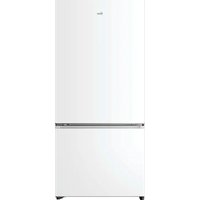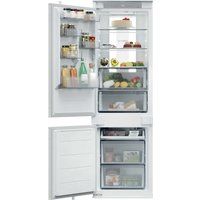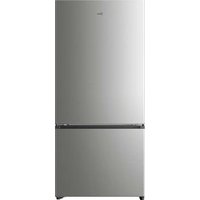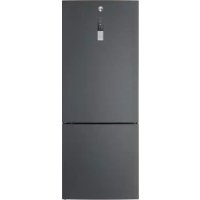
HFRIDGE 500 MAXI HMNV 7184 DXTN - Fridge HOOVER - Free user manual and instructions
Find the device manual for free HFRIDGE 500 MAXI HMNV 7184 DXTN HOOVER in PDF.


User questions about HFRIDGE 500 MAXI HMNV 7184 DXTN HOOVER
0 question about this device. Answer the ones you know or ask your own.
Ask a new question about this device
Download the instructions for your Fridge in PDF format for free! Find your manual HFRIDGE 500 MAXI HMNV 7184 DXTN - HOOVER and take your electronic device back in hand. On this page are published all the documents necessary for the use of your device. HFRIDGE 500 MAXI HMNV 7184 DXTN by HOOVER.
USER MANUAL HFRIDGE 500 MAXI HMNV 7184 DXTN HOOVER
DISPLAY TOP FEATURED
INTERFACCIA UTENTE INTERNA
CARATTERISTICTECNICHE
HUMIDITY EQUALISER
Tips for keeping food perfect in the Fridge
Where to store your foods in the fridge
Storing Frozen Food
ENERGYSAVING
TAKE CARE
Defrosting
Cleaning and Care
CHANGING THE INTERNAL LIGHT
REVERSING THE DOOR SWING
TROUBLE SHOOTING
Thank you for purchasing this product.
Before using your refrigerator, please carefully read this instruction manual in order to maximize its performance. Store all documentation for subsequent use or for other owners. This product is intended solely for household use or similar applications such as:
- the kitchen area for personnel in shops, offices and other working environments
on farms, by clientele of hotels, motels and other environments of a residential type
-atbedandbreakfasts(B&B)
for catering services and similar applications not for retail sale.
This appliance must be used only for purposes of storage of food, any other use is considered dangerous and the manufacturer will not be
responsible for any omissions. Also, it is recommended that you take note of the warranty conditions. Please, to obtain the best possible performance and trouble free operation from your appliance it is very important to carefully read these instructions. Failure to observe these instructions may invalidate your right to free service during the guarantee period.
SAFETY INFORMATION
This guide contains many important safety information. Please, we suggest you keep these instructions in a safe place for easy reference and a good experience with the appliance.
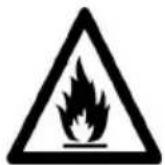
The refrigerator contains a refrigerant gas (R600a: isobutane) and insulating gas (cyclopentane), with high compatibility with the environment, that are, however, inflammable.

Caution: risk of fire
If the refrigerant circuit should be damaged:
- Avoid opening flames and sources of ignition.
Thoroughly ventilate the room in which the appliance is situated
WARNING!
Care must be taken
while cleaning/carrying the appliance to avoid touching the condenser metal wires at the back of the appliance, as you might injure your fingers and hands or damage your product.
- This appliance is not designed for stacking with any other appliance. Do not attempt to sit or stand on top of your appliance as it is not designed for such use. You could injure yourself or damage the appliance.
Make sure that mains cable is not caught under the appliance during and after carrying/moving the appliance, to avoid the mains cable becoming cut or damaged. - When positioning your appliance take care not to damage
your flooring, pipes, wall coverings etc. Do not move the appliance by pulling by the lid or handle. Do not allow children to play with the appliance or tamper with the controls. Our company declines to accept any liability should the instructions not be followed.
- Do not install the appliance in humid, oily or dusty places, nor expose it to direct sunlight and to water.
- Do not install the appliance near heaters or inflammable materials.
- If there is a power failure do not open the lid. Frozen food should not be affected if the failure lasts for less than 20 hours. If the failure is longer, then the food
should be checked and eaten immediately or cooked and then refrozen.
- If you find that the lid of the chest freezer is difficult to open just after you have closed it, don't worry. This is due to the pressure difference which will equalize and allow the lid to be opened normally after a few minutes.
- Do not connect the appliance to the electricity supply until all packing and transit protectors have been removed.
- Leave to stand for at least 4 hours before switching on to allow compressor oil to settle if transported horizontally.
- This freezer must only be used for its intended purpose (i.e. storing and freezing of edible
foodstuff).
- Do not store medicine or research materials in the Wine Coolers. When the material that requires a strict control of storage temperatures is to be stored, it is possible that it will deteriorate or an uncontrolled reaction may occur that can cause risks.
- Before performing any operation, unplug the power cord from the power socket.
- On delivery, check to make sure that the product is not damaged and that all the parts and accessories are in perfect condition.
If in the refrigeration system a leak is noted, do not touch the wall outlet and do not use open flames. Open the window and let air
into the room. Then call a service center to ask for repair.
- Do not use extension cords or adapters.
- Do not excessively pull or fold the power cord or touch the plug with wet hands.
- Do not damage the plug and/or the power cord; this could cause electrical shocks or fires.
- If the supply cord is damaged, it must be replaced by the manufacturer, its service agent or similarly qualified person in order to avoid a hazard.
-
Do not place or store inflammable and highly volatile materials such as ether, petrol, LPG, propane gas, aerosol spray cans, adhesives, pure alcohol, etc. These materials may cause an explosion.
-
Do not use or store inflammable sprays, such as spray paint, near the Wine Coolers. It could cause an explosion or fire.
- Do not place objects and/or containers filled with water on the top of the appliance.
We do not recommend the use of extension leads and multi-way adapters. - Do not dispose of the appliance on a fire. Take care not to damage, the cooling circuit/pipes of the appliance in transportation and in use. In case of damage do not expose the appliance to fire, potential ignition source and immediately ventilate the room where the appliance is situated.
The refrigeration
system positioned behind and inside the Wine Coolers contains refrigerant. Therefore, avoid damaging the tubes.
- Do not use electrical appliances inside the food storage compartments of the appliance, unless they are of the type recommended by the manufacturer.
- Do not damage the refrigerant circuit.
- Do not use mechanical devices or other means to accelerate the defrosting process, other than those recommended by the manufacturer.
- Do not use electrical appliances inside the food storage compartments, unless they are of the type recommended by the manufacturer.
- Do not touch internal cooling elements,
especially with wet hands, to avoid cracks or injuries.
- Maintain the ventilation openings in the appliance enclosure or in the built-in structure, free of obstruction.
- Do not use pointed or sharp-edged objects such as knives or forks to remove the frost.
- Never use hairdryers, electrical heaters or other such electrical appliances for defrosting.
- Do not scrape with a knife or sharp object to remove frost or ice that occurs. With these, the refrigerant circuit can be damaged, the spill from which can cause a fire or damage your eyes.
- Do not use mechanical devices or other equipment to hasten the defrosting
process.
- Absolutely avoid the use of open flame or electrical equipment, such as heaters, steam cleaners, candles, oil lamps and the like in order to speed up the defrosting phase.
- Never use water wash the compressor position, wipe it with a dry cloth thoroughly after cleaning to prevent rust.
It is recommended to keep the plug clean, any excessive dust residues on the plug can be the cause fire.
The product is designed and built for domestic household use only. - The guarantee will be void if the product is installed or used in commercial or non-residential domestic household premises.
The product must be
correctly installed, located and operated in accordance with the instructions contained in the User Instructions Booklet provided.
- The guarantee is applicable only to new products and is not transferable if the product is resold.
- Our company disclaims any liability for incidental or consequential damages.
- The guarantee does not in any way diminish your statutory or legal rights.
- Do not perform repairs on this Wine Coolers. All interventions must be performed solely by qualified personnel.
If you are discarding an old product with a lock or latch fitted to the door, ensure that
it is left in a safe condition to prevent the entrapment of children.
- This appliance can be used by children aged from 8 years and above and by persons with reduced physical, sensory or mental capabilities or with a lack of experience and knowledge; provided that they have been given adequate supervision or instruction concerning how to use the appliance in a safe way and understand the hazards involved.
- Children should not play with the appliance. Cleaning and user maintenance should not be made by children without supervision.
- Locks:If your Fridge/Freezer is
fitted with a lock, to prevent children being entrapped keep the key out of reach and not in the vicinity of the appliance. If disposing of an old Fridge/Freezer break off any old locks or latches as a safeguard.
FOR appliances without a 4-star compartment: this refrigerating appliance is not suitable for freezing foodstuffs
FOR a free standing appliance: this refrigerating appliance is not intended to be used as a built-in appliance
FOR Wine Coolers: this appliance is intended to be used exclusively for the storage of wine
COMBI REFRIGERATOR HOOVER Climate Class
The appliance is designed to operate at the limited range of ambient temperature, depending on climate zones. Do not use the appliance at the temperature out of the limit. Climate class of your appliance is indicated on the label with technical description inside the fridge compartment.
| Climate Class | Amb. T. (℃) | Amb. T. (°F) |
| SN | From 10 to 32 | From 50 to 90 |
| N | From 16 to 32 | From 61 to 90 |
| ST | From 16 to 38 | From 61 to 100 |
| T | From 16 to 43 | From 61 to 110 |
- extended temperate (SN): 'this refrigerating appliance is intended to be used at ambient temperatures ranging from 10^ to 32^ ;
- temperate (N): 'this refrigerating appliance is intended to be used at ambient temperatures ranging from 16^ to 32^ ;
- subtropical (ST): 'this refrigerating appliance is intended to be used at ambient temperatures ranging from 16^ to 38^'
- tropical (T): 'this refrigerating appliance is intended to be used at ambient temperatures ranging from 16^ to 43^ ;
TRANSPORTATION INSTRUCTIONS
The appliance should be transported only in a vertical upright position. The packing as supplied must be intact during transportation. If during the course of transport the product has been transported horizontally, it must only be laid on its left hand side (when facing the door front) and it must not be operated for at least 4 hours to allow the system to settle after the appliance is brought back to upright position.
- Failure to comply with the above instructions could result in damage occurring to the appliance. The manufacturer will not be held responsible if these instructions are disregarded.
- The appliance must be protected against rain, moisture and other atmospheric influences.
INSTALLATION INSTRUCTIONS
- If possible avoid placing the appliance near cookers, radiators or in direct sunlight as this will cause the compressor to run for long periods. If installed next to a source of heat or refrigerator, maintain the following minimum side clearances:
| From Cookers | 4" (100 mm) |
| From Radiators | 12" (300 mm) |
| From Fridges | 4" (100 mm) |
- Make sure that sufficient room, with an average temperature of between 16^ and 32^ , is provided around the appliance to ensure free air circulation. Ideally, a space of no less than 9cm on the back and 2cm on the sides.
- The appliance should be located on a smooth surface.
- It is forbidden to use the refrigerator outdoors.
- Protection from moisture. Do not locate the freezer in moist space to avoid the metal parts rusty. And do not spray water to the freezer, otherwise it will weaken the insulation and causes current leakage.
- Refer to "Cleaning and Care" section to prepare your appliance for use.
- If the freezer is installed in unheated areas, garages etc., in cold weather condensation may form on the outer surfaces. This is quite normal and is not a fault. Remove the condensation by wiping with a dry cloth.
- Never place Refrigerator in a wall recessed or into fitted cabinets or furniture when it is working, the grille at the back may become hot and the sides warm. Do not drape the Refrigerator with any covering.
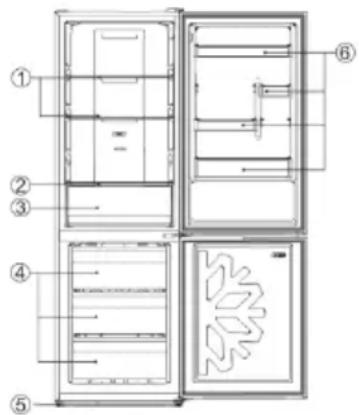
| No | Description |
| 1 | Fridge shelves |
| 2 | Crisper Cover |
| 3 | Crisper |
| 4 | Freezer drawers |
| 5 | Adjustable Feet |
| 6 | Refrigerator door racks |
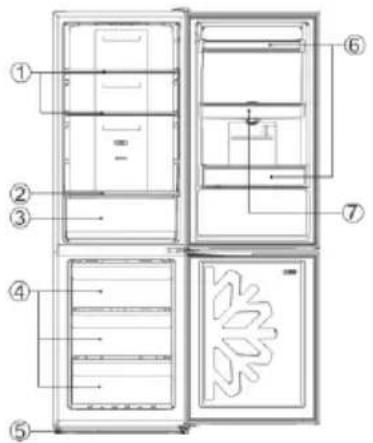
| No | Description |
| 1 | Fridge shelves |
| 2 | Crisper Cover |
| 3 | Crisper |
| 4 | Freezer drawers |
| 5 | Adjustable Feet |
| 6 | Refrigerator door racks |
| 7 | Water tank assembly |

| No | Description |
| 1 | Fridge shelves |
| 2 | Crispercover |
| 3 | Vegetable and fruit crisperr |
| 4 | Freezing drawers |
| 5 | Leveling feet |
| 6 | Door balcony |
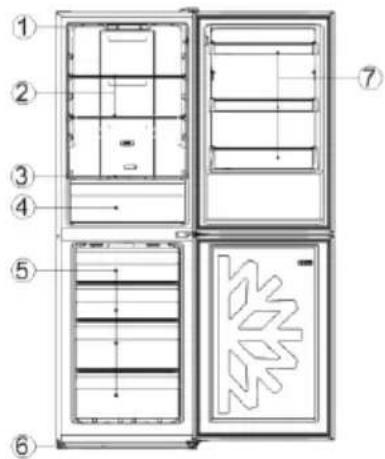
| No | Description |
| 1 | Control panel |
| 2 | Fridge shelves |
| 3 | Crisper Cover |
| 4 | Crisper |
| 5 | Freezer drawers |
| 6 | Adjustable Feet |
| 7 | Refrigerator door racks |
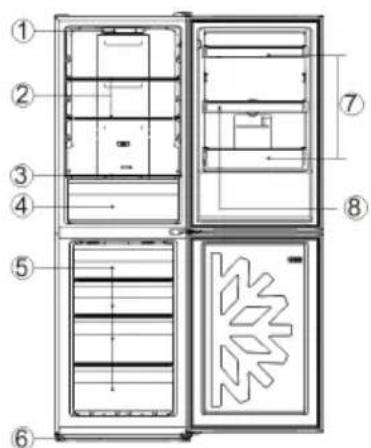
| No | Description |
| 1 | Control panel |
| 2 | Fridge shelves |
| 3 | Crisper Cover |
| 4 | Crisper |
| 5 | Freezer drawers |
| 6 | Adjustable Feet |
| 7 | Refrigerator door racks |
| 8 | Water tank assembly |
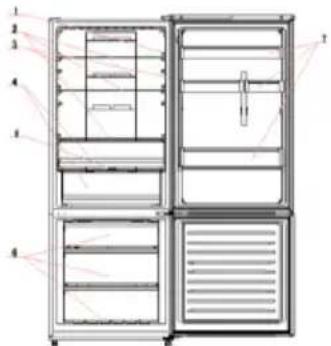
| No | Description |
| 1 | Light switch |
| 2 | Fridge shelves |
| 3 | Light |
| 4 | Crisper box |
| 5 | Crisper box cover |
| 6 | Freezer drawers |
| 7 | Door balcony |
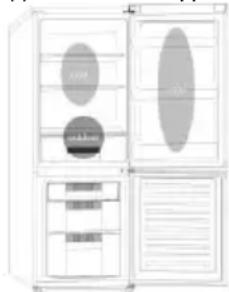
The most energy-saving configuration requires drawers, food box and shelves to be positioned in the product, please refer to the above pictures.
STARTING TO USE
Before you starting to use the freezer, please check that:
- The interior is dry and air can circulate freely at the rear.
- Clean the interior as recommended under "TAKE CARE" section (electric parts of the refrigerator can only be wiped by dry cloth).
- Do not switch on until 4 hours after moving the fridge/freezer. The coolant fluid needs time to settle. If the appliance is switched off at any time, wait 30 minutes before switching back on to allow the coolant fluid to settle.
- Before connecting the Refrigerator to the mains supply position. The thermostat control dia is located inside the Fridge compartment.
- Turn the thermostat knob to the "3" position and turn on the electricity. The compressor and the light inside the refrigerator will begin to work.
- Before storing foods in your refrigerator, turn the refrigerator on and wait for 24 hours, to make sure it is working properly and to allow the Fridge/Freezer to fail to the correct temperature.
- Open the door 30 minutes later, if the temperature in the refrigerator decreased obviously, it shows that the refrigerator system works well. When the refrigerator operates for a period of time, the temperature controller will automatically set the temperature within limits it opens.
COMBI OPERATION
Appliance connected to power at the first time: When the appliance is connected to power at the first time, the display will be lit for 2 seconds before going normal and the appliance runs with intelligence function.
Display Control: When the refrigerator door is closed and there is no button operation in 3 minutes, the display light goes off.
When the display light is off, open the refrigerator door or click any button to light it up.
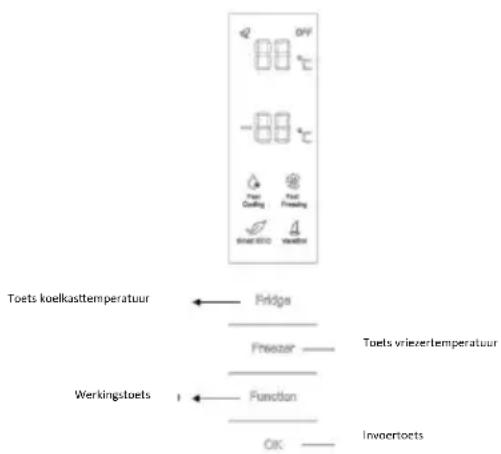
VERTICAL DISPLAY (Only on some models)
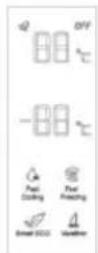
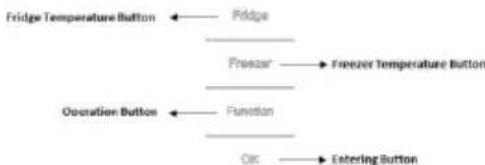
TEMPERATURE SETTING: Click the "Fridge" or "Freezer" button and when it flickers in the symbol, temperatures can be set. Each time when the button is clicked, the temperature changes accordingly. Temperatures cannot be set under functions of fast cooling, fast freezing, Smart ECO and vacation. Under temperature setting, if there is no button operation in 5 seconds, the button stops flickering and the set temperature comes into effect.
SMART ECO: Activate the Smart Eco button to set the temperatures of the fridge in max. energy efficiency conditions (+4^ for fridge temperature, - 18^ for freezer temperature).
To enter Smart Eco: Click "option" until it flickers and then click "OK" to enter this function.
To deactivate Smart Eco: Click "option" until it goes to Smart ECO, click "OK" to quit this function and the light goes off.
FAST COOLING: Activate Fast Cooling mode to start an additional pulse for a fast freezing of the fridge compartment. The function is activated and confirmed by the switching on of the dedicated LED icon.
To enter Fast Cooling: Click "option" until it flickers in "Fast Cooling" and then click "OK" to enter this function.
To deactivate Fast Cooling: Click "option" until it goes to "fast cooling" and then click "OK" to deactivate this function.
FAST FREEZING: Activate Fast Freezing to rapidly freeze big quantities of food keeping intact nutritional food properties. When the light in Fast Freezing goes off and the freezer temperature goes
back to the value before fast freezing. When Fast Freezing time is up (26 hours), it deactivates automatically. When it goes to Vacation, Fast Freezing stops.
To enter Fast Freezing: Click "option" until it flickers in "Fast Freezing" and then click "OK" to enter this function.
To deactivate Fast Freezing: Click "option" until it goes to "fast freezing" and then click "OK" to quit this function.
VACATION: In case of long stops, the Vacation function can be used. This function deactivates the fridge compartment, while leaving the freezer on. Ensure that there is no food inside the fridge compartment before using this function. The function is activated and confirmed by the switching on of the dedicated LED icon. The light in Vacation goes off and the refrigerator temperature goes back to the value before Vacation.
Vacation quits under functions of Smart ECO and Fast Cooling.
To enter Vacation: Click "option" until it flickers in "Fast Freezing" and then click "OK" to enter this function.
To deactivate Vacation: Click "option" until it goes to "Vacation" and then click "OK" to quit this function.
POWER OFF MEMORY: Refrigerator can automatically keep all the setting in case of power off. When the unit is plugged in again, the refrigerator will run with the setting before power off.
POWER-ON DELAY: To prevent harm to the refrigerator in case of sudden power cut and power on, the unit does not start immediately if the power off time is less than 5 minutes.
FREEZER OVER-TEMPERATURE ALARM (only in case of power on): When the freezer temperature is higher than 10^ Cat the first time connected to power, the symbol light of the freezer chamber goes on and the number representing temperature flickers.
Press any button or wait for 5 seconds, flickering stops and it goes back to the temperature that was set.
REFRIGERATOR DOOR OPENING ALARM: When the refrigerator is open over 3 minutes, the buzzer will buzz. Close the door or press any button to stop the alarm, but for the latter, the alarm will go off again after 3 minutes.
SENSOR FAULT ALARM: When it shows "E0", "E1", "E2" or other abnormal symbols, it means sensor faults and the refrigerator needs repair.
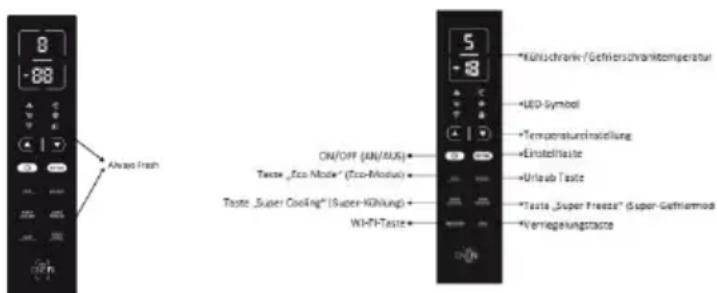
TOP FEAUTRED VERTICAL DISPLAY (Only on some models)
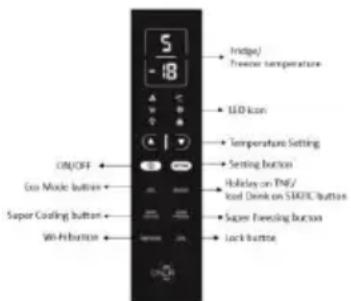
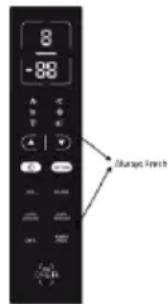
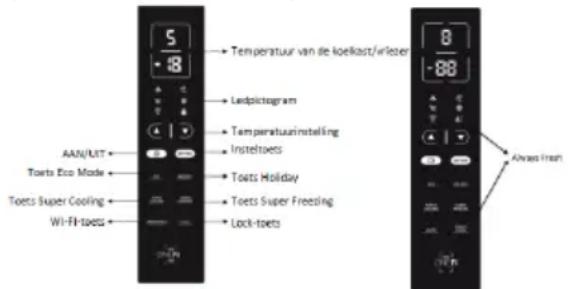
ALWAYS FRESH Button: On models with Always Fresh Technology press the "Always Fresh" button to activate the function.
SETTING Button: Press "SETTING" to change the temperature.
When button is pressed for the first time: You can change refrigerator temperature with PLUS Button and MINUS Button.
When button is pressed for the second time: You can change refrigerator temperature with PLUS Button and MINUS Button.
On models with Always Fresh Technology press the "Setting" button for 3 seconds to lock and unlock the display.
ON/OFF Button: To turn on Refrigerator Press ON/OFF button for 3 seconds. To turn off Refrigerator: Press ON/Off button for 3 seconds.
Stand-by Mode: To save energy is possible to activate Stanby Mode. The refrigerator will work in normal state and all leds will turn OFF
To enter Stan-by Mode: Press ON/OFF button for 1 second.
To deactivate Stan-by Mode: Press ON/OFF button for 1 second. Fridge back to normal operation.
ECO MODE Button: Press Eco Mode button to set temperatures of the fridge in max. energy efficiency conditions (+5^ for fridge temperature, -18^ for freezer temperature). If you want to exit the ECO mode function, you need to press the Eco Mode button again and the refrigerator temperature turns back to normal operation.
HOLIDAY Button: In case of long stops, the Holiday function can be used. This function deactivates the fridge compartment, while leaving the freezer on. Ensure that there is no food inside the fridge compartment before using this function. The function is activated and confirmed by the switching on of the dedicated LED icon. If you want to exit the Holiday function, you will need to press the "Holiday" button again, the light in Holiday goes off and the refrigerator temperature goes back to the value before Holiday.
SUPER COOLING Button: Press Super Cooling button to start an additional pulse for a fast freezing of the fridge compartment. The function is activated and confirmed by the switching on of the dedicated LED icon.
If you want to exit the Super Cooling function, you need to press the Super Cooling button again and the refrigerator temperature turns back to normal operation.
SUPER FREEZING Button: Press Super Freezing
button to rapidly freeze big quantities of food keeping intact nutritional food properties. If you want to exit the Super Freezing function, you need to press the Super Freezing button again and the freezer temperature turns back to normal operation.
WI-Fi Button: This appliance is equipped with OneFi+ technology that allows you to control it remotely via App. Press OneFi+ button to activate Wi-Fi function. Machine Enrollment (on App): Download the Hoover Wizard App on your device. The Hoover Wizard App is available for devices running both Android and iOS, both for tablets and for smartphones. Get all the details of the One Fi+ functions by browsing the App in DEMO mode.
Open the App, create the user profile and enroll the appliance following the instructions on the device display or the "Quick Guide" attached on the machine. This operation is necessary just for the first installation. To finalize the enrollment following the instruction on the smartphone's screen.
Refrigerator usage from remote by App: When the enrollment is completed, there will be Wi-Fi LED switched on. From now on it will be possible to manage the product by using the buttons on the display or using the App: both of them will be aligned according to the last command given.
LOCK Button: Press Lock button to block display user interface (Lock icon enlights, "LO" appears on display and, after 2 seconds, the refrigerator and freezer temperature shows recovery). If you want to exit Lock function, press the "Lock" button again for 3 seconds, and the refrigerator will exit the Lock function.
INTERNAL USER INTERFACE (Only on some models)
SET Button: Press SET button for setting the temperature until you reach the level you want where level 1 is the warmest and level 4 is the

coldest. Under normal operating conditions, we recommend using an intermediate setting (level 2). Once the setting takes effect, it immediately enters the corresponding stall for operation control, and the stall indicator lights up 3s3min and then goes out. Factory default temperature is set to 2.
Long press "SET" key to exceed 3s and enter the hardware self-check program. The hardware self-check operation is effective within 10min, and the long button operation after 10min is invalid.
WI-Fi Button: This appliance is equipped with OneFi+ technology that allows you to control it remotely via App. Press Wi-Fi icon for 3 seconds to activate Wi-Fi function and the icon light changes from white to blue.
Machine Enrollment (on App): Download the Wizard App on your device. The Hoover Wizard App is available for devices running both Android and iOS, both for tablets and for smartphones. Get all the details of the OneFi+ functions by browsing the App
in DEMO mode.
Open the App, create the user profile and enroll the appliance following the instructions on the device display or the "Quick Guide" attached on the machine. This operation is necessary just for the first installation. To finalize the enrollment following the instruction on the smartphone's screen.
Refrigerator usage from remote by App: When the enrollment is completed, there will be Wi-Fi LED switched on. From now on it will be possible to manage the product by using the buttons on the display or using the App: both of them will be aligned according to the last command given.
FAST COOL Button: when "FAST COOL" button is pressed, rapid cooling function is activated, according to the 21^ to refrigeration control gear.
Maximum running time is 3h, after this time temperature will be set to 1.
If the "SET" button is pressed in the process of speed cooling, the instant cooling function is immediately withdrawn and the default is entered into the next gear.
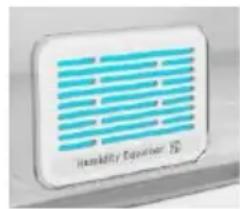
TECHNICAL FEATURES HUMIDITY EQUALISER (Only on some models)
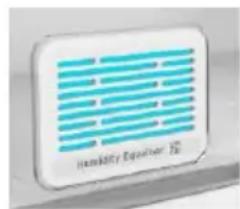
The exclusive Hoover Humidity Equaliser uses this humidity naturally generated by fruits and vegetables to keep always a level between 85% and 95% .
ALWAYS FRESH TECHNOLOGY (Only on some models)
Is the innovative Hoover technology that allows you to preserve food better
and longer, both in the refrigerator and in the freezer. Always Fresh promotes the maintenance and preservation of foods by interacting with their enzymatic activity through the activation of water molecules, naturally present in them.
Preservation technology is activated by a suitable button on the display.
Always Fresh must be switched off during the energy consumption test.
WATER DISPENSER (Only on some models)
The water dispenser allows you to get chilled water without opening the fridge compartment door.
Before first use
Before using the water dispenser for the first time, remove and clean
the water tank located inside the fridge
compartment.
- Lift the water tank out of the fridge compartment.
- Open the water tank cover and then clean the water tank and cover
in warm soapy water. Rinse thoroughly.
- After cleaning, attach the cover to the water tank and then replace
the water tank back on the fridge door. - Clean the dispenser pad outside the fridge door.
Filling the water tank with water
- Open the small cover.
- Fill the water tank with drinkable water up to the Max line.
- Close the small cover.
Dispensing
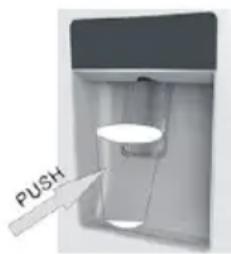
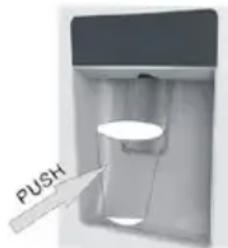
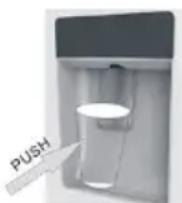
To dispense water, push the dispenser pad gently, using
a glass or container. To stop the flow of water, pull your glass away from the
dispenser pad.
Tips for keeping food perfect in the Fridge
Take extra care with meat and fish: cooked meats should always be stored on a shelf above raw meats to avoid bacterial transfer. Keep raw meats on a plate which is large enough to collect juices and cover it with cling film or foil.
Leave space around food: this allows cold air to circulate around the Fridge, ensuring all parts of the Fridge are kept cool.
Wrap up food! to prevent transfer of flavors and drying out, food should be separately packed or covered. Fruit and vegetables need not be wrapped.
Pre-cooked food should be cooled properly: allow pre-cooked food to cool down before placing in the Fridge. This will help to stop the internal temperature of the Fridge from rising.
Shut the door! to prevent cold air escaping, try to limit the number of times you open the door. When retuning from shopping, sort foods to be kept in your Fridge before opening the door. Only open the door to put food in or take it out.
Where to store your foods in the fridge
Position different food in different compartments according to be below table
| Refrigerator compartment | Type of food |
| Door or balconies of fridge compartment | ·Foods with natural preservatives, such as jams, juices, drinks, condiments. ·Do not store perishable foods |
| Crisper drawers (salad drawer) | ·Fruits, herbs and vegetables should be placed separately in the crispper bin |
| • Do not store bananas, onions, potatoes, garlic in the refrigerator | |
| Fridge shelf – middle | • Dairy products, eggs |
| Fridge shelf – top | • Foods that do no need coocking, such as ready-to-eat foods, deli meats, leftovers. |
| Freezer drawer(s)/tray | • Foods for long-term storage • Bottom drawer for raw meet, poultry, fish • Middle drawer for frozen vegetables, chips. • Top tray for ice cream, frozen fruit, frozen baked goods. |
Cool area: this is where to store foods which will keep longer if they are kept cool. Milk, eggs, yogurt, fruit juices, hard cheeses eg. Cheddar. Opened jars and bottles of salad dressings, sauces and jams. Fats, eg. Butter, margarine, low-fat speads, cooking fats and lard.
Coldest area (0^ to 5^) : this is where foods which must be cold to keep them safe should be kept:
- Raw and uncooked foods should always be wrapped.
-Pre-cooked chilled foods, eg. Ready meals, meat pies, soft cheeses.
-Pre-cooked meats eg. Ham,
-
Prepared salads(including pre-packed mixed green salads, rice, potato salad etc).
-
Desserts, eg. Fromage frais, home-prepared food and leftovers or cream cakes.
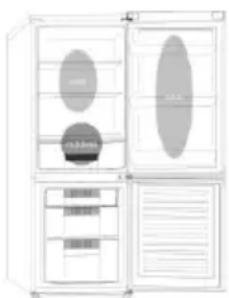
Crisper: this is the most humid part of the Fridge. Vegetables, fruit, fresh salad items eg. Unwashed whole lettuce, whole tomatoes, radishes etc can be stored here.
WE RECOMMEND THAT ALL PRODUCE KEPT IN THE SALAD BIN IS WRAPPED.
NOTE: Always wrap and store raw meat, poultry and fish on the lowest shelf at the bottom of the fridge. This will stop them dripping onto, or touching other foods. Do not store inflammable gasses or liquids in the fridge.
Electrical operation after 3h on the freezer, the temperature in the cabinet above -12^ , the alarm
light is it and buzzer sounds.
Storing Frozen Food
Prepackaged commercially frozen food should be stored in accordance with the frozen food manufacturer's instructions for a 10-10-10 free can compartment.
To ensure that the high quality achieved by the frozen food manufacturer and the food retailer is maintained the following should be remembered:
-
Put packets in the freezer as quickly as possible after purchase.
-
Do not exceed "Use By", "Best Before" dates on the packaging.
| DO | DON'T |
| Defrost food from the freezer thoroughly in a fridge or in a microwave oven following defrosting and cooking instructions. | Use pointed sharp edged objects such as knives, forks to remove the ice. |
| Defrost frozen meat completely before cooking. | Put hot food in the freezer. Let it cool down first. |
| Store commercially frozen food in accordance with the instructions given on the packets that you buy. | Put liquid-filled bottles or sealed cans containing carbonated liquids into the freezer as they may burst. |
| Check contents of the refrigerator at regular intervals. | Remove items from the freezer with wet hands. |
| Clean and defrost your refrigerator regularly. | Freeze fizzy drinks. |
| Prepare fresh food for freezing in small portions to ensure rapid freezing. | Consume ice-cream and water ice-dried from freezer. It may cause "freater burns" on lips. |
storage time in the fridge compartment is achieved with colder temperatures. Since some particular products (as fresh fruits and vegetables) may be damaged with colder temperatures, it is suggested to keep them in the crispier drawers, whenever present. If not present, maintain an average setting of the thermostat.
For frozen food, refer to the storage time written on the food packaging. This storage time is achieved whenever the setting respects the reference temperatures of the compartment (one-star-6°C, two stars -12°C, three stars -18°C).
ENERGYSAVING
For better energy saving we suggest:
- Installing the appliance away from heat sources and not exposed to direct sunlight and in a well-ventilated room.
Avoid putting hot food into the refrigerator to avoid increasing the internal temperature and therefore causing continuous functionalizing of the compressor.
Do not excessively stuff food so as to ensure proper air circulation. - Defrost the appliance in case there is ice to facilitate the transfer of cold.
- In case of absence of electrical energy, it is advisable to keep the refrigerator door closed.
- Open or keep the doors of the appliance open as little as possible.
- Avoid adjusting the setting to temperatures too cold.
- Remove dust present on the rear of the appliance.
TAKE CARE
Defrosting
vacuumed using a soft brush attachment.
Do not use harsh cleaners, scouring pads or solvents to clean any part of the Fridge/Freezeer.
CHANGING THE INTERNAL LIGHT
- Before carrying out the LED replacement always disconnect the mains supply.
- Hold and lift up the LED light cover.
- Remove the old LED by unscrewing it in an anti-clockwise direction.
- Replace with a new LED light by screwing it in a clockwise direction marking sure that it is secure in the light holder.
- Refit the light cover and re-connect your Fridge to the mains supply and switch on.
REVERSING THE DOOR SWING Dissemble the Refrigerator Door
- a. Use a tool to remove the screw off the hinge cover, and then remove the latter. Insert the communication line to the hole on the cabinet top.
b. Use a tool to remove the 4 screws off the upper hinge cover and then remove the latter. Pry up the door bush and small end cap cover on the door.
c. Insert the door bush and door communication line into the hole on the door and then put on the small end cap cover.
d. Use a tool to remove the 2 screws as shows in the below figure to remove the hole cover on the cabinet top and get the cabinet communication line out of the hole.
Pry up the small end cap cover on the door and get out the door bush and door communication line.
e. Insert the door bush into the round hole on the door and then put on the small end cap cover.
f. Move the refrigerator door upward over 500mm to remove the door.
- a. Use a tool to remove the 3 screws off the middle hinge cover and then remove the middle hinge.
b. move the freezer door upward over 500mm to remove the door.
c. Remove the adjustable front feet under the lower hinge; use a tool to remove the 4 screws from the lower hinge and then disassemble the lower hinge. Door disassembly is finished.
Assemble door, lower hinge accessories to the corresponding positions
- a. Use a tool to get the door bush out as shown in the below figure and assemble it to the corresponding position of the other side. b. Use a tool to remove the screws off the stopper ass as shown in the below figure and
then assemble them to the other side of the door.
c. Use a tool to remove the axle and two stoppers on the lower hinge and then assemble them to the position as shown in the below figure.
Assemble the refrigerator door and freezer door to the opposite side
- a. Remove the adjustable front foot as shown below by hand and then assemble the lower hinge to the other side of the cabinet and fix the screws by using a tool.
b. Assemble the shorter adjustable front foot to the lower hinge side and adjust the height of the foot to make the refrigerator stay in level. - Put on the freezer door and turn the middle hinge by 180^ and then assemble it to the other side of the cabinet; use a tool to screw up the 3 screws to fix the middle hinge.
- Put on the refrigerator door and assemble the upper hinge to the other side of the cabinet; use a tool to screw up the 4 screws to fix the upper hinge.
- After that, connect the door communication line and the cabinet communication line and then put on the upper hinge cover and fix it using a screw.
Assemble the hole cover to the other side of the cabinet and use a tool to screw up the hole cover.
Door disassembly is finished here.
Double check that the door is aligned correctly and all the seals are closed on all sides. If necessary, re-adjust the levelling feet.
NOTE: If you want to have the door swing reversed, we recommend that your contact a qualified technician. You should only try to reverse the door yourself if you believe that you are qualified to do so.
All parts removed must be saved to do the reinstallation of the door. You should rest the fridge freezer on something solid so that it will not slip during the door change process. Do not lay the fridge freezer flat as this may damage the coolant system. Ensure the fridge freezer is unplugged and empty.
We recommend that 2 people handle the fridge freezer during assembly.
TROUBLE SHOOTING
- If the appliance does not operate when switched on, check.
- Power cut: If the internal temperature of the Fridge/Freezer compartment is -18^ C or less when the power returns, your food is safe. The food in your Fridge/Freezer will remain frozen for approx 16 hours with the door closed. Do not open the Fridge/Freezer door more than necessary.
-
The product is designed and built for domestic household use only.
-
The plug is inserted properly in the socket and that the power supply is on. (To check the power supply to the socket, plug in another appliance).
- The fuse has blown/circuit breaker has tripped/main distribution switch has been turned off.
- The temperature control has been set correctly.
- If the refrigerator is exceptionally cold, you may have accidentally adjusted the thermostat control dial to a higher position.
If the refrigerator is exceptionally warm, the compressor may not be working. Turn the thermostat control dial to the maximum setting and wait a few minutes. If there is no humming noise, it is not working. Contact the local store where your purchase was made. - If condensation appears outside of the Refrigerator, this may be due to a change in the room temperature. Wipe off any residue of moisture. If the problem continues contact the local store where your purchase was made.
- If the provided plug has been replaced make sure the new plug is properly connected. If the appliance is still not operating after the above checks, please contact Customers Service.
- To contact the technical assistance, visit our website: https://corporate.haier-europe.com/en/ Under the section "website", choose the brand of your product and your country. You will be redirected to the specific website where you can find the telephone number and form to contact the technical assistance
SCRAPPING OLD APPLIANCES
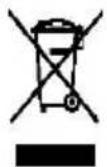
This appliance is marked according to the European directive 2012/19/EU on Waste Electrical and Electronic Equipment (WEEE).
WEEE contains both polluting substances (which can cause negative consequences for the environment) and basic components (which can be re-used). It is important to have WEEE subjected to specific treatments, in order to remove and dispose properly all pollutants, and recover and recycle all materials. Individuals can play an important role in ensuring that WEEE does not become an environmental issue; it is essential to follow some basic rules: WEEE should not be treated as household waste.
WEEE should be handed over to the relevant collection points managed by the municipality or by registered companies. In many countries, for large WEEE, home collection could be present.
In many countries, when you buy a new appliance, the old one may be returned to the retailer who has
to collect it free of charge on a one-to-one basis, as long as the equipment is of equivalent type and has the same functions as the supplied equipment.
Conformity
By placing the mark on this product, we are confirming compliance to all relevant European safety, health and environmental requirements which are applicable in legislation for this product.
GUARANTEE
Minimum guarantee is: 2 years for EU Countries, 3 years for Turkey, 1 year for UK, 1 year for Russia, 3 years for Sweden, 2 years for Serbia, 5 years for Norway, 1 year for Morocco, 6 months for Algeria, Tunisia no legal warranty required.
AVAILABILITY OF SPARE PARTS
"Thermostats, temperature sensors, printed circuit boards and light sources are available for a minimum period of seven years after placing the last unit of the model on the market. Door handles, door hinges, trays and baskets for a minimum period of seven years and door gaskets for a minimum period of 10 year, after placing the last unit of the model on the market".
For further information about the product, please consult https://eprel.ec.europa.eu/ or scan the QR on the energy label supplied with the appliance
TABLE DES MATIÈRES
INFORMATIONS SUR LA SECURITE
COMBI HOOVER
Classe climatique
INSTRUCTIONS DE TRANSPORT
INSTRUCTIONS D'INSTALLATION
DÉMARRAGE
FONCTIONNEMENT COMBINED
UNITE D'AFFICHAGE VERTICALE
UNITE D'AFFICHAGE VERTICALE AVANCE
INTERFACE UTILISATEUR INTERNE
CHARACTERISTIQUES TECHNIQUES
HUMIDITY EQUALISER
TECOLOGÍA ALWAYS FRESH(SI ESTÁ PRESENTE)
OBERES VERTIKALES DISPLAY (FALLS VORHANDEN
VERTICAL DISPLAY MET FUNCTIONS
INTERNE GEBRUIKERSINTERFACE
VERTICAAL DISPLAY (INDIEN AANWEZIG)
VERTICAAL DISPLAY MET FUNCTIONS (INDIEN AANWEZIG)
ALWAYS FRESH TECHNOLOGY (INDIEN AANWEZIG)
WATERDISPENSER (INDIEN AANWEZIG)
DET VERTIKALE DISPLAY
MEST ANVENDTE PÄ DET VERTIKALE DISPLAY
INTERN BRUGERGRAENSEFLADE
TEKNISKE EGENSKABER
HUMIDITY EQUALISER
ANTIBAKTERIELT SYSTEM (hvis til stede)
VANDDISPENSER
pá bed and breakfasts (B & B)
SKROTNING AV GAMLA APPARATER
Mer information om Produkten finns pa https://eprel.ec.europa.eu/ller skannar QR pa energimarket som medfoljer apparaten.
TEKNISET OMINAISUDET
HUMIDITY EQUALISER
ANTIBAKTEERINEN JARJESTELMA (ios varusteena)
VEDENANNOSTELIJA
SIGURNOSNE INFORMACJE
COMBI HOOVER
Klimatski razred
UPUTE ZAPRENOSENJE
UPUTE ZA POSTAVLIANJE
POCTAKUPORABE
KOMBINIRANI RAD
VERTIKALNI ZASLON
VERTIKALNI ZASLON VRHUNSKIH
KARAKTERISTIKA
INTERNO KORISNICKO SUCELJE
TEHNICKE KARAKTERISTIKE
HUMIDITY EQUALISER
ANTIBAKTERIJSKI SUSTAV (ako postoji)
DISPENZER ZA VODU3
Gumb ALWAYS FRESH:Na modelima Always Fresh
Technology pritisnite gumb „Always Fresh“ kakobiste aktivirali funkciju.
Gumb SETTING: Pritisnite, SETTING" da biste promijenili temperaturu.
Kada se gumb pritisne prvi put, mozete promijeniti temperaturu hladnjaka uz pomoc gumba PLUS i gumba MINUS .
Kada se gumb pritisne drugi put, mozte promijeniti temperaturu hladnjaka uz pomoć gumba PLUS i gumba MINUS .
Na modelima s tehnologijom Always Fresh pritišcite gumb „Setting" (Postavke) 3 sekunde za zakljucavanje i otključavanje zaslona.
Gumb ON/OFF: Kako biste uključili hladnjak, pritisnite gumb ON/OFF i držite tri sekunde. Kako biste isključili hladnjak, pritisnite gumb „ON/OFF“ i držite tri sekunde.
Način rada pripravnosti Kako biste uštedeli energiju, moguce je aktivirati način rada pripravnosti. Hladnjak ce normalno raditi, a sva LED svjetla ce se isključiti. Pokretanje načina rada pripravnosti: Pritisnite gumb „ON/OFF“ i držite jegn sekundu.
Prekid načina rada pripravnosti Pritisnite gumb „ON/OFF“ i držite jegn sekundu. Hladnjak ponovno normalno radi.
Gumb ECO MODE: Pritisnite gumb Eco Mode da biste namjestili temperature uredaja u uvjetima maksimalne energetske učinkovitosti (+5 °C za temperatur hladnjaka, -18 °C za temperaturu zamrzivača). Ako Želite prekinuti funkcjiju ECO mode, ponovno pritsinite gumb Eco Mode; temperatura hladnjaka vraća se u normalno stanje.
Gumb HOLIDAY: U slučaju dulje obustave rada, možete koristiti funkcjju Holiday. S pomocu ove funkcjije isključuje se hladnjak, dok zamrzivač ostaje ukljucen. Prijce korištenja ove funkcjije provjerite nje li u hladnjaku ostalo hrane. Funkcjja se aktivira i potvrduje uključivanjem odgovarajuće LED ikonice. Ako Želite prekinuti funkcjju godišnjeg odmora, ponovno pritisnite gumb „Holiday"; svjetlo funkcjije odmora se gasi, a temperatura hladnjaka vracá se na vrijednost prije funkcjije godišnjeg odmora.
Gumb SUPER COOLING: Pritisnite gumb Super Cooling da biste aktivirali dodatni puls za brzo zamrzavanje hladnjaka. Funkcija se aktivira i potvrduje uključivanjem odgovarajuće LED ikonice. Ako Želite prekinuti funkcjiju super hladenja, ponovno pritisnite gumb Super Cooling; temperatura
hladnjaka vraca se u normalno stanje.
SUPER FREEZING: Pritisnite gumb Super Freezing da biste brzo zamrznuli velike koliçine hrane zadržavajući njezina prehrambena svojstva. Ako Želite prekinuti funkciju super zamrzavanja, ponovno pritisnite gumb Super Freezing; temperatura hladnjaka vraća se u normalno stanje.
Gumb WI-FI: Ovaj uredaj opremljen je tehnologijom OneFi+ koja vam omogucava upravljati njime daljinski preko aplikacije. Pritisnite gumb za OneFi+ da bistePokrenuli funkciju Wi-Fi.
Povezivanje uredaja (s pomocu aplicacije): Preuzmite aplicaciju Hoover Wizard na svoj uredaj. Aplikacija Hoover Wizard dostupna je za uredaje koji koriste Android i iOS operativne sustave, za tablei pametne telephone. Saznajte sve o One Fi+ funkcjija pretražujuci aplikaciju u načinu rada DEMO. Otvorite aplikaciju, kreirajte korisnički profil i povežite uredaj prateci upute na zaslonu ili „Brzi vodič" koji ste dobili uz uredaj. Ova radnja nužna je samo prilikom prve instalacije. Da biste završili povezivanje, pratite upute prikazane na zaslonu pametnog Telefona.
Dalginska upotreba hladnjaka s pomocu aplikacije: Kada se povezivanje zavrski, uključit ce se LED zarulja za Wi-Fi. Od sada možete upravljati proizvodom s pomocu gumbi na zaslonu ili s pomocu aplikacije: i jakno i drugo bit ce usklaženo prema posljednjoj zadanoj naredbi.
Gumb LOCK: Pritisnite gumb „Lock“ da biste blokirali korisničko sučelje zašlona (ikona Lock ce zasvijetliti, na zašlonu je prikazano „LO“ i nakon dvije sekunde temperatura hladnjaka i zamrzivača ce se stabilizirati). Ako Želite prekinuti funkcjiju zakljucavanja, ponovno pritisnite gumb „Lock“ i držite tri sekunde i hladnjakce prekinuti funkcjiju zakljucavanja.
INTERNO KORISNICKO SUČELJE (Samo na nekim modelima)

Gumb SET: Pritisnite gumb „SET“ da biste postavili temperaturu dok ne dodete doŽeljene razine, pričemu razine 1 predstavlja najvisu, a razine 4 majnizu temperaturu. U normalnim radnim uvjetima preporucujemo upotrebu srednje razine (razina 2). Kada postavka stipi na snagu, ona odmahPokreće odgovarajuće zaustavljanje za operativnu kontrolu, aPokazatelj zaustavljanja osvijetljen je 3 minuta i nakon toga se gasi. Standardna tvornicka temperatura postavljena je na 2.
Pritisnite gumb, SET i drzite dulje od tri sekunde da biste ušli u program samostalne provjere računalne opreme. Operacija samostalne provjere računalne opremePokrće se u roku od 10 minuta,a dugo držanje gumba nods važće nakon 10 minuta.
Gumb WI-Fi: Uredaj je opremljen tehnologijom
OneFi+ koja omogucava daljinsko upravljanje
uredajem s pomoću aplikacije. Pritisnite i držite ikonu
Wi-Fi tri sekunde da biste aktivirali funkcjiu Wi-Fi,
enzymatickou cinnosti
POKNY TYKAJUCE SA INSTALÁCIE
NoucmbaHe u noodpbjHka
CMRAHA HA KPYLUKATA
OBpblAHE HABPATNTE
OTCTPAHRABE HAIPOB/EMN
BlaorapnBn,ye3aKynxTeTozInpOdyKT.
Ipei Da n3no3BaTe BaunxnaDneH ype, MoJ BHNMaTeJIHO IpOyTeTe TOBApbKOBOdCTBO C INCTpyKcnn, 3a Da NoCTnHHeT He H-Do6pa eEeKTHBHOCT. CbxpaHaBAte YraNata
DOKyMeHTaUra 3a NocLeBaUO NOI3BaHe IIN 3a Dpyrco6cTBHeuN. To3n npOdyKT e npEHa3HaueH eINHCTBeHO 3a DomaHa YNoTpe6a IIN 3a NoIO6Hn PpIIOKeHn KaTo:
KyxHeHckn 6okc 3a nepcoHaB MaRa3HH, Ofncn ndpyra pa6oTHa cpeda
BbBΦepMN,OTKIneHTNaHaXoTeJI,MoTeJIINB Dpyra CpeaOJxNIIuHcH TnI
BceMeHHxOTeHnTIN"bed and breakfast"(B& B)
3a KeTbpHr yCnyn n noDobHn npuIooKeHH, Ho He n KaTo o6OpyDbHe Ha o6eKn 3a npoJaXbHa dpeHo.
To3n ypeI Tp86Ba Da 6bIe n3noJI3BaH cAmO 3a cbxpaHeHne Ha xpaHa, BcraJa dpyra ynoTpe6a ce CHTa 3a onaCha n pOn3BODInTeJr HMa da bDe OTROBOpEH 3a KaKBIno I Da e npOnyckn. PpenopbTuTEHNo e CbUo Da 3ano3Haete C ycIOBnTa Ha rapaHnTa. 3a Da NoCTnHTe Bb3MOKHO HAI-Do6pa eEKeTINBHOCT N 6e3np6IeMHO fYHKuOHnHa He ypeDa Bn, e MHOrO BaXHO Da IpOuyTeTe BHNMaTeHNO Te3N INCTpykUnn. Hecna3BaHeto Ha Te3N INCTpykUnn MOKe Da BN NIIwN OT npABOTO Ha 6e3PNaTHO 06ClyXBAHe NO BpeMe Ha rapaHcuOHnN nepNo.
HHΦOPMAIJIa 3A 6E30IACHOCT ToBa pBKOBOdCTBO cBdbpJka MHOrO BaJxHa INΦOpMaIa 3a 6e30IacHOcT.
IpenopbUbme Bn da
cxbxpanBaTe Te3n HNCTpyKuHa 6e3oNaCHO MЯCTO 3a JecHa cnpaBka N Do6pa pa6ota cypeda.
XlaIINHnT ypeI cIbPka XlaIIneH ra3 (R600a:
n306yTaH) n 30launohen ra3 (zukloneHTaH), C BncoKa CbBmecTnMoCT cOKoHaTa cpeDa, KOnTo, o6aYe, ca 3aapanm.

Вниманке: onachoct
OT noXkap
Ako oxlaaniTeHaTa Bepnra ce noBpei:
- I36yBaITe OTKpNT OYH N I3TOUHnHa 3aPaIbAHe. ГржлвО пpoBeTppeTe
CTaTa, B KOrTo Ce HAmnpa ypeDbT.
PPEyPExKDEHNE!
-БыдeteВнмATEлни рп
почNTBaHETO/прehacn
еTOHaуpeДи
ИЗБЯВайTe Дa
ДOKOCВATEMeТАЛНITE
ЖицHAКOMпесораВ
ЗадняКрайHaуpeДa,
Ты КATOМожЕДa
HapAHITeПьСТИTeи
РьцЕТсИДa
ПоврдITEВашя
ПрodyкT.
To3n ypei He e npedHa3NaueH 3a cbxpaHHeHTo Ha KaKBInTO n Da e dpYrN ypei. He ce onntBaIte Da cAaTe nIa Ce n3npaBJe Bbpxy Ba7naypei, Tb' KaTo He e npedHa3NaueH 3a TaKaBa ynoTpe6a. MoKe Da ce HapAHTE nIi Da IOBpeiTe ypeia.
- YBepTe ce, Ye 3axpaHbAsnT Ka6eI He e 3akLeuEn NOD ypeDa IIO BpeMe Ha n CleI npEhaNo TpemeCTBa
HeTo My, 3a Da ce
PpeDoTbpaTu
PpeKbCbaHe Nn
NoBpeJdaHe Ha
3axpaHbAsnKa6eI.
Korato no3nOHHpate ypeDa cn, BnImaBaIte da He nobpeDInTe IODOBITE HactnIKN, Tpb6nte, cTeHInTe NOKPITnI nT.H. He MeCTeTe ypeDa qpe3 DbprNaHe Ha KaPaKa nn DpbXkata. He N03BOJRAIte Ha Deca Da cn ngpaT C ypeDa nn Da PnPaT KOHTPOJIHn PaHeI. Haata OxRbPra BcKaKBA OTROBOPHOCT, B CnyaJYe He ce CLeDbAT HHCTpyKcInTe.
He montpaTe ypeHa BaJxHn, Ma3Hn nnI npaHn MeCTa, HHTO rO n3JaarTe Ha dInpeKTHa CbHcEBA CBETlnHa N BODa.
He mOnTnpaIte ypeDa 6n3o do OTOpJIteHn TeLa nn 3aPalmu MaTepaI.
Ako ToKbT cnpe, He
OTBapYTe KaNaKa. 3aMpa3eHaTa XpaHa He 6n Tp8BaNo Da 6bJe 3aceHata, aKO Lnncata Ha 3axpaHbAHe e 3a NOMalko ot 20 yaca.Ako Lnncata Ha 3axpaHbAHe e NO-PrOdbJxKHTeJIHa, XpaHaTa Tp8Ba Da 6bJe npOBepHa n I3JaHa BeDHa rIi CrotBeHa n 3aMpa3eHa OTHOBO.
He ce npntecnBaIte, aKO yCTaHOBInTe, ye KaNaKbT Ha xOpn3OHTaJIHnA φpN3ep Ce OTBapr TpydNo BeDHaRa cIeI KaTO CTe r0 3aTBOPnIi. ToBa e TaKa IopaIpa3JIkKaTa BvB Bb3dUshOTo HaNraHe, KoEtO IZe Ce n3paBHi I Ze IIO3BOJn KaPaKbT Da 6bJe OTBOpEn cIeI HЯKOLKO MInHyTu.
He cBbP3BaIe ypeDa KbM eIekTpIueCKOTO 3axpaHbAHe,doKaTo BCnUKNpEa3HNe eIemHTN OT ONaKOBkata N 3a TpaHCnOpTa He 6bDaT npemaxHaTn.
OcTaBete ro B nOKoN
nohe 4 yaca npedn da ro BkIouHTe, 3a da MoJKe KOMnpecOporTo MaCIO da ce pa3npedeH, aKO e npehacn XOpN3OHTaJIHO.
To3nФриЗерТрЯБВаДa ceИЗПОЛЗВаcamO3a npeДВИДeнATERyIpOTpe6a (T.e.сьхранени 3ampa3ЯВаHeHa xpaHNTeJIHnпpoДуКТN).
He cxbxpanyaIte lekapctBa nIh HayuHOn3CleJoBaTeJcKn MaTePnAIn B OXlaInteJIte 3a BVHO. Korato Tp86Ba da ce CbXpaHЯBa MaTePnAIn, KOITo I3NcKBa CTpIKTeH KOHTpoJHa TeMnepaTypaTa Ha CbXpaHEnHe, e Bb3MOxHo ToJ da ce pa3BaJIи nIi Da NaCTbПn HeKOHTpOJInpaHa peakzna, KoTTo da npedn3BnKa pNcKObe.
MoHTHpaHe Ha BpaTHTe N DoJIHaTa NaHTa Ha CbOTBeTHHTe HM MecTa
- a).C nomoTa Ha OTBepTKa n3BaTe BTVkata, KaKTo e NOKa3aHO Ha NIOCTpaunrTa NO-Dony, N CLeT OBA J MOHTnpaIte Ha MCTOTO H a OTCpeuHaTa CTpHa.
6).C nOmoUta Ha OTBepTk aP3BnIte BnHTOBeTe Ha CTonepa, KaKTo e NOKa3aHO Ha NIIOCTaPauNra Tn-DoJy, N CLeT ToBa Tn 3aBnIte Ha OTCpeuHaTa CTpHa.
B). C nomoTa Ha OTBepTkCa BaneTe OCTa N DbaTcTonepa Ha DoJHata NaHTa, KaTO cNeD TOBa rN 3aBnEte Ha MCTOTO Hm Ha OTCpeuHaTa CTpHa, KaKTo e NOKa3aHo Ha
IIOCTpaunraTnO-dony.
MoHTnpaHe Ha BpaTaTa Ha XlaIaIIJIHHka HΦpH3epa Ha OTCpeUHaTa CtpaHa
- a). Cpbka cbaIe TpeDnna peryIpyem KpaK, KaKTo e NOKa3aHO NO-DOJy, IN CJIeT TOBa MOHTnpaiTe DOJHaTa NaHTa Ha OTCpeuHaTa CTpaHa H 3aBnTe BnHTOBeTe C NOMOuTa Ha OTBeptKa.
6).MOnThpaIte no-KbcnpeRyInpyeM npdeH KpaK Ha cTpaHaTa Ha DoHaTa naHTa HacTpoTe BnCOuHnHaTa Ha Kpaka, 3a Da ocTaHe XlaDnHKnBbB BoOpabHO NOLOKeHne.
2.ПoctabeBpataHaФpnaepaHa3aBbptTe cpeHATA NaHTa Ha 180 rpaDyca, cIeTToBaЯ MOHTnpaIte Ha OTCpeuHATA CtpaHa Ha KOpnyCa.N3noJ3BaIte OTBepTKa,3aJa 3aBnHTHe 3-Te BnHTa,C KOInTO Da 3akpenTe cpeHATA NaHTa.
3.ПocTaBeTe BpataHa XlaДиHnka N MOHTnpaIte rOpHaTaNaHTa Ha OTCpeuHaT a CtpaHa Ha Kopnyca.N3noJ3BaIte OTBepTKa,3a Da 3aBnHTnte 4-Te BVHTa,C KOINTo Da 3aKpeNITE rOpHaTaNaHTa. - CneToba cBbpxTe KOMyHnKaUHOHHa Ka6eHa BpataTa C KOMyHnKaUHOHHa Ka6eHa KopnyCa, a NocIe NoCTaBeTe KaNaka Ha TropHata NaHTa I TO 3aBnHTeC NOMOuTa Ha OTBepTKa.
- MoHTnpaIte KaIaka Ha OTbopa Ha OTCpeuHaTa CtpaHa Ha KOpNyca N3NoJ3BaIte OTBepTKa, 3a Da ro 3aBVHTnTe. Do6pe NoIpaBHeHa I DaII BcNHyIyIbTHeHna Ca NOCTaBeHn Ha MeCTaTt MM.AKe e Heo6XoDmO, peYIpaIte HNBeJIpaUaTIte KpaYeTa.
3A6EJIEXKKA:AKO NCKaTe Da ObBpHeTe BpaTte Ha XlaDnHnKa, npenopbUBaMe Bn da ce obpHeTe KbM KbaNΦuPAn TexnK. He ce ONNTBaIte camn Da o6pbSate BpaTte, ako He npitExBaTe DoCTaBcHn No3HaHn I yMeHn. BcUnKn OTcTaPHeHn Yactn Tpr6Ba Da ce 3aNa3r DO NOBtOpHTo MOHTnpaHe Ha BpaTata. Tpr6Ba Da NOdPpeXlaDnHnKa Ha Heo cStbNo, TaKa Ye Da He Ce npInb3He, DOKato O6pbSate BpaTata. He NoJaraTe XlaDnHnKa B IerHaNo NIOJKeHne, Tb KaTO ToBA MoKe Da NobpeDi OxLaJdaUaTa CnCTema. YBepeTe ce, ye XlaDnHnKbT e N3KlHOeH OT KOHTa T n epa3e. IpenopbUBaMe demOHTaKa I MOHTaKa Ha BpaTata Ha XlaDnHnKa Da ce N3BbPwBa OT DbMa dYsN.
OTCTPAHRAHE HA IIPOBJEMN
Ako ypeDbHe pa60Tu, KOraTo e BkIoueH, npoBepTe.
- П配电ьсвае на[elektpruyeCTBO:АковБТршнаТ TemпepаТураНа OTДeеленetoXладиннк/Фрзер e -18°C Или no-Hncka,Когато ce Bb3ctahOBи eelaktpuyeckoto3axpaHbAne,ХpaHaTа�e 6bde 3ana3eHa.XpaHATA B XlaDinHnka/Фрзер�е octaHe3ampa3eHn 3a OKOLO 16 yaca cbc 3aTbOpeHa
Bpata. He O'TbapnTe BpataHa XlaDnHnka/Φpnsepa nobce oT Heo6xOdNMOto.
- PpOdyKtBt e npoeKtnpaH n npoN3BeDen cAmO 3a DomaHa yNoTpe6a.
- Μεπεζηβε Κοσαθένη ΠραΒΑΝΗΟ B KOΤΑΚΤΑ έ Αλή 3αχραΝΗΑΗΕ Ε ΒΚΙΟΥΕΗ. (3a Αa προΒεριητε 3αχραΝΗΑΗΕ Ε KOΤΑΚΤΑ, ΒΚΙΟΥΕΤε ἀργ τγεδ).
- PpeNa3nteJIe n3ropaI/npeKbCbaTbe N3KIOUHn/rrAHNr PpeKbCBaue n3KIOHe.
- TemnepaTyprHnT KOHTpoJ e HacTpOeH npaBnHO.
- Ako XlaДиИнкБт e npeKaIeHo C TydeH, MoKe CJUaHNO Da cTe HaRJaCnIJ KOJIeIOTo Ha KOHTpOJIHHa TepMOCTaT Ha NO-BuCOKa I03NcIra.
Ako xlaadinHnKbTe npeKaIeHo TOnbl, KOMnpecopbt MoKe Da He pa6oTn.3aBpTepepylaTopa Ha TepMoCTata Ha MaKcImaHa cToiHOCT N 3uKaaiTe HAKOJIKO MHyTN.AKO He 6bDe yT Wym, ToH He pa6oTn. CbPKeTe ce c MeCTHmMa3AH, KbDeTo e HanpaBeHa NOKyPkata.
Ako ce noBn KOHDeH3 N3BbH XnaDnIHnKa, TOBa MoKe Da Ce DbJxN Ha npOMHa B cTaNHaTa TempeaTypa. N36bpWeTe BCuKn OCTaTbUc NT BlaRa. Ako npo6IeMbT npOdbJIkaba, CBpKHeTe ce C MeCTHn MaRa3NuHa, KbDeTo e HAnpaBeHa NOKyPkata.
Ako npedocabehnT e6nCmHeH, npobepTe daHOBnT e Cbbp3an npabuHNO. Ako cIeN 3BbPwBaHe Ha npobepKnte no-rope ypeBt BCE oue He pa6Ot, MoJr CbbpKeTe ce c OTde NObcnykBaHe Ha KIneHTn.
3a da ce cBbpxKeTe C TexHnueckKaTa NOMOu, nocTeTe Haun yebcaT: https://corperate.haier-europe.com/en/. B pa3dela,"websites" n36epeTe MapkaTa Ha Baun npodykT n Bawata Dbpjaba. Ue 6bDeTe npehacoeyn KbM KOHKpeTHna ye6caT, KbDeTo MOKeTe Da HamePnte TelefoHHn Homep n fOpMyIpa 3a Bpb3Ka C TexHnueckKaTa NOMOu
H3XBbPJIaHE HAcTAPn yPeDn
To3n ypeI e MapKnpaH B cBoTBeCTBne C Ebponeckata dIpuKeTnBa 2012/19/EC OTHOCHO tnaDbuTe OT eJeKTpueecko n eJeKTpoHHO o6OpyDbaHe (OEO).
OEOcBbPkaKaKTo 3aMbpcBaun BSeecTba (KoTO MoRat Da npuHrT OTpuataeHNn NocJeNt 3a OKHaTa CpeDa), Taka N OCHOBH KOMNoHEHTN (KOTo MoRat Da 6bDat NOBtPO H3N0L3BaHn).
BaxHo e OEoEO da 6bJe noIIOxHe Ho ha cneuΦnHOr TpeTnpaHe, 3a da ce otCTpaHr N yHnOxKaT npabNlHO BCNUKn 3AmbpcnteJn Da ce cb6epaT n peunKnipat BCNUK MaTePnaJn.
OTdJIHNTe rpaKaDaHn MoRaT da n3IrpTaR BaXHa pOJIa KaTo rapaHTnpaT, ye OEo Hma Da ce npBbPHaT B npo6Jem 3a OkOnHaTa CpeDa; BaXHo e Da Ce CNeDbat HkON OCHOBHn npaBnla:
OEO He Tp6Ba da ce TpeHpaT KaTo 6nTOBn OTnabu.
OEO Tp6Ba Da ce npdaBt Ha CbOTBeHTHe
NYHKTOBE 3a Cb6HpaHe, ynpabJbBAHN OT O6uHaTa
HIN OT pernctpupaH npyKcTBa. 3a roJeMn OEEO B
MHORO DbpKaBN MOKe Da NMa Bb3MOXHOCT 3a
B3MaHE OT DoMa.
BMHOrO DbPbABn, KOraTo 3akynTe HOB ypeI, CTapnT MoKe Da 6bJe BbPHaT Ha TbproBeua, KOITrpaBa Da rO B3eMe 6e3PiAtHO Ha OCHOB eHNO 3a eHNO, CTnra 063abEckdaHETo Da e OT EKBNAleHTeTNII N DA NMa CbUInTe FyHKcN KATO npEOCTaBeHOTaKOBa.
CbotBeTcTBHe
C noctabaryHTo Ha MapKnupOBKa Bbpxy To3n npOyKT NOTBbPdAbaMe CbOTBeTCTBneTO Ha BCNUKn ebponeNcKn 3NCKBaHn 3a 6e3oNaChocT,3paBe n ona3BaHe Ha OKoJHaTa cpeDa, npInIOxIMN OT 3aKOHOaTeJICTBOTo 3a To3n npOyKT.
TAPAHUN
MnHmHaHaTa rapaHua e: 2 roDInH 3a cTpaHnte ot EC, 3 roDInH 3a TypuN, 1 roDInH 3a O6eDInHeHTo KpaIcTbO, 1 roDInH 3a PyCn, 3 roDInH 3a UBeuN, 2 roDInH 3a CbP6n, 5 roDInH 3a HopBern, 1 roDInH 3a MapoKo, 6 Mececa 3a AAnKnp; 3a TyHnc He ce n3nckBa 3akOHOBa rapaHua.
HAJIINUHOCT HA PE3EPBHN
ACTN
TePMoCTaTn, TempepaTyPhN DaTuNc, NeaTHN
IIaTKn H3TOUHcN Ha CBETnHa Ha-NMaIKO B
IPOdblXeHHe Ha CeDem rOdiHn CneI PyckaHeTo Ha
Na3apa Ha NocJeHata 6pOka OT MoedeJa.
pbkoXBaTK 3a BpaTn, NaHTn 3a BpaTn, pafoBe n
YeKMeJKeTa Ha-MaIko B npOdbJIxHeHne Ha ceJeM roDInH, H yIpbTHeHna BpaTH Ha-MaIKo B npOdbJIxHeHne Ha 10 roDInH cIeN pyckaHeTo Ha na3apa Ha noCleHaHa 6pOka OT MoDeJa;
3a DonbHnTeHa HhOpMaun OTHoCHO npOyKta, MoJ, KOHCyItnpaIte ce c https://eprel.ec.europa.eu/ nnn cKaHpuIte QR ha eHeprnHn erIKeT,doCTaBeH cypeJa
ÖSSZEGZÉS
BIZTONSÁGI INFORMÁCIÖK
HOOVER COMBI
Klimaosztaly
SZÁLLITÁSRA VONATKOZÓ INFORMÁCIÖK
TELEPITÉSRE VONATKOZÓ ELOÍRÁSKO
A FAGYASZTOLASA HASZNÁLATA
A COMBI HUTÖSZEKRÉNY UZEMELTETÉSE
FUGGOLEGES KJELZO
FELSO FUGGOLEGES KJELZO
BELSO FELHASZNALOI INTERFESZ
MUSZAKI JELLEMMZOK
HUMIIDITY EQUALISER
ANTIBAKTERIÁLIS RENDSZER (ha van)
VIZADAGOLO
ALWAYS FRESH TECHNOLOGY (ha van)
He ytni3npyTe əIektpopnp6op
cKnraHnem. StapaTecb
He NOBpeIITb
KOHTyp/TPy6OnpoBOdbIOxJaXDeHnA
3JIeKTPopnp6opa npi TpaHCnOpTnPOBKe N BO BpeMg 3KcPnyatauN.B Clyuae IOBpeJdeHnA,
He IODBepraTe
3JIeKTPopnp6Op
BO3dEiCTBnIO OrH,
NOTEHnAaIbHbIX
NCTOCHNKOB
BOcPnaMeHEnn HEmeJeHNO
IpOBeTpIte
PomeSeHne,B KOTOPOM UCTaHOBLeH
3JIeKTPopnp6Op.
CnCTema oxlaJdeHncaXlaaIaTeHToMpacnoLoJKeHa c3aIINBHyTpN XoIoJNbHnKOBdIy BnHa. PoTOMy He donyckaIteIOBpeJdeHnYtpy6OpPbODoB.
He noIb3yITeCb 3JIeKTpNueCKnMn np6Opamn BHyTpN OTdJeHn dJa XpaHEnn PnUeBbIX npOdyKTOB, eCIn OHN He
OTHOCYTCAK yCTpOyCTBaM, peKOMeHNIOBAHHbIM npOn3BOIDTeJIeM.
He noBpeIte KOHTyp OxlaJdEHHa.
Для ускоренья
птосяа
разморожи Bavни He
и сюль зутЕ
mexанческе пли
друге усточь
крOME Тх, КOTОрbie
pekomeндовahlí
пponзвODиелм.
He noIb3yI TeCb 3JIeKTpOpnp6Opamn B OTdJeHnJx dJa XpaHEnn IpoDyKTOB, KpOMe np6OpOB TnPa, peKOMeHDoBaHNo rIpOn3BOdnteMe.
He donycka TepekepbITnI nomexamnBeHTnlaUHOHbIXOTBepCTn Ha Kopnyce3LeKtpOpnp6Opa n HaBCTpoEHbIXKOHCTpyKcJx.
Для удаленя льда He
пльзуйтесь
празmetамс OCTpbIMN
ил 3aOCTpeHHbIMN
KpaAMn, TaKIMN KaK HOJN N BUNK.
He npikacaiTecb K BHyTpEnHIM TeIIOO6MeHHbIM NOBepxHOCTaM, OcO6eHNO MOKpbIMn pykam. B npOTNBHom Clyuae BO3MOJHo 06mopaxIBaHne n TpaBMnpOBaHne KOxHbIX NOKPOBOB.
HnkOrda He nCnoB3yIte
dЯ pa3MopaxKINBaHnY
fehbl,
3JIeKTPOHaIgPeBaTeIi
npOue aHaIognHyIe
3JIeKTpOpi6Opbl.
He cunuTe
6pa3OBaBnncsHnei
IJIleD HOKOM IINI
OCTpbIM npedMeTaMNI.
OTIM MOJHO IOBpeINTb
KOHTyp OXJaJdeHnY,
IpOTEKAHne KOtOpORo
MOxET Bbl3BaTb
BO3rOpAHne IINI
IOBpeNTb Bam rla3a.
Для ускорения
птося са
разморожи Bavни He
и сюль зутЕ
менистесne ил n
dpyrne yctpoiCTBa.
- Hn B Koem clyuae He
HcNoIb3yIte OTKpbIToe
PImaMn IIn
3JIeKTpoO6OpUdoBaHne,
HaNpIMep,
o6OrpeBaTei,
napooHCTnteI, CBeu,
MacJHbIe lamMbI n T.I.,
4TO6bl yckopNTb npOcecc
pa3MopaxnBaHna.
HnkOrda He MoTe KOMPecccop BODoT, TzATEbHO BbITpnte erO cyXoTpaNKoNocLe YnCTKN, YTO6bl PpeDOTBpaTNTb NOBHeNe pKaBcHbI. - PeKOMeHdyeTcA codepkatab STeNceIbHyIO BnIKy B YnCTOTE, TaK KaK OTLOXKeHnI PbIIN Ha KOHTaKTax MOrYT PpNBecTN K BO3rOpaHnIO.
- I3delenne npedHa3NayeHo n n3rTOBLeHO Tolibko Дя 6bITOBOrO npimHeHn.
- Гараня сннларуетс, ecn эл ektrponpn6op yctaHOBLENI INCNoIb3yeTcB
TOPROBOMIJIHHeJINLOM 6bITOBOM NOMEeHNN.
PacnoIooKeHne, UCTaHOBky N 3KcIIyaTaUIO n3JeLna CLeDyET npOn3BOdntb B COOTBETCTBnC INHCTpyKzmaN, COdepKaUIMncra B npilaRaemom6yKlTe c pyKOBoIDCTBOM P0JIb3OBaTeJ.
- Гараня
pacnpoctpaHЯETc
TOlbko Ha HObbie
n3deIIn He
pepaetcB Clyuae
pepenpoJxN3deJIy.
Ha7a KOMpaHnHe HecET OTBcTCTBeHHOCTn 3a no6OuHbIe nI IN KOcBeHHbIe y6bITKn.
-「apaHTnHa HnKOm 6pa3oM He yMeHbShaet BaInx 3aKoHHbIX nI INOpNduuecknX npaB.
He 3aHmMaTecb peMOHTOM XOIOIbHNKOB IJI BnHa.Bce pa6oTbI DOJIxHbIBbINOpHЯTbcr TOJbKO KBaIIΦNcIropOBaHHbIMN
cneuaJIncTaMn.
- EcIn Bbl Bbl6paCbIBaete cTapbI 3JIeKTpOpnp6Op C 3aMKOM nIN 3aUeIKoH Na DBepue, y6eDITecb, UTO OHN HAXODaTcB 6e3OpanChOM COCTOJHn, UTO6bl DeTN He CMOrIi 3aKpbITbcra BHyTpN.
- Даньий за剂量довор может И спосьогаься DeТьМВВОЗразе8летистаршe,aТakже Лцами С оралчehныIMN Физунческим, ceHCOPHBIMN yMCTBEBIMN cnOCOBHCTAMN, HeOCTaTOUHbIM OblITOM N 3HaHnЯMn, пуСLOВИ,ЧTO OHN HaxODYTCЯ ПОД COOTBETCTBYUQUIMн HabIoJdeHneM, Или пюнстуктуравны O поядke 6e3OpacHOrO ПOLьЗOBAHЯ ЗaleKTPoPnбopom, n OCO3HaIOT CBЯЗанные C ATIM ONaCHOCTN.
He pa3pewaTe DeTm nIgpaTb C
3JIeKTpOpnp6Opom. DeTAM 3aPpeuaeTcBbIOJHrTb YnCTKU INoIb3OBaTeIbckoe 06CnykNbAHne 6e3 npncMOtpa.
3aMKn:ecnBaXoIOnJIbHnK/MOpO3nJIb NaKaMepa OcHaUeHbI 3aMKOM,TOДЯ npedOTBpaUeHnBA03MOxHOTo 3aKpbIBaHnpe6eHka BHyTpN XoIoJNbHnKa XpaHnTe KIOUy B HeOCTynHom MeCTe IODaJIbSe OT npi6opa. Pn yTnIIN3aCmN CTaporo XoIoJNbHnKa/MOpO3nJI bHOJ KaMepbl B KaueCTBe MEPbl IpeDocTopoJXHOCTn CLOMaITe Bce CTapbl E 3aMKn 3aUeJIKN.
KOMBUNHPOBAHHbI HOOVER KJIIMaTHueckn KJIacc
3NeKtpnp6op npedHa3NaueH dIra pa6oTbIB
OrpaHnueHHOM dnaNaeOHe TemnepaTyp
OKpykaIOSeCpeDbI, B 3aBNCmMocTN OT
KImMaTHuecknx 30H. He nCnoJIb3yIe
3NeKtpnp6op npi TemnepaTypax, BbIXOJaux 3a
ycTaHOBLeHHbIe npedeJIbI. KImMaTHueckn KLnacc
3NeKtpnp6op yKa3aH Ha Ta6bnUcE c Texnueckm
ONuCAHNem BHyTpN XoJIoNbHoro OTDeJIeHHa.
| КлиматOMICКлASS | Окруж.Т.(°C) | Окруж.Т.(°F) |
| SN | От 10 до 32 | От 50 до 90 |
| N | ОТ 16does 32 | ОТ 61does 90 |
| ST | ОТ 16does 38 | ОТ 61does 100 |
| T | ОТ 16does 43 | ОТ 61does 110 |
HNCTPKUNIOTPAHCIOPTNPOBKE
3JIeKTpOpiN6Op cIeNyET TpaHcnpTIpObaTb ToIbKO B BepTnKaIbHOM NOLOXKeHN.
YnakoBka, B KOTOpO NoCTaBJIeTcN 3dEJIne, BO Bpem TpaHCnOpTnpOBKn DOLJHbOCTaBaTbcr HEnOBpeKdEHHo. ECLN BO Bpem TpaHCnOpTnpOBKn 3JIeKTPopPn6Op HaxODITcB RROP3OHtALbHOM NIOJKeHN, OH DOLJHcN JExKaTb TOJIbKO Ha JLeBOI CTOpOHe (ecn CToABy Llucom K NepeDHeN DBepue), Iero He CNeDuYET 3KcNpyATnpOBaTb Ha npotJxHeHN MInHMym 4 Yacob, YTO6bl DaTb CNCTeMe OTCTOaTbcra NocIe npNBDeEHN 3dEJIy O6paTHo BROP3OHtALbHOe NOIOKeHne.
- Heco6IIOHe He BbIeepnBeHbIX HCTpyKcM MoKeT npBecT K NOBpeJDeHHO np6opa. POn3BOAnTeJIb He HeCet OTBeCTBeHHOCTN B Clyuae Heco6IIOHeH N TINX yKa3aHn.
- ΘleKtpnpn6op dOJxH 6bITb 3aunueH OT BO3dEInCTBnI DOxJa, BlaIgN Ipynx aTMocΦephIx RAJIeHNI.
HNCTPYKIIINIPO YCTAHOBKE
- ПО BO3MOXHOCn He yCTaHaBbIbAaiTe 3JIeKTPoPn6Op BO3Je Ra3OBbIX PIIIT, paImaTOpOB nIN B MeCTax, Ie OH MoXeT NOdBepraTcB O3JeiCTBnIO pIpaMbIX COJIHeuHbIX LyueN. 3TO npIBeDeT K pa6Ote KOMnPecccopa B TeueHne npOdoJIkHTeJIbHOrO BpeMeHN. PnYCTaHOBKe prdOM C NCTOCHNKOM Tepla nIN XOLOdIbHKOM co6JIIOJaTe CJIeDyIOUne MInHMaJIbHbIe pacCToRHaH:
OTIIT " (100 MM)
OTpaHaTOpOB 12" (300 MM)
OTXOJIOHJIbHNIKOB 4" (100MM)
- Y6eIntecb, yTO BOKpyr 3JIeKTPponpnp6oPAOCTaTOUHO pOcTpaHCTBa IJI CBO6oHNo UINPKyIaIuN BO3dyxa co cpeIHei TEMnepaTPOJ OT +16^ Do +32^ .B NIDEaIbHOM CnyAae 3a 3aDHei CTeHKO np6oPa DOJIxHo 6bITb He MeHee 9 cm, a no 6OKaM - He MeHee 2 cm CBO6oHOrO MecTa.
- ΘleKtpponp6op cIeNyet yCTaHabnBaTb Ha poBHOI NOBepxHocTN.
- 3anpeaaetcncnoB3OBaTbXoIoIbHnKHa OTKpbITOM BO3dyXe.
- 3aunTa ot Bnarn. He yctaHabnBaIte MOpO3nIbHNK BO BnAekHom MeCTe, YTo6bl MeTaNueckne DeTaN He pKAbEiN. He
paCnblIyTe TaKHe BOy Ha MOpO3NlBHNK,3TO MoKeT NOBpeDNTb H3OJIaUIO N Bbl3BaTb yTeky Toka.
- Pn noJroTOBKe 3JeKToPOnpNo6pa K 3KcJIyatauM CM.paTeJ «UcTka uYxoD
- Ecnn MOpO3nIbHnK yCTaHOBJIeH B HeOTaIIIBaEMOM NOMEueHHN, rapaKe nT.I., BXoIOdHyIO NOrOdy Ha HApyKhbIX NOBepxHOCTX MOKeT KOHeHCnPOBaTbcra Blara. 3To BNOJHe HopMaIbHo I He JaJIeTcra Prn3HaKOM HeNCnPabHocTn. YdaJIte KOHeHCAT CyXoI TkaHbIO.
- 3anpeuaeTcyaHaabnBaTb pa6oTuOuHxOIOINbHbK B yTOIeHHbIe B CTHe IIn6oNoIHocTBIO 3aKpbITbIE WkaQUnN Hn Me6JIb, NoCKOBky peWetKa Ha 3aDHe NOBepXHocTm MoKeT cTaB rOpAye, a 6OKOBHbI -TeNbIMn. He 3aKpbIBaIte XoIoDuNbHbNK KaKIMN-JIn6o NOKpbITnMn.
Khonka SETTING: Haxmnte "SETTING", yTo6bI n3MeHnTb TemnepaTpy.
Korda Khonka HaKaTa B nepBbI pa3: Bbl MoKeTe N3MeHArTb TempePaTy XOLOdINbHNka C NOMOuBIO KHONoK ▲ PIIOC n▼ MHHyc.
ДлблOKИРОВАнИЯ pa36лOKИРОВАнИЯ duCnIeЯ HMoDEJIAX CTEXHOLOrN AlwAs Fresh,HyKHO HaKaTb KhoNkY "Setting"и ydepeKINBaTb ee B TeueHne 3cekyHd.
Khonka BKN/ BbIKJ: 406bl BKNIOUHTb XOLOINbHnK, HaxMMte n ydepXnBaTe KONKy BKN/BbIKN B TeueHne 3ceyHd. 406bl BkIIHOuHTb XOLOINbHnK: HaMMte n ydepXnBaTe KONky BKN/BbIKN B
TeueHne 3 cekyHd.
Pekum Okudanha:ДлэЗКOHOMN 3HepRn MOKHO aKTHBnPOBaTb peKIM OxHaHNA. XoIOnJIbHNK 6yTe p6OToTaB B HopMaJIbHOM peKIme, n BCE cBeToDINODbI BbIKJIOUaTCra.
Дя BXOda BpeKIM OxuaHn:HaKMITE uYdepkmbaTe KhoNky BKJI/BblKJI B TeueHne 1 ceKyHdbI.
YTo6bI OTKHIOUHTbpeKIM OXnDaHHa:
Hakmnte u ydepknBaTe KhoNky BKJI/BbIKI TeueHne 1 cekyHdbI. XoIoNlbHnK Bo3Bpaaetc Ka HopMaIbHoI pa6Ote.
KhONka ECO MODE:HaXMMTe Ha KhONky Eco Mode, 4TO6bl 3aDaTb TemnepaTypy XoJIoDnIbHnKa B MaKcMmaIbHO 3Hepro3ΦΦeKTHBHom DnIaNa3OHe (+5°CДЯ TemnepaTypbIXoJIoDnIbHoN KaMepbl, - 18°CДЯ TemnepaTypbIMopo3NlbHOH KaMepbl). EcIn BBxOTHTe BbIITN N3ФyHKUINpeKmMa ECO, Bam CLeNyET BHOBb HaxKaTb KhONky Eco Mode, n TemnepaTypa XoJIoDnIbHnKa BepHeTcR K HopMaIbHOH.
KhONka HOLIDAY:Пи Heo6xOДmOCTn OTKHIOueHnHaДIHTeJIbHbIcPOKMOJHO NcNoIb3OBaTbФyHKUHO OTNysKa Holiday.3aФyHKUHO TKTIOUaETxoIOnIbHyIO KaMepy,OCaTBnMOPo3NlBHyIO KAMepy BkIOUeHHo.NpeD,NCoNtB3OBaHNHeM 3ToIФyHKUIN y6eINTecb,yTO BxOLOuNbHO KnapeOTCYTCTBYOT pOdyKtBI NITAHN.FyHKUAnAKTNIBPyETCn I NOdTBePjDaTeCBAKIOUeHHem COOTBeTCTByIOUe INKOHKn CO CBeTODnOdom.EcIn BblXOTNe BbItnN3ФyHKUIN Holiday,Bam Notpe6yEtcCHOBa HaxKaTb Ha KhoNky Holiday,CbET BpeKIMeh Holiday noracHeT,a TEMpepaTpya XoLOuNbHnKaBepHeTcK 3NaueHIO nepeD Holiday.
KhONKa SUPER COOLING:HaXmIte Ha KhONKy Super Cooling, yTo6b3aNyCTnTb DOnOJIHnTeIbHbIy MMpyIbc dIy 6bICTpO OxlaJckDeHn XoIoDnIbHo KaMepbl. FyHKUaAkTNBnPyETcN IOdTBePxxJaETcB BkLIuOeHHem COOTBeTCTByIOUeN IKOHN Co CBETOINOOM.
EcIn BbXOTnTe BbIITn H3 cyHKcN Super Cooling, Bam cIeNyET BHOBb HaKaTb KhoNky Super Cooling, NTempepaTypa XoIoAnNbHnKa BepHeTcK HopMaJIbHoI pa6Ote.
KhONka SUPER FREEZING:HaKMnTe Ha KHONky Super Freezing, yTo6bI 6bICTpo 3amOpO3ntb 6oJbWoe KOJIueCTBO pOdyKTOB c coXpaHeHMe HEn3MeHHbIMN IN NIIeBbIX CBOYCTB. EcIn Bbl XOTnTE BbTIu n3 FyHKUIN Super Freezing, Bam cJeNyET BHOb HaKaTb KhONky Super Freezing, n TEMnepaTypa MOpO3nIbHOJ KAmepbl BepHeTcK HOpMaJIbHOH
Khonka WI-Fl:YcTpoIcTBO OChaueHToTexHOJrne
OneFi+,no3BOJHOuSei DnCTaHcNHO ynpabTb Nm
Yepe3 npJIOKeHHe. HaxMITE Khonky OneFi +,
yTO6bl AKTNBIPoBaTb FyHKnIO Wi-Fl.
PerncpaunMaunHbI(B npnloxhen):3arpynte npnoxehne Hoover Wizard Ha Bawe ycTpoiCtBO. Pnpnoxehne Hoover Wizard doctynho dny yctpoeCTB noD ynpablenem Android n iOS, kak dna nnAHeTOB, TAK n Dnla CmapTfoHOB. Y3haTe 6oIbwe o fynkuaX One Fi+, npocmOTpeB npnloxehne B peKmme DEMO.
OTKpoTe npIoJKeHne, co3aJIte npOfnIb NOIb3OBAteJI N 3apeIncTpnpyTe yCTpoIcTBO B COOTBeTCTBn C yKa3aHnA Mn Ha DnCnIe yCTpoIcTBA nIN B "KpaKOM pyKOBoIDCTBE", npNlaRaEMOM K yCTpoIcTBy. 3Ta Oepaunr Heo6xOdUmA TOnbKO dIa nepBoYcTaHOBKn. YTo6bl 3aBepWntb perNCtpaUIO, cIeDyIte yKa3aHnMn Ha 3kPaHe cMapTfoHa.
UnpaBHeHne XoJIoNbHbNKOM C ydaJIeHHOROpnloKeHHe: PocIe 3aBepSeHnpeRcTpaCNI3aRopaTeC CBToDIOWi-Fi.C 3TOrO MoMeHTaYCTpOiCTBOM MOxHO 6yDeT UnpaBIAITb c NOMOsbIOKHOJNcPiNEe INCnCIO pNOIOKeHn:PnOpHTe IMeET PocIeDNHBAEeHNHa KOMHa Ha IIObOM n3 YCTPOiCTB.
Khonka LOCK:HaKMITE KhoNk Ky 6IoknOBKn Lock dJa 6IoknOBKn OTo6paXeHna Nolb3ObaTeNbCKoro INTEpeHca (3aRopaetcNkoHkA Lock,HaDncnlee NOABnEeTcN "LO",aYeepz2 CekyHdbI dJe TEMnepaTypbi XoIoAnlbHnKa N MOpO3nIbHO KaMepbOt6paXaETc BOCCTaHOBLeHne).EcIn Bbl XOTNTe BByITn N3 FyHKuIN 6IoknOBKn, HaxMMtene UdepJKBaIte KhoNky"Lock" eue pa3 B TeueHne 3 cekyHd, XoIoAnlbHnk BbIJeT N3 FyHKuIN 6IoknOBKn.
BHYTPEHHI NOJIb3OBATEJIbCKH INHTEPFENC (ecn nMeetc)

KhONka SET:HaXIMaIte KHONky SET,уTo6bI yCTaHOBnTb TempePaTyHa HxKhbI yPoBeHb: yPoBeHb 1-camab BlicOka,ayoBeHb 4-camra Hn3Ka.ПиHopMaJIbHbIXycOBnXkCnIyaTaCuMm peKOMeHdyem nCNoJIb3OBAtbpnpMeJyTOUHy BOJIuNHy (yPoBeHb 2).
Kak Tobilko HacrpoKa BCTyNt B CnIy, CnCTema HeMeJIeHNo nepexoHT B COOTBeTcTByIOuIpeXIM OCTaHOBA dIyUnpaBLeHna pa6ToI, INDnKaTOp OCTaHOBA 3aropaeTcHa 3 cB TeueHne 3 MNHyT, a 3aTeM rachet. 3aBoDcKa TaempePaTypa no yMOJuaHIO -2.
Haxmnte u ydepknBaTe KhoNky "SET" 6oJee 3 ceKyH, BblnoHaeTcBxO B nporpaMMy camoHaarHocTNk OobpyoDaHn. Oepaunca mOHaarHocTNk OobpyoDaHn npocXoDT B TeueHne 10 MHyT, nocJe Yero BbIKNoaETcR.
Khonka WI-FI:YcTpoiCTBO OCHaUeHO TexHOLOrnei OneFi+,no3B0JIoUeI dNCTaHcUOnHO ynpabJIb TM uepe3 npIOXeHne.HaxMITE u YdepHXBaIte IKOHkyWi-Fi B TeueHne 3 cekyHd, YTO6bl AKTNBIPoBaT bFyHKuHIO Wi-Fi, ZBeT NkOHKn I3MeHITcC 6eIoro Ha roLyboi.
Pezucmpaqumauunb(epunoxehu):3arpy3nTe npinojKeHne Wizard ha cBoe ycTrooiCTBO. PnpinojKeHne Hoover Wizard doctynho dJa ycTrooiCTB noD ynpabLeHnem Android n iOS, KaK dJa nnahweTob,Tak N dJa CmapToHOB.Y3haIte 6oJbWe o fynkuaX OneFi+, npocmotpeB npinojKeHne B pexnme DEMO. OTKpoiTe npinojKeHne, co3daIte npoΦnJIb NOlb3OBaTeJIg 3apeRncTppyte ycTrooiCTBO B
COOTBETCTBn C yka3aHnMn Ha DCnJIe eYcTpoIcTba nN B "KpaTkom pyKOBOdCTBe", npINarAemOM K yCTpoIcTBy. 3Ta onepaunr Heo6XoDmTa TObkO dIy nepBoO yCTaHOBKn. YTo6bl 3aBepuHTb perNCtpaUHO, cJeDuTe yka3aHnMnHa 3KpAne CMapTfoHa.
UnpaHHeXoJodunbHukom cydaJeHHO npuokHe: NocIe 3aBepseHn perncTaun 3aRopaeTcBetoNIOd Wi-Fi. C 3toro MomeHa yCTpOiCTBOM MOxHO 6yDeT UnpaBJIbTc NOMOsbIO KHOPOK Ha DnCnIee NnC NOMOsbIO pnpIoKeHn: npOpHTe IMeet NocLdHra BBeDeHHa KOMaHda Ha IIObOM IVcTpoiCTB.
Khonka FAST COOL: npn HaKaTn KhoNk "FAST COOL" aKTHBnpyeTc yHKnJra 6bIcTporo oxJaXdEHHa B COOTBeTcTBn C 21°C dJa YcTpoiCTBa ynpaBHeHHa OxlaXdEHHeM. MaKcImaJIbHoe BpeMa pa60tbl - 3 Yaca, nocNe 3TOrO TempePaTypa 6yJeT yCTaHOBLeHa Ha 1.
EcnnB npocce 6bictporo oxlaJeHnHaKaTb KhoNky"SET",yHKunrMaHOBeHHoro OxlaKeHn HEmdJIeHHO BbIKIOUaETcN I NO yMOJuaHHBBOITcra CneDyIOuI peKIM.
TEXHNUECKNE XAPAKTEPHCTHKN HUMIDITY EQUALISER (ecIn hmeeTc)
3KCKJIO3NBbI
KOMnEHCaTOP BnaJXHOCTN TByepa NcNoJIb3yET BnAry, BblJeJIeMyI O
ecTeCTBeHHbIM o6pa3OM
fpykTaMn n OBOUaMn, nIy
noDnepKaHn yPOBHn
MeKdy 85% n 95%
TEXHOJIOHNALEWAS FRESH (ecn HMeetc)HHHOBaIHOHNaTExHOJIoHn Hoover,IO3BOJIaHuaJIyUHeNdoJIbIe coXpaHrTbIpOdyKTbI,KaK B XOJOIDJIbHKe,TaK N B MOpO3HJbHOJ KaMepe.
Always Fresh cnocobCTByeT coxpaHeHHIO pOdyKTOB 3a CyeT B3aHMOdeIcTBnC HX fepeMHTHo AKTNBHOCTbIO NyTeM aKTNBpOBAHN MoJeYI BOdI, BXoJxH BHX COCTAB. TexHoIorna CoXpaHeHn AKTNBpyETc4 COOTBeTCTBYUoE KNHKnHa DnCnJIee.
Bo BpeMa npOBepKn 3Hepronotpe6leHnncTeMy Always Fresh cneDyET OTKlnOuTaB.
WATER DISPENSER (eclin NMeetc)
DncnepdIyBOdbIOB03BOJIaET
IOLyatab OXlaJeHHyIO BODy, He OTKpbIBaR DBepb XOIOJbHO KaMepbl.
Ipepe npeb6bIm ucnonb308aHueM
PpeKJe cem nCnoJIb3ObaTb DnCneHceP dIa BObl B nepBbI pa3, n3BNeKeNTe N OuycHTte pe3epByap dIa BObl, paCNOLOKeHHbI BHYTpN XoIoDnIbHOH
KaMepbl.
-ИЗВЕКЛТЕ ВБЕХ реЗервap ДЯВОДblИЗ XOJOДиьHон KaMepbl.
-OTKpoIte KpbIshky pe3epByapa IaBbI, 3aTeM OocHtnte pe3epByap IaBbI n 3aJeTne erO TeNIOMbIbHO BDOJ. TuaTeJIbHO onoIOCHnTE.
-Послочнstkn ппкpenite крblшky к pe3epByapyДЯВОдиИВОвь yctaHOBnTe pe3epByapДЯВОдиHa DBePуXOJIoDINbHnka.
- Ounchte onopy dncnepcepa 3a DpebxoJIOHbHka.
3anolhneue pe3ep8yapa bodo
-OTKpoTeMaIeHbKyIO KpbIwky.
-3aONHnTe pe3epByap nla BOdbI nHTbeBOB BODoJ DoJIHHMakc.
-3aKpoTe MaIeHbKyIO KpbIuKy.
Ponb30aHue duCneHcepom
IJIINyHINXOIOHOBBObIOCTOPOXHO HAdaBnBaHTeHaONOpYDnCneHcepacNOMOuBcTaKaHaNNKoHTeHepa.YTo6blOCTaHOBtBBOdy, N3BLeKeNTeCTaKaHn3DnCneHcepa.
CoBeTbI No xpaHeHHIO npOdyKTOB B XoJIoHNJIbHHKe
YdJIaIte ocO6oe BHMaHHe Mcy npbIe:
npnroTOBHeHbIe MChbIe 6IIOda CneJeYETo8aTeJIbHO XpaHHTb Ha NOnKe BblIe CbIpOTo Mrca, T06bI NCKJIQUHTb 6aKTePnaJIbHOe 3aarp3HeHne.
XpaHNTe cbIpbIE McONpOdyKbI Ha TapeJIke DOCTaTOUHO 60nbUoro pa3Mepa, YTO6bl n3 Hee HbBbTEkALIMMCHbIE COK; TaKHe ee CNeDyET 3aKpbBaTb NnueBOI PnEHKO nnΦoJbGro.
OcTabIaIe BOKpyr npOdyKTOB DOCTaTOUHO MeCTa:
TakIM o6pa3OM XOLOndbI B03dYx 6yTeT UINPKUInpoBaTb B XOLOdNtBHNKe, NOIDepKJBBAH Hn3KoTempeaTypy BCex KOMNoHErTOB BHyTpH Hero.
3aBopauBaIte npOyKt!: yTo6bI n36eJxatb nepeaun 3aPaxOB u BblcIxahnra PpOdyKTOB, IX cJeNyET pa3dEJIbHO yNakOBbIbTaB nIN pNkPbIBaTb. K tBI N OBOUH He HUXHO 3aBopauBaTb B yNaKOBky.
TOTOBbIe 6JIoDa cIeNyET npaBnIbHO OxJaKaTaB: npEKeJe Yem NOMEuAaTb npNroTOBLeHHe 6JIIO Bo XOJIoNbHnK, NOIOXdIte, NOKa OHO OCTbIeT.3To NO3BOJNT I36ExaTb NOBbIeHnY TeMnepaTypbI BHyTpN XOJIoNbHnKa.
3aKpbBaIte DBepy!: yTo6bI n36eKaTb yTeuKN XoIoHOrO BO3dYxa, noCTapaNTEcb pexe OTkpBaTb DBepy xoIoDnBnHa. IpexJe cem nomeuaTb KynIeHHbIe npOyKTb I B XoIoDnBnHk, paccOpTnpyIte Hx. OTkpBaIte DBepy TOnbKO dJa TORO, yTo6bI BBHyTb NII NOLOKHTb npOyKTbl.
3oHbI xpaHeHHI IpoOyKTOB B XoJIoDnJIbHHKe
PpOxlaHna 3oHa: MeCTo, rIe npOdyKtbl 6yDyT xpaHnTBcra DolbIe, ecIn OHn 6yDyT npOxlaHbIMN. MoIokO, aIua, IorgypTbI, fpykTOBbIe cOK, TBepDbIe cbIpbl, TaKne KaK yeIDep. OTKpbITbIe 6aHNu 6yTbIKn 3aIpaBOK dIra caIaNbOB, coycOB n BapeHH.
Knpobbl npOyKtbl, Hapmep, cInBouHoe MacNo, MaprapnH, MaIOxupHbIe cPpebl, KUnHapHbIe Knpbl n CmaJeU.
XoIOnHnA 30Ha (ot 0^ do +5^ ): MecTo, rIe cIeNyET xpaHnTb npOdyKtbl, TempepaTypa KOToPbIX DoJIxHa 6blTb Hn3KoI:
Cbipie HnepnroTOBHeHHbe npOyKtbl Heo6xOIMo 063aTeIbHO xpaHnTb BynaKOBke.
-ToTobbIe OXIAJKeHbIe IpoDyKTbI, TaKne KaK roTobbIe 6JIoJa, MChhIe NIpOri, MrgKne cbipbl.
-ToTobIe caIaTbI (B TOM YnCle yNaKOBaHHbIe 3eJIeHbIe caIaTbI-CMecn, PncOBbIe N KapToΦeJIbHbIe caIaTbI n T.D).
DecepTbI, HanpIMep, HexnHbM MaRKn cbIp, DomaunHe 6JIOda N OCTaTK N60 TopTbIC KpeOM.
KoHTeHep dIy OBOUeH n OpyKTob: 3TO CaMaB BIAJKHAR 3OHa XOJOAnJIbHNka. OBOUH, OpyKTbI, CBEXHe IPOdyKTbI dNraCaIaTnT.D. 3Decb MOxHO xpaHNTb HeMbITbI CaIaT-JaTYK, ZeJIbHbIE TOMaTbI, peDnC nT.D.
PEKOMEHyETCXPAHHTB BCE IPOyKTbI DJIAR CALATOB BYNAKOBE.
PIMMEAHNE. Cbipoe mco, nTuCy u pbl6y cneDyeT o83aTeIbHo 3aBopauNBaT b O6epTkU xpaHnTb Ha camOHNKHe NOLKe B HNNHe YacTn
XOLOdHbHKa.3To npdeoTbpaTHT KOHTI
nonadaHne cokOB Ha dpyrHe npodykTBi.He cTabbTe B
XOLOdHbHK BocPnaMeHaIOUncEra3bl NIN
KNDKcTn.
Ecnn TemnepaTpa B Mopo3nIbHoi KaMepe nocle 3
yacob pa60tbl bIe -12°C, 3aropaeTc cnHaJIbHbI
HNdkaTOP N 3ByuHT 3ymMep.
XpaHeHne 3amOpOKeHHbIX IpoDyKToB
YnaKOBaHHbIe npOdyKbI, npEiBapntelbHO
3aMopOxHeHbIe B npOMblJeHHbIX ycNoBHX,
CLeyET XpaHnTB B COOTBeTcTBn C HCTpyKzmaN Ix
npOn3BOdNTeJIe DJIa 1p03IbHbIX
OTdeHEn.
YTo6bI Do6ntbcra HaHnyuWero KaueCTBa npOdyKTOB, DOCTnHyTOro npOn3BOaNTeJeM 3aMOpOKeHHbIX npOdyKTOB, INoDpeRKnBaBwEroCRA peAIn3aTopOM npOdyKTOB nITaHna, CNeDyET NOMHTcLeDyUoJee
- NomeuTaTe nakeTbI B MOpO3nIbHnK KaK MoXHo 6bICTpee noCte nx npNo6peTeHna.
2.He npebbwaIte cpoKxpaHEnn («NcnoJb3ObaTbdo...》,《Cpok roJHOCTn》), yka3aHHbe Ha ynaKOBke.
c WEEE He cIeIyET oBpaAaTbCra, KaK C 6bITOBbIMN OTXoJAMN.
WEEE cneyuET cdaabaT ha COOTBeCTBvUOuIe nyHKtblc6opa OTxODOB, ynpabJIeMbIe MyHUNpIaNITetAmnNII 3aperncTpnpoBaHHbIMN KOMpaHnAMy.BoMHORHX CTpaHAX BO3MOKeH npIe KpyhBIX WEEE HaDomy y noIb3OBAteNei.
Bo MHornx CTpaHax npn npno6peTeHHN HOBo 6bIToBOI TEXHNKMOxHcDaTb CTapyIO npOdaCy, KOtOpBIO O6a3An 6ecnLaTHO pInHrTb ee B NopraKe «ODHa 3a ONDY), ecn O6bOpUdoBaHne aHaIOnuHoro Tnna nMMeT Te Ke yHKun, YTO n NoCTabJIeMoE o6bOpUdoBaHne.
COOTBeTCTBHe
HaheHenm MapKnpoBk Hn DaHnoe n3dneMbI NOTBePckDaemero COOTBeTCTBHe BcEMpeBaHTbIM EBponeckm Tpe6oBaHnM No6eOncocTh, 3paBOOxpaHeHIO OxaHeOKpykaOuSe Cpebl, DeNCTBYIOUMB3aKHOdaTeNbCTBe OTHCNTelbHO DaHHoro n3dJIIna.
HOOVER HOOVER GROUP S.R.L.
Via Privata Eden Fumagalli
20861 Brugherio Milan Italy