Guide BT - Measuring device Black Diamond - Free user manual and instructions
Find the device manual for free Guide BT Black Diamond in PDF.



| Product type | Electronic measurement device (avalanche transceiver) for locating avalanche victims |
| Brand | Black Diamond |
| Model | Guide BT |
| Dimensions (L x W x H) | 118 x 76 x 29 mm |
| Weight (batteries included) | 230 g |
| Power supply | 3 AAA alkaline batteries (LR03) 1.5 V or lithium (FR03) 1.5 V |
| Battery life in transmit (alkaline/lithium) | 400 h / 600 h |
| Battery life in search (alkaline/lithium) | 200 h / 300 h |
| Transmit frequency | 457 kHz |
| Bluetooth frequency | 2.402 – 2.480 GHz |
| Antenna technology | 3 antennas |
| Reception range | 60 m (search bandwidth) |
| Main functions | Transmit, search, marking, group check, pro mode, inclinometer, SCAN, analog mode, TX600 mode, iPROBE assistance, Auto-Search-to-Send, interference protection |
| Connectivity | Bluetooth via PIEPS app (iOS/Android) |
| Warranty | 2 years (extendable to 5 years via registration in PIEPS app) |
| Operating temperature | -20 °C to +45 °C |
| Storage temperature | -25 °C to +70 °C |
| Cleaning | Damp cloth without cleaning products |
| Safety | Use only with the provided carrying system, keep away from interference sources (20 cm in transmit, 50 cm in search), Bluetooth turned off in avalanche terrain |
| Spare parts | AAA batteries, carrying system, wrist strap (Guide BT only) |
| Repairability | Do not disassemble or repair yourself; contact Black Diamond support |
| General information | User manual included, firmware update via PIEPS app, self-check at startup |
Frequently Asked Questions - Guide BT Black Diamond
User questions about Guide BT Black Diamond
0 question about this device. Answer the ones you know or ask your own.
Ask a new question about this device
Download the instructions for your Measuring device in PDF format for free! Find your manual Guide BT - Black Diamond and take your electronic device back in hand. On this page are published all the documents necessary for the use of your device. Guide BT by Black Diamond.
USER MANUAL Guide BT Black Diamond
1.1 Markings 4
1.2 Liability 4
1.3 Warranty conditions 5
1.4 Manufacturer address & support 5
1.5 Intended use 5
1.6 Target group and previous knowledge 5
1.7 Essentials 6
1.8 Technical specifications 6
2. Safety 6
2.1 Signal words used in the safety instructions 6
2.2 General safety rules and obligations 7
2.3 Interference warnings 7
2.4 Residual risks |Warnings 7
3. Packaging 8
4. General description 9
4.1 Structure 9
4.2 Carrying system 9
4.3 Switching on | Self-Check | SEND mode 10
4.4 Group check. 11
4.5 Helpful background features 12
4.5.1 Interference protection 12
4.5.2 PIEPS iPROBE-Support 13
4.6 SEND SEARCH 13
4.7 SEARCH SEND 13
4.7.1 Secondary avalanche / Auto-Search-to-Send 13
4.8 SEARCH mode | Search strategy 14
4.8.1 In case of emergency 14
4.8.2 Signal search 15
4.8.3 Coarse search 16
4.8.4 Fine search 16
4.8.5 Pinpointing 17
4.8.6 Multiple burials / MARK function 17
4.9 GUIDE BT features 18
4.9.1 Vibra support 18
4.9.2 Extended group check & pro-mode 18
4.9.3 Mark range settings 18
4.9.4 Inclinometer 19
4.9.5 SCAN & victim selection 19
4.9.6 Analog mode 20
4.9.7 TX600 mode 20
5. Device management with the PIEPS APP 20
6. Troubleshooting, maintenance, storage, disposal 22
6.1 Troubleshooting 22
6.2 Battery replacement 22
6.3 Cleaning 23
6.4 Storage 23
6.5 Disposal 23
7. Conformity 24
1. INTRODUCTION
Thank you for purchasing a BLACK DIAMOND GUIDE BT/RECON BT!
The BLACK DIAMOND GUIDE BT/RECON BT is an easy to use avalanche transceiver with reliable high performance.
The BLACK DIAMOND GUIDE BT/RECON BT comes with all tried and tested beacon features:
3 antenna technology
- Big, circular receiving range for a quick and stable signal detection
- Perfect signal processing, even in difficult situations (multiple burials)
- Mark function
- Comprehensive self-check
- Easy to use group check
Automatic interference protection
- Auto search-to-send
iPROBE support
Device management via PIEPS APP
The GUIDE BT provides additional functionality for maximum support in professional use:
- SCAN function
- Analog mode
Victim selection - Group check pro-mode
WARNING!
An avalanche beacon does not protect against avalanches! Detailed knowledge of avalanche prevention is as indispensable as regularly practicing victim searches in an emergency. The following procedures and tips relate only to special usage in conjunction with the BLACK DIAMOND GUIDE BT/RECON BT. The basic line of action in an emergency – as explained in specialist publications and material from avalanche courses – must be followed.
With the BLACK DIAMOND GUIDE BT/RECON BT you have a product that is state of the art in terms of safety and user-friendliness. Despite this, the BLACK DIAMOND GUIDE BT/RECON BT can pose risks if used inappropriately or incorrectly. We refer to possible hazards in chapter 2 and with safety notes placed throughout the operating manual.
This operating manual is intended to ensure the safe use of the BLACK DIAMOND GUIDE BT/RECON BT. The safety instructions in this document must be followed at all times.
Before you use the BLACK DIAMOND GUIDE BT/RECON BT, you must read and understand this operating manual.
Black Diamond Equipment is not liable for technical or printing errors in this operating manual, neither is any liability accepted for damage caused directly or indirectly by the delivery, performance or use of this operating manual.
Copyright © Black Diamond Equipment, 2022
This translation of the original manual is protected by copyright. All rights, especially the rights of reproduction, distribution and translation, are reserved. No part of this document may be reproduced or stored, processed, duplicated or distributed using electronic systems in any form (photocopy, microfilm or other method) without the written consent of Black Diamond Equipment. Violations may incur criminal penalties.
1.1 MARKINGS
In accordance with applicable regulations, the following marks may be found on the BLACK DIAMOND GUIDE BT/RECON BT or/and on the packaging:
C
UK CA
R-NZ
图
CE mark of conformity indicates fulfillment of relevant EU directives. See Chapter 7. Conformity.
UKCA mark of conformity indicates fulfillment of relevant UK directives. See Chapter 7. Conformity.
Mark of conformity that indicates compliance with New Zealand requirements.
Dustbin symbol: advising users to dispose of waste electrical and electronic equipment separately from unsorted municipal waste.
FCCID
Indicates compliance with Part 15 of the FCC Rules.
ICID
Indicates compliance with Industry Canada's licence-exempt RSS standard(s).
Bluetooth® logo: The Bluetooth® word mark and logos are registered trademarks owned by the Bluetooth SIG, Inc. and any use of such marks by Black Diamond Equipment is under license.
Other trademarks and trade names are those of their respective owners.
SN
12 digit serial number: identifying the device and is used for device registration. The first 4 digits indicate year and week of manufacturing.
Recycling symbol.
AAA+
Battery symbol: indicating battery type and correct position.
i
Instruction pictogram: advising users to read the instructions and warnings.
Blac
Black Diamond brand name.
Black Diamond logo.
GUIDE BT
Example of the model name.
1.2 LIABILITY
The information contained in this operating manual describes but does not guarantee the features of the product. No liability is accepted for damage caused by:
- improper use,
- failure to follow the operating manual,
- unauthorized modifications of the BLACK DIAMOND GUIDE BT/RECON BT,
- improper work on and with the BLACK DIAMOND GUIDE BT/RECON BT,
continuing to use the BLACK DIAMOND GUIDE BT/RECON BT despite evidence of wear and tear, - unauthorized, improperly carried out repairs,
- emergencies, external influences or force majeure.
1.3 WARRANTY CONDITIONS
The manufacturer provides a 2-year warranty covering manufacturing and material defects of the BLACK DIAMOND GUIDE BT/RECON BT from the date of purchase. Exceptions are the battery, carrying system, hand-loop and bag as well as any damage caused by improper use or dismantling of the device by unauthorized persons. Any other warranties and liability for consequential damage are expressly excluded. For warranty claims, please take proof of purchase and a description of the fault to the point of sale.
Register your BLACK DIAMOND GUIDE BT/RECON BT in the PIEPS APP (iOS, Android) or at my.pieps.com and get:
- a warranty extension from 2 to 5 years!
- important information on software updates!
1.4 MANUFACTURER ADDRESS & SUPPORT
Black Diamond Equipment, Ltd. 2084 East 3900 South, Salt Lake City, UT 84124
Europe: Black Diamond Equipment Hans-Maier-Straße 9, 6020, Innsbruck, Austria
For technical problems, please contact the support: blackdiamondequipment.com
1.5 INTENDED USE
The BLACK DIAMOND GUIDE BT/RECON BT serves as an avalanche victim search device (avalanche transceiver) for the localization of buried persons and must only be used as intended. Any other use requires the written consent of Black Diamond Equipment. Improper use can put individuals at risk and result in the device being damaged. The BLACK DIAMOND GUIDE BT/RECON BT is not an automatically functioning device with partly automated functionalities – for this reason, the BLACK DIAMOND GUIDE BT/RECON BT may only be commissioned after having read and understood the documentation. Failure to use the device as intended will result in all liability and warranty claims being rejected. The BLACK DIAMOND GUIDE BT/RECON BT is to be operated only under the conditions of use described in the documentation.
1.6 TARGET GROUP AND PREVIOUS KNOWLEDGE
An avalanche beacon should be part of the avalanche emergency equipment of everyone who ventures off from the secured piste into open, unsecured terrain (e.g. ski touring, freeriding, mountain rescue operations, etc.).
Users of the BLACK DIAMOND GUIDE BT/RECON BT must meet the following conditions:
- Read and understand this operating manual.
- Users with impaired vision must ensure that they can read the labelling and displays on the device as well as the instructions in the documentation without problem.
- If users with impaired hearing are unable to hear the acoustic signal, they must ensure that they can correctly interpret the display indications in accordance with the instructions in the operating manual.
Regular training ensures safe and efficient use of the BLACK DIAMOND GUIDE BT/RECON BT.
1.7 ESSENTIALS
The BLACK DIAMOND GUIDE BT/RECON BT meets the current state of technology and the applicable health and safety regulations. However, incorrect operation or misuse can give rise to hazards for:
- the life and health of the users or third parties,
- the BLACK DIAMOND GUIDE BT/RECON BT and property of the user,
- the efficient use of the BLACK DIAMOND GUIDE BT/RECON BT.
1.8 TECHNICAL SPECIFICATIONS
| Name | BLACK DIAMOND GUIDE BT/RECON BT |
| Transmission frequency | 457 kHz |
| Field strength | max. 7 dBμA/m (2,23 μA/m) at a distance of 10 m |
| Bluetooth® transmission frequency | 2.402 – 2.480GHz |
| Bluetooth® transmit power | 0 dBm |
| Power supply | 3x Alkaline (AAA) LR03 1.5 V or 3x Lithium (AAA) FR03 1.5V |
| Battery lifetime | 400/200 h (Alkaline) 600/300 h (Lithium) |
| Search strip width | 60 m |
| Dimensions (LxWxH) | 118 x 76 x 29 mm |
| Weight | 230/220 g (incl. battery) |
| Temperature range | -20°C to +45°C (-4°F to +113°F) |
| Storage temperature range | -25°C to +70°C (-13°F to +158°F) |
2. SAFETY
This operating manual is structured in accordance with the applicable EU regulations and contains safety instructions. Each individual is personally responsible for complying with the safety instructions. This chapter contains all safety-related information.
Should anything be unclear or difficult to understand, please contact our support team.
2.1 SIGNAL WORDS USED IN THE SAFETY INSTRUCTIONS
| ▲ DANGER | Imminent threat to the life of individuals |
| A safety instruction with the signal word DANGER indicates an imminent threat to the life and health of individuals! | |
| ▲ WARNING | Risk of personal injury (serious injuries) and possible material damage |
| A safety instruction with the signal word WARNING indicates a dangerous situation which could affect the health of individuals. | |
| ▲ CAUTION | Risk of material damage and possible minor risk of injury |
| A safety instruction with the signal word CAUTION indicates a possibly dangerous situation which could primarily result in material damage. | |
| NOTICE | This symbol with the text NOTICE indicates supporting information. |
2.2 GENERAL SAFETY RULES AND OBLIGATIONS
The following safety rules and obligations apply in general for using the BLACK DIAMOND GUIDE BT/RECON BT:
The BLACK DIAMOND GUIDE BT/RECON BT must only be used in perfect condition.
- It is forbidden to alter or change the BLACK DIAMOND GUIDE BT/RECON BT without the written permission of Black Diamond Equipment.
- Do not attempt to repair damage or malfunctions without authorization. Instead, contact our support, who will tell how to proceed. The BLACK DIAMOND GUIDE BT/RECON BT must not be used until the damage/malfunction has been repaired.
The safety and operating instructions in the operating manual must be followed at all times.
2.3 INTERFERENCE WARNINGS
All avalanche beacons are very sensitive to electrical and magnetic influence. Black Diamond beacons are designed to minimize interference, but it is the user's responsibility to follow some basic best practices:
- Avoid carrying unnecessary electronics.
- Maximize distance between the beacon and any sources of electronic, magnetic, and metallic interference (such as phones, smart watches, radios, heated garments, and electronic airbags.)
- A minimum distance of 20cm for a beacon in SEND mode, and 50~cm in SEARCH mode is recommended.
- When in SEND mode, carry the beacon on the front side of your body.
- When in SEARCH mode, maximize distance by holding the beacon in a partially outstretched arm in front of your body.
- Advanced planning should be considered to ensure that smart watches, heated gloves, and similar items that are likely to remain very close to a searching beacon are kept at least 50cm away.
- All device firmware should be kept current.
2.4 RESIDUAL RISKS | WARNINGS
Even though the BLACK DIAMOND GUIDE BT/RECON BT has been designed with maximum care and all safety-related facts have been taken into consideration, residual risks may exist and must be evaluated by means of a risk assessment. All residual risks and warnings from the risk assessment are listed in this chapter.

DANGER
Risk of device loss
Always carry the device in the included carrying system! Always leave the device cord-secured!

DANGER
Risk of a not transmitting device due to enabled Bluetooth
The Bluetooth mode is supposed for device management and training mode only! Never use the Bluetooth mode in avalanche terrain!

DANGER
Risk of device loss during slope angle measurement
Although the GUIDE BT keeps transmitting while the inclinometer is active, the function should only be used for training reasons. Never use the inclinometer function in avalanche terrain!

DANGER
Risk of battery explosion due to improper battery types or damaged batteries
Only use batteries of type "Alkaline (AAA) LR03 1.5 V or 3x Lithium (AAA) FR03 1.5V"!
Never use damaged batteries!
The use of Lithium batteries must be confirmed in the PIEPS APP!
DANGER
Risk of incorrect battery capacity reading due to improper battery types
Only use batteries of type "Alkaline (AAA) LR03 1.5 V or 3x Lithium (AAA) FR03 1.5V"!
The use of Lithium batteries must be confirmed in the PIEPS APP!
WARNING
Risk of hearing damage due to the high noise level
Never hold the device directly next to your ear! A minimum distance of 50 cm is recommended.
CAUTION
Risk of crushing
Be aware of a crushing risk when using the sliders!
CAUTION
Risk of device malfunction or damage due to extreme temperatures
Do not expose the device to extreme temperatures outside of the operating limits! Store the device protected from direct sunlight! Extreme temperatures can result in malfunction or damage!
NOTICE
The user must read the operating manual!
3. PACKAGING
- 1x BLACK DIAMOND GUIDE BT/RECON BT
- 3x Alkaline battery (in battery compartment)
- 1x BLACK DIAMOND GUIDE BT/RECON BT carrying system
- 1x Hand loop (Guide BT only)
1x Quick Start Guide
Check that the contents are complete and undamaged after unpacking. If necessary, contact your point of sale or our support team.
Please recycle the packaging in an environmentally friendly manner (paper to paper, plastic to plastic, etc.).
4. GENERAL DESCRIPTION
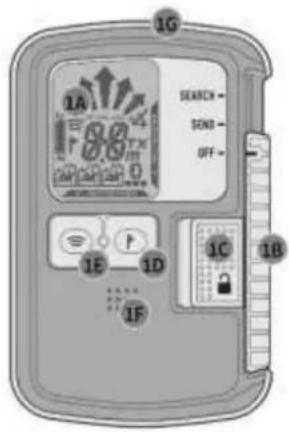
4.1 STRUCTURE
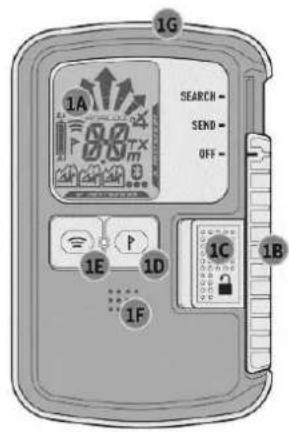
GUIDE BT
RECON BT
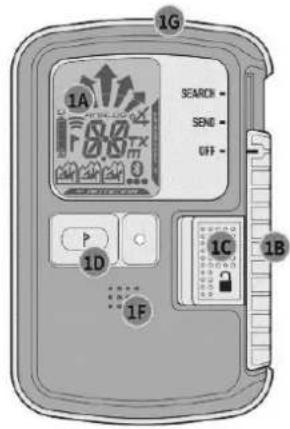
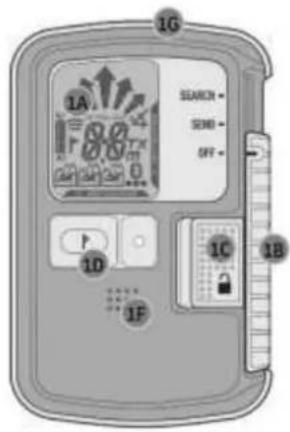
(1A) LCD display (backlight)
(1B) OFF/SEND/SEARCH Slider
(1C) Slider lock
(1D) MARK Button
(1E) SCAN Button*
(1F) Speaker
(1G) Transmit control LED
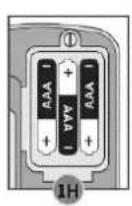
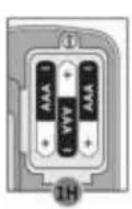
(1H) Battery compartment
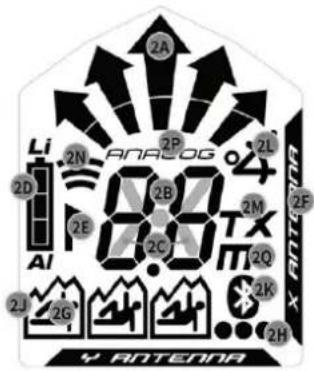
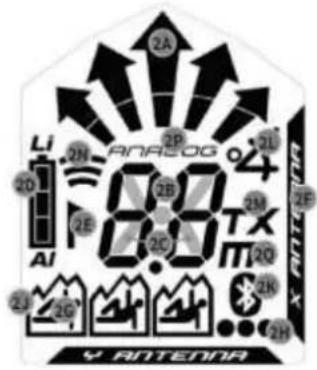
(2A) Direction indication
(2B) Distance indication
(2C) Transmit symbol
(2D) Battery capacity/type
(2E) MARK (marking possible)
(2F) Active transmitting antenna
(2G) Number of burials (1-3)
(2H) Number of burials (4 or more)
(2J) Transmitter marked
(2K) Bluetooth active
(2L) Inclinometer mode
(2M) TX600 mode
(2N) SCAN mode
(2P) Analog mode
(2Q) Meter symbol for SCAN /analog mode
GUIDE BT only
4.2 CARRYING SYSTEM
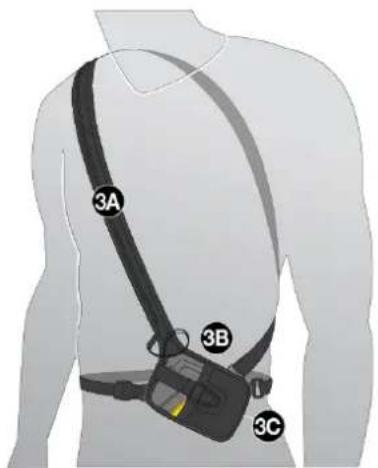
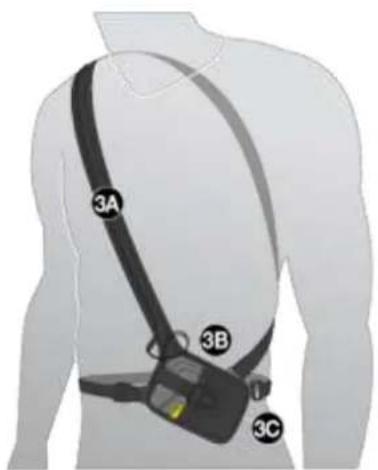
BLACK DIAMOND recommends using the included carrying system (3A). In order to protect the beacon's display, carry the beacon with its display facing inwards (3B). The transmit control LED (1G) is visible in the pouch's window (3C).
The carrying system must be worn under at least one layer of clothing in order to prevent damage or loss during a fall or avalanche.
The included hand loop (Guide BT only) is intended to be used for training sessions.

DANGER
Risk of device loss
Always carry the device in the included carrying system! Always leave the device cord-secured!
4.3 SWITCHING ON | SELF-CHECK | SEND MODE
NOTICE
Despite a comprehensive self-check, a beacon mode check (SEND check and SEARCH check) is obligatory prior to every tour! Every member of the group must verify that both the SEND and SEARCH modes are functioning correctly.
Switching on: Move the slider lock (1C) to the left and the slider (1B) upwards into the position SEARCH. Then release the slider lock (1C) and move the slider (1B) downwards, until it locks in the position SEND.
The display shows firmware version, battery capacity, self-check progress (4A), self-check result (4B), group check countdown (4C) and finally the send display with the active transmitting antenna (4D).
The device is now in SEND mode, the transmit control LED (1G) is blinking.
NOTICE
A minimum distance of 5m from other devices and all electronic, magnetic and metallic sources of interference should be kept during the self-check.

DANGER
Always physically verify that the switch is securely locked into position. The Slider should not move unless the Slider Lock is dis-engaged.
If the self-check is successful, "OK" is indicated on the display (4B). In the event of a device warning, an alert signal sounds and the display indicates "E" in combination with a number (4E). For error codes, see chapter 6.1.
| 4A 10 | 4B OK | 4C CH | 4D × | 4E EZ |
| Firmware version Battery capacity/type (AL=Alkaline, LI=Lithium) | Self-check OK | Group check countdown | SEND display | Self-check error |
Send-Vibra
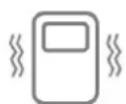
Additionally, the GUIDE BT provides haptic SEND mode confirmation (10x vibration). This feature is enabled by default and can be disabled in the PIEPS APP device manager.
4.4 GROUP CHECK FEATURE
The Black Diamond Guide BT/Recon BT provides the option for a group check. This does not replace the standard mode check, but is a useful feature with larger groups. In group check mode the receiving range is limited to 1 m.
| Group check regular BLACK DIAMOND GUIDE BT/RECON BT Check: frequency | Group check extended GUIDE BT only Check: frequency/pulse/period Enabled in Pieps App | |
| Start | Press and hold the MARK button (1D) during the group check countdown (CH) | Press and hold the SCAN button (1E) during the group check countdown (CH) |
| Result | “Distance indication” = OK “ER” = error (frequency not according to standard) | “OK” = OK “ER” = error (one or more transmit parameters not according to standard) |
| End | Release button | |
The Regular group check is sufficient for checking modern, digital devices with 3 antennas.
The Extended group check is recommended for checking old devices (analog single-antenna devices).
Regular group check display readings
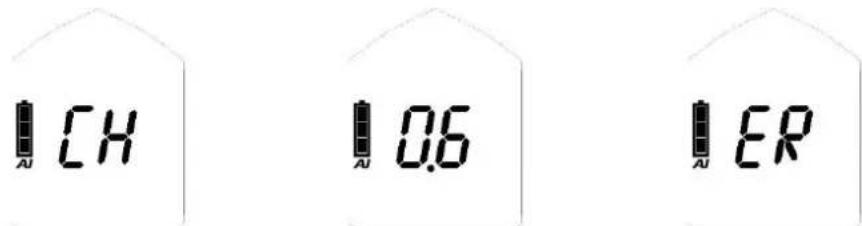
Device not transmitting or distance too big (>1m)
Distance reading: device transmitting and frequency according to standard
Device transmitting but frequency not according to standard
Extended group check display readings

Device not transmitting or distance too big (>1m)
Distance reading: device transmitting and all transmit parameters according to standard
Device transmitting but one or more transmit parameters not according to standard
More than one signals within 1 m range increase distance

Continuous wave indication | old-device-indication (see chapter 4.8.6)
Group check pro-mode
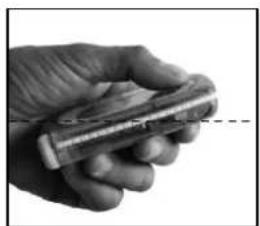
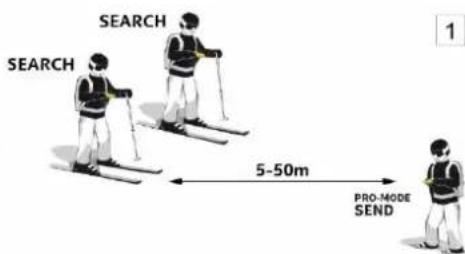
The GUIDE BT additionally provides a pro-mode. The pro-mode allows a transmit check as well as a receive check without exiting the group check mode. By default, it is disabled and can be enabled in the PIEPS APP device manager.
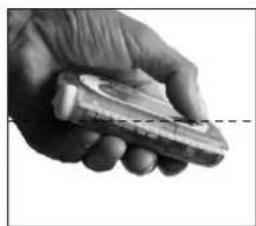
- Tip the GUIDE BT downwards to transmit in group check mode
- Tip the GUIDE BT upwards to receive in group check mode
Pro-mode SEARCH
Pro-mode SEND
example image)
The full avalanche beacon check with pro-mode
(1)Receive check
Group leader pro-mode SEND: device transmitting? All others SEARCH mode: devices receiving?
(2) Transmit check
Group leader pro-mode SEARCH: device receiving? All others SEND mode: devices transmitting?
NOTICE The receive check can be combined with a range test by choosing a large distance (50m)

4.5 HELPFUL BACKGROUND FEATURES
Maximum background support in SEND mode and SEARCH mode!
4.5.1 Interference protection
- Auto-Antenna-Switch | Protection in SEND mode If the transmitting antenna is impacted by external interference, the other antenna will take over the transmit function. The BLACK DIAMOND GUIDE BT/RECON BT always transmits with the strongest possible signal!
- Signal Verification | Protection in SEARCH mode Only a verified 457kHz signal is indicated. The BLACK DIAMOND GUIDE BT/RECON BT is excellent at filtering out ghost signals!
External interference and distance recommendations
All beacons are very sensitive to electrical and magnetic sources of interference. Due to this, all manufacturers recommend keeping a minimum distance from electronic, magnetic and metallic sources of interference (mobile phone, radio, keys, magnetic closures, smart watches, heated gloves, electronic airbags etc.).
Minimum distance in SEND mode: 20cm | Minimum distance in SEARCH mode: 50~cm
4.5.2 PIEPS iPROBE-Support
Beacons with iPROBE-support* get automatically deactivated when probing with the electronic probe PIEPS iPROBE. This prevents signal overlaps and the next-strongest signal is automatically shown on the display of the receiving beacon. Maximum support in multiple burials!
The iPROBE-Support is automatically activated on beacons with firmware version V1.1 or lower.
- The iPROBE-Support is automatically deactivated on beacons with firmware version V1.2 or higher and can be activated via the PIEPS APP.
- Beacons with iPROBE-Support: BLACK DIAMOND GUIDE BT/RECON BT, PIEPS PRO BT/POWDER BT, PIEPS MICRO, PIEPSDSPPRO/SPORT/PRO ICE, PIEPSDSPSTANDARD/TOUR≥v5.0, PIEPS FREERIDE.
4.6 SEND SEARCH
Move the slider lock (1C) to the left and the slider (1B) upwards in the position SEARCH.
Note: The slider does not lock in the SEARCH position.
4.7 SEARCH SEND
Move the slider (1B) downwards, until it locks in the position SEND.
4.7.1 Secondary avalanche | Auto-Search-to-Send
Auto-search-to-send, or `Auto-revert' mode, provides an additional layer of protection against secondary avalanche scenarios. By default, it is disabled and can be enabled in the PIEPS APP device manager. Once enabled, the device switches from SEARCH mode to SEND mode automatically after a certain time without movement (burial).
The function provides the following characteristics:
Motion-controlled initialization
- Short switching timeout
- Long warning phase with alert and countdown prior to switching
- Continued alert, also after switching
4.7.2 Operation
With auto revert enabled, while in SEARCH mode and after the predetermined time without motion, the transceiver will begin the auto revert process. As shown below, a countdown with an associated sound will begin. If at any time during the countdown the mark button is pressed, the clock will be reset and the transceiver will remain in SEARCH. If a signal is encountered during the countdown, the timer will also be reset and the transceiver will remain in search.
| Beacon function | SEARCH | WARNING | SEND | ||
| Display indication | Search display | 14 | RR | 13 | RR |
| 12 | ×× | ||||
| Sound | Search sound | ||||
| Manual abort | Turn device or press MARK button | Turn device off or into SEND mode | |||
| START WARNING SWITCHING TO SEND | |||||
| Setting 1 (60 s) | 0:30 min | 1:00 min | |||
| Setting 2 (90 s) | 1:00 min | 1:30 min | |||
| Setting 3 (120 s) | 1:30 min | 2:00 min | |||
4.8 SEARCH MODE | SEARCH STRATEGY
4.8.1 In case of emergency
A buried person has the greatest chance of being rescued by an efficient companion rescue. In the event of an accident, the following applies: KEEP CALM, OBSERVE, ALERT, ACT WITH COORDINATION!
(1) Keep calm & get an overview
Are there any other risks?
How many victims?
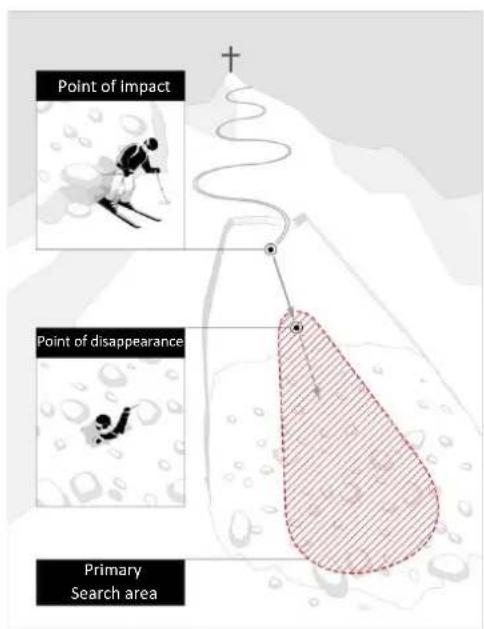
- Determine the primary search area!
(2) Make a brief emergency call
EU 112,AT 140,CH 1414,IT 118,FR 15,NA 911
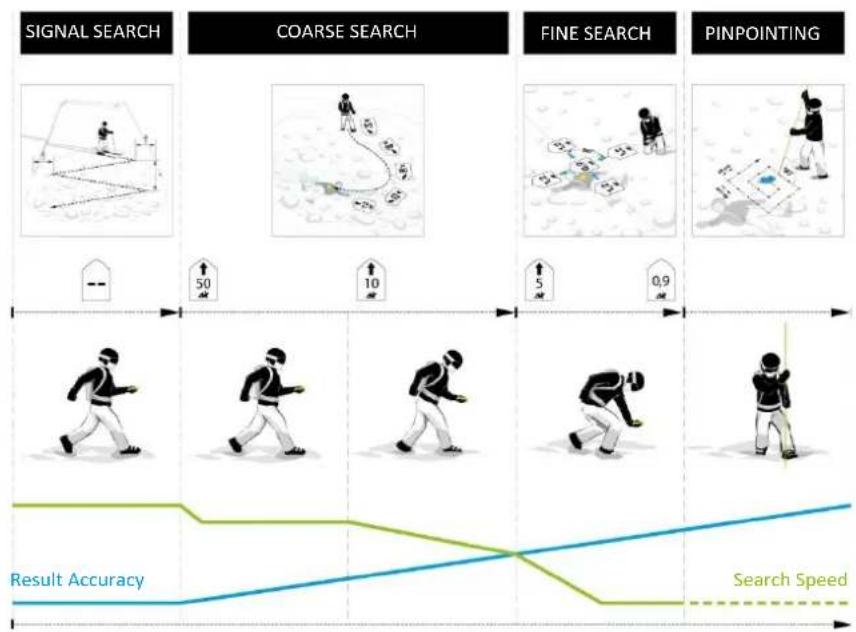
(3) Burial search
- Signal search (eyes + ears, beacon)
- Coarse search (starting with initial signal)
- Fine search (closer than 5 m on the surface)
- Pinpointing (systematic probing)
(4) Systematic digging
(5) First Aid
(6) Rescue
4.8.2 Signal search
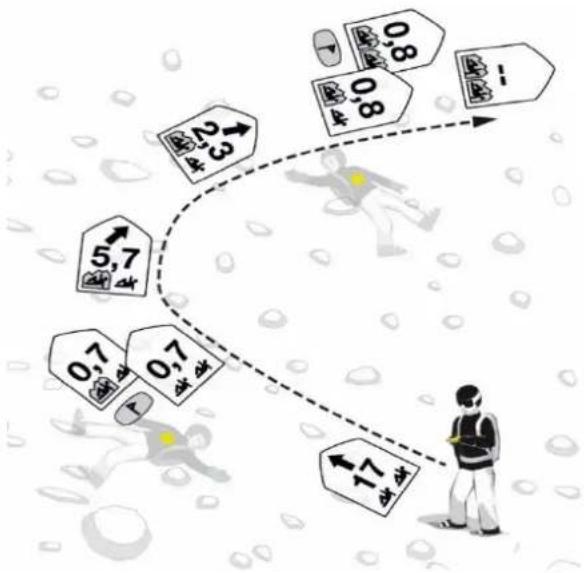
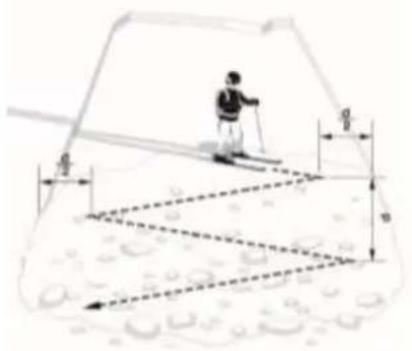
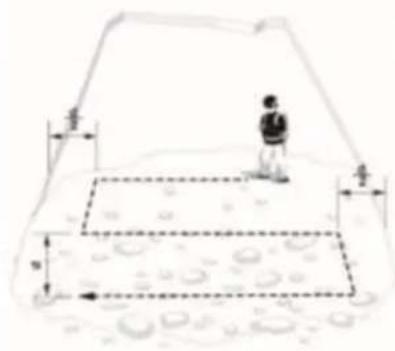
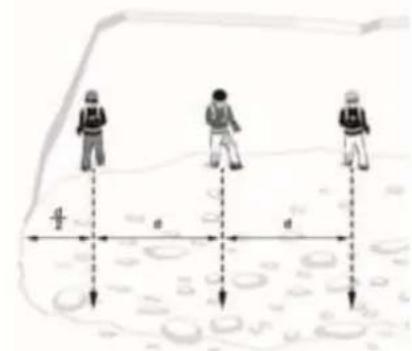
Start searching in the primary search area for the initial signal detection as well as for visual/acoustic signals. All participants, observers included, must switch their devices to SEARCH mode (or to standby mode)! Make sure to follow the external interference distance recommendations and hold the beacon a minimum of 50cm ( 20" ) from all electronic, magnetic, and metallic sources of interference. The BLACK DIAMOND GUIDE BT/RECON BT has a circular receiving range that allows a correct indication of direction and distance from the point of initial signal detection – a specific method such as turning/rotating is not necessary. All signals of the burials that are within the maximum receiving range are received simultaneously.
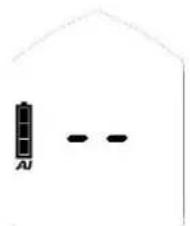
Walk the search strip width in the search area quickly. The recommended search strip width for the BLACK DIAMOND GUIDE BT/RECON BT is 60m .The display shows "no signal".
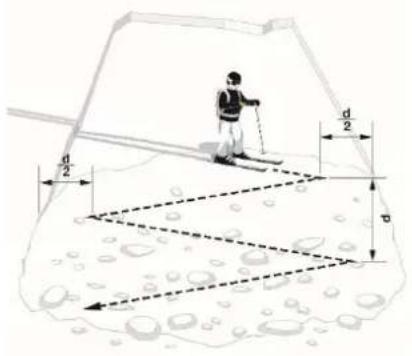
One rescuer with skis for signal search d = search strip width
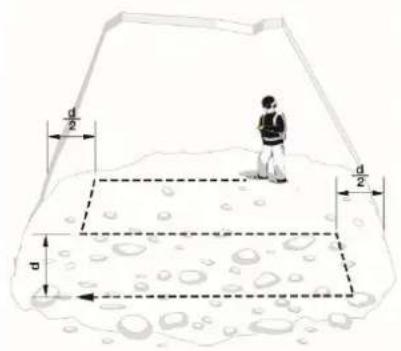
One rescuer by foot for signal search
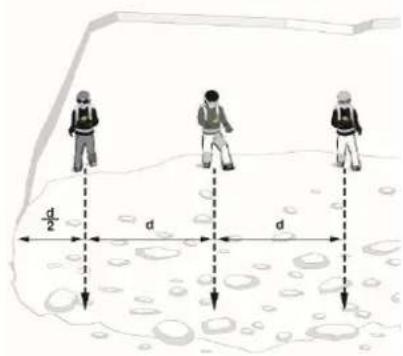
More rescuers for signal search
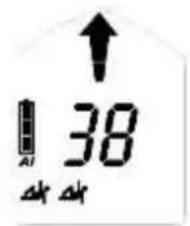
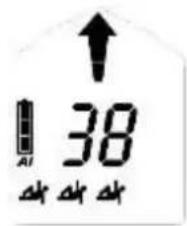
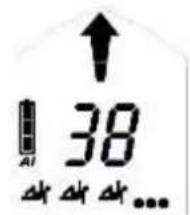
As soon as signals are received, the distance and direction to the strongest signal are shown on the display. The number of victims located within the receiving range is indicated by the number of human figures.
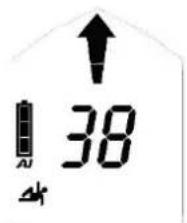
one
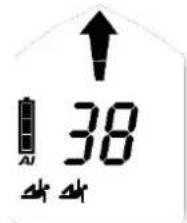
two
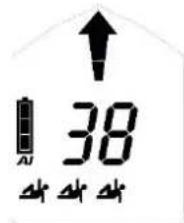
three
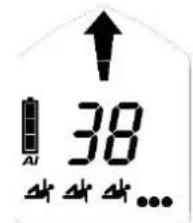
four or more
Vibra on initial signal detection
The GUIDE BT provides additional haptic support by vibration on initial signal detection. This lets rescuers focus on the visual surface search during the signal search.
4.8.3 Coarse search
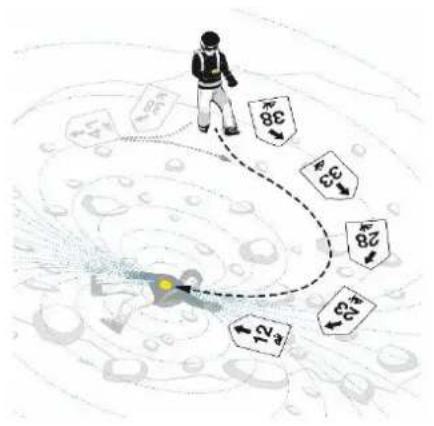
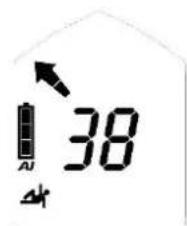
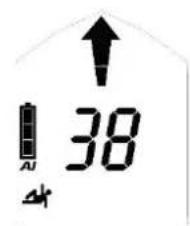
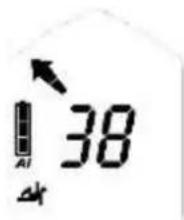
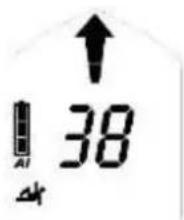
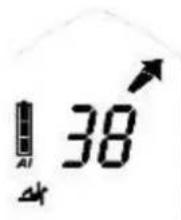
Follow the directional arrow quickly and check for a decreasing distance reading. Change the search direction by 180^ in case of an increasing distance reading.
Turn left
Move straight ahead
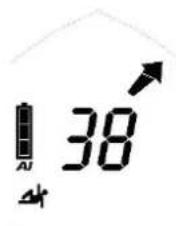
Turn right
NOTICE
Work calmly and with concentration in SEARCH
mode.
Avoid hasty movements!
4.8.4 Fine search
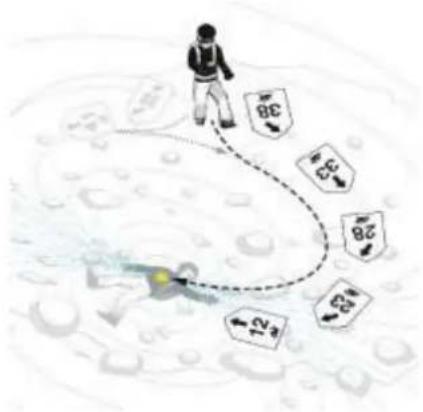
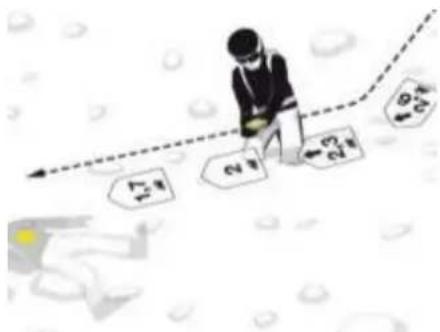
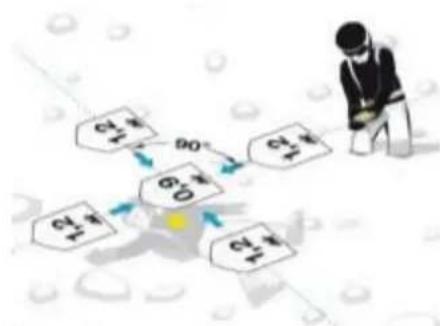
From a distance of 5m , the search speed should be notably reduced (50 cm/s). At the same time, start working close to the surface of the snow. To prevent confusion during the fine search, the direction indication disappears below a distance of 2 m. Reduce the search speed again and find, by cross-like movements, the position of the lowest distance reading. A dynamic acoustic signal output supports the fine search: the closer the higher/faster.
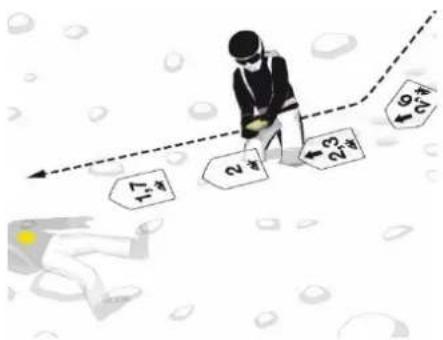
Do an accurate direction adjustment before the direction arrow disappears! You are then moving to the transmitting beacon in best coupling position and save time during the cross-like movements.
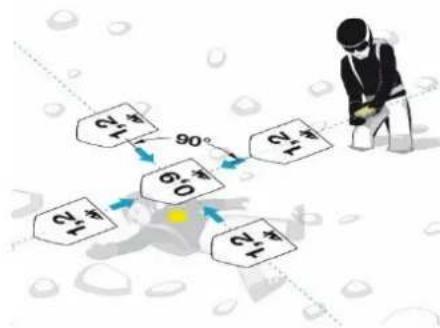
Move your beacon at a slow, steady speed of about 10 cm/s, keep it leveled close to the surface and do not rotate your device. Search along the Y axis, determine the lowest distance value, then follow along the X axis. Always move past the point of the lowest distance to verify the distance tendency. Mark the point of the lowest distance reading and start pinpointing.
4.8.5 Pinpointing
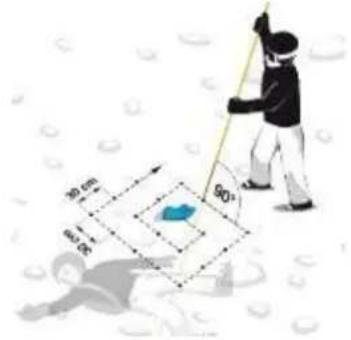
Begin at the point of the lowest distance indicated. Always probe perpendicular to the surface. Use your lower hand as a "probe guide" to ensure the probe follows a steady path. Follow a proven system until you have a hit. Communicate a hit clearly to companions. Leave the probe stuck for shoveling guidance.
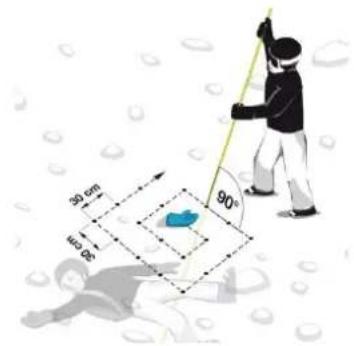
4.8.6 Multiple burials | MARK function
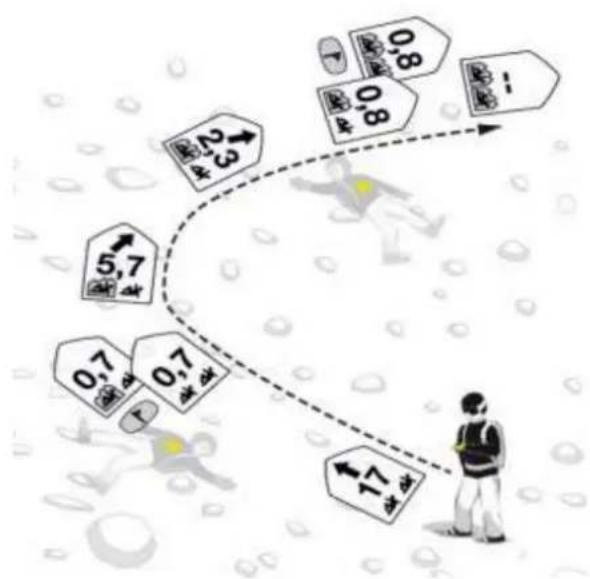
A multiple burial is indicated clearly on the display by the number of small human figures (2G, 2H).
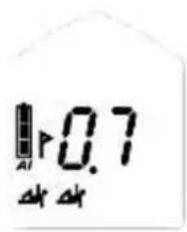
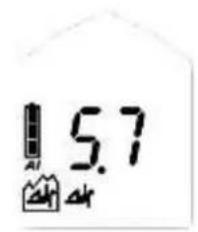
Marking is possible from a distance reading of 5m and is indicated by the MARK symbol (2E). Press the MARK button (1D) briefly to "hide" the localized transmitter. A successful flagging is confirmed by a frame around the human figure (2J). The display then indicates the direction/distance to the next strongest signal inside the receiving range. If there are no further signals within the receiving range the display indicates "no signal".
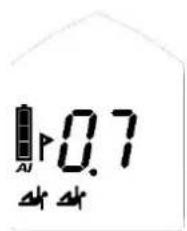
prior to marking
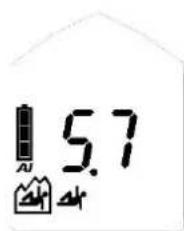
aftermarking
De-mark a single signal: press the MARK button (1D) for 3 seconds.
De-mark all: switch to SEND mode and then back to SEARCH mode. With the GUIDE BT you can also use the SCAN function for a full reset.
Continuous wave indication | old-device-indication
Old analog transceivers are transmitting a continuous wave in addition to the pulse signal. To keep an impact at a minimum, it is recommended to step a few meters away after marking such a transmitter.

Signal without continuous wave

Signal with continuous wave
The BLACK DIAMOND GUIDE BT/RECON BT identifies a continuous wave and supports visually by flashing human figures.

4.9 GUIDE BT FEATURES
4.9.1 Vibra support
Send-Vibra: see chapter 4.3.
Vibra on initial signal detection: see chapter 4.8.2.
4.9.2 Extended group check & pro-mode
See chapter 0.
4.9.3 Mark range settings
In the PIEPS APP device manager the mark range can be changed from 5 m (default) to 20 m or to max. range.
4.9.4 Inclinometer
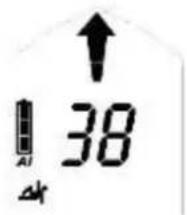
You can use the integrated three-dimensional inclinometer to quickly check the gradient:
- Put your ski pole in slope line at that point of the slope you want to measure.
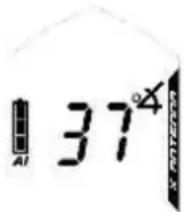
- Press the SCAN button (1E) for 3 seconds while in SEND mode.
- Put your GUIDE BT next to the ski pole and read the indicated value. The display switches back to SEND mode indication automatically after 20 seconds.
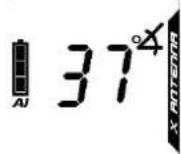
DANGER
Risk of device loss during slope angle measurement
Although the GUIDE BT keeps transmitting while the inclinometer is active, the function should only be used for training reasons. Never use the inclinometer function in avalanche terrain!
4.9.5 SCAN & victim selection
Two SCAN modes are available:
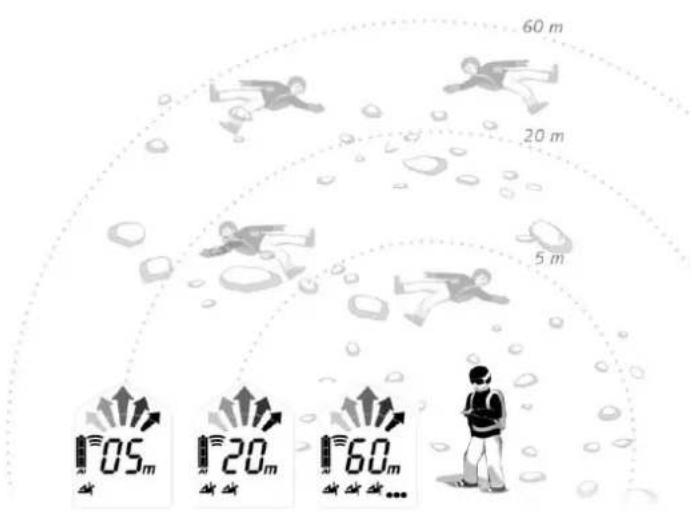
The Regular SCAN provides a rough overview about the burial situation by indicating the number of victims within certain distance ranges. This is the default setting. The Detailed SCAN shows direction and distance for each victim and allows selecting a victim. The setting can be changed in the PIEPS APP device manager.
Regular SCAN
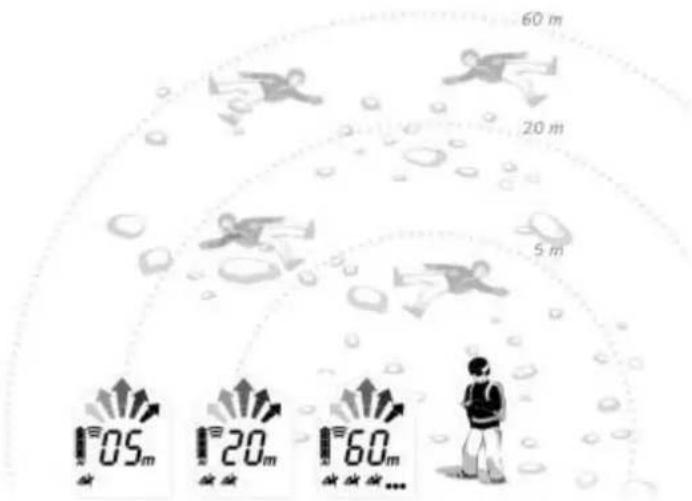
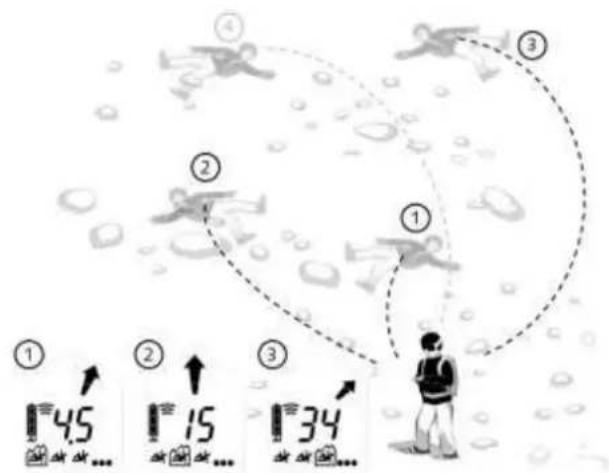
Press the SCAN button (1E) while in SEARCH mode. The GUIDE BT scans the entire receiving range and displays an overview. During the scan, don't move and hold the device steady.
reading 1: total number of victims within 5m reading 2: total number of victims within 20m reading 3: total number of victims within 60m
The SCAN mode ends automatically but can also be interrupted by another SCAN button press.
Detailed SCAN & victim selection
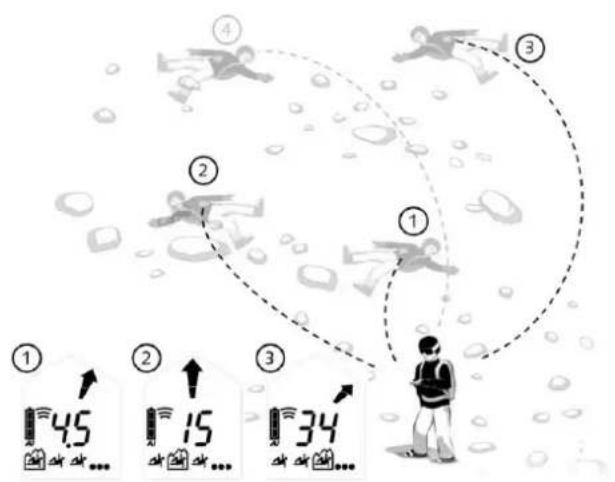
Press the SCAN button (1E) while in SEARCH mode. The GUIDE BT scans the entire receiving range and ends with indicating the direction and distance to the first victim.
Use MARK (1D) to scroll through the closest 3 victims. The selected one is encircled (2J) - follow the direction/distance reading to approach it. The MARK function is not available in this mode. Press SCAN to exit the Detailed SCAN mode and to return to regular SEARCH mode.
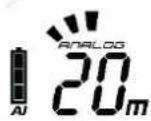
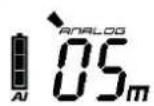
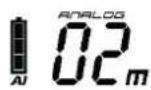
4.9.6 Analog mode
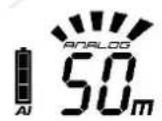
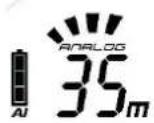
The analog mode can be used for specific search strategies as well as for demo reasons (coupling positions). Disabled by default, the feature can be enabled in the PIEPS APP device manager.
Press the SCAN button (1E) for 3 seconds while in SEARCH mode. The analog mode starts with biggest range.
Use SCAN to reduce range. Use MARK to increase range.
Press SCAN for 3 seconds to exit the analog mode and to return to regular SEARCH mode.

4.9.7 TX600 mode
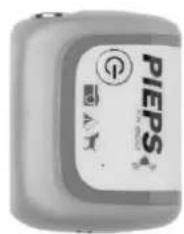
The TX600 mode allows detecting the PIEPS TX600 – this is a mini transmitter for dogs/equipment that works with 456 kHz.
Start TX600 mode: Press the buttons MARK (1D) and SCAN (1E) simultaneously for 3 seconds while in SEARCH mode. You see a "TX" indicated on the display (2M). Follow the search phases as usual but use a reduced search strip width of 20m . MARK can also be used as usual, SCAN and analog mode is not available in TX mode.
Exit TX600 mode: Press MARK and SCAN simultaneously again for 3 seconds. Alternatively, switch to SEND mode and then back to SEARCH mode. The "TX" indication disappears and the GUIDE BT is receiving 457kHz signals again.
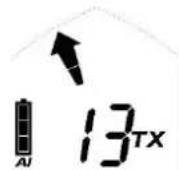
NOTICE The recommended search strip width in TX600 mode is 20m
5. DEVICE MANAGEMENT WITH THE PIEPS APP
Bluetooth and the PIEPS APP allow a straightforward device management (e.g. software update) and additionally provide a handy training mode.
Get the PIEPS APP (Android Play Store, iOS App Store), connect your BLACK DIAMOND GUIDE BT/RECON BT and take advantage of all features!
NOTICE
The user is responsible for keeping their beacon firmware up to date. Black Diamond recommends checking for updates at the beginning of every season, and checking monthly when equipment is in regular use.
To enable Bluetooth, press and hold the MARK button (1D) while switching on the beacon.
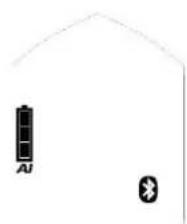
Bluetooth enabled

Connection to mobile device established
DANGER
Risk of a not transmitting device due to enabled Bluetooth
The Bluetooth mode is supposed for device management and training mode only. Never use the Bluetooth mode in avalanche terrain!
Settings are available for the following features:
| Feature | RECON BT | GUIDE BT |
| Battery type (Alkaline/Lithium) | ✓ | ✓ |
| Auto-Search-to-Send timeout (60 s/90 s/120 s) | ✓ | ✓ |
| Group check ON/OFF | ✓ | ✓ |
| Group check pro-mode ON/OFF | ✓ | |
| Send-Vibra ON/OFF | ✓ | |
| Analog mode ON/OFF | ✓ | |
| Scan mode (regular/detailed) | ✓ | |
| Mark range (5 m/20 m/MaxRange) | ✓ |
Further useful content in the PIEPS APP:
- Training scenarios
Basic knowledge - Software Updates
- Manuals
6. TROUBLESHOOTING, MAINTENANCE, STORAGE, DISPOSAL
6.1 TROUBLESHOOTING
| Error | Description | Measure |
| No indication on the display | Check the device for physical damage. Check the battery capacity, type and polarity (+,-). Replace the batteries. Take the device to your retailer. | |
| E0 | High currentThis error disappears after the self-check. | Take the device to your retailer. |
| E1 | System configurationThis error remains on the display.The device is not serviceable. | Take the device to your retailer. |
| E2 | Transmitter or receiver or amplifier | Repeat the self-check in an area free from interference (outdoors) and check for electronic, magnetic and metallic sources of interference. In case of a permanent error take the device to your retailer. |
| E3 | The error disappears after the self-check. | |
| E4 | The device has limited functionality in send or SEARCH mode. | |
| E5 | ProcessorThis error remains on the display.The device is not serviceable. | Take the device to your retailer. |
| E6 | Distance and/or direction indicatorThis error disappears after the self-check.The device has limited functionality regarding the distance and/or direction indication. | Take the device to your retailer. |
| E7 | Mode switch safety checkThis error disappears after the self-check.Early detection of potential switch malfunction.Switching between modes may be impaired | Perform a device check via the Pieps app and follow the recommendations. |
| E8 | AccelerometerThis error disappears after the self-check.The device has limited functionality: Auto-Search-to-Send is not possible.Group check pro-mode is not possible. | Take the device to your retailer. |
| E9 | BluetoothBluetooth activation and/or connection not possible. The avalanche beacon function is working.Is not checked during the self-check, occurs only during Bluetooth activation. | Retry to activate the Bluetooth mode.In case of a permanent error take the device to your retailer. |
6.2 BATTERY REPLACEMENT
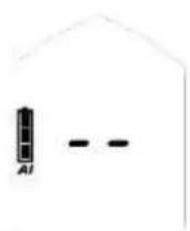
Change the batteries as soon as the battery capacity indication (2D) shows an empty battery. Always change all three batteries at once! To do so, open the battery compartment (1H) and be sure to insert the new batteries the right way around. For battery disposal, follow the applicable regulations in your country.

DANGER
Risk of explosion from incorrectly used batteries
Risk of incorrect battery capacity indication
Only use batteries of type "Alkaline (AAA) LR03 1.5 V" or "Lithium (AAA) FR03 1.5V"!
The use of Lithium batteries must be confirmed in the PIEPS APP!
| Battery lifetime | Alkaline | Lithium |
| GUIDE BT | 400 h SEND | 600 h SEND |
| RECON BT | 200 h SEND | 300 h SEND |
| 100% - 66% SEND | ✓ | |
| 2/3 full | 66% - 33% SEND | ✓ |
| 1/3 full | 33% - 20 h | ✓ |
| empty | 20 h SEND (+10°C, 50°F) + 1 h SEARCH (-10°C, 14°F) | |
| empty, blinking | Final reserve, device can shut down at any time |
6.3 CLEANING
Use a damp cloth without cleaning agent to clean the device.
NOTICE
Flowing water, steam or cleaning agent must not be used to clean the device. To do so could impede operation of the device.


6.4 STORAGE
Store the device in a dry room at room temperature.

NOTICE
If the device is not used for extended periods of time (summer months), it is recommended to remove the batteries from the battery compartment. The warranty does not cover damage caused by leaking batteries.

CAUTION
Risk of device malfunction or damage due to extreme temperatures
Do not expose the device to extreme temperatures outside the operating limits! Store the device protected from direct sunlight! Extreme temperatures can result in malfunction or damage!


6.5 DISPOSAL
NOTICE
Please note that the device is an electronic device. It cannot therefore be disposed by public waste management companies. Dispose of the device in accordance with the law in your country.

7. CONFORMITY
EUROPE
Black Diamond Equipment declares that the radio equipment type BLACK DIAMOND GUIDE BT/RECON BT is in compliance with Directives: EMC 2014/30/EU, RED 2014/53/EU, RoHS 2011/65/EU, LVD 2014/35/EU.
UK
Black Diamond Equipment declares that the radio equipment type BLACK DIAMOND GUIDE BT/RECON BT is in compliance with Electromagnetic Compatibility Regulations 2016, Radio Equipment Regulations 2017, The Restriction of the Use of Certain Hazardous Substances in Electrical and Electronic Equipment Regulations 2012, Electrical Equipment (Safety) Regulations 2016.
The full text of the EU and UK declarations of conformity is available at the following internet address:
www.blackdiamondequipment.com/DOC
USA/CANADA
Manufacturer: Black Diamond Equipment | Type/Model: BLACK DIAMOND GUIDE BT/RECON BT
USA:FCC Notice, Cautions and Statement
This device complies with the Part 15 of the FCC Rules. Operation is subject to the following two conditions: (1) This device may not cause harmful interference, and (2) This device must accept any interference received, including interference that may cause undesired operation.
This equipment has been tested and found to comply with the limits for Class B digital device, pursuant to Part 15 of the FCC Rules. These limits are designed to provide reasonable protection against harmful interference in a residual installation. This equipment generates, uses and can radiate frequency energy and, if not installed and used in accordance with the instructions, may cause harmful interference to radio communications. However, there is no guarantee that interference will not occur in a particular installation. If this equipment does harmful interference to radio or television reception, which can be determined by turning the equipment off and on, the user is encouraged to try to correct the interference by one of the following measures:
- Reorient or relocate the receiving antenna
- Increase the separation between the equipment and receiver
- Connect the equipment into an outlet on a circuit different from that to which the receiver is connected
- Consult the dealer or an experienced radio/TV technician for help
To assure continued compliance, any changes or modifications not expressly approved by the party responsible for compliance could void the user's authority to operate this equipment.
This transmitter must not be co-located or operated in conjunction with any other antenna or transmitter.
This equipment complies with FCC radiation exposure limits set forth for an uncontrolled environment and meets the FCC radio frequency (RF) Exposure Guidelines. This equipment has very low levels of RF energy that are deemed to comply without testing of specific absorption ratio (SAR).
Canada: IC Notice
This device complies with Industry Canada's licence-exempt RSS standard(s). Operation is subject to the following two conditions: (1) this device may not cause interference; and (2) this device must accept any interference, including interference that may cause undesired operation of the device.
This equipment complies with IC radiation exposure limits set forth for an uncontrolled environment and meets RSS-102 of the IC radio frequency (RF) Exposure rules. This equipment has very low levels of RF energy that are deemed to comply without testing of specific absorption ratio (SAR).

GUIDE BT
RECON BT
INSTRUCTIONS

E
Table des matieres
1. Introduction 3
Copyright © Black Diamond Equipment, 2022
Black Diamond Equipment, Ltd. 2084 East 3900 South , Salt Lake City, UT 84124
Europe : Black Diamond Equipment Hans-Maier-Straße 9, 6020, Innsbruck, Autriche
(2) Verification de la transmission
Copyright © Black Diamond Equipment, 2022
Black Diamond Equipment, Ltd. 2084 East 3900 South, Salt Lake City, UT 84124
(2Q) Metersymbol fur SCAN
/Analogmodus*
*Nur GUIDE BT
4.2 TRAGESYSTEM
Copyright © Black Diamond Equipment, 2022
Black Diamond Equipment, Ltd. 2084 East 3900 South, Salt Lake City, UT 84124
Europa: Black Diamond Equipment Hans-Maier-Straße 9, 6020, Innsbruck, Austria
Black Diamond Equipment, Ltd. 2084 East 3900 South, Salt Lake City, UT 84124
Europa: Black Diamond Equipment Hans-Maier-Straße 9, 6020, Innsbruck, Austria
blackdiamondequipment.com
1.5 USO PREVISTO
6. PROBLEEMOPISSING, ONDERHOUD, OPSLAG EN AFVOER 22
6.1 Probleemoplossing 22
6.2 BATTERIJ VERVANGEN 24
6.3 REINIGING 24
6.4 OPSLAG 24
6.5 VERWIJDERING 25
7. CONFORMITEIT 25
1. INLEIDING
Copyright © Black Diamond Equipment, 2022
Black Diamond Equipment, Ltd. 2084 East 3900 South, Salt Lake City, UT 84124
Europa: Black Diamond Equipment Hans-Maier-Straße 9, 6020, Innsbruck, Austria
2.3 INTERFERENTIEWAARSCHUWINGEN
4.4 FUNC TIE GROEPSCHECK
6. PROBLEEMOPISSING, ONDERHOUD, OPSLAG EN AFVOER
6.1 PROBLEEMOPLOSSING
Black Diamond Equipment, Ltd. 2084 East 3900 South, Salt Lake City, UT 84124
Europa: Black Diamond Equipment Hans-Maier-Straße 9, 6020, Innsbruck, Østerrike
Black Diamond Equipment erklærer at radioutstyret av typen BLACK DIAMOND GUIDE BT/RECON BT er i samsvar med Electromagnetic Compatibility Regulations 2016, Radio Equipment Regulations 2017, The Restriction of the Use of Certain Hazardous Substances in Electrical and Electronic Equipment Regulations 2012, Electrical Equipment (Safety) Regulations 2016.
Produesent: Black Diamond Equipment | Type/Model: GUIDE BT/RECON BT
Copyright © Black Diamond Equipment, 2022
Black Diamond Equipment, Ltd. 2084 East 3900 South, Salt Lake City, UT 84124
Europe: Black Diamond Equipment Hans-Maier-Straße 9, 6020, Innsbruck, Osterrike
Vid tekiska problem, kontakta supporten: BlackDiamondEquipment.com
1.5 AVSEDD ANVÄNDNING
Black Diamond Equipment fösakrar att radioutrustningen av typen BLACK DIAMOND GUIDE BT/RECON BT overensstämmer med Electromagnetic Compatibility Regulations 2016, Radio Equipment Regulations 2017, The Restriction of the Use of Certain Hazardous Substances in Electrical and Electronic Equipment Regulations 2012, Electrical Equipment (Safety) Regulations 2016
Black Diamond Equipment, Ltd. 2084 East 3900 South, Salt Lake City, UT 84124
Eurooppa: Black Diamond Equipment Hans-Maier-Straße 9, 6020, Innsbruck, Itävalta
Copyright © Black Diamond Equipment, 2022
Black Diamond Equipment, Ltd. 2084 East 3900 South, Salt Lake City, UT 84124
Europa: Black Diamond Equipment Hans-Maier-Straße 9, 6020, Innsbruck, Austria
blackdiamondequipment.com
1.5 PRZEZNACZENIE
Copyright © Black Diamond Equipment, 2022
Black Diamond Equipment, Ltd. 2084 East 3900 South, Salt Lake City, UT 84124
Evropa: Black Diamond Equipment Hans-Maier-Straße 9, 6020, Innsbruck, Rakousko
Black Diamond Equipment, Ltd. 2084 East 3900 South, Salt Lake City, UT 84124
Europa: Black Diamond Equipment Hans-Maier-Straße 9, 6020, Innsbruck, Rakusko
V pripe de technickych problemov sa obratte na zakaznicky servis: blackdiamondequipment.com
1.5POUZITIE
6.1 RIESENIE PROBLEMOV
Copyright © Black Diamond Equipment, 2022
www.blackdiamondequipment.com/DOC
ZDA/KANADA
Proizvajalec: Black Diamond Equipment | Vrsta/model: GUIDE BT/RECON BT
ZDA: Obvestilo, opozorila in izjava FCC
2. TEXHnKA 6E30nACHOCTN
2.1 CnHbHbIE CIOBA BVKA3AHINX IO TEXHNIKE 6E3OJACHOCTN
2.2 OBJIIE IIPABINIA NOB3AHHOCTN BOJLACTN TEXHKNB3OJNACHOCTN 8
2.3 PEPYIPPEKDEHNE O NOMEXAX 8
2.4 OCTATOUHbIE PNCKN | MEPbI PPEyIPKJENH
3. YNAKOBKA 10
4. OBLIEE ONICAHNE 11
4.1 KOHCTPYKlIy 11
4.2 CNTEMA IPEHOCKN 11
4.3 BKJIIOUeHNE | CAMOДИАГHOCTNKA | PEXKIM IPEDAuN 12
4.4 Φункция Гулкови поверки 13
4.5 IIOJIe3HbIE FOHOOBbIE FyHKUIN 15
4.5.1 3auuma om nomex 15
4.5.2 Poioppekka PIEPS iPROBE 15
4.6 Peredaua nonck 16
4.7 POnsck nepedaça 16
4.7.1 Iopmnb cxod naunbI / Auto-Search-to-Send (Aemomamueckoe nepeknouehue u3 pekuma noucka e pekum nepedau cuzana). 16
4.7.2 IcnoIb30BaHue 16
4.8 PEXKIM NONCKA | CTPATEGINI NONCKA 17
4.8.1 3KcmpenHbI cIyau
4.8.2 Pousck cueHana 18
4.8.3 py6biouck 19
4.8.4 ToHbI nouck 20
4.8.5 ToHoe onpeedeHue mecma 21
4.8.6 Ppynnnoo Heecacmblcnya/ Fynkua Memku (MARK) 21
4.9 Φυnhκιμη GUIDE BT 22
4.9.1 Bu6paua 22
4.9.2PacupeHHa yHKua aynnoo npoeku u npoccecuohbhy peKum 22
4.9.3 HacmpoKa paduyca omobpaKeHna Memok 22
4.9.4 Ykniohomep 22
4.9.5 CkaHupoBaHue u ebIbOp nocmpadabuee2o 23
4.9.6 Analo2oBb peKum 24
4.9.7 PeKum TX600 24
5. YnpabLeHne yctpoiCTBOM uepe3 npiloxHe PIEPS.. 25
6. NONCKI YCTPAHEHNE HENCINPABHOCTE, TEXHNUECKOE OBCJNUKBAHNE, XPAHEHNE, YTNUN3AUJRA....27
6.1 IINAGHOCTNKA 27
6.2 3AMEHA 6ATAPEI 28
6.3 OYNCTKA YCTPOINCTBA 29
6.4 XPAHEHNE 29
6.5 yTNJIIN3AUIN 29
7. COOTBETCTBNE CTAHdAPTAM 29
1. BBEDEHNE
БларпьмВаса пибразни МаяК蓝CK DIAMONDGUIDEBT/RECONBT!
Maek BLACK DIAMOND GUIDE BT/RECONBT-3TO BbICOKOpON3BOIDHTeJIbHbI N ydo6hB B HcNoJIb3OBAHNn IaBNHHI npneMonepeDaTtNk. B MaKe BLACK DIAMONDGUIDE BT/RECONBT peaIN3OBAHbI BCE npOBepENHbI e n IpOTecTIPOBaHHbIe YHKcN:
- 3 aHTeHHbI;
60nboupaunyc npnemA -Iy 6bictporo n ctaabnhoro onpeJeHnraHa; - OTNIuHnA o6pa6oTKa cnHana, daKe B TaJKeIbIX yCNoBnx (rpynnnoBoi HecuaTbI cIyau);
- yHKnYcTaHOBKn MetKn;
MOUHaYHKnIyCaMoDnArHOctNk; - ydo6ha fynkunrpynnoBo npOBepkn;
- aBTOMaTnuecka 3aunTa OT NOMEX;
- yHKnra ABToMaTneckoro nepeKIOueHn3 peXIMa NOncKa B peXIM nepeDaun CnHaJa;
- noДержka iPROBE;
- ynpaBHeHne ycTpoiCTbOM uepe3 npInoJKeHne PIEPS.
MaKGUIDEBTobecneuBaetdoonHHTeHbHbIe yHKunn dJa MaKcMaJIbHO 3ΦΦeKTUBHOro npOceccnoHaIbHorO nCNoIb3OBAHnA:
-ФункцяСКАнЮВАнг;
- AHaIorOByi peKIM
- BbI6op noCTpaDaBwero;
- PpoeecnoHaJIbHbI peKIM rpynIOBoI npOBepKn
Лавиньй майк He зашиает OT лавиь! Heo6xodmbl rIy6okne 3HaHnB B o6laCTN 3aunTbI OT laBnH, a Тадже рergyларпье Trpeнровки по посky пострадAWINB Wчрзвычайно сTuayци. Приve徳ньie Нжж e npoueDypbI и peKOMeHdaци ONTOCHYATcЯ NCKJIQUHTeJbHO K cpeuaJIbHbIM ONEpaZuM C npIMeHHeM MaJaKa BLACK DIAMOND GUIDEBT/RECONBT. Heo6xodmo cIeDoBaTb OCHOBhIM yka3aHnM B OTHoWeHn DeiCTBn BчрзвычайнБxСTuayци, кOTOPbie npINBOdA TcB cpeuaJIbHbIX n6JIkauzusx mATEpnaJax Kycob no 6eOpanacnoctn priу урозе схда лавиь.

PPEyIpeXdEHNE!
Maek BLACK DIAMOND GUIDE BT/RECON BT o6laaet noBbIeHNo haJeXHOCTbIO n OChaaetcY ydo6hblm noIb3OBaTeJIbckn mInTepfeycom. Ondako npri hapuSeHn npabIN ekCpIyataun MaKa BLACK DIAMOND GUIDE BT/RECON BT noIb3OBaTeJIb moKeT noDbepraTbcn onacHocTn. CBeDeHn 6o anChbIX fakTopax npINBOJATcR B rIabe 2, a yka3AHnno To texHnke 6e3OpaCHOCTn pa3MeueHbI NO BCemy TeKCTy daHHoro pyKOBOdCTBa.
Данhoe руковдъно зашип рedingнадаондя обесчени 6e3onaachoи пььоватя Маяк BLACK DIAMOND GUIDE BT/RECONBT. Пььовать должен HeyKocHTelbHo BbINOHLrtyka3aHn по Тхиke 6e3onaacHCTи,прИБeDEHHbIeВ HactoJemdoKymente.
Ipeed nauaIOM kcnnyataun MaaKa BLACK DIAMOND GUIDE BT/RECON BT Heo6xOIMOn N3yUHTb NycBOHTb HOpMaun, npBedeHHyU B daHHom pyKOBoCTBe NO kcnnyataun.
Kompania Black Diamond Equipment He Hecet OTBETCTBEHOCTHa TexHHueCKHe HToCHOCTn IoneaTK, DonuyeHHbIe B HactoJsem Dokumente, He npHmMaet npeTeH3n OTHocHTeJIbHO pRMArO nn KocBeHHoro yuepeBa, Bo3NkJeRo BO BpeM TaHcnpTIpOBKn Nll NcNoJIb3OBaHn DaHHOrO pyKOBoDCTBa, a TaKKe B pe3yIbTaTe NcNoJIb3OBaHn CBeDeHn, npNBedeHHbIX B daHHOM pyKOBoDCTBe.
^© Black Diamond Equipment, Июль 2022 r.
Tekt nepeboda opunhaHbHoeBepcnny pkoBOcTBa 3aunuaeTc3aKOHm o6 aBtopcknx npabax. Bce npaba, B qactnoctn npaba Ha BOcnpoN3BeDeHne, pacnpoctpaHene H nepeboD DOkUMeHTa, 3aunueehbl. 3aPpeuaTeCBA OBCpOIN3BOIDMb, xpaHnTb, 6pa6aTbIBaTb, KOInpOBAbI NII paCnpocTpaHraTb HAcToaH NDOkUMeHT, a TaKHe OTdJIbHbIe parMeHTbI HAcTOaHero DOkUMeHTa C NOMoU bIO 3JeKTPOHHbIX CnCTeM B LIObOM BVde (fOTOKONy, MInKpOJIeHka n dp.) 6e3 NiNsMbENHO rpa3peSeHnK KomNaHN Black Diamond Equipment. HApUeHne eToro Tpe6OBaHn IpecLeNyETcNo 3aKOHy.
1.1 MAPKINPOBKA
B COOTBeTCTBnC npIMeHmMbIMn HopMaTHBaMn Ha MaK BLACK DIAMOND GUIDE BT/RECON BT n (nIn) Ha yNaKOBky DaHHoro ycToPoCTBa MoKeT HaHOcNTbCa CneDyUoJia MapKnIpOBKa.
C
CIMBOJ COOTBECTBnA CE: yKa3bIbaeT Ha COOTBECTBnE n3dJIINr Tpe6OBAHnM COOTBECTBYUoXn DInpeKTHB EC.CM. rIaBy 7 COOTBECTBnE cTaHdApTAm.

CIMBOJ COOTBETCTBNA UKCA: yka3bIbaet Ha COOTBeTCTBNE n3dJIINr Tpe6oBaHnA M COOTBeTCTByOuXn DnpeKtNB BeJIko6pntAHn. Cm. rIaby 7 COOTBeTCTBne cTaHdApTaM. 3HaK COOTBeTCTBna Tpe6oBaHnM HoBoi 3eJaHdiN.
R-NZ

CIMB0JI《MycopHaj KOp3Ha》: peKOMeHdyET noJIb3OBaTeJIIO YTNJIIN3nPOBaTb OTXoDbI 3JIeKTPnueckoro I 3JIeKTPoHHOrO o6OpyIDOBaHn OTeJIbHO OT HecOpTnPOBaHHbIX 6bITOBbIX OTXoDOb.
FCCID
FCC ID: yka3bIbaeT Ha COOTBeTCTBne Tpe6oBaHnA m qactn 15 cBoJa npabn FCC.
ICID
IC ID: yka3bIbaeT Ha COOTBeTCTBne Tpe6oBaHnM cTaHdapTOB RSS MmHnCTepcTba npomblJeHHocTn KaHaDbI (Industry Canada) dny HeIuIeH3npyEmoro o6OpyDoBaHnI.

Лorotnbluetooth®:toproBoe haMeHOBaHneилorotnblbluetooth®яВlaHTcra 3aperntpnpoBaHHbIMTOBapHBIM3HaKaMn,prnHaJIeKaUmMkOmaHnBluToothSIG,Inc.; JIO6oe NcNoJIb3OBaHne TaKnx 3HaKOB KOMpaHnei Black Diamond Equipment ocUeCTBJIeTcR BpaMKax IInueH3nn. IpOChNe TOBapHbIe 3HaKnI ToproBbIe HaMeHOBaHnI prnHaJIeKaT COOTBeTCTBYUOUM BlaJeNbCaM.
SN
12-pa3pIHyI cepHbI HOMep: IeHTnKauHOHHbI HOMep; IcNoJIb3yeTcI dIypeHCTpaUyctpoIcTBa.IepBbIe 4 uipbI - roN HeJeIy BbInycka n3deJIN.

3NaK NOBTOpHO npepea6oTkn.

3HaK 6aTapeN: yKa3bIbAeT Ha HauHne 6aTapeN B COCTabe DaHHoro N3dEJIIN I Co6JIIODeHne npaBnL yCTaHOBKN 6aTapeN.

ПиКТOrpamma c yka3aHnem: peKOMeHdaZuIg IJIЯ NOJIb3OBATeJIe O3HaKOMITbcr C INHCTpyKUIMN i npEdupeJxDcHnA M.

TobapHyB 3HaK KOMNaHn Black Diamond.

Jlorotn Black Diamond.
GUIDE BT
1.3 YCIOBNA TAPAHNTN
ПюиЗВоДиТель пеДОCTаВлЯгт rapaHTиHa 2 roJa. Гаразня DeiCtByeT c DaTbI npno6peTeHnry yctpoiCtBa n
pacnpoctpaHЯETcRa Ha npoIN3BODCTBeHHbI 6paK i DeΦeKtbl MaTepnaIob, Испоь3уЕмыx B MaJaKe BLACK
DIAMOND GUIDEBT/RECONBT. Гаразня He paCnpoCTpaHЯETcRaHa 6aTaapeU, cIcTeMy nepeHocKn, netIIO dIy
Hошеня Ha pyke NчexOla, a TAKKE Ha yuEp6, KOTOpbI MOKeT Bo3HnKHyTb B pe3yIbTaTe HnPaBnIbHOrO
HcNoJIb3OBAHnry nII pa36bpKN yCTpoiCTBa IuIaMn, He IMeIoUIMM COOTBeTCTByUOJero pa3peSeHnry. KompanHnry
He daet HNKaknx DpyrNx rapaHTni N He HeceT OTBeTCTBeHHOCTH 3a NocLeDyUOJn yuEp6. Пр nOΦopMJIeHn
PpeTeH3nB TOUke ppoJaxn Heo6XODmO ppeOCTaBNTb DOKUMeHT, NOITBepKdAIOJnФakT npno6peTeHnry
DaHHoro yCTpoiCTBa, n OINcaHne HeINCPaBHOCTn IIn DeΦeKtA.
3apernctpnyte cboMMAK BLACK DIAMOND GUIDE BT/RECON BTB npnloxeHn PIEPS (iOS,Android) nnn H a Be6-caite my.pieps.com, n Bbl noJyute:
- npoIeHne rapaHTn c 2 do 5 let;
BaxhHbIe CbeHnO6 06HObJIeHnx npOrpaMMHOo6ecneHn.
1.4 IOPNIDNUECKN AADPEC KOMNAHIN N CEHTPA TEXHNUECKOI NOIDEPKKN
Black Diamond Equipment, Ltd. 2084 East 3900 South, Salt Lake City, UT 84124,
Ebpona: Black Diamond Equipment Hans-Maier-StraBe 9, 6020 Innsbruck, ABCtpnna
PnB O3HKnHOBeHNn TexHnuecknx npo6JeM o6paauTecb B ceHTp TexHnueeCKo nOdepKKn:
blackdiamondequipment.com
1.5 HADJIEXKALUEE INCIOJb3OBAHNE
Maek BLACNDGUIDEBT/RECONBT(laBnHbI npneMoepedaTnK)npedHa3NaeHdI NaCKaJIIN3aUeJ,ncTpadabWux BpeyIbTaTe CxOda laBnHbI, ndoJIKeH nCNOB3OBaTbc TaIbKO no Ha3NaeHHIO. IcnoIb3OBaHHe daHHoro yctpoiCTBa BdpYnx ceIax doynckaeTcra TOLko c nncbMeHHoro pa3peSeHnKaOMpaHnBlack Diamond Equipment.BpeyIbTaTe HeHaJIeJaIero IcnoIb3OBaHnBa03Nkaet OAnchocTb dIyJeIOBeka n pRcK nobpejdeHnA yctpoiCTBa.Maek BLACNDGUIDEBT/RECONBT He YBLaETcRaNoHocTbUo ABToMaTuYeCKM UcTpoiCTBOM;LIuMb qAcTb FyHKcuN PoIePjKBaOT aBToMaTuYeCKn peKIM.Po3tomy nepeD haualom 3KcnIpyataun MaKa BLACNDGUIDEBT/RECONBT cIeDuety TzateJIbHO u3yHTb NycBOHTb INΦOpMaZIO, npivBeDEHHUo B HactOJeM DOKymEt. Ppi HeHaJIeJaIeM IcnoIb3OBaHn yctpoiCTBa npTeH3Nu B pAMkax rapaHTn He npinHMaOTcR.MaIK BLACNDGUIDEBT/RECONBT pa3peSaeTcra 3KcnIpyaTnpoBAbT O1bKO npn co6JIooHn ycIOBn, yka3aHHbIX B HacToaMe MOKymEt.
1.6 CEJIEBARIpyPNA HEOBXOIMbI ObEm 3HAHNI
Любов человек, подадюший 6e3oNaChyIO 3OHy и проникAoUsн ha OTKpbI TYIO, He3aUnSeHHyIO TeppnTOpNIO rophoro ckloHa (HapnpMep, BO BpeMЯ KaTaHnЯ Ha lyIxKax nIIc Choy6OpDe, a TAKKe pRi BBInOJIHeHn cnaCaTeNbHO onepaunB ropax),ДOLJKeH NcPOnb3OBaTb LaBnHbIM MaYOK B COCTabe DpyrOTo IabINHOro abapnHo-cnaCateNbHOrO obOpudobHn.
NoB3ObaTeIb MaKa BLACK DIAMOND GUIDE BT/RECONBTdoJKeH BbInoJHaTb cJeDyUOme Tpe6oBaHn.
- I3yunTb hactoJuee pyKOBODCTBO NO 3KcNlyaTaun.
- Yelenobek co cna6bIM 3peHnem dolJKeH y6eIITbcra B TOM, qTo cnocObeH Ierko chTaTb o6o3HaueHnra, a TaKke INΦOpMaцuH, OTO6paKaemyH Na dinCnlee ycTpoiCTBa, N HcTpyKcHn, npBVeJeHHbIe B HactoIeM DOkUMeHTe.
- EcniyeIobek c HapuShenHm cnLyxHa He cblIiHT 3ByKObIe ciHaJIb, OH dJolKeH y6eIITbcraB TOM, YTO MoKet npabInbHO INTePnpEtIpObaTb CBeJeHn, OTo6paKaemble Ha IncPiee, corlaCHO yka3aHnM HactoIeRo pykoBoDCTBa nO ekCnIyatauN.
- PerylaepHoe obyuHne no3Bolraet o6ecneuTb 6e3oNaCHocTb n ΘΦΦeKTHBHOCTb ΘKcNlyaTuIN MaKa BLACK DIAMOND GUIDE BT/RECONBT.
1.7 CyIeCTBeHHbIE YCIOBnA
Maek BLACND GIDE BT/RECON BT n3rOToBHeN B COOTBeTCTBn C nepeoBbIMn DoctnKeHnMn B o6laCTn HayKn I TexHnKn I OTBeaet Tpe6OBaHnM npaBn I HopMaTHOB B o6laCTn OxpaHbI Tpyda I 3doPoBb. Ondako npi hapuWeHn npaBn EKcPlyaTaun nn HeHaJleXaUem NcNoJIb3OBaHn DaHHoro yctpOCTBa BO3HnKaIoT cJeDyUoUne pNCK:
- yrpo3a xnn3Hn n 3DopOBbIO NOIb3ObaTeJI NIN TpeTbx NII;
- pück noBpeKdEHHa MAka BLACK DIAMOND GUIDE BT/RECON BT n co6CTBeHHocTn noJb3OBATeIa;
- pück He3ΦΦeKTHBHOrO nCNoJIb3OBaHnMaJa Ka BLACK DIAMOND GUIDE BT/RECON BT.
1.8 TEXHnueCKne XAPAKTEPNCNk
2. TEXHnKA B3OpACHOCTN
HacToaUe pyKOBODCTBO no 3KcNlyatauCn CTpykTpynpoBaHO corlaacHO npImeHmbl HOpMaTbAM EC
i coDepeXHT yKa3aHnI NO TexHnke 6e3OanachocTn. KaJdbI noJIb3OBAteIb HeceT nepcoHaIbHyIO OTBeTCTBeHHocTb
3a BbINOJIHeHne daHbIX yKa3aHnI NO TexHnke 6e3OanachocTn. B 3TOI rIabe npINBOaTcB CBeDeHnI
no TexHnke 6e3OanachocTn.
При ВОЗнКовени 3aTpPydHeH N B NOHMaH N DaHHo INHΦOpMaци O6paTHTecb 3a NOMOuB U cHTp PODepKKn.
2.1 CnHbHbIE CIOBA B yKA3AHJX ITO TEXHnke 6E3OpACHOCTN
ONACHO
HenocpeodcmbeHHa yepo3a dna KU3Hu YeNoBeKa
Yka3aHue no mexHuke 6e3oNacHocmu, o6o3HaueHHoe cu2HaJIbHbIM cNoBOM ONACHO, yka3bIbaem Ha HnOcpedcmbenHyu y2po3y dny Jku3Hu YelOBeka!

PNEyNPEKDEHNE
Onachocmb noyuhenmaKeNou mpaBmi u noepexdeHua o6opyoobua
Yka3aHue no mexhuke 6e3onachocmu, o6o3haueHHoe cu2HaibHbIM cnoBOM
IPEyIPEKJENIE, yka3bIeem Ha onachyio cumyaauio, komopar moxem npueecmu Kmpaeme.

OCTOPOXHO
Puck nopekdehna o6opydoanu u noyuhen naeko mpaMbbl
Yka3aHue no mexnuke 6e3onachocmu, obo3haueHHoe cu2HaibHbIM cnoobom
OCTOPOXHO, yka3b6aem Ha nomeHuaIbHo onachyU cmyauu, komopar
8 nepbyo oupedeb MoKem npuaecmu K noepekdeHIO o6opydoaHa.
YBEDOMJIENHE
Cno8o YBEOMJIeHHe yka3bIeam Ha ecnoMozameIbHyIO uHΦopMauiu.
2.2 OБICIЕ ПAPВILA И OSЯЗАHHOCTN B OБЛACTN TEXHIKN BE3ONACHOCTN
При заима BLACK DIAMOND GUIDE BT/RECON BT npimehoTc cyeuOme o6ne npabnla n TpeobAHn B obactn texnkn 6e30nacHocn.
MaBK BLACND GIDE BT/RECON BT pa3peaetcKcnnyatnpoBaTb ToIbKO B HcnpaBHom COCTOHN.
3aPpeaetcnaMeHraTb KOHCTpyKuIIO nnMoDnΦuNpuBaTb MaR BLACK DIAMOND GUIDE BT/RECON BT 6e3 nncbMeHHoro pa3peweHnKaMNaHn Black Diamond Equipment.
3aPpeaetc yctpaHbTeeEeKbI nn HeCnpabHOCTn 6e3 COOTBETCTBYUxN HONMOH. Pn Heo6xoDmoctn o6paataeB 3a KOHCyIbTaunE B ceHTp TexHueckO NOpdePckn Hawei KOMNaHH. MaK BLACK DIAMOND GUIDE BT/RECON BT pa3peaetc HcNoIb3OBaTb TOnbKO nocJe yctpaHeHn deEeKa/THeNCnpabHOCTn.
- Повьтелдолжен HeykochTeIbHo co6IIOdaTb npaBnla 3KcNpyTaUu N BblOnHЯТb yka3aHn no texhike 6e3onacHocTn, npBBeDeHHbE B HactOraeMdoKymeHTe.
2.3 PPEyPExKdEHNEO NOMEXAX
JaBnHbIe MaKn O6laDaIOT BbICOKO yBCTBHeTbIO K 3JIeKTPueCKIM M MaHHTbIM NOJAM. MaKn Black Diamond cnpoeKTHpOBaHbI TaK, qTo6bl yMeHbTaB BInraHne TaKnx NOMex, oHaKO IJIa 3TOrO nOJIb3OBATeJIb 6o3aH co6JIuOdaTb OCHOBHbIe npabNla 3KcPnyatauIN:
HOCHTe C c60oTolbko caMbIe Heo6xOaMblE 3JeKtpoHHbIe yCTpoiCTBa;
- obecneyte MaKcMaJIbHOe pacCToHnme MeJdy MaJkom N IIO6bIMN nCTOuHNKaMn 3JeKtpoHHbIX, MaHTHBIX MTeaJIInuecknX NOMex (HaNPmep, TeIefoHAM, cMapT-YacAMN, paDNOpnpeMHNKamN, OdEJKdoC PNOORpeBOM mJeKTPoHHbIMN NOUShkAmn 6e3OnacHoCTn);
pekomehnyemoe mHHMaJIbHOe paCCToHne IJa MaJa B peKIme SEND (IPEDAuA) - 20 cm, B peKIme SEARCH (NONCK) - 50 cm;
BpeKImeSEND(NEPEDAUHocHTeMaJHKaNepeDHeCToPOHeTeIa;
BpeKmE SEARCH (IOUCK) yBeJIuHbTe paCCToHHe: BO3bMnTe MaK B pyKy n HEMHO BbITAHnTe ee nepeD co6o;
3apaHee npOyMaIte pa3MeueHne BO3MOxHbIX NCTOuHNKOB NOMex: cMapT-Yacbl, nepaTkN C NOdOrpeBOM n aHaIoTNHbI IpeDMeTbI DOJIxHbI HaxoITbcr OT MaKa B peXmE NoNcKa CNrHaJa Ha pacctOraHHn He MeHee 50 cm.
HaMaKe DOnJxHa 6bItb yCtAHOBLeHa NocIeHnB BepcN MaKpOnporpaMMHOro oBecepeHn.
2.4 OCTATOUHbIE PNCKN | MEpbI PPEdUnPExJDeHnA
HecmOTpHa Bce ycnIa, HappaBHeHbIe npOn3BoDnteIem Ha o6ecneueHne MaKcImaJIbHO 6e3OpacHocTn MaKa BLACK DIAMOND GUIDE BT/RECONBT,CyueCTByET BepoAHTOcTB HaJIuChN OcTaTOUHbIX PnCKOB,KOTOpbl E NOJIexKaT OueHKe. Bce ocTaToUHbIE pNCKn, BbIaBLeHHbIE B pe3yJIbTaTe TaKOJ OueHKn, N COOTBeTCTBYIOUHe MePbI IpeDynpExHn OINCbIBaOTcB DaHHoI rAbe.
ONACHO
Onachocmb nomepu ycmpoucmea
Nepenocky ycmpoacmba cdeyem ocyecmba cucnoib30baHuem cneuaabho Cucmemblnpehenocku! Ycmpoacmbo cdeyem fukcupobamb c nomoubuu hypa!
ONACHO
Puck HapyuHua nepedaqu cuzana npu akmuupoeaHou yHKuuu Bluetooth
Pezum nepedaqu daHbix no Bluetooth npedHa3hauen molbko dnyynpaeneu ycmpoicmbom u obyuHra! 3anpeuaemcra ucnolb30abmb peKum Bluetooth b 3ohe naBuHHou onacHocmu!
ONACHO
Onachocmb nomepu ycmpoicma npu u3mepehu y2na HaknoHa cknoHa
Hecmopra ha mo, ymo mawk GUIDE BT npodonkaem nepedaycuzhana npu pa6ome yknohomepa, 3my fynkuio cledyem ucpnoB3oabmb molbko 6 uejx obyeHna. 3anpeuaemca ucpnoB3oabmb pekum yknohomepa 60he laBuHHou onacnocmu!
ONACHO
Puck 83pb16a 6amapeu 8 pezylbmate ucnolb3oBaHua 6amapeu Headnekaueo muna unu ucnolb3oBaHua HeucnpasHou 6amapeu
Icnoj3yme monbko uenouhble bamapeu AAA LR03 (1,5 B) nnn 3 nntnebbix 6a tapen AAA FR03 (1,5 B)!
3anpeuaemca ucnob3oabmb nobpeckdeHHbIe bamapeu!
Icnoj3oBaHue umuebIX bamaep Neobxodmo nodmepdumb npunoKeHuPIEPS!
ONACHO
Puck owu6ku npu u3Mepenu ypo8n 3apra 6amaeu 8 pe3yIbmate ucnol60aHua 6amaeu Headlexkaueo muna
IcnoB3yme moIbKO uenOuHbIe 6amapeu AAA LRO3 (1,5 B) nIIN 3 IInTneBbIX 6aTapeu AAA FR03 (1,5 B)!
IcnoB3oBaHue IumueBix 6amapeu Heobxodmo nodmberdum b npunoKeHu PIEPS!
PPEyPExKDEHNE
Puck nopekdeHua op2aHO6 clyxa 8 ycnoBux noBbiueHHo2O 38yko02o daNeHua He nohocume ycmpoucmbo K yxy! ycmpoucmbo pekomehdyemc depKamb Ha paccmohuu He mehee 50 cm.
OCTOPOXHO
Onachocmb cdaaueahua yacmeu mea
Onachocmb cdaabuabaun yacme mela npu uonb3oahu nepeknuamene!
OCTOPOXHO
Puck omka3a uuu noepexdeheny ycmpoicmba 6 pe3ynbmame 603deucmbu 6bicoux memnepamyp
He noDBepaime ycmpoucmbo 03deucmbuH meMnepamyp, npebbiauux MAKcumalbHbIe paobue 3naueHua! Ycmpoucmbo cledyem xpaHmb b Mecmax, ucklouaoux npraMoE
B03deucmbue coHneuO u3nyeHua! B pe3yIbMame 03deucmbua blicokux memnepamyp ycmpoucmeo moKem bImu u3 cmpo!
YBEDOMJIEHNE
Iolb30aemelbdoJxhenBhumamelenbHo u3yummb pyko8odcmgo no 3Kcnnyamaauu!
3. YNAKOBKA
- 1 yctpoicBo BLACK DIAMOND GUIDE BT/RECON BT
3 3eNochbix 6aTapeu (BOTceKe IJIA 6aTapei)
1 cncTeMa dny nepeHockn ycTpoNCTBa BLACK DIAMOND GUIDE BT/RECON BT
1 netna Iyra HoWeHHa pyke (ToIbko dJa Guide BT)
1KpaTkoe pyKOBOcTO NO Naay pa6OtbI
Iocne pacnaKOBKn y6eHntecb B HAIuHn BCex KOMnoHeHTOB N B OTCyTCTBn NOBpeJdeHn. Pnp Heo6xoJUMocTn o6paTntecb K npOaBcy n3dEJIra IIN B cnyk6by noDepKKn Hawei KOMpaHn.
Ytunn3npoBaTb ynaKOBky cIeIyET C co6JIIOJeHHeM 3KOJIoRnuecknx HOpMaTHBOB n npaBnOxpaHbI OkpykaHOSei cpebl (6ymary OTdEHLHO, PIACTNK OTdEHLHO n T. d.).
4.ОБICIЕОПИСАHNE
4.1 KOHCTPyKcIa
GUIDE BT
RECON BT
(1A)KK-3KpaH (cnoDcBETKoI
(1B)ПереклочаTeьb
OFF(BbIKI./SEND(NEPEDAHA)/SEARCH (NONCK)
(1C)Блкнровka nepeкнютael
(1D) Khoonka MARK (METKA)
(1E) Khoonka SCAN (CKAHIOBAHNE) *
(1F)Динамнк
(1G) INHdNkatOp ynpaBLeHnpepaeH
(1H) OTeCk dIa 6aTapei
(2A)ИнДиКaTOp HAnpaBNeHn
(2B) INHdkaToppacToHHN
(2C) Cnmbol nepeaun
(2D) UpoBHe h 3apra n TnN 6atapei
(2E) MARK (MOxH0 yCTaHOBnTb MeTKy)
(2F) AKTINBna aHTeHHa, OcyueCTbIauoJnpepaUy
(2G)KolnueCTBO nocTpaDaBwIX (1-3)
(2H)KolnueCTBO noctpaadBunx(4nn 6oJIee)(2J)OTmeeHHbI nepeaTuk
(2K) BkIIOueH INTepeEic Bluetooth
(2L) Pekm yknloHomepa
(2M) PeknT X600*
(2N) Pekim SCAN (CKAHIOBAHNE) *
(2P)AHaIaIorObIy peKIM*
(2Q) CnMBOJ n3MepeHnIaIpeXnMaCKaHnpOBaHnI/aHaIorOBoR0peXnMa* *ToIbKOGUIDEBT.
4.2 CNTCTEMA NEPEHOCKN
KOMnHnB BLACK DIAMOND peKoMeHdyet Hocntb MaR B CnCTeMe nepeHockn (3A).ДЯ 3aunTb 3KpaHa OT NOBpeJdeHn yklaDbIbAte MaR K ekpaHom K TeLy (3B).PpN 3Tom BnDeH (3C) CBTeODnOHDn INHdkaTOP ynpabJeHn nepeJauey (1G).
CnCTeMy nepeHocKn HxKHO HocNtB KaK MInHMym NOD OndHm CnoEm OdeJdbI BO n36eKaHne NobpeXdHnry IyTepn BO BpeM NaDeHnry IIN CXOda JnABnHbI.
BxOJaAaB KOMnIeKT nTla dHa HOseHna Ha pyKe (ToIbKO Guide BT) npEHa3NaYeHa dHa nCNoIb3ObaHna B ceJax o6yHeHHa.
ONACHO
Onachocmb nomepu ycmpoucmba
Nepenocky ycmpoicmba cledyem ocyuecmnmb monbco c unonb308aHuem cneuaanbHou cucmembl npehenocku! Ycmpoicmbo cledyem dukcupobamc nomouhwhypa!
4.3 BKJIIOUcHHe | CAMOДИАГHOCTnKA | PEXKIM IPEDAuN
BHIMAHNE
Bceea npoepeyme,mo nepeknouamel haedeckno 3aekcupobah HnykHOM Hecmopra Ha hauue komnlekchoi camnpoepku, neped kaxdbim bixodom mpebyemcra obaameIbHO npoeepmpbabomy maKa b pekumax SEND (NEPEDA4A) u SEARCH (IONCK)! KaKdbu yen zpynnbdoJxhen ybedumbcra,mo pekumbi SND (NEPEDA4A) u SEARCH (IONCK) fynkuohupyom npaeunbo.
BkIoueHHe: cDvHbTe 6IOKIpOBky nepeKJIouaTeJ (1C) BLeBO, a nepeKJIouaTeJb (1B) — BBepx B noIoKeHne SEARCH (PONCK). 3aTeM oTnycHTe 6IOKIpOBky nepeKJIouaTeJ (1C) n CdbHbTe nepeKJIouaTeJb (1B) Bn3, POKa OH He 3aΦHKcnpyeTcB nOLOKeHm SND (PNEPEDAHA).
Ha 3kpahe oTo6paKaetcA cIeDyUo7aHnΦopMaZna: BercnMnKpOnpPamMMHOro o6ecneueHn, 3apd
6aTapei, xoD camOdnarHocTNKn (4A), pe3yIbTaT camOdnarHocTNKn (4B), o6paTHbI OTCuET rpynnobO npOBepKn
(4C) n, HakoHeu, 3NaouK nepeDaun I aKTINBna aHTeHnA, IcNoJIb3yEma IJnpeDaun CnIHana (4D).
YcTroPoIcTBo HaxODNTcB vpeKIMme nepeDaun, CBeTOdIOhBn INHdkaTOp ynpabLeHnN nepeDauey (1G) mHaerT.
YBEOMJIEHNE Bo bpeMa camoua2Hocmuku MuHumalbHoe paccmoHue MeKdy daHHbIM ycmpoucmBom u dpyzumu ycmpoucmbamu, 8 mom qucne 3neKmpoHHbIMu, Ma2Humhblmu u Memannlueeckmu ONACHO umohukamu nomex, doJHKHO cocmaabIbHe MeHee 5 MempoB.
Bceeda bpyuhyo npoepeyme, ymo nepeknoyamelb hadejHo 3aufkupoban B hykHOM noIooheuu. Cbo6oHoe dbuxhenue nepeknoyamela donyckaemc moIbko 6 mom clyae, ecnu 6loKupOBka nepeknoyamela He omKnoueHa.
После успшого заBERSEня поцурbl сamODnarHocTNKn Ha dinCnlee (4B) oTo6paKaetcpe3yIbTAT «OK».
При ВОЗнКНOBЕни OшибкустpoiCTBO reHepnpye 3ByKOBoi cnganHa Na dinCnlee oTo6paKaetc cIMBOJ «E»
В кOMбиHAци n c Homepom (4E). Kodbl Oшибok cm. B rIabe 6.1.
BbINOHReTIn yctpoiCTBO nepeaay?
YBEOMJIHNEI Ppoeepky npuema moHc coeMecmmb
c npoepeko daIbHocmu, bIbpa8 6oIbuoe paccmohue
(50 m).
4.5 NOJ3HbIE FOHOBbie FyHKUIN
YcTpoIcTbO oecneuBaet MaKcMaIbHyIO NOdepeKKy fOHOBbIX yHKcN B peKImax nepeaun n noncka!
4.5.1 3aunta ot nomex
- ABTOMaTnueckoe nepeKlnuoyehne aHTeHH | 3aunTa b pekime nepedaun
EcnHa nepeaioyau aHTeHHy BO3deiCTByeT BHeHn CNrHaI nomexn, cncTeMa ocUeCTBlaer
Ipeeknueehne aHTeHH, n nepeaay Haunhaet BbINOHNrB dpyra aHTeHHa. IpeepaacnrHaHa
yctpojCTBOM BLACK DIAMOND GUIDE BT/RECON BT Bcerda ocuyeCTBnEETcBpeXmMe MaKcImaIbHo
MOUHOCHTI
PekomeHObaHHa WnpHa NIOcblNONcKa
GUIDE BT/RECON BT coCTaBlaer 60 M.
3KpaH 6yDet NOKa3bBaTb OTCYCTBNE
CnHaJa.
OdIN cnacaTeNb Ha lyixax
ДЯ NOИСКСИГHAla
d=шрпнэЗнblNONCKa
OuHcnacatb6eIbIX
ДЯ NOИСКА сИгнэla
BoIbIeKoJIuYeCTBO cnaCateIeI
Дллпоиска снгнala
Iocne npnema cnHaHa Ha dncnlee oTo6paKaetcHnnpaBHeHnPaOpctpaHeHHaH6oJIe MoHOrO cnHaHa n pacCToHnE Do nCTouHnka 3Toro cnHaHa. KOnUYeCTBO NoCTpAdabux, ObHApXeHHbIX B paDyce npHema, yKa3bIbaeTcB BVde COOTBeTcByIOUeRO KOJIueCTBa fHypOK yeNoBeKa.
ODIN
Dba
Tpn
YeTbipe 60Jee
Bn6paun npo 6hApxKeHH NaalbHoro cnHaHa
GUIDE BT TaKKe IMeet DoNoHnTeIbHyIO FyHKuIO TaKTnIbHOro YBeDoMJIeHnO 6
06HapUkeHn HauJIbHOrO CnHaJa. 3TO N03BOJAE TcNaCaTeJAM COpeIoTOHTbcra
Ha Bn3YaJIbHOM NOnCKe Ha NOBepXHOCTN BO BpeM NaCKa CnHaJa.
4.8.3 rpy6bni nonck
KoHTpOJIpya 3NaueHne pacCToHn (doJxHO yMeHbAaTbc), HezAmeDInTeIbHo cJeNyTe B HApBaJIeHn, KOTOpoe yKa3bIbAet cTpeIka. EcII 3NaueHne pacCToHn yBeJIuYnBaEtCra, I3MeHnte HApBaJIeHne noncKa Ha 180^
NobepHnTe HaJIeBO
CneyuTe npraMo
NobepnTeHa npabaO
YBEDOMJIeHNe Bo epema noucka coxpanyme
cnookoucbue,bydbmebdumebHbI.
136e2aume pe3kux dbxkeHu!
4.8.4 Tochnyi nonck
Haunna c pacctoHn 5 M ckopocb noncKa cJeDyET 3NaHTeBHO yMeHbHtB (do 50 cm/c). OndOBpeMeHHo NaHNTe 6OJIee deTalbHO oCmATpNBaTB CHEKHyIO NOBepXHocTb. INdkaZra HnPaBLeHHa NOncKa npEkpaaetcR npN DoCTHXeHH paCCToHn 2 MeTpA, YTO No3BOJAE T NCKIIOHTb BepoTHOCb pa3HOUTeHH BO BpeM ToCHoro noncKa. NobTOPO HO yMeHbHtE cKOpocb noncKa n NyTeM nepeKpeCThIx DnHexeHH ONpeDeJIte NNoJKeHHe, npN KOtopOM Ha dncnlee OTobpaXaETcMnHmAlbHoe 3NaueHne pacCToHn. B peXHme ToCHoro noncKa DeIcTByeT dINHAMueckn 3ByKOBo CnHaI: YeM MeHbWe pacCToHn e DO ceJIeBOI ToKH, TeM BblSe/daIe 3ByuHT CnHaI.
IpeTdKak yctpoNCTBO npeKpaTNT OTo6paKaTaB cTpeKky HApPabLeHnA, ONpeDeJIte DaIbHeJWee HApPabLeHne NOncKa C MaKcMmaIbHO BO3MOxHoI ToHocTbIO! 3aTeM, BbI6paB HauLyUwee NolOKeHne aHTeHHbI H He Tepra BpeMeHn Ha nepeKepeCThBiE DBHXeHn, npoDolJaTe DvIXeHne B HApPabLeHn IpePaUoJero MaJa.
PabHomepHo nepemeaTe MaK co cKOpocTbIO 10 cm/c, He nobopauHBaMaK uYdepXNBa erO B6n3n nobepxHocTn. BblnoHInTe nonck BdoJIb oCn Y n OnpeJeIte MHHMaJIbHOe 3NaueHne pacCToHnra. 3aTe mCleDyIte BdOJb oCNI X. TTo6bl yBeiNbTcR, YTO paCCToHnE yMeHbShaetc, BO BpeMn nepemeuHnMaKa Bcerda nepeceKaIte ToUKy, COOTBeTcTBUOuYOHa HAnMeHbWeMy pacCToHnIO. NometbTe ToUKy HAnMeHbWeRo pacCToHnI N pNtCyIHTe K TOUYOMy onpeJeIeHNo MeCTa.
4.8.5 TouHoe onpeJeIeHne MeCTa
HaunHe cyka3aHHo Ha dinCnlee Tockn
HaHMeHbWeO paCCToHn. BbInOnHnTe nOnCK,
HaPabJIa YUp nepEnHdNKyIrpHo NOBepXHOCTN.
HaPabJIte Uyn no pOBHO TpaEKTopnn
c NOMOu pyKn, pacnoJooKeHHo BHN3y. CJeDyA
OppeJeHHo cNCTeMe, npDoJHKaHTe nONCK
do O6HapJxHn IocTpaDaBwero. YeTKO coo6uHTe
yUactNHkAM nonCKOB0I onepaunO MeCTe
O6HapJxHn.IyTo6bl 6o3HaHTb MeCTo paKoNkn,
OCTaBtE uyn B MeCTe O6HapJxHnIOcTpaDaBwero.
4.8.6 rpynnobn HeecuacthblcnyaI YHKUaMeTKn (MARK)
HaIyuHe HeckoIbKnx NocTpaDabWnX OTo6paKaetcH Ha 3KpaHe HeckOJIbKIMn FInyypamN ChJIOBeKa (2G, 2H). Ha pacCToHHn 5 M CTaHOBITcI DOctUHNO FUnKcIg MeTKn, n PpN 3OTom OTo6paKaETcCmBOJ MeTKn (2E). KpaTKOBpeMeHHo HaxMMte KhoNky MARK (METKA) (1D), YTO6bl «CKpbITb» o6hApYKeHHbI nepeDaTuNK. Ppi ycNeuHO yCTaHOBKe MeTKn BOKpyr FInyypbl QeNoBeka NOnBIAeTcR paMka (2J). 3aTeM Ha 3KpaHe OTo6paKaETcH NaPapBLeHne i pacCToHHne Do cLeyUoJero Han6OJee MoUHOro CunHana B padNyce npHema. EcnB pAdNyce npHema dpyrHe cINHaIbI OTCyTCTByIOT, Ha Dincnlee OTo6paKaETc CoO6IeHne O6 OTCyTCTBn CunHaIob «no signal>.
pey yctaHOBKOI MetK
IIOCLJE YCTaHOBKN METKIN
YdaJIeHne MeTKn C OJHO rCnHaJa: HaxMnte N ydePknBaIte KhoNky MARK (METKA) (1D) B TeueHne 3 ceKyHd.
YdaJIeHne MeTOK CO BcEx CnHAnOB: NepeKlIOuHTe YCTpoiCTBO B peKIM nepeJaun, a 3aTeM cHOBa B peKIM noncKa. YCTpoiCTBO GUIDE BT taKke NO3BOJAE TNCNoJIb3OBAtB YHKsIO
SCAN (CKAHIOPOBAHNE) dIra NoIHO r6poca.
OTo6paXeHHe HnpepbBHOI BOINbI I HnDnKaunHa yCTapeBwIX yCTpoiCTbAX
Kpome mnybcho rHa yctapeBwne aHaIorOBbye cTpoCtBa nepeaOT HnpepbIBhB BOHBOB CnHaI.
YTo6bI yMeHbWntb BInrHHe Do MNHmAlbHOrO yPoBn, peKOMeHdyETcra OToiTu Ha HeCKoJIbKO waor Nob nocle MapKnipOBKn CnHaJa TaKOrO nepeDaTcuKa.

Cuzhan6e3 HenpepbHOBoJIhBi

Cuzhan C HenpepbBHOB oHou
Maek BLACK DIAMOND GUIDE BT/RECON BT onpeJeIeT He npepbIBHbI BOJIHOBOI cIHaJI n OTo6paKaET HaJIuYe 3TOrO cIHaJa NocpeDCTBOM MIRaIOxh FInpyoK YelOBeka.

4.9ФУнкцИnguideBT
4.9.1 Bn6paun
Send-Vibra: cm. ΣλaBy 4.3.
Bn6paun npo oHaupxKeHn HaaybHoro cnHa: cm. rnaBy 4.8.2.
4.9.2PacunpeHHa yHKnra rpynnOB npOBepKn npoOecNoHaJIbHbI peXIM
Cm. rnaBy Error! Reference source not found..
4.9.3 Hactpoika paDnyca oTo6paXeHnMeTOK
Дисnetчep устpoистпрложеня PIEPS no3BOJЯET n3MeHHTb paDnyc oTo6paJxehnЯ MeTOK - ot 5 M (no yMOnuahnIO)do 20 m nII makcmaIbHOro paCCTOAHNIA.
4.9.4 YKNoHoomep
BbIMoKeTe HcNoJIb3OBaTb BCTpoeHHbI TpExMePbIyKIOHOMep, yTO6bl 6bICTpo npOBepNTb KpyTN3Hy CKIOHa.
- ПОLOЖNTe Лбіжную палку BДОЛь СКПОHA B TOI TOUKe, B KOTOPОB Bbl XOTNTe BblIOJIHNTb ИЗМерен.
- Haxmnte u ydepkmbaTe KhoNky SCAN (CKAHIOBAHNE) (1E) B TeueHne 3 ceKynd B peKIme nepeDauN.
- YctaHOBInTe yCTpoiCtBO GUIDE BT Ha IbIXHyIO paIKy I npOBepbTe oTo6paKeHHoe 3HaueHHe. 3KpaH aBTOMaTnueckn IpeEklOHTcR B pexm IpepaH uepe3 20 cekyHd.
ONACHO
Onachocmb nomepu ycmpoicmba npu u3mpehuu yna haknoha cknoha
Hecmopra ha mo, ymo maaK GUIDE BT npodonkaem nepedayc uezana npu pa6ome yknlohomepa,my fynkuio cledyem ucpnoIb3oabmb molboe ueiax obyehna. 3anpeuaemca ucpnoIb3oabmb pekum yknlohomepa 80he laebHHou onacnocmu!
4.9.5 CkaHnpoBaHne n Bbl6op noctpaadabwero
DocTynHbI DbapeKIma cKaHnOpBaHn.
PeknM oblyHoro cKaHnpOBaHn Daet npi6Iu3ntelbHyIO uHΦopMaunO o nonabux B naBHy IIOJx, yka3bBaKoJIueCTBO nocTaDabWnx B onpeDeJeHHOM paHyce. 3TOT peKIM bblpaH no yMOUaHIO. PeknM noDpo6HORo cKaHnpOBaHn noka3bBAeT hAnpAbLeHne i pacctOraHne Do KaJDoRo nocTaDabWero n No3BoJaTe BblpaTb nocTaDabWero. 3TOT peKIM MOJHO BKlouHTb B dncneTchepe yCtpoCTB npiloxeHn PAEPS.
06bivHoe cKaHnpoBaHne
Hajmte u ydepKuBAuTe KhoNky SCAN (CKAHIOBAHNE) (1E) B pexme noncka. YcpoiCTBO GUIDE BT npocKaHpyet Becb paDnyc npnaeMa n OTo6pa3nt pe3yIbTaTbI. He nepemeaItecb u PLOTHo ydepKuBAuTe ycpoiCTBOBnpoucece cKaHPOBaHnA.
3HaueHne 1: o6ee KoIInueCTBO noctpaIabuXn B paIyce 5 M
3HaueHne 2: o6ee KOJIueCTBO NOcTpaIaBux B paIyce 20 M
3HaueHne 3: o6uee KOJnueCTBO NOcTpaAaBux B paAnyce 60 M
PexIM cKaHnPOBaHnOcTaHaBnIBaETcABTOMaTHUeCKn, Ho erTo TaKKe MoXHo npepBaTbNOBTOphbIM HaXaTneM KHOKn SCAN (CKAHNPOBAHnE).
Ioppo6Hoe cKaHnpOBaHne n BbI6Op noCTpaadawero
HaKmTe uYdePknBaIe KhoNky SCAN (CKAHHPOBAHNE) (1E) BpeXnme noncka.
UcTpoiCTBo GUIDEBTcKaHpyetBecbpaDnyc npnema, noCle yero yka3bIbaeT HApPaBLeHne n pacSToHnE Do nepBOrO NoCTpaDaBSeRo.
ДЯ BbIbopa 36Lnx KaAunxNoCTpaDaBUnx
ncNoJIb3yIte KhoNky MARK (METKA) (1D).
BbIbpaHnblNoCTpaDaBUn oBeDeH pAmKoJ (2J)-IJa NiOnsKa 3ToRo NoCTpaDaBSeero
ncNoJIb3yIte 3NaueHnHa npaBLeHnI
pacStoHnI.B aTOMpeXnmeФyHKzIgMeTKN (MARK) HeDoctynHa.
ДлгТOrO,чTO6bI BbIITn n3peXIMa noIpo6HOrO cKaHInpOBaHnI N BepHyTbcR BpeXIM O6blHOrO noncKa hAnMITE KHOJky SCAN (CKAHINPOBAHNE).
4.9.6 AnalorobbI peKIM
AHaIorOBbI pexHIM MOxHIO nCnoJIb3OBA Tb KaK dJa KOHKpeTHbIX CtpaTeRn NOncKa, TaK n dJa DEMOHCTpaCuHOHHbIX cJeIe (NoIOXeHn aHTehHbI).
IIO yMOJIaHnIO 3TOT peKIM BbIKIIOueH, eRO BKIOUeHHe OcyIeCTBJIeTcB DInCneTuepe yCTpOiCTB IprINOJKeHHI
PIEPS.
HaxmTe uydepxuBaTKe KhoNky
SCAN (CKAHINPOBAHNE) (1E) B TeueHne 3 cekyH, B peKIMe noncKa. PnBkIouHeHn aHaIorOBOr o peKIMa nCNoJIb3yETcHn6oJIbIu paAnyc noncKa.
7. COOTBETCTBNE CTAHДAPTAM
EBPONA
Hactoam Kompana Black Diamond Equipment 3aBlaeT,To paNoobopyoBaHne Tnna BLACK DIAMOND GUIDE BT/RECON BT cooTBcTbyeT TpeobAHm dIpeKtNB: EMC 2014/30/EU, RED 2014/53/EU, RoHS 2011/65/EU,LVD 2014/35/EU.
Belenko6pntaHnA
HactoIIM KOMnHaNra Black Diamond Equipment 3aBlaeT,TO paAnoo6OpyDoBaHne Tnna BLACK DIAMOND GUIDE BT/RECON BT COOTBeTCTByET Tpe6OBaHnM dIpeKTHB o6 3JIeKtpomarHHTHOJ COBMeCTmOcTn (2016),Tpe6OBaHnM K paAnotExnueckomy o6OpyDoBaHnIO (2017), dIpeKTHBe o6 orpaHnueHn NcNoIb3OBAHnIa
onpeJeIeHbIX onaChbIX BeIecTB B 3JIeKtpnueckOM n 3JIeKtpoHHOM o6OpyIOBaHm (2012), Tpe6OBAHnAm K 6e3OpacHocTn 3JIeKtpoO6OpyIOBaHnA (2016).
ПолныйTekстдекларачи COOTBeTCTBna Tpe6obAHnM ECи BeIINKo6pntAHn DoCTypeH Na Be6-caTe no aDpecy www.blackdiamondequipment.com/DOC
CUSA/KAHADA
This is a good idea. 100%
Black Diamond Equipment, Ltd.
2084 East 3900 South, Salt Lake City, UT 84124 USA