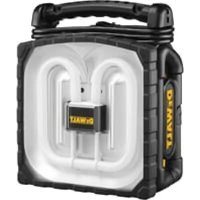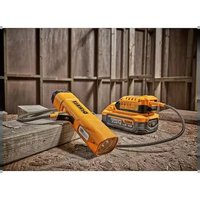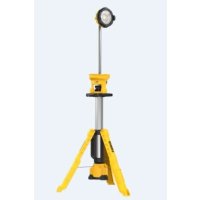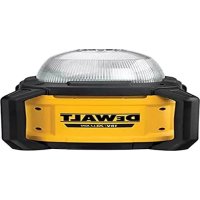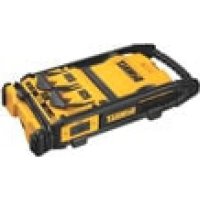
DC022 - Flashlight DEWALT - Free user manual and instructions
Find the device manual for free DC022 DEWALT in PDF.



| Product Type | Professional work light with integrated battery charger |
| Brand | DeWalt |
| Model | DC022 |
| Input Voltage | 230 V AC (UK and Ireland) / 115 V AC (DC022LX) |
| Maximum Rated Current | 16 A |
| Lamp Power | 38 W fluorescent |
| Weight (unit only) | 5.1 kg |
| Charging Voltage | 7.2 to 18 V DC |
| Charging Current | 2.8 A |
| Typical Charge Time | 1 hour |
| Compatible Battery Types | NiCd and NiMH 7.2 to 18 V (models DE9057 to DE9503) |
| Main Features | Adjustable work light, 1-hour charger, two 16 A outlets (on DC022 230 V) |
| Housing Material | Reinforced plastic |
| Protection Rating | Indoor use, do not expose to rain |
| Replacement Bulb | DeWalt DC0213 (38 W fluorescent) |
| Maintenance | Clean with a damp cloth, no water or solvents |
| Safety | Double insulated (DC021/DC022DK/LX) or grounded (DC022 QW/GB) |
| Warranty | 30-day money-back satisfaction guarantee, 1 year parts and labor |
| Package Contents | Light/charger, manual, exploded view drawing |
Frequently Asked Questions - DC022 DEWALT
User questions about DC022 DEWALT
0 question about this device. Answer the ones you know or ask your own.
Ask a new question about this device
Download the instructions for your Flashlight in PDF format for free! Find your manual DC022 - DEWALT and take your electronic device back in hand. On this page are published all the documents necessary for the use of your device. DC022 by DEWALT.
USER MANUAL DC022 DEWALT
Director Engineering and Product Development Horst Grossmann
DEWALT, Richard-Klinger-Strasse 11, D-65510, Idstein, Tyskland 01.09.2007
Important Safety Rules
- WARNING! When using the DC021 and DC022 worklight/chargers, basic precautions should always be followed, including the following:
a. Read all the instructions before using the DC021 and DC022 worklight/chargers.
b. To reduce the risk of injury, close supervision is necessary when a worklight/charger is used near children.
c. Do not contact moving parts.
d. Only use attachments recommended or sold by the manufacturer.
e. Do not use outdoors.
f. To disconnect, turn all controls to the off ("O") position, then remove plug from outlet.
g. Do not unplug by pulling on cord. To unplug, grasp the plug, not the cord.
h. Unplug from outlet when not in use and before servicing or cleaning.
i. Do not operate any worklight/charger with a damaged cord or plug, or after the worklight/charger malfunctions or is dropped or damaged in any manner. Return worklight/charger to the nearest authorized service facility for examination, repair, or electrical or mechanical adjustment.
j. To reduce the risk of electrical shock, do not put worklight/charger in water or other liquid. Do not place or store worklight/charger where it can fall or be pulled into a tub or sink.
k. Use only the charger supplied by the manufacturer to recharge.
I. Always unplug before replacing the bulb. Replace bulb with same type rated 38 Watts.
m. Connect to a property grounded outlet. Refer to Grounding Instructions.
Safety Rules for Worklight/Chargers
WARNING: Bum hazard. Do not operate flashlight or charger near flammable liquids or in gaseous or explosive atmospheres. Internal sparks may ignite fumes causing personal injury.
WARNING: Shock hazard. Remove battery pack before replacing the fluorescent bulb.
- Vision may be impaired when looking directly into fluorescent light.
- Do not expose light or charger to wet or damp areas. Do not expose light or charger to rain or snow.
- Do not wash light or charger with water or allow water to get inside light or charger. Do not submerge light in water at any time.
- Do not operate without lens cover assembly attached.
Before using battery and charger, read all instructions and cautionary markings on charger, battery pack, and product using battery pack. - This appliance is not intended for use by persons (including children) with reduced physical, sensory or mental capabilities, or lack of experience and knowledge, unless they have been given supervision or instruction concerning use of the appliance by a person responsible for their safety.
Children should be supervised to ensure that they do not play with the appliance.
DANGER:Electrocution hazard. 230 volts are present at charging terminals and outlets of the DC022. 115 volts are present at charging terminals of the DC022LX.Do not probe with conductive objects.Electric shock or electrocution may result.
WARNING: Shock hazard. Do not allow any liquid to get inside worklight/charger. Electric shock may result.
CAUTION: Burn hazard. To reduce the risk of injury, charge only DEWALT rechargeable batteries. Other types of batteries may burst causing personal injury and damage.
CAUTION: Under certain conditions, with the worklight/charger plugged in to the power supply, the exposed charging contacts inside the charger can be shorted by foreign material. Foreign materials of a conductive nature such as, but not limited to, steel wool, aluminum foil, or any buildup of metallic particles should be kept away from charger cavities. Always unplug the charger from the power supply when there is no battery pack in the cavity. Unplug worklight/charger before attempting to clean.
DO NOT attempt to charge the battery pack with any chargers other than the ones in this manual. The worklight/charger and battery pack are specifically designed to work together.
- In case of damaged power supply cord the supply cord must be replaced immediately by the manufacturer, its service agent or similar qualified person to prevent any hazard.
- This worklight/charger is not intended for any uses other than charging DEWALT rechargeable batteries. Any other uses may result in risk of fire, electric shock or electrocution.
- Do not expose worklight/charger to rain or snow. The worklight/charger is intended for household and commercial use.
Pull by plug rather than cord when disconnecting worklight/charger. This will reduce risk of damage to electric plug and cord.
- Make sure cord is located so that it will not be stepped on, tripped over, or otherwise subjected to damage or stress.
- Do not use an extension cord unless it is absolutely necessary. Use of an improper extension cord could result in risk of fire, electric shock or electrocution.
- Do not place any object on top of worklight/charger or place the worklight/charger on a soft surface that might block the ventilation slots and result in excessive internal heat. Place the worklight/charger in a position away from any heat source.
- Do not operate worklight/charger with a damaged cord or plug - have them replaced immediately.
- Do not operate the worklight/charger if it has received a sharp blow, been dropped, or otherwise damaged in any way. Take it to an authorized service center.
- Do not disassemble worklight/charger. Take it to an authorized service center when service or repair is required. Incorrect reassembly may result in a risk of electric shock, electrocution or fire.
- Disconnect the worklight/charger from the outlet before attempting any cleaning. This will reduce the risk of electric shock. Removing the battery pack will not reduce this risk.
- The DC021 and DC022 (230 V) worklight/ chargers are designed to operate on 230 Volts, 50 Hz AC (except outlets). The DC022
(115 V) is designed to operate on 115 Volts, 50Hz AC. It also operates on direct current (DC) through a fully charged battery pack. Do not use any other voltage.
Residual risks
The following risks are inherent to the use of this appliance:
- impaired vision when looking directly into fluorescent light
- burns from touching a hot bulb
Grounding Instructions
The DC022 (230 V) worklight/charger must be grounded. In the event of malfunction or breakdown, grounding provides a path of least resistance for electric current to reduce the risk of electric shock. The worklight/chargers are equipped with a cord having an equipment-grounding conductor and a grounding plug. The plug must be plugged into an appropriate outlet that is properly installed and grounded in accordance with all local codes and ordinances.

DANGER: Improper connection of the equipment grounding conduct or can result in a risk of electric shock. The conductor with insulation having an outer surface that is green with yellow stripes is the equipment grounding conductor. If repair or replacement of the cord or plug is necessary, do not connect the equipment-grounding conductor to a live terminal. Repairs shall only be performed by DEWALT service agent. Do not modify the plug provided with the worklight/charger - if it will not fit the outlet, have a proper outlet installed by a DEWALT repair agent.
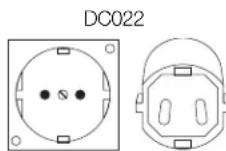
FOR GROUNDED, CORD-CONNECTED WORKLIGHT/CHARGERS RATED 16A AND LOWER AND INTENDED FOR USE ON A NOMINAL 230V SUPPLY CIRCUIT
The worklight/charger is for use on a nominal 230 V circuit, and has a grounding plug that looks like the plug in the following illustration.
ENGLISH
Additional Safety Instructions for Battery Packs
When using the charger, always observe the safety regulations applicable in your country to reduce the risk of fire, electric shock and personal injury. Read the following safety instructions before attempting to operate this product. Keep these instructions in a safe place.
This charger is in accordance with the relevant safety regulations. To avoid danger, electric appliances must only be repaired by qualified technicians.

WARNING: Fire hazard! Avoid metal short circuiting the contacts of a detached battery pack. Do not store or carry the battery pack without the battery cap placed over the contacts.
The battery fluid, a 25 - 30% solution of potassium hydroxide, can be harmful. In case of skin contact, flush immediately with water. Neutralize with a mild acid such as lemon juice or vinegar. In case of eye contact, rinse abundantly with clean water for at least 10 minutes. Consult a physician.
- Never attempt to open a battery pack for any reason.
Additional Safety Instructions for Chargers
Make sure that the battery pack is dry and clean before inserting it into the charger.
- Use only chargers labelled "NIMH" or "NIMH + NiCd" to charge DEWALT NIMH battery packs.
- Never carry the charger by its cord. Keep the cord away from heat, oil and sharp edges.
- Do not attempt to charge wet battery packs.
Always follow the instructions in the back of this manual for battery pack disposal.
- When not in use, chargers and battery packs must be stored in a dry place and locked up securely, out of reach of children
LABELS ON CHARGER AND BATTERY PACK
In addition to the pictographs used in this manual, the labels on the charger and the battery pack show the following pictographs:

Battery charging

Battery charged

Battery defective

Hot\cold pack delay

Do not probe with conductive objects.

Do not charge damaged battery packs

Read instruction manual before use.

Use only with DEWALT battery packs, others may burst, causing personal injury and damage.

Do not expose to water.

Have defective cords replaced immediately.

Charge only between 4^ and 40^ .

Discard the battery pack with due care for the environment.

Do not incinerate the battery pack NiMH/ NiCd+.

Charges NiMH and NiCd battery packs.

See technical data for charging time.

Lamp location.

For indoor use.


Ensure correct bulb is used.

Do not plug cord in.
Correct bulb placement.
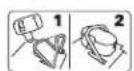
Battery clamp down.
Package contents
The package contains:
1 charger light
1 Instruction manual
1 Exploded drawing
- Check for damage to the worklight/charger, parts or accessories which may have occurred during transport.
Take the time to thoroughly read and understand this manual prior to operation.
Description (fig. 1-4)
WARNING: Never modify the power tool or any part of it. Damage or personal injury could result.
INTENDED USE
The DC021 and DC022 worklight/chargers are designed to use as a light source and to charge battery packs for professional tools.
The DC021 and DC022 worklight/chargers are professional appliances. DO NOT let children come into contact with the tool. Supervision is required when inexperienced operators use this tool.
a. ON/OFF switch
b. Handle
c. Charger port
d. 16 Amp outlets (DC022, 230 V only)
e. Power cord
f. Built-in cord wrap
g. Battery hold-down
h. Fluorescent bulb
i. Lens cover
j. Worklight housing
k. Charger indicator (red LED)
1. AC power indicator (green LED)
m. H-frame support
n. Rubber gasket
o. Bulb guard
Electrical safety
The electric motor has been designed for one voltage only. Always check that the power supply corresponds to the voltage on the rating plate.

DC022DK/LX; DC021
Your tool is double insulated in accordance with EN 60335.
DC022 QW and GB are grounded (class I) according to EN 60335.
Mains plug replacement (U.K. & Ireland only)

DANGER:
- Should your mains plug need replacing and you are competent to do this, proceed as instructed below. If you are in doubt, contact an authorized DEWALT repair agent or a qualified electrician.
- Disconnect the plug from the supply.
- Cut off the plug and dispose of it safely; a plug with bared copper conductors is dangerous if engaged in a live outlet.
Only fit 13 Amperes BS1363A approved plugs fitted with the correctly rated fuse (1). - The cable wire colours, or a letter, will be marked at the connection points of most good quality plugs. Attach the wires to their respective points in the plug (see below). Brown is for Live (L) (2) and Blue is for Neutral (N) (4).
Before replacing the top cover of the mains plug ensure that the cable restraint (3) is holding the outer sheath of the cable firmly and that the two leads are correctly fixed at the terminals crews.
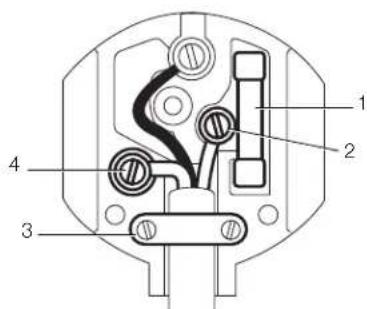

WARNING: NEVER use a light outlet.
NEVER connect the live (L) or
neutral (N) wires to the earth pin marked E or 1
ENGLISH
Fitting a mains plug to 115 V units (U.K. and Ireland only)
The plug should be fitted by a competent person. If you are in doubt, contact an authorized DEWALT repair agent or a qualified electrician.
The wires are coloured according to the following code:
$$ \text {l i v e} = \text {b r o w n} $$
$$ n e u t r a l = b l u e $$
- Do not connect the blue or brown wire to the earth terminal in the plug. Connect as follows:
brown to terminal marked 'L' blue to terminal marked 'N'
The plug fitted should be comply with BS EN 60309 (BS4343), 32 Amps, earthing contact position 4h.

WARNING: Always ensure that the cable clamp is correctly and securely fitted to the sheath of the cable.
Using an extension cable

WARNING: Keep electrical cords in good condition. Do not use worn, bare, or frayed cords because they can cause electrical shock.

WARNING: Operating equipment at low voltage can cause it to overheat. Using an excessively long extension cord can cause the cord to overheat.
Only use grounded extension cords that are rated for outdoor use and equipment with a third-wire ground.
If an extension cable is required, use an approved three-wire extension cable suitable for the power input of this tool (see technical data).
The minimum conductor size is 1.5mm^2 .When using a cable reel, always unwind the cable completely. Also refer to the table below.
| Conductor size (mm) | Cable rating (Amperes) |
| 0.75 | 6 |
| 1.00 | 10 |
| 1.50 | 15 |
| 2.50 | 20 |
| 4.00 | 25 |
| Cable length (m) | ||||||
| 7.5 | 15 | 25 | 30 | 45 | ||
| Voltage | Amperes | Cable rating (Amperes) | ||||
| 115 | 0-2.0 | 6 | 6 | 6 | 6 | 10 |
| 2.1-3.4 | 6 | 6 | 6 | 6 | 15 | |
| 3.5-5.0 | 6 | 6 | 10 | 15 | 20 | |
| 5.1-7.0 | 10 | 10 | 15 | 20 | 25 | |
| 7.1-12.0 | 15 | 15 | 20 | 25 | - | |
| 12.1-20.0 | 20 | 20 | 25 | - | - | |
| 230 | 0-2.0 | 6 | 6 | 6 | 6 | 6 |
| 2.1-3.4 | 6 | 6 | 6 | 6 | 6 | |
| 3.5-5.0 | 6 | 6 | 6 | 6 | 10 | |
| 5.1-7.0 | 10 | 10 | 10 | 10 | 15 | |
| 7.1-12.0 | 15 | 15 | 15 | 15 | 20 | |
| 12.1-20.0 | 20 | 20 | 20 | 20 | 25 | |
Battery Pack
DC021 AND DC022 BATTERY TYPE
The DC021 and the DC022 will charge 7.2-18 Volt DEWALT battery packs and will provide light using 12-18 Volt DEWALT battery packs. Run-time per one 18 V battery is one hour or greater.
Your battery may also be charged in DEWALT 1 hour chargers, 15 minute chargers or vehicular 12 volt chargers. Be sure to read all safety instructions before using your charger.
The 38W fluorescent worklight will run on 12-18V DEWALT batteries or 230 V and 115 V AC Power.
The 1-hour charger and the two power outlets will ONLY function when the worklight/charger is plugged into AC power and CANNOT be powered by DEWALT batteries.
Charging the Battery Pack
When charging the battery pack for the first time, or after prolonged storage, it will only accept an 80% charge. After several charge and discharge cycles, the battery pack will attain full capacity. Always check the mains prior to charging the battery pack. If the mains is functioning but the battery pack does not charge, take your charger to an authorised DEWALT repair agent. Whilst charging, the charger and the battery pack may become warm to touch. This is a normal condition and does not indicate a problem.

CAUTION: Do not charge the battery pack at ambient temperatures < 4^ or >40^ . Recommended charging temperature: approx. 24^ .
Charging Procedure (Fig. 1, 4)

GER:Electrocution hazard.
230 volts are present at charging terminals and outlets of the DC022/DC021. 115 volts are present at charging terminals of the DC022LX. Do not probe with conductive objects. Danger of electric shock or electrocution.

WARNING: Pinch hazard. Do not release the battery hold-down quickly. Personal injury may result.
- Plug the worklight/charger power cord (e) into an appropriate AC power outlet or generator.
- Lift the battery hold-down (g) with one hand and insert the battery pack into the charging receptacle. Slowly place the battery hold-down on battery pack to hold battery pack firmly.
- The red light on the top rear of the base will blink continuously indicating that the charging process has started.
- The completion of charge will be indicated by the red light remaining ON continuously.
- Charge time for DEWALT 7.2-18 V battery packs is approximately one hour.
Battery Cap (fi g. 5)
A protective battery cap is supplied to cover the contacts of a detached battery pack. Without the protective cap in place, loose metal objects could short circuit the contacts, causing a fire hazard and damaging the battery pack.
- Take off the protective battery cap before placing the battery pack in the charger or tool (Fig. 5A).
- Place the protective cap over the contacts immediately after removing the battery pack from the charger or tool (Fig. 5B).

WARNING: Make sure the protective battery cap is in place before storing or carrying a detached battery pack.
Automatic Refresh
The automatic refresh mode will equalize or balance the individual cells in the battery pack at its peak capacity. Battery packs should be refreshed overnight after every 10th charge/discharge cycle or whenever the pack no longer delivers the same amount of work.
To refresh your battery pack, place it in the charger as usual. The red light will blink continuously indicating that the charge cycle has started.
When the 1-hour charge cycle (depending on charger) has completed, the light will stay on continuously and will no longer blink. The battery pack is fully charged and can be used at this time.
If the battery pack is left in the charger after the initial 1-hour charge (depending on charger), the charger will automatically initiate the refresh mode. This mode will continue up to 8 hours, but the battery pack can be removed at any time during the refresh mode.
Hot/Cold Pack Delay
When the charger detects a battery pack that is too hot or too cold, it automatically starts a Hot/ Cold Pack Delay, suspending charging until the battery has reached an appropriate temperature. The charger then automatically switches to the pack charging mode. This feature ensures maximum battery life. The red indicator blinks long, then short while in the Hot/Cold Pack Delay mode.
OPERATION
NOTE: If using the worklight/charger on AC power, the green LED indicator (I) must be illuminated. DO NOT use worklight/charger if the LED indicator is not illuminated.
- Place the folded DC021/DC022 on a stable, level surface so that the charger receptacles are in sight.
- With one hand securely holding the handle (b), use the other hand to lift the worklight/ charger housing (j). The worklight housing can be positioned in multiple directions on the top of the H-frame support (m). The H-frame support will pivot in 4 positions around the base of the charger housing.
- Position the worklight as desired. Press the ON/OFF switch (a) to ON.
When finished using the worklight/charger, turn the ON/OFF swith to OFF, fold the worklight/charger housing down to the flat position for storage (Fig. 1).
Replacing the Fluorescent Bulb (Fig. 6, 7)

NG: Shock Hazard. Disconnect battery pack and unplug tool before replacing the fluorescent bulb. Such preventative safety measures reduce the risk of personal injury.
CAUTION: Vision may be impaired when looking directly into fluorescent light.
ENGLISH
CAUTION: Cut hazard. If replacing a broken bulb, protect your hands before attempting to remove the bulb. Do not remove any pieces of broken glass or bulb from the outlet area with bare hands, or personal injury may occur.
CAUTION: Do not touch bulb immediately after use. Allow the bulb to cool before removing. Contact with a hot bulb may cause personal injury.
To change the fluorescent bulb, the worklight housing must be in an upward position as shown in Figure 2.
NOTE: Recommended replacement bulb is the DEWALT DC0213 38W fluorescent bulb.
- With one hand securing the bottom corner of the worklight housing (j) and lens cover (i), use the other hand to roll back the rubber gasket (n) from the worklight housing starting at one of the top corners.
- Still securely holding the worklight housing roll back the rubber gasket from all sides of the housing (Fig. 5).
- Remove the rubber gasket and lens cover and set aside.
- With one hand securing the bottom corner of the worklight housing, use the other hand to remove the bulb guard (o). Gently squeeze the sides of the bulb guard with the thumb and index finger to release it from the clips. Set the bulb guard aside.
- Secure the bottom corner of the worklight housing with one hand. Use the other hand to firmly grasp the fluorescent bulb (h) at the center and hold onto the white plastic housing under the bulb guard. While still securing the bottom corner, gently remove the bulb from the worklight housing as shown in Figure 6. Ensure that the outlet and area around the outlet is free of dirt, dust and other contaminants.
- Align the replacement fluorescent bulb in the same orientation as the previous bulb. Secure the bottom corner of the worklight housing with one hand. Using the other hand, carefully press on the center of the bulb's plastic housing to secure it in place.
-
Once the replacement bulb is in place, gently press the center of the bulb's plastic housing to ensure it is connected properly. Replace the bulb guard by clipping it to the worklight housing.
-
Replace the lens cover. Place the rubber gasket in one corner and roll the gasket into place on all four sides of the worklight housing. Ensure the rubber gasket is firmly in place around the worklight housing.
MAINTENANCE
Your DEWALT appliance has been designed to operate over a long period of time with a minimum of maintenance. Continuous satisfactory operation depends upon proper tool care and regular cleaning.
WARNING: To reduce the risk of injury, turn unit off and disconnect from power source before installing and removing accessories, before adjusting or changing set-ups or when making repairs. Be sure the trigger switch is in the OFF position. An accidental start-up can cause injury.
Service Notes
This product is not user serviceable. Other than the replacement bulb, there are no user serviceable parts inside the worklight/charger. Servicing at an authorized service center is required to avoid damage to static sensitive internal components.

Cleaning
WARNING: When cleaning, use only a damp cloth on plastic parts. Many household cleaners contain chemicals which could seriously damage plastic parts. Also, do not use gasoline, turpentine, lacquer or paint thinner, dry cleaning fluids or similar products which may seriously damage plastic parts. Never let any liquid get inside the tool; never immerse any part of the tool into a liquid.
WORKLIGHT/CHARGER CLEANING INSTRUCTIONS
WARNING: Disconnect the worklight/ charger from the AC outlet before cleaning. Dirt and grease may be removed from the exterior of the worklight/charger using a cloth or soft non-metallic brush. Do not use water or any cleaning solutions.
Optional accessories

WARNING: Since accessories, other than those offered by DEWALT, have not been tested with this product, use of such accessories with this tool could be hazardous. To reduce the risk of injury, only DEWALT, recommended accessories should be used with this product.
Consult your dealer for further information on the appropriate accessories.
Protecting the environment

Separate collection. This product must not be disposed of with normal household waste.
Should you find one day that your DEWALT product needs replacement, or if it is of no further use to you, do not dispose of it with household waste. Make this product available for separate collection.

Separate collection of used products and packaging allows materials to be recycled and used again. Re-use of recycled materials helps prevent environmental pollution and reduces the demand for raw materials.
Local regulations may provide for separate collection of electrical products from the household, at municipal waste sites or by the retailer when you purchase a new product.
DEWALT provides a facility for the collection and recycling of DEWALT products once they have reached the end of their working life. To take advantage of this service please return your product to any authorised repair agent who will collect them on our behalf.
You can check the location of your nearest authorised repair agent by contacting your local DEWALT office at the address indicated in this manual. Alternatively, a list of authorised DEWALT repair agents and full details of our after-sales service and contacts are available on the Internet at: www.2helpU.com.

Rechargeable battery pack
This long life battery pack must be recharged when it fails to produce sufficient power on jobs which were easily done before. At the end of its technical life, discard it with due care for our environment:
- Run the battery pack down completely, then remove it from the tool.
- NiCd, NiMH and Li ion cells are recyclable. Take them to your dealer or a local recycling station. The collected battery packs will be recycled or disposed of properly.
THE FOLLOWING BATTERIES ARE COMPATIBLE WITH THIS CHARGER:
| DE9057 | 7.2V | NiCd | 1.3Ah |
| DE9062 | 9.6V | NiCd | 1.3Ah |
| DE9074 | 12.0V | NiCd | 1.3Ah |
| DE9094 | 14.4V | NiCd | 1.3Ah |
| DE9098 | 18.0V | NiCd | 1.3Ah |
| DE9061 | 9.6V | NiCd | 2.0Ah |
| DE9071 | 12.0V | NiCd | 2.0Ah |
| DE9091 | 14.4V | NiCd | 2.0Ah |
| DE9095 | 18.0V | NiCd | 2.0Ah |
| DE9084 | 7.2V | NiMH | 2.0Ah |
| DE9075 | 12.0V | NiCd | 2.4Ah |
| DE9092 | 14.4V | NiCd | 2.4Ah |
| DE9096 | 18.0V | NiCd | 2.4Ah |
| DE9501 | 12.0V | NiMH | 2.6Ah |
| DE9502 | 14.4V | NiMH | 2.6Ah |
| DE9503 | 18.0V | NiMH | 2.6Ah |
GUARANTEE
30 DAY NO RISK SFACTION GUARANTEE
If you are not completely satisfied with the performance of your DEWALT tool, simply return it within 30 days, complete as purchased, to the point of purchase, for a full refund or exchange. Proof of purchase must be produced.
- ONE YEAR FREE SERVICE CONTRACT
If you need maintenance or service for your DEWALT tool, in the 12 months following purchase, it will be undertaken free of charge at an authorized DEWALT repair agent. Proof of purchase must be produced. Includes labour and spare parts for Power Tools. Excludes accessories.
- ONE YEAR FULL WARRANTY
If your DEWALT product becomes defective due to faulty materials or workmanship within 12 months from the date of purchase, we guarantee to replace all defective parts free of charge or, at our discretion, replace the unit free of charge provided that:
The product has not been misused.
- Repairs have not been attempted by unauthorized persons.
- Proof of purchase date is produced. This guarantee is offered as an extra benefit and is additional to consumers statutory rights.
For the location of your nearest authorized DEWALT repair agent, please use the appropriate telephone number on the back of this manual. Alternatively, a list of authorized DEWALT repair agents and full details on our after-sales service are available on the Internet at www.2helpU.com.
LÁMPARA DE TRABAJO PESADO CON O SIN CABLE / CARGADOR DE 1 HORA DC021/DC022
Enhorabuena!
Bloc-piles rechargeable
30 JOURS D'ENGAGEMENT SATISFACTION GARANTIE
ACCUTYPE DC021, DC022
Do not incinerate the battery pack NiMH/ NiCd+.

NIMH NiMH/NiCd+ pil takimmi yakmayn. NiCd

Sarj cihazi, NiMH ve NiCd pil takimlarini sarj eder.

Sarj siresi icin teknik veriler bolumine bakin.

Lamba konum.

√ ic mekanlarda kullanim icin. Dogru ampulun kullaikdgmdan emin olun.

Kabloyu fisetakmayin

Dogru ampul yerlestirme.
Pil keneti asagi.
Paketicerikleri
D-65510, Idstein, Germany
01.09.2007
EnuavzoiXavovc0afoaaleia
- IPOEIAOIOHHe!KataTnXgohon Tovphiotuxovogyaioc/phiotov DC021XaDC022qeTeVaaTNOvovTu Aiva oBaoosqoovlaed, OvateuaabavouevovTov katoo:
a. a a o b v / o g t i o t e s D C 0 2 1 x a D C 0 2 2.
β. Tua meoon tov auoviov tvavauotouov, aataeiratou evn cunqonon otav eva oovocogyaoia / oogwntc xnootouetau novtceuud
γ. Mnyaxovuaite ta zvovuva eon. - Xoetaooueio movo 0ooaogntmaTov ouviotovra nawovrt aTO tvXataoavot.
ε.Mynavetexoonσεeogovxogovs.
στ. Για αλοσυνδεη, θεοτε δλονς τονς διακόπες σθην κλευση θεοη (“O”) χαι xατόμιν φαφασεοτε το φις ατό την πόλξα. - Mny bale to aio nyn pia Taqaoivac to xalwio. Tua va byaale To an tyn qia,va ngatate to qis kai oxu to xalwio.
η. Aioovdeote aio tv npca otav dev xnoaotie to egyaleo xai niov aio tn ovtjnoen no tov naoguo. - Mny leitovoyite oonouodnote owouotzo
eyaoia / oogotn u e oquevo
xawdo n fic n av to owtuo
eyoiaoc o oogotn exi npovoudoe
Biaep,exei paei vnoore otouadnto
Cetaia. Euaotgeyte to ooiutoxo
eyoaiac / oogotn otov anoueoto
Egovooobotnaev ovuaqdoawa
ovyrnonc yua eetaaon, enozevni, n
nxtqnn / mynavz qvthauon.
i. Ta n tne won nuovov nentgoanxiac, mny tototheite to nteqoxo foortxio / gootn ovego n allo vyo. Mny tototheite n aoohneve to foatoux ooyaoia / fogotn o eon oov pnoe va noi yva qa thei meoa oe paavega n vtnja.
ua. Xpouoouotie mvo to fogtoT nov Taqextal ao tov nataoxevaoT y a Tnv eavafoogtoTov egyalteov.
AioovvdeTe navTo eoyaleio aTo npiaqavavuaataoote to launna.AvuaataoThe to launna launnaogaiovtov38Watts.
ey. Suvodote oe natalan yewuevn npca. AiajaoTe Tc Odyte yciowms.
SYMBOAIAO OPEAN SYNTHPHSENEOESTOY
Eav yaeate ovwnon n enoynou tv
eyaoieu DEWALT oovayogocote evoc
12 mivn to npnvnyaoyag,
unth naayamotornel yoo5 xoeon0e
esowodotnevo avutnooovvntonng
tn DRwALT Iqteia va qoogopiaote
anoden ayogag. To oujfoao airo
xalntto noos egayas xai
avdakawov na yaeotgvaoyaleia.
Egaovta ta napkxaeva.
-IIAHPHEETYYHENO2ETOY2
Eav to 1000Tn5 DEWALT TnO ayogaoate
aagouoae BAdh loyoyeAattowatov
vauov n eoyaoiae o daotma 12
muvov ao Tn yegouyia ayogao tov,
eyuwaote n doogcv avwataotaon
oov to Aattawatov vEgoiunatoV,
n, rata nTn aoxzuaqn paG zoiqn, nT
doogcv avwataotaon nTg movadas, me Tnv
poittoeom:
To npoiov dev exe unootet axoqetoeguon.
Devexov enyaeon0e enocees aoe u neovooobotneva cota.
Exoooopoei odoetn Tne
yogounvoc yogoc. H noogobou
eyonnooogodegeta og oogobetn
nooyxna eiva enuovto vovuovv
duoogatov tv aovataovv.
Tia n biuovon tov oovotepoae aag
Eouodootnvov auuvooov ouvtjno
Tn DEWALT, qaoaoloue xenouoantoe
tox vataaio 0q10 neevovn
Bogweta oTo niow meoc touagovt
eywbiov. Evallaxiau, pnojetve va Boette
Xauoyo eovooobotnvov avutoodov
Ovvtjngn Tn DEWALT, xawos kai npge
Leuouoeie na ty eunugetmon meta
tn wanon ot odiactvo, tn dieuvon
www.2helpU.com.
| Belgique et Luxembourg | DEWALT | Tel: | 070-225587 |
| Belgiè en Luxemburg | Mechelen Campus, Schällenhoevedreef 20E Fax: 070-225585 | ||
| B-2800 | Mechelen | ||
| Denmark | DEWALT | TIt: | 7020 |
| Sluseholm 2-4 | Fax: 7022 4910 | ||
| 2450 Koberhavn SV www.dewalt.dk | |||
| Deutschland | DEWALT Deutschland Tel: 06126-21-1 | ||
| Postfach | 1202 | ||
| 65502 | Idstein | ||
| Elaas | Black & Decker (Hellas) S.A. | Tηλ: | (01) 8981-616 |
| Στραβενος 7 & Bouluαγμενης 159 | Φαξ: | (01) 8983-570 | |
| Γιναδα 16674, Αθηγα | Scrivcc: | (01) 8982-630 | |
| Espana | DEWALT | Tel: 934 797 400 | |
| Parque de Negocios "Mas Blau" | Fax: 934 797 439 | ||
| Edificio Muntadas, c/Bergadía, 1, Of. A6 | |||
| 08820 El Prat de Llobregat (Barcelona) | |||
| France | DEWALT | Tel: 33 (0) 472 20 39 72 | |
| BP 30084 - 5 allée des hêtres | Fax: 33 (0) 472 20 39 02 | ||
| 69579 Limonest Cedex | www.dewalt.fr | ||
| Schweiz | DEWALT Schweiz | Tel: 044-755 60 70 | |
| Suisse | In der Luberzen 40 | Fax: 044-730 70 67 | |
| Swizzera | 8902 Urdorf | www.dewalt.ch | |
| Ireland | DEWALT | Tel: | 00353-2781800 |
| Calpe House Rock Hill | Fax: 00353-2781811 | ||
| Black Rock, Co. Dublin | www.dewalt.ie | ||
| Italia | DEWALT | Tel: | 800-014353 |
| Viale Elvezia 2 | Fax: 039-2387592 | ||
| 20052 Monza (Mi) | www.dewalt.it | ||
| Nederland | DEWALT BV | Tel: 0164 283000 | |
| Joulehof 12 | Fax: 0164 283100 | ||
| 4622 RG Borgon Op Zoom | www.dewalt.nl | ||
| Norge | DEWALT | Tel: 22 90 99 00 | |
| Postboks 4814, Nydalen | Fax: 22 90 99 01 | ||
| 0422 | Oslo | ||
| Österreich | DEWALT Österreich | Tel: 01 - 66116 - 0 | |
| Oberlaaerstr. 248 | Fax: 01 - 66116 - 14 | ||
| 1230 | Wien | ||
| Portugal | DEWALT | Tel: 214 66 75 00 | |
| Rua Egas Moniz 173 | Fax: 214 66 75 75 | ||
| João do Estoril, 2766-651 Estoril | |||
| Suomi | DEWALT | Puh: 010 400 430 | |
| Kellasatama 3 | 02150 | Espoo | |
| DEWALT | Tel: | 010 400 430 | |
| Kägelhamnen 3 | 02150 | Espoo | |
| Sverige | DEWALT | Tel: 031 68 61 00 | |
| Box 94 | Fax: 031 68 60 08 | ||
| 431 22 Mölndal | www.DEWALT.se | ||
| Türkije | Merkcz Scrvis | Tel: 0212 361 60 20 | |
| Tersane Cad. | Faks: 0212 361 60 19 | ||
| Nafe Sokak 1-3/4 Karaköy - Istanbul | |||
| United Kingdom | DEWALT | Tel: 01753-56 70 55 | |
| 210 Bath Road | Fax: 01753-57 21 12 | ||
| Slough,arks SL1 3YD | www.dewalt.co.uk | ||
| 657045-00 | 10/07 | ||