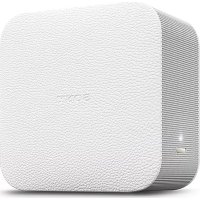
LSPXP1 - Projector SONY - Free user manual and instructions
Find the device manual for free LSPXP1 SONY in PDF.


| Product type | Ultra-short throw portable projector |
| Brand | Sony |
| Model | LSPX-P1 (with wireless unit LSPX-PT1) |
| Display system | SXRD 0.37 inch, 1366 x 768 pixels |
| Projected image size | 22 to 80 inches |
| Light source | Laser diode (Class 2) |
| Luminous power | 100 lumens |
| Speakers | 2 x 25 mm (bass reflex), mono |
| Amplification | 2 W + 2 W (4 ohms) |
| Wireless connectivity | Wi-Fi IEEE 802.11a/b/g/n (2.4/5 GHz), Bluetooth |
| Battery | Built-in rechargeable lithium-ion |
| Operating temperature | 5°C to 35°C |
| Dimensions (projector) | 80 x 131 x 131 mm |
| Weight (projector) | 930 g |
| Dimensions (wireless unit) | 135 x 35 x 135 mm |
| Weight (wireless unit) | 200 g |
| Power supply | AC adapter 19.5 V DC (projector) / 5 V DC (wireless unit) |
| Supplied accessories | 2 AC adapters, 4 power cords, IR Blaster, guides |
| Options | Floor stand LSPX-PS1 |
| Maintenance | Clean with a soft cloth; do not use alcohol or solvents |
| Safety | Class 2 laser product; do not look into the projection window |
Frequently Asked Questions - LSPXP1 SONY
User questions about LSPXP1 SONY
0 question about this device. Answer the ones you know or ask your own.
Ask a new question about this device
Download the instructions for your Projector in PDF format for free! Find your manual LSPXP1 - SONY and take your electronic device back in hand. On this page are published all the documents necessary for the use of your device. LSPXP1 by SONY.
USER MANUAL LSPXP1 SONY
http://rd1.sony.net/help/projector/lspxp1/h_ec/

SONY.
4-581-618-23(1)
Portable Ultra Short Throw Projector
Reference Guide
©2016 Sony Corporation Printed in Korea
LSPX-P1
| GB | Reference Guide | 4 |
| FR | Guide de référence | 16 |
| DE | Referenzanleitung | 30 |
| ES | Guía de referencia | 44 |
| IT | Guida di riferimento | 58 |
| NL | Referentiegids | 72 |
| PT | Guía de referencia | 86 |
| GR | Oδηγός αναφοράς | 100 |
| PL | Przewodnik | 116 |
| Referenčné príručka | 130 |
| Referencevejledning | 144 |
| Viiteopas | 158 |
| Referensmaterial | 172 |
| Referanseveiledning | 184 |
| Felhasználói útmató | 196 |
| Teatmik | 210 |
| Информacea за позукта | 224 |
| Ghid de referinţă | 238 |
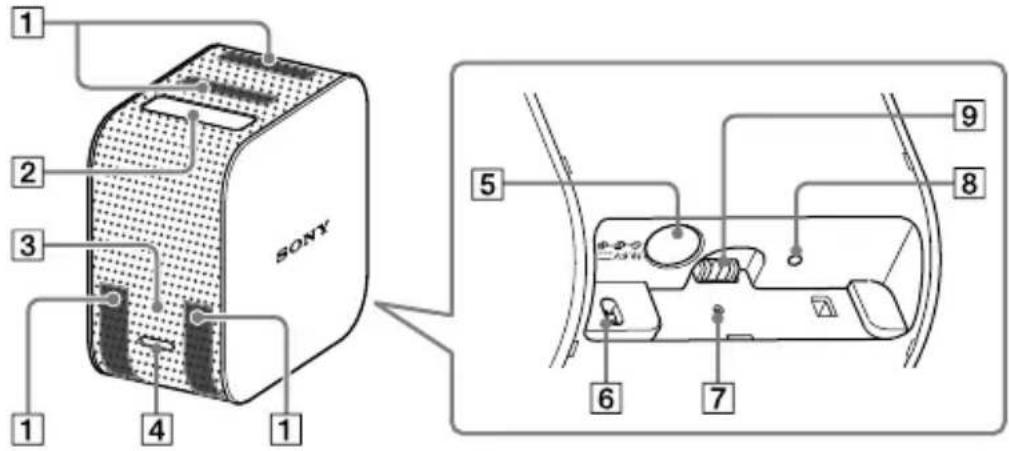
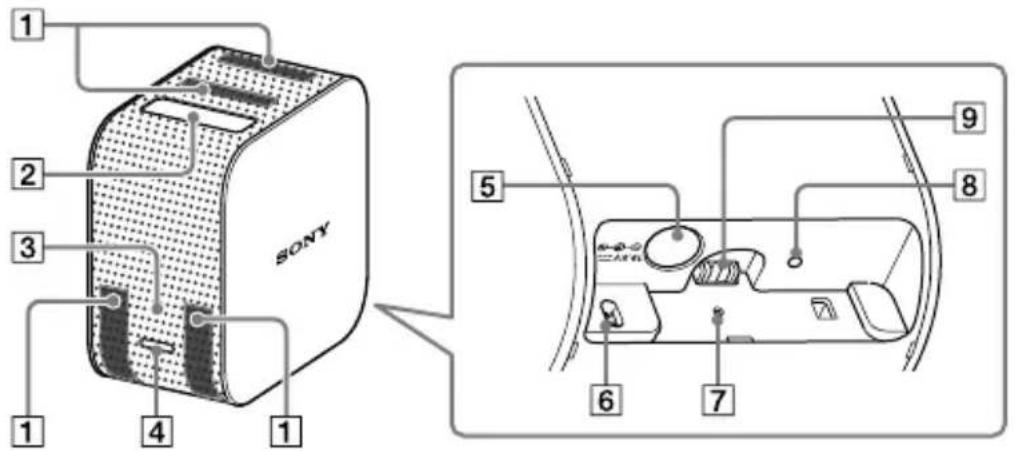
Location of controls
Portable Ultra Short Throw Projector
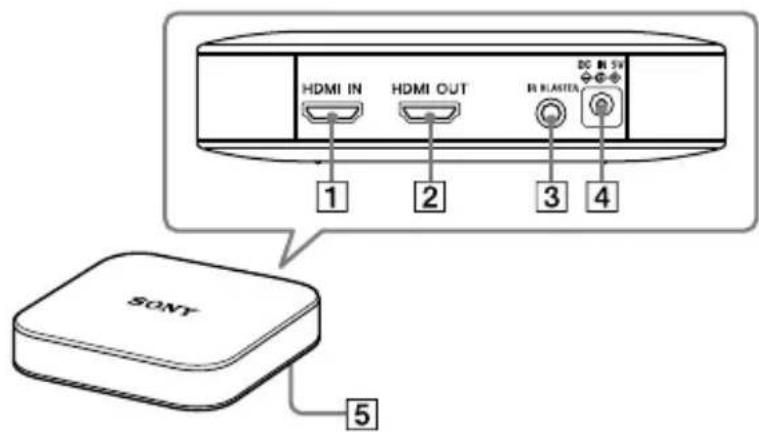
Wireless Unit
Portable Ultra Short Throw Projection
1 Ventilation holes (intake/exhaust)
2 Projection window (Laser aperture)
3 Power indicator
4 Power button
DC IN 19.5V jack
6 Distance sensor
7 RESET button
Charge indicator
9 Power jack for the stand (not supplied)
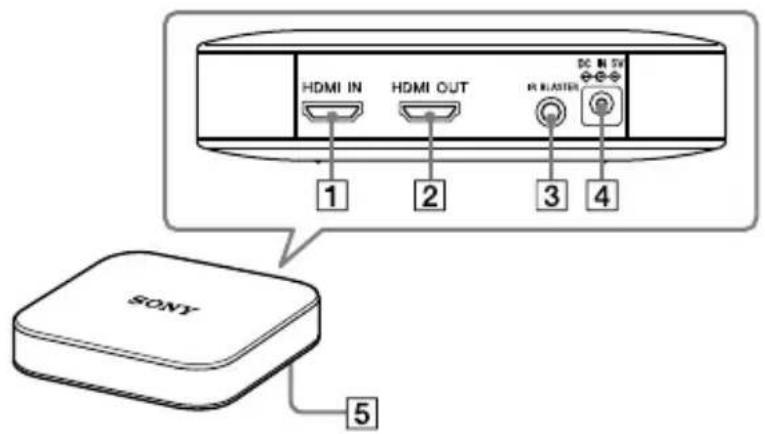
Wireless Unit
1 HDMI IN connector
2 HDMI OUT (pass-through) connector
3 IR BLASTER connector
4 DC IN 5V jack
PAIRING button
CAUTION
Notice for the customers in the countries applying EU Directives
Manufacturer: Sony Corporation, 1-7-1
Konan Minato-ku Tokyo, 108-0075 Japan
For EU product compliance: Sony Belgium, bijkantoor van Sony Europe Limited, Da Vincilaan 7-D1, 1935 Zaventem, Belgium

Hereby, Sony Corporation declares that this equipment is in compliance with Directive 2014/53/EU.
The full text of the EU declaration of conformity is available at the following internet address:
http://www.compliance.sony.de/
5150 - 5350 MHz band is restricted to indoor operations only.
These restrictions apply in the following countries:
AT/BE/BG/CZ/DK/EE/FI/FR/DE/EL/HU/IE/IT/LU/NL/NO/PL/PT/RO/ES/SE/CH/UK
Frequency Range & Power for RF Specification
LSPX-P1 (Projector)
Wireless LAN (IEEE802.11a/b/g/n)
Frequency Range/Output Power
- 2400 - 2483.5 MHz/< 20 dBm
- 5150 - 5250 MHz/< 23 dBm
- 5250 - 5350 MHz/< 23 dBm
- 5470 - 5725 MHz/< 23 dBm
Bluetooth
Frequency Range/Output Power
- 2402 - 2480 MHz/< 20 dBm
LSPX-PT1 (Wireless Unit)
Wireless LAN (IEEE802.11a/n)
Frequency Range/Output Power
- 5150 - 5250 MHz/< 23 dBm
Notice
If static electricity or electromagnetism causes data transfer to discontinue midway (fail), restart the application or disconnect and connect the communication cable (HDMI cable) again.
This product has been tested and found compliant with the limits set out in the EMC regulation for using connection cables shorter than 3 meters (9.8 feet).
The electromagnetic fields at the specific frequencies may influence the picture and sound of this unit.
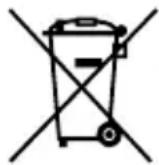
Disposal of waste batteries and electrical and electronic equipment (applicable in the European Union and other European countries with separate collection systems)
This symbol on the product, the battery or on the packaging indicates that the product and the battery shall not be treated as household waste. On certain batteries this symbol might be used in combination with a chemical symbol. The chemical symbols for mercury (Hg) or lead (Pb) are added if the battery contains more than 0.0005% mercury or 0.004% lead.
By ensuring these products and batteries are disposed of correctly, you will help prevent potentially negative consequences for the environment and human health which could otherwise be caused by inappropriate waste handling. The recycling of the materials will help to conserve natural resources.
In case of products that for safety, performance or data integrity reasons require a permanent connection with an incorporated battery, this battery should be replaced by qualified service staff only. To ensure that the battery and the electrical and electronic equipment will be treated properly, hand over these products at end-of-life to the applicable collection point
for the recycling of electrical and electronic equipment. For all other batteries, please view the section on how to remove the battery from the product safely. Hand the battery over to the applicable collection point for the recycling of waste batteries. For more detailed information about recycling of this product or battery, please contact your local Civic Office, your household waste disposal service or the shop where you purchased the product or battery.
Caution
Use of controls or adjustments or performance of procedures other than those specified herein may result in hazardous radiation exposure.
This Projector is classified as a CLASS 2 LASER PRODUCT.
This CLASS 2 LASER PRODUCT label is located near the projection window of the Projector.
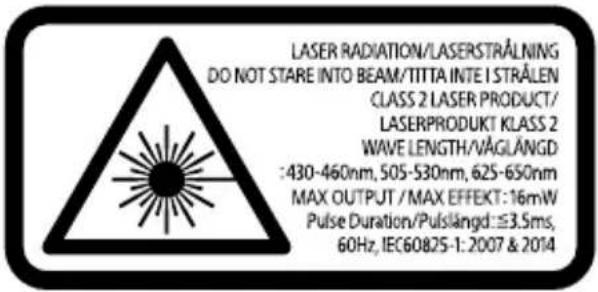
WAVELENGTH: 430-460 nm, 505-530 nm, 625-650 nm
MAX OUTPUT 16 mW
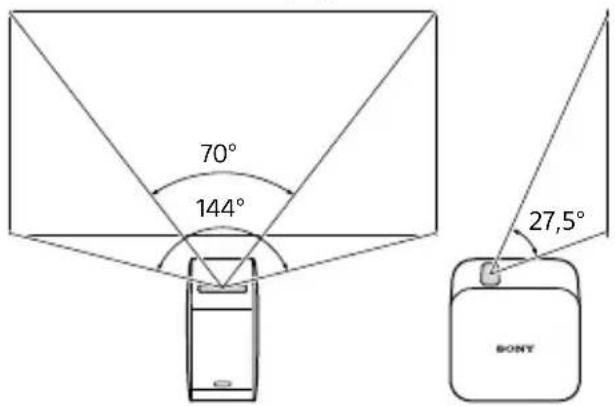
Pulse Duration: Red 2.67 ms / Green 3.5 ms or 1.75 ms / Blue 3.5 ms, 60 Hz
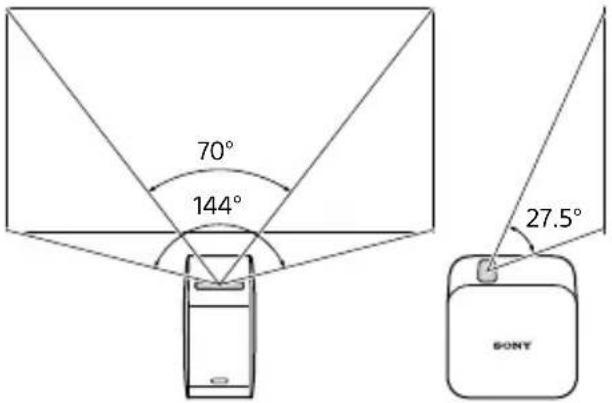
Beam divergence (Laser radiation area)
Precautions
For your safety
- Do not let water or foreign objects get into the unit. It may cause a fire or electric shock. If water or foreign objects have gotten into the unit, turn it off immediately, and disconnect the power cord and connection cables.
- Do not disassemble or modify the unit. It may cause a malfunction, fire or electric shock.
- If there is a possibility of lightning strike, do not use the unit. A lightning strike may cause an electric shock. If lightning is likely, unplug the unit to prevent a fire, electric shock and malfunction.
On safety
- Wireless functions are incorporated into this unit. Radio waves may affect the operation of other devices. Do not use this device in the following locations.
-
On an airplane.
-
Near automatically-controlled equipment, such as automatic doors or fire alarms.
If other equipment experiences problems such as interference while the unit is being used, immediately stop using the unit.
- Do not continue viewing the projected
screen for a long time. Continuously viewing the projected screen for a long time may cause eye strain. If you feel any discomfort or pain, immediately stop using the unit and have a rest. If the discomfort or pain persists after taking a rest, consult a doctor.
- Do not project onto a glossy surface. The light may be reflected into your eyes and may adversely affect them.
- Keep the unit away from children. If a cable becomes wrapped around the neck or similar misuse, it may cause an accident or injury.
On handling
- If the unit is not to be used for a long time, unplug it.
- Do not drop, hit, compress, or put a heavy object on the unit.
- The operating temperature range of the unit is 5^ to 35^ . If the unit is used in an extremely cold or hot place outside the operating temperature range, it may cause a malfunction.
- Do not place the unit where there is excessive oily smoke, steam, moisture or dust. It may cause a fire or electric shock.
- Do not install the unit in a dangerously unsuitable location. The unit may fall causing an injury.
- Do not subject the unit to a strong impact. If you apply a strong force to the unit, such as putting a heavy object on it, drop it, or step on it, it may cause injuries or a
malfunction. Although the projection window is made of tempered glass, if it is strongly pushed or struck, it may break causing injuries.
- Take care not to drop the unit when moving it. If the unit falls, it may break or cause injuries.
On placement
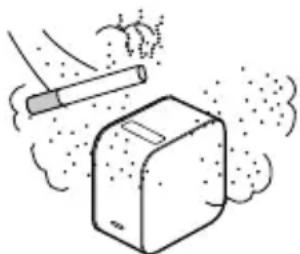
- Do not place the unit in any places where there is excessive dust or cigarette smoke. Dust and cigarette tar adheres to components inside the unit (such as the projection window) causing a malfunction.
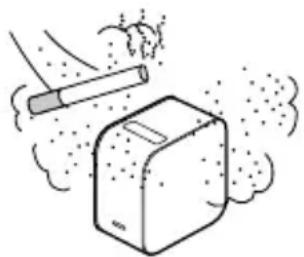
- Do not place the unit in any places where the temperature is extremely hot or cold, or the humidity is extremely high. Especially when there is strong sunshine or during the summer, the inside of a car can get quite hot, and a unit left in the car may deform or malfunction.
- Do not place the unit on an unstable surface. The unit may fall or topple over resulting in injuries.
- Do not place the unit where there is water. It may cause a fire or electric shock.
- Do not place/store the unit in a place
exposed to direct sunlight or close to a heater. Heat may build up in the unit causing a fire.
On AC adaptor and cables
- Do not damage the power cord. It may cause a fire or electric shock.
- Be sure to use the supplied AC adaptor with the unit. If a different AC adaptor is used with the unit, it may cause a fire, electric shock or malfunction.
- Do not touch the power plug with wet hands. It may cause an electric shock.
- Before making connections with the AC adaptor and connection cables, turn off the unit and connected equipment, and unplug the power plugs from the wall outlet.
- Do not wrap the power cord or connection cable around the AC adaptor. It may cause the cord or cable to break.
- Before moving the unit, disconnect the power cord and connection cables. The cables may be damaged resulting in a fire or electric shock, or connected equipment may fall or topple over causing injuries.
- Insert the connector straight. If it is inserted at an angle, pins may make a short circuit causing a fire.
On fan noise
A fan is incorporated inside the projector to prevent overheating, and this makes a slight noise while turned on. This noise is
not a malfunction. However, if there are any abnormal noises, consult qualified Sony personnel.
On light source maintenance
This unit uses a laser, therefore special caution and facilities are necessary for the inspection and maintenance of light source components. Be sure to consult qualified Sony personnel.
On cleaning
- Be sure to turn the unit off and unplug it from the wall outlet before cleaning.
- If the unit is rubbed hard with a dirty cloth, the unit may be scratched.
- If volatile liquids such as insecticide are sprinkled on the unit, or an item made of rubber or vinyl stays in physical contact with the unit for a long time, the unit may be affected or the surface color may fade.
- Do not touch the projection window with bare hands.
To clean the surface of the projection window:
Gently wipe it with a soft cloth such as an eyeglass cleaning cloth. If there are stubborn stains, wipe them up with a cloth moistened with water. Never use alcohol, benzene, thinner, acidic cleaning agents, alkaline cleaning agents, abrasive cleaning agents, chemical dust cloths, and so on.
- To cleaning the exterior:
Gently wipe it with a soft cloth. If there are stubborn stains, wipe up the stains with a soft cloth which has been soaked in diluted neutral detergent and thoroughly wrung out, then wipe the exterior again with a dry cloth. Do not use alcohol, benzene, thinner, and so on.
On projector
- Although this unit is manufactured using very high precision technology, there may be some permanent black or white pixels on the projected screen. Also, there may be striped unevenness in color or brightness. This is a result of the projector structure and is not a malfunction. The color balance of each projector unit varies; therefore, when multiple LCD projectors are used, the color reproduction among projectors may vary, even if they are of the same model.
Depending on viewed content, primary colors such as red, blue, or green are visible when you move your eyes or under certain conditions; this is not a malfunction. It is caused by a "color breakup" phenomenon which is specific to the field-sequential color system adopted into the unit for displaying images. This phenomenon can be subdued by diminishing the contrast between the image and the backdrop, such as decreasing the brightness of the unit or increasing the brightness of the room.
On condensation
If the projector is moved suddenly from a cold to a warm place, or just after a room heater is turned on in a winter morning, condensation may occur on the surface or inside of the projector. If condensation occurs, leave the projector turned off until the condensation dissipates. If the projector is used while there is condensation, it may cause a malfunction.
On ventilation holes
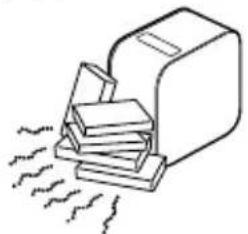
- Do not block the ventilation holes (intake/exhaust). If the ventilation holes are blocked, heat will build up inside the unit, causing a fire or malfunction. To maintain good ventilation, observe the following: - Place the unit away from walls and objects.
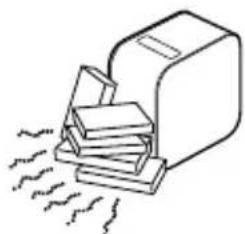
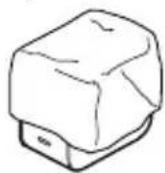
- Do not use a cover that blocks the ventilation holes.
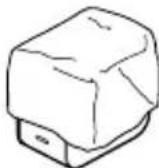
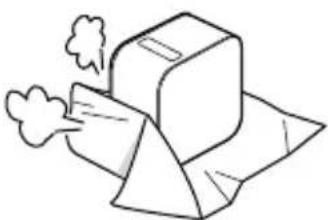
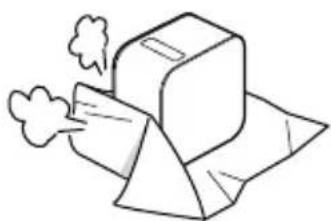
- Do not place the unit on a soft cloth, paper documents, thick carpet or small
pieces of paper. They may be drawn in and block the intake holes.
- Do not bring your hand or object close to the exhaust holes. It may cause burns or deformation.
On projection window
- Do not look into the projection window. The light may damage your eyes.
- Do not obstruct the projection window. The light will heat the obstruction, which may cause deterioration, deformation, burns or fire.
Cautions about heat generation of the unit
While using or charging the unit, the unit or AC adaptor may become hot; this is not a malfunction. If the unit temperature becomes excessively hot, it may automatically turn off for safety. In such a case, use it in a cooler place after the unit has cooled down.
- If the unit or AC adaptor becomes unusually hot, it may malfunction. Immediately turn the unit off and unplug the AC adaptor from the wall outlet, then consult qualified Sony personnel.
- Do not continue touching the unit in operation or the AC adaptor for a long time. Prolonged contact with the skin may result in burns. Even touching through clothing, prolonged contact may result in burns.
- Do not use the unit or AC adaptor covered by cloth or bedding. Heat will build up causing deformation, malfunction or a fire.
On charging
- Charge the unit in the ambient temperature of 5^ to 35^ . The unit may not charge sufficiently outside this temperature range.
- While charging or using the unit, the temperature of the unit may rise; this is not a malfunction.
- If you do not use the unit for a long time, charge it every six months to prevent battery degradation.
- When the unit has been left unused for a long time, the charging time may be longer.
- When the battery usage time drops to half of its original time, it may have reached the end of its life span. Consult qualified Sony personnel about the rechargeable battery replacement.
On AC power interruption
When the unit is turned off using the power button, the power supply to the unit is not
completely stopped.
To completely stop the power supply to the unit, unplug it from the wall outlet. Place the AC adaptor close to the wall outlet so that you can quickly unplug it when becoming aware of a problem.
Notes on wireless LAN
Sony is not liable for any loss or damage caused by loss or theft of the unit resulting in unauthorized accesses to or abuse of the equipment which is incorporated into the unit.
Notes on wireless LAN security
- Always make sure that you are using a wireless LAN that is secured against hacking, access from malicious third parties, and other vulnerabilities.
- Proper security setting for a wireless LAN is very important.
- Sony is not liable for any loss or damage caused by security problems resulted from failing to take security countermeasures, or unavoidable circumstances due to specifications of the wireless LAN.
If you have questions or problems, read this document, Startup Guide, and Help Guide (Web operating instructions) thoroughly again. If the answer is not found, consult qualified Sony personnel.
Specifications
Portable Ultra Short Throw Projection (LSPX-P1)
Projector
Display system Projection system
Display device 0.37 inch SXRD × 1 1366× 768 pixels
Projection image size 22 inches to 80 inches
Light source Laser diode
Light output 100 lm
Audio
Speakers Approx. 25mm diameter × 2 (monaural) bass reflex system
Amplifier 2W× 2W monaural (4 ohms)
■ Wireless communication
Wireless LAN IEEE 802.11a/b/g/n (2.4 GHz band, 5 GHz band), MIMO compatible
Bluetooth Bluetooth 4.0 (Bluetooth Low Energy)
General
Operating temperature 5 ^ C to 35^
Built-in battery Lithium-ion battery
Dimensions Approx. 80mm× 131mm× 131mm width × height × depth
Mass Approx. 930 g
Wireless Unit (LSPX-PT1)
Input/output
HDMI IN connector
HDMI OUT (pass through) connector
IR BLASTER connector (Mini jack)
■ Wireless communication
Wireless LAN IEEE 802.11a/n (5 GHz band), MIMO compatible
General
Operating temperature 5°C to 35°C
Dimensions Approx. 135mm× 35mm× 135mm width × height × depth
Mass Approx. 200 g
Supplied accessories
AC adaptor VGP-AC19V77 (1)
AC adaptor LSPX-AC5V2 (1)
Power cord (4)
IR Blaster (1)
Startup Guide (1)
Reference Guide (this document) (1)
Warranty (1)
Optional accessories
Floor stand LSPX-PS1
Design and specifications are subject to change without notice.
- Manufactured under license from Dolby Laboratories. Dolby and the double-D symbol are trademarks of Dolby Laboratories.
- The terms HDMI and HDMI High-Definition Multimedia Interface, and the HDMI Logo are trademarks or registered trademarks of HDMI Licensing LLC in the United States and other countries.
- The BLUETOOTH SMART word mark and logos are registered trademarks owned by Bluetooth SIG, Inc. and any use of such marks by Sony Corporation is under license.
-
Wi-Fi, Wi-Fi Direct, Miracast, and Wi-Fi Protected Setup are trademarks or registered trademarks of Wi-Fi Alliance.
-
Google, Google logo, Android, Google Play, and YouTube are trademarks or registered trademarks of Google Inc.
- Apple, Apple logo, iPhone, and iPod touch are trademarks of Apple Inc., registered in the U.S. and other countries. App Store is a service mark of Apple Inc.
- All other names of systems, products, and services are trademarks or registered trademarks of their respective owners. In this manual, the ^TM or ^® marks are not specified. All rights which are not explicitly written in this document belong to their respective owners.


Bluetooth
SMART

CERTIFIED
(Only as for projector)
Notes on Third Party Software
Portable Ultra Short Throw Projector and Wireless Unit contain certain third party software which is distributed and/or made available under such terms provided by the copyright owners ("Third Party Software"). Third Party Software includes those commonly referred to as "free software" and/or "open source software". The applicable license terms for Third Party Software designated by the copyright owners are listed on the website shown below. Your use of Third Party Software is subject to the applicable license terms.
http://oss.sony.net/License/LSPX-P1_LSPX-PT1/
Third Party Software contains GNU General Public License ("GPL") and/or GNU Lesser General Public License ("LGPL"). We inform that you have a right to have access to, modify and redistribute the source codes for Third Party Software licensed under GPL/LGPL. The source codes for GPL/LGPL applicable Third Party Software are available for downloading on the website shown below. Please access the following URL and select "LSPX-P1" or "LSPX-PT1".
http://www.sony.net/Products/Linux/
Sony is not obligated to provide and does not provide any support or assistance with respect to the source codes.
Bluetooth Bluetooth 4.0 (Bluetooth Low Energy)
Généralités
WLAN (IEEE802.11a/b/g/n)
WLAN (IEEE802.11a/n)
Bluetooth 4.0 (Bluetooth Low Energy)
Allgemein
Betriebstemperatur
5^ bis 35^
Integriere Batterie
Lithium-lonen-Batterie
Abmessungen
Bluetooth 4.0 (Bluetooth Low Energy)
Aspectos generales
IT/LU/NL/NO/PL/PT/RO/ES/SE/CH/UK
LAN wireless (IEEE802.11a/b/g/n)
LAN wireless (IEEE802.11a/n)
Bluetooth 4.0 (Bluetooth Low Energy)
Generali
Draagbare Ultra Short Throw-projector
Draadloos element
Draagbare Ultra Short Throwprojector
Bluetooth Bluetooth 4.0 (Bluetooth Low Energy)
Algemeen
Conector HDMI OUT (pass-through)
Conector IR BLASTER (mini-ficha)
Bluetooth 4.0 (Bluetooth Low Energy)
Parametry ogólne
Temperatura robocza
5^ do 35^
IT/LU/NL/NO/PL/PT/RO/ES/SE/CH/UK
Frekvensområde & effekt for RF-specification
LSPX-P1 (projektor)
Tradlost LAN (IEEE802.11a/b/g/n)
Frekvensomrade/effect
- 2.400 - 2.483,5 MHz/< 20 dBm
- 5.150 - 5.250 MHz/< 23 dBm
- 5.250 - 5.350 MHz/< 23 dBm
- 5.470 - 5.725 MHz/< 23 dBm
Bluetooth
Frekvensområde/effectet
- 2.402 - 2.480 MHz/< 20 dBm
Trädløs enched (LSPX-PT1)
Input/output
HDMI IN-stik
AC-adapter VGP-AC19V77 (1)
AC-adapter LSPX-AC5V2 (1)
Strømledning (4)
IR Blaster (1)
Startvejledning (1)
Referencevejledning (dette Dokument) (1)
Garanti (1)
Valgrit tilbehør
Gulvstandler LSPX-PS1
WLAN (IEEE802.11a/b/g/n)
WLAN (IEEE802.11a/n)
Bluetooth 4.0 (Bluetooth Low Energy)
Yleistä
Käytölampötila
5^ - 35^
Sisäinen akku
Lithiumioniakku
Mitat
Noin 80mm× 131mm× 131mm (leveys × korkeus × syvyys)
Paino
Noin 930 g
IT/LU/NL/NO/PL/PT/RO/ES/SE/CH/UK
(Endast for projetor)
IT/LU/NL/NO/PL/PT/RO/ES/SE/CH/UK
RF-specifikacio frekvenciatartomanya es teljesitménye
LSPX-P1 (Projektor)
Bluetooth Bluetooth 4.0 (Bluetooth Low Energy)
Altalandos jellemzok
Uzemi hómér séklet
5^ - 35^
Lithium-ion alkumulator
Mérétek
Kb. 80mm× 131mm× 131mm (szelesseg × magassag × melyseg)
Tömeg
Kb. 930g
IT/LU/NL/NO/PL/PT/RO/ES/SE/CH/UK
Bluetooth 4.0 (Bluetooth Low Energy)
■ Üldine
Tötemperatuur
5^ kuni 35^
Integreeritudaku
Liitiumionaku
Mööttmed
Umbes 80mm× 131mm× 131mm (laius × korgus × sugavus)
Kaal
Umbes 930 g
Juhtmevaba seade (LSPX-PT1)
Sisend/väljund
Pesa HDMI IN
Teatmik (see document) (1)
Garantii (1)
YeCTOTHaJIeHTa/U3XoJHaMOUHOCT
- 2400 - 2483,5 MHz/< 20 dBm
- 5150 - 5250 MHz/< 23 dBm
- 5250 - 5350 MHz/< 23 dBm
- 5470 - 5725 MHz/<23 dBm
Bluetooth
YeCTOTHaJeHTa/U3XoJHaMOUHOCT
- 2402 - 2480 MHz/< 20 dBm
MAKUMAJHA I3XODHA MOLUHOCT 16 mW
Прдьлжnteнocт Ha NMnycnte:ЧерВеH 2,67 ms/3eJIeH 3,5 ms nIi 1,75 ms/cnH 3,5 ms, 60 Hz
ДиВер reHЯ Na lyba (30Ha Ha 06IbYBaHe Na Ia3epa)
ПредпаЗн Мерки
3a Bawaata 6e3onacHocT
He octabraye BOda nJn YyKdN npedMeTn da nonaHaT B ypeDa. ToBa moKe da npuHnNoxap nn TOKOB ydAp.AKO BOda nJn YyKdN npedMeTn nonaHaT B ypeDa, ro n3KnIOUcTe He3a6aBHO, OTkaueTe 3axpaHbAunna Ka6eI n CBbp3BaUnTe Ka6eJI.
- He pa3rIIO6BaIte n He MoDnΦuIpaIte ypeJa. Toba MoKe Da npuHn HEn3npaBHOCT, noXap IJN TOKOB yIap.
- Ako Ima BepoTHOCT OT rpbMOTeBnueH yap, He n3noJ3BaIte ypeJa. rpbMOTeBnueH yap MOKe Ja npuHn TOKOB yap. Ako Ima BepoTHOCT OT rpbMOTeBnueH yap, Okayete ypeJa, 3a Da npedOTbPaTHe NOxAp, TOKOB yap IN HeN3npaBHOCT.
OTHOCHO6e30NaCHOCTTa
- Be3KnHnTe ΦyHKuN ca BrpaDeHn B To3n ypei. PaIIOBbHNte MoarTa da IOBJIaRrHa pa6oTaTa Ha dpyrN ycTPOcTBa. He n3noJ3BaIe ToBa ycTPOcTBO Ha cJeDnTe MeCTa. -B camoJet. -B 6JIn3OcT Do aBTOMaTuHo ynpablaBaHO o6OpyDbaHe, HapPIMep aBTOMaTuHn BpAtn nn npOTUBONOXapHn aJapMn.
Ako npyro o6opuyBaHe nMa npo6JeM, HapnpMeP cMyuHnI NO BpeMe Ha n3NoJ3BaHeTo Ha ypeDa, He3a6abHo CnpTe Da n3NoJ3BaTe ypeDa.
He rIeJaTe npOdbJxNteHNO HEnpeKbChaTO B nPoEKTnpaHnE ekpaH. HenpeKbChaT0To npOdbJxNteHNO rIeHa He npOeKTnpaHnE ekpaH MoKe Da HaTobApn OuHTe. Ako NouyBCTBaTe DnCKOMΦOpT NII 6oJka, He3a6abHo Cnpete Da u3NoJ3BaTe ypeDa N NOUYHeTe. Ako DnCKOMΦOpTbT N 6oJkata PpOdbJxKat CJIeD NOUVBKaTa, KOHCyIITnpaTe ce c Jekap.
He npoeKtupaTe Ha JbckaBa NOBbpxHOCT. CBeTInHaTa MoKe Da ce OTPa3N B OHTe BN N cepNo3HO Da Tn yBpeDi.
- Pa3eTe ypeDa daleu OT deua. Ako Ka6eIbT ce yBne OKOJIO BpaTa nIi Ce n3NoI3Ba HnnpaBnHNO nO noo6eH NaHH, TOBa MoKe Da IOBeJe Do INHcIeHT IIN HapAHaBaHe.
OTHOCHO pa6oTaTa c ypeDa
- Ako ypeIbT Hma Da ce N3NoI3Ba Dblro BpeMe, Ro N3KJIIOUeTe OT KOHTaKTa.
He ro n3nyckaiaTe, ydpraIte, HATnCKaITe I He noCTaBraITe TeKKn PpeDMeTu Bbpxu Hero.
-Диana30HbT Ha pa6oTHaTa TempepaTypaHa ypeDa e 5^ do 35^ Ako ypeDbT ceI3NoJ3Ba Ha npeKaJIeHO CTydeHO IINTOILO MЯCTO N3BbH DnAna3OHa Ha pa6oTHaTa TempepaTypa, TOBa MoKe JaIOBeDe Do HEn3PpABHOCT.
He nocTaBnTe ypeHa Ha MeCTa C dIM OT Ma3HnH,napa,BlaRa Nn npax.ToBa MoXe Da npuHn NoJap Nn TOKOB yIap.
He montpaTe ypeHa onaCHO HeIOxOJaMCTo.YpeBt MoKe da NaDHe, KoETo Da IOBeDe Do HapaHraBaHe.
He noIpaIaIe ypeDa Ha cINH ydApn. Ako npInoJxTe rOJaMa Cnla Bbpxy ypeDa, Hapnpimep aKO nOCTaBtE TeKbK npEdMeT Bbpxy Hero, N3pyChTe ro INn CTbPiTE Bbpxy Hero, TOBa MoKe da npuHHIOBpeDa INn HapaHraBaHe. Makap ye npoeKunOHnT npO3opee e HappaBeH OT 3akaleHo CTbKlO, aKO ce HaTNCHe INn ydApn CnIHoo, To MOKe Da Ce CcuNn I da npuHHn HapaHraBaHe.
BHHMaBaIte Da He n3nycHeTe ypeDa, KOraTo rO MeCTnte. Ako ypeDbT naDHe, MoKe Da Ce CuyuN nn Da npuHn HapaHaBaHe.
OTHOCHO NOCTABRHeTo
He noctabraye ypeHa Ha MeCTa C npekomepeH npax nIu cngapen dIM. PpaxTa u cngapeHnT KaTpaH noIeNBaT no KOMnoHENTe B ypeDa (HaNPmep npoeKcNoHHn Ipo3opeu) n npuHnBaT HeN3npaBHOCTn.
He noctabraye ypeHa MeCTa, KbTeTo Temnepatypata e npeKaJIeHO HnCKa IInn BVCOKa, IIN Ha MeCTa C BVCOKa BlaXHocT. PnI cIIHa cIbHueBa cbETnHa IIN npe3 JIArTO BbTpEshOCTTa Ha aBTOMo6nla MOKe Da Ce HaRoPeuN CNlHO N OCTaBeH B aBTOMo6nla ypeD MoKe Da ce DeΦOpMnpa IIN NOBpeiN.
He noctabryte ypeda Ha HectaunHa NobbpxHocT. YpeDbT MoKe Da NaIHe NII Na ce npoeobpHe, KoETo Da IOBeDe Do HapaHraHe.
He noctabryTe ypeHa MaCTO C BODa. ToBa moKe Da npuHn Ioxap NIN TOKOB yIap.
He noctabraIe/cbXpaHbAaTe ypeDa Ha MxCTO, n3IOKeHO Ha dInpeKTHa CbHueBa CBETnHa nIN B 6In3OCT Do HarpeBaTeJ. YpeDbT MoKe Da ce HaRopeuN, KoEt O da npUHHNoXap.
OTHOCHO AC aandaTepa n ka6eJInte
He noBpeKdaiTe 3axpaHbauJnKa6eJ. Toba MoKe Da npuHn Noxap nn TOKOB yIap.
- YBepete ce, Ye n3noJ3BaTe DoCTaBeHnca ypeJa AC aanTep. Ako cypeJa ce n3noJ3Ba dpyr AC aanTep, TOBa moKe da npuHHn noXap, TOKOB ydap nn HEn3npabHocT.
- He dokocbaite uence na c bnaekn npue. ToBa moKe da npuHH TOKOB ydap.
- Ппени за нанравиTe ВрьзкITE с AC\
адаметери CBврзвашиTe Kaбели,\
иЗКЛЮчete урEDA и CBврзаHOTO\
оборудвае ИИЗВадеTe Уренье NTо\
Контактinte.
- He yBnBaIte 3axpaHbAunKa6eJ nn Cbbp3BaunKa6eJ okono AC aanTepa. ToBa MoKe Da npeKbcHe npOBoHNka nn Ka6eJa.
- Ппени да пемecтва即时дураете зхранвашия кабел и CBbp3Baцитete Кабел.Кабелпешто може да се повредл.T, KOeTo Да пчини пожар Или ТOKOB yapedл СьрзаноTo obopudbaHe можeledдддпспспнн Наразногаhe.
BkapaIte KOHeKTopa HappaBO.Ako ce BkapBa IOD bTbI, uNΦTOBeTe MoKe Da HaIpaBRT KbCO CbeINHeHne N TOBa Da npuHHn IOKap.
OTHOCHO Wyma Ha BeHTnlaTopa
B npoeKtopa mAm BrpaJeH BeHTnlaTOp c
ZeI npeIoTbPaTaBaHe Ha npePpBaHe n
TOBa pnuuHra Jek Wym,doKaTo e
BkIoueH.To3n Wym He e Hen3npaBHOCT. Ho
aKO mMa HeecTeCTBeHN WymOBe, ce
KOHcYJTIpaJTe C KBaJIuΦnUpaH NepcoHaJI
Ha Sony.
OTHOCHO NOIDpBxKKaTa Ha N3TOUHnKa Ha CBETInHa
To3n ypeI n3noI3Ba Ia3ep, 3aTOBa e Heo6xOIMMO CneuHaHOBHNMaHne INOMeUeHne 3a npOBepKa NpOdpbXKa Ha KOMNoHEHTIte Ha n3TOUHnKa Ha CBETJIHa. HenpemeHHO ce KOHCyItpaIte c KBaJIInΦuIpaH nepcoHaJ Ha Sony.
OTHOCHO NOUHCTBaHETO
- HenpemeHNO npeI nOuNCtBaHe u3KJIouTe ypeIa I rO u3BaJeTe OT KOHTaKaTa.
-
Ako Tbpkate cnHNo ypeDa C MpbchKaBpNa, MoKe da rHaDpaKaTe.
-
Ako JETINB IN TeHOCTN, Hapnimep HNCEKtuu, Ce npckat no ypea nn aKO npeDMeTn, HanpaBeHN OT rMa nn BHHJI, Ca BB FIn3NUeCKN KOHTaKT C ypeDa IpoDbJxNtELHO BpeMe, TOBa MOKe Da NOBJnRE Ha ypea NNuCBeTa Ha NOBbPxHocTTa My da N36JeDHee.
He dokocBaIte npoeKuOHnI npo3opeC roJI npue.
3a da nouCTte NOBbpxHocTtHa npoeKunOHn npo3opeu: BHmATEJHo ro n36bpweTe c meka Kbpna, HapnpMeR KbPna 3a noUcTbaHe Ha ouHla.AKO nMa yOpNTn neTHa, n36bpweTe rC HABJaXHeHa BvB BOda Kbpna. Hnkora He n3noJ3BaIe CnIPT, 6eH30JI, pa3peDHTeN, noUcTbAaN aReHTN C OCHOBn NIN KNCeJIHH, a6pa3NBn IOUcTBAaN aReHTN, XIMueCKN KbPn 3a npax I dp.
3a da nouCTnte BbHnHaTa qact: POnucTeTe BnMaTeJHo C MeKa Kbpna. Ako nMa yOpHTn neTHa, n36bpweTe rN C MeKa Kbpna, KOrTo e HAKUsHaTa B pa3TBOpEn HeyTpaleH DeTeprEHT n HaBJIHO n3eDeHa, cJeD KoETO 3a6bpWeTe BbHnHaTa qact OTHOBOCbc cyxa Kbpna. He n3noJ3BaIte cnpT, 6eH3oJ, pa3TBOpNTe n dp.
OTHOCHO npoekTopa
BbnpekuyeTo3n ypeJe npOn3BeDen c n3KIOUHTeJIHO ppeun3Ha TexHOLOrnmaOKe Da NMa NOCToAHN cepHN IIN 6eIINKceHn Ha npoeKTupaHn eKpaH. OcBeH TOBa MoKe Da NMa HepaBHn JeHTN B CBeTa IIN npKocTtA.ToBa e pe3yJtAT OT CTpykTypaHa npoeKTopa n He e Hen3npabHocT. ZBeTHnT 6aJahC Ha BCEKn npoeKTop e pa3JIuYeH, CLeIOBaTeJIHO KOraTO ce I3NoJ3BaT HApoklKO LCD npoeKTopa, Bb3npOn3BExJaHeTo Ha zBeTobete npi pa3JIuHnTe npoeKTopn MOpKe Da ce pa3JIuHaBa DOpn aKO ca OT eJHaKaB MoJeI.
B 3aBnCmOCT OT rIeJaHOTc bIbprXaHne OCHOBHNTe cBeTOBE, KOITo Ca YepBHe, CINN IIN 3eJIeH, Ca BNUIMM, KOraTO DBNXHTe OHTe CN IIN Ipn ONpeJeH N YCIOBn; TOBa He e HEn3npaBHOCT. ToBa Ce IpruHnRA O T fEHOMeHa "PpeKbcBaHe Ha cBeTa", KOITo e XapaKTepeH 3a cBeTOBaTa CNTeMa C NocJeDoBaTeJH N POIeTa, BHeJPeHa BVpeDa 3a NOKa3BaHe Ha n3O6paJxehn. To3n fEHOMEH MOKe Da Ce CMEKn Upe3 HAmajBaHe Ha KOHTpacta MeJy n3O6paJxehnTo I φOHa, HApnPmEp Upe3 HAmajBaHe Ha JRPKocTTa Ha ypeDa INI yBeJIuYBaHe Ha JRPKOCTTBA CTaTa.
OTHOCHO KOHdEHN3a
Ako npoeKTopbT 6bde Bhe3aHNO
npemecTeH OT CTydeHO Ha TOnIIO MЯCTO NJI
BedHa rCneB BKIOUcBaHe Ha HArpeBaTeJRA
B CTAraTBA 3IMHa YTpIN, MoKe Da ce NOBu
KOHDeH3 NO NOBbpXHOCTTa NJI BbTpe B
npoeKTopa. Ako ce NOBu KOHDeH3,
OCTaBeTe npoeKTopa N3KJIIOUeH Do
N3ue3BaHe Ha KOHDeH3a. Ako npoeKTopbT
ce N3NoJ3Ba Prn HaJIInuYe Ha KOHDeH3,
TOBa MoKe Da npuHH HeN3PpABHOCT.
OTHOCHO OTBOPNTe 3a BeHTnlaucn
He 6loKpaTe OTBOpTe 3a BeHTnlaCn (BXoJeH/IN3XoJeH).Ako OTBOpTe 3a BeHTnlaCn8bDaT 6loKpaHN, BbTpewHOCTTa Ha ypeJa ige Ce Haropeu N TOBa MoKe Da npuHn Noxap Nn HEn3npaBHOCT.3a Da nOndbPkaTe Do6pa BeHTnlaCn, Cna3BaIte CneHOTO: -PiocTabeTe ypeHa pa3cToHne OT CTehN IN PpeDMETN.
-He n3noJ3BaIte noKpntne, KOeTO 6bokupa OTBOpNTe 3a BeHTnlaucna.
-He noctabraye ypeDa BbpxMyeka Kbpna, xapTneHn DokyMeHTn, de6en KnilmN nn MaJKN KbCyeTa xapTna. Te MoXe Da 6bDat 3acMysKaHN n da 6loKnpaT BXoHnTe OTBOpn.
He do6nKabAte pbKaTa cn nI npyI npedMeTn B 6n3OCT Do n3XoHnTe OTBOpN. Moxe da npuHHn n3rapHn nn deopMaun.
OTHOCHO npoeKunOHnI npo3opeu
He norlexdaIte B npoeKuOHnna npo3opeu. CBeTlnHaTa MoKe Da yBpeN OCHTE BN.
He noctabTey npenTCTBne nped npoeKuOHnI npo3opeu. CBeTlnHaTa Ue ro Harpee, Koeto MoKe Da npuHnIOBpeDa, DeOpMaun, n3rapaHe nnnoxap.
ПредаЗни Мерки OTHOCHO3аграванetoHa урEDA
-ДOKATOиЗПОЛ3ВATEиИЗЗAPEXДaTeурda,урдьТиИN AC aДаNTepbT можeДа ce HArOpEuT;TOBa He eHEn3npaBnOCT.AKO TempepaTyPaTaHaурda eMHOROBUCOKA,toI MOxeabTOMaTHUHO Da ce N3KJIOnC cZeJ6e3ONaChOcT.BTo3n CnyaH roI3ПОЛ3ВaIte Ha NO-XlaIDHO MЯСTO,CJIaKaTOceEOXlaAnl.
Ako ypeBt nJn AC aanTepbT ce haPep TpeKoMePHO, MoKe Da ce NOBpeJaT. He3a6abHo n3KnIOye UpeDa n 13BaDeTe AC aanTepa OT KOHTaKTa, CJeD KoETo ce KOHCyItnpaIte c KBaJIuΦnUpaH nepcoHaI Ha Sony.
- He DoKocBaIte pa6oTeu ypei nIa AC aIaItepa npOdbJXnTeJIHO. PpOdbJXnTeJIHnT KOHTc c KoxaTa MoKe Da IOBeJe Do n3rapHn. DOpn aKO rO DoKOCBaTe ppe3 dpexnte, PpOdbJXnTeJIHnT KOHTaKT MoKe Da IOBeJe Do n3rapHn.
He n3noJ3BaIte ypea nn AC aanTepa, ako ca nokpntn C dpexa nn yapsha. Ice HATpyna TOnnHa, KOeTO ue DOBeJe Do DeOpMaun, Heu3npabHocT nn noXap.
OTHOCHO 3apeKdaHeTo
3apejdaTe ypea npo OKoHa tempepatya ot 5^ do 35^. YpebT He MOxKe Da ce 3apei DoCTaTbUHO N3BbH TO3N Tempepatyen Dnana3OH.
-Дokato ИЗползВаTe Илл 3apexДaTeуpeДa,TOIМожда ce 3aToПЛ;TOBa Hee HEN3npaBHOCT.
- Ako He n3noJ3BaTe ypeda npoDbIjXnteJnHO BpeMe, ro 3apeKdaiTe Ha BCEKN WeCT Meceua, 3a Da npedna3nte 6aTepeYra OT nobpeJa.
Korato ypeIbT He e n3noJI3BaH npOdbJnxTeJIHo BpeMe, BpeMeTo 3a 3apeXdAnHe MoKe Da e No-DbIro.
Korato BpeMeTo 3a H3NoJ3BaHe Ha
6aTePnraTa CnaDHe HAnOJOBnHa CnpMa
OpuHnHaJIHO To BpeMe, T MaKe Da e
IOCTnIHnA KaPa Ha CepBn3Hn Ca XnBOT.
KoHCyItnpaIte Ce c KBaIINΦnIpaH
NepcoHaI Ha Sony OTHOcMHaTa Ha
akymylaTopHaT aTePnI.
OTHOCHO npeKbcBaHeTo Ha npOMeHJIbOTOKOBOTO 3axpaHBAHe
Korato ypeT e n3KIOueH OT 6yToHa 3a
3axpaHbAHeto, 3axpaHbAHeto KbM ypeDa
He cnpa HnBnHO.
3a Da cnpTe HaBnHO 3axpaHbAHeto KbM
ypeDa, rO n3KIOUeTe OT KOHTaKaTa.
IocTabete AC aanTepa 6JIn3o Do
KOHTaKaTa, 3a da MoKeTe 6bp30 da rO
IN3BaAnTE, aKO 3a6eJeXITE npo6JIem.
Belejckn OTHoCHO 6e3KuHaTa LAN
Sony He Hocn OTROBOPHOCT 3a 3aY6n nn nIeTn, npuHHeHn OT 3aY6a nn KpaX6a BCJeDCTBnE Ha HeynblHOMOueH DocTbN nn 3NoynOpTe6a c obOpyDbAHe, BrpaDeHo B ypeDa.
Белеки OTHOCH CnryphocTTa Ha 6e3xnuHaTa LAN
BnHaHn 3nOJ3BaIte 6e3KuHa LAN, 3aUHTeHa OT npOHKBAHe, OCTbN OT 3IOHaMepeHN TpeTn CTpaHn N dpyra y3BIMoCT.
- Правлинente насторки за зашита на解开 лесуниота LAN с мною вожни.
- Sony He Hocn OTROBOPHOCT 3a 3aγ6n nIi IeTn, npuHHeH O T npo6JIeMn cbc CnryphOCTTa, Bb3HNKHaJI N O T HeBb3MOxHOCT 3a npeDnpneMaHe Ha 3aUHTN KoHTpAmepKn nIi HenpeOdoJIMM o6cToTaeTcTBa nopadi CneuΦnKaunTe Ha 6e3KnuHaTa LAN.
Ako mATE Bbnpocn nI npo6JeMn, npoyeTe To3n DOkymeHt, KpaTKOTO pKOBODCTBO n IOMOuHOTo pKOBODCTBO (NHTpyKcunTe 3a ekCnloaatauaB INHTepHe) BHIMaTeJHO OTHOBO. Ako He HaMePnte OTROBOp, ce KOHCyITupaTte C KBaJIuΦuUpaH nepcoHaJ Ha Sony.
Cneunkaun
ПренонmpоeКтОрUltra Short Throw (LSPX-P1)
PpoeKtop
CnCTema 3a noka3BaHe
PpoeKuHnHa Cntema
YCTPOIcTBo 3a NOKa3BaHe
0.37 nHua SXRD × 1
1366× 768 nukceja
Pa3mep Ha npoeKtnpaHo n3o6paXeHne
22 nHua ha 80 nHua
N3TOUHnK Ha CBETnHa
Janaepen dnoD
N3BExKaHa Ha cBeTInHa
100 lm
Ayduno
BucOKoROBOpuTeJI
Pn6I3.25mmIaMaTeBp×2(MOHO)cNCTema 6acpeΦneKc
YcunBaTeJ
2W× 2WMoHO (40ma)
БeЗЖична KOMУнkaцья
Be3xnuHa LAN
IEEE 802.11a/b/g/n (2,4 GHz yectoTHa JeHTa, 5 GHz yectoTHa JeHTa), MIMO cbbmecTUM
Bluetooth
Bluetooth 4.0 (HnckoeHeprnE Bluetooth)
060
Pa6oTHa TemnepaTypa
5^ 10 35^
BrpaedHa 6aTepey
JIITnEBo-IOHHa 6aTePnA
Pa3mepn
Pn6n3. 80 mm × 131 mm × 131 mm (WnpOuHa × BnCOUHa × Dbl6OuHa)
Terno
Pnpi6n3.930g
БeЗкичен модул (LSPX-PT1)
BxoI/n3xoI
KoHeKTop HDMI IN
KoHeKTOp (npexOeH) HDMI OUT
KoHeKTOp IR BLASTER (MnHn KaK)
Be3xuHa KOMyHnKaun
Be3xnuHa LAN
IEEE 802.11a/n (5 GHz octet Heta), MIMO
CbbMECTUM
06uo
Pa6oTHa TemnepaTpa
5^ do 35^
Pa3mepn
Pn6Iin3. 135mm× 35mm× 135mm (uHPOUHa x BUCOUnHa X DbJI6OUnHa)
Terno
Pnpi6n3.200g
Дocтавенakcecoapn
AC aanTep VGP-AC19V77 (1)
IT/LU/NL/NO/PL/PT/RO/ES/SE/CH/UK
LAN wireless (IEEE802.11a/b/g/n)
Interval freventa/Putere de iesire
- 2.400 - 2.483,5 MHz/< 20 dBm
- 5.150 - 5.250 MHz/< 23 dBm
- 5.250 - 5.350 MHz/< 23 dBm
- 5.470 - 5.725 MHz/< 23 dBm Bluetooth
Interval freventa/Putere de iesire
- 2.402 - 2.480 MHz/< 20 dBm
LSPX-PT1 (Unitate wireless)
LAN wireless (IEEE802.11a/n)
Interval freventa/Putere de iesire
- 5.150 - 5.250 MHz/< 23 dBm
Notificare
Bluetooth 4.0 (Bluetooth Low Energy)
General
Unitate wireless (LSPX-PT1)
Intrare/lesire
Conector HDMI IN
Conector HDMI OUT (de trecere)
Conector IR BLASTER (mini-mufa)
Comunicare wireless
LAN wireless
IEEE 802.11a/n (bandă de 5 GHz), compatibil cu MIMO
General


- SONY.
- Location of controls
- Portable Ultra Short Throw Projection
- Wireless Unit
- CAUTION
- Notice for the customers in the countries applying EU Directives
- Frequency Range & Power for RF Specification
- Notice
- Precautions
- For your safety
- On safety
- On handling
- On placement
- On AC adaptor and cables
- On fan noise
- On light source maintenance
- On cleaning
- On projector
- On condensation
- On ventilation holes
- On projection window
- Cautions about heat generation of the unit
- On charging
- On AC power interruption
- Notes on wireless LAN
- Notes on wireless LAN security
- Specifications
- Portable Ultra Short Throw Projection (LSPX-P1)
- Projector
- Audio
- ■ Wireless communication
- General
- Wireless Unit (LSPX-PT1)
- Input/output
- Supplied accessories
- Optional accessories
- Bluetooth
- SMART
- Notes on Third Party Software
- Généralités
- Allgemein
- Betriebstemperatur
- Integriere Batterie
- Abmessungen
- Aspectos generales
- Generali
- Draagbare Ultra Short Throwprojector
- Algemeen
- Parametry ogólne
- Temperatura robocza
- Frekvensområde & effekt for RF-specification
- Trädløs enched (LSPX-PT1)
- Valgrit tilbehør
- Yleistä
- Käytölampötila
- Sisäinen akku
- Mitat
- Paino
- RF-specifikacio frekvenciatartomanya es teljesitménye
- Altalandos jellemzok
- Uzemi hómér séklet
- Mérétek
- Tömeg
- ■ Üldine
- Tötemperatuur
- Integreeritudaku
- Mööttmed
- Kaal
- Juhtmevaba seade (LSPX-PT1)
- Sisend/väljund
- ПредпаЗн Мерки
- 3a Bawaata 6e3onacHocT
- OTHOCHO6e30NaCHOCTTa
- OTHOCHO pa6oTaTa c ypeDa
- OTHOCHO NOCTABRHeTo
- OTHOCHO AC aandaTepa n ka6eJInte
- OTHOCHO Wyma Ha BeHTnlaTopa
- OTHOCHO NOIDpBxKKaTa Ha N3TOUHnKa Ha CBETInHa
- OTHOCHO NOUHCTBaHETO
- OTHOCHO npoekTopa
- OTHOCHO KOHdEHN3a
- OTHOCHO OTBOPNTe 3a BeHTnlaucn
- OTHOCHO npoeKunOHnI npo3opeu
- ПредаЗни Мерки OTHOCHO3аграванetoHa урEDA
- OTHOCHO 3apeKdaHeTo
- OTHOCHO npeKbcBaHeTo Ha npOMeHJIbOTOKOBOTO 3axpaHBAHe
- Belejckn OTHoCHO 6e3KuHaTa LAN
- Белеки OTHOCH CnryphocTTa Ha 6e3xnuHaTa LAN
- Cneunkaun
- ПренонmpоeКтОрUltra Short Throw (LSPX-P1)
- PpoeKtop
- CnCTema 3a noka3BaHe
- YCTPOIcTBo 3a NOKa3BaHe
- Pa3mep Ha npoeKtnpaHo n3o6paXeHne
- N3TOUHnK Ha CBETnHa
- N3BExKaHa Ha cBeTInHa
- Ayduno
- BucOKoROBOpuTeJI
- YcunBaTeJ
- БeЗЖична KOMУнkaцья
- Be3xnuHa LAN
- 060
- Pa6oTHa TemnepaTypa
- BrpaedHa 6aTepey
- Pa3mepn
- Terno
- БeЗкичен модул (LSPX-PT1)
- BxoI/n3xoI
- Be3xuHa KOMyHnKaun
- 06uo
- Pa6oTHa TemnepaTpa
- Дocтавенakcecoapn
- Notificare
- Unitate wireless (LSPX-PT1)
- Intrare/lesire
- Comunicare wireless
Brand : SONY
Model : LSPXP1
Category : Projector