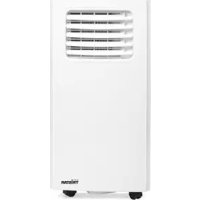
AC5527PR - Air-conditioner TRISTAR - Free user manual and instructions
Find the device manual for free AC5527PR TRISTAR in PDF.



| Brand | TRISTAR |
| Model | AC5527PR |
| Product type | Portable air conditioner |
| Refrigerant | R290 (flammable) |
| Refrigerant quantity | 0.14 kg |
| Global Warming Potential (GWP) | 3 |
| Supply voltage | 220-240 V ~ 50 Hz |
| Operating modes | Cooling, Dehumidification, Fan |
| Programmable timer | 0-24 hours (on/off) |
| Remote control | Yes |
| Castors | Yes |
| Air filter | Washable, cleaning recommended every 2 weeks |
| Window kit included | Yes |
| Hot air exhaust hose | Included (adjustable length) |
| Continuous drainage possible | Yes (with drain hose) |
| Recommended use | Indoor only |
| Warranty | 24 months |
| Safety | Automatic shut-off when tank full, overheat protection, fault detection |
| Error codes | E0: ambient temperature sensor; E2: water tank full |
| Compliance | National electrical standards, fluorinated gas directive |
Frequently Asked Questions - AC5527PR TRISTAR
User questions about AC5527PR TRISTAR
0 question about this device. Answer the ones you know or ask your own.
Ask a new question about this device
Download the instructions for your Air-conditioner in PDF format for free! Find your manual AC5527PR - TRISTAR and take your electronic device back in hand. On this page are published all the documents necessary for the use of your device. AC5527PR by TRISTAR.
USER MANUAL AC5527PR TRISTAR
natural_image
White Tristar air conditioner unit with ventilation grille and control panel (no visible text or symbols)EN| Instruction manual
- Please read this user's manual carefully to ensure proper use, maintenance and installation.
• The appliance is for indoor use only. - Do not use the unit on a socket under repairs or not installed properly
- Do not use the unit, follow these precautions: o Near to source of fire.
o An area where oil is likely to splash.
o An area exposed to direct sunlight.
o An area where water is likely to splash.
o Near a bath, a laundry, a shower or a swimming pool. - Never insert your fingers, rods into the air outlet. Take special care to warn children of these dangers.
- Keep the unit upward while transport and storage, for the compressor locates properly.
- Before cleaning the air-conditioner, always turn off or disconnect the power supply.
- When moving the air-conditioner, always turn off and disconnect the power supply, and move it slowly.
- To avoid the possibility of fire disaster, the air-conditioner shall not be covered.
-
All the air-conditioner sockets must comply with the local electric safety requirements. If necessary, please check it for the requirements.
• Children should be supervised to ensure that they do not play with the appliance. -
If the supply cord is damaged, it must be replaced by the manufacturer, its service agent or similarly qualified persons in order to avoid a hazard.
- This appliance can be used by children aged from 8 years and above and persons with reduced physical, sensory or mental capabilities or lack of experience and knowledge if they have been given supervision or instruction concerning use of the appliance in a safe way and understand the hazards involved. Children shall not play with the appliance. Cleaning and user maintenance shall not be made by children without supervision.
- The appliance shall be installed in accordance with national wiring regulations.
- Notes:
o If any parts damage, please contact the dealer or a designated repair shop;
o In case of any damage, please turn off the air switch, disconnect the power supply, and contact
o The dealer or a designated repair shop;
o In any case, the power cord shall be firmly grounded.
To avoid the possibility of danger, if power cord is damaged, please turn off the air switch and disconnect the power supply. It must be replaced from the dealer or a designated repair shop.
WARNING
- Do not use means to accelerate the defrosting process or to clean, other than those recommended by the manufacturer.
- The appliance shall be stored in a room without continuously operating ignition sources (for example: open flames, an operating gas appliance or an operating electric heater).
- Do not pierce or burn.
- Be aware that refrigerants may not contain an odor.
- Appliance shall be installed, operated and stored in a room with a floor area larger than X m2. (X=4 for 5000Btu/h, 7000Btu/h, 8000Btu/h; X=7.7 for 9000Btu/h, 10000Btu/h, 10500Btu/h)
- Contact authorized service technician for repair or maintenance of this unit.
- Do not pull, deform. or modify the power supply cord, or immerse it in water. Pulling or misuse of the power supply cord can result in damage to the unit and cause electrical shock.
- Compliance with national gas regulations shall be observed.
- Keep ventilation openings clear of obstruction.
- Any person who is involved with working on or breaking into a refrigerant circuit should hold a current valid certificate from an industry-accredited assessment authority, which authorizes their competence to handle refrigerants safely in accordance with an industry recognized
assessment specification.
- Servicing shall only be performed as recommended by the equipment manufacturer. Maintenance and repair requiring the assistance of other skilled personnel shall be carried out under the supervision of the person competent in the use of flammable refrigerants.
- Do not operate or stop the unit by inserting or pulling out the power plug, it may cause electric shock or fire due to heat generation.
- Unplug the unit if strange sounds, smell, or smoke comes from it.

\*\*\* TRISTAR Instruction manual
WARNING
Specific information regarding appliances with R 290 refrigerant gas.
• Thoroughly read all of the warnings.
- When defrosting and cleaning the appliance, do not use any tools other than those recommended by the manufacturing company.
- The appliance must be placed in an area without any continuously sources of ignition (for example: open flames, gas or electrical appliances in operation).
- Do not puncture and do not burn.
- Appliance shall be installed, operated and stored in a room with a floor area larger than X m2. (X=4 for 5000Btu/h, 7000Btu/h, 8000Btu/h; X=7.7 for 9000Btu/h, 10000Btu/h, 10500Btu/h)
- This appliance contains Y g (see rating label back of unit) of R290 refrigerant gas.
- R290 is a refrigerant gas that complies with the European directives on the environment. Do not puncture any part of the refrigerant circuit.
- If the appliance is installed, operated or stored in a nonventilated area, the room must be designed to prevent to the accumulation of refrigerant leaks resulting in a risk of fire or explosion due to ignition of the refrigerant caused by electric heaters, stoves, or other sources of ignition.
- The appliance must be stored in such a way as to prevent mechanical failure.
- Individuals who operate or work on the refrigerant circuit must have the appropriate certification issued by an accredited organization that ensures competence in handling refrigerants according to a specific evaluation recognized by associations in the industry.
- Repairs must be performed based on the recommendation from the manufacturing company. Maintenance and repairs that require the assistance of other qualified personnel must be performed under the supervision of an individual specified in the use of flammable refrigerants.
REFRIGERANT
(CE) N 842/2006: This air conditioner contains the refrigerant R290. The amount of refrigerant is less than 1kg, and is in a closed cooling circuit. The coolant does have zero ozone depletion potential, but is a so-called greenhouse gases under the Kyoto Protocol and may thus contribute to global warming, if it is released to the atmosphere. Therefore only trained technicians with refrigerant certificate make a filling or emptying. Your air conditioner does not have been refilled with refrigerant if used properly and has an undamaged coolant circuit. GWP: R290: 3
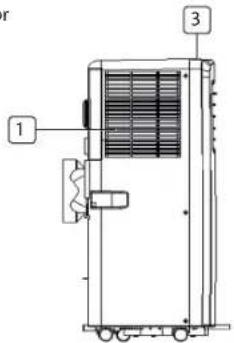
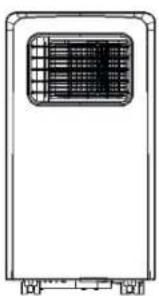
PARTS DESCRIPTION
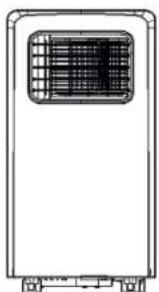
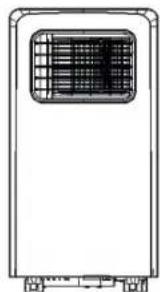
- Air inlet
- Air outlet
- Control panel
- Power cord
- Castor
natural_image
Line drawing of a rectangular industrial or storage unit with a central grating and mounting base (no text or symbols)
ACCESSORIES
| Part Description | |
| Hot-air exhaust hose | |
| Hose connector (window end) | |
| Hose connector (Air conditioner end) | |
| Window kit | |
| Remote controller |
EN
TRISTAR Instruction manual
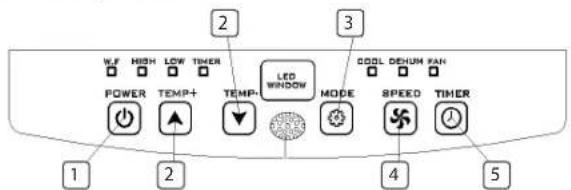
FUNCTION OF CONTROL PANEL
- Power button
- Temperature buttons
- Mode button
- Fan speed adjustment button
- Timer on/off button
BEFORE THE FIRST USE
Before starting operations in this section:
• Find a place where there is power supply nearby.
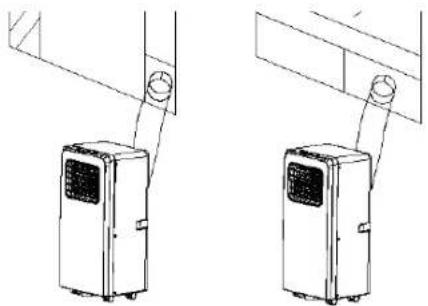
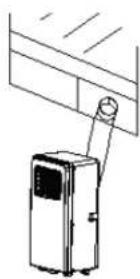
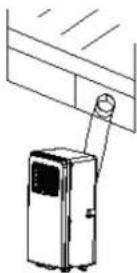
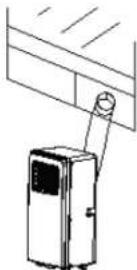
• Install the exhaust hose, and adjust the window position well.
natural_image
Technical line drawing of two identical air conditioning units mounted on a stand, with no text or symbols present.- Insert the power cord into an grounded AC220\~240V/50Hz socket;
- Press the POWER button to turn on the air-conditioner.
• Operation temperature range: 18°C - 35°C - Check whether the exhaust hose has been mounted properly.
- When using functions on cooling and dehumidifying, keep an interval of at least 3 minutes between each POWER.
USE
Cooling operation
- Press the "Mode" button till the "Cool" icon appears.
- Press the ▲ or ▼ button to select a desired room temperature. (16°C-31°C)
- Press the "Fan Speed" button to select wind speed.
Dehumidifying operation
- Press the "Mode" button till the "Dehumidify Indicator Lamp" blinks
• Automatically set the selected temperature to current room temperature minus 2°C. (16°C-31°C)
• Automatically set the fan motor to LOW wind speed.
Fan operation
- Press the "Mode" button till the "Fan" icon appears.
- Press the "Fan Speed" button to select wind speed.
Timer operation
Timer ON setting
- When the air-conditioner is OFF, press the "Timer" button and select a desired ON time through the temperature and time setting buttons.
- "Preset ON Time" is displayed on the operation panel.
• ON time can be regulated at any time in 0-24 hours
Timer OFF setting
- When the air-conditioner ON, press "Timer" button and select a desired OFF time through the temperature and time setting buttons.
- "Preset OFF Time" is displayed on the operation panel.
• OFF time can be regulated at any time in 0-24 hours.
Continuous Drainage
- When you plan to leave this unit unused for a long time, please remove the rubber blockage from the drainage hole at the bottom of unit, and connect a drain hose to the lower fixing clip. All the water in the water tank will drain outside.
- If water pump is damaged, continuous drainage can be used, and under this condition, the water pump is not activated. The unit can also work well.
- If water pump is damaged, intermittent drainage can also be used. Under this condition, when the water full indicator lamp lights up, please connect a drain hose to the lower fixing clip.
Internal Tank Water Full Alarm Function
The inner water tank in the air-conditioner has one water level safety switches, it controls water level. When water level reaches an anticipated height, the water full indicator lamp lights up. (If water pump is damaged, when the water is full, please remove the rubber blockage at the bottom of unit, and all water will drain outside.)
INSTALLATION
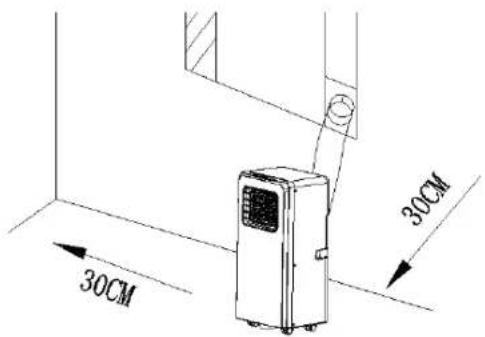
- A removal air-conditioner shall be installed in the flat and empty place all around. Don't block the air outlet, and the required distance around should be at least 30cm.
- Socket wiring should be in accordance with the local electric safety requirements.
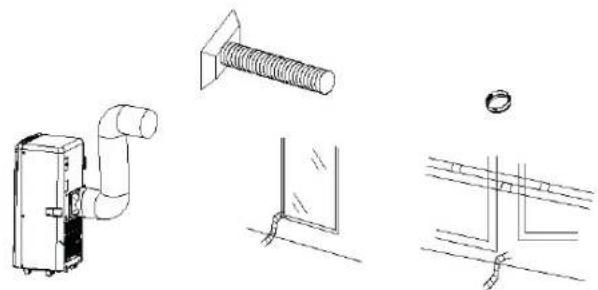
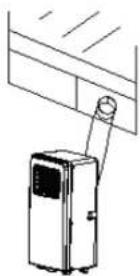
Exhaust Hose Installation
natural_image
Technical line drawings of mechanical components including a valve, screw, and mounting bracket (no text or symbols)EN
TRISTAR Instruction manual
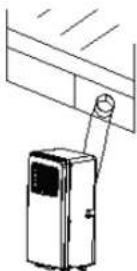
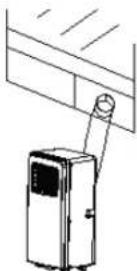
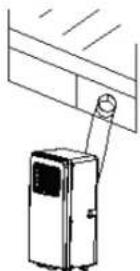
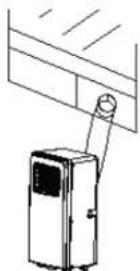
- Twist both ends of the exhaust hose into the square fixing clip and the flat fixing clip.
- Insert the square fixing clip into openings at back of the air conditioner.
- Put the other end of the exhaust hose to the near windowsill.
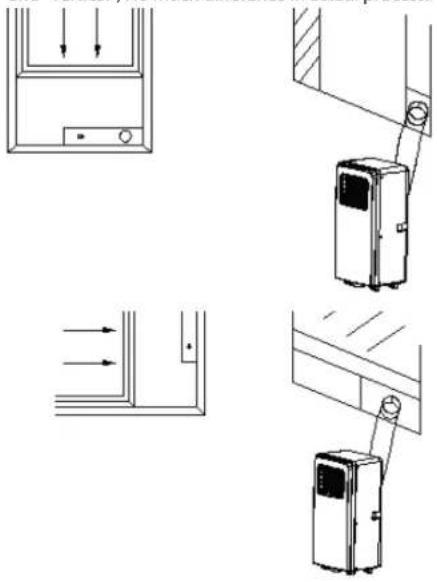
Window Slider Kit Installation
- The installation manner of window slider kit is mostly in "horizontal" and "vertical", No much difference in actual process.
natural_image
Technical line drawings of electrical components and connections (no text or symbols)CLEANING MAINTENANCE
- Before cleaning, be sure to disconnect the unit from any electric supply outlet.
- First clean the surface with a neutral detergent and wet cloth, and then wipe it with a dry cloth.
- Do not use gasoline or other chemicals to clean the unit.
- Do not wash the unit directly.
- If the conditioner is damaged, please contact the dealer or repair shop.
Air Filter
- If the air filter becomes clogged with dust/dirt, the air filter should be cleaned once every two weeks.
- Open the air inlet grille and take off air filter.
- Clean the air filter with neural detergent in lukewarm ^40^ and dry it up in the shade.
- Putting the air filter into the inlet grille, replace the components as they were.
TROUBLE SHOOTING
| Troubles Possible Causes Suggested Remedies | ||
| The unit does not start when pressing power button | Water full indicator lamp blinks, and water tank is full.Room temperature is higher than the setting temperature. (Electric heating mode)Room temperature is lower than the setting temperature. (Cooling mode) | Dump the water out of the water tank.Reset the temperatureReset the temperature |
| The unit doesn't cool enough | The doors or windows are not closed.There are heat sources inside the room.Exhaust air hose is not connected or blocked.Temperature setting is too high.Air inlet is blocked. | Make sure all the windows and doors are closed.Remove the heat sources if possibleConnect or clean the exhaust air hose.Reset the temperatureClean the air inlet. |
| Troubles Possible | Causes Suggested Remedies | |
| Auto Power-Off in heating mode | · Heating protection, when the temperature at the air outlet exceeds 70°C, the unit will power off automatically. | · Restart the unit at enough lower room temperature. |
| Noisy · The ground is not level or not flat enough · The sound comes from the flowing of the refrigerant inside the air conditioner | · Place the unit on a flat, level ground if possible · It is normal. | |
| E0 Code · Room temperature sensor failed | · Replace room temperature sensor (the unit can also work without replacement.) | |
| E2 Code · Water tank full · Please empty the water tank | ||
The product or equipment contains fluorinated greenhouse gas.
Art.nr. AC-5474
Coolant: R290
Quantity in kg: 0,10
Global Warming Potential: 3
Art.nr. AC-5477
Coolant: R290
Quantity in kg: 0,14
Global Warming Potential: 3
Art.nr. AC-5527PR
Coolant: R290
Quantity in kg: 0,14
Global Warming Potential: 3
Art.nr. AC-5529
Coolant: R290
Quantity in kg: 0,16
Global Warming Potential: 3
Art.nr. AC-5531
Coolant: R290
Quantity in kg: 0,16
Global Warming Potential: 3
GUARANTEE
- This product is guaranteed for 24 months granted. Your warranty is valid if the product is used in accordance to the instructions and for the purpose for which it was created. In addition, the original purchase (invoice, sales slip or receipt) is to be submitted with the date of purchase, the name of the retailer and the item number of the product.
- For the detailed warranty conditions, please refer to our service website: www.tristar.eu
ENVIRONMENT

This appliance should not be put into the domestic garbage at the end of its durability, but must be offered at a central point for the recycling of electric and electronic domestic appliances. This symbol on the appliance, instruction manual and packaging puts your attention to this important issue. The materials used in this appliance can be recycled. By recycling of used domestic appliances you contribute an important push to the protection of our environment. Ask your local authorities for information regarding the point of recollection.
SUPPORT
You can find all available information and spare parts at
http://www.tristar.eu
natural_image
Line drawing of a portable air conditioner unit with a grid vent (no text or symbols)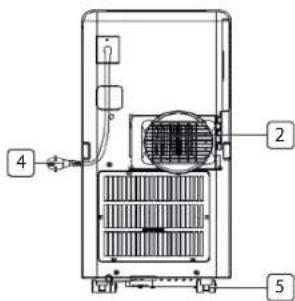
ACCESSOIRES
natural_image
Line drawing of two air purifiers with ventilation grilles, shown from different angles (no text or symbols)natural_image
Technical line drawings of mechanical components including a pipe fitting, threaded bolt, and mounting bracket (no text or symbols)natural_image
Technical line drawing of a mechanical device with mounting bracket and housing (no text or symbols)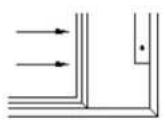
REINIGING ONDERHOUD
natural_image
Front view line drawing of a rectangular industrial or gas vent with a central gridded chamber (no text or symbols)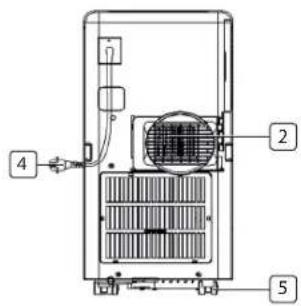
ACCESSOIRES
natural_image
Technical line drawing of two air purifiers mounted on a wall, no text or symbols presentnatural_image
Technical line drawings of mechanical components including a pipe fitting, screw, and mounting bracket (no text or symbols)natural_image
Technical line drawing of a mechanical device with mounting bracket and housing (no text or symbols)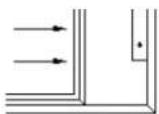
ENTRETIEN ET NETTOYAGE
DE
29
natural_image
Line drawing of a portable air conditioner unit with a handle and ventilation grille (no text or symbols)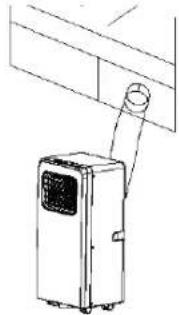
natural_image
Line drawing of a portable air conditioner unit with a coiled hose and ventilation grille (no text or symbols)natural_image
Technical line drawings of mechanical components including a pipe fitting, threaded bolt, and mounting bracket (no text or symbols)natural_image
Technical line drawings of electrical components and wiring (no text or symbols)REINIGUNGSWARTUNG
natural_image
Line drawing of a rectangular industrial or storage unit with a central grating and mounting base (no text or symbols)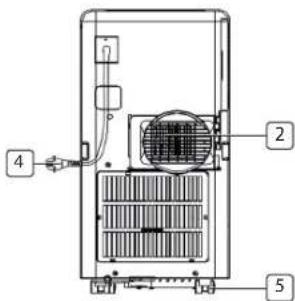
ACCESORIOS
natural_image
Line drawing of two identical air purifiers mounted on a wall, with no text or symbols present.ES
natural_image
Technical line drawings of door panel and air purifier components (no text or symbols)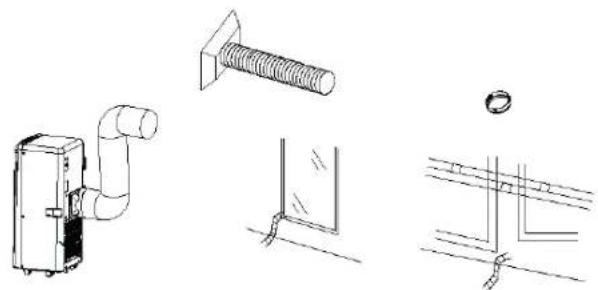
natural_image
Technical line drawings of mechanical components including a pipe fitting, threaded bolt, and mounting bracket (no text or symbols)★★★●
TRISTAR
Manual de usuario
LIMPIEZA Y MANTENIMIENTO
natural_image
Line drawing of a rectangular electronic device with a grid-patterned top panel and mounting base (no text or symbols)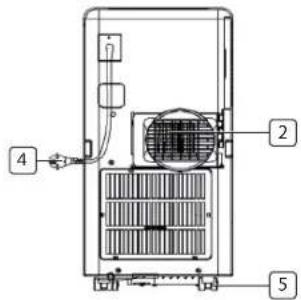

\*\*\* TRISTAR
natural_image
Line drawings of two different air purifiers mounted on a shelf, with no text or symbols present.natural_image
Technical line drawings of mechanical components including a pipe fitting, bolt, and mounting bracket (no text or symbols)natural_image
Technical line drawings of electrical components and wiring (no text or symbols)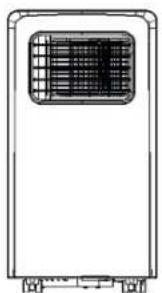
natural_image
Line drawing of a rectangular electronic device with a grid-patterned panel and mounting base (no text or symbols)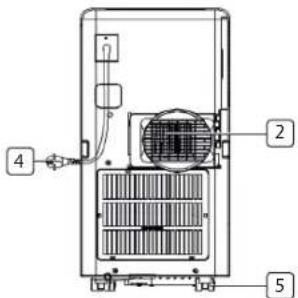
AKCESORIA
natural_image
Line drawing of two air purifiers with ventilation grilles, shown from different angles (no text or symbols)PL
natural_image
Technical line drawings of electrical components including a bulb, screw, panel, and grounding symbol (no text or labels)natural_image
Technical line drawing of a mechanical device with mounting bracket and housing (no text or symbols)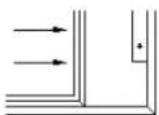
CZYSZCZENIE I KONSERWACJA
natural_image
Line drawing of a rectangular industrial or gas vent with a grid-patterned top panel and mounting base (no text or symbols)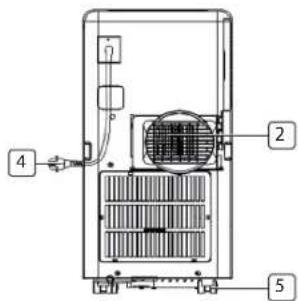
natural_image
Line drawings of two different air purifiers mounted on a shelf, with no text or symbols present.natural_image
Technical line drawings of mechanical components including a pipe fitting, threaded bolt, and mounting bracket (no text or symbols)natural_image
Technical line drawings of electrical panel connections and mounting bracket (no text or symbols)natural_image
Line drawing of a rectangular industrial or storage unit with a central vent and side-mounted wheels (no text or symbols)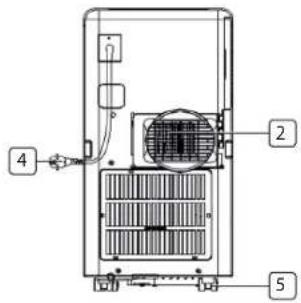
TILLBEHÖR
natural_image
Line drawing of a portable air conditioner unit with ventilation slots and a hanging handle (no text or symbols)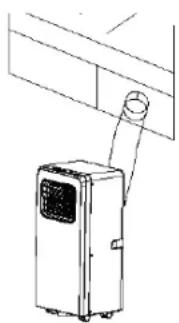
natural_image
Line drawing of a small air conditioner unit mounted on a shelf, with no visible text or symbols.natural_image
Technical line drawings of mechanical components including a pipe fitting, threaded bolt, and mounting bracket (no text or symbols)natural_image
Technical line drawing of a mechanical device with mounting bracket and housing (no text or symbols)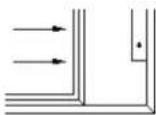
UNDERHÅLLSRENGÖRING
natural_image
Line drawing of a rectangular industrial or storage unit with a grid-patterned vent and mounting base (no text or symbols)
PŘÍSLUŠENSTVÍ
natural_image
Line drawing of a portable air conditioner unit with attached wiring (no text or symbols)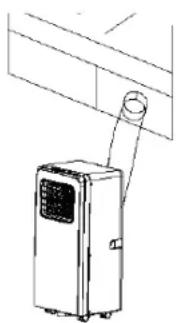
natural_image
Line drawing of a small air conditioner unit attached to a wall-mounted panel (no text or symbols)natural_image
Technical line drawings of mechanical components including a pipe fitting, screw, and mounting bracket (no text or symbols)natural_image
Simple line drawing of a device with a mounted cylindrical component and a wall-mounted panel (no text or symbols)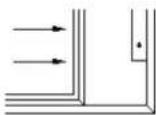
ÚDRŽBA ČIŠTĚNÍM
natural_image
Line drawing of a rectangular industrial or storage unit with a central gridded chamber (no text or symbols)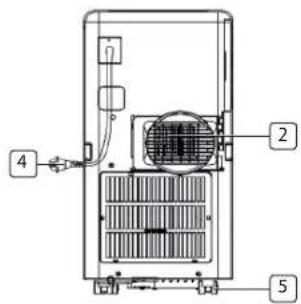
PRÍSLUŠENSTVO
natural_image
Line drawing of a portable air conditioner unit with ventilation slots and a hanging handle (no text or symbols)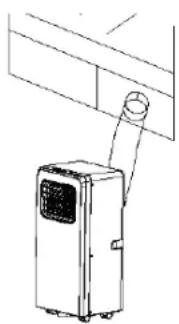
natural_image
Line drawing of a portable air conditioner unit with ventilation duct (no text or symbols)natural_image
Technical line drawings of four different pipe installation components: a valve, a bolt, a corner detail, and a bracket (no text or symbols present)natural_image
Technical line drawing of a mechanical device with mounting bracket and housing (no text or symbols)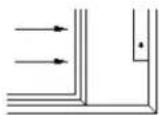
ÚDRŽBA ČISTENÍM
- Pred čistením zabezpečte, aby sa jednotka odpojila z výstupu elektrického napájania.
- Najprv vyčistite povrch s neutrálnym čistiacim prostriedkom a mokrou textíliou, a potom ho utrite do sucha so suchou textíliou.
- Nepouživajte žiadne benziny ani iné chemikálie pre čistenie jednotky.
• Jednotku neumývajte priamo. - Ak je klimatizácia poškodená, prosím, kontaktujte predajcu alebo servis.
Vzduchový filter
natural_image
Technical line drawing of two air purifiers mounted on a wall, no text or symbols presentnatural_image
Technical line drawings of mechanical components including a valve, screw, and mounting bracket (no text or symbols)natural_image
Technical line drawing of a mechanical device with mounting bracket and housing (no text or symbols)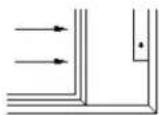
ČIŠČENJE, VZDRŽEVANJE
natural_image
Line drawing of a rectangular industrial or storage unit with a central grid-patterned chamber (no text or symbols)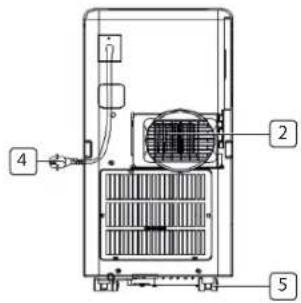
TARTOZÉKOK
natural_image
Line drawings of two different air purifiers mounted on a shelf, no text or symbols presentnatural_image
Technical line drawings of mechanical components including a pipe fitting, screw, and mounting bracket (no text or symbols)natural_image
Technical line drawing of a mechanical device with mounting bracket and housing (no text or symbols)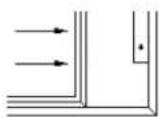
Quality shouldn't be a luxury!

www.tristar.eu
Tristar Europe B.V. | Jules Verneweg 87 | 5015 BH Tilburg | The Netherlands