URC 1035 - Remote control ONE FOR ALL - Free user manual and instructions
Find the device manual for free URC 1035 ONE FOR ALL in PDF.



| Product type | Universal remote control for air conditioner |
| Brand | ONE FOR ALL |
| Model | URC 1035 |
| Dimensions (W x H x D) | 43 mm x 130 mm x 20 mm |
| Weight | 60 g (without batteries) |
| Power supply | 2 AAA batteries (alkaline recommended) |
| Infrared operating distance | Up to 10 meters without obstacles |
| Adjustable temperature range | 16°C to 31°C |
| Operating modes | 5 modes: Auto, Cool, Dry, Fan, Heat |
| Fan speeds | 4 speeds: Auto, 1, 2, 3 |
| Swing function | Activation/deactivation |
| Timer | From 30 minutes to 24 hours (programmed on/off) |
| LCD display | With blue backlight (5-second activation) |
| Brand compatibility | 10 major brands (Mitsubishi, Hitachi, Gree, Midea, Daikin, Chigo, Fujitsu, Panasonic, Samsung, LG) and others via code |
| Code setup | Auto search or manual entry of 4-digit code |
| Material | Plastic |
| Maintenance and cleaning | Damp cloth, no solvents or detergents; remove batteries if unused for long periods |
| Safety precautions | Do not modify, risk of fire/electrocution, use appropriate batteries, recycle according to directives |
| Warranty | 3 years (conditions: normal use, no damage caused by user) |
| Spare parts and repairability | Not available (sealed device, no user-replaceable parts) |
| General information | Comply with WEEE directive (2012/19/EU) and battery regulations (2006/66/EC) |
Frequently Asked Questions - URC 1035 ONE FOR ALL
User questions about URC 1035 ONE FOR ALL
0 question about this device. Answer the ones you know or ask your own.
Ask a new question about this device
Download the instructions for your Remote control in PDF format for free! Find your manual URC 1035 - ONE FOR ALL and take your electronic device back in hand. On this page are published all the documents necessary for the use of your device. URC 1035 by ONE FOR ALL.
USER MANUAL URC 1035 ONE FOR ALL
ENGLISH 2 | DEUTSCH 6 | FRANÇAIS 10 | ESPÁNOL 14 | PORTUGUES 18 | ITALIANO 22 | NEDERLANDS 26 | DANSK 30 | NORSK 34 | SVERIGE 38 | SUOMI 42 | EAAHNIKA 46 | PYCCKM 50 | TÜRKCE 54 | POLSKI 58 | CESKY 62 | MAGYAR 66 | Бъларский 70 | ROMÁNă 74 | SLOVENSKY 78 | HRVATSKI 82 |
CODELIST 86
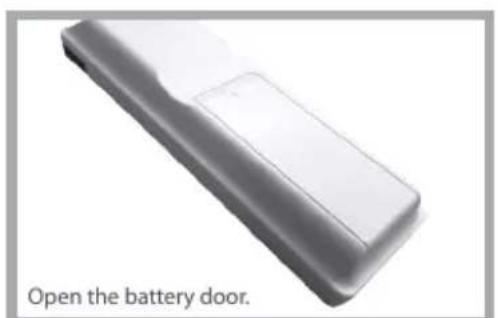
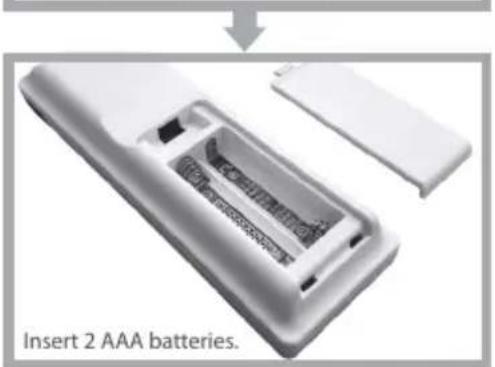

CAUTION: Risk of explosion if battery
is replaced by an incorrect type. Use quality Alkaline batteries.
Controls most popular air conditioner brands
- 5 modes: Auto, Cool, Dry, Fan and Heat
Cool and Heating mode: from 16 to 31^
Fan Speed: Auto,1,2,3
- Swing Auto and Off
- Timer on/off function
- Top 10 brand auto search
- LCD with backlight
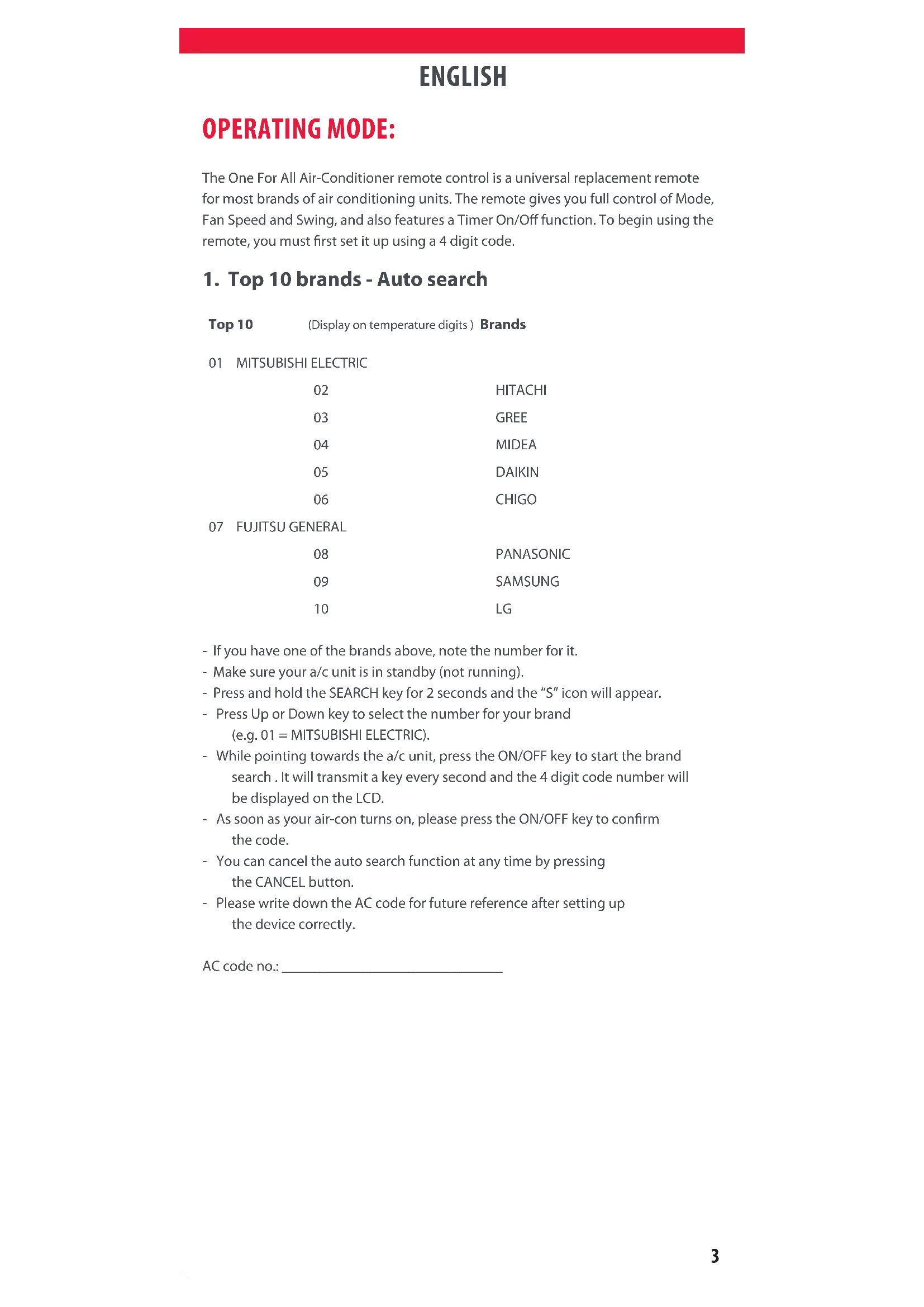
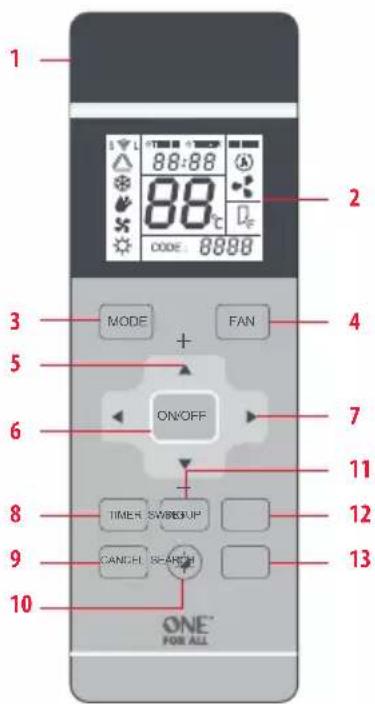
IMAGE & FUNCTION
IR Transmit (1pc IR at front and 2 pcs IR on top)
2 LCD
3 Mode
4 Fan Speed Control
5 Temperature Control
6 AC On/Off
7 Left Right Navigation
8 AC On/Off Timer Setup
9 Cancel
10 Backlight On/Off
11 AC Code Setup
12 Swing On/Off
13 AC Code Search
LCD Display:
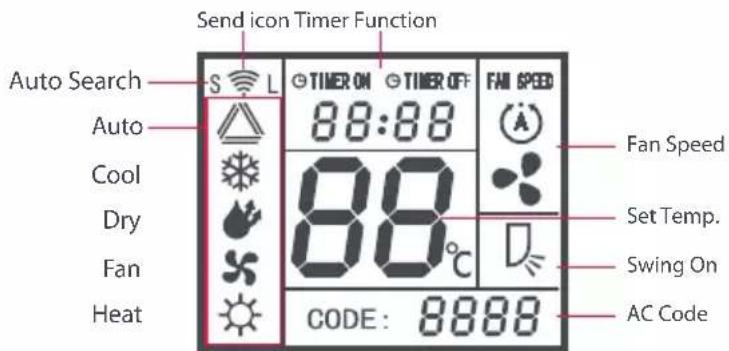
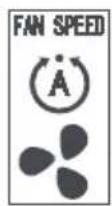
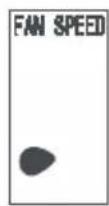
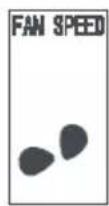
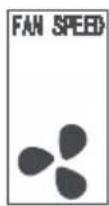
Fan Speed description:
Fan Speed Auto Fan speed 1 (Low) Fan speed 2 (Mid) Fan speed 3 (High)
Icons
ENGLISH
OPERATING MODE:
The One For All Air-Conditioner remote control is a universal replacement remote for most brands of air conditioning units. The remote gives you full control of Mode, Fan Speed and Swing, and also features a Timer On/Off function. To begin using the remote, you must first set it up using a 4 digit code.
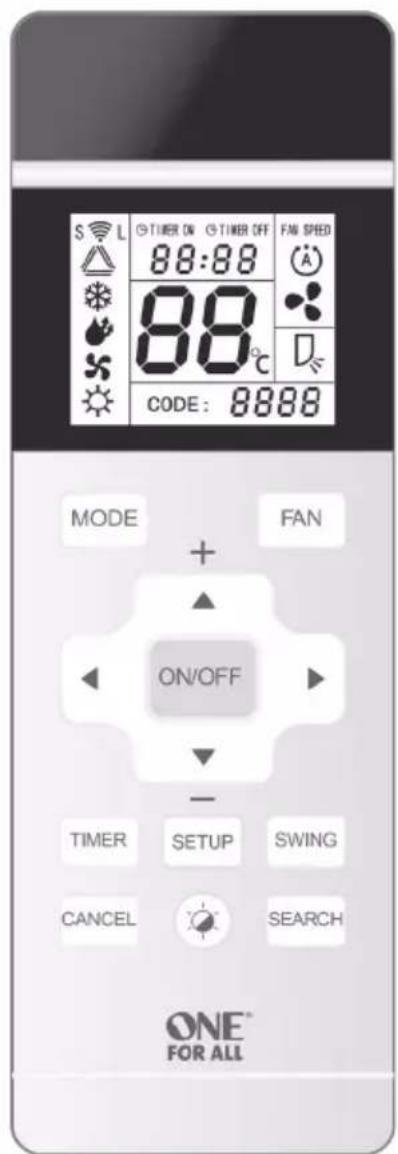
1. Top 10 brands - Auto search
Top 10 (Display on temperature digits) Brands
01 MITSUBISHI ELECTRIC
02 HITACHI
03 GREE
04 MIDEA
05 DAIKIN
06 CHIGO
07 FUJITSU GENERAL
- If you have one of the brands above, note the number for it.
- Make sure your a/c unit is in standby (not running).
- Press and hold the SEARCH key for 2 seconds and the "S" icon will appear.
- Press Up or Down key to select the number for your brand (e.g. 01 = MITSUBISHI ELECTRIC).
- While pointing towards the a/c unit, press the ON/OFF key to start the brand search. It will transmit a key every second and the 4 digit code number will be displayed on the LCD.
- As soon as your air-con turns on, please press the ON/OFF key to confirm the code.
- You can cancel the auto search function at any time by pressing the CANCEL button.
- Please write down the AC code for future reference after setting up the device correctly.
AC code no.:
ENGLISH
OPERATING MODE:
2. AC code setup
If your brand is not one of the 10 listed in the Auto Search section, checked the included code list and locate your brand there. To test the codes listed:
- Press and keep holding SETUP key for 2s.
- In the CODE display, the last digit will flashes on screen.
-
Use the Left and Right keys to select a digit, and the Up and Down keys to change it until the 4 digits match the first code in the list
-
Press the ON/OFF key to test the code
- If your a/c unit reacts, press SETUP to store the code.
- If not, try again with the next code in the list.
- You can exit this mode by pressing the CANCEL button
- Once you have found the code that works correctly, please write it down below.
AC code no.:
3. Timer ON/OFF function
- If your a/c unit is ON, you can set the TIMER functions to turn it OFF half an hour to 24 hours from now (in half hour intervals)
- If your a/c unit is OFF, you can set the TIMER functions to turn it ON half an hour to 24 hours from now (in half hour intervals)
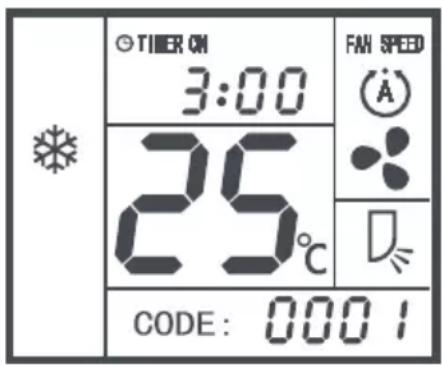
Example:
Timer: Turn On after 3hrs.
Cool mode, Temp = 25°C,
Fan Speed = Auto,
Swing = On
- To activate the Timer, press the TIMER key repeatedly until the desired time shows as in the example. The Timer will start if no key is pressed for 3 seconds.
- You can cancel the TIMER by pressing the CANCEL button or by turning the a/c unit ON or OFF.
- When the Timer is activated, please leave the remote control pointing towards the unit.
ENGLISH
TECHNICAL SPECIFICATIONS
Model No. URC 1035
IR Operating Distance Up to 10m line of sight, in unobstructed
environment
Temp Setting Range 16 - 31°C
LCD Segment and icons type LCD display
Backlight Blue color LED | Backlight off timer = 5s
Power input Powered by AAA x 2pcs | Alkaline batteries are
recommended for the unit.
Operating and Storage Temps Operating: 0 - 40^ | Storage: -20 - 60^
Dimension (L x H x T) 43mm x 130mm x 20mm
Weight 60g (Batteries excluded)
MAINTENANCE
- Do not expose your unit to dust, strong sunlight, humidity, high temperatures or mechanical shocks.
- Use new batteries of the recommended type and size only.
- Do not use old and new batteries together as old batteries tend to leak.
- To avoid chemical leaks, remove batteries from the unit if you do not intend to use the unit for an extended period of time.
- Do not use corrosive or abrasive cleansers on your unit.
- Use a water wet cloth to clean the soft plastic surface, do not use any detergent or cleaning agent.
- Keep the unit dust free by wiping it with a soft, dry cloth.
- Do not disassemble the unit, it contains no user-serviceable parts.
WARNING
- Do not modify the unit in any way.
- Risk of fire.
- Risk of electrical shock.
- Risk of burns.
- Do not dispose of electrical appliances and unsorted municipal waste, use separate collection facilities. Contact your local government for information regarding the collection systems available.
- There is no user serviceable parts in this unit.
CAUTION
- Risk of explosion if battery is replaced by an incorrect type.
- Dispose of used batteries according to the instructions.
DEUTSCH
FUNKTIONEN
Temperature operative
Timer: Taend after 3 timer.
Tilstanden Kølig, Temp = 25 °C,
Ventilatorhastighed = Auto,
Variation = Til
TEXHNUECKNEXAPAKTEPNUKNI
Homep moen URC 1035
Pa6ooye pacctOHaMe IK-nopta Do 10 M B 3OHe prrMoB BuDnMOCTN
Duaana30H yctAHOBKn TemnepaTy p 16-31°C
KK-dncnnen KK-dncnne c cermentamn 3HaKamn
ΦOHOBa noDCBtKa CnHn cBetoNDo
TainmepOTKIOUeHnA OHOBOI NOCBETK1-5c
Ntahne Baatapen AAA,2wT.
PekomEnyTeTc nCnOJIb3OBaTb 9eNoUHbIe
6aTapeN.
Pa6oay temepaTyu
TemnepaTypa xpanenpa Pa6ooua TemnpaTypa:0-40°C
TemnepaTypa xpaHHeHH: -20...+60°C
Pa3MepbI (D×B×U) 43×130×20 MM
Macca 60r(6e36aTapei)
TEXHNUECKOE OBCJUyXUBAHNE
- PpeOxpaHnTe nylbT O TBo3eIcTBnIaII, npMbx COJIHeuHbIX Lyuei, BlaI, BbICOKNX TEMpepaTp i yapOB.
2.ИсплььунTe TOЛбКО HOВБе 6aTApen peKOMeHIOBaaHHOrTOIIa pa3Mepa. - He nCnoBzyeTe CTapyIO HOBYIO 6aTapeN OndHOBpeMeHHO: CTapbIe 6aTapeN MOrYT TeUb.
- YTo6bI n36eKaTb yTeuKn XmMnuecknx BeuecTB, BbHImaIte 6aTaepen n3 nyltBa, ecn He nnAhpye Te nCNOJb3ObaTb erO B TeueHne dNtTeNbHO BpemEn.
5.He nCnoB3yIte arpeccnBbIe nn a6pa3nBbIe cpeCTBa IJN OUcTKn NytTa. - Дя оочткп пл actikobои NOBepxHoctn Испь3ун Te caIФeTKy, CMочehну BOdО. He npIMeHЯITE MOIOJIne cpeICTBa IIN XIMpeAaKTHbbl.
7.CBoeBpeMeHNO ydaIaIte nbInb c NOMOu bIO MraKo CyXo caΦeTK. - He pa36npaIte npu6op: OH He copejKNT KOMNOHEHTOB, 06CnyKINBaembIX NOJIb3OBaTeJEM.
OCTOPOXHO!
He nIbTaIteCb MoIuHcIpOBoBaTn3JeJIe.
OrheonacHO.
CyueCTByeT pNCK nopaKeHnE 3JneKTpnueCKnM TOKOM.
BO3MOXHbIOXKOrN.
He BbI6paCbIbaiTe 3JIeKTpOpiu6OpBb B 6bITOBbIe OTXoDbI: INcONb3yIte CnCTEmbl pa3dEnbHorO c6opa Mycopa. 3a nHΦopMaueNe O TaKx CNCTeMax O6paTntEcB MeCTHbIe OTBeTCTBeHHbIe OprAhBi BlaCTN.
YcTpoIcTO He CoepKNT KOMNoHErTOB, O6CnyKnBaEmbIX NOJIb3OBaTeJIeM.
BHUMAHVE!
CyueCTByeT pncB3pbBa npn nCnoIb3ObaHm 6aTapen HnpabunbHoro Tuna.
- Ytuln3npyTe 6aTapeN B COOTBETCTBm C HHTpyKUmaM.
TÜRKÇE
ÖZELLIKLER LISTESI
Arka1ik Mavi renkli LED
Arka 1sik kapali zamanlayici = 5 sn
Predkosc wentylatora = Auto,
Lopatka = wt.
Aleggyakoribb 10 Márka
Rychlost'vent. = Auto,
Kolisanie = Zap.
The crossed out wheeled bin symbol on this product ensures that this product is manufactured using high quality components that can be recycled and reused according European Directive 2012/19/EU. Please do not dispose of this product with your normal household waste, refer to local regulations for the proper collection or disposal of electrical and electronic products. This will help this will help in preventing negative effects on the environment and/or human health.
BATTERY DISPOSAL (EUROPEAN DIRECTIVE 2006/66/EC)
Please do not dispose of your batteries with your normal household waste, refer to local regulations for the proper collection or disposal. This will help preventing potential negative effects on the environment and/or human health.
GUARANTEE TERMS AND CONDITIONS UNIVERSAL ELECTRONICS warrants to the original purchaser that this product will be free from defects in materials and workmanship under normal and correct use for a period of 3 years from the date of original purchase. This product will be repaired or if necessary, replaced free of charge if it has been proven to be defective within the 3 year warranty period. The forwarding costs are on the account of the owner, the costs of returning the product are on the account of UNIVERSAL ELECTRONICS.
This warranty does not cover damage or failures caused by products or services not supplied by UNIVERSAL ELECTRONICS, or which result from not mounting the product according to manual instructions. This also applies when the product has been modified/ repaired by others than UNIVERSAL ELECTRONICS or if a fault is the result of accident, misuse, abuse, neglect, mishandling, misapplication, faulty installation, improper maintenance, alteration, modifications, fire, water, lightning, natural disasters, wrong use or carelessness.
To obtain warranty service during the warranty period contact [...] and please note that we need your original purchase receipt so that we may establish your eligibility for service. If you have bought this product for purposes which are not related to your trade, business or profession, you may have legal rights under your national legislation governing the sale of consumer goods. This guarantee does not affect those rights. www.oneforall.com
DEUTSCH