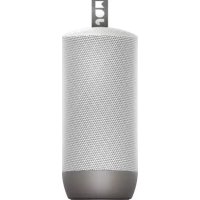
Zero Chill HXP606 - Speaker JAM - Free user manual and instructions
Find the device manual for free Zero Chill HXP606 JAM in PDF.



| Product type | Portable speaker |
| Brand | JAM |
| Model | Zero Chill HXP606 |
| Power | Built-in rechargeable lithium battery, charges via micro USB port (cable included) |
| Battery life | Up to 22 hours of listening |
| Charging time | Approximately 3 hours |
| Connectivity | Bluetooth 5.0 (estimated), 3.5mm auxiliary input |
| Protection rating | IP67 (dustproof and immersion up to 1 meter for 30 minutes) |
| Main functions | Play/pause, volume, next/previous track, call management, stereo pairing of two speakers |
| Buttons | Power/play/pause, volume +/next track, volume -/previous track |
| LED indicators | Solid red (charging), flashing red (low battery), flashing blue (connected), alternating red/blue (pairing), green (stereo pairing) |
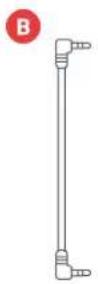
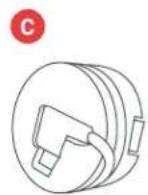
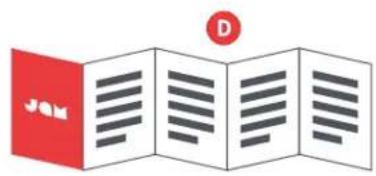
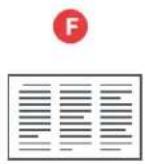
| Box contents | Speaker, auxiliary cable, USB cable with winder, quick start guide, welcome card, legal card, JAM sticker |
| Safety | Do not use near ears, do not immerse without closing the covers, do not expose to excessive heat, non-replaceable battery |
| Warranty | 1 year (United States and Canada), 2 years (United Kingdom and Europe) |
| Maintenance | Keep bottom and side covers tightly closed around water, clean with a dry cloth |
Frequently Asked Questions - Zero Chill HXP606 JAM
User questions about Zero Chill HXP606 JAM
0 question about this device. Answer the ones you know or ask your own.
Ask a new question about this device
Download the instructions for your Speaker in PDF format for free! Find your manual Zero Chill HXP606 - JAM and take your electronic device back in hand. On this page are published all the documents necessary for the use of your device. Zero Chill HXP606 by JAM.
USER MANUAL Zero Chill HXP606 JAM
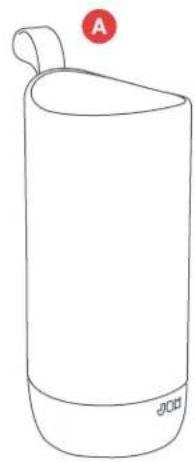
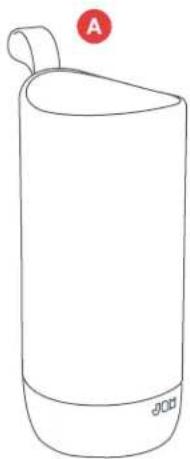
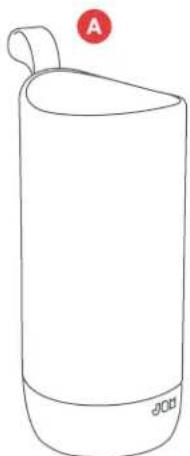
A - Speaker
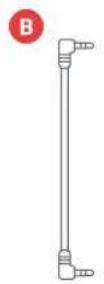
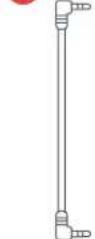
B-Aux-in cord
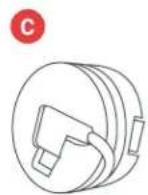
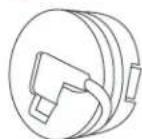
C - USB charging cable with spool wrap
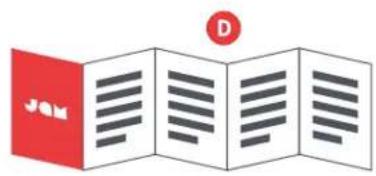
D - Quick-Start Guide
E - Welcome card
F - Legal card
G - Jam sticker
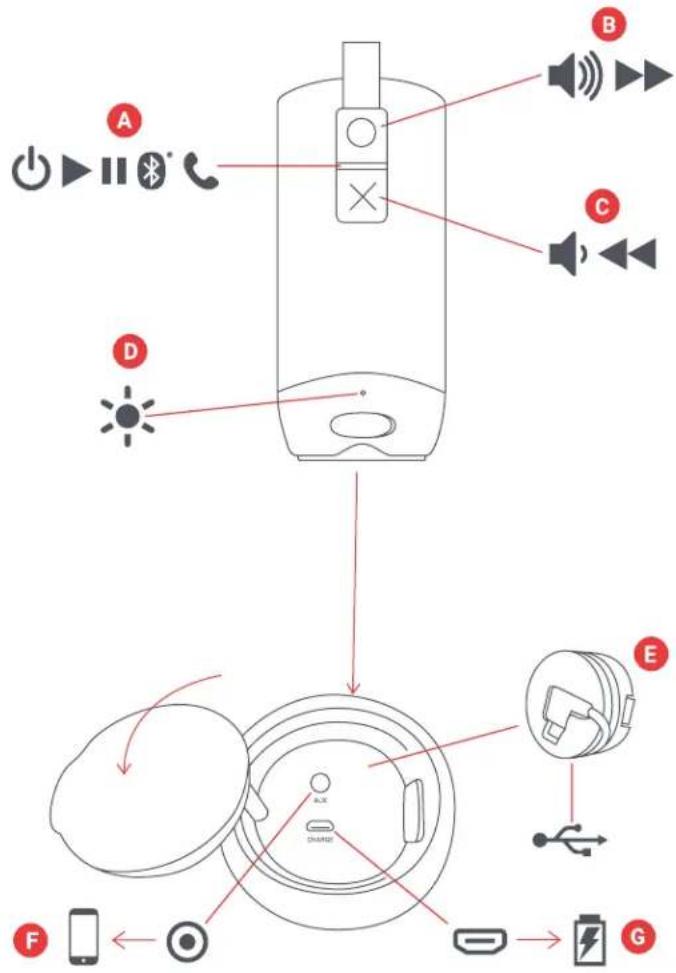
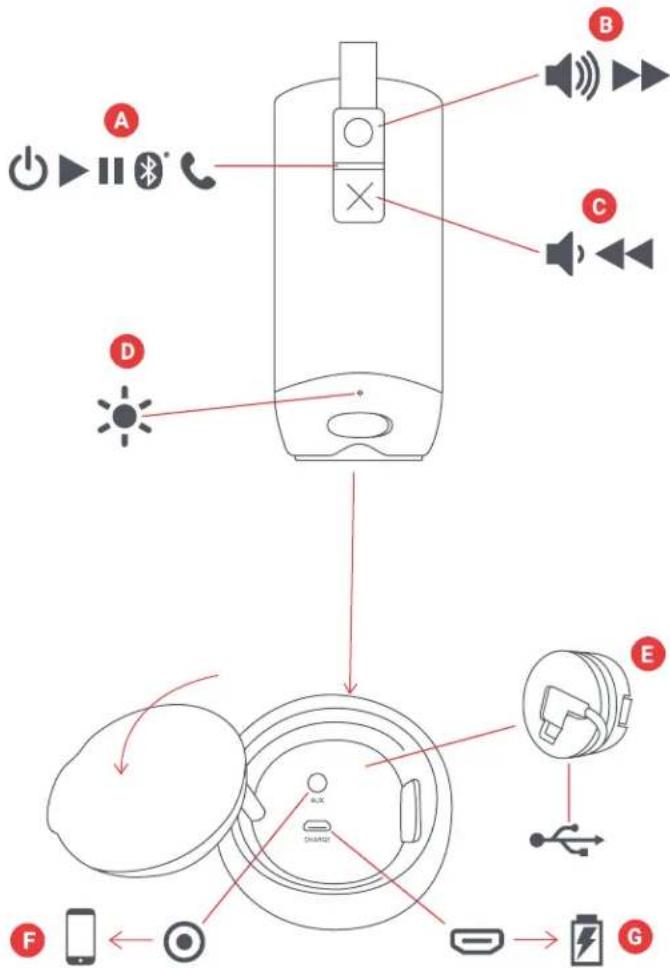
CONTROLS
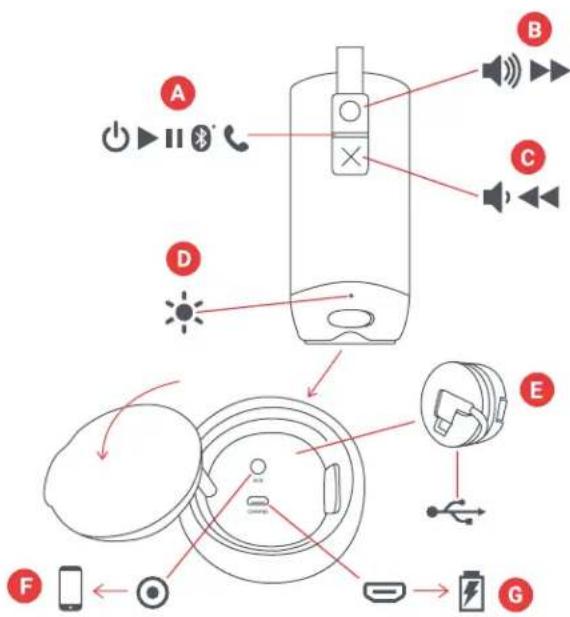
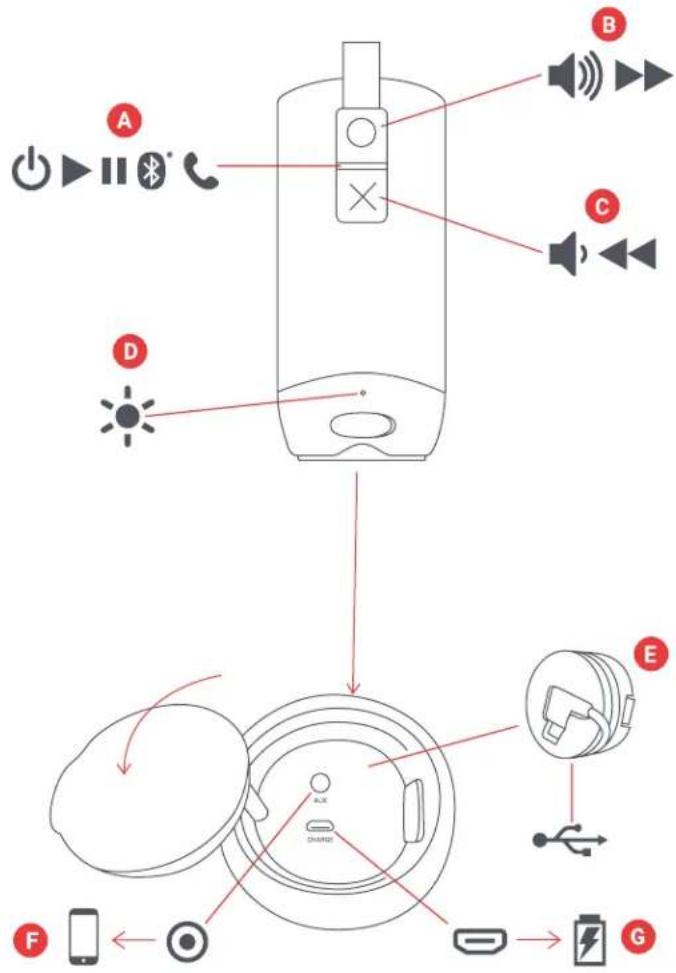
A - Power on/off/play/pause button
B - Volume up/next track
C - Volume down/previous track
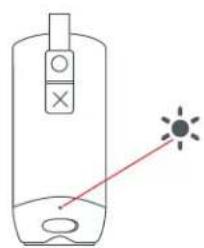
D-LED light indicator
E - Charging cable with spool wrap
F-Aux-in port
G - Charging port
SETUP
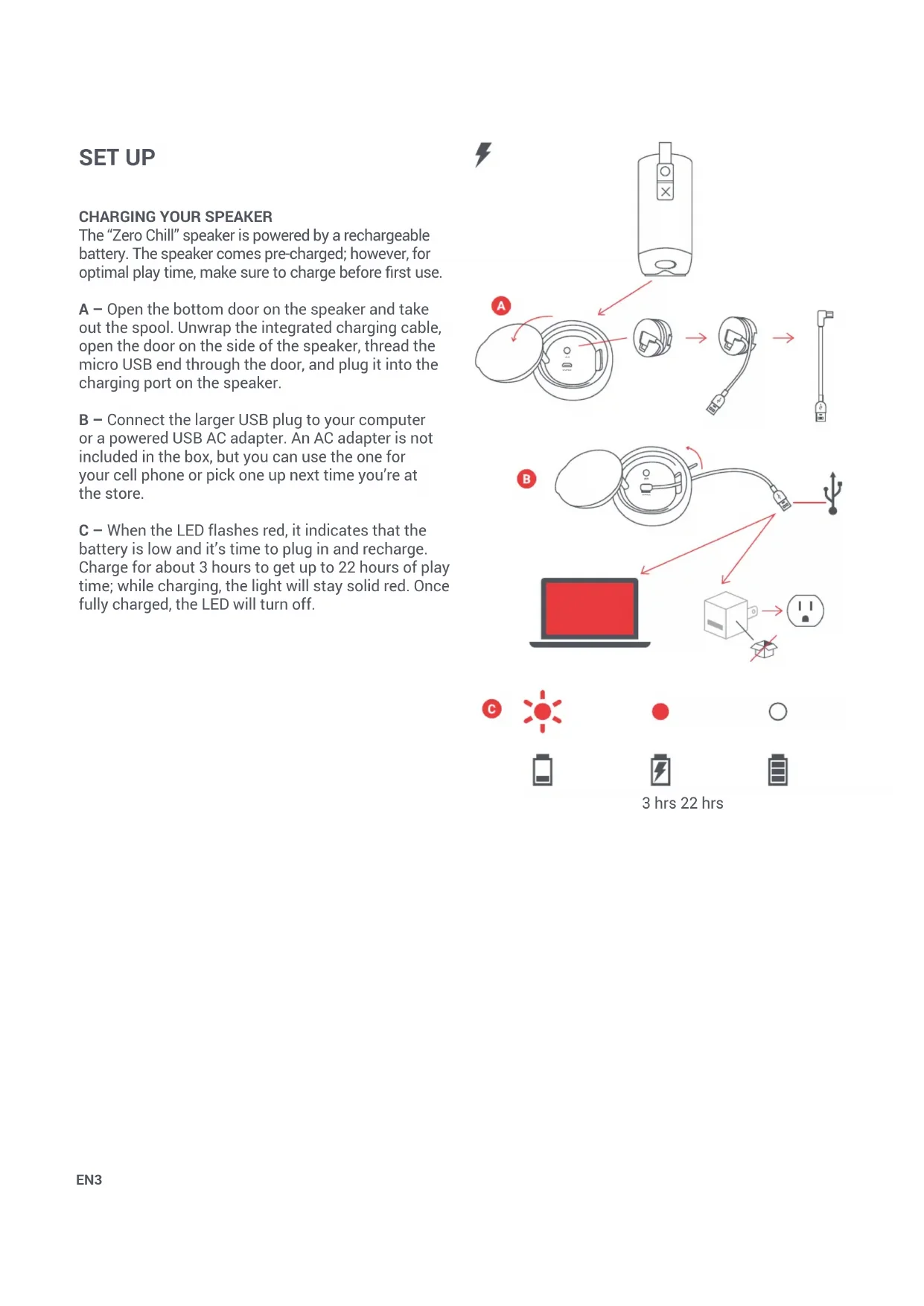
The "Zero Chill" speaker is powered by a rechargeable battery. The speaker comes pre-charged; however, for optimal play time, make sure to charge before first use.
A - Open the bottom door on the speaker and take out the spool. Unwrap the integrated charging cable, open the door on the side of the speaker, thread the micro USB end through the door, and plug it into the charging port on the speaker.
B - Connect the larger USB plug to your computer or a powered USB AC adapter. An AC adapter is not included in the box, but you can use the one for your cell phone or pick one up next time you're at the store.
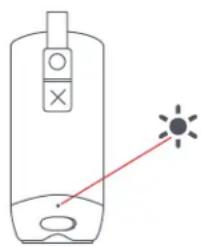
C- When the LED flashes red, it indicates that the battery is low and it's time to plug in and recharge. Charge for about 3 hours to get up to 22 hours of play time; while charging, the light will stay solid red. Once fully charged, the LED will turn off.
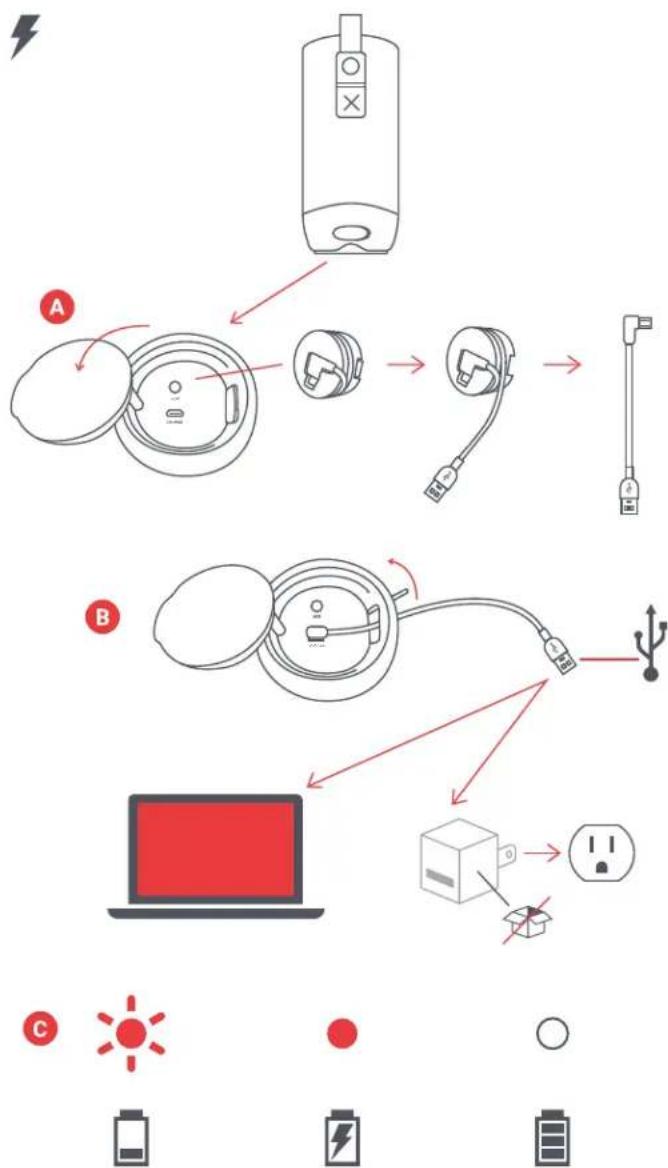
3 hrs 22 hrs
USE
A - TURN ON YOUR SPEAKER
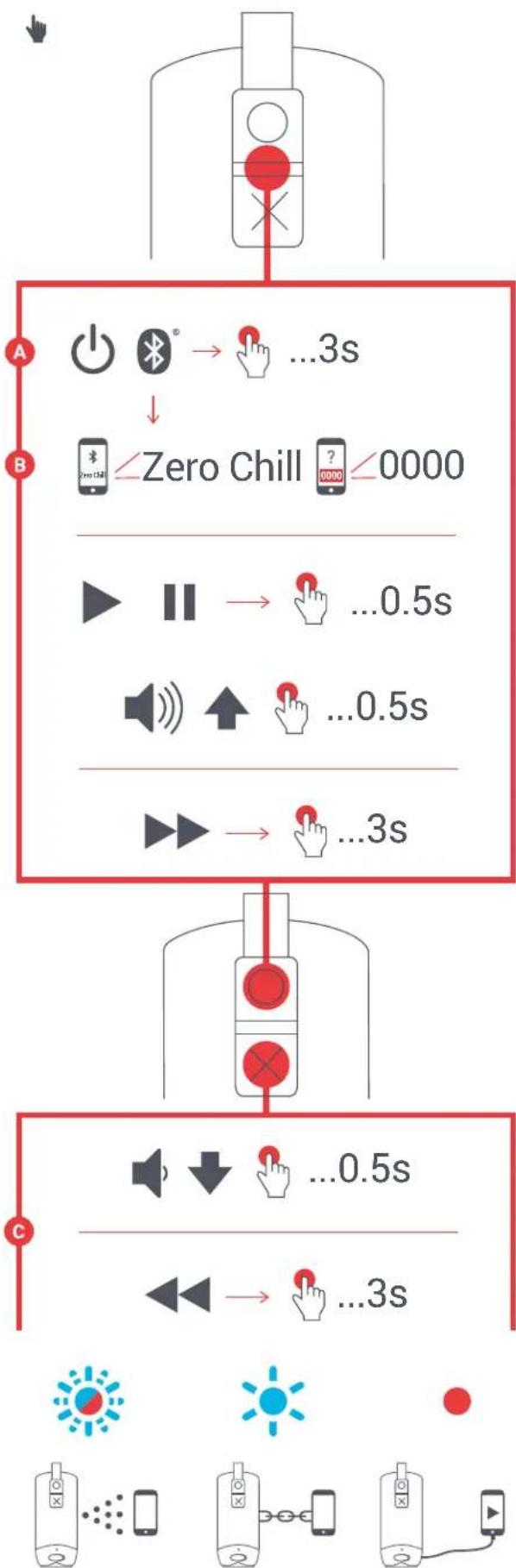
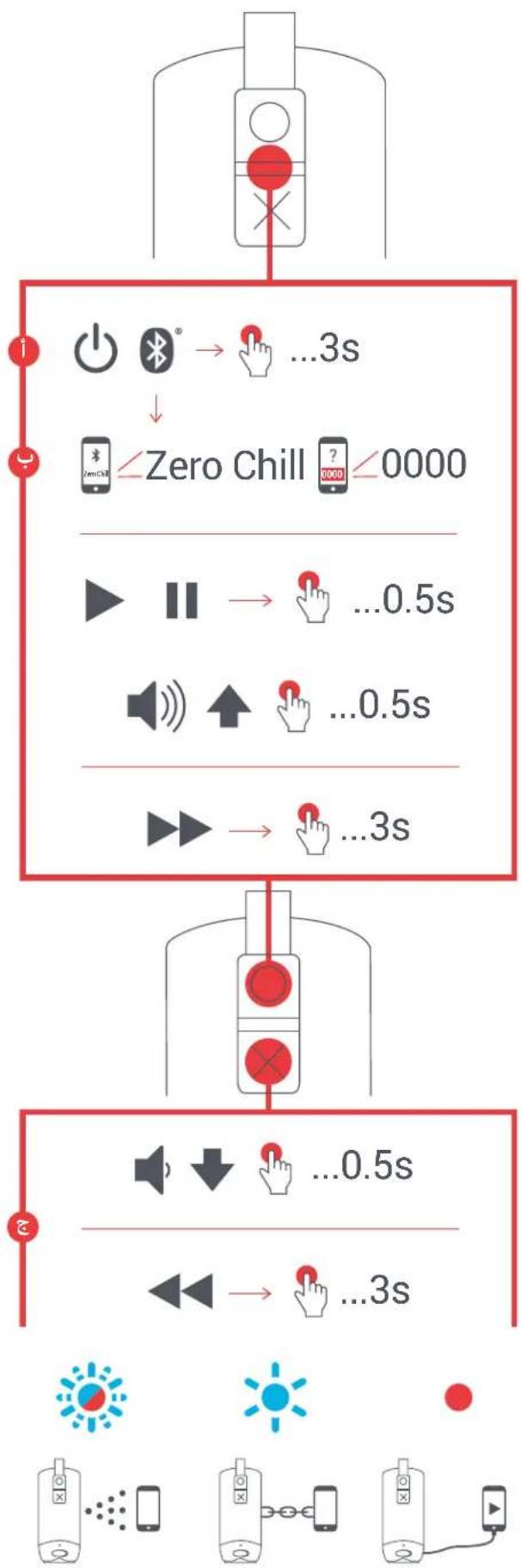
Long press the "play/pause" button for 3 seconds to turn on your speaker.
B-CONNECTING TO A DEVICE
Once turned on, the speaker will immediately search for a device to pair to. If a device has not been previously paired, the light will switch from blinking blue to blinking red and blue alternately. Enable Bluetooth on your device. From the Bluetooth menu, select "Zero Chill." When the device and Zero Chill are connected, you will hear a tone and the LED light will turn solid blue momentarily then move to a slow blinking blue.
You may also connect your device to Zero Chill using an aux cord, which is included. When plugged in, the light will turn solid red.
Note: Once paired, the speaker will remember the device every time it is turned on. To disconnect the speaker from the device, hold down the "X" and "play/ pause" buttons at the same time, for 2 seconds.
C-BUCTION FUNCTION
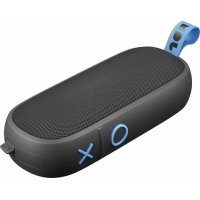
Short press the "play/pause" button for 0.5 seconds to play your music. To increase the volume, short press the "O" button; to lower the volume, short press the "X" button. To skip forward a track, long press the "O" button; to skip back a track, long press the "X" button.
D-WATER & DUST PROOF
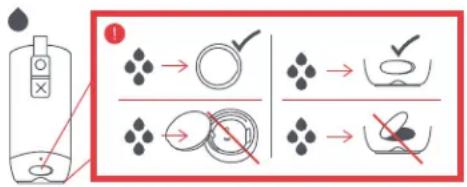
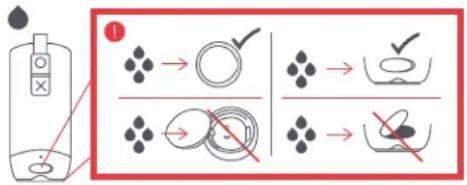
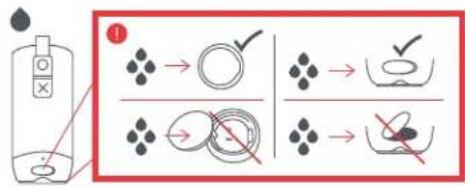
The smart folks who made this speaker designed it to keep the party going through just about anything (they call it IP67). This means that Zero Chill is dust proof, and submersible in water up to 1 meter (3ft) for 30 minutes. But those designers aren't miracle workers. Doing something like dropping your speaker from Mount Everest or taking it deep-sea diving will damage your speaker and prevent it from emitting the incredible sounds it is made to. Always keep the side and bottom flaps flush with the speaker when you are using it near water, or it could be damaged.
E-CALLHANDLING
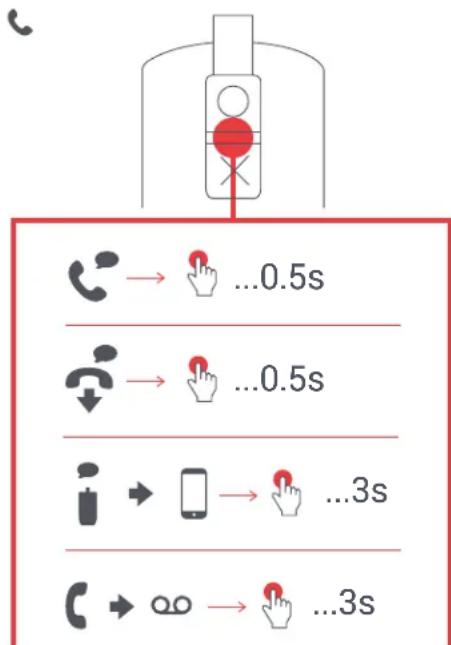
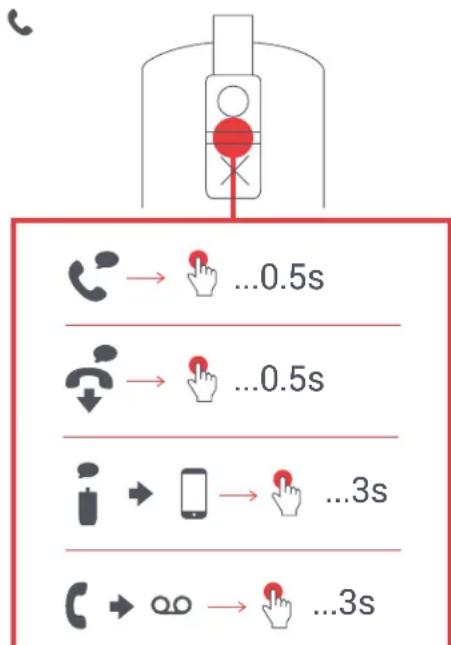
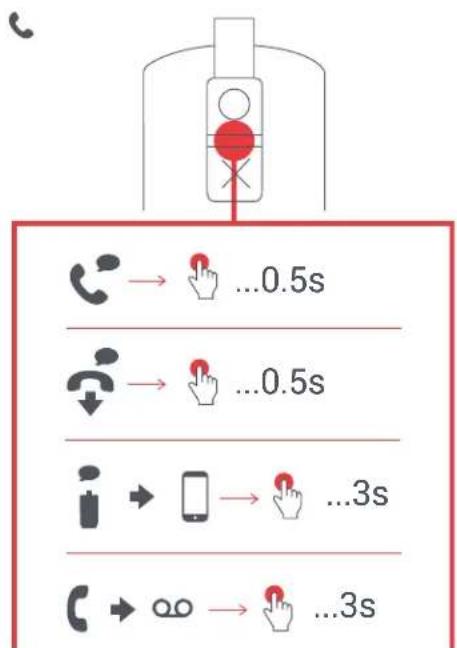
While rocking out to your music, if a call comes in, short press the "play/pause" button to pick it up; short press again when you're done, to hang up.
While on a call, if you want to make it private, long press the "play/pause" button to move the call from the speaker to your phone.
If a call comes in and you don't want to pick it up, long press the "play/pause" button to send the call to voicemail.
- See the tables on the following pages for complete button function and LED light indicator interpretation.
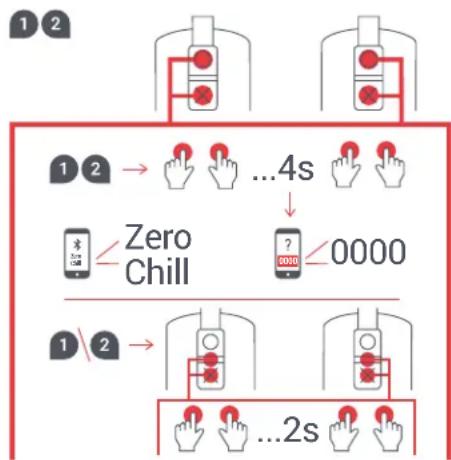
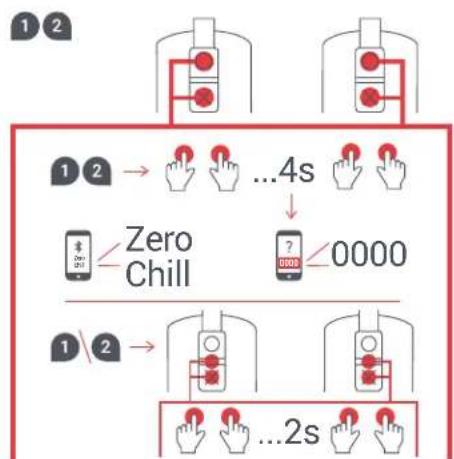
- Turn on speaker 1 (press and hold the "play/pause" button for 3 seconds).
- Turn on speaker 2 (press and hold the "play/pause" button for 3 seconds).
- On both speakers, press and hold the "X" and "O" buttons at the same time for up to 4 seconds and wait for a tone and the lights to blink green.
- The speakers will begin to pair together. This will take a few seconds.
- Tone prompt will indicate when speakers are paired together.
- Choose "Zero Chill" from your device's Bluetooth list.
- Press the "play/pause" button on either speaker to listen to music. Press "X" and "O" together to toggle between stereo and mono modes.
- Once paired, your speakers will recognize each other every time both are turned on. To disconnect Pair 2 mode, press and hold the "X" and "O" buttons for up to 4 seconds. This will enter into pairing mode again.
Note: If either of your speakers has been previously paired to a device, or will not pair automatically, press and hold the "play/pause" and "X" buttons on both speakers for 5 seconds to activate pairing mode. You will know they have reached pairing mode by the red and blue blinking light.
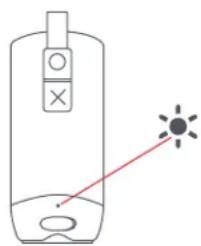
LED INDICATORS
CHARGING IN USE
| Red flash every 5 seconds Low | battery |
| Solid red Charging | |
| LED off Charging complete |
| Flash blue and red Speaker in pairing mode |
| Blue flash every 5 seconds Paired with device |
BASIC FUNCTIONS
| Power on/off Long press play/pause button | |
| Disconnect from device Long press play/pause and X buttons |
| Enable Pair 2 Long press X and | O buttons simultaneously |
| Switch between mono & stereo | Short press X and O buttons simultaneously |
MUSICCALLS
| Pick up a call Short press play/pause button | |
| Decline a call Long press play/pause button | |
| End a call | Short press play/pause button |
| Move active call from speaker to device | Long press play/pause button |
| Take a second incoming call | Short press play/pause button |
| Decline a second incoming call | Long press play/pause button |
| Play/pause Short press play/pause button | |
| Volume up Short press O button | |
| Volume down Short press X button | |
| Skip forward a track | Long press O button |
| Skip backward a track | Long press X button |
LEGAL INFORMATION
READ ALL INSTRUCTIONS BEFORE USE AND SAVE THESE INSTRUCTIONS FOR FUTURE REFERENCE.
FCC Warning:
This equipment has been tested and found to comply with the limits for a Class B digital device, pursuant to Part 15 of the FCC Rules. These limits are designed to provide reasonable protection against harmful interference in a residential installation. This equipment generates, uses, and can radiate radio frequency energy and, if not installed and used in accordance with the instructions, may cause harmful interference to radio communications. However, there is no guarantee that interference will not occur in a particular installation. If this equipment does cause harmful interference to radio or television reception, which can be determined by turning the equipment off and on, the user is encouraged to try to correct the interference by one or more of the following measures:
- Reorient or relocate the receiving antenna
- Increase the separation between the equipment and receiver.
- Connect the equipment into an outlet on a circuit different from that to which the receiver is connected.
- Consult the dealer or an experienced radio/TV technician for help.
Any changes or modifications not expressly approved by the party responsible for compliance could void the user's authority to operate the equipment.
This device complies with Part 15 of the FCC Rules. Operation is subject to the following two conditions:
(1) This device may not cause harmful interference, and
(2) This device must accept any interference received, including interference that may cause undesired operation.
FCC RF Exposure Statement:
This equipment complies with FCC radiation exposure limits set forth for an uncontrolled environment. This transmitter must not be co-located or operating in conjunction with any other antenna or transmitter.
ISEDC Caution:
This device complies with Innovation, Science, and Economic Development Canada licence-exempt RSS standard(s). Operation is subject to the following two conditions:
(1) This device may not cause interference, and
(2) This device must accept any interference, including interference that may cause undesired operation of the device.
ISEDC RF Exposure Statement:
The device is in compliance with RF exposure guidelines; users can obtain Canadian information on RF exposure and compliance.
1-YEAR LIMITED WARRANTY - US & CANADA
WARRANTY - US & CANADA
JAM warrants this product free from defect in material and workmanship for a period of 1 year from the date of purchase. This warranty does not cover damage caused by misuse or abuse, accident, the attachment of any unauthorized accessory, alteration to the product, or any other conditions whatsoever that are beyond the control of JAM.
For detailed Warranty instructions and information, visit: www. jamaudio.com/customer-support/warranty-1yr. To obtain warranty service on your JAM product, contact a Consumer Relations representative by the telephone number or email address for your country of residence. Please make sure to have the model number of the product available.
For service in the USA
Email:
8:30am-7:00pm EST M-F
For service in Canada
Email:
cservice@homedicsgroup.ca
Tel: 1-888-225-7378
8:30am-5:00pmESTM-F
For service in Australia
Email:
cservice@homedics.com.au
Tel: 03-87566500
8:30am-5:00pm AEST M-F
www.jam-audio.com.au
WARRANTY - UK & EUROPE
JAM warrants this product free from defect in material and workmanship for a period of 2 years from the date of purchase. This warranty does not cover damage caused by misuse or abuse, accident, the attachment of any unauthorised accessory, alteration to the product, or any other conditions whatsoever that are beyond the control of JAM. Distributed in the EU by FKA Brands Ltd, Somerhill Business Park, Tonbridge, TN11 0GP, UK. Tel: 020 3538 0768 Email: uksupport@jamaudio.com.
WARRANTY - AUSTRALIA
(1-YEAR LIMITED WARRANTY)
We or Us means HoMedics Australia Pty Ltd ACN 31 103 985 717 and our contact details are set out at the end of this warranty; You means the purchaser or the original end-user of the Goods. You may be a domestic user or a professional user; Supplier means the authorized distributor or retailer of the Goods that sold you the Goods in Australia and New Zealand; and Goods means the product or equipment which was accompanied by this warranty and purchased in Australia and New Zealand.
For Australia:
Our Goods come with guarantees that cannot be excluded under the Australian Consumer Law. You are entitled, subject to the provisions of the Australian Consumer Law, to a replacement or refund for a major failure and for compensation for any other reasonably foreseeable loss or damage. You are also entitled, subject to the provisions of the Australian Consumer Law, to have the Goods repaired or replaced if the goods fail to be of acceptable quality and the failure does not amount to a major failure. This is not a complete statement of your legal rights as a consumer.
For New Zealand:
Our Goods come with guarantees that cannot be excluded under the Consumer Guarantees Act 1993. This guarantee applies in addition to the conditions and guarantees implied by that legislation.
The Warranty
HoMedics sells its products with the intent that they are free of defects in manufacture and workmanship under normal use and service. In the unlikely event that your HoMedics product proves to be faulty within 1 year from the date of purchase due to workmanship or materials only, we will replace it at our own expense, subject to the terms and conditions of this guarantee.
The warranty period is limited to 3 months from the date of purchase for products used commercially/professionally. Terms and Conditions:
In addition to the rights and remedies that you have under the Australian Consumer Law, Consumer Guarantees Act of New Zealand or any other applicable law and without excluding such rights and remedies warranty against defects:
-
The Goods are designed to withstand the rigors of normal household use and are manufactured to the highest standards using the highest quality components. Whilst unlikely, if, during the first 12 months (3 months commercial use) from their date of purchase from the Supplier (Warranty Period), the Goods prove defective by reason of improper workmanship or materials and none of your statutory rights or remedies apply, we will replace the Goods, subject to the terms and conditions of this warranty.
-
We do not have to replace the Goods under this Additional Warranty if the Goods have been damaged due to misuse or abuse, accident, the attachment of any unauthorised accessory, alteration to the product, improper installation, unauthorised repairs or modifications, improper use of electrical/power supply, loss of power, malfunction, or damage of an operating part from failure to provide manufacturer's recommended maintenance, transportation damage, theft, neglect, vandalism, environmental conditions, or any other conditions whatsoever that are beyond the control of HoMedics.
-
This Warranty does not extend to the purchase of used, repaired, or secondhand products, or to products not imported or supplied by HoMedics Australia Pty Ltd, including but not limited to those sold on offshore internet auction sites.
-
This Warranty extends only to consumers and does not extend to Suppliers.
-
Even when we do not have to replace the Goods, we may decide to do so anyway. In some cases, we may decide to substitute the Goods with a similar alternative product of our choosing. All such decisions are at our absolute discretion.
-
All such replaced or substituted Goods continue to receive the benefit of this Additional Warranty for the time remaining on the original Warranty Period (or 3 months, whichever is the longest).
-
This Additional Warranty does not cover items damaged by normal wear and tear, including but not limited to chips, scratches, abrasions, discolouration, and other minor defects, where the damage has negligible effect on the operation or performance of the Goods.
-
This Additional Warranty is limited to replacement or substitution only. As far as the law permits, we will not be liable for any loss or damage caused to property or persons arising from any cause whatsoever, and shall have no liability for any incidental, consequential, or special damages.
-
This warranty is only valid and enforceable in Australia and New Zealand.
Making a Claim:
In order to claim under this Warranty, you must return the Goods to the Supplier (place of purchase) for replacement. If this is not possible, please contact our Consumer Relations department by email (cservice@homedics.com.au) or at the address below.
-
All returned Goods must be accompanied by satisfactory proof of purchase that clearly indicates the name and address of the Supplier, the date and place of purchase, and identifies the product. It is best to provide an original, legible, and unmodified receipt or sales invoice.
-
You must bear any expense for return of the Goods or otherwise associated with making your claim under this Additional Warranty.
Distributed in Australia by HOMEDICS AUSTRALIA PTY LTD, 14 Kingsley Close, Rowville, Victoria 3178. Distributed in New Zealand by Phoenix Distribution NZ Ltd, 7B Orbit Drive, Albany / North Shore 0757, Auckland, New Zealand.
IMPORTANT SAFETY INSTRUCTIONS
READ ALL INSTRUCTIONS BEFORE USING.
WARNING: Do not place speakers too close to ears. May cause damage to ear drums, especially in young children.
- Use this product only for its intended purpose as described in this manual. Do not use attachments not recommended by Jam.
- Jam is not liable for any damage caused to smartphones, iPod/MP3 players, or any other devices.
- Do not place or store this product where it can fall or be dropped into a tub or sink without shutting waterproof doors.
- Do not place or drop into water or any other liquid without shutting waterproof doors.
Not for use by children. THIS IS NOT A TOY. -
Never operate this product if it has a damaged cord, plug, cable,
-
Keep away from heated surfaces.
- Only set on dry surface. Do not place on surface wet from water or cleaning solvents if waterproof doors are open.
WARNING:
replaceable lithium battery. Please dispose in accordance with your local, state, province, and country guidelines. Batteries (battery pack or batteries installed) shall not be exposed to excessive heat such as sunshine, fire, or the like.
BATTERY REPLACEMENT
Your speaker includes a rechargeable battery designed to last the lifetime of the product. In the unlikely event that you should require a replacement battery, please contact Consumer Relations, which will supply details of the warranty and out-of-warranty replacement battery service. This product contains small parts that may present a choking hazard for young children.
CAUTION: All servicing of this product must be performed by authorized Jam Audio service personnel only. For complete user guide and to register your product, visit www.jamaudio.com (USA), canada.jamaudio.com (Canada), or uk.jamaudio.com/instructionbooks (UK).

To prevent possible hearing damage, do not listen at high volume for long periods.

WEEE EXPLANATION
This marking indicates that this product should not be disposed with other household wastes throughout the EU.
To prevent possible harm to the environment or human health from uncontrolled waste disposal, recycle it responsibly to promote the sustainable reuse of material resources.

BATTERY DIRECTIVE
This symbol indicates that batteries must not be disposed of in the domestic waste as they contain substances that can be damaging to the environment and health. Please dispose of batteries in designated collection points.
Hereby, FKA Brands Ltd, declares that this radio device is in compliance with the essential requirements and other relevant provisions of Directive 2014/53/EU. A copy of the Declaration of Conformity can be obtained from uk.jamaudio.com/DoC.
© 2018 HMDX. All Rights Reserved. JAM is a registered trademark of HMDX. HMDX is a registered trademark of FKA Distributing Co. The Bluetooth® word mark and logos are registered trademarks owned by Bluetooth SIG, Inc. and any use of such marks by HMDX is under license.



Operating frequency band: 2402 - 2480MHz
HX-P606: Maximum radio-frequency power transmitted: -3.07dBm
Distributed by HMDX.
3000 N Pontiac Trail
Commerce Township, MI 48390
All Rights Reserved.
IB-HXP606

"Zero Chill"
HX-P606
cservice@homedicalsgroup.ca
Tel: 1-888-225-7378
INDHOLD STYREFUNKTIONER

A-Hjtiler
B-Aux-in-kabel
C - USB-opleadningskabel med spoleindpakning
D-Startvejledning
E - Velkomstmeddeelse
F - Juridisk meddeelse
G-Jam-klistermaerke
A - ACCENSIONE DELL'ALTOPARLANTE
F-KOBLE SAMMEN TO HÖYTTALERE
-
- Slå på høyttaler 1 (trykk på og hold spill-/pause-knappen nede i tre sekunder).
-
- Slå på høyttaler 1 (trykk på og hold spill-/pause-knappen nede i tre sekunder).
- Pâ begge hóyttalerne, hold innate knappene «X» og «O» samtidig i optil fire sekunder og vent til et lydsignal lyder og indikatorene blinker gront.
- Høytalerne begyinner á kobles sammen. Dette kan ta et par sekunder.
- Et lydsignal lyder for a angi nár hoyttalerne er koblet sammen.
- Velg «Zero Chill» fra enchetens Bluetooth-liste.
- Trykk på spill-/pause-knappen på hvilken som helst høytaler forå lytte til musikk. Trykk samtidig på knappene «X» og «O» forå veksle mellom stereo- og monomoduser.
- När høytalerne erSAMmenkoblet, husker de hverandre hver gang de slås på. Hvis du vil koble fra sammenkoble to-modusen modusen, holdinne knappene «X» og «O» i opptil fire sekunder. Dette starter sammenkoblingsmodusen igjen.
Merk: Hvis en av høytalerne tidligere er koblet sammen med en enchet eller ikke kobles sammen automatisk, holdinne spill-/ pause-knappen og knappen «X» på begge høytalere samtidig i fem sekunder forå aktivere sammenkoblingsmodusen. Du merker at de harkommen i sammenkoblingsmodusen nr indikatorene blinker rødt og blätt.

LED-INDIKATOR
LADER I BRUK
AV/PÅ KOBLE SAMMEN TO HÖYTTALERE
| Slå av/på Trykk lenger på spill- /pause- knappen |
| Koble fra encheten Holdinne spill-/pause- knappen og knappen «X» |
| Aktiver Sammenkoble to Hold | samtidiginne knappene «X» og «O» |
| Veksle mellom mono og stereo | Trykkort samtidig på knappene «X» og «O» |
MUSIKKANROP
| Svar på et anrop | Trykk kort på spill-/pause- knappen |
| Avvis et anrop | Trykk lenger på spill-/pause- knappen |
| Avslutt en samtale | Trykk kort på spill-/pause- knappen |
| Flytt aktiv anrop til,enheten | Trykk lenger på spill-/pause- knappen |
| Svar på et nytt anrop | Trykk kort på spill-/pause- knappen |
| Avvis et nytt anrop | Trykk lenger på spill-/pause- knappen |
| Spill/pause Trykk kort på spill- | pause- knappen |
| Øk lydstyrken Trykk kort på knappen «O» | |
| Reduser lydstyrken Trykk kort | på knappen «X» |
| Hopp forover et spor Trykk longer på knappen «O» | |
| Hopp bakover et spor | Trykk lenger på knappen «X» |
JURIDISK INFORMASJON
LES GJENNOM ALLE ANVISNINGER FOr BRUK OG LAGRE DISSE ANVISINGENE FOR FREMTIDIG REFERANSE.
GARANTI-STORBRITANNIA OG EUROPA
AIABASE OAE TIO OHHIEI PIN TH XPHKAI FYAAETE AYTE TIO OHHI EIA MEAMONTIKH ANAOPA.
EETYHSH-HNQMENO BAZIAEIO & EYPQIH
H JAM Eyyuatai otiyia pia nepiodo 2 etwv ano thynepuoyvia ayopac, o1 auto to npoiovdelta a napouaiae iAaTTwpa tOTo uko kai tnv kataokun Tou. Autn n eyyunondelta kaunTei Tc Znuiec nou pokkntkav ano akatalnnxphon n kakonoinon tou npoiovtoc, atuxnua, npoaaptnon onoioudbnote mEouioobotnevou napekovou, alloiowon Tou npoiovtoc n onoioudbnote alouoc opouc noudelta eminttov stov eevxo tnc JAM. dauovm otny EE ano tnV FKA Brands Ltd, Somerhill Business Park, Tonbridge, TN11 OGP, UK (Hvwuevo Baoiaeio). Email: support(row@fkabbrands.com.
\SHMANTIKEO△HΓIEAΦAΛEIA
AIABA2TE OAE OADHIEIPIINTH XPHSH
NPOEIANOIHSH: Mny TOnoTheTe Ta nxieia nou KovTa Ota autla. Mnopei va npokAne i Bn Ota Tounava Twv auTow, Eikka e μkpa niaia.
- Na xρησιονοιειτε auto To προίν μόνο για To σκοῦ για Tov onoio προριζεται, onως περιγραρεται οτο εγχεπίδιο. Mny xρησιονοιειτε ελαρτήματa Ta onoia δεν συνιότα n Jam.
H Jam φερει εθυνη για Μοτιαδήποτε ζημί προκληθεισε Smartphones, iPod/MP3 player ὅε Μοτιαδήποτε ἀλλη σουκεύη.
Mny tonotheite n aoonkeuee auto To npoiov oepoc ano to onioo mnpoei va neoi n va netaxtei o unaviepa n vepoxutn xwpi caexte kaleiotec tuc uatooteyic upec.
Mny tonotheite n pixveTe o vpno n onoiobnote aaloo uypocwipc va exte kAeiotec tic uataoteyic tuepe. - Δev npooplεταi για χρησι anο παιδι. AYTO TO ΠPOION ΔEN EINAI ΠΑΙΧΝΙΑΙ.
Mny xpojmoiote auto to npoiov ev exe qapuevo kaawio, buoqa, kawio n nepiBna. - ⅢaTnpEeTe To jaKpia ano 0epuaivoevEc eIupavc
TooTeite MVO OE OTEVc Eunpaviec. Mny ToonTeite 0e enpaviaou exi uypavtheta ano vepo n kaapiotkoic dlautec, av o batooteyic hupc eival avoktec.
PPOEIADONOH
TPOEIOIOTIH2H:AutoTo npoiovdeltaTei eowtepiKn, n avtakataoTaoum unatapia laioiu. NapakaOue va to anoppintete oupwva u TIC tonikec, noiTieakec, e npaxiakec kai eVikceac oac odyiec. O mpatpiec (mataipia n matapiae nov exovv Eykataotaee) dve npenla va ektihevtai oe unepboLkn thepOtnta onwc se hIoavpeia, wTia kN.
ANTIKATAZAHTAHMNTAPIA
Ta akouotika oac nepiaaabavovu ma enavaopptioevn
unatapia oxediaouevn va diapkeoi yia oan Tn diapkeia
ZWCtou npoiovtoc. ZTNV maalov anithetav nepintwnon Tou
Ba xpeiaoteiTe mua natapia avtikataoTaOnc,napakaAoue
EIKoivwovntoe TE TO tmuja EUnnpetOnc Katavaawv,
an' onou taoc napexovxentopoepiec oxetika Tey
Eyynonkai TnV atikataoanmatapiow ekTOC Evynonc.
AutO To npoiov nepieexi Mkpa EaaptjmaTou vOeExetai va
npokaeeouv kivovnuymu Oe mkpaaia.
PPO2OXH: OLeC oI epyaoie c ouvtnpnnc auTou Tou npoiovtoc npenei va ekTeAouvTu aOvo ano Eouoioobtoevo npoownko ouvtnpnnc TcJam Audio. IaTov nAnpno obnyo xnpnc kai yia va kaataxwpioteTo npoiov oc, enokpenteTn dueuvon www.jamaudio.com (HNA) n canada.jamaudio.com (Kavadac), n uk.jamaudio.com/instructionbooks (HvwEvo BaoilEio).

Ia va anopuyety evexoeyn 3aBn Tnc akoc, mnu akoute e yal n Evtaon yia eyalo xoviko oioTma.

EHHHTSHTOYOPOY WEEE
Autn onpavon uno0nawvei ot to npoiov auto dev npentv anoppintetai maiz e alaa oikak anoppmuata onouhntote otv Eupwnaikn Evwon. Tva anopoeuxe iinavn punavon oTo npiBaalov n BAbn otnv avPwnuyn uyeia ano tv neeEeayktn anoppwn aoBnTwv, avukkwoTe to ueuva yia va npownoeTn biwoun enavaxnpoonoinon Twv uukw npwv.

OAHJIA JIA TH MNATAPIA
AutoTo oujboLo unodekvuiO tI oJnatapec dev npenei va anoppintovta OTA oikia anaoppipmuata, eneton nepieoxouovoeic nov npoei va eiva eniiaabeic yia to nepiaalov kalynyieia. Napakaoume anoppiye Tc matapiec oe kaohopoiEv aonueuoync.
Me Tny napouoa, n FKA Brands Ltd 0nawve otu autn no ouokeun paioauvoTiwovmuopwveaui Tc baikec anaithoic kai alae c oxetukc diataeic tnc onyiaac 2014/53/EE. Mnopeite va labeta eva atypapo Tnc Anawonc Suupopwoon an to uk.jamaudio.com/DoC.

"Zero Chill"
HX-P606
KnihaPokynu
OBSAH OVLÁDACÍ PRVKY


D-ODOLNY VODE A PRACHU
D-VIZALLO ES PORALLO
J 1 J 1 J 1 J 1 J 1 J 1 J 1 J 1 J 1 J 1 J 1 J 1 J 1 J 1 J 1 J 1 J 1 J 1 J 1 J 1 J 1 J 1 J 1 J 1 J 1 J 1 J 1 J 1 J 1 J 1 J 1 J 1 J 1 J 1 J
ooll oolg jolil logj 0g jlo g aiaia ayll
.22 100
Jus 100000000000000000000000000000000000000
.LED
pU
1 1
j4000
-
-
-
-
-
-
-
-
-
-
-
-
-
-
-
-
-
-
-
-
-
-
-
-
-
-
-
-
-
-
-
-
-
-
-
-
-
-
-
-
-
-
-
-
-
-
-
-
-
-
-
-
-
-
-
-
-
-
-
-
-
-
-
-
-
-
- 2.
-
-
-
-
-
-
-
-
-
-
-
-
-
-
-
-
-
-
-
-
-
-
-
-
-
-
-
-
-
-
-
-
-
-
-
-
-
-
-
-
-
-
-
-
-
-
-
-
-
-
-
-
-
-
-
-
-
-
-
-
-
-
-
-
-
- . . . . . . . . . . . . . . . . . . . . . . . . . . . . . . . . . . . . . . . . . .
- “Zero Chill” j♂l . Bluetooth a♂l j♂l g l♂l g l♂l g l♂l g l♂l g l♂l g l♂l g l♂l g l♂l g l♂l g l♂l g l♂l g l♂l g l♂l g l♂l g l♂l g l♂l g l♂l g l♂l g l♂l g l♂l g l♂l g l♂l g l♂l g l♂l g l♂l g
aIyI aIogll jzJgj Jgj IgsLs Ls. 111111111111111111111111111
JgXjy0oJzgljll aclloI S Jxu.1jQy:abgdo /Jxuill jzgg X> 2Jl 6e jzai jzgljll jzgljll JxuJ .nii tdu cogll snni f 《Cgo/1jxu> Cgbl Jxu
1jjj 0
/山j"“Cgbl/1y/1xj" j 0o a o j 0j
.ogall j. lalwgo JxjJl t a oJoo g o J
.aaabzol aaojg O>> j 0e oJoo b
Lg Ybdoa ploJ! gso do ybdo. X>> j 0e
jllg ybdoa cdo jgso do ybdoq. O>> jll
X
J 15 J 100000000000000000000000000000000000000000000000000000000000000000000
15 15:abgdo
15
loic ooo. jj0 g0 bao o do cgo all y
Wl o!
Jouuuluaa
a a a a a a a a a a a a a a a a a a a a a a a a a a a a a a a a a a a

aLl 10000000000000000000000000000000000000000000000000000000000

"Zero Chill"
HX-P606
사용 썸명서
内容登录 此段末
B
C
F

G
不料导
| 재원/일시정지재원/일시정지버违法行为을 Sedate <|im_start|>assistant | 재원 /일시정지재원 /일시정지버违法行为을 Sedate | |
| sedate => <|im_start|>assistant <|im_start|>assistant <|im_start|>assistant <|im_start|>assistant <|im_start|>assistant <|im_start|>assistant <|im_start|>assistant <|im_start|>assistant <|im_start|>assistant <|im_start|>assistant <|im_start|>assistant <|im_start|>assistant <|im_start|>assistant <|im_start|>assistant <|im_start|>assistant <|im_start|>assistant <|im_start|>assistant <|im_start|>assistant <|im_start|>assistant <|im_start|>assistant <|im_start|>assistant <|im_start|>assistant <|im_start|>assistant <|im_start|>assistant <|im_start|>assistant <|im_start|>assistant <|im_start|>assistant <|im_start|>assistant <|im_start|>assistant <|im_start|>assistant <|im_start|>assistant <|im_start|>assistant <|im_start|>assistant <|im_start|>assistant |
特别声明
音用前要自,无子自
保中-国及
JAM是邦譜音I无日L2年同在阿T且,
中
``` 请输入 (Product name): Zero Chill
Model):HX-P606
蓝牙通信(Operation Frequency): Bluetooth (2400 - 2480 MHz)
频道 (Radio Channel): 79 channels for BT4.2
早原 一 期(BluetoothMode):BT:4.2
AnleTNeLAIiD (Antenna Gain): -0.58dBi
南 0301 (Modulation Type): GFSK, /4 -DQPSK
電 (Power Supply): DC 3.7 V from battery
- CONTROLS
- SETUP
- USE
- A - TURN ON YOUR SPEAKER
- B-CONNECTING TO A DEVICE
- C-BUCTION FUNCTION
- D-WATER & DUST PROOF
- E-CALLHANDLING
- LED INDICATORS
- BASIC FUNCTIONS
- LEGAL INFORMATION
- READ ALL INSTRUCTIONS BEFORE USE AND SAVE THESE INSTRUCTIONS FOR FUTURE REFERENCE.
- FCC Warning:
- FCC RF Exposure Statement:
- ISEDC Caution:
- ISEDC RF Exposure Statement:
- 1-YEAR LIMITED WARRANTY - US & CANADA
- WARRANTY - US & CANADA
- WARRANTY - UK & EUROPE
- WARRANTY - AUSTRALIA
- (1-YEAR LIMITED WARRANTY)
- For Australia:
- For New Zealand:
- The Warranty
- Making a Claim:
- IMPORTANT SAFETY INSTRUCTIONS
- READ ALL INSTRUCTIONS BEFORE USING.
- WARNING:
- BATTERY REPLACEMENT
- WEEE EXPLANATION
- BATTERY DIRECTIVE
- "Zero Chill"
- INDHOLD STYREFUNKTIONER
- A - ACCENSIONE DELL'ALTOPARLANTE
- F-KOBLE SAMMEN TO HÖYTTALERE
- LED-INDIKATOR
- JURIDISK INFORMASJON
- GARANTI-STORBRITANNIA OG EUROPA
- EETYHSH-HNQMENO BAZIAEIO & EYPQIH
- \SHMANTIKEO△HΓIEAΦAΛEIA
- AIABA2TE OAE OADHIEIPIINTH XPHSH
- PPOEIADONOH
- ANTIKATAZAHTAHMNTAPIA
- EHHHTSHTOYOPOY WEEE
- OAHJIA JIA TH MNATAPIA
- OBSAH OVLÁDACÍ PRVKY
- D-ODOLNY VODE A PRACHU
- D-VIZALLO ES PORALLO
- pU
- j4000
- Wl o!
- 内容登录 此段末
- 不料导
- 特别声明
- 中
Brand : JAM
Model : Zero Chill HXP606
Category : Speaker