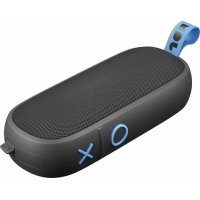
Hang Around HXP505 - Speaker JAM - Free user manual and instructions
Find the device manual for free Hang Around HXP505 JAM in PDF.


| Product Type | Portable Bluetooth Speaker |
| Brand | JAM |
| Model | Hang Around HXP505 |
| Power Supply | Internal rechargeable lithium battery |
| Charging Time | Approximately 3 hours |
| Battery Life | Up to 20 hours of playback |
| Connectivity | Bluetooth 5.0 (estimated), 3.5mm auxiliary input (cable not included) |
| Waterproof Rating | IP67 (dust-tight, immersion up to 1 meter for 30 minutes) |
| Controls | Power On/Off, Play/Pause, Volume +/-, Next/Previous Track, Call Management |
| Features | Stereo connection of 2 speakers, multipoint pairing, call notification |
| LED Indicator | Red (charging/low battery), flashing red/blue (pairing), green (stereo connection) |
| Weight | Approximately 0.5 kg (estimated) |
| Dimensions | Approximately 20 x 10 x 10 cm (estimated) |
| Box Contents | Speaker, micro-USB cable, quick start guide, welcome card, legal card, JAM sticker |
| Warranty | 1 year (USA/Canada), 2 years (UK/Europe) |
| Cleaning and Maintenance | Wipe with a dry cloth. Do not use solvents. Close the waterproof cover before any contact with water. |
| Safety Instructions | Do not immerse without the waterproof cover closed, do not expose to excessive heat, do not use if damaged, keep out of reach of children (choking hazard). |
| Repairability | Battery not user-replaceable. Contact JAM customer service for any repairs. |
Frequently Asked Questions - Hang Around HXP505 JAM
User questions about Hang Around HXP505 JAM
0 question about this device. Answer the ones you know or ask your own.
Ask a new question about this device
Download the instructions for your Speaker in PDF format for free! Find your manual Hang Around HXP505 - JAM and take your electronic device back in hand. On this page are published all the documents necessary for the use of your device. Hang Around HXP505 by JAM.
USER MANUAL Hang Around HXP505 JAM
natural_image
Line drawing of a VR headset with a strap and handle (no text or symbols)B
C

D

E

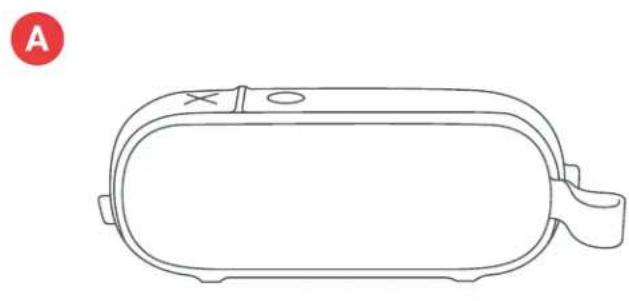
A - Speaker with integrated cable
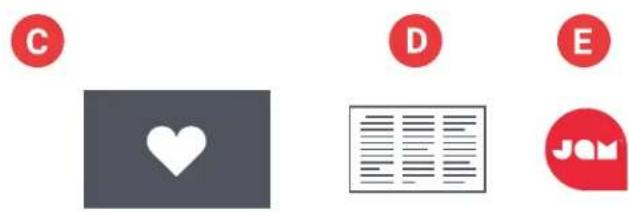
B - Quick-Start Guide
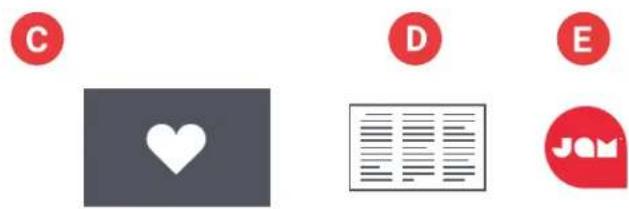
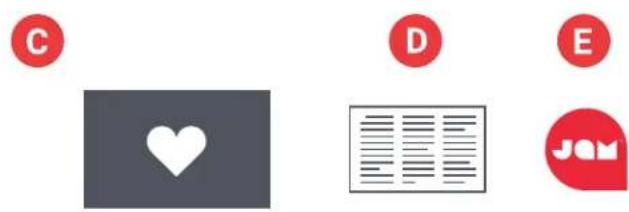
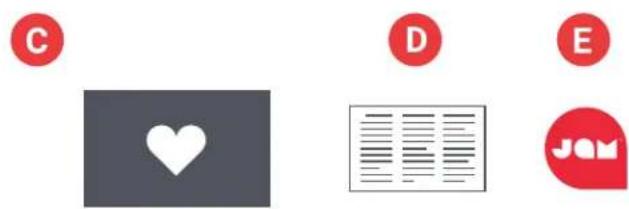
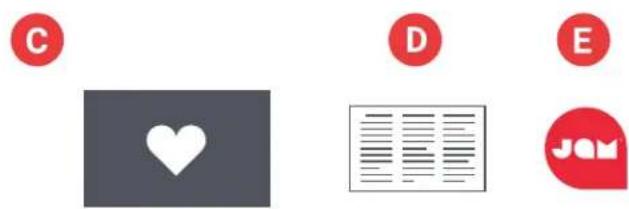
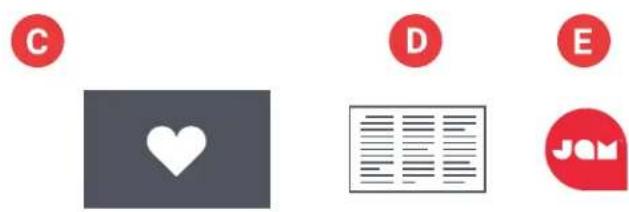
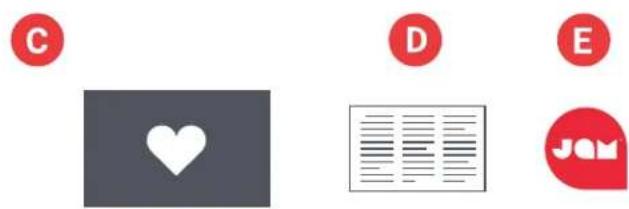
C - Welcome card
D - Legal card
E - Jam sticker
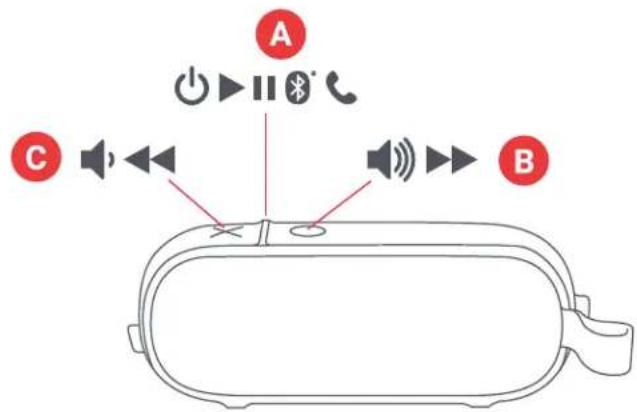
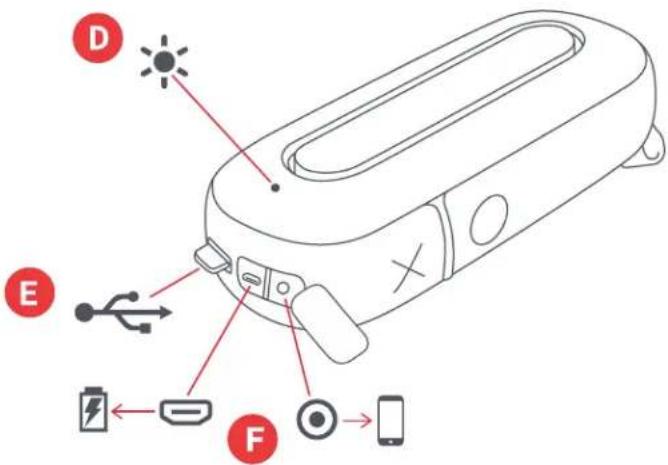
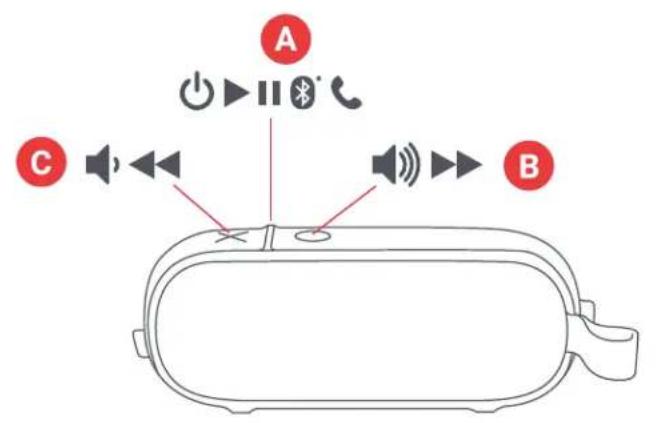
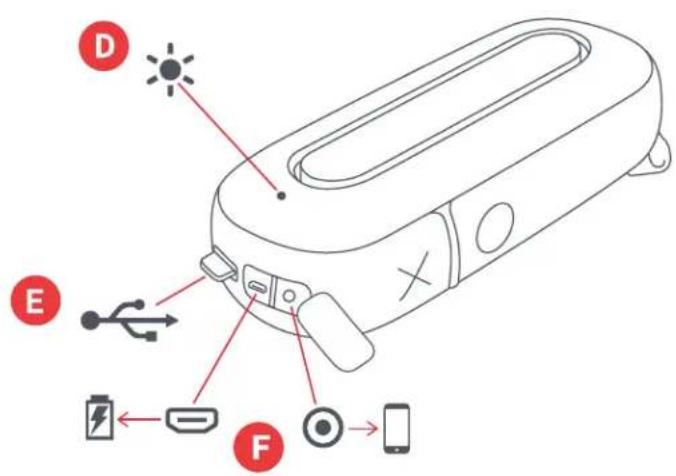
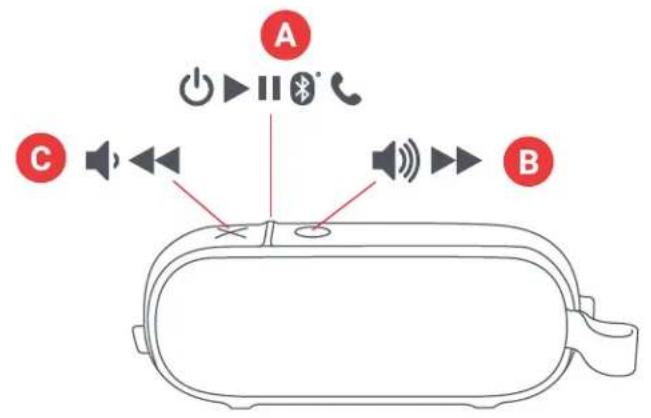
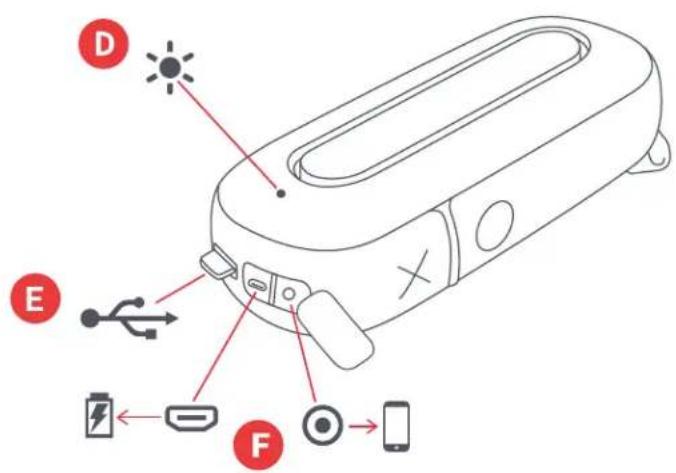
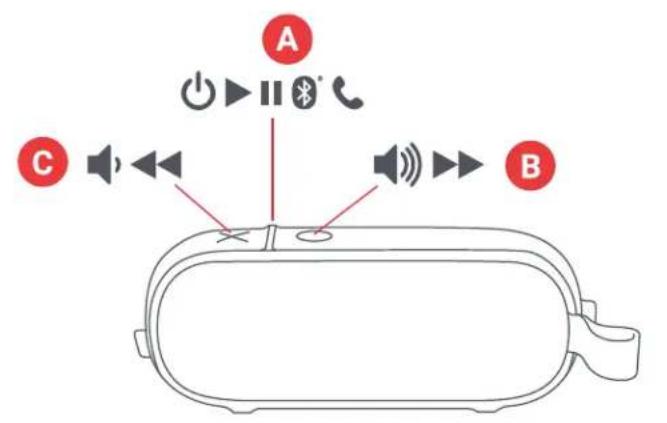
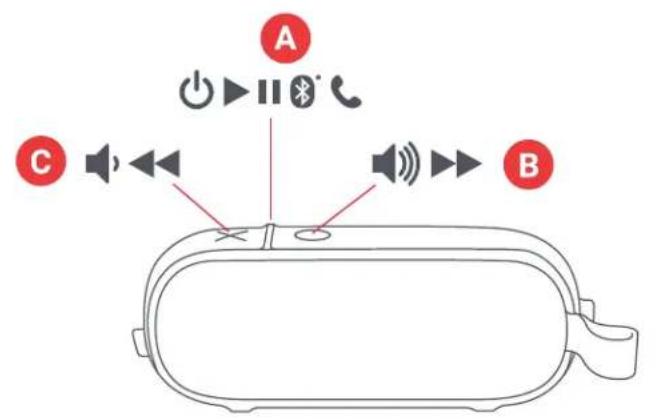
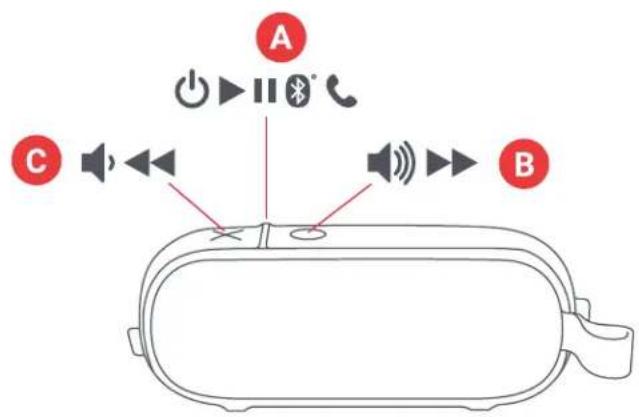
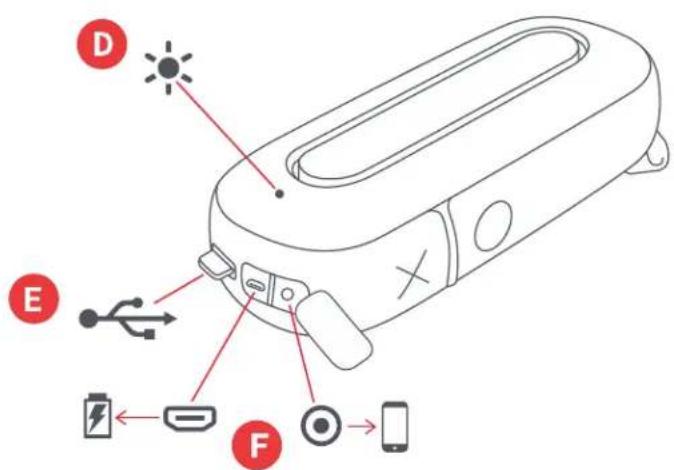
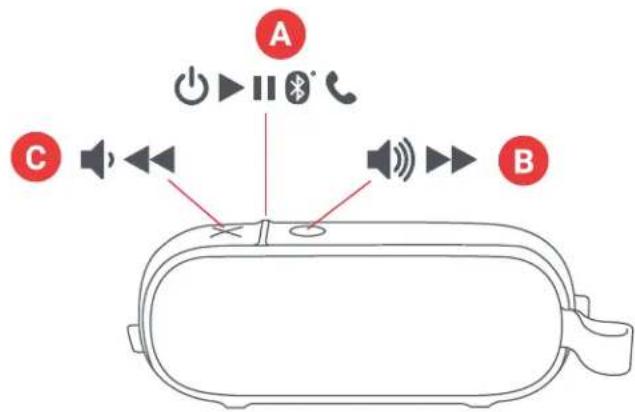
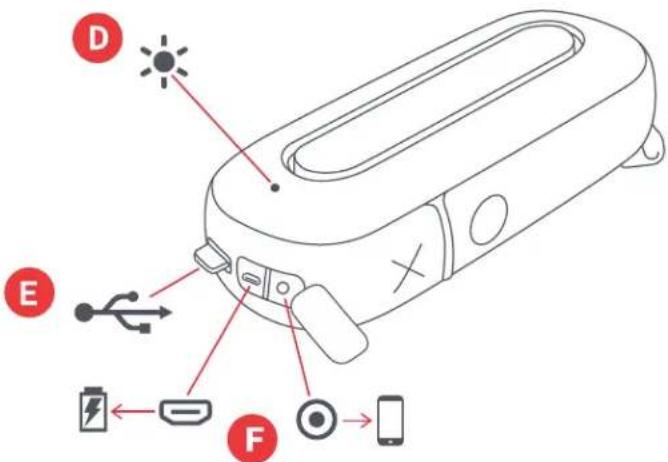
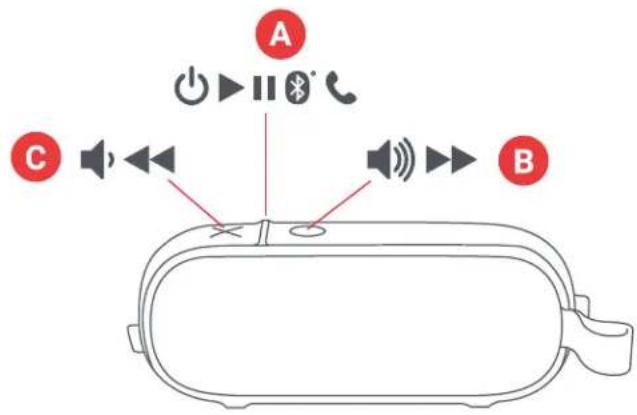
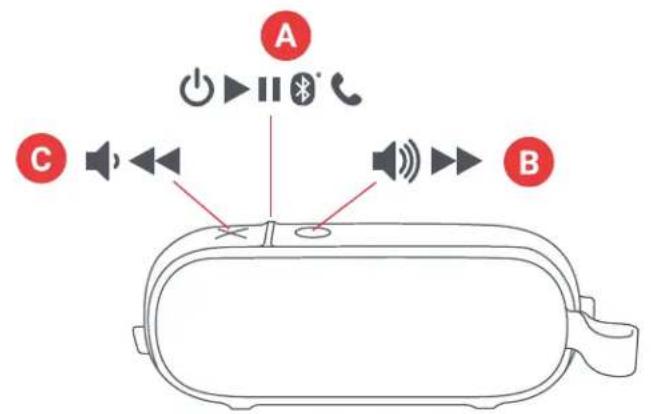
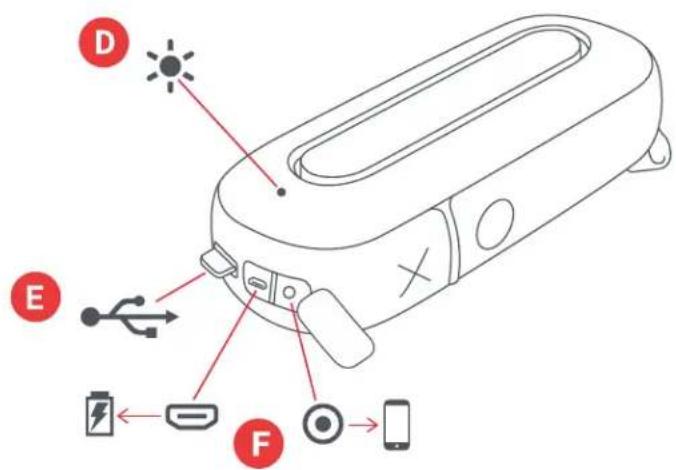
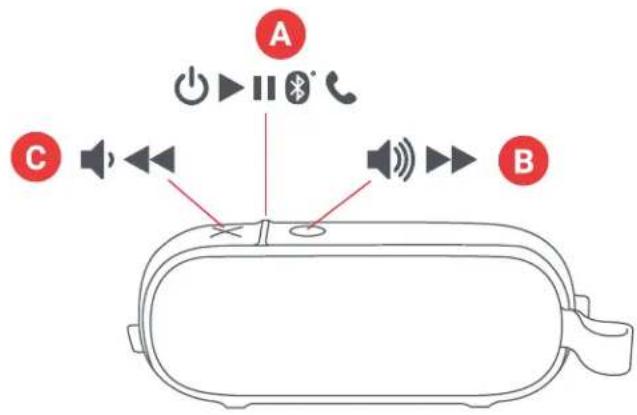
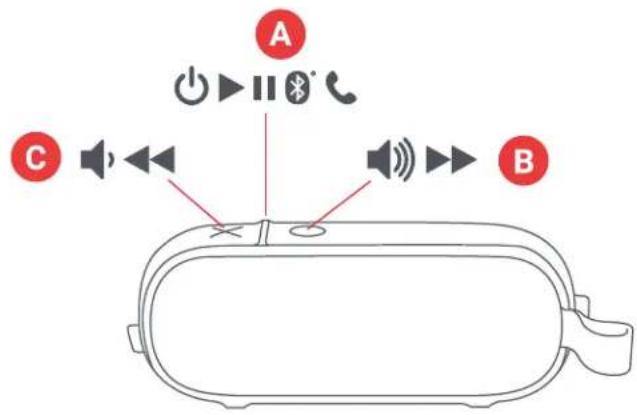
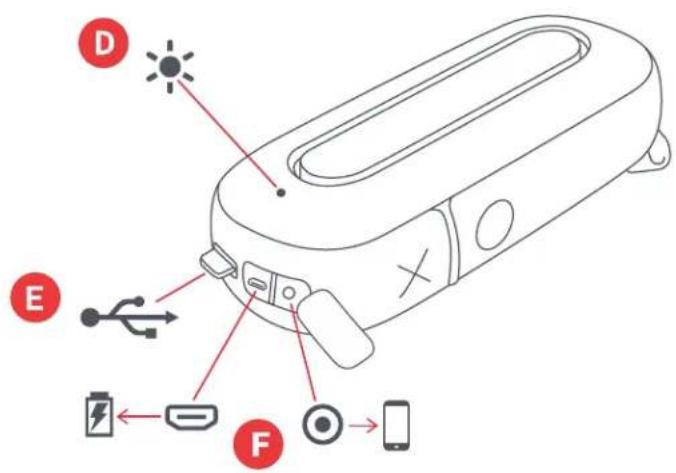
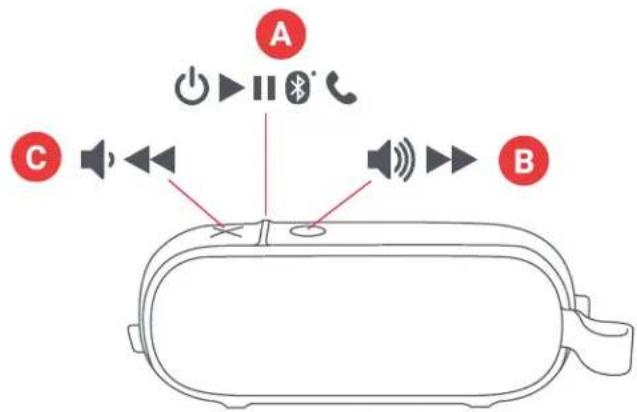
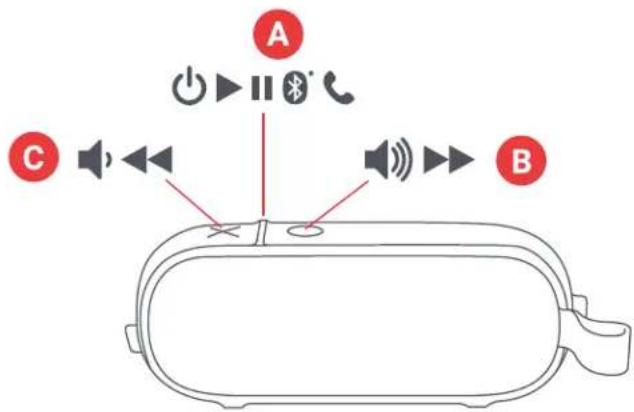
CONTROLS
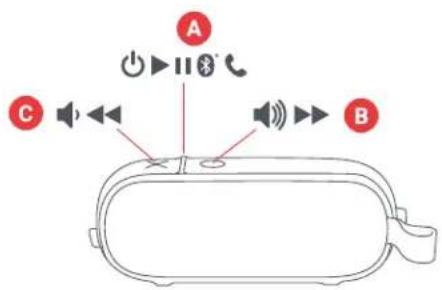
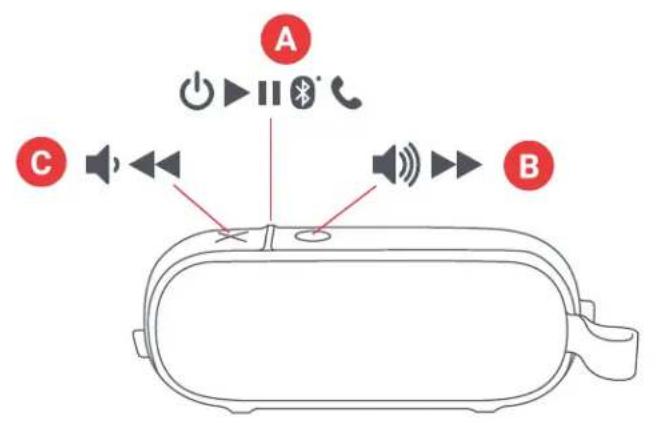
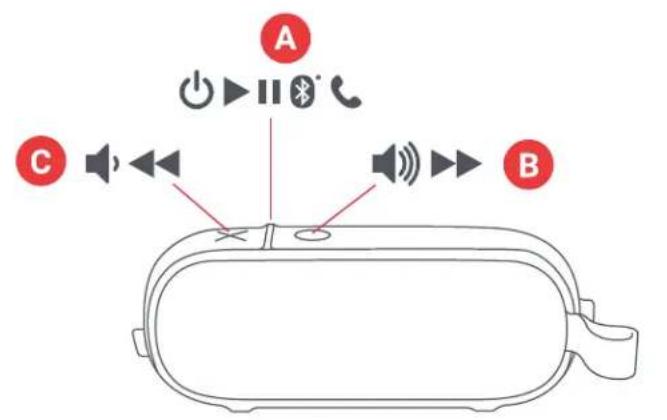
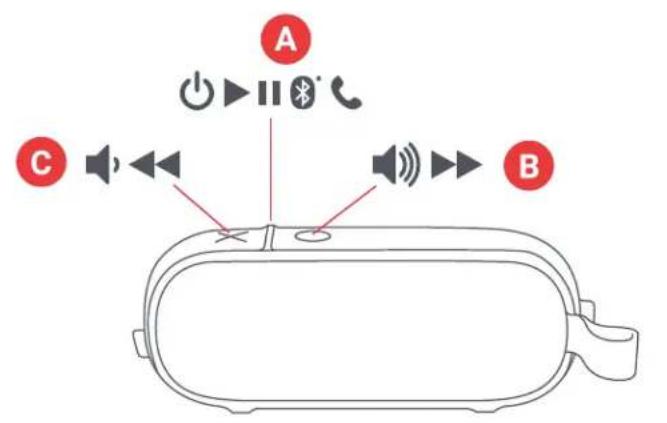
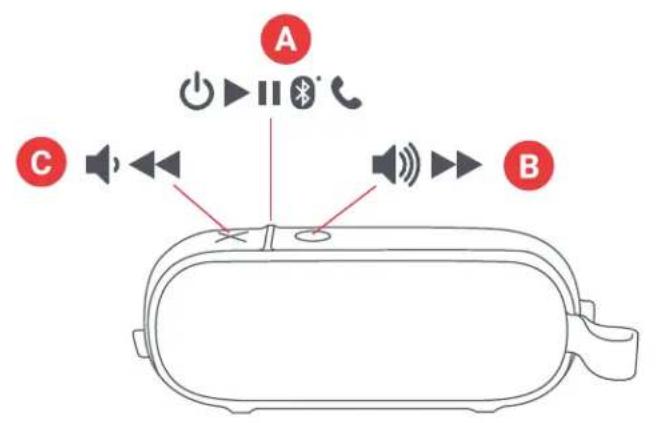
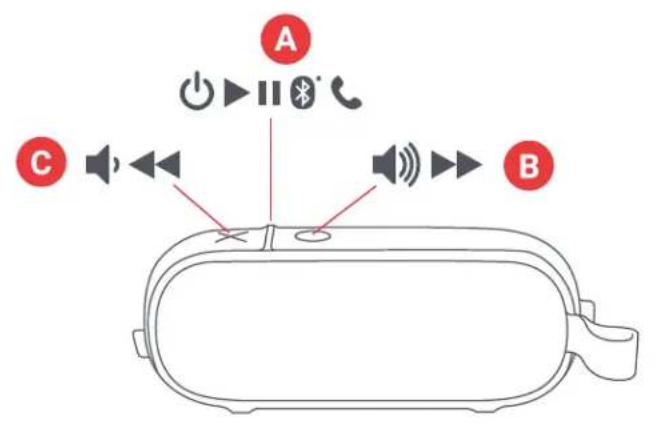
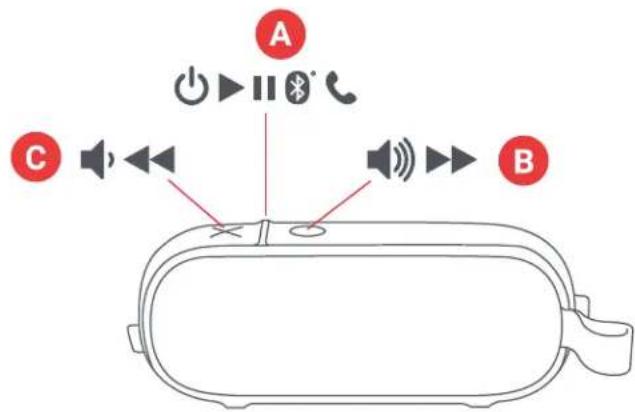
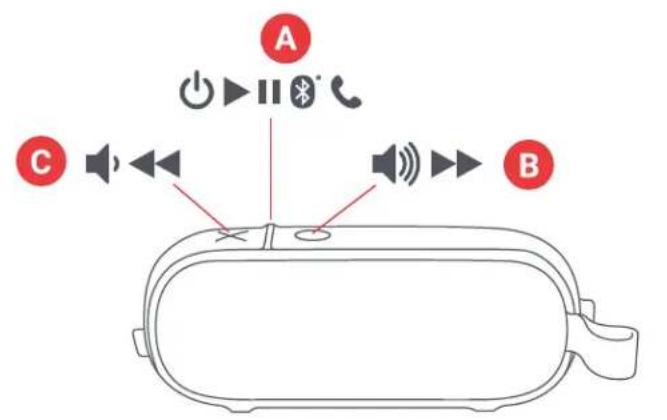
A - Power on/off/play/pause button
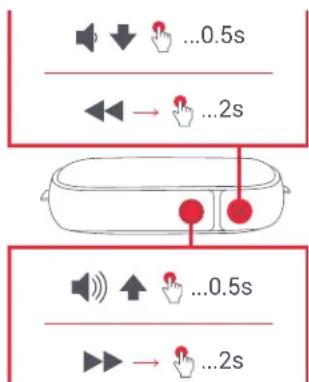
B - Volume up/next track
C - Volume down/previous track
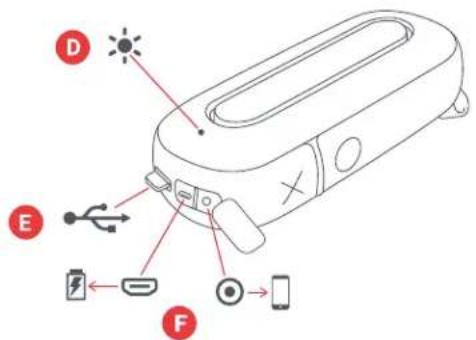
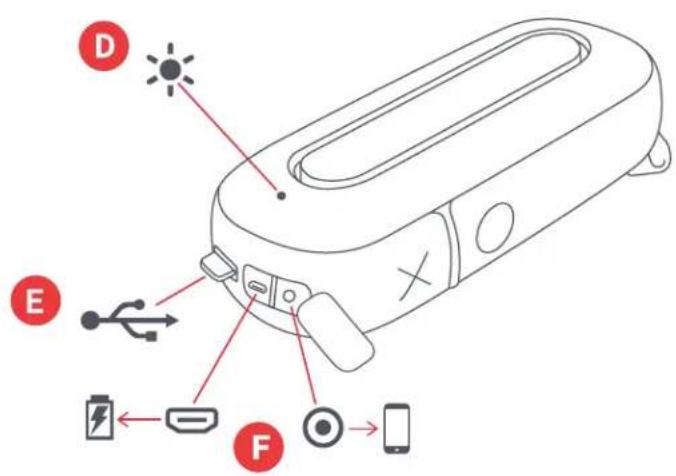
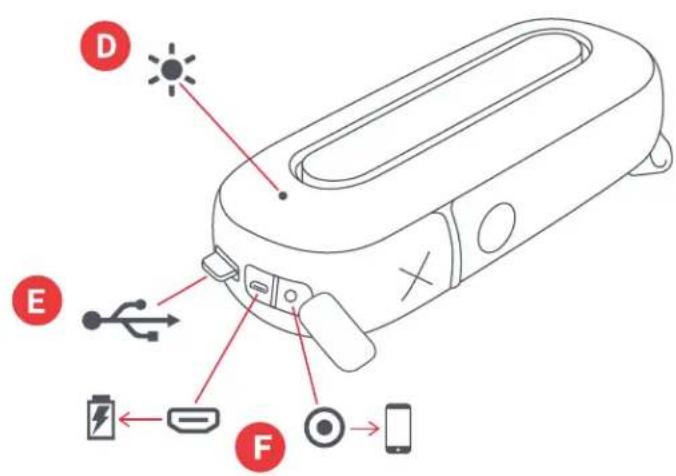
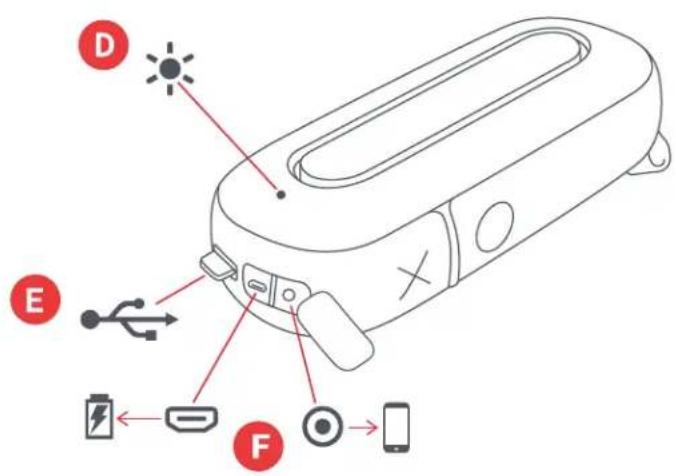
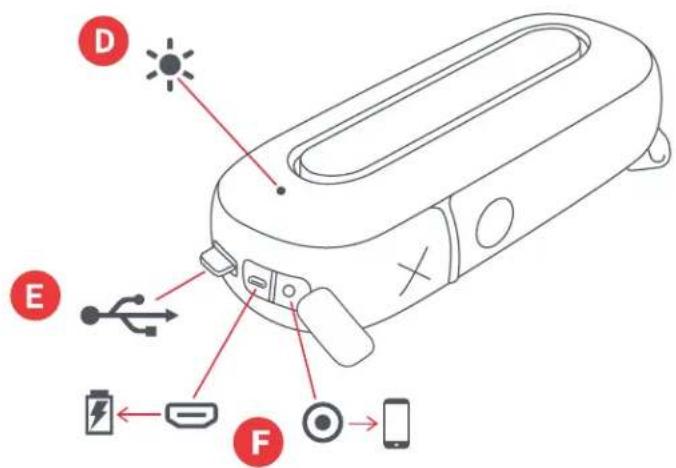
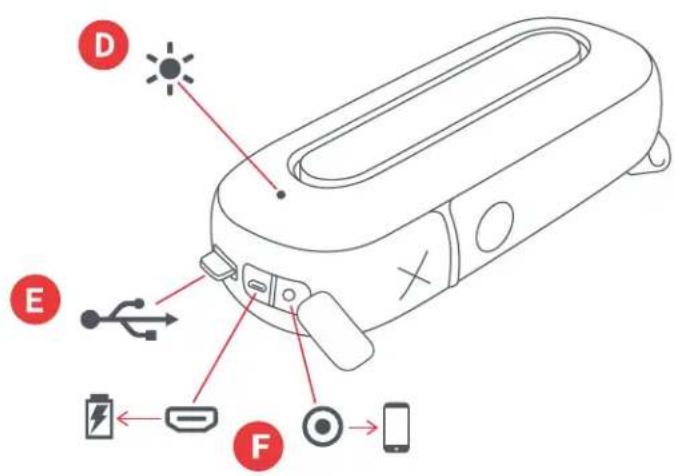
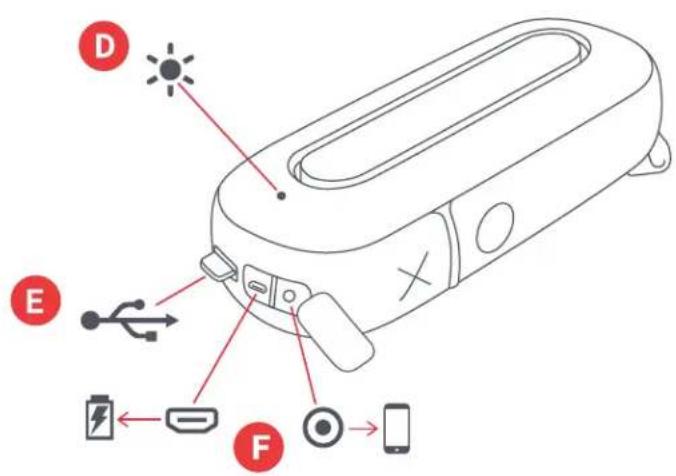
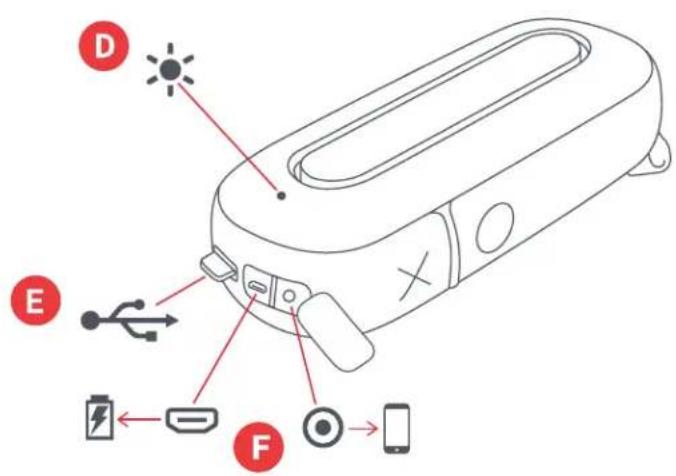
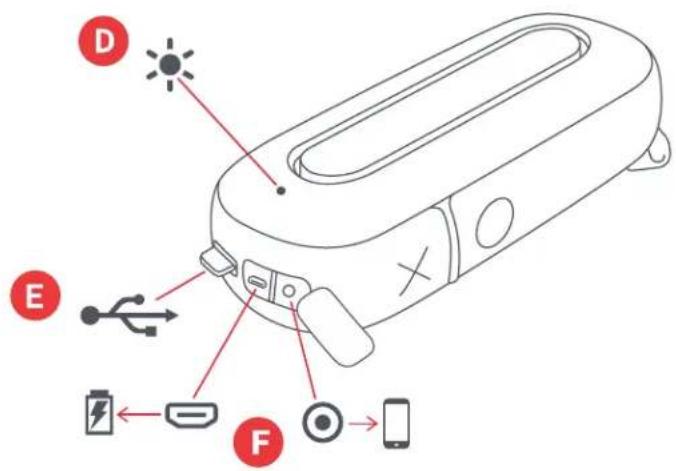
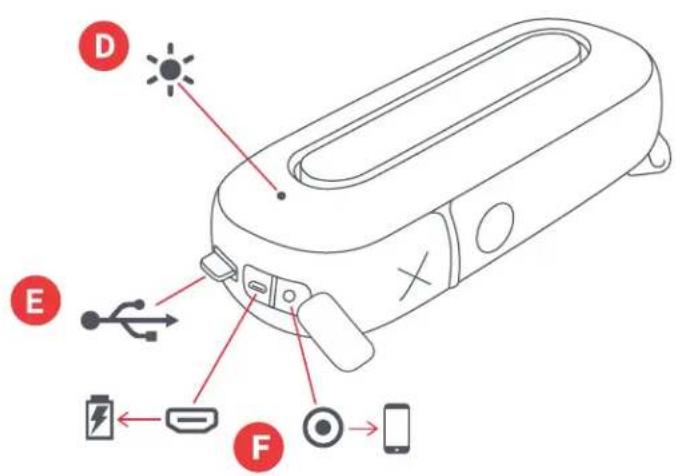
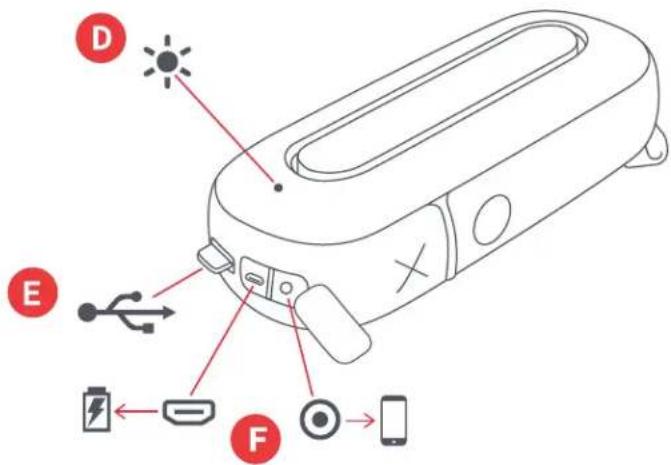
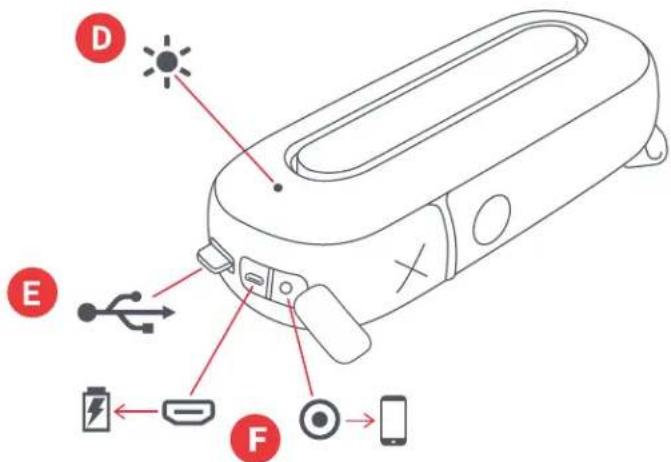
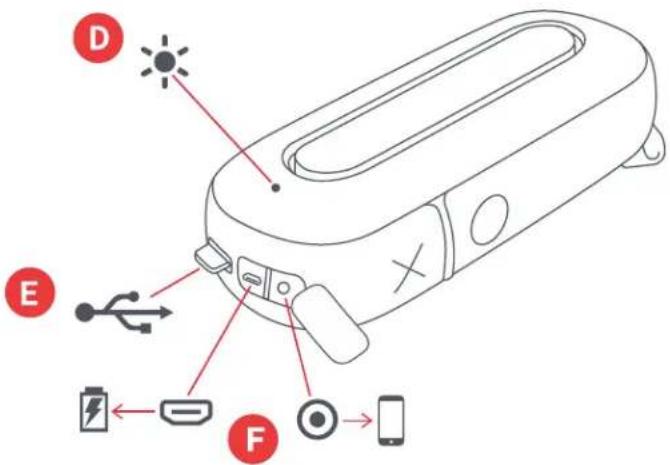
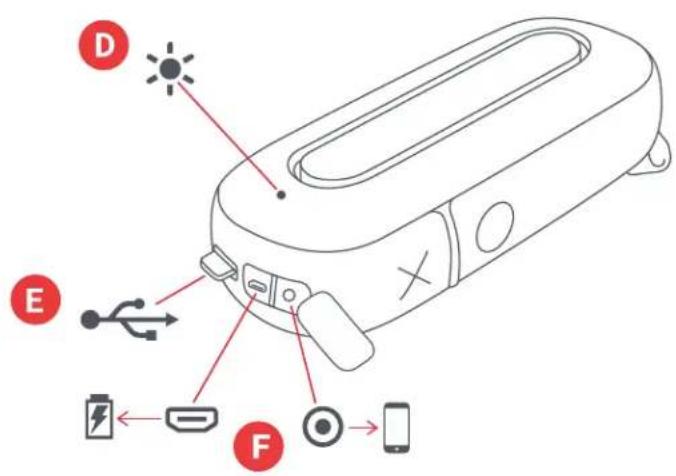
D - LED light indicator
E - Charging cable
F - Charging & aux-in port
SET UP
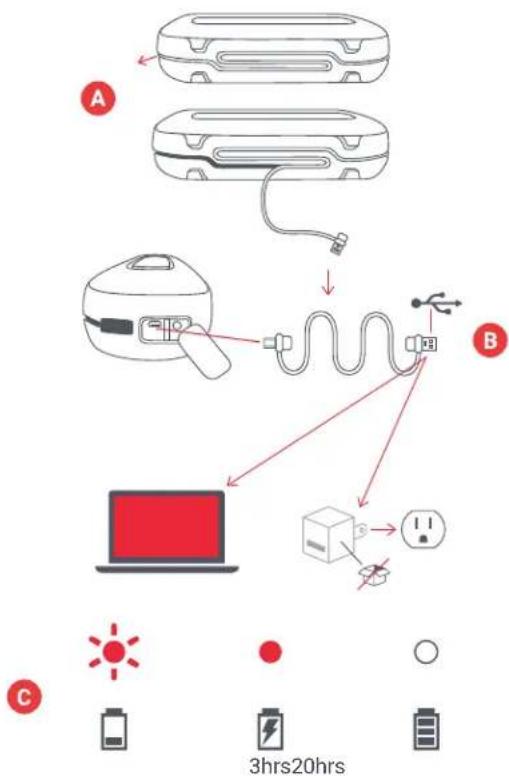
The "Hang Around" speaker is powered by a rechargeable battery. The speaker comes pre-charged; however, for optimal playtime, make sure to charge before first use.
A – Unwrap the integrated charging cable and plug the micro USB end into the charging port on the speaker.
B – Connect the larger USB plug to your computer or a powered USB AC adapter. An AC adapter is not included in the box, but you can use the one for your cell phone or pick one up next time you're at the store.
C – When the LED flashes red, it indicates that the battery is low and it's time to plug in and recharge. Charge for about 3 hours to get up to 20 hours of play time; while charging, the light will stay solid red. Once fully charged, the light will turn off.
flowchart
graph TD
    A["Electric vehicle battery"] --> B["Switch"]
    B --> C["Power plug"]
    C --> D["Laptop with battery icon"]
    D --> E["Electric switch connected to battery plate"]
    style A fill:#f9f,stroke:#333
    style B fill:#ccf,stroke:#333
    style C fill:#cfc,stroke:#333
    style D fill:#fcc,stroke:#333
    style E fill:#ffc,stroke:#333
USE
A - TURN ON YOUR SPEAKER
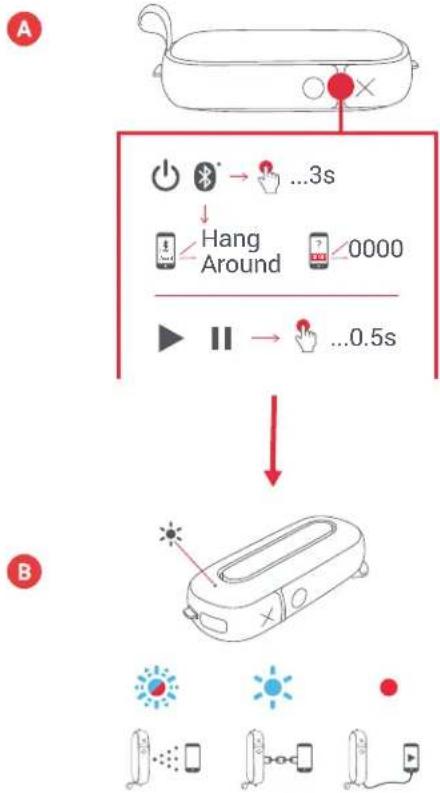
Long press the "play/pause" button for 3 seconds to turn on your speaker.
B - CONNECTING TO A DEVICE
Once turned on, the speaker will immediately search for a device to pair to; the LED will blink red and blue alternately. Enable Bluetooth on your device. From the Bluetooth menu, select "Hang Around." When the device and Hang Around are connected, you will hear a tone and the LED will turn solid blue.
Note: Once paired, your device and speaker will find each other every time, as long as your device's Bluetooth is on. If you're connecting to a computer, you may have a few more steps on that end. You'll have to get that information from the computer company. Depending on your device, you may be prompted to enter a pairing code. If so, use "0000" as the code. Holding down the "X" and "play/pause" button at the same time for 2 seconds will disconnect a paired device.
You may also connect your device to Hang Around using an aux cord, which is not included. When plugged in, the light will turn solid red.
flowchart
graph TD
    A["Device with 🎯"] --> B{3s: Hang Around}
    B -->|Yes| C["0000 seconds"]
    B -->|No| D["...0.5s"]
    C --> E["Battery charging"]
    D --> E
C - PAIR 2
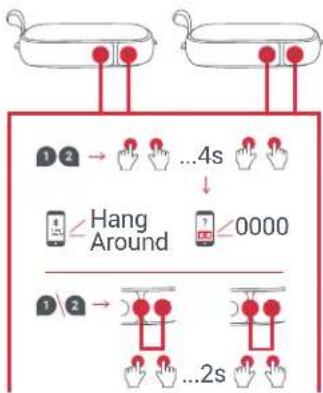
To connect 2 speakers together for even more stereo sound, begin by turning both on. Long press both "X" and "O" buttons on each speaker simultaneously, for 2 seconds. The LED light will flash green; once paired, you will hear a tone from the master and the LED will begin to flash once every 5 seconds.
Now turn on the Bluetooth function on your device and connect to "Hang Around." You should hear sound playing from both speakers.
To disconnect your speakers, long press both "X" and the "O" buttons at the same time for 2 seconds to unpair them from each other.
Once you pair them to one another and your Bluetooth device, every time you turn both on again, they will automatically find each other.
D - BUTTON FUNCTION
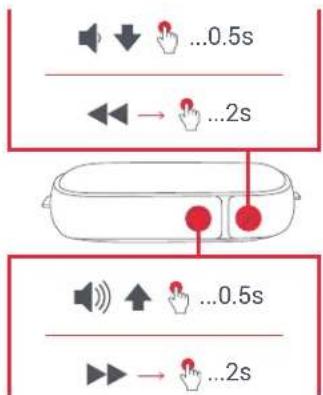
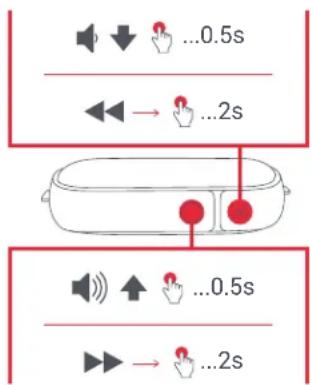
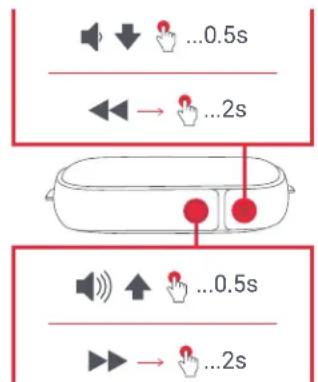
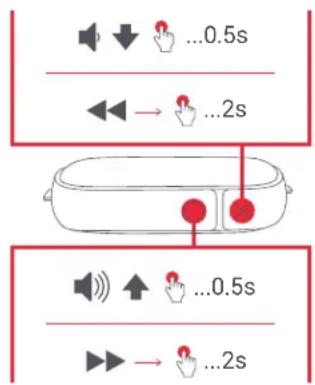
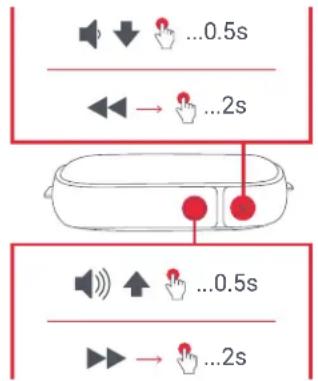
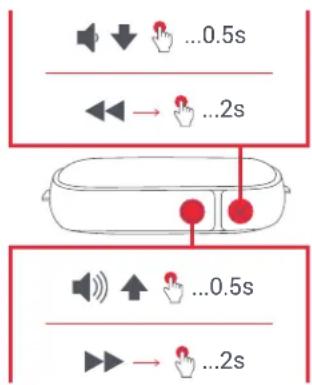
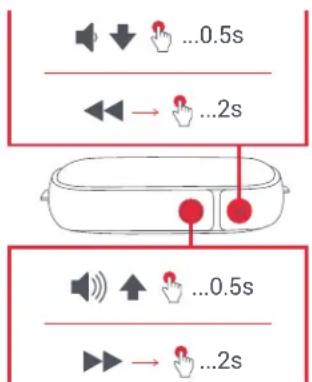
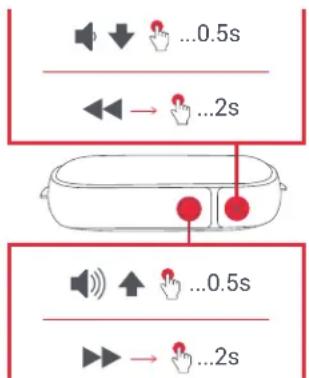
Short press the "play/pause" button for 0.5 seconds to play your music. To increase the volume, short press the "O" button; to lower the volume, short press the "X" button. To skip forward a track, long press the "O" button; to skip back a track, long press the "X" button.
C
flowchart
graph TD
    A["Top Box"] --> B{1 2}
    B --> C["Hand Icon"]
    C --> D["...4s"]
    D --> E["Hand Icon"]
    E --> F["↓"]
    F --> G["Hang Around"]
    G --> H["Hand Icon"]
    H --> I["<0000"]
    I --> J["Hand Icon"]
    J --> K["1 2"]
    K --> L["Hand Icon"]
    L --> M["...2s"]
    M --> N["Hand Icon"]
D
E - WATER & DUST PROOF
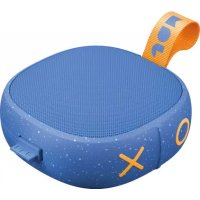
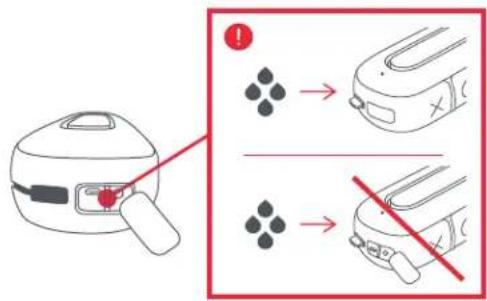
The smart folks who made this speaker designed it to keep the party going through just about anything (they call it IP67). This means that Hang Out is dust proof, and submersible in water up to 1 meter (3ft) for 30 minutes. Always keep the side flap flush with the speaker when you are using it near water, or it will be damaged.
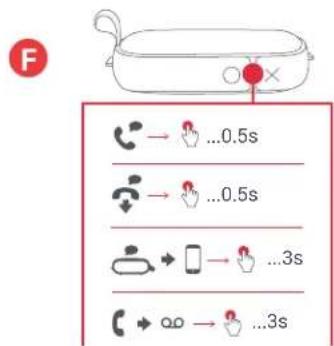
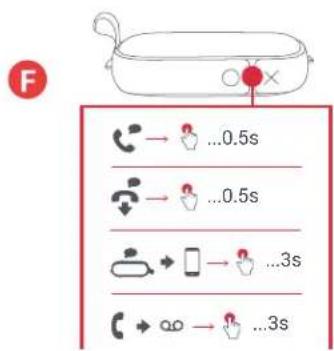
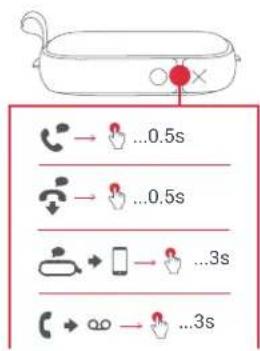
F - CALL HANDLING
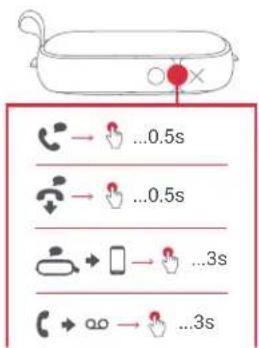
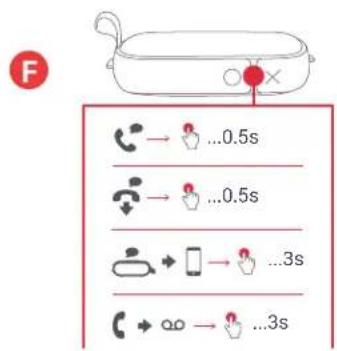
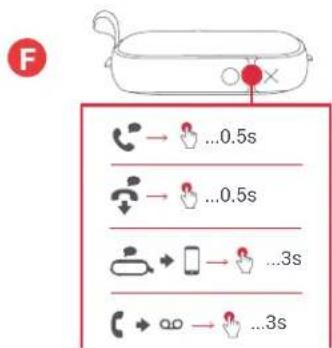
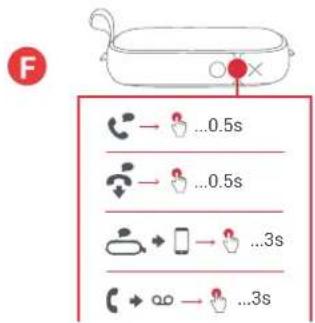
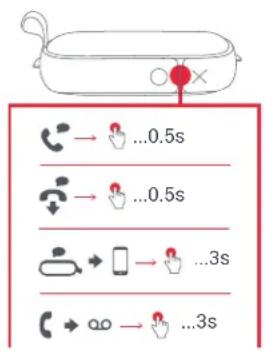
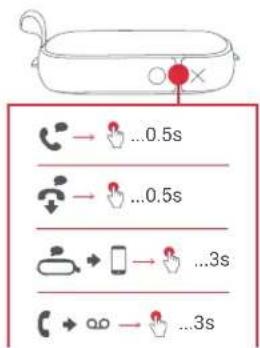
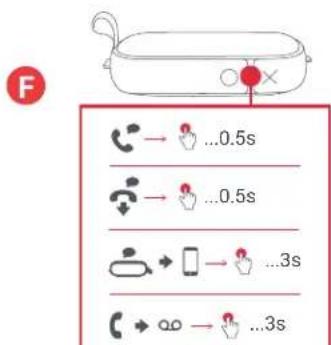
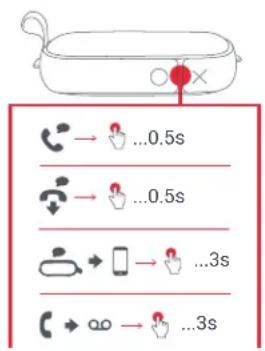
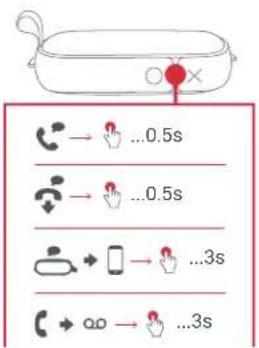
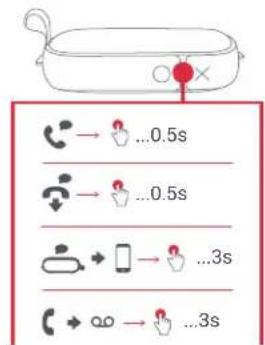
While rocking out to your music, if a call comes in, short press the "play/pause" button to pick up a call; short press again when you're done, to hang up.
While on a call, if you want to make it private, long press the "play/pause" button to move the call from the speaker to your phone.
If a call comes in and you don't want to pick it up, long press the "play/pause" button to send the call to voicemail.
*See the tables below for complete button function and LED light indicator interpretation.
E
F
LED INDICATORS
CHARGING
| Red flash every 5 seconds Low battery | |
| Solid red Charging | |
| LED off Charging complete |
IN USE
| Flash blue and red Pairing mode | |
| Blue flash every 5 seconds | Paired with device |
BASIC FUNCTIONS
POWER
| Power on/off | Long press play/pause button |
| Pair 2 | Long press X and O buttons for 2 seconds |
MUSIC
| Play/Pause Short press play/pause button |
| Volume up Short press O button |
| Volume down Short press X button |
| Skip forward a track Long press O button |
| Skip backward a track Long press X button |
CALLS
| Pick up a call Short press play/pause button | |
| Decline a call Long press play/pause button | |
| End a call Short press play/pause button | |
| Move active call from speaker to device | Long press play/pause button |
| Take a second incoming call Short press play/pause button | |
| Decline a second incoming call Long press play/pause button |
LEGAL INFORMATION
READ ALL INSTRUCTIONS BEFORE USE AND SAVE THESE INSTRUCTIONS FOR FUTURE REFERENCE.
FCC Warning:
This equipment has been tested and found to comply with the limits for a Class B digital device, pursuant to Part 15 of the FCC Rules. These limits are designed to provide reasonable protection against harmful interference in a residential installation. This equipment generates, uses, and can radiate radio frequency energy and, if not installed and used in accordance with the instructions, may cause harmful interference to radio communications. However, there is no guarantee that interference will not occur in a particular installation. If this equipment does cause harmful interference to radio or television reception, which can be determined by turning the equipment off and on, the user is encouraged to try to correct the interference by one or more of the following measures:
- Reorient or relocate the receiving antenna.
- Increase the separation between the equipment and receiver.
- Connect the equipment into an outlet on a circuit different from that to which the receiver is connected.
- Consult the dealer or an experienced radio/TV technician for help.
Any changes or modifications not expressly approved by the party responsible for compliance could void the user's authority to operate the equipment.
This device complies with Part 15 of the FCC Rules. Operation is subject to the following two conditions:
(1) This device may not cause harmful interference, and
(2) This device must accept any interference received, including interference that may cause undesired operation.
FCC RF Exposure Statement:
This equipment complies with FCC radiation exposure limits set forth for an uncontrolled environment. This transmitter must not be co-located or operating in conjunction with any other antenna or transmitter.
ISEDC Caution:
This device complies with Innovation, Science, and Economic Development Canada licence-exempt RSS standard(s). Operation is subject to the following two conditions:
(1) This device may not cause interference, and
(2) This device must accept any interference, including interference that may cause undesired operation of the device.
ISEDC RF Exposure Statement:
The device is in compliance with RF exposure guidelines; users can obtain Canadian information on RF exposure and compliance.
1-YEAR LIMITED WARRANTY - US & CANADA
WARRANTY - US & CANADA
JAM warrants this product free from defect in material and workmanship for a period of 1 year from the date of purchase. This warranty does not cover damage caused by misuse or abuse, accident, the attachment of any unauthorized accessory, alteration to the product, or any other conditions whatsoever that are beyond the control of JAM.
For detailed Warranty instructions and information, visit: www.jamaudio.com/customer-support/warranty-1yr. To obtain warranty service on your JAM product, contact a Consumer Relations representative by the telephone number or email address for your country of residence. Please make sure to have the model number of the product available.
For service in the USA Email: cservice@jamaudio.com Tel: 1-888-802-0040 8:30am-7:00pm EST M-F
For service in Canada Email:
cservice@homedicsgroup.ca
Tel: 1-888-225-7378
8:30am-5:00pm EST M-F
For service in Australia Email: cservice@homedics.com.au Tel: 03-87566500 8:30am-5:00pm AEST M-F www.jam-audio.com.au
WARRANTY - UK & EUROPE
JAM warrants this product free from defect in material and workmanship for a period of 2 years from the date of purchase. This warranty does not cover damage caused by misuse or abuse, accident, the attachment of any unauthorised accessory, alteration to the product, or any other conditions whatsoever that are beyond the control of JAM. Distributed in the EU by FKA Brands Ltd, Somerhill Business Park, Tonbridge, TN11 0GP, UK. Tel: 020 3538 0768 Email: uksupport@jamaudio.com.
WARRANTY - AUSTRALIA
(1-YEAR LIMITED WARRANTY)
We or Us means HoMedics Australia Pty Ltd ACN 31 103 985 717 and our contact details are set out at the end of this warranty; You means the purchaser or the original end-user of the Goods. You may be a domestic user or a professional user; Supplier means the authorized distributor or retailer of the Goods that sold you the Goods in Australia and New Zealand; and Goods means the product or equipment which was accompanied by this warranty and purchased in Australia and New Zealand.
For Australia:
Our Goods come with guarantees that cannot be excluded under the Australian Consumer Law. You are entitled, subject to the provisions of the Australian Consumer Law, to a replacement or refund for a major failure and for compensation for any other reasonably foreseeable loss or damage. You are also entitled, subject to the provisions of the Australian Consumer Law, to have the Goods repaired or replaced if the goods fail to be of acceptable quality and the failure does not amount to a major failure. This is not a complete statement of your legal rights as a consumer.
For New Zealand:
Our Goods come with guarantees that cannot be excluded under the Consumer Guarantees Act 1993. This guarantee applies in addition to the conditions and guarantees implied by that legislation.
The Warranty
HoMedics sells its products with the intent that they are free of defects in manufacture and workmanship under normal use and service. In the unlikely event that your HoMedics product proves to be faulty within 1 year from the date of purchase due to workmanship or materials only, we will replace it at our own expense, subject to the terms and conditions of this guarantee. The warranty period is limited to 3 months from the date of purchase for products used commercially/professionally.
Terms and Conditions:
In addition to the rights and remedies that you have under the Australian Consumer Law, Consumer Guarantees Act of New Zealand or any other applicable law and without excluding such rights and remedies warranty against defects:
-
The Goods are designed to withstand the rigors of normal household use and are manufactured to the highest standards using the highest quality components. Whilst unlikely, if, during the first 12 months (3 months commercial use) from their date of purchase from the Supplier (Warranty Period), the Goods prove defective by reason of improper workmanship or materials and none of your statutory rights or remedies apply, we will replace the Goods, subject to the terms and conditions of this warranty.
-
We do not have to replace the Goods under this Additional Warranty if the Goods have been damaged due to misuse or abuse, accident, the attachment of any unauthorised accessory, alteration to the product, improper installation, unauthorised repairs or modifications, improper use of electrical/power supply, loss of power, malfunction, or damage of an operating part from failure to provide manufacturer's recommended maintenance, transportation damage, theft, neglect, vandalism, environmental conditions, or any other conditions whatsoever that are beyond the control of HoMedics.
-
This Warranty does not extend to the purchase of used, repaired, or secondhand products, or to products not imported or supplied by HoMedics Australia Pty Ltd, including but not limited to those sold on offshore internet auction sites.
-
This Warranty extends only to consumers and does not extend to Suppliers.
-
Even when we do not have to replace the Goods, we may decide to do so anyway. In some cases, we may decide to substitute the Goods with a similar alternative product of our choosing. All such decisions are at our absolute discretion.
-
All such replaced or substituted Goods continue to receive the benefit of this Additional Warranty for the time remaining on the original Warranty Period (or 3 months, whichever is the longest).
-
This Additional Warranty does not cover items damaged by normal wear and tear, including but not limited to chips, scratches, abrasions, discolouration, and other minor defects, where the damage has negligible effect on the operation or performance of the Goods.
-
This Additional Warranty is limited to replacement or substitution only. As far as the law permits, we will not be liable for any loss or damage caused to property or persons arising from any cause whatsoever, and shall have no liability for any incidental, consequential, or special damages.
-
This warranty is only valid and enforceable in Australia and New Zealand.
Making a Claim:
In order to claim under this Warranty, you must return the Goods to the Supplier (place of purchase) for replacement. If this is not possible, please contact our Consumer Relations department by email (cservice@homedics.com.au) or at the address below.
- All returned Goods must be accompanied by satisfactory proof of purchase that clearly indicates the name and address of the Supplier, the date and place of purchase, and identifies the product. It is best to provide an original, legible, and unmodified receipt or sales invoice.
- You must bear any expense for return of the Goods or otherwise associated with making your claim under this Additional Warranty.
Distributed in Australia by HOMEDICS AUSTRALIA PTY LTD, 14 Kingsley Close, Rowville, Victoria 3178. Distributed in New Zealand by Phoenix Distribution NZ Ltd, 7B Orbit Drive, Albany / North Shore 0757, Auckland, New Zealand.
IMPORTANT SAFETY INSTRUCTIONS
READ ALL INSTRUCTIONS BEFORE USING.
WARNING: Do not place speakers too close to ears. May cause damage to ear drums, especially in young children.
- Use this product only for its intended purpose as described in this manual. Do not use attachments not recommended by Jam. - Jam is not liable for any damage caused to smartphones, iPod/MP3 players, or any other devices.
- Do not place or store this product where it can fall or be dropped into a tub or sink without shutting waterproof doors.
- Do not place or drop into water or any other liquid without shutting waterproof doors.
• Not for use by children. THIS IS NOT A TOY.
- Never operate this product if it has a damaged cord, plug, cable,
- Keep away from heated surfaces.
- Only set on dry surface. Do not place on surface wet from water or cleaning solvents if waterproof doors are open.
WARNING:
replaceable lithium battery. Please dispose in accordance with your local, state, province, and country guidelines. Batteries (battery pack or batteries installed) shall not be exposed to excessive heat such as sunshine, fire, or the like.
BATTERY REPLACEMENT
Your speaker includes a rechargeable battery designed to last the lifetime of the product. In the unlikely event that you should require a replacement battery, please contact Consumer Relations, which will supply details of the warranty and out-of-warranty replacement battery service. This product contains small parts that may present a choking hazard for young children.
CAUTION: All servicing of this product must be performed by authorized Jam Audio service personnel only. For complete user guide and to register your product, visit www.jamaudio.com (USA), canada.jamaudio.com (Canada), or uk.jamaudio.com/instructionbooks (UK).

To prevent possible hearing damage, do not listen at high volume for long periods.

WEEE EXPLANATION
This marking indicates that this product should not be disposed with other household wastes throughout the EU.
To prevent possible harm to the environment or human health from uncontrolled waste disposal, recycle it responsibly to promote the sustainable reuse of material resources.

BATTERY DIRECTIVE
This symbol indicates that batteries must not be disposed of in the domestic waste as they contain substances that can be damaging to the environment and health. Please dispose of batteries in designated collection points.
Hereby, FKA Brands Ltd, declares that this radio device is in compliance with the essential requirements and other relevant provisions of Directive 2014/53/EU. A copy of the Declaration of Conformity can be obtained from uk.jamaudio.com/DoC.
© 2018 HMDX. All Rights Reserved. JAM is a registered trademark of HMDX. HMDX is a registered trademark of FKA Distributing Co. The Bluetooth® word mark and logos are registered trademarks owned by Bluetooth SIG, Inc. and any use of such marks by HMDX is under license.



Operating frequency band: 2402 - 2480MHz
HX-P505: Maximum radio-frequency power transmitted: 0.49dBm
Distributed by HMDX.
3000 N Pontiac Trail
Commerce Township, MI 48390
All rights reserved.
IB-HXP505
JOM ^TM
"Hang Around"
HX-P505
natural_image
Line drawing of a VR headset with no text or symbolsB
C

D
E

flowchart
graph TD
    A["Device with battery"] --> B["Device connected via cable"]
    B --> C["Electricity meter connected to battery"]
    C --> D["Electricity meter with plug and power outlet"]
    D --> E["Electricity meter with battery icon"]
    style A fill:#f9f,stroke:#333
    style B fill:#ccf,stroke:#333
    style C fill:#cfc,stroke:#333
    style D fill:#fcc,stroke:#333
    style E fill:#ffc,stroke:#333
    note right of C
        3hrs20hrs
    end
UTILISATION
VOYANTS À DEL
CHARGE
natural_image
Line drawing of a VR headset with a red circular badge labeled 'A' (no text or symbols on the device itself)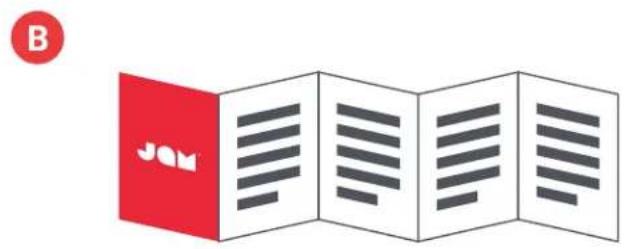
INDICADORES LED
CARGANDO
natural_image
Line drawing of a VR headset with a red circular badge labeled 'A' (no text or symbols on the device itself)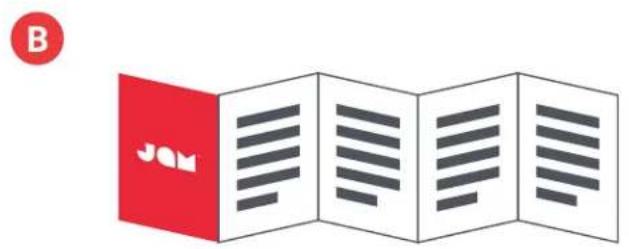
GEBRAUCH
A - EINSCHALTEN IHRES LAUTSPRECHERS
flowchart
graph TD
    A["Hand gestures at top of bowl"] --> B{1 2}
    B --> C["Hand icons with red dots"]
    C --> D["...4s"]
    D --> E["Hand icons with red dots"]
    E --> F["↓"]
    F --> G["Hang Around icon"]
    G --> H["?"]
    H --> I["0000"]
    I --> J["1 2"]
    J --> K["Hand icons with red dots"]
    K --> L["...2s"]
    L --> M["Hand icons with red dots"]

E - WASSER- UND STAUBGESCHÜTZT
LED-ANZEIGEN
LADEN
natural_image
Line drawing of a VR headset with a red circular badge labeled 'A' (no text or symbols on the device itself)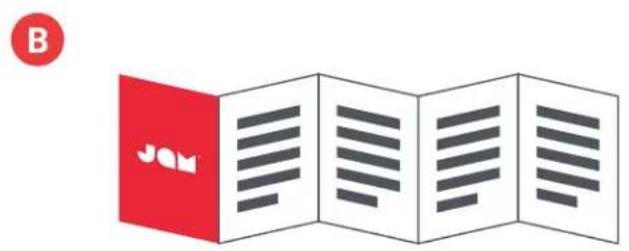
flowchart
graph TD
    A["Device with 🎯"] --> B{3s: Hang Around}
    B -->|Yes| C["+/-"]
    B -->|No| D["0.5s: 0000"]
    C --> E["->"]
    D --> F["->"]
C - 2 KOPPELEN
flowchart
graph TD
    A["Container 1"] --> B["Hand icon: 2s"]
    C["Container 2"] --> D["Hand icon: ...4s"]
    B --> E["Hand icon: Hang Around"]
    D --> F["Hand icon: <0000"]
    E --> G["Timecode: 1s"]
    F --> H["Timecode: <0000"]
    G --> I["Hand icon: Hang Around"]
    H --> J["Hand icon: <0000"]
    I --> K["Timecode: 1s"]
    J --> L["Timecode: <0000"]
D
flowchart
graph TD
    A["Left Hand"] --> B["Right Hand"]
    B --> C["Left Button"]
    C --> D["Left Button with Red Dot"]
    D --> E["Right Button with Red Dot"]
    style A fill:#f9f,stroke:#333
    style B fill:#f9f,stroke:#333
    style C fill:#f9f,stroke:#333
    style D fill:#f9f,stroke:#333
    style E fill:#f9f,stroke:#333
E - WATERBESTENDIG EN STOFDICHT
LED-INDICATOREN
OPLADEN
natural_image
Line drawing of a VR headset with labeled buttons (X, O) and a red circular icon labeled 'A' (no text or symbols on the device itself)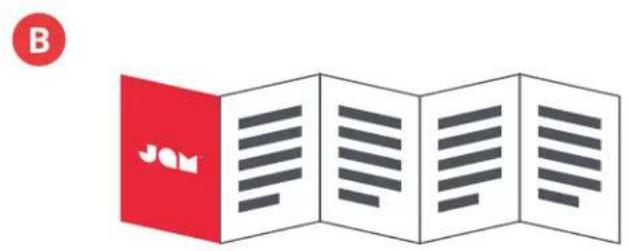
flowchart
graph TD
    A["Device with battery"] --> B["Switch"]
    B --> C["Power plug"]
    C --> D["Laptop with battery icon"]
    D --> E["Electricizer with plug"]
    E --> F["3hrs 20hrs"]
ANVENDELSE
A - TÆND FOR H∅JTTALEREN
E - VANDTÆT OG ST∅VTÆT
LED-INDIKATORER
OPLADNING
natural_image
Line drawing of a VR headset with a red circular badge labeled 'A' (no text or symbols on the device itself)
flowchart
graph TD
    A["Device with battery"] --> B["Switch"]
    B --> C["Power plug"]
    C --> D["Laptop with battery"]
    D --> E["3hrs 20hrs"]
Uso
A - ACCENSIONE DELL'ALTOPARLANTE
flowchart
graph TD
    A["Two containers with red dots"] --> B{1 2} --> C["Hand gestures with red dots"]
    C --> D["...4s"]
    D --> E["Hand gestures with red dots"]
    E --> F["0000"]
    F --> G["Hand gestures with red dots"]
    G --> H["...2s"]
    H --> I["Hand gestures with red dots"]

E - IMPERMEABILE E ANTIPOLVERE
SPIE LED
CARICA
natural_image
Line drawing of a VR headset with rounded corners and a handle (no text or symbols)B
C

D

E

flowchart
graph TD
    A["Electric vehicle battery"] --> B["Switch"]
    B --> C["Device with power plug"]
    C --> D["Laptop"]
    D --> E["Battery pack"]
    E --> F["Electric device with battery icon"]
    style A fill:#f9f,stroke:#333
    style B fill:#ccf,stroke:#333
    style C fill:#cfc,stroke:#333
    style D fill:#fcc,stroke:#333
    style E fill:#cff,stroke:#333
    style F fill:#ffc,stroke:#333
KÄYTTÖ
A - VIRRAN KYTKEMINEN KAIUTTIMEEN
flowchart
graph TD
    A["Device with 🎯"] --> B{Selection: 3s}
    B --> C["Load Hang Around"]
    C --> D["Time Scale: 0000s"]
    D --> E["Action: 🎯 → 🎯...0.5s"]
    E --> F["User Interface: 🎯 → 🎯...0.5s"]
    F --> G["User Interface: 🎯 → 🎯...0.5s"]
C- LIITÄ 2
D - PAINIKETOIMINNOT
flowchart
graph TD
    A["Two food items"] --> B{1 2} --> C["Hand gestures with red dots"]
    C --> D["...4s"]
    D --> E["Hand gestures with red dots"]
    E --> F["0000 second hand gesture"]
    F --> G["Hang Around"]
    G --> H["1 2"] --> I["Hand gestures with red dots"]
    I --> J["...2s"]
    J --> K["Hand gestures with red dots"]

E - VESITIIVIS JA PÖLYTIIVIS
LED-MERKKIVALOT
LATAA
natural_image
Line drawing of a VR headset with rounded corners and handle (no text or symbols)B
©

D
E

flowchart
graph TD
    A["Electric vehicle battery"] --> B["Switch"]
    B --> C["Power plug"]
    C --> D["Laptop with battery icon"]
    D --> E["Electric box with plug icon"]
    E --> F["3hrs 20hrs battery"]
    style A fill:#f9f,stroke:#333
    style B fill:#ccf,stroke:#333
    style C fill:#cfc,stroke:#333
    style D fill:#fcc,stroke:#333
    style E fill:#cff,stroke:#333
    style F fill:#ffc,stroke:#333
KULLANIM
A - HOPARLÖRLERİNİZİ AÇMA
E - SUYA VE TOZA DAYANIKLI
LED GÖSTERGELERİ
ŞARJ ETME
natural_image
Line drawing of a VR headset with rounded corners and a handle (no text or symbols)B
C

D
E

flowchart
graph TD
    A["Device with battery"] --> B["Switch"]
    B --> C["Power plug"]
    C --> D["Laptop with battery"]
    D --> E["3hrs 20hrs"]
ANVÄNDNING
A - AKTIVERA DIN HÖGTALARE
flowchart
graph TD
    A["Hand gestures at top of bowl"] --> B{1 2} --> C["Hand icons with red dots"]
    C --> D["...4s"]
    D --> E["Hand icons with red dots"]
    E --> F["Hand icons with red dots"]
    F --> G["...2s"]
    G --> H["Hand icons with red dots"]
    H --> I["Hand icons with red dots"]
    I --> J["...0000"]
    J --> K["Hand icons with red dots"]
    K --> L["Hand icons with red dots"]
    L --> M["...4s"]
    M --> N["Hand icons with red dots"]
    N --> O["Hand icons with red dots"]
D
E - VATTENSÄKER OCH DAMMSÄKER
LED-INDIKATORER
LADDAR
natural_image
Line drawing of a VR headset with a red circular badge labeled 'A' (no text or symbols on the device itself)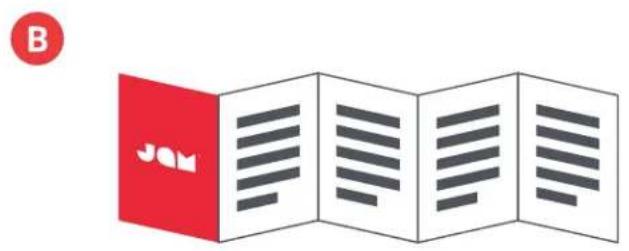
flowchart
graph TD
    A["Electric vehicle battery"] --> B["Switch"]
    B --> C["Power plug"]
    C --> D["Laptop with battery icon"]
    D --> E["Electric box with plug icon"]
    E --> F["3hrs 20hrs"]
flowchart
graph TD
    A["Hand gestures at top of bowl"] --> B{1 2} --> C["Hand icons with red dots"]
    C --> D["...4s"]
    D --> E["Hand icons with red dots"]
    E --> F["↓ Hang Around"]
    F --> G["Hand icons with red dots"]
    G --> H["?"]
    H --> I["0000"]
    I --> J["Hand icons with red dots"]
    J --> K["1 2} --> L[Hand icons with red dots"]
    L --> M["...2s"]
    M --> N["Hand icons with red dots"]

Е – ВОДО-И ПЫЛЕНЕПРОНИЦАЕМОСТЬ
СИГНАЛЫ СВЕТОДИОДА
ЗАРЯДКА
natural_image
Line drawing of a VR headset with a red circular label (A) in the top-left corner, no text or symbols on the device itself.
flowchart
graph TD
    A["Device with battery"] --> B["Switch"]
    B --> C["Power plug"]
    C --> D["Laptop with battery icon"]
    D --> E["3hrs 20hrs battery icon"]
    style A fill:#f9f,stroke:#333
    style B fill:#ccf,stroke:#333
    style C fill:#cfc,stroke:#333
    style D fill:#fcc,stroke:#333
    style E fill:#ffc,stroke:#333
BRUK
A - SLÅ PÅ H∅YTTALEREN
E - VANN- OG ST∅VTETT
LED-INDIKATORER
LADER
natural_image
Line drawing of a VR headset with a red circular badge labeled 'A' (no text or symbols on the device itself)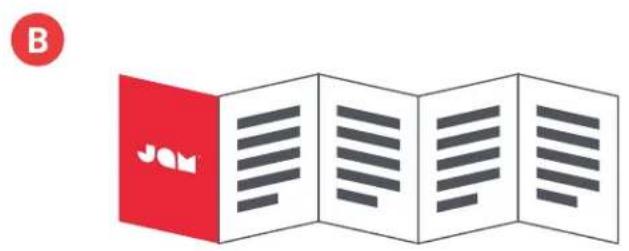
flowchart
graph TD
    A["Device with 🎯"] --> B{3s latency}
    B -->|Hold| C["Hang Around"]
    C --> D["0000 seconds"]
    D --> E["...0.5s"]
    E --> F["Battery charging"]
flowchart
graph TD
    A["Two bowls with red dots"] --> B{1 2} --> C["Hand gestures with red circles"]
    C --> D["...4s"]
    D --> E["Hand gestures with red circles"]
    E --> F["↓ Hang Around"]
    F --> G["3s Hang around, ? 0000"]
    G --> H["Hand gestures with red circles"]
    H --> I["...2s"]
    I --> J["Hand gestures with red circles"]
D
F
ΕΝΔΕΙΞΕΙΣ LED
ΦΟΡΤΙΣΗ
natural_image
Line drawing of a VR headset with a red circular badge labeled 'A' (no text or symbols on the device itself)
flowchart
graph TD
    A["Electric vehicle battery"] --> B["Switch"]
    B --> C["Device with plug and plug"]
    C --> D["Laptop"]
    D --> E["Batch"]
    E --> F["Electric switch with plug and plug"]
    F --> G["Electric box with plug and plug"]
    G --> H["Electric plug with plug and plug"]
    H --> I["Batch with plug and plug"]
    I --> J["Electric battery pack"]
    style A fill:#f9f,stroke:#333
    style B fill:#ccf,stroke:#333
    style C fill:#cfc,stroke:#333
    style D fill:#fcc,stroke:#333
    style E fill:#cff,stroke:#333
    style F fill:#ffc,stroke:#333
    style G fill:#cfc,stroke:#333
    style H fill:#fcc,stroke:#333
    style I fill:#ffc,stroke:#333
    style J fill:#fcc,stroke:#333
POUŽITÍ
A - ZAPNĚTE REPRODUKTOR
flowchart
graph TD
    A["Device Selection"] --> B{3s: Hang Around}
    B -->|Yes| C["+/-"]
    B -->|No| D["+/-"]
    C --> E["+/-"]
    D --> F["+/-"]
    E --> G["+/-"]
    F --> H["+/-"]
    G --> I["+/-"]
    H --> J["+/-"]
    I --> K["+/-"]
C - PÁROVÁNÍ 2
E - ODOLNÝ VŮČI VODĚ A PRACHU
F
INDIKÁTORY LED
NABÍJENÍ
DŮLEŽITÉ POKYNY TÝKAJÍCÍ SE BEZPEČNOSTI
PŘED POUŽITÍ SI PŘEČTĚTE VŠECHNY POKYNY
natural_image
Line drawing of a VR headset with front and back panels (no text or symbols)B
C

D
E

E - VÍZÁLLÓ ÉS PORÁLLÓ
LED KIJELZÖK
TÖLTÉS
natural_image
Line drawing of a VR headset with front and back panels (no text or symbols)B
C

D
E

E - À PROVA D'ÁGUA E POEIRA
F
INDICADORES DE LED
CARREGANDO
natural_image
Line drawing of a VR headset with a red circular badge labeled 'A' (no text or symbols on the device itself)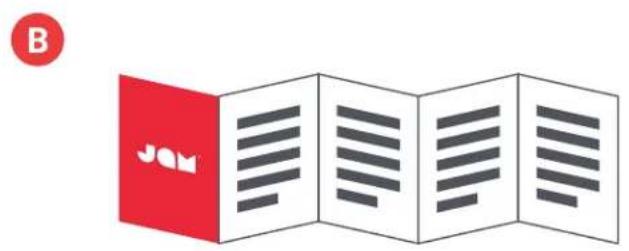
flowchart
graph TD
    A["Electric vehicle battery"] --> B["Charger device"]
    B --> C["Plug plug"]
    C --> D["Power plug with plug icon"]
    D --> E["Laptop"]
    E --> F["Power plug with plug icon"]
    F --> G["3hrs 20hrs"]
POUŽITIE
A - ZAPNUTIE REPRODUKTORA
flowchart
graph TD
    A["Device"] --> B{Signal State}
    B -->|3s| C["Take Hang Around"]
    C --> D["0000 second hand icon"]
    D --> E["5-second hand icon"]
    E --> F["...0.5s second hand icon"]
    F --> G["Next Phone Icon with sunburst icon"]
    G --> H["Next Phone Icon with Wi-Fi icon"]
C - SPÁROVANIE 2
flowchart
graph TD
    A["Container 1"] --> B["Hand with red dots"]
    C["Container 2"] --> D["Hand with red dots"]
    B --> E["4s"]
    D --> F["...4s"]
    E --> G["↓"]
    F --> H["↓"]
    G --> I["Hang Around"]
    H --> J["0000"]
    I --> K["1"]
    J --> L["1"]
    K --> M["2"]
    L --> N["2s"]
    M --> O["...2s"]
D
E - VODOTESNÝ A PRACHOTESNÝ
INDIKÁTORY LED
NABÍJANIE
| Červená bliká každých 5 sekúnd Vybitá batéria |
| Neprerušovaná červená Nabíjanie |
| LED nesvieti Nabíjanie dokončené |
PRI POUŽITÍ
DÔLEŽITÉ BEZPEČNOSTNÉ POKYNY
VŠETKY POKYNY SI PREČÍTAJTE PRED POUŽITÍM.
natural_image
Line drawing of a VR headset with rounded corners and handle (no text or symbols)B
C

D
E

E - REZISTENTA LA APĂ ȘI LA PRAF
F
flowchart
graph TD
    A["Call"] --> B["...0.5s"]
    C["Phone"] --> D["...0.5s"]
    E["Smartphone"] --> F["...3s"]
    G["Phone"] --> H["...3s"]
INDICATORI LED
ÎNCĂRCARE
natural_image
Line drawing of a VR headset with rounded corners and handle (no text or symbols)B
C

D
E

E - WODOSZCZELNY I PYŁOSZCZELNY
WSKAŹNIKI LED
ŁADOWANIE

natural_image
Line drawing of a VR headset with a red circular icon above (no text or symbols)
natural_image
Three red circular icons with white symbols: a heart, a document, and a JAM logo (no text or numbers present)flowchart
graph TD
    A["Electric vehicle battery"] --> B["Charger device"]
    B --> C["Switch connected via resistor to power plug"]
    C --> D["Power plug with fuse"]
    D --> E["Device with battery icon"]
    E --> F["Electric switch with plug icon"]
    F --> G["Electric plug with plug icon"]
    G --> H["Electric plug with plug icon"]
    H --> I["Electric plug with plug icon"]
    I --> J["Electric plug with plug icon"]
    J --> K["Electric plug with plug icon"]
    K --> L["Electric plug with plug icon"]
    L --> M["Electric plug with plug icon"]
    M --> N["Electric plug with plug icon"]
    N --> O["Electric plug with plug icon"]
    O --> P["Electric plug with plug icon"]
    P --> Q["Electric plug with plug icon"]
    Q --> R["Electric plug with plug icon"]
    R --> S["Electric plug with plug icon"]
    S --> T["Electric plug with plug icon"]
    T --> U["Electric plug with plug icon"]
    U --> V["Electric plug with plug icon"]
    V --> W["Electric plug with plug icon"]
    W --> X["Electric plug with plug icon"]
    X --> Y["Electric plug with plug icon"]
    Y --> Z["Electric plug with plug icon"]
الإعداد
ج - إقران مكېرى صوت
9
natural_image
Line drawing of a VR headset with rounded corners and a handle (no text or symbols)B
C

D
E

flowchart
graph TD
    A["Electricator with battery"] --> B["Motor with plug"]
    B --> C["Electricizer connected via cable"]
    C --> D["Power plug with plug icon"]
    D --> E["Laptop with battery"]
    E --> F["Electricity meter with plug icon"]
    F --> G["Electricity plug icon with plug icon"]
    style A fill:#f9f,stroke:#333
    style B fill:#ccf,stroke:#333
    style C fill:#cfc,stroke:#333
    style D fill:#fcc,stroke:#333
    style E fill:#cff,stroke:#333
    style F fill:#ffc,stroke:#333
    style G fill:#fcf,stroke:#333
사용
A-스피커 켜기
E-방수 및 방진
F
LED 표시등
충전 중
제품명 (Product name):Bluetooth Stereo Speaker
모델명(Model):HX-P505
무선 방식 (Operation Frequency): Bluetooth (2402-2480 MHz)
채널 (Radio Channel): 79 channels for BT 4.1;
변조 형식 (Modulation Type): GFSK, π/4-DQPSK, 8DPSK
전원 (Power Supply): 3.7 V from battery
모든 권리 보유.
IB-HXP505
JOM
"Hang Around"
HX-P505
使用說明
目錄
控制
natural_image
Line drawing of a VR headset with a red circular badge labeled 'A' (no text or symbols on the device itself)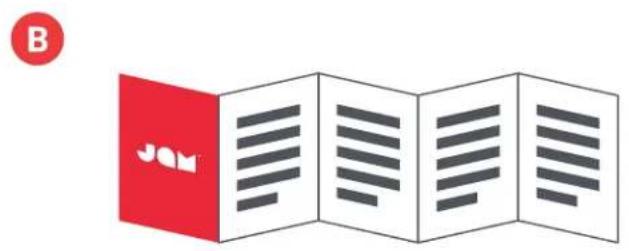
flowchart
graph TD
    A["Electric vehicle battery"] --> B["Switch"]
    B --> C["Power plug"]
    C --> D["Laptop with battery icon"]
    D --> E["Electric box with plug"]
    E --> F["3hrs/20hrs battery"]
    style A fill:#f9f,stroke:#333
    style B fill:#ccf,stroke:#333
    style C fill:#cfc,stroke:#333
    style D fill:#fcc,stroke:#333
    style E fill:#cff,stroke:#333
    style F fill:#ffc,stroke:#333
使用
A — 啟動揚聲器
E — 防水與防塵
LED 顯示燈
充電