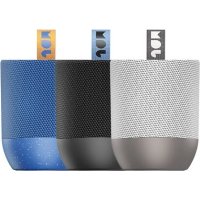
Voice Alexa HXP590A - Speaker JAM - Free user manual and instructions
Find the device manual for free Voice Alexa HXP590A JAM in PDF.
User questions about Voice Alexa HXP590A JAM
0 question about this device. Answer the ones you know or ask your own.
Ask a new question about this device
Download the instructions for your Speaker in PDF format for free! Find your manual Voice Alexa HXP590A - JAM and take your electronic device back in hand. On this page are published all the documents necessary for the use of your device. Voice Alexa HXP590A by JAM.
USER MANUAL Voice Alexa HXP590A JAM
- HX-P590A USER GUIDE GUIDE DE L’UTILISATEUR / GUÍA DEL USUARIOEN EN English p. 4
- Français p. 32
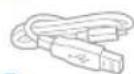
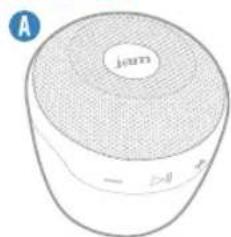
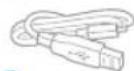
- Español EN EN CONTENTS CHARGING A – Speaker B – Charging cord C – Legal card Charge 3 hours for up to 4 hours of play time. AC adapter not included. JUST TAP AND ASK. 3h76 EN EN p. 6054
Preset One Preset Two Preset Three Preset Four No Jam Speaker Found New Speaker Setup Connect the speaker to the power adapter Plug the other end of the power adapter into an electrical outlet Back Next Back Next Wait 60 Seconds for the Jam speaker to boot Once the light is solid red, proceed to the next step Back Next Press the Wifi Graphics button on the back of the speaker Once in connection mode, the blue light on top of the speaker will start blinking Please have your network password ready Back Next Press the Pair button on the back of the speaker Once in connection mode, the blue light on top of the speaker will start blinking (Illustration goes here) Please enter your Wifi Network Password Cancel Confirm Wifi Password Bedroom Streaming Service POPSTAR Yang Meecola 1:03 3:37
TAP TO ADD A NEW SPEAKER
BEDROOMAdagioMarie Alto Adagio Marie Alto BEDROOM Kapelle Jay Z. Hans OFFICE Classy Lute Playa LIVING ROOM
TAP TO ADD A NEW SPEAKER
OFFICEKapelleJay Z. Hans Adagio Marie Alto BEDROOM Kapelle Jay Z. Hans OFFICE Classy Lute Playa LIVING ROOM
TAP TO ADD A NEW SPEAKER
Adagio Marie Alto BEDROOM Classy Lute Playa LIVING ROOM Kapelle Jay Z. Hans OFFICE OFFICEKapelleJay Z. Hans
TAP TO ADD A NEW SPEAKER
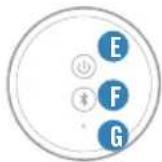
Battery light WiFi / Bluetooth light Low battery Bluetooth pairing mode Charging Bluetooth connected Ready Ready to connect to WiFi network Connected to WiFi network98 EN EN
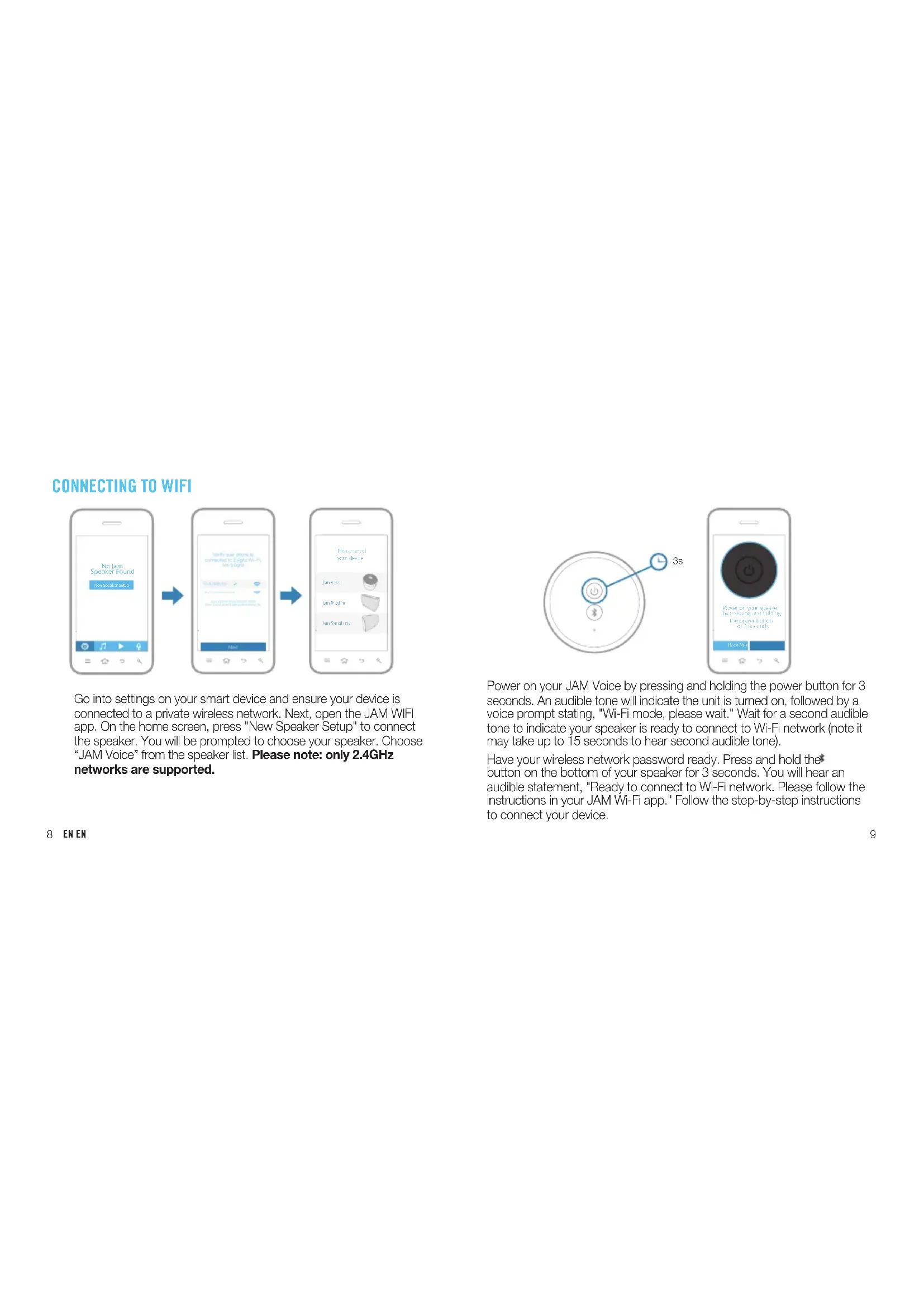
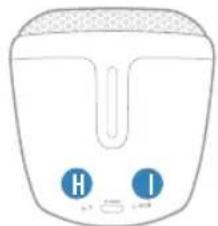
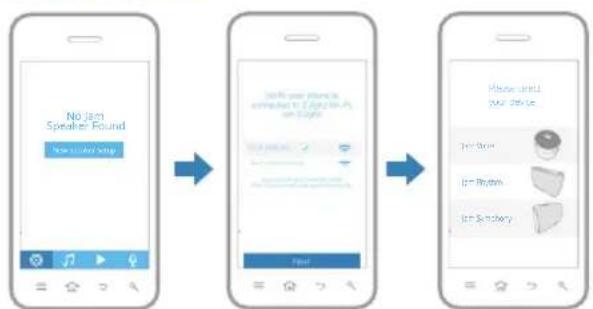
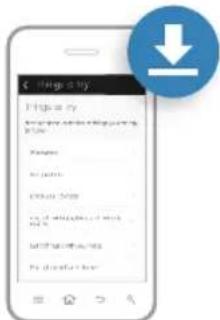
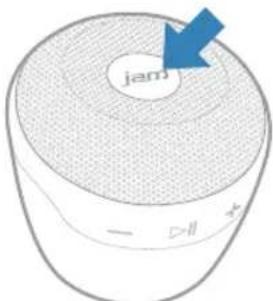
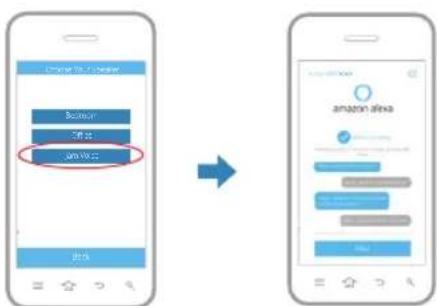
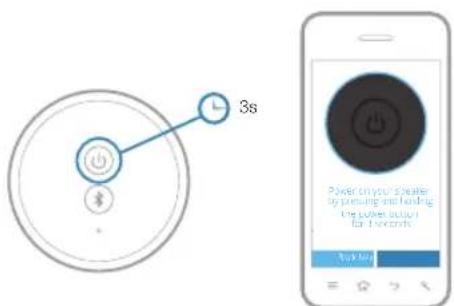
Go into settings on your smart device and ensure your device is connected to a private wireless network. Next, open the JAM WIFI app. On the home screen, press "New Speaker Setup" to connect the speaker. You will be prompted to choose your speaker. Choose “JAM Voice” from the speaker list. Please note: only 2.4GHz networks are supported. Power on your JAM Voice by pressing and holding the power button for 3 seconds. An audible tone will indicate the unit is turned on, followed by a voice prompt stating, "Wi-Fi mode, please wait." Wait for a second audible tone to indicate your speaker is ready to connect to Wi-Fi network (note it may take up to 15 seconds to hear second audible tone). Have your wireless network password ready. Press and hold the button on the bottom of your speaker for 3 seconds. You will hear an audible statement, "Ready to connect to Wi-Fi network. Please follow the instructions in your JAM Wi-Fi app." Follow the step-by-step instructions to connect your device. Music Stream KapelleJay Z. Hans1:36 3:28BedroomOfficeLiving RoomBEDROOMAdagioMarie AltoPresetsBack Preset One Preset Two Preset Three Preset Four No Jam Speaker Found New Speaker Setup Connect the speaker to the power adapter Plug the other end of the power adapter into an electrical outlet Back Next Back Next Wait 60 Seconds for the Jam speaker to boot Once the light is solid red, proceed to the next step Back Next Press the Wifi Graphics button on the back of the speaker Once in connection mode, the blue light on top of the speaker will start blinking Please have your network password ready Back Next Press the Pair button on the back of the speaker Once in connection mode, the blue light on top of the speaker will start blinking (Illustration goes here) Please enter your Wifi Network Password Cancel Confirm Wifi Password Bedroom Streaming Service POPSTAR Yang Meecola 1:03 3:37
TAP TO ADD A NEW SPEAKER
BEDROOMAdagioMarie Alto Adagio Marie Alto BEDROOM Kapelle Jay Z. Hans OFFICE Classy Lute Playa LIVING ROOM
TAP TO ADD A NEW SPEAKER
OFFICEKapelleJay Z. Hans Adagio Marie Alto BEDROOM Kapelle Jay Z. Hans OFFICE Classy Lute Playa LIVING ROOM
TAP TO ADD A NEW SPEAKER
Adagio Marie Alto BEDROOM Classy Lute Playa LIVING ROOM Kapelle Jay Z. Hans OFFICE OFFICEKapelleJay Z. Hans
TAP TO ADD A NEW SPEAKER
Classy Lute Playa GROUP 1 Group 1 Streaming Service Classy Lute Playa 1:03 3:37 Streaming Service FAVORITES POP RADIO INDIE RADIO WORKOUT MIX Speaker Settings + Info Back Rename SpeakerEqualizer SettingsSpeaker InfoSleep TimerFeedback Voice Voice Voice Voice Connected. How will you place the speaker? Done Choose Your Speaker Back BedroomOfficeJam VoiceSpeaker Settings + Info Back Rename SpeakerEqualizer SettingsSpeaker InfoSleep TimerFireware Update Restore Factory Settings Wifi Network Jones Home Speaker Name Office SSID Jam Home Audio_06D2 IP 192.168.1.117 Firmware Version 3.4.2820.145 Wi-Fi Strength Language Alexa Language English Speaker Info Back Firmware update available Version 2.0.1 Download and Install Firmware Update Next Amazon login successful Skip Login Next Connected Power on your speaker by pressing and holding the power button for 3 seconds Back Next The LED light will flash white when ready to pair to your network. Proceed to the next step. Back Next Press and hold the button on the bottom of the speaker for 3 seconds. Once in connection mode, the speaker will give you an audible confirmation. Have your network password ready. Back Next Jane Smith Logout Back Please select your device Jam Voice Jam Rhythm Jam Symphony Connected. How will you place the speaker? Done Choose Your Speaker Back BedroomOfficeJam VoiceSpeaker Settings + Info Back Rename SpeakerEqualizer SettingsSpeaker InfoSleep TimerFireware Update Restore Factory Settings Wifi Network Jones Home Speaker Name Office SSID Jam Home Audio_06D2 IP 192.168.1.117 Firmware Version 3.4.2820.145 Wi-Fi Strength Language Alexa Language English Speaker Info Back Firmware update available Version 2.0.1 Download and Install Firmware Update Next Amazon login successful Skip Login Next Connected Power on your speaker by pressing and holding the power button for 3 seconds Back Next The LED light will flash white when ready to pair to your network. Proceed to the next step. Back Next Press and hold the button on the bottom of the speaker for 3 seconds. Once in connection mode, the speaker will give you an audible confirmation. Have your network password ready. Back Next Jane Smith Logout Back Please select your device Jam Voice Jam Rhythm Jam Symphony 3s1110 EN EN
CONNECTING TO WIFI, CONTINUED
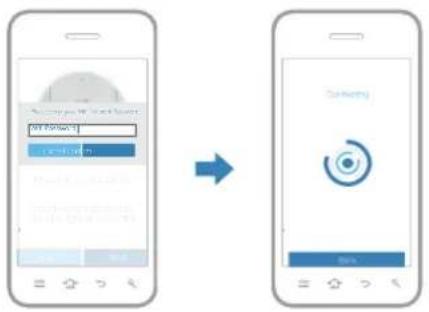
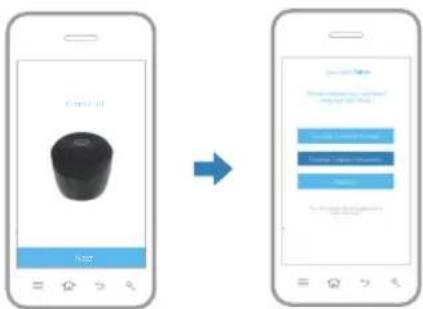
The app will prompt you to enter your network password. Once you enter the password and hit continue, you will hear an audible voice prompt indicating, “Waiting for Wi-Fi connection.” Once connected, you will hear the audible, “Connected to Wi-Fi network.” Hit the next button and choose which language you prefer. You can choose between English (United States), English (United Kingdom), or Deutsch (German). Music Stream KapelleJay Z. Hans1:36 3:28BedroomOfficeLiving RoomBEDROOMAdagioMarie AltoPresets Back
Preset One Preset Two Preset Three Preset Four No Jam Speaker Found New Speaker Setup Connect the speaker to the power adapter Plug the other end of the power adapter into an electrical outlet Back Next Back Next Wait 60 Seconds for the Jam speaker to boot Once the light is solid red, proceed to the next step Back Next Press the Wifi Graphics button on the back of the speaker Once in connection mode, the blue light on top of the speaker will start blinking Please have your network password ready Back Next Press the Pair button on the back of the speaker Once in connection mode, the blue light on top of the speaker will start blinking BackBack NextNext Press the Pair button on Press the Pair button on the back of the speakerthe back of the speaker Once in connection mode, Once in connection mode, the blue light on top of the the blue light on top of the speaker will start blinkingspeaker will start blinking (Illustration goes here) Please enter your Wifi Network Password Cancel Confirm Wifi Password Bedroom Streaming Service POPSTAR Yang Meecola 1:03 3:37
TAP TO ADD A NEW SPEAKER
BEDROOMAdagioMarie Alto Adagio Marie Alto BEDROOM Kapelle Jay Z. Hans OFFICE Classy Lute Playa LIVING ROOM
TAP TO ADD A NEW SPEAKER
OFFICEKapelleJay Z. Hans Adagio Marie Alto BEDROOM Kapelle Jay Z. Hans OFFICE Classy Lute Playa LIVING ROOM
TAP TO ADD A NEW SPEAKER
Adagio Marie Alto BEDROOM Classy Lute Playa LIVING ROOM Kapelle Jay Z. Hans OFFICE OFFICEKapelleJay Z. Hans
TAP TO ADD A NEW SPEAKER
Classy Lute Playa GROUP 1 Group 1 Streaming Service Classy Lute Playa 1:03 3:37 Streaming Service FAVORITES POP RADIO INDIE RADIO WORKOUT MIX Connected. How will you place the speaker? Done Choose Your Speaker Back Bedroom Office Jam Voice Speaker Settings + Info Back Rename Speaker Equalizer Settings Speaker Info Sleep Timer Fireware Update Restore Factory Settings Wifi Network Jones Home Speaker Name Office SSID Jam Home Audio_06D2 IP 192.168.1.117 Firmware Version 3.4.2820.145 Wi-Fi Strength Language Alexa Language English Speaker Info Back Firmware update available Version 2.0.1 Download and Install Firmware Update Next Amazon login successful Skip Login Next Connected Power on your speaker by pressing and holding the power button for 3 seconds Back Next The LED light will flash white when ready to pair to your network. Proceed to the next step. Back Next Press and hold the button on the bottom of the speaker for 3 seconds. Once in connection mode, the speaker will give you an audible confirmation. Have your network password ready. Back Next Jane Smith Logout Back Please select your device Jam Voice Jam Rhythm Jam Symphony Speaker Settings + Info Back Rename Speaker Equalizer Settings Speaker Info Sleep Timer Feedback Voice Voice Voice Voice Speaker Settings + Info Back Rename Speaker Equalizer Settings Speaker Info Sleep Timer Feedback Voice Voice Voice Voice1312 EN EN
LOGGING INTO YOUR AMAZON ACCOUNT
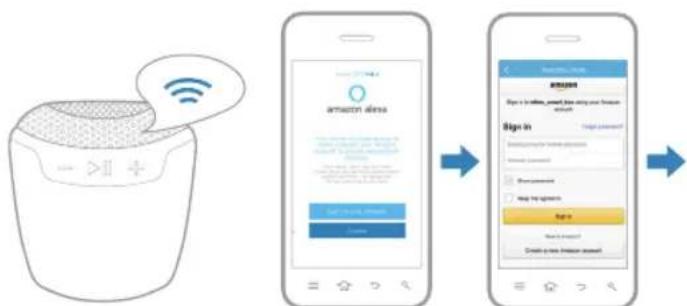
Press the "Sign in with Amazon" button to log in to your Amazon account, or skip this step. Note: You cannot utilize Alexa Voice Service if you are not logged in to an Amazon account. Sign in to your Amazon account. If you do not already have an Amazon account, choose “Create a new Amazon account.” It may take a few seconds for your account to load. Once logged in, the app will confi rm your login successful. Note: You will be prompted to agree to Amazon's terms when logging in for the fi rst time. Speaker Settings + Info Back Rename SpeakerEqualizer SettingsSpeaker InfoSleep TimerFeedbackVoiceVoiceVoice Voice Speaker Settings + Info Back Rename SpeakerEqualizer SettingsSpeaker InfoSleep TimerFeedbackVoiceVoiceVoice Voice Connected. How will you place the speaker? Done Choose Your Speaker Back BedroomOfficeJam VoiceSpeaker Settings + Info Back Rename SpeakerEqualizer SettingsSpeaker InfoSleep TimerFireware UpdateRestore Factory Settings Wifi Network Jones Home Speaker Name Office SSID Jam Home Audio_06D2IP 192.168.1.117Firmware Version 3.4.2820.145Wi-Fi Strength LanguageAlexa LanguageEnglishSpeaker Info Back Firmware update available Version 2.0.1 Download and Install Firmware Update Next Amazon login successful Skip Login Next Connected Power on your speaker by pressing and holding the power button for 3 seconds Back Next The LED light will flash white when ready to pair to your network. Proceed to the next step. Back Next Press and hold the button on the bottom of the speaker for 3 seconds. Once in connection mode, the speaker will give you an audible confirmation. Have your network password ready. Back Next Jane Smith Logout Back Please select your device Jam Voice Jam Rhythm Jam Symphony Speaker Settings + Info Back Rename SpeakerEqualizer SettingsSpeaker InfoSleep TimerFeedbackVoice Voice VoiceVoice Connected. How will you place the speaker? DoneChoose Your Speaker Back BedroomOfficeJam VoiceSpeaker Settings + Info Back Rename SpeakerEqualizer SettingsSpeaker InfoSleep TimerFireware UpdateRestore Factory Settings Wifi Network Jones Home Speaker Name Office SSID Jam Home Audio_06D2IP 192.168.1.117Firmware Version 3.4.2820.145Wi-Fi Strength LanguageAlexa LanguageEnglishSpeaker Info Back Firmware update available Version 2.0.1 Download and Install Firmware Update Next Amazon login successful Skip Login Next Connected Power on your speaker by pressing and holding the power button for 3 seconds Back Next The LED light will flash white when ready to pair to your network. Proceed to the next step. Back Next Press and hold the button on the bottom of the speaker for 3 seconds. Once in connection mode, the speaker will give you an audible confirmation. Have your network password ready. Back Next Jane Smith Logout Back Please select your device Jam Voice Jam Rhythm Jam Symphony1514 EN EN
To activate Alexa, tap the JAM microphone button on the top of your speaker. You will hear a short tone. Next, ask Alexa a question, such as, “Alexa, what is the weather today in New York?” Or you can tell Alexa to do something, like, “Alexa, add milk to my shopping list." Download the Amazon Alexa app in the App Store, Google Play Store, or Amazon App Store where you can explore Things to Try, Alexa Skills, Smart Home Capabilities, and more. This app will allow you to customize your location, set your route to and from work, etc. Alexa... Connected.How will you placethe speaker?DoneChoose Your SpeakerBackBedroomOfficeJam VoiceSpeaker Settings + InfoBackRename SpeakerEqualizer SettingsSpeaker InfoSleep TimerFireware UpdateRestore Factory Settings Wifi Network Jones Home Speaker Name Office SSID Jam Home Audio_06D2IP 192.168.1.117Firmware Version 3.4.2820.145Wi-Fi Strength LanguageAlexa LanguageEnglish Speaker Info Back Firmware update available Version 2.0.1 Download and Install Firmware Update Next Amazon login successful Skip Login Next Connected Power on your speaker by pressing and holding the power button for 3 seconds Back Next The LED light will flash white when ready to pair to your network. Proceed to the next step. Back Next Press and hold the button on the bottom of the speaker for 3 seconds. Once in connection mode, the speaker will give you an audible confirmation. Have your network password ready. Back Next Jane Smith Logout Back Please select your device Jam Voice Jam Rhythm Jam Symphony1716 EN EN
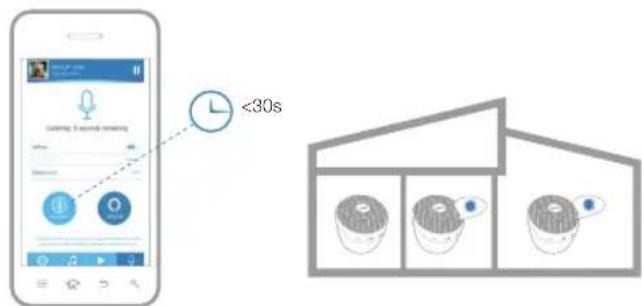
Press the icon within the app, then use the toggle buttons to select the speaker(s) you’d like to broadcast to. Press and hold the intercom icon while saying your message (up to 30 seconds). When fi nished, release the icon. The message will then play on all selected speakers. <30s
USING ALEXA THROUGH THE APP
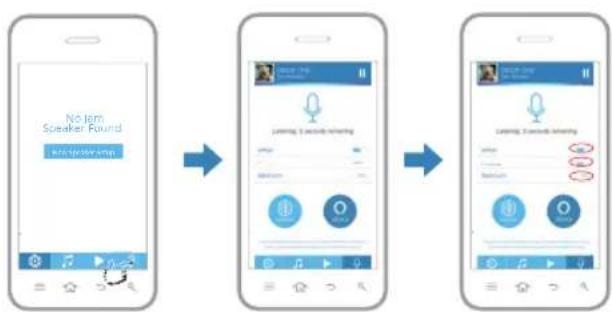
Press the microphone button on the lower right hand side of the app. Select the speakers you would like to have Alexa speak from by sliding the corresponding switch next to the speaker name left or right. NOTE: the speaker is considered “active” if the line is blue. It will be gray if the speaker is not active. Next, press and hold the Alexa button on the app while speaking to Alexa (up to 7 seconds). When fi nished, release the icon. You will hear an audible tone indicating Alexa has received the message and she will respond. Connected.How will you placethe speaker?DoneSpeaker Settings + InfoBackRename SpeakerEqualizer SettingsSpeaker InfoPresetsSleep TimerFeedbackAlexa SettingsSpeaker Settings + InfoBackRename SpeakerEqualizer SettingsSpeaker InfoPresetsSleep TimerFirmware UpdateChange Speaker OrientationRestore Factory Settings Wifi Network Jones Home Speaker Name Office SSID Jam Home Audio_06D2IP 192.168.1.117Firmware Version 3.4.2820.145Wi-Fi Strength Language EnglishAlexa Language English Speaker Info BackChange Speaker OrientationRestore Factory Settings Wifi Network Jones Home Speaker Name Office SSID Jam Home Audio_06D2IP 192.168.1.117Firmware Version 3.4.2820.145Wi-Fi Strength Language EnglishAlexa Language English (US) Speaker Info Back Firmware update available Version 2.0.1 Download and Install Firmware Update My Music Library BEDROOM Adagio Marie Alto Song Name Artist, Album Song Name Artist, Album Song Name Artist, Album Song Name Artist, Album Song Name Artist, Album Song Name Artist, Album Song Name Artist, Album Song Name Artist, Album Search Songs Artists Albums Playlists Smart Phone BEDROOM Adagio Marie Alto No Jam Speaker Found New Speaker Setup1918 EN EN
LOGGING OUT OF YOUR AMAZON ACCOUNT
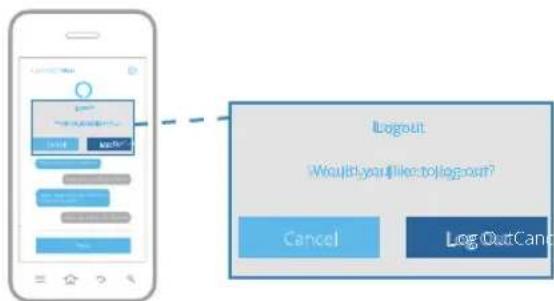
To log out of your Amazon account, select the Amazon Alexa icon on your music source screen. Choose the speaker you wish to sign out of Amazon and select the SIGN OUT button. From this screen, press the logout button when prompted to confi rm your selection. Connected.How will you placethe speaker?Done Choose Your Speaker Back Bedroom Office Jam Voice Speaker Settings + InfoBackRename SpeakerEqualizer SettingsSpeaker InfoSleep TimerFireware UpdateRestore Factory Settings Wifi Network Jones Home Speaker Name Office SSID Jam Home Audio_06D2IP 192.168.1.117Firmware Version 3.4.2820.145Wi-Fi Strength LanguageAlexa LanguageEnglishSpeaker InfoBack Firmware update available Version 2.0.1 Download and Install Firmware Update NextAmazon login successful Skip Login NextConnected Power on your speaker by pressing and holding the power button for 3 seconds Back Next The LED light will flash white when ready to pair to your network. Proceed to the next step. Back Next Press and hold the button on the bottom of the speaker for 3 seconds. Once in connection mode, the speaker will give you an audible confirmation. Have your network password ready. Back Next Jane Smith Logout Back Please select your device Jam Voice Jam Rhythm Jam Symphony Speaker Settings + Info Back Rename Speaker Equalizer Settings Speaker Info Sleep Timer Feedback Voice Voice Voice Voice Speaker Settings + Info Back Rename Speaker Equalizer Settings Speaker Info Sleep Timer Feedback Voice Voice Voice Voice Log OutCancel Logout Would you like to log out? Log OutCancel Logout Would you like to log out?2120 EN EN Music Stream KapelleJay Z. Hans1:36 3:28BedroomOfficeLiving RoomBEDROOMAdagioMarie AltoPresetsBack1Preset One2Preset Two3Preset Three4Preset Four No Jam Speaker Found New Speaker Setup Connect the speaker to the power adapter Plug the other end of the power adapter into an electrical outlet Back Next Back Next Wait 60 Seconds for the Jam speaker to boot Once the light is solid red, proceed to the next step Back Next Press the Wifi Graphics button on the back of the speaker Once in connection mode, the blue light on top of the speaker will start blinking Please have your network password ready Back Next Press the Pair button on the back of the speaker Once in connection mode, the blue light on top of the speaker will start blinking (Illustration goes here) Please enter your Wifi Network Password Cancel Confirm Wifi Password Bedroom Streaming Service POPSTAR Yang Meecola 1:03 3:37
TAP TO ADD A NEW SPEAKER
BEDROOMAdagioMarie Alto Adagio Marie Alto BEDROOM Kapelle Jay Z. Hans OFFICE Classy Lute Playa LIVING ROOM
TAP TO ADD A NEW SPEAKER
OFFICEKapelleJay Z. Hans Adagio Marie Alto BEDROOM Kapelle Jay Z. Hans OFFICE Classy Lute Playa LIVING ROOM
TAP TO ADD A NEW SPEAKER
Adagio Marie Alto BEDROOM Classy Lute Playa LIVING ROOM Kapelle Jay Z. Hans OFFICEOFFICEKapelleJay Z. Hans
TAP TO ADD A NEW SPEAKER
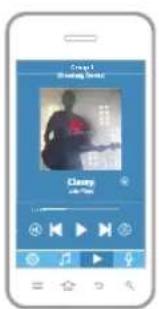
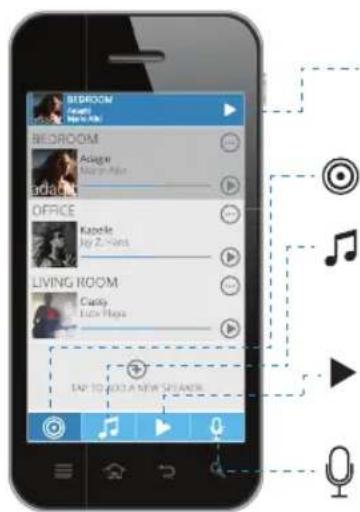
BEDROOMBEDROOM AdagioAdagio Marie AltoMarie Alto Adagio Marie Alto BEDROOM Kapelle Jay Z. Hans OFFICE Classy Lute Playa LIVING ROOM NAVIGATING THE JAM APP CHOOSE YOUR TUNES Quick access play bar View the current song and control the music. Speaker screen View your speakers’ activity. Music source screen Select from your library or streaming services, and log in to your Amazon account. Now playing View the current song and control the music. Microphone Talk through your speakers or activate Amazon Alexa voice service. Press the icon within the app to access the Music Source screen. Here you can easily play music from a variety of popular streaming services. You can also play your own music library without leaving the app, or log in to your Amazon account through the Amazon Alexa icon.2322 EN EN
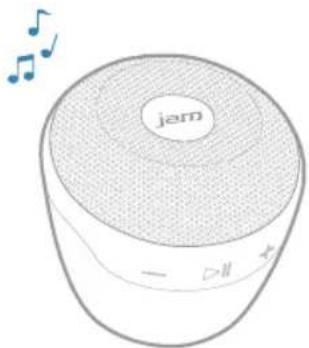
GROUPING AND UNGROUPING SPEAKERS
Music StreamKapelleJay Z. Hans1:36 3:28BedroomOfficeLiving RoomBEDROOMAdagioMarie AltoPresetsBack1Preset One2Preset Two3Preset Three4Preset Four No Jam Speaker Found New Speaker Setup Connect the speaker to the power adapter Plug the other end of the power adapter into an electrical outlet Back Next Back Next Wait 60 Seconds for the Jam speaker to boot Once the light is solid red, proceed to the next step Back Next Press the Wifi Graphics button on the back of the speaker Once in connection mode, the blue light on top of the speaker will start blinking Please have your network password ready Back Next Press the Pair button on the back of the speaker Once in connection mode, the blue light on top of the speaker will start blinking (Illustration goes here) Please enter your Wifi Network Password Cancel Confirm Wifi Password Bedroom Streaming Service POPSTAR Yang Meecola 1:03 3:37
TAP TO ADD A NEW SPEAKER
BEDROOMAdagioMarie Alto Adagio Marie Alto BEDROOM Kapelle Jay Z. Hans OFFICE Classy Lute Playa LIVING ROOM
TAP TO ADD A NEW SPEAKER
OFFICEKapelleJay Z. Hans Adagio Marie Alto BEDROOM Kapelle Jay Z. Hans OFFICE Classy Lute Playa LIVING ROOM
TAP TO ADD A NEW SPEAKER
Adagio Marie Alto BEDROOM Classy Lute Playa LIVING ROOM Kapelle Jay Z. Hans OFFICEOFFICEKapelleJay Z. Hans
TAP TO ADD A NEW SPEAKER
GROUP 1ClassyLute Playa Adagio Marie Alto BEDROOM
OFFICELIVING ROOMLR/LR/
Classy Lute Playa GROUP 1 Group 1 Streaming Service Classy Lute Playa 1:03 3:37 Streaming ServiceStreaming Service ClassyClassy Lute PlayaLute Playa Streaming Service FAVORITES POP RADIO INDIE RADIO WORKOUT MIX Music StreamKapelleJay Z. Hans1:36 3:28BedroomOfficeLiving RoomBEDROOMAdagioMarie AltoPresetsBack1Preset One2Preset Two3Preset Three4Preset Four No Jam Speaker Found New Speaker Setup Connect the speaker to the power adapter Plug the other end of the power adapter into an electrical outlet Back Next Back Next Wait 60 Seconds for the Jam speaker to boot Once the light is solid red, proceed to the next step Back Next Press the Wifi Graphics button on the back of the speaker Once in connection mode, the blue light on top of the speaker will start blinking Please have your network password ready Back Next Press the Pair button on the back of the speaker Once in connection mode, the blue light on top of the speaker will start blinking (Illustration goes here) Please enter your Wifi Network Password Cancel Confirm Wifi Password Bedroom Streaming Service POPSTAR Yang Meecola 1:03 3:37
TAP TO ADD A NEW SPEAKER
BEDROOMAdagioMarie Alto Adagio Marie Alto BEDROOM Kapelle Jay Z. Hans OFFICE Classy Lute Playa LIVING ROOM
TAP TO ADD A NEW SPEAKER
OFFICEKapelleJay Z. Hans Adagio Marie Alto BEDROOM Kapelle Jay Z. Hans OFFICE Classy Lute Playa LIVING ROOM
TAP TO ADD A NEW SPEAKER
Adagio Marie Alto BEDROOM Classy Lute Playa LIVING ROOM Classy Lute Playa LIVING ROOM Kapelle Jay Z. Hans OFFICEOFFICEKapelleJay Z. Hans
TAP TO ADD A NEW SPEAKER
GROUP 1ClassyLute Playa Adagio Marie Alto BEDROOM
OFFICELIVING ROOMLR/LR/
Classy Lute Playa GROUP 1 Group 1 Streaming Service Classy Lute Playa 1:03 3:37 Streaming Service FAVORITES POP RADIO INDIE RADIO WORKOUT MIX Music StreamKapelleJay Z. Hans1:36 3:28BedroomOfficeLiving RoomBEDROOMAdagioMarie AltoPresetsBack1Preset One2Preset Two3Preset Three4Preset Four No Jam Speaker Found New Speaker Setup Connect the speaker to the power adapter Plug the other end of the power adapter into an electrical outlet Back Next Back Next Wait 60 Seconds for the Jam speaker to boot Once the light is solid red, proceed to the next step Back Next Press the Wifi Graphics button on the back of the speaker Once in connection mode, the blue light on top of the speaker will start blinking Please have your network password ready Back Next Press the Pair button on the back of the speaker Once in connection mode, the blue light on top of the speaker will start blinking (Illustration goes here) Please enter your Wifi Network Password Cancel Confirm Wifi Password Bedroom Streaming Service POPSTAR Yang Meecola 1:03 3:37
TAP TO ADD A NEW SPEAKER
BEDROOMAdagioMarie Alto Adagio Marie Alto BEDROOM Kapelle Jay Z. Hans OFFICE Classy Lute Playa LIVING ROOM
TAP TO ADD A NEW SPEAKER
OFFICEKapelleJay Z. Hans Adagio Marie Alto BEDROOM Kapelle Jay Z. Hans OFFICE Classy Lute Playa LIVING ROOM
TAP TO ADD A NEW SPEAKER
Adagio Marie Alto BEDROOM Classy Lute Playa LIVING ROOM Kapelle Jay Z. Hans OFFICEOFFICEKapelleJay Z. Hans
TAP TO ADD A NEW SPEAKER
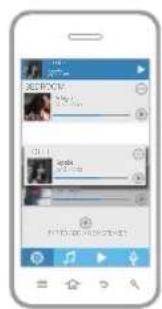
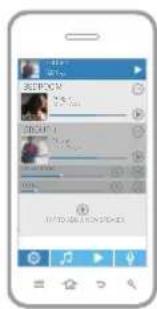
Classy Lute Playa GROUP 1 Group 1 Streaming Service Classy Lute Playa 1:03 3:37 Streaming Service FAVORITES POP RADIO INDIE RADIO WORKOUT MIX Grouping your speakers allows you to play the same music through multiple speakers. The speaker that you are dropping into (or the fi rst speaker listed in a group) is the master speaker. Within the app, press and hold the speaker you would like to group. Drag and drop to pair it with another speaker, or add it to an existing group of speakers. Music Stream KapelleJay Z. Hans1:36 3:28BedroomOfficeLiving RoomBEDROOMAdagioMarie AltoPresetsBack1Preset One2Preset Two3Preset Three4Preset FourNo JamSpeaker FoundNew Speaker SetupConnect the speakerto the power adapterPlug the other end of the power adapter into anelectrical outletBack NextBack NextWait 60 Seconds for theJam speaker to bootOnce the light is solidred, proceed to the next stepBack Next Press the Wifi Graphics button on the back of the speakerOnce in connection mode, the blue light on top of the speaker will start blinkingPlease have your network password readyBack Next Press the Pair button on the back of the speaker Once in connection mode, the blue light on top of the speaker will start blinking (Illustration goes here) Please enter your Wifi Network Password Cancel ConfirmWifi PasswordBedroomStreaming ServicePOPSTARYang Meecola1:03 3:37TAP TO ADD A NEW SPEAKERBEDROOMAdagioMarie AltoAdagioMarie AltoBEDROOMKapelleJay Z. HansOFFICEClassyLute PlayaLIVING ROOMTAP TO ADD A NEW SPEAKEROFFICEKapelleJay Z. HansAdagioMarie AltoBEDROOMKapelleJay Z. HansOFFICEClassyLute PlayaLIVING ROOMTAP TO ADD A NEW SPEAKERAdagioMarie AltoBEDROOMClassyLute PlayaLIVING ROOMKapelleJay Z. HansOFFICEOFFICEKapelleJay Z. Hans TAP TO ADD A NEW SPEAKERGROUP 1ClassyLute PlayaAdagioMarie AltoBEDROOMOFFICELIVING ROOM
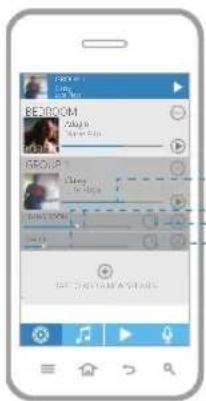
ClassyLute PlayaGROUP 1 Group 1Streaming ServiceClassyLute Playa1:03 3:37Streaming ServiceFAVORITESPOP RADIOINDIE RADIOWORKOUT MIX Control the volume of all speakers in the group Control the volume of individual speakers Toggle between stereo, left, and right channels Release speaker from the group (release the master speaker to disband the entire group)2524 EN EN
Preset One Preset Two Preset Three Preset Four No Jam Speaker Found New Speaker Setup Connect the speaker to the power adapter Plug the other end of the power adapter into an electrical outlet Back Next Back Next Wait 60 Seconds for the Jam speaker to boot Once the light is solid red, proceed to the next step Back Next Press the Wifi Graphics button on the back of the speaker Once in connection mode, the blue light on top of the speaker will start blinking Please have your network password ready Back Next Press the Pair button on the back of the speaker Once in connection mode, the blue light on top of the speaker will start blinking (Illustration goes here) Please enter your Wifi Network Password Cancel Confirm Wifi Password Bedroom Streaming Service POPSTAR Yang Meecola 1:03 3:37
TAP TO ADD A NEW SPEAKER
BEDROOMAdagioMarie Alto Adagio Marie Alto BEDROOM Kapelle Jay Z. Hans OFFICE Classy Lute Playa LIVING ROOM
TAP TO ADD A NEW SPEAKER
OFFICEKapelleJay Z. Hans Adagio Marie Alto BEDROOM Kapelle Jay Z. Hans OFFICE Classy Lute Playa LIVING ROOM
TAP TO ADD A NEW SPEAKER
Adagio Marie Alto BEDROOM Classy Lute Playa LIVING ROOMKapelleJay Z. HansOFFICEOFFICEKapelleJay Z. Hans
TAP TO ADD A NEW SPEAKER
GROUP 1ClassyLute Playa Adagio Marie Alto
BEDROOMOFFICELIVING ROOMLR/LR/
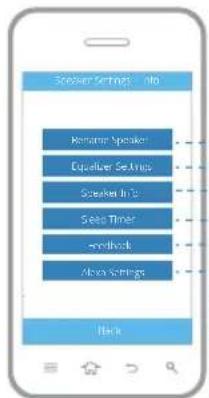
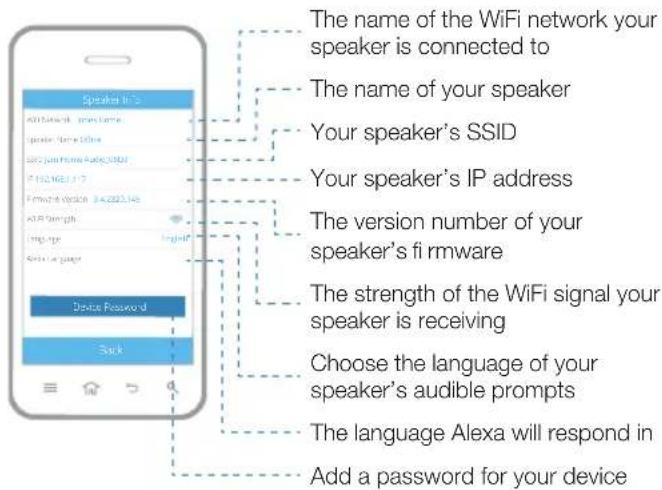
Classy Lute Playa GROUP 1 Group 1 Streaming Service Classy Lute Playa 1:03 3:37 Streaming ServiceFAVORITESPOP RADIOINDIE RADIOWORKOUT MIX Tap next to a speaker to access its settings and information. Give your speaker a name, like Bedroom or Offi ce Adjust the speaker’s bass and treble Find info about your speaker and connectivity Set a sleep timer up to 4 hours Send feedback to the developer about the app Choose Language setting for Alexa Device PasswordWifi Network Jones HomeSpeaker Name OfficeSSID Jam Home Audio_06D2IP 192.168.1.117Firmware Version 3.4.2820.145Wi-Fi Strength LanguageAlexa LanguageEnglishSpeaker Info Back The name of the WiFi network your speaker is connected to The name of your speaker Your speaker’s SSID Your speaker’s IP address The version number of your speaker’s fi rmware The strength of the WiFi signal your speaker is receiving Choose the language of your speaker’s audible prompts The language Alexa will respond in Add a password for your device2726 EN EN
SPEAKER FIRMWARE UPDATE FEEDBACK SECTION
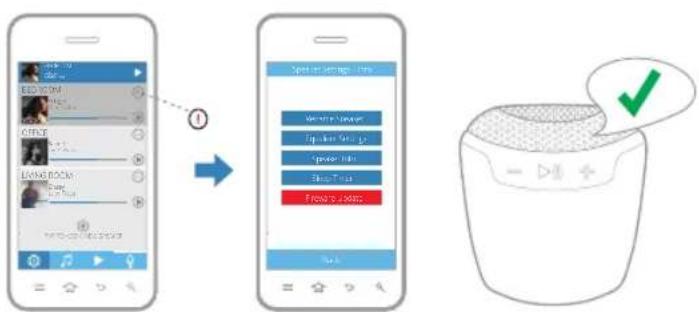
If you see next to your speaker, a fi rmware update is available. Press the icon and select "Firmware Update" from the menu. Tap "Download and Install" to start the update. When complete, the speaker will provide an audible confi rmation. Music Stream KapelleJay Z. Hans1:36 3:28BedroomOfficeLiving RoomBEDROOMAdagioMarie AltoPresetsBack Preset One Preset Two Preset Three Preset Four No Jam Speaker Found New Speaker Setup Connect the speaker to the power adapter Plug the other end of the power adapter into an electrical outlet Back Next Back Next Wait 60 Seconds for the Jam speaker to boot Once the light is solid red, proceed to the next step Back Next Press the Wifi Graphics button on the back of the speaker Once in connection mode, the blue light on top of the speaker will start blinking Please have your network password ready Back Next Press the Pair button on the back of the speaker Once in connection mode, the blue light on top of the speaker will start blinking (Illustration goes here) Please enter your Wifi Network Password Cancel Confirm Wifi Password Bedroom Streaming Service POPSTAR Yang Meecola 1:03 3:37
TAP TO ADD A NEW SPEAKER
BEDROOMAdagioMarie Alto Adagio Marie Alto BEDROOM Kapelle Jay Z. Hans OFFICE Classy Lute Playa LIVING ROOM
TAP TO ADD A NEW SPEAKER
OFFICEKapelleJay Z. Hans Adagio Marie Alto BEDROOM Kapelle Jay Z. Hans OFFICE Classy Lute Playa LIVING ROOM
TAP TO ADD A NEW SPEAKER
Adagio Marie Alto BEDROOM Classy Lute Playa LIVING ROOM Kapelle Jay Z. Hans OFFICE OFFICEKapelleJay Z. Hans
TAP TO ADD A NEW SPEAKER
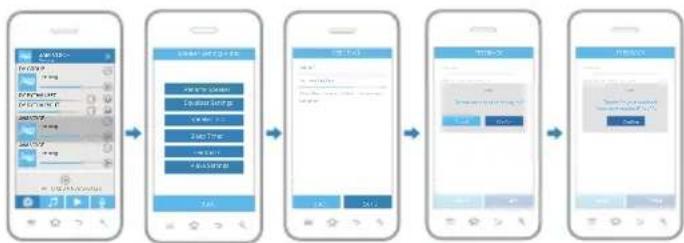
Classy Lute Playa GROUP 1 Group 1 Streaming Service Classy Lute Playa 1:03 3:37 Streaming Service FAVORITES POP RADIO INDIE RADIO WORKOUT MIX Connected. How will you place the speaker? Done Choose Your Speaker Back BedroomOfficeJam Voice Speaker Settings + Info Back Rename SpeakerEqualizer SettingsSpeaker InfoSleep TimerFireware Update Restore Factory Settings Wifi Network Jones Home Speaker Name Office SSID Jam Home Audio_06D2 IP 192.168.1.117 Firmware Version 3.4.2820.145 Wi-Fi Strength Language Alexa Language English Speaker Info Back Firmware update available Version 2.0.1 Download and Install Firmware Update Next Amazon login successful Skip Login Next Connected Power on your speaker by pressing and holding the power button for 3 seconds Back Next The LED light will flash white when ready to pair to your network. Proceed to the next step. Back Next Press and hold the button on the bottom of the speaker for 3 seconds. Once in connection mode, the speaker will give you an audible confirmation. Have your network password ready. Back Next Jane Smith Logout Back Please select your device Jam Voice Jam Rhythm Jam Symphony Have a question about the app or need to send feedback on a feature or function? We would love to hear it. Sending feedback is simple. First, choose the speaker you would like to send feedback about then press the in the upper right corner. Next, press the FEEDBACK button. In the FEEDBACK screen, simply add a subject title to your comment, type in your email address and write a short description of the problem. Hit the SEND button when fi nished and the CONFIRM button to submit your comments. Your request has been submitted. You will receive a confi rmation ID number showing your comment has been processed. Keep this for your records. Speaker Settings + Info Back Rename Speaker Equalizer Settings Speaker Info Sleep Timer Feedback Alexa Settings Subject* Your email address Please Describe your problem in the message box below FEEDBACK Back Send FEEDBACK Cancel Confirm Hint Do you want to send debug log? FEEDBACK Confirm Hint Thanks for your feedback Your confirmation ID is x00x
TAP TO ADD A NEW SPEAKER
JAM VOICE No song Subject* Your email address Please Describe your problem in the message box below FEEDBACK Back Send FEEDBACK Cancel Confirm Hint Do you want to send debug log? FEEDBACK Confirm Hint Thanks for your feedback Your confirmation ID is x00x
TAP TO ADD A NEW SPEAKER
JAM VOICE No song Subject* Your email address Please Describe your problem in the message box below FEEDBACK Back Send BackBack SendSend Feedback Myemail@emailaddress.com Please Describe your problem in the message box below FEEDBACK Cancel Confirm Hint Do you want to send debug log? FEEDBACK Confirm Hint Thanks for your feedback Your confirmation ID is x00x
TAP TO ADD A NEW SPEAKER
JAM VOICE No song Subject* Your email address Please Describe your problem in the message box below FEEDBACK Back Send FEEDBACK Cancel Confirm Hint Do you want to send debug log? BackBack SendSend Feedback Myemail@emailaddress.com Please Describe your problem in the message box below FEEDBACK Confirm Hint Thanks for your feedback Your confirmation ID is x00x
TAP TO ADD A NEW SPEAKER
Power on your speaker by pressing and holding the power button for 3 seconds. Your speaker will automatically go into WiFi mode. To switch to Bluetooth mode quickly, press the button on the bottom of your speaker and the LED light will switch to blinking blue. Enable Bluetooth on your device and choose JAM Voice from the list. If prompted, enter code “0000.”
RESET OR RESTORE YOUR SPEAKER
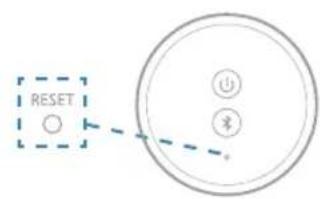
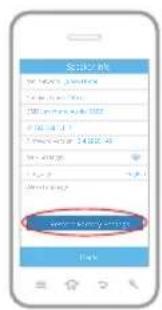
If you need to reset your speaker, use a paperclip to press the reset button on the bottom of your speaker. To completely restore your speaker to factory settings, choose “Restore Factory Settings” from the speaker info screen within the app or press and hold the button and power button together for 5 seconds.
Connected.How will you placethe speaker?DoneChoose Your SpeakerBackBedroomOfficeJam VoiceSpeaker Settings + InfoBackRename SpeakerEqualizer SettingsSpeaker InfoSleep TimerFireware Update Restore Factory SettingsWifi Network Jones HomeSpeaker Name OfficeSSID Jam Home Audio_06D2IP 192.168.1.117Firmware Version 3.4.2820.145Wi-Fi Strength LanguageAlexa LanguageEnglish Speaker Info Back Firmware update available Version 2.0.1 Download and Install Firmware Update Next Amazon login successful Skip Login Next Connected Power on your speaker by pressing and holding the power button for 3 seconds Back Next The LED light will flash white when ready to pair to your network. Proceed to the next step. Back Next Press and hold the button on the bottom of the speaker for 3 seconds. Once in connection mode, the speaker will give you an audible confirmation. Have your network password ready. Back Next Jane Smith Logout Back Please select your device Jam Voice Jam Rhythm Jam Symphony3130 EN EN
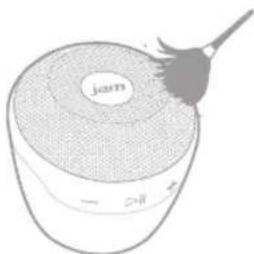
Gently dust your speaker with a soft, dry towel. Using water or harsh cleansers is not recommended. 1 Year Limited Warranty For detailed warranty instructions and information visit: USA: www.jamaudio.com/customer-support/warranty-1yr CAN: canada.jamaudio.com/warranty-1yr To obtain warranty service on your JAM product, contact a Consumer Relations representative by telephone or email for assistance (you can find their contact info on page 1). Please make sure to have the model number of the product available. FCC Compliance: Note: This device complies with part 15 of the FCC Rules. Operation is subject to the following two conditions: (1) This device may not cause harmful interference, and (2) this device must accept any interference received, including interference that may cause undesired operation. Note: This equipment has been tested and found to comply with the limits for a Class B digital device, pursuant to part 15 of the FCC Rules. These limits are designed to provide reasonable protection against harmful interference in a residential installation. This equipment generates, uses, and can radiate radio frequency energy and, if not installed and used in accordance with the instructions, may cause harmful interference to radio communications. However, there is no guarantee that interference will not occur in a particular installation. If this equipment does cause harmful interference to radio or television reception, which can be determined by turning the equipment off and on, the user is encouraged to try to correct the interference by one or more of the following measures:
- Reorient or relocate the receiving antenna.
- Increase the separation between the equipment and receiver.
- Connect the equipment into an outlet on a circuit different from that to which the receiver is connected.
- Consult the dealer or an experienced radio/TV technician for help. Note: Changes or modifications not expressly approved by HMDX could void the user’s authority to operate this equipment. IC Caution: RSS-GEN Issue 4 November 2014 This device complies with Industry Canada’s licence- exempt RSSs. Operation is subject to the following two conditions: (1) This device may not cause interference, and (2) This device must accept any interference, including interference that may cause undesired operation of the device. IMPORTANT SAFEGUARDS: When using an electrical product, basic precautions should always be followed, including the following:
READ ALL INSTRUCTIONS BEFORE USING
- WARNING: Do not place speakers too close to ears. May cause damage to eardrums, especially in young children.
- Use this product only for its intended use as described in this manual. Do not use attachments not recommended by HMDX.
- HMDX is not liable for any damage caused to smartphones, iPod/MP3 players, or any other device.
- Do not place or store this product where it can fall or be dropped into a tub or sink.
- Do not place or drop into water or any other liquid.
- Not for use by children. THIS IS NOT A TOY.
- Never operate this product if it has a damaged cord, plug, cable, or housing.
- Keep away from heated surfaces.
- Only set on dry surfaces. Do not place on surface wet from water or cleaning solvents.
This product contains small parts that may present a choking hazard for young children. CAUTION: All servicing of this product must be performed by authorized HMDX Service Personnel only. The Spotify word mark and logos are registered trademarks of Spotify and are used under license by HoMedics, LLC. The Spotify software is subject to third party licenses found here: www.spotify.com/connect/third-party-licenses The iHeart word mark and logos are registered trademarks of iHeart and are used under license by HoMedics, LLC. Google, Android, and Google Play word mark and logos are registered trademarks of Google and are used under license by HoMedics, LLC. App Store is a service mark of Apple Inc. The Apple logo is a trademark of Apple Inc., registered in the U.S. and other countries. IOS is a trademark or registered trademark of Cisco in the U.S. and other countries and is used under license by Apple Inc. Amazon, Alexa, and all related logos are trademarks of Amazon.com, Inc. or its affiliates. and is used under licencse by Homedics. LLC All other trademarks and all other trade names belong to their respective owners. IB-HXP590A ©2016-2017 HMDX. All rights reserved. USA www.jamaudio.com/help/wifi cservice@jamaudio.com
8:30m-7:00pm EST M-F CANADA canada.jamaudio.com/help/wifi cservice@homedicsgroup.com
Preset One Preset Two Preset Three Preset Four No Jam Speaker Found New Speaker Setup Connect the speaker to the power adapter Plug the other end of the power adapter into an electrical outlet Back Next Back Next Wait 60 Seconds for the Jam speaker to boot Once the light is solid red, proceed to the next step Back Next Press the Wifi Graphics button on the back of the speaker Once in connection mode, the blue light on top of the speaker will start blinking Please have your network password ready Back Next Press the Pair button on the back of the speaker Once in connection mode, the blue light on top of the speaker will start blinking (Illustration goes here) Please enter your Wifi Network Password Cancel Confirm Wifi Password Bedroom Streaming Service POPSTAR Yang Meecola 1:03 3:37
TAP TO ADD A NEW SPEAKER
BEDROOMAdagioMarie Alto Adagio Marie Alto BEDROOM Kapelle Jay Z. Hans OFFICE Classy Lute Playa LIVING ROOM
TAP TO ADD A NEW SPEAKER
OFFICEKapelleJay Z. Hans Adagio Marie Alto BEDROOM Kapelle Jay Z. Hans OFFICE Classy Lute Playa LIVING ROOM
TAP TO ADD A NEW SPEAKER
Adagio Marie Alto BEDROOM Classy Lute Playa LIVING ROOM Kapelle Jay Z. Hans OFFICE OFFICEKapelleJay Z. Hans
TAP TO ADD A NEW SPEAKER
Preset One Preset Two Preset Three Preset Four No Jam Speaker Found New Speaker Setup Connect the speaker to the power adapter Plug the other end of the power adapter into an electrical outlet Back Next Back Next Wait 60 Seconds for the Jam speaker to boot Once the light is solid red, proceed to the next step Back Next Press the Wifi Graphics button on the back of the speaker Once in connection mode, the blue light on top of the speaker will start blinking Please have your network password ready Back Next Press the Pair button on the back of the speaker Once in connection mode, the blue light on top of the speaker will start blinking (Illustration goes here) Please enter your Wifi Network Password Cancel Confirm Wifi Password Bedroom Streaming Service POPSTAR Yang Meecola 1:03 3:37
TAP TO ADD A NEW SPEAKER
BEDROOM Adagio Marie Alto Adagio Marie Alto BEDROOM Kapelle Jay Z. Hans OFFICE Classy Lute Playa LIVING ROOM
TAP TO ADD A NEW SPEAKER
OFFICE Kapelle Jay Z. Hans Adagio Marie Alto BEDROOM Kapelle Jay Z. Hans OFFICE Classy Lute Playa LIVING ROOM
TAP TO ADD A NEW SPEAKER
Adagio Marie Alto BEDROOM Classy Lute Playa LIVING ROOM Kapelle Jay Z. Hans OFFICE OFFICE Kapelle Jay Z. Hans
TAP TO ADD A NEW SPEAKER
Preset One Preset Two Preset Three Preset Four No Jam Speaker Found New Speaker Setup Connect the speaker to the power adapter Plug the other end of the power adapter into an electrical outlet Back Next Back Next Wait 60 Seconds for the Jam speaker to boot Once the light is solid red, proceed to the next step Back Next Press the Wifi Graphics button on the back of the speaker Once in connection mode, the blue light on top of the speaker will start blinking Please have your network password ready Back Next Press the Pair button on the back of the speaker Once in connection mode, the blue light on top of the speaker will start blinking BackBack NextNext Press the Pair button on Press the Pair button on the back of the speakerthe back of the speaker Once in connection mode, Once in connection mode, the blue light on top of the the blue light on top of the speaker will start blinkingspeaker will start blinking (Illustration goes here) Please enter your Wifi Network Password Cancel Confirm Wifi Password Bedroom Streaming Service POPSTAR Yang Meecola 1:03 3:37
TAP TO ADD A NEW SPEAKER
BEDROOMAdagioMarie Alto Adagio Marie Alto BEDROOM Kapelle Jay Z. Hans OFFICE Classy Lute Playa LIVING ROOM
TAP TO ADD A NEW SPEAKER
OFFICEKapelleJay Z. Hans Adagio Marie Alto BEDROOM Kapelle Jay Z. Hans OFFICE Classy Lute Playa LIVING ROOM
TAP TO ADD A NEW SPEAKER
Adagio Marie Alto BEDROOM Classy Lute Playa LIVING ROOM Kapelle Jay Z. Hans OFFICE OFFICEKapelleJay Z. Hans
TAP TO ADD A NEW SPEAKER
Preset One Preset Two Preset Three Preset Four No Jam Speaker Found New Speaker Setup Connect the speaker to the power adapter Plug the other end of the power adapter into an electrical outlet Back Next Back Next Wait 60 Seconds for the Jam speaker to boot Once the light is solid red, proceed to the next step Back Next Press the Wifi Graphics button on the back of the speaker Once in connection mode, the blue light on top of the speaker will start blinking Please have your network password ready Back Next Press the Pair button on the back of the speaker Once in connection mode, the blue light on top of the speaker will start blinking (Illustration goes here) Please enter your Wifi Network Password Cancel Confirm Wifi Password Bedroom Streaming Service POPSTAR Yang Meecola 1:03 3:37
TAP TO ADD A NEW SPEAKER
BEDROOMAdagioMarie Alto Adagio Marie Alto BEDROOM Kapelle Jay Z. Hans OFFICE Classy Lute Playa LIVING ROOM
TAP TO ADD A NEW SPEAKER
OFFICEKapelleJay Z. Hans Adagio Marie Alto BEDROOM Kapelle Jay Z. Hans OFFICE Classy Lute Playa LIVING ROOM
TAP TO ADD A NEW SPEAKER
Adagio Marie Alto BEDROOM Classy Lute Playa LIVING ROOM Kapelle Jay Z. Hans OFFICE OFFICEKapelleJay Z. Hans
TAP TO ADD A NEW SPEAKER
Music StreamKapelleJay Z. Hans1:36 3:28BedroomOfficeLiving RoomBEDROOMAdagioMarie AltoPresetsBack1Preset One2Preset Two3Preset Three4Preset Four No Jam Speaker Found New Speaker Setup Connect the speaker to the power adapter Plug the other end of the power adapter into an electrical outlet Back Next Back Next Wait 60 Seconds for the Jam speaker to boot Once the light is solid red, proceed to the next step Back Next Press the Wifi Graphics button on the back of the speaker Once in connection mode, the blue light on top of the speaker will start blinking Please have your network password ready Back Next Press the Pair button on the back of the speaker Once in connection mode, the blue light on top of the speaker will start blinking (Illustration goes here) Please enter your Wifi Network Password Cancel Confirm Wifi Password Bedroom Streaming Service POPSTAR Yang Meecola 1:03 3:37
TAP TO ADD A NEW SPEAKER
BEDROOMAdagioMarie Alto Adagio Marie Alto BEDROOM Kapelle Jay Z. Hans OFFICE Classy Lute Playa LIVING ROOM
TAP TO ADD A NEW SPEAKER
OFFICEKapelleJay Z. Hans Adagio Marie Alto BEDROOM Kapelle Jay Z. Hans OFFICE Classy Lute Playa LIVING ROOM
TAP TO ADD A NEW SPEAKER
Adagio Marie Alto BEDROOM Classy Lute Playa LIVING ROOM Kapelle Jay Z. Hans OFFICEOFFICEKapelleJay Z. Hans
TAP TO ADD A NEW SPEAKER
GROUP 1ClassyLute Playa Adagio Marie Alto BEDROOM
OFFICELIVING ROOMLR/LR/
Classy Lute Playa GROUP 1 Group 1 Streaming Service Classy Lute Playa 1:03 3:37 Streaming ServiceStreaming Service ClassyClassy Lute PlayaLute Playa Streaming Service FAVORITES POP RADIO INDIE RADIO WORKOUT MIX Music StreamKapelleJay Z. Hans1:36 3:28BedroomOfficeLiving RoomBEDROOMAdagioMarie AltoPresetsBack1Preset One2Preset Two3Preset Three4Preset Four No Jam Speaker Found New Speaker Setup Connect the speaker to the power adapter Plug the other end of the power adapter into an electrical outlet Back Next Back Next Wait 60 Seconds for the Jam speaker to boot Once the light is solid red, proceed to the next step Back Next Press the Wifi Graphics button on the back of the speaker Once in connection mode, the blue light on top of the speaker will start blinking Please have your network password ready Back Next Press the Pair button on the back of the speaker Once in connection mode, the blue light on top of the speaker will start blinking (Illustration goes here) Please enter your Wifi Network Password Cancel Confirm Wifi Password Bedroom Streaming Service POPSTAR Yang Meecola 1:03 3:37
TAP TO ADD A NEW SPEAKER
BEDROOMAdagioMarie Alto Adagio Marie Alto BEDROOM Kapelle Jay Z. Hans OFFICE Classy Lute Playa LIVING ROOM
TAP TO ADD A NEW SPEAKER
OFFICEKapelleJay Z. Hans Adagio Marie Alto BEDROOM Kapelle Jay Z. Hans OFFICE Classy Lute Playa LIVING ROOM
TAP TO ADD A NEW SPEAKER
Adagio Marie Alto BEDROOM Classy Lute Playa LIVING ROOM Classy Lute Playa LIVING ROOM Kapelle Jay Z. Hans OFFICEOFFICEKapelleJay Z. Hans
TAP TO ADD A NEW SPEAKER
GROUP 1ClassyLute Playa Adagio Marie Alto BEDROOM
OFFICELIVING ROOMLR/LR/
Classy Lute Playa GROUP 1 Group 1 Streaming Service Classy Lute Playa 1:03 3:37 Streaming Service FAVORITES POP RADIO INDIE RADIO WORKOUT MIX Music StreamKapelleJay Z. Hans1:36 3:28BedroomOfficeLiving RoomBEDROOMAdagioMarie AltoPresetsBack1Preset One2Preset Two3Preset Three4Preset Four No Jam Speaker Found New Speaker Setup Connect the speaker to the power adapter Plug the other end of the power adapter into an electrical outlet Back Next Back Next Wait 60 Seconds for the Jam speaker to boot Once the light is solid red, proceed to the next step Back Next Press the Wifi Graphics button on the back of the speaker Once in connection mode, the blue light on top of the speaker will start blinking Please have your network password ready Back Next Press the Pair button on the back of the speaker Once in connection mode, the blue light on top of the speaker will start blinking (Illustration goes here) Please enter your Wifi Network Password Cancel Confirm Wifi Password Bedroom Streaming Service POPSTAR Yang Meecola 1:03 3:37
TAP TO ADD A NEW SPEAKER
BEDROOMAdagioMarie Alto Adagio Marie Alto BEDROOM Kapelle Jay Z. Hans OFFICE Classy Lute Playa LIVING ROOM
TAP TO ADD A NEW SPEAKER
OFFICEKapelleJay Z. Hans Adagio Marie Alto BEDROOM Kapelle Jay Z. Hans OFFICE Classy Lute Playa LIVING ROOM
TAP TO ADD A NEW SPEAKER
Adagio Marie Alto BEDROOM Classy Lute Playa LIVING ROOM Kapelle Jay Z. Hans OFFICEOFFICEKapelleJay Z. Hans
TAP TO ADD A NEW SPEAKER
BEDROOMAdagioMarie Alto Adagio Marie Alto BEDROOM Kapelle Jay Z. Hans OFFICE Classy Lute Playa LIVING ROOM
TAP TO ADD A NEW SPEAKER
OFFICEKapelleJay Z. Hans Adagio Marie Alto BEDROOM Kapelle Jay Z. Hans OFFICE Classy Lute Playa LIVING ROOM
TAP TO ADD A NEW SPEAKER
Adagio Marie Alto BEDROOM Classy Lute Playa LIVING ROOM Kapelle Jay Z. Hans OFFICEOFFICEKapelleJay Z. Hans
TAP TO ADD A NEW SPEAKER
BEDROOMAdagioMarie Alto Adagio Marie Alto BEDROOM Kapelle Jay Z. Hans OFFICE Classy Lute Playa LIVING ROOM
TAP TO ADD A NEW SPEAKER
OFFICEKapelleJay Z. Hans Adagio Marie Alto BEDROOM Kapelle Jay Z. Hans OFFICE Classy Lute Playa LIVING ROOM
TAP TO ADD A NEW SPEAKER
Adagio Marie Alto BEDROOM Classy Lute Playa LIVING ROOM Kapelle Jay Z. Hans OFFICE OFFICEKapelleJay Z. Hans
TAP TO ADD A NEW SPEAKER
JAM VOICE No song Subject* Your email address Please Describe your problem in the message box below FEEDBACK Back Send FEEDBACK Cancel Confirm Hint Do you want to send debug log? FEEDBACK Confirm Hint Thanks for your feedback Your confirmation ID is x00x
TAP TO ADD A NEW SPEAKER
JAM VOICE No song Subject* Your email address Please Describe your problem in the message box below FEEDBACK Back Send BackBack SendSend Feedback Myemail@emailaddress.com Please Describe your problem in the message box below FEEDBACK Cancel Confirm Hint Do you want to send debug log? FEEDBACK Confirm Hint Thanks for your feedback Your confirmation ID is x00x
TAP TO ADD A NEW SPEAKER
JAM VOICE No song Subject* Your email address Please Describe your problem in the message box below FEEDBACK Back Send FEEDBACK Cancel Confirm Hint Do you want to send debug log? BackBack SendSend Feedback Myemail@emailaddress.com Please Describe your problem in the message box below FEEDBACK Confirm Hint Thanks for your feedback Your confirmation ID is x00x
TAP TO ADD A NEW SPEAKER
8:30m-7:00pm EST M-F CANADA canada.jamaudio.com/help/wifi cservice@homedicsgroup.com
8:30m-5:00pm EST M-F www.jamaudio.com/customer-support/product-registration canada.jamaudio.com/product-registration6160 ESES CONTENIDO
Preset One Preset Two Preset Three Preset Four No Jam Speaker Found New Speaker Setup Connect the speaker to the power adapter Plug the other end of the power adapter into an electrical outlet Back Next Back Next Wait 60 Seconds for the Jam speaker to boot Once the light is solid red, proceed to the next step Back Next Press the Wifi Graphics button on the back of the speaker Once in connection mode, the blue light on top of the speaker will start blinking Please have your network password ready Back Next Press the Pair button on the back of the speaker Once in connection mode, the blue light on top of the speaker will start blinking (Illustration goes here) Please enter your Wifi Network Password Cancel Confirm Wifi Password Bedroom Streaming Service POPSTAR Yang Meecola 1:03 3:37
TAP TO ADD A NEW SPEAKER
BEDROOMAdagioMarie Alto Adagio Marie Alto BEDROOM Kapelle Jay Z. Hans OFFICE Classy Lute Playa LIVING ROOM
TAP TO ADD A NEW SPEAKER
OFFICEKapelleJay Z. Hans Adagio Marie Alto BEDROOM Kapelle Jay Z. Hans OFFICE Classy Lute Playa LIVING ROOM
TAP TO ADD A NEW SPEAKER
Adagio Marie Alto BEDROOM Classy Lute Playa LIVING ROOM Kapelle Jay Z. Hans OFFICE OFFICEKapelleJay Z. Hans
TAP TO ADD A NEW SPEAKER
Preset One Preset Two Preset Three Preset Four No Jam Speaker Found New Speaker Setup Connect the speaker to the power adapter Plug the other end of the power adapter into an electrical outlet Back Next Back Next Wait 60 Seconds for the Jam speaker to boot Once the light is solid red, proceed to the next step Back Next Press the Wifi Graphics button on the back of the speaker Once in connection mode, the blue light on top of the speaker will start blinking Please have your network password ready Back Next Press the Pair button on the back of the speaker Once in connection mode, the blue light on top of the speaker will start blinking (Illustration goes here) Please enter your Wifi Network Password Cancel Confirm Wifi Password Bedroom Streaming Service POPSTAR Yang Meecola 1:03 3:37
TAP TO ADD A NEW SPEAKER
BEDROOM Adagio Marie Alto Adagio Marie Alto BEDROOM Kapelle Jay Z. Hans OFFICE Classy Lute Playa LIVING ROOM
TAP TO ADD A NEW SPEAKER
OFFICE Kapelle Jay Z. Hans Adagio Marie Alto BEDROOM Kapelle Jay Z. Hans OFFICE Classy Lute Playa LIVING ROOM
TAP TO ADD A NEW SPEAKER
Adagio Marie Alto BEDROOM Classy Lute Playa LIVING ROOM Kapelle Jay Z. Hans OFFICE OFFICE Kapelle Jay Z. Hans
TAP TO ADD A NEW SPEAKER
Preset One Preset Two Preset Three Preset Four No Jam Speaker Found New Speaker Setup Connect the speaker to the power adapter Plug the other end of the power adapter into an electrical outlet Back Next Back Next Wait 60 Seconds for the Jam speaker to boot Once the light is solid red, proceed to the next step Back Next Press the Wifi Graphics button on the back of the speaker Once in connection mode, the blue light on top of the speaker will start blinking Please have your network password ready Back Next Press the Pair button on the back of the speaker Once in connection mode, the blue light on top of the speaker will start blinking BackBack NextNext Press the Pair button on Press the Pair button on the back of the speakerthe back of the speaker Once in connection mode, Once in connection mode, the blue light on top of the the blue light on top of the speaker will start blinkingspeaker will start blinking (Illustration goes here) Please enter your Wifi Network Password Cancel Confirm Wifi Password Bedroom Streaming Service POPSTAR Yang Meecola 1:03 3:37
TAP TO ADD A NEW SPEAKER
BEDROOMAdagioMarie Alto Adagio Marie Alto BEDROOM Kapelle Jay Z. Hans OFFICE Classy Lute Playa LIVING ROOM
TAP TO ADD A NEW SPEAKER
OFFICEKapelleJay Z. Hans Adagio Marie Alto BEDROOM Kapelle Jay Z. Hans OFFICE Classy Lute Playa LIVING ROOM
TAP TO ADD A NEW SPEAKER
Adagio Marie Alto BEDROOM Classy Lute Playa LIVING ROOM Kapelle Jay Z. Hans OFFICE OFFICEKapelleJay Z. Hans
TAP TO ADD A NEW SPEAKER
Classy Lute Playa GROUP 1 Group 1 Streaming Service Classy Lute Playa 1:03 3:37 Streaming Service FAVORITES POP RADIO INDIE RADIO WORKOUT MIX Connected. How will you place the speaker? Done Choose Your Speaker Back Bedroom Office Jam Voice Speaker Settings + Info Back Rename Speaker Equalizer Settings Speaker Info Sleep Timer Fireware Update Restore Factory Settings Wifi Network Jones Home Speaker Name Office SSID Jam Home Audio_06D2 IP 192.168.1.117 Firmware Version 3.4.2820.145 Wi-Fi Strength Language Alexa Language English Speaker Info Back Firmware update available Version 2.0.1 Download and Install Firmware Update Next Amazon login successful Skip Login Next Connected Power on your speaker by pressing and holding the power button for 3 seconds Back Next The LED light will flash white when ready to pair to your network. Proceed to the next step. Back Next Press and hold the button on the bottom of the speaker for 3 seconds. Once in connection mode, the speaker will give you an audible confirmation. Have your network password ready. Back Next Jane Smith Logout Back Please select your device Jam Voice Jam Rhythm Jam Symphony Speaker Settings + Info Back Rename Speaker Equalizer Settings Speaker Info Sleep Timer Feedback Voice Voice Voice Voice Speaker Settings + Info Back Rename Speaker Equalizer Settings Speaker Info Sleep Timer Feedback Voice Voice Voice Voice6968 ESES
TAP TO ADD A NEW SPEAKER
BEDROOMAdagioMarie Alto Adagio Marie Alto BEDROOM Kapelle Jay Z. Hans OFFICE Classy Lute Playa LIVING ROOM
TAP TO ADD A NEW SPEAKER
OFFICEKapelleJay Z. Hans Adagio Marie Alto BEDROOM Kapelle Jay Z. Hans OFFICE Classy Lute Playa LIVING ROOM
TAP TO ADD A NEW SPEAKER
Adagio Marie Alto BEDROOM Classy Lute Playa LIVING ROOM Kapelle Jay Z. Hans OFFICEOFFICEKapelleJay Z. Hans
TAP TO ADD A NEW SPEAKER
Music StreamKapelleJay Z. Hans1:36 3:28BedroomOfficeLiving RoomBEDROOMAdagioMarie AltoPresetsBack1Preset One2Preset Two3Preset Three4Preset Four No Jam Speaker Found New Speaker Setup Connect the speaker to the power adapter Plug the other end of the power adapter into an electrical outlet Back Next Back Next Wait 60 Seconds for the Jam speaker to boot Once the light is solid red, proceed to the next step Back Next Press the Wifi Graphics button on the back of the speaker Once in connection mode, the blue light on top of the speaker will start blinking Please have your network password ready Back Next Press the Pair button on the back of the speaker Once in connection mode, the blue light on top of the speaker will start blinking (Illustration goes here) Please enter your Wifi Network Password Cancel Confirm Wifi Password Bedroom Streaming Service POPSTAR Yang Meecola 1:03 3:37
TAP TO ADD A NEW SPEAKER
BEDROOMAdagioMarie Alto Adagio Marie Alto BEDROOM Kapelle Jay Z. Hans OFFICE Classy Lute Playa LIVING ROOM
TAP TO ADD A NEW SPEAKER
OFFICEKapelleJay Z. Hans Adagio Marie Alto BEDROOM Kapelle Jay Z. Hans OFFICE Classy Lute Playa LIVING ROOM
TAP TO ADD A NEW SPEAKER
Adagio Marie Alto BEDROOM Classy Lute Playa LIVING ROOM Kapelle Jay Z. Hans OFFICEOFFICEKapelleJay Z. Hans
TAP TO ADD A NEW SPEAKER
GROUP 1ClassyLute Playa Adagio Marie Alto BEDROOM
OFFICELIVING ROOMLR/LR/
Classy Lute Playa GROUP 1 Group 1 Streaming Service Classy Lute Playa 1:03 3:37 Streaming ServiceStreaming Service ClassyClassy Lute PlayaLute Playa Streaming Service FAVORITES POP RADIO INDIE RADIO WORKOUT MIX Music StreamKapelleJay Z. Hans1:36 3:28BedroomOfficeLiving RoomBEDROOMAdagioMarie AltoPresetsBack1Preset One2Preset Two3Preset Three4Preset Four No Jam Speaker Found New Speaker Setup Connect the speaker to the power adapter Plug the other end of the power adapter into an electrical outlet Back Next Back Next Wait 60 Seconds for the Jam speaker to boot Once the light is solid red, proceed to the next step Back Next Press the Wifi Graphics button on the back of the speaker Once in connection mode, the blue light on top of the speaker will start blinking Please have your network password ready Back Next Press the Pair button on the back of the speaker Once in connection mode, the blue light on top of the speaker will start blinking (Illustration goes here) Please enter your Wifi Network Password Cancel Confirm Wifi Password Bedroom Streaming Service POPSTAR Yang Meecola 1:03 3:37
TAP TO ADD A NEW SPEAKER
BEDROOMAdagioMarie Alto Adagio Marie Alto BEDROOM Kapelle Jay Z. Hans OFFICE Classy Lute Playa LIVING ROOM
TAP TO ADD A NEW SPEAKER
OFFICEKapelleJay Z. Hans Adagio Marie Alto BEDROOM Kapelle Jay Z. Hans OFFICE Classy Lute Playa LIVING ROOM
TAP TO ADD A NEW SPEAKER
Adagio Marie Alto BEDROOM Classy Lute Playa LIVING ROOM Classy Lute Playa LIVING ROOM Kapelle Jay Z. Hans OFFICEOFFICEKapelleJay Z. Hans
TAP TO ADD A NEW SPEAKER
GROUP 1ClassyLute Playa Adagio Marie Alto BEDROOM
OFFICELIVING ROOMLR/LR/
Classy Lute Playa GROUP 1 Group 1 Streaming Service Classy Lute Playa 1:03 3:37 Streaming Service FAVORITES POP RADIO INDIE RADIO WORKOUT MIX Music StreamKapelleJay Z. Hans1:36 3:28BedroomOfficeLiving RoomBEDROOMAdagioMarie AltoPresetsBack1Preset One2Preset Two3Preset Three4Preset Four No Jam Speaker Found New Speaker Setup Connect the speaker to the power adapter Plug the other end of the power adapter into an electrical outlet Back Next Back Next Wait 60 Seconds for the Jam speaker to boot Once the light is solid red, proceed to the next step Back Next Press the Wifi Graphics button on the back of the speaker Once in connection mode, the blue light on top of the speaker will start blinking Please have your network password ready Back Next Press the Pair button on the back of the speaker Once in connection mode, the blue light on top of the speaker will start blinking (Illustration goes here) Please enter your Wifi Network Password Cancel Confirm Wifi Password Bedroom Streaming Service POPSTAR Yang Meecola 1:03 3:37
TAP TO ADD A NEW SPEAKER
BEDROOMAdagioMarie Alto Adagio Marie Alto BEDROOM Kapelle Jay Z. Hans OFFICE Classy Lute Playa LIVING ROOM
TAP TO ADD A NEW SPEAKER
OFFICEKapelleJay Z. Hans Adagio Marie Alto BEDROOM Kapelle Jay Z. Hans OFFICE Classy Lute Playa LIVING ROOM
TAP TO ADD A NEW SPEAKER
Adagio Marie Alto BEDROOM Classy Lute Playa LIVING ROOM Kapelle Jay Z. Hans OFFICEOFFICEKapelleJay Z. Hans
TAP TO ADD A NEW SPEAKER
BEDROOMAdagioMarie Alto Adagio Marie Alto BEDROOM Kapelle Jay Z. Hans OFFICE Classy Lute Playa LIVING ROOM
TAP TO ADD A NEW SPEAKER
OFFICEKapelleJay Z. Hans Adagio Marie Alto BEDROOM Kapelle Jay Z. Hans OFFICE Classy Lute Playa LIVING ROOM
TAP TO ADD A NEW SPEAKER
Adagio Marie Alto BEDROOM Classy Lute Playa LIVING ROOM Kapelle Jay Z. Hans OFFICE OFFICEKapelleJay Z. Hans
TAP TO ADD A NEW SPEAKER
Classy Lute Playa GROUP 1 Group 1 Streaming Service Classy Lute Playa 1:03 3:37 Streaming Service FAVORITES POP RADIO INDIE RADIO WORKOUT MIX Connected. How will you place the speaker? Done Choose Your Speaker Back BedroomOfficeJam Voice Speaker Settings + Info Back Rename SpeakerEqualizer SettingsSpeaker InfoSleep TimerFireware Update Restore Factory Settings Wifi Network Jones Home Speaker Name Office SSID Jam Home Audio_06D2 IP 192.168.1.117 Firmware Version 3.4.2820.145 Wi-Fi Strength Language Alexa Language English Speaker Info Back Firmware update available Version 2.0.1 Download and Install Firmware Update Next Amazon login successful Skip Login Next Connected Power on your speaker by pressing and holding the power button for 3 seconds Back Next The LED light will flash white when ready to pair to your network. Proceed to the next step. Back Next Press and hold the button on the bottom of the speaker for 3 seconds. Once in connection mode, the speaker will give you an audible confirmation. Have your network password ready. Back Next Jane Smith Logout Back Please select your device Jam Voice Jam Rhythm Jam Symphony
TAP TO ADD A NEW SPEAKER
JAM VOICE No song Subject* Your email address Please Describe your problem in the message box below FEEDBACK Back Send FEEDBACK Cancel Confirm Hint Do you want to send debug log? FEEDBACK Confirm Hint Thanks for your feedback Your confirmation ID is x00x
TAP TO ADD A NEW SPEAKER
JAM VOICE No song Subject* Your email address Please Describe your problem in the message box below FEEDBACK Back Send BackBack SendSend Feedback Myemail@emailaddress.com Please Describe your problem in the message box below FEEDBACK Cancel Confirm Hint Do you want to send debug log? FEEDBACK Confirm Hint Thanks for your feedback Your confirmation ID is x00x
TAP TO ADD A NEW SPEAKER
JAM VOICE No song Subject* Your email address Please Describe your problem in the message box below FEEDBACK Back Send FEEDBACK Cancel Confirm Hint Do you want to send debug log? BackBack SendSend Feedback Myemail@emailaddress.com Please Describe your problem in the message box below FEEDBACK Confirm Hint Thanks for your feedback Your confirmation ID is x00x
TAP TO ADD A NEW SPEAKER
Connected.How will you placethe speaker?DoneChoose Your SpeakerBackBedroomOfficeJam VoiceSpeaker Settings + InfoBackRename SpeakerEqualizer SettingsSpeaker InfoSleep TimerFireware Update Restore Factory SettingsWifi Network Jones HomeSpeaker Name OfficeSSID Jam Home Audio_06D2IP 192.168.1.117Firmware Version 3.4.2820.145Wi-Fi Strength LanguageAlexa LanguageEnglish Speaker Info Back Firmware update available Version 2.0.1 Download and Install Firmware Update Next Amazon login successful Skip Login Next Connected Power on your speaker by pressing and holding the power button for 3 seconds Back Next The LED light will flash white when ready to pair to your network. Proceed to the next step. Back Next Press and hold the button on the bottom of the speaker for 3 seconds. Once in connection mode, the speaker will give you an audible confirmation. Have your network password ready. Back Next Jane Smith Logout Back Please select your device Jam Voice Jam Rhythm Jam Symphony8786 ESES
8:30m-7:00pm EST M-F CANADA canada.jamaudio.com/help/wifi cservice@homedicsgroup.com
8:30m-5:00pm EST M-F www.jamaudio.com/customer-support/product-registration canada.jamaudio.com/product-registrationCANADA.JAMAUDIO.COM
EasyManual