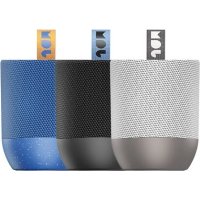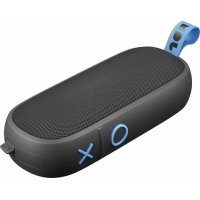
Classic Wireless HXP325 - Speaker JAM - Free user manual and instructions
Find the device manual for free Classic Wireless HXP325 JAM in PDF.


| Product type | Bluetooth Speaker |
| Brand | JAM |
| Model | Classic Wireless HXP325 |
| Power supply | Built-in rechargeable lithium-ion battery |
| Battery life | Up to 10 hours of playback |
| Charging time | Approximately 3 hours |
| Connectivity | Bluetooth, auxiliary input (cable not included) |
| Main functions | Play/pause, next/previous track, rotary volume, call management, stereo pairing of two speakers |
| LED indicator | Solid red (charging), flashing red (low battery), flashing red/blue (pairing), solid blue then slow flashing (connected) |
| Care and cleaning | Do not immerse in water; clean with a dry cloth; close waterproof covers before any contact with liquid |
| Safety | Do not expose to excessive heat; do not use by children; do not listen at high volume for long periods; battery not replaceable |
| Spare parts and repairability | Internal battery not user-replaceable; repair only by JAM authorized service |
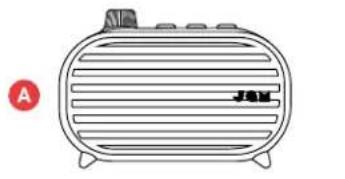
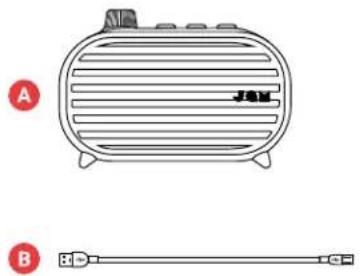
| General information | Comes with USB charging cable and quick start guide |
Frequently Asked Questions - Classic Wireless HXP325 JAM
User questions about Classic Wireless HXP325 JAM
0 question about this device. Answer the ones you know or ask your own.
Ask a new question about this device
Download the instructions for your Speaker in PDF format for free! Find your manual Classic Wireless HXP325 - JAM and take your electronic device back in hand. On this page are published all the documents necessary for the use of your device. Classic Wireless HXP325 by JAM.
USER MANUAL Classic Wireless HXP325 JAM
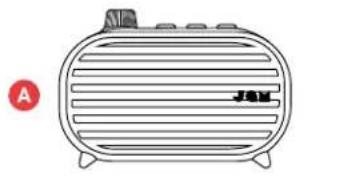
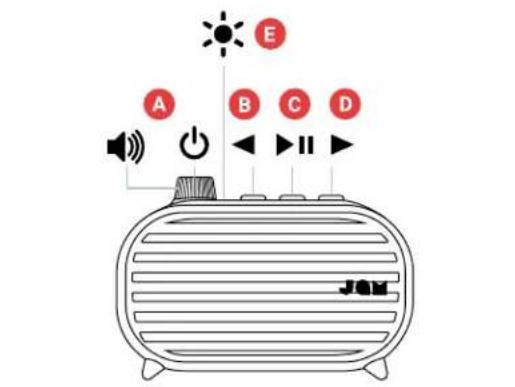
A - Power on/off/volume dial
B-Back track
C - Play/pause
D-Forward track
E-LED light indicator
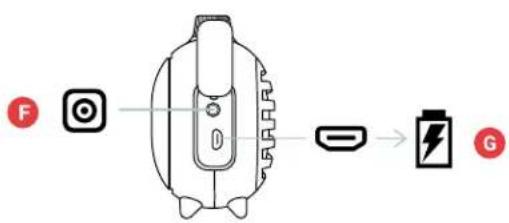
F-Aux-in port
G-USB charging port
SETUP
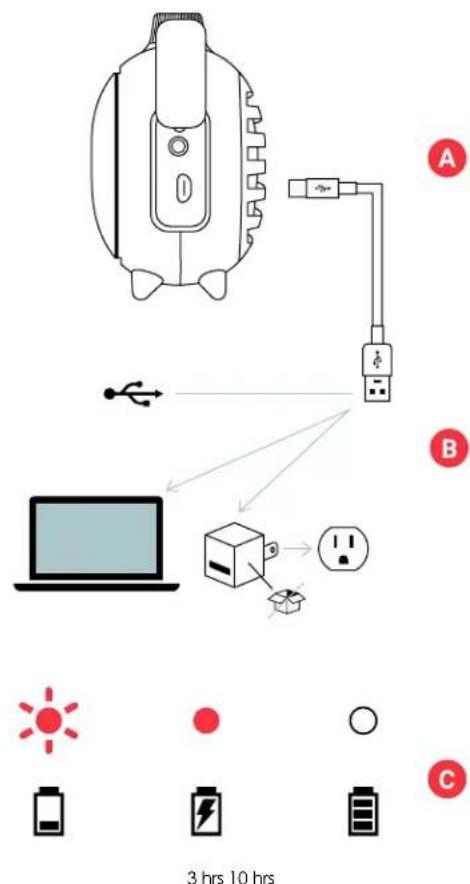
The "Classic" speaker is powered by a rechargeable battery. The speaker comes precharged; however, for optimal playtime, make sure to charge before first use.
A - To charge the speaker, open the cover of the USB charging port located on the left side. Take the included charging cable and connect the end with the micro USB into the port on the speaker labeled "Charge".
B - Connect the larger USB plug into your computer or a powered USB AC adapter. An adapter is not included in the box, but you can use the one for your cell phone or pick one up the next time you're at the store.
C- While charging, the LED light at the top of the speaker will stay solid red. Charge for about 3 hours to get up to 10 hours of playtime. Once fully charged, the LED will turn off.
USE
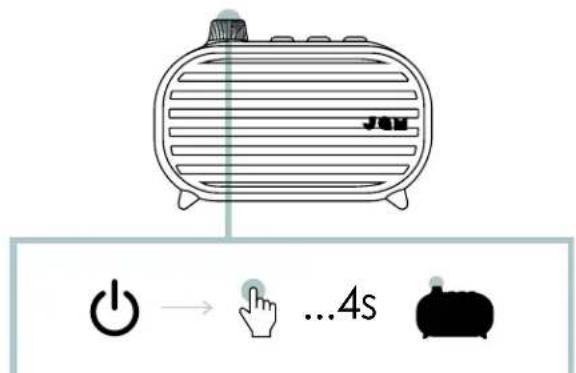
A - TURN ON YOUR SPEAKER
Press and hold the power button (which is also the volume dial) for 4 seconds to turn on your speaker.
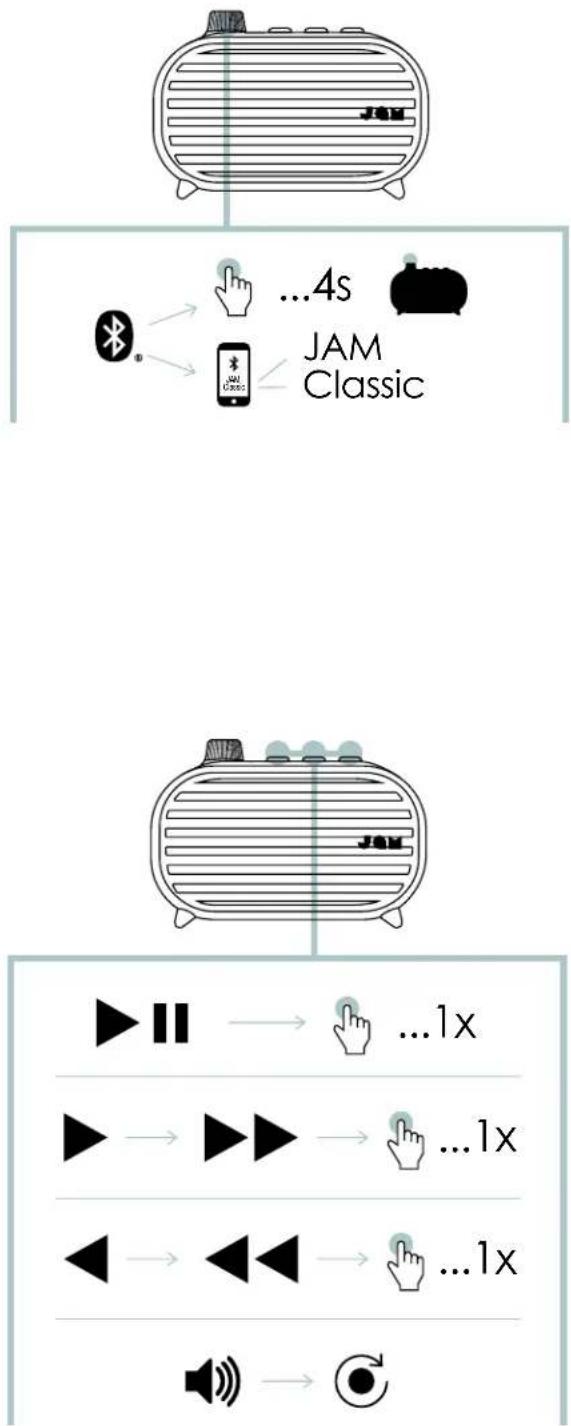
B-CONNECTING TO A DEVICE
Once turned on, the speaker will immediately search for a device to pair to. If a device has not been previously paired, the LED light on the top of the speaker will flash red and blue alternatively. Enable Bluetooth® on your device. From the Bluetooth® menu, select "JAM Classic". When the device and JAM Classic are connected, you will hear a tone and the LED light will turn solid blue momentarily then move to a slow flashing blue.
You may also connect your device to the "Classic" speaker using an aux cable, which is not included.
Note: Once paired, the speaker will remember the device every time it is turned on. To disconnect the speaker from the device, press and hold the "play/ pause" button for 3 seconds. You will hear a tone and the LED light at the top of the speaker will flash red and blue. The "Classic" is now ready to pair to a new device.
C-BUTTONFUNCTION
Quickly press the "play/pause" button once to play your music.
To increase the volume, turn the volume dial clockwise; to lower the volume, turn the volume dial counterclockwise.
To skip forward a track, quickly press the button once; to skip back a track, quickly press the once.
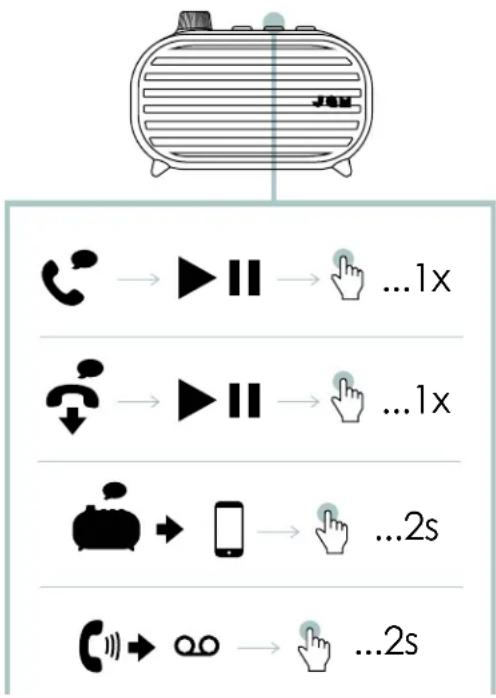
D-CALLHANDLING
If a call comes in while rocking out to your music, quickly press the "play/pause" button once to pick it up; quickly press again when you're done to hang up.
While on a call, if you want to make it private, press and hold the "play/pause" button for 2 seconds to move the call from your speaker to your phone.
If a call comes in and you don't want to pick it up, press and hold the "play/pause" button for 2 seconds to send the call to voicemail.
*See the tables on the following pages for complete button function and LED light indicator interpretation.
PAIR 2 CLASSIC SPEAKERS
- Turn on speaker 1 (press and hold the volume dial for 4 seconds to turn on).
- Pair your device to the speaker by following the "CONNECTING TO A DEVICE" instructions.
- Turn on speaker 2 (press and hold the volume dial for 4 seconds). Do not pair speaker 2 to your device.
- On speaker 1, press and hold the backward and forward button at the same time for 2 seconds. You will hear "ready to pair" while the speakers are connecting to each other. This will take a few seconds.
- Once the speakers are paired successfully together, you will hear "left channel" and "right channel" indicating that they are in stereo mode.
- Press the "play/pause" button on either speaker to listen to music. Press and hold the backward and forward button at the same time for 2 seconds to toggle between stereo and mono modes.
- Once paired, your speakers will recognize each other every time both are turned on. To disconnect pair 2 mode, press and hold the backward and forward button at the same time for 2 seconds. This will enter into pairing mode again.
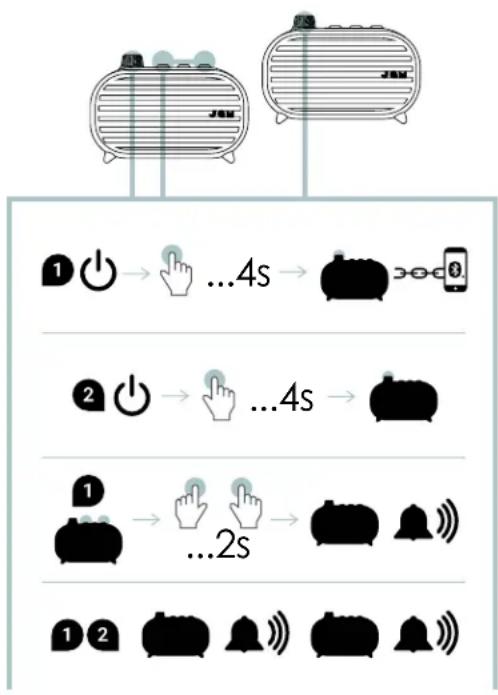
Note: If either of your speakers has been previously paired to a device, or will not pair automatically, press and hold the "play/pause" and buttons on both speakers for 2 seconds to activate pairing mode. You will know they have reached pairing mode by the red and blue blinking light.
LED INDICATORS
CHARGING
| Red flash every 5 seconds Low battery |
| Solid red Charging |
| LED off Charging complete |
IN USE
| LED flashing red and blue alternatively | Speaker is powered on and in pairing mode |
| Blue flash every 5 seconds Speaker is paired with device | |
BASIC FUNCTIONS
POWER
| Power on/off | Press and hold the power button for 4 seconds |
CALLS
| Pick up a call | Press either play/pause button once |
| Decline a call | Press and hold play/pause button for 2 seconds |
| End a call Press play/pause button once | |
| Move active call from speaker to device | Press and hold the play/pause button for 2 seconds |
| Take a second incoming call | Press either play/pause button once |
| Decline a second incoming call | Press and hold play/pause button for 2 seconds |
PAIR 2 SPEAKERS
| Enable pair 2 | Press and hold the < and > buttons simultaneously for 2 seconds |
| Switch between mono & stereo | Press and hold the < and > buttons simultaneously for 2 seconds |
MUSIC
| Play/Pause | Quickly press play/pause button once |
| Volume up Turn the volume dial clockwise | |
| Volume down | Turn the volume dial counterclockwise |
| Skip forward a track Quickly press the > button once | |
| Skip backward a track Quickly press the < button once | |
LEGAL INFORMATION
READ ALL INSTRUCTIONS BEFORE USE AND SAVE THESE INSTRUCTIONS FOR FUTURE REFERENCE.
FCC Warning:
This equipment has been tested and found to comply with the limits for a Class B digital device, pursuant to Part 15 of the FCC Rules. These limits are designed to provide reasonable protection against harmful interference in a residential installation. This equipment generates, uses, and can radiate radio frequency energy and, if not installed and used in accordance with the instructions, may cause harmful interference to radio communications. However, there is no guarantee that interference will not occur in a particular installation. If this equipment does cause harmful interference to radio or television reception, which can be determined by turning the equipment off and on, the user is encouraged to try to correct the interference by one or more of the following measures:
- Reorient or relocate the receiving antenna.
- Increase the separation between the equipment and receiver.
- Connect the equipment into an outlet on a circuit different from that to which the receiver is connected.
- Consult the dealer or an experienced radio/TV technician for help.
Any changes or modifications not expressly approved by the party responsible for compliance could void the user's authority to operate the equipment.
This device complies with Part 15 of the FCC Rules. Operation is subject to the following two conditions:
(1) This device may not cause harmful interference, and
(2) This device must accept any interference received, including interference that may cause undesired operation.
FCC RF Exposure Statement:
This equipment complies with FCC radiation exposure limits set forth for an uncontrolled environment. This transmitter must not be co-located or operating in conjunction with any other antenna or transmitter.
ISEDC Caution:
This device complies with Innovation, Science, and Economic Development Canada licence-exempt RSS standard(s). Operation is subject to the following two conditions:
(1) This device may not cause interference, and
(2) This device must accept any interference, including interference that may cause undesired operation of the device.
ISEDC RF Exposure Statement:
The device is in compliance with RF exposure guidelines; users can obtain Canadian information on RF exposure and compliance.
1-YEAR LIMITED WARRANTY - US & CANADA
WARRANTY - US & CANADA
JAM warrants this product free from defect in material and workmanship for a period of 1 year from the date of purchase. This warranty does not cover damage caused by misuse or abuse, accident, the attachment of any unauthorized accessory, alteration to the product, or any other conditions whatsoever that are beyond the control of JAM.
For detailed Warranty instructions and information, visit: www.jamaudio.com/customer-support/warranty-1yr. To obtain warranty service on your JAM product, contact a Consumer Relations representative by the telephone number or email address for your country of residence. Please make sure to have the model number of the product available.
For service in the USA
Email:
8:30am-7:00pm EST Monday-Friday
For service in Canada
Email:
cservice@homedicsgroup.ca
Tel: 1-888-225-7378
8:30am-5:00pm EST Monday-Friday
WARRANTY - UK & EUROPE
JAM warrants this product free from defect in material and workmanship for a period of 2 years from the date of purchase. This warranty does not cover damage caused by misuse or abuse, accident, the attachment of any unauthorised accessory, alteration to the product, or any other conditions whatsoever that are beyond the control of JAM. Distributed in the EU by FKA Brands Ltd, Somerhill Business Park, Tonbridge, TN11 0GP, UK. Tel: 020 3538 0768 Email: uksupport@jamaudio.com.
WARRANTY - AUSTRALIA
(1-YEAR LIMITED WARRANTY)
We or Us means HoMedics Australia Pty Ltd ACN 31 103 985 717 and our contact details are set out at the end of this warranty; You means the purchaser or the original end-user of the Goods. You may be a domestic user or a professional user; Supplier means the authorized distributor or retailer of the Goods that sold you the Goods in Australia and New Zealand; and Goods means the product or equipment which was accompanied by this warranty and purchased in Australia and New Zealand.
For Australia:
Our Goods come with guarantees that cannot be excluded under the Australian Consumer Law. You are entitled, subject to the provisions of the Australian Consumer Law, to a replacement or refund for a major failure and for compensation for any other reasonably foreseeable loss or damage. You are also entitled, subject to the provisions of the Australian Consumer Law, to have the Goods repaired or replaced if the goods fail to be of acceptable quality and the failure does not amount to a major failure. This is not a complete statement of your legal rights as a consumer.
For New Zealand:
Our Goods come with guarantees that cannot be excluded under the Consumer Guarantees Act 1993. This guarantee applies in addition to the conditions and guarantees implied by that legislation.
The Warranty
JAM sells its products with the intent that they are free of defects in manufacture and workmanship under normal use and service. In the unlikely event that your JAM product proves to be faulty within 1 year from the date of purchase due to workmanship or materials only, we will replace it at our own expense, subject to the terms and conditions of this guarantee. The warranty period is limited to 3 months from the date of purchase for products used commercially/professionally.
Terms and Conditions:
In addition to the rights and remedies that you have under the Australian Consumer Law, Consumer Guarantees Act of New Zealand or any other applicable law and without excluding such rights and remedies warranty against defects:
- The Goods are designed to withstand the rigors of normal household use and are manufactured to the highest standards using the highest quality components. Whilst unlikely, if, during the first 12 months (3 months commercial use) from their date of purchase from the Supplier (Warranty Period), the Goods prove defective by reason of improper workmanship or materials and none of your statutory rights or remedies apply, we will replace the Goods, subject to the terms and conditions of this warranty.
- We do not have to replace the Goods under this Additional Warranty if the Goods have been damaged due to misuse or
abuse, accident, the attachment of any unauthorised accessory, alteration to the product, improper installation, unauthorised repairs or modifications, improper use of electrical/power supply, loss of power, malfunction, or damage of an operating part from failure to provide manufacturer's recommended maintenance, transportation damage, theft, neglect, vandalism, environmental conditions, or any other conditions whatsoever that are beyond the control of JAM.
- This Warranty does not extend to the purchase of used, repaired, or secondhand products, or to products not imported or supplied by HoMedics Australia Pty Ltd, including but not limited to those sold on offshore internet auction sites.
- This Warranty extends only to consumers and does not extend to Suppliers.
- Even when we do not have to replace the Goods, we may decide to do so anyway. In some cases, we may decide to substitute the Goods with a similar alternative product of our choosing. All such decisions are at our absolute discretion.
- All such replaced or substituted Goods continue to receive the benefit of this Additional Warranty for the time remaining on the original Warranty Period (or 3 months, whichever is the longest).
- This Additional Warranty does not cover items damaged by normal wear and tear, including but not limited to chips, scratches, abrasions, discolouration, and other minor defects, where the damage has negligible effect on the operation or performance of the Goods.
- This Additional Warranty is limited to replacement or substitution only. As faras the law permits, we will not be liable for any loss or damage caused to property or persons arising from any cause whatsoever, and shall have no liability for any incidental, consequential, or special damages.
- This warranty is only valid and enforceable in Australia and New Zealand.
Making a Claim:
In order to claim under this Warranty, you must return the Goods to the Supplier (place of purchase) for replacement. If this is not possible, please contact our Consumer Relations department by email (cservice@homedics.com.au) or at the address below.
-
All returned Goods must be accompanied by satisfactory proof of purchase that clearly indicates the name and address of the Supplier, the date and place of purchase, and identifies the product. It is best to provide an original, legible, and unmodified receipt or sales invoice.
-
You must bear any expense for return of the Goods or otherwise associated with making your claim under this Additional Warranty.
Distributed in Australia by HOMEDICS AUSTRALIA PTY LTD, 14 Kingsley Close, Rowville, Victoria 3178. Distributed in New Zealand by Phoenix Distribution NZ Ltd, 7B Orbit Drive, Albany / North Shore 0757, Auckland, New Zealand.
For service in Australia
Email:
cservice@homesdics.com.au
Tel: 03-87566500
8:30am-5:00pm AEST Monday-Friday
www.jam-audio.com.au
IMPORTANT SAFETY INSTRUCTIONS
READ ALL INSTRUCTIONS BEFORE USING.
WARNING: Do not place speakers too close to ears. May cause damage to ear drums, especially in young children.
- Use this product only for its intended purpose as described in this manual. Do not use attachments not recommended by JAM
- JAM is not liable for any damage caused to smartphones, iPod/MP3 players, or any other devices.
-
Do not place or store this product where it can fall or be dropped into a tub or sink without shutting waterproof doors.
-
Do not place or drop into water or any other liquid without shutting waterproof doors.
Not for use by children. THIS IS NOT A TOY. - Never operate this product if it has a damaged cord, plug, cable, or housing.
- Keep away from heated surfaces.
- Only set on dry surface. Do not place on surface wet from water or cleaning solvents if waterproof doors are open.
WARNING:
This product has an internal, non
replaceable lithium battery. Please dispose in accordance with your local, state, province, and country guidelines. Batteries (battery pack or batteries installed) shall not be exposed to excessive heat such as sunshine, fire, or the like.
BATTERY REPLACEMENT
Your speaker includes a rechargeable battery designed to last the lifetime of the product. In the unlikely event that you should require a replacement battery, please contact Consumer Relations, which will supply details of the warranty and out-of-warranty replacement battery service. This product contains small parts that may present a choking hazard for young children.
CAUTION: All servicing of this product must be performed by authorized JAM Audio service personnel only. For complete user guide and to register your product, visit www.JAMaudio.com (USA), canada.jamaudio.com (Canada), or uk.jamaudio.com/instructionbooks (UK).

To prevent possible hearing damage, do not listen at high volume for long periods.

WEEE EXPLANATION
This marking indicates that this product should not be disposed with other household wastes throughout the EU. To prevent possible harm to the environment or human health from uncontrolled waste disposal, recycle it responsibly to promote the sustainable reuse of material resources.

BATTERY DIRECTIVE
This symbol indicates that batteries must not be disposed of in the domestic waste as they contain substances that can be damaging to the environment and health. Please dispose of batteries in designated collection points.
Hereby, FKA Brands Ltd, declares that this radio device is in compliance with the essential requirements and other relevant provisions of Directive 2014/53/EU. A copy of the Declaration of Conformity can be obtained from uk.JAMaudio.com/DoC.
© 2020 HMDX. All rights reserved. JAM is a registered trademark of FKA Distributing Co. The Bluetooth® word mark and logos are registered trademarks owned by Bluetooth® SIG, Inc. and any use of such marks by HMDX is under license.



Operating frequency band: 2402 - 2480MHz
HX-P325: Maximum radio-frequency power transmitted: 0.84 dBm
Distributed by HMDX.
3000 N Pontiac Trail
Commerce Township, MI 48390
All rights reserved.
IB-HXP325


CLASSIC
WIRELESS SPEAKER
HX-P325
cservice@homedicalsgroup.ca
Telephone: 1-888-225-7378
© 2020 HMDX. All rights reserved. JAM is a registered trademark of FKA Distributing Co. The Bluetooth® word mark and logos are registered trademarks owned by Bluetooth® SIG, Inc. and any use of such marks by HMDX is under license.



Operating frequency band: 2402 - 2480MHz
HX-P325: Maximum radio-frequency power transmitted: 0.84 dBm
Distributed by HMDX.
3000 N Pontiac Trail
Commerce Township, MI 48390
All rights reserved.
IB-HXP325


CLASSIC
WIRELESS SPEAKER
HX-P325
© 2020 HMDX. All rights reserved. JAM is a registered trademark of FKA Distributing Co. The Bluetooth® word mark and logos are registered trademarks owned by Bluetooth® SIG, Inc. and any use of such marks by HMDX is under license.



Operating frequency band: 2402 - 2480MHz
HX-P325: Maximum radio-frequency power transmitted: 0.84 dBm
Distributed by HMDX.
3000 N Pontiac Trail
Commerce Township, MI 48390
All rights reserved.
IB-HXP325


CLASSIC
WIRELESS SPEAKER
HX-P325
Gebrauchsanleitung
INHALT BEDIENELEMENTE



© 2020 HMDX. All rights reserved. JAM is a registered trademark of FKA Distributing Co. The Bluetooth® word mark and logos are registered trademarks owned by Bluetooth® SIG, Inc. and any use of such marks by HMDX is under license.



Operating frequency band: 2402 - 2480MHz
HX-P325: Maximum radio-frequency power transmitted: 0.84 dBm
Distributed by HMDX. 3000 N Pontiac Trail
Commerce Township, MI 48390
All rights reserved.
IB-HXP325


CLASSIC
WIRELESS SPEAKER
HX-P325
Handleiding
INHOUD BEDIENING


© 2020 HMDX. All rights reserved. JAM is a registered trademark of FKA Distributing Co. The Bluetooth® word mark and logos are registered trademarks owned by Bluetooth® SIG, Inc. and any use of such marks by HMDX is under license.



Operating frequency band: 2402 - 2480MHz
HX-P325: Maximum radio-frequency power transmitted: 0.84 dBm
Distributed by HMDX. 3000 N Pontiac Trail
Commerce Township, MI 48390
All rights reserved. IB-HXP325


CLASSIC
WIRELESS SPEAKER
HX-P325
A - ACCENSIONE DELL'ALTOPARLANTE
© 2020 HMDX. All rights reserved. JAM is a registered trademark of FKA Distributing Co. The Bluetooth® word mark and logos are registered trademarks owned by Bluetooth® SIG, Inc. and any use of such marks by HMDX is under license.



Operating frequency band: 2402 - 2480MHz
HX-P325: Maximum radio-frequency power transmitted: 0.84 dBm
Distributed by HMDX. 3000 N Pontiac Trail
Commerce Township, MI 48390
All rights reserved. IB-HXP325


CLASSIC
WIRELESS SPEAKER
HX-P325
T
内容用部
© 2020 HMDX. All rights reserved. JAM is a registered trademark of FKA Distributing Co. The Bluetooth® word mark and logos are registered trademarks owned by Bluetooth® SIG, Inc. and any use of such marks by HMDX is under license.



Operating frequency band: 2402 - 2480MHz
HX-P325: Maximum radio-frequency power transmitted: 0.84 dBm
Distributed by HMDX. 3000 N Pontiac Trail
Commerce Township, MI 48390
All rights reserved. IB-HXP325


CLASSIC
WIRELESS SPEAKER
HX-P325
使用說明
目錄控制


© 2020 HMDX. All rights reserved. JAM is a registered trademark of FKA Distributing Co. The Bluetooth® word mark and logos are registered trademarks owned by Bluetooth® SIG, Inc. and any use of such marks by HMDX is under license.



Operating frequency band: 2402 - 2480MHz
HX-P325: Maximum radio-frequency power transmitted: 0.84 dBm
Distributed by HMDX. 3000 N Pontiac Trail
Commerce Township, MI 48390
All rights reserved. IB-HXP325