EasyManual
HWK660 - Soundbar SAMSUNG - Free user manual and instructions
Find the device manual for free HWK660 SAMSUNG in PDF.



Frequently Asked Questions - HWK660 SAMSUNG
User questions about HWK660 SAMSUNG
0 question about this device. Answer the ones you know or ask your own.
Ask a new question about this device
Download the instructions for your Soundbar in PDF format for free! Find your manual HWK660 - SAMSUNG and take your electronic device back in hand. On this page are published all the documents necessary for the use of your device. HWK660 by SAMSUNG.
USER MANUAL HWK660 SAMSUNG
Thank you for purchasing this Samsung product. To receive more complete service, please register your product at www.samsung.com/register
SAFETY INFORMATION
SafetyWarnings
TO REDUCE THE RISK OF ELECTRIC SHOCK, DO NOT REMOVE THE COVER (OR BACK). NO USER-SERVICEABLE PARTS ARE INSIDE. REFER SERVICING TO QUALIFIED SERVICE PERSONNEL.
| CaUtiOn riSK Of eLeCtrlC SHOCK. DO nOt OPen. | This symbol indicates that high voltage is present inside. It is dangerous to make any kind of contact with any internal part of this product. | ||
| This symbol indicates that important literature concerning operation and maintenance has been included with this product. |
| Class II product : This symbol indicates that it does not require a safety connection to electrical earth (ground). | |
| ~ | AC voltage : This symbol indicates that the rated voltage marked with the symbol is AC voltage. |
| — | DC voltage : This symbol indicates that the rated voltage marked with the symbol is DC voltage. |
| Caution, Consult instructions for use : This symbol instructs the user to consult the user manual for further safety related information. | |
Warning : To reduce the risk of fire or electric shock, do not expose this appliance to rain or moisture.
CaUtiOn : TO PREVENT ELECTRIC SHOCK, MATCH WIDE BLADE OF PLUG TO WIDE SLOT, FULLY INSERT.
- This apparatus shall always be connected to a AC outlet with a protective grounding connection.
- To disconnect the apparatus from the mains, the plug must be pulled out from the mains socket, therefore the mains plug shall be readily operable.
CaUtiOn
- Do not expose this apparatus to dripping or splashing. Do not put objects filled with liquids, such as vases on the apparatus.
- To turn this apparatus off completely, you must pull the power plug out of the wall socket. Consequently, the power plug must be easily and readily accessible at all times.
PreCaUtiOnS
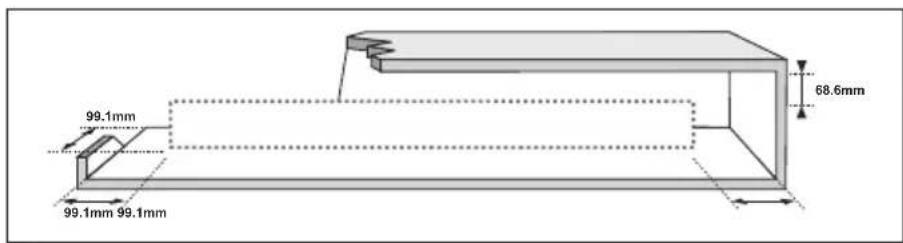
Ensure that the AC power supply in your house complies with the power requirements listed on the identification sticker located on the back of your product. Install your product horizontally, on a suitable base (furniture), with enough space around it for ventilation (7 10~cm) . Make sure the ventilation slots are not covered. Do not place the unit on amplifiers or other equipment which may become hot. This unit is designed for continuous use. To fully turn off the unit, disconnect the AC plug from the wall outlet. Unplug the unit if you intend to leave it unused for a long period of time.
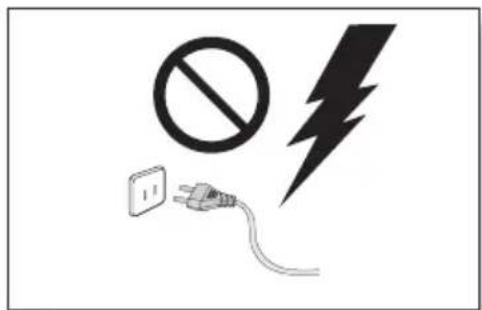
During thunderstorms, disconnect the AC plug from the wall outlet. Voltage peaks due to lightning could damage the unit.
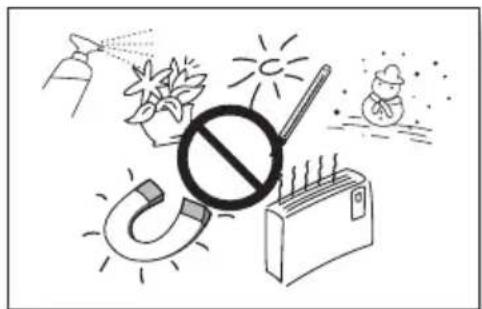
Protect the product from moisture (i.e. vases), and excess heat (e.g. a fireplace) or equipment creating strong magnetic or electric fields. Disconnect the power cable from the AC supply if the unit malfunctions. Your product is not intended for industrial use. It is for personal use only. Condensation may occur if your product has been stored in cold temperatures. If transporting the unit during the winter, wait approximately 2 hours until the unit has reached room temperature before using.
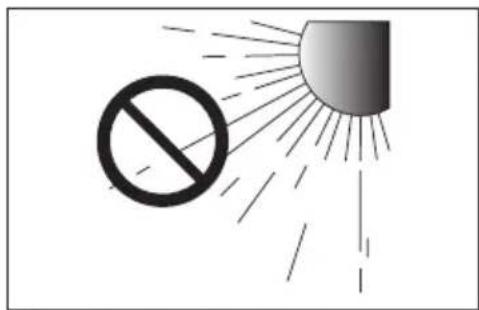
Do not expose the unit to direct sunlight or other heat sources. This could lead to overheating and cause the unit to malfunction.
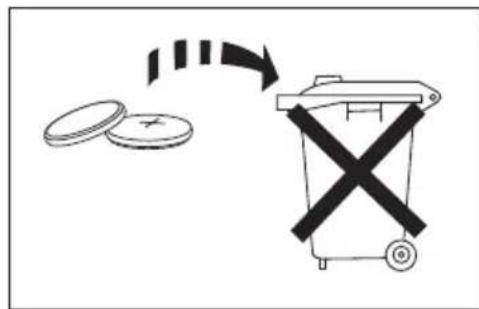
The batteries used with this product contain chemicals that are harmful to the environment. Do not dispose of batteries in the general household trash. Do not dispose of batteries in a fire. Do not short circuit, disassemble, or overheat the batteries. There is a danger of explosion if the battery is incorrectly replaced. Replace only with the same or equivalent type.

WARNING: DO NOT INGEST BATTERY. CHEMICAL BURN HAZARD. The remote control supplied with this product contains a coin/button cell battery. If the coin/button cell battery is swallowed, it can cause severe internal burns in just 2 hours and can lead to death. Keep new and used batteries away from children. If the battery compartment does not close securely, stop using the product and keep it
away from children. If you think batteries might have been swallowed or placed inside any part of the body, seek immediate medical attention.
CONTENTS
2 GETTING STARTED
2 Safety Information
5 What's Included
6 DESCRIPTIONS
6 Front / Right Side Panel
7 Rear / Bottom Panel
8 Remote Control
11 INSTALLATION
11 Installing the Soundbar
11 Installing the Wall Mount
15 Detaching the Soundbar from the Wall
16 CONNECTIONS
16 Connecting the Subwoofer
18 Connecting to a TV
18 Connecting to a TV Using a Digital Optical Cable
19 Connecting to a TV Using an HDMI (Digital) Cable
19 TV SoundConnect
21 Connecting to External Devices
21 Optical or Analogue Audio Cable
22 HDMI Cable
23 FUNCTIONS
23 Input Mode
24 Bluetooth
27 Using the Multiroom App
29 Using the Network Standby On Function
30 Software Update
32 TROUBLESHOOTING
32 Troubleshooting
33 APPENDIX
33 Specifications
- Figures and illustrations in this User Manual are provided for reference only and may differ from actual product appearance.
- An administration fee may be charged if either (a) an engineer is called out at your request and there is no defect with the product (i.e. where the user manual has not been read).
(b) you bring the unit to a repair centre and there is no defect with the product (i.e. where the user manual has not been read). - You will be informed of the administration fee amount before a technician visits.
WHAT'S INCLUDED
BEFORE READING THE USER'S MANUAL
Note the following terms before reading the user manual.
Icons used in this manual
| Icon Term Definition | ||
| Caution | Indicates a situation where a function does not operate or settings may be cancelled. | |
| Note | Indicates tips or instructions on the page that help you operate a function. | |
Check for the supplied accessories shown below.
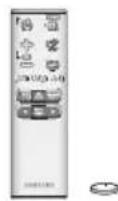
Remote Control / Lithium Battery (3V:CR2032)

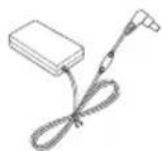

Power Cord : 2 EA AC/DC Adapter Optical Cable



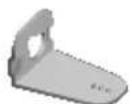
Wall Mount Guide Holder-Screw : 2 EA Screw : 2 EA
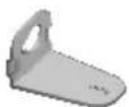
Bracket-Wall Mount L Bracket-Wall Mount R

- The appearance of the accessories may differ slightly from the illustrations above.
- Micro USB to USB adapter and HDMI cables are sold separately. To purchase, contact a Samsung Service Centre or Samsung Customer Care.
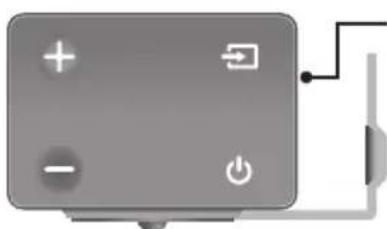
Controls the volume level.
The numeric value of the volume level appears in the front panel display.
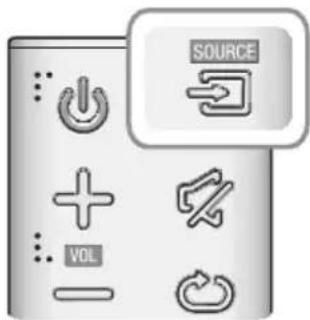
Source) Button
Selects the D.IN, AUX, HDMI, BT, or TV input.
While the unit is powered on, pressing the button for more than 3 seconds sets the button to act as the (Mute) button. To cancel the (Mute) button setup, press the button for more than 3 seconds again.
Power) Button
Turns the power on and off.
While the unit is powered on, pressing the button for more than 3 seconds sets the button to act as the (Mute) button. To cancel the (Mute) button setup, press the button for more than 3 seconds again.

Displays the current mode.

- When you plug in the AC cord, the power button will begin working in 4 to 6 seconds.
- When you turn on this unit, there will be a 4 to 5 second delay before it produces sound.
- If you want to enjoy sound only from the Soundbar, you must turn off the TV's speakers in the Audio Setup menu of your TV. Refer to the owner's manual supplied with your TV.
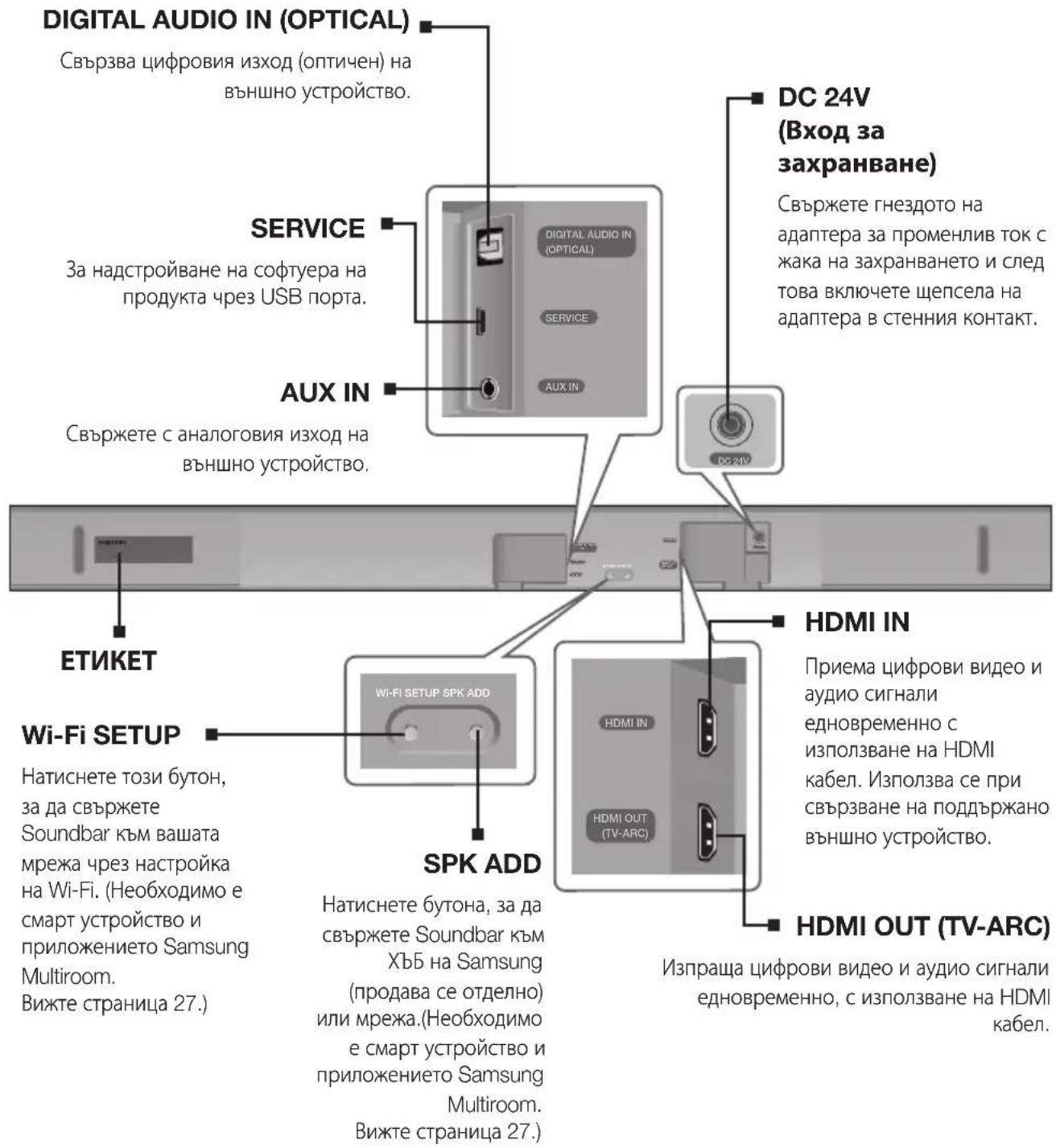
REAR / BOTTOM PANEL
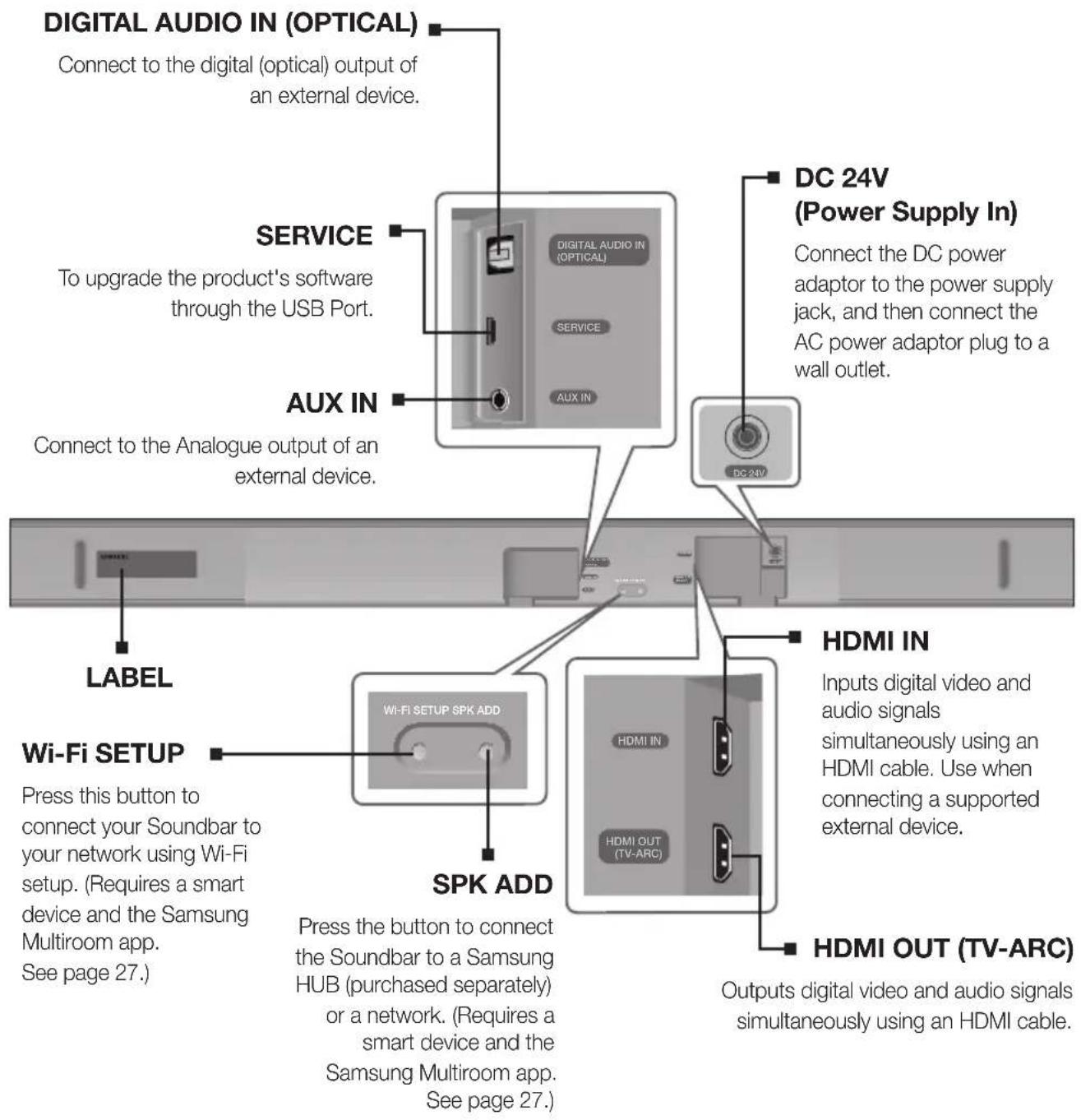

- When disconnecting the power cable of the AC power adaptor from a wall outlet, pull the plug. Do not pull the cable.
- Do not connect this unit or other components to an AC outlet until all connections between components are complete.
- Make sure to rest the AC/DC Adapter flat on a table or the floor. If you place the AC/DC Adapter so that it is hanging with the AC cord input facing upwards, water or other foreign substances could enter the Adapter and cause the Adapter to malfunction.
REMOTE CONTROL
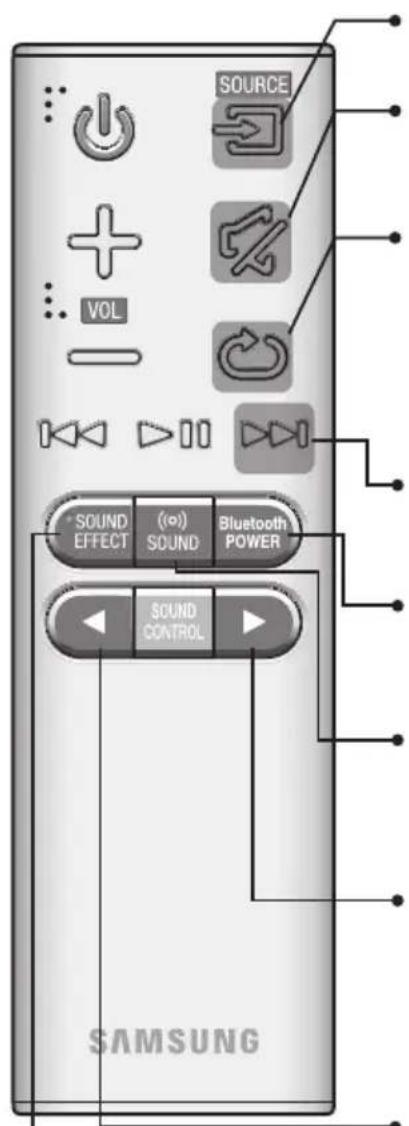
SOURCE
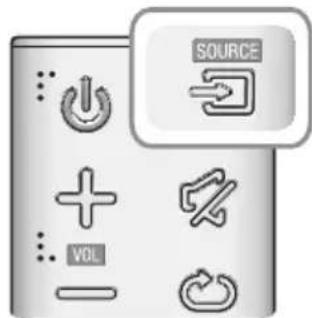
Press to select a source connected to the Soundbar.
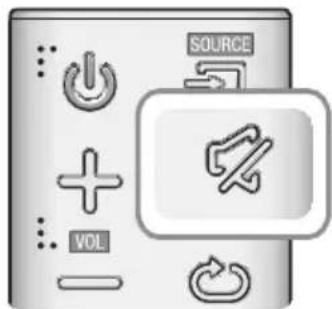
Mute
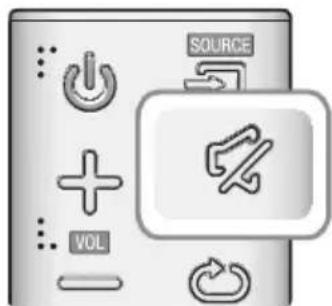
You can turn the volume down to 0 with the push of a button. Press again to restore the sound to the previous volume level.
Repeat
The Repeat function is available only when playing back music from Songs on phone or DMS of Samsung Multiroom app.
OFF - REPEAT : Cancels Repeat Playback.
TRACK - REPEAT : Plays a track repeatedly.
ALL - REPEAT : Plays all tracks repeatedly.
Skip Forward
If there is more than one file on the device you are playing, and you press the button, the next file is selected.
Bluetooth POWER
Press the Bluetooth POWER button on the remote to turn the Bluetooth POWER On function on and off. See pages 20 and 25 for details.
(o) SOUND
Surround Sound adds depth and spaciousness to the sound. Pressing the (o) SOUND button repeatedly cycles through the Surround Sound settings : ON - SURROUND SOUND, OFF - SURROUND SOUND
Press and hold the button for about 5 seconds to turn the Anynet+ function on or off.
OFF-ANYNET+,ON-ANYNET+
The Anynet+ function lets you control the Soundbar with the remote from an
Anynet ^+ compatible Samsung TV.
The Soundbar must be connected to the TV via an HDMI cable.
Press and hold the button for about 5 seconds to turn the Auto Power Link function on or off.
OFF - POWER LINK, ON - POWER LINK
- Auto Power Link Synchronizes the Soundbar to a connected Optical source via the Optical jack so it turns on automatically when you turn on your TV. (See page 18)
Auto Power Link function is only available in the D.IN mode.
SOUND EFFECT
You can select from 6 sound modes - STANDARD (Original Sound), MUSIC, CLEAR VOICE, SPORTS, MOVIE, and NIGHT - depending on the content you want to listen to.
Select the STANDARD mode if you want to enjoy the original sound.
* DRC (Dynamic Range Control)
Lets you apply dynamic range control to Dolby Digital. Press and hold the SOUND EFFECT button for about 5 seconds in STANDBY mode to turn the DRC (Dynamic Range Control) function on or off.
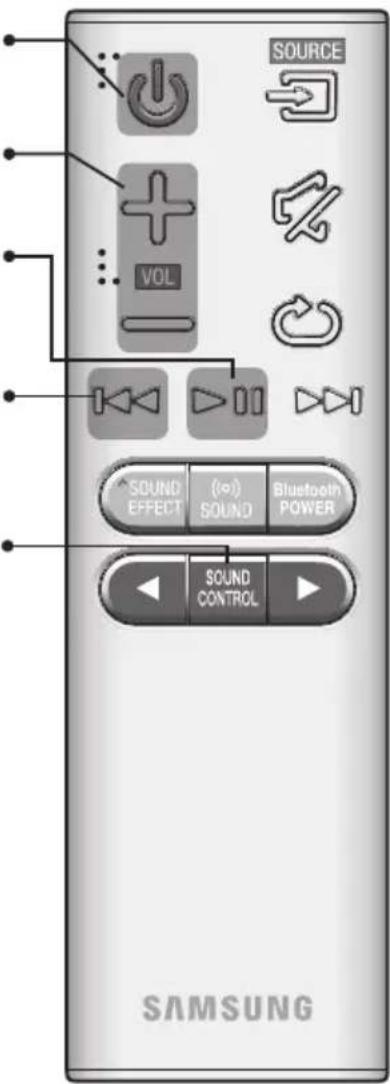
Power Turns the Soundbar on and off.
Volume
Adjusts the volume level of the unit.
Play/Pause
Press the button to pause a file temporarily. Press the button again to play the selected file.
Skip Back
If there is more than one file on the device you are playing, and you press the button, the previous file is selected.
SOUND CONTROL
Press to select TREBLE, BASS, SUBWOOFER LEVEL or AUDIO SYNC.
Then, use the , buttons to adjust the TREBLE or BASS volume from -3 +3 , SUBWOOFER LEVEL volume from -12 , -6 +6 . Press and hold the SOUND CONTROL button for about 5 seconds to adjust the sound for each frequency band. 150Hz , 300Hz , 600Hz , 1.2KHz , 2.5KHz , 5KHz , and 10KHz are selectable and each can be adjusted to a setting between -6 +6 .
If the Soundbar is connected to a digital TV and the video appears out of sync with the audio, press the SOUND CONTROL button to sync the audio with the video. Use the , buttons to set the audio delay between 0 ms ~ 300 ms. In TV mode, and BT mode, the Audio Sync function may not available.

- Operate the TV using the TV's remote control.
Controlling the Soundbar using Your TV Remote Control
- Press and hold the (o) SOUND button for more than 5 seconds while the Soundbar is turned on.
- "ON - TV REMOTE" appears on the Soundbar's display.
- In the TV's menu, set the TV speaker to external speaker.

- Not available if the TV ARC function or HDMI mode is in use.
- All buttons are not available except the VOL +/- and the 出 buttons in this function.
- TV menus differ by manufacturer and model. Refer to the TV's user manual for further information.
- Manufacturers supporting this function:
- VIZIO, LG, Sony, Sharp, PHILIPS, PANASONIC, TOSHIBA, GRUNDIG, Hisense, RCA
- This function may not be compatible with your TV's remote depending on the remote control's manufacturer.
- To turn off this function, press the SOUND button for 5 seconds. "OFF - TV REMOTE" appears on the Soundbar's display.
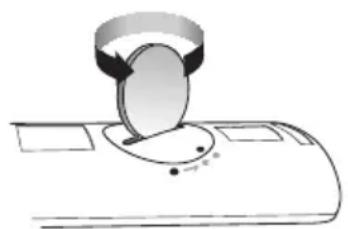
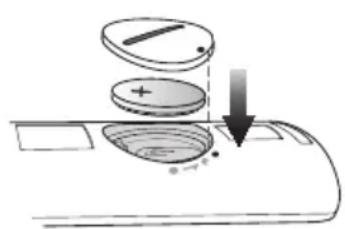
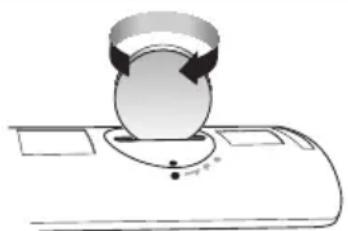
INSTALLING THE BATTERY IN THE REMOTE CONTROL
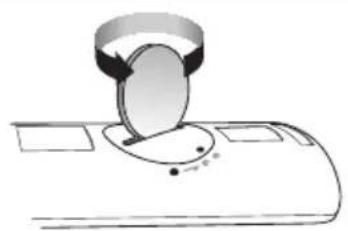
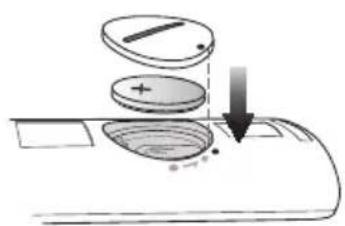
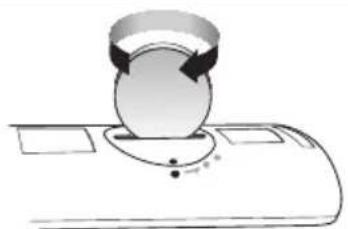
-
Use a suitable coin to turn the remote control's battery cover counterclockwise to remove it as shown in the figure above.
-
Insert a 3V lithium battery. Keep the positive (+) pole facing up when inserting the battery. Put the battery cover on and align the '●' marks side by side as shown in the figure above.
-
Use a suitable coin to turn the remote control battery cover clockwise as far as it will go to fix it in place.
INSTALLING THE SOUNDBAR
INSTALLING THE WALL MOUNT
Installation Precautions
Install on a vertical wall only.
- For the installation, avoid a location with high temperature or humidity, or a wall that cannot sustain the weight of the set.
- Check the strength of the wall. If the wall is not strong enough to support the unit, reinforce the wall or install the unit on a different wall that can support the unit's weight.
Purchase and use the fixing screws or anchors appropriate for the kind of wall you have (plaster board, iron board, wood, etc.). If possible, fix the support screws into wall studs.
Purchase wall mounting screws according to the type and thickness of the wall you will mount the Soundbar on.
-Diameter: M5
-Length: 35 mm or longer recommended.
- Connect cables from the unit to external devices before you install it on the wall.
Make sure the unit is turned off and unplugged before you install it. Otherwise, it may cause an electric shock.
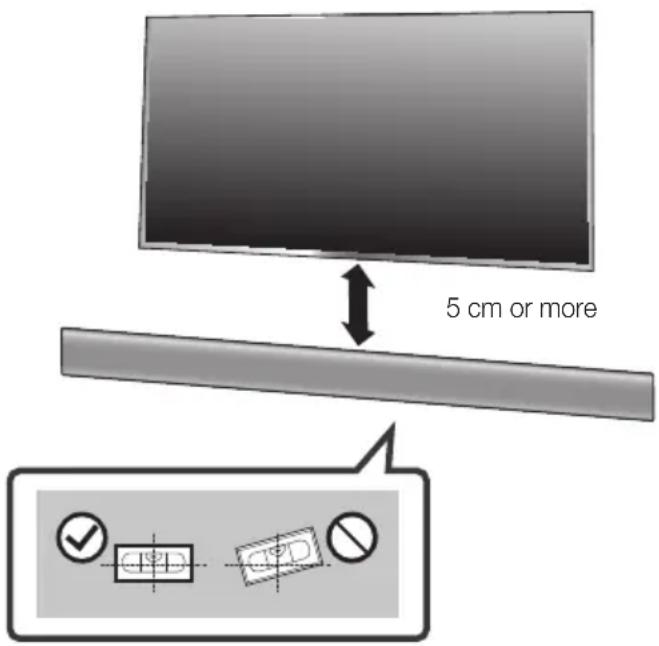
- Place the Wall Mount Guide against the wall surface.
The Wall Mount Guide must be level.
If the TV is mounted on the wall, install the Soundbar at least 5cm below the TV.
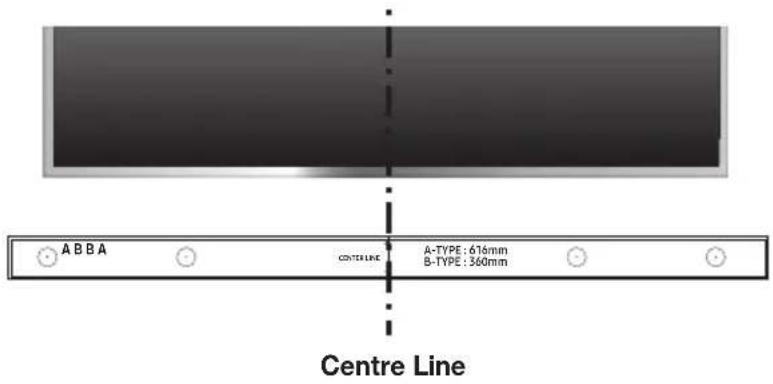
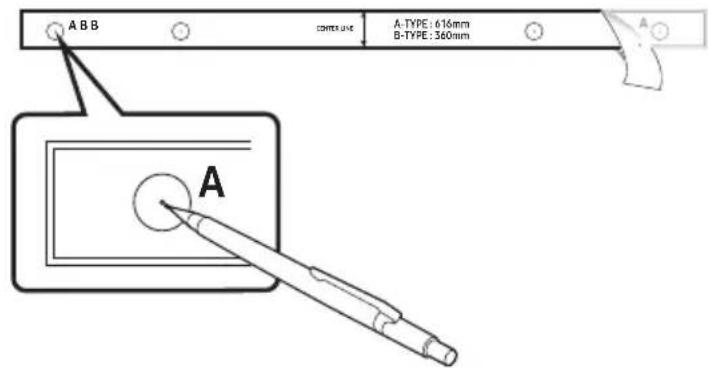
- Align the Paper Template's Centre Line with the centre of your TV (if you are mounting the Soundbar below your TV), and then fix the Wall Mount Guide to the wall using tape.

- If you are not mounting below a TV, place the Centre Line in the centre of the installation area.
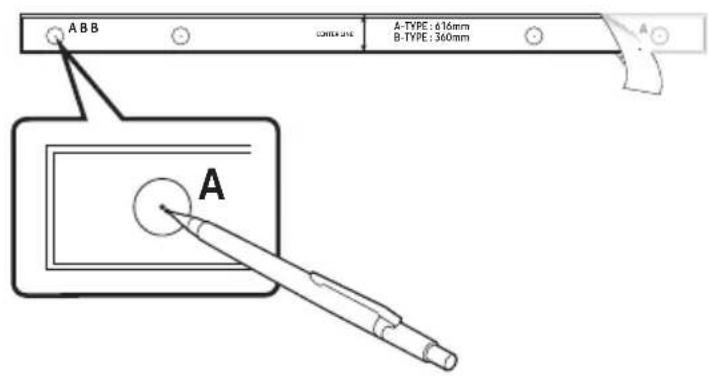
-
Push a pen tip or sharpened pencil tip through the centre of the A-TYPE images on each end of the Guide to mark the holes for the supporting screws, and then remove the Wall Mount Guide.
-
Using an appropriately sized drill bit, drill a hole in the wall at each marking.

- If the markings do not correspond to the positions of studs, make sure you insert appropriate anchors or molies into the holes before you insert the support screws. If you use anchors or molies, make sure the holes you drill are large enough for the anchors or molies you use.
ENG
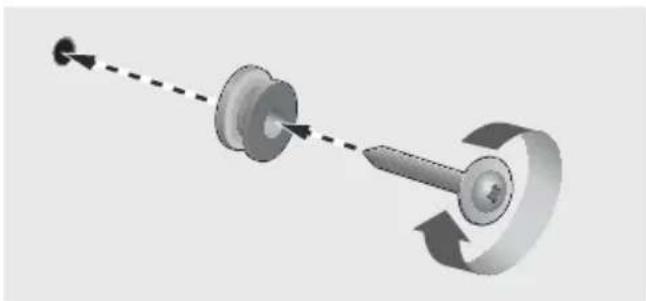
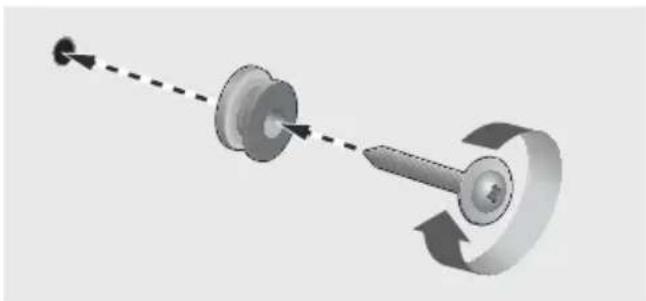
- Push a screw (not supplied) through each Holder-Screw, and then screw each screw firmly into a support screw hole.
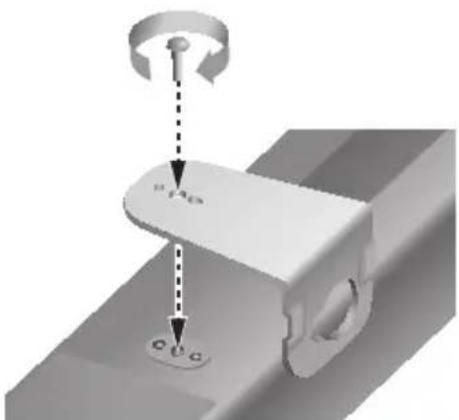
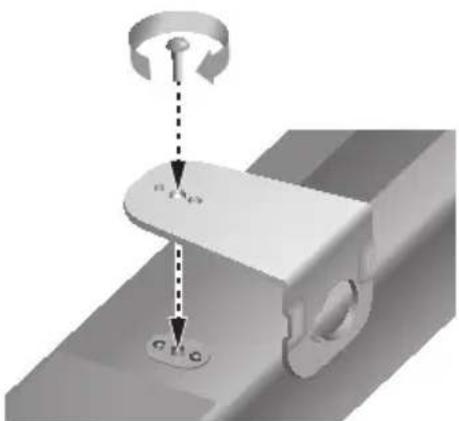
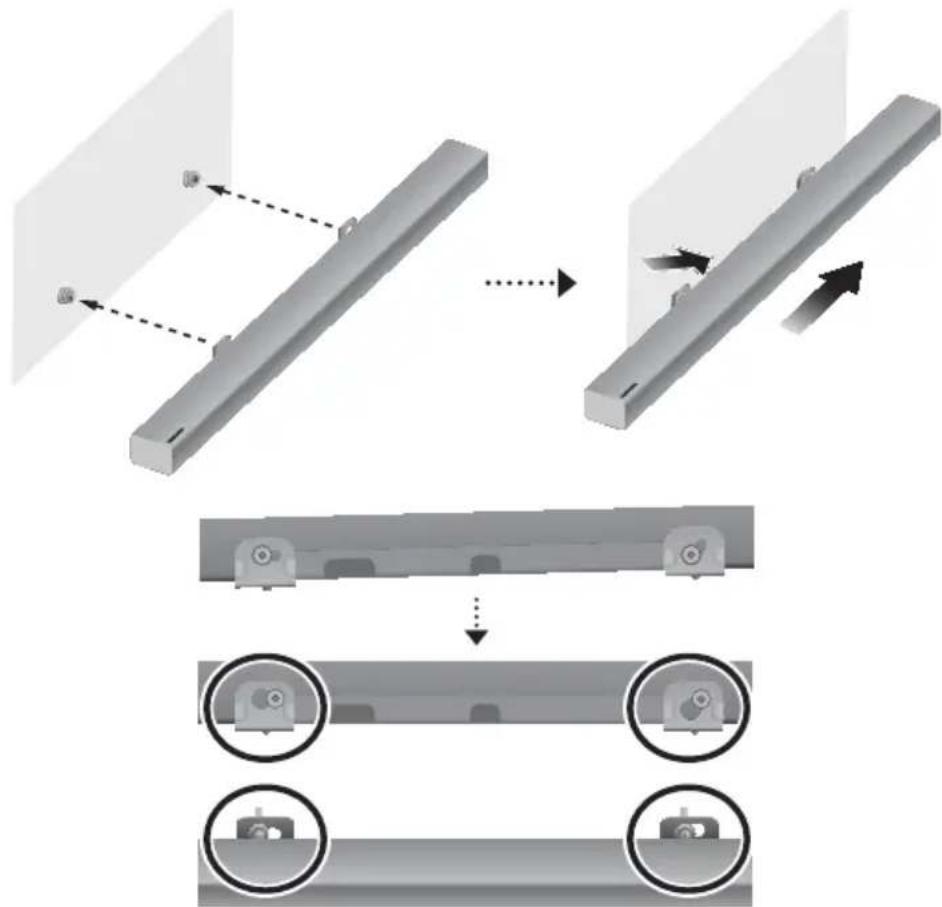
- Use the two Screws (M4 x L12) to attach both Bracket-Wall Mount L and R to the Soundbar's bottom. For a proper fit, make sure to align the bumps on the Soundbar to the holes on the brackets.

Rear side of Soundbar
Right end of Soundbar
- When assembling, make sure the hanger part of Bracket-Wall Mounts faces backwards.

Wall Mount LWall Mount R
- The left and right mounts are different shapes. Make sure to position them correctly.
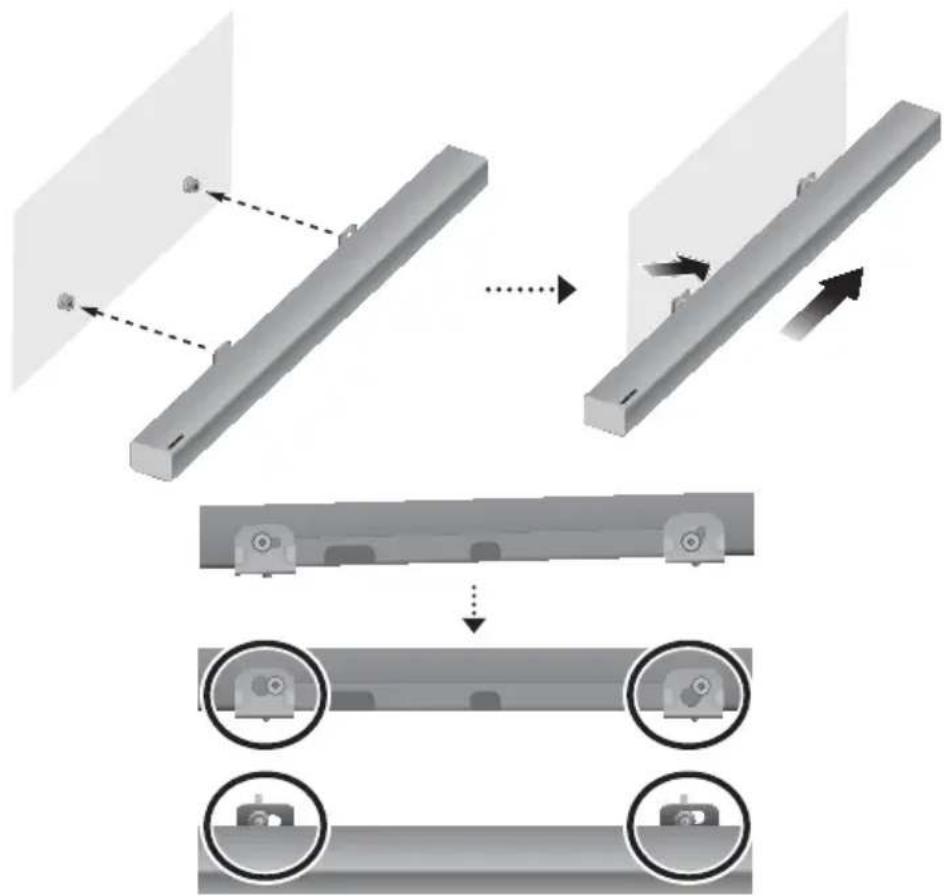
- Install the Soundbar with the attached Bracket-Wall Mounts by hanging the Bracket-Wall Mounts on the Holder-Screws on the wall.

- Slightly tilt the Soundbar to insert both Holder-Screw heads into Bracket-Wall Mount holes. Push the Soundbar in the direction of the arrow to make sure both sides are firmly fixed.
DetaCHing tHe SOUnDBar frOM tHe WaLL
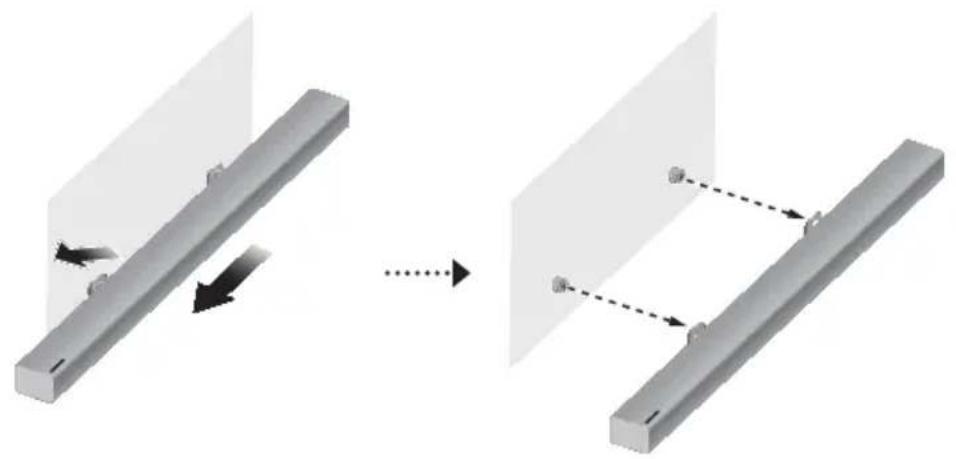
- To separate the Soundbar from the wall mount, push it in the direction of the arrow, and then pull it away from the wall as shown.
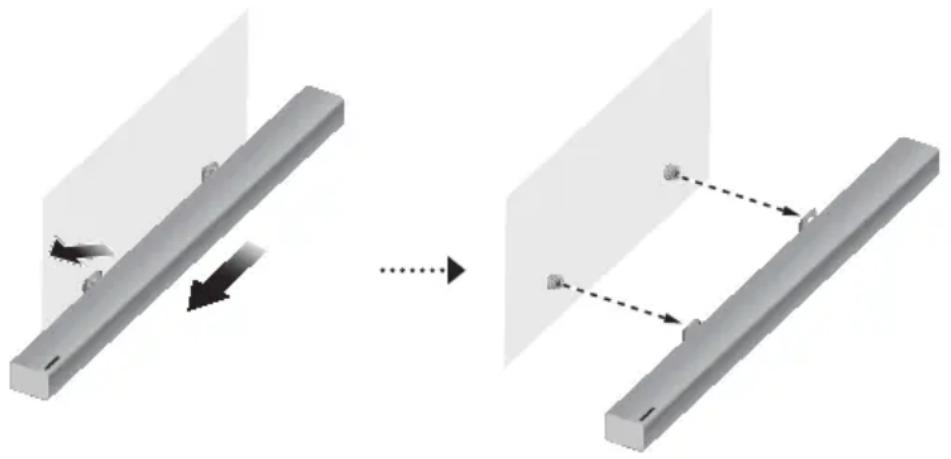

- Do not hang onto the installed unit and avoid striking or dropping the unit.
- Secure the unit firmly to the wall so that it does not fall off. If the unit falls off, it may cause an injury or damage the product.
- When the unit is installed on a wall, please make sure that children do not pull any of the connecting cables, as this may cause it to fall.
- For the optimal performance of a wall mount installation, install the speaker system at least 5 cm below the TV, if the TV is mounted on the wall.
- For your safety, if you do not mount the unit on the wall, install it on a secure, flat surface where it is unlikely to fall.

- Do not connect the power cord of this product or your TV to a wall outlet until all connections between components are complete.
- Before moving or installing this product, be sure to turn off the power and disconnect the power cord.
CONNECTING THE SUBWOOFER
COnneCting tO tHe SUBWOOffer aUtOMatiCaLLy
The Subwoofer's linking ID is preset at the factory and the main unit and subwoofer should link (connect wirelessly) automatically when the main unit and subwoofer are turned on.
- When the subwoofer is completely connected, the blue LED Link Indicator on the subwoofer stops blinking and glows continuously.
COnneCting tO tHe SUBWOOfer ManUaLLy
If the blue LED light does not stop blinking when the main unit and subwoofer are turned on, please set the ID by following the steps below.

- Important: Before you begin, put the battery into the remote. See page 10 for instructions.
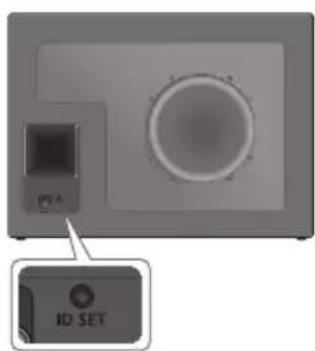
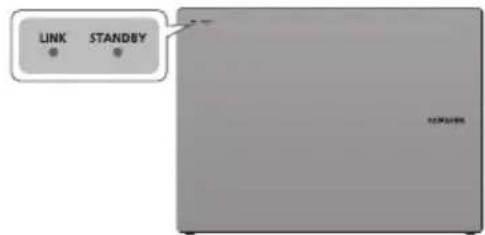
- Plug the power cords of the main unit and subwoofer into an AC wall outlet.
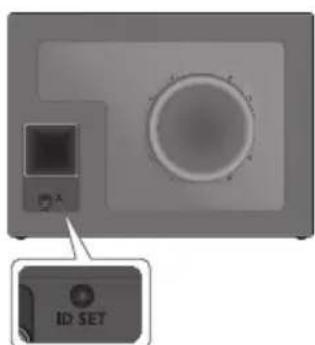
- Press the iD Set button on the back of the subwoofer with a small, pointed object for 5 seconds.
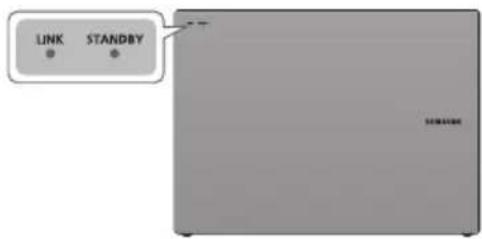
The STANDBY indicator turns off and the LINK indicator (Blue LED) blinks quickly.
- While the main unit is powered off (in STANDBY mode), press and hold the (Mute) on the remote control for 5 seconds.
- The iD Set message appears on the Soundbar's display.
- To finalise the link, turn the main unit's power on while the subwoofer's Blue LED blinks.
The main unit and the subwoofer should now be linked (connected).
The Link indicator (Blue LED) on the subwoofer should be glowing continuously and not blinking.
If the LINK indicator is not solid blue, the linking process has failed. Turn off the main unit and start again from Step 2.
You can enjoy better sound from the wireless subwoofer by selecting a Sound Effect. (See page 8)

- Before moving or installing the product, be sure to turn off the power and disconnect the power cord.
- If the main unit is powered off, the wireless subwoofer will in standby mode and the STANDBY LED on the front will blink Red directly. (no blue LED).
- If you use a device that uses the same frequency (2.4GHz) as the Soundbar near the Soundbar, interference may cause some sound interruption.
- The maximum transmission distance of the wireless signal between the main unit and subwoofer is about 10 meters, but may vary depending on your operating environment. If a steel-concrete or metallic wall is between the main unit and the wireless subwoofer, the system may not operate at all, because the wireless signal cannot penetrate metal.
- If the main unit doesn't make a wireless connection, follow steps 1-5 on the previous page to re-set the connection between the main unit and wireless subwoofer.

- The wireless receiving antenna is built into the wireless subwoofer. Keep the unit away from water and moisture.
- For optimal listening performance, make sure that the area around the wireless subwoofer location is clear of any obstructions.
LED INDICATOR LAMP STATUS ON SUBWOOFER
| LED Status | Description Resolution | ||
| Red On | Standby (with the Soundbar main unit turned off) | Check the power supply to the Soundbar main unit | |
| Connection failed | Connect again (refer to the instructions on manual connection in the user manual) | ||
| Blue | On | Successfully connected (normal operation) | - |
| Blinking | Standby (with the Soundbar main unit turned off) | Check the power supply to the Soundbar main unit | |
| Connection failed | Connect again (refer to the instructions on manual connection in the user manual) | ||
| Red and blue Blinking Malfunction Contact the service center. | |||
CONNECTING TO A TV

- Important: Before you begin, put the battery into the remote. See page 10 for instructions.
CONNECTING TO A TV USING A DIGITAL OPTICAL CABLE
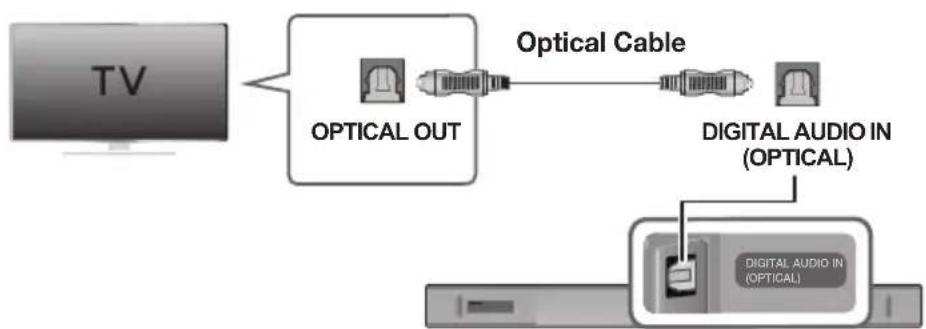
- Connect the DIGITAL AUDIO IN (OPTICAL) jack on the Soundbar to the OPTICAL OUT jack of the TV with a digital optical cable.
- Press the button on the right side of the Soundbar or the SOURCE button on the remote control to select the D.IN mode.
Auto Power Link
If you have connected the main unit to a TV with a digital optical cable, you can set the Auto Power function ON to have the Soundbar turn on automatically when you turn the TV on.
- Connect the Soundbar and a TV with a digital optical cable.
- Press the button on the main unit's right side or the SOURCE button on the remote control to select the D.IN mode.
- Press the button on the remote control for 5 seconds to turn Auto Power Link on or off.

- Auto Power Link is set to ON by default.
- Depending on the connected device, Auto Power Link may not function.
CONNECTING TO A TV USING AN HDMI (DIGITAL) CABLE
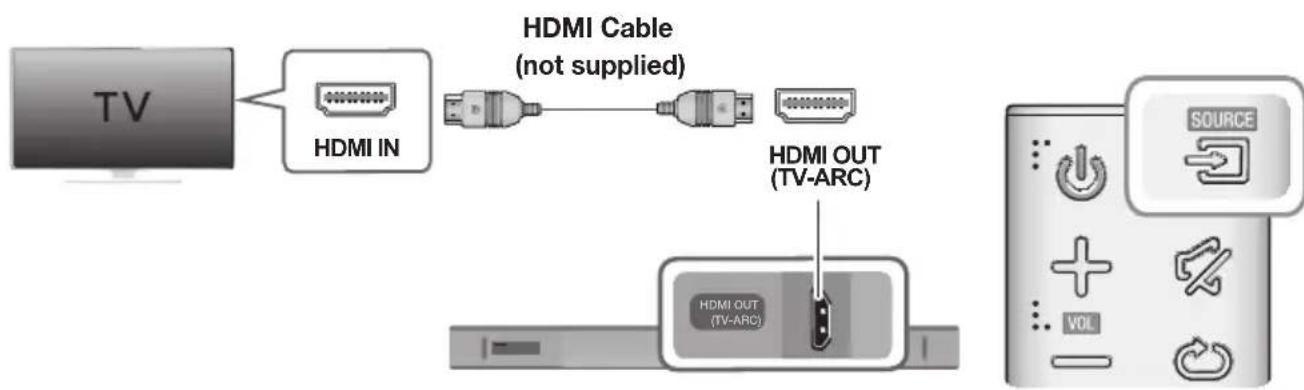
ENG
- Connect an HDMI cable (not supplied) from the HDMI OUT (TV-ARC) jack on the bottom of the product to the HDMI IN jack on your TV.
- Press the button on the right side of the Soundbar or the SOURCE button on the remote control to select the D.IN mode.

- HDMI is an interface that enables the digital transmission of video and audio data with just a single connector.
- If the TV provides an ARC port, connect the HDMI cable to the HDMI IN (ARC) port.
-
We recommend you use a coreless HDMI cable if possible. If you use a cored HDMI cable, use one whose diameter is less than 14mm .
-
Anynet+ must be turned on.
- This function is not available if the HDMI cable does not support ARC.
TV SOUNDCONNECT
You can enjoy TV sound through your Soundbar when it is connected to a Samsung TV that supports the TV SoundConnect function.

- Turn on the TV and Soundbar.
- Press the button on the main unit's right side or the SOURCE button on the remote control to select the TV mode.
- On the TV, a message asking whether to enable the TV SoundConnect function appears.
- Select <Yes> using the TV's remote control to finish connecting the TV and Soundbar.

- If the TV SoundConnect linking process fails, navigate to SoundConnect in the TV's Sound menu, select Add New Device, and set Add New Device to ON. Then, try again.
-
Switching the Soundbar's mode from TV to another mode automatically terminates TV SoundConnect. To connect the Soundbar to another TV, the existing connection must be terminated.
-
To terminate the existing connection, press and hold the button on the remote for 5 seconds or switch to another mode. To connect to the other TV, follow Steps 1 through 4 above.

- The TV SoundConnect (SoundShare) function is supported by some Samsung TVs released from 2012 on. Check whether your TV supports the TV SoundConnect (SoundShare) function before you begin. (For further information, refer to the TV's user manual.).
- If your Samsung TV was released before 2014, check the SoundShare setting menu.
- If the distance between the TV and Soundbar exceeds 10 meters, the connection may not be stable or the audio may stutter. If this occurs, relocate the TV or Soundbar so that they are within operational range, and then re-establish the TV SoundConnect connection.
TV SoundConnect Operational Ranges:
-Recommended pairing range: within 2 meters.
-Recommended operational range: within 10 meters.
- The Play/Pause, Next, and Prev buttons on the Soundbar or Soundbar's remote do not control the TV.
Using the Bluetooth POWER On function
The Bluetooth POWER On function is available after you have successfully connected the Soundbar to a Bluetooth compatible TV using TV SoundConnect. When the Bluetooth POWER On function is ON, turning the connected TV on or off will turn the Soundbar's power on and off as well.
- Connect the TV to your Soundbar using the TV SoundConnect function.
- Press the Bluetooth POWER button on the Soundbar remote. ON - BLUETOOTH POWER appears on the Soundbar's display.
ON - BLUETOOTH POWER : The Soundbar turns on and off when you turn the TV on or off.
OFF - BLUETOOTH POWER : The Soundbar only turns off when you turn the TV off.

- This function is supported by some Samsung TVs released from 2013 on.
CONNECTING TO EXTERNAL DEVICES
OPTICAL OR ANALOGUE AUDIO CABLE
This unit comes equipped with one digital optical in jack and one analogue audio (AUX) in jack, giving you two ways to connect it to external devices.
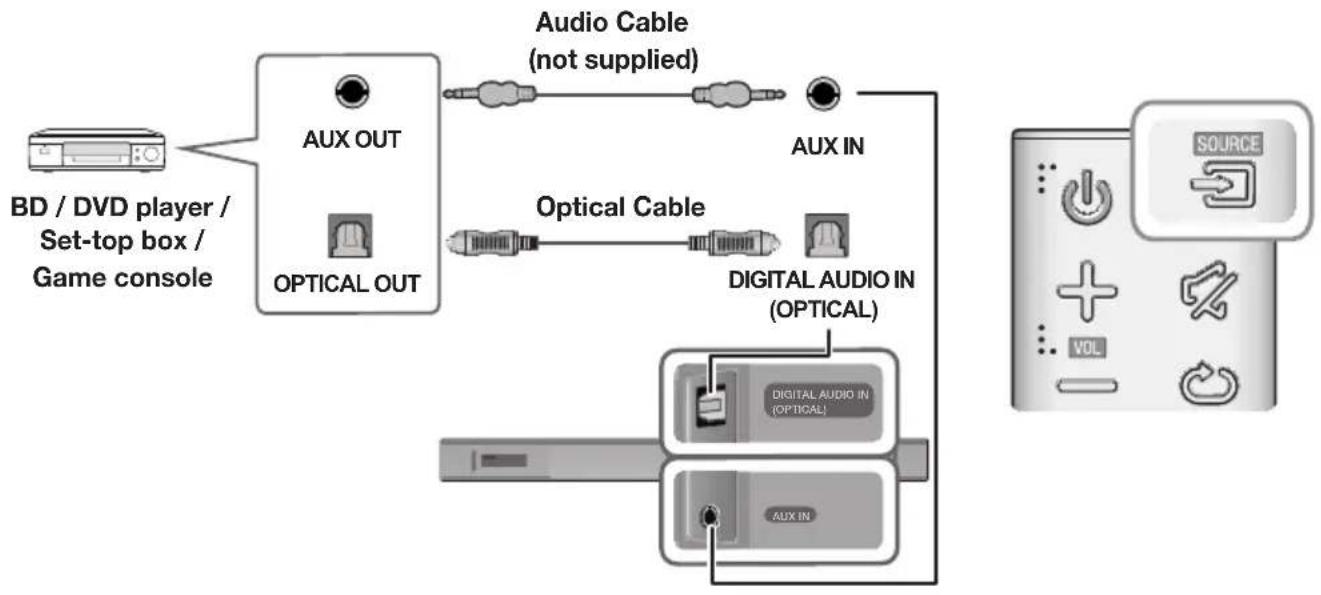
AUX Cable
- Connect AUX IN (Audio) on the main unit to the AUDIO OUT jack of the Source Device using an audio cable.
- Press the button on the right side of the Soundbar or the SOURCE button on the remote control to select the AUX mode.
Optical Cable
- Connect DIGITAL AUDIO IN (OPTICAL) on the main unit to the OPTICAL OUT jack of the Source Device using a digital optical cable.
- Press the button on the right side of the Soundbar or the SOURCE button on the remote control to select the D.IN mode.
HDMI CABLE
HDMI is the standard digital interface for connecting to TVs, projectors, DVD players, Blu-ray players, set top boxes, and more.
HDMI prevents any degradation to the signal due to conversion to analogue and maintains the video and audio quality of the original digital source.
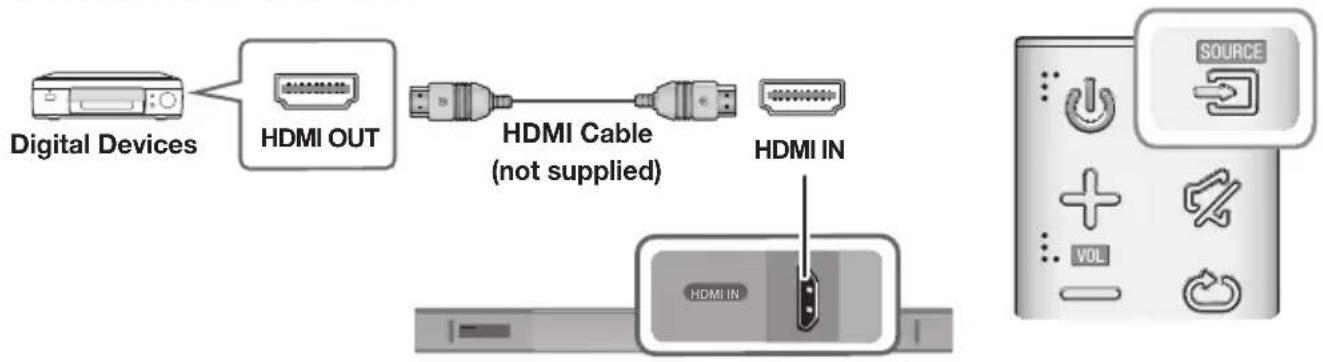
-
Connect an HDMI cable (not supplied) from the HDMI IN jack on the bottom of the product to the HDMI OUT jack on your digital device.
-
Press the button on the right side of the Soundbar or the SOURCE button on the remote control to select the HDMI mode.
INPUT MODE
Press the button on the main unit's you want.
right side or the SOURCE button on the remote control to select the mode
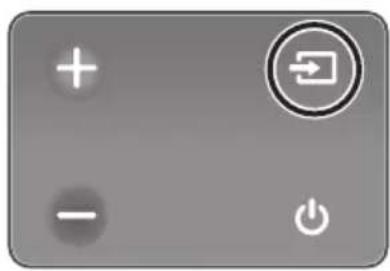
Right end of Soundbar
| Input mode Display | |
| Optical Digital input ARC (HDMI OUT) input | D.IN |
| AUX input | AUX |
| HDMI input | HDMI |
| BLUETOOTH mode | BT |
| TV SoundConnect | TV |
The unit turns off automatically in the following situations.
D.IN/HDMI/BT/TV Mode
-If there is no audio signal for 5 minutes.
AUX Mode
-If the AUX cable is disconnected for 5 minutes.
- If there is no KEY input for 8 hours when the AUX cable is connected. (Auto Power Down function can be turned off only in that case.)
To turn off Auto Power Down function, while in AUX mode, press and hold the button for 5 seconds.
ON - AUTO POWER DOWN / OFF - AUTO POWER DOWN appears on the display.
BLUETOOTH
You can connect a Bluetooth device to the Soundbar and enjoy music with stereo sound, all without wires!
TO CONNECT THE SOUNDBAR TO A BLUETOOTH DEVICE
Check if the Bluetooth device supports the Bluetooth compliant stereo headset function.
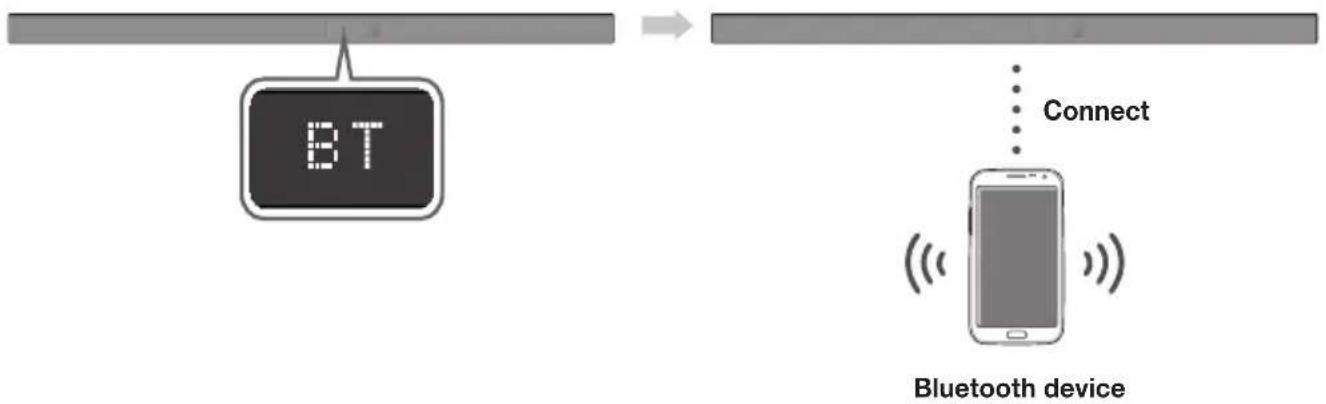
- Press the button on the main unit's right side or the SOURCE button on the remote control to select the BT mode.
- You will see BT READY on the front display of the Soundbar.
- Select the Bluetooth menu on the Bluetooth device you want to connect. (Refer to the Bluetooth device's user manual.)
-
Select "[AV] Samsung Soundbar Kxxx" from the list.
-
When the Soundbar is connected to the Bluetooth device, it will display [Bluetooth device name] BT on the front display.
- The device name can only be displayed in English. An underline " _ " will be displayed if the name is not in English.
-
If the Bluetooth device has failed to pair with the Soundbar, delete the previous "[AV] Samsung Soundbar Kxxx" found by the Bluetooth device and have it search for the Soundbar again.
-
Play music on the connected device.
You can listen to the music playing on the connected Bluetooth device over the Soundbar.
- In BT mode, the Play / Pause / Next / Prev functions are not available. However, these functions are available on Bluetooth devices supporting AVRCP.

- If asked for a PIN code when connecting a Bluetooth device, enter <0000> .
- Only one Bluetooth device can be paired at a time.
- The Bluetooth connection will be terminated when you turn the Soundbar off.
- The Soundbar may not perform Bluetooth search or connection correctly under the following circumstances:
-If there is a strong electrical field around the Soundbar.
- If several Bluetooth devices are simultaneously paired with the Soundbar.
-
If the Bluetooth device is turned off, not in place, or malfunctions.
-
Note that such devices as microwave ovens, wireless LAN adaptors, fluorescent lights, and gas stoves use the same frequency range as the Bluetooth device, which can cause electric interference.
The Soundbar supports SBC data (44.1kHz, 48kHz). - Connect only to a Bluetooth device that supports the A2DP (AV) function.
- You cannot connect the Soundbar to a Bluetooth device that supports only the HF (Hands Free) function.
-
Once you have paired the Soundbar to a Bluetooth device, selecting "[AV] Samsung Soundbar Kxxx" from the device's scanned devices list will automatically change the Soundbar to BT mode.
-
Available only if the Soundbar is listed among the Bluetooth device's paired devices. (The Bluetooth device and the Soundbar must have been previously paired at least once.)
-
Soundbar will appear in the Bluetooth device's searched devices list only when the Soundbar is displaying BT READY.
- In the TV SoundConnect mode, the Soundbar cannot be paired to another Bluetooth device.
BLUETOOTH POWER ON (BLUETOOTH POWER)
If a previously paired Bluetooth device tries to pair with the Soundbar when the Bluetooth POWER On function is on and the Soundbar is turned off, the Soundbar turns on automatically.
- Press the Bluetooth POWER button on the remote while the Soundbar is turned on.
- ON - BLUETOOTH POWER appears on the Soundbar's display.
TO DISCONNECT THE BLUETOOTH DEVICE FROM A SOUNDBAR
You can disconnect a Bluetooth device from the Soundbar. For instructions, see the Bluetooth device's user manual.
The Soundbar will be disconnected.
- When the Soundbar is disconnected from the Bluetooth device, the Soundbar will display BT DISCONNECTED on the front display.
TO DISCONNECT THE SOUNDBAR FROM A BLUETOOTH DEVICE
Press the SOURCE button on the remote control or the button on the product's right side to switch from BT to another mode or turn off the Soundbar.
- The connected Bluetooth device will wait a certain amount of time for a response from the Soundbar before terminating the connection. (Disconnection time may differ, depending on the Bluetooth device)

- In Bluetooth connection mode, the Bluetooth connection will be lost if the distance between the Soundbar and the Bluetooth device exceeds 10 meters.
- The Soundbar automatically turns off after 5 minutes in the Ready state.
More about Bluetooth
Bluetooth is a technology that enables Bluetooth-compliant devices to interconnect easily with each other using a short wireless connection.
-
A Bluetooth device may cause noise or malfunction, depending on usage, if:
-
A part of your body is in contact with the receiving/transmitting system of the Bluetooth device or the Soundbar.
It is subject to electrical variation from obstructions caused by a wall, corner, or office partition. -
It is exposed to electrical interference from same frequency-band devices including medical equipment, microwave ovens, and wireless LANs.
-
Pair the Soundbar with the Bluetooth device while they are close together.
-
The further the distance between the Soundbar and Bluetooth device, the worse the quality is. If the distance exceeds the Bluetooth operational range, the connection is lost.
-
In poor reception areas, the Bluetooth connection may not work properly.
- The Bluetooth connection only works when it is close to the unit. The connection will be automatically cut off if the Bluetooth device is out of range. Even within range, the sound quality may be degraded by obstacles such as walls or doors.
- This wireless device may cause electric interference during its operation.
USING THE MULTIROOM APP
The Samsung Multiroom app lets you connect the Soundbar to a smart device, your network, and the Internet. Once the Soundbar is connected to a smart device that has the Multiroom App installed, you can also connect the Soundbar and multiple Samsung Multiroom devices together wirelessly and play audio through them.
BEFORE YOU BEGIN
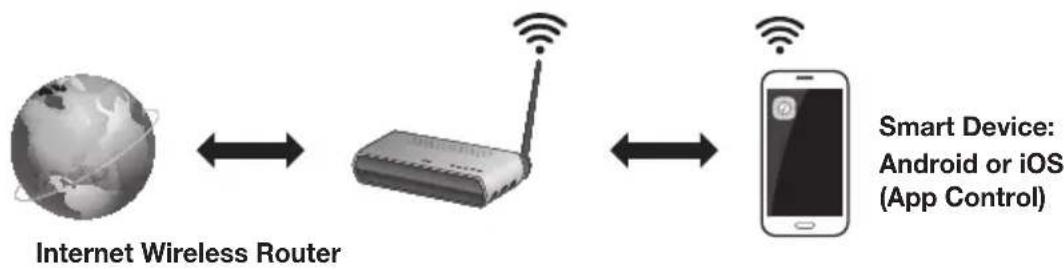
Communication Basics
Requirements:
- A Wireless Router and a Smart Device.
- The wireless router must be connected to the Internet.
- The smart device must be connected to the router via a Wi-Fi connection.
INSTALLING THE SAMSUNG MULTIROOM APP
To use the Soundbar with the Samsung Multiroom App, you must download and then install the Samsung Multiroom App on your smart device. You can download the app from Google Play or the App Store. With the Samsung Multiroom App installed, you can play music on your Soundbar that is stored on your smart device, located on other connected devices, provided by other content providers, or streamed from Internet radio stations.
Android or iOS
Download the Samsung Multiroom app from Google Play or the App Store of your smart device.
- Market search : Samsung Multiroom

Launching the Samsung Multiroom App
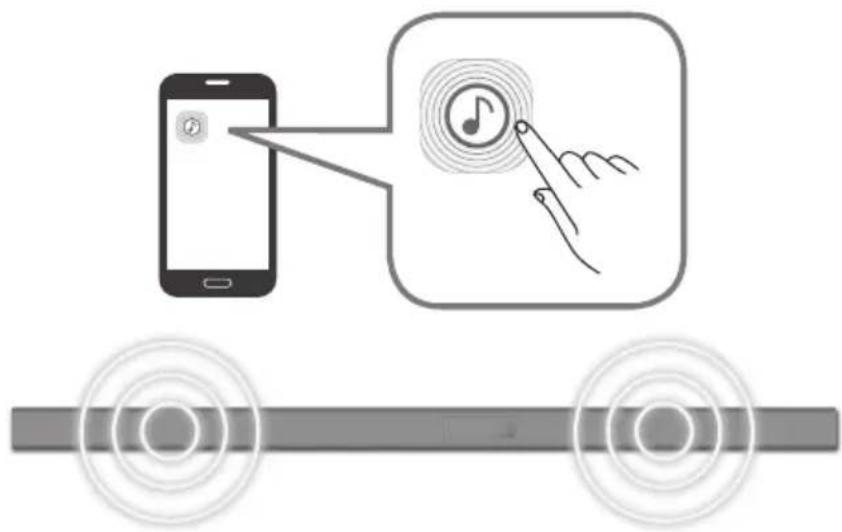
To launch the Samsung Multiroom app, tap the Multiroom app icon on your smart device.
CONNECTING THE SOUNDBAR TO YOUR NETWORK
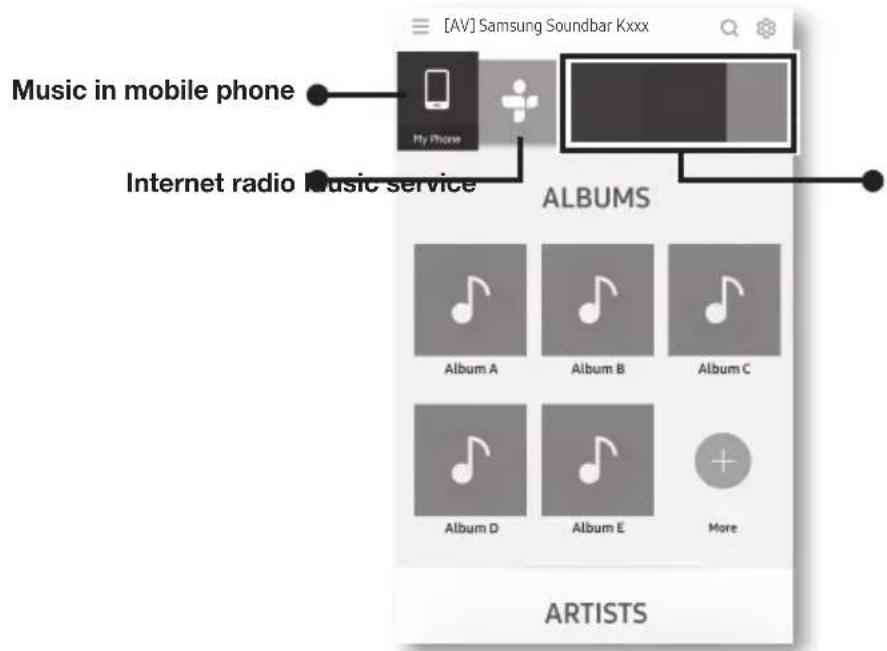
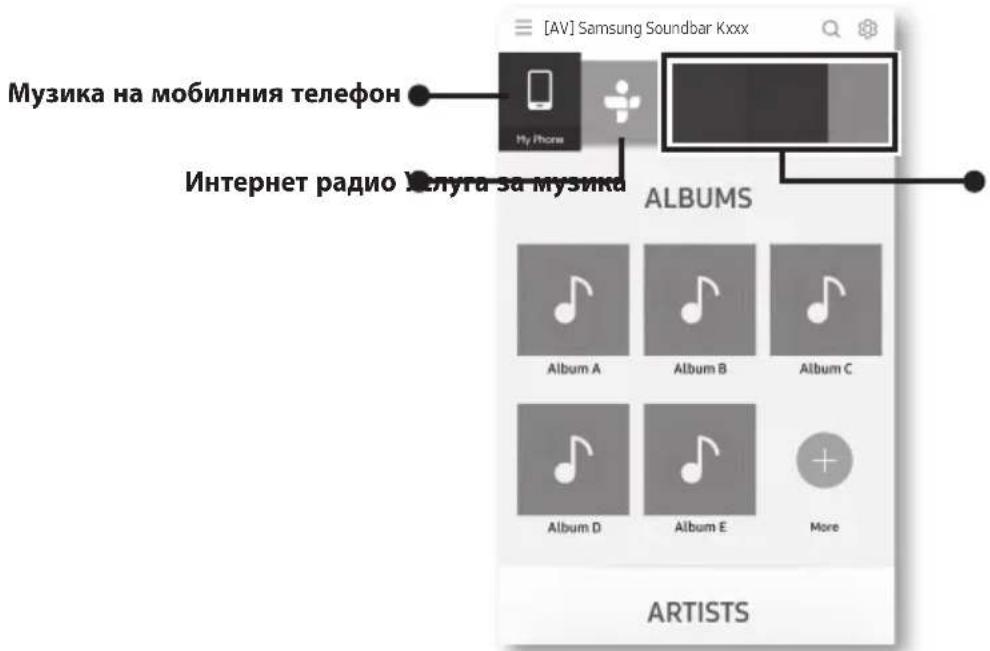
On your smart device, select the Samsung Multiroom app. Follow the directions on your smart device's screen. You can use the following music sources with the Samsung Multiroom app.
- Music files stored in your mobile phone, various music sources, and Internet radio.
USING THE NETWORK STANDBY ON FUNCTION
The Network Standby On function becomes available if a wireless connection has been properly established between a smart device and the Soundbar. This function turns on the Soundbar automatically when a smart device attempts to connect to the Soundbar via Bluetooth or Wi-Fi. If you turn the Soundbar on via a Bluetooth connection, its input mode is set to BT automatically. To turn the Soundbar on via Wi-Fi, you must have the Samsung Multiroom App installed on your smart device.
- Connect the smart device to your Soundbar.
- Turn the Network Standby On function on by pressing the button on the Soundbar remote for more than 5 seconds. You can turn the function off by pressing the button again for more than 5 seconds.

- Network Standby On is available only if the Soundbar is listed among the smart device's paired devices. (The Smart device and the Soundbar must have been previously paired at least once.)
- Soundbar will appear in the smart device's searched devices list only when the Soundbar is displaying [BT READY] or [WiFi READY].
-
In the TV SoundConnect mode, the Soundbar cannot be paired to another smart device.
-
If the Network Standby On function did not work: -The Network Standby On is set to Off. Set it to ON.
-
The Wi-Fi connection to the Soundbar will be terminated if the Soundbar's power cord is disconnected or the power is cut off. If the power is cut off, turn on the Soundbar and reconnect it.
- If the Network Standby is set to Off, the Soundbar cannot be turned on by Bluetooth connection.
SOFTWARE UPDATE
UPDATING WITH USB
Samsung may offer updates for the Soundbar's system firmware in the future.
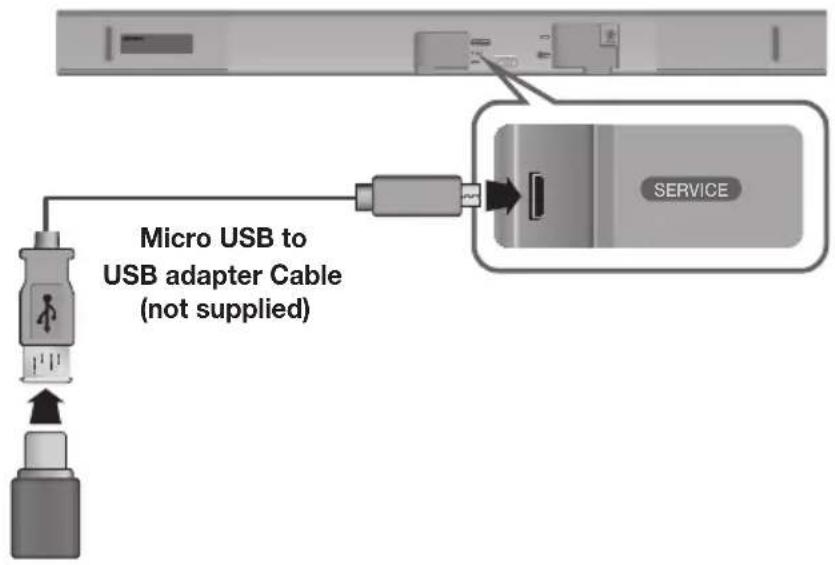
If an update is offered, you can update the firmware by connecting a USB device with the firmware update stored on it to the USB port on your Soundbar.
Note that if there are multiple update files, you must load them onto the USB device singly and use them to update the firmware one file at a time.
Please visit samsung.com or contact the Samsung call centre to receive more information about downloading update files.
Updating Procedure
- Connect a Micro USB to USB adapter cable with a male USB 2.0 Micro USB plug (Type B) on one end and a standard female 2.0 USB jack (Type A) on the other end to the micro USB jack on your Soundbar.

-
The Micro USB to USB adapter cable is sold separately. To purchase, contact a Samsung Service Centre or Samsung Customer Care.
-
Follow the steps below to download the product software: Go to the Samsung website at (samsung.com/sec) → search for the model name - select the customer support option (the option name is subject to change)
- Save the downloaded software to a USB stick and select "Extract to the folder name" to unzip the folder.
- Turn off the Soundbar and connect the USB stick containing the software update to the female port on a Micro USB adapter cable.
- Turn on the Soundbar. Within 3 minutes, UPDATE is displayed and updating begins.
- After the update is complete, the Soundbar turns off and on again.
If UPDATE was not displayed
- Turn off the Soundbar, connect the USB storage device that contains update files to the Soundbar's USB port.
- Disconnect the power cord, reconnect it, and then turn on the Soundbar.

- Insert a USB device containing the firmware update into the USB port on the main unit.
- Updating firmware may not work properly if audio files supported by the Soundbar are stored in the USB storage device.
- Do not disconnect the power or remove the USB device while updates are being applied. The main unit will turn off automatically after completing the firmware update.
- After update is completed, the user setup in Soundbar is initialised. We recommend you write down your settings so that you can easily reset them after the update. Note that updating firmware resets the subwoofer connection too.
If the connection to the subwoofer is not re-established automatically after the update, refer to page 16. If the software update fails, check that the USB stick is not defective.
Mac OS users should use MS-DOS (FAT) as the USB format.
- Depending on the manufacturer, some USB devices may not be supported.
AUTO UPDATE
If the Soundbar is connected to the Internet, it will automatically check for the latest firmware and update when new firmware becomes available, even if it is turned off.

The Soundbar is configured to run Auto Update by default.
- To use the Auto Update function, the Soundbar must be connected to the Internet.
- The Wi-Fi connection to the Soundbar will be terminated if its power cord is disconnected or the power is cut off. If the power is cut off, turn on the Soundbar and reconnect it.
TROUBLESHOOTING
Before requesting service, please check the following.
| The unit will not turn on. | |
| • Is the power cord plugged into the outlet? | → Connect the power plug to the outlet. |
| A function does not work when the button is pressed. | |
| • Is there static electricity in the air? | → Disconnect the power plug and connect it again. |
| Sound is not produced. | |
| • Is the Mute function on? • Is the volume set to minimum? | → Press theMute) button to cancel the Mute function. → Adjust the volume. |
| The remote control does not work. | |
| • Are the batteries drained? • Is the distance between the remote control and main unit too far? | → Replace with new batteries. → Move closer to the unit. |
| The TV SoundConnect (TV pairing) failed. | |
| • Does your TV support TV SoundConnect? | → TV SoundConnect is supported by some Samsung TVs released from 2012 on. Check your TV to see if it supports TV SoundConnect. |
| • Is your TV firmware the latest version? | → Update your TV with the latest firmware. |
| • Does an error occur when connecting? | → Contact the Samsung Call Centre. |
| → Reset TV SoundConnect and connect again. To reset the TV SoundConnect connection, press and hold the ➔ button for 5 seconds. | |
| The red LED on the subwoofer blinks and the subwoofer is not producing sound. | |
| • Your subwoofer may not be connected to the main unit of the product. | → Try to connect your subwoofer again. (See Page 16) |
| Soundbar is not turned on by Bluetooth or Multiroom App. | |
| • Check the Network Standby option is OFF. | → If it's true, BT and Wifi functions are not allowed in power off state. Press and hold the▶I button for 5 seconds to turn on the Network Standby in power on state. |
SPECIFICATIONS
| GENERAL | Weight | Main Unit | 2.6 kg |
| Subwoofer (PS-WK650, PS-WK651) | 6.8 kg | ||
| Dimensions (W x H x D) | Main Unit | 1010.5 x 54.0 x 87.5 mm | |
| Subwoofer (PS-WK650, PS-WK651) | 452.0 x 335.0 x 154.0 mm | ||
| Operating Temperature Range | +5°C to +35°C | ||
| Operating Humidity Range | 10 % to 75 % | ||
| AMPLIFIER | Rated Output Power | Main Unit | 30W x 6, 6 ohm, THD≤10% |
| Subwoofer (PS-WK650, PS-WK651) | 160W, 3 ohm, THD≤10% | ||
- Design, specifications and App screen are subject to change without prior notice.
- Nominal specification
Samsung Electronics Co., Ltd reserves the right to change the specifications without notice.
-Weight and dimensions are approximate.
- For more information about the power supply and power consumption, refer to the label attached to the product.
※ Precaution : The product will restart automatically if you turn on/off Wi-Fi/Ethernet.
| Overall Standby Power Consumption (W) (All the network ports are “ON” condition) | 2.8W | |
| Wi-Fi/Ethernet Port deactivation method | Press Wi-Fi SETUP button on the product for 30 seconds or press the ➔I button on the Soundbar remote for more than 5 seconds to turn Wi-Fi/Ethernet On / Off. | |
| Bluetooth Port deactivation method | Press SPK ADD button on the product for 30 seconds or press the ➔I button on the Soundbar remote for more than 5 seconds to turn Bluetooth On / Off. | |
Open Source Licence Notice
- For further information on Open Sources used in this product, please visit the website: http://opensource.samsung.com

Spotify Licence
- The Spotify Software is subject to third party licences found here: www.spotify.com/connect/third-party-licenses.
- For more information about Spotify Connect, please visit www.spotify.com/connect
LICENCES

Manufactured under licence from Dolby Laboratories. Dolby, Dolby Audio and the double-D symbol are trademarks of Dolby Laboratories.

For DTS patents, see http://patents.dts.com. Manufactured under licence from DTS Licensing Limited. DTS, the Symbol, & DTS and the Symbol together are registered trademarks, and DTS 2.0 Channel is a trademark of DTS, Inc. © DTS, Inc. All Rights Reserved.
HDMI
The terms HDMI and HDMI High-Definition Multimedia Interface, and the HDMI Logo are trademarks or registered trademarks of HDMI Licensing LLC in the United States and other countries.
Wireless Models (including the frequency of 5.15GHz-5.35GHz)
Hereby, Samsung Electronics, declares that this equipment is in compliance with the essential requirements and other relevant provisions of Directive 1999/5/EC.
The original Declaration of Conformity may be found at http://www.samsung.com, go to Support > Search Product Support and enter the model name.
This equipment may be operated in all EU countries.
This equipment may only be used indoors.

Wireless Models (excluding the frequency of 5.15GHz-5.35GHz)
Hereby, Samsung Electronics, declares that this equipment is in compliance with the essential requirements and other relevant provisions of Directive 1999/5/EC.
The original Declaration of Conformity may be found at http://www.samsung.com, go to Support > Search Product Support and enter the model name.
This equipment may be operated in all EU countries.

Contact SAMSUNG WORLD WIDE
If you have any questions or comments relating to Samsung products, please contact the SAMSUNG customer care Centre.
| Country Contact Centre | Web Site |
| Europe | |
| UK 0330 SAMSUNG (7267864) www.samsung.com/uk/support | |
| EIRE 0818 717100 www.samsung.com/ie/support | |
| GERMANY | 0180 6 SAMSUNG bzw.0180 6 7267864* (*0,20 €/Anruf aus dem dt. Festnetz, aus dem Mobilfunk max. 0,60 €/Anruf) www.samsung.com/de/support |
| FRANCE 01 48 63 00 00 www.samsung.com/fr/support | |
| ITALA 800-SAMSUNG (800.7267864) www.samsung.com/it/support | |
| SPAIN 3490217 2678 www.samsung.com/es/support | |
| PORTUGAL 808 20 7267 www.samsung.com/pt/support | |
| LUXEMBURG | 261 03 710 www.samsung.com/be_fr/support |
| NETHERLANDS | 0900-SAMSUNG (0900-7267864) (€ 0,10/Min) www.samsung.com/nl/support |
| BELGIUM | 02-201-24-18 www.samsung.com/be/support(Dutch)www.samsung.com/be_fr/support(French) |
| NORWAY | 815 56480 www.samsung.com/no/support |
| DENMARK | 70 70 19 70 www.samsung.com/dk/support |
| FINLAND | 030-6227 515 www.samsung.com/fi/support |
| SWEDEN | 0771 726 7864 (0771-SAMSUNG) www.samsung.com/se/support |
| POLAND | 801-172-678' lub +48 22 607-93-33 * (koszt polaczenia wedlug taryfy operatora) www.samsung.com/pl/support |
| HUNGARY | 0680SAMSUNG (0680-726-786)0680PREMIUM (0680-773-648) www.samsung.com/hu/support |
| Country Contact Centre | Web Site | |
| AUSTRIA | 0800-SAMSUNG (0800-7267864) [Only for Premium HA] 0800-366661 [Only for Dealers] 0810-112233 | www.samsung.com/at/support |
| SWITZERLAND | 0800 726 78 64 (0800-SAMSUNG) | www.samsung.com/ch/support (German) www.samsung.com/ch_fr/ support (French) |
| CZECH | 800 - SAMSUNG (800-726786) | www.samsung.com/cz/support |
| SLOVAKIA | 0800 - SAMSUNG (0800-726 786) | www.samsung.com/sk/support |
| CROATIA | 072 726 786 www.samsung.com/hr/support | |
| BOSNIA | 055 233 999 www.samsung.com/support | |
| MONTENEGRO | 020 405 888 www.samsung.com/support | |
| SLOVENIA | 080 697 267 (brezplačna števiška) www.samsung.com/si | |
| SERBIA | 011 321 6899 www.samsung.com/rs/support | |
| BULGARIA | *3000 Βeña a m Péxqara 0800 111 31, bēzniatna teneφοῦ nvnma | www.samsung.com/bg/support |
| ROMANIA | *8000 (apel in retea) 08008-726-78-64 (08008-SAMSUNG) Apel GRATUIT | www.samsung.com/ro/support |
| CYPRUS 8009 | 000 only from landline, toll free | |
| GREECE | 80111-SAMSUNG (80111 726 7864) only from land line (+30) 210 6897691 from mobile and land line | www.samsung.com/gr/support |
| LITHUANIA | 8-800-7777 | www.samsung.com/lt/support |
| LATvia | 8000-7267 | www.samsung.com/lv/support |
| ESTONIA | 800-7267 | www.samsung.com/ee/support |
[Correct disposal of batteries in this product]
![SAMSUNG HWK660 - [Correct disposal of batteries in this product] - 1](/content/2026/03/431907/images/8f7b41d95ad89081ce64da1beade7b9adb9f47a4b012e169c365e37fbdc30927.jpg)
Correct Disposal of This Product (Waste Electrical & Electronic Equipment)
(Applicable in countries with separate collection systems)
This marking on the battery, manual or packaging indicates that the batteries in this product should not be disposed of with other household waste at the end of their working life. Where marked, the chemical symbols Hg, Cd or Pb indicate that the battery contains mercury, cadmium or lead above the reference levels in EC Directive 2006/66. If batteries are not properly disposed of, these substances can cause harm to human health or the environment.
To protect natural resources and to promote material reuse, please separate batteries from other types of waste and recycle them through your local, free battery return system.
(Applicable in countries with separate collection systems)
This marking on the product, accessories or literature indicates that the product and its electronic accessories (e.g. charger, headset, USB cable) should not be disposed of with other household waste at the end of their working life. To prevent possible harm to the environment or human health from uncontrolled waste disposal, please separate these items from other types of waste and recycle them responsibly to promote the sustainable reuse of material resources.
Household users should contact either the retailer where they purchased this product, or their local government office, for details of where and how they can take these items for environmentally safe recycling.
Business users should contact their supplier and check the terms and conditions of the purchase contract. This product and its electronic accessories should not be mixed with other commercial wastes for disposal.
IpeicTaBeTe cn Bb3MOXHOCTnTe
BlaarOapm Bn, ye 3akynxTe npodukT ha Samsung.
3a da nonyuHTe no-nbIHO o6cnyXbaHe, moJIa, peRncTpnpaIte npOdyKta cn Ha aIpec
www.samsung.com/register
MePkN 3A Be3OnAcHOct
3AДA HAMAJITE PNUCKA OT TOKOB UdAP, HE CBAJIYTE KANIKA (NIN 3ADHNAK). BbTPE HRA M AACTI, INPEJHA3HAUEN 3A OBCJYXBAHE OT IOTPEBNTIEL. 3A CEPBN3HO OBCJYXBAHE CE OBPbAITE KbM KBALNΦUCAHPA HCEPBUN3EH NEPCOHAI.
LHPOBATA CToHOCT Ha CnIaTa Ha 3ByKa Ie Ce NOABn Ha ekpaHa Ha npEHHOTo Ta6No.
2 ByToH -BTOUHMK)
I36npa mejdy D.IN, AUX, HDMI, BT, TV BxoJ.
Korato yCTPOINCTBOTO e BKNIOUeHO, npn HATNCKaHe Ha 6yToHa 3a NOBEue OT 3 cekyn 6yTOHbT ce NaCTPOBa Da DeIcTB KaTo 6yToH (3aIywaBaHe). 3a Da OTMeHInTe HAcTPOINKaTa Ha 6yToHa (3arLywaBaHe), HATNCHE Te 6yToHa -THOBO 3a NoBEue OT 3 cekyn.
3 ByToH (EKnIOUvBaHe)
BkIIOUBa IIIN I3KIIIOUBa Soundbar.


- Korato BKIIOHTe Ka6ena 3a npomeHINB TOK, KJIABNbT 3a BKNIOUbaHe 3e 3apa60Tu Cne4 4do 6cekyHn.
Korato BkIOUHTe 3axpaHbHeTo Ha TOBa yCTpOcTBO, Ie HMa 3a6aBHe OT 4 Do 5 ceKHyN, Ippei da MoKe Da ce Bb3Ipon3BExJa 3ByK.
Ako nckate da ce paBate Ha 3Byk cAmO ot Soundbar, Tp86Ba Da u3KIOUHTe BnCOKOrOBOpNTe B MeHTo HAcTpoIka Ha ayINO Ha TeNEBn3Opa. HanpaBeTe CnpabKa C pBKOoDCTBOTo 3a Notpe6nteHa BaIINr TeNEBn3Op.
3АДНО/ДОЛНОТABЛО

- Ppi n3BaXdAHeTo Ha 3axpaHbAaun Ka6eHa aanTepa 3a npomeHnB TOK OT KOHTaKtHa CTeHaTa, DpbXte 5enCeHa. He dbpnaTe ka6ena.
He Cbbp3BaIte TOBA yCTPOIcTBO ININ dpyrN KOMnHOHtN KbM AC KOHTaKT, ppei Da 3abbpWnte BCnKIN CBbp3BaHm MEXkDy KOMnHOHtTe. - Ybepete ce, ye AC/DC aanTepbTe e noCTaBeH da Jexn Bbpxu Maca nn Ha noJa. Ako nocTabte AC/DC aantepa taka, ye da Bncn C BxoJa 3a AC ka6ena opneHTnpa Harope, Baantepa Moke da npohKHe BOda nn dpyrN yxqnn qactnui ToBa da pnuHH He3npabHOCT Ha aantepa.
ДИСТАЦИОНноУПРавЛЕHIN

SOURCE
HaTnCHete,3a Da n36epeTe n3ToHnK,Cbbp3aH cbcSoundbar.
3arnyuwaBaHe
MoKeTe Da HAmnITe CnIaTa Ha 3ByKa Do O C HAtnCKaHe Ha eINH 6yToH.
HaTnCHete OTHOBO, 3a Da Bb3CTaHOBInTe 3ByKa Do npEiunHOTo Ha CnJa Ha 3ByKa.
NoBtapnHe
Функцята „Повторец" e налича сamo korato ce BBзроиЗьжда музika OT necн ha teleфон Ил DMS ha ппоженeto Samsung Multiroom.
OFF-REPEAT:OTmehnIOBTOpeHneToHaVb3Ipon3BexJaHe.
TRACK - REPEAT:Повторго ceи3пьнене Ha 3aInc.
ALL-REPEAT:Bb3npoN3BexkaO tHOBO BCuKN 3aINCN.
IponyckaHe Hanpei
Korato B yctpoiCTBOTO,OT KOEt BO3npon3BeXdaTe,IMa NOBuee OT eINH faui, npu HATnCKaHe Ha 6yToHa Ce n3bnpa CneBaunrT faui.
Bluetooth POWER
CHaTnCKaHe Ha 6yToHa Bluetooth POWER Ha DnCTaHcNHOHOTO ynpabJIeHne MoKTe Da n3KnIOuBaTe n BkIOUBaTe fYHKcIra蓝牙Bluetooth POWER On. 3a noDpO6HoCTn Bx. cTp. 20 n 25.
(S) SOUND
CbpayHd 3Byk npndaaba Ibl6OuHa n IpocTpaHCTBeHOCT Ha 3Byka.
HaTnCKaHeTo Ha 6yToHa (o) SOUND HAKOLKO PbTu PpeBKnIOvBa MeKdy
HaCTpoiKeTe Ha CbpayHd 3Byk: ON-SURROUND SOUND, OFF - SURROUND SOUND
HaTnCHHeTe 3aIbpXte 6yToHa 3a OKoNo 5 ceKHyn, 3a da BkJIouHt e nn n3KnIOHTe cyHKuYra Anynet+.
OFF-ANYNET+,ON-ANYNET+
ФункцяТа Anynet+Ви поЗюяВа дуypавьагte Soundbar cДиctанцИнHOупавлелпсOT CBМecTUM C Anynet+TeENEb3Op Samsung.
Soundbar Tpr6Ba dacce CBpke KbM TeENEb3Opa ue3 HDMI ka6en.
HaTnCHHeI 3aIpbXt 6yToHa 3a OKoNo 5 cekyn, 3a Da BKJIouHte nn nKIIIOHTe yHKUraTAt Auto Power Link.
OFF - POWER LINK, ON - POWER LINK
* Auto Power Link CnHxpoHn3npa Soundbar cbc cbbp3ah onTnueH n3ToUHnK ue3 oTnUHO rHe3do TaKa, Ye da Ce BkIIOuBa ABTomTuHNo, KOrato BkIIOuBaTe TeJIeBn3Opa cn. (Bx. ctrp. 18) DyHKzraTa Auto Power Link e Haniue caMo B pexHM D.IN.
SOUND EFFECT
Mokete da n36pate n3mexky 6 pekima 3a 3Byk: STANDAR (Opunhaen 3byk.), MUSIC, CLEAR VOICE, SPORTS, MOVIE, NIGHT B 3aBNCMOCT OT Tnna n3toHnCn, Ha KOUTO nCKaTe da ce paDBe.
n36pepe pexim STANDARD, aKO nCKaTe da ce paDBe Ha opunhaen 3Byk.
* DRC (Dynamic Range Control)
IOn3BOJIaBa Da npNIIOXnTe ynpaBHeHne Ha dINHaMnHnA dnaIa3OH KbM Dolby Digital.
HaTnCHHeI 3aIpbXTe 6byToHa SOUND EFFECT 3a OKoNo 5 ceKynB B pexm STANDBY, 3a da BkIIOUHTe IIN N3KIOUHTe fynKcIyTa (Dynamic Range Control - ynpabJIeHne Ha dInHaMnHnI dnaIa3OH).
BkIIOUBaHe
BkIIOUba nIIN n3KIIIOUba Soundbar.
Cmna Ha 3Byka
Perynipa HNBOTo Ha 3ByKa Ha yCTpoIyCTBOTO.
Bb3npoun3Bexkdahe/lay3a
HaTnCHHe 6yToHa II, 3a Da HAnpaBnTe BpeMeHNo nay3a BB
Bb3PON3BExKaHToHaΦaHa.
HaTnCHETe OTHOBO 6yToHa II, 3a Da Bb3npoUN3BeDeTe N36paHnA faJl.
Пleckауне Назд
Korato B yctpoiCTBOTO,OT KOETO BB3IPOUN3BExJaTe,IMa IOBeue OT eINH
faJI, npn Hatackane Ha 6yToHa K ce n3bupa npedxoHnTf aaiJ.
SOUND CONTROL
HaTnCHeTe, 3a da n36peTe TREBLE, BASS, SUBWOOFER LEVEL
AUDIO SYNC.
CneTOBa n3nOJI3BaIte 6yToHInTe ▲,▶,3aJapepyIuPate cunata Ha 3BykaHa
TREBLE INI BASS OT-3~+3, CINATA Ha 3ByKa Ha SUBWOOFER LEVEL OT
-12, -6 ~ +6.
HaTuscheTe 3aIpbXte 6yToHa SOUND CONTROL 3a 5 cekyni, 3a da
Hynipate 3Byka 3a BcKa YecToTHa JeHTa. Morat da ce n36upat 150Hz, 300Hz,
600Hz, 1,2KHz, 2,5KHz, 5KHz u 10KHz u BcKa onu Ja ce pepynpa Ha
CTOINHOCTMMeJy-6\~+6.
AkoSoundbareCbpb3aHcunphiOBTeleBn3Op INBnEOTHe n3rIeXJa
CINHxPOHN3IpaHO C ayINOTo, HATNCHeTe 6yTOHnTE SOUND CONTROL 3a
CINHXPOHn3IpaHe Ha BnDeOTo C ayDnOt. N3NON3BaIte 6yTOHnTe △3a Da
3aandaTe BpemTo 3a 3aKbcHeHne Ha ayDnOTo MeJy O ~ 300 Mc. B peKm TV n
B pexim BT, fynkuiyta Audio Sync Moke da He e HannuHa.
SAMSUNG

Pa60Ta C TeneBn3Opa Upe3 nIcTahUHOHTo ynpaBneHne.
YnpaBneHne Ha Soundbar ue3 dncTaHcnoHHoto ynpaBneHne Ha Baunr TeNeBn3Op
- Hatahe 3aipbxte 6ytoHa (O) SOUND 3a Ha5 cekyHn,doKaTo yctpoiCTBOTo Soundbar e BknioHeo.
- Ha dincpnna Ha Soundbar ce noBBA,ON-TV REMOTE".
- B MeHIOTo Ha TeNeBn3Opa 3aJaIte BbHSeH BnCOKoROBOpUTe 3a BnCOKoROBOpUTeJHa TeNeBn3Opa.

He hauHNO, aKo ce n3non3Ba yHKnraTAtVARCnnpexmHDMI.
- BytoHnTe He ca HauuHn, c n3KIOueHne Ha VOL +/- n 6yToHnTe (3aIyuBaHa) B Ta3n fynKzua.
MeHIOTaHaTeLEBn3OpaCe pa3NIu4BaT B 3aBcIMoCT OT npOn3BOJnteIy Moena.HanpaBeTe cnpabKa CpbKOBoDCTBOTO 3a Notpe6NtEJI Ha TeLEBn3Opa 3a Nobeue INΦOpMaun.
-
Poin3BODInTeIN, KOnTO NOnDbPjxAT Ta3N fYHKUa:
-
VIZIO, LG, Sony, Sharp, PHILIPS, PANASONIC, TOSHIBA, GRUNDIG, Hisense, RCA
- Bb3MOxHc Ta3n ΦyHKcIg Da He e CbBMeCTMma C nCTaHcIOHHOTo ynpabJIeHne Ha BaIINr TeJIeBN3Op, B 3aBVCIMOCT OT pON3BOIDTeJIHa nCTaHcIOHHOTo ynpabJIeHne.
3a Da n3KIOUHTe Ta3n FyHKU,HaTNCHeTe 6yToH) SOUND 3a 5 ceKHyDn.
Ha nncnna Ha Soundbar ce noyBa,OFF-TV REMOTE".
IOCTABRHE HA BATEPUNTE B DnCTAHUHHOTO YNPABJIEHNE
-
C NOxOJaMoHeTa 3aBbPteTe KaNaYeTo Ha 6aTeepnTe Ha INCTaHcNoHHOTy npabJeHne No NocKa, O6paTHa Ha YacOBHNKOBaTa CTpeJIka, 3a Da To IN3BaJnte, KaKTo e NOKa3aHo Ha fNrgypata No-rope.
-
NocTabete nItneBa 6aTePn3V. IonoXntenHnT nonIOc (+) Tpr6Ba da 6bJe HacOueH Harope npn NoCTabHeTo Ha 6aTePnra. NocTabete Kanayeto Ha 6aTePnra nNoPaBHeTe 6o3HaueHnTa 'eNHO Do npyro, KaKTo e NOKa3aHo Ha fNpypTa no-rope.
-
C noDxOJaMa MoHeta 3aBbPTeTe KaNaeTo Ha 6aTepeNte Ha INCTaHcUHOHOTo YnpaBHeHne IIO NOCKa Ha YaCobHnKOBaTa CTpeIka DOKpa, 3a Da FO fIKCuPaTe Ha MAcTOTO My.
MOHTNPAHE HA SOUNDBAR
Инсталвахе НА CTEHATA KOH3ОЛА
PpeDn3HmepKn 3a nHCTanaTnTa
- Ako He MOHTnPaTe NOI TEJIeBUN3Op, NOCTaBeTe LcHtpaHa LMnna B cHeTbpa Ha 3OHaTa 3a MoHTaK.
-
Пьхhte Вьрха Н ХИМКал ИПОДСТРЕН мОЛВ пеЗ сеHTьра Н ИЗБрахжЯТа A-TYPE BвВ BCEКИ Кран Н ВODач, 3a Да МарКирATE OTBOPNTe 3a NOДьрЖашITE BINTOBe, CLEД TOВa МАХHeTe BODaЧа 3a MoHTIPAhe Ha CTeHa.
-
KaTo I3NoI3BaTe 6OpMaIiHa c nOxOJaI pa3MeP, npo6nIte OTBop B CteHaTbBpXy BCKa MapKnIpOBKa.

- Ako MapknpoBknte He CbOTBETCTBaT Ha N03nUInTe Ha UINΦTOBe, NOCTaBeTe NOxOJaUOnOpN nn 6oIToBe B OTBOPrTe, PpeN Da NoCTaBtE NoDlbPxaUte BnHToBe. Ako n3No3BaTe ONOpN nn yNtBTHNTeN, YBepTe Ce, Ye OTBOpTe, KOITo pO6uBaTe, Ca DOCTaTbHOr fONEMN 3a ONOpNTe Nnn yNtBTHNTeNTE, KOUTO Nn3BaTe.
- Ibxhe BnHT (He ce doctabc KOMPneKta) BB BCEkn 1bpXau-BnHT n CJeT TOBa 3aBnTe BCEKN BnHT 3dpBO B OTbopa Ha noDtpxuaui BnHT.
6.ИЗползва Te ДБаТа BnHT (M4 x L12), 3a Да зakpenite Cko6ata 3a moHTax Ha cTeHa I N KbM nbHOTO Ha Soundbar. 3a npabunHOTo noCTabReHe noDpaBHeTe n3dATINHe Ha Soundbar KbM OTBOpTe Ha cKo6nte.

3aHa cTpaHa Ha Soundbar
Decen Kpaia Ha Soundbar
- Ppi crno6rahe ce ybepeTe,Ye KOH3oJaTa Ha Cko6a 3a MOHTaX Ha cTeHa e o6bphTa Ha3aJ.

Iopnpora 3a cTeHa IIpnpopa 3a cTeHa I
JaBaTnIaChataIIOIopnaIMatpa3NHyHΦOpMa.NoCTaBeTe rnpabuJHo.
- MoHTpaIte Soundbar c doCTaBeHata Cko6a 3a MOHTaK Ha CTeHa, KaTo Ra OKaHTe Ha IbPkaY-BnHT, NoCTaBeHn Ha CTeHaT.

HaKnoHeTe IeKO Soundbar, 3a Da nocTabnTe rnaBnTe Ha Dbata BpKaU-BnHT B OTBOpNTe Ha Cko6a 3a MOHTaX HA CTeHa. Hatnche Te Soundbar no nocokata Ha cTpekata, 3a Da ce yBepnte, ye DBete cTpaHn ca 3akpeHen 3npBO.
ДeMOHтИРАHe HA SOUNDBAR Oт стЕНА
- 3a da otde nte Soundbar ot ctoKaTa 3a cTeHa, HATNCHeT ro no Nocoka Ha cTreKata n CneT OToB rN3dbpnaTe OT cTeHaT, KaKTo e NOKa3aHO.

He ce npobncBaIte Ha MOHTnpaHn ypei n ro naTe OT yapn.
-ПоДсИгуреТЯлOTe 3ДраВО КБМ CTeHаТ,За Дa He ПадHe.В пOTиВeн счuaй можe Дa ВьЗИнКHe TelenecHa
пов体育场 ини пов体育场 на урета.
Korato ypeBc Ce HCTaHa pa Ha cTeHaTa, yBepeTe ce, Ye DeLaTa HMa Da DbPnAT CbeHNHTeHInTe KaBeJI.
3a ONTUMaHa pa6oTa npu MOHTnpaHe Ha CTeHa, INCTaIIpaIte CnCTeMaTa BNCOKOROBOpTeJI Ha nOHe 5 IOd TEJEBN3Opa, aKO TEJEBN3OpBt E MOHTpAHa HA CTeHaT.
3a BaIa 6e3oNaCHOCT, aKO He MOHTnpaTe ypeHa Ha CTeHa, MOHTnpaTe rO Ha 3dpaba, paBHa NOBbpxHOCT, KbJeTO HMa BepoAHTHOCT Da NaIDHe.

He Cbbp3BaIte 3axpaHbuaaia Ka6en Ha To3n npOyKT nn Ha Baunr TeNeBn3Op KbM KOHTaKT, OOKaTO He Ca 3aBpWeHn Cbbp3BaHnra Ta Ha BCNUK KOMNOHEHTN.
- Ппдддддддддддддддддддддддддддддддддддддддддддддддддддддддддддддддддддддддддддддддддддддддддддддддддддд徳, Трбва НрpeMuHNo Да ИЗКИQuHTe 3axpaHbaHeTo Ида ИЗВадитse Унссena OТ KOHTaT.
CbP3BAHE HA CbByΦEPA
ABtOMAtUHcBbP3BAHe HA cbByΦePA
Cb3BaunrntnHHTNfKauHOHeH Omep (N)Ha cy6yepa e npeBapntHo 3aandeH f6puHIO N OCHOBHOTO yCTPOIcTBO n cy6yepa cneBa da ce Cbpxat (6e3KnuHO CbP3BaHe) ABtOMaTHo, KOrATo 6bDat BKIOUeHN.
Korato cy6yepbTe HnblHO CBbp3aH, CnHnT CBeTOIOHa HnDnKaTopa 3a Cbbp3BaHe Ha cy6yepa cnnpa da MInr a 3ano4Ba Da CBETn HnpeKbCHATO.
Pb4HO cBbP3BAHe HA cb6yΦePA
Ako CnHnT CBeToDnOHe Cnpe Da Mnra, KOrato OCHOBHOTU yCTPOINCTBO n cy6yepa ca BkIouehn, MoJIa, 3aJaTe I KaTO CneDbATE CTbKnITE NO-DOny.

Baxho: Ppei Da 3aOnuHete, NoCTaBeTe 6aTePnTa B DnCTaHcNHOHTo ynpabHeHne. BxKte cTpaHua 10 3a INCHpyKUIN.
- BkIIOHETe 3axpaHbAunKa6eJHa OCHOBHOTo yCTpOHTBO Ha Cb6yepaB A C KOHTAKT.
-
Hatnche 6ytoHa ID SET OT3aHa c b6yepca C mJIbK OcTbp PpeMeT 3a 5 CeKyHnI.
-
INdikKaTOpbT STANDBY ce n3KJIIOUba n INdikKaTOpbT LINK (CINHnT CBeToIDNoI) 6bp3O Mna.
3.Дokato Галвно устюг bo e n3knioyeho (B pexim Ha STANDBY),HaTnchete n 3aIpbjxte (3aInywaBaHe)Ha nCTaHcnoHHo ynpablenhe 3a 5 cekyHn.
4. Cbo6eHneTo ID SET 1ue ce noBn Ha nCnpeHa Soundbar.
5. 3a da fHannn3npate Bpb3kata, BKNIOHTe 3axpaHbHeTO Ha rIaBHOTO yCTPOINCTBO, DOKATO MIRa CINNRT CBETODNOHa cb6yepa.
Cera oCHOBHOTO yCTpOINCTBO n Cb6yeΦepbT ca Cbbp3aHN (yCTaHOBeHa e Bpb3Ka).
- INHdkaTopbT LINK (CINHnT CBeToDnO) Ha cy6yepa Tp8Ba Da CBETn HENpeKbCHaTO n Da He Mira.
Ako INnIkaTOpbT LINK He CBeTn HEnpeKbChaTo B CnHbO, IpOueCbT Ha Cbbp3BaHe e HeycneWeH. N3KnIOyTe OCHOBHOT yCTpOJCTBO n 3aNoOHete OTHOBO OT Ctbnka 2.
- Moxe da ce paBate Ha no-dO6bp 3Byk OT 6e3xuHnna Cb6yphi, KaTo n36epTe 3BykoEeKt. (Bx. ctp. 8)

- Ппдд д псмстбати ИИнсталлару устpoиctBOTO,Трбв He npemehno ДИЗКЛIOHTe 3axpaHbaHToI Ида ИЗвдnte сцencela OT KOHTaTa.
- Ako ochobhoto yctpoiCTBO e n3KJIoueHO, 6e3KJUHnI r cybYep ige 6bIe B pexm Ha n3aKbaHe n CBeToNDoBt STANDBY B npedHaT auct ige Mira dIpeKTHO b UcpBeHo. (Hma cIn cBeToNDoD).
- Ako B 6n30ct do Soundbar n3non3BaTe yctpoiCTBO, KOeTo n3non3Ba cbuata YeCTota (2,4 GHz) kaTofSoundbar, cmyueHnraTa MoKe da npuHnT ppeKbCbaHe 3a 3Byka.
Pa3cTOrHnETo 3a npedabHe Ha paIIOBbIHH e OKo1o 10 M, HO MoKe Da Bapnpa B 3aBNCIMOCT OT pa6oTHaTa CpeHa.
Ako Mejky OCHOBHn6 6IOK u 6e3xuHn npneMHNK nMa JKeene3o6eToHHa IIN MeTaIIHa CTeHa, e Bb3MOXHO CNTemata Da He yHKUOnHnpa, Tb KaTO paIIOBbJIHInTe He MoRat da IPOHNIKBa Tpe3 MetaJI.
- Ako ochobhoto yctpoiCTBO He ocbsieCTBn 6e3xuHa Bpb3ka, cneBaIte CTbNk1-5 Ha npednHaTa CtpaHua, 3a da ONiTate OTHOB Da OCbIeCTBnTe Bpb3Ka MExdy ochobhoto yctpoiCTBO n 6e3xuHna Cb6ybp.

- 6e3xuHata aHTeHa 3a npneMahe e BtrpaHe h B 6e3xuHnna Cb6yep. PanaTe ypeJa daJeu OT Boda n Bnra.
3a onTImaHNO kaueCTBO Ha 3Byka ce yBepTe, ye o6IacTTa OKOLO 6e3KuHnR cb6ybp He e 6IoKupaHa OT npEpmTu.
CTATYC HA CBETOДЮДHATA ИДИКATOPHA JAMNA 3A CYБУФЕPA
Pa60TeH 0xbaT Ha TV SoundConnect:
4.ИЗпьлнаваеHa My3иKa Ha CBbp3aHOTO yCTpoICTBO.
- Moxete da cnyuatae My3nka, Bb3npoun3BexdaHa oT Cbbp3aHTo Bluetooth yctpoiCTBO, Upe3 cnCTemata Soundbar.
BpeKIM BT, fynKcHnTe B3npOn3BeJxHaHe/Play3a/Hanpei/Ha3aI He ca HauuHb. BbnpeKn ToBa, Te3n FyHKcHn ca HauuHb Bluteoth yctpoicBaTa, KoITo NpDlbpxat AVRCP.

- Ako OT BAC ce ncka da BbBeTe PIN kOJ npi CbBp3BaHe Ha Bluetooth yCtpoICTBO, BbBeTe <0000>.
- Camo eHNO Bluetooth yCTPOINCTBO MOKe da 6bJe CnBOBAHO BdaEN MOMeHT.
- Bluetooth vbp3kata ute 6bnde npekbchata, koraTo Soundbar ce n3kniou.
Soundbar moke da He n3nblna BlapBnHO Bluetooth TbpceHe nn Cbbp3BaHe npn cneHnte 6ctoTeCTBa:
-Ako Ima cnilho eJektpnuecko none okono Soundbar.
- Ako HЯкову Bluetooth устовь биват endobpeMeHNo cDBoBaHc Soudbar.
-
Ako Bluetooth yctpoiCTBOTO 6bJe n3KlHueHO, He e Ha MAcTOTO cN ININ IMA HEn3PpaBHOCtN.
-
Имайтpeпгд, Ye taknaусточы kaTo Hanpimep MnkpoBbHOBn cyprHn, 6e3xuHn LAN aanTepn, lymHeCteHTHO OCBtJIeHne n ra3OBn peryIaTOPn n3NoI3BaT cbIua paAnOueCTOTen oxbat kaTo Bluetooth yctpoICTBOTO, KoTo MoKe da npuHHn eNeKtpuYeCKn cMySeHn.
Soundbar noДьрka SBC Данн (44,1 kHz, 48 kHz).
Cbbp3BaIte camo Bluetooth yctpoiCTBO, Koeto noIbpxA2DP (AV) fynKU.
He moxete da cbbp3BaTe Soundbar c Bluetooth yctpoiCTBO, koeto noDlbpxa camo yHKnraTa HF (Cbo6oHn pbue). -
Cnéi KaTo cDBoIne Soundbar c Bluetooth yCTpoiCTBO, n36npaHTo Ha " [AV] Samsung Soundbar Kxxx"OT CnncBka CbC cKaHnPaHn yCTpoiCTBa aBTOMaTnUHO ige cMeHN Soundbar Ha peKIM BT.
-
Haniuho e camo ako Soundbar npncbCTBa B cnncbKa cbc CBoEHn C Bluetooth yctpoiCTBa. (Bluetooth yctpoiCTBOTo n Soundbar Tpa6Ba da ca 6nIn CBoEHn nohe eHN nbT npedi ToBA.)
Soundbar ue ce noaBn B cnncbKa c TbpceHn ot Bluetooth ycTpoiCtBa, koraTo Soundbar noka3Ba BT READY.
B pekm TV SoundConnect Soundbar He moke da ce cdoBa c pyro Bluetooth yctpoCTBO.
BLUETOOTH POWER ON (BLUETOOTH POWER)
Ako cIbOBAHO bMnHaNoTo Bluetooth yCTpoiCTBO ce Onnta da ce cIbON cbc Soundbar, kOrato fynKuTAta Bluetooth POWER On e BkIoueHa n Soundbar e N3KnIOueH, Soundbar ce BkIoUBa aBtOMaTHUHO.
- HaTnCHete 6yToHa Bluetooth POWER Ha nCTaHcIOHHOTo ynpaBHeHne,doKaTO Soundbar e BkIoueH.
- Ha dincpnna Ha Soundbar ce noyBaON-BLUETOOTH POWER
3A nPeKbcBAHe HA BPb3kATA HA BLUETOOTH YcTPOIcTBOTc SOUNDBAR
Mokete da npekbcheTe Bpb3kata Ha Bluetooth yctpoiCTBOTo c Soundbar. 3a nHctpyKu, npobepe t pkoBocTBOTo 3a notpe6ntela Ha Bluetooth yctpoiCTBOTo.
Bpb3kata cSoundbar ue 6bne ppeKbcHaTa.
- Korato 6bnde npekbcnata Bpb3kata Ha Soundbar c Bluetooth yctpoiCTBOTo, Soundbar ue nokaje BT DISCONNECTED Ha npedHnA dinCnnei.
3A nPeKbcBAHe HA BPb3kATA HA SOUNDBAR c BLUETOOTH YcTPOIcTBOTO
HaTnchete 6yToHa SOURCE Ha nctaHOnHTo ynpabHeHne nn 6yToHa OT dChata cTpaHa Ha npOkyTa, 3a da npEbkIouHte ot BT KbM dpyr pekm nn da n3KIOHTe Soundbar.
Cbbp3aHOTo Bluetooth yctpoNCTBO ue n3uaka n3BeCTHO BpeMe 3a OTROBOP OT Soundbar, npedn da npeKbcHe Bpb3kata. (BpeMeTO 3a npeKcbBaHe Ha Bp3KaTAMOKe Da e pa3nUH0, B 3abncmocT OT Bluetooth yctpoNCTBOTo.)

- B pexm Ha cBp3BaHe c Bluetooth, Bluetooth bpb3kata MoKe da ce n3ry6n, aKO INTepeBaIbT Mekny Soundbar n Bluetooth yctpoiCTBOTo npebuun 10 m.
Soundbar ce n3KIOUba aBTOMaTHNO Cne5 MHyTu B pexm FOTOBHOCT.
▶noBeue 3a Bluetooth
Bluetooth e TexHONORn, KOrTo no3BONRA Bluetooth-cBMeCTMn yctpoiCTBa da o6uYbAT neCHO, KaTo n3noJ3BaT 6e3KnHa Bpb3Ka ot 6n3Kn pa3CToHn.
- Bluetooth yctpoCTBOTO MOJE da npuHHI shm nn HEN3PpABHOCT B 3aBNCMOCT OT n3NOJ3BaHETo, KORAto:
- Yact OT TANOTO E B KOHTAKT C PnHcMo/npedabaaata CnCTema Ha Bluetooth yctpoiCTBOTO nIN CnCTemata 3a Soundbar.
IopnHexHa eKeTpueckn Bapnaun O boknpaun npedmetn KaTo CTEN, bflnn nnn Ofnc npda3deneHnA. - E n3nojEHO Ha eNEKtpnuecka nHTeppepeHcIa OYCTPOIcTBa CbC CXOeH YecTeOH dnaNa3OH, BKNIOHTENHO MeINuHNCKN ypeiN, MIKPOBJIHOBN NeK N 6e3KNUH LAN.
CdboBaTe Soundbarc Bluetooth yctpoictBOTO,doKaTo noDtbPkaTe 6n3Ko pa3CTOHNHe.
- KoJIKOTo e NO-ROJMO pa3CTOJHHeTO MEXy Soundbar n Bluetooth yCTpOJCTBOTo, TONKOBa No-JNoO CTaBA KaueCTBOTO. Ako pa3CTOJHHeTO HaXbPn pa6OTnHa Bluetooth, Bpb3kata ce n3ry6Ba.
B O6nactn C HnCKO npneMaHe-yyBCTBntenHocT, Bluetooth Bpb3kata MoKe Ja He pa60Tu npabuHIO.
Bluetooth Bpb3kata pa60n cmoB 6n3OCT do ypea. Bpb3kata 6e 6bde aBTOMaTHUHO npekbchata, aKo pa3ctOHNTo HAnxBpIn To3n Oxbat. DOpN B pAMKInTe Ha To3n 0xbat KaueCTBOTo Ha 3Byka MoKa da Ce BLOHn nopadn npenrTcBna KaTO CTEN IN BpaTn.
ToBa 6e3KnUHO yCtpoIcTBO MOKe Ja npEiN3BnKa eNeKtpuYeCKn CMUeHn I NO BpeMe Ha pa6oTaTa cn.
- Tbpcene B Market: Samsung Multiroom

Ctraptupahe ha npiloxeHneTo Multiroom Ha Samsung
3a da cTAPtnpate npinoxeHneTo Multiroom Ha Samsung, dOKoCHete HerOBaHa NkOHa Ha CBOeTO cMapr yCTpOJcTBO.
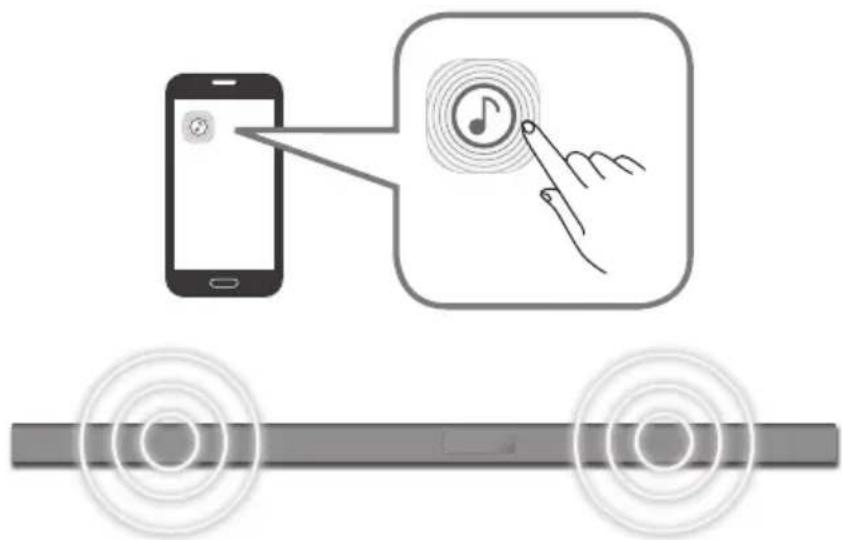
CBbP3BAHE HA SOUNDBAR KbM MPEXATA BN
Ha BaueTo cMapr yctpoiCTBO n36epe Te npiloxeHneTo Samsung Multiroom. CieBaTe ykaaHnra Ta Ha ekpaHa Ha cMapr yctpoiCTBOTO cn.
MokTeIaI3noJIbATEcIeHNITe yHKUHa npJIOKeHHeTo Samsung Multiroom.
- MojkeTe da ce HacnaIaIte Ha My3nKaJIHn faiJIOBe, CbXpaHeHn Ha MO6nIHn Bn TeNefoH, pa3NJuHn n3TOUHnHa My3nKa I INTEpHET paINO.
Лицензи за www.spotify.com/connect/third-party-licenses.
- 3a noBuee HnΦopMaζη 3a Spotify Connect nocetete www.spotify.com/connect
JIINCEH3

Manufactured under licence from Dolby Laboratories. Dolby, Dolby Audio and the double-D symbol are trademarks of Dolby Laboratories.


3a DTS nateHTn Bx. http://patents.dts.com. Ipon3BeHNO no liueH3 Ha DTS Licensing Limited. DTS, cmboIbT n DTS 3aeNo Cbc CmBoJa ca peHcTpuaH TbproBckn MapKn, a DTS 2.0 Channel e TbproBcka MapKa Ha DTS, Inc. DTS, Inc. BcnuK npaba 3anaeHn.
HDMI
TepmHnTe HDMI n HDMl High-Definition Multimedia Interface, KaKTo n IJorTo HDMl ca TbproBckn MapKn nnpeRnCTpnpaHn TbproBckn MapKn Ha HDMl Licensing LLC B CAU n npyn CTpaHn.
Be3KnuHm moe (BkIIOuHTeJIHO yeCTota ot 5,15 GHz-5,35 GHz)
C ToBa Samsung Electronics Декларupa, чу Тоб усточьо OTROВая Н OCHOBHNTe ИЗССВАЙNYДPyгс CBOTБНУCSLOВЯ HAДиpeKTиBA 1999/5/EC.
OpunHaHata deKnapaun 3a cbOTBcTCTBne MoKe da ce HamepHa http://www.samsung.com, otnde Ta Na POnPbXka > TbpceHe Ha noPdpXka 3a npOykTa n BBeTe MeTo Ha MOnela. To3n ypeJ moKe da pa60Tu BB BCnUKN cTpaHn oT EC. To3n ypeJ moKe da ce nIPOIN3Ba cAmo Ha 3aKpNTO.

Be3KnHm moe (6e3 yecToa ot 5,15 GHz-5,35 GHz)
C ToBa Samsung Electronics DeKnapipa, Ye ToBa yCTpoiCTBO OTROBapHa OCHOBHnTe N3NCKBaHnna I npytn CbOTBeTn YcNoBnHa DnpeKtNa 1999/5/EC. OpunnHaHnTa DeKnapaun 3a CbOTBeTCTBme MoKe Da Ce HamepHa http://www.samsung.com, Otndete Ha POndpbXka > TbpceHe Ha POndpbXka 3a npOykTa n BbVeTe ImeTo Ha Modena. To3n UpeD MoKe Da pa60TN BvB BCnKn CTpaHn ot EC.

Cbpxe Ce cSAMSUNG NO LENCABT
Ako mATE Bbnpocn nn KomeHTapn 3a npOyKTITE Ha Samsung, ce o6bpHeTe KbM ueHtbaPe 3a o6cnyXbaHe Ha KIneHTn Ha SAMSUNG.
| Country Contact Centre | Web Site | |
| ■Europe | ||
| UK 0330 SAMSUNG (7267864) www.samsung.com/uk/support | ||
| EIRE 0818 717100 www.samsung.com/ie/support | ||
| GERMANY | 0180 6 SAMSUNG bzw.0180 6 7267864* (*0,20 €/Anruf aus dem dt. Festnetz, aus dem Mobilfunk max. 0,60 €/Anruf) | www.samsung.com/de/support |
| FRANCE 01 48 63 00 00 www.samsung.com/fr/support | ||
| ITALA 800-SAMSUNG (800.7267864) www.samsung.com/it/support | ||
| SPAIN 3490217 2678 www.samsung.com/es/support | ||
| PORTUGAL 808 20 7267 www.samsung.com/pt/support | ||
| LUXEMBURG 261 03 710 | www.samsung.com/be_fr/support | |
| NETHERLANDS | 0900-SAMSUNG (0900-7267864) (€ 0,10/Min) | www.samsung.com/nl/support |
| BELGIUM 02-201-24-18 | www.samsung.com/be/support(Dutch)www.samsung.com/be_fr/support(French) | |
| NORWAY 815 56480 www.samsung.com/no/support | ||
| DENMARK | 70 70 19 70 | www.samsung.com/dk/support |
| FINLAND 030-6227 515 www.samsung.com/fi/support | ||
| SWEDEN 0771 726 7864 (0771-SAMSUNG) www.samsung.com/se/support | ||
| POLAND | 801-172-678* lub +48 22 607-93-33* (* (koszt polaczenia wedlung taryfy operatrice) | www.samsung.com/pl/support |
| HUNGARY | 0680SAMSUNG (0680-726-786)0680PREMIUM (0680-773-648) | www.samsung.com/hu/support |
[Праьнho n3XbPnHe Ha 6aTePNte B To3n npodykT]
(HaHnHOBCTpaHn CbCcnTeMn3a pa3dEnHo CmToC6bupaHe)
Toba 063NaueHHe Bbpyx 6aTePnTa, pbKOBoDCTBOTo HnIOnakOBKaTa, NOKa3Ba, Ye 6aTePnTE B To3n npOyKT He 6BaJa Ce n3XBpNAT C Dpyrnte 6bTOBn OTnAdbuCn B KpaHa TExHH NoJeEH JXnBOT. KbTeO Ca MapKpAnHn, XmMueckTe CmBONn Hg, Cd nnPi Pb NOKa3BaT, Ye 6aTePnTA CbDbpxk XnBAK, KaDMn NnI ONoBO Ha KOHTpONHtE HnBA B DupeKTHBa 2006/66 Ha EO.
Ako 6aTepeHnTe He ce HxBbPnT nPaBnH0, Te3n BeIeCTBa MoTa Da npEiIN3BnKaT yBpExJaHe Ha YOBeKoTo 3JpaBe NnHa OKONHaT CpeJa.
3a da ppeanate npnpoHnTe pecypcn 3a da cbdeNCTBaTe 3a MHOROKpatha YnoTpe6a Ha MaTePnAInHe pecypcn, MoJr OTdienIte 6aTePnTE Opynte BNDoe OTnaDbHn PPOyKTHn Tn peuKnpaIte NocpeDCTBOM Baata IokaHa cncTeMa 3a 6e3nnato Hbpbae He 6aTePN.
| Country Contact Centre | Web Site | |
| AUSTRIA | 0800-SAMSUNG (0800-7267864) [Only for Premium HA] 0800-366661 [Only for Dealers] 0810-112233 | www.samsung.com/at/support |
| SWITZERLAND | 0800 726 78 64 (0800-SAMSUNG) | www.samsung.com/ch/support (German) www.samsung.com/ch_fr/ support (French) |
| CZECH | 800 - SAMSUNG (800-726786) | www.samsung.com/cz/support |
| SLOVAKIA | 0800 - SAMSUNG (0800-726 786) | www.samsung.com/sk/support |
| CROATIA | 072 726 786 www.samsung.com/hr/support | |
| BOSNIA | 055 233 999 www.samsung.com/support | |
| MONTENEGRO | 020 405 888 www.samsung.com/support | |
| SLOVENIA | 080 697 267 (brezplačna številkaj) www.samsung.com/si | |
| SERbia | 011 321 6899 www.samsung.com/rs/support | |
| BULGARIA | *3000 Βeña B m Péxqata 0800 111 31, bēzniatna telenófonha πηνηρί | www.samsung.com/bg/support |
| ROMANIA | *8000 (apel in retea) 08008-726-78-64 (08008-SAMSUNG) Apel GRATUIT | www.samsung.com/ro/support |
| CYPRUS 8009 | 4000 only from landline, toll free | |
| GREECE | 80111-SAMSUNG (80111 726 7864) only from land line (+30) 210 6897691 from mobile and land line | www.samsung.com/gr/support |
| LITHUANIA | 8-800-7777 | www.samsung.com/lt/support |
| LATvia | 8000-7267 | www.samsung.com/lv/support |
| ESTONIA 800-7267 | www.samsung.com/ee/support | |
IpaBnHTo TpeTnpaHe Ha n3denneto CneKpAHa EKcNlOaTuNoHHMa MY XHBOT
(OTnabun, npedctabnaaune neneKtpueecko n enektpoHNO o6OpyDahe)
(HaHNo B CTpaHn CbC CnCTeMn 3a pa3dEnHo cmTeOcb6npaHe)
To3n 3HaK, NoctaBeH Bbpyx N3dEnIeTO, HerOBn PnHnAdJeXHOCTN INNeuATn MaTePnAInn, O3HaHab, Ye npOyKtB T nPnHaADJeXHOCTNTe (Hapnpimep 3apJHo yCtpoCTBO, CnyuaKn, USB ka6en) He 6NuBa da ce n3XbBpJrT 3aEDHO C pTyrrte 6bTOnBv OTnAbu, KORato n3Tepe ECKnloatauHOHNHT My XJBOT. OTdJIeTIe Te3n YcTPOCTBA OT DpyrTne BINOBT ONaDbuN Hn PnPedaaTbe 3a peuKnipaHe. Cna3aBn ToBa TpaINHO He n3NaIarTe Ha onaHOCT 3dpBeTo HA npYn xopa H npEJa3BaTE OKoHATA cpeAo 3AmbpcBaHe, npEIN3BnKaHOOT 6e3KoHTponHO 3XbBpJrHe HA ONaDbuN. OCBeh TOBa, NOdoHO OTROBOPHO NOBedeHne CB3DaBA Bb3MoXHOCT 3a NOBtPOHO (ekolornuHO Cbo6pa3HO) INONLBAHe HA MATEpauHnITE pecypcn.
IOMaunHnTe NOTpe6nten Tp6Ba Da Ce Cbpxat CtbproBeua Ha dpe6Ho,OT KOROTO Ca 3aKynnmN 3dEneMeTO,NN CbC CbOTBeHTaT MeCTHa DbpKaaBHa areHcna,3a Da NOnyauT NOIpO6H NHCtpKyuN KbDe N KORA MORAT Da 3aHeCat Te3n yCTpoiCTBa 3a peuKnipaHe, 6e3oNaCHO 3a OkonHata Cpda.
KopnpaTbHnTe Notpe6nte nCneBa da ce Cbpxkat C doCTaBvNka cn d npoBeprt yCNOBnTa Ha DOROBopa 3a NOKyNka. Toba n3dJeIne H erOBrte enEeKtpOnHH npHaNDJIeXHOCHTn He 6BnBa da ce CmecTBAT C dpYrTe OtnaDbuHa TbproBCKOTOppeDpNpAITne.
Odabire ulaze D.IN, AUX, HDMI, BT iii TV.
- Kada je uredaj ukljucen, pritiskanjem i držanjem gumba duze od 3 sekunde gumb se postavlja za obavljanje funkcjie (Iskluci zvuk). Da biste otkazali postavljanje gumba (Iskluci zvuk), ponovo pritsnite i drzite gumb duze od 3 sekunde.
www.spotify.com/connect/third-party-licenses.
- Za više informacija o softveru Spotify Connect posjetite stranicu www.spotify.com/connect
LICENCA

Manufactured under licence from Dolby Laboratories. Dolby, Dolby Audio and the double-D symbol are trademarks of Dolby Laboratories.


Patente tvrtke DTS potražite na http://patents.dts.com. Proizvedeno pod licencom tvrtke DTS Licensing Limited. DTS, symbolism, & DTS i simbol zajedno registrirani su zašitni znakovi, a DTS 2.0 Channel zašitni je znak tvrtke DTS, Inc. © DTS, Inc. Sva prava pridržana.
HOMI
Pojmovi HDMI i High-Definition Multimedia Interface i logotip HDMI zašitni su znakovi ili registrarani zašitni znakovi tvrtke HDMI Licencing LLC u Sjedinjenim Americkim Državama i drugim zempljama.
Bezichnodeli (uključujuci frekvencije od 5,15 GHz - 5,35 GHz)
Tvrtka Samsung Electronics ovm izjavlujde da je ova oprema uskladena s bitnim zahtjevima i drugim vaznim odredbama Directive 1999/5/EZ.
Izvornu izjavu o sukladnosti možete pronači na adresi http://www.samsung.com, ako odaberete Podrška > Traži podršku za proizvod i unesete naziv modela.
Oprema se smije upotrebljavati u svim zempljama EU.
Ova oprema smije se upotrebljavati samo u zatvorenom prostoru.

TRACK - REPEAT: Opakovane prehravani stopy.
ALL - REPEAT: Opakovane prehravani vsech stop.
Preskocit Dopredu
Manufactured under licence from Dolby Laboratories. Dolby, Dolby Audio and the double-D symbol are trademarks of Dolby Laboratories.


2.0 Channel
Manufactured under licence from Dolby Laboratories. Dolby, Dolby Audio and the double-D symbol are trademarks of Dolby Laboratories.


HOIATUS. ARGE NEELAKE PATAREID ALLA, KEEMILISE POLETUSE OHT.
Manufactured under licence from Dolby Laboratories. Dolby, Dolby Audio and the double-D symbol are trademarks of Dolby Laboratories.


2.0 Channel
Bouton (Alimentation)
Manufactured under licence from Dolby Laboratories. Dolby, Dolby Audio and the double-D symbol are trademarks of Dolby Laboratories.


2.0 Channel
EvepyoonoiE kai anevpoyonoie (Evepy./AeVep.) to Soundbar.
Evtaon nXou
www.spotify.com/connect/third-party-licenses.
- Ia nepioooTepe c npopopiec oxetik a e to Spotify Connect, eniokeeefte tn dieuovon www.spotify.com/connect
AΔEIA

Manufactured under licence from Dolby Laboratories. Dolby, Dolby Audio and the double-D symbol are trademarks of Dolby Laboratories.


Tia Tc epeoTeXie CDS, aatpeEe Tn diakTuakn tooTeoia http://patents.dts.com. KataokeuaZetai katoniv aediac ano tn DTS Licensing Limited. H ovopaia DTS, to avtiox o ubo lo kai n ovopaia DTS i e to uBoLo evai onuata katateeVta kai to DTS 2.0 Channel evai eunopiko onma tnc DTS, Inc. © DTS, Inc. Me tnv enipulaaen navtoc dikaiomegaatoc.
HOMI
Oi eWuueHDMI, HMI High-Definition Multimedia Interface kai to loyotuHDMI eivai eptopika onmuata n onmuata kaataeovta tnc HDMI Licensing LLC otic H.I.A. kai aee xwpes.
Aoupuata o t (ouumepiaa avoevwv twv ouxvoittwv 5,15 GHz - 5,35 GHz)
Me tynapouo, n Samsung Electronics e 0ti autoc o EonliooC pI npoi tic ouoiwdeic aatainoeic kai tic loinec oxetikec diataeic tnc Odyiaac 1999/5/EK. Mnpoeite va bpoeite tn pywrotunn dAwn oumuoppwoc otn diadiktuakntoioeia http://www.samsung.com, metaaivovtac oTo YNooTnpiEn > Avzntnon unootnpicn npoiovtoc kai eiaoyovtac to ovoua muvtelou.
Autoc o eonlouoc mopéi va xpnoiooinθe i oλe c tic wpec tnc E.E. Autoc o eonlouoc mopéi va xnpoiuoinθe i movo e eowteikouc wpuoc.

Aoupuataoovtela(εaipouévwwtwvouxvoiTsw5,15GHz-5,35GHz)
Me tyn apouoa, n Samsung Electronics e1 6ti autoc o Eoaniooic Pnpoi tic ouawdeic anatnoeic kai tic loinec oxetikec diataeic tnc Odyiaac 1999/5/EK.
Mnperte va bpertte tn pywotunn Anlwn oumuoppwoc otn diaiktuakn tonoeia
http://www.samsung.com, metaaliovvtac oto Ynootnpieq > Avzntnon unootnpiecn poiovtoc kai
Eisayovtac to ovopa mvteau.
Autoc o eonlouoc mopei va xpooiintheta o ae c t wpe c t E.E.

Manufactured under licence from Dolby Laboratories. Dolby, Dolby Audio and the double-D symbol are trademarks of Dolby Laboratories.


Premendo Anything to do is possible.
Se sul disposativo che si sta riproducendo sono presenti più file, premendo il tasting. >> >> >> >> >> >> >> >> >> >> >> >> >> >> >> >> >> >> >> >> >> >> >> >> >> >> >> >> >> >> >> >> >> >> >> >> >> >> >> >> >> >> >> >> >> >> >> >> >> >> >> >> >> >> >> >> >> >> >> >> >> >> >> >> >> >> >> >> >> >> >> >> >> >> >> >> >> >> >> >> >> >> >> >> >> >> >> >> >> >> >> >> >> >> >> >> >> >> >> >> >>>
Bluetooth POWER
Manufactured under licence from Dolby Laboratories. Dolby, Dolby Audio and the double-D symbol are trademarks of Dolby Laboratories.


-Ja audio signals nav pieejams 5 minutes.
Rezims AUX
-Ja AUX kabelis ir atvienots 5 minutes.
Ja AUX kabelis ir pievienots, bet KEY ivade nav pieejama 8 stundas. (Funkciju Auto Power Down var izslegt tikai saja gadijumā.)
Lai izslęgtu fungcjju Auto Power Down, kamér ir aktivizëts režëms AUX, nospiediet un turiet nospiestu pogu 5 sekundes. Displejä tiek paradëts zinojums ON - AUTO POWER Down / OFF - AUTO POWER Down.
BLUETOOTH
Var izveidot Bluetooth ierces un sistemas Soundbar savienojumu un baudit muziku ar stereo skanu, neizmantojot vadus.
SISTÉMAS SOUNDBAR UN BLUETOOTH IERICES SAVIENOJUMA IZVEIDOSANA
Pärbaudiet, vai Bluetooth ierice atbalsta ar tehnologiju Bluetooth saderigu stereo austinu funkciju.
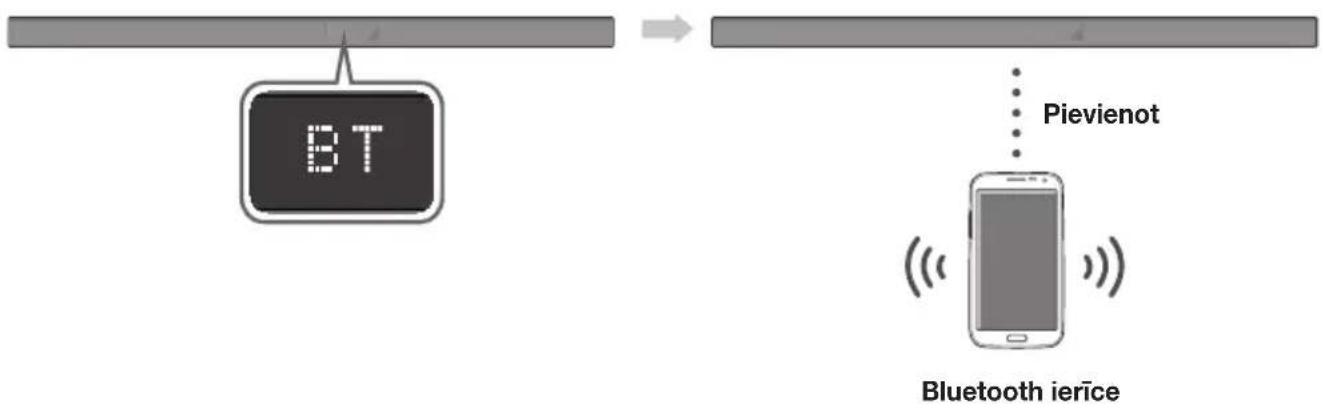
Manufactured under licence from Dolby Laboratories. Dolby, Dolby Audio and the double-D symbol are trademarks of Dolby Laboratories.

Manufactured under licence from Dolby Laboratories. Dolby, Dolby Audio and the double-D symbol are trademarks of Dolby Laboratories.

Manufactured under licence from Dolby Laboratories. Dolby, Dolby Audio and the double-D symbol are trademarks of Dolby Laboratories.


Selecteazā intrarea D.IN, AUX, HDMI, BT, TV.
Manufactured under licence from Dolby Laboratories. Dolby, Dolby Audio and the double-D symbol are trademarks of Dolby Laboratories.


Pentru brevete DTS, accesaţi http://patents.dts.com. Fabricat sub licență DTS Licensing Limited. DTS-HD, Simbolul, & DTS-HD Şi Simbolul sunt maricci commerciale inregistrate Şi DTS 2.0 Channel este marca commercia a DTS, Inc. © DTS, Inc. Toate drepturile rezerva.
Hami
HDMI, High-Definition Multimedia Interface.si sigla HDMI sunt marmi commerciale sau marmi commerciale inregistrate ale HDMI Licensing LLC in Statele Unite ale Americi si alte tari.
Modèle wireless (inclusiv freventa 5,15 GHz - 5,35 GHz)
Manufactured under licence from Dolby Laboratories. Dolby, Dolby Audio and the double-D symbol are trademarks of Dolby Laboratories.


Za DTS patente, pogledajte http://patents.dts.com. Proizvedeno pod licencom kompanije DTS Licensing Limited. DTS, simbol, kao i DTS i simbol zajedno su registrovani zašitni znaci, a DTS 2.0 Channel je zašitni znak kompanije DTS, Inc. © DTS, Inc. Sva prava zadržana.
HDMI
Pojmovi HDMI, High-Definition Multimedia Interface i HDMI logotip su zašitni znaci ili registrovani zašitni znaci kompanije HDMI Licensing LLC u Sjedinjenim Americkim Državama i drugim zemljama.
Bezni modeli (uključujuci frekvenciju 5.15 GHz - 5.35 GHz)
Samsung Electronics ovim izjavljupe da je ova oprema usaglasena sa sustinskim zahevima i drugim relevantnim odredbama direktive 1999/5/EC.
Zvaničnu Izjavu o usaglasenosti možete naći na adresi http://www.samsung.com. Idite na Podrška > Traži podršku za proizvod i unesite naziv modela.
32 RIESENIE PROBLEMOV
32 Riesenie problemov
33 DODATOK
33 Technické udaje
Manufactured under licence from Dolby Laboratories. Dolby, Dolby Audio and the double-D symbol are trademarks of Dolby Laboratories.

Información o patentoch k DTS najdete na adrese http://patents.dts.com. Vyrobené pod licenciou od spolocnosti DTS Licensing Limited. DTS, symbol & DTS spolu so symbolom su registrované ochranné známky a DTS 2.0 Channel je ochranná známka spolocnosti DTS, Inc. © DTS, Inc. Vsetky prava vyhradené.
HDMI
Oznacenia HDMI a HDMI High-Definition Multimedia Interface a logo HDMI su ochranné známky alebo registrované ochranné známky spolocnosti HDMI Licencing LLC v Spojenych státoch a inych krajinach.
Bezdrotové modely (vrátane frekvencie 5,15 GHz - 5,35 GHz)
Spolocnost' Samsung Electronics tymto vyhlasuje, ze toto zariadenie je v sulade s nevyhnutnymi poziadavkami a d'alsimi relevantnymi cast'am smernice 1999/5/ES. Povodné vyhlasenie o zhode najdete na stranke http://www.samsung.com, prejdite na položku Podpora > H'adat' podporu k produktu a zadajte nazov modelu. Toto zariadenie je:nozné pouzivat' vo vsetkych krajinach EU. Toto zariadenie je:nozné pouzivat' iba v interiéri.

Bezdrotové modely (okrem frekvencie 5,15 GHz - 5,35 GHz)
Spolocnost' Samsung Electronics tymto vyhlasuje, ze toto zariadenie je v sulade s nevyhnutnymi poziadavkami a d'alsimi relevantnymi cast'amir smernice 1999/5/ES. Povodne vyhlasenie o zhode najdete na stranke http://www.samsung.com, prejdite na položku Podpora > Hl'adat' podporu k produktu a zadaje nazov modelu. Toto zariadenie je mozné pouzivat' vo vsetkych krajinach EU.

Kontaktujte SAMSUNG WORLD WIDE
Ak mate akekol'vek otazky alebo komentare oh'adom produktov spolochnosti Samsung, prosim, kontaktujte stredisko starostlivosti o zakaznikov SAMSUNG.
| Country Contact Centre | Web Site | |
| ■Europe | ||
| UK 0330 SAMSUNG (7267864) www.samsung.com/uk/support | ||
| EIRE 0818 717100 www.samsung.com/ie/support | ||
| GERMANY | 0180 6 SAMSUNG bzw.0180 6 7267864* (*0,20 €/Anruf aus dem dt. Festnetz, aus dem Mobilfunk max. 0,60 €/Anruf) | www.samsung.com/de/support |
| FRANCE 01 48 63 00 00 www.samsung.com/fr/support | ||
| ITALA 800-SAMSUNG (800.7267864) www.samsung.com/it/support | ||
| SPAIN 3490217 2678 www.samsung.com/es/support | ||
| PORTUGAL 808 20 7267 www.samsung.com/pt/support | ||
| LUXEMBURG 261 03 710 | www.samsung.com/be_fr/support | |
| NETHERLANDS | 0900-SAMSUNG (0900-7267864) (€ 0,10/Min) | www.samsung.com/nl/support |
| BELGIUM 02-201-24-18 | www.samsung.com/be/support(Dutch)www.samsung.com/be_fr/support(French) | |
| NORWAY | 815 56480 | www.samsung.com/no/support |
| DENMARK | 70 70 19 70 | www.samsung.com/dk/support |
| FINLAND | 030-6227 515 | www.samsung.com/.fi/support |
| SWEDEN | 0771 726 7864 (0771-SAMSUNG) | www.samsung.com/se/support |
| POLAND | 801-172-678* lub +48 22 607-93-33* (* koszt polaczenia wedlug taryfy operatora) | www.samsung.com/pl/support |
| HUNGARY | 0680SAMSUNG (0680-726-786)0680PREMIUM (0680-773-648) | www.samsung.com/hu/support |
| Country Contact Centre | Web Site | |
| AUSTRIA | 0800-SAMSUNG (0800-7267864) [Only for Premium HA] 0800-366661 [Only for Dealers] 0810-112233 | www.samsung.com/at/support |
| SWITZERLAND | 0800 726 78 64 (0800-SAMSUNG) | www.samsung.com/ch/support (German) www.samsung.com/ch_fr/ support (French) |
| CZECH | 800 - SAMSUNG (800-726786) | www.samsung.com/cz/support |
| SLOVAKIA | 0800 - SAMSUNG (0800-726 786) | www.samsung.com/sk/support |
| CROATIA | 072 726 786 www.samsung.com/hr/support | |
| BOSNIA | 055 233 999 www.samsung.com/support | |
| MONTENEGRO | 020 405 888 www.samsung.com/support | |
| SLOVENIA | 080 697 267 (brezplačna števiška) www.samsung.com/si | |
| SERBIA | 011 321 6899 www.samsung.com/rs/support | |
| BULGARIA | *3000 Βeña a m Péxqara 0800 111 31, bēzniatna teneφοῦ nvnma | www.samsung.com/bg/support |
| ROMANIA | *8000 (apel in retea) 08008-726-78-64 (08008-SAMSUNG) Apel Gratisuit | www.samsung.com/ro/support |
| CYPRUS 8009 | 000 only from landline, toll free | |
| GREECE | 80111-SAMSUNG (80111 726 7864) only from land line (+30) 210 6897691 from mobile and land line | www.samsung.com/gr/support |
| LITHUANIA | 8-800-7777 | www.samsung.com/lt/support |
| LATvia | 8000-7267 | www.samsung.com/lv/support |
| ESTONIA | 800-7267 | www.samsung.com/ee/support |
[Sprüva likvidácia baterii v tomto vyrobuku]
HRBTNA/SPODNJA PLOŠCA
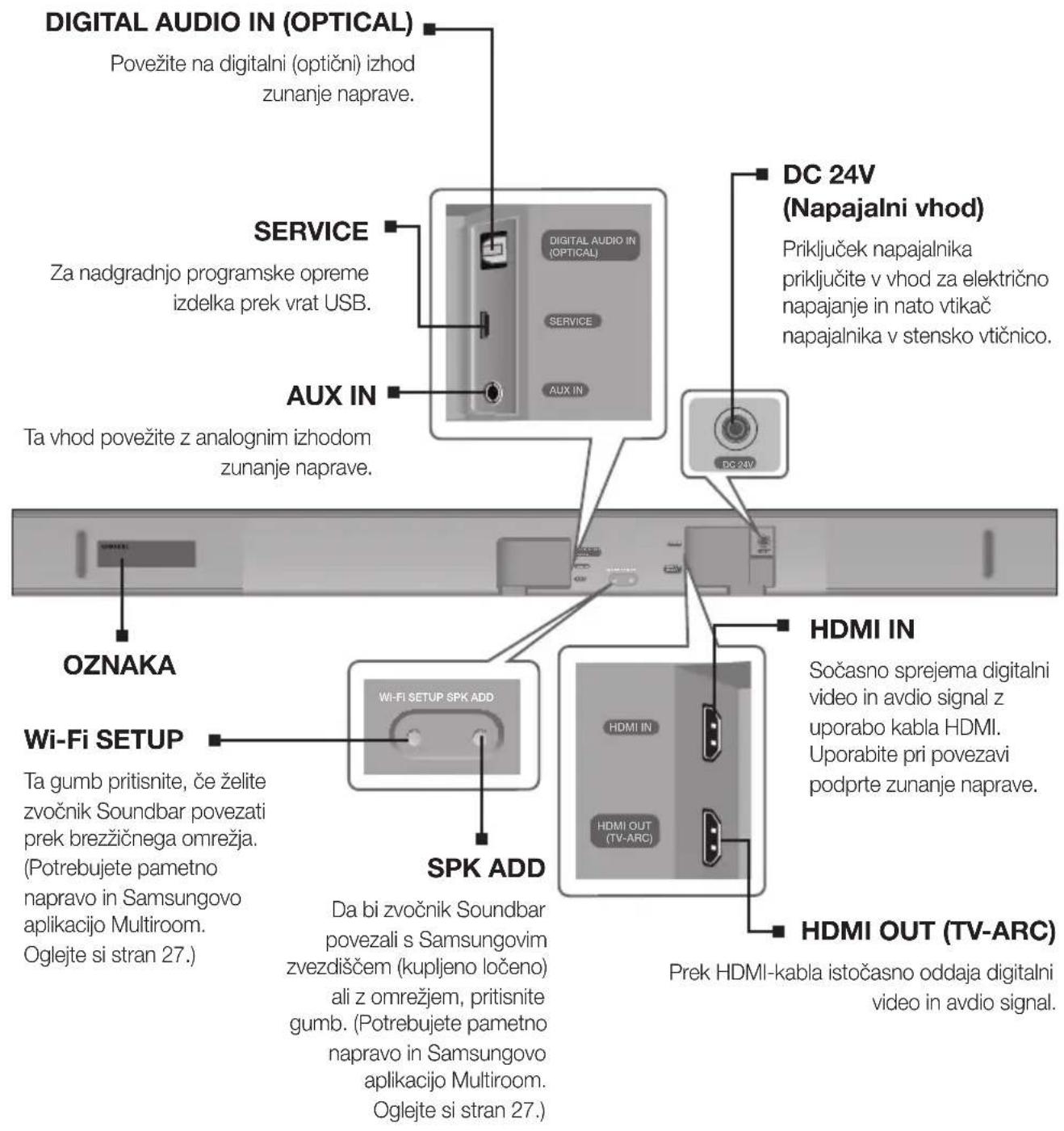

Manufactured under licence from Dolby Laboratories. Dolby, Dolby Audio and the double-D symbol are trademarks of Dolby Laboratories.

Patente za technologijo DTS najdete na http://patents.dts.com. Izdelano po licenci DTS Licensing Limited. Ime & oznaka DTS, navedena skupaj ali loceno, sta registrarani blagovni znamki, DTS 2.0 Channel pa je blagovna znamka družbe DTS, Inc. © DTS, Inc. Vse pravice pridržane.
Hami
Izraza HDMI, HDMI High-Definition Multimedia Interface in logotip HDMI so blagovne znamke ali registirane blagovne znamke druzbe HDMI Licensing LLC v ZDA in drugih državah.