HW-Q910A - Soundbar SAMSUNG - Free user manual and instructions
Find the device manual for free HW-Q910A SAMSUNG in PDF.



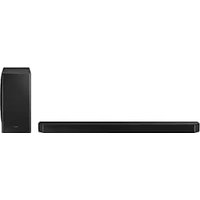
| Product type | Soundbar with wireless subwoofer |
| Brand and model | Samsung HW-Q910A |
| Dimensions (W x H x D) of the main unit | 1232.0 x 69.5 x 138.0 mm |
| Weight of the main unit | 7.1 kg |
| Dimensions of the subwoofer (W x H x D) | 210.0 x 403.0 x 403.0 mm |
| Weight of the subwoofer | 9.8 kg |
| Power supply | AC, via supplied power cord |
| Standby power consumption | 7.0 W |
| Total output power | 330 W (18 W x 6 + 10 W x 3 + 18 W x 6 + 160 W) |
| Supported audio formats | Dolby Atmos, Dolby TrueHD, DTS:X, 8-channel LPCM |
| Connectivity | HDMI (eARC/ARC), HDMI input (x2), optical, Bluetooth, Wi-Fi, USB (service) |
| Audio functions | Adaptive Sound, Q-Symphony, Spacefit Sound+, Active Voice Amplifier (AVA), Auto EQ |
| Wall mounting | Possible with included mounting kit |
| Cleaning and maintenance | Soft, dry cloth, avoid abrasive products for the structure |
| Safety | Do not expose to moisture, unplug during storms, respect ventilation |
| Box contents | Soundbar, subwoofer, remote control with batteries, HDMI cable, wall mounting guide, screws and rubber feet |
| Firmware update | Automatic via Wi-Fi or manual via USB port |
| Compatibility | Apple AirPlay 2, Amazon Alexa, SmartThings, Spotify Connect |
Frequently Asked Questions - HW-Q910A SAMSUNG
User questions about HW-Q910A SAMSUNG
0 question about this device. Answer the ones you know or ask your own.
Ask a new question about this device
Download the instructions for your Soundbar in PDF format for free! Find your manual HW-Q910A - SAMSUNG and take your electronic device back in hand. On this page are published all the documents necessary for the use of your device. HW-Q910A by SAMSUNG.
USER MANUAL HW-Q910A SAMSUNG
Thank you for purchasing this Samsung product.
To receive more complete service, please register your product at
www.samsung.com/register
SAFETY INFORMATION
SAFETY WARNINGS
TO REDUCE THE RISK OF ELECTRIC SHOCK, DO NOT REMOVE THE COVER (OR BACK).
NO USER-SERVICEABLE PARTS ARE INSIDE. REFER SERVICING TO QUALIFIED SERVICE PERSONNEL.
Refer to the table below for an explanation of symbols which may be on your Samsung product.
 | CAUTION |  |
| RISK OF ELECTRIC SHOCK. DO NOT OPEN. | ||
 | This symbol indicates that high voltage is present inside. It is dangerous to make any kind of contact with any internal part of this product. | |
 | This symbol indicates that this product has included important literature concerning operation and maintenance. | |
 | Class II product : This symbol indicates that a safety connection to electrical earth (ground) is not required. If this symbol is not present on a product with a power cord, the product MUST have a reliable connection to protective earth (ground). | |
 | AC voltage : Rated voltage marked with this symbol is AC voltage. | |
 | DC voltage : Rated voltage marked with this symbol is DC voltage. | |
 | Caution. Consult Instructions for use : This symbol instructs the user to consult the user manual for further safety related information. | |
WARNING
- To reduce the risk of fire or electric shock, do not expose this appliance to rain or moisture.
CAUTION
- TO PREVENT ELECTRIC SHOCK, MATCH WIDE BLADE OF PLUG TO WIDE SLOT, FULLY INSERT.
- This apparatus shall always be connected to a AC outlet with a protective grounding connection.
- To disconnect the apparatus from the mains, the plug must be pulled out from the mains socket, therefore the mains plug shall be readily operable.
- Do not expose this apparatus to dripping or splashing. Do not put objects filled with liquids, such as vases, on the apparatus.
- To turn this apparatus off completely, you must pull the power plug out of the wall socket. Consequently, the power plug must be easily and readily accessible at all times.
PRECAUTIONS
- Ensure that the AC power supply in your house complies with the power requirements listed on the identification sticker located on the bottom of your product. Install your product horizontally, on a suitable base (furniture), with enough space around it for ventilation (7\~10 cm). Make sure the ventilation slots are not covered. Do not place the unit on amplifiers or other equipment which may become hot. This unit is designed for continuous use. To fully turn off the unit, disconnect the AC plug from the wall outlet. Unplug the unit if you intend to leave it unused for a long period of time.
- During thunderstorms, disconnect the AC plug from the wall outlet. Voltage peaks due to lightning could damage the unit.
- Do not expose the unit to direct sunlight or other heat sources. This could lead to overheating and cause the unit to malfunction.
- Protect the product from moisture (i.e. vases), and excess heat (e.g. a fireplace) or equipment creating strong magnetic or electric fields. Unplug the power cable from the AC wall socket if the unit malfunctions. Your product is not intended for industrial use. It is for personal use only. Condensation may occur if your product has been stored in cold temperatures. If transporting the unit during the winter, wait approximately 2 hours until the unit has reached room temperature before using.
- The battery used with this product contains chemicals that are harmful to the environment. Do not dispose of the battery in the general household trash. Do not expose the battery to excess heat, direct sunlight, or fire. Do not short circuit, disassemble, or overheat the battery.
CAUTION : Danger of explosion if the battery is replaced incorrectly. Replace only with the same or equivalent type.
Fabric cleaning
Remove any dirt or stain on the product surface immediately.
Removing and cleaning can be less effective for some substances or if left for a prolonged time.
CAUTION
- Use a vacuum cleaner or an adhesive lint roller to remove dust, handprints, and the likes.
- Some cleaning brushes may damage the product, depending on the materials they contain.
- Towels and cleaning clothes may leave lint or dirt on the product.
- Do not use a nail or other tools to scratch the dirt off. It may damage the fabric.
- To remove oil or liquid stains, use a clean white cloth moist with water. If the stain persists, wipe it with a mixture of water and neutral detergent (such as dishwashing soaps) and a cloth.
- A non-neutral detergent or cleaner may cause discoloration or fabric damage.
- After cleaning, use a dry cloth or hairdryer to dry the area.
- Do not use excessive force to avoid discoloration or fabric damage.
CONTENTS
01 Checking the Components 6
02 Product Overview 7
Top Panel of the Soundbar 7
Bottom Panel of the Soundbar 7
03 Using the Soundbar Remote Control 9
Inserting Batteries before using the Remote Control (AA batteries X 2)....9
How to Use the Remote Control....9
Active Voice Amplifier (AVA) 10
Using the Hidden Buttons (Buttons with more than one function).... 10
Output specifications for the different sound effect modes....11
Adjusting the Soundbar volume with a TV remote control 12
04 Connecting the Soundbar 13
Connecting the power and units.... 13
- Manually connecting the Subwoofer.... 14
- LED Indicator Lights on the Rear of Subwoofer.... 14
- Auto EQ....15
Connecting an SWA-9500S (Sold Separately) to your Soundbar 15
05 Using a wired connection to the tv
16
Method1. Connecting with HDMI 16
- Connecting the TV that supports HDMI ARC (Audio Return Channel) 16
Method 2. Connecting using an Optical Cable .....17
06 Using a wireless connection to the TV
18
Method 1. Connecting via Bluetooth ..... 18
Method 2. Connecting via Wi-Fi .... 19
07 Connecting an External Device
20
Method 1. Connecting using an HDMI Cable (Capable of Dolby Atmos decoding and playback)....20
Method 2. Connecting using an Optical Cable ...... 21
08 Connecting a Mobile Device
22
Method 1. Connecting via Bluetooth 22
Method 2. Connecting via Wi-Fi (Wireless Network)....23
Getting Started with Amazon Alexa (Built-in Alexa)....24
Getting Started with Alexa on Amazon Product (Works with Alexa)....25
Using the Tap Sound 26
09 Connecting To Apple AirPlay 2
27
Connect and use with an Apple product.... 27
10 Installing the Wall Mount 28
Installation Precautions 28
Wallmount Components....28
11 Installing the Soundbar above a TV Stand 29
Component 29
12 Software Update 30
Auto Update....30
USB Update 30
Initialisation....31
13 Troubleshooting 31
14 Licence 33
15 Open Source Licence Notice 33
16 Important Notes About Service 33
17 Specifications and Guide 34
Specifications 34
01 CHECKING THE COMPONENTS

natural_image
Three grayscale product photos of remote devices: a rectangular box, a remote control with two small batteries, and a cylindrical container (no text or symbols visible)Soundbar Main Unit Soundbar Remote Control / Batteries Subwoofer

text_image
x 2 A B C D E F G H I J K L M N O P Q R S T U V W X Y ZPower Cord (Subwoofer, Soundbar) HDMI Cable Wall Mount Guide

text_image
x2 x2 (M4 x L10) x2Holder-Screw Screw Bracket-Wall Mount

Rubber-Foot
- For more information about the power supply and power consumption, refer to the label attached to the product. (Label: Rear of the Soundbar Main Unit)
• To purchase additional components or optional cables, contact a Samsung Service Centre or Samsung Customer Care. - For more information about the wallmount or rubber-foot, see pages 28\~30.
- Design, specifications, and App screen are subject to change without prior notice.
- The appearance of the accessories may differ slightly from the illustrations above.
02 PRODUCT OVERVIEW
Top Panel of the Soundbar
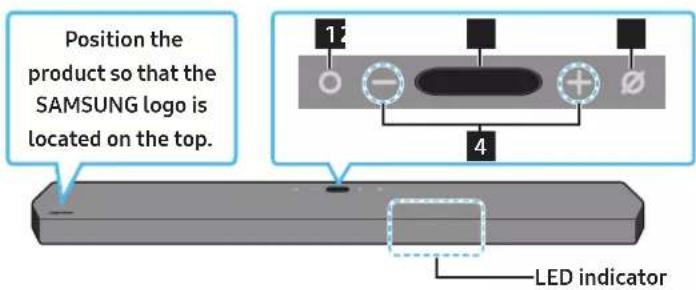
text_image
Position the product so that the SAMSUNG logo is located on the top. 1 2 3 4 LED indicator| 1 | ○ (Multi Function) ButtonIn standby mode, press the Ⓜ Multi Function) button to turn on the Soundbar.Press the Ⓜ Multi Function) button to change the input source. | ||
| 2 | DisplayDisplays the product's status and current mode.D.IN → HDMI 1 → HDMI 2 → Wi-Fi → BT | ||
| 3 | ∅ (Mic On/Off) ButtonPress the button to turn the microphone on or off.When the microphone is off, the LED indicator will light red. | Mic Off | Mic On |
 | |||
| 4 | - + (Volume) ButtonAdjusts the volume. | ||
- When you plug in the AC cord, the power button will begin working in 4 to 6 seconds.
- When you turn on this unit, there will be a 4 to 5 second delay before it produces sound.
• If you hear sounds from both the TV and Soundbar, go to the Settings menu for the TV audio and change the TV speaker to External Speaker.
Bottom Panel of the Soundbar
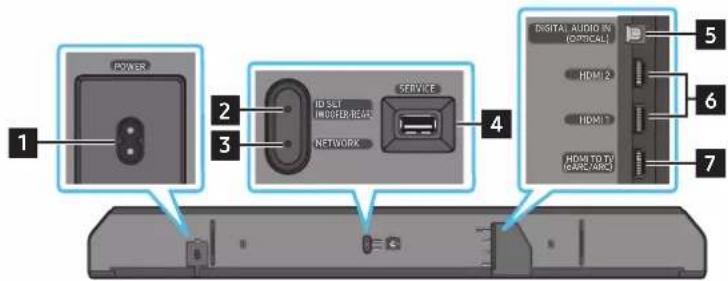
text_image
POWER ID SET HINDUER REACH NETWORK SERVICE 4 DIGITAL AUDIO IN (COMICAL) 5 HDMI 2 HDMI 1 HEAD TO TA (CASC-ABC) 6 7| 1 POWERConnect the Soundbar's AC power cable. (See page 13) | |
| 2 D SET (WOOFER/REAR)Press to connect the Soundbar to surround speakers and a subwoofer wirelessly. (The surround speaker is sold separately.) | |
| 3 NETWORKPress to connect to a wireless network (Wi-Fi) via theSmartThingsapp. | |
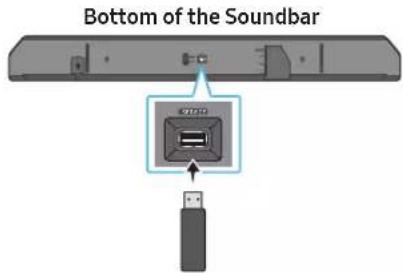
| 4 SERVICEConnect a USB storage device to upgrade the product's software. | |
| 5 DIGITAL AUDIO IN (OPTICAL)Connect to the digital (optical) output of an external device. (See page 21) |
6 HDMI 1 / HDMI 2
Inputs digital video and audio signals simultaneously using an HDMI cable.
Connect to the HDMI output of an external device. (See page 20)
7 HDMI TO TV (eARC/ARC)
Connect to the HDMI jack on a TV. (See page 16)
- When disconnecting the power cord from a wall outlet, pull the plug. Do not pull the cable.
- Do not connect this unit or other components to an AC outlet until all connections between components are complete.
03 USING THE SOUNDBAR REMOTE CONTROL
Inserting Batteries before using the Remote Control (AA batteries X 2)
Slide the back cover in the direction of the arrow until it is completely removed. Insert 2 AA batteries (1.5V) oriented so that their polarity is correct. Slide the battery cover back into position.
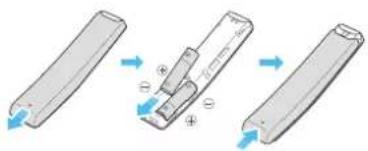
text_image
Diagram illustrating the process of a device with directional arrows and polarity indicators, showing transformation from rectangular to rectangular panel.How to Use the Remote Control
text_image
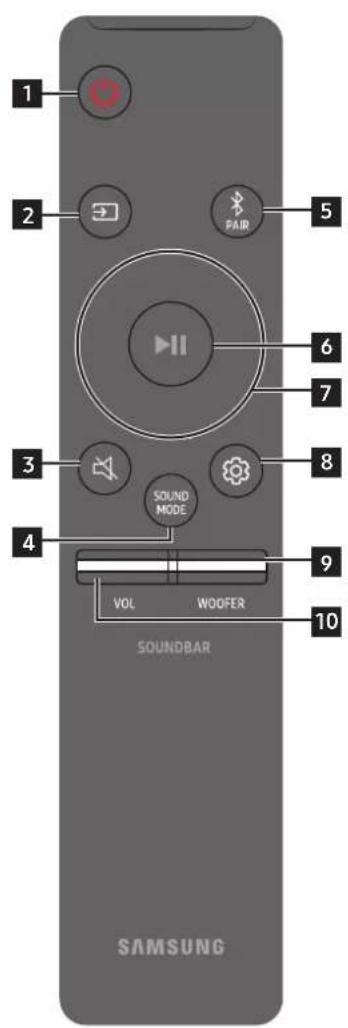
1 2 PAIR 5 6 7 3 SOUND MODE 8 4 9 VOL WOOFER 10 SOUNDBAR SAMSUNG| 1 |  Power Power | Turns the Soundbar on and off.Auto Power Down FunctionThe unit turns off automatically in the following situations:In D.IN / HDMI 1 / HDMI 2 / Wi-Fi / BT mode if there is no audio signal for 18 minutes. |
| 2 |  Source Source | Press to select a source connected to the Soundbar.Voice Feedback On/OffYou can turn on or off the Voice Feedback.Press and hold the (Source) button on the remote control for 5 seconds while the Soundbar is off (Standby mode).Each time you change the Voice Feedback setting, the OLED Display will show “AUI OFF” (Default) or “AUI ON”. |
| 3 |  Mute Mute | Press the (Mute) button to mute the sound.Press it again to unmute the sound. |
| 4 |  SOUND MODE SOUND MODE | You can select the desired sound mode by choosing STANDARD, SURROUND, GAME PRO, or ADAPTIVE SOUND.STANDARDOutputs the original sound.SURROUNDProvides a wider sound field than standard.GAME PROProvides stereoscopic sound to immerse you in the action while gaming.ADAPTIVE SOUNDAnalyzes the content in real time and automatically provides the optimal sound field based on the characteristics of the content. |
| 5 |  Bluetooth PAIR Bluetooth PAIR | Switch the Soundbar to Bluetooth pairing mode. Press the button and wait for the “BTPAIRING” screen to connect to a new Bluetooth device. |
| 6 |  Play / Pause Play / Pause | You can also play or pause music by pressing the button. |
| 7 |  Up/Down/Left/Right Up/Down/Left/Right | 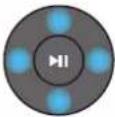 Press the indicated areas to select Up/Down/Left/Right.Press Up/Down/Left/Right on the button to select or set functions.Music SkipPress theRightbutton to select the next music file. Press theLeftbutton to select the previous music file.ID SETUse this option when the Subwoofer or Surround Speakers are not connected or need reconnection.While powered off, press and hold theUpbutton for 5 seconds to performID SET.(See page 14.) Press the indicated areas to select Up/Down/Left/Right.Press Up/Down/Left/Right on the button to select or set functions.Music SkipPress theRightbutton to select the next music file. Press theLeftbutton to select the previous music file.ID SETUse this option when the Subwoofer or Surround Speakers are not connected or need reconnection.While powered off, press and hold theUpbutton for 5 seconds to performID SET.(See page 14.) |
| 8 | Sound Control | When pressed, the setting items such asAUTO EQ, AVA, TREBLE, BASS, SYNC, CENTER LEVEL, SIDE LEVEL, FRONT TOP LEVEL, and VIRTUAL ON/OFFare displayed in sequence. The desired item can be adjusted using theUp/Downbuttons.To control the volume of the treble or bass sound, selectTREBLEorBASSin Sound Settings, and then adjust the volume between -6~+6 by using theUp/Downbuttons.Press and hold the(Sound Control)button for about 5 seconds to adjust the sound for each frequency band. 150Hz, 300Hz, 600Hz, 1.2kHz, 2.5kHz, 5kHz, and 10kHz are selectable using theLeft/Rightbuttons and each can be adjusted to a setting between -6 to +6 using theUp/Downbuttons.(Make sure the Sound mode is set to “STANDARD”)To control the volume of the each speaker selectCENTER LEVEL, SIDE LEVEL, or FRONT TOP LEVELin Sound Settings, and then adjust the volume between -6~+6 by using theUp/Downbuttons.If the video on the TV and audio from the Soundbar are not synchronized, selectSYNCin Sound Control, and then set the audio delay between 0~300 milliseconds by using theUp/Downbuttons.SYNCis only supported for some functions.If Surround Speakers are connected, selectREAR LEVELor REARTOP LEVELand then use theUp/Down buttons to adjust the volume within a -6 to +6 range.TheVIRTUALSpeaker function can be turnedON/OFFby using theUp/Downbuttons.You can use theAUTO EQfunction if a subwoofer is connected. |
| 9 | WOOFER LEVEL | Push the button up or down to adjust the level of the woofer to -12 or between -6 to +6. To set the woofer volume level to 0 (Default), press the button. |
| 10 | VOLUME | Push the button up or down to adjust the volume.MutePress theVOLbutton to mute the sound. Press it again to unmute the sound. |
Active Voice Amplifier (AVA)
• Analyses external noise in real time while soundbar is playing, so that voice audio can always be heard clearly.
- No data is saved during the analysis.
Using the Hidden Buttons (Buttons with more than one function)
| Hidden Button | Reference page | |
| Remote Control Button Function | ||
| WOOFER (Up) TV remote control On/Off (Standby) page 12 | ||
| Up ID SET page 14 | ||
| (Sound Control) | 7 Band EQ page 10 | |
Output specifications for the different sound effect modes
| Effect Input | Output | ||
| With Subwoofer only | With Subwoofer & Wireless Rear Speaker Kit | ||
| STANDARD | 2.0 ch 2.1 ch 2.1 ch | ||
| 5.1 ch 5.1 ch / 7.1 ch (DTS) 5.1 ch / 7.1 ch (DTS) | |||
| 7.1 ch 7.1 ch 7.1 ch | |||
| Dolby Atmos®, DTS:X 7.1.2 ch 7.1.4 ch | |||
| SURROUND | 2.0 ch 7.1.2 ch 9.1.4 ch | ||
| 5.1 ch 7.1.2 ch 9.1.4 ch | |||
| 7.1 ch | 7.1.2 ch 9.1.4 ch | ||
| Dolby Atmos®, DTS:X 7.1.2 ch 9.1.4 ch | |||
| GAME PRO | 2.0 ch 7.1.2 ch 9.1.4 ch | ||
| 5.1 ch 7.1.2 ch 9.1.4 ch | |||
| 7.1 ch | 7.1.2 ch 9.1.4 ch | ||
| Dolby Atmos®, DTS:X 7.1.2 ch 9.1.4 ch | |||
| ADAPTIVE SOUND | 2.0 ch 7.1.2 ch 9.1.4 ch | ||
| 5.1 ch 7.1.2 ch 9.1.4 ch | |||
| 7.1 ch | 7.1.2 ch 9.1.4 ch | ||
| Dolby Atmos®, DTS:X 7.1.2 ch 9.1.4 ch | |||
- The Samsung Wireless Rear Speaker Kit can be purchased separately. To purchase a Kit or the Subwoofer, contact the vendor you purchased the Soundbar from.
- The Surround Speakers will not produce sounds for 2 channel output while STANDARD mode is in use. To enable sound for the Surround Speakers, change the effect mode to SURROUND.
Adjusting the Soundbar volume with a TV remote control
Adjust the Soundbar volume using the TV's remote control.
- This function can be used with IR remote controls only. Bluetooth remote controls (remote controls that require pairing) are not supported.
-
Set the TV speaker to External Speaker to use this function.
• Manufacturers supporting this function: VIZIO, LG, Sony, Sharp, PHILIPS, PANASONIC, TOSHIBA, Hisense, RCA -
Turn Off the Soundbar.
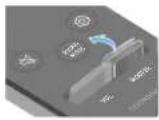
- Push up and hold the WOOFER button for 5 seconds.
Each time you push the WOOFER button up and hold it for 5 seconds, the mode switches in the following order: "OFF-TV REMOTE" (Default mode), "SAMSUNG-TV REMOTE", "ALL-TV REMOTE".
| Remote Control Button Display Status | |||
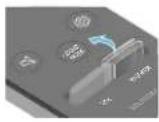 |  | (Default mode)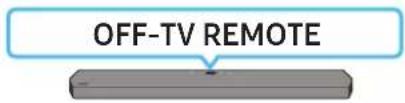 | Disable the TV remote control. |
 |  | 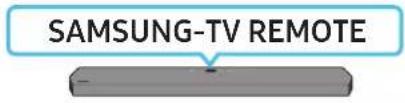 | Enable a Samsung TV's IR remote control. |
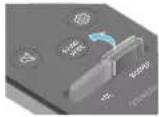 |  | 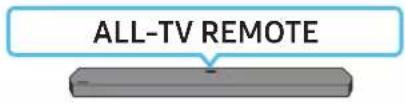 | Enable a third-party TV's IR remote control. |
04 CONNECTING THE SOUNDBAR
Connecting the power and units
Use the Power cord to connect the Subwoofer and Soundbar to an electrical outlet in the following order:
- For more information about the required electrical power and power consumption, refer to the label attached to the product. (Label: Rear of the Soundbar Main Unit)
- Connect the Power cord to the Subwoofer.
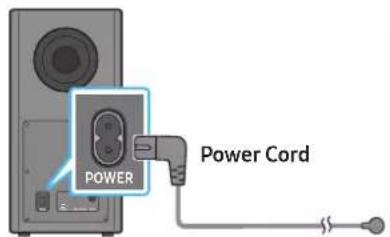
text_image
POWER Power CordRear of Subwoofer
- Connect the Power cord to the Soundbar.
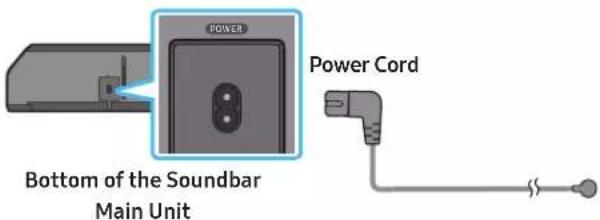
text_image
POWER Power Cord Bottom of the Soundbar Main Unit- Connect power to the Soundbar and Subwoofer. The Subwoofer is automatically connected when the Soundbar is turned on.
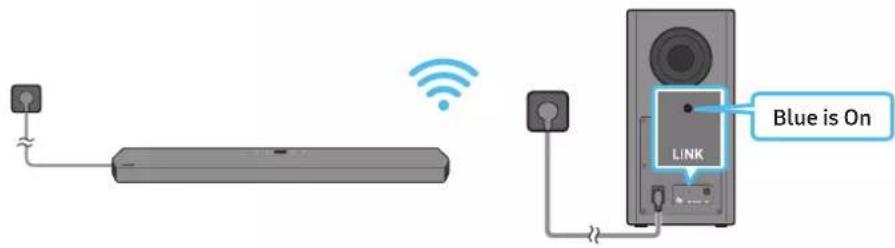
text_image
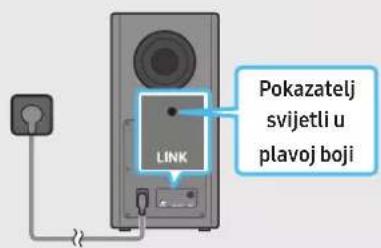
Blue is On LINKNOTE
- Connect the Subwoofer power before connecting to the Soundbar. The Subwoofer will be automatically connected when turning on the Soundbar.
- If you unplug and reconnect the power cord when the product is turned on, the Soundbar turns on automatically.
Before performing the manual connection procedure below:
-
Check whether the power cables for the Soundbar and subwoofer are connected properly.
• Make sure that the Soundbar is turned off. -
Turn off the Soundbar main.
-
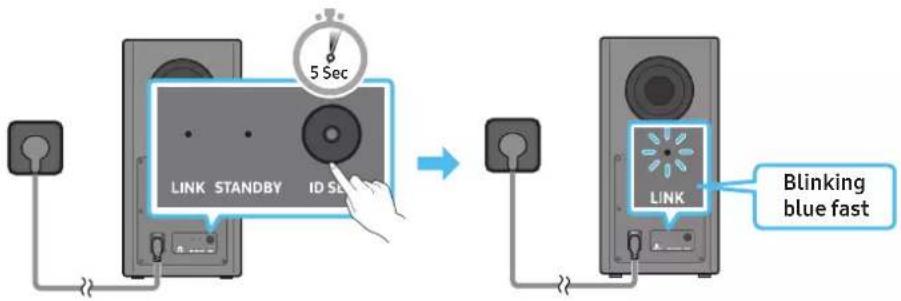
Press and hold ID SET on the rear of the subwoofer for at least 5 seconds.
- The red indicator on the rear of the subwoofer turns off and the blue indicator blinks.
text_image
5 Sec LINK STANDBY ID SE LINK Blinking blue fastRear of Subwoofer Rear of Subwoofer
-
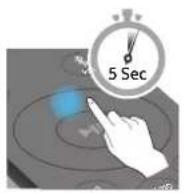
Press the Up button on the remote control for 5 seconds.
-
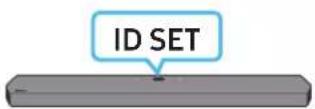
The ID SET message appears on the display of the Soundbar for a moment, and then it disappears.
- The Soundbar will automatically power on when ID SET is complete.

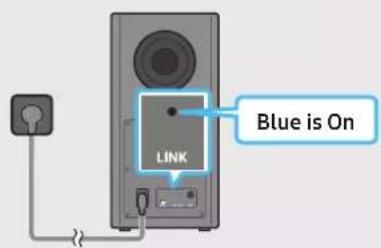
- Check if the LINK LED is solid blue (connection complete).
text_image
LINK Blue is OnThe LINK LED indicator stops blinking and glows a solid blue when a connection is established between the Soundbar and the Wireless Subwoofer.
LED Indicator Lights on the Rear of Subwoofer
| LED Status Description | Option Resolution | ||
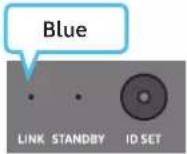 | On | Successfully connected (normal operation) | - |
| Blinking Recovering the connection | Check if the power cable attached to the main Soundbar unit is connected properly or wait about 5 minutes. If blinking persists, try manually connecting the subwoofer. See page 14. | ||
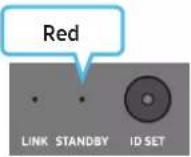 | On | Standby (with the Soundbar main unit turned off) | Check if the power cable attached to the main Soundbar unit is connected properly. |
| Connection failed | Connect again. See the instructions for manual connection on page 14. | ||
| LED Status Description | Resolution | ||
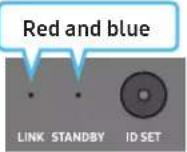 | Blinking Malfunction | See the contact information for the Samsung Service Centre in this manual. | |
NOTE
- If the main unit is powered off, the wireless subwoofer will go into stand-by mode and the STANDBY LED on the rear of the sub-woofer will turn red after blinking in blue several times.
- If you use a device that uses the same frequency as the Soundbar near the Soundbar, interference may cause some sound interruption.
- The maximum transmission distance of the main unit's wireless signal is about 10 m, but may vary depending on your operating environment. If a steel-concrete or metallic wall is between the main unit and the wireless subwoofer, the system may not operate at all because the wireless signal cannot penetrate metal.
CAUTION
- Wireless receiving antennas are built into the wireless subwoofer. Keep the unit away from water and moisture.
- For optimal listening performance, make sure that the area around the wireless subwoofer and the Wireless Receiver Module (sold separately) is clear of any obstructions.
Auto EQ
The Auto EQ technology of Samsung provides more natural and softer bass by calibrating low frequency detected via the mic on the subwoofer. Low frequency usually occurs due to the size of the room and the location of the subwoofer.
- Ensure the subwoofer is placed at least 8 cm away from walls, furniture or other partitions.
- You must keep the room as quiet as possible while operating the Auto EQ tuning.
- Do not use any buttons until the Auto EQ tuning is complete.
• Auto EQ tuning takes about 2 minutes. - During Auto EQ tuning, there is no sound from the Soundbar's main unit and rear speakers.
If you are using the function for the first time
- Press the ⚙ (Sound Control) button until Auto EQ is selected.
- Press the Up/Down buttons to select Tuning, and then press the ▶II button.
- Tuning will start, and the progress appears in percentage.
- To cancel tuning, press the Up, Down, Left, Right or ▶ button, and then press the ▶ button to confirm.
- If the tuning is failed, LED blinks in red.
- If the tuning is successful, LED blinks in blue.
If you have done the tuning process
- Press the ⚙ (Sound Control) button until Auto EQ is selected.
- Press the Up/Down buttons to select Tuning, and then press the ▶|| button.
- Press the Up/Down buttons to select one of the following options.
- On: Turn on the previously tuned EQ settings.
- Off: Turn on the default EQ settings.
- Tuning: Start the tuning process again.
Connecting an SWA-9500S (Sold Separately) to your Soundbar
Expand to true wireless surround sound by connecting the Samsung Wireless Rear Speaker Kit (SWA-9500S, sold separately) to your Soundbar. For detailed information on connections, see the Samsung Wireless Rear Speaker Kit manual.
05 USING A WIRED CONNECTION TO THE TV
Method 1. Connecting with HDMI

CAUTION
- When both the HDMI cable and optical cable are connected, the HDMI signal is received first.
- To connect the HDMI cable between the TV and Soundbar, be sure to connect the terminals marked ARC. Otherwise, the TV sound may not be output.
- The recommended cable is High Speed HDMI Cable with Ethernet.
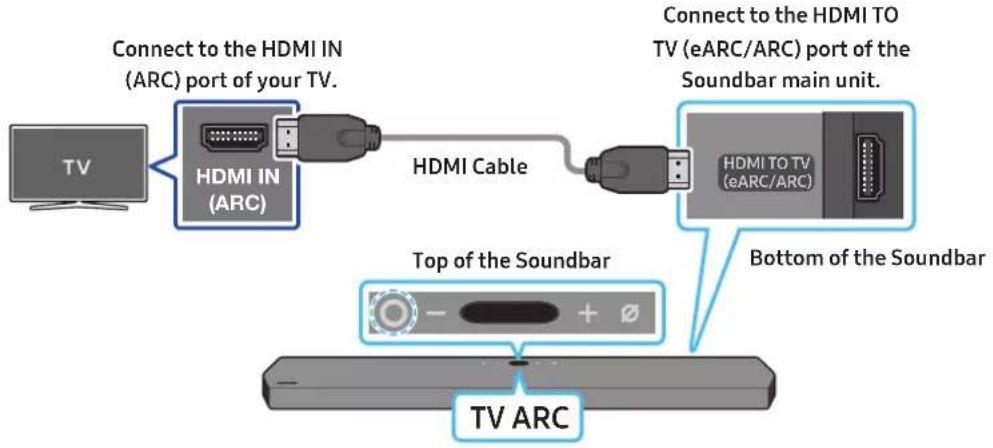
Connecting the TV that supports HDMI ARC (Audio Return Channel)
text_image
Connect to the HDMI IN (ARC) port of your TV. Connect to the HDMI IN (ARC) port of your TV. HDMI IN (ARC) HDMI Cable Connect to the HDMI TO TV (eARC/ARC) port of the Soundbar main unit. HDMI TO TV (eARC/ARC) Top of the Soundbar Bottom of the Soundbar TV ARC- With the Soundbar and TV turned off, connect the HDMI cable as shown in the figure.
- Turn on the Soundbar and TV.
- "TV ARC" appears in the display window of the Soundbar main unit and the Soundbar plays TV sound.
- When the TV sound is not output, press the Ⓐ (Multi Function) button at the top of the Soundbar or the 📋 (Source) button on the remote control to select the "D.IN" mode. The screen displays "D.IN" and "TV ARC" in sequence, and TV sound is played.
- When connecting a TV that supports the eARC function, "eARC" appears on the display and the sound is heard.
- To connect with eARC, the eARC function in the TV menu should be set to On. Refer to the TV user manual for details on setting. (e.g. Samsung TV: Home (n) → Settings (→ Sound → Expert Settings → HDMI-eARC Mode (Auto))
- If "TV ARC" does not appear in the display window of the Soundbar main unit, confirm that the HDMI cable is connected to the correct port.
- Use the volume buttons on the TV's remote control to change the volume on the Soundbar.
NOTE
- When you connect the TV that supports the HDMI ARC (Audio Return Channel) to the Soundbar with an HDMI cable, you can transmit the digital video and audio data without connecting a separate optical cable.
• We recommend you use a coreless HDMI cable if possible. If you use a cored HDMI cable, use one whose diameter is less than 14 mm. - This function is not available if the HDMI cable does not support ARC.
- When the audio in a broadcast is encoded in Dolby Digital and the "Digital Output Audio Format" on your TV is set to PCM, we recommend that you change the setting to Dolby Digital. When the setting on the TV is changed, you will experience better sound quality. (The TV menu may use different words for Dolby Digital and PCM depending on the TV manufacturer.)
Method 2. Connecting using an Optical Cable
Pre-connection Checklist
- When both the HDMI cable and optical cable are connected, the HDMI signal is received first.
- When you use an optical cable and the terminals have covers, be sure to remove the covers.

natural_image
Diagram showing a device transitioning from a cylindrical component to a rectangular chamber, with arrows indicating direction (no text or symbols)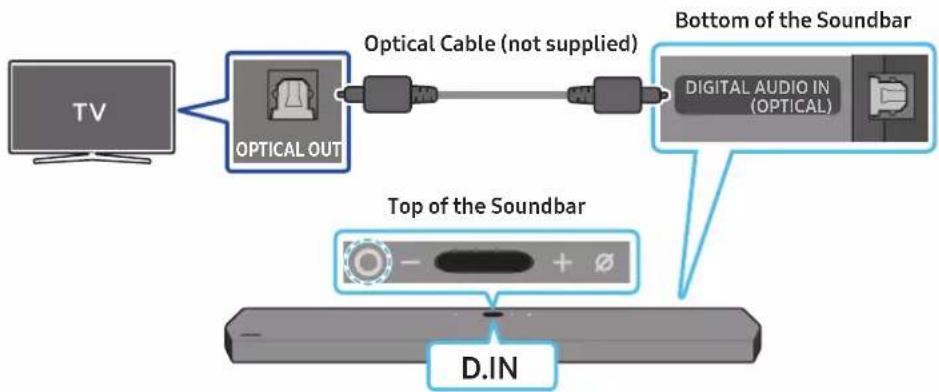
flowchart
graph LR
    TV["TV"] --> OpticalOut["Optical OUT"]
    OpticalOut --> Cable["Optical Cable (not supplied)"]
    Cable --> DigitalAudioIn["Digital Audio IN (OPTICAL)"]
    DigitalAudioIn --> BottomSoundBar["Bottom of the Soundbar"]
    TopSoundBar["Top of the Soundbar"] --> DINA["D.IN"]
- With the TV and Soundbar turned off, connect the DIGITAL AUDIO IN (OPTICAL) port on the Soundbar and the OPTICAL output port on the TV with the optical cable (not supplied), as shown in the figure.
- Turn on the Soundbar and TV.
- Press the O (Multi Function) button at the top of the Soundbar or the → (Source) button on the remote control to select the "D.IN" mode.
- The TV sound is output from the Soundbar.
Using the Q-Symphony Function
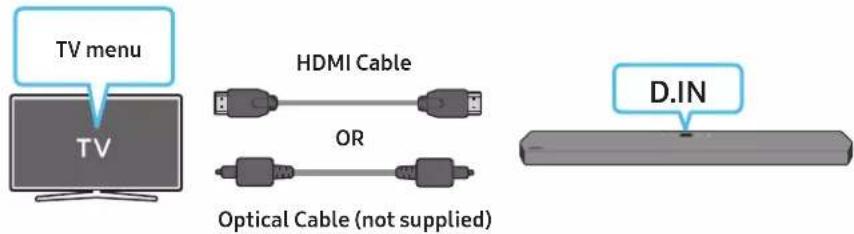
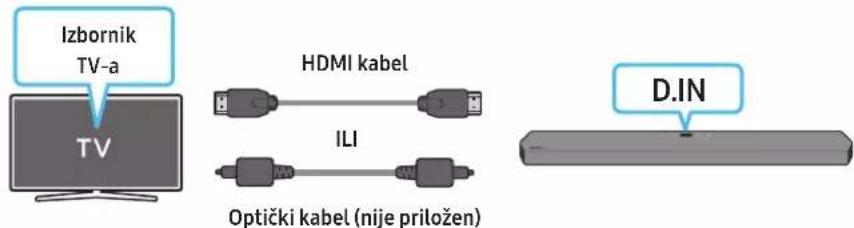
For Q-Symphony, the Soundbar syncs with a Samsung TV to output sound through two devices for optimum surround effect. When the Soundbar is connected, the menu, "TV+Soundbar" appears under the Sound Output menu of the TV. Select the corresponding menu.
text_image
TV menu HDMI Cable OR Optical Cable (not supplied) D.IN• TV menu example: TV + [AV] Soundbar series name (HDMI)
NOTE
- It can operate according to the Codec supported by TV.
- This function is supported only when the HDMI Cable or Optical Cable (not supplied) is connected.
• This function is available in some Samsung TVs and some Soundbar models. - When using Q-Symphony, you can only choose GAME PRO or ADAPTIVE SOUND.
Using the Spacefit sound
Provides optimized sound quality by analyzing the listening spaces.
To enable this function, turn on the Adaptive Sound+ mode on your Samsung TV menu.
(Home (n) → Settings (→ General → Intelligent Mode Settings → Adaptive Sound+)
NOTE
• The sound mode on your Soundbar will automatically change to Adaptive Sound+ if you enable the Adaptive Sound+ mode on your TV.
- This function works when the Soundbar connects to some of the Samsung TVs.
06 USING A WIRELESS CONNECTION TO THE TV
Method 1. Connecting via Bluetooth
When a Samsung TV is connected using Bluetooth, you can hear stereo sound without the hassle of cabling.
- Only one Samsung TV can be connected at a time.
- Samsung TV that supports Bluetooth can be connected. Check the specifications of your TV.
flowchart
graph LR
    A["TV"] --> B["Top of the Soundbar"]
    B --> C["BT PAIRING"]
    C --> D["OR"]
    D --> E["Hand with finger pointing at a button labeled '5 Sec'"]
    style A fill:#f9f,stroke:#333
    style B fill:#ccf,stroke:#333
    style C fill:#cfc,stroke:#333
    style D fill:#fcc,stroke:#333
    style E fill:#cff,stroke:#333
The initial connection
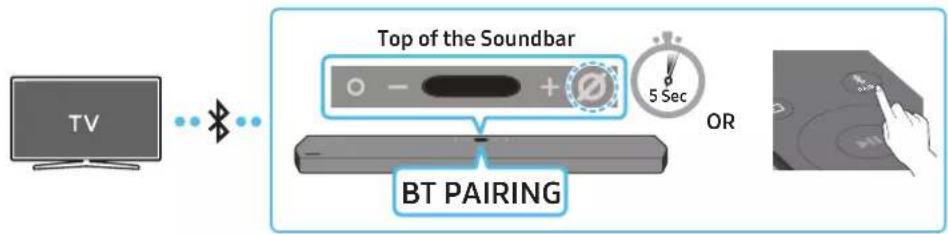
- Press the ✦PAIR button on the Soundbar remote control to enter the "BT PAIRING" mode.
(OR) a. Press the ○ (Multi Function) button on the top panel and then select "BT".
"BT" changes to "BT PAIRING" in a few seconds automatically or changes to "BT READY" if there is a connect record.
b. When "BT READY" appears, press and hold the ☐(Mic On/Off) button on the top panel of the Soundbar for more than 5 seconds to display "BT PAIRING".
- Select Bluetooth mode on the Samsung TV.
(e.g. Home ( home ) → Settings ( ⚙ ) → Sound → Sound Output → Bluetooth Speaker List → [AV] Samsung Soundbar Q900A / Q910A (Bluetooth))
- Select "[AV] Samsung Soundbar Q900A / Q910A" from the list on TV's screen.
An available Soundbar is indicated with "Need Pairing" or "Paired" on the TV's Bluetooth device list. To connect the Samsung TV to the Soundbar, select the message, and then establish a connection.
- When the Samsung TV is connected, [TV Name] "BT" appears on the Soundbar's top display.
- You can now hear Samsung TV sound from the Soundbar.
- After you have connected the Soundbar to your Samsung TV the first time, use the "BT READY" mode to reconnect.
If the device fails to connect
• If you have an existing Soundbar (e.g., [AV] Samsung Soundbar Q900A / Q910A) on the list of speakers on the Samsung TV, delete it.
- Then repeat steps 1 through 3.
Disconnecting the Soundbar from the Samsung TV
Press the Ⓐ (Multi Function) button at the top of the Soundbar or the ☑ (Source) button on the remote control to select the mode other than "BT".
- Disconnecting takes time because the Samsung TV must receive a response from the Soundbar. (The time required may differ, depending on the Samsung TV model.)
What is the difference between BT READY and BT PAIRING?
- BTREADY: In this mode, you can reconnect any Samsung TV or mobile device that was connected before.
- BT PAIRING : In this mode, you can connect a new device to the Soundbar.
(Press the ✝ PAIR button on the Soundbar remote control or press and hold the ⭕ (Mic On/Off) button on the top of the Soundbar for more than 5 seconds while the Soundbar is in "BT" mode.)
Notes on Bluetooth connection
- Locate a new device within 1 m to connect via Bluetooth communication.
- If asked for a PIN code when connecting a Bluetooth device, enter <0000>.
- The Soundbar automatically turns off after 18 minutes in the Ready state.
- The Soundbar may not perform Bluetooth search or connection correctly under the following circumstances:
- If there is a strong electrical field around the Soundbar.
- If several Bluetooth devices are simultaneously paired with the Soundbar.
- If the Bluetooth device is turned off, not in place, or malfunctions.
- Electronic devices may cause radio interference. Devices that generate electromagnetic waves must be kept away from the Soundbar main unit - e.g., microwaves, wireless LAN devices, etc.
Method 2. Connecting via Wi-Fi
Pre-connection Checklist
• Wi-Fi connection is available only on Samsung TV.
- Check whether the wireless router (Wi-Fi) is turned on and the TV is connected to the router.
- The TV and Soundbar must be connected to the same wireless network (Wi-Fi).
- If your wireless router (Wi-Fi) uses a DFS channel, you will not be able to establish a Wi-Fi connection between the TV and Soundbar. Contact your Internet service provider for details.
- Because the menus may differ depending on the year of manufacture, refer to your TV manual.
- To connect the TV to the Soundbar via Wi-Fi, connect the Soundbar to the wireless router first. See page 23, for details on how to establish a Wi-Fi connection.
- For more information about Wi-Fi connection to the Soundbar, see page 23, "Method 2. Connecting via Wi-Fi (Wireless Network)".
- Change the input source of the TV by using the Audio menu to Soundbar.
• Samsung TVs released in 2017 or later
Home (☐) → Settings (☐) → Sound → Sound Output → [AV] Samsung Soundbar Q900A / Q910A (Wi-Fi)
07 CONNECTING AN EXTERNAL DEVICE
Method 1. Connecting using an HDMI Cable (Capable of Dolby Atmos decoding and playback)
Pre-connection Checklist
- If the Audio Output options include Secondary Audio, make sure Secondary Audio is set to Off.
- Make sure that the content supports Dolby Atmos®.
flowchart
graph TD
    A["External Device"] --> B["HDMI OUT"]
    B --> C["HDMI Cable"]
    D["TV"] --> E["HDMI IN (ARC)"]
    E --> F["HDMI Cable"]
    G["Top of the Soundbar"] --> H["HDMI 1 OR HDMI 2"]
    I["Bottom of the Soundbar"] --> J["HDMI 2"]
    I --> K["HDMI 1"]
    I --> L["HDMI TO TV (eARC/ARC)"]
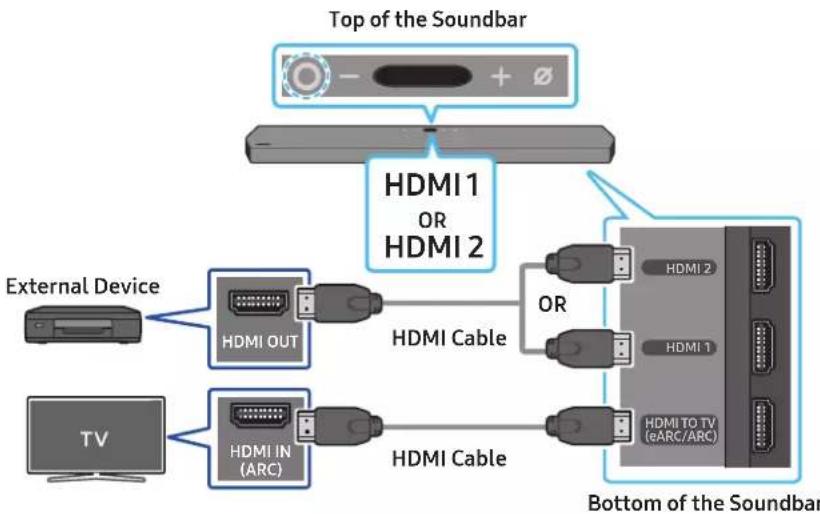
- Use an HDMI cable to connect the HDMI OUT port on the external device and the HDMI port on the bottom of the Soundbar.
- Use an HDMI cable to connect the HDMI IN port of the TV and the HDMI TO TV (eARC/ARC) port on the bottom of the Soundbar.
- Turn on the Soundbar, TV, and the external device.
- Press the Ⓐ (Multi Function) button on the top of the Soundbar or the 📋 (Source) button on the remote control to select "HDMI 1" or "HDMI 2" mode.
- The Soundbar display indicates that "HDMI1" or "HDMI2" mode is currently selected and the Soundbar will start playing sounds.
NOTE
- When you use Dolby Atmos®: If the input source is Dolby Atmos®, 7.1.2 channels are outputted.
- When Dolby Atmos® is activated, "DOLBY ATMOS" appears in the top display.
- Configuring Dolby Atmos® on your BD player or other device
Open the audio output options on the settings menu of your BD player or other device and make sure that "No Encoding" is selected for Bitstream. For example, on a Samsung BD Player, go to Home Menu → Sound → Digital Output and then select Bitstream (unprocessed).
Supported UHD Signals Specification (3840 x 2160p)
| Frame rate (fps) Colour depth RGB 4:4:4 YCbCr 4:4:4 YCbCr 4:2:2 YCbCr 4:2:0 | |||||
| <60 | 8 bit O O O O | ||||
| 10 bit - | - | O O | |||
| 12 bit | - | - | O O | ||
| 120 | 8 bit | - | - | - | - |
| 10 bit - | - | - | - | ||
• Supported specification may vary depending on the connected external device or usage conditions.
Method 2. Connecting using an Optical Cable
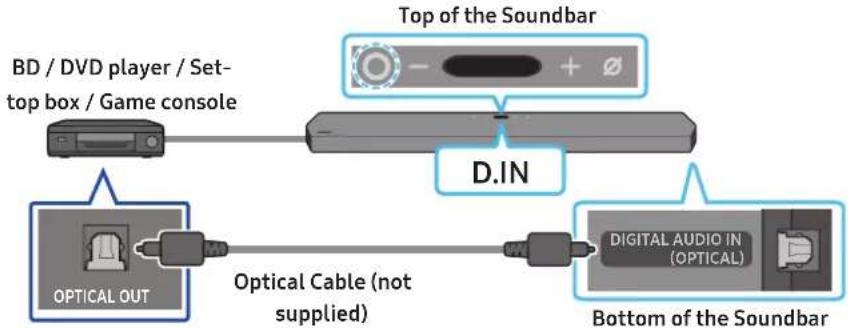
flowchart
graph LR
    A["BD / DVD player / Set-top box / Game console"] --> B["Top of the Soundbar"]
    B --> C["D.IN"]
    C --> D["Digital Audio IN (OPTICAL)"]
    D --> E["Bottom of the Soundbar"]
    F["OPTICAL OUT"] --> G["Optical Cable (not supplied)"]
    G --> D
- Use an optical cable (not supplied) to connect the DIGITAL AUDIO IN (OPTICAL) on the Soundbar main and the OPTICAL OUT port on the external device.
- Turn on the Soundbar and external device.
- To select "D.IN" mode, press the Ⓐ (Multi Function) button on the top of the Soundbar or the → (Source) button on the remote control.
- Your Soundbar will play sounds from the external device.
08 CONNECTING A MOBILE DEVICE
Method 1. Connecting via Bluetooth
When a mobile device is connected using Bluetooth, you can hear stereo sound without the hassle of cabling.
- When you connect a paired Bluetooth device with the Soundbar off, the Soundbar automatically turns on.
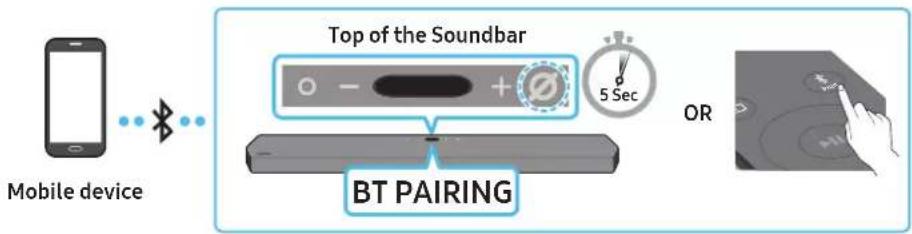
flowchart
graph LR
    A["Mobile device"] -->|Wireless Signal| B["Top of the Soundbar"]
    B --> C["BT PAIRING"]
    C --> D["OR"]
The initial connection
- When connecting to a new Bluetooth device, make sure the device is within 1 m distance.
- Press the ✝PAIR button on the Soundbar remote control to enter the "BT PAIRING" mode.
(OR) a. Press the ○ (Multi Function) button on the top panel and then select "BT".
"BT" changes to "BT PAIRING" in a few seconds automatically or changes to "BT READY" if there is a connect record.
b. When "BT READY" appears, press and hold the ☑(Mic On/Off) button on the top panel of the Soundbar for more than 5 seconds to display "BT PAIRING".
- On your device, select "[AV] Samsung Soundbar Q900A / Q910A" from the list that appears.
- When the Soundbar is connected to the Mobile device, [Mobile Device Name] "BT" appears in the top display.
- Play music files from the device connected via Bluetooth through the Soundbar.
• After you have connected the Soundbar to your mobile device the first time, use the "BT READY" mode to reconnect.
If the device fails to connect
- If you have an existing Soundbar (e.g., "[AV] Samsung Soundbar Q900A / Q910A") in the list of speakers on the Mobile device, delete it.
- Repeat steps 1 and 2.
What is the difference between BT READY and BT PAIRING?
- BTREADY: In this mode, you can reconnect any Samsung TV or mobile device that was connected before.
- BTPAIRING: In this mode, you can connect a new device to the Soundbar.
(Press the ✝PAIR button on the Soundbar remote control or press and hold the ⭕ (Mic On/Off) button on the top of the Soundbar for more than 5 seconds while the Soundbar is in "BT" mode.)
Notes on Bluetooth connection
- Locate a new device within 1 m to connect via Bluetooth communication.
- If asked for a PIN code when connecting a Bluetooth device, enter <0000>.
• The Soundbar automatically turns off after 18 minutes in the Ready state. -
The Soundbar may not perform Bluetooth search or connection correctly under the following circumstances:
-
If there is a strong electrical field around the Soundbar.
- If several Bluetooth devices are simultaneously paired with the Soundbar.
-
If the Bluetooth device is turned off, not in place, or malfunctions.
-
Electronic devices may cause radio interference. Devices that generate electromagnetic waves must be kept away from the Soundbar main unit - e.g., microwaves, wireless LAN devices, etc.
• The Soundbar supports SBC data (44.1kHz, 48kHz). - Connect only to a Bluetooth device that supports the A2DP (AV) function.
- You cannot connect the Soundbar to a Bluetooth device that supports only the HF (Hands Free) function.
- When connecting the Soundbar to a Bluetooth device, place them as close to each other as possible.
- The farther the Soundbar and Bluetooth device are from each other, the lower the sound quality will become.
The Bluetooth connection may break when the devices are out of the effective range.
- The Bluetooth connection may not function as intended in areas with poor reception.
- A Bluetooth device may experience noise or malfunction under in the following conditions:
- When the body is in contact with the signal transceiver on the Bluetooth device or Soundbar
- In corners or when there is an obstacle in proximity, such as a wall or partition, where electrical changes may occur.
- When exposed to radio interferences by other products operating on the same frequency ranges, such as medical equipment, microwave ovens, and wireless LAN devices.
-
Obstacles such as doors and walls may still impact the sound quality even when the devices are within the effective range.
-
Note that your Soundbar cannot be paired with other Bluetooth devices while using the Bluetooth option.
- This wireless device may cause electrical interference during operation.
Disconnecting the Bluetooth device from a Soundbar
You can disconnect a Bluetooth device from the Soundbar. For instructions, see the Bluetooth device's user manual.
• The Soundbar will be disconnected.
- When the Soundbar is disconnected from the Bluetooth device, the Soundbar will display "BT DISCONNECTED" on the top display.
Disconnecting the Soundbar from the Bluetooth device
Press the Ⓐ (Multi Function) button on the top of the Soundbar or the ➕ (Source) button on the remote control to switch the mode from "BT".
- Disconnecting takes time because the Bluetooth device must receive a response from the Soundbar. (Disconnection time may differ, depending on the Bluetooth device)
- When the Soundbar is disconnected from the Bluetooth device, the Soundbar will display "BT DISCONNECTED" on the top display.
Method 2. Connecting via Wi-Fi (Wireless Network)
To connect a Soundbar to a mobile device via a wireless network (Wi-Fi), the SmartThings app is required.
The initial connection
- Install and launch the SmartThings app from your mobile device (smartphone or tablet).
- On the app, follow the screen instructions to add the Soundbar.
- The automatic pop-up (the second screenshot below) may not show on some devices.
If the pop-up window does not appear, press “+” on the Home screen. The Soundbar is added to the app.
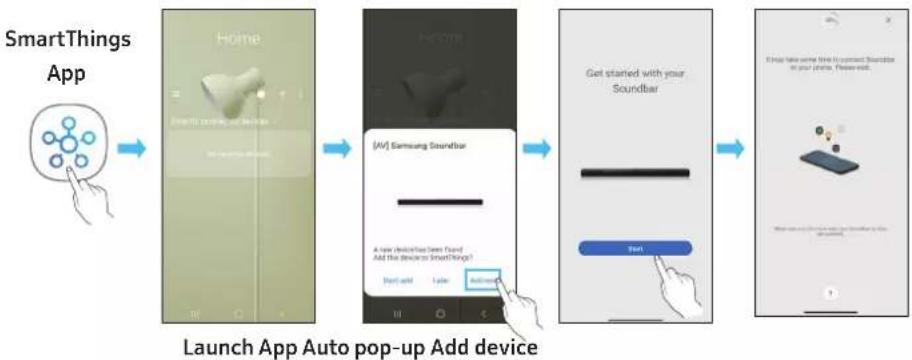
flowchart
graph LR
    A["SmartThing App"] --> B["Home"]
    B --> C["UV"] Samsung Soundbar
    C --> D["Get started with your Soundbar"]
    D --> E["Start"]
    E --> F["Launch App Auto pop-up Add device"]
Getting Started with Amazon Alexa (Built-in Alexa)
• Amazon Alexa is a service provided by Amazon.
- This function may not be supported depending on the model or geographical area.
- This function only supports some languages, and the supported functions may differ depending on the geographical area.
- For product specification or compatibility, refer to the Samsung website (www.samsung.com).
Using Alexa, you can play music, listen to news, see weather forecasts, and control home appliances.
To use Amazon Alexa, an Amazon account is required to connect the Soundbar over the network.
- Install the SmartThings app on your mobile device and then launch it.
- Enter the Alexa account by following the instructions on the app and then log in the service.

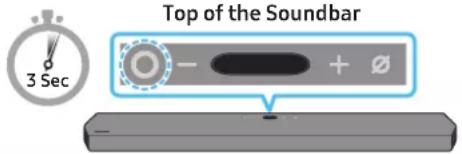
text_image
Top of the Soundbar 3 Sec- Call Alexa or press the Ⓐ (Multi Function) button on the Soundbar for 3 seconds to use the Alexa service.
- Press the Ⓐ (Multi Function) button for 3 seconds to call Alexa. Say with the button pressed to enable voice recognition.
Use voice commands to control the Soundbar

Trigger + Command
| Things to try Example of what to say | |
| Volume control | “Alexa, turn up the volume.” |
| “Alexa, turn down the volume” | |
| Listening to streaming content from Amazon Music | “Alexa, play some jazz music” |
| Playback control | “Alexa, play next song.” |
| “Alexa, stop the music.” | |
| “Alexa, what is this song?” | |
| Weather information | “Alexa, what's the weather?” |
| Timer scheduling | “Alexa, set a timer for 10 minutes.” |
Getting Started with Alexa on Amazon Product (Works with Alexa)
- This function may not be supported depending on the model or geographical area.
- This function only supports some languages, and the supported functions may differ depending on the geographical area.
- For product specification or compatibility, refer to the Samsung website (www.samsung.com).
- This service is provided by Amazon and can be terminated at any time. Samsung does not assume responsibility for service availability.
- Amazon Alexa app screen is subject to change without prior notice.
Connect and use with an Amazon product (Amazon Echo)
Use an Amazon Echo product to control your Soundbar and enjoy music services provided by Amazon Echo.
To use Amazon Alexa, an Amazon account is required to connect the Soundbar over the network.
- Install the SmartThings app on your mobile device and then launch it.
- Enter the Alexa account by following the instructions on the app and then log in the service.
Use voice commands to control the Soundbar
- The Amazon Echo service you can use with your Soundbar is limited to music. Other services provided by Amazon Echo, such as news and weather, can only be accessed through your Amazon Echo product.

Trigger + Command + Speaker name
* To use voice commands for the Soundbar named "Living room"
| Action Voice Command | |
| To set the volume level to 5 | “Alexa Set the volume to 5 on Living room” |
| To increase the volume level | “Alexa Volume up on Living room” |
| To mute the sound | “Alexa Mute on Living room” |
| To listen to a radio station named KISS FM | “Alexa Play Kiss FM on Living room” |
| To play the next song | “Alexa Next song on Living room” |
| To stop the audio | “Alexa Stop on Living room” |
| To turn the audio off | “Alexa Turn off on Living room” |
Using the Tap Sound
Tap the Soundbar with your mobile device to play the sound of content on the mobile device through the Soundbar.
- This function may not be supported, depending on the mobile device.
- This function is only compatible with Samsung mobile devices with Android 8.1 or later.
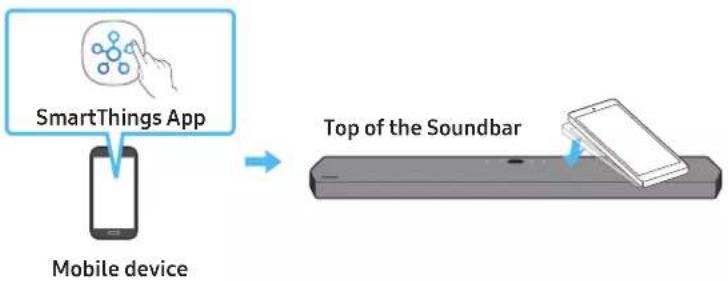
flowchart
graph LR
    A["SmartThings App"] --> B["Mobile device"]
    B --> C["Top of the Soundbar"]
- Turn on the Tap Sound function on your mobile device.
- For details on how to turn on the function, refer to "Setting the Tap Sound function" below.
-
Tap the Soundbar with the mobile device. Select "Start now" in the displayed message window. A connection is established between the mobile device and Soundbar via Bluetooth.
-
Play the sound of content on the mobile device through the Soundbar.
-
This function connects a mobile device to the Soundbar via Bluetooth by detecting vibration that occurs when the device touches the Soundbar.
- Make sure the mobile device does not tap a sharp corner of the Soundbar. The Soundbar or mobile device may become scratched or damaged.
- It is recommended that the mobile device be covered with a case. Lightly tap the wide area in the upper portion of the Soundbar, without using excessive force.
• To use this function, update the SmartThings app to the latest version.
The function may not be supported, depending on the app version.
Setting the Tap Sound function
Use the SmartThings app to turn on the Tap View, Tap Sound function.
-
On the mobile device, run the SmartThings app.
-
Select (≡→_) in the SmartThings app screen displayed on the mobile device.
-
Set "Tap View, Tap Sound" to On to allow the function to work when a mobile device moves close to the Soundbar. The function is turned on.
NOTE
- When the mobile device is in power-saving mode, the Tap Sound function does not work.
- The Tap Sound function may not work if there are devices near the Soundbar that cause radio interference such as electric devices. Make sure devices that may cause radio interference are placed at a sufficient distance away from the Soundbar.
09 CONNECTING TO APPLE AIRPLAY 2
This feature may not be available in some countries.
Connect and use with an Apple product
- With AirPlay 2, you can control your home's audio system from your iPhone, iPad, HomePod, or Apple TV.
- This Samsung Soundbar supports AirPlay 2 and requires iOS 11.4 or later.
NOTE
- Confirm that the Soundbar is connected to Wi-Fi. (Refer to Method 2. Connecting via Wi-Fi (Wireless Network))
10 INSTALLING THE WALL MOUNT
Installation Precautions
• Install on a vertical wall only.
- Do not install in a place with high temperature or humidity.
- Verify whether the wall is strong enough to support the product's weight. If not, reinforce the wall or choose another installation point.
- Purchase and use the fixing screws or anchors appropriate for the kind of wall you have (plaster board, iron board, wood, etc.). If possible, fix the support screws into wall studs.
• Purchase wall mounting screws according to the type and thickness of the wall you want to mount the Soundbar on.
- Diameter: M5
– Length: 35 mm or longer recommended.
- Connect cables from the unit to external devices before you install the Soundbar on the wall.
- Make sure the unit is turned off and unplugged before you install it. Otherwise, it may cause an electric shock.
Wallmount Components

Wall Mount Guide

x2

x2
(M4 × L10)
Holder-Screw Screw

x2
Bracket-Wall Mount
- Place the Wall Mount Guide against the wall surface.
• The Wall Mount Guide must be level.
- If your TV is mounted on the wall, install the Soundbar at least 5 cm below the TV.
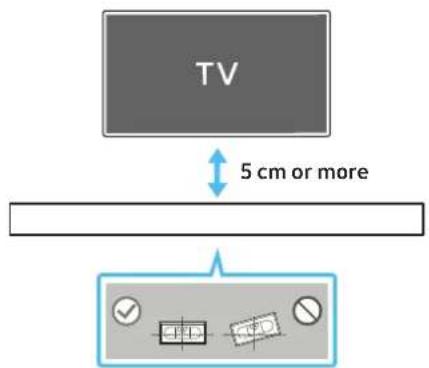
text_image
TV 5 cm or more- Align the Wall Mount Guide's Centre Line with the centre of your TV (if you are mounting the Soundbar below your TV), and then fix the Wall Mount Guide to the wall using tape.
- If you are not mounting below a TV, place the Centre Line in the centre of the installation area.
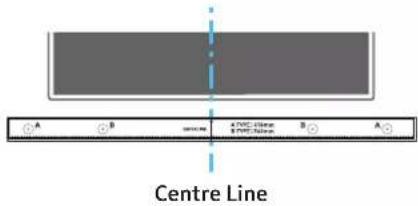
text_image
Centre Line- Push a pen tip or sharpened pencil tip through the centre of the A-TYPE images on each end of the Guide to mark the holes for the supporting screws, and then remove the Wall Mount Guide.
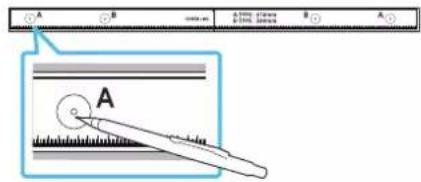
text_image
A B A (100%) B (100%) A A A- Using an appropriately sized drill bit, drill a hole in the wall at each marking.
- If the markings do not correspond to the positions of studs, make sure you insert appropriate anchors or mollies into the holes before you insert the support screws. If you use anchors or mollies, make sure the holes you drill are large enough for the anchors or mollies you use.
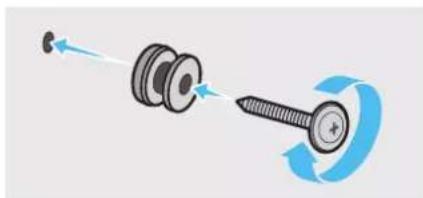
- Push a screw (not supplied) through each Holder-Screw, and then screw each screw firmly into a support screw hole.
natural_image
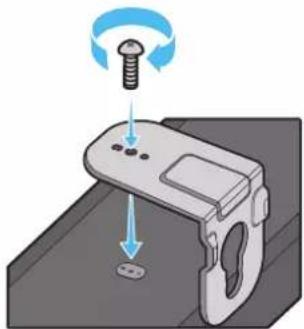
Diagram showing a screw being inserted into a housing with motion arrows indicating rotation (no text or symbols)- Install the 2 Bracket-Wall Mounts in the correct orientation on the bottom of the Soundbar using 2 Screws.
natural_image
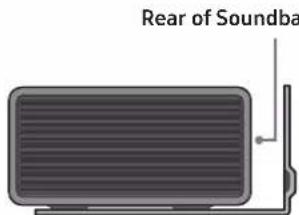
Illustration of a mechanical device with a screw and adjustment knob, showing no text or symbols- When assembling, make sure the hanger part of the Bracket-Wall Mounts are located behind the rear of the Soundbar.
text_image
Rear of SoundbaRight end of Soundbar
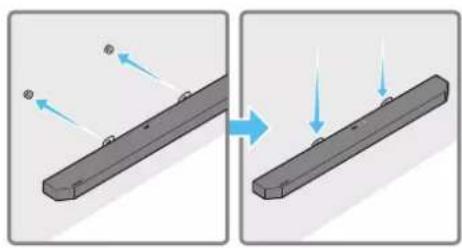
- Install the Soundbar with the attached Bracket-Wall Mounts by hanging the Bracket-Wall Mounts on the Holder-Screws on the wall.
natural_image
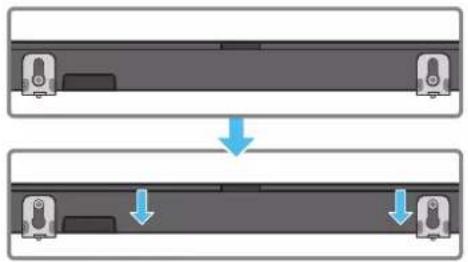
Two-step diagram showing a mechanical component before and after cutting, with arrows indicating motion direction (no text or symbols)- Slide the Soundbar down as shown below so that the Bracket-Wall Mounts rest securely on the Holder-Screws.
- Insert the Holder-Screws into the wide (bottom) part of the Bracket-Wall Mounts, and then slide the Bracket-Wall Mounts down so that the Bracket-Wall Mounts rest securely on the Holder-Screws.
natural_image
Diagram showing two mechanical components with downward arrows indicating motion or assembly (no text or symbols)11 INSTALLING THE SOUNDBAR ABOVE A TV STAND
Component

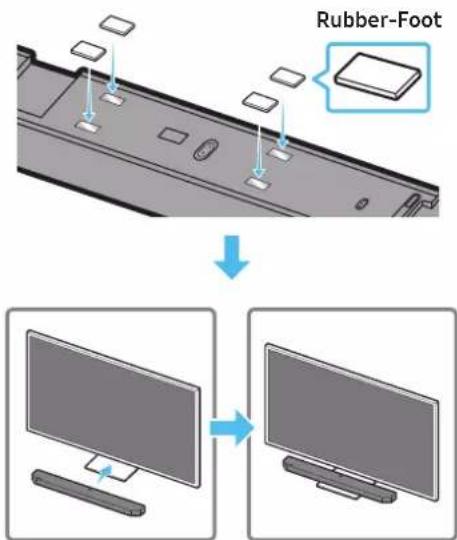
Rubber-Foot
To install, attach the Rubber-Feet to the bottom of the Soundbar before placing it in position above the TV stand. Make sure you attach the Rubber-Feet so they do not lie outside the edges of the TV stand. Refer to the figure below.
text_image
Rubber-FootPlace the Soundbar on a TV stand.
text_image
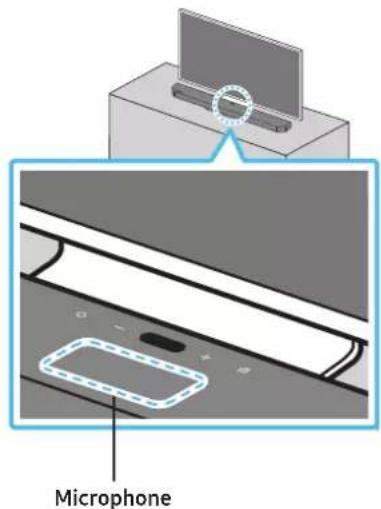
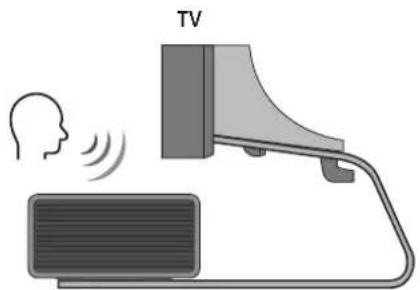
MicrophoneAs illustrated in the image, align the centre of the Soundbar with the centre of the TV, carefully place the Soundbar onto the TV stand. At this time, place the microphone at the front of the stand not to interfere with voice recognition.
text_image
TVRight end of Soundbar
NOTE
• Make sure the Soundbar is placed on a flat and solid surface.
- Insufficient gap from the TV may cause voice recognition and acoustic problems.
12 SOFTWARE UPDATE
Auto Update
When the Soundbar is connected to the Internet, software updates automatically occur even when the Soundbar is turned off.
- To use the Auto Update function, the Soundbar must be connected to the Internet.
The Wi-Fi connection to the Soundbar will be terminated if the Soundbar's power cord is disconnected or the power is cut off. If the power is cut off, when the power comes back on or you reconnect the power cord, turn on the Soundbar, and then reconnect it to the Internet.
USB Update
text_image
Bottom of the SoundbarSamsung may offer updates for the Soundbar's system firmware in the future.
When an update is available, you can update the Soundbar by connecting the USB drive that contains the update firmware to the SERVICE port of the Soundbar.
- Go to the Samsung website (www.samsung.com) → search for the model name from the customer support menu option.
- For more information about update, refer to Upgrade Guide.
- Download the upgrade file (USB type).
- Unzip the file to create a folder with the file name.
- Store the created folder in a USB and then connect it to the Soundbar.
-
Turn on the Soundbar. Then the product is updated within 3 minutes with displaying the message, "UPDATE".
-
During update, do not turn it off or remove the USB.
- If "UPDATE" does not appear on the display window, remove the power cord from the Soundbar and then reconnect it.
- When the latest version is installed, no update is performed.
- Depending on the USB type, update may not be supported.
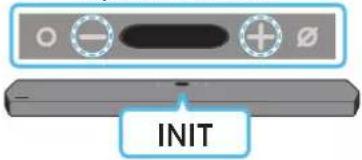
Initialisation
Top of the Soundbar
text_image
INITWith the Soundbar on, press the (Volume) buttons on the body at the same time for at least 5 seconds. "INIT" appears on the display and then the Soundbar is initialised.
CAUTION
- All the settings of the Soundbar are initialised. Be sure to perform this only when initialisation is required.
13 TROUBLESHOOTING
Before seeking assistance, check the following.
Soundbar does not turn on.
- Check whether the power cord of the Soundbar is correctly inserted into the outlet.
Soundbar works erratically.
• After removing the power cord, insert it again.
- Remote the power cord from the external device and try again.
- If there is no signal, the Soundbar automatically turns off after a certain period of time. Turn on the power. (See page 9.)
Remote control does not work
- Point the remote directly at the soundbar.
- Replace the batteries with new ones.
The Soundbar indicator turns solid red.
• The microphone is turned off. Turn on the microphone. (See page 7.)
Sound is not output from the soundbar.
- The volume of the Soundbar is too low or muted. Adjust the volume.
- When any external device (STB, Bluetooth device, mobile device, etc.) is connected, adjust the volume of the external device.
- For sound output of the TV, select Soundbar. (Samsung TV: Home ( home ) → Settings ( Ⓞ → Sound → Sound Output → Select Soundbar)
- The cable connection to the Soundbar may not be loose. Remove the cable and connect again.
- Remove the power cord completely, reconnect, and turn the power on.
- Initialise the product and try again. (See page 31.)
Sound is not output from the subwoofer.
- Check whether the LED indicator on the rear of the Subwoofer is on in blue. Reconnect the Soundbar and Subwoofer if the indicator is blinking in blue or turned red. (See page 14.)
- You may experience an issue if there is an obstacle between the Soundbar and Subwoofer. Move devices to an area away from obstacles.
- Other devices sending radio frequency signals in proximity may interrupt the connection. Keep your speaker away from such devices.
- Remove and reconnect the power plug.
The Subwoofer volume is too low
- The original volume of the content you are playing may be low. Try adjusting the Subwoofer level. (See page 10.)
- Bring the Subwoofer speaker closer to you.
In case the TV is not connected via HDMI TO TV (eARC/ARC)
- Check whether the HDMI cable is correctly connected to the ARC terminal. (See page 16.)
- Connection may not be possible due to the connected external device (set-top box, game machine, etc.). Directly connect the Soundbar.
- HDMI-CEC may not be activated on the TV. Turn on the CEC on the TV menu. (Samsung TV: Home ( home ) → Settings ( → General → External Device Manager → Anynet+ (HDMI-CEC) ON)
- To connect with eARC, the eARC function in the TV menu should be set to On. (Samsung TV: Home (→ Settings (→ Sound → Expert Settings → HDMI-eARC Mode (Auto))
There is no sound in when connecting to the TV in HDMI TO TV (eARC/ARC) mode
- Your device is unable to play the input signal. Change the TV's audio output to PCM or Dolby Digital. (For a Samsung TV: Home (☑) → Settings (☑) → Sound → Expert Settings → Digital Output Audio Format)
Soundbar will not connect via Bluetooth.
- When connecting a new device, switch to "BT PAIRING" for connection. (Press the ✪PAIR button on the remote control or press the 📄Mic On/Off) button on the body for at least 5 seconds.)
- If the Soundbar is connected to another device, disconnect that device first to switch the device.
- Reconnect it after removing the Bluetooth speaker list on the device to connect. (Samsung TV: Home (→ Settings (→ Sound → Sound Output → Bluetooth Speaker List)
- The automatic TV connection may be disabled. While the Soundbar is in "BTREADY", press and hold the Left button on the Soundbar remote control for 5 seconds to select ON-TV CONNECT. If you see OFF-TV CONNECT, press and hold Left button again for 5 seconds to switch the selection.
- Remove and reconnect the power plug, then try again.
- Initialise the product and try again. (See page 31.)
Sound drops out when connected via Bluetooth.
- Some devices can cause radio interference if they are located too close to the Soundbar. e. g. microwaves, wireless routers, etc.
- If your device that is connected via Bluetooth moves too far away from the soundbar, it may cause the sound to drop out. Move the device closer to the soundbar.
- If a part of your body is in contact with the Bluetooth transceiver or the product is installed on metal furniture, the sound may drop out. Check the installation environment and conditions for use.
Soundbar will not connect to Wi-Fi.
- Check whether your wireless router is on.
- Turn off the router, turn it back on, and then try again.
- The soundbar will not connect if the wireless signal is too weak. Try moving the router closer to the soundbar, or eliminating any obstacles that are between the soundbar and the router, if possible.
- If your wireless router is new, you will need to reconfigure the speaker's network settings.
The soundbar does not turn on automatically with the TV.
- When you turn off the Soundbar while watching TV, power synchronization with the TV is disabled. First turn off the TV.
The AVA function is not available in the following cases.
- The AVA function will not be available using Q-symphony function.
- The AVA function will not be available when the microphone is turned off.
The Auto EQ tuning process failed.
- Tuning process may fail if there is a sound output from the Soundbar or any external noise during the tuning process. Proceed the tuning process in a quiet environment.
- Do not manipulate the Soundbar during the tuning process.
14 LICENCE
Dolby
ATMOS
Dolby, Dolby Atmos, and the double-D symbol are registered trademarks of Dolby Laboratories Licensing Corporation. Manufactured under license from Dolby Laboratories. Confidential unpublished works. Copyright © 2012-2020 Dolby Laboratories. All rights reserved.
dtsx
For DTS patents, see http://patents.dts.com. Manufactured under license from DTS, Inc. (for companies headquartered in the U.S./Japan/Taiwan) or under license from DTS Licensing Limited (for all other companies). DTS, DTS:X Pro, DTS:X, and the DTS:X logo are registered trademarks or trademarks of DTS, Inc. in the United States and other countries. © 2020 DTS, Inc. ALL RIGHTS RESERVED.
HDMI™ HINDISSION MULTIMEDIA INTERFACE
The terms HDMI and HDMI High-Definition Multimedia Interface, and the HDMI Logo are trademarks or registered trademarks of HDMI Licensing Administrator, Inc. in the United States and other countries.

Spotify®

- Use your phone, tablet or computer as a remote control for Spotify. Go to spotify.com/connect to learn how
- The Spotify Software is subject to third party licenses found here: https://www.spotify.com/connect/third-party-licenses.

Works with
Apple AirPlay
- Apple, AirPlay, iPhone, iPad, HomePod, and Apple TV are trademarks of Apple Inc., registered in the U.S. and other countries.
- Use of the Works with Apple badge means that an accessory has been designed to work specifically with the technology identified in the badge and has been certified by the developer to meet Apple performance standards.
15 OPEN SOURCE LICENCE NOTICE
To send inquiries and requests for questions regarding open sources, contact Samsung Open Source (http://opensource.samsung.com)
16 IMPORTANT NOTES ABOUT SERVICE
- Figures and illustrations in this User Manual are provided for reference only and may differ from actual product appearance.
- An administration fee may be charged if either
(a) an engineer is called out at your request and there is no defect with the product (i.e. where the user manual has not been read).
(b) you bring the unit to a repair centre and there is no defect with the product (i.e. where the user manual has not been read). - You will be informed of the administration fee amount before a technician visits.
17 SPECIFICATIONS AND GUIDE
Specifications
| Model Name HW-Q900A / HW-Q910A | |
| Weight 7.1 kg | |
| Dimensions (W x H x D) 1232.0 x 69.5 x 138.0 mm | |
| Operating Temperature Range +5°C to +35°C | |
| Operating Humidity Range 10 % ~ 75 % | |
| AMPLIFIERRated Output power ((18 W x 6) + (10 W x 3) + (18 W x 6)) + 160 W | |
| Supported play formats | Dolby 5.1ch / Dolby Digital Plus / Dolby TRUE HD / Dolby ATMOS DTS 5.1ch / DTS HD / DTS-HD Master Audio / DTS:X / LPCM 8Ch |
| WIRELESS DEVICE OUTPUT POWERWi-Fi max transmitter power | 100mW at 2.4GHz - 2.4835GHz, 200mW at 5.15GHz - 5.25GHz, 100mW at 5.25GHz - 5.35GHz & 5.47GHz - 5.725GHz |
| WIRELESS DEVICE OUTPUT POWERBT max transmitter power 100mW at 2.4GHz - 2.4835GHz | |
| WIRELESS DEVICE OUTPUT POWERSRD max transmitter power 25mW at 5.775GHz - 5.875GHz | |
| Subwoofer Name PS-WA95B | |
| Weight 9.8 kg | |
| Dimensions (W x H x D) | 210.0 x 403.0 x 403.0 mm |
| AMPLIFIERRated Output power | 160 W |
| WIRELESS DEVICE OUTPUT POWERSRD max transmitter power 25mW at 5.775GHz - 5.875GHz | |
NOTE
• Samsung Electronics Co., Ltd reserves the right to change the specifications without notice.
• Weight and dimensions are approximate.
Precaution : The Soundbar will restart automatically if you turn on/turn off Wi-Fi.
| Overall Standby Power Consumption (W) | 7.0 W |
| Wi-FiPort deactivation method | Press the ID SET button on the bottom panel of the Soundbar for 30 seconds to turn Wi-Fi On / Off. |
| BluetoothPort deactivation method | Press the NETWORK button on the bottom panel of the Soundbar for 30 seconds to turn Bluetooth On / Off. |
• Hereby, Samsung declares that this radio equipment is in compliance with Directive 2014/53/EU and the relevant UK statutory requirements.
The full text of the declaration of conformity is available at the following internet address:
http://www.samsung.com go to Support and enter the model name.
This equipment may be operated in all EU countries and in the UK.
The 5GHz WLAN(Wi-Fi or SRD) function of this equipment may only be operated indoors.
[Correct disposal of batteries in this product]
(Applicable in countries with separate collection systems)
This marking on the battery, manual or packaging indicates that the batteries in this product should not be disposed of with other household waste at the end of their working life. Where marked, the chemical symbols Hg, Cd or Pb indicate that the battery contains mercury, cadmium or lead above the reference levels in EC Directive 2006/66.
If batteries are not properly disposed of, these substances can cause harm to human health or the environment.
To protect natural resources and to promote material reuse, please separate batteries from other types of waste and recycle them through your local, free battery return system.
Correct Disposal of This Product
(Waste Electrical & Electronic Equipment)
(Applicable in countries with separate collection systems)
This marking on the product, accessories or literature indicates that the product and its electronic accessories (e.g. charger, headset, USB cable) should not be disposed of with other household waste at the end of their working life. To prevent possible harm to the environment or human health from uncontrolled waste disposal, please separate these items from other types of waste and recycle them responsibly to promote the sustainable reuse of material resources.
Household users should contact either the retailer where they purchased this product, or their local government office, for details of where and how they can take these items for environmentally safe recycling.
Business users should contact their supplier and check the terms and conditions of the purchase contract. This product and its electronic accessories should not be mixed with other commercial wastes for disposal.
For information on Samsung's environmental commitments and product specific regulatory obligations e.g. REACH, WEEE, Batteries, visit: www.samsung.com/uk/aboutsamsung/sustainability/environment/our-commitment/data/
text_image
Diagram illustrating the step-by-step assembly of a device with labeled components and directional arrows indicating motion.natural_image
Three-step diagram showing a mechanical component before and after processing, with no visible text or symbols.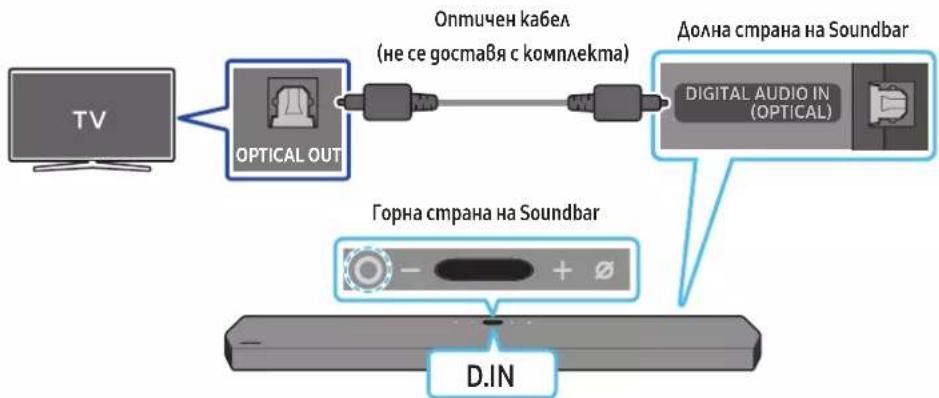
flowchart
graph LR
    TV["TV"] --> OpticalOut["OPTICAL OUT"]
    OpticalOut --> DigitalAudioIn["DIGITAL AUDIO IN (OPTICAL)"]
    DigitalAudioIn --> Soundbar["Долна страна на Soundbar"]
    Soundbar --> DINA["D.IN"]
    style OpticalOut fill:#f9f,stroke:#333
    style DigitalAudioIn fill:#ccf,stroke:#333
    style Soundbar fill:#cfc,stroke:#333
text_image
A B C D E F G H I J K L M N O P Q R S T U V W X Y ZЦентрална линия
natural_image
Diagram showing a screw being inserted into a housing with blue arrows indicating direction (no text or symbols)natural_image
Illustration of a mechanical device with a screw and adjustment knob, showing no text or symbolsnatural_image
Diagram showing two mechanical components with arrows indicating motion, no text or symbols presentnatural_image
Diagram showing two mechanical components with downward arrows indicating motion or assembly (no text or symbols)Dolby, Dolby Atmos, and the double-D symbol are registered trademarks of Dolby Laboratories Licensing Corporation. Manufactured under license from Dolby Laboratories. Confidential unpublished works. Copyright © 2012-2020 Dolby Laboratories. All rights reserved.
dtsx
For DTS patents, see http://patents.dts.com. Manufactured under license from DTS, Inc. (for companies headquartered in the U.S./Japan/Taiwan) or under license from DTS Licensing Limited (for all other companies). DTS, DTS:X Pro, DTS:X, and the DTS:X logo are registered trademarks or trademarks of DTS, Inc. in the United States and other countries. © 2020 DTS, Inc. ALL RIGHTS RESERVED.
HDMI™
The terms HDMI and HDMI High-Definition Multimedia Interface, and the HDMI Logo are trademarks or registered trademarks of HDMI Licensing Administrator, Inc. in the United States and other countries.

Spotify®

- Apple, AirPlay, iPhone, iPad, HomePod, and Apple TV are trademarks of Apple Inc., registered in the U.S. and other countries.
- Use of the Works with Apple badge means that an accessory has been designed to work specifically with the technology identified in the badge and has been certified by the developer to meet Apple performance standards.
15 БЕЛЕЖКА ЗА ЛИЦЕНЗ С ОТВОРЕН КОД
text_image
Diagram illustrating the process of battery charging with positive and negative charges, showing three stages of charge transfer.text_image
5 Sec ID SET- Provjerite svijetli li LINK LED postojano plavo (povezivanje je završeno).
natural_image
Three-step diagram showing a mechanical component before and after processing, with no visible text or symbols.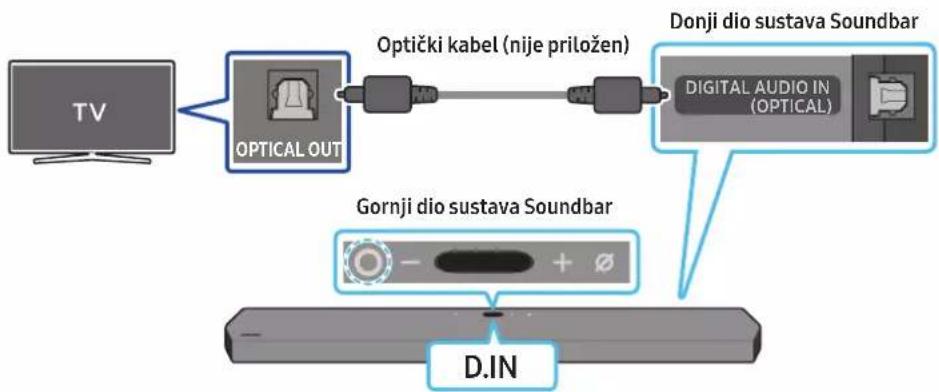
flowchart
graph LR
    TV["TV"] --> OpticalOut["Optical OUT"]
    OpticalOut --> OptičkiKbel["Optički kabel (nije priložen)"]
    OptičkiKbel --> DigitalAudioIn["Digital Audio In (OPTICAL)"]
    DigitalAudioIn --> DonjiDioSustavaSoundbar["Donji dio sustava Soundbar"]
    DonjiDioSustavaSoundbar --> GornjiDioSustavaSoundbar["Gornji dio sustava Soundbar"]
    GornjiDioSustavaSoundbar --> D.IN["D.IN"]
- Kad su televizor i Soundbar isključeni, povežite ulaz DIGITAL AUDIO IN (OPTICAL) na sustavu Soundbar i izlazni priključak OPTICAL na televizoru s pomoću optičkog kabela (nije priložen), kao što je prikazano na slici.
- Uključite Soundbar i televizor.
- Pritisnite gumb ○(Više funkcija) na vrhu uredaja Soundbar ili gumb ➞(Izvor) na daljinskom upravljaču kako biste odabrali način rada „D.IN”.
- Zvuk televizora se čuje iz Soundbar sustava.
Upotreba funkcije Q-Symphony
Kad je funkcija Q-Symphony uključena, Soundbar se sinkronizira sa Samsung TV-om kako bi se zvuk emitirao putem dva uređaja radi optimalnog efekta prostornog ozvučenja. Kad se Soundbar poveže, pojavljuje se izbornik, „TV+Soundbar“ u izborniku TV-a Sound Output. Odaberite odgovarajući izbornik.
text_image
Izbornik TV-a TV HDMI kabel ILI Optički kabel (nije priložen) D.INnatural_image
Simple 3D illustration of a bracket-like object with a hole, labeled 'x 2' (no text or symbols on the object itself)Zidni nosač
- Postavite vodič za zidni nosač na površinu zida.
• Vodič za zidni nosač mora biti ravan.
- Ako je televizor postavljen na zid, instalirajte Soundbar najmanje 5 cm ispod televizora.

text_image
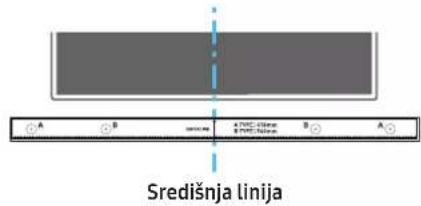
TV 5 cm ili više- Poravnajte središnju liniju vodiča za zidni nosač sa sredinom TV-a (ako postavljate Soundbar ispod TV-a), a zatim pričvrstite vodič za zidni nosač na zid pomoću ljepljive trake.
- Ako ga ne postavljate ispod TV-a, postavite središnju liniju u sredinu područja instalacije.
text_image
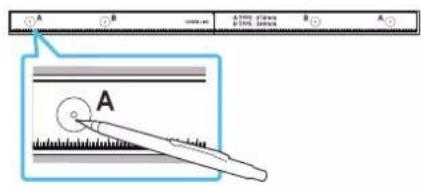
Središnja linija- Gurnite vrh olovke kroz sredinu slika A-TYPE na svakoj strani vodiča kako biste označili otvore za nosive vijke, a zatim uklonite vodič za zidni nosač.
natural_image
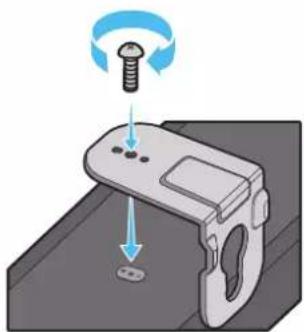
Diagram showing a screw being inserted into a housing with blue motion arrows indicating rotation (no text or symbols)- Montirajte 2 zidna nosača u točan položaj na dnu uređaja Soundbar pomoću 2 vijka.
natural_image
Illustration of a mechanical device with a screw and adjustment knob, showing motion direction (no text or symbols)natural_image
Illustration of a flat-screen TV with antenna and cable (no text or symbols)natural_image
Diagram showing two mechanical components with arrows indicating motion, no text or symbols presentflowchart
graph TD
    A["Top Section"] --> B["Downward Arrow"]
    B --> C["Bottom Section"]
11 INSTALIRANJE SUSTAVA SOUNDBAR IZNAD POSTOLJA TELEVIZORA
Sastavni dio

Gumene nožice
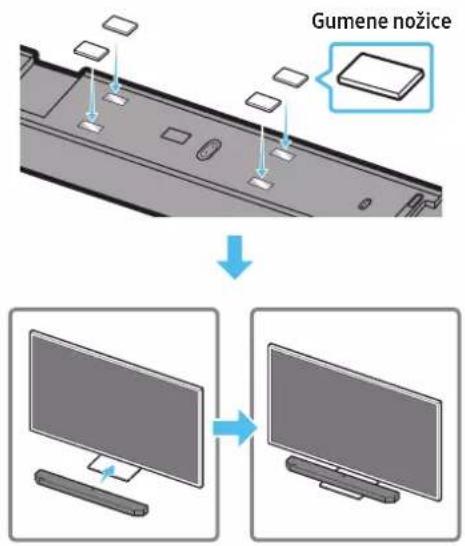
Prilikom postavljanja pričvrstite gumene nožice na donji dio sustava Soundbar prije postavljanja u položaj iznad postolja televizora. Obavezno pričvrstite gumene nožice tako da se ne nalaze izvan rubova postolja TV-a. Pogledajte donju sliku.
text_image
Gumene nožiceDolby, Dolby Atmos, and the double-D symbol are registered trademarks of Dolby Laboratories Licensing Corporation. Manufactured under license from Dolby Laboratories. Confidential unpublished works. Copyright © 2012-2020 Dolby Laboratories. All rights reserved.
dtsx
For DTS patents, see http://patents.dts.com. Manufactured under license from DTS, Inc. (for companies headquartered in the U.S./Japan/Taiwan) or under license from DTS Licensing Limited (for all other companies). DTS, DTS:X Pro, DTS:X, and the DTS:X logo are registered trademarks or trademarks of DTS, Inc. in the United States and other countries. © 2020 DTS, Inc. ALL RIGHTS RESERVED.
HDMI™
The terms HDMI and HDMI High-Definition Multimedia Interface, and the HDMI Logo are trademarks or registered trademarks of HDMI Licensing Administrator, Inc. in the United States and other countries.

Spotify®

Works with Apple AirPlay
- Apple, AirPlay, iPhone, iPad, HomePod, and Apple TV are trademarks of Apple Inc., registered in the U.S. and other countries.
- Use of the Works with Apple badge means that an accessory has been designed to work specifically with the technology identified in the badge and has been certified by the developer to meet Apple performance standards.
15 NAPOMENA O LICENCI ZA KORIŠTENJE SOFTVERA OTVORENOG KODA
Za slanje upita i zahtjeva za pitanja vezana za softver otvorenog koda, kontaktirajte Samsung Open Source (http://opensource.samsung.com)
16 VAŽNE NAPOMENE O USLUZI
- Slike i ilustracije u ovom korisničkom priručniku navedene su samo za referencu i mogu se razlikovati od stvarnog izgleda proizvoda.
- Moguća je naplata naknade za administraciju u slučaju
(a) poziva inženjera na vaš zahtjev, ako se utvrdi da na proizvodu ne postoji kvar (tj. niste pročitali korisnički priručnik)
(b) dostave uređaja u servisni centar, ako se utvrdi da na proizvodu ne postoji kvar (tj. niste pročitali korisnički priručnik). - O iznosu administrativne naknade bit ćete obaviješteni prije posjeta tehničara.
17 SPECIFIKACIJE I VODIČ
Specifikacije
| Naziv modela HW-Q900A / HW-Q910A | |
| Težina 7,1 kg | |
| Dimenzije (Š x V x D) 1232,0 x 69,5 x 138,0 mm | |
| Raspon radne temperature +5°C do +35°C | |
| Raspon radne vlage 10 % ~ 75 % | |
| POJAČALONazivna izlazna snaga ((18 W x 6) + (10 W x 3) + (18 W x 6)) + 160 W | |
| Podržani formati reprodukcije | Dolby 5.1ch / Dolby Digital Plus / Dolby TRUE HD / Dolby ATMOSDTS 5.1ch / DTS HD / DTS-HD Master Audio / DTS:X / LPCM 8Ch |
| IZLAZNA SNAGA BEŽIČNOG UREĐAJAMaks. snaga Wi-Fi odašiljača | 100 mW pri 2,4 GHz – 2,4835 GHz, 200 mW pri 5,15 GHz – 5,25 GHz,100 mW pri 5,25 GHz – 5,35 GHz i 5,47 GHz – 5,725 GHz |
| IZLAZNA SNAGA BEŽIČNOG UREĐAJAMaks. snaga BT odašiljača 100mW pri 2,4GHz – 2,4835GHz | |
| IZLAZNA SNAGA BEŽIČNOG UREĐAJAMaks. snaga SRD odašiljača 25mW pri 5,775GHz – 5,875GHz | |
| Naziv uređaja Subwoofer PS-WA95B | |
| Težina 9,8 kg | |
| Dimenzije (Š x V x D) 210,0 x 403,0 x 403,0 mm | |
| POJAČALONazivna izlazna snaga | 160 W |
| IZLAZNA SNAGA BEŽIČNOG UREĐAJAMaks. snaga SRD odašiljača 25mW pri 5,775GHz – 5,875GHz | |
NAPOMENA
- Samsung Electronics Co., Ltd pridržava pravo promijeniti specifikacije bez ranijeg upozorenja.
- Težina i dimenzije su približne.
Mjera opreza: Soundbar će se automatski ponovno pokrenuti ako uključite/isključite bežičnu vezu.
text_image
Diagram illustrating the process of a device with labeled components and directional arrows indicating movement or force.natural_image
Diagram showing three stages of a device operation: before, after, and after (no text or symbols)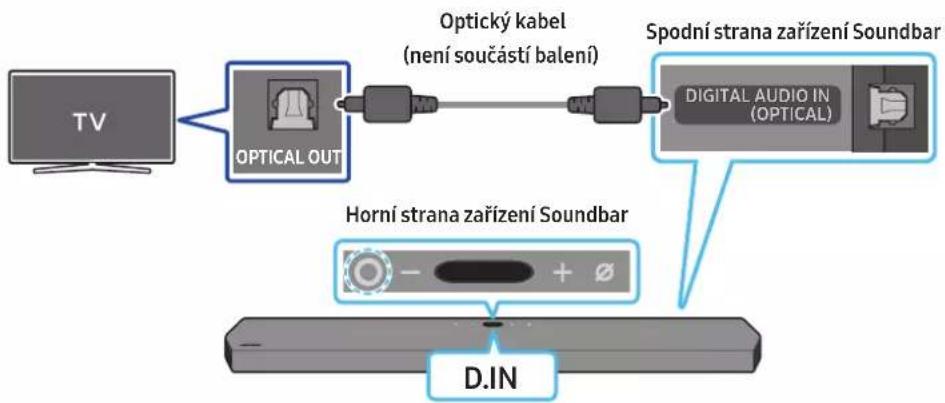
09 PŘIPOJENÍ K APPLE AIRPLAY 2
natural_image
Diagram showing a screw being inserted into a housing with motion arrows indicating rotation (no text or symbols)natural_image
Illustration of a mechanical device with a screw and adjustment knob, showing no text or symbolsnatural_image
Illustration of a flat-screen monitor with a cable and antenna (no text or symbols)natural_image
Diagram showing two mechanical components with arrows indicating motion, no text or symbols presentnatural_image
Diagram showing two mechanical components with arrows indicating motion or assembly (no text or symbols)11 INSTALACE SOUNDBARU NAD STOJAN TELEVIZORU
Komponenta

4 ks
Pryžová podložka
Dolby, Dolby Atmos, and the double-D symbol are registered trademarks of Dolby Laboratories Licensing Corporation. Manufactured under license from Dolby Laboratories. Confidential unpublished works. Copyright © 2012-2020 Dolby Laboratories. All rights reserved.
dtsx
For DTS patents, see http://patents.dts.com. Manufactured under license from DTS, Inc. (for companies headquartered in the U.S./Japan/Taiwan) or under license from DTS Licensing Limited (for all other companies). DTS, DTS:X Pro, DTS:X, and the DTS:X logo are registered trademarks or trademarks of DTS, Inc. in the United States and other countries. © 2020 DTS, Inc. ALL RIGHTS RESERVED.
HDMI™
The terms HDMI and HDMI High-Definition Multimedia Interface, and the HDMI Logo are trademarks or registered trademarks of HDMI Licensing Administrator, Inc. in the United States and other countries.

Spotify®

- Apple, AirPlay, iPhone, iPad, HomePod, and Apple TV are trademarks of Apple Inc., registered in the U.S. and other countries.
- Use of the Works with Apple badge means that an accessory has been designed to work specifically with the technology identified in the badge and has been certified by the developer to meet Apple performance standards.
15 UPOZORNĚNÍ K LICENCÍM NA OPEN SOURCE
If batteries are not properly disposed of, these substances can cause harm to human health or the environment.
www.samsung.com/uk/aboutsamsung/sustainability/environment/our-commitment/data/
SIKKERHEDSOPLYSNINGER
SIKKERHEDSADVARSLER
DÆKSLET MÅ IKKE AFMONTERES, DA DET ∅GER RISIKOEN FOR ELEKTRISK ST∅D (ELLER BAGSIDEN).
DER ER INGEN INDVENDIGE DELE, SOM SKAL SERVICERES.
SERVICEARBEJDE SKAL UDF∅RES AF KVALIFICEREDE
SERVICEMEDARBEJDERE.
natural_image
Simple 3D rectangular block with a 'x4' label, no additional text or symbols presentGummifod
text_image
Diagram illustrating the process of a device with labeled components and directional arrows indicating movement or force.Subwooferens bagside
Subwooferens bagside Subwooferens bagside
natural_image
Diagram showing three stages of a mechanical device with directional arrows indicating motion (no text or symbols)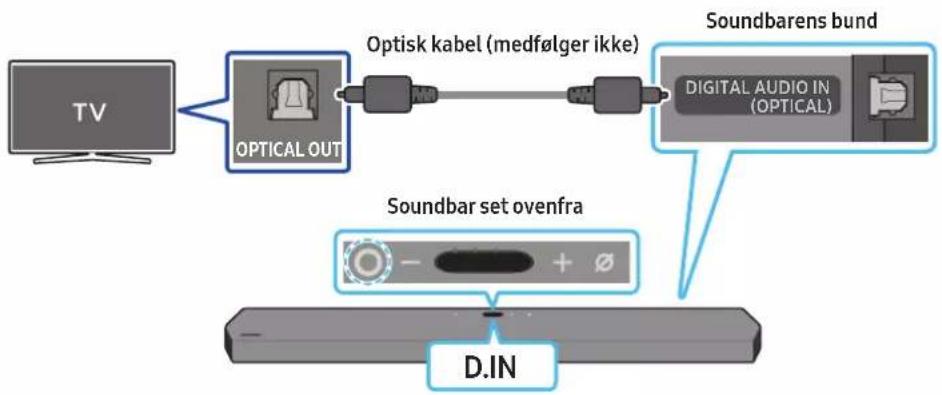
flowchart
graph LR
    TV["TV"] --> OpticalOut["Optical OUT"]
    OpticalOut --> OptiskLabel["Optisk kabel (medfølger ikke)"]
    OptiskLabel --> DigitalAudioIn["Digital AUDIO IN (OPTICAL)"]
    DigitalAudioIn --> SoundbarensBund["Soundbarens bund"]
    SoundbarensBund --> SoundbarSetOvenfra["Soundbar set ovenfra"]
    SoundbarSetOvenfra --> DIN["D.IN"]
natural_image
Diagram showing a screw being inserted into a housing with blue motion arrows indicating rotation (no text or symbols)natural_image
Illustration of a mechanical device with a screw and adjustment knob, showing no text or symbolsnatural_image
Diagram showing two mechanical components with arrows indicating motion, no text or symbols presentnatural_image
Diagram showing two identical mechanical components with downward arrows indicating motion or assembly (no text or symbols)11 INSTALLATION AF SOUNDBAR'EN LIGE OVEN OVER EN TV-FOD
Komponent

Gummifod
Dolby, Dolby Atmos, and the double-D symbol are registered trademarks of Dolby Laboratories Licensing Corporation. Manufactured under license from Dolby Laboratories. Confidential unpublished works. Copyright © 2012-2020 Dolby Laboratories. All rights reserved.
dtsx
For DTS patents, see http://patents.dts.com. Manufactured under license from DTS, Inc. (for companies headquartered in the U.S./Japan/Taiwan) or under license from DTS Licensing Limited (for all other companies). DTS, DTS:X Pro, DTS:X, and the DTS:X logo are registered trademarks or trademarks of DTS, Inc. in the United States and other countries. © 2020 DTS, Inc. ALL RIGHTS RESERVED.
HDMI™
The terms HDMI and HDMI High-Definition Multimedia Interface, and the HDMI Logo are trademarks or registered trademarks of HDMI Licensing Administrator, Inc. in the United States and other countries.

Spotify®

- Brug din telefon, tablet eller computer som fjernbetjening til Spotify. Gå til spotify.com/connect for at finde ud af, hvordan du gør
- Spotify-softwaren er underlagt tredjepartslicenser. Få mere at vide her: https://www.spotify.com/connect/third-party-licenses.

Works with
Apple AirPlay
- Apple, AirPlay, iPhone, iPad, HomePod, and Apple TV are trademarks of Apple Inc., registered in the U.S. and other countries.
- Use of the Works with Apple badge means that an accessory has been designed to work specifically with the technology identified in the badge and has been certified by the developer to meet Apple performance standards.
15 LICENSBEMÆRKNINGER VEDR. OPEN SOURCE
www.samsung.com/uk/aboutsamsung/sustainability/environment/our-commitment/data/
text_image
Diagram illustrating the process of battery charging with positive and negative charges, showing three stages of charge transfer.natural_image
Diagram showing three stages of a device operation: before, after, and after (no text or symbols)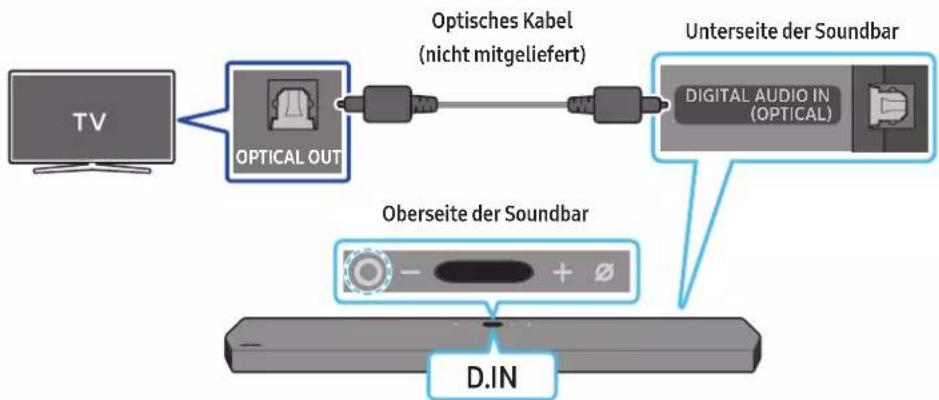
natural_image
Diagram showing a screw being inserted into a housing with motion arrows indicating rotation (no text or symbols)natural_image
Illustration of a mechanical device with a screw and adjustment knob, showing no text or symbolsnatural_image
Diagram showing two mechanical components with arrows indicating motion, no text or symbols presentnatural_image
Diagram showing two mechanical components with downward arrows indicating motion or assembly (no text or symbols)11 INSTALLIEREN DER SOUNDBAR ÜBER EINEM TV- STANDFUß
Bestandteil

Gummifuß
Dolby, Dolby Atmos, and the double-D symbol are registered trademarks of Dolby Laboratories Licensing Corporation. Manufactured under license from Dolby Laboratories. Confidential unpublished works. Copyright © 2012-2020 Dolby Laboratories. All rights reserved.
dtsx
For DTS patents, see http://patents.dts.com. Manufactured under license from DTS, Inc. (for companies headquartered in the U.S./Japan/Taiwan) or under license from DTS Licensing Limited (for all other companies). DTS, DTS:X Pro, DTS:X, and the DTS:X logo are registered trademarks or trademarks of DTS, Inc. in the United States and other countries. © 2020 DTS, Inc. ALL RIGHTS RESERVED.
HDMI™
The terms HDMI and HDMI High-Definition Multimedia Interface, and the HDMI Logo are trademarks or registered trademarks of HDMI Licensing Administrator, Inc. in the United States and other countries.

Spotify®

- Apple, AirPlay, iPhone, iPad, HomePod, and Apple TV are trademarks of Apple Inc., registered in the U.S. and other countries.
- Use of the Works with Apple badge means that an accessory has been designed to work specifically with the technology identified in the badge and has been certified by the developer to meet Apple performance standards.
15 HINWEIS ZUR OPEN SOURCE- LIZENZ
VEILIGHEIDSWAARSCHUWINGEN
OM DE KANS OP EEN ELEKTRISCHE SCHOK TE VERKLEINEN MAG U DE BEHUIZING NIET VERWIJDEREN (OF DE ACHTERZIJDE).
ER BEVINDEN ZICH GEEN ONDERDELEN DIE DOOR DE GEBRUIKER KUNNEN WORDEN GEREPAREERD. LAAT REPARATIE EN ONDERHOUD OVER AAN GEKWALIFICEERD SERVICEPERSONEEL.
natural_image
Three grayscale product photos showing remote and rectangular devices (no text or symbols visible)natural_image
Three technical diagrams showing a U-shaped connector, a double-headed chain, and a labeled control panel (no readable text or symbols)Stroomkabel (Subwoofer, Soundbar) HDMI-kabel Wandmontagegids

text_image
x2 x2 (M4 x L10) x2text_image
Diagram illustrating the process of battery charging with positive and negative charges, showing three stages of charge transfer.'SAMSUNG-TV REMOTE', 'ALL-TV REMOTE'.
text_image
BLAUW is Aan LINKnatural_image
Three-step diagram showing a device moving from left to right, with no visible text or symbols.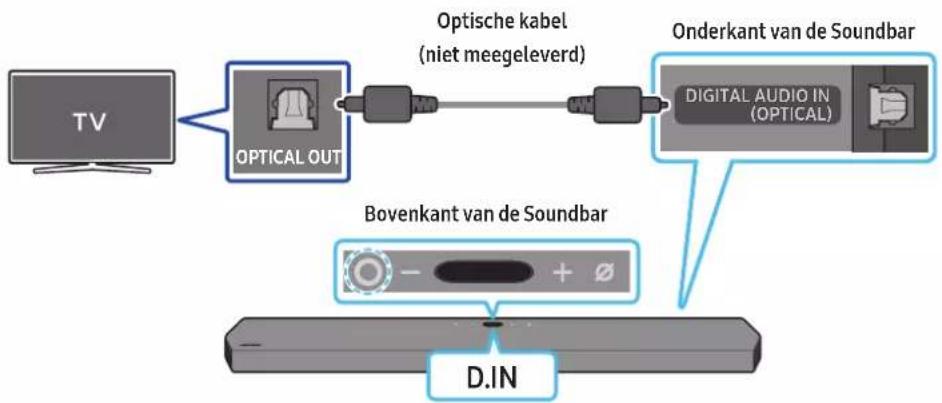
flowchart
graph LR
    TV["TV"] --> OpticalOut["Optical OUT"]
    OpticalOut --> OptischeKabel["Optische kabel (niet meegeleverd)"]
    OptischeKabel --> OnderkantvanDeSoundbar["Onderkant van de Soundbar"]
    OnderkantvanDeSoundbar --> DigitalAudioIn["Digital Audio In (Optical)"]
    DigitalAudioIn --> BovenkantvanDeSoundbar["Bovenkant van de Soundbar"]
    BovenkantvanDeSoundbar --> D.IN["D.IN"]
- Samsung-tv's uitgebracht in 2017 of later
Home (☐) → Instellingen (☐) → Geluid → Geluidsuitvoer → [AV] Samsung Soundbar Q900A / Q910A (Wi-Fi)
07 EEN EXTERN APPARAAT VERBINDEN
09 VERBINDEN MET APPLE AIRPLAY 2
text_image
A B A (100%) S (100%) A Anatural_image
Diagram showing a screw being inserted into a housing with blue motion arrows indicating rotation (no text or symbols)natural_image
Illustration of a mechanical device with a screw and adjustment knob, showing no text or symbolsnatural_image
Diagram showing two mechanical components with arrows indicating motion, no text or symbols presentnatural_image
Diagram showing two mechanical components with downward arrows indicating motion or assembly (no text or symbols)11 DE SOUNDBAR INSTALLEREN BOVEN EEN TV-VOET
Onderdeel

Rubberen voet
13 PROBLEEMOPLOSSING
Dolby, Dolby Atmos, and the double-D symbol are registered trademarks of Dolby Laboratories Licensing Corporation. Manufactured under license from Dolby Laboratories. Confidential unpublished works. Copyright © 2012-2020 Dolby Laboratories. All rights reserved.
dtsx
For DTS patents, see http://patents.dts.com. Manufactured under license from DTS, Inc. (for companies headquartered in the U.S./Japan/Taiwan) or under license from DTS Licensing Limited (for all other companies). DTS, DTS:X Pro, DTS:X, and the DTS:X logo are registered trademarks or trademarks of DTS, Inc. in the United States and other countries. © 2020 DTS, Inc. ALL RIGHTS RESERVED.
HDMI™
The terms HDMI and HDMI High-Definition Multimedia Interface, and the HDMI Logo are trademarks or registered trademarks of HDMI Licensing Administrator, Inc. in the United States and other countries.

Spotify®

- Apple, AirPlay, iPhone, iPad, HomePod, and Apple TV are trademarks of Apple Inc., registered in the U.S. and other countries.
- Use of the Works with Apple badge means that an accessory has been designed to work specifically with the technology identified in the badge and has been certified by the developer to meet Apple performance standards.
15 OPEN SOURCE- LICENTIEKENNISGEVING
www.samsung.com/uk/aboutsamsung/sustainability/environment/our-commitment/data/
OHUTUSALANE TEAVE
HOIATUSED
ELEKTRILÖÖGIOHU VÄHENDAMISEKS ÄRGE EEMALDAGE KAANT (EGA TAGAPANEELI).
SEADMES POLE KASUTAJA HOOLDATAVAID OSI. HOOLDAMISEKS PÖÖRDUGE KVALIFITSEERITUD TEENINDUSTÖÖTAJATE POOLE.
text_image
Diagram illustrating the process of a device with labeled components and directional arrows indicating movement or assembly.natural_image
Diagram showing three stages of a mechanical or electronic component with directional arrows indicating motion (no text or symbols)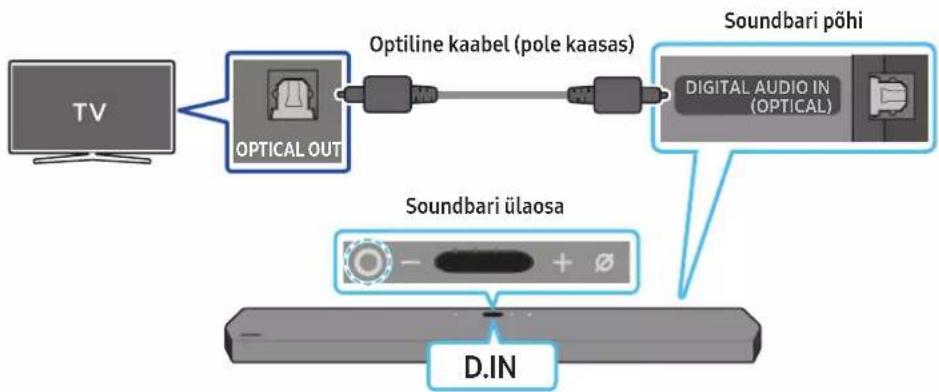
flowchart
graph LR
    TV["TV"] --> OpticalOut["Optical OUT"]
    OpticalOut --> OptilineKaabel["Optiline Kaabel (pole kaasas)"]
    OptilineKaabel --> DigitalAudioIn["Digital Audio In (OPTICAL)"]
    DigitalAudioIn --> SoundbariPõhi["Soundbari Põhi"]
    SoundbariPõhi --> SoundbariÜlaosa["Soundbari Ülaosa"]
    SoundbariÜlaosa --> D.IN["D.IN"]
09 ÜHENDAMINE APPLE AIRPLAY 2-GA
natural_image
Simple 3D illustration of a bracket-like object with no text or symbolsSeinakinnituskronstein
-
Asetage seinakinnitusjuhik vastu seinapinda.
-
Seinakinnitusjuhik peab olema loodis.
- Kui teler on seinale kinnitatud, paigaldage Soundbar vähemalt 5 cm telerist allapoole.
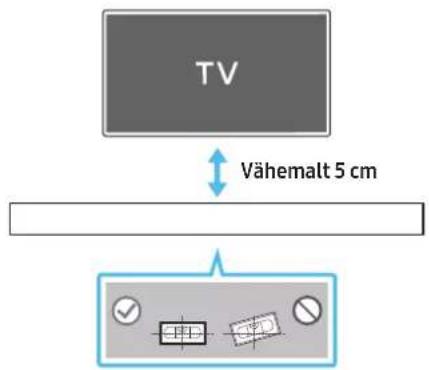
text_image
TV Vähemalt 5 cmnatural_image
Diagram showing a screw being inserted into a housing with blue motion arrows indicating rotation (no text or symbols)natural_image
Illustration of a mechanical device with a screw and adjustment knob, showing no text or symbols- Kokkupanekul veenduge, et seinakinnituskronsteinide riputusosad jääksid Soundbari taha.
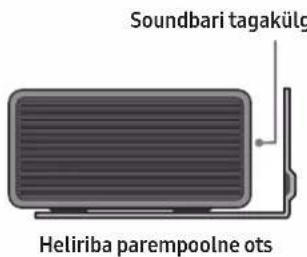
text_image
Soundbari tagakülg Heliriba parempoolne otsnatural_image
Diagram showing two mechanical components with arrows indicating motion, no text or symbols presentnatural_image
Diagram showing two mechanical components with downward arrows indicating motion or assembly (no text or symbols)11 SOUNDBARI PAIGALDAMINE TELERIALUSE KOHALE
Komponent

Kummijalg
Dolby, Dolby Atmos, and the double-D symbol are registered trademarks of Dolby Laboratories Licensing Corporation. Manufactured under license from Dolby Laboratories. Confidential unpublished works. Copyright © 2012-2020 Dolby Laboratories. All rights reserved.
dtsx
For DTS patents, see http://patents.dts.com. Manufactured under license from DTS, Inc. (for companies headquartered in the U.S./Japan/Taiwan) or under license from DTS Licensing Limited (for all other companies). DTS, DTS:X Pro, DTS:X, and the DTS:X logo are registered trademarks or trademarks of DTS, Inc. in the United States and other countries. © 2020 DTS, Inc. ALL RIGHTS RESERVED.
HDMI™
The terms HDMI and HDMI High-Definition Multimedia Interface, and the HDMI Logo are trademarks or registered trademarks of HDMI Licensing Administrator, Inc. in the United States and other countries.

Spotify®

- Kasutage telefoni, tahvelarvutit või arvutit Spotify kaugjuhtimispuldina. Lisateavet vt spotify.com/connect
- Spotify Software allub muu osapoole litsentsidele, mille leiate siit: https://www.spotify.com/connect/third-party-licenses.

Works with Apple AirPlay
- Apple, AirPlay, iPhone, iPad, HomePod, and Apple TV are trademarks of Apple Inc., registered in the U.S. and other countries.
- Use of the Works with Apple badge means that an accessory has been designed to work specifically with the technology identified in the badge and has been certified by the developer to meet Apple performance standards.
15 AVATUD LÄHTEKOODI LITSENTSI TEATIS
Active Voice Amplifier (AVA)....10
natural_image
Three grayscale product photos of remote control devices, no text or symbols visiblenatural_image
Three technical diagrams showing a U-shaped connector with cross-sectional views, alongside a control panel with labeled points A and B (no readable text or symbols)text_image
x2 x2 (M4 x L10) x2text_image
Diagram illustrating the process of a device with labeled components and directional arrows indicating movement.Active Voice Amplifier (AVA)
natural_image
Three-step diagram showing a mechanical device before and after processing, with no visible text or symbols.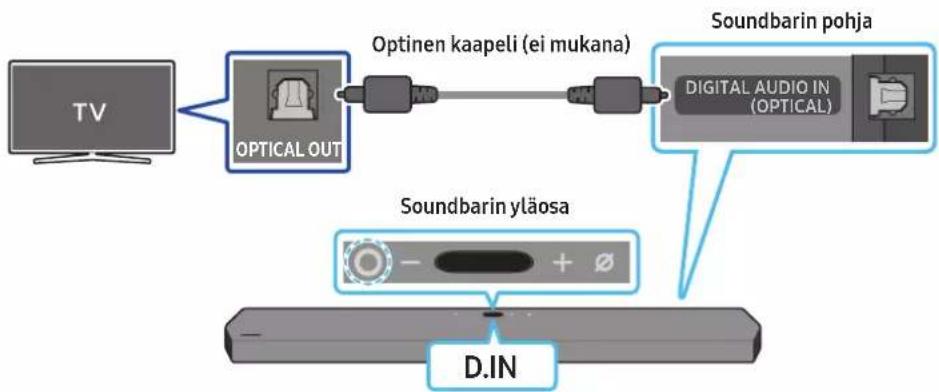
flowchart
graph LR
    TV["TV"] --> OpticalOut["Optical OUT"]
    OpticalOut --> OptinenKaapeli["Optinen kaapeli (ei mukana)"]
    OptinenKaapeli --> DigitalAudioIn["Digital Audio In (OPTICAL)"]
    DigitalAudioIn --> SoundbarinPohja["Soundbarin pohja"]
    SoundbarinPohja --> SoundbarinYläosa["Soundbarin yläosa"]
    SoundbarinYläosa --> D.IN["D.IN"]
09 YHTEYDEN MUODOSTAMINEN APPLE AIRPLAY 2:EEN
natural_image
Diagram showing a screw being inserted into a housing with motion arrows indicating rotation (no text or symbols)natural_image
Illustration of a mechanical device with a screw and adjustment knob, showing no text or symbolsnatural_image
Diagram showing two mechanical components with arrows indicating motion, no text or symbols presentnatural_image
Diagram showing two identical mechanical components with downward arrows indicating motion or assembly (no text or symbols)11 SOUNDBAR-LAITTEEN ASENTAMINEN TV:N JALUSTAN PÄÄLLE
Osa

Kumitassu
text_image
KumitassuDolby, Dolby Atmos, and the double-D symbol are registered trademarks of Dolby Laboratories Licensing Corporation. Manufactured under license from Dolby Laboratories. Confidential unpublished works. Copyright © 2012-2020 Dolby Laboratories. All rights reserved.
dtsx
For DTS patents, see http://patents.dts.com. Manufactured under license from DTS, Inc. (for companies headquartered in the U.S./Japan/Taiwan) or under license from DTS Licensing Limited (for all other companies). DTS, DTS:X Pro, DTS:X, and the DTS:X logo are registered trademarks or trademarks of DTS, Inc. in the United States and other countries. © 2020 DTS, Inc. ALL RIGHTS RESERVED.
HDMI™
The terms HDMI and HDMI High-Definition Multimedia Interface, and the HDMI Logo are trademarks or registered trademarks of HDMI Licensing Administrator, Inc. in the United States and other countries.

Spotify®

- Apple, AirPlay, iPhone, iPad, HomePod, and Apple TV are trademarks of Apple Inc., registered in the U.S. and other countries.
- Use of the Works with Apple badge means that an accessory has been designed to work specifically with the technology identified in the badge and has been certified by the developer to meet Apple performance standards.
15 AVOIMEN KOODIN LISENSSITIEDOTE
17 TEKNISET TIEDOT JA OPAS
Tekniset tiedot
02 VUE D'ENSEMBLE DU PRODUIT
text_image
Diagram illustrating the process of a device with labeled components and directional arrows indicating movement or force.text_image
5 Sec ID SETnatural_image
Diagram showing a device being processed with blue arrows indicating motion (no text or symbols)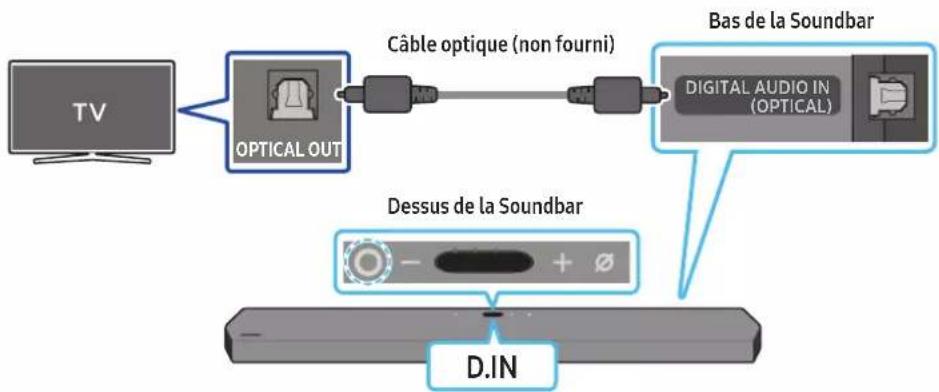
flowchart
graph LR
    TV["TV"] --> OpticalOut["OPTICAL OUT"]
    OpticalOut --> CableOptique["Câble optique (non fourni)"]
    CableOptique --> DigitalAudioDigital["DIGITAL AUDIO IN (OPTICAL)"]
    DigitalAudioDigital --> BasSoundBar["Bas de la Soundbar"]
    DigitalAudioDigital --> DessusSoundBar["Dessus de la Soundbar"]
    DessusSoundBar --> DINA["D.IN"]
09 CONNEXION À APPLE AIRPLAY 2
natural_image
Simple 3D illustration of a bracket-like object with no text or symbolsSupport de fixation murale
natural_image
Diagram showing a screw being inserted into a housing with blue motion arrows indicating rotation (no text or symbols)natural_image
Illustration of a mechanical device with a screw and adjustment knob, showing no text or symbolsnatural_image
Diagram showing two mechanical components with arrows indicating motion, no text or symbols presentnatural_image
Diagram showing two mechanical components with downward arrows indicating motion or assembly (no text or symbols)11 INSTALLATION DE LA SOUNDBAR AU-DESSUS D'UN SOCLE DE TÉLÉVISEUR
Composant

Pied en caoutchouc
text_image
MicrophoneDolby, Dolby Atmos, and the double-D symbol are registered trademarks of Dolby Laboratories Licensing Corporation. Manufactured under license from Dolby Laboratories. Confidential unpublished works. Copyright © 2012-2020 Dolby Laboratories. All rights reserved.
dtsx
For DTS patents, see http://patents.dts.com. Manufactured under license from DTS, Inc. (for companies headquartered in the U.S./Japan/Taiwan) or under license from DTS Licensing Limited (for all other companies). DTS, DTS:X Pro, DTS:X, and the DTS:X logo are registered trademarks or trademarks of DTS, Inc. in the United States and other countries. © 2020 DTS, Inc. ALL RIGHTS RESERVED.
HDMI™
The terms HDMI and HDMI High-Definition Multimedia Interface, and the HDMI Logo are trademarks or registered trademarks of HDMI Licensing Administrator, Inc. in the United States and other countries.

Spotify®

- Apple, AirPlay, iPhone, iPad, HomePod, and Apple TV are trademarks of Apple Inc., registered in the U.S. and other countries.
- Use of the Works with Apple badge means that an accessory has been designed to work specifically with the technology identified in the badge and has been certified by the developer to meet Apple performance standards.
15 AVIS CONCERNANT LES LICENCES LIBRES
16 REMARQUES IMPORTANTES RELATIVES AU SERVICE
www.samsung.com/uk/aboutsamsung/sustainability/environment/our-commitment/data/
natural_image
Three grayscale product photos of remote and audio devices (no text or symbols visible)text_image
x2 x2 (M4 x L10) x2natural_image
Simple 3D rectangular block with a 'x4' label, no additional text or symbols presentΛαστιχένιο επίθεμα
text_image
Diagram illustrating the process of battery charging with positive and negative charges, showing three stages of charge distribution.04 Σ'YNΔΕΣΗ TOY SOUNDBAR
natural_image
Diagram showing three stages of a device operation: before, after, and after (no text or symbols)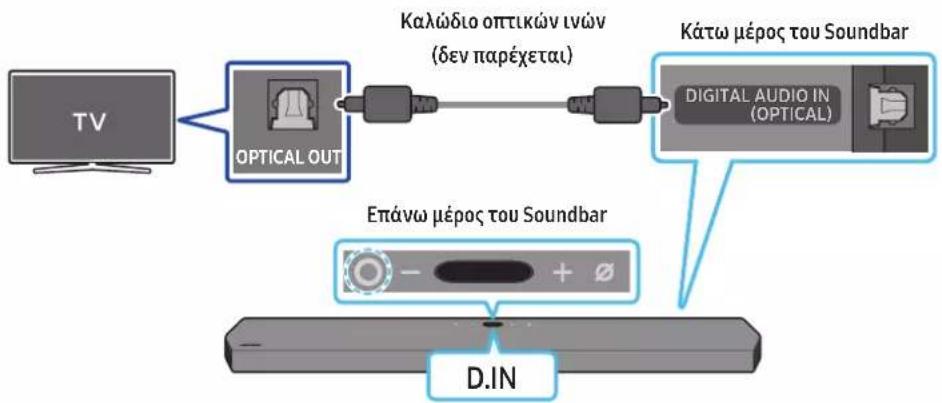
flowchart
graph LR
    TV["TV"] --> OpticalOut["OPTICAL OUT"]
    OpticalOut --> Media["Media Link"]
    Media --> DigitalAudioIn["DIGITAL AUDIO IN (OPTICAL)"]
    DigitalAudioIn --> KáτωμέροςTouSoundbar["Káτω μέρος του Soundbar"]
    DigitalAudioIn --> EpáνωμέροςTouSoundbar["Επάνω μέρος του Soundbar"]
    EpáνωμέροςTouSoundbar --> D.IN["D.IN"]
09 Σ'YNΔΕΣΗ ΣΤΟ APPLE AIRPLAY 2
natural_image
Diagram showing a screw being inserted into a housing with blue arrows indicating motion (no text or symbols)natural_image
Illustration of a mechanical device with a screw and adjustment knob, showing no text or symbolsnatural_image
Diagram showing two mechanical components with arrows indicating motion, no text or symbols presentnatural_image
Diagram showing two mechanical components with downward arrows indicating motion or assembly (no text or symbols)Dolby, Dolby Atmos, and the double-D symbol are registered trademarks of Dolby Laboratories Licensing Corporation. Manufactured under license from Dolby Laboratories. Confidential unpublished works. Copyright © 2012-2020 Dolby Laboratories. All rights reserved.
dtsx
For DTS patents, see http://patents.dts.com. Manufactured under license from DTS, Inc. (for companies headquartered in the U.S./Japan/Taiwan) or under license from DTS Licensing Limited (for all other companies). DTS, DTS:X Pro, DTS:X, and the DTS:X logo are registered trademarks or trademarks of DTS, Inc. in the United States and other countries. © 2020 DTS, Inc. ALL RIGHTS RESERVED.
HDMI™
The terms HDMI and HDMI High-Definition Multimedia Interface, and the HDMI Logo are trademarks or registered trademarks of HDMI Licensing Administrator, Inc. in the United States and other countries.

Spotify®

- Apple, AirPlay, iPhone, iPad, HomePod, and Apple TV are trademarks of Apple Inc., registered in the U.S. and other countries.
- Use of the Works with Apple badge means that an accessory has been designed to work specifically with the technology identified in the badge and has been certified by the developer to meet Apple performance standards.
www.samsung.com/uk/aboutsamsung/sustainability/environment/our-commitment/data/
BIZTONSÁGI INFORMÁCIÓK
BIZTONSÁGI FIGYELMEZTETÉSEK
AZ ÁRAMÜTÉS VESZÉLYÉNEK CSÖKKENTÉSE ÉRDEKÉBEN NE TÁVOLÍTSA EL A BURKOLATOT (VAGY A HÁTOLDALT)!
A KÉSZÜLÉK BELSEJÉBEN NINCSENEK FELHASZNÁLÓ ÁLTAL KEZELENDŐ ALKATRÉSZEK. A SZERVIZELÉST BÍZZA KÉPZETT SZAKEMBERRE.
text_image
Diagram illustrating the process of a device with labeled components and directional arrows indicating movement or force.natural_image
Three-step diagram showing a mechanical component before and after processing, with no visible text or symbols.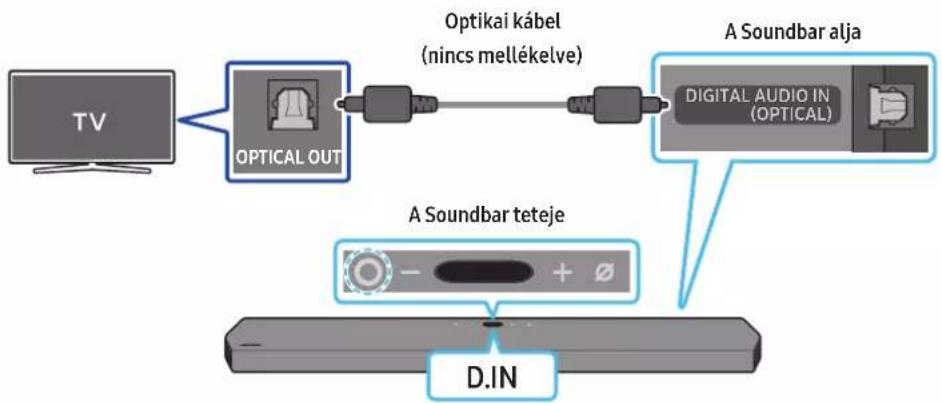
flowchart
graph LR
    TV["TV"] --> OpticalOut["OPTICAL OUT"]
    OpticalOut --> Optikaikabel["Optikai kabel (nincs mellékelve)"]
    Optikaikabel --> DigitalAudioIn["Digital Audio In (OPTICAL)"]
    DigitalAudioIn --> SoundbarTeteje["A Soundbar teteje"]
    SoundbarTeteje --> DINA["D.IN"]
    ASoundbarTeteje --> DigitalAudioIn
09 CSATLAKOZTATÁS AZ APPLE AIRPLAY 2-ESHEZ
natural_image
Simple 3D illustration of a bracket-like object with no text or symbolsTartó-Fali konzol
natural_image
Diagram showing a screw being inserted into a housing with blue motion arrows indicating rotation (no text or symbols)natural_image
Illustration of a mechanical device with a screw and adjustment knob, showing motion direction (no text or symbols)natural_image
Diagram showing two mechanical components with arrows indicating motion, no text or symbols presentnatural_image
Diagram showing two mechanical components with downward arrows indicating motion or assembly (no text or symbols)11 A SOUNDBAR TELEPÍTÉSE EGY TV ÁLLVÁNY FÖLÉ
Komponens
Gumiláb
Dolby, Dolby Atmos, and the double-D symbol are registered trademarks of Dolby Laboratories Licensing Corporation. Manufactured under license from Dolby Laboratories. Confidential unpublished works. Copyright © 2012-2020 Dolby Laboratories. All rights reserved.
dtsx
For DTS patents, see http://patents.dts.com. Manufactured under license from DTS, Inc. (for companies headquartered in the U.S./Japan/Taiwan) or under license from DTS Licensing Limited (for all other companies). DTS, DTS:X Pro, DTS:X, and the DTS:X logo are registered trademarks or trademarks of DTS, Inc. in the United States and other countries. © 2020 DTS, Inc. ALL RIGHTS RESERVED.
HDMI™
The terms HDMI and HDMI High-Definition Multimedia Interface, and the HDMI Logo are trademarks or registered trademarks of HDMI Licensing Administrator, Inc. in the United States and other countries.

Spotify®

- Apple, AirPlay, iPhone, iPad, HomePod, and Apple TV are trademarks of Apple Inc., registered in the U.S. and other countries.
- Use of the Works with Apple badge means that an accessory has been designed to work specifically with the technology identified in the badge and has been certified by the developer to meet Apple performance standards.
15 NYÍLT FORRÁSKÓDÚ LICENC
text_image
Diagram illustrating the process of battery charging with positive and negative charges, showing three stages of charge distribution.text_image
5 Sec ID SETnatural_image
Diagram showing three stages of a device operation: before, after, and after (no text or symbols)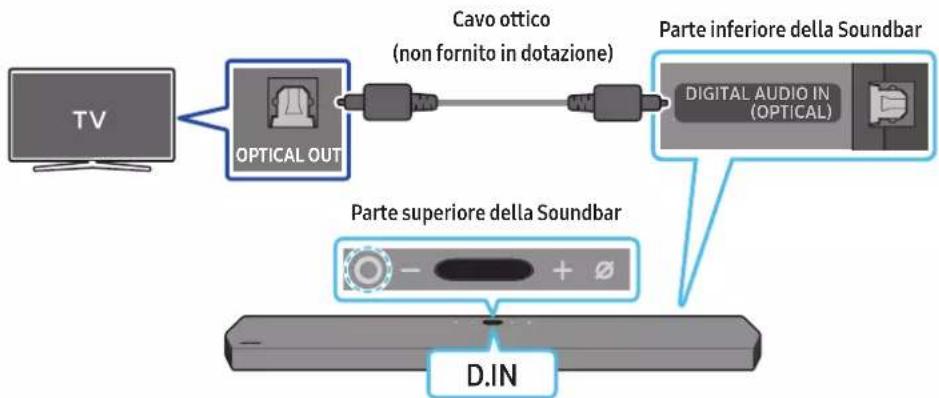
flowchart
graph LR
    TV["TV"] --> OpticalOut["OPTICAL OUT"]
    OpticalOut --> CavoOttico["Cavo ottico (non fornito in dotazione)"]
    CavoOttico --> DigitalAudioDigital["DIGITAL AUDIO IN (OPTICAL)"]
    DigitalAudioDigital --> ParteInferioreDinere(DIN)Parte superioreDinere
    ParteSuperioreDinere --> DigitalAudioDigital
natural_image
Illustration of a remote control panel with no text or symbols on the panel itself09 CONNESSIONE AD APPLE AIRPLAY 2
natural_image
Simple 3D illustration of a small mechanical part with a hole, labeled 'x2' (no text or symbols on the object itself)natural_image
Diagram showing a screw being inserted into a housing with blue motion arrows indicating rotation (no text or symbols)natural_image
Illustration of a mechanical device with a screw and adjustment knob, showing no text or symbolsnatural_image
Diagram showing two mechanical components with arrows indicating motion, no text or symbols presentnatural_image
Diagram showing two mechanical components with downward arrows indicating motion or assembly (no text or symbols)text_image
O + Ø INITDolby, Dolby Atmos, and the double-D symbol are registered trademarks of Dolby Laboratories Licensing Corporation. Manufactured under license from Dolby Laboratories. Confidential unpublished works. Copyright © 2012-2020 Dolby Laboratories. All rights reserved.
dtsx
For DTS patents, see http://patents.dts.com. Manufactured under license from DTS, Inc. (for companies headquartered in the U.S./Japan/Taiwan) or under license from DTS Licensing Limited (for all other companies). DTS, DTS:X Pro, DTS:X, and the DTS:X logo are registered trademarks or trademarks of DTS, Inc. in the United States and other countries. © 2020 DTS, Inc. ALL RIGHTS RESERVED.
HDMI™
The terms HDMI and HDMI High-Definition Multimedia Interface, and the HDMI Logo are trademarks or registered trademarks of HDMI Licensing Administrator, Inc. in the United States and other countries.

Spotify®

- Apple, AirPlay, iPhone, iPad, HomePod, and Apple TV are trademarks of Apple Inc., registered in the U.S. and other countries.
- Use of the Works with Apple badge means that an accessory has been designed to work specifically with the technology identified in the badge and has been certified by the developer to meet Apple performance standards.
15 AVVISO DI LICENZA PER IL SOFTWARE OPEN SOURCE
natural_image
Three grayscale product photos showing remote and rectangular devices (no text or symbols visible)02 PRODUKTA PÄRSKATS
text_image
Diagram illustrating the process of battery charging with positive and negative charges, showing three stages of charge transfer.natural_image
Three-step diagram showing a device moving from left to right, with no visible text or symbols.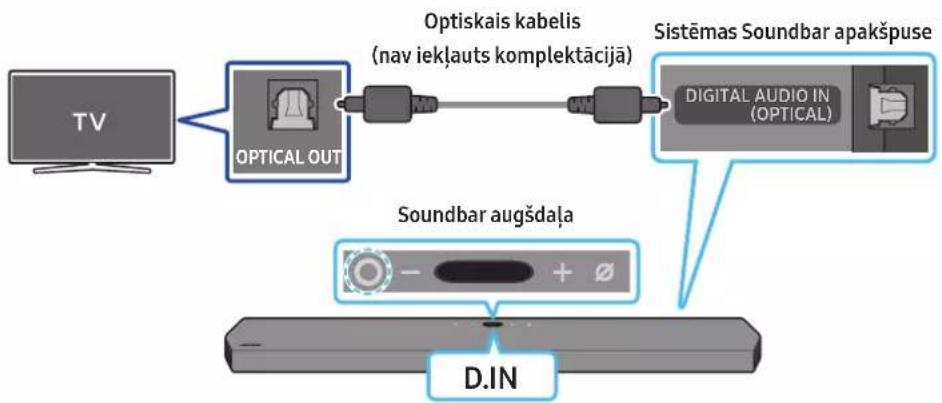
flowchart
graph LR
    TV["TV"] --> OpticalOut["OPTICAL OUT"]
    OpticalOut --> Optiskaikabel["Optiskais kabelis (nav iekļauts komplektācijā)"]
    Optiskaikabel --> DigitalAudioIn["Digital Audio IN (OPTICAL)"]
    DigitalAudioIn --> SistemasSoundbarApakspuse["Sistemas Soundbar apakspuse"]
    SistemasSoundbarApakspuse --> Soundbaraugšdaļa["Soundbar augšdaļa"]
    Soundbaraugšdaļa --> D.IN["D.IN"]
natural_image
Diagram showing a screw being inserted into a housing with motion arrows indicating rotation (no text or symbols)natural_image
Illustration of a mechanical device with a screw and adjustment knob, showing no text or symbolsnatural_image
Diagram showing two mechanical components with arrows indicating motion, no text or symbols presentnatural_image
Diagram showing two mechanical components with downward arrows indicating motion or assembly (no text or symbols)11 SISTEMAS SOUNDBAR NOVIETOŠANA VIRS TELEVIZORA STATÍVA
Komponents

Pamatnes gumija
text_image
Diagram showing a USB port connected to a device with an icon labeled 'USB'.13 PROBLÉMU NOVĚRŠANA
Dolby, Dolby Atmos, and the double-D symbol are registered trademarks of Dolby Laboratories Licensing Corporation. Manufactured under license from Dolby Laboratories. Confidential unpublished works. Copyright © 2012-2020 Dolby Laboratories. All rights reserved.
dtsx
For DTS patents, see http://patents.dts.com. Manufactured under license from DTS, Inc. (for companies headquartered in the U.S./Japan/Taiwan) or under license from DTS Licensing Limited (for all other companies). DTS, DTS:X Pro, DTS:X, and the DTS:X logo are registered trademarks or trademarks of DTS, Inc. in the United States and other countries. © 2020 DTS, Inc. ALL RIGHTS RESERVED.
HDMI™
The terms HDMI and HDMI High-Definition Multimedia Interface, and the HDMI Logo are trademarks or registered trademarks of HDMI Licensing Administrator, Inc. in the United States and other countries.

Spotify®

Works with Apple AirPlay
- Apple, AirPlay, iPhone, iPad, HomePod, and Apple TV are trademarks of Apple Inc., registered in the U.S. and other countries.
- Use of the Works with Apple badge means that an accessory has been designed to work specifically with the technology identified in the badge and has been certified by the developer to meet Apple performance standards.
15 PAZIÑOJUMS PAR ATVĒRTĀ PIRMKODA LICENCI
text_image
Diagram illustrating the process of battery charging with positive and negative charges, showing three stages of charge transfer.natural_image
Three-step diagram showing a mechanical component before and after processing, with no visible text or symbols.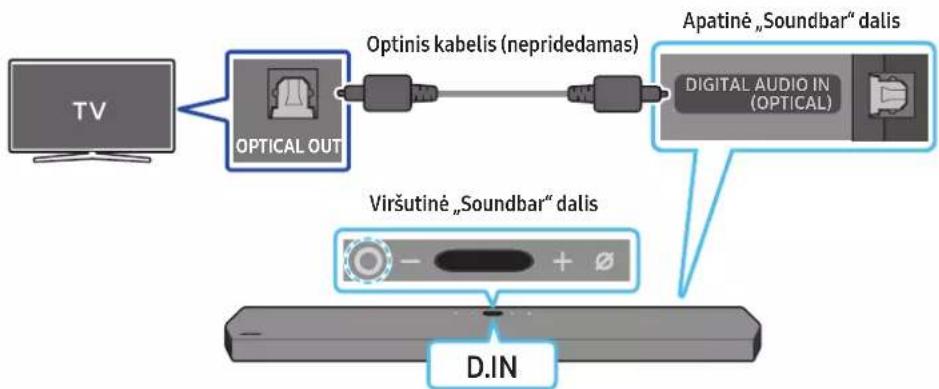
flowchart
graph LR
    TV["TV"] --> OpticalOut["Optical OUT"]
    OpticalOut --> Optiniskabel["Optinis kabel (nepridedamas)"]
    Optiniskabel --> DigitalAudioIn["Digital Audio In (Optical)"]
    DigitalAudioIn --> ApatinéSoundbar["Apatiné „Soundbar“ dalis"]
    ApatinéSoundbar --> ViršutineSoundBar["Viršutine „Soundbar“ dalis"]
    ViršutineSoundBar --> DINA["D.IN"]
natural_image
Simple 3D illustration of a bracket-like object with no text or symbolsSieninis laikiklis
natural_image
Diagram showing a screw being inserted into a housing with blue arrows indicating rotation (no text or symbols)natural_image
Illustration of a mechanical device with a screw and adjustment knob, showing no text or symbolsnatural_image
Diagram showing two mechanical components with arrows indicating motion, no text or symbols presentnatural_image
Diagram showing two identical mechanical components with downward arrows indicating motion or assembly (no text or symbols)11 „SOUNDBAR“ GARSIAKALBIO MONTAVIMAS VIRŠ TELEVIZORIAUS STOVO
Komponentai

Guminé kojelé
Dolby, Dolby Atmos, and the double-D symbol are registered trademarks of Dolby Laboratories Licensing Corporation. Manufactured under license from Dolby Laboratories. Confidential unpublished works. Copyright © 2012-2020 Dolby Laboratories. All rights reserved.
dtsx
For DTS patents, see http://patents.dts.com. Manufactured under license from DTS, Inc. (for companies headquartered in the U.S./Japan/Taiwan) or under license from DTS Licensing Limited (for all other companies). DTS, DTS:X Pro, DTS:X, and the DTS:X logo are registered trademarks or trademarks of DTS, Inc. in the United States and other countries. © 2020 DTS, Inc. ALL RIGHTS RESERVED.
HDMI™
The terms HDMI and HDMI High-Definition Multimedia Interface, and the HDMI Logo are trademarks or registered trademarks of HDMI Licensing Administrator, Inc. in the United States and other countries.

Spotify®

- Apple, AirPlay, iPhone, iPad, HomePod, and Apple TV are trademarks of Apple Inc., registered in the U.S. and other countries.
- Use of the Works with Apple badge means that an accessory has been designed to work specifically with the technology identified in the badge and has been certified by the developer to meet Apple performance standards.
15 ATVIROJO KODO LICENCIJOS PRANEŠIMAS
text_image
Diagram illustrating the process of battery charging with positive and negative charges, showing three stages of charge transfer.natural_image
Diagram showing three stages of a device operation: before, after, and after (no text or symbols)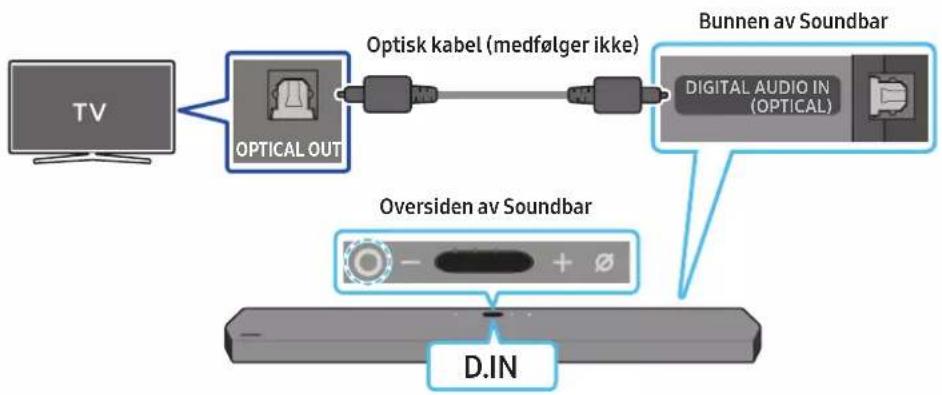
flowchart
graph LR
    TV["TV"] --> OpticalOut["Optical OUT"]
    OpticalOut --> OptiskKabel["Optisk kabel (medfølger ikke)"]
    OptiskKabel --> DigitalAudioIn["Digital Audio In (OPTICAL)"]
    DigitalAudioIn --> BunnenavSoundbar["Bunnen av Soundbar"]
    D.IN["D.IN"] --> OversidenavSoundbar["Oversiden av Soundbar"]
09 KOBLE TIL APPLE AIRPLAY 2
natural_image
Simple 3D illustration of a bracket-like object with no text or symbolsnatural_image
Diagram showing a screw being inserted into a housing with blue motion arrows indicating rotation (no text or symbols)natural_image
Illustration of a mechanical device with a screw and a button, showing motion direction (no text or symbols)natural_image
Illustration of a flat-screen TV with antenna and cable (no text or symbols)natural_image
Diagram showing two mechanical components with arrows indicating motion, no text or symbols presentnatural_image
Diagram showing two mechanical components with arrows indicating motion or assembly (no text or symbols)11 MONTERE LYDPLANKEN OVER ET TV-STATIV
Komponent

Gummifot
Dolby, Dolby Atmos, and the double-D symbol are registered trademarks of Dolby Laboratories Licensing Corporation. Manufactured under license from Dolby Laboratories. Confidential unpublished works. Copyright © 2012-2020 Dolby Laboratories. All rights reserved.
dtsx
For DTS patents, see http://patents.dts.com. Manufactured under license from DTS, Inc. (for companies headquartered in the U.S./Japan/Taiwan) or under license from DTS Licensing Limited (for all other companies). DTS, DTS:X Pro, DTS:X, and the DTS:X logo are registered trademarks or trademarks of DTS, Inc. in the United States and other countries. © 2020 DTS, Inc. ALL RIGHTS RESERVED.
HDMI™
The terms HDMI and HDMI High-Definition Multimedia Interface, and the HDMI Logo are trademarks or registered trademarks of HDMI Licensing Administrator, Inc. in the United States and other countries.

Spotify®

- Apple, AirPlay, iPhone, iPad, HomePod, and Apple TV are trademarks of Apple Inc., registered in the U.S. and other countries.
- Use of the Works with Apple badge means that an accessory has been designed to work specifically with the technology identified in the badge and has been certified by the developer to meet Apple performance standards.
15 LISENSMERKNAD FOR ÅPEN KILDE
Hvis du vil sende spørsmål om åpne kildekoder, kan du kontakte Samsung Open Source via e-post (http://opensource.samsung.com)
16 VIKTIGE MERKNADER OM SERVICE
Active Voice Amplifier (AVA) 10
text_image
Diagram illustrating the process of battery charging with positive and negative charges, showing three stages of charge transfer.Obstuga pilota
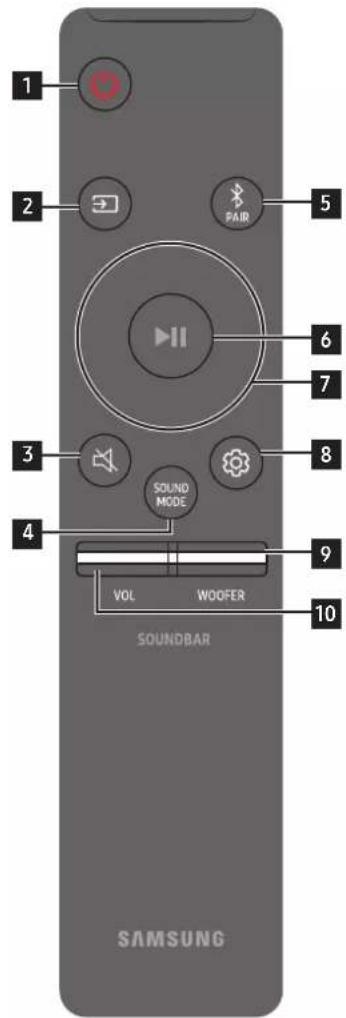
text_image
1 2 PAIR 5 6 7 3 SOUND MODE 8 4 9 VOL WOOFER 10 SOUNDBAR SAMSUNGActive Voice Amplifier (AVA)
natural_image
Three-step diagram showing a device moving from left to right, with no visible text or symbols.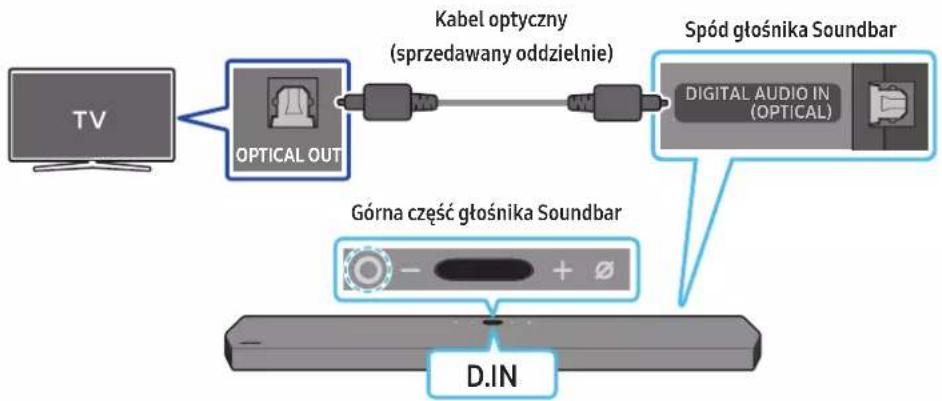
flowchart
graph LR
    TV["TV"] --> OpticalOut["OPTICAL OUT"]
    OpticalOut --> Kabelo["Kabel optyczny (sprzedawany oddzielnie)"]
    Kabelo --> DigitalAudioDigital["DIGITAL AUDIO IN (OPTICAL)"]
    DigitalAudioDigital --> SpodGtośnikaSoundbar["Spód głośnika Soundbar"]
    SpodGtośnikaSoundbar --> GórnacgGórnacgGórnacgGórnacgGórnacgGórnacgGórnacgGórnacgGórnacgGórnacgGórnacgGórnacgGórnacgGórnacgGórnacgGórnacgGórnacgGórnacgGórnacgGórnacgGórnacgGoldIn["+ - + -"]
    GórnacgGórnacgGórnacgGórnacgGórnacgGórnacgGórnacgGórnacgGoldIn[+ - + - + - + - + - + - + - + - + - + - + - + - + - + - + - + - + - + - + - + - + - + - + - + - + - + - + - + - + - + - + - + - + - + - + - + - + - + - + - + - + - + - + - + - + - + - + - + - + - + - + - +
natural_image
Diagram showing a screw being inserted into a housing with blue motion arrows indicating rotation (no text or symbols)natural_image
Illustration of a mechanical device with a screw and adjustment knob, showing no text or symbolsnatural_image
Diagram showing two mechanical components with arrows indicating motion, no text or symbols presentnatural_image
Diagram showing two mechanical components with downward arrows indicating motion or assembly (no text or symbols)11 INSTALACJA LISTWY SOUNDBAR NAD PODSTAWKA TELEWIZORA
Element

Gumowa nóżka
Dolby, Dolby Atmos, and the double-D symbol are registered trademarks of Dolby Laboratories Licensing Corporation. Manufactured under license from Dolby Laboratories. Confidential unpublished works. Copyright © 2012-2020 Dolby Laboratories. All rights reserved.
dtsx
For DTS patents, see http://patents.dts.com. Manufactured under license from DTS, Inc. (for companies headquartered in the U.S./Japan/Taiwan) or under license from DTS Licensing Limited (for all other companies). DTS, DTS:X Pro, DTS:X, and the DTS:X logo are registered trademarks or trademarks of DTS, Inc. in the United States and other countries. © 2020 DTS, Inc. ALL RIGHTS RESERVED.
HDMI™
The terms HDMI and HDMI High-Definition Multimedia Interface, and the HDMI Logo are trademarks or registered trademarks of HDMI Licensing Administrator, Inc. in the United States and other countries.

Spotify®

- Apple, AirPlay, iPhone, iPad, HomePod, and Apple TV are trademarks of Apple Inc., registered in the U.S. and other countries.
- Use of the Works with Apple badge means that an accessory has been designed to work specifically with the technology identified in the badge and has been certified by the developer to meet Apple performance standards.
15 INFORMACJA O LICENCJACH NA OPROGRAMOWANIE OPEN SOURCE
Active Voice Amplifier (AVA) 10
natural_image
Three grayscale product photos of remote control devices, no text or symbols visibletext_image
X2 A B control A:7002 - 60mm B:7002 - 50mm Atext_image
Diagram illustrating the process of battery charging with positive and negative charges, showing three stages of charge transfer.Active Voice Amplifier (AVA)
natural_image
Diagram showing a device transitioning from a cylindrical component to a rectangular device, with arrows indicating direction (no text or symbols)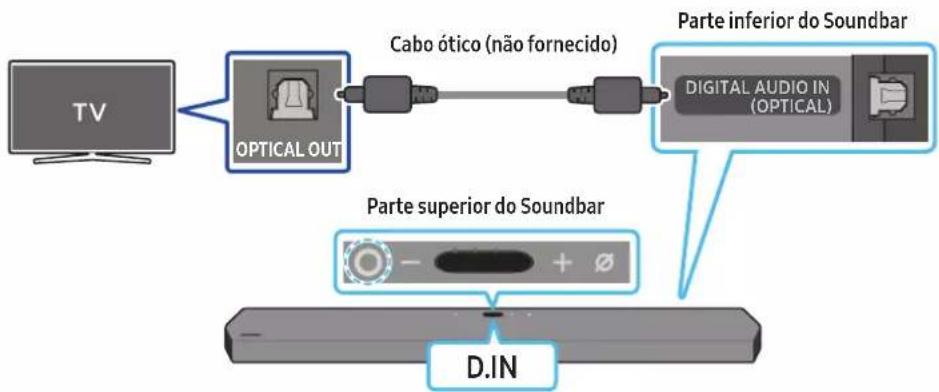
flowchart
graph LR
    TV["TV"] --> OpticalOut["OPTICAL OUT"]
    OpticalOut --> Cable0["Cabo ótico (não fornecido)"]
    Cable0 --> DigitalAudioDigitalAudio["DIGITAL AUDIO IN (OPTICAL)"]
    DigitalAudioDigitalAudio --> ParteInferior["Parte inferior do Soundbar"]
    DigitalAudioDigitalAudio --> ParteSuperior["Parte superior do Soundbar"]
    ParteSuperior --> DINA["D.IN"]
flowchart
graph LR
    A["TV"] --> B["+"]
    B --> C["Parte superior do Soundbar"]
    C --> D["BT PAIRING"]
    D --> E["OU"]
    E --> F["Hand with finger pointing to a circular dial with 5 Sec clock"]
A ligação inicial
09 LIGAR AO APPLE AIRPLAY 2
text_image
A B S S A TNC 45mm B TNC 45mm A Linha centralnatural_image
Diagram showing a screw being inserted into a housing with blue motion arrows indicating rotation (no text or symbols)natural_image
Illustration of a mechanical device with a screw and adjustment knob, showing no text or symbolsnatural_image
Illustration of a flat-screen TV with antenna and cable (no text or symbols)natural_image
Diagram showing two mechanical components with arrows indicating motion, no text or symbols presentnatural_image
Diagram showing two mechanical components with downward arrows indicating motion or assembly (no text or symbols)11 INSTALAR O SOUNDBAR POR CIMA DO SUPORTE DO TELEVISOR
Componente

X4
Borracha de base
Dolby, Dolby Atmos, and the double-D symbol are registered trademarks of Dolby Laboratories Licensing Corporation. Manufactured under license from Dolby Laboratories. Confidential unpublished works. Copyright © 2012-2020 Dolby Laboratories. All rights reserved.
dtsx
For DTS patents, see http://patents.dts.com. Manufactured under license from DTS, Inc. (for companies headquartered in the U.S./Japan/Taiwan) or under license from DTS Licensing Limited (for all other companies). DTS, DTS:X Pro, DTS:X, and the DTS:X logo are registered trademarks or trademarks of DTS, Inc. in the United States and other countries. © 2020 DTS, Inc. ALL RIGHTS RESERVED.
HDMI™
The terms HDMI and HDMI High-Definition Multimedia Interface, and the HDMI Logo are trademarks or registered trademarks of HDMI Licensing Administrator, Inc. in the United States and other countries.

Spotify®

- Apple, AirPlay, iPhone, iPad, HomePod, and Apple TV are trademarks of Apple Inc., registered in the U.S. and other countries.
- Use of the Works with Apple badge means that an accessory has been designed to work specifically with the technology identified in the badge and has been certified by the developer to meet Apple performance standards.
15 AVISO DE LICENÇA DE CÓDIGO ABERTO
INFORMATII DESPRE SIGURANTĂ
AVERTIZĂRI DE SIGURANȚĂ
PENTRU A REDUCE PERICOLUL DE ELECTROCUTARE, NU DEMONTAȚI CAPACUL (SAU PARTEA DIN SPATE).
ÎN INTERIOR NU EXISTĂ COMPONENTE CARE POT FI REPARATE DE CĂTRE UTILIZATOR. TOATE REPARAȚIILE TREBUIE EFECTUATE NUMAI DE CĂTRE PERSONAL DE CALIFICAT.
Active Voice Amplifier (AVA) 10
Folosirea Butoanelor ascunse (Butoane cu mai multe functii)....11
text_image
Diagram illustrating the process of a device with labeled components and directional arrows indicating movement or assembly.Active Voice Amplifier (AVA)
natural_image
Three-step diagram showing a device moving from left to right, with no visible text or symbols.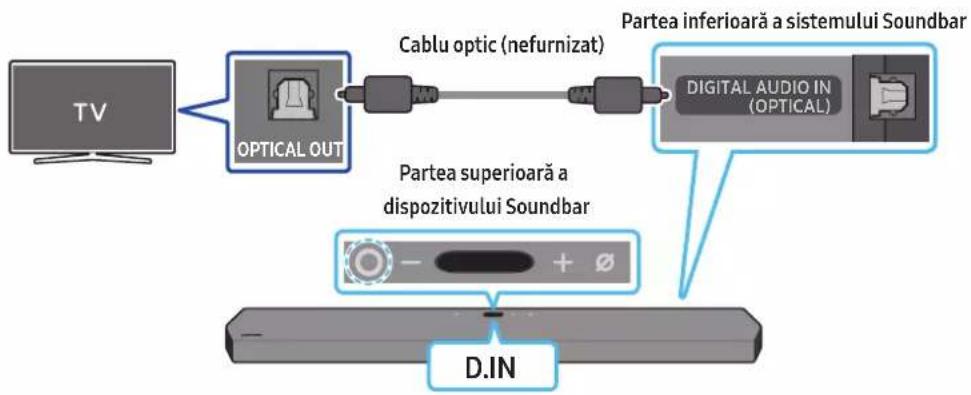
flowchart
graph LR
    TV["TV"] --> OpticalOut["OPTICAL OUT"]
    OpticalOut --> CableOptic["Cable optic (nefurnizat)"]
    CableOptic --> DigitalAudioIn["Digital AUDIO IN (OPTICAL)"]
    DigitalAudioIn --> ParteaSuperiora["a dispozitivului Soundbar"]
    ParteaSuperiora --> DINA["D.IN"]
    DigitalAudioIn --> ParteaInferioar["a sistemului Soundbar"]
09 CONECTAREA LA APPLE AIRPLAY 2
natural_image
Diagram showing a screw being inserted into a housing with blue motion arrows indicating rotation (no text or symbols)natural_image
Illustration of a mechanical device with a screw and adjustment knob, showing no text or symbolsnatural_image
Diagram showing two mechanical components with arrows indicating motion, no text or symbols presentnatural_image
Diagram showing two mechanical components with downward arrows indicating motion or assembly (no text or symbols)11 INSTALAREA UNUI SOUNDBAR DEASUPRA UNUI SUPPORT DE TELEVIZOR
Componentă

Talpă de cauciuc
Dolby, Dolby Atmos, and the double-D symbol are registered trademarks of Dolby Laboratories Licensing Corporation. Manufactured under license from Dolby Laboratories. Confidential unpublished works. Copyright © 2012-2020 Dolby Laboratories. All rights reserved.
dtsx
For DTS patents, see http://patents.dts.com. Manufactured under license from DTS, Inc. (for companies headquartered in the U.S./Japan/Taiwan) or under license from DTS Licensing Limited (for all other companies). DTS, DTS:X Pro, DTS:X, and the DTS:X logo are registered trademarks or trademarks of DTS, Inc. in the United States and other countries. © 2020 DTS, Inc. ALL RIGHTS RESERVED.
HDMI™
The terms HDMI and HDMI High-Definition Multimedia Interface, and the HDMI Logo are trademarks or registered trademarks of HDMI Licensing Administrator, Inc. in the United States and other countries.

Spotify®

- Apple, AirPlay, iPhone, iPad, HomePod, and Apple TV are trademarks of Apple Inc., registered in the U.S. and other countries.
- Use of the Works with Apple badge means that an accessory has been designed to work specifically with the technology identified in the badge and has been certified by the developer to meet Apple performance standards.
15 NOTĂ REFERITOARE LA LICENȚA PENTRU PROGRAME OPEN SOURCE
natural_image
Three grayscale product photos showing remote and cylindrical devices (no text or symbols visible)Glavni uređaj Soundbar Daljinski upravljač/baterije Soundbar-a Sabvufer

text_image
x2 A B C A7502-010mm E7502-010mm B AKabl za napajanje (sabvufer, Soundbar) HDMI kabl Vođica za montažu na zid

text_image
x2 x2 (M4 x L10) x2Zavrtanj držača Zavrtanj Nosač za montažu na zid

Gumena nožica
- Više informacija o napajanju i potrošnji energije potražite na nalepnici na proizvodu. (oznaka: Zadnja strana glavne jedinice Soundbarzvučnika)
- Za kupovinu dodatnih komponenata ili opcionalnih kablova, obratite se Samsung servisnom centru ili Samsung korisničkoj podršci.
- Za više informacija o montiranju na zid ili na gumenoj nožici pogledajte strane od 28 do 30.
- Dizajn, specifikacije i ekran aplikacija su podložni promeni bez prethodnog obaveštenja.
- Izgled dodatne opreme se može u određenoj meri razlikovati od ilustracija prikazanih iznad.
02 PREGLED PROIZVODA
Gornji panel Soundbar uređaja
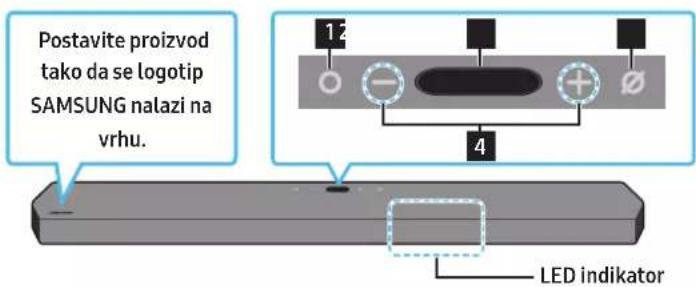
text_image
Postavite proizvod tako da se logotip SAMSUNG nalazi na vrhu. 12 - + - 4 LED indikator| 1 | Dugme (Više funkcija)U režimu pripravnosti pritisnite dugme (Više funkcija) da biste uključili Soundbar.Pritisnite dugme (Vše funkcija) da biste promenili ulazni kanal. | ||
| 2 | EkranPrikazuje status i trenutni režim proizvoda.D.IN → HDMI 1 → HDMI 2 → Wi-Fi → BT | ||
| 3 | Dugme (Mikrofon uključen/isključen)Pritisnite dugme da uključite ili isključite mikrofon.Kad se mikrofon isključi, LED indikator svetleće u crvenoj boji. | Mic Off | Mic On |
| 4 | Dugme — + (Jačina zvuka)Podešava jačinu zvuka. | ||
text_image
Diagram illustrating the process of battery charging with positive and negative charges, showing three stages of charge transfer.Kako se koristi daljinski upravljač
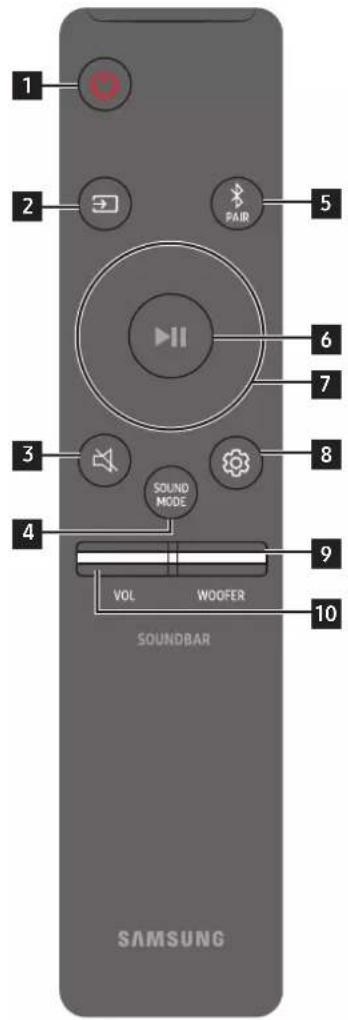
text_image
1 2 PAIR 5 6 7 3 SOUND MODE 8 4 9 VOL WOOFER 10 SOUNDBAR SAMSUNGtext_image
5 Sec ID SETnatural_image
Three-step diagram showing a mechanical component before and after processing, with no visible text or symbols.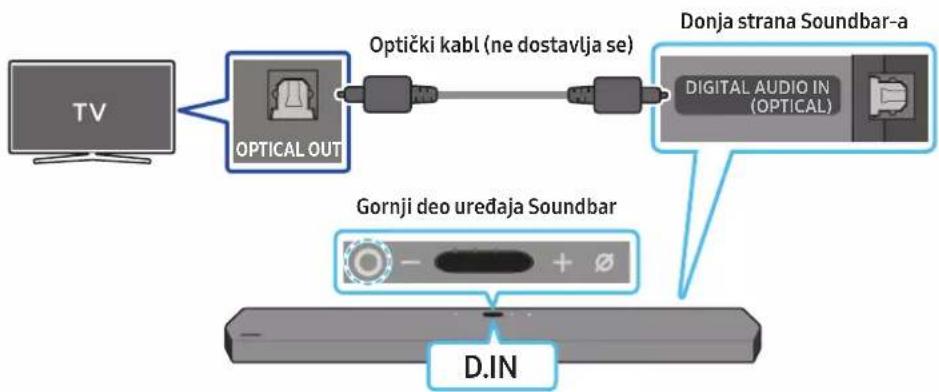
flowchart
graph LR
    TV["TV"] --> OpticalOut["OPTICAL OUT"]
    OpticalOut --> OptičkiKab["Optički kabl (ne dostavlja se)"]
    OptičkiKab --> DigitalAudioIn["Digital Audio IN (OPTICAL)"]
    DigitalAudioIn --> DonjaStranaSoundbara["Donja strana Soundbar-a"]
    DonjaStranaSoundbara --> GornjiDeoUređajaSoundBar["Gornji deo uređaja Soundbar"]
    GornjiDeoUređajaSoundBar --> D.IN["D.IN"]
- Kada su TV i Soundbar isključeni, optičkim kablom (nije priložen) povežite DIGITAL AUDIO IN (OPTICAL) port Soundbar-a i OPTICAL izlazni port TV-a, na način prikazan na slici.
- Uključite Soundbar i TV.
- Pritisnite dugme 📄(Više funkcija) na vrhu Soundbar zvučnika ili dugme 📄(Izvor) na daljinskom upravljaču kako biste izabrali režim „D.IN”.
- Soundbar uredaj emituje zvuk sa televizora.
Upotreba funkcije Q-Symphony
Kada je funkcija Q-Symphony uključena, Soundbar se sinhronizuje sa Samsung TV-om kako bi se zvuk emitovao putem dva uređaja radi optimalnog efekta prostornog ozvučenja. Kada se Soundbar poveže, pojavljuje se meni „TV+Soundbar“ u meniju televizora Sound Output. Izaberite odgovarajući meni.
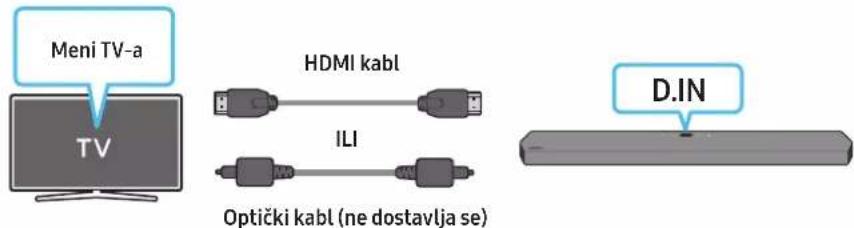
text_image
Meni TV-a TV HDMI kabl ILI Optički kabl (ne dostavlja se) D.IN- Primer menija televizora: TV + [AV] naziv serije Soundbar zvučnika (HDMI)
NAPOMENA
natural_image
Simple 3D illustration of a bracket-like object with no text or symbolsNosač za montažu na zid
-
Postavite vođicu za montiranje na zid na površinu zida.
-
Vođica za montiranje na zid mora da bude ravna.
- Ako je televizor postavljen na zid, instalirajte Soundbar najmanje 5 cm ispod televizora.
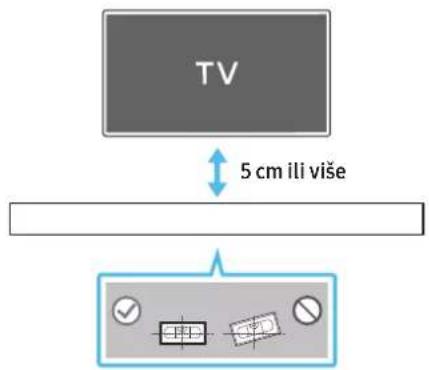
text_image
TV 5 cm ili više- Poravnajte središnju liniju vođice za montiranje na zid sa sredinom TV-a (ako postavljate Soundbar ispod TV-a), a zatim pričvrstite vođicu za montiranje na zid na zid pomoću lepljive trake.
- Ako ga ne postavljate ispod TV-a, postavite središnju liniju u sredinu područja instalacije.
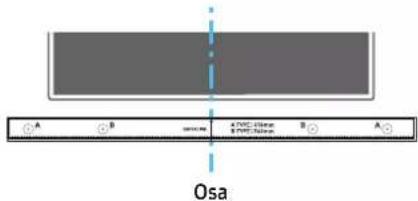
text_image
A B Osa A TWC 410mm B TWC 390mm A- Gurnite vrh olovke kroz sredinu slika VRSTE A na svakoj strani vodice da biste označili otvore za noseće vijke, a zatim uklonite vodicu za montiranje na zid.
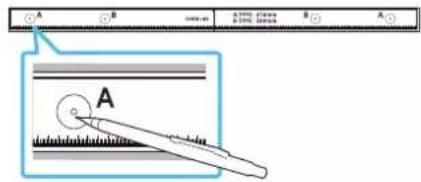
text_image
A B A (100%) B (100%) A B A Bnatural_image
Diagram showing a screw being inserted into a housing with motion arrows indicating rotation (no text or symbols)- Montirajte 2 zidna nosača u tačan položaj na dnu Soundbar zvučnika pomoću 2 vijka.
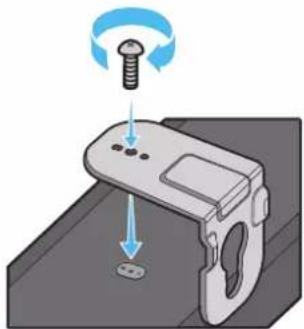
natural_image
Illustration of a mechanical device with a screw and adjustment knob, showing no text or symbols- Prilikom sastavljanja proverite da li se delovi za kačenje na zidnim nosačima nalaze na zadnjem delu Soundbar zvučnika.
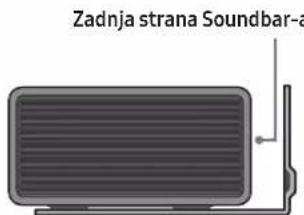
text_image
Zadnja strana Soundbar-anatural_image
Diagram showing two mechanical components with arrows indicating motion, no text or symbols presentnatural_image
Diagram showing two mechanical components with downward arrows indicating motion or assembly (no text or symbols)11 INSTALIRANJE SOUNDBAR UREĐAJA IZNAD STALKA ZA TELEVIZOR
Komponenta

Gumena nožica
Za instalaciju, prikačite gumene nožice sa donje strane Soundbar uređaja pre nego što ga postavite iznad stalka za televizor. Vodite računa da gumene nožice prikačite tako da ne budu van spoljašnjih ivica stalka za televizor. Pogledajte sliku u nastavku.
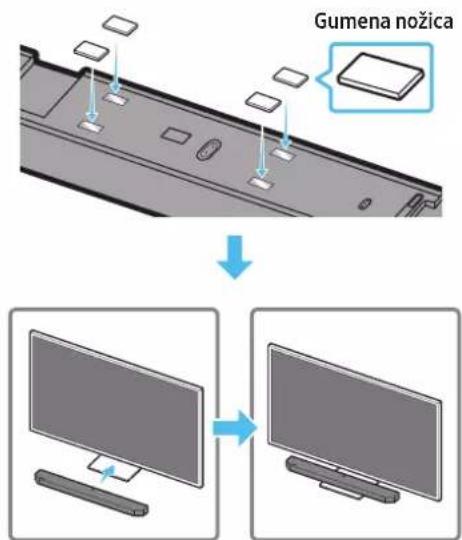
text_image
Gumena nožicaPostavite Soundbar uređaj na postolje za televizor.
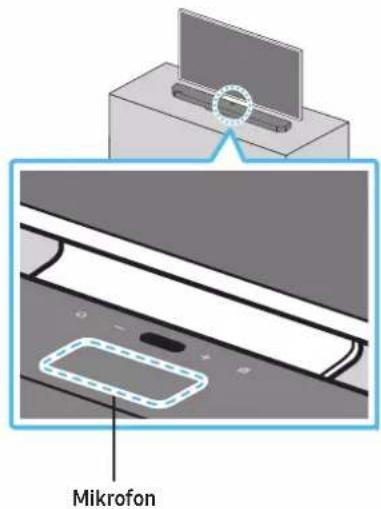
text_image
MikrofonKao što je prikazano na slici, poravnajte sredinu Soundbar-a sa sredinom TV-a i pažljivo postavite Soundbar u stalak za televizor.
Sada postavite mikrofon ispred stalka da ne bi došlo do smetnji sa prepoznavanjem glasa.
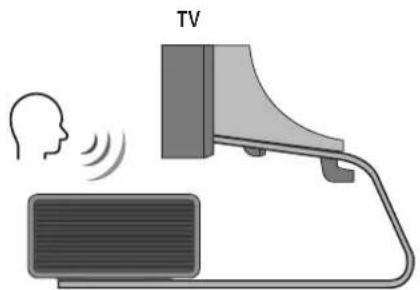
text_image
TVDolby, Dolby Atmos, and the double-D symbol are registered trademarks of Dolby Laboratories Licensing Corporation. Manufactured under license from Dolby Laboratories. Confidential unpublished works. Copyright © 2012-2020 Dolby Laboratories. All rights reserved.
dtsx
For DTS patents, see http://patents.dts.com. Manufactured under license from DTS, Inc. (for companies headquartered in the U.S./Japan/Taiwan) or under license from DTS Licensing Limited (for all other companies). DTS, DTS:X Pro, DTS:X, and the DTS:X logo are registered trademarks or trademarks of DTS, Inc. in the United States and other countries. © 2020 DTS, Inc. ALL RIGHTS RESERVED.
HDMI™
The terms HDMI and HDMI High-Definition Multimedia Interface, and the HDMI Logo are trademarks or registered trademarks of HDMI Licensing Administrator, Inc. in the United States and other countries.

Spotify®

- Koristite svoj telefon, tablet ili računar kao daljinski upravljač za Spotify. Idite na veb lokaciju spotify.com/connect da biste saznali kako
- Softver Spotify podleže licencama trećih stana koje se mogu pronaći ovde: https://www.spotify.com/connect/third-party-licenses.

Works with
Apple AirPlay
- Apple, AirPlay, iPhone, iPad, HomePod, and Apple TV are trademarks of Apple Inc., registered in the U.S. and other countries.
- Use of the Works with Apple badge means that an accessory has been designed to work specifically with the technology identified in the badge and has been certified by the developer to meet Apple performance standards.
15 NAPOMENA O LICENCI ZA KORIŠĆENJE SOFTVERA OTVORENOG KODA
Za slanje upita i zahteva za pitanja vezana za softver otvorenog koda, kontaktirajte Samsung Open Source (http://opensource.samsung.com)
16 VAŽNE NAPOMENE O USLUZI
- Slike i ilustracije u ovom korisničkom priručniku su navedene samo za referencu i mogu se razlikovati od stvarnog izgleda proizvoda.
- Moguća je naplata naknade za administraciju u slučaju
(a) poziva inženjera na vaš zahtev, ako se utvrđi da na proizvodu ne postoji kvar (tj. niste pročitali korisnički priručnik).
(b) dostave uređaja u servisni centar, ako se utvrdi da na proizvodu ne postoji kvar (tj. niste pročitali korisnički priručnik). - O iznosu administrativne naknade ćete biti obavešteni pre poseta tehničara.
17 SPECIFIKACIJE I VODIČ
Specifikacije
| Naziv modela HW-Q900A / HW-Q910A | |
| Težina 7,1 kg | |
| Dimenzije (Š x V x D) 1232,0 x 69,5 x 138,0 mm | |
| Raspon radne temperature +5 °C do +35 °C | |
| Raspon radne vlage 10 % ~ 75 % | |
| POJAČALONazivna izlazna snaga ((18 W x 6) + (10 W x 3) + (18 W x 6)) + 160 W | |
| Podržani formati reprodukcije | Dolby 5.1ch / Dolby Digital Plus / Dolby TRUE HD / Dolby ATMOSDTS 5.1ch / DTS HD / DTS-HD Master Audio / DTS:X / LPCM 8Ch |
| IZLAZNA SNAGA BEŽIČNOG UREĐAJAMaks. snaga Wi-Fi predajnika | 100 mW pri 2,4 GHz – 2,4835 GHz, 200 mW pri 5,15 GHz – 5,25 GHz,100 mW pri 5,25 GHz – 5,35 GHz i 5,47 GHz – 5,725 GHz |
| IZLAZNA SNAGA BEŽIČNOG UREĐAJAMaks. snaga BT predajnika 100mW pri 2,4GHz – 2,4835GHz | |
| IZLAZNA SNAGA BEŽIČNOG UREĐAJAMaks. snaga SRD predajnika 25mW pri 5,775GHz – 5,875GHz | |
| Naziv sabvufera PS-WA95B | |
| Težina 9,8 kg | |
| Dimenzije (Š x V x D) 210,0 x 403,0 x 403,0 mm | |
| POJAČALONazivna izlazna snaga | 160 W |
| IZLAZNA SNAGA BEŽIČNOG UREĐAJAMaks. snaga SRD predajnika 25mW pri 5,775GHz – 5,875GHz | |
NAPOMENA
- Samsung Electronics Co., Ltd zadržava pravo da promeni specifikacije bez prethodnog upozorenja.
- Težina i dimenzije su približne.
text_image
Diagram illustrating the process of a device with labeled components and directional arrows indicating movement.natural_image
Diagram showing three stages of a device operation: before, after, and after (no text or symbols)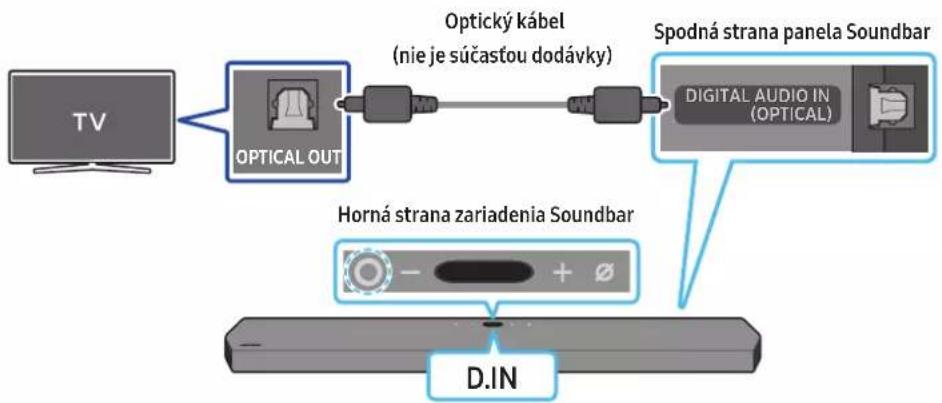
flowchart
graph TD
    A["TV"] --> B["OPTICAL OUT"]
    B --> C["Optický kábel (nie je súčastou dodávky)"]
    C --> D["Spodná strana panela Soundbar"]
    D --> E["DIGITAL AUDIO IN (OPTICAL)"]
    F["Horná strana zariadenia Soundbar"] --> G["D.IN"]
09 PRIPOJENIE K APPLE AIRPLAY 2
natural_image
Diagram showing a screw being inserted into a housing with motion arrows indicating rotation (no text or symbols)natural_image
Illustration of a mechanical device with a screw and adjustment knob, showing no text or symbolsnatural_image
Illustration of a flat-screen TV with antenna and cable (no text or symbols)Pravý koniec zariadenia Soundbar
natural_image
Diagram showing two mechanical components with arrows indicating motion, no text or symbols presentnatural_image
Diagram showing two identical mechanical components with downward arrows indicating motion or assembly (no text or symbols)11 INŠTALÁCIA PANELA SOUNDBAR NAD STOJANOM TELEVÍZORA
Súčasť

Gumená pätka
text_image
Diagram showing a USB port connected to a device with an icon pointing to the port's internal structure.Dolby, Dolby Atmos, and the double-D symbol are registered trademarks of Dolby Laboratories Licensing Corporation. Manufactured under license from Dolby Laboratories. Confidential unpublished works. Copyright © 2012-2020 Dolby Laboratories. All rights reserved.
dtsx
For DTS patents, see http://patents.dts.com. Manufactured under license from DTS, Inc. (for companies headquartered in the U.S./Japan/Taiwan) or under license from DTS Licensing Limited (for all other companies). DTS, DTS:X Pro, DTS:X, and the DTS:X logo are registered trademarks or trademarks of DTS, Inc. in the United States and other countries. © 2020 DTS, Inc. ALL RIGHTS RESERVED.
HDMI™
The terms HDMI and HDMI High-Definition Multimedia Interface, and the HDMI Logo are trademarks or registered trademarks of HDMI Licensing Administrator, Inc. in the United States and other countries.

Spotify®

- Apple, AirPlay, iPhone, iPad, HomePod, and Apple TV are trademarks of Apple Inc., registered in the U.S. and other countries.
- Use of the Works with Apple badge means that an accessory has been designed to work specifically with the technology identified in the badge and has been certified by the developer to meet Apple performance standards.
15 POZNÁMKA K LICENCII S OTVORENÝM ZDROJOVÝM KÓDOM
16 DÔLEŽITÉ POZNÁMKY K SERVISU
Where marked, the chemical symbols Hg, Cd or Pb indicate that the battery contains mercury, cadmium or lead above the reference levels in EC Directive 2006/66.
If batteries are not properly disposed of, these substances can cause harm to human health or the environment.
text_image
Diagram illustrating the process of battery charging with positive and negative charges, showing three stages of charge transfer.natural_image
Three-step diagram showing a mechanical device before and after processing, with no visible text or symbols.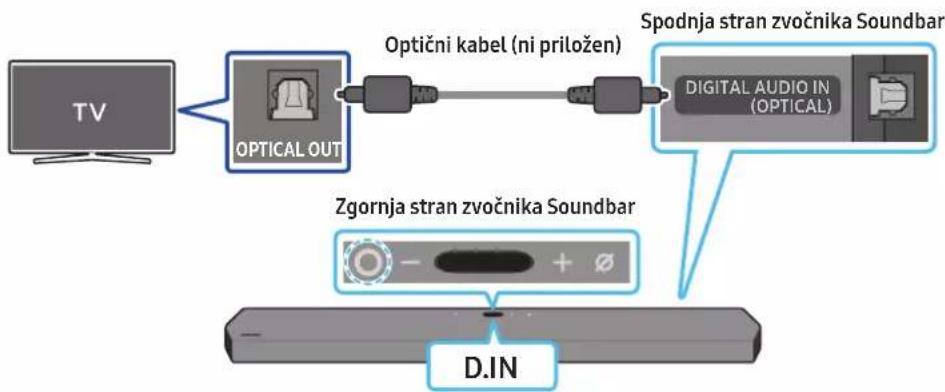
natural_image
Diagram showing a screw being inserted into a housing with blue motion arrows indicating rotation (no text or symbols)- 2 stenska nosilca pravilno usmerite in z 2 vijakoma namestite na spodnjo stran zvočnika Soundbar.
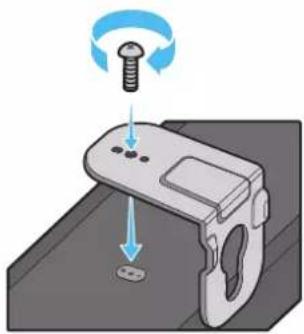
natural_image
Illustration of a mechanical component with a screw and a base, showing motion direction (no text or symbols)natural_image
Illustration of a rectangular electronic device with ventilation grille and antenna (no text or symbols)natural_image
Diagram showing two mechanical components with arrows indicating motion, no text or symbols present- Soundbar potisnite navzdol, kot je prikazano spodaj, da stenska nosilca varno namestite na vijake nosilca.
- Vijake nosilca vstavite v široki (spodnji) del stenskih nosilcev in nato potisnite stenska nosilca navzdol, da ju varno namestite na vijake nosilca.
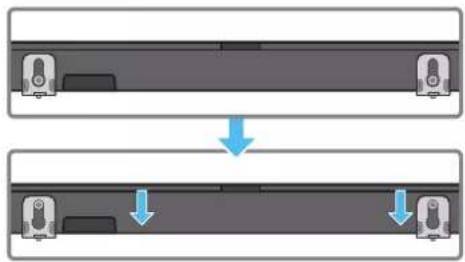
natural_image
Diagram showing two identical mechanical components with downward arrows indicating motion or assembly (no text or symbols)11 NAMEŠČANJE ZVOČNIKA SOUNDBAR NAD STOJALO ZA TELEVIZOR
Komponenta

Gumijasti podstavek
Pri namestitvi na spodnji del zvočnika Soundbar pritrdite gumijaste podstavke, preden ga postavite v položaj nad stojalo za televizor. Poskrbite, da boste gumijaste podstavke pritrdili tako, da ne bodo segli zunaj robov stojala za TV. Oglejte si spodnjo sliko.
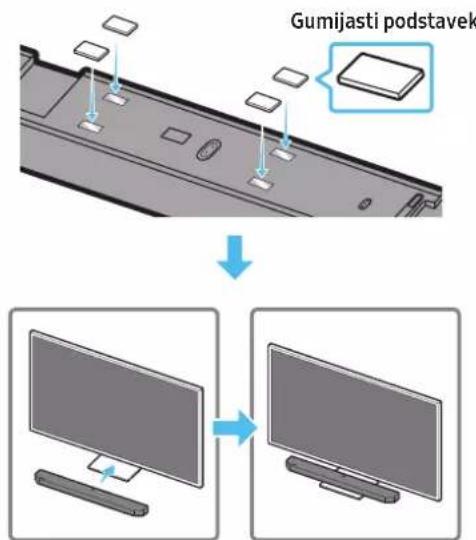
text_image
Gumijasti podstavekZvočnik Soundbar postavite na stojalo za televizor.
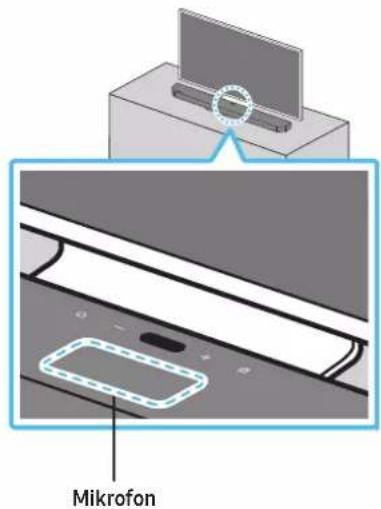
text_image
MikrofonDolby, Dolby Atmos, and the double-D symbol are registered trademarks of Dolby Laboratories Licensing Corporation. Manufactured under license from Dolby Laboratories. Confidential unpublished works. Copyright © 2012-2020 Dolby Laboratories. All rights reserved.
dtsx
For DTS patents, see http://patents.dts.com. Manufactured under license from DTS, Inc. (for companies headquartered in the U.S./Japan/Taiwan) or under license from DTS Licensing Limited (for all other companies). DTS, DTS:X Pro, DTS:X, and the DTS:X logo are registered trademarks or trademarks of DTS, Inc. in the United States and other countries. © 2020 DTS, Inc. ALL RIGHTS RESERVED.
HDMI™
The terms HDMI and HDMI High-Definition Multimedia Interface, and the HDMI Logo are trademarks or registered trademarks of HDMI Licensing Administrator, Inc. in the United States and other countries.

Spotify®

- Apple, AirPlay, iPhone, iPad, HomePod, and Apple TV are trademarks of Apple Inc., registered in the U.S. and other countries.
- Use of the Works with Apple badge means that an accessory has been designed to work specifically with the technology identified in the badge and has been certified by the developer to meet Apple performance standards.
15 OBVESTILO O ODPRTOKODNI LICENCI
natural_image
Three grayscale product photos showing remote and rectangular devices (no text or symbols visible)text_image
x2 x2 (M4 x L10) x2text_image
Diagram illustrating the process of battery charging with positive and negative charges, showing three stages of charge transfer.natural_image
Three-step diagram showing a mechanical device before and after processing, with no visible text or symbols.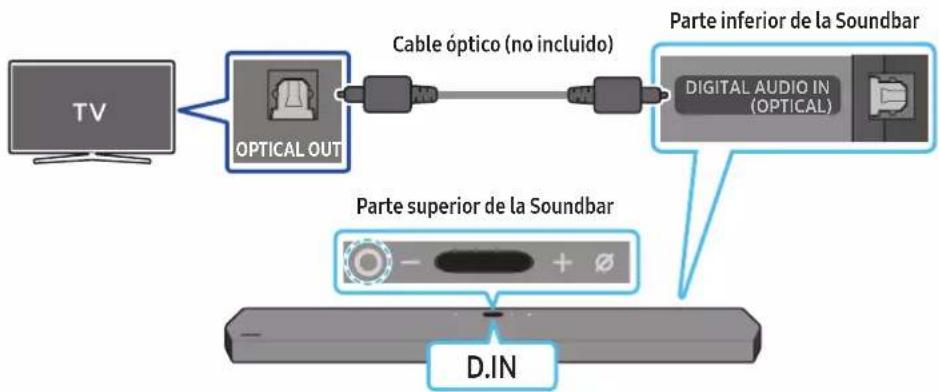
flowchart
graph LR
    TV["TV"] --> OpticalOut["OPTICAL OUT"]
    OpticalOut --> CableOptico["Cable óptico (no incluido)"]
    CableOptico --> DigitalAudioIn["Digital Audio IN (OPTICAL)"]
    DigitalAudioIn --> ParteInferior["Parte inferior de la Soundbar"]
    ParteInferior --> DINA["D.IN"]
    DINA -->|+| Opto["Oscilloscope icon"]
    DINA -->|-| Opto
text_image
A B C D E F G H I J K L M N O P Q R S T U V W X Y Z Anatural_image
Diagram showing a screw being inserted into a housing with blue motion arrows indicating rotation (no text or symbols)natural_image
Illustration of a mechanical component with a screw and adjustment knob, showing motion direction (no text or symbols)natural_image
Diagram showing two mechanical components with arrows indicating motion, no text or symbols presentnatural_image
Diagram showing two mechanical components with downward arrows indicating motion or assembly (no text or symbols)text_image
Diagram showing a device with an Ethernet port and USB cable, highlighting the port's internal structure.Dolby, Dolby Atmos, and the double-D symbol are registered trademarks of Dolby Laboratories Licensing Corporation. Manufactured under license from Dolby Laboratories. Confidential unpublished works. Copyright © 2012-2020 Dolby Laboratories. All rights reserved.
dtsx
For DTS patents, see http://patents.dts.com. Manufactured under license from DTS, Inc. (for companies headquartered in the U.S./Japan/Taiwan) or under license from DTS Licensing Limited (for all other companies). DTS, DTS:X Pro, DTS:X, and the DTS:X logo are registered trademarks or trademarks of DTS, Inc. in the United States and other countries. © 2020 DTS, Inc. ALL RIGHTS RESERVED.
HDMI™
The terms HDMI and HDMI High-Definition Multimedia Interface, and the HDMI Logo are trademarks or registered trademarks of HDMI Licensing Administrator, Inc. in the United States and other countries.

Spotify®

- Apple, AirPlay, iPhone, iPad, HomePod, and Apple TV are trademarks of Apple Inc., registered in the U.S. and other countries.
- Use of the Works with Apple badge means that an accessory has been designed to work specifically with the technology identified in the badge and has been certified by the developer to meet Apple performance standards.
natural_image
Three grayscale product photos of remote devices: a rectangular box, a remote control with two small batteries, and a cylindrical container (no text or symbols visible)text_image
x 2 A B C D E F G H I J K L M N O P Q R S T U V W X Y Ztext_image
x2 x2 (M4 x L10) x2text_image
Diagram illustrating the process of a device with labeled components and directional arrows indicating movement."SAMSUNG-TV REMOTE", "ALL-TV REMOTE".
text_image
5 Sec ID SETnatural_image
Three-step diagram showing a mechanical component before and after processing, with no visible text or symbols.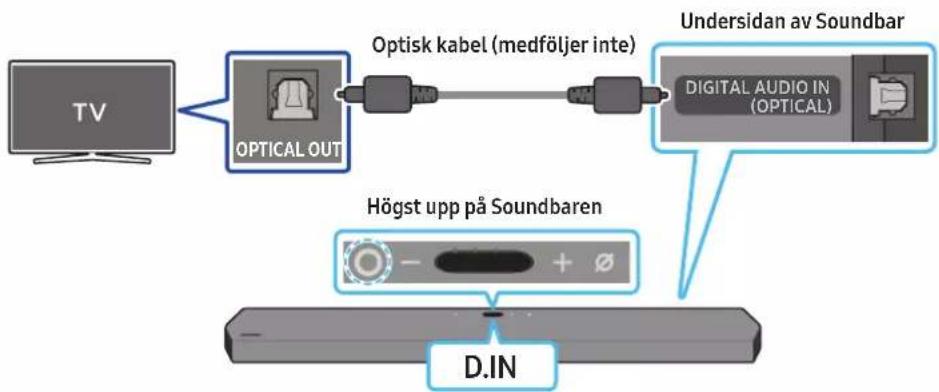
flowchart
graph LR
    TV["TV"] --> OpticalOut["Optical OUT"]
    OpticalOut --> OptiskLabel["Optisk kabel (medföljer inte)"]
    OptiskLabel --> DigitalAudioIn["Digital Audio IN (OPTICAL)"]
    DigitalAudioIn --> UndersidanavSoundbar["Undersidan av Soundbar"]
    DigitalAudioIn --> HögstuppåSoundbaren["Högst upp på Soundbaren"]
    HögstuppåSoundbaren --> DIN["D.IN"]
natural_image
Simple diagram showing a control panel with minus sign and plus symbol, no text or labels present09 ANSLUTA TILL APPLE AIRPLAY 2
natural_image
Simple 3D illustration of a bracket-like object with no text or symbolsVäggfäste
text_image
A B C D E F G H I J M Mittlinjetext_image
A B A (100%) (100%) A B A B A Anatural_image
Diagram showing a screw being inserted into a housing with blue motion arrows indicating rotation (no text or symbols)natural_image
Illustration of a mechanical device with a screw and adjustment knob, showing no text or symbolsnatural_image
Diagram showing two mechanical components with arrows indicating motion, no text or symbols presentnatural_image
Diagram showing two mechanical components with arrows indicating motion or assembly (no text or symbols)11 INSTALLERA SOUNDBAR OVANPÅ ETT TV-STATIV
Komponent

Gummifot
Dolby, Dolby Atmos, and the double-D symbol are registered trademarks of Dolby Laboratories Licensing Corporation. Manufactured under license from Dolby Laboratories. Confidential unpublished works. Copyright © 2012-2020 Dolby Laboratories. All rights reserved.
dtsx
For DTS patents, see http://patents.dts.com. Manufactured under license from DTS, Inc. (for companies headquartered in the U.S./Japan/Taiwan) or under license from DTS Licensing Limited (for all other companies). DTS, DTS:X Pro, DTS:X, and the DTS:X logo are registered trademarks or trademarks of DTS, Inc. in the United States and other countries. © 2020 DTS, Inc. ALL RIGHTS RESERVED.
HDMI™
The terms HDMI and HDMI High-Definition Multimedia Interface, and the HDMI Logo are trademarks or registered trademarks of HDMI Licensing Administrator, Inc. in the United States and other countries.

Spotify®

- Apple, AirPlay, iPhone, iPad, HomePod, and Apple TV are trademarks of Apple Inc., registered in the U.S. and other countries.
- Use of the Works with Apple badge means that an accessory has been designed to work specifically with the technology identified in the badge and has been certified by the developer to meet Apple performance standards.
15 LICENSMEDDELANDE FÖR OPEN SOURCE
© 2021 Samsung Electronics Co., Ltd. All rights reserved.
Contact SAMSUNG WORLD WIDE
If you have any questions or comments relating to Samsung products, please contact the SAMSUNG customer care Centre.
| Country Samsung Service Centre | Web Site | |
| UK | 0333 000 0333 www.samsung.com/uk/support | |
| IRELAND (EIRE) | 0818 717100 www.samsung.com/ie/support | |
| GERMANY | 06196 77 555 77 www.samsung.com/de/support | |
| FRANCE | 01 48 63 00 00 www.samsung.com/fr/support | |
| ITALIA | 800-SAMSUNG (800.7267864) www.samsung.com/it/support | |
| SPAIN | 91 175 00 15 www.samsung.com/es/support | |
| PORTUGAL | 210 608 098Chamada para a rede fixa nacionalDias úteis das 9h às 20h | www.samsung.com/pt/support |
| LUXEMBURG | 261 03 710 www.samsung.com/be_fr/support | |
| NETHERLANDS | 088 90 90 100 www.samsung.com/nl/support | |
| BELGIUM | 02-201-24-18 | www.samsung.com/be/support (Dutch)www.samsung.com/be_fr/support (French) |
| NORWAY | 21629099 www.samsung.com/nd/support | |
| DENMARK | 707 019 70 www.samsung.com/dk/support | |
| FINLAND | 030-6227 515 www.samsung.com/fi/support | |
| SWEDEN | 0771-400 300 www.samsung.com/se/support | |
| POLAND | 801-172-678* lub +48 22 607-93-33** (optata wedlug taryfy operatora) | http://www.samsung.com/pl/support/ |
| HUNGARY | 0680SAMSUNG (0680-726-7864) | www.samsung.com/hu/support |
| AUSTRIA | 0800 72 67 864 (0800-SAMSUNG) | www.samsung.com/at/support |
| SWITZERLAND | 0800 726 786 | www.samsung.com/ch/support (German)www.samsung.com/ch_fr/support (French) |
| CZECH | 800 - SAMSUNG(800-726786) | www.samsung.com/cz/support |
| SLOVAKIA | 0800 - SAMSUNG(0800-726 786) | www.samsung.com/sk/support |
| CROATIA | 072 726 786 www.samsung.com/hr/support | |
| BOSNIA | 055 233 999 | www.samsung.com/ba/support |
| North Macedonia | 023 207 777 www.samsung.com/mk/support | |
| MONTENEGRO | 020 405 888 | www.samsung.com/support |
| SLOVENIA | 080 697 267 (brezplačna številka) | www.samsung.com/si/support |
| SERBIA | 011 321 6899 | www.samsung.com/rs/support |
| Kosovo | 038 40 30 90 | www.samsung.com/support |
| ALBANIA | 045 620 202 www.samsung.com/al/support | |
| BULGARIA | 0800 111 31 - Безплатен за всички оператори*3000 - Цена на един градски разговор или според тарифата на мобилният оператор09:00 до 18:00 - Понеделник до Петък | www.samsung.com/bg/support |
| ROMANIA | 0800872678 - Apel gratuit*8000 - Apel tarifat în rețeaProgram Call CenterLuni - Vineri: 9 AM - 6 PM | www.samsung.com/ro/support |
| CYPRUS | 8009 4000 only from landline, toll free | www.samsung.com/gr/support |
| GREECE | 80111-SAMSUNG (80111 726 7864) only from land line(+30) 210 6897691 from mobile and land line | |
| LITHUANIA | 8-800-77777 | www.samsung.com/lt/support |
| LATVIA | 8000-7267 | www.samsung.com/lv/support |
| ESTONIA | 800-7267 | www.samsung.com/ee/support |