MagicWatch MWE9004 - Air conditioner WAECO - Free user manual and instructions
Find the device manual for free MagicWatch MWE9004 WAECO in PDF.



| Product type | Ultrasonic parking assistance |
| Brand | Waeco |
| Model | MagicWatch MWE9004 |
| Rear detection area - stop zone | approx. 0.10 m to 0.30 m |
| Rear detection area - measuring range | approx. 0.30 m to 1.80 m |
| Number of ultrasonic sensors | 4 (2 blue, 2 black) |
| Ultrasonic frequency | 40 kHz |
| Supply voltage | 9–30 V |
| Current consumption | 220 mA max. |
| Operating temperature | -25 °C to +70 °C |
| Protection class | e12 (automotive certification) |
| Signaling | Audible (progressive beeps) |
| Electrical connection | Reverse light, ground, speaker, optional: speed signal, radio mute input |
| Sensor mounting | Inside or outside the bumper, drilling Ø 18 mm |
| Painting of sensors | Possible (recommended at a specialized garage) |
| Settings | Sensitivity (3 levels), fixed object suppression, shut-off time (optional front) |
| Optional accessories | LED display, distance screen, 20° brackets for metal bumpers, extension cable, cutting tool |
| Delivery contents | Control electronics, speaker, 4 sensors, brackets, drill ∅ 18 mm, fixing material |
| Country of manufacture | France (ZA du Pré de la Dame Jeanne, F-60128 Plailly) |
| Warranty | Legal, contact the manufacturer or reseller |
Frequently Asked Questions - MagicWatch MWE9004 WAECO
User questions about MagicWatch MWE9004 WAECO
0 question about this device. Answer the ones you know or ask your own.
Ask a new question about this device
Download the instructions for your Air conditioner in PDF format for free! Find your manual MagicWatch MWE9004 - WAECO and take your electronic device back in hand. On this page are published all the documents necessary for the use of your device. MagicWatch MWE9004 by WAECO.
USER MANUAL MagicWatch MWE9004 WAECO

2
natural_image
Line drawing of a spray gun with multiple spray bottles and a handle (no text or symbols)
DE:8 NO:131
EN:23 FI:146
FR:37 PT:161
ES:53 RU:176
IT:69 PL:192
NL:85 CS:208
DA:101 SK:223
SV:116 HU:238
3

natural_image
Side view line drawing of a sedan with sound waves and labeled 'a' (no text or symbols on the car itself)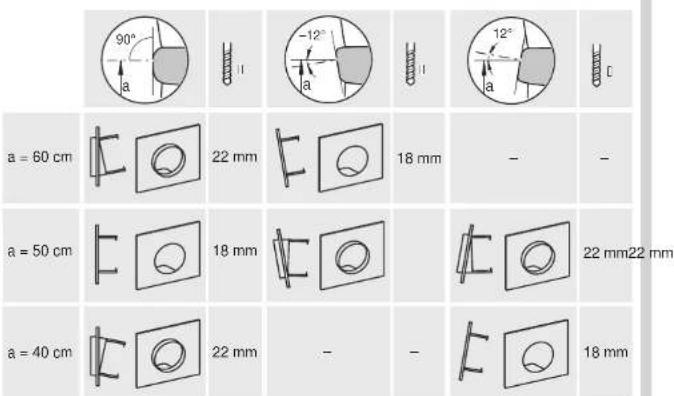
4
5

6

MWE9008MWE9004 + MWE9008
7

A
B
natural_image
Illustration of a pipette dispensing liquid onto a surface with a circular hole (no text or symbols)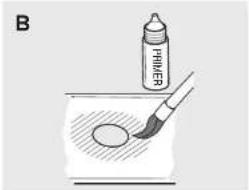
natural_image
Illustration of a fountain pen writing on paper with a circular object, no text or symbols present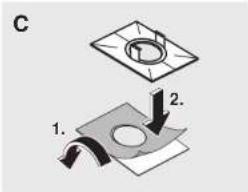
9
natural_image
Line drawing of a boat's side panel with a curved arrow indicating direction (no text or symbols)10
11
| DE:10 | ES:55 | DA:103 | FI:148 | PL:194 | HU:240 |
| EN:25 | IT:71 | SV:118 | PT:163 | CS:210 | |
| FR:39 | NL:87 | NO:133 | RU:178 | SK:225 |
MWE9004
| DE | EN | FR | ES | IT | NL | DA | SV | |
| bl | Blau | Blue | Blou | Azul | Blu | Blauw | Bà | Bà |
| br | Braun | Brown | Marron | Marrón | Marrone | Bruin | Brun | Brun |
| ge | Gelb | Yellow | Jaune | Amarillo | Giallo | Geel | Gul | Gul |
| or | Orange | Orange | Orange | Naranja | Arancio | Oranje | Orange | Orange |
| rt | Rot | Red | Rouge | Rojo | Rosso | Rood | Rød | Rød |
| sw | Schwarz | Black | Noir | Negro | Nero | Zwart | Sort | Svart |
| NO | FI | PT | RU | PL | CS | SK | HU | |
| bl | Bà | Sininen | Azul | Синий | Niebieski | Modra | Modra | Kék |
| br | Brun | Ruskea | Castanho | Кориче-вый | Brązowy | Hnėda | Hinedá | Barna |
| ge | Gul | Keltainen | Amarolo | Жолтый | Żółty | Żlutá | Żńá | Sárga |
| or | Oransje | Oranssi | Cor de laranja | Оранже-вый | Pomaran-czowy | Oranżová | Oranżová | Narancs |
| rt | Rad | Punainen | Varmelho | Красный | Czerwony | Červená | Červená | Piros |
| sw | Svart | Musta | Preto | Черный | Czamy | Černá | Člerna | Fekete |
WAECO
mobile solutions
Dometic WAECO International GmbH
Hollefeldstrasse 63
D-48282 Emsdetten
www.waeco.com
natural_image
Isometric line drawing of a mechanical device with three circular ports and mounting brackets (no text or symbols)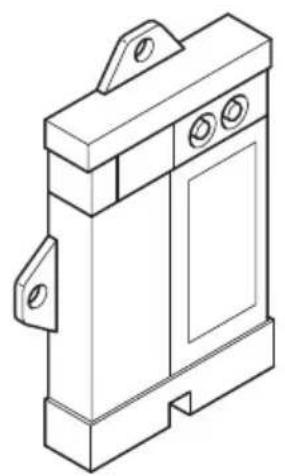
natural_image
Isometric line drawing of a mechanical device with three circular ports and mounting brackets (no text or symbols)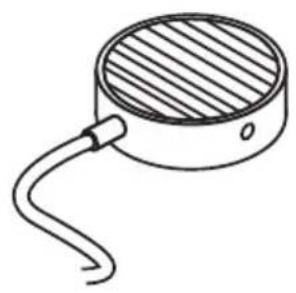
natural_image
Simple line drawing of a circular device with a curved cable and a shaded top surface (no text or symbols)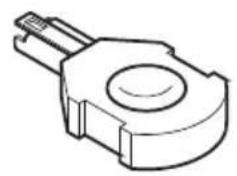
natural_image
Technical line drawing of a mechanical component with a circular top and protruding shaft (no text or symbols)MagicWatch
MWE9004, MWE9008
DE 3 Einparkhilfe
Installation and Operating Manual
Please read this instruction manual carefully before installation and first use, and store it in a safe place. If you pass on the product to another person, hand over this instruction manual along with it.
Contents
1 Safety and installation instructions.... 19
2 Scope of delivery 20
3 Intended use 22
4 Instructions before installation 22
5 Fitting the parking aid. 24
6 Connecting the parking aid 25
7 Detection range 26
8 Setting the system 27
9 Performing a functional test 28
10 Using the parking aid 29
11 Troubleshooting 29
12 Guarantee .... 30
13 Disposal 31
14 Technical data 31
1 Safety and installation instructions
The following texts only complete the figures on the supplementary sheet. They do not contain the full installation and operating instructions. Please observe the figures on the supplementary sheet.
Please observe the prescribed safety instructions and stipulations from the vehicle manufacturer and service workshops.
Observe the applicable legal regulations.
The manufacturer accepts no liability for damage in the following cases:
● Damage to the product resulting from mechanical influences and excess voltage
- Alterations to the product without express permission from the manufacturer
● Use for purposes other than those described in the operating manual

CAUTION!
- Secure the parts of the parking aid installed in the vehicle in such a way that they cannot become loose under any circumstances (sudden braking, accidents) and cause injuries to the occupants of the vehicle.
- Do not fit the parts of the parking aid installed where an airbag may open. This could cause injury if the airbag opens.
- The parking aid is intended as an additional aid, which means it does not relieve you of the obligation to take due care when manoeuvring.

NOTICE!
- Installing the parking aid can cause problems on vehicles with LED tail lights.
- If you would like to install the sensors on metal bumpers, you require suitable adapters (not included in the scope of delivery).
- Do not expose the control electronics to dampness.
● The sensors may not cover signal lamps. - When fitting the sensors, make sure there are no objects fixed to the vehicle that are in the detection range of the sensors.
- Apply a small amount of grease inside the sensor plug connections.
2 Scope of delivery
2.1 MWE9008
See fig. 1
| No. | Quantity Designation Item no. | ||
| 1 | 1 Control electronics, rear sensors 9101500059 | ||
| 2 | 1 Control electronics, front sensors 9101500060 | ||
| 3 | 1 Loudspeaker 9103555912 | ||
| 4 | 2 Control electronics connection cable | ||
| 5 | 2 | Ultrasonic sensors (blue) | 9101500057 |
| 2 | Ultrasonic sensors (black) | 9101500056 | |
| 4 | Ultrasonic sensors (brown) | 9101500058 | |
| 6 | 8 Standard 0° sensor holder(fitted from the inside) | 9101500033(VPE 4) | |
| 7 | 8 Standard 12° sensor holder(fitted from the inside) | ||
| 8 | 8 Sensor holder 0° with cover ring(fitted from the outside) | ||
| 9 | 8 Sensor holder 12° with cover ring(fitted from the outside) | ||
| 10 | 1 Core bit ∅ 18 mm | ||
| - | 1 Fastening material | ||
2.2 MWE9004
See fig. 1
| No. | Quantity Designation Item no. | ||
| 1 | 1 Control electronics 9101500063 | ||
| 3 | 1 Loudspeaker 9103555912 | ||
| 4 | 1 Cable bridge | ||
| 5 | 2 | Ultrasonic sensors (blue) | 9101500057 |
| 2 | Ultrasonic sensors (black) | 9101500056 | |
| 6 | 4 Standard 0° sensor holder(fitted from the inside) | 9101500033(VPE 4) | |
| 7 | 4 Standard 12° sensor holder(fitted from the inside) | ||
| 8 | 4 0° sensor holder with cover ring(fitted from the outside) | ||
| 9 | 4 12° sensor holder with cover ring(fitted from the outside) | ||
| 10 | 1 Core bit ∅ 18 mm | ||
| - | 1 Fastening material | ||
2.3 Accessories
Available as accessories (not included in the scope of delivery):
| Description Item no. | |
| Sensor holder with silicon ring for metal bumper 9101500015 | (VPE 4) |
| 20° sensor holder with cover ring (fitted from outside) 9101500023 | (VPE 1) |
| Sensor extension cable 1.5 m 9103555747 | |
| Punching tool 18 mm | 9101500013 |
| Punching tool 22 mm | 9101500024 |
| External button MWE9008 (assembly) | 9103555920 |
| External button MWE9008 (installation) | 9101500064 |
| LED display for MWE9004 | 9101500062 |
| Display with distance indicator for MWE9004 | 9101500002 |
3 Intended use
Magic Watch is an ultrasonic parking aid. It monitors space when manoeuvring.
● MWE9008: in front of and behind the vehicle
● MWE9004: behind the vehicle
It provides an audible warning signal for any obstacles it detects.
Magic Watch is designed for installation in cars and caravans.
4 Instructions before installation
4.1 Determining the place of installation for the sensors
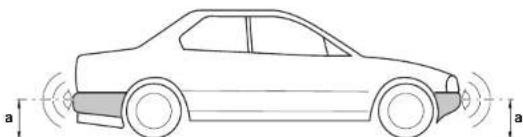
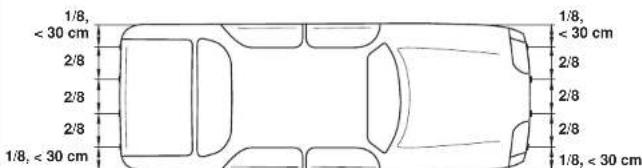
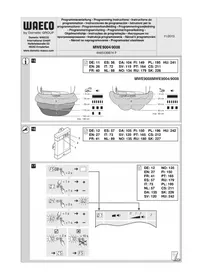
See fig. 3 to fig. 6

NOTE
The sensors must be correctly aligned for the device to work properly.
If these point to the ground, irregularities and bumps on the surface may be interpreted as obstacles. If they point too far up, obstacles will not be detected at all.
Note the following during installation:
- The distance from the sensors to the ground should be between 40 cm and a maximum of 60 cm (fig. 3).
- For the sensors to function optimally, the angle of the sensor to the road surface should be 90° (fig. 3). The angle may not be less than 90°, as the road will otherwise be interpreted by the sensor as an obstacle.
- The sensor holders included are suitable for all standard bumpers. Should the vehicle bumper be mounted at a steep angle, 20° sensor holders with a cover ring are available as an optional extra (see chapter “Accessories” on page 21).
-
The sensor holders included are not suitable for installation in metal bumpers. If your vehicle has metal bumpers, you will need special sensor holders with a silicon ring (see chapter “Accessories” on page 21).
-
Note that the sensor holder depends on the installation height and the angle of the bumper. Select the right sensor holder and the appropriate drill diameter by consulting the table in fig. 3. The instruction manual shows how to install the standard sensor holder (fitted from the inside of the bumper), which produces the best visual result. Alternatively, the sensors can also be fitted using the sensor holders with cover ring which are provided.
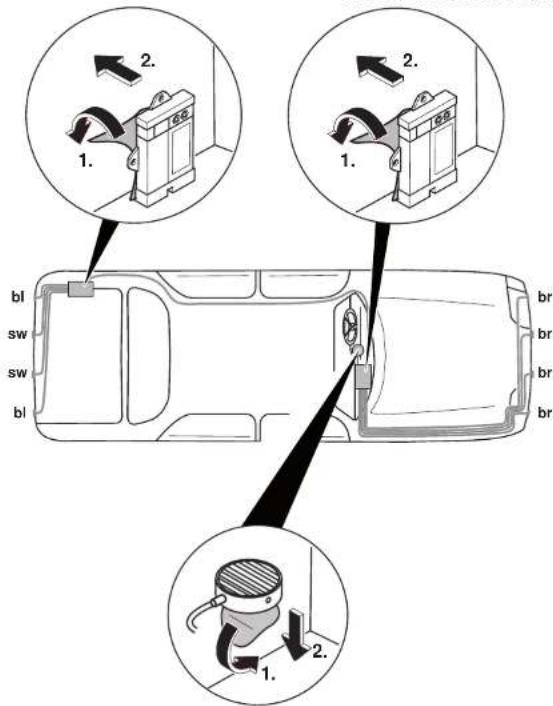
● Install the sensors in the correct place (fig. 6):
Colour of sensor Installation location
Blue (bl) Outer sides of the rear bumper
Black (sw) Centre of the rear bumper
Brown (br) Front bumper
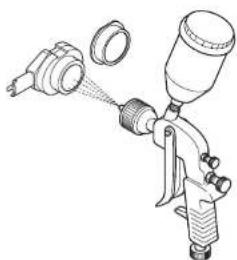
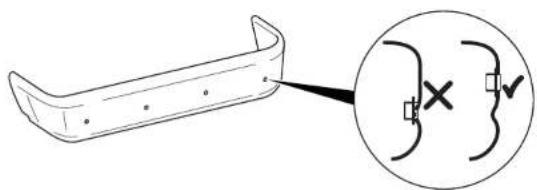
4.2 Painting the sensors
See fig. 2

NOTE
The sensors may be painted. The manufacturer recommends having the sensors painted by a specialist workshop.
5 Fitting the parking aid
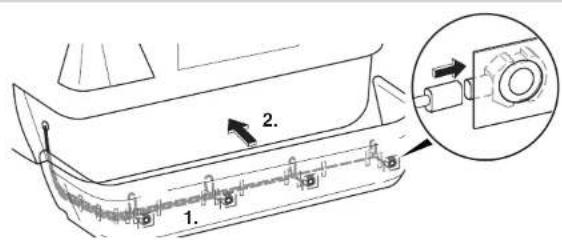
See fig. 7 to fig. 10

NOTICE! Risk of malfunction
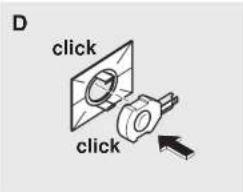
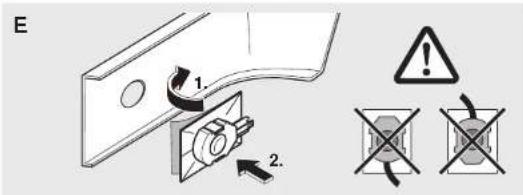
Align and attach the sensor holders correctly. Otherwise the correct function of the parking aid cannot be ensured.
The sensor holders must be attached with the retaining tabs pointing up and down.

NOTICE! Risk of paint damage!
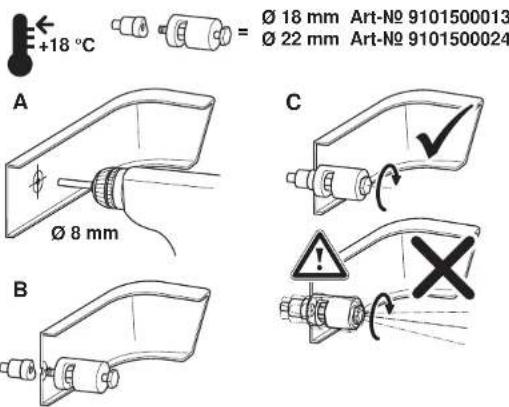
- The ambient temperature may not fall below 18 °C when punching or drilling.
- We recommend using a punching tool.
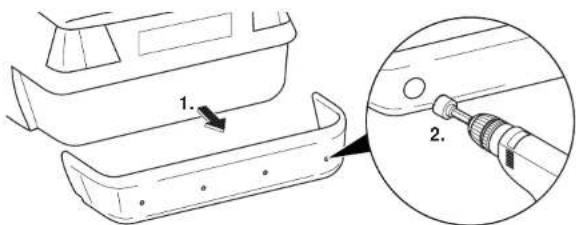
Supplementary to fig. 7A
▶Drill the holes according to the selected sensor holder.
Supplementary to fig. 7 B
▶Make sure that you do not tilt the punching tool when operating.
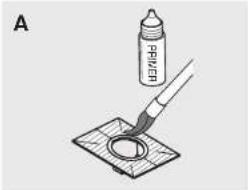
Supplementary to fig. 8
▶Clean the adhesive surface on the inner side of the bumper with a primer.
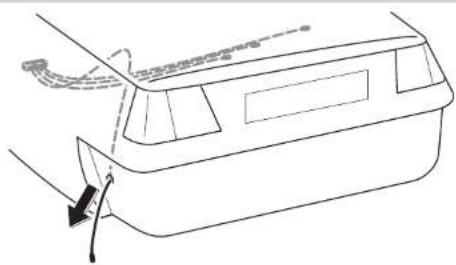
6 Connecting the parking aid

NOTE
- MWE9008/9004: On some vehicles, the reversing light only works when the ignition is switched on. In this case, you must switch on the ignition in order to identify the positive and earth wires.
- MWE9008: You can set a switch-off time for the front sensors if you are unable to get a speedometer signal for the front sensor control electronics (neither an analogue connection from the speedometer nor digital via the CAN bus such as CBI150). The front sensors are activated by switching on the ignition and deactivated after the set time (parameter 12). A 9103555920 switch (accessory) can also be used to activate the front sensors.
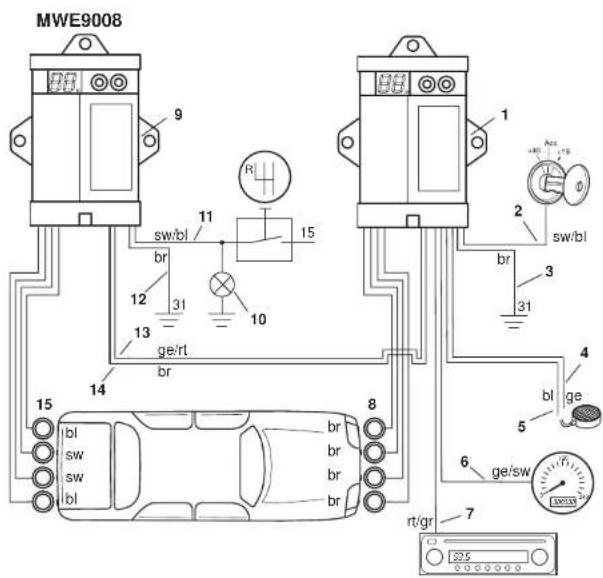
The complete circuit diagram MWE9008 can be found in fig. 11.
No. Designation
| 1 Control electronics for front sensors | |
| 2 Black/blue cable: connection to connected positive (+12 V) | |
| 3 Brown cable: connection to earth | |
| 4 Yellow cable from the loudspeaker: connection to slot 15 in the plug of the front sensor control electronics | |
| 5 Blue cable from the loudspeaker: connection to slot 3 in the plug of the front sensor control electronics | |
| 6 Yellow/black cable: connection to the speed signal from the speedometer (optional) | |
| 7 Red/grey cable: connection to the radio's mute connection (optional) | |
| 8 Front sensors | |
| 9 Control electronics for rear sensors | |
| 10 Reversing light | |
| 11 Black/blue cable: connection to the reversing light | |
| 12 Brown cable: connection to earth | |
| 13 Yellow/red cable from the connection cable of the rear sensor control electronics: connection to the front sensor control electronics, slot 17 | |
| 14 Brown cable from the connection cable of the rear sensor control electronics: connection to the front sensor control electronics, slot 5 | |
| 15 Rear sensors |
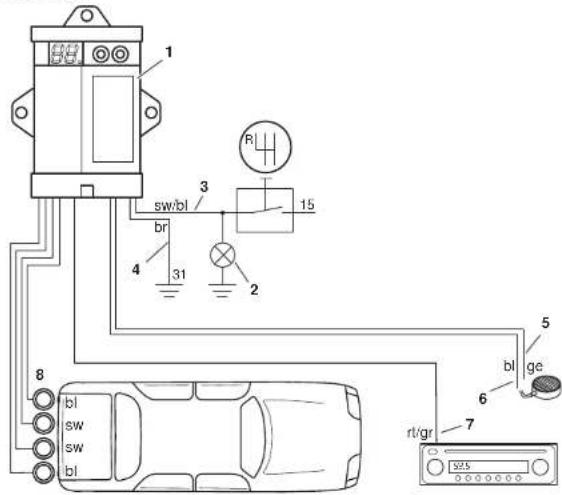
The complete circuit diagram MWE9004 can be found in fig. 12.
No. Designation
1 Control electronics
2 Reversing light
3 Black/blue cable: connection to the reversing light
4 Brown cable: connection to earth
5 Yellow cable from the loudspeaker: connection to slot 15 in the plug of the control electronics
6 Blue cable from the loudspeaker: connection to slot 3 in the plug of the control electronics
7 Red/grey cable: connection to the radio's mute connection (optional)
8 Sensors
7 Detection range
See fig. 15
The detection range of the parking aid is divided into four zones at the rear and into three zones in front.
- Zone 1 (rear only)
This zone is the first limit range. Small objects or those with poor reflective characteristics may not be detected here.
- Zone 2
Nearly all objects are displayed in this zone.
- Zone 3
Nearly all objects in this zone are displayed, however objects may only appear in the sensors' blind spot, or not be detected at all due to their consistency or small size.
- Stop zone (4)
If there are objects in this zone, the parking aid emits a continuous tone warning you to stop.
Nearly all objects in this zone are displayed, however objects may only appear in the sensors' blind spot or not be detected at all due to their consistency or small size.
The distance at which the parking aid signals to stop is adjustable in stages.
Displaying fixed objects, such as a trailer hitch, can be suppressed.
8 Setting the system
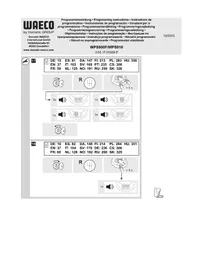
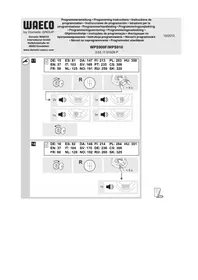
See fig. 16 to fig. 18

NOTICE!
Incorrect settings can impair safe operation.

NOTE
To stop setting the parameters without saving your changes, or to stop the entire set-up: refrain from pressing any buttons for a while.
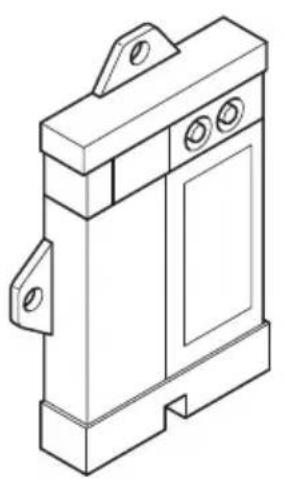
The control electronics for the front sensors have the following control elements:
No. in fig. 16 Designation
1 Display FSFactory settings activated
c5Your own settings
2, 3 Buttons for setting the system
Setting the values
See fig. 17 to fig. 18.
Configuring the front control module (MWE9008)
- You can set the travel speed at which the sensors switch off by connecting the control electronics of the front sensors to the speedometer.
▶ Set parameter 11 to the required value.
- You can set a switch-off time for the front sensors if you are unable to connect the control electronics of the front sensors to the speedometer (e.g. no speedometer signal or signal via a CAN bus adapter such as CBI150).
▶ Set parameter 12 to the required time.
- You can set the system so that the front sensors not only display obstacles intermittently but all the time until they are deactivated by the travel speed or by switching off.
▶ Set parameter 16 to 1.
- You can set the sensitivity of the sensors.
▶ Set parameter 17 to the required value. 1 = low; 2 = medium; 3 = high
Configuring the rear control module
You can set the sensitivity of the sensors.
▶ Set parameter 17 to the required value. 1 = low; 2 = medium; 3 = high
Suppressing the display of fixed objects (such as trailer hitches) (MWE9004/9008 rear control module)

ATTENTION!
Make sure that there are no people or other objects behind the vehicle during the set-up process.
▶ Set parameter 10 to 1, 2 or 3 until the fixed objects are no longer displayed. The setting 0 deactivates this function.
Mirror function display (MWE9004 only)
You can switch the left display for the right display when using the LED display 9101500062.
▶ Set parameter 14 to 1.
Restoring the factory settings
▶Press both buttons for longer than two seconds.
√The display shows F5.
9 Performing a functional test
To test the parking aid, drive towards something slowly such as a wall.

NOTICE!
Be very careful when you operate the device for the first time, and make sure that you familiarize yourself with the various sequences of beeps (fig. 15).
10 Using the parking aid
The rear sensors (MWE9008/9004) are activated automatically by engaging the reverse gear with the ignition on or the engine running.
The front sensors (MWE9008) are activated automatically once the speed of the vehicle is between 0 and 10 km/h and the ignition is switched on. If the speedometer signal cannot be detected, the front sensors are activated when the ignition is switched on or when you engage the reverse gear. After the adjustable switch-off time has elapsed they are deactivated automatically. A 9103555920 switch (accessory) can also be installed for activating the front sensors.
As soon as there is an obstacle within the detection range, a repeated signal tone is emitted.
As you approach, the tone sequence changes, depending on the zone in which the obstacle is, thus indicating the distance (fig. 15).

NOTICE!
Stop the vehicle immediately and investigate the situation (getting out if necessary), if the following happens while you are manoeuvring:
when manoeuvring, the device first indicates an obstacle and the tone sequence speeds up normally (e.g. from slow to medium).
Suddenly the signal tone slows down, or no obstacle is indicated at all.
This means that the original obstacle is in the blind spot of the sensors (construction-related characteristic), and it is possible to hit it.
11 Troubleshooting
The device indicates no function.
The voltage supply cable (black/blue and brown wires) is not connected or is incorrectly connected.
▶Check the connections.
The plugs for the sensors are not connected or are not properly plugged into the control electronics.
▶Check the plugs, and make sure they lock into place.
A long tone sounds (approx. 3 seconds) after switching on the ignition
One or more sensors are defective or no longer connected to the control electronics. The control electronics display shows the defective sensor:
- for example E1 for the front sensor with short cable or E4 for the front sensor with long cable.
▶Check the plugs and make sure they lock into place.
▶Replace the defective sensor(s).

NOTICE!
The system does not work if one or more sensors are defective.
Device indicates obstacles incorrectly.
False alarms may have the following causes:
● For example dirt or frost on the sensors
▶Clean the sensors.
● The sensors were incorrectly installed.
▶ Adjust the position or height of the sensors (fig. 3).
● The sensors have contact with the chassis.
▶Disconnect the sensors from the chassis.
Objects on the vehicle (e. g. spare wheel) lead to false alarms.
▶ Set parameter 10 to 1, so that fixed objects are no longer displayed (see chapter “Setting the system” on page 27).
12 Guarantee
The statutory warranty period applies. If the product is defective, please contact the manufacturer's branch in your country (see the back of the instruction manual for the addresses) or your retailer.
For repair and guarantee processing, please send the following items:
- Defect components
● A copy of the receipt with purchasing date
● A reason for the claim or description of the fault
13 Disposal
▶Place the packaging material in the appropriate recycling waste bins wherever possible.

If you wish to finally dispose of the product, ask your local recycling centre or specialist dealer for details about how to do this in accordance with the applicable disposal regulations.
14 Technical data
| MagicWatch | ||
| MWE9008 MWE9004 | ||
| Item no.: 9101500055 9101 | 500054 | |
| Detection range front sensors: | ||
| Stop zone: | Approx. 0.10 m to 0.25 m | - |
| Measuring range: | Approx. 0.25 m to 0.95 m | |
| Detection range rear sensors: | ||
| Stop zone: | Approx. 0.10 m to 0.30 m | |
| Measuring range: | Approx. 0.30 m to 1.80 m | |
| Ultrasound frequency: 40 kHz | ||
| Supply voltage: 9 – 30 Volt | ||
| Supply voltage: max. 220 mA | ||
| Operating temperature: -25 °C to +70 °C | ||
| Certification: | 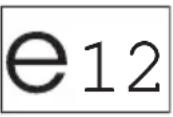 | |

NOTE
The sensors may be painted. The manufacturer recommends having the sensors painted by a specialist workshop.
8 Stille inn systemet
Dometic Australia Pty. Ltd.
1 John Duncan Court
Varsity Lakes QLD 4227
+61 7 55076000
+61 7 55076001
Mail: sales@dometic-waeco.com.au
AUSTRIA
Dometic Austria GmbH
Commercial : info@dometic.fr
SAV/Technique : service@dometic.fr
HONG KONG
WAECO Impex Ltd.
Suites 2207-2211 · 22/F · Tower 1
The Gateway · 25 Canton Road,
Tsim Sha Tsui · Kowloon
Hong Kong
+852 24611386
昌 +852 24665553
Mail: info@dometic-waeco.com.hk
HUNGARY
Dometic Plc. Sales Office
Kerékgyártó u. 5.
H-1147 Budapest
+36 1 468 4400
昌 +36 1 468 4401
Dometic Italy S.r.l.
Via Virgilio, 3
I-47100 Forlì
+39 0543 754901
+39 0543 756631
Mail: info@dometic.it
NORWAY
Dometic Norway AS
Skolmar 24
N-3232 Sandefjord
+47 33428450
吕 +47 33428459
Mail: firmapost@waeco.no
POLAND
Dometic Poland Sp. z o.o.
Ul. Puławska 435A
02-801 Warszawa
Poland
+48 22 414 32 00
+48 22 414 32 01
Mail: info@dometic.pl
RUSSIA
Dometic RUS LLC
Komsomolskaya square 6-1
107140 Moscow
Russia
+7 495 780 79 39
+7 495 916 56 53
Mail: info@dometic.ru
SLOVAKIA
Dometic Slovakia s.r.o.
Tehelná 8
SK-98601 Fil'akovo
+421 47 4319 107
+421 47 4319 166
Mail: info@dometic.sk
SPAIN
Dometic Spain S.L.
Avda. Sierra del Guadarrama, 16
E-28691 Villanueva de la Cañada
Madrid
+34 902 111 042
+34 900 100 245
Mail: info@dometic.es
SWEDEN
Dometic Scandinavia AB
Gustaf Melins gata 7
Dometic Switzerland AG
Riedackerstrasse 7a
CH-8153 Rümlang (Zürich)
+41 44 8187171
+41 44 8187191
Mail: info@dometic-waeco.ch
TAIWAN
WAECO Impex Ltd.
Taipei Office
2 FL-3 · No. 56 Tunhua South Rd, Sec 2
Taipei 106, Taiwan
+886 2 27014090
昌 +886 2 27060119
Mail: marketing@dometic-waeco.com.tw
UNITED KINGDOM
Dometic UK Ltd.
Dometic House · The Brewery
Blandford St. Mary
Dorset DT11 9LS
+44 844 626 0133
+44 844 626 0143
Mail: sales@dometic.co.uk
UNITED ARAB STATES
Dometic Middle East FZCO
P. O. Box 17860
S-D 6, Jebel Ali Freezone
Dubai, United Arab Emirates
+971 4 883 3858
+971 4 883 3868
Mail: info@dometic.ae
UNITED STATES OF AMERICA
Dometic Marine Division
2000 N. Andrews Ave. Extension
Pompano Beach, FL 33069 USA
+1 954 973 2477
+1 954 979 4414
Mail: marinesales@dometicusa.com

- MagicWatch
- MWE9004, MWE9008
- Contents
- Safety and installation instructions
- CAUTION!
- NOTICE!
- Scope of delivery
- MWE9008
- MWE9004
- Accessories
- Intended use
- Instructions before installation
- Determining the place of installation for the sensors
- NOTE
- Colour of sensor Installation location
- Painting the sensors
- See fig. 2
- Fitting the parking aid
- NOTICE! Risk of malfunction
- NOTICE! Risk of paint damage!
- Supplementary to fig. 7A
- Supplementary to fig. 7 B
- Supplementary to fig. 8
- Connecting the parking aid
- No. Designation
- Detection range
- See fig. 15
- - Zone 1 (rear only)
- - Zone 2
- - Zone 3
- - Stop zone (4)
- Setting the system
- No. in fig. 16 Designation
- Setting the values
- Configuring the front control module (MWE9008)
- Configuring the rear control module
- Suppressing the display of fixed objects (such as trailer hitches) (MWE9004/9008 rear control module)
- ATTENTION!
- Mirror function display (MWE9004 only)
- Restoring the factory settings
- Performing a functional test
- Using the parking aid
- Troubleshooting
- The device indicates no function.
- A long tone sounds (approx. 3 seconds) after switching on the ignition
- Device indicates obstacles incorrectly.
- Objects on the vehicle (e. g. spare wheel) lead to false alarms.
- Guarantee
- Disposal
- Technical data
- Stille inn systemet
- Dometic Australia Pty. Ltd.
- AUSTRIA
- Dometic Austria GmbH
- HONG KONG
- WAECO Impex Ltd.
- HUNGARY
- Dometic Plc. Sales Office
- Dometic Italy S.r.l.
- NORWAY
- Dometic Norway AS
- POLAND
- Dometic Poland Sp. z o.o.
- RUSSIA
- Dometic RUS LLC
- SLOVAKIA
- Dometic Slovakia s.r.o.
- SPAIN
- Dometic Spain S.L.
- SWEDEN
- Dometic Scandinavia AB
- Dometic Switzerland AG
- TAIWAN
- UNITED KINGDOM
- Dometic UK Ltd.
- UNITED ARAB STATES
- Dometic Middle East FZCO
- UNITED STATES OF AMERICA
- Dometic Marine Division
Brand : WAECO
Model : MagicWatch MWE9004
Category : Air conditioner