
ESCM12MBK - Coffee machine GORENJE - Free user manual and instructions
Find the device manual for free ESCM12MBK GORENJE in PDF.
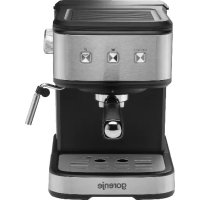


| Product Type | Espresso coffee machine with steam nozzle |
| Brand | Gorenje |
| Model | ESCM12MBK |
| Power supply | See label on appliance (220-240 V ~ 50/60 Hz according to standards) |
| Main functions | Espresso preparation, hot water, steam for milk frothing, automatic shut-off after 25 min, preheating |
| Descaling | Automatic after 500 cycles, requires household descaler or citric acid |
| Water tank capacity | Approx. 1.2 L (max level indicated) |
| Included accessories | Metal brewing unit, metal filter, measuring spoon, drip tray, cup rest |
| Housing material | Heat-resistant plastic |
| Safety | Grounded plug, overheat protection system, hot surfaces indicated |
| Maintenance | Regular cleaning of housing, tank, drip tray and accessories; periodic descaling |
| Repairability | Do not disassemble yourself; contact an authorized after-sales service |
| Warranty | International warranty (see warranty card) |
| Intended use | Household and similar applications (offices, hotels, etc.) |
| Weight | Approx. 3.5 kg (estimate) |
Frequently Asked Questions - ESCM12MBK GORENJE
User questions about ESCM12MBK GORENJE
0 question about this device. Answer the ones you know or ask your own.
Ask a new question about this device
Download the instructions for your Coffee machine in PDF format for free! Find your manual ESCM12MBK - GORENJE and take your electronic device back in hand. On this page are published all the documents necessary for the use of your device. ESCM12MBK by GORENJE.
USER MANUAL ESCM12MBK GORENJE
Before using the electrical appliance, the following basic precautions should always be observed:
Safety Cautions
Read all instructions.
- Before using, check that the voltage of wall outlet corresponds to rated voltage marked on the rating plate.
- This appliance is fitted with a grounded plug. Please ensure the wall outlet in your house is well earthed.
- To protect against fire, electric shock and injury to persons, do not immerse cord, plug, in water or other liquid.
- Remove plug from wall outlet before cleaning and when not in use. Allow appliance to cool down completely before taking off or attaching components, or before cleaning.
- Do not operate any appliance with a damaged cord or plug, after the appliance malfunctions, or after it is dropped or damaged in any way. Return the appliance to the nearest authorized service facility for examination, repair or electrical or mechanical adjustment.
- The use of accessory attachments not recommended by the appliance manufacturer may result in fire, electric shock or injury to persons.
- Place the appliance on a flat surface or table. Do not let the power cord hang over the edge of the table or counter.
- Ensure the power cord does not touch any hot surface of the appliance.
- To avoid damage, do not place the coffee maker on a hot surface or close to fire.
- To disconnect, remove the plug from the wall outlet. Always hold the plug; never pull the cord.
- Do not use the appliance for any other purpose than intended, and place it in a dry environment.
- Close supervision is necessary when your appliance is used near children.
- Be careful not to get burned by steam.
- Do not touch any hot surface of the appliance (such as the steam wand, and the steel mesh just after hot water passed through it). Use handle or knobs.
- Do operate the coffee maker without any water in it.
- Do not remove the metal funnel when appliance is brewing coffee or making steam.
- Connect the plug to the wall outlet before use, and turn off any switch before removing the plug from the wall outlet.
- This appliance is not intended for use by persons (including children) with reduced physical, sensory or mental capabilities, or lack of experience and knowledge, unless they have been given supervision or instruction concerning use of the appliances by a person responsible for their safety.
- Children should be supervised to ensure that they do not play with the appliance.
- This appliance is intended to be used in household and similar applications, such as:
- staff kitchen areas in shops, offices and other working environments;
- farm houses; by clients in hotels, motels and other residential type environments;
- bed and breakfast type environments.
- Do not use outdoors.
- Save these instructions.
- If you do not intend to use the appliance for a long time, turn it on and release steam for 3 minutes before leaving this appliance.
- If you cut off power during steam release, the appliance will continue to release steam for some time due to residual heat. If you turn off the steam knob, the appliance will stop releasing steam immediately.
Know your coffee maker
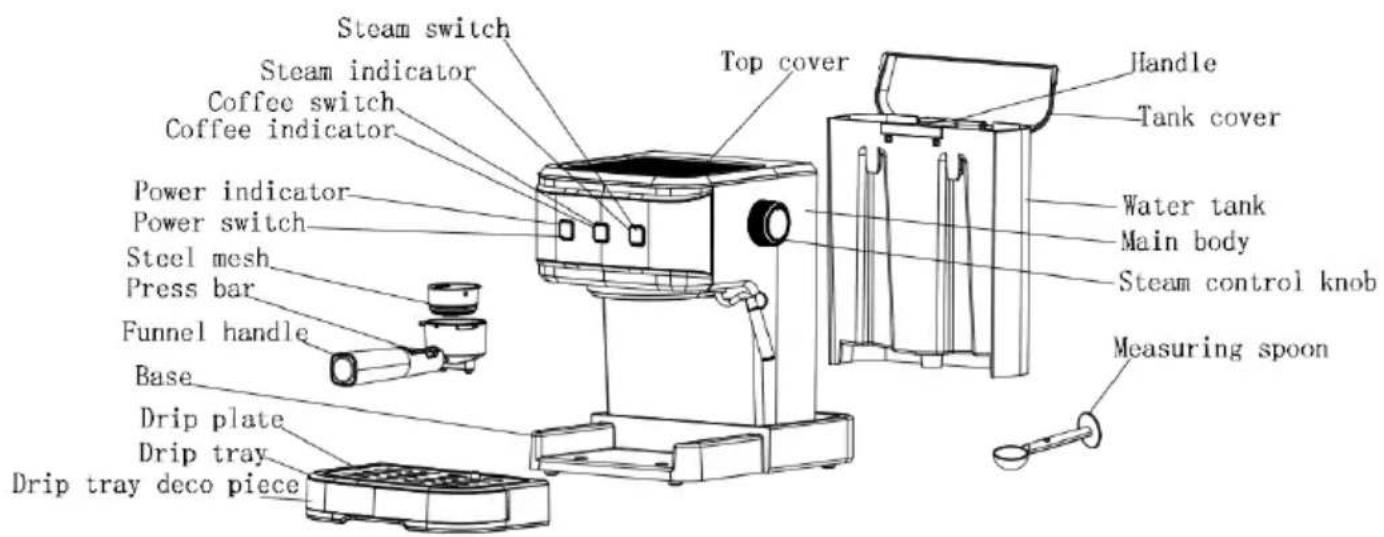
Before the first use
To ensure the first cup of coffee tastes excellent, rinse the coffee maker with warm water as follows:
- Pour water into the water tank. Water level should not exceed the "MAX" mark on the tank. Then, replace the water tank cover. Note: The appliance is supplied with a detachable tank for easy cleaning. You can fill the tank with water first, and then return the tank into the appliance.
- Place the steel mesh into the metal funnel (without any coffee in steel mesh).
- Place a jug on the removable shelf. Make sure the steam control knob is on the OFF position. Note: The appliance is not supplied with a jug. Please use your own jug or a coffee cup.
- Connect the appliance to power supply. Press the power switch " " once. The red indicator is illuminated.
- Press the coffee switch. The pump will start pumping water. When water starts to flow out of the appliance, stop the pump by pressing the coffee switch. Press the steam switch selector and wait for a moment. The appliance starts to preheat. When the inner lamp of coffee switch is illuminated, the preheating process is finished. Press the coffee switch and water will flow out of the appliance.
- When water stops flowing or dripping from the appliance, you can discard the water in the container (jug or coffee cup). Clean the container thoroughly. Now, you can start brewing. Note: There may be noise when water is pumped for the first time. This is normal: the appliance is displacing the air inside. After about 20 seconds, the noise will disappear.
Preheating
To make a cup of good hot espresso, we recommend preheating the appliance before making coffee, including the funnel, filter and cup. This way, coffee flavour will not be affected by the cold parts.
- Remove the detachable tank and open the tank cover to fill it with the desired amount of water. Water level should not exceed the "MAX" mark on the tank. Then, correctly place the tank into the appliance.
- Place the steel mesh into the metal funnel, making sure the tube on the funnel aligns with groove in the appliance. Then, insert the funnel into the appliance from the "Insert" position, and fix it into the coffee maker firmly by turning it anticlockwise until it is in the "Lock" position.
- Place an espresso cup on the removable shelf.
- Then, connect the appliance to power supply. Make sure the steam control knob is in the OFF position.
- Press the power switch " " once. The power indicator turns on and the coffee indicator blinks. When preheating is complete, the coffee indicator is constantly lit. Press the coffee switch. When water starts to flow out of the appliance, close the pump immediately. The purpose of this step is to pump the water from the tank into the housing.
- When the lamp on coffee switch is illuminated, press the coffee switch again. Hot water will start flowing out of the appliance. When the lamp on the coffee switch is extinguished, close the pump. The preheating process is complete.
Make espresso
- Remove the funnel by turning it clockwise. Add ground coffee into the steel mesh, using a measuring spoon. A spoon of ground coffee can make about one cup of top-grade coffee. Press the ground coffee powder tightly with the tamper.
- Set the steel mesh into the metal funnel, making sure the tube on the funnel aligns with the groove in the appliance. Then, insert the funnel into the appliance from the "Insert" position, and fix it into the coffee maker firmly by turning it anticlockwise until it is in the "Lock" position.
- Pour hot water into the cup. When the cup is warmed up, discard the water from the cup and dry it. Then, place the hot cup on the removable shelf.
- At this point, the lamp in the coffee switch will be illuminated. If it is extinguished, wait for a moment. Once the lamp in it is illuminated, press the coffee switch. Wait for a moment; there will be coffee flowing out. When the required amount of coffee is in the cup, press the coffee switch again and the water pump will stop working.
WARNING:
- Do not leave the coffee maker unattended while making coffee, as it sometimes has to be operated manually!
- When you finish making the coffee, you can remove the metal funnel by turning it clockwise. Discard the coffee residue from the steel mesh.
- Let the funnel and the mesh cool down completely, then rinse them under running water.
- Operating time for brewing a single cup of coffee is up to 60 seconds. If operating time exceeds 60 seconds, the water pump will stop working. Operating/brewing time can be adjusted as follows. When the appliance is in standby mode, press and hold the coffee switch for 3 seconds. The coffee indicator blinks. Then, press the coffee switch again within 5 seconds. The water pump starts to operate. After the desired amount of time, press the coffee switch again and the water pump will stop working. The setting is finished. Operating time can be set in the range from 15 to 60 seconds.
Making hot water
When preheating is complete, the coffee indicator lights up and it is lit constantly. Then, press the coffee switch and the water pump starts to pump water. Turn the knob to "Hot water", and hot water will flow out of the steam pipe. To stop making hot water, press the coffee switch again. Hot water is used for warming cups, making tea or cooling down the appliance.
To adjust the operating time for heating up water, please refer to the section "Make ESPRESSO...
Make cappuccino/frothed milk
For a cup of cappuccino, top up a cup of espresso with frothed milk.
Method:
- First, prepare espresso as described in the section "MAKE ESPRESSO", using a sufficiently large container (cup). Make sure the steam control knob is in the "0" position.
- Press the steam switch selector. The lamp in the coffee switch will be illuminated. Wait until the indicator in the steam switch selector is illuminated.
Note: During operation, the indicator in the steam selector will cycle on and off as the desired temperature is maintained.
- Fill a jug with about 100 ml of milk for each cappuccino to be prepared. We recommend using whole milk at refrigerator temperature (not hot!).
Note: When choosing the size of the jug for frothing milk, it is recommended that the diameter is not less than 70 ± 5 mm. Also, bear in mind that the milk volume is doubled during frothing; make sure the jug is tall enough.
- Slowly turn the steam control knob anticlockwise. Steam will come out from the frothing device.
Note: Never turn the steam control button rapidly, as the steam will accumulate in a short time, which may increase the risk of explosion.
- Insert the frothing device about two centimetres into the milk. Froth the milk by moving the jug around, up and down.
- When the milk is frothed to your liking, turn the steam control knob to position "0".
Note: Clean the steam outlet with a wet sponge immediately after steam stops, but be careful not to burn yourself!
- Pour the frothed milk into the prepared espresso, and the cappuccino is ready. Sweeten to taste and sprinkle the froth with a little cocoa powder if desired.
- Press the power switch to power down the appliance. All indicators will be extinguished.
WARNING:
After you finish using the "Steam" function, press the coffee switch. If the coffee indicator and steam indicator blink fast, this means that the appliance temperature is too high and the appliance needs to be turned off and rest for more than 5 minutes. Alternatively, you can activate the "Hot water" function to cool down the appliance. The water pump will stop pumping water automatically once the temperature is normal. If the appliance is used for brewing coffee immediately, without being cooled down, the coffee will be burnt and there will be overflow at the funnel.
Automatic power off function
If there is no any operation within 25 minutes, the unit will power off automatically.
FACTORY RESET
When preheating is complete, simultaneously press and hold the power switch, coffee switch and steam switch for 3 seconds. Their corresponding indicators will blink 3 times, and factory reset is complete.
Cleaning and maintenance:
- Before cleaning, unplug the appliance from power supply and let it cool down completely.
- Clean the coffee maker housing with a moisture-proof sponge often. Regularly clean the water tank, drip tray and removable shelf. Dry them after cleaning. Note: Do not clean with alcohol or any solvent. Never immerse the appliance housing in water.
- Detach the metal funnel by turning it clockwise and discard the coffee residue inside. Then, you can clean it with a detergent, but make sure you rinse it thoroughly with clean water.
- Clean all attachments in water and dry them thoroughly.
Cleaning mineral deposits
- A descending prompt will occur automatically after working for a total of 500 cycles. At that time, all indicators will quickly blink 5 times at the same time after preheating is finished. Once it is descaled, the appliance will operate normally again.
- Fill the tank with water and descending agent (descaler) to the MAX level. The ratio of water to descaler is 4:1; for details, please refer to the instructions provided with the descaler. Please use "household descaler". You can also use citric acid (obtainable from chemist's or drug stores) instead of the descaler, mixing it with water in the ratio of one hundred parts water to three parts citric acid.
- Install the metal funnel (without any coffee powder in it), place a jug on the tray, and brew water as described in the "PREHEATING" section.
- Press the power switch once. Its red lamp will be illuminated. Press the pump control switch, making sure the coffee/steam selector is in the correct position. When water starts to flow out of the appliance, close the pump and wait for a moment. The coffee maker begins to heat up.
- When the lamp in the pump control switch is illuminated, this indicates that the heating process is finished. Press the pump control switch and make two cups of coffee (about 2 oz.). Then, close the pump and wait for 5 seconds.
- Press the coffee/steam selector. The indicator in the pump control switch will be extinguished. Wait until the indicator in the coffee/steam selector is illuminated. Make steam for 2 minutes by turning the steam control knob. Then turn the steam control knob to "0" to stop making steam. Press the power switch to stop the unit immediately. Make sure the descaler remains in the unit for at least 15 minutes.
- Restart the unit and repeat steps 4 to 6 at least 3 times.
- Then, press the coffee/steam selector. The lamp in the pump control switch will be illuminated. Then, press the pump control switch to brew until no descaler is left in the appliance.
- Then, add tap water to the MAX level and brew coffee (without any coffee powder). Repeat steps 4-6 for 3 times (this time, it is not necessary to wait for 15 minutes in step 6). Then, brew until there is no water left in the tank.
- Repeat step 9 at least 3 times to make sure the piping is clean.
- To cancel the descending warning after the descending process, proceed as follows. While the appliance is in standby mode, simultaneously press and hold the coffee switch and steam switch for 3 seconds. Then, their corresponding indicators quickly blink 3 times, which means the descending warning is canceled and the working cycle counter is reset.
Troubleshooting
| Symptom | Cause | Corrections |
| There is rust on the metal parts of the tank. | You are not using the recommended type of descaler. Unsuitable descalers may corrode the metal parts in the tank. | Use a descaler recommended by the manufacturer. |
| Water leaks from the bottom of the coffee maker. | There is too much water in the drip tray. | Please clean the drip tray. |
| The coffee maker is malfunctioning. | Please contact the authorized service facility for repair. | |
| Water leaks from the outer side of the filter. | There is some coffee powder on the edge of the filter. | Remove coffee from the edge of the filter. |
| Espresso has acid (vinegar) taste. | Appliance has not been properly rinsed after the descaling process (after cleaning of mineral deposits). | Clean the coffee maker as described in the section “Before the first use” for several times. |
| Coffee powder was stored in a hot and wet place for a long time. The coffee powder turned bad. | Please use fresh coffee powder, or store unused coffee powder in a cool, dry place. After opening a package of ground coffee, reseal it tightly and store it in the refrigerator to maintain its freshness. | |
| The coffee maker does not work. | The appliance is not plugged correctly to a power outlet. | Correctly plug the power cord into a wall outlet. If the appliance still does not work, please contact an authorized service facility for repair. |
| Milk does not froth. | The steam ready indicator is not illuminated. | Steam can only be used for frothing when the steam ready indicator is illuminated. |
| The container is too big or the shape is not suitable. | Use a tall and narrow container/jug. | |
| You are using skimmed milk | Use whole milk or semi-skimmed milk |
If you cannot find the cause of a problem, do not take apart the appliance by yourself. Rather, contact a certified service center.
This equipment is labelled in compliance with the European Directive 2012/19/EC on waste electric and electronic equipment - WEEE. The Directive specifies the requirements for collection and management of waste electric and electronic equipment effective in the entire European Union.
ENVIRONMENT
At the end of the appliance's useful life, do not discard it with common household waste. Take it to an authorized recycling centre. This will help preserve the environment.
WARRANTY AND REPAIR
For more information or in case of problems, please contact the Gorenje Call Centre in your country (phone number listed in the International Warranty Sheet). If there is no such centre in your country, please contact the local Gorenje dealer or Gorenje's small domestic appliance department.
For personal use only!
GORENJE
WISHES YOU A LOT OF PLEASURE IN USING YOUR APPLIANCE.
Important
Making hot water
When you first switch on the appliance, the indicator light for coffee will light up. Press the button for coffee and the water will start to flow. Close the nozzle on the "Hot water" (hot water) and the water will start to flow from the spout. To stop making hot water, press the coffee button again. Hot water is used for making tea, preparing tea or cooling the urn.
To adjust the working time for making water, see the section "Making Espresso".
Making Cappuccino/Latte
To make cappuccino, add milk to the espresso.
Method of preparation:
- First make espresso, as described in the section "MAKING ESPRESSO", using a sufficiently large cup. Then set the steam regulator to position "0".
- Press the steam button. The indicator light of the coffee button will light up. Wait until the indicator light of the steam button lights up. Note: During operation, the indicator light of the steam button will turn on and off with the surface of the desired temperature.
- Pour about 100 ml of milk for each capsule that is not prepared. Stop using milk with a temperature from the refrigerator (not hot!). Note: When choosing the size of the cup for milk dispensing, it is recommended that the diameter not be less than 70 ± 5 mm. Also, keep in mind that the milk volume increases during dispensing; make sure the cup is tall enough.
- Important: Turn the steam control knob counterclockwise. Steam will come out of the steam nozzle. Note: Never turn the steam control knob quickly, as steam will accumulate in a short time, which may increase the risk of burns.
- Immerse the steam nozzle into the milk about 2 centimeters. Dispense the milk by turning the cup upwards and downwards.
- When the milk is dispensed to your taste, turn the steam control knob to the "0" position. Note: Wipe the steam nozzle with a damp cloth immediately after the steam stops, but be careful not to burn yourself!
- Pour the dispensed milk into the prepared espresso and it is ready. Taste it and if you like, add a little cocoa.
- Press the standby button to turn off the appliance. All indicators will go out.
PRECAUTION:
After you finish using the "steam" function, press the power button. If the power indicator and the steam indicator flash quickly, this means that the appliance temperature is too high and the appliance must be turned off and left to cool for more than 5 minutes. As an alternative, you can activate the "hot water" function to cool the appliance. The water pump will stop drawing water automatically after the temperature becomes normal. If the appliance is used to prepare hot drinks without cooling, the drink will overflow and there will be spillage in the funnel.
Automatic shut-off function
If the appliance is not used for 25 minutes, it will turn off automatically.
FACTORY SETTINGS
When the preheating is finished, simultaneously press and hold the standby, power, and steam buttons for 3 seconds. The corresponding indicators will flash 5 times and the restoration of factory settings is complete.
Maintenance and care:
If no action is taken with the appliance for 25 minutes, it will turn off automatically.
RETURN TO FACTORY SETTINGS
When the preheating is complete, simultaneously press and hold the power button for 3 seconds. The coffee machine will beep, the indicator lights will flash 3 times, and the settings will reset to factory defaults.
Cleaning and maintenance
- Before cleaning, disconnect the appliance from the power supply and let it cool completely.
- Regularly wipe the appliance body with a damp, well-wrung cloth. Regularly rinse the water tank, the drip tray, and the capsule container. After cleaning, dry thoroughly.
Note: Do not use cleaning agents containing alcohol or solvents. It is forbidden to immerse the appliance body in water.
- Remove the metal capsule holder by turning it counterclockwise, and remove the coffee grounds from it. Wash the capsule holder with mild detergent and rinse with clean water.
- Wash and dry all removable parts thoroughly.
Descaling
- After 500 operating cycles, the appliance will indicate that descaling is necessary. Once after the preheating is complete, all indicator lights will flash quickly 5 times. After descaling, the appliance will be ready for normal operation again.
- Fill the water tank with a solution of water and descaling agent up to the MAX mark (proportion: 4 parts water to 1 part descaling agent, or as directed in the instructions for the descaling agent). Use a household descaling agent. You can also prepare a descaling solution yourself by adding 3 parts citric acid to 100 parts water.
- Install the metal capsule holder (without a capsule), place the cup tray on the drip tray, and prepare hot water as described in the "Preheating" section.
- Press the power button once. The red indicator will light up. Press the coffee brewing button, and check that the steam regulator is in the OFF position. When water starts to flow out of the appliance, turn off the pump and wait for the appliance to start heating up.
- When the indicator light of the coffee brewing button lights up, heating is complete. Press the coffee brewing button and let out 2 cups of water (about 60 milliliters). Turn off the pump and wait 5 seconds.
- Press the steam button. The indicator light of the coffee brewing button will go out. Wait until the indicator light of the steam button lights up. Steam for 2 minutes, opening the steam regulator. Then turn the steam regulator to the OFF position to stop. Press the power button to turn off the appliance. Leave the descaling agent inside the appliance for 15 minutes.
- Turn the appliance on again and repeat steps 4-6 at least 3 times.
- Press the steam button. The steam ready indicator will light up. Press and hold the steam ready button until all the descaling solution is removed from the appliance.
- Fill the water tank with fresh water up to the MAX mark, without adding any descaling solution, and repeat steps 4-6 three more times (there is no need to wait 15 minutes in step 6). After that, perform the preparation until the water tank is completely empty.
- Repeat step 9 at least 3 times to ensure the tubes are clean.
- To reset the descaling warning after cleaning, perform the following actions. When the appliance is in standby mode, simultaneously press and hold the coffee preparation and steam buttons for 3 seconds. The button indicators will flash 3 times, indicating that the descaling warning and the cycle counter have been reset.
Troubleshooting
Preparing hot water
The heating cycle is complete, and the ready indicator for coffee preparation will light up. You can now use the appliance. Press the hot water button, and the pump will start supplying water. Turn the knob to the Hot water position. Hot water will be dispensed from the steam nozzle. To stop the hot water flow, press the hot water button again. Hot water is used for preheating cups, preparing tea, or for other purposes. To use the hot water function, see the section "Preparing Espresso".
Preparing cappuccino/latte
To prepare cappuccino, fill the espresso cup with milk. How to prepare milk foam:
- First prepare an espresso as described in the section "PREPARING ESPRESSO", using a sufficiently large container (cup). Make sure the steam regulator is in the "0" position.
- Press the steam selector button. The lamp in the steam button will light up. Wait until the indicator in the steam selector button lights up.
Note. During operation, the indicator in the steam selector will turn on and off as the heating element cycles. 3. Pour about 100 ml of milk into a jug for each portion of cappuccino. We recommend using cold milk from the refrigerator (not hot!).
Note. When choosing the size of the jug for frothing milk, it is recommended that the diameter be no less than 70± 5 mm. In addition, the volume of milk for frothing should be sufficient; the jug must be tall enough.
Descaling the appliance:
- First, disconnect the appliance from the power supply and let it cool down.
- The appliance body should be wiped regularly with a damp sponge. Regularly clean the water tank, the drip tray, and the milk frother. After cleaning, dry them.
Note. Do not use solvents or abrasive cleaners. When cleaning, do not immerse the appliance in water.
- Remove the water filter by turning it counterclockwise and discard any remaining water. Then clean the filter with a mild detergent and rinse thoroughly with clean water.
- Clean all parts with water and dry them thoroughly.
Cleaning the appliance
- The descaling (removing limescale) process starts automatically after 500 cups of coffee have been prepared. During this process, all indicators will flash quickly 5 times. After descaling, the appliance will operate normally again.
- Fill the water tank with water and descaling agent up to the MAX level. The ratio of water to agent should be 4:1. For detailed information, see the instructions for the descaling agent. Use a household descaling agent. Alternatively, you can use citric acid (from the store). Mix it with water in a ratio of three parts water to one part citric acid.
- Install the water filter (without the cartridge), place a container under the steam wand, and prepare water as described in the section "PREPARING FOR HEATING".
- Press the power button once. The red lamp will light up. Press the pump button, making sure the selector is in the correct position. When water starts coming out of the appliance, turn off the pump and wait a few seconds. The appliance will start heating.
- When the lamp goes out and the pump starts, heating is complete. Press the pump button and prepare two cups of coffee (about 2 ounces or 60 ml). Then turn off the pump and wait 5 seconds.
- Press the selector for steam. The pump indicator will light up. Wait until the indicator in the steam selector lights up. Run the steam for 2 minutes, turning the steam regulator. Then turn the regulator to the "0" position to stop the steam supply. Press the power button to stop the appliance. Make sure the descaling agent remains in the appliance for at least 15 minutes.
- Repeat steps 3 to 6 three times.
- Press the selector button. The pump indicator light will turn on. Press the pump until water comes out, until the device is filled with descaling solution.
- Then pour water into the tank up to the MAX level and perform coffee brewing (without coffee). Repeat steps 3 to 6 three times (wait 15 minutes each time on step 6 is not necessary). Then brew coffee until water runs out of the tank.
- Repeat step 9 three times to ensure complete cleaning of the device.
- To remove the descaling solution from the tank after descaling, perform the following steps. When the device is in standby mode, simultaneously press and hold the coffee and steam buttons for 3 seconds. The corresponding indicators will blink 3 times. This indicates that the descaling warning is reset, and the cycle counter is set.
Troubleshooting



- SAFETY CAUTIONS
- KNOW YOUR COFFEE MAKER
- BEFORE THE FIRST USE
- PREHEATING
- MAKE ESPRESSO
- WARNING
- MAKING HOT WATER
- MAKE CAPPUCCINO/FROTHED MILK
- METHOD
- AUTOMATIC POWER OFF FUNCTION
- FACTORY RESET
- CLEANING AND MAINTENANCE
- CLEANING MINERAL DEPOSITS
- ENVIRONMENT
- WARRANTY AND REPAIR
- GORENJE
- IMPORTANT
- MAKING CAPPUCCINO/LATTE
- PRECAUTION
- AUTOMATIC SHUT-OFF FUNCTION
- FACTORY SETTINGS
- MAINTENANCE AND CARE
- RETURN TO FACTORY SETTINGS
- DESCALING
- PREPARING HOT WATER
- PREPARING CAPPUCCINO/LATTE
- DESCALING THE APPLIANCE
- CLEANING THE APPLIANCE
Brand : GORENJE
Model : ESCM12MBK
Category : Coffee machine