WL 75 - Light therapy BEURER - Free user manual and instructions
Find the device manual for free WL 75 BEURER in PDF.



| Product type | Wake-up light with light therapy |
| Model | WL 75 |
| Brand | Beurer |
| Power supply | Power adapter 9V DC 2A (100-240V AC 50/60Hz) |
| Maximum power | 18 W |
| Light technology | LED (lifespan > 20,000 hours) |
| Maximum light intensity | Approx. 2,000 lux at 15 cm |
| Intensity levels | 10 levels on the device, continuously adjustable via app |
| Ambient light | RGB with automatic color change and individual color setting (10 predefined atmospheres) |
| Main functions | Sunrise simulation (Alarm), sunset simulation (Sleep), FM radio, AUX input, Bluetooth, control via beurer LightUp app, dual alarm, snooze, wake-up melodies and lullabies, USB charging for smartphone |
| FM radio | Range 87.5-108 MHz, 10 presets |
| Speaker | 2 W |
| Bluetooth | Version 4.0, range ~10 m |
| Required app | beurer LightUp (iOS ≥ 12.0, Android ≥ 8.0) |
| Display | Touchscreen LCD with backlight (4 levels) |
| Time setting | Manual on device or automatic via app |
| Time display format | 12h or 24h |
| Snooze function | Duration 1 to 30 minutes, adjustable in app |
| Care and cleaning | Clean with a dry cloth; do not use abrasive products, do not immerse in water |
| Safety | Do not open or repair yourself; use only the supplied adapter; keep away from water; do not use if damaged |
| Spare parts and repairability | Contents: 1 x wake-up light, 1 x power adapter, 1 x AUX cable, 1 x instruction manual; repairs by authorized service |
| Warranty | 3 years (excluding normal wear and accessories) |
| Dimensions | Approx. 18 x 10 x 15 cm (estimated) |
| Weight | Approx. 500 g (estimated) |
Frequently Asked Questions - WL 75 BEURER
User questions about WL 75 BEURER
0 question about this device. Answer the ones you know or ask your own.
Ask a new question about this device
Download the instructions for your Light therapy in PDF format for free! Find your manual WL 75 - BEURER and take your electronic device back in hand. On this page are published all the documents necessary for the use of your device. WL 75 by BEURER.
USER MANUAL WL 75 BEURER
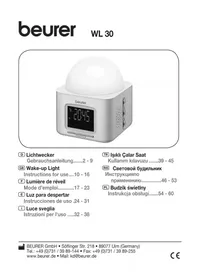
Instructions for use 10
FR Réveil lumineux
Mode d'emploi 17
ES Luz para descentar
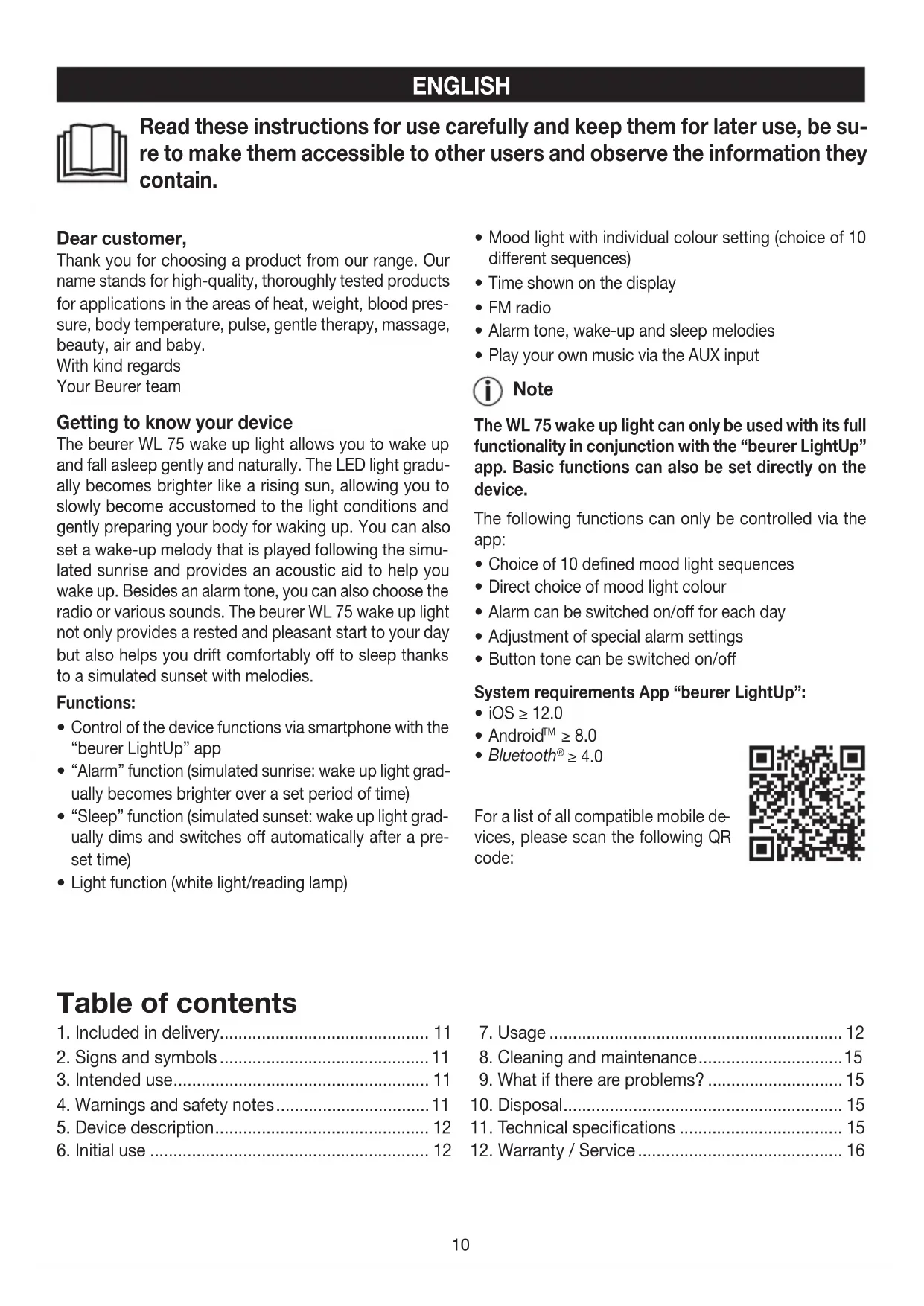
Read these instructions for use carefully and keep them for later use, be sure to make them accessible to other users and observe the information they contain.
Dear customer,
Thank you for choosing a product from our range. Our name stands for high-quality, thoroughly tested products for applications in the areas of heat, weight, blood pressure, body temperature, pulse, gentle therapy, massage, beauty, air and baby.
With kind regards
Your Beurer team
Getting to know your device
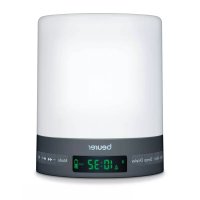
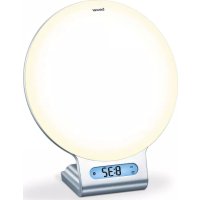
The beurer WL 75 wake up light allows you to wake up and fall asleep gently and naturally. The LED light gradually becomes brighter like a rising sun, allowing you to slowly become accustomed to the light conditions and gently preparing your body for waking up. You can also set a wake-up melody that is played following the simulated sunrise and provides an acoustic aid to help you wake up. Besides an alarm tone, you can also choose the radio or various sounds. The beurer WL 75 wake up light not only provides a rested and pleasant start to your day but also helps you drift comfortably off to sleep thanks to a simulated sunset with melodies.
Functions:
Control of the device functions via smartphone with the "beurer LightUp" app
- "Alarm" function (simulated sunrise: wake up light gradually becomes brighter over a set period of time)
- "Sleep" function (simulated sunset: wake up light gradually dims and switches off automatically after a preset time)
Light function (white light/reading lamp)
- Mood light with individual colour setting (choice of 10 different sequences)
Time shown on the display
FM radio - Alarm tone, wake-up and sleep melodies
- Play your own music via the AUX input
i Note
The WL 75 wake up light can only be used with its full functionality in conjunction with the "beurer LightUp" app. Basic functions can also be set directly on the device.
The following functions can only be controlled via the app:
- Choice of 10 defined mood light sequences
- Direct choice of mood light colour
- Alarm can be switched on/off for each day
- Adjustment of special alarm settings
- Button tone can be switched on/off
System requirements App "beurer LightUp":
- iOS ≥ 12.0
AndroidTM ≥ 8.0 - Bluetooth® ≥ 4.0
For a list of all compatible mobile devices, please scan the following QR code:
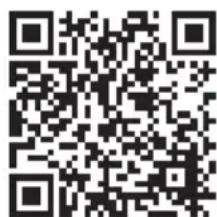
Table of contents
- Included in delivery 11
- Signs and symbols 11
- Intended use 11
4.Warnings and safety notes 11 - Device description 12
-
Initial use 12
-
Usage 12
-
Cleaning and maintenance 15
9.What if there are problems? 15 -
Disposal 15
- Technical specifications 15
12.Warranty/Service 16
1. Included in delivery
Check that the exterior of the cardboard delivery packaging is intact and make sure that all contents are present. Before use, ensure that there is no visible damage to the device or accessories and that all packaging material has been removed. If you have any doubts, do not use the device and contact your retailer or the specified Customer Service address.
1x Wake up light with cable antenna
1x Mains adapter
1x AUX cable
1x Instructions for use
2. Signs and symbols
The following symbols are used on the device, in these instructions for use, on the packaging and on the type plate for the device:
| Warning Warning instruction indicating a risk of injury or damage to health | |
| Important Safety note indicating possible damage to the device/accessory | |
| Product information Note on important information | |
| Read the instructions | |
| Disposal in accordance with the Waste Electrical and Electronic Equipment EC Directive – WEEE | |
| Manufacturer | |
| PAP | Disposition of packaging in an environmentally friendly manner |
| CE | CE labelling This product satisfies the requirements of the applicable European and national directives. |
| EAC | The products demonstrably meet the requirements of the Technical Regulations of the EAEU. |
| VI | Energy efficiency class 6 |
3. Intended use

WARNING
The device may only be used for the purpose for which it is designed and in the manner specified in the instructions for use. Improper use can be dangerous. The manufacturer is not liable for damage resulting from improper or careless use.
4.Warnings and safety notes

WARNING
- The device is intended only for domestic/private use, not for commercial use.
- This device may be used by children over the age of eight and by people with reduced physical, sensory or mental skills or a lack of experience or knowledge, provided that they are supervised or have been instructed on how to use the device safely and are fully aware of the consequent risks of use.
- Under no circumstances should you open or repair the device yourself, as faultless functionality can no longer be guaranteed thereafter. Failure to comply will invalidate the warranty.
Children must not play with the device. - Keep packaging material away from children (risk of suffocation).
- Only operate the device with the mains adapter provided and at the mains voltage specified on the mains adapter.
- Place the device on a firm, even surface.
- The device must be placed near an easily accessible socket.
- Before use, inspect the device and accessories for visible damage. If you have any doubts, do not use the device and contact your retailer or the specified Customer Service address.
- Keep the device, mains adapter and mains cable away from water.
- Never plug in or unplug the mains adapter when you have wet hands.
- Cleaning and user maintenance must not be performed by children unless supervised.
- In the event of defects or operational faults, switch the device off immediately and disconnect it from the mains socket.
- Arrange the mains cable so that no-one will trip over it.

IMPORTANT
- Protect the device from impacts, moisture, dirt, marked temperature fluctuations and direct sunlight.
- Do not drop the device.
5. Device description
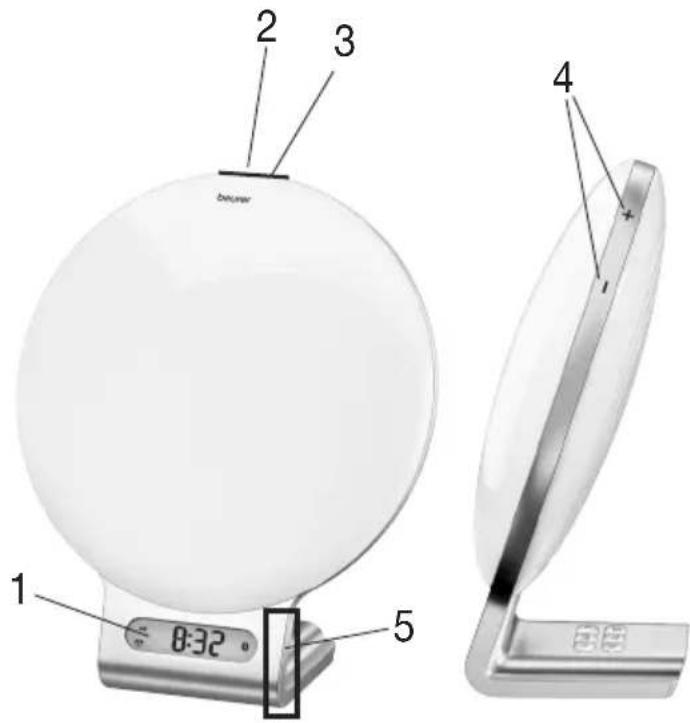
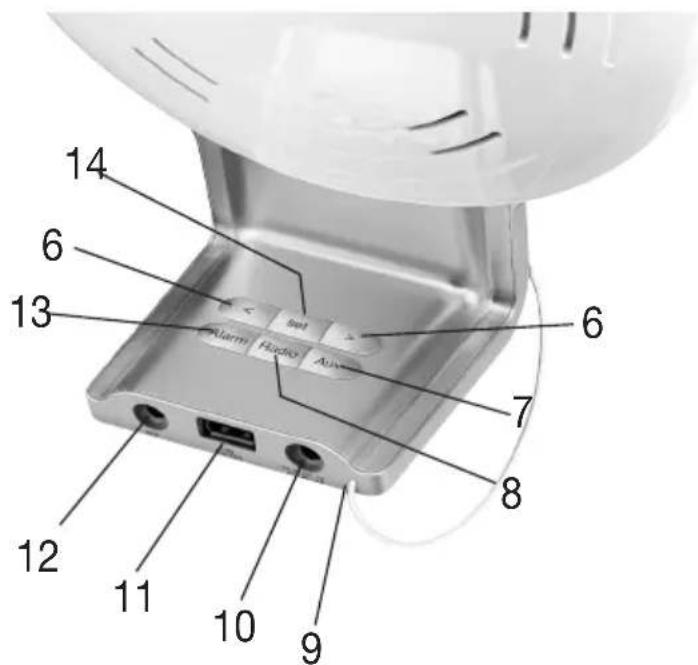
| 1 Display 8 Radio button | |
| 2 ON/OFF button ① | 9 Cable antenna |
| 3 Touch sensor (for snoozing) | 10 Mains part connection |
| 4 Brightness buttons +/- | 11 USB connection (for charging smartphones) |
| 5 Touch sensor (for illuminated display) | 12 AUX input |
| 6 </> buttons | 13 Alarm button |
| 7 AUX button 14 Set button | |
Display
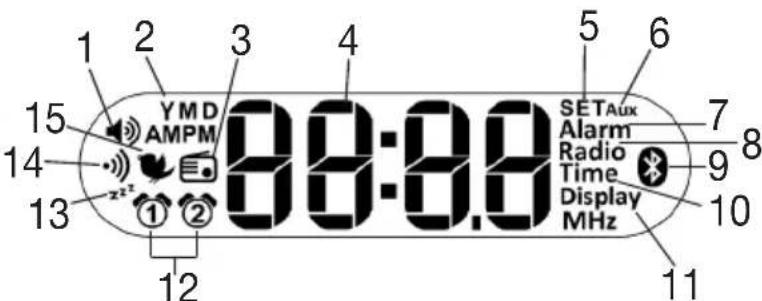
| 1 Volume 9 Bluetooth | ® |
| 2 Year (Y)/Month (M)/Day (D) | 10 Time |
| 3 Radio alarm mode 11 | Display |
| 4 Time/Date/Radio frequency | 12 Alarm memory space 1, 2 |
| 5 SET mode 13 “Sleep” | function |
| 6 AUX mode 14 Beep | |
| 7 Alarm mode 15 Wake-up melody | |
| 8 Radio | |
6. Initial use
- Remove the packaging material.
- Check that all parts listed are present.
- Check the device, mains adapter and AUX cable for damage.
- Download the free "beurer LightUp" app from the Apple App Store (iOS) or Google Play (Android).
- Activate Bluetooth® on your smartphone.
- Place the device on a firm, even surface. The device must be placed near an easily accessible socket.
- Insert the mains adapter connector into the mains adapter socket on the rear of the device.
- Insert the mains adapter into a suitable socket.
- The time is shown on the device display.
- Place the cable antenna at the back.
- Open the "beurer LightUp" app and follow the instructions.
- Once the WL 75 is connected, the time on the wake up light is updated.
7. Usage
You can either set the device functions using the "beurer LightUp" app or the buttons on the wake up light.
We recommend setting the device functions using the "beurer LightUp" app as it is more convenient.
If the wake up light is connected to a smartphone, all the buttons on the wake up light are locked. Once the smartphone and wake up light are disconnected, you can use the buttons on the wake up light again.
7.1 Setting the time/date
Note
You can set the time and date using the "beurer LightUp" app or the buttons on the wake up light. If you connect the wake up light to your smartphone using the "beurer LightUp" app, the time and date are automatically set on the wake up light.
To set the time using the buttons on the wake up light, proceed as follows:
- Press the Set button on the device three times. "SET Time" appears on the display. Wait three seconds until the hour format "24 h" flashes on the display.
- Set the hour format using the buttons (24-hour format ^ 24hr or 12-hour format AM/PM ^ 12hr ). Confirm with the Set button.
- The hour flashes on the display. Set the hour using the / buttons. Confirm with the Set button.
- The minute flashes on the display. Set the minute using the / buttons. Confirm with the Set button.
- The year (Y) flashes on the display. Set the year using the buttons. Confirm with the Set button.
- The month (M) flashes on the display. Set the month using the buttons. Confirm with the Set button.
- The day (D) flashes on the display. Set the day using the / buttons. Confirm with the Set button.
7.2 "Alarm" function Setting the alarm
Note
If you set the alarm using the buttons on the wake up light, you can select the alarm time and the alarm tone. If you set the alarm using the "beurer LightUp" app, you can also select the alarm days, snooze time and a simulated sunrise (wake up light gradually becomes brighter over a set period of time).
To set the alarm using the buttons on the wake up light, proceed as follows:
- Press the Set button on the device once. "SET Alarm" appears on the display. Wait three seconds until ① flashes on the display.
- Use the buttons to select either alarm or alarm ② Confirm with the Set button.
- The alarm hour flashes on the display. Set the alarm hour using the buttons. Confirm with the Set button.
- The alarm minute flashes on the display. Set the alarm minute using the buttons. Confirm with the Set button.
- Alarm tone wake-up melody 1-6 radio flashes on the display. Use the buttons to select the desired alarm tone. Confirm with the Set button. Alarm is now activated.
The simulated sunrise starts before the set alarm in order to prepare the body for waking up. The alarm only goes off after the sunrise.
Activating the alarm
To activate the alarm, press the Alarm button on the wake up light repeatedly until "RLARn1", "RLARn2" or "RLARn1 and RLARn2" appears on the display.
Deactivating the alarm
To deactivate the alarm, press the Alarm button on the wake up light repeatedly until "OFF" appears on the display.
Activating the snooze function
When the alarm sounds, touch (not press) the ON/OFF button ① to activate the snooze function. You can set the snooze time in the "beurer LightUp" app.
Switching off the alarm
When the alarm sounds, press the ON/OFF button ① to switch off the alarm.
7.3 Light/reading lamp
Note
You can switch on the light using the "beurer LightUp" app or the buttons on the wake up light.
To switch on the light using the buttons on the wake up light, proceed as follows:
- Briefly press the ON/OFF button on the inserted device. The light comes on.
- To switch the light off again, press the ON/OFF button again. The light goes off.
- You can use the brightness buttons + - to set the brightness.
7.4 Mood light
The wake up light can also be used as a mood light.
i Note
If you switch on the mood light via the wake up light, you get a mood light with a standardised colour change.
If you set the mood light via the "beurer LightUp" app, you also have the following setting options:
- You can select the colour of the mood light yourself.
- 10 preset sequences (e.g. rainbow) are available.
- The mood light can be set on a timer.
To switch on the mood light on the wake up light, proceed as follows:
- Press and hold the ON/OFF button for 2 seconds. The colour changing mood light comes on.
-
To maintain one colour on the mood light, press the ON/OFF button again.
-
To switch the mood light off, press the ON/OFF button again.
7.5 "Sleep" function
The "Sleep" area is ideal for helping you fall asleep. Here you can set the sunset function. With this function, the light gradually dims after a set period of time. You can also assign various relaxing sounds to the simulated sunset and either use natural light or a mood light.
Note
You can set the sunset function using the "beurer LightUp" app or the buttons on the wake up light.
To switch on the sunset function on the wake up light, proceed as follows:
- To use the sunset function with normal light, briefly press the ON/OFF button. The light comes on.
To use the sunset function with the mood light, press and hold the ON/OFF button for 2 seconds. The mood light comes on. - Press and hold the ON/OFF button for 5 seconds. 2 flashes on the display. Use the buttons within 5 seconds to set the duration of the sunset.
- Use the buttons to set the volume.
- Use the Set button to set the desired sound.
7.6 Radio
Note
You can configure the radio settings using the "beurer LightUp" app or the buttons on the wake up light.
Setting the radio station
To set the radio station using the buttons on the wake up light, proceed as follows:
- Press the Set button on the device twice. "SET Radio" appears on the display. Wait three seconds until the current station frequency flashes on the display.
- Use the buttons to set the desired radio station. To start the station search, press and hold the or button. Confirm with the Set button.
- Programme number P01 flashes on the display. Use the buttons to select the desired programme number (e.g. P01 or P02) under which the set radio station is to be saved. There are 10 radio memory spaces available. Confirm with the Set button.
Switching the radio on/off
- To switch the radio on or off, press the Radio button on the wake up light.
- To switch between the saved radio stations, first press the Set button. Use the / buttons to select the desired radio station.
- To set the volume, press the buttons while the radio is playing.
7.7 Setting the display brightness

Note
The wake up light has four display brightness levels (0, 1, 2 and 3). You can set the display brightness in the settings of the "beurer LightUp" app or using the buttons on the wake up light.
To set the display brightness using the buttons on the wake up light, proceed as follows:
- Press the Set button on the device four times. "SET Display" appears on the display. Wait three seconds until a number flashes on the display.
- Use the buttons to set the desired display brightness. Confirm with the Set button. The configured display brightness is shown after 5 seconds.
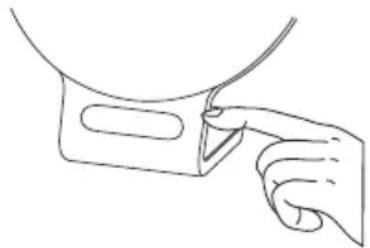
Alternatively, you can also tap on the right-hand side of the display to make the display brightness briefly brighter.
7.8 AUX connection
You can connect an external audio source (e.g. MP3 player, smartphone or CD player) to the wake up light via the AUX input.
- Connect the supplied AUX cable to an audio source.
- Insert the other end of the AUX cable into the AUX input on the rear of the device.
- Press the AUX button on the device. The external audio source is now connected to the wake up light.
- Use the buttons to adjust the volume.
- Press the AUX button to exit AUX mode again.
7.9 Switching the button tone on/off
You can only switch the button tone of the wake up light on and off via the settings in the "beurer LightUp" app.
7.10 Activating/deactivating Bluetooth®

Note
The wake up light is supplied to the customer with Bluetooth® activated. If you deactivate Bluetooth®, the wake up light cannot be connected to the "beurer LightUp" app.
To deactivate Bluetooth® on the wake up light, proceed as follows:
-
Press the Set button on the device five times. "SET" appears on the display. Wait three seconds until "on" flashes on the display.
-
Press the button until " appears on the display. Confirm with the Set button. Bluetooth® is now deactivated on the wake up light.
8. Cleaning and maintenance
- Clean the device with a dry cloth.
- Do not use any abrasive cleaning products.
- Ensure that no water enters the device. If this should happen, only reuse the device once it has fully dried out.
- Never immerse the device or mains part plug in water or other liquids.
- Protect the device from impacts, moisture, dust, chemicals, marked temperature fluctuations and nearby sources of heat (ovens, heaters).
9. What if there are problems?
| Problem Possible cause | Solution |
| Device does not light up | On/off button switched off |
| No electricity Connection the mains part properly. | |
| No electricity The mains part is faulty. Contact customer services or your retailer. | |
| LEDs have reached the end of their service life. LEDs faulty. | |
| No Bluetooth® connection (symbol is missing). | Device outside the range. |
| No connection to the app. | |
| Completely close the app (including in the background). Switch Bluetooth® off and back on again. If need be, remove it from the devices list in the Bluetooth® settings, and then use the “beurer LightUp” app. Switch the smartphone off and back on again. |
You can find further information and a list of frequently asked questions (FAQs) about this product at www.beurer.com.
10. Disposal
For environmental reasons, do not dispose of the device in the household waste at the end of its useful life. Dis- pose of the device at a suitable local collection or recycling point. Observe the local regulations for material disposal. Dispose of the device in accordance with EC Directive - WEEE (Waste Elec
trical and Electronic Equipment). If you have any questions, please contact the local authorities responsible for waste disposal.
11. Technical specifications
| Illuminance | Max. approx. 2,000 lux (at distance of 15 cm) |
| Light | LED technology (LED service life: >20,000 hours) |
| Light levels | 10 on wake up light Infinitely variable via app |
| Mood light | Automatic RGB colour change, option of setting individual colour |
| Snooze time 1–30 minutes | |
| LCD backlighting Off, 1, 2, 3 | |
| Time | Can be switched between 12h/24h |
| Alarm | 2 alarm times Wake up: alarm tone, radio, 6 wake-up melodies Fall asleep: 4 sleep melodies |
| Charging function | Smartphones can be charged via USB |
| Button tone Off, On | |
| AUX Line-in, 3.5 mm jack plug | |
| Radio | Frequency range FM 87.5 – 108 MHz, 10 memory spaces |
| Loudspeaker 2 watts | |
| Mains part Manufacturer: Model no.: | Kuantech Incorporated Company KSASB0240900200HE |
| Supply Input: Output: | 100-240V AC 50/60Hz 0.6A 9V DC 2A 18W |
| Average active efficiency | ≥ 85% |
| No-load power consumption | ≤ 0,1W |
| Mains part protection class | Protection class II |
| Frequency band | 2402MHz-2480MHz |
| Transmission power | max. 4dBM |
Subject to technical changes.
We hereby confirm that this product complies with the European RED Directive 2014/53/EU.
The CE Declaration of Conformity for this product can be found under: https://www.beurer.com/web/we-landing-pages/de/cdeclarationofconformity.php.
12. Warranty / Service
Beurer GmbH, Söflinger Straße 218, 89077 Ulm, Germany (hereinafter referred to as "Beurer") provides a warranty for this product, subject to the requirements below and to the extent described as follows.
The warranty conditions below shall not affect the seller's statutory warranty obligations which ensue from the sales agreement with the buyer.
The warranty shall apply without prejudice to any mandatory statutory provisions on liability.
Beurer guarantees the perfect functionality and completeness of this product.
The worldwide warranty period is 3 years, commencing from the purchase of the new, unused product from the seller.
The warranty only applies to products purchased by the buyer as a consumer and used exclusively for personal purposes in the context of domestic use.
German law shall apply.
During the warranty period, should this product prove to be incomplete or defective in functionality in accordance with the following provisions, Beurer shall carry out a repair or a replacement delivery free of charge, in accordance with these warranty conditions.
If the buyer wishes to make a warranty claim, they should approach their local retailer in the first instance: see the attached "International Service" list of service addresses.
The buyer will then receive further information about the processing of the warranty claim, e.g. where they can send the product and what documentation is required.
A warranty claim shall only be considered if the buyer can provide Beurer, or an authorised Beurer partner, with
-
a copy of the invoice/purchase receipt, and
-
the original product.
The following are explicitly excluded from this warranty:
- deterioration due to normal use or consumption of the product;
- accessories supplied with this product which are worn out or used up through proper use (e.g. batteries, rechargeable batteries, cuffs, seals, electrodes, light sources, attachments and nebuliser accessories);
- products that are used, cleaned, stored or maintained improperly and/or contrary to the provisions of the instructions for use, as well as products that have been opened, repaired or modified by the buyer or by a service centre not authorised by Beurer;
- damage that arises during transport between manufacturer and customer, or between service centre and customer;
- products purchased as seconds or as used goods;
- consequential damage arising from a fault in this product (however, in this case, claims may exist arising from product liability or other compulsory statutory liability provisions).
Repairs or an exchange in full do not extend the warranty period under any circumstances.
FRANÇAIS

Bo3MOxHbI TexHuYeCKHe n3MeHeHn.
HactoIIM NOITBepKdaem,TO daHHoe N3dJIne COOTBeTCTByET Tpe6OBaHnM eBpOeNCKo DNpeKTbBi RED 2014/53/EU.
C DeKlapauee O COOTBeTCTBUN DnpeKtNBam CE dJaDaHHoro npnbopa MoXHo 03HaKOMTbcra, nepeyIraNo ccbInke: https://www.beurer.com/web/we-landingpages/de/cedeclarationofconformity.php
12. rapaHTn/cepBnchoe 06cnykBaHne
Bone noDpo6nA INΦopMaζη NO rapaHTn/CepBnCy HaxoNTcB rapaHTnHOM/CepBnCHOM TaIHOe, KOTpbI BxOHT B KOMPJIeKT NocTaBKn.

Jesli walks away from the dystopia, a place where people can find their way to the moon.
- The Bluetooth® word mark and logos are registered trademarks owned by Bluetooth SIG, Inc. and any use of such marks by Beurer GmbH is under license. Other trademarks and trade names are those of their respective owners.
- Apple and the Apple logo are trademarks of Apple Inc., registered in the U.S. and other countries. App Store is a service mark of Apple Inc., registered in the U.S. and other countries.
- Google Play and the Google Play logo are trademarks of Google Inc.
- Android is a trademark of Google Inc.