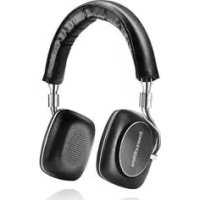
P5 Series 2 - Earphones BOWERS & WILKINS - Free user manual and instructions
Find the device manual for free P5 Series 2 BOWERS & WILKINS in PDF.




| Product type | On-ear headphone |
| Brand | Bowers & Wilkins |
| Model | P5 Series 2 |
| Frequency response | 10 Hz - 20 kHz |
| Impedance | 22 ohms |
| Sensitivity | 108 dB/V at 1 kHz |
| Maximum input power | 50 mW |
| Connector | 3.5 mm stereo mini-jack (4-pole CTIA) |
| Cable length | 1.2 m |
| Dimensions (unfolded) | 192 x 190 x 70 mm |
| Dimensions (folded) | 130 x 190 x 70 mm |
| Net weight | 195 g |
| Earpiece marking | Left (L) and right (R) engraved |
| Diaphragm material | Damped nylon |
| Voice coil | CCAW |
| Included accessories | Universal cable (3.5 mm 3-pole mini-jack), protective pouch |
| Apple compatibility | Remote and microphone compatible with iPhone 3GS+, iPod touch 2G+, iPad; remote compatible with iPod classic, iPod nano 4G+, iPod shuffle 3G+ |
| Detachable cable | Yes, with microphone and remote for Apple, or universal cable |
| Foldable design | Yes (flat) |
| Maintenance and cleaning | Clean leather parts with a soft cloth slightly dampened with warm water; do not use cleaning products |
| Safety | Contains small parts (choking hazard) and magnetic elements; avoid prolonged exposure to high sound levels |
Frequently Asked Questions - P5 Series 2 BOWERS & WILKINS
User questions about P5 Series 2 BOWERS & WILKINS
0 question about this device. Answer the ones you know or ask your own.
Ask a new question about this device
Download the instructions for your Earphones in PDF format for free! Find your manual P5 Series 2 - BOWERS & WILKINS and take your electronic device back in hand. On this page are published all the documents necessary for the use of your device. P5 Series 2 by BOWERS & WILKINS.
USER MANUAL P5 Series 2 BOWERS & WILKINS
P5 Series 2 Headphones
Welcome to Bowers & Wilkins and P5 Series 2 Headphones
Thank you for choosing Bowers & Wilkins. When John Bowers first established our company he did so in the belief that imaginative design, innovative engineering and advanced technology were keys that could unlock the enjoyment of audio in the home. His belief is one that we continue to share and it inspires every product we design.
P5 Series 2 is a high performance on-ear headphone that provides the highest quality personal audio experience in every situation. This manual will tell you everything you need to know to get the most from your P5 Series 2 Headphones.
1. P5 Series 2 Carton Contents
- P5 Series 2 Headphones
- Universal cable
- Quilted pouch
- Literature pack
2. Using your P5 Series 2 Headphones
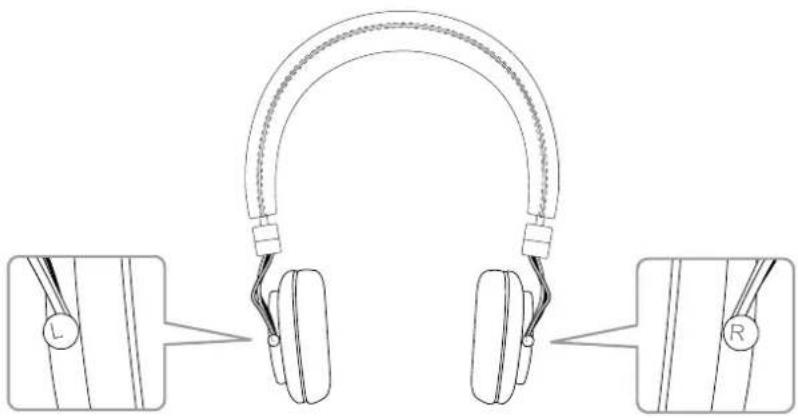
Using your headphones correctly will help ensure that their performance reaches its full potential. First, identify the loft and right ear pieces. Identification legends are engraved on the metal hinge below the headband.
This is illustrated in Diagram 1.
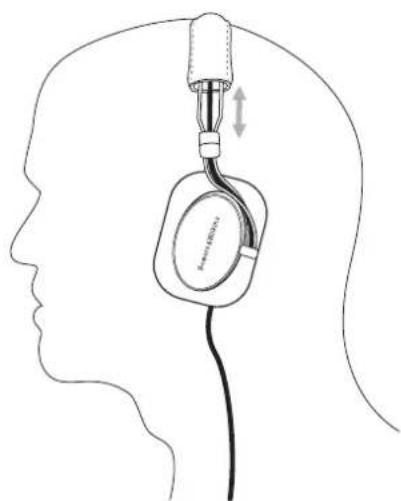
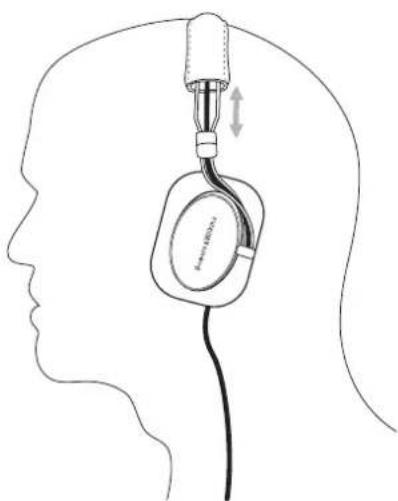
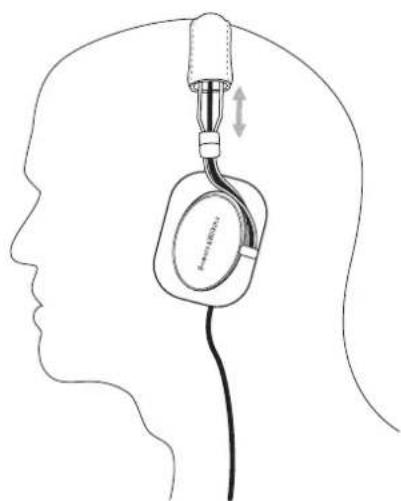
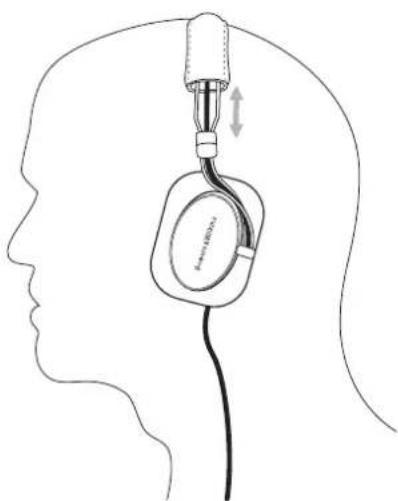
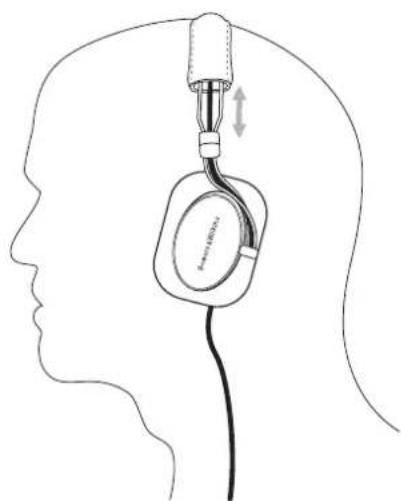
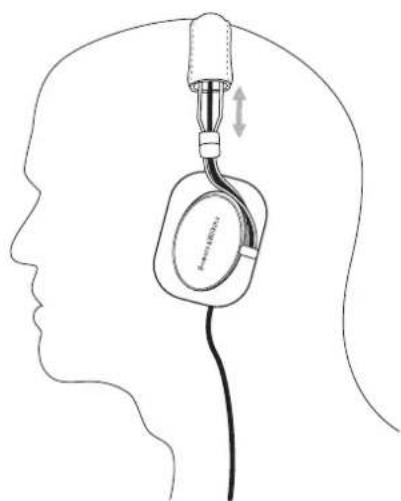
Now unfold the headphones and slide them on to your head with the headband adjusted so that each earpiece sits comfortably over the ear.
This is illustrated in Diagram 2.
It is recommended that you fold and return your headphones to their pouch when not in use.
natural_image
Diagram of two earbuds with labeled connectors and side views, showing headband structure (no text or symbols)Diagram 1 Identifying left and right
natural_image
Line drawing of a human head silhouette with an earpiece inserted, showing anatomical positioning (no text or symbols)Diagram 2 Adjusting the earpiece.
3. Connecting your headphones
Your P5 Series 2 Headphones can be connected to any audio device with a 3.5mm jack headphone output. The remote and mic cable fitted to P5 Series 2 Headphones incorporates an iPhone *, iPod * and iPad® compatible microphone and audio control. Its use is described in the following section of this manual.
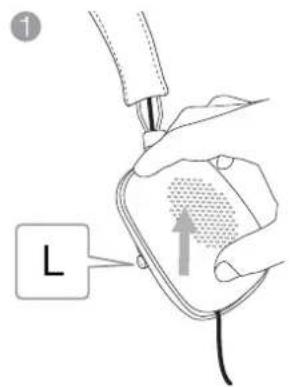
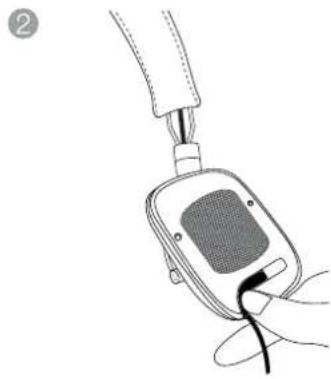
If using your P5 Series 2 Headphones with anything other than an Apple ^® device the remote and mic cable functionality may vary. If performance is affected the supplied universal cable can be substituted. Detaching the remote and mic cable and fitting the universal cable is described below and illustrated in diagram 3.
- Unfold the headphones and remove the left earpad by gently pulling it away from the body of the earpiece. Removing the left earpad reveals the cable connection plug and socket.
• Gently grasp the cable just below the earpiece and lift upwards. The connection plug and socket will raise up. - Now gently grasp the connection plug and pull it out of the socket.
- With the remote and mic cable now disconnected, take the universal cable and identify the 2.5mm connection plug.
- Insert the 2.5mm (angled) connection plug into the left earpiece socket and press the connection plug moulding into its routing channel.
- Replace the left earpad. Make sure that the earpad location pins and sockets engage accurately.
4. Using your P5 Series 2 Headphones with iPhone, iPad and iPod
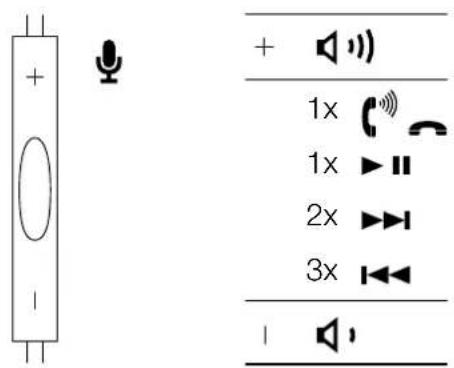
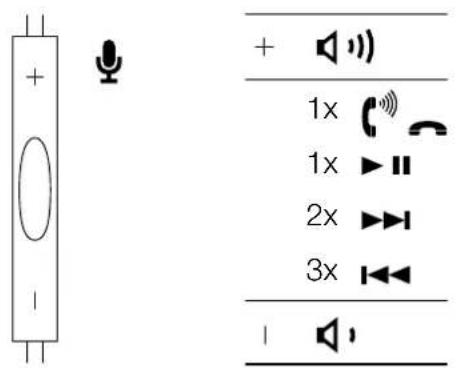
Your P5 Series 2 Headphones incorporate a combined microphone and audio control, integrated within the remote and mic cable, that enables you to make or answer calls while wearing the headphones. The control also enables you to play, pause and skip songs. The microphone and control is illustrated in diagram 4
The control incorporates three click switches, one in the middle and one at either end, and operates as follows:
- Click the end switch engraved "+" to increase phone or song volume.
- Click the end switch engraved “—” to decrease phone or song volume.
- Click the middle switch once to answer a call.
- Click the middle switch once to end a call.
- Click the middle switch once to play or pause a song
- Click the middle switch twice to skip to the next song.
- Click the middle switch three times to skip to the previous song.
natural_image
Line drawing of a hand holding a medical device with a cable inserted (no text or symbols)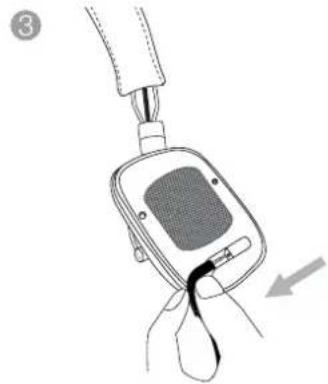
natural_image
Line drawing of a hand holding a digital blood glucose meter device with a black clip, showing no text or symbols.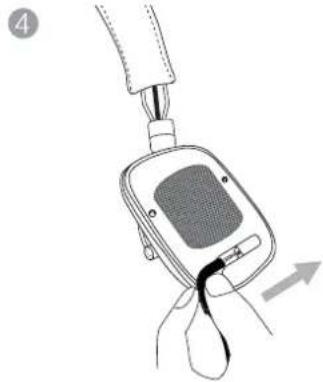
natural_image
Diagram of a blood glucose meter device with attached tubing and a black clip, showing no text or symbols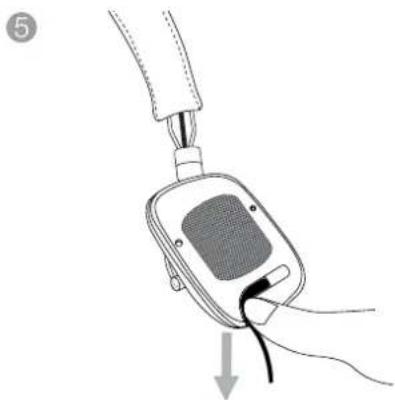
natural_image
Line drawing of a hand holding a blood glucose meter connected to a cable, with an arrow indicating the insertion point (no text or symbols present)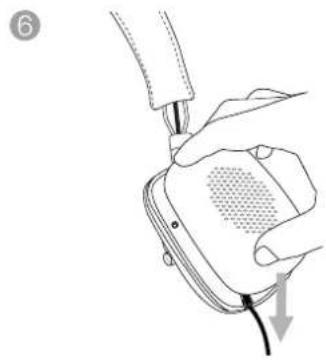
natural_image
Line drawing of a hand holding a device with a cable, showing a sensor or sensor device (no text or symbols present)Diagram 3 Changing the cable
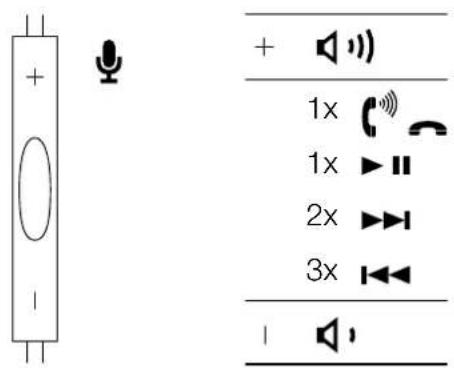
Diagram 4 The microphone and audio controls
5. Cleaning your P5 Series 2 Headphones
Clean your P5 Series 2 Headphones by soaking a soft cloth in warm water and dabbing the leather until clean, do not rub the cloth on the leather. Do not use cleaning detergents or leather polish, doing so may cause damage to the product.
6. Trouble shooting
No or intermittent audio
- Make sure that the headphone plug is securely connected to the device's headphone socket (not a "line out" socket).
- Make sure that the headphone plug connection is not obstructed by any protective case used on the device.
- Try an alternative audio source.
- Use the supplied universal cable if iPod, iPhone or iPad microphone and control features are not required.
Remote and mic not functioning correctly
- Check the iPod, iPhone and iPad compatibility.
- Disconnect and re-connect the headphones to ensure the connection is secure.
- Test on another compatible product if available.
Low volume or poor audio quality
- Ensure the headphones are securely connected.
- Disable any audio enhancement features on the audio source.
- Make sure the volume level of the audio source is turned up.
- Try an alternative audio source.
- Check the cable connection within the left earpiece.
Sound is only coming from one earpiece
- Disconnect and re-connect the headphones to ensure the connection is secure.
- Try another audio source.
- Check the cable connection within the left earpiece.
7. Safety warnings
- Contains small parts which may be a choking hazard. Not suitable for children under age 3.
• This product contains magnetic material. - When unplugging the headphones never pull on the cable. Always grasp and pull the connector.
- Long-term exposure to loud music may cause hearing damage. It is best to avoid high volume levels when using headphones, especially for extended periods.
- Use caution when using your headphones while operating a vehicle or engaging in any activity that requires your full attention. Check and follow local laws regarding mobile phone and headset headphones use. Some jurisdictions impose specific limitations, such as single earpiece configuration, on the use of such products while driving.
- Sounds that you rely on as reminders or warnings may have an unfamiliar character when using headphones. Be aware of how these sounds may vary in character so you can recognise them as needed.
- Do not drop, sit on, or allow the headphones to become wet.
Technical Specifications
Model P5 Series 2
Description On-Ear Headphone
Technical features Nylon damped diaphragm
CCAW coil
Changeable ear cushions
Detachable cable
Folding (flatable) design
Damping foam
Drive units 2x ø40mm (1.6in) full range
Impedance 22 ohms
Frequency range 10Hz to 20kHz
Distortion (THD) <0.4% (1KHz/10mW)
Max. input power 50mW
Sensitivity 108dB/V at 1kHz
Inputs 3.5mm stereo mini jack (CTIA 4-pole)
Height 192mm folded out, 130mm folded in
Width 190mm
Depth 70mm
Cable length 1.2m
Weight 195g
Accessories supplied Universal cable (3.5mm stereo 3-pole mini jack)
Protective pouch
Apple compatibility The remote and mic are supported by iPhone 3GS and later, iPod Touch 2nd generation & later, iPad all models. The remote is supported by iPod Classic all models, iPod Nano 4th generation & later, iPod Shuffle 3rd generation & later.
natural_image
Diagram of a pair of headphones with labeled parts (L, R) showing ear structure and connector details (no text or symbols beyond labels)Schéma 1
natural_image
Line drawing of a human head silhouette with an ear device attached, showing anatomical alignment (no text or symbols)Schéma 2
natural_image
Line drawing of a hand holding a blood glucose meter with a probe inserted (no text or symbols)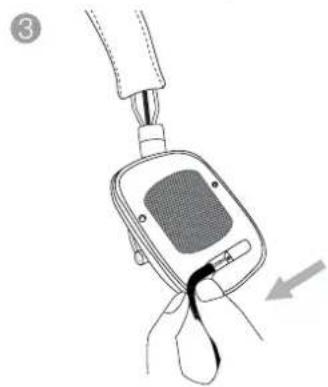
natural_image
Illustration of a hand holding a blood glucose meter with a probe inserted, showing the device's internal structure and insertion point (no text or symbols)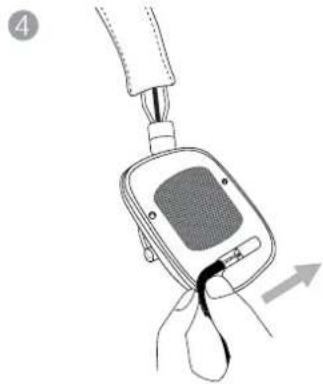
natural_image
Line drawing of a hand holding a digital blood glucose meter with a black clip, showing a force application (no text or symbols)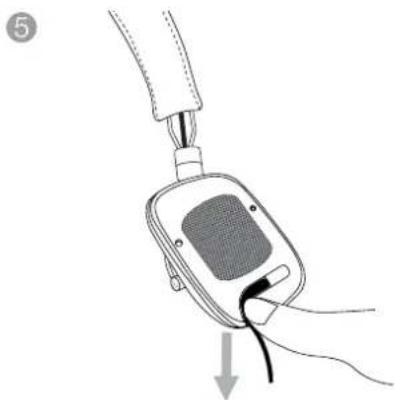
natural_image
Illustration of a hand holding a blood glucose meter connected to a device with a cable, showing a downward arrow (no text or symbols present)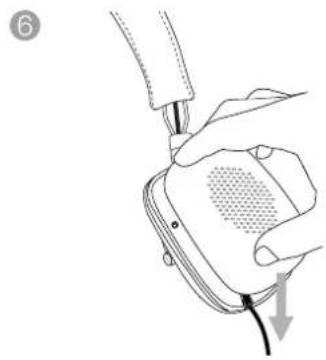
natural_image
Illustration of a hand holding a device with a cable, showing a mesh grille and cable tip (no text or symbols)Haut-parleurs 2x ø40mm (1.6 pouce) large bande
Distorsion (THD) <0.4% (1KHz/10mW)
natural_image
Diagram of a pair of headphones with labeled parts (L, R) showing ear structure and connector details (no text or symbols beyond labels)Abbildung 1
natural_image
Line drawing of a human head silhouette with an earpiece inserted, showing anatomical positioning (no text or symbols)natural_image
Line drawing of a hand holding a blood glucose meter with a probe inserted (no text or symbols)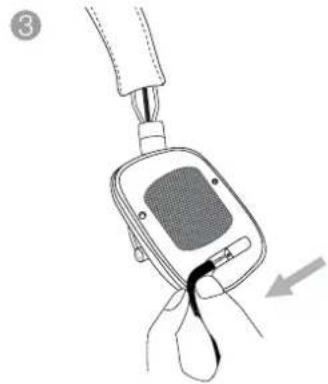
natural_image
Line drawing of a hand holding a digital blood glucose meter device with a black cable inserted, showing no text or symbols.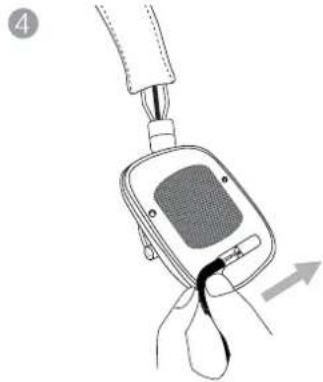
natural_image
Diagram of a blood glucose meter device with attached tubing and a black clip, showing no text or symbols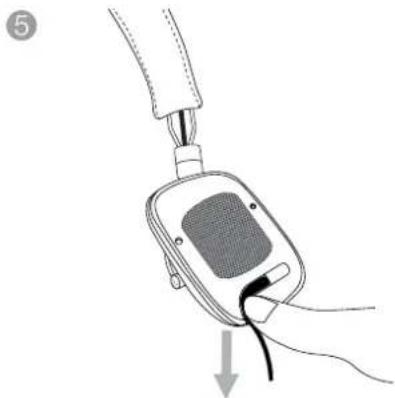
natural_image
Illustration of a hand holding a blood glucose meter connected to a cable, with a downward arrow indicating force or insertion (no text or symbols present)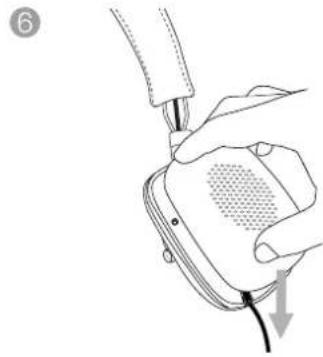
natural_image
Line drawing of a hand holding a device with a cable, showing a pressure sensor or sensor device (no text or symbols present)natural_image
Diagram of a pair of headphones with labeled parts (L, R) showing ear structure and connector details (no text or symbols beyond labels)natural_image
Line drawing of a human head silhouette with an ear device attached, showing anatomical alignment (no text or symbols)natural_image
Line drawing of a hand holding a blood glucose meter with a probe inserted (no text or symbols)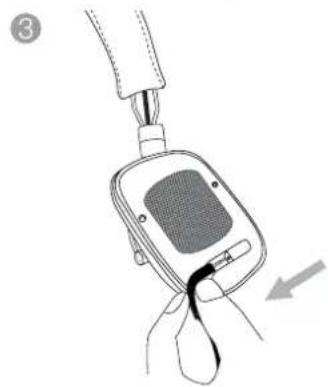
natural_image
Illustration of a hand holding a blood glucose meter with a probe inserted, showing the device's internal structure and insertion point (no text or symbols)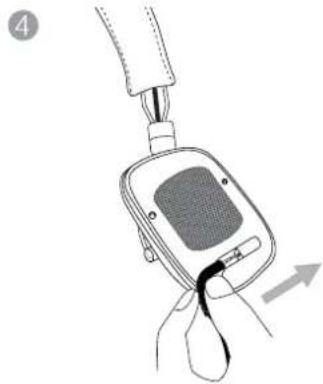
natural_image
Line drawing of a hand holding a digital blood glucose meter device with a black clip, showing no text or symbols.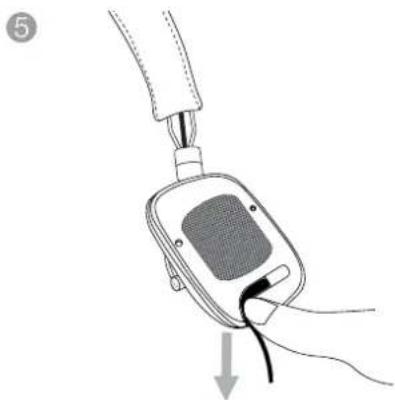
natural_image
Line drawing of a hand holding a blood glucose meter connected to a cable, with a downward arrow indicating force or insertion (no text or symbols present)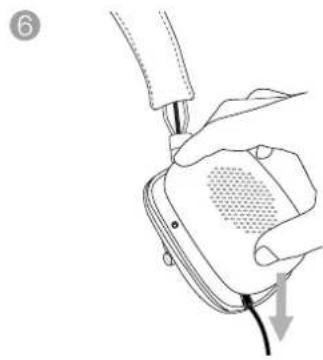
natural_image
Line drawing of hands connecting a device to a plug, with a cable inserted (no text or symbols)natural_image
Diagram of two earbuds with labeled connectors and side views, showing head and neck alignment (no text or symbols)natural_image
Line drawing of a human head silhouette with an earpiece inserted, showing anatomical positioning (no text or symbols)natural_image
Line drawing of a hand holding a blood glucose meter with a probe inserted (no text or symbols)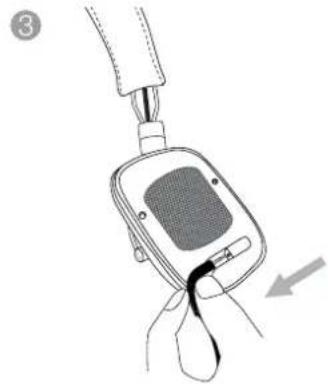
natural_image
Line drawing of a hand holding a digital blood glucose meter device with a black cable inserted, showing no text or symbols.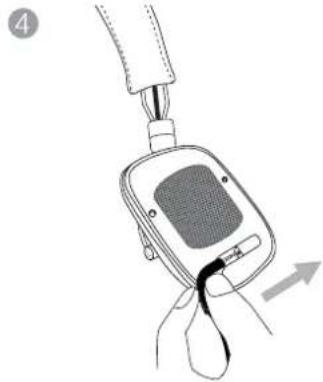
natural_image
Diagram of a blood glucose meter device with attached tubing and a black clip, showing no text or symbols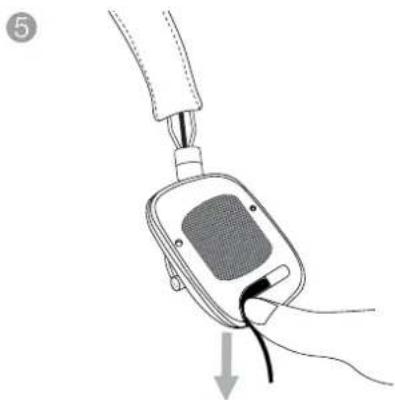
natural_image
Line drawing of a hand holding a blood glucose meter connected to a cable, with a downward arrow indicating force or insertion (no text or symbols present)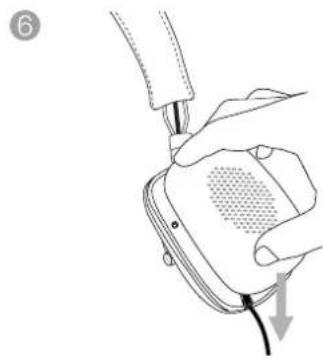
natural_image
Line drawing of hands connecting a device to a plug, with a cable inserted (no text or symbols)Diagrama 3
Substituir o cabo
natural_image
Diagram of two earbuds with labeled connectors and side views, showing head and neck alignment (no text or symbols)Afbeelding 1
Bepalen wat links en rechts is
natural_image
Line drawing of a human head silhouette with an ear device attached, showing anatomical alignment (no text or symbols)natural_image
Line drawing of a hand holding a blood glucose meter with a probe inserted (no text or symbols)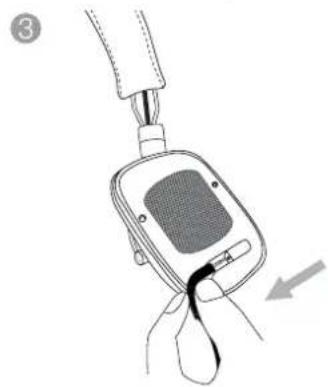
natural_image
Illustration of a hand holding a blood glucose meter with a probe inserted, showing the device's internal structure and insertion point (no text or symbols)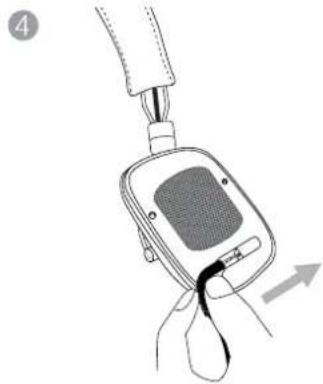
natural_image
Line drawing of a hand holding a digital blood glucose meter device with a black clip, showing no text or symbols.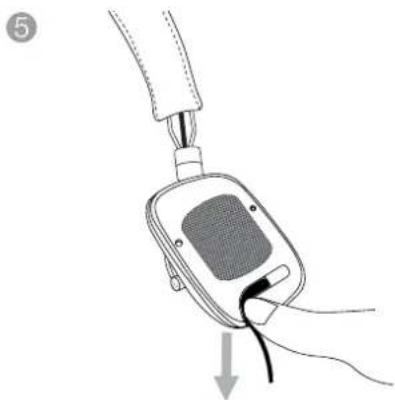
natural_image
Line drawing of a hand holding a blood glucose meter connected to a cable, with a downward arrow indicating force or insertion (no text or symbols present)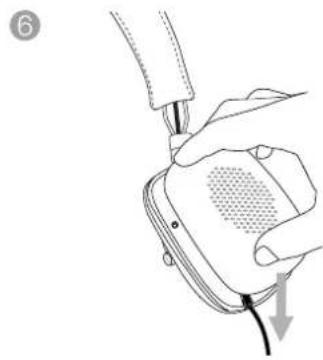
natural_image
Line drawing of hands connecting a device to a plug, with a cable inserted (no text or symbols)4th generation & later, iPod Shuffle 3rd generation & later.
natural_image
Diagram of a pair of headphones with labeled parts (L, R) showing ear structure and connector details (no text or symbols beyond labels)natural_image
Line drawing of a human head silhouette with an earpiece inserted, showing anatomical alignment (no text or symbols)natural_image
Line drawing of a hand holding a medical device with a cable inserted (no text or symbols)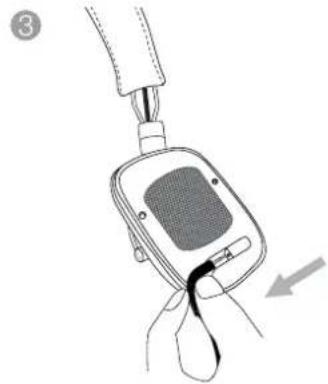
natural_image
Line drawing of a hand holding a digital blood glucose meter device with a black cable inserted, showing no text or symbols.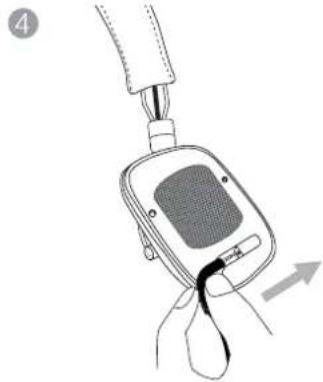
natural_image
Diagram of a blood glucose meter device with attached tubing and a black clip, showing no text or symbols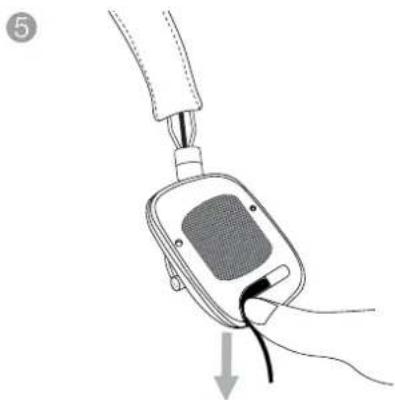
natural_image
Illustration of a hand holding a blood glucose meter connected to a device with a cable, showing a downward arrow (no text or symbols present)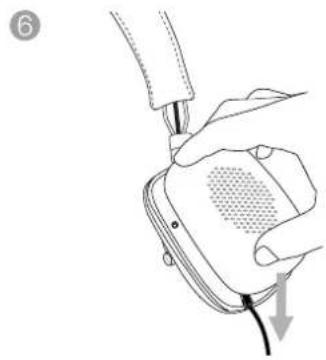
natural_image
Illustration of a hand holding a device with a cable, showing a mesh grille and cable tip (no text or symbols)natural_image
Diagram of two types of headphones with labeled parts (L and R), showing ear structure and connector details (no text or symbols beyond labels)Διάγραμμα 1
natural_image
Line drawing of a human head silhouette with an ear device attached, showing anatomical alignment (no text or symbols)natural_image
Line drawing of a hand holding a blood glucose meter connected to a cable (no text or symbols)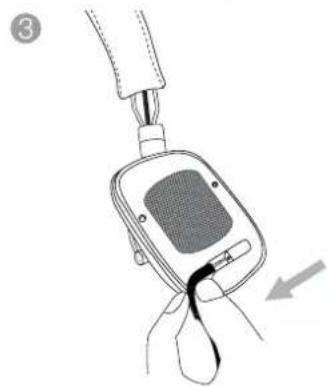
natural_image
Illustration of a hand holding a blood glucose meter with a probe inserted, showing the device's internal structure and insertion point (no text or symbols)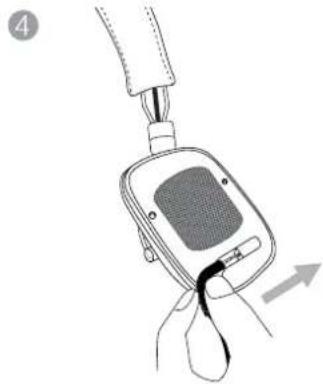
natural_image
Line drawing of a hand holding a digital blood glucose meter with a black clip, showing a force application (no text or symbols)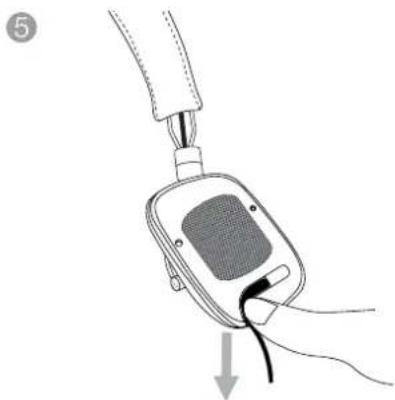
natural_image
Illustration of a hand holding a blood glucose meter connected to a device with a cable, showing a downward arrow (no text or symbols present)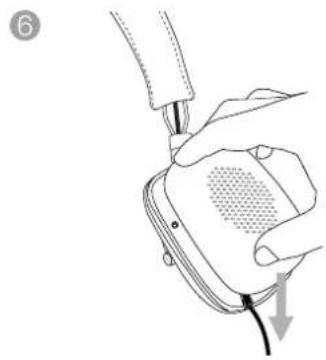
natural_image
Illustration of a hand holding a device with a cable and a small screen, no text or symbols presentnatural_image
Diagram of two earbuds with labeled connectors and side views, showing headband and ear structure (no text or symbols)natural_image
Line drawing of a human head silhouette with an earpiece inserted, showing anatomical positioning (no text or symbols)natural_image
Illustration of a hand holding a medical device with a cable inserted (no text or symbols visible)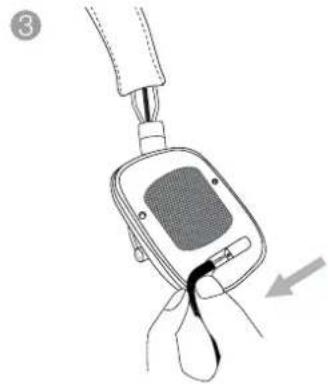
natural_image
Line drawing of a hand holding a digital blood glucose meter device with a black cable inserted, showing no text or symbols.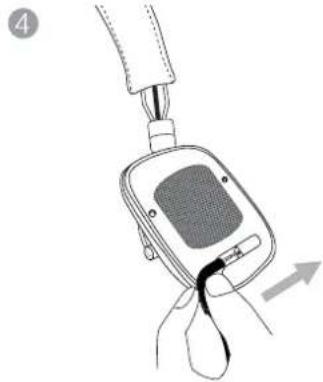
natural_image
Diagram of a blood glucose meter device with attached tubing and a black clip, showing no text or symbols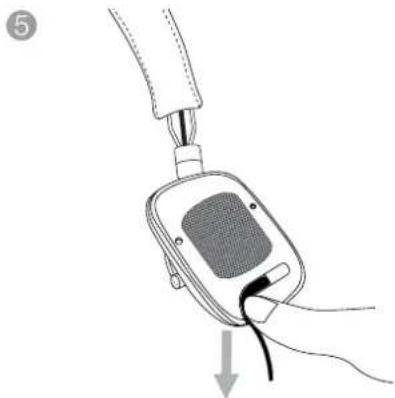
natural_image
Diagram of a hand holding a blood glucose meter connected to a cable, with an arrow indicating force or insertion (no text or symbols present)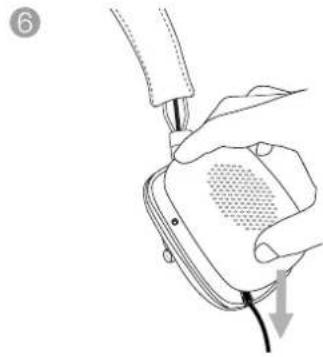
natural_image
Line drawing of a hand holding a device with a cable, showing a press or cable attachment (no text or symbols)natural_image
Diagram of two types of headphones with labeled parts (L and R), showing ear structure and connector details (no text or symbols beyond labels)Obrázek 1
natural_image
Line drawing of a human head silhouette with an earpiece inserted, showing ear structure and measurement arrows (no text or symbols)natural_image
Line drawing of a hand holding a medical device with a cable inserted (no text or symbols)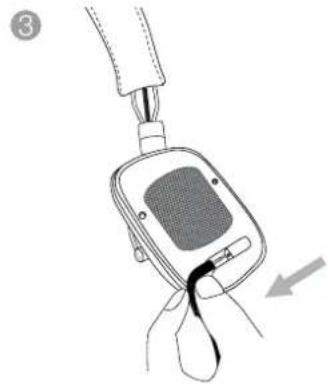
natural_image
Line drawing of a hand holding a digital blood glucose meter device with a black cable inserted, showing no text or symbols.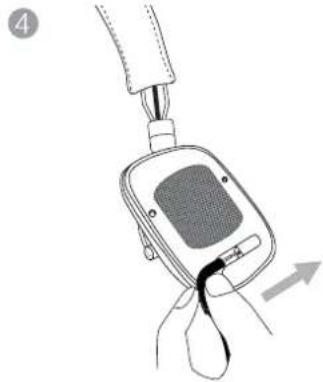
natural_image
Diagram of a blood glucose meter device with attached tubing and a black clip, showing no text or symbols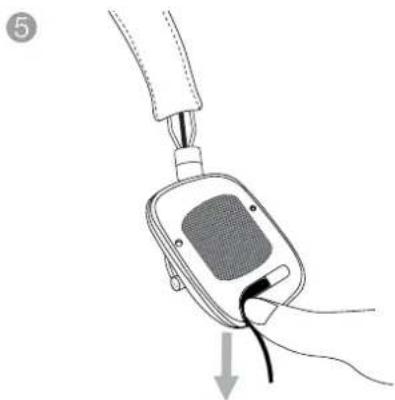
natural_image
Illustration of a hand holding a blood glucose meter connected to a device with a cable, showing a downward arrow (no text or symbols present)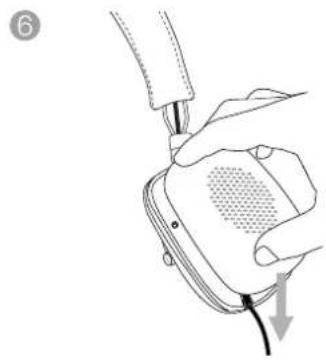
natural_image
Illustration of a hand holding a device with a cable, showing a mesh grille and cable tip (no text or symbols)natural_image
Diagram of a pair of headphones with labeled parts (L, R) showing ear structure and connector details (no text or symbols beyond labels)- Ábra
natural_image
Line drawing of a human head silhouette with an earpiece inserted, showing anatomical positioning (no text or symbols)- Ábra
natural_image
Line drawing of a hand holding a blood glucose meter with a probe inserted (no text or symbols)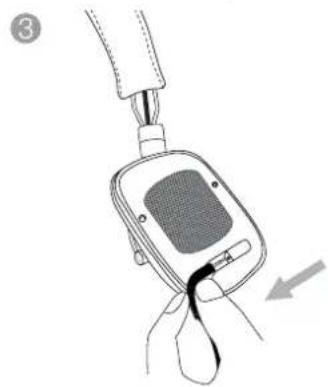
natural_image
Illustration of a hand holding a blood glucose meter with a probe inserted, showing the device's internal structure and insertion point (no text or symbols)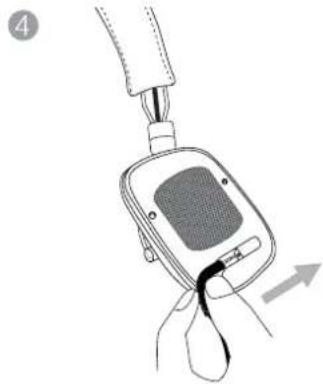
natural_image
Line drawing of a hand holding a digital blood glucose meter with a probe inserted (no text or symbols)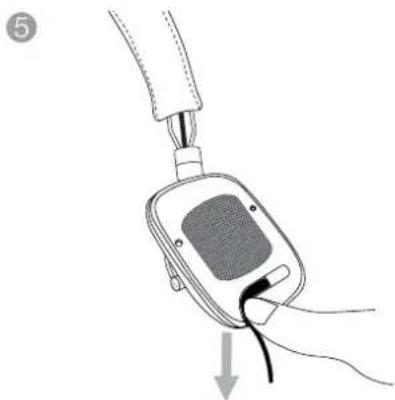
natural_image
Line drawing of a hand holding a blood glucose meter connected to a cable, with a downward arrow indicating force or insertion (no text or symbols present)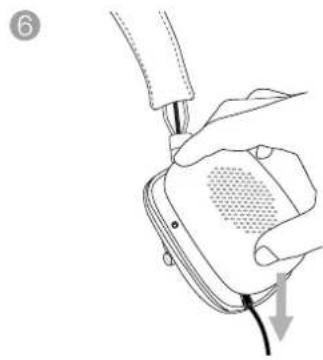
natural_image
Line drawing of hands connecting a device to a plug, with a cable inserted (no text or symbols)natural_image
Diagram of two earbuds with labeled connectors and side views, showing head and neck alignment (no text or symbols)natural_image
Line drawing of a human head silhouette with an earpiece inserted, showing anatomical alignment (no text or symbols)natural_image
Line drawing of a hand holding a blood glucose meter connected to a cable (no text or symbols)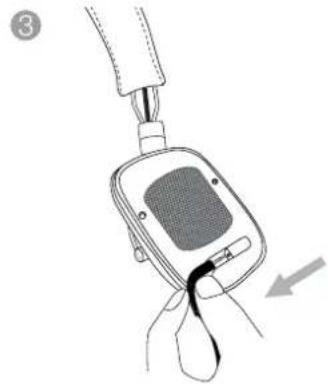
natural_image
Line drawing of a hand holding a digital blood glucose meter device with a black cable inserted, showing no text or symbols.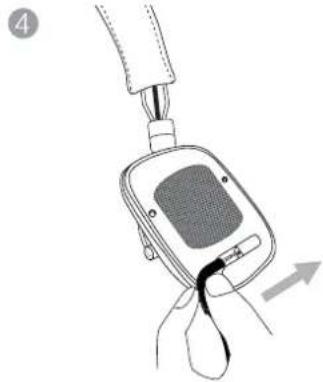
natural_image
Diagram of a blood glucose meter device with attached tubing and a black clip, showing no text or symbols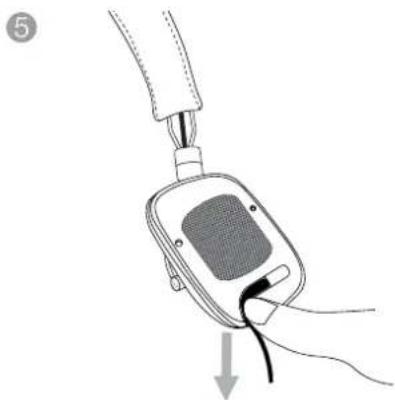
natural_image
Line drawing of a hand holding a blood glucose meter connected to a cable, with a downward arrow indicating force or insertion (no text or symbols present)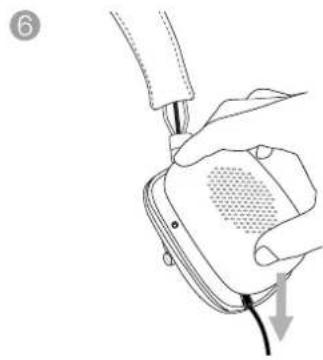
natural_image
Line drawing of hands connecting a device to a plug, with a cable inserted (no text or symbols)natural_image
Diagram of a pair of headphones with labeled parts (L, R) showing ear structure and connector details (no text or symbols beyond labels)Bild 1
natural_image
Line drawing of a human head silhouette with an earpiece inserted, showing anatomical alignment (no text or symbols)natural_image
Line drawing of a hand holding a blood glucose meter connected to a cable (no text or symbols)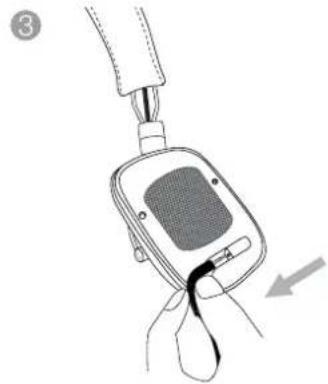
natural_image
Line drawing of a hand holding a digital blood glucose meter device with a black cable inserted, showing no text or symbols.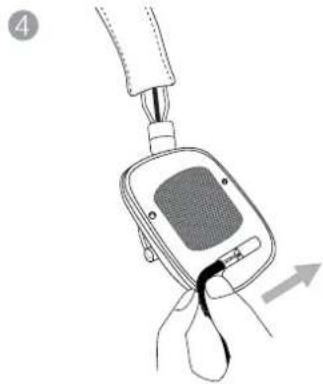
natural_image
Line drawing of a hand holding a digital blood glucose meter with a black clip, showing a force application (no text or symbols)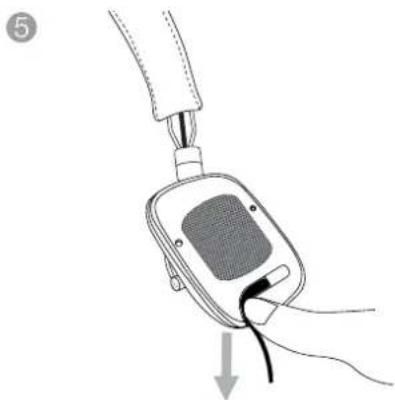
natural_image
Illustration of a hand holding a blood glucose meter connected to a device with a cable, showing a downward arrow (no text or symbols present)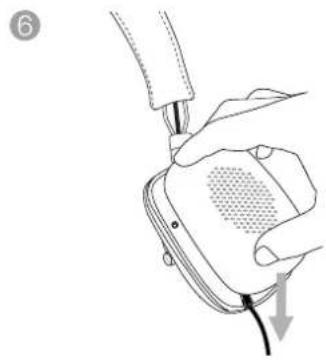
natural_image
Illustration of a hand holding a device with a cable, showing a grid pattern and a downward arrow (no text or symbols)Apple, iPad, iPhone, iPod, iPod classic,
natural_image
Diagram of a pair of headphones with labeled parts (L, R) showing ear structure and connector details (no text or symbols beyond labels)Diagram 1
natural_image
Line drawing of a human head silhouette with an earpiece inserted, showing anatomical alignment (no text or symbols)natural_image
Line drawing of a hand holding a blood glucose meter connected to a cable (no text or symbols)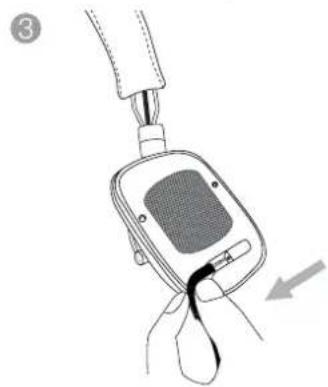
natural_image
Illustration of a hand holding a blood glucose meter with a probe inserted, showing the device's internal structure and insertion point (no text or symbols)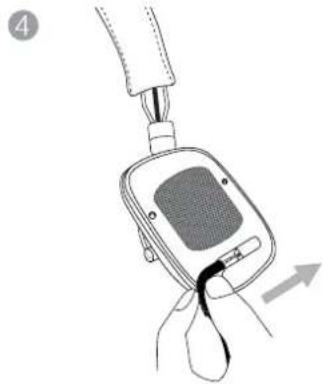
natural_image
Line drawing of a hand holding a digital blood glucose meter with a black clip, showing a force application (no text or symbols)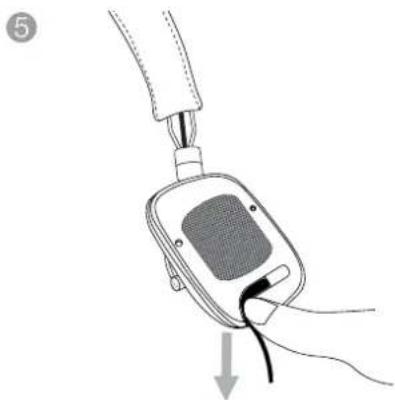
natural_image
Illustration of a hand holding a blood glucose meter connected to a device with a cable, showing a downward arrow (no text or symbols present)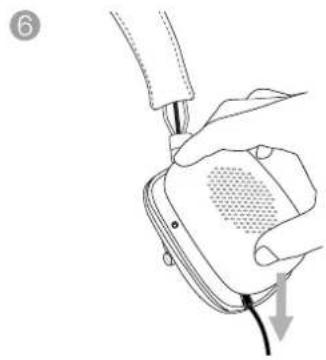
natural_image
Illustration of a hand holding a device with a cable, showing a mesh grille and cable tip (no text or symbols)Diagram 3
Bytte kabel
Forvrengning (THD) <0.4% (1kHz/1mW)
Apple, iPad, iPhone, iPod, iPod classic,
iPod nano, iPod shuffle, and iPod touch er
natural_image
Diagram of two types of headphones with labeled parts (L and R), showing ear structure and connector details (no text or symbols beyond labels)图1
辨别耳机的左与右
natural_image
Line drawing of a human head profile with earphones and a connector, no text or symbols present图2
调节听筒
3. 连接耳机
natural_image
Line drawing of a hand holding a blood glucose meter connected to a cable (no text or symbols)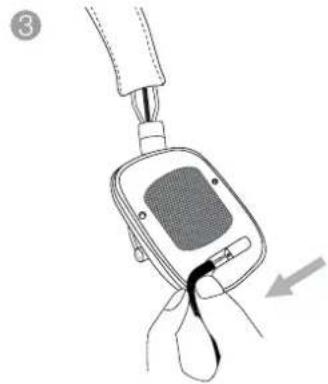
natural_image
Line drawing of a hand holding a digital blood glucose meter device with a black cable inserted, showing no text or symbols.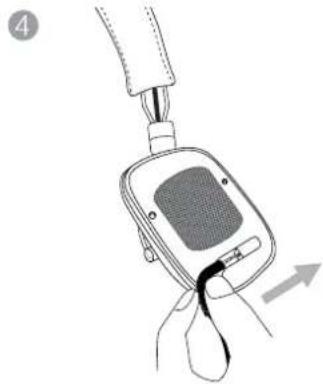
natural_image
Line drawing of a hand holding a digital blood glucose meter device with a black clip, showing no text or symbols.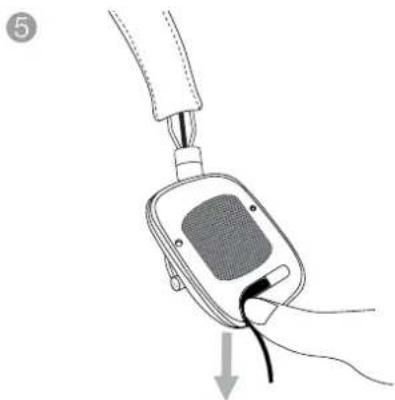
natural_image
Illustration of a hand holding a blood glucose meter connected to a device with a cable, showing a downward arrow (no text or symbols present)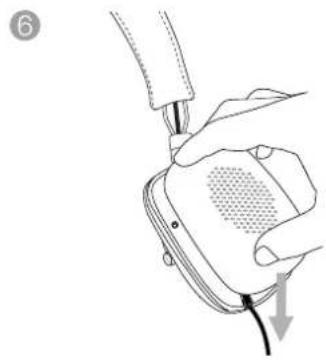
natural_image
Illustration of a hand holding a device with a cable, showing a mesh grille and cable tip (no text or symbols)图3
更换接线

图4
迷你麦克风和音频控制
5. 清洁P5 Series 2耳机
natural_image
Diagram of two types of headphones with labeled parts (L and R), showing ear structure and connector details (no text or symbols beyond labels)圖1
辨別耳機的左與右
natural_image
Line drawing of a human head silhouette with an ear device attached, showing anatomical alignment (no text or symbols)图2
調節聽筒
3. 連接耳機
natural_image
Line drawing of a hand holding a blood glucose meter connected to a cable (no text or symbols)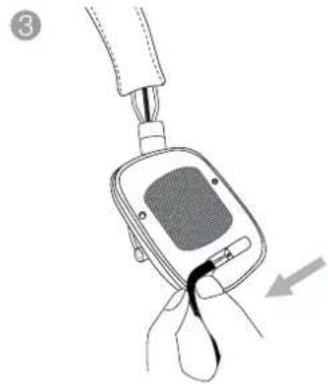
natural_image
Line drawing of a hand holding a digital blood glucose meter device with a black cable inserted, showing no text or symbols.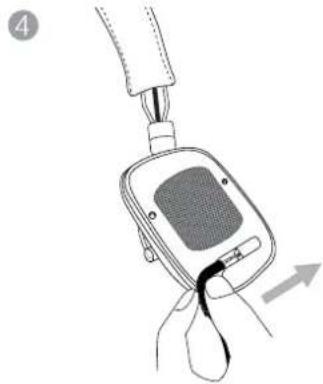
natural_image
Line drawing of a hand holding a digital blood glucose meter with a probe inserted (no text or symbols)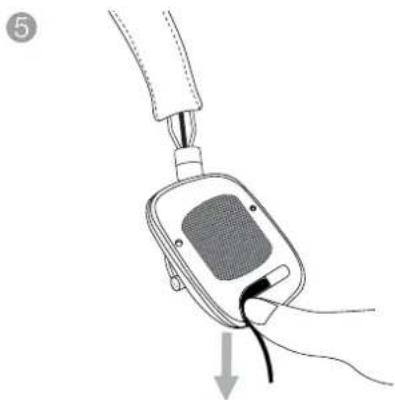
natural_image
Illustration of a hand holding a blood glucose meter connected to a device with a cable, showing a downward arrow (no text or symbols present)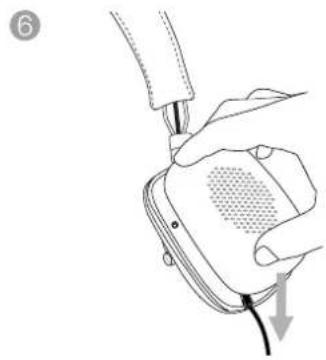
natural_image
Illustration of a hand holding a device with a cable, showing a mesh grille and cable tip (no text or symbols)圖3
更換接線
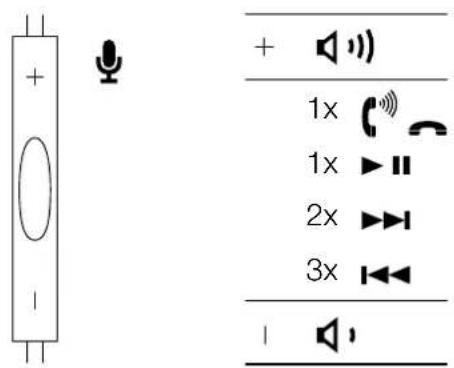
圖4
迷你麥克風和音頻控制
5. 清潔P5 Series 2耳機
natural_image
Diagram of two types of headphones with labeled parts (L and R), showing ear structure and connector details (no text or symbols beyond labels)图1
左右の確認
natural_image
Line drawing of a human head silhouette with an ear device attached, showing anatomical alignment (no text or symbols)图2
イヤーカップの調整
3. 接続方法
natural_image
Line drawing of a hand holding a medical device with a cable inserted (no text or symbols)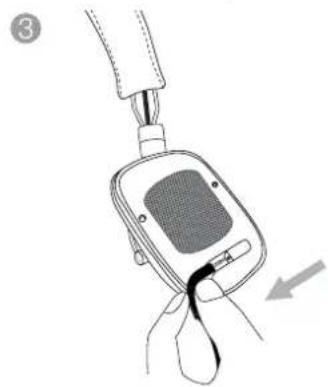
natural_image
Illustration of a hand holding a blood glucose meter with a probe inserted, showing the device's internal structure and insertion point (no text or symbols)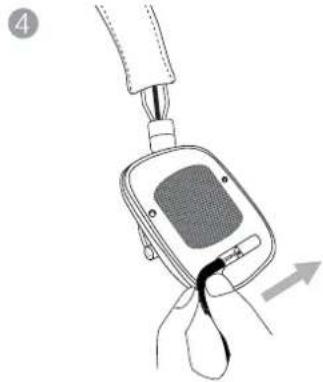
natural_image
Line drawing of a blood glucose meter device with attached tubing and a hand holding the cup (no text or symbols)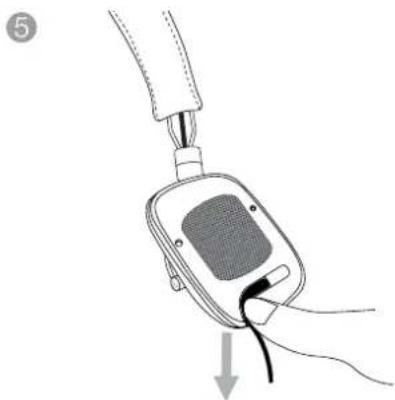
natural_image
Illustration of a hand holding a blood glucose meter connected to a device with a cable, showing a downward arrow (no text or symbols present)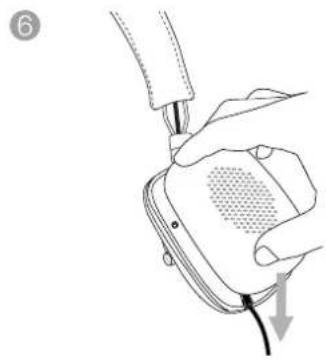
natural_image
Illustration of a hand holding a device with a cable, showing a mesh grille and cable tip (no text or symbols)図3
ケーブルの交換
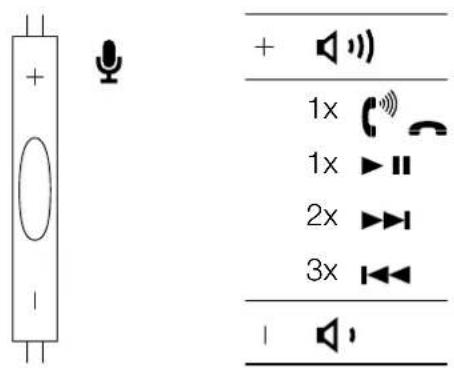
図4 マイクとオーディオの調節
natural_image
Diagram of two types of headphones with labeled parts (L and R), showing ear structure and connector details (no text or symbols beyond labels)그림 1 좌, 우 구분
natural_image
Line drawing of a human head silhouette with an ear device attached, showing anatomical alignment (no text or symbols)그림 2 이어피스 조정
3. 헤드폰 연결
natural_image
Line drawing of a hand holding a blood glucose meter connected to a cable (no text or symbols)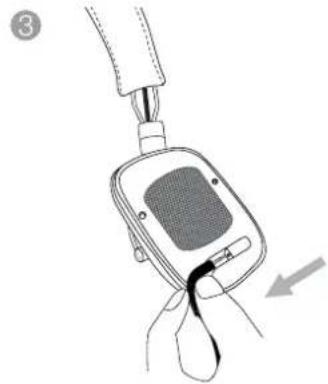
natural_image
Line drawing of a hand holding a digital blood glucose meter device with a black cable inserted, showing no text or symbols.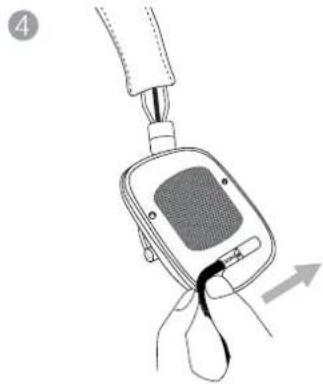
natural_image
Line drawing of a hand holding a digital blood glucose meter with a black clip, showing a force application (no text or symbols)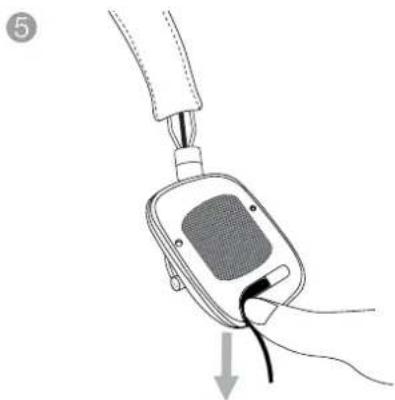
natural_image
Illustration of a hand holding a blood glucose meter connected to a device with a cable, showing a downward arrow (no text or symbols present)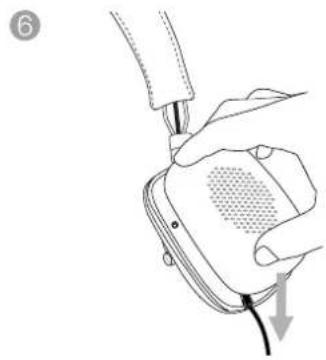
natural_image
Illustration of a hand holding a device with a cable, showing a mesh grille and cable tip (no text or symbols)그림 3
케이블 교체
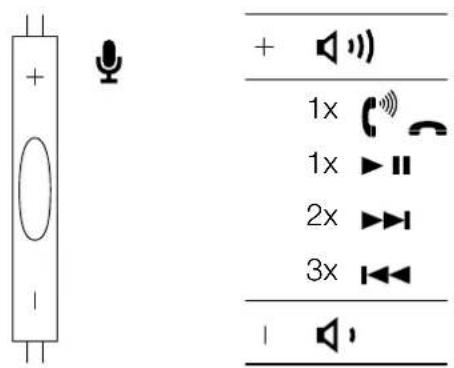
그림 4 마이크 및 오디오 컨트롤
5. P5 Series 2 청소

- P5 Series 2 Headphones
- Welcome to Bowers & Wilkins and P5 Series 2 Headphones
- P5 Series 2 Carton Contents
- Using your P5 Series 2 Headphones
- Connecting your headphones
- Using your P5 Series 2 Headphones with iPhone, iPad and iPod
- Cleaning your P5 Series 2 Headphones
- Trouble shooting
- No or intermittent audio
- Remote and mic not functioning correctly
- Low volume or poor audio quality
- Sound is only coming from one earpiece
- Safety warnings
- Technical Specifications
- 连接耳机
- 清洁P5 Series 2耳机
- 連接耳機
- 清潔P5 Series 2耳機
- 接続方法
- 헤드폰 연결
- P5 Series 2 청소
Brand : BOWERS & WILKINS
Model : P5 Series 2
Category : Earphones