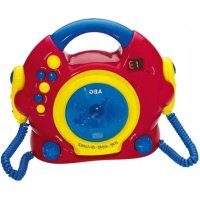
CDK 4229 - Cd player/recorder AEG - Free user manual and instructions
Find the device manual for free CDK 4229 AEG in PDF.



| Product type | CD player/recorder |
| Brand | AEG |
| Model | CDK 4229 |
| Net weight | 0.91 kg |
| Power supply | 4 UM2/R14 1.5 V batteries or DC 6 V / 5 W mains adapter |
| Power consumption | 5 W |
| Protection class | III |
| Disc formats | Audio CD, CD-R (no MP3) |
| Playback functions | Play, pause, track skip, music search, repeat one track or entire disc, track programming |
| Built-in microphone | Yes, with volume control |
| Headphone jack | Yes, 3.5 mm jack |
| Display | LED screen |
| CD compartment | Opens by tilting the lid |
| Laser safety | Class 1 laser, built-in safety switches |
| Child safety | Not suitable for children under 3 years; small parts hazard |
| Cleaning | Wipe surface with damp cloth without additives; unplug before cleaning |
| Disposal | Do not dispose of with household waste; take to a recycling center or collection point |
| Included accessories | User manual |
| Warranty | Keep the warranty certificate |
Frequently Asked Questions - CDK 4229 AEG
User questions about CDK 4229 AEG
0 question about this device. Answer the ones you know or ask your own.
Ask a new question about this device
Download the instructions for your Cd player/recorder in PDF format for free! Find your manual CDK 4229 - AEG and take your electronic device back in hand. On this page are published all the documents necessary for the use of your device. CDK 4229 by AEG.
USER MANUAL CDK 4229 AEG
D Sing Along CD-Player
NL Sing Along CD-Player
F Sing Along CD-Player
E Lector de CD Sing Along
natural_image
Red and yellow AEG CD player with blue co-plays and control buttons (no readable text or symbols on device body)CE
AEG
Overview of the Components......Page 3
Instruction Manual......Page 21
Technical Data......Page 23
Disposal Page 23
Język polski
Spis treści
4 Deutsch
Bedienungsanleitung
7 Touche ON/OFF (microphone on/off)
8 Touche PROGRAM (programmer le CD)
Thank you for choosing our product. We hope you will enjoy using the appliance.
Before using this device, carefully read this user manual and keep it together with the Warranty Certificate, cashier receipt and if possible, the original package inclusive its interior packing. If you hand on the device to any third person, include the user manual as well.
Safety instructions
Caution!
- To avoid the risk of fire or electric shock, you should not expose the device to rain or humidity. Do not use the device near water (e.g. bathroom, swimming pool, humid cellars).
- Do not use the unit in extremely hot, cold, dusty, or damp places.
- The unit is designed solely for private use and its intended purpose. This unit is not designed for commercial use.
-
Observe the following if you are using an external power supply:
-
Make sure that the power cable is not bent, pinched, or comes into contact with heat sources.
- Make sure that the power cable is not a tripping hazard.
- The power supply unit is only suitable for use in dry rooms.
- Never touch the power supply unit or the cable with wet hands.
- Only connect the power supply unit to a properly installed wall outlet. Ensure that the listed voltage matches the voltage of the wall outlet. Also ensure that the output current, voltage and the polarity of the power supply unit match the information on the connected device.
• Always install batteries in the correct direction.
- Avoid covering the device's vent openings.
- Never cover the vent holes with objects, such as magazines, tablecloths, curtains etc.
- This appliance shall not be exposed to dripping or splashing water and that no object filled with liquids such as vases shall be placed on apparatus.
- Open sources of fire, such as e.g. burning candles may not be placed onto the unit.
- Never open the device's case. Improper repairs can cause severe danger to the user. If the device becomes damaged, do not use the device but have it repaired by a qualified specialist.
- If you do not use the device for a long period of time, pull the power supply unit from the wall socket and/or remove the batteries.
These symbols may be found on the device and shall indicate the following:
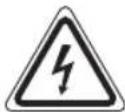
The lightning symbol warns the user of dangerously high voltages inside the case.

The exclamation mark symbol points to important instruction or maintenance remarks in the accompanying guidelines.

Devices bearing this symbol work with a "class 1 laser" for tracing the CD. The built-in safety switches should prevent the user being exposed to dangerous laser light, which is invisible to the human eye, when the CD compartment is opened.
These safety switches must not be bypassed or altered; otherwise there is a risk of being exposed to the laser beam.
Children and Frail Individuals
- In order to ensure your children's safety, please keep all packaging (plastic bags, boxes, polystyrene etc.) out of their reach.
CAUTION!
Do not allow small children to play with the foil. There is a danger of suffocation!
- This device is not intended to be used by individuals (including children) who have restricted physical, sensory or mental abilities and/or insufficient knowledge and/or experience, unless they are supervised by an individual who is responsible for their safety or have received instructions on how to use the device.
• Children should be supervised at all times in order to ensure that they do not play with the device.
Special Safety Instructions

Caution! This device works with a class 1 laser.

Caution: Not suitable for children under the age of 3. Small parts could break off and be swallowed.
Overview of the Components
1 Handle
2 PLAY/PAUSE button (Play/Pause)
3 F.SKIP button (next track)
4 B.SKIP button (previous track)
5 STOP button (Stop)
6 Microphone
7 ON/OFF switch (microphone on/off)
22 English
8 PROGRAM button (CD programming)
9 REPEAT button (Repeat mode)
10 OFF.VOL.control (volume)
11 MIC VOL control (microphone volume)
12 CD compartment
13 OPEN - catch for opening the CD compartment
14 Indicator lamp PROGRAM
15 Indicator lamp REPEAT
16 LED display
Back (not shown)
HEADPHONE – Headphone jack
DC 6V jack
Speaker
Battery compartment
Start-up of the device/introduction
Location
Select an appropriate location for the device, e.g. a dry, flat, non-slip surface on which the device can be easily operated.
Inserting the Batteries (not supplied)
- Open the lid of the battery compartment on the back by releasing the screw on the battery compartment with a screwdriver and then removing the lid.
- Insert 4 batteries of type UM2/R14 1.5 V. Please ensure that the polarity is correct (see the inside of the battery compartment)!
- Close the battery compartment again and tighten the screw.
When the batteries are flat an "E" is shown in the display. In this case please replace the complete set of batteries by new ones.
CAUTION:
- The batteries shall not be exposed to excessive heat such as sunshine, fire or the like. Danger of explosion!
- Batteries can leak and lose battery acid. If the device is not used for long periods of time, remove the batteries.
• Non-rechargeable batteries may not be charged. - Chargeable batteries may only be recharged under the supervision of an adult.
- Chargeable batteries must be removed from the toy before they are charged.
- Different battery types or new and used batteries must not be used together.
- Batteries must be inserted with the correct polarity.
- Spent batteries must be removed from the toy.
- Batteries are not to be disposed of together with domestic wastes. Dispose of the used batteries at the relevant collection bin or at your dealer's.
• The terminals may not be short-circuited.
Operation with a Power Pack (not supplied)
- Make sure that the mains voltage and the polarity of the power supply correspond with the information on the type label of the device.
- Insert the power pack into the 6 V DC / 5 W connection provided and then into a correctly installed power socket.
Transport Safety Device, CD Compartment
- Please open the CD compartment by folding open the CD compartment lid to the front.
- Before operating the machine for the first time, remove the transport safety device from the CD player if it is still in place.
Headphone Socket
If you want to listen on headphones you should use headphones with a 3.5 mm jack plug inserted into the ⏻ HEADPHONE socket. The loudspeakers are switched off.
Switching On/Off
Switch the device on by turning the volume control in a clockwise direction and then adjusting the volume to the desired level. To switch the device off, turn the control to the left until it is heard to click into place. Then remove the mains plug. You should also take out the batteries if the device is not going to be used for a prolonged period.
Playing CD's
- Open the CD compartment by folding open the CD compartment lid to the front.
- Set a CD onto the centering spindle with the printed side facing upwards, so that the CD mechanically latches into place. Then close the CD compartment lid. "-" appears in the display followed by the number of tracks. Press the PLAY/PAUSE button in order to play the CD. The CD will play from the first title.
- With F.SKIP you can jump to the next or next-but-one track etc. If the button is held down, the music search starts.
- The B.SKIP button can be used as follows:
Press once = the current track is repeated from the beginning.
Press twice = jumps to the previous track.
Press three times = plays one track before that etc. If the button is held down, the music search starts.
- In order to remove a CD, please press the STOP button, open the CD compartment and lift the CD out carefully. Always keep the CD deck closed.
NOTE:
- If a disc is incorrectly inserted - or no disc has been inserted - the symbol “--” and the word "NO" appear in the display.
- Please note these instructions for playing back CDs and CDRs in MP3 format! The device is not able to play back MP3 files. The CD begins to turn, but the sound cannot be heard.
- Playback of CDs produced by the user cannot be guaranteed due to the large variety of software and CD media available.
PLAY/PAUSE
When a CD is playing:
Playback can be briefly interrupted; the CD track flashes in the display. Renewed pressing of the PLAY/PAUSE button will re-start the playing from the same place.
REPEAT
When a CD is being played the REPEAT button has a repeat function. First start the CD and then press the REPEAT button.
Press once = (REPEAT display flashes): The current track is repeated continuously. Press twice = (REPEAT display lights up): The entire CD is repeated continuously.
Press three times = The function is deactivated.
Programmed Repeat with the PROGRAM Button
This can be used to program any desired sequence of tracks.
- Press the STOP button.
- Press the PROGRAM button. "00" appears in the display. Use the F.SKIP/B.SKIP buttons to select the desired track and then press the PROGRAM button again.
- Select the next track with the F.SKIP/B.SKIP buttons and press the PROGRAM key again. Repeat the procedure until all the desired tracks are selected.
- Press the PLAY/PAUSE button. The playback starts.
- Press once the STOP key to stop the playback while retaining the program.
- In order to play the programme again, first press the PROGRAM button once and then the PLAY/PAUSE button.
- In order to delete the programme (in stop mode) first press the PROGRAM button and then keep the STOP button pressed down for approximately 3 seconds. The total number of tracks is shown in the display.
The device stops automatically once the entire sequence of programmed tracks is completed. The programmed order of tracks remains in the memory until the CD is removed from the CD compartment or the device is switched off.
Cleaning and Maintenance
CAUTION:
Never immerse the device in water.
- If using an external power supply, disconnect the mains plug before cleaning.
- Stains on the outside of the device can be wiped off with a moist cloth without any additives.
Technical Data
Model: CDK 4229 Battery operation: 4 x 1.5V, Type UM2/R14 Mains operation: DC 6 V / 5 W / Polarity ⊖→⊕ Power consumption: 5 W Protection class: III Net weight: approx. 0.91 kg
The right to make technical and design modifications in the course of continuous product development remains reserved.
This device has been tested according to all relevant current CE guidelines, such as electromagnetic compatibility and low voltage directives, and has been constructed in accordance with the latest safety regulations

Disposal
Meaning of the "Dustbin" Symbol
Protect our environment: do not dispose of electrical equipment in the domestic waste.
Please return any electrical equipment that you will no longer use to the collection points provided for their disposal.
This helps avoid the potential effects of incorrect disposal on the environment and human health.
This will contribute to the recycling and other forms of reutilisation of electrical and electronic equipment.
Information concerning where the equipment can be disposed of can be obtained from your local authority.
CTC Clatronic Sp. z o.o
- Język polski
- Spis treści
- Deutsch
- Bedienungsanleitung
- Safety instructions
- Caution!
- Children and Frail Individuals
- Special Safety Instructions
- Overview of the Components
- English
- Start-up of the device/introduction
- Location
- Inserting the Batteries (not supplied)
- CAUTION:
- Operation with a Power Pack (not supplied)
- Transport Safety Device, CD Compartment
- Headphone Socket
- Switching On/Off
- Playing CD's
- NOTE:
- PLAY/PAUSE
- REPEAT
- Programmed Repeat with the PROGRAM Button
- Cleaning and Maintenance
- Technical Data
- Disposal
- Meaning of the "Dustbin" Symbol
Brand : AEG
Model : CDK 4229
Category : Cd player/recorder