EasyManual
CDM1090 - Drill Ferm - Free user manual and instructions
Find the device manual for free CDM1090 Ferm in PDF.



User questions about CDM1090 Ferm
0 question about this device. Answer the ones you know or ask your own.
Ask a new question about this device
Download the instructions for your Drill in PDF format for free! Find your manual CDM1090 - Ferm and take your electronic device back in hand. On this page are published all the documents necessary for the use of your device. CDM1090 by Ferm.
USER MANUAL CDM1090 Ferm
Original instructions
04
DE
Thank you for buying this Ferm product.
By doing so you now have an excellent product, delivered by one of Europe's leading suppliers. All products delivered to you by Ferm are manufactured according to the highest standards of performance and safety. As part of our philosophy we also provide an excellent customer service, backed by our comprehensive Warranty. We hope you will enjoy using this product for many years to come.
The numbers in the text refer to the diagrams on pages 2-3.

Read the operating instructions carefully before using this device. Familiarise yourself with its functions and basic operation. Service the device as per the instructions to ensure that it always functions properly. The operating instructions and the accompanying documentation must be kept in the vicinity of the device.
Contents
- Machine information
- Safety instructions
- Mounting accessories
- Operation
- Service & maintenance
1. MACHINE INFORMATION
Technical specifications
Voltage 18 V
三
Charger voltage 230 V
Charger frequency 50 Hz
Battery output 1.3 Ah
Charging time 3-5 hour
Drill speeds 2
Max. torque (low speed) 15 Nm
No-load speed Position I 0-400/min
Position II 0-1150/min
Chuck capacity 0.8 - 10 mm
Weight (incl. battery) 2.0kg
Lpa (acoustic pressure) 80.0 dB(A)
Lwa (acoustic power) 91.0 dB(A)
Vibration 1.399 m/s2
Vibration level
The vibration emission level stated in this instruction manual has been measured in accordance with a standardised test given in EN 60745; it may be used to compare one tool with another and as a preliminary assessment of exposure to vibration when using the tool for the applications mentioned
- using the tool for different applications, or with different or poorly maintained accessories, may significantly increase the exposure level
- the times when the tool is switched off or when it is running but not actually doing the job, may signifi cantly reduce the exposure level
Protect yourself against the effects of vibration by maintaining the tool and its accessories, keeping your hands warm, and organizing your work patterns
Contents of packing
1 Cordless drill
2 Batteries
1 Battery charger
2 Double-sided bits
1 Operating instructions
1 Safety instructions
1 Warranty card
Check the appliance, any loose parts and accessories for damage caused during transport.
Product information
Fig. A
- On/off switch
- Speed selector switch
- Torque setting ring
- Chuck
- Battery
- Direction switch
2. SAFETY INSTRUCTIONS
Explanation of the symbols

Denotes risk of personal injury, loss of life or damage to the tool in case of non-observation of the instructions in this manual.

Indicates electrical shock hazard.

The number of revolutions of the machine can be electronically set.

Do not use in rain.

Indoor use only.
Ni-Cad batteries can be recycled. Drop them off at a disposal center for chemical wastes, so that they can be recycled or disposed of in an eco-friendly manner.


Always recycle batteries
risk an accident.
- Before cleaning or servicing the charger or battery block, always pull the plug from the charger socket.
- Never charge the battery block when the ambient temperature is below 5^ or above 40^ .
- The air vents in the charger must never be blocked.
- The battery block must not be short-circuited.

A short-circuit will cause a high current to flow. This may result in overheating, the danger of fire or explosion of the battery block. This may damage the battery block or the user may risk an accident.
Important safety notes on charger and battery block

If you come in contact with acid from the battery block, rinse it off with water immediately. If acid gets into your eyes, rinse out your eyes at once with water and contact a doctor immediately!
- Read and note the operating instructions and safety notes for the charger and battery block before use!
- NB! Only use the charger and battery block that were supplied by the manufacturer - otherwise you will risk an accident.
- Protect the charger, battery block and power tool from moisture, e.g. rain or snow.
- Always check that all cables are connected correctly before using the charger.
- If you discover that a cable is damaged, you should not use the charger again. Have the damaged cable replaced immediately.
- When the charger is not in use, the mains plug should be removed from the power socket. Do not pull out the plug by grasping the cable.
- If the charger has been dropped or has otherwise been exposed to high mechanical stresses, you should have it checked for damage by an authorised dealer before using it again. Damaged parts should be repaired.
- Exercise caution when handling the battery block and do not drop it or expose it to impacts.
- Never attempt to repair the charger or battery block yourself. Repairs must always be carried out by an authorised dealer - otherwise you
Therefore:
- Do not connect any cables to the poles of the battery block.
Take care that there are no metal objects (nails, paper clips, coins, etc.) on the contact surface of the battery block. -
Do not expose the battery block to water or rain.
Only use the battery block supplied in combination with this cordless drill/ screwdriver so as to avoid faults and/or risks to persons. -
A damaged battery block or one that can no longer be charged must be disposed of as special waste. Do not discard it with household waste.
- Never throw the battery block onto a fire or into water. This will risk explosion!
Electrical safety

Always check that the voltage on the battery block corresponds to the voltage on the rating plate. Also check that your mains voltage corresponds to the input voltage of the battery charger.

Class II machine - Double insulation - You don't need any earthed plug.
Replacing cables or plugs
Immediately throw away old cables or plugs when they have been replaced by new ones.
- Remove the battery block when the power tool is not being used and prior to maintenance.
- The tool is suitable for use as a screwdriver and drill. Any other application is specifically excluded.
3. MOUNTING ACCESSORIES

Prior to mounting an accessory always remove the battery.
Fitting and removing drill cutters Fig.B
In addition to screwdriver bits with a hexagonal shaft, this tool can also accommodate drill bits with a hexagonal shaft.
- Loosen the drill chuck (4) by rotating the hand-grip (9).
- Insert the shaft of the drill cutter into the chuck.
- Tighten the drill chuck so that the drill cutter is firmly clamped.
- Rotate the drill chuck in the opposite direction when you wish to change the cutter.
Connecting and removing the battery Fig. C

Ensure that the exterior of the battery block or tool is clean and dry before connecting the charger.
- Ensure that the direction reversing switch (6, Fig. A) is in the central position in order to prevent the appliance from being switched on unexpectedly.
- Insert the battery (5) into the base of the appliance, as shown on the illustration. Push the battery until it latches in.
- Press the locking buttons (10) on both sides before removing the battery, and disengage the battery from the base of the appliance.
4. OPERATION

Always follow the safety notes and the relevant safety code.
Hold the appliance firmly and press the drill steadily onto the workpiece. Do not overload the appliance. Only use drills with no visible wear.
Worn drills will have a bad effect on the functioning of the appliance.
Adjusting the speed
Fig. D
The appliance has two drill speeds.
- For slow drilling or for driving or removing screws, set the speed selection switch (2) to '1'.
- For fast drilling set the speed selection switch to '2'.

Never switch over when the motor is running!
Adjusting the torque
Fig. E
The appliance has 16 different torque settings with which to set the power for driving and removing screws.
- Set the torque adjustment ring (3) to the desired position. The available torque settings are indicated on the adjustment ring by the numbers 1 to 8 and by dots between the figures to define intermediate settings (16 in total).
- You should preferably choose a setting as low as possible when using the screwdriver. Select a higher setting if the motor slips.
Driving and removing screws
- Set the direction reversing switch (6) to position 'R' in order to drive screws.
- Set the direction reversing switch to position 'L' in order to remove screws.
Drilling
- Rotate the torque adjustment ring (3) to the drilling position.

Ensure that the direction reversing switch (6) is always set to 'R' during drilling.
Switching the device on and off
Fig. A
- Depress the on/off switch (1). It regulates the speed of the appliance by transmitting power to the switch.
-
Release the on/off switch (1) to halt the drill chuck immediately which will no longer run on.
-
Move the direction reversing switch (6) to the centre in order to lock the appliance in its disabled state.
Only lay down the appliance when it has stopped running completely. Do not place it on a dusty surface as particles of dust could get into the mechanism.
Charging the battery
- The included battery is delivered in partly charged condition.
Only use the battery charger in a temperature range between +5^ to +40^ . - Only use the battery charger in dry, ventilated rooms.
Charging
Fig. F
- Place the battery holder on a flat table and put the battery in the battery holder. Pay attention to + and - pole markings.
- Put the adapter plug of the net adapter in the connector on the side of the battery holder.
- Put the net adapter in the socket.
- The red charging lamp on the battery holder will illuminate indicating the battery is being charged.
- The charging process of a fully discharged battery will take approximately 5 hours the first time and afterwards approximately 3 hours.

After the charging time the red light will not switch off automatically! Remove the battery within 5 hours from the charger. If the battery is not removed from the charger after the charging period it may become overheated.
Discharging the battery

Not only charging batteries is important, discharging is of equal importance or even greater importance.
- When the battery is charged the cordless drill has to be used until you start noticing that the power of the drill is diminishing and that the maximum rotational speed is not reached.
The battery is almost discharged now. Only now you can start charging the battery. - Charging the battery while it is still charged for say one-third of capacity, the so-called 'memory effect' can occur. Since during
charging only the discharged part of the battery capacity of the battery is being charged now, the battery can start crystallizing in the one-third that is still charged. This part of the battery capacity can never be used afterwards.
- Do not discharge the battery to the minimum. As soon as you notice that the power or the maxi mum rotational speed is diminishing, you have to charge the battery. When you proceed using the drill and the battery becomes fully discharged, the so-called 'switch of poles effect' can occur. The polarity of the battery poles will be switched: the +' will become - and the -' will become the + . Once this has occurred the polarity will remain switched during loading and this will damage the battery irreparable.

When the cordless drill is not being used over a longer period of time, the battery has to be charged fully first. The battery has to be stored in charged condition.
5. SERVICE & MAINTENANCE

Make sure that the machine is not live when carrying out maintenance work on the motor.
These machines have been designed to operate over a long period of time with a minimum of maintenance. Continuous satisfactory operation depends upon proper machine care and regular cleaning.
Cleaning
Keep the ventilation slots of the machine clean to prevent overheating of the engine. Regularly clean the machine housing with a soft cloth, preferably after each use. Keep the ventilation slots free from dust and dirt. If the dirt does not come off use a soft cloth moistened with soapy water. Never use solvents such as petrol, alcohol, ammonia water, etc. These solvents may damage the plastic parts.
Lubrication
The machine requires no additional lubrication.
Faults
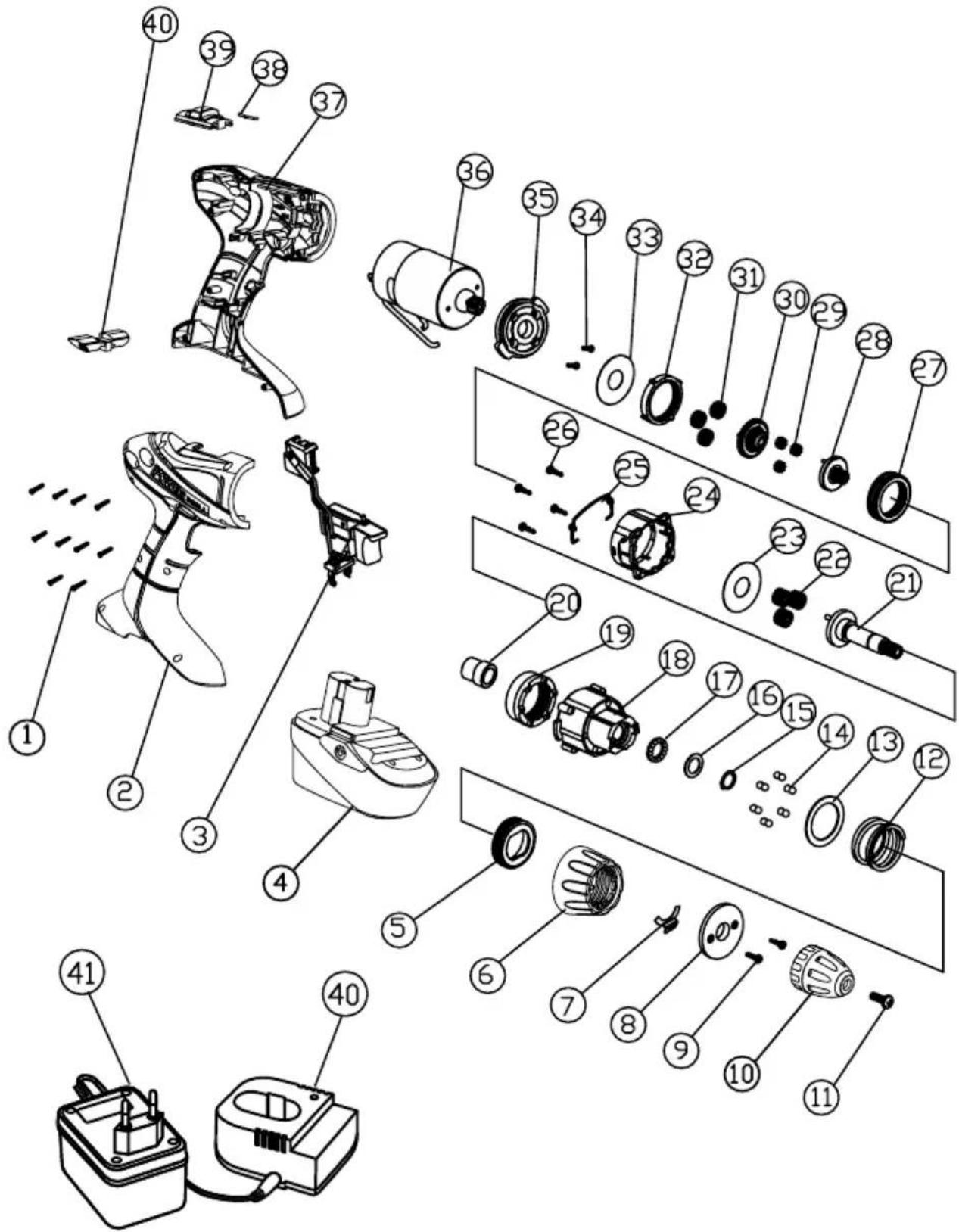
Should a fault occur, e.g. after wear of a part, please contact the service address on the warranty card. In the back of this manual you find
an exploded view showing the parts that can be ordered.
Environment
To prevent damage during transport, the appliance is delivered in a solid packaging which consists largely of reusable material. Therefore please make use of options for recycling the packaging.

Faulty and/or discarded electrical or electronic apparatus have to be collected at the appropriate recycling locations.
Warranty
The warranty conditions can be found on the separately enclosed warranty card.
AKKU-BOHRSCHRAUBER
Specifications techniques
Tension 18 V
一
Para出击 this situation:
5. ASSISTÊNCIA E MANUTENÇÂO

Lpa (aenpaine) 80.0 dB(A)
5. SERVICE OG VEDLIKEHOLD

It is our policy to continuously improve our products and we therefore reserve the right to change the product specification without prior notice.
Ferm BV · Lingenstraat 6 · 8028 PM · Zwolle The Netherlands
Spare parts list
No. Description Position
| 400811 Switch 3 | |
| CDA1044 FDCDB-1800 Battery, 18V, 1.3Ah 4 | |
| 400813 Gearbox assembled 5 TILL 9 | |
| 400805 Chuck 10 | |
| 409283 Left screw M5 X 20 11 | |
| 409960 Gear box cover 24 | |
| 400824 Motor 36 | |
| 300782 Charger base 40 | |
| 300783 Charger adaptor | 41 |
Exploded view