PPA100BTW - Speaker PEAQ - Free user manual and instructions
Find the device manual for free PPA100BTW PEAQ in PDF.



| Product Type | 2.0 Active Speaker |
| Brand | PEAQ |
| Model | PPA100BTW |
| Output Power | 36 W RMS (18 W x 2) |
| Frequency Response | 30 Hz – 20 kHz |
| Signal-to-Noise Ratio | > 75 dB |
| Harmonic Distortion | < 0.5 % at 1 W, 1 kHz |
| Speakers | Tweeter 1" × 2 (10 W each), Woofer 3.5" × 2 (20 W each) |
| Connectivity | Bluetooth 2.1+EDR (profiles A2DP, AVRCP), RCA input (via 3.5 mm adapter) |
| Power Supply | AC adapter 18 V DC, 2 A (AC input 100‑240 V ~ 47/63 Hz) |
| USB Charging Port | 5 V, 1 A (compatible with smartphones and media players) |
| Control Functions | Volume knob, play/pause buttons, fast forward, fast backward, source selector |
| LED Indicators | Bluetooth LED, line input LED, Bluetooth sync LED |
| System Power | 18 V DC, 2 A |
| Operating Temperature | Below 45 °C |
| Magnetic Shielding | Yes (can be placed near an LCD screen without distortion) |
| Safety | Double insulation (Class II), splash-proof, detachable power cord |
| Care and Cleaning | Unplug the device, clean with a soft dry cloth. Do not use abrasive products. |
| Included Accessories | 1 stereo 3.5 mm – 2 RCA cable, 1 AC adapter, 1 speaker interconnection cable, user manual |
Frequently Asked Questions - PPA100BTW PEAQ
User questions about PPA100BTW PEAQ
0 question about this device. Answer the ones you know or ask your own.
Ask a new question about this device
Download the instructions for your Speaker in PDF format for free! Find your manual PPA100BTW - PEAQ and take your electronic device back in hand. On this page are published all the documents necessary for the use of your device. PPA100BTW by PEAQ.
USER MANUAL PPA100BTW PEAQ
Bluetooth Loudspeaker PPA100BT-B/W
DE Bedienungsanleitung
EL Osnyicxponc
EN User Manual
ES Manual de instructaciones
FR Mode d'emploi
HU Kezelési lefrás
IT Manuale dell'utente
NL Gebruiksaanwijzing
PL Instrukcja obslugi
PT Instruções de utilização
RU RykoBoDCTBO NOJIb3OBaTeJIA
SV Bruksanvisning
TR Kullanim Kilavuzu
ZH 用户手册
Deutsch 2-11
Eaynvika 12-21
English 22-31
Espanol 32-41
Francais 42-51
Magyar 52-61
Italiano 62-71
Nederlands 72-81
Polski 82-91
Portugues 92-101
Pycckn y3bIK 102-111
Svenska 112-121
Türkce 122-131
汉语 132-141
1 EvεiEthernet Sync LED
2 'Evδειη Line IN LED
3 'Evδειη Bluetooth LED
4 Eunoyea nynic
5 'Evtaon n'xou
6 Avanapaywyn/naun
7 Frnyopn Takivnon niow
8 Frnyopn eTakivon unpootá
Eπionμavon aσφαλεία
IMPORTANT SAFETY INSTRUCTIONS
READ CAREFULLY AND KEEP FOR FUTURE REFERENCE.
The lightning flash with arrowhead within an equilateral triangle is intended to alert the user to the presence of uninsulated "dangerous voltage" inside the enclosure of this appliance, which may be of sufficient magnitude to constitute a risk of electric shock to persons.
The exclamation point within an equi-lateral triangle is intended to alert the user to the presence of important operating and maintenance instructions in the literature accompanying this appliance
- For safety reasons, this class II appliance is provided with double or reinforced insulation as indicated by this symbol.
Before connecting the appliance to a socket outlet, make sure the voltage indicated on the appliance corresponds to your local mains.
The MAINS plug is used as the disconnect device; the disconnect device shall remain readily operable.
If the supply cord is damaged, it must be replaced by the manufacturer or its service agent or similarly qualified person in order to avoid hazard.
WARNING: To reduce the risk of fire or electric shock, do not expose this appliance to rain or moisture. The apparatus shall not be exposed to dripping or splashing and no objects filled with liquids, such as vases, shall be placed on the apparatus.
- Regularly check if the supply cord, appliance or extension cable are defective. If
found defective, do not put appliance into operation. Immediately pull the plug.
-
Place the supply cord and, if necessary, an extension cable in such a way that pulling or tripping over it is impossible. Do not allow the supply cord to hang down within easy reach.
-
Do not jam, bend or pull the supply cord over sharp edges.
-
Protect the supply cord from being walked on or pinched particularly at the plug, convenience receptacles and the point where it exits from the appliance.
-
Never pull the plug by the supply cord or with wet hands.
-
Disconnect the mains plug in case of faults during use, during lightening storms, before cleaning and when not using the appliance for a longer period of time.
-
The appliance may not function properly or not react to the operation of any control due to electrostatic discharge. Switch off and disconnect the appliance; reconnect after a few seconds.
Refer all servicing to qualified service personnel. Do not attempt to repair the appliance yourself. Servicing is required when the appliance has been damaged in any way, such as the supply cord or plug are damaged, liquid has been spilled, objects have fallen into the appliance, the enclosure is damaged, the appliance has been exposed to rain or moisture, does not operate normally, or has been dropped.
-
Upon completion of any service or repairs to this product, ask the service technician to perform safety checks to determine that the product is in proper operating condition.
-
Do not use attachments or accessories other than recommended by the manufacturer or sold with this appliance. Install in accordance with this user manual.
-
When installing the appliance, leave sufficient space for ventilation. Do not install in bookcases, built-in cabinets or the like.
- The ventilation should not be impeded by covering the ventilation openings with items, such as newspapers, table-cloths, curtains, etc. Do not insert any objects.
- No naked flame sources, such as lighted candles, should be placed on the apparatus.
- Do not place any electronic equipment or toys on the appliance. Such items could fall from the top and cause product damage and/or personal injury.
- Do not install near any heat sources such as radiators, heat registers, stoves or other appliances (including amplifiers) that produce heat
- Do not apply excessive force to the front or top, as this could ultimately overturn the appliance.
- Do not shift or move the appliance when powered on.
- Do not touch, push or rub the surface of the appliance with any sharp or hard objects.
- Do not move the appliance from cold into warm places and vice versa. Condensation can cause damage to the appliance and electrical parts.
- For appliances with earphone jack: DANGER! Excessive sound pressure from earphones and headphones can cause hearing loss. If you listen to loud music for a long time, your hearing may be impaired. Set to moderate volume.
- For appliances with USB function: Reset appliance by disconnecting USB device from appliance in case of malfunction.
-
For appliances with USB function: If an USB data storage medium malfunctions as a result of electrostatic discharge and momentary electrical surges, disconnect the device from the appliance.
-
For appliances / accessories intended for use of batteries:
- CAUTION! Danger of explosion if batteries are incorrectly replaced. Replace only with the same or equivalent type. Observe correct polarity.
- Batteries (battery pack or batteries installed) shall not be exposed to excessive heat such as sunshine, fire or the like. Protect from mechanical shock. Keep dry and clean. Keep away from children.
- Do not open, dismantle, shred or short-circuit batteries. Do not mix old and new batteries.
- Dispose of properly. Pay attention to environmental aspects of battery disposal. Do not dispose of in household waste.
- Refer to safety and other instructions on the battery or its packaging.
Main unit
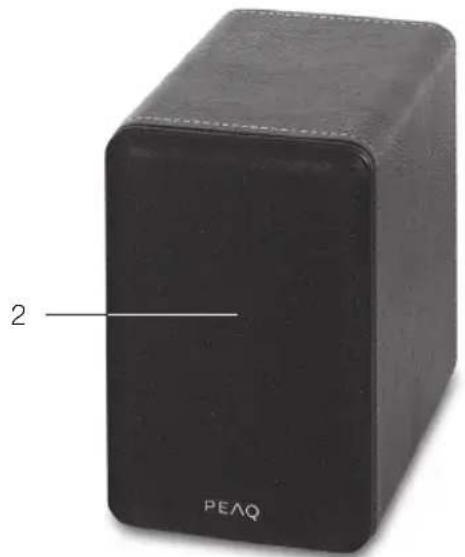
Left Speaker
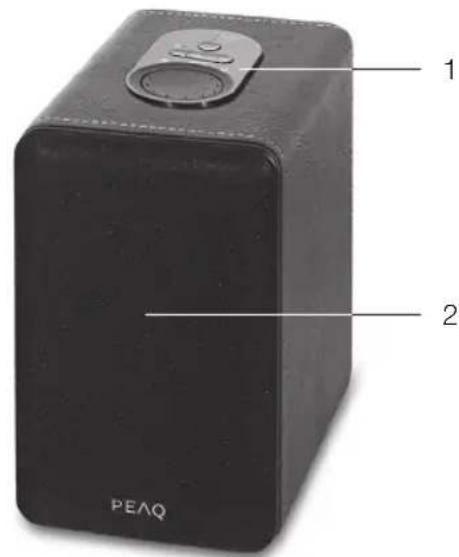
Right Speaker

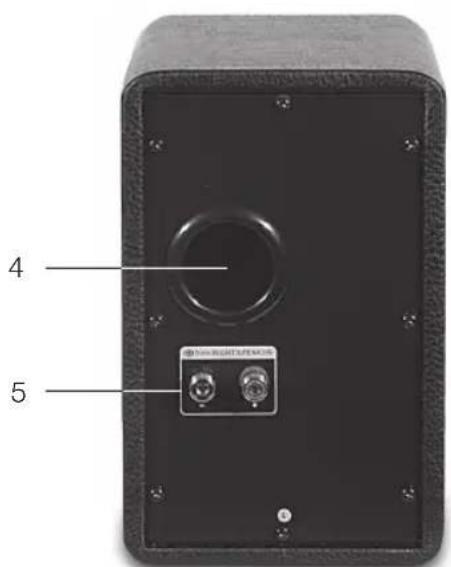
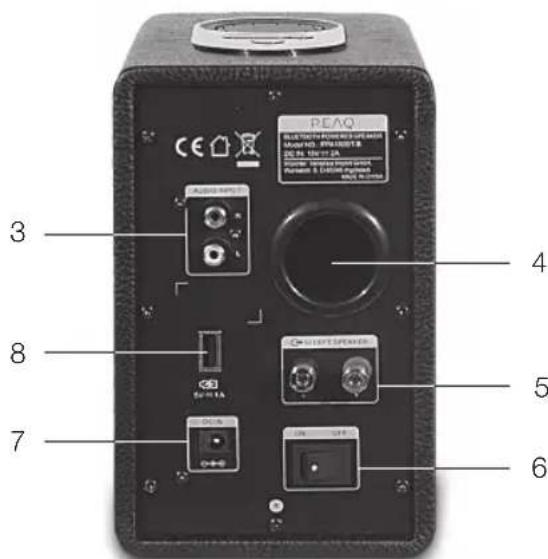
1 Top panel
2 Speaker grille
3 Audio input
4 Bass reflex tunnel
5 Terminal binding post
6 Power switch
7 DC power socket
8 USB charging port
Accessories
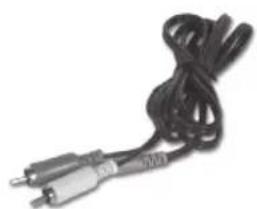
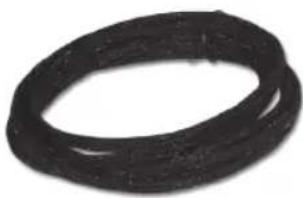
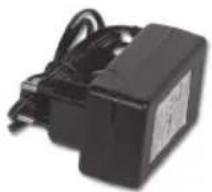
1x 3.5 mm stereo - 2 RCA cable
1x Power adapter
1x Interconnect speaker cable
1x User Manual
Top panel
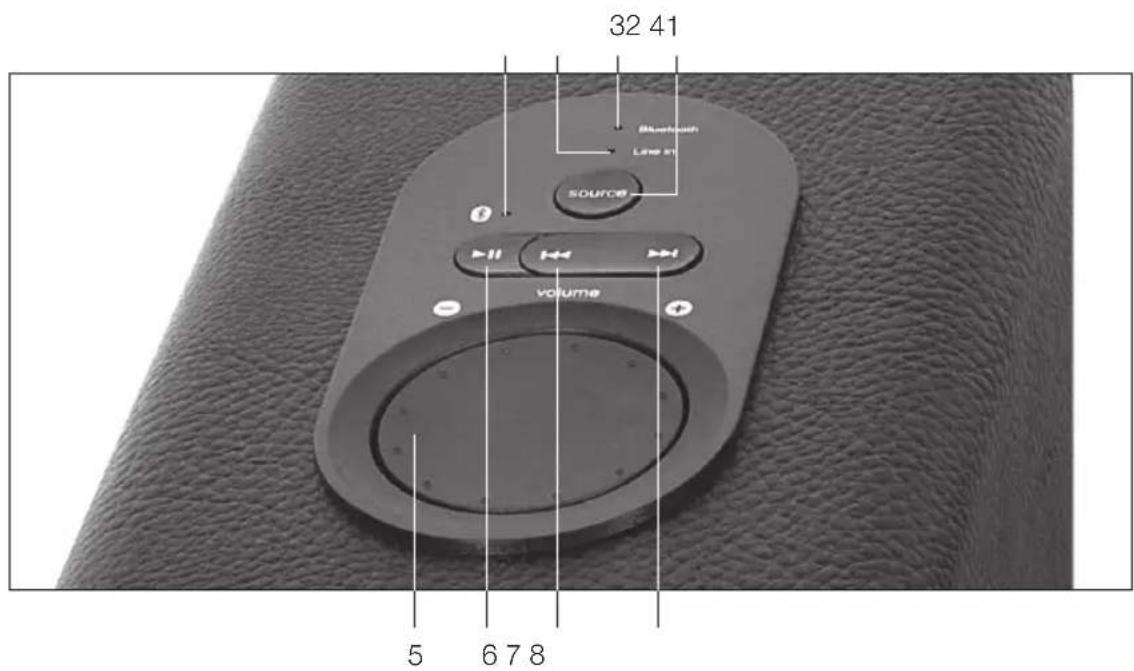
1 Bluetooth Sync LED
2 Line IN LED
3 Bluetooth LED
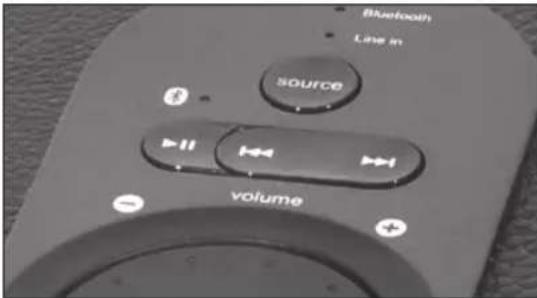
4 Source selector
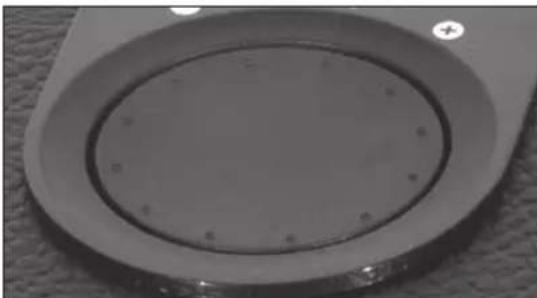
5 Master volume
6 Play/Pause
7 Fast backward
8 Fast forward
Safety remark
Important safety instructions. Read carefully and keep for future reference.
The lightning flash with arrowhead within an equilateral triangle is intended to alert the user to the presence of uninsulated "dangerous voltage" inside the enclosure of this appliance, which may be of sufficient magnitude to constitute a risk of electric shock to persons and animals.
The exclamation point within an equilateral triangle is intended to alert the user to the presence of important operating and maintenance instructions in the literature accompanying this appliance.
To reduce the risk of fire or electric shock, do not expose this appliance to rain or moisture. The appliance shall not be exposed to dripping or splashing. Objects filled with liquids, such as vases, shall not be placed on appliance.
Connections
SPEAKERS
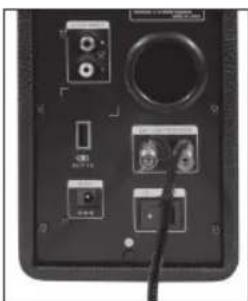
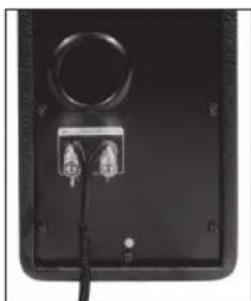
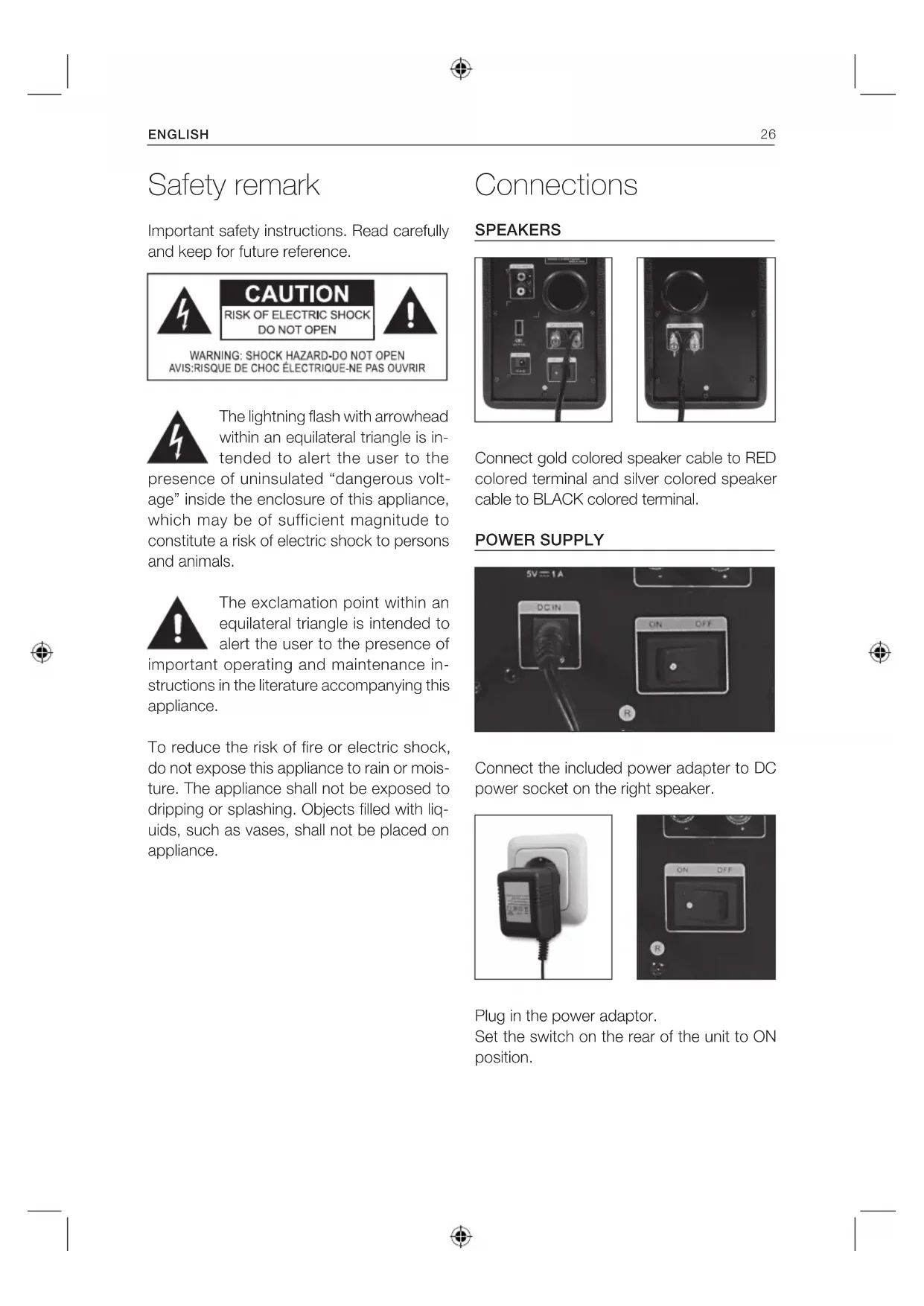
Connect gold colored speaker cable to RED colored terminal and silver colored speaker cable to BLACK colored terminal.
POWER SUPPLY
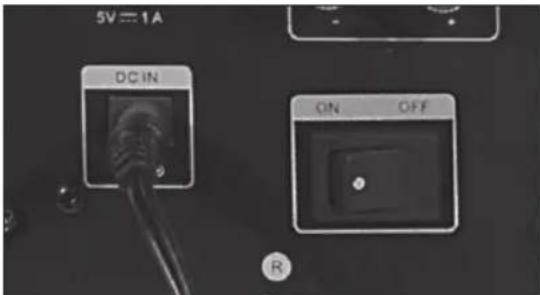
Connect the included power adapter to DC power socket on the right speaker.
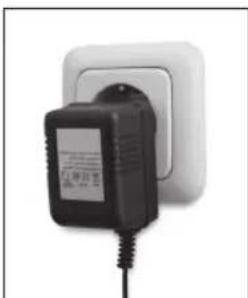
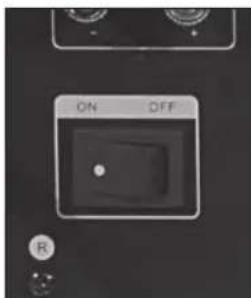
Plug in the power adaptor. Set the switch on the rear of the unit to ON position.
Sources
BLUETOOTH SOURCES
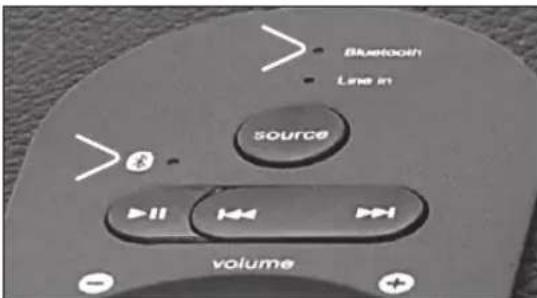
-
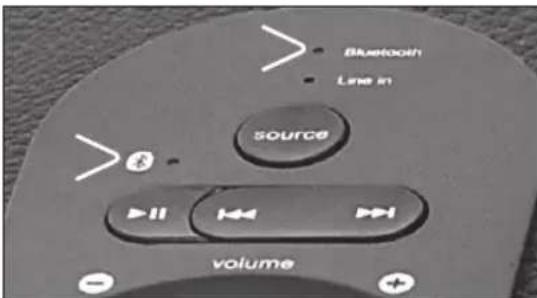
The Bluetooth LED lit up in blue, and the pairing sequence initiates after 10 seconds with Bluetooth Sync LED blink between red and blue colours rapidly. The Bluetooth mode is the default source selection. Pairing sequence begins after 10 seconds. The system will detect previous paired device within the first 10 seconds.
-
Pair with Bluetooth music devices (skip this step if appliance remembered your music device)
IPHONE, IPAD OR IPOD
Go to setting page from your advice (SETTINGS) > select GENERAL > enable BLUE-TOOTH > select PPA100BT.
ANDROID PHONE
Go to setting page from your Android Phone (SETTINGS) > select WIREFLESS & NETWORKS > enable BLUETOOTH > select PPA100BT.
OTHERS
Read the instruction manual came from your device (enter the pairing code "0000" if prompted).
NOTE: Paired successfully the Bluetooth LED will blink once every 5 to 6 seconds.
WIRED SOURCES
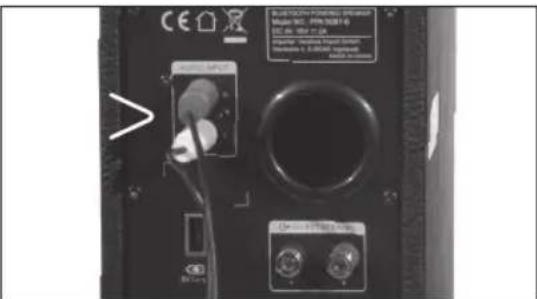
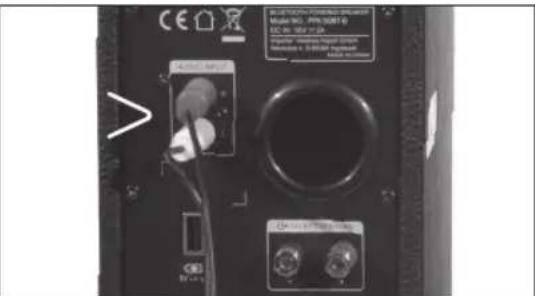
Connect the playback device with the included cable set (red, white) to the RCA input interfaces. These are located at the rear panel of the right speaker.
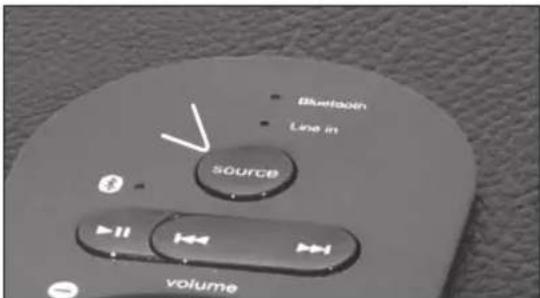
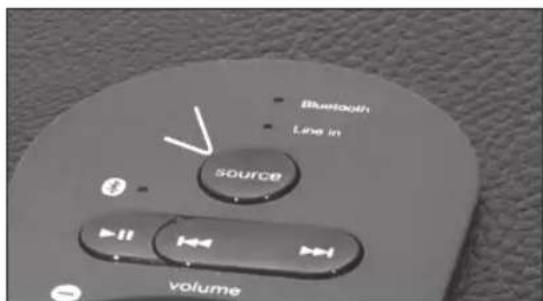
Press the SOURCE button and the Line IN LED lit up. The system is now ready to receive audio via wired connection from your media player.
Operations
CHANGE THE BLUETOOTH PLAYBACK DEVICE
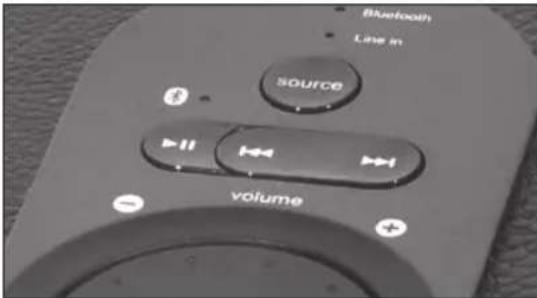
Simply turn off the Bluetooth signal in the first playback device. Depress the playback button at the top panel for several seconds to disconnect the previous Bluetooth device. The system will restart the pairing sequence again. Press and hold the PLAY/PAUSE button for 3 seconds. Bluetooth Sync LED blink between red and blue colours rapidly.
VOLUME DIAL
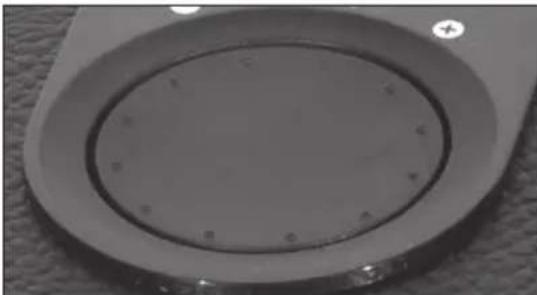
Can be rotated to increase or decrease the volume level with the blueLED blinking as you turn. Once the level hit either range limits, the blue LED will pause.
CONTROL BUTTONS
On the top panel you can control the music playback on the Bluetooth device. PLAY/ PAUSE button can initiate playback or stop on the playback device. Fast Forward button will skip to the next track, and Fast Backward for skipping to previous track.
There remote control functions work on Bluetooth devices supporting AVRCP profile only. Compatible with iOS 4.1 or later, Android 1.5 or later, and Windows Mobile 5.0 or later systems.
USB CHARGER PORT
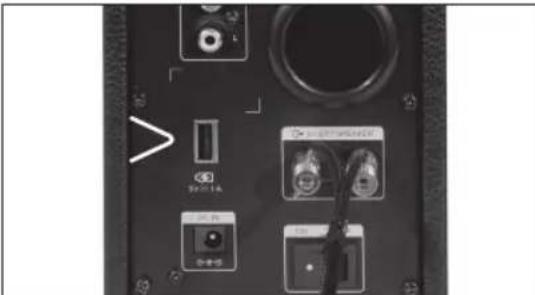
Lets you charge your media player/phones via an USB type A interface.For charging method, please refer to your media player instruction manual.
Specifications
| Amplifier | |
| Output Power 36 Watt RMS | |
| Power distribution: 18 Watt x2 | |
| Harmonic distortion: < 0.5 % 1 W | 1 kHz |
| Frequency response: 30Hz - 20 kHz | |
| Signal/ Noise ratio: > 75 dB | |
| Separation: > 45 dB | |
| Speakers | |
| Tweeter driver type: 1" x 2 | |
| Tweeter rated power: 10 Watt x2 | |
| Bass driver type: 3.5" | |
| Bass rated type 20 Watt x2 | |
| Interfaces | |
| Output: Terminal binding posts | |
| Input: 10 Watt x2 | |
| Bass driver type: 2RCA | |
| Bass rated type 20 Watt x2 | |
| Bluetooth®Wireless Technology 2.1+EDR (Enhanced Data Rate), A2DP and AVRCP profiles | |
| Power | |
| Power supply: System: DC 18 V | 2A ---Power adapter: AC 100 V - 240 V ~ 47/63 Hz 1A |
| USB rating: | 5V, 1A |
| USB extension cables are not supported | |
| Not suitable for charging IPads. | |
| Operating/ambient temperature: | less than 45°C |
Frequently Asked Questions (FAQ)
| Solutions | |
| No Sound | -Check if the audio source is working well-Check if the audio and speaker cables well connected-Check if the Bluetooth profile is supported, and is connected successfully |
| One or more speaker has no sound | -Check if the speaker cable is connected correctly, and ensure the source is connected successfully. |
| Static sound heard when volume knob is turned | -Turn off the playback source first, then turn the speaker volume knob several times. Playback again and monitor.The static noise is due to dust, so simply turning the volume will remove it easily. |
| What are the products supported? | -Any playback devices that support Bluetooth audio profiles,and analog connection to PC, notebook, CD/DVD player,media players with 3.5mm stereo output socket. |
| Sound is distorted | -Check if the source file is not corrupted and the bit rate is above 192 for better song performance, try playing adifferent song track and test. |
| Where to place this speaker system? | -It is magnetically shielded so can be placed near any LCD TV monitor without any distortion. It should preferably place left and right position of the listener,equally spaced to achieve stereo effect. It should also be placed near an AC power source for its operation |
If the problem still exists, please contact the distributor or seek professional advice.
INTENDED USE
This appliance is intended for recieving and playing audio and video signals. Only use according to these instructions. Improper use is dangerous and will void any warranty claim. Observe the safety instructions. Do not use outdoors.
BLUETOOTH
The Bluetooth word mark and logos are registered trademarks owned by Bluetooth SIG, Inc. and any use of such marks by PEAQ is under license. Other trademarks and trade names are those of their respective owners.
DISPOSAL
The crossed-out wheeled bin logo requires the separate collection of waste electric and electronic equip
ment (WEEE). Electric and electronic equipment may contain dangerous and hazardous substances. Do not dispose of this appliance as unsorted municipal waste. Return it to a designated collection point for the recycling of WEEE. By doing so, you will help to conserve resources and protect the environment. Contact your retailer or local authorities for more information.
IPHONE, IPAD OU IPOD
Risk of electric shock! Do not open

CAUTION: To prevent the risk of electric shock, do not remove cover (or back). No user-serviceable parts inside. Refer servicing to qualified service personnel.
Risk of electric shock! Do not open

CAUTION: To prevent the risk of electric shock, do not remove cover (or back). No user-serviceable parts inside. Refer servicing to qualified service personnel.
1 Bluetooth Sync LED
2 Line IN LED
3 Bluetooth LED
4 Bron selector
IPHONE, IPAD OU IPOD
Risk of electric shock!
Do not open

CAUTION: To prevent the risk of electric shock, do not remove cover (or back). No user-serviceable parts inside. Refer servicing to qualified service personnel.

CIMBOJ MOJIHN CO CTpeKoB BHyTpnpaB-HOCTOPOHHERTOpeYrOblHnKa Cnyknt, TTo6bI
PnBHe BHMMAHMe NOBaTeJI K HAIHNO HEN3OJNPOBaHHOro "Onachoro HAnpXeHn" BHyTpN 3TOrO Pn6Opa, BeINHHa KOTOPo MOxET 6bITb DOCTaTOHON DnI NOPaXeHn IIOEi TOKOM.

BockJIuIaTeIbHbI 3HaK BHyTpI paBHocToPOnHero TpeYroJIbHnKa ClyXnT, YTObI npI
BInb BINMaHHe NIOJIb3OBATeJI K BaXHOI OtnepaUIMn Yka3aHmM NO 06CnyKmbHIO B IInTepaType, CoPBOxKaIouSeI 3TOT nPbOp.
JaHHbI CnMBoI 063HaHaET, YTO no COO6paxeHnA M 6e3OpacHOCTN B ATOM PnIOBope KnaCCa IINCNoJIb3yETcR DAOBHAR NIN yCINHeHHa N3OJIaMnI
Ipeed noKJIouHHeM np60pa K cTeBOi po3eTke y6eNTecb, YTO HApJKeHne, Yka3aHHoe Ha CAMOM np6Ope, COOTBETCTByET HApJKeHIO B JOKaJIbHOI CETN 3JIeKTpONITAHIN.
CeteboiTEnceIbNCIOJIb3yETcBAKaeCTBe pa3beINHITeJIpa3beINHITeJIdoJIkeH BcERda HaxoNTbcBRAICPABHOM COCTOHN.
B Cnyae NOBpeKdEHNcIIOBOrO Ka6eJI Heo6XoIMo, YTO6bI IPOIN3BOIDNTeJIb, ERO cepBnCHbI aERHT NII INDpyOE KBAINDINPPOBaHHOe NIO pOnN3BENI 3aMeHy Ka6eJI dJIy yCTpaHEHnR BO3MOXHOI ONaCHOCTN.
PENPYNPEXDEHNE:IymeHbWeHnOanHOCTNIOXapaUyapatoKOMHe NOBpeRaTe3OTnp6OpBO3eINCTBNOIOxJaNNBlaRn.BeprnteeroOTKanEnb6pb3r,HECTaBbTeHaHrO COCyDbICIKKOCTAM,HaNPmEp,Ba3bl.
- PeryIpaHNo npOBepaTe 3neKtpnueckn KaBeb, KaBebcamOro pnpOpopaN yDmHnTeJIb HbKaBebHa npedMet hAnuNnno NobpeXdeHn.
B cnyae o6hapykeHn noBpeKdEHN He 3KnIy- atnpyTe np6op. HezameiTteBHO OTKIOHTe WtencelbHyO Bnky.
PacnonaraiTe cunoboi Kaebi,ecn Heo6xO- DIMO,ydHHTeHbHbI KaebIb TaKIM O6pa3OM, 7TO6bl NCKJIOHTB BepoRTHOCTb TOFO, YTO KTOJIO BO MOKeT HAcTyNtB INI 3aCenITbcr 3a Hero. He dOnyckaiTe npOBicaHnra Cunoboro Ka6eJIBA JERKO DOCTyINbIX MecTaX.
-He3axkmaTe,He cnaTe Hne npotraBaTe CnIOBOI KaBbYepe3OCTpbIyTJIbl.
-He HactynaiTe Hne OpyckaTe 3aueMEnHn CnIOBOrO Ka6eI,OCo6eHNO BO3Je UTeNcEJIbHOu BnKn.ObecneYte yD6Hoe paCNoJoxKeHne npi60pa OTHCNTbHO cTeBOI po3ETKn.
Hikorda He OTKIOaHTe WTeNCbHyo BnIKy, noTAYHB 3a CINIOBOI LHP, INN MOKpbIM pyKaMn.
-
OTKIIOUaIte CTeBOI UTIENCeB CJIyae KOpOTKOI 3AmbIKAHIN B IPOUcECE 3KCNlyaTauN, BO BpeM rpo3bl, nepeD y6bpKo, a TaKKe KOJa npu6Op He 3KcnIyATnpyETcR B TeHeHne DInITeJIbHORO BpemEH.
-
Pnp6op MoKet FyHKUHOHPOBaTb HeHaJIeKaIIM O6pa3OM NII HpeaHnpOBaTb Ha KOMaHdbI IIO6bIX CpeiCTB UynpAbeHnno PrnHne 3JekTpOCTaTHueCKOro pa3Pra. BbIKNoHTe n OTKnIOHTe np6op OT cETn 3JekTpOnNTAHn; NOBtOpHO NOKJIIOHTe erO nIPOuECTBmHECKOLbKnx CeKyHd.
-ObcIyKINBaHnpe npmbopa DoJHKHO OcyIeCTBJIaTbCRA KBAInΦmUpOBaHHbIMn COTpydHnKAMn cepBnCHOrO ueHTpa.He NbTaIteCb OTPMOHTnpoBaTb npnbop camocToTeJIbHo.ObcIyKINBaHnpe np60ba Tpe6byetcB Cnyae IIObIX NOBpeXKeHn, HAnpImep, NOBpeXKeHnce CINOBORO Ka6EJIa NII UTENCEJBHO BUNK, PPOJINB XIKKOCTN, NaDEHne KaKIX-NI6O ppeMeTOB Ha np6Op, NOBpeXKeHnke KopNyCa, NoPadaHnDe IOxJa NII BJIaRn, c6On B pa60te NII naDEHnce Camoro np60ba.
BCTaBbTe cInoBOaJanTep.
IepemecnttepeekluoyateIbHa3aHne IaHeINBNOLOXKeHNE BKJIIOUeHnI.
NCTOCHNI
NCTOCHNI BLUETOOTH
1.CBETOIOHOHbI INHdkatop Bluetooth 3aropaetcCINHM, nYepe3 10 cekyHd yCTaHaBnBaETcCBa3b; npn 3TOM CBT MIRAOUeRO CBETOIOHOrO INHdkatopa CnHXPOH3aCm Ype3 Bluteooth 6yDet MeHrTBcC KpacHOrO Ha CInH. Bluetooth ABJRAETc BblbpaembIM NO yMOJUHIO NCTOCHNkOM. CoPraKeHne yCTaHaBnBAeTcyepe3 10 cekyHd.B TeueHne nepbIx 10 cekyHd CNCTema ONpeJeJIeT pahee COpraKeHHoe yCTPOINCTBO.
CoprajxHne c noDepKnBaIOuIMn Bluetooth My3bIkaJIbHbIMn yCTpoNCTBaMn (npOnyCTnte 3OT WaR,ecn DaHHoe o6OpyIDOBaHne 3anOMHnlo BaWe My3bIkaJIbHOe yCTPOINCTBO)
IPHONE, IPAD UNI IN IPOD
IpeennteHa ctpaHnuy hactpoek npn nOmoN BaWero yctpOyCTBa (HACTPOIKN) > BbIbepTe OBLUNE > BKIOHTe BLUETOOTH > BbIbepTe PPA100BT.
TEJIEΦOH ANDROID
Ipeennte Ha ctpaHcy Hactpoek npn nomou Baawero TelefoHa Android (HACTPOIKU) > Bb6epnte BECNPBOODhIE N CETN > BKIOHTe BLUETOOTH >Bb6epnte PPA100BT.
DPyTNE NCTOCHNK
IpoHTe HNCTpyKUHO, NOCTaBnAemyo C BaHm yCTPOINCTBOM (pHn Heo6XODMOCTN BBeNTe KOd COnpJxEHHa "0000").
PIMMEUHNE: Pn ycneuHOM COpXeHN CBETOIOHb INHINKATOP Bluetooth 6ydt MuraT KaXdIe 5-6 CEkyH.
ПОНБДНБЕ ИСТОУнКИ
IopKIOUHTeYCTPOINCTBOBOCPON3BeHnnpNOMOUNBXODJUHX B KOMNJIeKTKa6eJe (KpaChb,6ebl) K BXoHNbIMpa3bEmAM RCA. OHn HaxoTcHa 3aHneNaHei npaBOrO DInHAMnka.
Haxmte KhONky SOURCE, 3aropntc BcTeODnOHNb HndNKatOp BXoJa. Teepb CnCTema rOTOBa K noJyehu oayIOOCnHaIOB OT BaIeO MeINanJIeepa NocpeDCTBOM nPOBOHO NOKNIouEHNIA.
Pabota
CMEHA YCTPOICTBA BOCNPOIN3BEDEHNA BLUETOOTH
Ipocto otKJIOHTe cnHajn Bluetooth Ha nepBOM yCTpOINCTBe BOCPON3BeDEHnra. Ia nOTKIOUeHn npEdbNyUero yCTpOINCTBa Bluetooth oTOXMMTe KhONKy BOCPON3BeHnHa BepxHei NaHeJIHa HeckOJBKO cekyHd.CnCTema BHOBb 3anyCTNT npOeDpy copjXKeHn. HaxMnte uYdePKNBaIte KhONKy BOCPON3BEHNE/NAV3A B TeueHne 3 cekyHd.CBeToNDcNHXPOHN3aun Npe3 Bluetooth bYdet MIRATb TO KpaCHbIM, TO CINHM.
PÉVЛЯTOP ΓPOMKOCTN
Moxket NOBopaHbATbcraIyBEJIuYeHnIyUMeHbWeHnRApOMKoCTn,Pn3TOMMnraetCnHnCBeToNDn. PnIOCTnxKeHnIrpahnDnana3OHa MrraHne CnHeRoCBeToNDnA npeKpaTntc.
KHONKUINPABLHEHNA
HaBepxHn paHn MoXHo ynpabJbTb BOCPON3BeHHeM My3bIKn Ha yCTPOcTBe Bluetooth.KhONka BOCPON3BEDEHNE/ IAY3A MoKet Naatb BOCPON3BeHne HnOCTaHOBnT bYCTPOcTBO BOCPON3BeHn. KhONka nepeMOTKn BnpeNd N03BOJnE TpeiTu K CNeDuOuMeMy TpeKy, a KHONka nepeMOTKn Ha3aI - K npdebluymeMy TpeKy.
Risk of electric shock! Do not open

CAUTION: To prevent the risk of electric shock, do not remove cover (or back). No user-serviceable parts inside. Refer servicing to qualified service personnel.