PPA55BTBL - Speaker PEAQ - Free user manual and instructions
Find the device manual for free PPA55BTBL PEAQ in PDF.



| Product type | Bluetooth® speaker |
| Brand | PEAQ |
| Model | PPA55BTBL |
| Power supply | 5 V, 1 A via Micro USB port |
| Power consumption | Max. 5 W |
| Output power | 5 W |
| Speaker | 3.0 inches (1 speaker) |
| Bluetooth version | 2.1+EDR |
| Supported Bluetooth profiles | HFP, A2DP, AVRCP |
| Bluetooth range | Up to 10 meters |
| Battery type | Built-in rechargeable lithium-ion |
| Charging time | Approximately 4 hours |
| LED indicators | Red (charging), Green (charged), Blue (pairing) |
| Playback functions | Play/Pause, Volume +/-, Next/Previous track |
| Phone function | Answer/hang up via button |
| Auxiliary audio input | AUX IN (3.5 mm jack) |
| Charging connector | Micro USB |
| Carrying strap | Yes, integrated |
| LED ambient light | Switchable |
| Intended use | Sound reproduction, Bluetooth phone calls, auxiliary input |
| Cleaning | Soft damp cloth, no abrasive products |
| Important safety instructions | Do not expose to water, do not open, use appropriate charger |
| Included accessories | Micro-USB cable, 3.5 mm audio cable, user manual |
Frequently Asked Questions - PPA55BTBL PEAQ
User questions about PPA55BTBL PEAQ
0 question about this device. Answer the ones you know or ask your own.
Ask a new question about this device
Download the instructions for your Speaker in PDF format for free! Find your manual PPA55BTBL - PEAQ and take your electronic device back in hand. On this page are published all the documents necessary for the use of your device. PPA55BTBL by PEAQ.
USER MANUAL PPA55BTBL PEAQ
IM_PPA56BT_BL_100413_V04_HR.ind 213416 600PM
Sicherheitshinweise
- A2DP (Advanced Audio Distribution Profile)
- Read this user guide carefully before first use. It contains important safety information as well as instructions for the use and care of the device. Save the guide for later reference and include it with the device when transferring it to a third party.
- To avoid dangerous situations, do not use device for any purpose other than those described in the instructions. Improper use is dangerous and voids the warranty.
- This product is not intended to be used by persons (including children) with reduced physical, sensory or mental abilities or lack of experience and / or lack of knowledge unless they are supervised by a person responsible for their safety or have received instructions on how to use the product.
- Children should be supervised to ensure that they do not play with the product.
- Never expose rechargeable batteries to excessive heat (e.g. bright sun, fire), and never throw them into fire. The rechargeable batteries could explode.
-
The rechargeable battery is permanently built into the product and cannot be replaced.
-
Never damage the rechargeable battery. Damaging the casing of the rechargeable battery might cause an explosion or a fire!
- Never short-circuit the contacts of the rechargeable battery. Do not throw the rechargeable battery or the product into fire. There is a danger of fire and explosion!
- Charge the rechargeable battery regularly, even if you are not using the product. Due to the rechargeable battery technology being used, you do not need to discharge the rechargeable battery first.
- Never charge the rechargeable battery of the product unattended.
- The product is intended to be used in moderate climates only. Do not use in tropical or very humid climates.
- Do not move the product from cold into warm environments and vice versa. Condensation can damage the product and electric components.
- The use of accessories and parts not specifically recommended by the manufacturer may cause injuries or damages and will result in forfeiture of the warranty.
ENGLISH
- Do not touch, press or rub the surface of the product with sharp or hard objects.
- To reduce the risk of fire or electric shock, do not expose the device to rain or humidity.
- Do not impede ventilation by covering the ventilation openings with items, such as newspapers, tablecloths, curtains, etc. Do not insert any objects.
- No naked flame sources, such as lighted candles, should be placed on the product.
- Make sure no objects or liquids penetrate through openings into the housing.
- Never immerse electric parts of the product in water or other liquids while cleaning or using it. Never place the product under running water.
- Do not place the product in the vicinity of devices producing strong magnetic fields (for example motors, loudspeakers, transformers).
- Do not expose the product to direct sunlight, humidity, dirt, hot light sources or strong magnetic fields. Do not expose the product to high temperatures and strong vibrations and avoid high mechanical stress.
- The product may not function properly or not react to the operation of any control due to electrostatic dis-
charge. Switch off and disconnect the product; reconnect/switch on after a few seconds.
- If the product shows damages, do not use it any longer and have it repaired by a qualified technician, or contact our customer service department. Do not disassemble the product, and do not try to repair it yourself.
- The light source contained in this luminaire shall only be replaced by the manufacturer or his service agent or a similar qualified person.
- Attention! Please do not look directly into the light emanating from the LED. Do not point the LED light directly into the eyes.
- This product shall be charged by an approved independent SELV power supply (EN 61347-2-13):
- With output voltage equal to rated voltage of this product; and - With output power at least equal to rated power of this product; and - With protection index of IPX4 or above for the power supply, the mains plug can be using an IPX4 socket
- Remove the batteries from the product before disposal.
- The product must be disconnected from the supply mains when removing the battery.
- Battery must be disposed safely and environmentally friendly manner.
Intended use
The product is intended only for sound reproduction, phone call reception via Bluetooth® and sound reproduction via audio cable inlet (AUX IN).
Use the product only as described in this manual.
The Imtron GmbH assumes no liability for damage to the product, for property damage or for personal injury due to careless or improper usage of the product, or usage of product which does not meet the manufacturer's specified purpose.
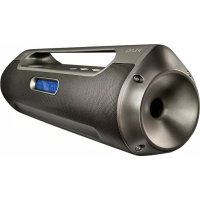
Components
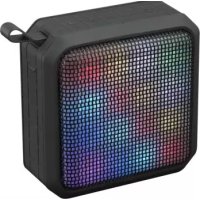
A. Connection terminals with cover
B. Belt
C. LED lamp enclosure
D. Speaker
E. Control panel
F. Light switch On/off

G. Volume +skip forward
H. Charging control LED
I. Operation control LED
J. Volume /skip back
K. On/off switch/Play/Pause/ Call answer/ hang up
L. Audio input AUX IN
M. Micro USB input
Accessories
1 x Bluetooth® Speaker
1 x Micro-USB-cable
1 x Audio cable (2 x 3.5 mm jack)
1 x User manual
Compatibility
This product is compatible with Bluetooth® enabled mobile phones and music devices. It features Bluetooth® version 2.1+EDR. It also works with devices featuring other Bluetooth® versions that support e.g.
Wireless Hands-Free communication
• HFP (Hands-free Profile)
Wireless stereo listening
• A2DP (Advanced Audio Distribution Profile)
Wireless music control
• AVRCP
Before first time use
- Read this user guide carefully to avoid damages or injuries due to improper use. Pay special attention to the safety instructions. Keep the instructions for future reference and include them when transferring the device to third persons.
- The device must be charged before the first use. Please refer to the chapter "Charging the battery".
- Carefully remove all packaging materials and check the device for completeness and integrity. Do not use a damaged device.
- Pair the speaker with a Bluetooth® AV source or Bluetooth® mobile phone first. Please refer to the chapters "Pairing".
- The Bluetooth® Speaker ID is PPA55BT-BL.
Operation
TURNING ON/OFF
To turn on, press and hold the On/off switch for approx. 2-3 seconds. The operation control LED turns on. Press the On/off switch until the speaker turns off.
ADJUSTING THE VOLUME
Press and hold the button ☐ to-adjust the volume.
CARRYING STRAP
There is a strap at the top of the speaker. The strap can be used for carrying or hanging the product at a hook.
Charging the battery
- Connect the USB cable (included) to the speaker.
- Connect the other end of the USB cable to the USB port of the computer or a USB-charger.
- During the battery charging the charging control LED lights continuously red.
Note
During the battery charging process the speaker can be operated. It will take approx. 4 hours to fully charge the battery.
When the battery is empty audio playback and light will turn off automatically.
LED Status
- Red:
LED turns on continuously: Battery charging. - Green:
LED turns on continuously: Battery charging complete.
LED turns off: Battery charging complete.
- Blue:
LED flashing: Turn on and ready for Bluetooth® pairing.
LED continuously on: Paired with a Bluetooth ^® device.
Bluetooth®
PAIRING
- Press and hold the On/off switch until a sound sequence rings and the operation control LED starts flashing. The speaker is ready for pairing.
- Activate the Bluetooth ^® function on the audio device. Connect the Bluetooth ^® -AV-source with the speaker via Bluetooth ^® pairing.
- A short melody will indicate that both devices are successfully paired. LEDs inside the speaker lights on.
- Unpair at the Bluetooth ^® source to disconnect. A sound indicates that the Bluetooth ^® is deactivated. You can also long press 📂 to unpair.
Note:
- Keep the range of 1 meter when pairing.
- Up to 10 meters reception range while music playback via Bluetooth®.
- Before pairing a Bluetooth® AV source, refer to the AV source user guide regarding safety instructions and use with other devices.
MOBILE PHONE
- To pick up an incoming call, press once 📄 button shortly.
- To end a call, press 📋button again or end the call directly on your mobile phone.
Note:
Phone calls will always be the top priority. When an incoming/outgoing call is being progressed, it actively interrupts the music playback. As soon as the call has been ended, the music resumes.
MUSIC PLAYBACK
- Start the music playback on the Bluetooth® AV source or press button at the speaker (if supported).
- Press the button ☑ to skip title forward or back.
Audio input (AUX IN)
Attention:
Before you connect your external player (for example an MP3 player), refer to its user guide regarding safety instructions and use with other devices.
- Connect the stereo cable to the AUX jack.
- Insert the other end of the cable into the headphone or LINE OUT jack of the external device.
Note:
- Disconnect the Bluetooth® connection with audio sources before connecting an external device via AUX IN.
- Switch the external player on and turn its volume to zero.
- Turn the speaker system on and regulate the volumes of both devices.
LED light
Press the light switch to turn the light on or off. The light can be operated at any mode, even when the product is switched off.
Cleaning and care
- Switch off the device before cleaning.
- Clean the device with a soft, damp cloth and a mild cleaning agent. Fin- ish by wiping it with a dry cloth.
- Do not use alcohol, acetone, benzene, scouring cleansers etc. to clean the device. Do not use hard brushes or metal objects.
Troubleshooting
If there are any problems during operation, please refer to the following table. If problems cannot be solved as indicated under Solution, please contact your manufacturer.
| Problem Possible | causes Solution | |
| Product does not function | Battery empty • Recharge batteries | |
| Light does not work | Battery empty • Recharge batteries | |
| No Sound • Volume | is very lowExternal device is muted | Adjust the volumeCheck and turn off mute on the external device. |
| Poor audio quality with Bluetooth® connection | Poor Bluetooth® reception | Move both devices closer together or remove any obstacles between. |
| No Bluetooth® connection | The external device does not support the profiles for this productBluetooth® function is disable | Try to pair with another external device.Enable the Bluetooth® function. |
Technical Data
Power supply : 5 V , 1 A
Speaker unit : 3.0" x 1
Output power of speaker : 5 W
Power consumption : Max. 5 W
Disposal
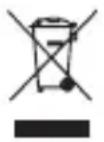
Do not dispose of this appli- ance as unsorted municipal waste. Return it to a desig- nated collection point for the
recycling of WEEE. By doing so, you will help to conserve resources and protect the environment. Contact your retailer or local authorities for more information.
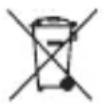
Please dispose of batteries in an environmentally friendly manner Do not put batteries
into the household waste. Please use the return and collection systems in your community or contact the dealer where you purchased the product.