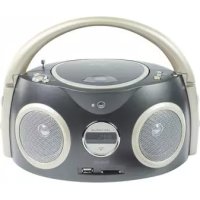
HAVPRCD21 - Cd player/recorder KONIG - Free user manual and instructions
Find the device manual for free HAVPRCD21 KONIG in PDF.



User questions about HAVPRCD21 KONIG
0 question about this device. Answer the ones you know or ask your own.
Ask a new question about this device
Download the instructions for your Cd player/recorder in PDF format for free! Find your manual HAVPRCD21 - KONIG and take your electronic device back in hand. On this page are published all the documents necessary for the use of your device. HAVPRCD21 by KONIG.
USER MANUAL HAVPRCD21 KONIG
MANUAL DE USO (p. 31)
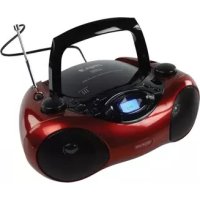
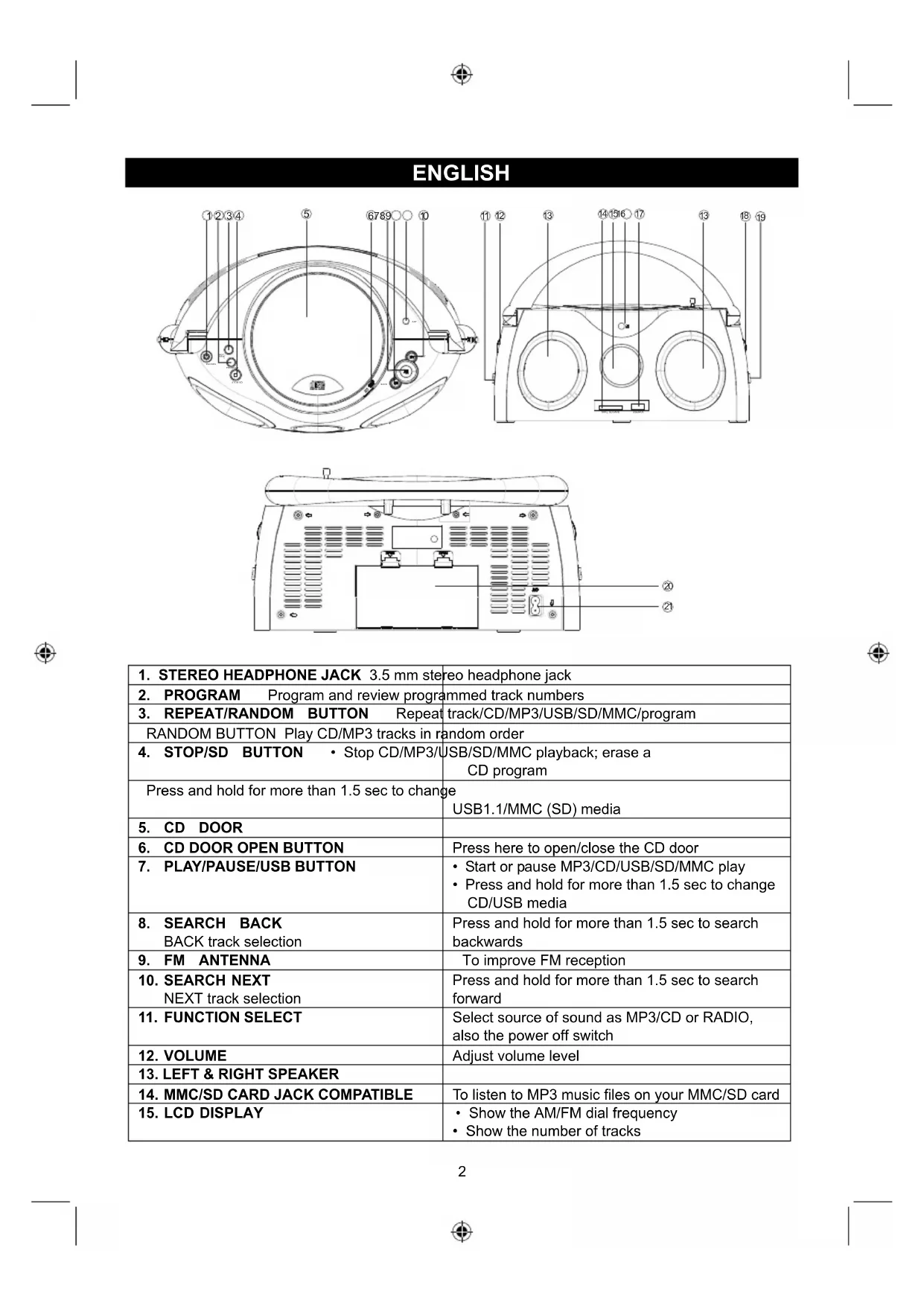
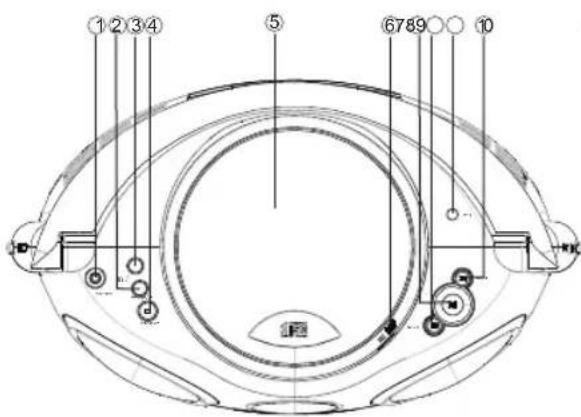
| 1. STEREO HEADPHONE JACK 3.5 mm stereo headphone jack | |
| 2. PROGRAM Program and review programmed track numbers | |
| 3. REPEAT/RANDOM BUTTON Repeat track/CD/MP3/USB/SD/MMC/program | |
| RANDOM BUTTON Play CD/MP3 tracks in random order | |
| 4. STOP/SD BUTTON • Stop CD/MP3/USB/SD/MMC playback; erase a CD program | |
| Press and hold for more than 1.5 sec to change USB1.1/MMC (SD) media | |
| 5. CD DOOR | |
| 6. CD DOOR OPEN BUTTON | Press here to open/close the CD door |
| 7. PLAY/PAUSE/USB BUTTON | • Start or pause MP3/CD/USB/SD/MMC play • Press and hold for more than 1.5 sec to change CD/USB media |
| 8. SEARCH BACK BACK track selection | Press and hold for more than 1.5 sec to search backwards |
| 9. FM ANTENNA | To improve FM reception |
| 10. SEARCH NEXT NEXT track selection | Press and hold for more than 1.5 sec to search forward |
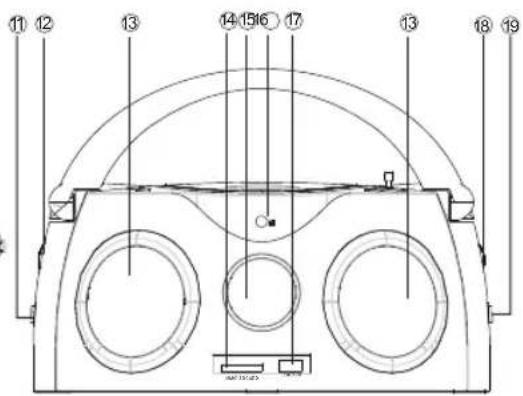
| 11. FUNCTION SELECT | Select source of sound as MP3/CD or RADIO, also the power off switch |
| 12. VOLUME | Adjust volume level |
| 13. LEFT & RIGHT SPEAKER | |
| 14. MMC/SD CARD JACK COMPATIBLE | To listen to MP3 music files on your MMC/SD card |
| 15. LCD DISPLAY | • Show the AM/FM dial frequency • Show the number of tracks |
| 16. REMOTE SENSOR | |
| 17. USB SLOT COMPATIBLE To listen to MP3 music files on your USB flash memory stick | |
| 18. TUNING CONTROL Select AM/FM/FM ST. stations | |
| 19. BAND SELECTOR (AM · FM · FM · ST.) Select AM/FM/FM ST. wave band | |
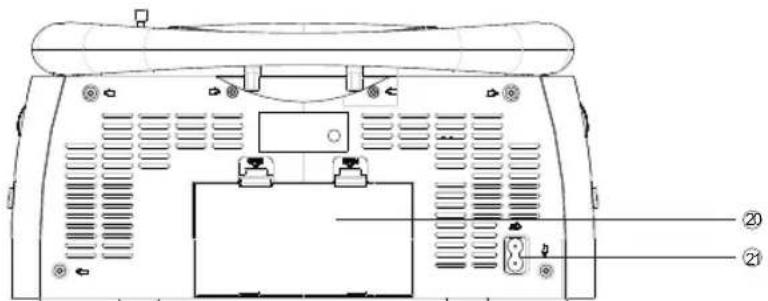
| 20. BATTERY DOOR To open battery compartment | |
| 21. AC MAINS Inlet for power cord | |
REMOTE CONTROL HANDSET
The functions of the remote control buttons are the same as those of the CD/MP3/USB/SD section. Select the MP3/CD tracks using the (+10) / (-10) button.
- The remote control volume button has no function in the radio mode.
Fast-forward or rewind a song
- Press and hold next/fast-forward or previous/rewind.
During fast-forward or rewind function, the output will be muted until release.
-
When you recognize the passage you want, release or
-
Normal playback resumes.
Selecting the folder
- Press and hold the +10 / FOL+ button or -10/FOL- button for 3 sec, folder number will show the sequence "F01->F02...", just release the button when your favourite folder is displayed.
- The display will show the folder number and the song number. Alternately within 5 sec.
POWER SUPPLY
Using AC power
- Check if the power voltage, as shown on the type plate located on the bottom of the set, corresponds to your local AC power supply. If it does not, consult your dealer or service centre.
- Connect the power cord to the AC MAINS inlet and the wall outlet. The power supply is now connected and ready for use.
-
To switch off completely, unplug the power cord from the wall outlet.
-
Unplug the power cord from the wall outlet to protect your set during heavy thunderstorms.
Batteries (not included)
Open the battery compartment and insert eight batteries, type R-14, UM-2 or C-cells, (preferably alkaline) with the correct polarity as indicated by the "+" and "-" symbols inside the compartment.
Batteries contain chemical substances, so they should be disposed of properly.
Incorrect use of batteries can cause electrolyte leakage and will corrode the compartment or cause the batteries to burst. Therefore:
Do not mix battery types: e.g. alkaline with carbon zinc. Only use batteries of the same type for the set.
- When inserting new batteries, do not try to mix old batteries with new ones.
- Remove the batteries if the set will not be used for a long time.
Installing batteries in the remote control
- Open the battery cover to remove it.
- Insert two (AAA) batteries (not included) correctly so that the + and - polarities match the polarity diagrams inside the battery compartment.
Note:
- About half a year of normal operation can be expected when using the general batteries.
- When the batteries are exhausted, the commander should no longer operate the system. Replace both batteries with new ones.
- When the commander will not be used for a long time, remove the batteries to avoid damage caused by battery leakage and corrosion.
- Avoid keeping the commander in extremely hot or humid locations.
- There should be no obstacles between the remote control and the remote sensor and they should be kept within 30^ ranges.
- The remote control's operating distance is about 0.2 m to 6 m away from the remote sensor.
To prevent sound from skipping (Anti-Skip System)
The ESP (electronic shockproof protection) system applies semiconductor memory to prevent aborting while playing when the machine is subjected to external force.
That means the ESP function is already turned on.
The ESP function CD/MP3 is automatically activated whenever the player is used for playing CD/MP3 discs.
- CD ESP time is about 2 seconds.
- MP3 ESP time is about 5 seconds.
Note:
When using the ANTISHOCK functions, the battery power consumption increases because the disc rotates faster than normal and the dynamic memory is active.
While the ANTISHOCK function provides continuous sound output when the unit is subjected to shock or vibration, it will not correct errors arising from the use of defective, scratched or dirty discs.
BASIC FUNCTION
Switching power on/off: Save energy whether you are using mains or battery supply, to avoid unnecessary energy consumption always put off the source selector.
General operation
- To select your sound source, adjust the source selector to MP3/CD/OFF/RADIO.
- Adjust the sound using VOLUME.
- To switch off the set, adjust the source selector to the off position.
RADIO
Radio reception
- Slide the FUNCTION selector to RADIO.
- Slide the BAND selector to the desired setting -FM STEREO, FM, AM.
- Rotate the TUNING control to find the desired stations.
NOTE: If the BAND selector is set to the FM stereo station, the FM stereo LED indicator will illuminate.
-
When you have finished listening, slide the FUNCTION selector to the other position to shut the power off.
-
For FM, pull out the telescopic antenna. Incline and turn the antenna. Reduce its length if the signal is too strong (very close to a transmitter).
- For AM, the set is provided with a built-in antenna so the telescopic antenna needs not be adjusted.
Earphone output
Plug in a 3.5mm earphone plug into the earphone output on the front panel of the unit for private use. The speakers will be automatically disconnected when you use the earphone output.
PROGRAMMING METHOD
(1) Press the [PROGRAM] key at STOP mode, the system will go to PROGRAM mode.
- The PRG icon and P01 will blink at 2Hz . This prompts the user to enter the first songs in the program PLAY list.
(2) The user can select the desired tracks by using the [NEXT] [+10 Track], [BACK] [-10 Track] keys.
Once these keys are pressed, the display will show the selected track.
(3) After selecting the desired track, press the [PROGRAM] key again and it will be stored in the memory. A maximum of 99 tracks can be programmed when steps (2) to (3) are repeated.
(4) If the [STOP] key is pressed during program mode, the selected tracks will be stored in the memory and will return to STOP mode (continuous play mode)
(5) If the [PLAY] key is pressed during program mode, it will start the program PLAY mode. PLAY starts from P01 Track.
Erasing a Program
You can erase the contents of the memory: Press the STOP button 2 times.
CD/MP3 PLAYER
Playing a CD/MP3
This CD player can play audio discs, MP3 CD-R/CD-RW. Do not try to play CD-ROM, CDi, VCD, DVD or computer CD.
- Adjust the source selector to CD.
- To open the CD door, press the CD OPEN button.
- Insert a MP3/CD or CD-R with the printed side facing up and press the CD door gently to close.
- Press on the set to start playback.
- To pause playback, press▶. To resume, press▶again.
- To stop CD playback, press STOP.
Note: CD/MP3 play will also stop when:
- You open the CD compartment;
- You select RADIO sound source;
- The CD/MP3 has reached the end. Select a different track
During playback you can use or to select a particular track.
- If you have selected a track number in the stop or pause position, press to start playback.
- Press once briefly for the next track, or press repeatedly until the desired track number appears in the display.
- Press once briefly to return to the beginning of a current track.
Press briefly more than once for a previous track.
Finding a passage within a track
- Press and hold or
- The CD is played at high speed.
- When you recognize the passage you want, release or
- Normal playback resumes.
Different play modes: Repeat
Repeat - plays the current track continuously.
Repeat all - plays the entire CD continuously.
Playing tracks in random order - after pressing the random button, the tracks will be played in random order.
USB Compatible/ SD/MMC CARD compatible player
Audio function
- PLAY/PAUSE/STOP.
- NEXT/FF, BACK/FB skip search.
- +10 Track/-10 track skip search.
- Folder increment/folder decrement skip search (not activated in program PLAY mode).
- Program track (99 tracks).
- PLAY MODE: normal repeat repeat all repeat all repeat 1 folder shuffle normal. (There is no repeat 1 folder mode in program PLAY mode)
- Maximum folders: 500 folders.
- Maximum files: 999 files.
- USB_UP (Select USB compatible/MMC (SD) compatible.)
Press and hold the [PLAY] key for more than 1.5 sec in CD mode, the system will change to USB compatible mode.
Then "---" will be displayed. At this moment, the system will read the USB TOC.
[USB_UP] (Press and hold the [PLAY] key for more than 1.5 sec in USB compatible mode, the system will change to CD mode. Then "---" will be displayed. At this moment, the system will read the CD TOC. Press and hold the [STOP] key for more than 1.5 sec in USB compatible mode).
- The user can switch from USB compatible to MMC (SD) compatible by pressing the [USB_UP] key (key pad STOP long key).
-
Then "---" will be displayed. At this moment, it will read each device TOC.
-
If a device is successfully read, then the corresponding device is ready to play a file.
- If a device fails to be read, then "NO" will appear on the display to indicate that there is no device.
*Notice: If no device is attached or the player fails to read the device when a user switches over from USB compatible to MMC (SD) compatible by pressing the [USB_UP] key, then "NO" is displayed and the system moves into the STOP mode.
Precautions & general maintenance
- Place the set on a hard and flat surface so that the system doesn't tilt.
- Do not expose the set, batteries or CDs to humidity, rain, sand or excessive heat caused by heating equipment or direct sunlight.
- Do not cover the set. Adequate ventilation with a minimum gap of 6 inches between the ventilation holes and surrounding surfaces is necessary to prevent heat build-up.
- The mechanical parts of the set contain self-lubricating bearings, so no extra oil is required.
- To clean the set, use a soft dry cloth. Do not use any cleaning agents containing alcohol, ammonia, benzene or abrasives as these may harm the housing.
CD player and CD handling
- The lens of the CD player should never be touched!
- Sudden changes in the surrounding temperature can cause condensation to form and the lens of your CD player can cloud over. Playing a CD is then not possible. Do not attempt to clean the lens but leave the set in a warm environment until the moisture evaporates.
- Always close the CD door to keep the CD compartment dust-free. To clean, dust the compartment with a soft dry cloth.
To clean the CD, wipe in a straight line from the centre towards the edge using a soft, lint-free cloth. Do not use cleaning agents as they may damage the disc. - Never write on a CD or attach any stickers to it.
TECHINCAL SPECIFICATIONS
GENERAL:
Power requirement 230 V AC ~ 50 Hz
Batteries 12 V DC.-8 X LR14 (UM-2)
Power consumption 13 Watts
Dimensions Approx. 302mm L × 178mm W × 138mm H
Operating temperature +5^ + 35^
RECEIVER SECTION
Receiving bands AM/FM
Tuning range AM: 520 ~ 1620 KHz
FM: 87.5 ~ 108 MHz
AUDIO SECTION
Power output Maximum 2 Watts X 2
Headphone impedance 4~32 Ohms
ESP (seconds) MP3: 5s, CD: 2s
USB compatible max capacity 4 GB
USB 1.1 or 2.0 all compatible
MMC/SD card compatible max capacity 4 GB
ACCESSIONS
Instruction booklet 1
Remote control 1
Safety precautions:


To reduce risk of electric shock, this product should ONLY be opened by an authorized technician when service is required. Disconnect the product from mains and other equipment if a problem should occur. Do not expose the product to water or moisture.
Maintenance:
Clean only with a dry cloth. Do not use cleaning solvents or abrasives.
Warranty:
No guarantee or liability can be accepted for any changes and modifications of the product or damage caused due to incorrect use of this product.
General:
Designs and specifications are subject to change without notice.
All logos brands and product names are trademarks or registered trademarks of their respective holders and are hereby recognized as such.
Keep this manual and packaging for future reference.
Attention:

This product is marked with this symbol. It means that used electrical and electronic products should not be mixed with general household waste. There is a separate collections system for these products.
DEUTsCH
Par piles (non incluses)
ESP (seconds) MP3:5s, CD:2s
ESP (seconden) MP3: 5s, CD: 2s
USB compatibel max. capacititeit 4 GB
USB 1.1 of 2.0
Dimensioni Appross. 302 mm (L) X 178 mm (L) X 138 mm (A)
ESP (secondi) MP3: 5s, CD: 2s
ESP (seconds) MP3: 5s, CD: 2s
USB kompatilitet max kapacitet 4 GB
For at forhindre lyden i at hoppe (Anti-Skip System)
VEDLIKEHOLD OG SIKKERHET
Mottaende band AM/FM
Frekvensomrade AM:520\~1620 KHz
FM: 87,5 ~ 108 MHz
LYDDEL
Effekt Maksimalt 2 Watt X 2
Hodetelefonimpedans 4~32 Ohm
ESP (sekunder)
MP3: 5s, CD: 2s
Description: Radio/CD player
Descriere: Radio / CD player