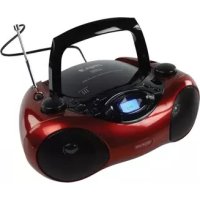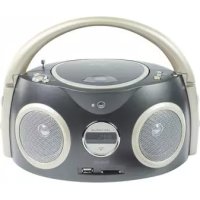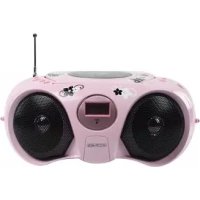
HAVPRCD15 - Cd player/recorder KONIG - Free user manual and instructions
Find the device manual for free HAVPRCD15 KONIG in PDF.



| Product Type | Portable CD/radio player |
| Brand | Konig |
| Model | HAVPRCD15 |
| Dimensions (L x D x H) | 257 x 200 x 118 mm |
| Weight | 1.488 kg |
| Mains power | AC 230 V ~ 50 Hz |
| Battery power | 8 x R14 (UM-2) / DC 12 V |
| Output power (RMS) | 2 x 1.2 W |
| Speakers | 8 ohms |
| Headphone jack | 3.5 mm stereo |
| Radio bands | AM 540-1600 kHz, FM stereo |
| CD compatibility | CD, CD-R, CD-RW |
| Programming | Up to 20 tracks |
| Playback functions | Play, pause, stop, skip forward/backward, search |
| Repeat functions | Track repeat, disc repeat |
| FM antenna | Telescopic |
| AM antenna | Built-in |
| Maintenance | Soft, dry cloth, no solvents |
| Safety | Unplug before cleaning, do not open yourself |
| Warranty | Void if modified or used incorrectly |
Frequently Asked Questions - HAVPRCD15 KONIG
User questions about HAVPRCD15 KONIG
0 question about this device. Answer the ones you know or ask your own.
Ask a new question about this device
Download the instructions for your Cd player/recorder in PDF format for free! Find your manual HAVPRCD15 - KONIG and take your electronic device back in hand. On this page are published all the documents necessary for the use of your device. HAVPRCD15 by KONIG.
USER MANUAL HAVPRCD15 KONIG
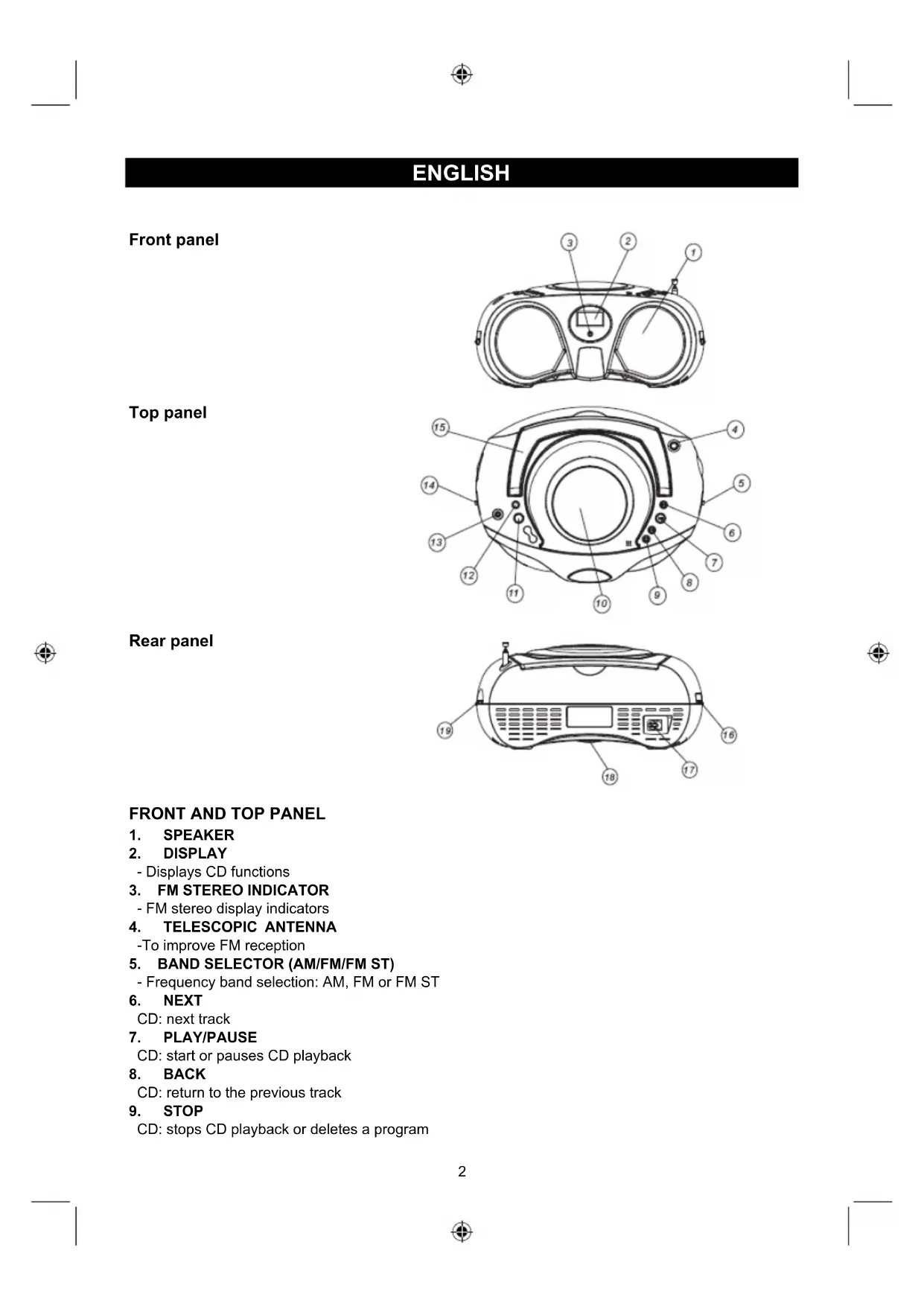
MANUAL (p. 2) Radio/CD player
-To improve FM reception
- BAND SELECTOR (AM/FM/FM ST)
-
Frequency band selection: AM, FM or FM ST
-
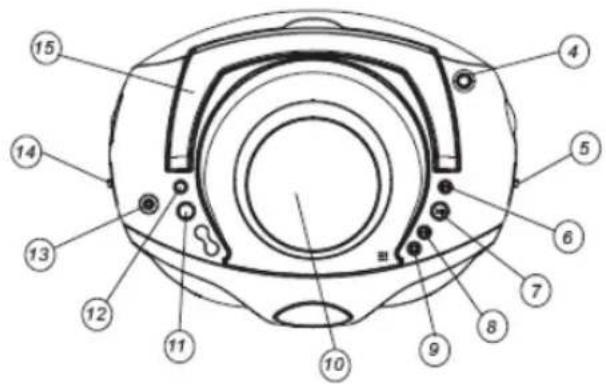
NEXT
CD: next track
- PLAY/PAUSE
CD: start or pauses CD playback
- BACK
CD: return to the previous track
- STOP
CD: stops CD playback or deletes a program
10. CD DOOR
- CD compartment door open/close mark (OPEN/CLOSE)
11.PROGRAM
- CD: programming and control of programmed track number
12. REPEAT
- CD: repeat a track/CD/program
13. STEREO HEADPHONE JACK
- Connection for the 3.5mm stereo headphone
14. FUNCTION SELECTOR
- Source selection CD or RADIO and power off
15. HANDLE
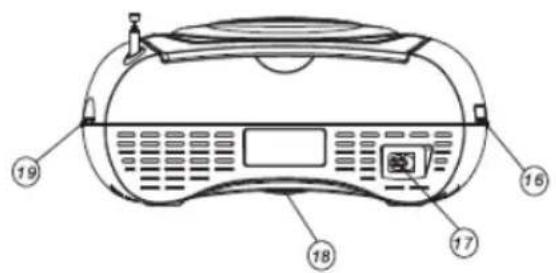
REAR PANEL
16. VOLUME CONTROL
- Sound level control
17. AC POWER SUPPLY
- Power supply connection
18. BATTERY COMPARTMENT
19. TUNING KNOB
- AM/FM/FM ST station selector
POWER SUPPLY
The electrical power supply can be used to prolong battery life. Ensure that the radio/CD player is unplugged from the socket before inserting the batteries.
USING THE DC POWER SUPPLY
Batteries (not included)
Open the battery compartment and insert 8 R14 batteries with respect to the "+" and -" polarity marks in the compartment.
Important:
- When replacing the batteries, make sure you dispose of the old batteries in accordance with applicable regulations. They should be disposed of in a location specifically designated for that purpose so they can be recycled safely and without posing any risk to the environment. Do not burn or bury them.
Incorrect use of the batteries may result in electrolyte leakage having a corrosive effect in the compartment. - Do not mix different types of batteries: do not use, for example, alkaline batteries with saline batteries. Only use batteries of the type recommended by the manufacturer.
- Do not mix old and new batteries.
If the radio/CD player is not to be used for an extended period of time, remove the batteries. - Batteries should not be exposed to extreme heat such as sunshine or fire.
- Warning: excessive sound pressure from earphones and headphones can cause hearing loss.
USING THE AC POWER SUPPLY
- Make sure that the voltage indicated on the manufacturer's nameplate in the battery compartment corresponds to the voltage supplied by your electrical installation. If this is not the case, consult your dealer or service centre.
- Connect the electrical power cable to the radio/CD player then plug it into the socket. The socket must be located near the radio/CD player and be easily accessible. To turn the radio/CD player off, unplug the power supply cable from the socket.
- To protect the radio/CD player during violent thunderstorms, unplug the power supply cable from the socket.
GENERAL OPERATION
- Select the source by setting the FUNCTION SELECTOR to CD, OFF or RADIO.
- Set the desired volume level using the VOLUME KNOB.
- To turn off the unit, set the FUNCTION SELECTOR to OFF.
RADIO RECEPTION
- Set the FUNCTION SELECTOR to RADIO.
- Position the BAND SELECTOR on the desired band: AM, FM or FM ST.
- Turn the TUNING CONTROL to search for the desired station.
NOTE: The FM stereo indicator comes on if the BAND SELECTOR is set on FM stereo and you have tuned the radio to an FM stereo station.
- Adjust VOLUME CONTROL for the desired volume level.
- When you have finished listening to the radio, position the FUNCTION SELECTOR to OFF to turn the radio/CD player off.
Helpful hints:
To improve radio reception
- To listen to the FM radio, extend the telescopic antenna and position it for optimum reception. Reduce the length of the antenna if the signal is too strong (for example, if you are very near to a transmitter).
- As the unit is equipped with a built-in antenna, the telescopic antenna does not have to be used to listen to AM stations. Move the entire unit to position the built-in antenna.
STEREO HEADPHONE JACK
Plug stereo headphones (not included), equipped with a 3.5mm mini-plug, into the PHONES jack for private listening, without disturbing people around you.
Reduce the VOLUME to a low level before putting the headphones on. You can then adjust the
VOLUME progressively to a comfortable level.
CD PLAYBACK
The CD player supports audio discs, CD-R and CD-RW. Do not attempt to use CD-ROM, CDi, VCDs, DVDs or data CDs.
Note: Even if this portable radio/CD player is able to read CD-R and CD-RW discs, in addition to conventional compact discs, it is not possible to offer a 100% guarantee that all CD-R/RW discs can be read; playback depends on the quality and condition of the blank discs that you use. A playback failure does not necessarily indicate that the radio/CD player is malfunctioning.
- Position the FUNCTION SELECTOR on CD (the display unit briefly displays - - - )
- To open the CD player door, raise it by the corner marked OPEN/CLOSE
- Insert a CD, CD-R or CD-RW disc, printed surface facing upwards, and gently press the CD player door to close it
- Start playback by pressing PLAY/PAUSE
- Press PLAY/PAUSE to interrupt or resume playback
- To stop CD playback, press STOP
NOTE: CD playback stops automatically when the CD compartment is opened, the radio function is selected or the CD is finished.
SELECTING A DIFFERENT TRACK
During playback, press NEXT or BACK on the radio/CD player or remote control to select a track.
If you have selected a track number in Stop or Pause mode, press PLAY/PAUSE to resume playback.
Briefly press NEXT to move to the next track or press NEXT several times until the desired track number appears in the display.
Briefly press BACK to return to the start of the current track.
Press BACK several times to find a previous track.
SEARCHING FOR A SPECIFIC SECTION OF A TRACK
- Press and hold BACK or NEXT to read the track in fast forward mode at reduced volume
- When you have found the desired section, release the BACK or NEXT button (normal playback resumes automatically)
REPEAT
Repeat: repeat the current track.
Repeat all: repeat the entire CD.
PROGRAMMING TRACK NUMBERS
Up to 20 tracks can be programmed in any order. If desired, a given track can be programmed more than once.
- In STOP mode, press BACK or NEXT to select a track.
- When the desired track number appears, press the PROG button once to record the track (the display unit displays "prog", briefly followed by the track number selected).
- Repeat steps 1 and 2 to select and program the desired tracks.
- To start playback of your programmed tracks, press PLAY/PAUSE.
PROGRAM CHECK
In STOP mode, press the PROG button (the display unit displays the track numbers in the order programmed).
DELETING A PROGRAM
Perform the following operations to delete the memory: open the CD door; select the RADIO source, press STOP once.
OPERATING PRECAUTIONS AND GENERAL MAINTENANCE
- Place the radio/CD player on a firm and level surface to ensure that it does not tip over.
- Do not expose the unit, batteries or the CDs to humidity, rain, sand, excessive heat sources or direct sunlight.
- No not open the radio/CD player. A gap of at least 15cm must be kept between the ventilation openings and the surrounding surfaces in order to ensure sufficient ventilation and avoid an accumulation of heat.
The radio/CD player's mechanism has self-lubricating bearings and does not require grease or lubrication.
Use a soft dry cloth to clean the radio/CD player. Never use cleaning agents containing alcohol, ammonia, benzene or abrasives, which may damage the cabinet.
SPECIFICATIONS
Power supply: 230VAC 50Hz
12 V DC 8 x UM-2/R14 batteries (not included)
Power consumption: 14 Watts
Dimensions of radio/CD player: 257 × 200 × 118 mm (LxWxH)
Weight: 1.488
Frequency range: AM 540 to 1600 KHz
Output power (RMS): 2 × 1.2 W RMS
Speaker: 8 Ohms
Headphone: 03.5mm
(The technical details could change without notice)
Safety precautions:
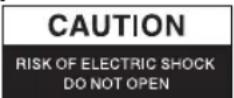

To reduce risk of electric shock, this product should ONLY be opened by an authorized technician when service is required. Disconnect the product from mains and other equipment if a problem should occur. Do not expose the product to water or moisture.
Maintenance:
Clean only with a dry cloth. Do not use cleaning solvents or abrasives.
Warranty:
No guarantee or liability can be accepted for any changes and modifications of the product or damage caused due to incorrect use of this product.
General:
Designs and specifications are subject to change without notice.
All logos brands and product names are trademarks or registered trademarks of their respective holders and are hereby recognized as such.
Keep this manual and packaging for future reference.
Attention:

This product is marked with this symbol. It means that used electrical and electronic products should not be mixed with general household waste. There is a separate collections system for these products.
DEUTsCH
Vorderseite
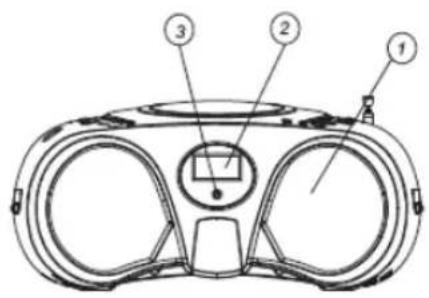
Oberseite
Rückseite
CC 12V 8 x UM-2/R14 batteries (non fouries)
Puisance de consummation: 14 Watts
Dimensions du poste de radio/CD: 257(L) x 200(W) x 118(H) mm
Poids: 1.488 kg
(DESCHIDERE/INCHIDERE)
11.PROGRAM
Katavawon pεμaTOc: 14 Watts
Aiaotaoic tou paioopwov/CD player: 257(L) x 200(W) x 118(H) mm
Bápoc: 1.488
Eupoc ouxvotnrag: AM 540 1600KHz
Ioxuc Eóδou (RMS): 2x1.2W RMS
Hxio: 8 Ohms Akouotiká: 0 3.5mm
(OI TeXVIKcEeAETTOUpeIEcEvEEXTai va aALAAouv Xwpi TPOeIOToiOn)
kg
Osnyies aoeaaleia:

Tia va i Tov kivduvo nAektpoanlqac,TO pioiov auto
Oa pTei va avoixoMONO aIO eouoiodotnuévo texvikó
otav aIaiteital ouvtnpon (eepics). AIOuovbOte TO pioiov
aTO tvn pizcai aALLO EOTANIO av TAPOUOIAOTei PpO3Nmu.
Mnv ekTeTE TO pioov ovepo n uypasia.
Σuvtρηση:
KaθaipioTe mOvo eEv oTeyVIOavi. Mn xpoiopoTIOIEte δiaUe ts λεiavtiká.
Eyyunon:
Ouεμia eyyunon n euvn d ev iai aTobeknt o TepiTTw on aalayns n Eetatpotnc tou Tpoiovto n 1a ngiou pokn0k Aoyw eoqauevns xprnncou Tpoiovto.
ГEVIKA:
To oxedio kai ta xapakntpiotiká μπtopoov va aλλαoguv χwipic kaia πpoeidtoiŋn.
Ola ta loyotutta, oI eTwwvuiie cai oI ovuaic Tpoiovtwv evai eTtropika onmuata n onmuata kataeTheVTA twv avtiatoxw katoxw kai dia tou napoytocavaywpiovtai wTeioia.
SLETTING AV PROGRAMMING
Gjordette for a slette en programmering: Apne CD luken; Velg RADIO, trykk STOP en gang.
FORHÄNDSRIGER OG VEDLIKEHOLD
- Plasser radio/CD spilleren på en jevn overflate hvor den ikke kan velte.
- Ikke utsett encheten, batteriene aller CD-ene for fuktigkeit, regn, sand, sterk varme aller solskinn.
- Prov不解: Ane enheten. Det mæ vare minst 15 cm mellom vifteapningen bak og andre overflater sik at varmen kan unnslippe spilleren.
Lagrene i radio/CD spilleren er selvsmorende og trenger ikke bli tilfør smoremiddel. - Bruk en tørr klut for a tørke av den. IkkeBruk vaske- ell skuremidler, ell ammoniakkholdige midler nár den gjores ren
Spesifikasjoner
Strømtilgang: AC 230V ~ 50Hz
DC 12V 8 x UM-2/R14 batterier (ikke inkludert)
Description: Radio/CD player