
EC 9155.MB PREMIUM - Espresso Coffee Maker DELONGHI - Free user manual and instructions
Find the device manual for free EC 9155.MB PREMIUM DELONGHI in PDF.




| Product type | Espresso machine with integrated bean grinder |
| Brand | De'Longhi |
| Model | EC 9155.MB PREMIUM |
| Pump pressure | 15 bar |
| Water tank capacity | 1.2 L |
| Bean hopper capacity | 250 g |
| Power | 1350 W |
| Weight | 11 kg |
| Dimensions (W x D x H) | 33 x 36 x 40 cm |
| Grind settings | 8 |
| Brewing temperatures | 3 levels (92°C to 96°C) |
| Functions | Espresso, Americano, Ground coffee, Hot water, Steam |
| Steam wand | Pivoting professional steam wand |
| Included filters | 1 cup and 2 cups |
| Adjustable water hardness | Yes, with test strip |
| Automatic descaling | Yes, with indicator light |
| Dishwasher safe parts | Portafilter, filters, milk jug, drip tray |
| Included accessories | Milk jug, descaler, test strip, Softballs (according to model), coffee scoop, brush |
| Warranty | 2 years |
Frequently Asked Questions - EC 9155.MB PREMIUM DELONGHI
User questions about EC 9155.MB PREMIUM DELONGHI
0 question about this device. Answer the ones you know or ask your own.
Ask a new question about this device
Download the instructions for your Espresso Coffee Maker in PDF format for free! Find your manual EC 9155.MB PREMIUM - DELONGHI and take your electronic device back in hand. On this page are published all the documents necessary for the use of your device. EC 9155.MB PREMIUM by DELONGHI.
USER MANUAL EC 9155.MB PREMIUM DELONGHI
Therefore, a_i = 1/2







| DISHWASHER SAFE | QIEco MultiClean | ||||
| √ | × | × | √ | √ | |
| × | × | × | √ | √ | |
| × | × | √ | × | × | |
| × | × | × | √ | √ |
9. CLEANING THE COFFEE GRINDER
Before using the appliance, always read the safety warnings.
1. DESCRIPTION
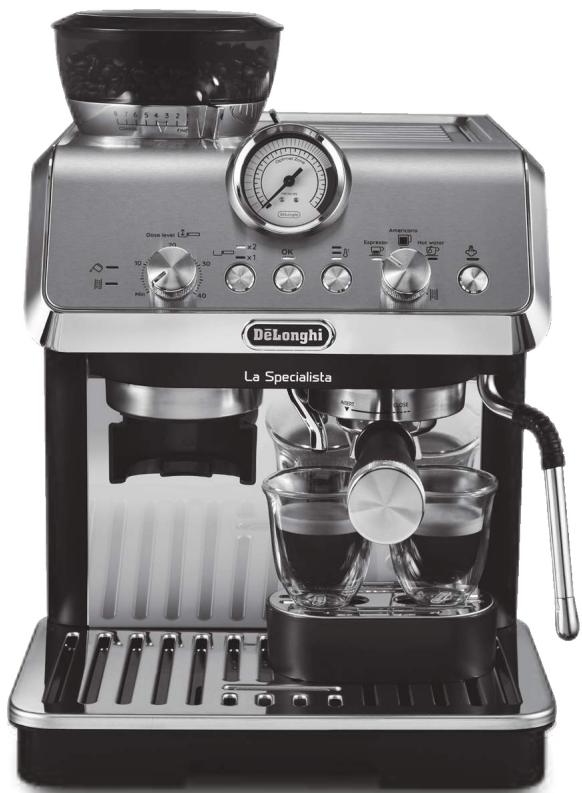
1.1 Description of appliance - A
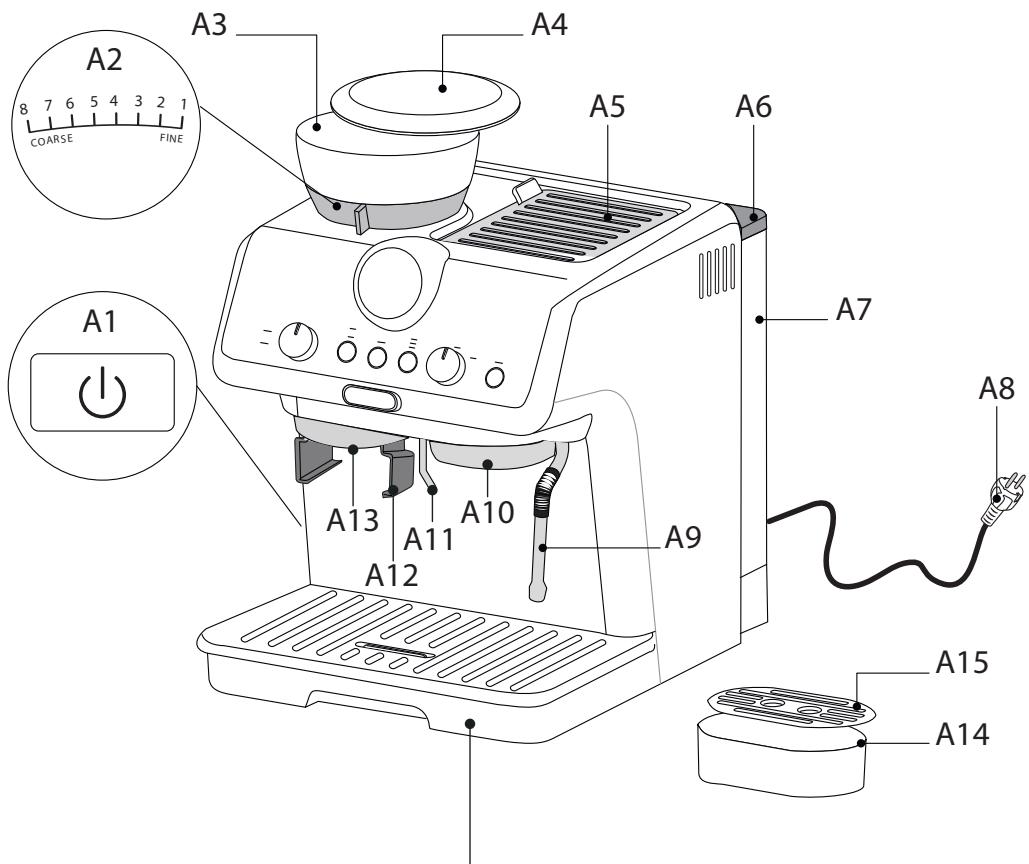
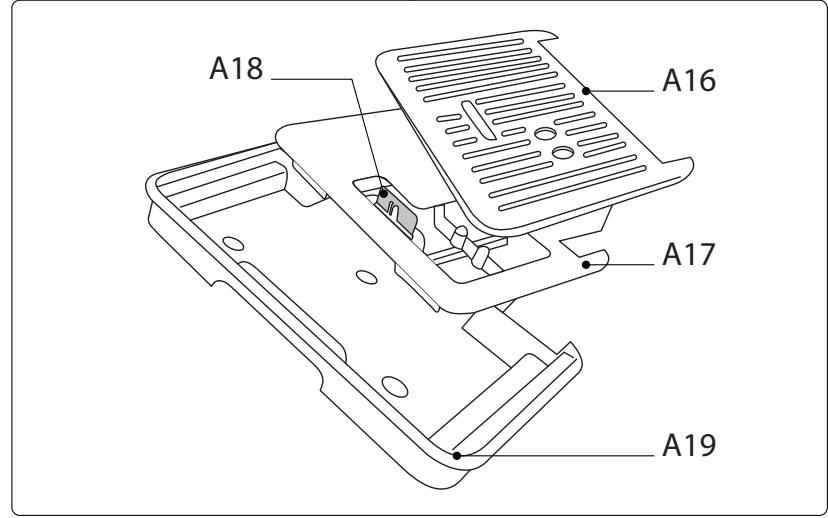
A1. Main switch (ON/OFF) A2. Grinding level selector A3. Beans container A4. Beans container lid A5. Accessory door A6. Water tank lid A7. Water tank A8. Power cord A9. Steam wand A10. Coffee spout A11. Hot water spout A12. Housing for grinding filter holder A13. Coffee mill outlet A14. Small cup support A15. Small cup grille A16. Cup/mug grille A17. Cup/mug grille support A18. Drip tray water level indicator A19. Drip tray
1.2 Description of control panel - B
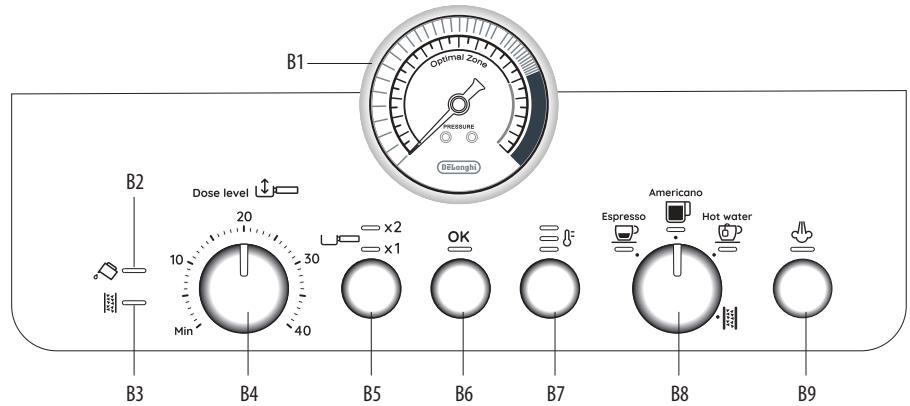
B1. Pressure gauge B2. "No water" indicator B3. "Descale" indicator B4. Ground coffee quantity dial B5. 1 or 2 cup button (to use the corresponding coffee filter) B6. "OK" button: to deliver the beverage/confirm B7. "Coffee temperature" button B8. Function selector dial
- Espresso Americano Hot water
- Descaling
B9. "Steam" button: to deliver steam
1.3 Description of accessories - C
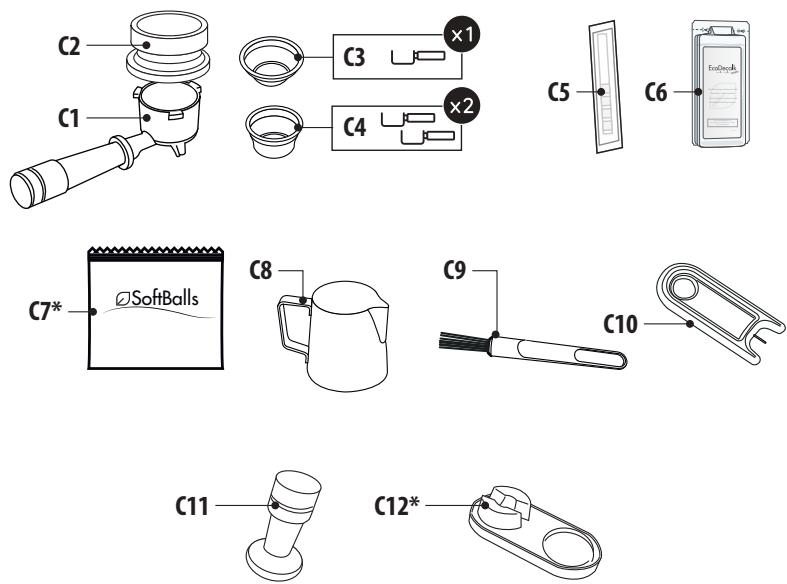
C1. Filter holder C2. Dosing and tamping guide C3. 1 cup filter C4. 2 cup filter C5. "Total Hardness Test" paper C6. Descaler C7. Softballs (*certain models only) C8. Milk jug C9. Cleaning brush C10. Steam wand cleaning needle
C11. Presser C12. Pressing mat (*certain models only)
1.4 Optional cleaning accessories recommended by the manufacturer
For more information, visit www.delonghi.com.
EcoMultiClean
Cleaner
EAN: 8004399333307
2. PREPARING THE APPLIANCE
Wash all accessories with warm water and washing-up liquid, then proceed as follows:
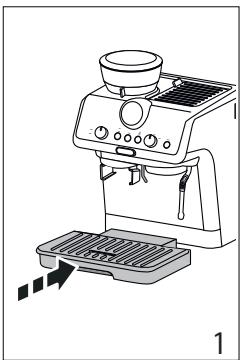
- Insert the drip tray (A19) complete with cup grille (A16) and relative support (A17) (fig. 1);
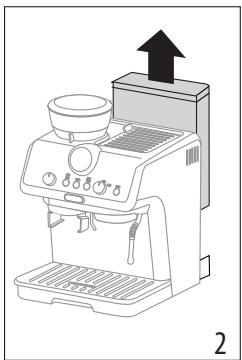
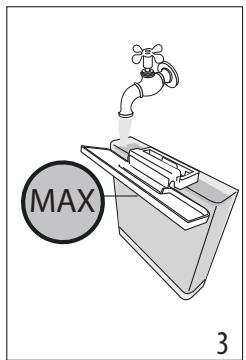
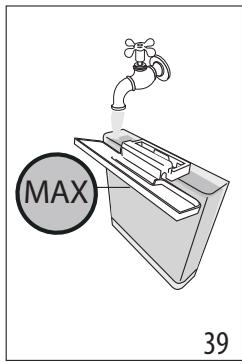
- Extract the water tank (A7) (fig. 2) and fill with fresh clean water, taking care not to exceed the MAX level (fig. 3).
- Put the tank back in the appliance.
Important: Never operate the appliance without water in the tank or without the tank.
Please note: You should customise water hardness as soon as possible following the instructions in section "7. Settings menu".
3. SETTING UP THE APPLIANCE
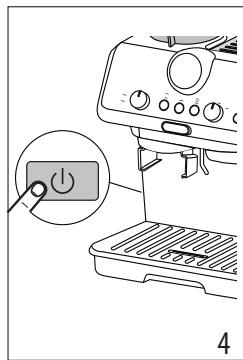
- Plug into the mains socket. Press the main switch (A1) (fig. 4);
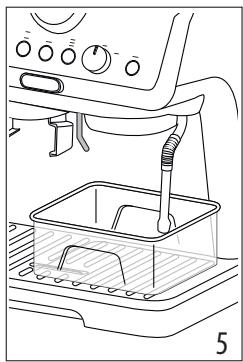
- Place a container with a minimum capacity of 100 ml under the hot water spout (A11) (fig. 5);
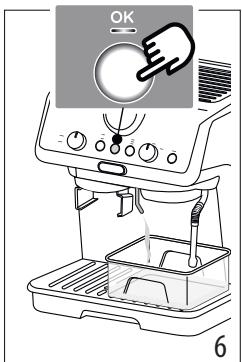
- Press the OK button (B6) (fig. 6). Delivery begins and stops automatically. Empty the container.
Before using the coffee maker, the internal circuits of the machine must be rinsed. Proceed as follows:
- Place the coffee filter (C3) or (C4) in the filter holder (C1).
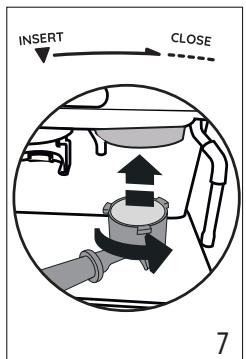
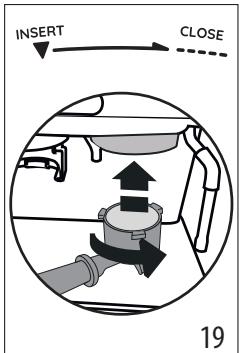
- Attach the filter holder (C1) complete with filter to the appliance. To attach correctly, align the filter holder handle with "INSERT" (fig. 7), then turn the handle to the right until it is aligned in the "CLOSE" position.
- Place a container under the filter holder and steam wand (A9).
- Press the OK button (B6). Delivery begins.
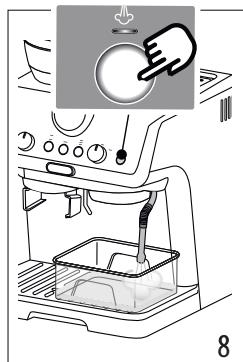
- When delivery has finished, press the steam button (B9) (fig. 8) and deliver steam for a few seconds to rinse the steam circuit. For best results, repeat 3 or 4 times. The purpose of this procedure is to purge any water from the circuit before using steam to prepare a beverage.
The appliance is ready for use.
Please note: We also recommend rinsing the internal circuits if the appliance is not used for a long period.
The first time you use the appliance, you need to make 4-5 cups of coffee before the appliance starts to give satisfactory results.
Pay particular attention to the quantity of pre-ground coffee
in the filter ((C3) or (C4)) (see instructions in section "4.1 Step 1 - Grinding").
Proceed as described in section "The "perfect dose""
4. MAKING COFFEE
4.1 Step 1 - Grinding
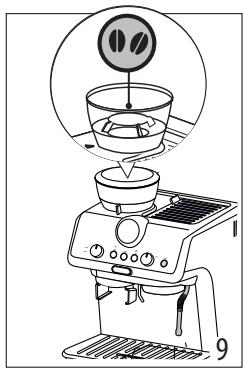
- Put coffee beans in the container (A3) (fig. 9). It is best to grind only a quantity of beans sufficient for immediate use, so that the coffee will always be fresh.
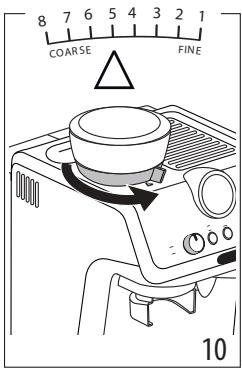
- The default grinding setting is 5 (medium ground). If this is too fine or too coarse, adjust the level according to personal taste and the type of coffee used (adjust only when the coffee mill is in operation (fig. 10).
Please note: A grinding level between 3 and 6 is recommended for most coffees. Grinding with 1 or 2 selected produces a very fine result. Use only with very special coffee (light roast) or when you notice non-optimal coffee quality due to wear of the burrs (grinding too coarse).
- Place one of the coffee filters (C3) or (C4) in the filter holder (C1). Press (B5) to select preparation of 1 or 2 cups. This also doubles the quantity of espresso delivered.
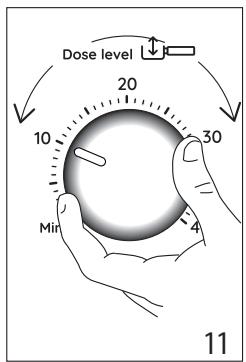
- Set the quantity by adjusting the dial (B4), starting from the minimum position (fig. 11).
The first time you use it, leave the dial in the Min. position. In the beginning, it is normal to make a few attempts before finding the optimal setting. We suggest you start with the default values, then modify them if necessary following the suggestions in section "Adjusting the quantity of ground coffee in the filter".
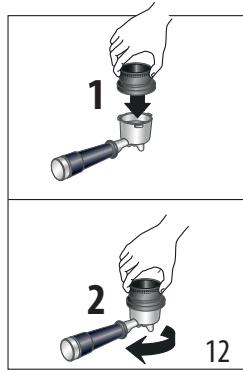
- Attach the dosing and tamping guide (C2) to the filter holder: 1 press; 2 rotate to lock (fig. 12).
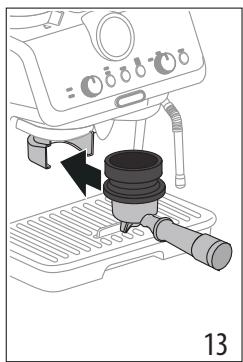
- Insert the filter holder in the coffee mill outlet (A13) (fig. 13).
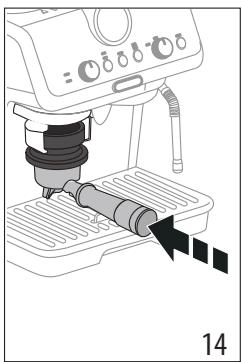
- Press the filter holder until you hear a "click" (fig. 14), then release. Grinding starts and stops automatically.
Please note: To manually stop grinding, just press the filter holder again (until you hear a click).
Adjusting the quantity of ground coffee in the filter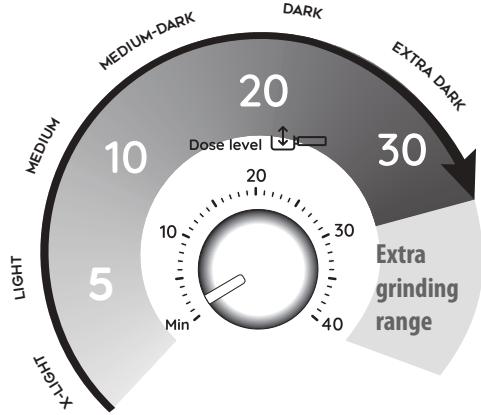
Different varieties of coffee bean give different results when ground: consequently, the initial adjustment of the dosage requires special care.
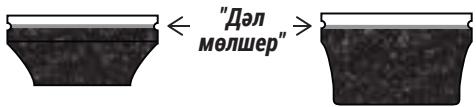
This illustration shows how to regulate the dosage, based on the roast colour: this should be taken as a general guide, given that in practice, the final adjustment can vary according to the composition of the beans.
- Set the quantity (to the raised mark inside the coffee filter), starting from the minimum position. The numbers on the dial are a handy reference to note down once the quantity in the filter is ideal. The numbers do not correspond to the coffee mill settings, measurement units (g/oz) or grinding time.
- Looking at the roast colour of your particular beans, turn the dial slowly to find the right adjustment.
4.2 Step 2 - Tamping
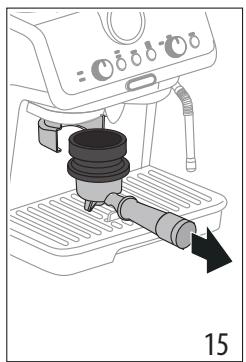
- After grinding, remove the filter holder (fig. 15).
- Tap the dosing and tamping guide (C2) to level the ground coffee.
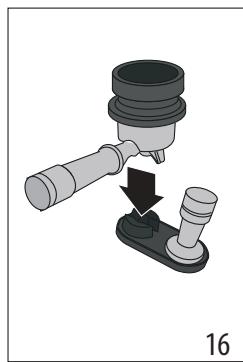
- (Certain models only): rest the filter holder in the housing on the pressing mat (C12) (fig. 16).
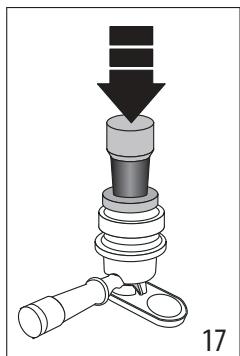
- Press the coffee using the presser (C11) (fig. 17).
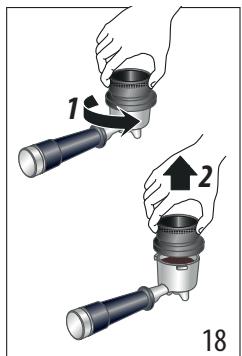
- Remove the dosing and tamping guide by turning it anticlockwise and pulling upwards (fig. 18) and check that the quantity is correct (see "The "perfect dose").
- Attach the filter holder to the coffee outlet (A10) (fig. 19).
Please note: Coffee left on the edges of the filter after pressing does not in any way compromise the quality of the brewing and therefore the end result.
The "perfect dose"
The perfect quantity corresponds to the raised line inside the coffee filters;
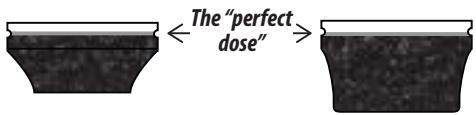
Make sure the coffee is at the right level after tamping. It might be necessary to adjust the level a few times using the dial (B4) before the ideal dosage is achieved. - If the coffee is extracted too strongly or too weakly even at the ideal dosage, this can be corrected by grinding the beans more finely or more coarsely (see "4.1 Step 1 - Grinding"). To correct over-extraction (coffee released too slowly), select a coarser setting. To correct under-extraction (coffee released too quickly), select a finer setting.
4.3 Step 3 - Brewing
- Select the temperature (fig. 20) (see "Coffee preparation temperature").
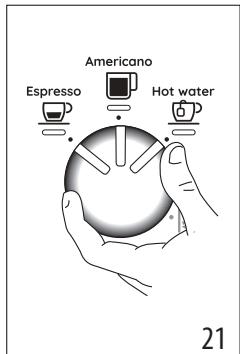
- Select the desired beverage (fig. 21). If the beverage has been programmed (see section "6. Programming beverage quantities"), the beverage light flashes briefly.
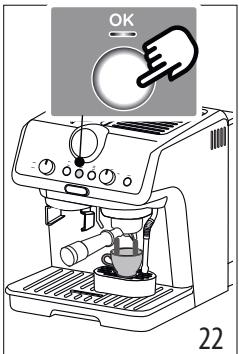
- Press OK (B6) to start brewing (fig. 22) (pre-infusion and infusion). Delivery of the coffee will stop automatically.
Coffee preparation temperature
The water temperature is controlled during the entire preparation process to ensure its stability during the extraction step. The Specialista Arte has 3 infusion temperatures* in a range between 92 and 96°C.
The temperature effectively utilized will depend typically on the variety of bean and the roast: Robusta beans require a lower temperature, and Arabica beans a higher temperature. The same applies for dark roasted beans or for light roasted beans, respectively.
| Temperature level | Corresponding indicator light | Roast colour |
| MIN | Dark | |
| MED | Medium-dark | |
| MAX | Light - medium |
- This is the temperature of the water in the thermoblock. It is therefore not the temperature of the beverage in the
cup or the temperature of the beverage at the moment of release from the outlets of the filter holder.
5. MAKING MILK BEVERAGES
5.1 Frothing the milk
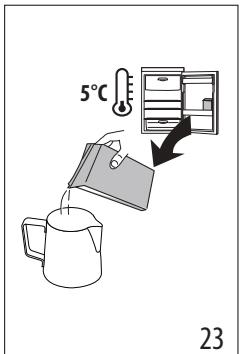
- Fill the jug (C8) with the amount of milk to be warmed/frothed, bearing in mind that the milk doubles or triples in volume (fig. 23). For a denser and more evenly distributed froth, best results will be achieved using whole cow's milk at refrigerator temperature (about 5°C).

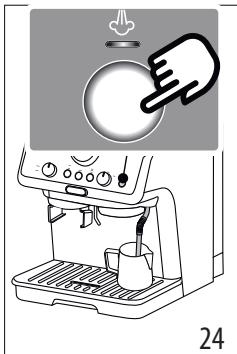
- Place the jug under the steam wand and press the steam button (B9) (fig. 24).
- To froth the milk, rest the steam wand (A9) on the surface of the liquid. This mixes air with the milk and steam.
- Keep the steam wand in contact with the surface, taking care not to let in too much air and create excessively large bubbles.
- Immerse the steam wand below the surface of the milk, this creates a vortex in the liquid. Once the milk is heated to the desired temperature, press the steam button again and wait for the flow of steam to stop completely before removing the milk jug from the machine.
Barista tips:
- Fresh milk is best. Always use fresh milk straight from the fridge.
- For best results, always replace the milk jug in the fridge when not in use. Whole milk ensures optimum results. The appearance and texture of froth depending on the nature of the dairy milk or vegetable beverages utilized. After frothing the milk, eliminate unwanted bubbles by swirling the jug gently.
Cleaning the steam wand
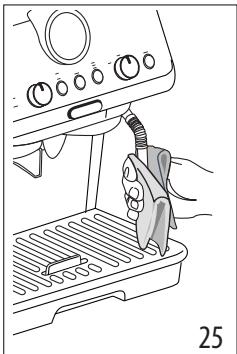
- Following use, always wipe the steam wand (fig. 25) with a cloth to remove residual deposits of milk. The recommended procedure for in-depth cleaning is to use Eco MultiClean: this product ensures maximum hygiene by removing milk proteins and fats, and can be used for cleaning the entire machine.
- Release steam for a few seconds to clean the wand (fig. 8).
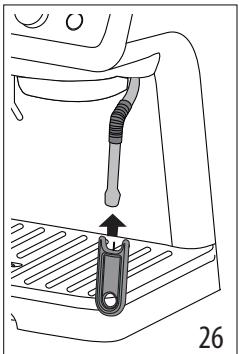
- Wait until the steam wand has cooled down. To ensure the wand works efficiently over time, use the special cleaning tool (C10) to free the holes (fig. 26) of any obstruction.
6. PROGRAMMING BEVERAGE QUANTITIES
- Prepare the appliance to deliver 1 or 2 cups of the beverage you want to make, as far as attaching the filter holder (C1) complete with the (C3) or (C4) filter and ground coffee.
- Turn the dial (B8) to select the beverage being programmed.
- Press and hold the OK button (B6) until the machine delivers the desired quantity. The OK button light flashes orange to confirm you are in programming mode.
- When the desired quantity has been reached, release the OK button. The quantity is programmed.
Please note:
- You can programme beverages, but not steam delivery.
- Programming changes the quantity of beverage delivered, but not the quantity of ground coffee
- When a programmed beverage is selected, the corresponding light flashes briefly.
- 2x beverages can be programmed separately.
| Coffee recipe | Default quantity | Programmable quantity |
| Espresso | ≈ 35 ml | from ≈15 to ≈90 ml |
| Espresso 2x | ≈ 70 ml | from ≈30 to ≈180 ml |
| Americano | ≈ 120 ml | · espresso: from ≈15 to ≈90 ml · water: from ≈25 to ≈150 ml |
| Americano X2 | ≈ 240 ml | · espresso: from ≈30 to ≈180 ml · water: from ≈50 to ≈240 ml |
| Hot water | ≈ 250 ml | from ≈65 to ≈300ml |
7. SETTINGS MENU
| 1. Access the menu: | |||
| Press together and hold for 3 seconds | ×2 + | ||
| 2. Select the setting to be adjusted | |||
| Americano Espresso Hot water Hot water Hot water Hot water Hot water Hot water Hot water Hot water Hot water Hot water Hot water Hot water Hot water Hot water Hot water Hot water Hot water Hot water Hot water Hot water Hot water Hot water Hot water Hot water Hot water Hot water Hot water Hot water Hot water Hot water Hot water Hot water Hot water Hot water | Turn to | Press No | Press No again to change the setting |
| Pre-infusion pause | Espresso | The indicator light corresponding to the setting currently selected comes on | No → No |
| No → 1 sec | |||
| No → 2 sec | |||
| Extra grinding adjustment | Americano | The indicator light corresponding to the setting currently selected comes on | No → 1st range |
| No → 2nd range | |||
| Auto-off | Hot water | The indicator light corresponding to the setting currently selected comes on | 9 minutes |
| 1.5 hours | |||
| 3 hours | |||
| Water hardness | The indicator light corresponding to the setting currently selected comes on | soft medium | |
| hard /very hard | |||
| → | |||
3. Save the new settings by pressing OK (B6)
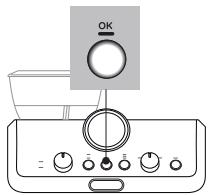
Please note: The appliance exits the settings menu automatically if there is no activity for 30 seconds.
7.1 Reset default settings
The OK light (B6) flashes briefly to confirm the reset.
| 1. Access the menu: | |
| Press together and hold for 3 seconds | x3set |
| 2. Reset default settings | |
| Press and hold the steam button (B9) for 3 seconds. | |
The OK light (B6) flashes briefly to confirm the reset.
8. CLEANING THE APPLIANCE
Important!
- Do not use solvents, abrasive detergents or alcohol to clean the coffee machine.
- Do not use metal objects to remove encrustations or coffee deposits as they could scratch metal or plastic surfaces.
- Should the machine remain idle for more than a week, it is advisable to carry out a rinse cycle before preparing any beverages.
Danger!
- Never immerse the coffee maker in water when cleaning: it is an electrical appliance. Before commencing any cleaning operation on the outside of the machine, turn it off, unplug it from the mains socket and wait for it to cool down.
| DISHWASHER SAFE | O Eco MultiClean | |||
| × | √ | √ | × | × |
| √ | × | × | √ | √ |
| → | ||||
| DISHWASHER SAFE MultiClean | Eco MultiClean | |||
| × | × | × | √ | √ |
| × | × | √ | × | × |
| × | × | × | √ | √ |
9. CLEANING THE COFFEE MILL
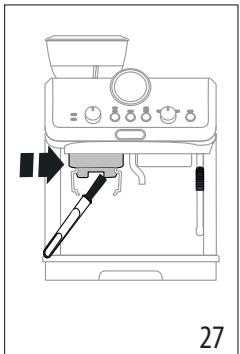
- Clean the attachment area with the brush (C9) (fig. 27).
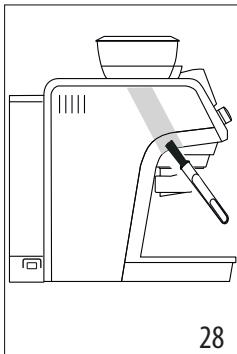
- Use the brush to clean the coffee guide (fig. 28).
Efficient grinding
The burrs are subject to wear over time. As time goes by, to achieve the perfect quantity, you need to turn the dial (B4) towards the highest numbers. When you reach a setting of between 30 and 40, you need to set the extra grinding range (see section "7. Settings menu" - "Extra grinding range").
When the quantity of ground coffee becomes less than expected, contact a service centre to have the burrs replaced. With the new burrs fitted, adjust the coffee mill by accessing the settings menu and selecting the first range of the "extra grinding adjustment" setting. Next, turn the ground coffee quantity dial (B4) to the Min position and set the quantity as for first-time use (see "La "dose perfetta").
10. WATER HARDNESS
The descale light [B3) comes on following a predetermined period of operation that depends on a water hardness setting. The machine can also be programmed according to the actual hardness of the local water supply, in which case descaling may be required less frequently (see section "7. Settings menu").
- Remove the "TOTAL HARDNESS TEST" indicator paper (C5) from its pack.
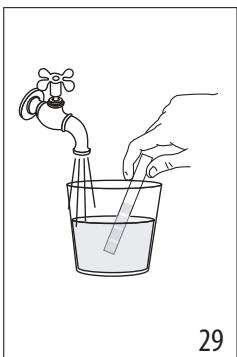
- Immerse the paper completely in a glass of water for about one second (fig. 29).
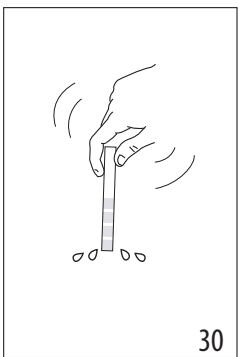
- Remove the strip from the water and shake lightly (fig. 30).
| Water Hardness Test Result | (B7) button | Level |
| 1 soft water | ||
| 2 medium water | ||
| 3 hard or very hard water |
- Set the machine accordingly, as indicated in the section "7. Settings menu".
11. HOW TO USE SOFTBALLS (CERTAIN MODELS ONLY)
Softballs (C7) are an innovative treatment system that prolongs the life of the machine, without altering the properties of the water, while ensuring consistently creamy and aromatic coffee. To optimize the effectiveness of the treatment, leave Softballs in the water overnight before use.
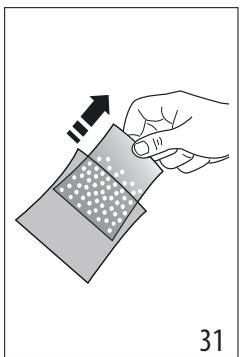
- Take the sachet of Softballs from the wrapper (fig. 31).
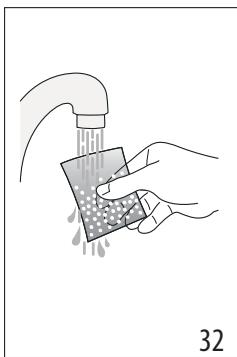
- Rinse the sachet of Softballs under running water (fig. 32).
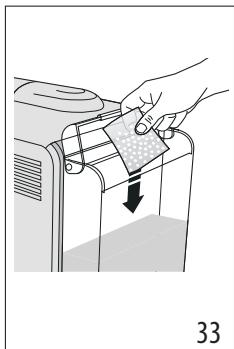
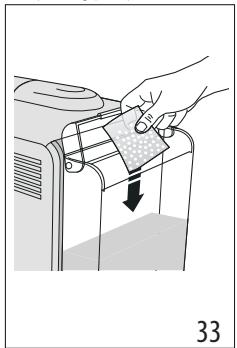
- Immerse the sachet in the water tank (A7) (fig. 33).
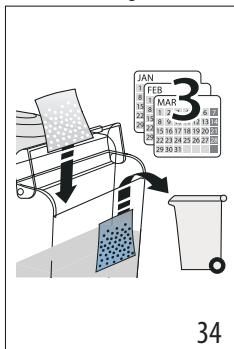
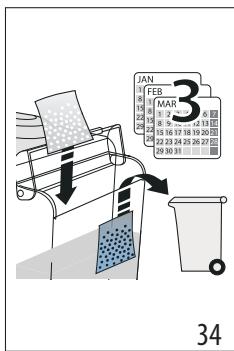
- Change the sachet of Softballs every 3 months (fig. 34).
12. DESCALING
Important!
Before using the descaler, (C6) read the instructions and the labelling on the pack. Use De'Longhi descaler only. Using unsuitable descaler and/or performing descaling incorrectly may result in faults not covered by the manufacturer's guarantee. - Descaler can cause damage to delicate surfaces. If the product is accidentally spilt, dry immediately.
| To descale | |
| Descaler | De'Longhi descaler |
| Container | Capacity 2 litres |
| Time | ~40min |
- When the indicator light [B3] comes on, you need to descale the appliance. You can start descaling at any time.
- Remove and empty the drip tray (A19), then reposition it in the machine.
- Empty the water tank (A7). (If present, remove the softballs and place in a glass of water until they can be re-inserted at the end of the descaling process.)
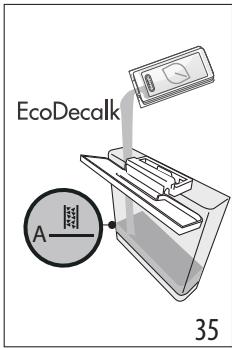
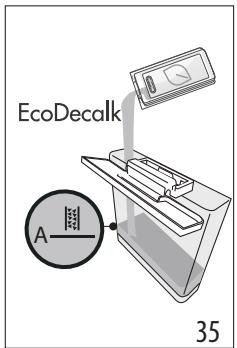
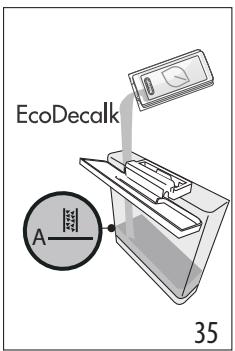
- Pour the descaler into the water tank (C6) up to the level A marked on the inside of the tank (corresponding to the contents of one 100ml pack) (fig. 35).
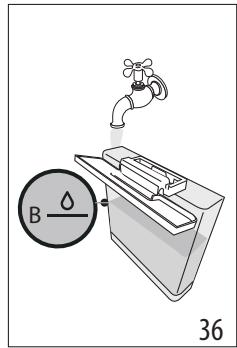
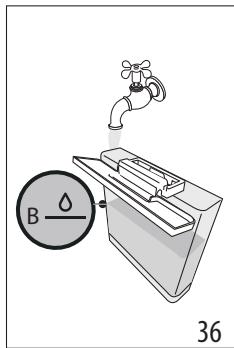
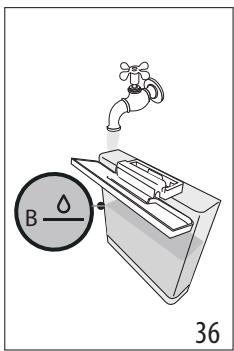
- Add water (1 litre) up to level B (fig. 36). Now reposition the water tank in the machine.
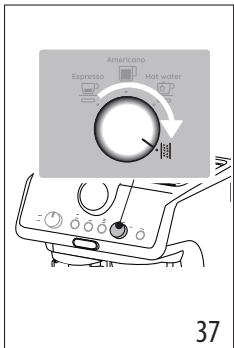
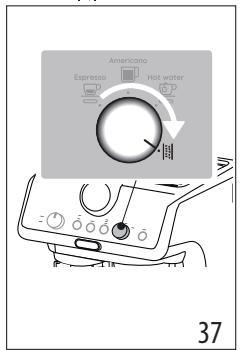
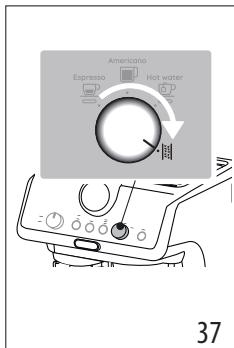
- Turn the dial (B8) to [5] (fig. 37): The OK light turns orange and the [5] light flashes.
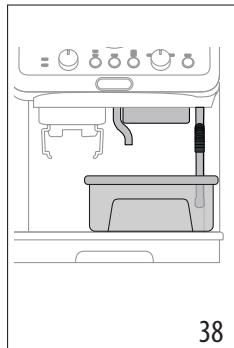
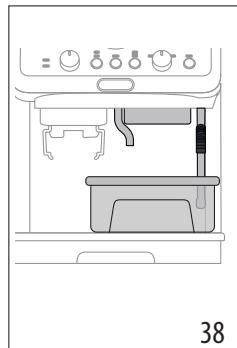
- Make sure the filter holder (C1) is not attached. Position a container under the coffee spouts (A10) and hot water spout (A11) and another under the steam wand (A9) (fig. 38).
- Press and hold the OK button (B6) for at least 3 seconds. The OK light flashes.
- The descaling programme starts and the descaler liquid comes out of the spouts. The descale programme removes limescale deposits from inside the appliance by automatically performing a series of rinses and pauses until the tank is empty.
Descending ceases and the OK light turns white. This means that a rinse cycle must be carried out:
- Empty the containers used to collect the descaler solution and reposition them under the spouts.
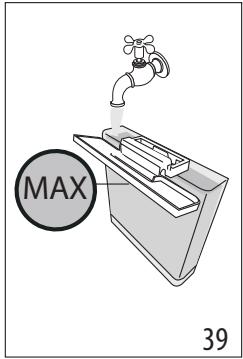
- Remove the water tank, empty out any residual descaler solution, rinse under running water and fill with fresh water up to the MAX level (fig. 39). Put the tank back in its housing.
- Press the OK button. The rinse cycle starts.
- When rinsing is complete, delivery stops. The light flashes red and the OK light goes out.
- Empty the recipient used to collect the rinse water.
- Remove and empty the drip tray (A19), then reposition it in the machine.
- Remove the tank, fill with fresh water and reposition in the machine. (If present, rinse the softballs with running water and put back in the tank).
- Turn the function selection dial (B8) to one of the beverages. The machine is now ready for use.
Please note:
- The descending cycle can be started up at any time (even if the relative light has not yet come on).
- Should descending be started up by mistake, it can be stopped by pressing the OK button and holding for 10 seconds; the rinse cycle cannot be stopped.
- EXPLANATION OF INDICATOR LIGHTS
| LIGHTS | EXPLANATION OF INDICATOR LIGHTS | OPERATION |
| All lights blink briefly | Turning the machine on | Self-diagnosis |
| OK on | The machine has been turned on for the first time and the water circuit must be filled | Proceed as indicated in section "3. Setting up the appliance" |
| OK + Americano + Hot water On (The indicators L and show the respective selections) | The machine is ready to deliver fluids | Set up the machine and proceed with preparation of the beverage |
| OK Flashing | The machine is warming up | Wait until the ideal delivery temperature has been reached |
| On | There is not enough water in the tank (A7) or the tank is not correctly in place | Fill the tank with water, or remove the tank and reposition it correctly |
| → | ||
| Flashing | An attempt is being made to prepare a beverage, but with water tank (A7) empty | Fill the tank with water |
| Because the beans are too finely ground, the coffee is delivered too slowly or not at all | Remove the filter holder (C1) and repeat the coffee-making steps, bearing in mind the indications given in sections "4.1 Step 1 - Grinding" and "4.2 Step 2 - Tamping" | |
| The coffee filter (C3) or (C4) is obstructed | Rinse the filters under running water | |
| The tank (A7) is not properly in place and the relative valves are not open | Press down lightly on the tank to open the valves | |
| Limescale in the water circuit | Descale as described in section "12. Descaling" | |
| ×2×1on | 1 cup preparation is selected | The entire preparation procedure (from grinding to delivery) is set to make 1 cup |
| ×2on×1 | 2 cup preparation is selected | The entire preparation procedure (from grinding to delivery) is set to make 2 cups |
| MIN MAX On | Select one of the available temperatures | See "Coffee preparation temperature" |
| Flashing | General alarm | Turn the machine off and wait 10 minutes before turning on again. If the problem continues, contact customer services. |
| Flashing | The steam function is selected and underway | After a few seconds, the machine starts deliv-ering steam |
| On-red | Dscaling is required | Carry out descaling as described in section "12. Descaling" |
| Red OK Orange Flashing-On | Dscaling is selected | Press OK to start descaling or turn the dial to a beverage |
| Red OK Orange Flashing | Dscaling proceeds. The machine deliver-ers descaling solution | Proceed by completing the descaling cycle (see "12. Descaling") |
| → | ||
| Red OK White Flashing - On | The first phase of the descending cycle is complete. You now need to proceed with rinsing. | Press OK to start rinsing. |
| Red OK White Flashing | The machine proceeds with the rinsing phase to complete the descending cycle. | Proceed by completing the descending cycle (see “12. Descaling”) |
- TROUBLESHOOTING
| PROBLEM | CAUSE | SOLUTION |
| There is water in the drip tray (A19) | This water comes from the internal cir-cuits of the machine and is a normal con- sequence of their operation | Empty and clean the drip tray on a reg- ular basis |
| The machine fails to produce espresso coffee | No water in the tank (A7) | Fill the tank |
| The OK light (B6) is on, meaning that the coffee circuit or the steam circuit is empty | Press the button associated with the OK light to fill the circuit | |
| Blockage in the coffee filter (C3) or (C4) | Rinse the filters under running water | |
| Coffee ground too finely | Adjust the quantity and grinding level | |
| The tank (A7)is not properly in place and the valves at the bottom are not open | Press down lightly on the tank to open the valves at the bottom | |
| Limescale in the water circuit | Descale as described in section “12. Descaling” | |
| The filter holder (C1) cannot be attached to the appliance | The ground coffee has not been tamped or the quantity is excessive | Repeat phase 1 (section “4. Making cof- fee”) using less coffee. If you are using the 1 cup filter, make sure the 1X light (B5) is on. |
| The espresso coffee drips from the edges of the filter holder (C1) instead of from the holes | The filter holder is not correctly in place | Attach the filter holder correctly (fig. 19) |
| The coffee spout gasket has lost flexibility or is dirty | Contact a customer services centre to have it replaced | |
| Blockage in the coffee filter (C3) or (C4) | • Rinse the filters under running water • Adjust the grinding settings | |
| The espresso cream is too light (delivered from the spout too fast) | The machine settings need to be reappraised | See instructions in section “The “perfect dose”” |
| The espresso cream is too dark (delivered from the spout too slowly) | The machine settings need to be reappraised | See instructions in section “The “perfect dose”” |
| On completion of the descale cycle, the machine calls for a further rinse | During the rinse cycle, the water tank (A7) has not been filled to the MAX level | Repeat the rinse cycle (see section “12. Descaling”) |
| The machine does not grind the coffee | Foreign matter has found its way into the coffee mill | Turn the selector (A2) to 8 and remove all beans with a vacuum cleaner until the beans container (A3) is empty and clean. If the problem continues, contact customer services |
| Changing to a different type of coffee | You are recommended to pour only the amount of beans to be used into the beans container (A3) To empty the container, vacuum out the contents with a vacuum cleaner or grind all the beans in the container until completely empty. Add new type of coffee beans If the amount of ground coffee does not give the perfect dose, proceed to set up the machine as for first-time use | |
| After grinding, the coffee filter (C3) or (C4) is empty | The funnel of the coffee mill is clogged | Clean as described in section “9. Cleaning the coffee mill”. |
| After grinding, the amount of coffee in the filter (C3) or (C4) does not give the “perfect dose” | The quantity of ground coffee needs adjusting | Adjust the quantity of coffee with the dial (B4), following the instructions in section “The ‘perfect dose’”. If the dial is already in the max. position, proceed as described in section “7. Settings menu” – “Extra grinding adjustment” |
| You are using the 2 cup filter (C4) | Make sure the 2X light is on | |
| Over time the burrs wear down | Contact Customer Services |
4.3 Phase 3 - Distribution (brewing)
- Espresso Americano Hot water
- Descaling
| DISHWASHER SAFE | Ceco MultiClean | ||||
| √ | × | × | √ | √ | |
| × | × | × | √ | √ | |
| × | × | √ | × | × | |
| × | × | × | √ | √ |
9. CLEANING THE GRINDER
| DISHWASHER SAFE | QIEco MultiClean | ||||
| √ | × | × | √ | √ | |
| × | × | × | √ | √ | |
| × | × | √ | × | × | |
| × | × | × | √ | √ |
9. CLEANING THE COFFEE GRINDER
- Clean the coupling area with the brush (C9) (fig. 27).
- Using the brush, clean the coffee ramp (fig. 28).
Efficient grinding
4.1 Phase 1 - Grinding
4.3 Phase 3 - Brewing
- Select temperature (fig. 20) (see "Temperature for coffee preparation").
- Select the desired drink (fig. 21). If the drink has been programmed (see chapter "6. Programming coffee strength"), the lamp of the selected drink will blink briefly.
- Press OK (B6) to start preparation (fig. 22) (for pour-over and brew). Preparation starts and stops automatically.
4.3 Phase 3 - Dispensing (brewing)
| DISHWASHER SAFE | Eco MultiClean | |||
| × | √ | √ | × | × |
| → | ||||
| DISHWASHER SAFE | QIEco MultiClean | ||||
| √ | × | × | √ | √ | |
| × | × | × | √ | √ | |
| × | × | √ | × | × | |
| × | × | × | √ | √ |
9. CLEANING THE COFFEE GRINDER
| DISHWASHER SAFE | Olive MultiClean | |||
| × | √ | √ | × | × |
| √ | × | × | √ | √ |
| → | ||||
| DISHWASHER SAFE MultiClean | Eco MultiClean | |||
| × | × | × | √ | √ |
| × | × | √ | × | × |
| × | × | × | √ | √ |
9. CLEANING THE COFFEE GRINDER
| DISHWASHER SAFE | O Eco MultiClean | |||
| × | √ | √ | × | × |
| √ | × | × | √ | √ |
| → | ||||
| DISHWASHER SAFE MultiClean | OECo MultiClean | |||
| × | × | × | √ | √ |
| × | × | √ | × | × |
| × | × | × | √ | √ |
9. CLEANING THE COFFEE GRINDER
- Espresso Americano Hot water (Topyaa Boda)
- Descaling
B9. Steam wand: For dispensing steam
1.3 Description of accessories -C
1.4 Not included accessories for cleaning, recommended by the manufacturer
Temperature for preparing coffee
The temperature of the water is controlled throughout the entire brewing process to ensure its stability during the extraction stage. La Specialista Arte offers 3 brewing temperature levels, which correspond to a range from 92°C to 96°C.
Depending on the type and degree of roasting of the beans, it is recommended to use different temperature levels: Robusta beans require a lower temperature, while Arabica beans require a higher one. These requirements are also valid for lightly roasted beans or freshly roasted beans.
4.2 Two-chamber tamper
- Place the tamper on the coffee grounds (Figure 15).
- For tamping the coffee, use the tamper with the flat side (C2) and press firmly.
- (For double shots): Place the tamper on the coffee grounds with the convex side (C12) (Figure 16).
- Press the coffee button (C11) (17-figure).
- Before brewing, remove the filter and the coffee grounds (18-figure). Then insert the filter paper (see "Drip coffee maker").
- Set the water hardness (A10) (19-figure).
If the coffee is too weak: increase the amount of coffee grounds or select a stronger brew strength. If the coffee is too strong: decrease the amount of coffee grounds or select a weaker brew strength.
"Drip coffee maker"
The drip coffee maker is suitable for ground coffee;
After brewing, the coffee is kept warm automatically. To use the drip coffee maker, press the start button (B4) once or twice.
If the coffee is too weak or too strong, you can adjust it by changing the amount of coffee grounds or the grind size (see "4.1 Step 1 - Grinding"). To adjust the amount of coffee grounds (if the coffee is too weak), increase the amount. To adjust the grind size (if the coffee is too strong), change the grind setting.
4.3 Step 3 - Brewing
- Set the temperature (20-figure) (see "Coffee brewing temperature").
- Select the water hardness (21-figure). If the water hardness is not set (see "6. Setting the water hardness"), the water hardness indicator will flash.
- To start brewing, press the OK button (B6) (22-figure) (heating and then brewing). The coffee maker will stop automatically.
Coffee brewing temperature
To ensure the coffee brewing process is carried out without interruption, the water temperature is checked. The coffee maker has three brewing temperatures*, which are set between 92 and 96°C. The optimal temperature depends on the type of coffee and the roast: for Robusta coffee, a lower temperature is needed, for Arabica coffee, a higher temperature is required. The temperature is also set for lightly roasted and dark roasted coffees.
| DISHWASHER SAFE | Oleco MultiClean | ||||
| X | X | √ | X | X | |
| X | X | X | √ | √ |
9. CLEANING THE COFFEE MAKER
- Bekeitya aHaMaFbIn ΜeTkaMeH (C9) Ta3aJaHaI3 (27-cpeT).
- Kofo 6afttaftbIHTbTa3aJAY yuH uTeKaHbI naJaHaNbIbI3 (28-cypet).
Tmimi TapTy
Kaayticep yakblt 0te KeNE To3aBl. YaKbl 0te Ke ne dAn MOnIeepi any ywiH dOnHreKeTl (B4) en XorapfbCaHdapfa 6ypay KaKet 6oNaBb. 30 Xane 40 apaIbIbHdaft npamaTpRe KOn JxetKeH Ke3de, KocbIMwa TapTy npamaTpIn OpaHTy KaKet 6oNaBb ("7. PanaMeTpnep M3ipi" - "KocbIMwa TapTy ayKbIMb" 6eImIH KapaHbI3).
TaptbInFaH KoFe MOnIepi KytKeHderiEdn a3 WbIKKaH Ke3De, KaWayTicTePdi AybICTbIpTy yuH IN KbIMET opTaIbIFbIMEn Xa6apJaacblbI3. KaWayTicTeP caIbIHFaH Ke3De, napaMetpIep M3aipIHe Kpy XaHe "KocBIMwa TaTpYdBi peTtey" napaMetpiH, 6ipHni aykbIMbIH TaHday apkblb I KoFe TApTkblTbi petTeH3. OdaH KeiH, TaptbInFaH KoFe MOnIepi HOnHreNeKTi (B4) Min KyIHe opHaTbIN, 6ipHni pet KonDaHaHaDa caIbHybl Tnic MOnIepi caIbHB13 ("DAn MOnIeep"" 6oJIIMn KapaHbI3).
10.CY KATTbIJIbIFbl
Ka Ka Ta3anay 7aMbI (B3) cy KaTbIbIfblnapaMeTpIe 6aHaNbICTbI aDbIH anaahbIKtaIraH Kymbc Ke3eHHeh KeiH XaHaDbI. ByKypbJIbHbI ci3 TypaTbIH Jepderi HaKtbl Cy KaTbIbHbIHa ca6afapJaMaNayFa da 6oJala, coHda Xn Ka Ka Ta3anay KaKet 6oImaJbI ("7. NapaMeTpIep M3pi" 6oImin KapaHbI3).
- TOTAL HARDNESS TEST KερceτκιώΚαfa3bIH (C5) opambyHaH υβfapbIbI3.
- KaFa3DbI cTaKaHdAfbI cyFa 6ip ceKyuHdTaI ToBbIK 6aTbIPbIN aBbIHbI3 (29-cypet).
- XokaHaHb cydah 乌fapbl, kailan cijkiniz (30-cypet).
| Су KaTTbIbIbIbIc | (B7)ТуМсeI | Дени |
| 1ЖУМсaК,су | ||
| 2орташacу | ||
| 3KaTTblHemeceTeKaTTbl cy |
- KypbIfblHbl "7. Iapametprlep M3iPI 60JIIMIHde KepcetilreHnei Tnicihue opHaTbIHb13.
11. JYMCAK TYIIPUIKTEPDI KOIДAHY ФДICI (TEK KEIBIP YJΓIJIEPDE)
KymcaTnyipwikTep (C7) DeereHim3 cydbIH KacneTTepi H3repTnei, KypblfBiHbH JapaMdbIbIK, Mep3iMH Y3apTaTbIH XaHe KofoHi 6ipKaIbITbI KOIO XoH NiCTi eTeiH INHOBaunJIbIK Kyue. OHeyDi TImdInirH KaCapTy ysiH JyMCAk TyipwiKTEpDI KOJaHaBac 6ypbi6ip TYHRe cyfa caJIbIN KoBlHbI3.
- Short turbo switches are installed (31-figure).
- Short turbo switches are installed on the water (32-figure) opening.
- Fill the water tank (A7) (33-figure).
- Short, install the 3rd level of turbo switches (34-figure).
12. HOW TO DESCALE
Attention!
Before descaling (C6), read the instructions and the instructions on the descaling container. Use only De'Longhi descaling products. Using other descaling products or descaling improperly may damage the appliance. Descaling is necessary. If you have any doubts, contact the service center.
| Каç таzaлay | |
| Каç, Тазарткыìш | De'Longhi каç тазарткыìшì |
| bɪdɪc | СbɪbɪMдьɪlɪbɪfbl - 2 ЛNTp |
| Yaксытbl | ~40 MнH |
- The indicator light (B3) will turn on when descaling is needed. You can start descaling at a convenient time.
- Remove the filter (A19) and, if present, the water softener filter.
- Empty the water tank (A7). (If present, remove the softener filter and rinse it under running water.)
- Pour the descaling solution into the water tank (C6) up to the A level (this is about 100 ml of product) (35-figure).
- Add water (1) to the A level (36-figure). Then place the water tank back.
- Press the button (B8) (37-figure): the light will turn on and the light will flash.
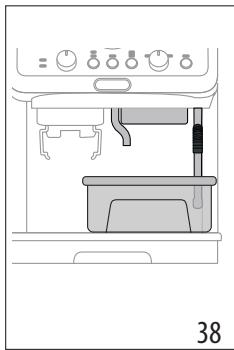
- In this case, the steam knob (C1) must be closed. Place a container under the steam wand (A10) and the hot water wand (A11), then turn the steam knob (A9) (38-figure) to open it.
- Press the button (B6) for 3 seconds. The light will flash.
- Each gas burner must be equipped with a safety device that prevents the gas supply if the flame goes out. Each gas burner must have a flame failure device that stops the gas flow if the flame is extinguished.
Each gas burner must be turned off and the gas valve closed. To do this, follow these steps:
- To ignite the gas burner, press and hold the control knob, then turn it to the high flame position.
- After the flame is lit, keep the knob pressed for a few seconds, then release it. If the flame goes out, repeat the operation.
To turn off the burner, turn the knob to the off position (see figure 39). Close the gas valve on the supply line.
- Press the gas valve. The ignition cycle is complete.
- After the flame is lit, the gas flow stops. [...] The valve is closed and the gas supply is cut off.
- To drain the water, open the drain valve.
- Remove the cap (A19), then open the valve and let the water drain.
- After draining, close the valve and replace the cap. (If necessary, use a wrench to tighten the cap). 17. Function test: Check the gas supply.
Then turn the gas valve to the off position.
If there is a leak:
Each gas burner can be reignited by pressing the ignition button (if equipped). If the gas burner does not ignite, press the gas valve for 10 seconds to stop the gas flow; then repeat the ignition cycle.
- INDICATOR LAMPS DESCRIPTION
| шAMДAP | ИнДИКATOP ШAMДAPынIH TYСИДIPMECI | ЖУМБIC TYPI |
| Барлык, Шamдap a3 fana уакытжылбытайды | Курьлфы icke косылuda | θзин-эзiTekсеруde |
| OK Kocylы | Курьлфы 6ipinshi pet icke Кocылfasан JэHe cy aiHaJy Жолары толырылы Kepek | Келесi 6eIIMde KepcetilreH Hyckaylappы OpbIHdaHbI3: "3. Курьлфы napametprpeH opHATy" |
| OK + Hot water Kocylы ENdikatoplары ТиICTi Тандaynapылы КерсеTi | Курьлфы cybIKtBtKtarpы Куюfa дaibH | Курьлфы пapametprpeH opHATbI, CysbH daibIHdAydbl 6actaHbI3 |
| OK Kobinbiklay | Маша НхыltынluDA | Mincis 6kyu TemnepaTPacbHnA DeiH Kbl3FaHsA KytTic3 |
| Kocylы | Быдіста жеткілікі Magic opbH Жok (A7) Hemece bldlc opbHna Дурс салынбаган | Быдісты СуMuH TOЛТырБИнbI3 Hemece bldlcSTbl aIbI, OHbI ДурстпсалынbI3 |
| Жынлы | Сусын дaibHdav Āpeketi opbIHdanyda, bipak cy bldlcbl (A7) 6oc | Быдісты СуMuH TOЛТырБИнbI3 |
| Дэндер Тым Мада 6oLbIn ТарылганыктAN, Kofoe эTe Jäm KúbIlyda Hemece Mул dem KúbIлмayda | Суэрі устыtsы (C1) StbIFapbln aIbI, Kofoe Jaskay KaDAMapbln КаITanlan opbIHdaHbI3, bipak "4.1 1-Kadam - YHTaKtay" JxHe "4.2 2-Kadam - TblbI3dAy" 6eIIMderiHde KepcetilreH HvCKaynapылы ecenke aIbIbI3 | |
| (C3) Hemece (C4) Kofoe cy3rici 6iteLren | Суэрір徂Да afbH cy acTbIHda шaibHbI3 | |
| bldlc (A7) opbHnHa duypbc салынбafan JxHe TnICTi Клаландap aSbIIMaFah | Клаландapы aShy yuHn bldlcTbI yctihen JxaiJIan 6acblbI3 | |
| Су aiHaJIbIMbIhda KaK Калыntackан | "12. KaK Tazalay" 6eIIMde сипатлгандai etin KaKTan Тазаланы3 | |
| → | ||
| шAMДAP | ИнданКATOP ШAMДAPыHBиН TYСИДIPМECI | ЖУМьIC TYPI |
| x2 x1 Kocyls | 1 kece дайындay napametpi Тандалды | Букій дайындay поочурасы (Tартудан Ксюfa DeiiHri) 1 kece жасay napametpihe opнатылды |
| x2 Kocyls | 2 kece дайындay napametpi Тандалды | Букій дайындay поочурасы (Tартудан Ксюfa DeiiHri) 2 kece жасay napametpihe opнатылды |
| MIN MED MAX Kocyls | К олж e trimdi temператypалардын,бipін Тандалдз | "Кофе дайындay Temператypалсы"6өлімн караныз |
| Жынblытay | Жалны дабы | Курсынгыны ошірін,10 мінітіан сон, Кайта Ксюыныз.Еream п探测ема Кайталая 6ерс, Тусынчынралды Колд Кызmetтетіменхаşраласыныз. |
| Жынblытay | Бу Фунцяясы тандалfacан Жэн ecурін жатур | Биршеce сенидан coн, Курсынfy 6у 6epe 6actaydBi |
| Kocyls - Kbl3bll | Кak taizanay kajket etiledi | Кak taizanaydukkeleci 6eiliMe Керсетілгendey opbɪндалыз: "12. Кak taizanay" |
| ЖынblытayOK capbint | Кak taizanay taizanfah | Кak taizanaydukбactay ушін OK Туймecin 6acbyныз hemecce Дэнгелекti 6iP cycbɪnfa 6ураиыз |
| ЖынblытayOK | Кak taizanay opbɪндалäы. Курсынfu KaK Taizanay epitɪngicɪn afbɪzədBi | Кak taizanaydukobpɪnɪdaɪs ("12. Кak taizanay"6eiliMine cai) |
| ЖынblытayOK | Кak taizanay ушінivсiklinig 6ipɪnü Kezeeni Āякtaлды.Енdi шаюды opbɪндау кajket. | Шаюды 6actay ушін OK туймecin 6acbyныз. |
| ЖынblытayOK | Машина кak taizanay ушін ушін Kezeин opbɪндау ушін ушін Kezeин opbɪндау. | Кak taizanaydukobpɪnɪdaɪs ("12. Кak taizanay"6eiliMine cai) |
- ACCESSORIES LIST
| ПЮБЛЕМА | CE6E6I | ШЕЛIMI |
| Тамший hayасьида (A19) cy 6ap | Бул су Кчрьлгын bIn iшki аиhalыm JОлдарынан шыfasы jжэne 6ул оларын ЖуMbICынан кein 6олатын Калыntын hapce | Тамший hayасьин Туракты Турde 6ocatbIHb3 Jжэne Тазаланы3 |
| Кчрьлгы үспесco кофeciin Жасай олмayda | ыдбICTa cyжOK (A7) | Су bIDbcBn TOITbIPbHb3 |
| OKшамы (B6) кофe hemece 6y аиhalымы 6oc ekeniH korpctу Ушin жанды | Жунeni TOTMbIPy JwIn OK шамын Тиесіл Tумсени басын3 | |
| (C3) hemece (C4) кофe cy3rici бITEлген | Сузгileрdi aByIN cy actbHda шайын3 | |
| Кофe ТыIM мада etilin Тарылган | Мөлserрmen уNTakTay (тарту) Дechг佩н реттп3 | |
| ыдьic (A7) opнын дурьс салынбafan Jжэne Oнын ТубИ徴i Клаландap aшык emec | ТубИ徴i Клаландapы aшу УшIN bIDcICTbY UCTiHEN Jжийл басын3 | |
| Су aiHalbIMbIHDA КAK Калыntackан | "12. Кak тazanay" БOLIMde синоталлгандai etin Кakтан Тазаланы3 | |
| Сузгі усткыш (C1) Кчрьлгыfa бекитимедi | Тарылган Кофe ТыfblДалмafan hemece Кофe Молшері ТыIM кeIN | Альраз, Кофeti пайдану арылы 1-kezeнд("4. Кофe хасay" БOLIMi) осы Кеzeнд Кайталаны3.Ер 1 Keceліk сузгіпайданын жATcaHb3, 1X ShambyHbN (B5)жанын Турfaнын Ke3 JжETKizhi3. |
| Зспесco кофeci tecikterpenen емec, сузгі устышын (C1) Жиекерін tamшылайы | Сузri устыш opнын дурьс салынбafan | Сузri устышын dурьістан бекітін3 (19-cypet) |
| Кофe Shymerini ТыfblДалмblshblHbH Соьылмыbl KacneTi Jxofalfah hemece onl kipleren | Оны aybICTbIpy YwIn ТуТыншылары TКОдay ОрТалыrtbIMeH xa6apLacbHb3 | |
| (C3) hemece (C4) кофe cy3rici бITEлген | •Сузгileрdi afbIn cy actbHda шайын3 •Кофe tarpy napametpreleni pettehi3 | |
| Зспесco кілereşі тым суьык (шумков тым тezаfedы) | Кчрьлгыnapametprelpi ka'ta орнаылуbl кepek | ""Дэл мэлэр"" 6элimінderi нуSCayapLapы Караны3 |
| ПИОБЛЕМА | CE6E6I | ШЕШIMI |
| Знице кинreich Тым Кара (шумкень Тым бая удаbl) | Курьлгыnapаметрелій салу opнатылbykepek | ""Дэл менир"" 6өлimiinderи hyckayларды караныз |
| Каç тазалay сүліяякталган сон, Курьлгы shaio сүлін opындануды сура'dы | Шаю сүлій барысында су bдысы (A7) MAX дөгөiner Deийн толttырлmafasan | Шаю сүлій сүләлалыз ("12. Каç тазалay" 6өлimiinderи караныз) |
| Курьлгы кOFеhi tarTpnaïды | Кофе tarTpкышta 6өгдze 3at 6ap | Тандаftышы (A2) 8 пarametr pine 6уран, 6арнык, дэндердішансорышpen 德н bдысы (A3) 6ocaraнша жэne тазаллоганда anlgin таспаныз.Егр поблесma Кайталагды калдay Кызmetтepimehхаарласыныз |
| Баска кOFe турин aybістыр | • Дэн bдысынale NaTek KОлданыларын Iэндер mөлserрін fana calfaн жэн (A3) • bдысы 6ocatу ушin онын iшиderiineрdi shanccorfbышpen Tazalaныз Hemece bдысы TANFAH 6арнык dэнderdi bдыс толык 6ocaraнша tarTpын таспаныз.• Ханca koфe дэнiz Турін салыныз •Егр tarTpылганkoфe мөлserрі kUTken dəл мөлserр 6oilmai shыкca, курьлгыnapametrрелін Курьлгыны alfaшкы падалануfa дайынданган ке徴дій peTTeɪз | |
| Кофeni tarTkан coh, (C3) hemecе (C4) koфe cyzrici 6ocãды | Кофe tarTkышын, Куньсыбы 6iteлген | "9. Koфe tarTkышыт TaZalaay" 6өлimiDE cinnataлгандai etin TaZalaanbly3. |
| → | ||
| ПЮБЛЕМА | CEБEBI | ШЕШИМ |
| Кофени Тартукан сон, (C3) немесе (C4) сизERICIN, ilшinderei koфе молшер ("дал молшерг") жетnéйdi | Тартылган кофе молшер piTTeуni кадут | Кофе молшерин дэнгелекпен (B4) petten, ""Дал молшер" бүлімінderi hyckaynapы opbIHdaныз.Егр дэнгелек макс. КүйнDE 6уган Deин туган 6oJSCa, onJa "7. Пaramетрир'mәз行政处罚 - "Кофe tarтуды КосыIMSHA petTey" бүлімінde TyciHdipɪŋreн аpeketti opbIHdaныз |
| СiЗ 2 КecSELIC cy3rini пайдалиын жатырсыз (C4) | 2X Шамы Кангafынha көз жеткизii3i3 | |
| Уakыт от eе ке пашayтICTep TO3aDbl | Тулынчыларды колдay КызmetTepimEn XaбapnaCSbIHbI3 | |
| DISHWASHER SAFE | Olive MultiClean | |||
| × | √ | √ | × | × |
| → | ||||
| DISHWASHER SAFE | QIEco MultiClean | ||||
| √ | × | × | √ | √ | |
| × | × | × | √ | √ | |
| × | × | √ | × | × | |
| × | × | × | √ | √ |
9. CLEANING THE COFFEE GRINDER
| DISHWASHER SAFE | Olive MultiClean | |||
| X | √ | √ | X | X |
| → | ||||
| DISHWASHER SAFE | QIEco MultiClean | ||||
| √ | × | × | √ | √ | |
| × | × | × | √ | √ | |
| × | × | √ | × | × | |
| × | × | × | √ | √ |
9. CLEANING THE COFFEE GRINDER
- Clean the attachment zone with the brush (C9) (fig. 27).
- Use the brush to clean the coffee beans (fig. 28).
Efficient grinding
Grinders wear out over time. Therefore, over time, to achieve the perfect dose, you need to turn the knob (B4) towards higher numbers. When you are between 30 and 40, it's time to set the extra grinding range (see chapter 7, "Settings menu" - "Extra grinding range").
| DISHWASHER SAFE | Q5co MultiClean | |||
| × | √ | √ | × | × |
| √ | × | × | √ | √ |
| × | × | × | √ | √ |
| × | × | √ | × | × |
| × | × | × | √ | √ |
9. CLEANING THE COFFEE GRINDER
| DISHWASHER SAFE | Q5co MultiClean | |||
| × | √ | √ | × | × |
| √ | × | × | √ | √ |
| × | × | × | √ | √ |
| × | × | √ | × | × |
| × | × | × | √ | √ |
9. CLEANING THE GRINDER
OK: (B6) jJl Jc jlg3 0dJ OK jj Jc bawal .8 .OK
aIgll aIgll 1
| مُّلْكَسِيرِهُ لَبَعَدَةِ الحَزَلَةِ مَّلْكَسِيرِهُ لَبَعَدَةِ الحَزَلَةِ مَّلْكَسِيرِهُ لَبَعَدَةِ مَّلْكَسِيرِهُ لَبَعَدَةِ مَّلْكَسِيرِهُ لَبَعَدَةِ مَّلْكَسِيرِهُ لَبَعَدَةِ مَ�َنَتَبَعَدِهُ |
| مُّلْكَسِيرِهُ بَعَدَةِ الحَزَلَةِ مَ�َ�َرْبَعَدِهُ بَعَدَةِ مَ�َ�َرْبَعَدِهُ bَعَدَةِ مَ�َ�َرْبَعَدِهُ bَعَدَةِ mَ�َنَتَبَعَدِهُ bَعَدَةِ mَ�َ�رْبَعَdِهُ bَعَدَةِ bَعَدَةِ bَعَدَةِ bَعَدَةِ bَعَدَةِ bَعَدَةِ bَعَدَةِ bَعَدَةِ bَعَدَةِ bَعَدَةِ bَعَدَةِ bَعَدَةِ bَعَدَةِ bَعْدَةِ bَعَدَةِ bَعَدَةِ bَعَدَةِ bَعَدَةِ bَعَدَةِ bَعَدَةِ bَعَدَةِ bَعَدَةِ bَعَدَةِ bَعَدَةِ bَعَدَةِ bَعَدَةَ bَعَدَةِ bَعَدَةِ bَعَدَةِ bَعَدَةِ bَعَدَةِ bَعَدَةِ bَعَدَةِ bَعَدَةِ bَعَدَةِ bَعَدَةِ bَعَدَةِ bَعَدَةِ bَعِدَةِ bَعَدَةِ bَعَدَةِ bَعَدَةِ bَعَدَةِ bَعَدَةِ bَعَدَةِ bَعَدَةِ bَعَدَةِ bَعَدَةِ bَعَدَةِ bَعَدَةِ bَعَدَةْ bَعَدَةِ bَعَدَةِ bَعَدَةِ bَعَدَةِ bَعَدَةِ bَعَدَةِ bَعَدَةِ bَعَدَةِ bَعَدَةِ bَعَدَةِ bَعَدَةِ bَعَدَةِ bَع—" |
jS.(B3){gall Llaic aill lll j 1 .1 A.(A19)a(A19)a(a)a(a)a(a)a aag aill lglll ally . (A7) all jzg 3 all! Jlalss. ( gssll (C6) a yjzssjll jz jz jz jksw 4 J11 J11 J11 J100 a zw a Ljla lo A .35 Jkwl) .36JkJ1)B sssall Jj j (j1 1)Jall .5
J OK jgall g: (37 JkJl) (B8)aaal 6 .6
| sgssss | (B7) jll | salll jwccjll |
| 2 a#b##goo ollo jwssll | ∅ | |
| 3 gljwcccldo l#jwcc | ∅ | |
1a 7Jauill goo gao la jauill cIisla Jbou 4 .
| DISHWASHER SAFE MultiClean | ||||
| × | × | √ | × | × |
| √ | √ | × | × | × |
ogalliaaba.9
.(27Jswi) (C9)olawjolawjll aebzio 1
.28Jk) 0gagall yjoo aaiy j,olajoll oiai
jbs
dclc llll i. jilj 1 jalbll jai jai jai jai jai jai jai jai jai jai jai jai jai jai jai jai jai jai jai jai jai jai jai jai jai jai jai jai jai jai jai jai jai jai jai jai jai jai jai jai jai jai jai jai jai jai jai jai jai jai jali jali jali jali jali jali jali jali jali jali jali jali jali jali jali jali jali jali jali jali jali jali jali jali jali jali
.(《glo!jobgbi:«-《bawalUusLJ 7》>Jall
aalg aillw alj ydo jgi aggball oggall aasolal ic aiaa bja jno bawl a: jnbll cajawll dyaedall gall bawll gllbld wagbawll calsel aqll jgwl noggall aeg (B4) aaii bwa aao aay dl uas a. jnall "glzyl" aaii(11) jnil) lglil palaasll ayas aaii bawl a MIN jdlld
.(<<dJ
olollsw .10
TOTAL HARDNESS TEST (C5 "cll)
(29)
.30Jsw) 0j8o8gclll o bawl j
| مإستعمال | (B7)zzjj | الله��اللهالله |
| 1 الله��الله |
| :aaaalaaaalaaalaaalaaalaaalaaalaaalaaalaaalaaalaaalaaalaaalaaalaaalaaalaaalaaalaaalaaalaaalaaalaaalaaalaaalaaalaaalaaalaaalaaalaaalaaalaaalaaalaaalaaalaaalaaalaaalaaalaaalaaalaaalaaalaaalaaalaaalaaalaaalaaalaaalaaa | .1 |
| 3 3 3 3 3 3 3 3 3 3 3 3 3 3 3 3 3 3 3 3 3 3 3 3 3 3 3 3 3 3 3 3 3 3 3 3 3 3 3 3 3 3 3 3 3 3 3 3 3 3 33 | .2 |
jai.8
a
gJtll aouo cIabio gI cUio Jaxu y Auol all uobii
Jgssu
wglg jg aagjll gai jbj 4aasall eal y
.
JgEgawjdujjolldwllcuijduaill
Therefore, y = -1/2 x + 3; BC is parallel to l.
Therefore, the area of triangle BCD equals the area of triangle COD plus the area of triangle BDO minus the area of triangle BOC.
| MultiClean | DISHWASHER SAFE | |||
| × | × | √ | √ | × |
| √ | √ | × | × | √ |
| √ | √ | × | × | × |
| ← | ||||
.
i. (x, y) = a + b
.
(5 ( )
.1aai aagg g@JdI J:6 (Kb) (OK (B6 jj bc b#).3
.
ailll aillll gllll cbls yll aall lalwol
:dllglal
(C1) Cωjoll ωg (C4)g (C3)δgall jld
Joloo:aaSLlly (C1) 50000000000000000000000000000000
Jolg 05d 015b 4, cwwll Jgall
g (7 k) "INSERT"
:"CLOSE" gogll oIiIoo
:(A9)jLJUgJgJdJIbCoo
:all (OK (B6 jj Jc bdo) .7
8g (8 Jkll) (B9) jll jao jol jol jol jol jol .8
JgJgJgJgJgJgJgJgJgJgJg
.1y4g3dall0jLjSuayualluyjgu
4.1 0aBgl (C4)g(C3))jdlg
.(grinding)-1
- CLEANING THE COFFEE GRINDER
- DESCRIPTION
- DESCRIPTION OF APPLIANCE - A
- DESCRIPTION OF CONTROL PANEL - B
- DESCRIPTION OF ACCESSORIES - C
- OPTIONAL CLEANING ACCESSORIES RECOMMENDED BY THE MANUFACTURER
- PREPARING THE APPLIANCE
- SETTING UP THE APPLIANCE
- MAKING COFFEE
- STEP 1 - GRINDING
- STEP 2 - TAMPING
- THE "PERFECT DOSE
- STEP 3 - BREWING
- COFFEE PREPARATION TEMPERATURE
- MAKING MILK BEVERAGES
- FROTHING THE MILK
- BARISTA TIPS
- CLEANING THE STEAM WAND
- PROGRAMMING BEVERAGE QUANTITIES
- PLEASE NOTE
- SETTINGS MENU
- SAVE THE NEW SETTINGS BY PRESSING OK (B6)
- RESET DEFAULT SETTINGS
- CLEANING THE APPLIANCE
- IMPORTANT
- DANGER
- CLEANING THE COFFEE MILL
- EFFICIENT GRINDING
- WATER HARDNESS
- HOW TO USE SOFTBALLS (CERTAIN MODELS ONLY)
- DESCALING
- PHASE 3 - DISTRIBUTION (BREWING)
- CLEANING THE GRINDER
- PHASE 1 - GRINDING
- PHASE 3 - BREWING
- PHASE 3 - DISPENSING (BREWING)
- DESCRIPTION OF ACCESSORIES -C
- NOT INCLUDED ACCESSORIES FOR CLEANING, RECOMMENDED BY THE MANUFACTURER
- TEMPERATURE FOR PREPARING COFFEE
- TWO-CHAMBER TAMPER
- DRIP COFFEE MAKER
- COFFEE BREWING TEMPERATURE
- CLEANING THE COFFEE MAKER
- TMIMI TAPTY
- CY KATTBIJIBIFBL
- JYMCAK TYIIPUIKTEPDI KOIДAHY ФДICI (TEK KEIBIP YJΓIJIEPDE)
- HOW TO DESCALE
- ATTENTION
- IF THERE IS A LEAK
- OGALLIAABA
- JBS
- OLOLLSW
- JAI
- A
- THEREFORE, Y = -1/2 X + 3; BC IS PARALLEL TO L
Brand : DELONGHI
Model : EC 9155.MB PREMIUM
Category : Espresso Coffee Maker