
CYBER-SHOT DSC-H200 - Camera SONY - Free user manual and instructions
Find the device manual for free CYBER-SHOT DSC-H200 SONY in PDF.



| Product type | Digital camera Cyber-shot DSC-H200 |
| Brand | Sony |
| Model | DSC-H200 |
| Sensor | CCD 1/2.3", 20.4 megapixels (total), 20.1 megapixels (effective) |
| Optical zoom | 26x (35 mm equivalent: 22.3 – 580 mm in 4:3, 28 – 748 mm in 16:9) |
| Image stabilizer | SteadyShot optical |
| Screen | LCD TFT 7.5 cm (3.0"), 460,800 dots |
| Flash | Built-in, range: 0.4 – 6.8 m (W), 1.5 – 3.6 m (T) |
| Video | MPEG-4 AVC/H.264, 1280 × 720 (Fine) |
| Storage media | Internal memory 55 MB, Memory Stick Duo, Memory Stick Micro, SD, SDHC, microSD, microSDHC |
| Connectivity | USB 2.0 Hi-Speed, A/V OUT (video/audio) jack |
| Power source | 4 LR6 (AA) alkaline batteries supplied or 4 compatible Ni-MH HR6 (AA) rechargeable batteries |
| Battery life (still images) | Approx. 350 shots (CIPA standard with new alkaline batteries) |
| Battery life (movie) | Approx. 85 minutes (actual shooting) |
| Dimensions (W × H × D) | 122.9 × 83.2 × 87.2 mm (CIPA compliant) |
| Weight | Approx. 530 g (with batteries and Memory Stick Duo) |
| Operating temperature | 0 °C to 40 °C |
| Main functions | Face detection, smile detection, sweep panorama, scene modes, photo effect, exposure correction |
| Maintenance and cleaning | Clean the exterior with a soft cloth slightly dampened with water, then wipe with a dry cloth. Avoid chemical products. |
| Safety | Do not expose to water, do not point at the sun, avoid shocks, use only compatible batteries |
| General information | In-camera guide, PlayMemories Home software (Windows), compatible with Exif Print and PRINT Image Matching III |
Frequently Asked Questions - CYBER-SHOT DSC-H200 SONY
User questions about CYBER-SHOT DSC-H200 SONY
0 question about this device. Answer the ones you know or ask your own.
Ask a new question about this device
Download the instructions for your Camera in PDF format for free! Find your manual CYBER-SHOT DSC-H200 - SONY and take your electronic device back in hand. On this page are published all the documents necessary for the use of your device. CYBER-SHOT DSC-H200 by SONY.
USER MANUAL CYBER-SHOT DSC-H200 SONY
Learning more about the camera ("Cyber-shot User Guide")
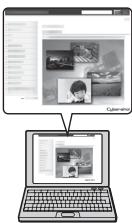
"Cyber-shot User Guide" is an on-line manual. Refer to it for in-depth instructions on the many functions of the camera.
① Access the Sony support page.
http://www.roy.net/SonyInfo/Support/
② Select your country or region.
③ Search for the model name of your camera within the support page.
- Check the model name on the bottom of your camera.
Checking the supplied items
The number in parentheses indicates the number of pieces.
- Camera (1)
- LR6 (size AA) alkaline batteries (4)
Dedicated USB cable (1) (Sony Corporation 1-837-783-) - Shoulder strap (1)
- Lens cap (1)/Lens cap strap (1)
- Instruction Manual (this manual) (1)
Owner's Record
The model and serial numbers are located on the bottom. Record the serial number in the space provided below. Refer to these numbers whenever you call your Sony dealer regarding this product.
Model No. DSC-H200
Serial No.
GB
WARNING
To reduce fire or shock hazard, do not expose the unit to rain or moisture.
For Customers in the U.S.A.
UL is an internationally recognized safety organization. The UL Mark on the product means it has been UL Listed.
If you have any questions about this product, you may call: Sony Customer Information Center 1-800-222-SONY (7669) The number below is for the FCC related matters only.
Regulatory Information
Declaration of Conformity
Trade Name:SONY
Model No.:DSC-H200
Responsible Party: Sony Electronics Inc.
Address: 16530 Via Esprillo, San Diego, CA 92127 U.S.A.
TelephoneNo.:858-942-2230
This device complies with Part15 of the FCC Rules. Operation is subject to the following two conditions: (1) This device may not cause harmful interference, and (2) this device must accept any interference received, including interference that may cause undesired operation.
CAUTION
You are cautioned that any changes or modifications not expressly approved in this manual could void your authority to operate this equipment.
I Note:
This equipment has been tested and found to comply with the limits for a Class B digital device, pursuant to Part 15 of the FCC Rules.
These limits are designed to provide reasonable protection against harmful interference in a residential installation. This equipment generates, uses, and can radiate radio frequency energy and, if not installed and used in accordance with the instructions, may cause harmful interference to radio communications. However, there is no guarantee that interference will not occur in a particular installation. If this equipment does cause harmful interference to radio or television reception, which can be determined by turning the equipment off and on, the user is encouraged to try to correct the interference by one or more of the following measures:
- Reorient or relocate the receiving antenna.
- Increase the separation between the equipment and receiver.
- Connect the equipment into an outlet on a circuit different from that to which the receiver is connected.
- Consult the dealer or an experienced radio/TV technician for help.
The supplied interface cable must be used with the equipment in order to comply with the limits for a digital device pursuant to Subpart B of Part 15 of FCC Rules.
For Customers in Europe
I Notice for the customers in the countries applying EU Directives
This product has been manufactured by or on behalf of Sony Corporation, 1-7-1 Konan Minato-ku Tokyo, 108-0075 Japan. Inquiries related to product compliance based on European Union legislation shall be addressed to the authorized representative, Sony Deutschland GmbH, Hedelfinger Strasse 61, 70327 Stuttgart, Germany. For any service or guarantee matters, please refer to the addresses provided in the separate service or guarantee documents.
This product has been tested and found compliant with the limits set out in the EMC regulation for using connection cables shorter than 3 meters (9.8 feet).
Attention
The electromagnetic fields at the specific frequencies may influence the picture and sound of this unit.
Notice
If static electricity or electromagnetism causes data transfer to discontinue midway (fail), restart the application or disconnect and connect the communication cable (USB, etc.) again.
Disposal of Old Electrical & Electronic Equipment (Applicable in the European Union and other European countries with separate collection systems)

This symbol on the product or on its packaging indicates that this product shall not be treated as household waste. Instead it shall be handed over to the applicable collection point for the recycling of electrical and electronic equipment. By ensuring this product is disposed of correctly, you will help prevent potential negative consequences for the environment and human health, which could otherwise be caused by inappropriate waste handling of this product. The recycling of materials will help to conserve natural resources. For more detailed information about recycling of this product,
please contact your local Civic Office, your household waste disposal service or the shop where you purchased the product.
Disposal of waste batteries (applicable in the European Union and other European countries with separate collection systems)

This symbol on the battery or on the packaging indicates that the battery provided with this product shall not be treated as household waste. On certain batteries this symbol might be used in combination with a chemical symbol. The chemical symbols for mercury (Hg) or lead (Pb) are added if the battery contains more than 0.0005% mercury or 0.004% lead. By ensuring these batteries are disposed of correctly, you will help prevent
potentially negative consequences for the environment and human health which could otherwise be caused by inappropriate waste handling of the battery. The recycling of the materials will help to conserve natural resources.
In case of products that for safety, performance or data integrity reasons require a permanent connection with an incorporated battery, this battery should be replaced by qualified service staff only.
To ensure that the battery will be treated properly, hand over the product at end-of-life to the applicable collection point for the recycling of electrical and electronic equipment.
For all other batteries, please view the section on how to remove the battery from the product safely. Hand the battery over to the applicable collection point for the recycling of waste batteries.
For more detailed information about recycling of this product or battery, please contact your local Civic Office, your household waste disposal service or the shop where you purchased the product.
Identifying parts


1 Mode dial: SCN(Scene Selection)/i (Intelligent Auto)/P (Program Auto)/ M (Manual Exposure Shooting)/ (Sweep Panorama)/ (Movie Mode) 2 Shutter button
For shooting: W/T (Zoom) lever For viewing: (Playback zoom) lever (Index) lever
4 Self-timer lamp/Smile Shutter lamp/AF illuminator
5 Lens
6 Speaker
Hook for shoulder strap
8 (flash pop-up) button
- When you do not want to fire the flash, push the flash unit down by hand to retract it.
9 Flash
10 Microphone
USB/A/V OUT jack
12 LCD screen
13 ?/In-Camera Guide/Delete) button
4 Access lamp
15 Control button
MENU on: ▲/▼/▲▶
MENU off: DISP/◎/◎
16 MENU button
17 Playback) button
18 ON/OFF (Power) button/ON/OFF (Power) lamp
19 Battery/memory card cover
20 Memory card slot
21 Battery insertion slot
Tripod receptacle Use a tripod with a screw less than 5.5mm (7/32 inches) long. Otherwise, you cannot firmly secure the camera, and damage to the camera may occur.
Inserting the batteries/a memory card (sold separately)
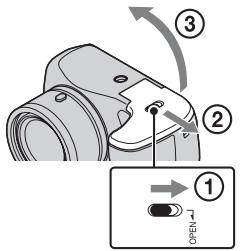

Ensure the notched corner faces correctly.
GB
1 Open the cover.
2 Insert the memory card (sold separately).
- With the notched corner facing as illustrated, insert the memory card until it clicks into place.
3 Match + / - and insert the batteries.
4 Close the cover.
Memory cards that you can use
| Memory Card | For still images | For movies | |
| A | Memory Stick PRO Duo | ✓ | ✓ (Mark2 only) |
| Memory Stick PRO-HG Duo | ✓ | ✓ | |
| Memory Stick Duo | ✓ | — | |
| B | Memory Stick Micro (M2) | ✓ | ✓ (Mark2 only) |
| C | SD memory card | ✓ | ✓ (Class 4 or faster) |
| SDHC memory card | ✓ | ✓ (Class 4 or faster) | |
| D | microSD memory card | ✓ | ✓ (Class 4 or faster) |
| microSDHC memory card | ✓ | ✓ (Class 4 or faster) |
In this manual, the products in the table are collectively referred to as followings:
A: "Memory Stick Duo" media
B: "Memory Stick Micro" media
C:SD card
D: microSD memory card
Notes
- When using "Memory Stick Micro" media or microSD memory cards with this camera, make sure to use with the appropriate adaptor.
To remove the memory card/batteries
Memory card: Push the memory card in once.
Batteries: Be sure not to drop the batteries.
Notes
- Never open the battery/memory card cover or remove the batteries/memory card when the access lamp (page 6) is lit. This may cause damage to data in the memory card/internal memory.
Batteries you can and cannot use with your camera
In the table below, heckmark indicates the battery can be used, while — indicates the one cannot be used.
| Battery type | Supplied | Supported | Rechargeable |
| LR6 (size AA) alkaline batteries | ✓ | ✓ | — |
| HR15/51: HR6 (size AA) Nickel-Metal Hydride batteries | — | ✓ | ✓ |
| Lithium batteries* | — | — | — |
| Manganese batteries* | — | — | — |
| Ni-Cd batteries* | — | — | — |
- Operating performance cannot be ensured if voltage drops or other problems are caused by the nature of the battery.
Notes
- The performance of your camera differs depending on the manufacturer and the type of battery you use. Also, battery-performance may decline dramatically under low temperatures. Especially, at temperatures below 5ircC ( 41ircF ), your camera may get turned off unexpectedly as you turn it on or switch the playback mode to the shooting mode.
For more details on batteries, see "Batteries" in "Cyber-shot User Guide". - Please note that we cannot guarantee full performance of your camera when using the batteries not indicated as "supported" in the above table.
Battery life and number of images you can record/ view
| Battery life | Number of images | |
| Shooting (still images) | Approx. 175 min. | Approx. 350 images |
| Actual shooting (movies) | Approx. 85 min. | — |
| Continuous shooting (movies) | Approx. 150 min. | — |
| Viewing (still images) | Approx. 400 min. | Approx. 8000 images |
Notes
- The number of images that can be recorded is an approximate number when shooting with new batteries. The number may be less depending on the circumstances.
-
The number of images that can be recorded is when shooting under the following conditions:
-
Using Sony "Memory Stick PRO Duo" (Mark2) media (sold separately).
-
New batteries are used at an ambient temperature of 25ircC (77ircF)
-
The number of still images that can be recorded is based on the CIPA standard, and is for shooting under the following conditions.
(CIPA: Camera & Imaging Products Association)
- Shooting once every 30 seconds.
- The zoom is switched alternately between the W and T ends.
- The flash strobes once every two times.
-
The power turns on and off once every ten times.
-
The battery life for movies is based on the CIPA standard, and is for shooting under the following conditions:
-
Recording mode: 1280 × 720 (Fine)
-
"Actual shooting (movies)": Indicates the approximate shooting time as a guideline when you repeatedly perform shooting, zooming, standby for shooting, and turning on and off the camera.
-
"Continuous shooting (movies)": When continuous shooting ends because of set limits (29 minutes), press the shutter button again to continue shooting. Shooting functions such as the zoom do not operate.
-
The values shown for alkaline battery are based on commercial norms, and do not apply to all alkaline batteries in all conditions. The values may vary, depending on the battery manufacturer/type, environmental conditions, product setting, etc.
Setting the clock
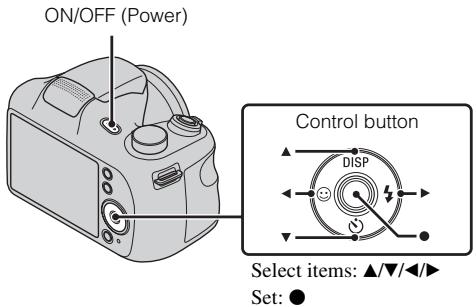
1 Press the ON/OFF (Power) button.
Date & Time setting is displayed when you press the ON/OFF (Power) button for the first time.
- It may take time for the power to turn on and allow operation.
2 Select a desired language.
3 Select a desired geographic location by following the on-screen instructions, then press .
4 Set [Date & Time Format], [Summer Time] and [Date & Time], then press [OK].
- Midnight is indicated as 12:00 AM, and noon as 12:00 PM.
5 Operat e following the instructions on the screen.
Shooting still images/movies
Mode dial
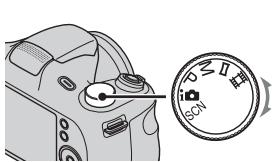
i: Intelligent Auto
: Sweep Panorama
Movie Mode

GB
Shooting still images
1 Press the shutter button halfway down to focus.
When the image is in focus, a beep sounds and the indicator lights.
2 Press the shutter button fully down.
Shooting movies
1 Press the shutter button fully down to start recording.
- Use the W/T (zoom) lever to change the zoom scale.
2 Press the shutter button fully down again to stop recording.
Notes
- The operating sound of the lens may be recorded when the zoom function operates while shooting a movie.
- The panoramic shooting range may be reduced, depending on the subject or the way it is shot. Therefore even when [360irc] is set for panoramic shooting, the recorded image may be less than 360 degrees.

1 Press the (Playback) button.
When images on a memory card recorded with other cameras are played back on this camera, the registration screen for the data file appears.
Selecting next/previous image
Select an image with (next)/ (previous) on the control button. Press in the center of the control button to view movies.
- Deleting an image
① Press?/血 (Delete) button.
② Select [This Image] with on the control button, then press .
Returning to shooting images
Press the shutter button halfway down.
In-Camera Guide
This camera contains an internal function guide. This allows you to search the camera's functions according to your needs.

GB
1 Press the MENU button.
2 Select an item whose description you want to view, then press the ?/面 (In-Camera Guide) button.
The operation guide for the selected function is displayed.
- You can search for a function by key word(s) or icon, by pressing the ?/In-Camera Guide) button when MENU is not displayed.
Introduction of other functions
Other functions used when shooting or playing back can be operated using the control button or MENU button on the camera. This camera is equipped with a Function Guide that allows you to easily select from the functions. While displaying the guide, try the other functions.


Function Guide
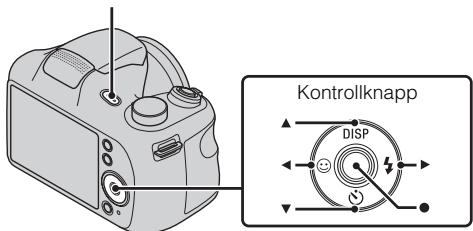
Control button
DISP (Display Setting): Allows you to change the screen display.
(Self-Timer): Allows you to use the self-timer.
(Smile Shutter): Allows you to use the Smile Shutter mode.
(Flash): Allows you to select a flash mode for still images.
(Tracking focus): Allows you to continue to focus on a subject even if the subject moves.
Menu Items
Shooting
| Movie shooting scene | Select movie recording mode. |
| Panorama Shooting Scene | Select recording mode when shooting panoramic images. |
| Scene Selection | Select pre-set settings to match various scene conditions. |
| Picture Effect | Shoot still images with an original texture according to the desired effect. |
| Easy Mode | Shoot still images using minimal functions. |
| Color hue | Set the color hue when [Toy camera] is selected in Picture Effect. |
| Extracted Color | Select the color to extract when [Partial Color] is selected in Picture Effect. |
| Soft Skin Effect | Set the Soft Skin Effect and the effect level. |
| Still Image Size/ Panorama Image Size/Movie Size | Select the image size for still images, panoramic images or movie files. |
| Exposure Compensation | Adjust the exposure manually. |
| ISO | Adjust the luminous sensitivity. |
| White Balance | Adjust color tones of an image. |
| Focus | Select the focus method. |
| Metering Mode | Select the metering mode that sets which part of the subject to measure to determine the exposure. |
| Cont. Shooting Settings | Select single-image mode or burst mode. |
| Bracket Setting | Select the bracket shooting mode. |
| Scene Recognition | Set to automatically detect shooting conditions in Intelligent Auto mode. |
| Smile Detection Sensitivity | Set the Smile Shutter function sensitivity for detecting smiles. |
| Face Detection | Select to detect faces and adjust various settings automatically. |
| DRO | Set DRO function to correct the brightness and contrast and improve the image quality. |
| Anti Blink | Set to automatically shoot two images and select image in which the eyes are not blinking. |
| In-Camera Guide | Search the camera's functions according to your needs. |
GB
Viewing
| Beauty Effect | Retouch a face on a still image. |
| Retouch | Retouch an image using various effects. |
| Delete | Delete an image. |
| Slideshow | Select a method of continuous playback. |
| View Mode | Select the display format for images. |
| Protect | Protect the images. |
| Print (DPOF) | Add a print order mark to a still image. |
| Rotate | Rotate a still image to the left or right. |
| In-Camera Guide | Search the camera’s functions according to your needs. |

Setting items
If you press the MENU button while shooting or during playback,
(Settings) is provided as a final selection. You can change the default settings on the (Settings) screen.
| Shooting Settings | AF Illuminator/Grid Line/Disp. Resolution/Digital Zoom/Red Eye Reduction/Blink Alert/Write Date |
| Main Settings | Beep/Panel Brightness/Language Setting/Display color/ Initialize/Function Guide/Video Out/USB Connect Setting/LUN Setting/Download Music/Empty Music/Eye-Fi*1/Power Save |
| Memory Card Tool*2 | Format/Create REC.Folder/Change REC.Folder/Delete REC.Folder/Copy/File Number |
| Clock Settings | Area Setting/Date & Time Setting |
1 [Eye-Fi] is displayed only when a compatible memory card is inserted to the camera.
2 If a memory card is not inserted, (Internal Memory Tool) will be displayed and only [Format] can be selected.
Features of "PlayMemories Home"
The software "PlayMemories Home" allows you to import still images and movies to your computer and use them.
GB


Downloading "PlayMemories Home" (for Windows only)
You can download "PlayMemories Home" from the following URL: www.sony.net/pm
Notes
- An Internet connection is required to install "PlayMemories Home".
- An Internet connection is required to use "PlayMemories Online" or other network services. "PlayMemories Online" or other network services may not be available in some countries or regions.
- "PlayMemories Home" is not compatible with Macs. Use the applications that are installed on your Mac. For details, visit the following URL: http://www.sony.co.jp/imsoft/Mac/
■ Installing "PlayMemories Home" on a computer
1 Using the Internet browser on your computer, go to the following URL, then click [Install] → [Run].
www.sony.net/pm
2 Follow the instructions on the screen to complete the installation.
- When the message to connect the camera to a computer is displayed, connect the camera and computer using the dedicated USB cable (supplied).

Viewing "PlayMemories Home Help Guide"
For details on how to use "PlayMemories Home", refer to the "PlayMemories Home Help Guide".
1 Double-click the [PlayMemories Home Help Guide] icon on the desktop.
- To access the "PlayMemories Home Help Guide" from the start menu: Click [Start] → [All Programs] → [PlayMemories Home] → [PlayMemories Home Help Guide].
- For Windows 8, select the [PlayMemories Home] icon on the Start screen, then launch "PlayMemories Home" and select [PlayMemories Home Help Guide] from the [Help] menu.
- For details on "PlayMemories Home", you can also see the "Cyber-shot User Guide" (page 2) or the following PlayMemories Home support page (English only): http://www.sony.co.jp/pmh-se/
Number of still images and recordable time of movies
The number of still images and recordable time may vary depending on the shooting conditions and the memory card.
GB
Still images
(Units: Images)
| Capacity Size | Internal memory | Memory card |
| Approx. 55 MB | 2 GB | |
| 20M | 5 | 265 |
| VGA | 350 | 11500 |
| 16:9(15M) | 7 | 330 |
Movies
The table below shows the approximate maximum recording times. These are the total times for all movie files. Continuous shooting is possible for approximately 29 minutes (limited by product specifications). For [1280 × 720 (Fine)] size movies, continuous shooting is possible for approximately 20 minutes (limited by 2 GB file size).
(h hour), m (minute))
| Capacity Size | Internal memory | Memory card |
| Approx. 55 MB | 2 GB | |
| 1280 × 720 (Fine) | — | 25 m (20 m) |
| 1280 × 720 (Standard) | — | 35 m (30 m) |
| VGA | 2 m (1 m) | 1 h 5 m (1 h 5 m) |
The number in () is the minimum recordable time.
- The recordable time of movies varies because the camera is equipped with VBR (Variable Bit Rate), which automatically adjusts image quality depending on the shooting scene. When you record a fast-moving subject, the image is clearer but the recordable time is shorter because more memory is required for recording. The recordable time also varies depending on the shooting conditions, the subject or the image size setting.
Notes on using the camera
On use and care
Avoid rough handling, disassembling, modifying, physical shock, or impact such as hammering, dropping or stepping on the product. Be particularly careful of the lens.
Notes on recording/playback
- Before you start recording, make a trial recording to make sure that the camera is working correctly.
- The camera is neither dust-proof, nor splash-proof, nor water-proof.
- Avoid exposing the camera to water. If water enters inside the camera, a malfunction may occur. In some cases, the camera cannot be repaired.
- Do not aim the camera at the sun or other bright light. It may cause the malfunction of the camera.
- If moisture condensation occurs, remove it before using the camera.
- Do not shake or strike the camera. It may cause a malfunction and you may not be able to record images. Furthermore, the recording media may become unusable or image data may be damaged.
Do not use/store the camera in the following places
- In an extremely hot, cold or humid place In places such as in a car parked in the sun, the camera body may become deformed and this may cause a malfunction.
- Storing under direct sunlight or near a heater
- The camera body may become discolored or deformed, and this may cause a malfunction.
- In a location subject to rocking vibration
- Near a location that generates strong radio waves, emits radiation or is strongly magnetic place. Otherwise, the camera may not properly record or play back images.
- In sandy or dusty places
- Be careful not to let sand or dust get into the camera. This may cause the camera to malfunction, and in some cases this malfunction cannot be repaired.
On the battery
- Avoid rough handling, disassembling, modifying, physical shock, or impact such as hammering, dropping or stepping on the battery.
- Do not use a deformed or damaged battery.
- Do not mix a used battery together with a new battery or different types of batteries.
- Remove the batteries from the camera when you do not operate the camera for long periods, or when the batteries are dead.
Notes on the screen and lens
The screen is manufactured using extremely high-precision technology so over 99.99% of the pixels are operational for effective use. However, some tiny black and/or bright dots (white, red, blue or green) may appear on the screen. These dots are a normal result of the manufacturing process, and do not affect the recording.
On camera's temperature
Your camera and battery may get hot due to continuous use, but it is not a malfunction.
Warning on copyright
Television programs, films, videotapes, and other materials may be copyrighted. Unauthorized recording of such materials may be contrary to the provisions of the copyright laws.
No compensation for damaged content or recording failure
Sony cannot compensate for failure to record or loss or damage of recorded content due to a malfunction of the camera or recording media, etc.
Cleaning the camera surface
Clean the camera surface with a soft cloth slightly moistened with water, then wipe the surface with a dry cloth. To prevent damage to the finish or casing:
- Do not expose the camera to chemical products such as thinner, benzine, alcohol, disposable cloths, insect repellent, sunscreen or insecticide.
Maintaining the LCD monitor
- Hand cream or moisturizer left on the screen may dissolve its coating. If you get any on the screen, wipe it off immediately.
- Wiping forcefully with tissue paper or other materials can damage the coating.
- If fingerprints or debris are stuck to the screen of the LCD monitor, we recommend that you gently remove any debris and then wipe the screen clean with a soft cloth.
Specifications
Camera
[System]
Image device: 7.76mm (1/2.3 type)
CCD, Primary color filter
Total pixel:
Approx. 20.4 Megapixels
Effective pixel:
Approx. 20.1 Megapixels
Lens: 26× zoom lens
f = 4.0 mm - 104.0 mm (22.3 mm
- 580 mm (35 mm film
equivalent))
F3.1 (W) - F5.9 (T)
While shooting movies (16:9):
28mm - 748mm
While shooting movies (4:3):
22.3 mm - 580 mm
SteadyShot: Optical
Exposure control: Automatic exposure, Manual Exposure, Scene Selection
White balance: Automatic, Daylight, Cloudy, Fluorescent 1/2/3, Incandescent, Flash, One Push
Burst shooting (when shooting with the largest pixel number):
Approx. 0.8 images/second (up to 100 images)
File format:
Still images: JPEG (DCF, Exif, MPF Baseline) compliant, DPOF compatible
Movies: MPEG-4 AVC/H.264
Recording media: Internal Memory (Approx. 55 MB), "Memory Stick Duo" media, "Memory Stick Micro" media, SD cards, microSD memory cards
Flash: Flash range (ISO sensitivity
(Recommended Exposure Index) set to Auto):
Approx. 0.4m to 6.8m (1 ft. 1/3
inches to 22 ft. 3 3/4 inches) (W)
Approx. 1.5m to 3.6m (5 ft. to
11 ft. 9 3/4 inches) (T)
[Input and Output connectors]
USB / A/V OUT jack:
Video output
Audio output
USB communication
USB communication: Hi-Speed USB
(USB 2.0)
[Screen]
LCD screen:
7.5cm (3.0 type) TFT drive
Total number of dots:
460 800 dots
[Power, general]
Power: LR6 (size AA) alkaline batteries (4), 6 V
HR15/51: HR6 (size AA) Nickel
Metal Hydride batteries (4) (sold separately), 4.8V
Power consumption (during shooting):
Approx. 1.6 W
Operating temperature:
0ircC to 40ircC (32ircF to 104ircF)
Storage temperature:
-20ircC to +60ircC (-4ircF to +140ircF)
Dimensions (CIPA compliant):
122.9mm× 83.2mm× 87.2mm
(4 7/8 inches × 3 3/8 inches ×
3 1/2 inches)
(W/H/D)
Mass (CIPA compliant) (including four batteries and "Memory Stick Duo" media):
Approx. 530g (1 lb 2.7 oz)
Microphone: Monaural
Speaker: Monaural
Exif Print: Compatible
PRINT Image Matching III:
Compatible
Design and specifications are subject to change without notice.
Trademarks
- The following marks are trademarks of Sony Corporation.
Cyber-shot, "Cyber-shot," "Memory Stick PRO Duo,"
"Memory Stick PRO-HG Duo,"
"Memory Stick Duo," "Memory Stick Micro"
- Windows is registered trademark of Microsoft Corporation in the United States and/or other countries.
Mac and Mac OS are registered trademarks of Apple Inc. - SDHC logo is a trademark of SD-3C, LLC.
- Eye-Fi is a trademark of Eye-Fi Inc.
- Facebook and the "p" logo are trademarks or registered trademarks of Facebook, Inc.
YouTube and the YouTube logo are trademarks or registered trademarks of Google Inc. - In addition, system and product names used in this manual are, in general, trademarks or registered trademarks of their respective developers or manufacturers. However, the TM or marks are not used in all cases in this manual.
Additional information on this product and answers to frequently asked questions can be found at our Customer Support Website.
http://www.sony.net/
Printed on 70% or more recycled paper using VOC (Volatile Organic Compound)-free vegetable oil based ink.
i (Mode Auto Intelligent)/
P (Programme Auto)/M (Prise de vue expo manuelle)/
(CIPA: Camera & Imaging Products Association)
(h (heures), m (minutes))
| CapacitéTaille | Mémoire interne | Carte mémoire |
| Environ 55 Mo | 2 Go | |
| 1280×720(Fine) | — | 25 m (20 m) |
| 1280×720(Standard) | — | 35 m (30 m) |
| VGA | 2 m (1 m) | 1 h 5 m (1 h 5 m) |
A: "Memory Stick Duo"
B: "Memory Stick Micro"
C: Scheda SD
D: Scheda memoria microSD
Note
Cybershot, "Cyber-shot", "Memory Stick PRO Duo", "Memory Stick PRO-HG Duo", "Memory Stick Duo", "Memory Stick Micro"
(CIPA: Camera & Imaging Products Association)
(CIPA: Camera & Imaging Products Association)
HR15/51: HR6 (tamanho AA) (4)
(vendido separamente), 4,8 V
Consumo (durante a fotografia): Aprox. 1,6 W
Temperatura de operacao:
0ircC a 40ircC
Temperatura de armazenamento:
-20ircCa + 60ircC
Dimensoes (conforme CIPA):
122,9mm× 83,2mm× 87,2mm
(L/A/P)
(CIPA: Camera & Imaging Products Association)
Elementary apparatus


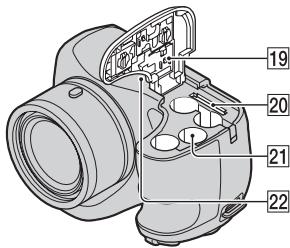
1 Pokrto trybu: SCN (Wybor sceny)/i (Inteligntna automatya)/ P (Autoprogram)/ M (Fot. z reczna reg. naswietlenia)/ (Rozlegla panorama)/ (Tryb filmu)
(CIPA: Camera & Imaging Products Association)
(CIPA: Camera & Imaging Products Association)
A membranous membrane protein (BMP)
(CIPA: Camera & Imaging Products Association)
| Shooting Settings | AF Illuminator/Grid Line/Disp. Resolution/Digital Zoom/Red Eye Reduction/Blink Alert/Write Date |
| Main Settings | Beep/Panel Brightness/Language Setting/Display color/Initialize/Function Guide/Video Out/USB Connect Setting/LUN Setting/Download Music/Empty Music/Eye-Fi*1/Power Save |
| Memory Card Tool*2 | Format/Create REC.Folder/Change REC.Folder/Delete REC.Folder/Copy/File Number |
| Clock Settings | Area Setting/Date & Time Setting |
(CIPA: Camera & Imaging Products Association)
Cyber-shot, "Cyber-shot", "Memory Stick PRO Duo", "Memory Stick PRO-HG Duo", "Memory Stick Duo", "Memory Stick Micro"
(CIPA: Camera & Imaging Products Association)
(CIPA: Camera & Imaging Products Association)
ON/OFF-knapp (strømbryter)
Velge elementer: / /
Stilleinn:
Vise "PlayMemories Home Help Guide"
Blits: Blitsomrade (med Auto angitt for
ISO-folsomhet (anbefalt
eksponeringsindeks)):
Ca. 0,4m til 6,8m W
Ca. 1,5m til 3,6m (T)
HR15/51: HR6 (storrelse AA)
nikkel-metalhydridbatterier (4)
(selges separat), 4,8 V
(CIPA: Camera & Imaging Products Association)
(h (timer), m (minutter))
| Kapacitet Størrelse | Intern hukommelse | Hukommelseskort |
| Ca. 55 MB | 2 GB | |
| 1280×720(Fin) | — | 25 m (20 m) |
| 1280×720(Standard) | — | 35 m (30 m) |
| VGA | 2 m (1 m) | 1 h 5 m (1 h 5 m) |
HR15/51: HR6 (storrelse AA)
nikkel-metalhydrid-batterier (4)
(salges separat), 4,8 V
(CIPA: Camera & Imaging Products Association)
- Jedno okidanje svakih 30 sekundi.
-Zum se ukljuucej/iskljucej pritiskom na W odnosno T stranu. -
Bljeskalica ce se aktivirati svaki drugi put.
-Urejakce se ukljuciti i iskliguci svaki deseti put. -
Vijek trajanja baterije za videozapise temelji se na CIPA standardu te se odnosi na snimanje pod sljedecim uvjetima:
-
Način snimanja: 1280 × 720 (kvalitetno)
»Stvarno sminanje (videozapiš) « Označava probižné vrijeme sminanja kao smjernicu kad se u više navrata smina, zumira, aktivira nacin mirovanja za sminanje te ukljucije i skljuce fotoparat.
- «Neprekidno snimanje (videozapisi)»: Kad se neprekidno snimanje dovrsi zbog postavljenih ogranicenja (29 minuta), ponovno pritsnite gumb okidača i nastavite sminati. Funkcije snimanja poput zuma ne Funktioniraju.
(CIPA: Camera & Imaging Products Association)
- Λημια φογα καθε 30 δεντερλεπτα.
-To ωµµ ταβλλ τ α δαδωγ αδνννWaT.
-To φλα aVαβεισθοβοσκοπιχα μια φορα καθεδύν φορες.
-Htpofooboiαevyoonoeita xia aeevojoieiraia αoqa xaθεdeltaa φoεε.
H diaqexia leitouyia cns nataagias yta taviesbaiceta oto ngotvo CIPA xua wuxi yia liyn vno ts azolov0e ouvohae:
-Aetovogyia eyygaoqan:1280x720(Yynl)
-"Piayauatn ληη (taivies)Ynoeuxvbe tv xata npooeyon Xoovn 1nns oyno stav npayarotoeite eaevalnmeva nyn, covu, avaovn yia nnnn enyoyotoiOnn nn aeneveoyotoiOnn Tng foTOOAPUINXAVNS.
-"Sigmaexovn Iytn (Taviez)": Otav tegauotei n ouvexoevn Iytn Exiatias aaoqouov Ogiov (29 5e, pnt ova to xovupi kiaotogv yia va ouvxoiete tyn Oqoueves Leitovoyies Iytng, onwoc to covu, dev eiva evyoanueve.
Otuuovdivovtai yia tacaiuicmuataqiacebaoiogvtae uetopua oovvovyiaoLc taaiauiemuataqiesoea5uovthnx. Otuuevdextau vaoiIauov avaloyae tvoxoevaotn/voi maataqias,ti neipalovvtixesovthnx,tno0muon tooiovtox.

Cyber-shot, "Cyber-shot", "Memory Stick PRO Duo", "Memory Stick PRO-HG Duo", "Memory Stick Duo", "Memory Stick Micro"
To Windows eivca oJua
xatate0ev Tc Microsoft
Corporation 0t Hwouvee
Piotaiee ts Aueoan h/ka 0
aAless
- Ta Mac xαi Mac OS εivα Μηματα xαταεντα της Apple Inc.
To λoγoτuπ 0 SDHC eivat µασ σ ona τηs SD-3C,LLC.
To Eye-Fi eivα εμτούχο σημα της Eye-Fi Inc.
- Facebook xua to loyotvto "f" ειαν εμιομα σηματή η σηματα xataeθεντα ης Facebook, Inc.
To YouTube xau to loyotuTo YouTube eivua eutogua omaT n omaata xataateeVTA tns Google Inc.
Eπλeov, ta oμata towv ouotmaow xai npoiotov two xetaiootovvtaeavto vexyepio evai, oe yevex 90aues, eptogna onmuata n onmuata xataotevta towv avtioayw dnmooyw n xataoevaotov tovc. OTooo, oe avto eeyepio ta onmuata TM 6 Dev xetaoumooivtae oλes tis πeuiTWOEIG.
Pioo0eTc5 nIoo0o0iE
Oxetua mu to npoiov auTo xau
aattnoie 6 ouvves
egtothoeic mIoogeite va bgeite
oto dduotvazo toTo
VoootqteNc PELaOtov MaC.
http://www.sony.net/
EkTuWmuEvo 70% nIeipaoTepeo avakukwEvo xapTi eXpOJn oAevaiou BaaioeVou aΦutika Eλaia, tou bEv mepTeix EI POE (TNTtikc Opyavikec Evwaic).
Eupwaikn Eyyunon SONY
Ayamnte nAatn,
Sac evxagotovne ov ayogoadate
avto to npoiov tsy. EAnicovue
va meivete avoxonnevo ato tn
xionjou.tnTv andavn neiorttoom
poT ov npoiov oac xoeiaotei oegbc
(Enoxeun)ata tyn diapaeua tn5
eyvongn, qaqaxaleite va
enixovnvnote me to xataotma
ayogac n eva mloos to dixtov
evoofoirotveuv neogbc ma (ASN)
tnc Evogwaizic Oixovoumz Zovns
(EOZ) na aalow ywogovnov
avaqepovta o' autn thy vnyonn h
ota uovodovovavtu vphiia6a
(IIeioxK Kalvwns nE YvOnns).
Mtooge va beite Ieontouoege yia
ta meIau ton buixtov ma cSNS, otuc
tnkefovvkoivzataoloyous, otous
xatahoyovpiovtov ma na otis
totoeleideae ma. Ta va atofovyete
aabe ngittn talawqia, aas
ouviotoume va diafoate npoeaoxtua
to eyeioido xoiqn snoptov va egte
ee TAEHm oe npoumtheur acn to dixtro esvoovodotneuvov oegbcus
H Eyyunon ΣaS
H aagovua eyyon Joxvya to
yoiov nSonyoavogaoate,ep
ooov taTetO ovawegeta ota
ovlaiaouovodoeavtooiov
oag,vnoTnv oovotdeon ot
ayoatae Evtos Tn Pteoyns
KalvnsEeyonj.
GR
Me tnv npoovoa, n Sony eyrvataot to npoov eviva aataaayevo ano xae elattwa oxtcnoevo me ta vlaia n tvnataoxevn yua ma a
peiodo ENO2 ETOY2 ano tvn
neogounvia ts ayxuic ayogac. H
aqodba na va npoofoepei kai
extianpooei tvn npooboa eyyon,
etagiae Sony, evia autn nov
avapeeta o' autivnTv Eeyonn h
oto ovboevov autv nfvllaoo otn
xooa ovt enuiozeta n emoekvni
kata n diqaxea tns eyyonns.
Eav, evtoc nis nepoiouv eyyonig,
atodeyhei atelattmauxo to pioov (xata nlv npoovnia ts axoyin
ayogac) loyaw atalannw vluoxov n
ataoxoyns, n Sony n eva eiloos tov
dutuv EOovodtoevov SeBc
ASN tns IIeovxis Kalvngns
Eyyonn th aenoxeaei n th a
avvataaotroih (vat eriyolnyt
Sony) xooic enjbaovun y aoyatix
n atvalaaxia, to npoiov n ta
elattomatixa egaotnata tou, evtoc
evlovoyov qovov, baoei tow ogov xai
ovhovnoun tov extiethva naqaxatow.
H Sony xaa t aeivn tov diziovv
Eevovodtoevov SeBc ASN
muopovva avvataotaohov
elattomatixa npoiovta n egatqnata
me vea n avazvkaueva npoiovta n
egatqnata. Ola ta npoiovta xai
eagntnata ton evov
avvataatae i yivovta idioanpoia
tns Sony.
'Opoi
- EioxEvE dvuaIe I Tn paOofoa
evyunng th apeoyovta moo ev A
poooyoanei To pOToTuro
tmoIyo y n anObeEINn oanong (me
tnv EvdeIe Ns ngeoynia
ayogac, to mvteIov tv npoiOvtos
Xa tN eTswuiaoc Tnv emOgo
muIe To EaattoumatIO pOioiov
eVTOg Ns peQoDov eYyUnnH
Sony Xa Ta meLN tv dxtivou
Egoovodotneov EoBc ASN
mIoOoovva agvNthov Tn dgoeav
eTnoxevn xata Tnv peiodo
eyynuoeawc avd neoooxoogiovv
Ta npoovacegoeva ygyapa h eav
dev npoxuvttovn aovt a
npeoqunvia ayogac, to pOioiov n to
movtlo tv pOioVTOG n enTovuia
tov eMogov H paOoov ayyon
dev ovyeav o tuoc tv mvtovlou
noequaxoc aigtooc tv pooiOvtos
exaalowei diaygaei,
afoaetheta i xataotei
duovauywoTOS.
2.Γa va aonopevz0e1βαβn nawLεiα / dyawφησ oαφωμενa n aotouwéva μoδa nξαgntuata aotohjeuvc δδoEvov, opeλεte va ta apαoεoet πvι naodωoet to pioovoc yεπoEvov nata Tyn πεiiodo εγγyŋ
3.H πaαoν oα eYyonm dEVAaVnte ta EoDaa taovs uovvouc metapaooc nO ovvoeovta mE tetapaoaTou poiovtoc aQoC xai anT Sony i MeLo Tov dKtwov ASN.
4.HaogobaaeyyonnDevxaiuTae ta e:
Piouoovrtnenonxau eioxevn aivataotaon eaojntavov axoteloeqa ovooioyuqf 000a
Avaiaoua (ovotua iepn yta otoia npoβEeTea nqoiouh avzataotaan rata tn diaoxia cng evos npoiovtro osm unavaoopztouve mataaqie,phioyia extruwoong, yoadic,lambdaes,xaiowda xI).
Znua n eattouata nov 10000000av loyw xonjns, 1aotovoyiaic neiouoov aovbatov m tyn vaoovian atouwn i oocwnxonj
Znuei 日 aalayes oTo poiov Tou pooxlanonav aio:
KaxiXgOn, oVuaovouv:
*tov xoiouovn eioe qev
vouaiaoohuaivn
euaovaeunzma n
aaiayc oTO aoiov n baiy
oe 0oovc vogov
xovotalaw
* mavovn n m oBpovn
m tO odnyie Tg Sony
yAratotaon h xonTou
TQoiovtoc
* mouvtjnoiou oioiovtos oupwva e Tc odnyies oowtng ouvtjnois Tns Sony
* yxataotaon n xonon tov
0oioivtoe me tooto m
oumofoe me tig teyixie
ooiodayoaes ra ta
ootura aooaiaic nov
oxuovn ot n ogoa orov exi
xyataotabeix
xonoutonoeita to ooiov.
Molvaos aotovs hon tov qoovtoc me loyouo tov dev paoexetae t o to npoioy havdoaevn eyaataaon tov loyuaozv.
TnV xataotaon tTa
Eaattouma tawovotnmuatow
Me ta oToia xOnoiMoTeiTa n
Ota otioia evooatovetato
Tgoiov extos aAo alla
TgoiovTa TCSony edixia
oxeduaeva yia va
xOnoiomoiovvtae me to ev
loywooiov.
XoJOnTov pOoiovToe 1EaQnuaTa, nqoeaeiazo EoIaOoKuAlambda pOoiovTa Tov oIoov OTuOg, N XaTaTaon KAto npoturo dev ovnuotovata an to T Sony.
Eπωενη η ελεύηθειασειωνη έτο ὄτουα τοῦν δεῖαι μέλη τής Sony η τοῦν ἀντυον ASN.
Pvthetaiae i npooaouyec xogic nyn pnooyueyn yaoan yaaatoeon ts Sony, oiooteo ouaneaiaabavovta:
* naovabαθuŋ tov πoovivtos πega ato ts πoobayagés ᵓ ta ωaαaxgwtixa πov πeγαqóvotua 0τ Σχειidio xηη
* o tqoTOnaHoeiTsou
TQoiOvTo ME OxOTo VA
ovmuogphioeiogcEvoixeS
toXIXe TeyVIXe
TQoiDiayoaeXsAIOTuVA
aooAiaGouovov
XooegyuaTOtOioTe
TQoiOvDev EIXe oxedauoTei
XaKataoxeuaotei EIOxA.
□Aμελεua.
GR
A tvxjmuata, xwxaV, yog aXuKxg Xa alles oouies, 1nmuiao, doynoei, vtebouxn theoounteta, axatalnaIoo eaoqumo, vtetaon, vtebouxn n eoalmeytoofooboiia Taon eooov, actiovobla, naextqootatixc exeevwoei oueueauabavovouov Tou xegauov, aoovxiwovovduvaueov kaiendaooeov.
5.H naovoa eeyunon kaivtetmu ovo ta vuaa meo nov npoiovoc. 2ev xaivtte to loyouxoo (eite ts) Sony, te tiovv xataoxoeawotow) yia to oioaoeexet a nojoeetau va iyoovoe ma adoeia xionge ato tv teu xjoitn h xogotec dnaowei eyyunong e gaooei aotnv yevynon.
Egaipeaic kai πeipiooi
Me eaiogon tov oov avapoeovta
avotego, no Sony de aagexia xiaia
eyunon (qntn, awonen, ex tov oov
n nnooov apogaa tnv aoitata, tvh
eidoon, tnv axigbetaa, tnv agoioiota,
tnv zataalnoitaou npoiovtoc n
tov loayauovou npagoyetao n
ovodevte to poiov, yia
ovyekzouveo zoote. Ecv n oxyvoa
vootheoi atayogevei piowos n
peoicox tsn aagova eaiogene, n
Sony eae i neoogicei tvn evywno
tno mv onyviotn extaon tov
entepenei n oxyovoa vooheoiia.
Otoaodntote eyynuon n otoiia dev
eaeitea ano (oto metoo tvo to
entepeneia o ovuyovoc) 0a
teogicctea on dtaqxieia oxvcs n
paoovaceyvunoi.
H movadixv vtoxoeown Tc Sony
ouvaue n tvn paoovaaeynuon
eiva n euaoxevn n avtxataotaon
pooivotovw ovuovceatouc
oogocxa uovthxcncs n5 eynuong. H
Sony dev evthetavatya otaodnjote
aoviaea n qnauaov atcctaae ta
pooivota, to oepic, niv paoovaa
eyvunon, oumteqauapavoveov wov
oavovmaov xa avawatalewov, tow
tujnatoc tov xataBanjnoy ia tvn
ayoga tov pcoiovtos, nts awoiaas
xedov, eooodatoc, deooyevov,
aotaavouni n xohon tv ooiovvtos n
otowovntote ovvedeqevov
pooivotw-v nsc quoons,
aogeumttovooae n enaoalovthns
aoviaea n cniuaac axn av avnt
n awoiaea n cnina aphiqa oe:
MwovnLeotovyia n mLeotovya Tou pOiovtos n ovvedeEvov ngoiytwov Loyw kattowatov n m diatheouotac xata nTg iOio dov auo BOixetau oT sy n e eaoosou dxtov ASN, nooia npoxaloe diaoxon diaeouotac tou poiovtoc, aWleia Xovov Xogotn n diaoxon tns egyaiac.
Piaoxivavaxqioov
(\pi \lambda \eta \phi \phi o\phi \omega \nu \tau \upsilon \zeta \eta \tau \theta \eta \kappa a\nu
a\sigma \tau \to \pi \sigma o i o\nu \dot{\eta}\alpha \dot{\sigma})
ouvdeegaevaaoovta.
□Znuaa aotawiaa loyouwov npoyogmuatovn apqououevov moeov ato0thevovs6de0eovv
Moivoeis aio wus n auwes artie.
TaavotewoovovnuaawoleeXua
Cnuev, vouovovivra oieoobntorte
yevixc agxcs dauioi,
ouuetaiaubavopoeivns aeeleias n
aakow adzoxogaiiov, aebtnons
oubaon, ontis n owtojno
eyuvnox, xaa oaoivnv uvoyns
axopa xia yia thema tya ta oioia n
Sony n meoctov dxtovs ASN exei
edotoihei yia nn dvatoirna
poxoyniqntetovovnmoi.
TTO metoov n oovovoa vovooia
atayovoevi neoogicnte ts
eagaeic euvvvn, n Sony egaei n
neogoiqin tvvovnnigmovt
meyoarntextaonnovngtei n
ovovbova vovooia. Ta naqadeyua,
peqa qanr anayovoevnu TIV
eagoeon n tov paoquoogniovov
oepoiota oaeiaea, oe bajia
aeiaea, oe ex aootebe
paattoja, oe doLoa waoqoies
paeis. Se xapia peiittwn, n
evuvn tng Sory xata tvn paovoa
eyvnon, dev vtegbaive tvn tmov
xataabhnye na tvn ayogawot
poiovotoc, wototo av n oovova
vovoeia eitipetei movo
peoogouwv evovovnu ynlootegov
baohou, tho ovovou on televtaioi.
- Learning more about the camera ("Cyber-shot User Guide")
- Checking the supplied items
- Owner's Record
- WARNING
- For Customers in the U.S.A.
- Regulatory Information
- Declaration of Conformity
- CAUTION
- I Note:
- For Customers in Europe
- I Notice for the customers in the countries applying EU Directives
- Attention
- Notice
- Disposal of Old Electrical & Electronic Equipment (Applicable in the European Union and other European countries with separate collection systems)
- Disposal of waste batteries (applicable in the European Union and other European countries with separate collection systems)
- Identifying parts
- Inserting the batteries/a memory card (sold separately)
- Memory cards that you can use
- Notes
- To remove the memory card/batteries
- Batteries you can and cannot use with your camera
- Battery life and number of images you can record/ view
- Setting the clock
- Shooting still images/movies
- Shooting still images
- Shooting movies
- Selecting next/previous image
- - Deleting an image
- Returning to shooting images
- In-Camera Guide
- Introduction of other functions
- Control button
- Menu Items
- Viewing
- Setting items
- Features of "PlayMemories Home"
- ■ Installing "PlayMemories Home" on a computer
- Viewing "PlayMemories Home Help Guide"
- Number of still images and recordable time of movies
- Still images
- Movies
- Notes on using the camera
- On use and care
- Notes on recording/playback
- Do not use/store the camera in the following places
- On the battery
- Notes on the screen and lens
- On camera's temperature
- Warning on copyright
- No compensation for damaged content or recording failure
- Cleaning the camera surface
- Maintaining the LCD monitor
- Specifications
- Camera
- [System]
- [Input and Output connectors]
- [Screen]
- [Power, general]
- Trademarks
- http://www.sony.net/
- Note
- Elementary apparatus
- A membranous membrane protein (BMP)
- Vise "PlayMemories Home Help Guide"
- Eupwaikn Eyyunon SONY
- Ayamnte nAatn,
- H Eyyunon ΣaS
- 'Opoi
- Egaipeaic kai πeipiooi
Brand : SONY
Model : CYBER-SHOT DSC-H200
Category : Camera