
PMK5800 - Drone PARROT - Free user manual and instructions
Find the device manual for free PMK5800 PARROT in PDF.

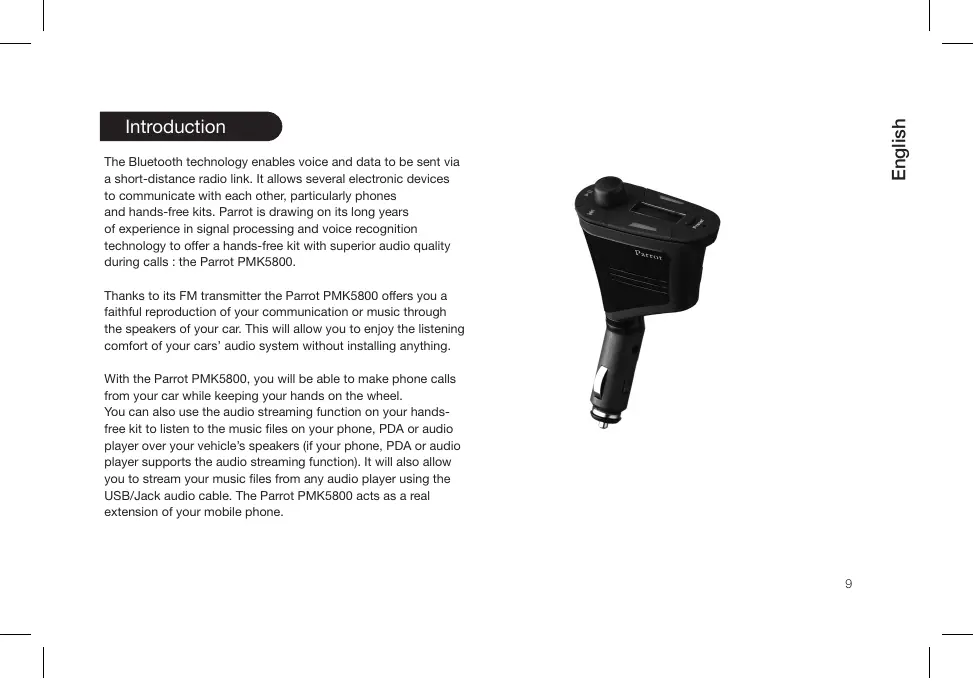


| Product Type | Bluetooth hands-free car kit with FM transmitter |
| Brand | Parrot |
| Model | PMK5800 |
| Dimensions | 150 × 81 × 37 mm |
| Weight | 85 g |
| Power supply | 12 V cigarette lighter socket |
| FM transmitter | Bands 88-108 MHz (North America) / 87.5-108 MHz (Europe) |
| Main functions | Hands-free calls, Bluetooth A2DP audio streaming, voice recognition, audio cable playback |
| Bluetooth technology | Version 1.2, Handsfree 1.0/1.5 profiles, Object Push, A2DP |
| Bluetooth range | Approximately 10 meters |
| Maximum pairing | Up to 10 phones |
| Bluetooth PIN code | 0000 |
| Display | Adjustable screen, inversion possible via red button |
| Voice recognition | Magic words "telephone" and "hang up", keywords for contacts |
| Package contents | Kit, USB/Jack audio cable, user guide, product guide |
| Software update | Via Bluetooth using Parrot Flash Update Wizard |
| Maintenance and cleaning | Clean with a soft, dry cloth |
| Safety | Do not change frequency while driving; use an extension if necessary; check FM transmitter legislation |
| Spare parts and repairability | Contact Parrot hotline |
| General information | Warranty period: not specified; support via www.parrot.com |
Frequently Asked Questions - PMK5800 PARROT
User questions about PMK5800 PARROT
0 question about this device. Answer the ones you know or ask your own.
Ask a new question about this device
Download the instructions for your Drone in PDF format for free! Find your manual PMK5800 - PARROT and take your electronic device back in hand. On this page are published all the documents necessary for the use of your device. PMK5800 by PARROT.
USER MANUAL PMK5800 PARROT
FCC Compliance Statement
This device complies with part 15 of the FCC rules. Operation is subject to the following two conditions:
(1). this device may not cause harmful interference, and
(2). this device must accept any interference received, including interference that may cause undesired operation.
Note: The manufacturer is not responsible for any radio or tv interference caused by unauthorized modifications to this equipment. Such modifications could void the user's authority to operate the equipment.
Declaration of Conformity
We, Parrot S.A. of 174 quai de Jemmapes, 75010 Paris, France, declare under our sole responsibility that our product, the Parrot PMK5800 to which this declaration relates in conformity with appropriate standards EN300328, EN301 357 and CEPT REC 70-03 Annex 13 as a Class 2 device and EN301489-17, EN301489-9, EN60950 following the provision of Radio Equipment and Telecommunication Equipment directive (1999/5/EC R&TTE), with requirements covering EMC directive 89/336/EEC and Low Voltage directive 73/23/EEC. Identification n^ : 394 149 496 R.C.S. PARIS Parrot S.A.
Licences
The Bluetooth word mark and logos are owned by the
Bluetooth® SIG, Inc. and any use of such marks by Parrot S.A.
is under license.
Bluetooth QDID : - B012641
-B012423
-B012424
MP3 audio coding technology licensed from Fraunhauser IIS and Thomson.
Correct Disposal of This Product (Waste Electrical & Electronic Equipment)
(Applicable in the European Union and other European countries with separate collection systems). This marking shown on the product or its literature, indicates that it should not be disposed with other household wastes at the end of its working life. To prevent possible harm to the environment or human health from uncontrolled waste disposal, please separate this from other types of wastes and recycle it responsibly to promote the sustainable reuse of material resources. Household users should contact either the retailer where they purchased this product, or their local government office, for details of where and how they can take this item for environmentally safe recycling. Business users should contract their supplier and the terms and conditions of the purchase contract. This product should not be mixed with other commercial wastes for disposal.
Compatibility problems
Some special edition cars can be released with some differences from the original model. This could cause some compatibility problems with the interfaces.
Our company is not responsible of compatibility problems caused by new equipment or devices updated by the car manufacturer without advise.
Copyrights
Copyright © 2007 Parrot. All rights reserved. The total or even partial reproduction, transmission or storage of this guide in any form or by any process whatsoever (electronic, mechanical, photocopy, recording or otherwise) is strictly prohibited without prior consent from Parrot.
Registered trademarks
All the names and trademarks mentioned in this document are copyrighted and are the property of their respective owners. MP3 audio coding technology licensed from Fraunhauser IIS and Thomson
Modifications
The explanations and specifications in this guide are given for information purposes only and may be modified without prior notice. They are deemed to be correct at time of going to press. The utmost care has been taken when writing this guide, as part
of the aim to provide you with accurate information. However, Parrot shall not be held responsible for any consequences arising from any errors or omissions in the guide, nor for any damage or accidental loss of data resulting directly or indirectly from the use of the information herein. Parrot reserves the right to amend or improve the product design or user guide without any restrictions and without any obligation to notify users. As part of our ongoing concern to upgrade and improve our products, the product that you have purchased may differ slightly from the model described in this guide.
if so, a later version of this guide might be available in electronic format at Parrot's website at www.parrot.com.

English
Contents
Introduction. 09
Kit contents. 10
Using for the first time. 10
1.1. Installing the Parrot PMK5800 10
2. Syntonizing your car radio with the Parrot PMK5800.....11
3. Pairing your phone with the Parrot PMK5800 12
4. Selecting the language of the Parrot PMK5800 12
5. Setting the frequency 13
6.Reversing the display orientation. 13
Description du Parrot PMK5800. 14
1. 16
2. Menu structure. 16
Features. 16
1. Voice recognition 16
1.1 Recording keywords and magic words 16
1.2 Saving contacts in the Parrot PMK5800 17
2. Telephony.. 17
2.1 Making a call manually from the phone 17
2.2 Making a call via the voice recognition feature... 18
2.3 Receiving a call. 18
2.4 Ending a call. 19
2.5 Redial function 19
2.6 Adjusting the volume 19
2.7 Changing to discreet mode 19
2.8 Sending DTMFs. 19
2.9 Clearing the memory 19
2.10 Microphone mute 20
- Audio Streaming 20
3.1 Pairing your audio player with the Parrot PMK5800 20
3.2 Playing music files 20
3.3 Pausing during playback 21
3.4 Stopping playback 21
3.5 Adjusting the volume 21
3.6 Selecting music files 21
3.7 Fast forwarding / fast rewinding the current track.. 21
- Audio Streaming via audio cable 21
Updating the software 22
Hotline 22
Specification. 23
Introduction
The Bluetooth technology enables voice and data to be sent via a short-distance radio link. It allows several electronic devices to communicate with each other, particularly phones and hands-free kits. Parrot is drawing on its long years of experience in signal processing and voice recognition technology to offer a hands-free kit with superior audio quality during calls: the Parrot PMK5800.
Thanks to its FM transmitter the Parrot PMK5800 offers you a faithful reproduction of your communication or music through the speakers of your car. This will allow you to enjoy the listening comfort of your cars' audio system without installing anything.
With the Parrot PMK5800, you will be able to make phone calls from your car while keeping your hands on the wheel. You can also use the audio streaming function on your hand-sfree kit to listen to the music files on your phone, PDA or audio player over your vehicle's speakers (if your phone, PDA or audio player supports the audio streaming function). It will also allow you to stream your music files from any audio player using the USB/Jack audio cable. The Parrot PMK5800 acts as a real extension of your mobile phone.
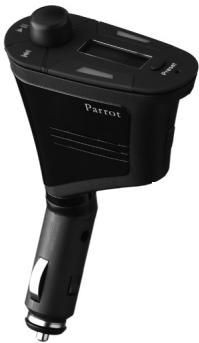
Kit contents
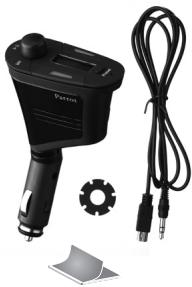
The kit includes :
- Parrot PMK5800
- USB/Jack audio cable
Rubber tip - User guide
- Parrot product guide
The use of a FM transmitter is forbidden in certain countries. Please refer to national legislation or Recommendation 70-03 implementation table for current position http://wwwERO.dk.
Using for the first time
1. Installing the Parrot PMK5800
Use the Parrot PMK5800
on your vehicle's cigar lighter.
The rubber tip will allow you to fit the Parrot PMK5800 to all types of cigar lighter sockets. If this rubber tip is necessary, screw it on the lower part of the device.
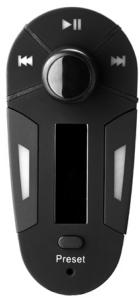
You can position the screen of the Parrot PMK5800 correctly by adjusting the base of the device or by pressing the red button to reverse the display orientation.
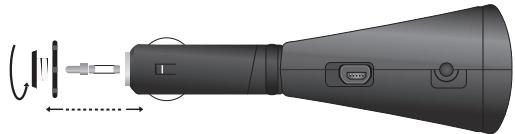
NOTE: YOU CAN USE THE PARROT PMK5800 IN ANY TYPE OF VEHICLE EXCEPT IN HEAVY TRUCKS (24V).
In some rare occasions, depending on the depth at which the cigar-lighter is placed, it is convenient to add an extender (not provided), so that the driver has the Parrot PMK5800 in full view. Make sure that the device stays stable and within reach if you are using it while driving.
2. Syntonizing your car radio
with the Parrot PMK5800
Thanks to the FM transmitter of the Parrot PMK5800, your communications as well as audio streaming and vocal menus will be relayed through the vehicles speakers. But you first have to synonymize your car radio and your cell phone, that is to say to set your car radio and the Parrot PMK5800 to the same frequency.
NOTE : DO NOT CHOOSE FREQUENCIES WHICH CORRESPOND TO THE MAIN NATIONAL RADIO STATIONS.
| Geographical area | Authorized frequencies |
| North America | 88 / 108 MHz |
| Europe | 87.5 / 108 MHz |
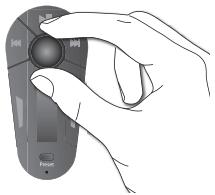
After syntonization, set the volume of your car radio to a high level and press the scroll wheel. The Parrot PMK5800 will send out an audio signal that will be relayed through the speakers of your vehicle. This will confirm the syntonization.
NOTE: IF THE PARROT PMK5800 AND YOUR CELL PHONE ARE NOT CORRECTLY SYNONIZED, THE SPEAKERS OF YOUR VEHICLE WON'T RELAY ANY AUDIO SIGNALS. WE ADVISE YOU TO KEEP A FREQUENCY ON YOUR CAR RADIO EXCLUSIVELY FOR THE PARROT PMK5800. FOR MORE INFORMATION, REFER TO YOUR CAR RADIO'S USER GUIDE.
3. Pairing your phone with the Parrot
PMK5800
Prior to use the Parrot PMK5800 with your phone for the very first time, you must initially pair both devices.
- Turn on your cell phone.
- Plug the Parrot PMK5800 in the cigar lighter socket and switch on the ignition.
The Parrot PMK5800 says « Please Pair device »
- From your Bluetooth phone, search for Bluetooth peripherals (consult your phone's user guide or refer to the «Support» heading on the www.parrot.com website).
- Select «Parrot PMK5800»
- Enter « 0000 » on your phone when prompted.
The Parrot PMK5800 says « Pairing successful » when both devices are connected.
The language is automatically selected if your cell phone supports this feature. Otherwise, you can set the language manually (for more information, refer to the "Selecting the language" section).
NOTE : YOU CAN PAIR UP TO 10 PHONES WITH THE PARROT PMK5800.
4. Selecting the language
of the Parrot PMK5800
The default language of the Parrot PMK5800 is English. Depending on your cell phone, the language can also be set according to the information on your SIM card. If you set the language manually, the automatic selection will be disabled until the next memory erasing.
If you want to set the language of the Parrot PMK5800 manually:
- On your car radio, select the same frequency you chose on the Parrot PMK5800.
- Quickly press the scroll wheel.
The Parrot PMK5800 says the selected language
- Press the scroll wheel once more to enter the «Language» menu.
- Use the scroll wheel to select the language.
- Press the scroll wheel or the green button to confirm the language you selected.
5. Setting the frequency
To get your communications as well as audio streaming relayed through the vehicles speakers, you first have to set your car radio and the Parrot PMK5800 to the same frequency. To do so, the Parrot PMK5800 allows you to memorize frequencies with the Preset button.
- On your car radio, select the frequency you will attribute to the Parrot PMK5800 and assign this frequency to a preset button. For more information, refer to your car radio's user guide.
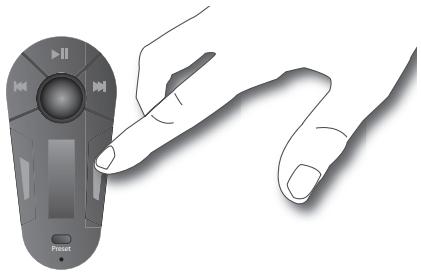
- Press the Preset button for 2 seconds to switch to the memorizing mode.
The Preset area blinks.
- Select the same frequency you chose on your car radio with the scroll wheel.
- Select the preset number you want to assign to this frequency by quickly pressing the Preset button.
- Press the Preset button for 2 seconds to assign the frequency to the preset number you previously selected.
The blinking in the preset area stops : the frequency has been correctly assigned.
WARNING : FOR OBVIOUS REASONS OF SECURITY,DO NOT CHANGE THIS FREQUENCY WHILE YOU ARE DRIVING.
NOTE:
- YOU CAN MEMORIZE UP TO 9 FREQUENCIES.
- IF YOU RECORD SEVERAL FREQUENCIES ON THE PARROT PMK5800, A SHORT PRESS ON THE PRESET BUTTON WILL ALLOW YOU TO CHANGE TO THE NEXT PRESET.
6. Reversing the display orientation
Press the red button for 2 seconds to reverse the display orientation
Description of the Parrot PMK5800
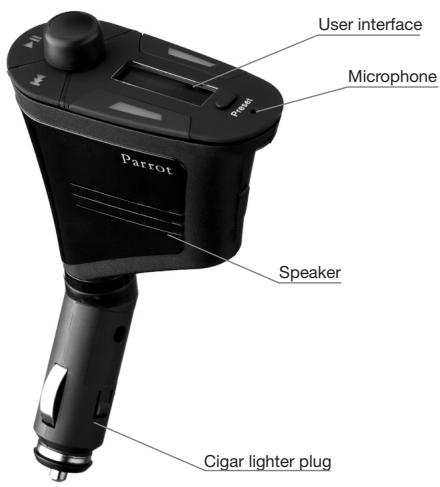
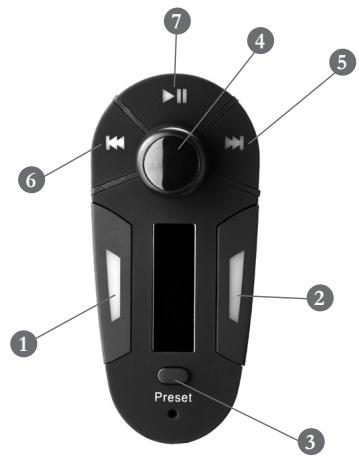
| 1 | Red button |
| Hang up | |
| Exit the vocal menu | |
| Exit the Voice recognition mode | |
| Reject an incoming call | |
| Reverse the display orientation | |
| 2 | Green button |
| Answer an incoming call | |
| Start a call | |
| Redial the last number dialled | |
| Confirm | |
| Change to discreet mode during a call | |
| Make a call via the voice recognition feature |
| 3 | Preset button |
| Select an already memorized frequency | |
| Memorize a frequency | |
| 4 | Scroll wheel |
| Set the frequency | |
| Navigate through the vocal menu | |
| Select/confirm | |
| 5 | Seek + button |
| Play next track | |
| 6 | Seek - button |
| Play previous track | |
| 7 | Play/Pause button |
| Play the active track | |
| Pause / resume playback | |
| Stop playback (long press) | |
| Suspend music from the analogical source |
1. Scrolling through the menus
- On your car radio, select the same frequency you chose on the Parrot PMK5800. For more information, refer to the « Setting the frequency »
- Press the central scroll wheel to access the menus. The kit says the name of the current menu.
- Browse through the menus by turning the wheel and confirm with the green button or by pressing the scroll wheel.
- To exit the menu, press the red button or wait a few seconds.
2. Menu structure
- Language : This menu allows you to select the language of the Parrot PMK5800. Refer to the « Selecting the language» section.
- Add voice tags : This menu allows you to transfer a contact via Bluetooth and add a voiceprint to this contact.
- Record magic words : This menu allows you to record the « phone » magic word (to accept an incoming call or start the voice recognition feature) and the « Hang up » magic word (to terminate a call). It also allows you to activate/deactivate these words if you already recorded them.
For more information, refer to the Voice recognition section.
- Record Keywords : This menu allows you to record keywords (which are useful in the event of a contact with several phone numbers). For more information, refer to the Voice recognition" section.
- Software update: Enable this option before updating via Bluetooth (www.parrot.com, Download section). Doing so will increase the number of devices compatible with your Parrot PMK5800.
Features
1. Voice recognition
The Parrot PMK5800 will allow you to enjoy the voice recognition feature even if your phone does not support it.
Using the voice recognition feature is particularly appropriate while you are driving.
1.1. Recording keywords and magic words
To offer you as many features as possible, the Parrot PMK5800 lets you record keywords: «general», «mobile», «work», «home», «other», as well as magic words: «phone» and «hang up».
- The magic word "phone" lets you accept an incoming call, as well as start the voice recognition feature.
The magic word «hang up» lets you terminate a call. - In the event of a contact with several phone numbers, the keywords allow you to choose the number to call.
To record keywords and magic words:
- On your car radio, select the same frequency you chose on the Parrot PMK5800. For more information, refer to the « Setting the frequency».
- Press the scroll wheel to enter the menu and select "Record keywords".
- Follow the prompts given by the kit. You will need to record each keyword twice for better recognition.
When a keyword is correctly recorded, you can choose another keyword. Otherwise, it prompts you to record it again.
You can exit the menu at any time by pressing the red button and then go back to record or modify the keywords whenever required.
1.2. Saving contacts in the Parrot PMK5800
To use the voice recognition feature, your contacts must first be saved in the hands-free kit's memory. Consequently you have to send your contacts to the Parrot PMK5800 via Bluetooth. To do so:
- On your car radio, select the same frequency you chose
on the Parrot PMK5800. For more information, refer to the «Setting the frequency» section.
- Press the scroll wheel to enter the menu and select «Add voice tags».
The kit says "Awaiting a contact"
- On your cell phone, select the contact and send it via Bluetooth. For more information, refer to your phone's user guide.
- Once received, add a voiceprint by following the prompts
NOTE: THE USE OF CERTAIN FEATURES (VOICE RECOGNITION, SEND CONTACTS BY BLUETOOTH) DEPENDS EXCLUSIVELY ON YOUR PHONE. REFER TO THE SUPPORT HEADING ON OUR WEBSITE AT WWW.PARROT.COM FOR FURTHER INFORMATION.
2. Telephony
2.1 Making a call manually from the phone
- Dial the number using the phone's keypad and start the call.
- The call automatically changes to hands-free mode. Otherwise, press the green button on the Parrot PMK5800.
2.2 Making a call via the voice recognition feature
IMPORTANT: YOU MUST HAVE FIRST RECORDED THE VOICE PRINTS ON YOUR PHONE OR THE KIT (REFER TO THE CHAPTER ENTITLED «VOICE RECOGNITION»).
- On your car radio, select the same frequency you chose on the Parrot PMK5800. For more information, refer to the « Setting the frequency» section.
- Quickly press the green button or say the "phone" magic word (only if you already recorded this magic word - refer to the Voice recognition section for more information).
- Say the name of the person that you wish to call after the "beep".
- If your contact has several phone numbers and if you are using the kit's voice recognition feature, say «home», «work», «mobile», «general» or «other» after the second beep. If you do not do so, the default number of this contact will be dialled.
NOTE: PRESS THE RED BUTTON TO EXIT THE VOICE RECOGNITION MODE OR WAIT FOR 5 SECONDS.
NOTE: THE USE OF CERTAIN FEATURES (VOICE RECOGNITION, SEND CONTACTS BY BLUETOOTH) DEPENDS EXCLUSIVELY ON YOUR PHONE. REFER TO THE SUPPORT HEADING ON OUR WEBSITE AT www.PARROT.COM FOR FURTHER INFORMATION.
2.3 Receiving a call
An incoming call is indicated by a ringtone and a blinking of the red and green LEDs.
- If your car radio is already set on the frequency of the Parrot PMK5800, then press the green button to answer the call or the red button to reject it.
- If your car radio is not set to the frequency of the Parrot PMK5800, switch to this frequency. By doing so, you automatically answer the call.
- You can also answer this call with your phone (private conversation).
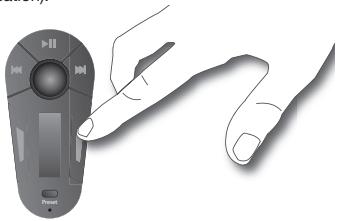
2.4 Ending a call
To end a call, press the red button on the Parrot PMK5800
or say "hang up" (only if you already recorded this magic word - refer to the Voice recognition section for more information).
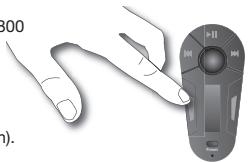
2.5 Redial function
Hold down the green key on the kit for two seconds to radial the last number dialled.
2.6 Adjusting the volume
During the call, turn the volume control command of your car radio or set it with your phone.
NOTE: THE USE OF CERTAIN FEATURES (VOLUME ADJUSTMENT, SEND CONTACTS BY BLUETOOTH) DEPENDS EXCLUSIVELY ON YOUR PHONE. REFER TO THE SUPPORT HEADING ON OUR WEBSITE AT www.PARROT.COM FOR FURTHER INFORMATION.
2.7 Changing to discreet mode
- During a call, if you want to continue the conversation on your phone (private conversation), press the green button on the Parrot PMK5800. The call is transferred to the phone.
- If you want to switch back to the kit, press the green button again.
2.8 Sending DTMFs
During a call, you can send DTMFs (Dual-Tone Multi-Frequency) for touch-temail. This feature can be used for managing your voicemail, for example.
- Press the scroll wheel - the kit says «0».
- Turn the wheel to scroll through the numbers.
- Press the scroll wheel to send the selected number to the phone.
- Repeat this sequence to send other DTMFs.
2.9 Clearing the memory
You can pair up to 10 devices.
- If you attempt to pair a 11th device, the kit displays «memory full».
- To pair a new phone, you must clear the memory by pressing simultaneously the red and green buttons.
CAUTION: THIS WILL CLEAR ALL THE CONTACTS AND VOICEPRINTS ASSOCIATED WITH THE PHONE AT THE SAME TIME.
NOTE: THE USE OF CERTAIN FEATURES (DISCREET MODE, DTMF...) DEPENDS EXCLUSIVELY ON YOUR PHONE. REFER TO THE SUPPORT HEADING ON OUR WEBSITE AT WWW.PABROT.COM FOR FURTHER INFORMATION.
2.10 Microphone mute
During a call, if you do not want the person on the other end of the line to hear you, quickly press the «Play» button on the remote controls of the Parrot PMK5800. Press the button again to cancel the mute.
3. Audio Streaming
The streaming audio feature lets you play the music tracks recorded on your Bluetooth audio player over the vehicle's speakers. This feature depends on your audio player. Some phones also incorporate this feature. For further information, refer to our website: www.parrot.com. Prior to use the Parrot PMK5800 with your audio player, you will need to pair both devices.
3.1. Pairing your audio player with the Parrot PMK5800
NOTE: IF YOU ARE USING YOUR PHONE FOR THE HANDS-FREE AND STREAMING AUDIO FUNCTIONS AT THE SAME TIME, THE
FOLLOWING PHASE IS NOT REQUIRED. YOUR PHONE IS ALREADY RECOGNISED BY THE KIT.
- On your car radio, select the same frequency you chose on the Parrot PMK5800. For more information, refer to the « Setting the frequency».
- From your Bluetooth audio player, search for Bluetooth peripherals (consult your audio player's user guide or refer to the
heading on the www.parrot.com website). - Select «Parrot PMK5800»
- Enter «000» on your audio player when prompted.
The Parrot PMK5800 says «pairing successful» when both devices are paired. The device sounds a beep when connected.
3.2. Playing music files
- On your car radio, select the same frequency you chose on the Parrot PMK5800. For more information, refer to the «Setting the frequency».
- If a connection for Audio Streaming is active, press the «Play / Pause» button to start playing the music files stored in your phone's / player's memory.
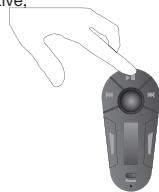
3.3. Pausing during playback
- When playing music files, quickly press the «Play / Pause» button to momentarily stop playback.
- Quickly pressing the «Play / Pause» button resumes playback of the music track.
3.4. Stopping playback
Hold down the «Play / Pause» button to stop playback. The car stereo is once again played through the vehicle's speakers.
3.5. Adjusting the volume
Use the volume control command of your car radio to adjust the volume for the audio streaming.
3.6. Selecting music files
When playing a music file, you can change to the next or previous track by pressing the «Next» and «Previous» buttons respectively.
NOTE: IF YOUR AUDIO PLAYER SUPPORTS THIS FEATURE, THE NEXT/ PREVIOUS ICONS ARE LIGHTENED.
3.7. Fast forwarding / fast rewinding the current track
During playback, you can fast forward or rewind by holding down the «Next» and «Previous» buttons respectively.
NOTE: IF YOUR AUDIO PLAYER SUPPORTS THIS FEATURE, THE NEXT/PRVIOUS ICONS ARE LIGHTENED.
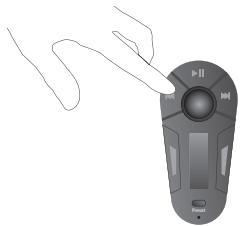
4. Audio Streaming via audio cable
The streaming audio feature lets you play the music tracks recorded on your audio player over the vehicle's speakers even if it does not support Bluetooth technology. To do so, simply connect your audio player to the Parrot PMK5800 with the USB/Jack audio cable.
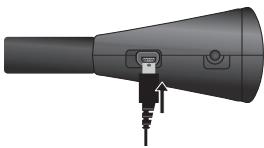
You will then have to use your audio player to control the music playing (selection of music files, Fast forwarding/rewinding...). Press the Play button of the Parrot PMK5800 to momentarily stop playback (only if your car radio and your phone are correctly syntonised).
Updating the software
You can update the software of your Parrot PMK5800 by Bluetooth. Simply enable this mode before updating. The update is performed by Bluetooth from a computer equipped with Bluetooth. Updating provides access to new features and improves compatibility with an even wider range of phones. For further information, visit our website to download the latest software version: www.parrot.com.
Hotline
Our hotline is at your disposal. You can contact the hotline by email or telephone. Visit our website at www.parrot.com for further information.
Italy: [+39] 02 86 39 14 63
Spain: [+34] 902 404 202
UK: [+44] (0)870 112 5872
Germany:09001727768
USA: [+1] (877) 9 Parrot (toll-free)
China: [+86] (0)21 6460 1944
Hong Kong: [+852] 2736 1169
France: [+33] 148036069
Europe: [+33] 148036069 (spoken languages : English, French, Spanish and German).
Technical specifications
Bluetooth
- Bluetooth 1.2 qualified.
- Hands-free profile 1.0 and 1.5.
- Object Push Profile.
- Bluetooth PIN code «0000».
Maximum range: around 10m - Pairing of up to ten phones.
Mechanics
- Dimensions: 150 × 81 × 37 mm .
Weight: 85 g.
Signal processing
- Echo cancellation.
- noise cancellation.
Built-in voice recognition.
Compliance
FCC.
- Bluetooth.
CE.
Notes

François
Sommaire
Introduction 27
2.10 Coupure microphone
Specifications Techniques
Bluetooth
FCC.
- Bluetooth.
CE.
Notes


Indices
Introduccion. 45
FCC.
- Bluetooth.
CE.
Notas


Indices
Introduzione 61
2.8 Invio di DTMF (Dual-Tone Multi-Frequency)
(Dual-Tone Multi-Frequency).
FCC.
- Bluetooth.
CE.
Nota

Deutsch
Inhalt
Einführung. 81
FCC.
- Bluetooth.
CE.
Hinweis


Inhoudsopgave
Inleiding. 101
FCC.
- Bluetooth.
CE.
Aantekeningen

Português
Indices
Introducao 119
FCC.
- Bluetooth.
CE.
Notas

Svenska
Innehal
Inledning. 137
Italy: [+39] 02 86 39 14 63
Spain: [+34] 902 404 202
UK: [+44] (0)870 112 5872
Germany:09001727768
USA: [+1] (877) 9 Parrot ( Gratisnummer)
China: [+86] (0)21 6460 1944
Hong Kong: [+852] 2736 1169
France:0148036069
Europe: [+33] 148036069(taltesprak:engelsk,fransk,spansk og tysk).
PMK5800 NIE JEST PRAWIDLOWO
ZSYNCHRONIZOWANY Z
RADIOODTWARZACZEM, PRZESYLANIE
INFORMACJIAUDIOPRZEZ
RADIOODTWARZACZ NIE JEST MOZLIWE. ZALECAMY ZAPISANIE
CZESTOTLIWOSCI RADIOODTWARZACZU DO UZYWANIA Z PARROT
PMK5800. DO TEGO CELU MOZNA WYKORZYSTAC FUNKCJE PAMIECI
RADIOODTWARZACZA.
Italy: [+39] 02 86 39 14 63
Spain: [+34] 902 404 202
UK: [+44] (0)870 112 5872
Germany:09001727768
USA: [+1] (877) 9 Parrot (ucretsiz arama)
China: [+86] (0)21 6460 1944
Hong Kong: [+852] 2736 1169
France:0148036069
Europe: [+33] 148036069 (konusulan diller:
IPMMEAHUE: C YCTPOIYCTBOM PARROT PMK5800 Bb MOXETE CB3AHT Bo 10 TEJIΦOHOB.
4. BbI6op Ra3bika yctpoiCTBa
Parrot PMK5800
Iyo ymouhanHO na yctpoCTBe Parrot PMK5800 yctahOBnEH aHrnnckrsBbIK. 3aBzucmOCTOn tBaueoTe nefoHa yctpoCTBO MOKet YCTAHOBNT bBbIK cAMOCToTEnbHO B 3aBzucmOCTOn OT INHOFopMaun, IMeoueCra h SI-McPte. EcNBI bY cTaHabINBaTe rBbIK BpyHyO, ABtOMTuNeCKn Bi6Op 6ydtET OTKIOHEN DO MOpMeHT NoCnpedyUOeO YoJdaneHIn HOFopMaun n3 pAmrT. Pnj JeLanH, BbIK MOKeTe BbIpaTb AByk UcpoCTBa Parrot PMK5800 bpyHyO:
- HA antibotomobimOB npneMnHke Bb6epRte aactOty pa60tbyycptobaa Parrot PMK5800.
- KpaTKOBpeMeHHo HaxMMTe Ha KOJIeCNKO.
YctpoIcTBo Parrot PMK5800 coo6uHT, KaKoJ Ra3bIK Bb6paH B HAcTOraIIMOMeHT.
-
Eupe pa3 hακmITE ha KONECKIO IaI BxAODa B MeHO «BbI6Op 3bIka).
4.ДЯВБОРаЯ3ыkaBOCNoJIb3yItecKONEcNKOM -
HacKMITE ha KONcKIO nHn HAeNHyO KHONKY DnI NOPTBeKJXDHnBbGOpA3bKa.
5. Hacptponka qactotb BcuaHnra
Длгь ВOCрпоЗБЕDEнгЯ TENEФОнHOrO pa3roBOPa и NOTOKOBOr aудно на КОLOнКха вэserо abTomOБинla Heo6xOДмЮ,Чтбы усpoчгсву Parrot PMK5800 n bauw abTomOБиньни рпeмнikь 6bln otperулрованы ha Odyн n Ty ку счТOTy. Длгь сьшero уdOбCTBa ИспOnьТВаня Parrot PMK5800 no3BOJIЯт Bam 3aONOMHITb IcNOnb3yEмBLE qactOTb npi NOMOuФункIMпpeDabpintelNBHa hAcTpoKa.
- Ha BaWem ABTOMOBnHbOM npVEmNHke Bbl6epnte qactoty, KOTpyo BblBbIeHNmYCTpOHTBy Parrot PMK5800 n 3aHeCtne ee B pAmrTb O bHyN 3aueEe, CBrz3aHHyo C kNaBnWeBbOpa npEbpantbHOH hctpoKn. JdnoDOnnHtTeBHO HnHOpMaUNnOBpATteCe K NcHcTpkyuINBaWero ABTOMOBnHbTO pPmeMHkA.
2.ДеркITEнжатой KнОКИп徴Варпгьнoiи НасторКIM Parrot PMK5800в төсөнгeme 2 сekунд пяпөрекда в рөхим 3anOMINHЯчСТOTы.30Ha《PpeBapuTeIbHna HaCTpoKa》6yTeMnraTb.
- IcnoIb3y kONeICbI, Bb6EpHte CTaOThY, KOTOPYbI Bbl YctahOBnHbA HABOMtBbHOB NPNpEMNHke.
4.BbIbepTe 3OHy 3aHeceHnB namrTb (Homep
npedBapnteHbOHnAchptoKIN, KOTOPOM npincBOeHa cactota), kpatKOBpeMeHHo Haxab HAKnOpky «PpEdBAPnteHnaHnacptoKa».
OTBeaTb Ha BXOJaIcN Bbl3OB.
- Ecnn Bbl XOTNTe COXPAHNtB KOHfDHeHnAaHbSocTb BaWero Bbl3OBA, Bbl MOkeTnePcTO OTBeNTb Na Bbl3OB Ha TepeHone. Bbl3OB bdyTe pINrH BAWM NtepeHOM. a He yctpoCTbOM Parrot PMK5800.
2.4 Pa3bEduHeHne
yctpoiCTBa Parrot PMK5800.
O6HOBJIeHne
BbMokTe 3arpy3nTb HOByIO BercNIO nporpAMMHorO
obcneueHnBa Wauero KOMNNEKTa rpoKOrOBPOAIE CBsRn Parrot
MK6100 uepe3 Bluetooth. AkTbnuPyte 3To tPexMe npeed
obHOBNHeM nporpAMMbI. ObHOBNHeN pno3BOoNTcaeoh
Bluetooth c KomlbTOterpa, OchaueHnORo FyHKnue Me BLuethoot.
ObHOBNHeN eNo3BOJrAET NcNOJIb3OBAbT HoBle FyHKUHOHaNBHe
Bo3MOxHOCTn yUYuWHTb COBMECTMOCt b paCImpeHHbIM
FyHKUIMM BoJIwEero KOnJIeCTBa TeneΦoHOB. Bonee
nopRo6HyIO HnfOpMaUHc MoTPrTe Ha Hauwem Web-caiTe: www.
parrot.com 3aJdnte Ha hauw web-caiT www.parrot.com dny
3arpy3kn NoocJeHneB BercNIO nporpAMMHorO obceueHnra.
Topyaa liHna
Haua「ropraa lihna» Bcergda B aalmePacnpraekenn. BmyoTe Cb3aTbcA C ne no 3JeKTOPHNO nOte Hnno TenefoHy. Haua「ropraa lihna» paBotaet C noHeDJIbHka no nTnHTuCy c 9.00 do 18.00 (GMT + 1).
ItaJn: [+39] 0286391463
Испаши: [+34] 902 404 202
BelenkoobpntaHn: [+44] (0)870 112 5872
- FCC Compliance Statement
- Declaration of Conformity
- Licences
- Correct Disposal of This Product (Waste Electrical & Electronic Equipment)
- Compatibility problems
- Copyrights
- Registered trademarks
- Modifications
- Contents
- Introduction
- Kit contents
- Using for the first time
- Installing the Parrot PMK5800
- Syntonizing your car radio
- with the Parrot PMK5800
- Pairing your phone with the Parrot
- PMK5800
- Selecting the language
- of the Parrot PMK5800
- Setting the frequency
- Reversing the display orientation
- Description of the Parrot PMK5800
- Scrolling through the menus
- Menu structure
- Features
- Voice recognition
- Recording keywords and magic words
- To record keywords and magic words:
- Saving contacts in the Parrot PMK5800
- Telephony
- Making a call manually from the phone
- Making a call via the voice recognition feature
- Receiving a call
- Ending a call
- Redial function
- Adjusting the volume
- Changing to discreet mode
- Sending DTMFs
- Clearing the memory
- Microphone mute
- Audio Streaming
- Pairing your audio player with the Parrot PMK5800
- Playing music files
- Pausing during playback
- Stopping playback
- Adjusting the volume
- Selecting music files
- Fast forwarding / fast rewinding the current track
- Audio Streaming via audio cable
- Updating the software
- Hotline
- Technical specifications
- Bluetooth
- Mechanics
- Signal processing
- Compliance
- Notes
- Sommaire
- Coupure microphone
- Specifications Techniques
- Indices
- Notas
- Invio di DTMF (Dual-Tone Multi-Frequency)
- Nota
- Inhalt
- Hinweis
- Inhoudsopgave
- Aantekeningen
- Innehal
- BbI6op Ra3bika yctpoiCTBa
- Parrot PMK5800
- Hacptponka qactotb BcuaHnra
- Pa3bEduHeHne
- O6HOBJIeHne
- Topyaa liHna
Brand : PARROT
Model : PMK5800
Category : Drone