
SAS-DVR1004 - Voice recorder KONIG - Free user manual and instructions
Find the device manual for free SAS-DVR1004 KONIG in PDF.


| Product Type | Digital Voice Recorder |
| Brand | Konig |
| Model | SAS-DVR1004 |
| Dimensions (approx.) | 100 x 30 x 15 mm |
| Weight | 50 g |
| Power Supply | Rechargeable lithium-ion battery 3.7 V, via USB port |
| Storage Capacity | 4 GB (built-in, expandable via microSD card) |
| Supported Audio Formats | MP3, WAV |
| Main Functions | Voice recording, playback, deletion, USB formatting, built-in microphone, speaker, dictaphone |
| Care and Cleaning | Clean with a soft, dry cloth. Do not use chemicals. |
| Safety | Do not expose to moisture, avoid shocks, do not disassemble the device. |
| Spare Parts | USB cable, earphones, power adapter (not included) |
| Repairability | Contact Konig after-sales service for any repairs. |
| General Information | Brand: Konig, Model: SAS-DVR1004, Category: Voice Recorder |
Frequently Asked Questions - SAS-DVR1004 KONIG
User questions about SAS-DVR1004 KONIG
0 question about this device. Answer the ones you know or ask your own.
Ask a new question about this device
Download the instructions for your Voice recorder in PDF format for free! Find your manual SAS-DVR1004 - KONIG and take your electronic device back in hand. On this page are published all the documents necessary for the use of your device. SAS-DVR1004 by KONIG.
USER MANUAL SAS-DVR1004 KONIG
MANUAL DE USO (p. 71)
NÁVOD (s. 253)
MANUAL (p. 85)
ROKASGRĀMATA (Ipp. 267)
HASZNÁLATI ÚTMUTATÓ (o. 99)
NAUDOJIMO VADOVAS (281 p.)
KÄYTTÖOHJE (s. 113)
PRIRUČNIK (str. 295)

KÖNIG
ENGLISH
Table of contents
• About this short description manual 2
• Packaging content 2
• Technical specifications 3
• Safety precautions 5
• Product description 5
- Front panel 5
- Rear panel 6
- Remote control 7
- Mouse 7
• Installation instructions 8
• User instructions 8
- Power on the system 9
- Sitemap main menu 10
- DISPLAY 11
- RECORD 11
- SEARCH 11
- NETWORK 12
- ALARM 12
- DEVICE 12
- SYSTEM 13
- ADVANCED 13
• Mobile device support 13
• Safety precautions 14
- Maintenance 14
- Warranty 14
- Disclaimer 14
- Disposal 14
About this short description manual
This manual describes the operation and installation of the digital video recorder and cameras. Please refer to the extensive English manual for further details about the digital video recorder (DVR).
• We recommend that you read this manual before installing/using the security camera system.
- Keep this manual in a safe place for future reference.
Packaging content
SAS-SETDVR35
• 1x DVR: SAS-DVR1004
• 2x camera: SAS-CAM1100
• 2x 18-metre connection cable
• 1x remote control (incl. 2x AAA battery)
- 1x USB mouse
• 1x AC/DC power supply

KÖNIG
- 1x HDMI cable
• 1x UK/EU power cable - 1x CD-ROM
• Installation guide
SAS-SETDVR45
• 1x DVR: SAS-DVR1004
• 4x camera: SAS-CAM1100
• 4x 18-metre connection cables
• 1x remote control (incl. 2x AAA battery)
- 1x USB mouse
• 1x HDMI™ cable
• 1x AC/DC power supply
• 1x EU power cable
• 1x UK power cable
- 1x CD-ROM
• Installation guide
SAS-DVR1004/1008/1016
- 1x DVR
• 1x remote control (incl. 2x AAA battery) - 1x USB mouse
• 1x HDMI™ cable
• 1x AC/DC power supply
• 1x EU power cable
• 1x UK power cable - 1x CD-ROM
• Installation guide
SAS-CAM1100/1110
- 1x camera
• 1x 18-metre connection cable - Manual
SAS-CAM1200/1210
- 1x camera
• 1x 18-metre connection cable - Manual
Technical specifications
Digital video recorder SAS-DVR1004/1008/1016
• Video compression: h.264
• Video system: PAI/NTSC
• Operation system: linux
• Video input: 4/8/16 channels BNC
• Video output: 1 channel BNC/1 channel VGA/1 channel HDMI™ 1080p
• Audio input: 2/4 channel RCA
• Audio output: 1 channel RCA
ENGLISH

KÖNIG
ENGLISH
• VGA resolutions: 800 x 600, 1024 x 768, 1280 x 1024, 1440 x 900, 1920 x 1080
• Display resolutions: PAI: 960 x 576 @ 25 fps (each channel)
NTSC: 960 x 480 @ 30 fps (each channel)
• Record resolutions: PAI D1 mode: 360 x 288 (CIF), 720 x 288 (hD1), 720 x 576 (D1)
960h Mode: 480 x 288 (WCIF), 960 x 288 (WhD1), 960 x 576 (WD1)
NTSC D1 Mode: 360 x 240 (CIF), 720 x 240 (hD1), 720 x 480 (D1)
960h Mode: 480 x 240 (WCIF), 960 x 240 (WhD1), 960 x 480 (WD1)
• Record frame rate: PAI (each channel) D1 mode/960h mode: 25 fps
NTSC (each channel) D1 mode/960h mode: 30 fps
• Display: full screen/quad/PIP/S.E.Q.
• HDD interface: 1x SATA 3.5 or 2.5 inch
• HDD capability: up to 2 TB
• Playback: 4/8/16 channels simultaneously
• Playback via network: 4 channels
• Network interface: RJ45, 10 m/100 m
• Network protocol: supports TCP/IP, DhCP, DDNS, PPPoE
• Network function: supports live view with IE and mobile phone
• USB interface: USB 2.0 for mouse and file backup/upgrade
• Back-up: AVI file via USB flash/removable hDD USB disk/USB CD/network
• Authority: max. 7 users
• Operation: live view, record, playback, backup and remote access at the same time
• Recording quality: best/good/normal
• Record modes: normal/schedule/motion detection/remote recording
• Pre-recording: 3 sec.
- Playback mode: play/fast forward/fast rewind/frame by frame
- Playback search: date/time/file list
• Recording pack time: 15/30/45/60 min.
• Privacy zone: yes
• Power supply: DC 12 V/3 A
• Dimensions: 300 x 222 x 50 mm
• Weight: 1.5 kg (without hDD)
Camera SAS-CAM1100/1110
• Image chip: 1/4" CMOS
- Lens: 3.6 mm
• Horizontal resolution: 700 TVL
• View angle: 45°
• Infrared LED: 24 pcs, 5 \~ 10 m
• Light sensitivity: 1.5 lux
• Electronic shutter: 1/50 (1/60) \~ 1/100.000 sec.
• S/N ratio: >48 dB
• Gain: auto
• Gamma correction: >0.45
• Protection: IP66
• Working temperature: -20 °C \~ 55 °C

KÖNIG
• Video output: 1.0 V p-p/75 Ω
• Voltage: DC 12 V
• Dimensions: 145 x 60 x 55 mm
• Weight (with bracket): 350 g
Camera SAS-CAM1200/1210
• Image chip: 1/4" CMOS
- Lens: 3.6 mm
• Horizontal resolution: 700 TVL
• View angle: 45°
• Infrared LED: 24 pcs, 5 \~ 10 m
• Light sensitivity: 1.5 lux
• Electronic shutter: 1/50 (1/60) \~ 1/100.000 sec.
• S/N ratio: >48 dB
• Gain: autO
• Gamma correction: >0.45
• Protection: IP66
• Working temperature: -20 °C \~ 55 °C
• Video out: 1.0 V p-p/75 Ω
• Voltage: DC 12 V
• Dimensions: 100 x 75 mm
• Weight (with bracket): 250 g
Safety precautions

Do not open the camera or DVR in the event of a malfunction. These products should only be opened by a qualified engineer.
Do not submerge the camera and DVR in liquid.
Do not expose the DVR to water or humidity.
Do not expose the camera or DVR to high temperatures (see technical specifications).
Do not install the system close to strong magnetic fields, such as speakers. This may affect the performance of the system.
Product description
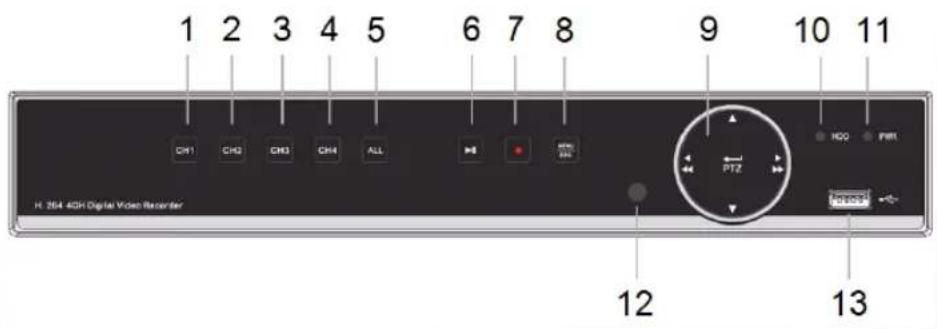
Front panel (SAS-DVR1004 shown)
ENGLISH

KÖNIG
- CH1, touch to select channel 1
- CH2, touch to select channel 2
- CH3, touch to select channel 3
- CH4, touch to select channel 4
- ALL, touch to select (see) all channels in 1 screen (quad view)
- PLAY/PAUSE, touch to start playback or pause playback
- REC, touch to start recording
-
MENU/ESC, touch to select menu or escape from menu
-
Select button:
◄/◄◄ Move left/rewind
▶/▶▶ Move right/forward
▲ Move up
▼ Move down
-
HDD, hard disk drive indicator
-
PWR, power indicator
-
IR EYE, for receiving IR signals of remote control
-
USB connector for mouse
Rear panel

- Video (camera) input (max. 16 for SAS-DVR1016)
- Video output (composite)
- Audio input
- Video output (VGA)
- RS485/sensor/alarm interface (see below diagram)
- Not used
- Audio output
- Video output (HDMI)
- Ethernet port (LAN)
- USB port (Flash drive, hard drive)
- DC 12 V input
- Power switch
ENGLISH

KÖNIG
Remote control
- Mute button: press to switch off the sound.
- All button: press to select (see) all channels in 1 screen (quad view).
- Numeric buttons: press to select channel or input of number.
- Menu button: press to select the menu.
- Submenu button: press to select the submenu.
- Select buttons: select options with the cursor buttons and select button.
- Playback/record buttons Rewind button: press to reverse the video. Play button: press to start playing the video. Forward button: press to forward the video. Recording button: press to record the video. Pause button: press to pause the video. Stop button: press to stop the video.

ENGLISH

Mouse
Clicking the left mouse key: In menu lock mode, enter pop-up menu and click on any sub menu to pop up log-in window. In menu unlock mode, enter pop-up menu, and then click left key to enter any sub menu directly.
After entering the main menu, click left key to enter any sub menu: in (detailed file) menu mode, click on the left key to playback a recorded file.
Change the status of check box and motion detection area. Click on combo box to access pull down menu: click left key to stop dwell time display if it is activated.
Click the left key to select values in edit boxes or pull-down menu, and select Chinese characters, special symbols and numeric characters. You can also click left instead of (enter
or (backspace).
Clicking the right mouse key: In live display mode, click on the right key to pop up the main menu.
Double-click left mouse key: In live display or playback mode, double-click left key to maximise the screen.
Moving the mouse: Select menu item.

KÖNIG
ENGLISH
Sliding mouse: Slide the mouse to select a motion area if you are in motion mode. Slide the mouse to adjust colour and volume if you are in colour settings menu mode.
Installation instructions
![graph TD A["Monitor"] -->|To camera input| B["Video Cable"] A -->|To DC 12 V input| C["Power Supply"] B --> D["AC/DC power supply"] C --> E["Power outlet"] F["Connection cable"] --> G["Camera with Max. 4/8/16 camera inputs"] H["Power supply"] --> I["Divider cable with 5x DC output"] J["Power outlet"…](/content/2026/06/1262065/images/4208079ddaba45bc82e16b132c4be00696c2fa80ed2a1502d5432199364908ae.jpg)
User instructions
The following chapters describe some of the features and functions of the DVR. Refer to the extensive English manual for further details about the DVR. For system settings, it is recommended to use the mouse.
Note: the system language can be set to several languages. The screenshots in this manual, however, are shown only in English.

KÖNIG
ENGLISH
Power on the system
After connecting the connection cables of the cameras and the monitor, connect the power cable to the DVR and wall outlet. Press the power button on the rear panel to power on the system. You enter the system initialising screen.
System Initializing...
After system initialising is finished, the DVR automatically shows the live screen of the connected cameras (1, 2, 3 or 4). This is called live mode.




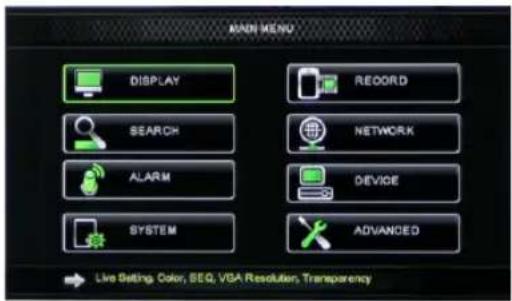
MAIN MENU
In live mode, click on menu button on the front panel or on the remote control to enter the main menu interface. Alternatively, right-click the mouse to show the toolbar with the main menu icon.
In the main menu mode, you can control device management settings, such as display, record, network, search, device, system and advanced settings etc. See next page for the site map of the main menu.
Sitemap main menu
![graph TD A["Main Menu"] --> B["Display"] A --> C["Record"] A --> D["Search"] A --> E["Network"] A --> F["Alarm"] A --> G["Device"] A --> H["System"] A --> I["Advanced"] B --> J["Live set"] B --> K["Output Set"] B --> L["Privacy zone"] C --> M["Record Parameters"] C --> N["Schedule"] C --> O["Main St…](/content/2026/06/1262065/images/fbab06cc07b55df12caca1a8a6ad8908900bfd65cd02538eb36d5268c8a7e39b.jpg)
Note: for the following instructions, we assume that you control the DVR main menu with a mouse.

KÖNIG
ENGLISH
DiSPIAy
By clicking on display in the main menu, you enter the display section.
The live mode contains the on-screen settings/information per channel and the colour setting per channel if the DVR is in live mode.
Output contains the settings for the video output to the monitor.
With privacy zone you can set 4 zones per channel which are not visible due to the privacy restrictions.

RECoRD
Section for setting the recording parameters. The final record settings define the total recording time with a hard disk of 500 GB.
With average settings, the DVR can record for 14 days, based on 8 hours per day.

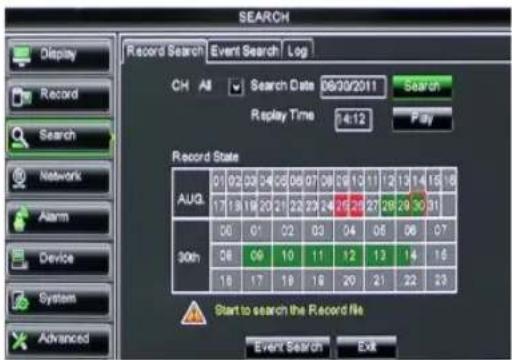
SEARCH
The search section provides options to search recordings by date, time or event.
The log option allows you to view the log information you searched.
The backup option exports all the listed log information.

KÖNIG
ENGLISH
NETwoRk
It includes all network settings to integrate the DVR system in your network. To set the network, some network skills are recommended. Please contact your reseller or any person with network skills for help. To connect the DVR to the internet, certain settings must be done in the network section. Please refer to the extensive English manual for further details about the network settings.

AIARM
It provides the option to set motion alarm per channel. After the parameters are defined, the DVR starts recording if it detects any motion. The alarm section allows you to connect to an external motion detector and set the related parameters.

DEVICE
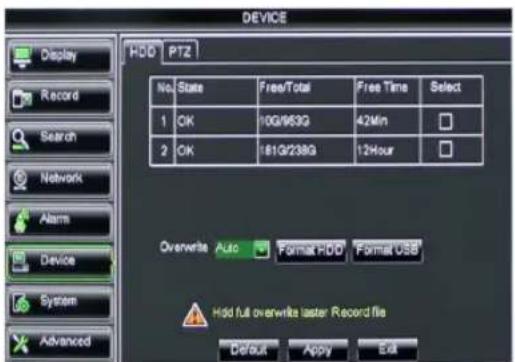
Section for information about hard disk capacity, and pan, tilt and zoom settings of the camera.


KÖNIG
ENGLISH
SySTEM
It provides general settings for the DVR system and its users.

ADVANCED
Section for advanced and additional system settings.

Mobile device support

This DVR supports a live stream from the cameras to your mobile device, such as smartphones and tablets. In this way, you can have on-the-go access to your security system from virtually anywhere. To be able to view feed, install the RXCamPro app on your mobile device. You can find the app in the Apple App Store (iOS 5.0 or above) and Google Play (Android 2.3 or above).
Note: for using the mobile device support, the DVR must be connected to the internet with the correct network settings.

Safety precautions
To reduce risk of electric shock, this product should ONLY be opened by an authorized technician when service is required.
Disconnect the product from mains and other equipment if a problem should occur.
Do not expose the product to water or moisture.

Maintenance
Clean the product only with a dry cloth.
Do not use cleaning solvents or abrasives.
Warranty
Any changes and/or modifications to the product will void the warranty. We cannot accept any liability for damage caused by incorrect use of this product.
Disclaimer
Designs and specifications are subject to change without notice. All logos, brands and product names are trademarks or registered trademarks of their respective holders and are hereby recognized as such.
Disposal

• This product is designated for separate collection at an appropriate collection point.
Do not dispose of this product with household waste.
• For more information, contact the retailer or the local authority responsible for waste management.
This product has been manufactured and supplied in compliance with all relevant regulations and directives, valid for all member states of the European Union. It also complies to all applicable specifications and regulations in the country of sales. Formal documentation is available upon request. This includes, but is not limited to: Declaration of Conformity (and product identity), Material Safety Data Sheet, product test report.
Please contact our customer service desk for support:
via website: http://www.nedis.com/en-us/
via e-mail: service@nedis.com
via telephone: +31 (0)73-5993965 (during office hours)
NEDIS B.V., De Tweeling 28, 5215 MC 's-Hertogenbosch, THE NETHERLANDS

KÖNIG
Inhalt
System Initializing...



MAIN MENU
DEVICE

KÖNIG
DEUTSCH
SySTEM
System Initializing...



MAIN MENU
DEVICE

KÖNIG
FRANÇAIS
SySTEM
System Initializing...



MAIN MENU
DEVICE

KÖNIG
NEDERLANDS
SySTEM
ADVANCED
System Initializing...


MAIN MENU
DEVICE

KÖNIG
ITALIANO
SySTEM
System Initializing...



MAIN MENU
Section for setting the recording parameters. The final record settings define the total recording time with a hard disk of 500 GB. With average settings, the DVR can record for 14 days, based on 8 hours per day.

SEARCH
DEVICE

KÖNIG
ESPAÑOL
SySTEM
Câmara SAS-CAM1200/1210
System Initializing...


MAIN MENU
DEVICE

KÖNIG
PORTUGUÊS
SySTEM
System Initializing...

4
3

MAIN MENU
DEVICE

KÖNIG
MAGYAR
SySTEM
System Initializing...


MAIN MENU
DEVICE

KÖNIG
SUOMI
SySTEM
System Initializing...


MAIN MENU
DEVICE

KÖNIG
SVENSKA
SySTEM




MAIN MENU
DEVICE

KÖNIG
ČESKY
SySTEM
- Declansator electronic: 1/50 (1/60) \~ 1/100.000 sec.

KÖNIG
• Raport S/N: > 48 dB
- Amplificare: auto
• Corectie gama: > 0,45
• Protectie: IP66
• Temperatura de lucru: -20 °C \~ 55 °C
• leşire video: 1,0 V p-p/75 Ω
• Tensiune: 12 V c.c.
• Dimensiuni: 145 x 60 x 55 mm
• Greutate (cu suport): 350 g
Cameră SAS-CAM1200/1210
• Cipul de imagine: 1/4" CMOS
• Lentilă: 3,6 mm
• Rezolutie orizontală: 700 TVL
• Unghiul de vizualizare: 45°
• LED infrarosu: 24 buc., 5 \~ 10 m
• Sensibilitate la lumină: 1,5 lux
- Declansator electronic: 1/50 (1/60) \~ 1/100.000 sec.
• Raport S/N: > 48 dB
- Amplificare: auto
• Corectie gama: > 0,45
• Protectie: IP66
• Temperatura de lucru: -20 °C \~ 55 °C
• leşire video: 1,0 V p-p/75 Ω
• Tensiune: 12 V c.c.
• Dimensiuni: 100 x 75 mm
• Greutate (cu suport): 250 g
Măsuri de siguranță

System Initializing...


MAIN MENU
DEVICE

KÖNIG
SySTEM
System Initializing...



MAIN MENU
DEVICE

KÖNIG
ΕΛΛΗΝΙΚΑ
SySTEM
• Billed-chip: 1/4" CMOS
• Linser: 3,60 mm
• Horizontal opløsning: 700 TVL
System Initializing...

3
4
MAIN MENU

KÖNIG
DANSK
SySTEM
System Initializing...
Etter at systemet er ferdig installert, viser DVR-en automatisk sanntidsskjermen på de tilkoblede kameraene (1, 2, 3 eller 4). Dette kalles sanntidsmodus.



MAIN MENU
DEVICE

KÖNIG
NORSK
SySTEM


MAIN MENU
Карта главного меню
![graph TD A["Main Menu"] --> B["Display"] A --> C["Record"] A --> D["Search"] A --> E["Network"] A --> F["Alarm"] A --> G["Device"] A --> H["System"] A --> I["Advanced"] B --> J["Live set"] B --> K["Output Set"] B --> L["Privacy zone"] C --> M["Record Parameters"] C --> N["Schedule"] C --> O["Main St…](/content/2026/06/1262065/images/98a92c71fd087246f7050bda9508ee0dac269429c4fdb26ad737edb7cccd1076.jpg)
RECoRD
DEVICE

KÖNIG
РУССКИЙ
SySTEM
System Initializing...



MAIN MENU
DEVICE

KÖNIG
TÜRKÇE
SySTEM
System Initializing...

3
4
MAIN MENU
DEVICE

KÖNIG
EESTI
SySTEM



MAIN MENU
DEVICE

KÖNIG
SLOVENSKY
SySTEM
System Initializing...


MAIN MENU
DEVICE

KÖNIG
LATVIEŠU
SySTEM
System Initializing...



MAIN MENU
DEVICE

KÖNIG
LIETUVIŠKAI
SySTEM
System Initializing...



Glavni izbornik
DEVICE
Odjeljak za informacije o kapacitetu tvrdog diska i postavkama za panoramski prikaz, nagnutost i zum kamere.

KÖNIG
HRVATSKI
SySTEM
DVR podržava prijenos uživo s kamera na vaš mobilni uređaj poput pametnih telefona i tablet uređaja. Na ovaj način možete imati pristup u hodu na vaš sustav sigurnosti virtualno s bilo kojeg mjesta. Da biste mogli prikazati sažetak sadržaja, instalirajte aplikaciju RXCamPro na svojem mobilnom uređaju. Možete pronaći aplikaciju u trgovini Apple App (iOS 5.0 ili noviji) i Google Play (Android 2.3 ili noviji).
System Initializing...

4
3

MAIN MENU
DEVICE

KÖNIG
БЪЛГАРСКИ
SySTEM
System Initializing...


MAIN MENU
DEVICE

KÖNIG
POLSKI
SySTEM
System Initializing...
Ko je inicializacija sistema končana, DVR samodejno prikaže žive slike priključenih kamer (1, 2, 3 ali 4). Ta način se imenuje gledanje v živo.


MAIN MENU
DEVICE

KÖNIG
SLOVENSKI
SySTEM
Nudi osnovne nastavitve za DVR sistem in njihove uporabnike.

ADVANCED
Razdelek za napredne in dodatne nastavitve sistema.

Podpora mobilne naprave


- KÖNIG
- TABLE OF CONTENTS
- ABOUT THIS SHORT DESCRIPTION MANUAL
- PACKAGING CONTENT
- SAS-SETDVR35
- SAS-SETDVR45
- SAS-DVR1004/1008/1016
- SAS-CAM1100/1110
- SAS-CAM1200/1210
- TECHNICAL SPECIFICATIONS
- DIGITAL VIDEO RECORDER SAS-DVR1004/1008/1016
- CAMERA SAS-CAM1100/1110
- CAMERA SAS-CAM1200/1210
- SAFETY PRECAUTIONS
- PRODUCT DESCRIPTION
- REMOTE CONTROL
- MOUSE
- USER INSTRUCTIONS
- POWER ON THE SYSTEM
- MAIN MENU
- DISPIAY
- RECORD
- SEARCH
- NETWORK
- AIARM
- DEVICE
- SYSTEM
- ADVANCED
- MOBILE DEVICE SUPPORT
- MAINTENANCE
- WARRANTY
- DISCLAIMER
- DISPOSAL
- INHALT
- CÂMARA SAS-CAM1200/1210
- CAMERĂ SAS-CAM1200/1210
- MĂSURI DE SIGURANȚĂ
- GLAVNI IZBORNIK
- PODPORA MOBILNE NAPRAVE
Brand : KONIG
Model : SAS-DVR1004
Category : Voice recorder