
On Stage IV - Docking Station JBL - Free user manual and instructions
Find the device manual for free On Stage IV JBL in PDF.


| Product Type | Docking station for iPod/iPhone and portable speaker |
| Brand | JBL |
| Model | On Stage IV |
| Dimensions (L x W x H) | 210 mm x 210 mm x 68 mm |
| Weight | 0.7 kg |
| Power supply (mains) | 12 V DC, 1.5 A via included mains adapter |
| Battery power | 6 AA batteries (NiMH or alkaline, not included) |
| Power consumption | 20 W maximum |
| Transducers | 4 JBL Odyssey 1-inch full-range speakers |
| Output power | 10 W x 2 (20 W total) |
| Frequency response | 110 Hz – 20 kHz |
| Signal-to-noise ratio | 70 dB |
| Auxiliary input impedance | 5 kohms |
| Connectivity | Docking station for iPod/iPhone, 3.5 mm auxiliary audio input |
| Main functions | iPod/iPhone compatibility including iPod nano, iPod touch, iPod classic, iPhone; iTunes sync via USB; charges iPod/iPhone via mains or USB; infrared remote control included; automatic standby after inactivity (5 min on batteries, 10 min on mains) |
| LED indicator | Solid white (active), blinking white (mute), solid amber (low battery), blinking amber (mute + low battery), off (standby) |
| Care and cleaning | Clean with a dry cloth; do not use water or liquid products |
| Safety | Do not expose to water or moisture; do not block ventilation openings; unplug during thunderstorms; use only approved accessories |
| Spare parts and repairability | Not applicable (no detachable parts provided); refer all servicing to qualified personnel |
| General information | Available colors: black or white; wide compatibility: iPod/iPhone, MP3 players, computers; Apple "Made for iPod/iPhone" certification |
Frequently Asked Questions - On Stage IV JBL
User questions about On Stage IV JBL
0 question about this device. Answer the ones you know or ask your own.
Ask a new question about this device
Download the instructions for your Docking Station in PDF format for free! Find your manual On Stage IV - JBL and take your electronic device back in hand. On this page are published all the documents necessary for the use of your device. On Stage IV by JBL.
USER MANUAL On Stage IV JBL
Speaker Dock for iPod/iPhone
Owner's Manual 3
JBL On STAGe ^® IV
Speaker Dock for iPod/iPhone

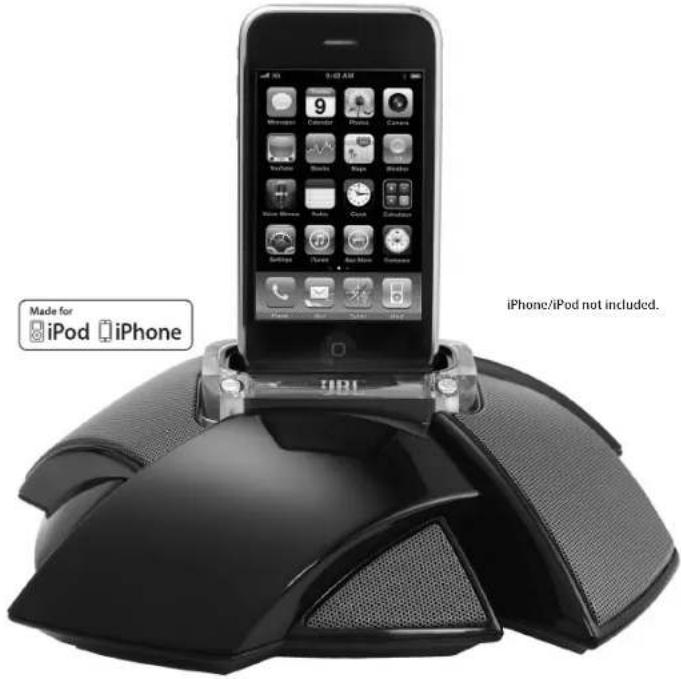
Owner's Manual
ImPortant SaFetY InStruCtionS
-
Read these instructions.
-
Keep these instructions.
-
Heed all warnings.
-
Follow all instructions.
-
Do not use this apparatus near water.
-
Clean only with dry cloth.
-
Do not block any ventilation openings. Install in accordance with the manufacturer's instructions.
-
Do not install near any heat sources such as radiators, heat registers, stoves, or other apparatus (including amplifiers) that produce heat.
-
Do not defeat the safety purpose of the polarized or grounding-type plug. A polarized plug has two blades with one wider than the other. A grounding-type plug has two blades and a third grounding prong. The wide blade or third prong is provided for your safety. If the provided plug does not fit into your outlet, consult an electrician for replacement of the obsolete outlet.
-
Protect the power cord from being walked on or pinched, particularly at the plugs, convenience receptacles and the point where they exit from the apparatus.
-
Only use attachments/accessories specified by the manufacturer.
-
Use only with the cart, stand, tripod, bracket or table specified by the manufacturer or sold with the apparatus. When a cart is used, use caution when moving the cart/apparatus combination to avoid injury from tip-over.
-
Unplug this apparatus during lightning storms or when unused for long periods of time.
-
Refer all servicing to qualified service personnel. Servicing is required when the apparatus has been damaged in any way, such as: when the power supply cord or plug has become damaged, when liquid has been spilled or objects have fallen into the apparatus, when the apparatus has been exposed to rain or moisture, when the apparatus does not operate normally, or the apparatus has been dropped.
- Do not expose this apparatus to dripping or splashing and ensure that no objects filled with liquids, such as vases, are placed on the apparatus.
- To completely disconnect this apparatus from the AC mains, disconnect the power supply cord plug from the AC receptacle.
- The mains plug of the power supply cord shall remain readily operable.
- Do not expose batteries to excessive heat such as sunshine, fire or the like.

The lightning flash with arrowhead symbol, within an equilateral triangle, is intended to alert the user to the presence of uninsulated "dangerous voltage" within the product's enclosure that may be of sufficient magnitude to constitute a risk of electric shock to persons.

The exclamation point within an equilateral triangle is intended to alert the user to the presence of important operating and maintenance (servicing) instructions in the literature accompanying the product.
warning: To reduce the risk of fire or electric shock, do not expose this apparatus to rain or moisture.
FCCregulationS
Fcc inFOrMatiOn FOr users
This device complies with Part 15 of the FCC Rules. Operation is subject to the following two conditions: (1) This device may not cause harmful interference; and (2) this device must accept any interference received, including interference that may cause undesired operation.
radi0 and teleVisiOn interference
This equipment has been tested and found to comply with the limits for a Class B digital device, pursuant to Part 15 of the FCC Rules. These limits are designed to provide reasonable protection against harmful interference in a residential installation. This equipment generates, uses and can radiate radio frequency energy and, if not installed and used in accordance with the instructions, may cause harmful interference to radio communications. However, there is no guarantee that interference will not occur in a particular installation. If this equipment does cause interference to radio or television reception, which can be determined by turning the equipment off and then on, the user is encouraged to try to correct the interference by one or more of the following measures:
- Increase the separation between the equipment and receiver.
- Connect the equipment to a different outlet so that the equipment and receiver are on different branch circuits.
- Consult the dealer or an experienced radio/TV technician for help. Changes or modifications not expressly approved by IBI could void the user's authority to operate the equipment.
IC Statement and Warning
iMpOrtant n0te F0r all electr0nic pr0ducts: Before inserting or unplugging audio cables from the source device's headphones or line level output jacks, it is good practice to turn off the device first. This will prolong the life of your unit, help protect your device from static electricity and prevent potential damage.
JBL on Stage ^** IV eaSY SetuP guide
Carefully unpack your speaker dock and confirm that all the items shown here 1. are included: JBL On Stage ^1* IV Speaker Dock, power supply, remote control and iPod/iPhone adapter.

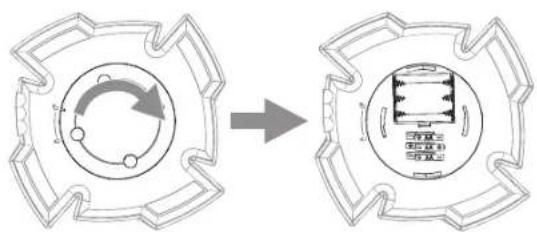
Rotate the battery door to the unlocked position and remove it.2.
flowchart
graph TD
    A["Left Circular Component"] --> B["Right Rectangular Device"]
    style A fill:#f9f,stroke:#333
    style B fill:#bbf,stroke:#333
Insert 3. six AA batteries in the compartment. Observe the battery polarity that is indicated inside the battery compartment.
NOTES ON BATTERY USE:
- If you are using rechargeable batteries, make sure all of them are fully charged before inserting them. The JBL On Stage IV will not charge rechargeable batteries.
• If you are using conventional batteries, make sure that all of them are fresh. - Do not use a combination of rechargeable and conventional batteries. Use all of one type or the other.
- The Status LED will illuminate amber when the batteries need to be replaced.
Replace the battery door and rotate it to the locked position.4.

flowchart
graph TD
    A["Left Circular Component"] --> B["Right Circular Structure"]
    style A fill:#f9f,stroke:#333
    style B fill:#bbf,stroke:#333
- Do not mix battery types.
- Do not mix charged and partially charged batteries.
- Batteries will not recharge while in JBL On Stage IV.
CAUTION: Risk of explosion of battery if replaced with incorrect type. Dispose of used batteries according to the instructions.
www.jbl.com
- Connect a USB type Mini-B cable (not included) to the JBL On Stage IV's USB port and to a USB port on the computer on which your iTunes is located.
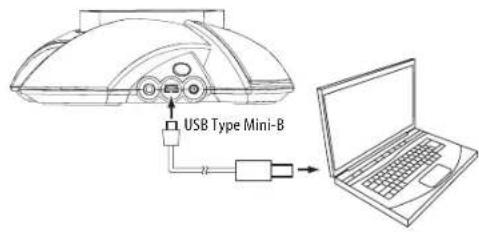
- If you are going to use your JBL On Stage IV with another audio source, plug one end of a 3.5mm stereo cable (not included) into the Audio In connector, and plug the other end into the audio source's audio out or headphone out connector.

IMPORTANT: If you play audio through a docked iPod/iPhone and an audio source connected to the Audio In connection at the same time, you will hear both of their outputs mixed through the JBL On Stage IV. To hear only one source you will need to manually turn off the source you do not want to hear.
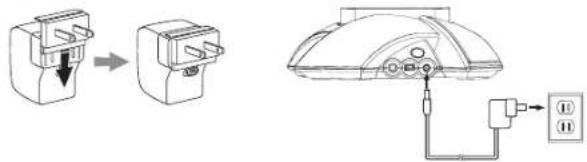
Insert the included AC outlet adapter all the way into the power supply (if 7, there is more than one adapter, use the correct one for your region). Then connect the power supply into the JBL On Stage IV's 6V DC In connector and plug it into an AC wall outlet.
1.2
6
- Place the appropriate iPod/iPhone adapter into the JBL On Stage IV's iPod well and place your iPod/iPhone on the docking connector. Make sure the iPod/iPhone is inserted all the way onto the connector.
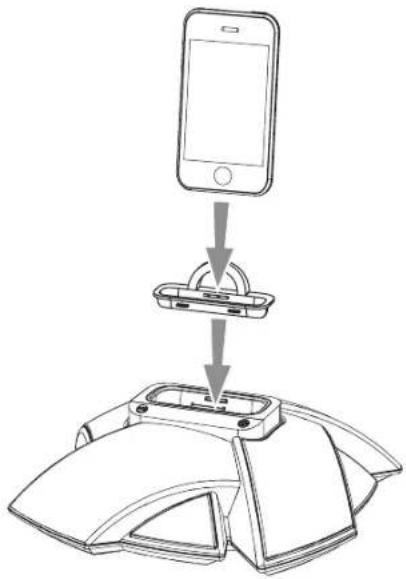
NOTE: If applicable, use the adapter supplied with your iPod or iPhone.
- Press the JBL On Stage IV's On/Off button. The unit's Status LED will light white when the system is on.

natural_image
Line drawing of a computer mouse with a finger pointing to the button (no text or symbols)Adjust the volume using the (+) and (−) buttons. Press both buttons to 10. mute the sound; press either button to unmute the sound.

www.jbl.com
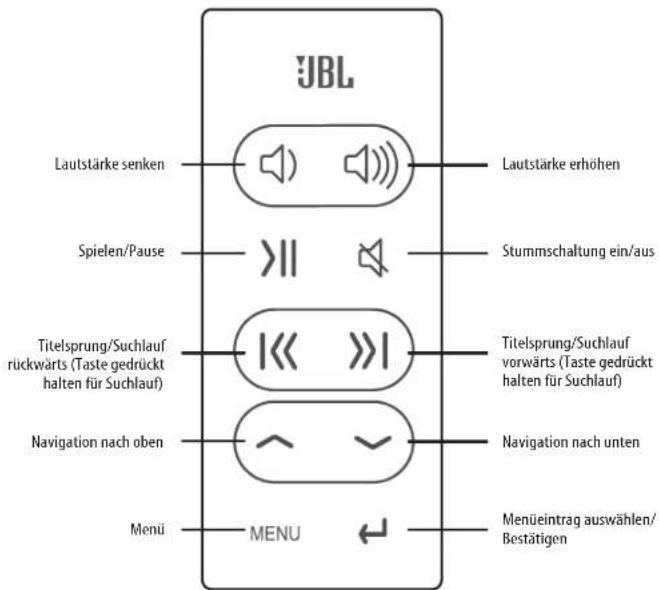
remote Control ButtonS

flowchart
graph TD
    A["JBL"] --> B["Volume Down"]
    A --> C["Play/Pause"]
    A --> D["Previous/Rewind (Hold for rewind)"]
    A --> E["Menu Scroll Up"]
    A --> F["Menu"]
    A --> G["Menu Select/Enter"]
    B --> H["Speaker Icon"]
    C --> I[">II"]
    D --> J["<< >>"]
    E --> K["^_^"]
    F --> L["←"]
    H --> M["Speaker Icon"]
    I --> N[">II"]
    J --> O["<< >>"]
    K --> P["^_^"]
    L --> Q["←"]
    M --> R["Speaker Icon"]
    N --> S["Speaker Icon"]
    O --> T["Speaker Icon"]
    P --> U["Speaker Icon"]
    Q --> V["Speaker Icon"]
NOTE: iPod touch and iPhone menu navigation may require you to manually put the iPod/iPhone in music mode.
Status Led
Your JBL On Stage IV's LED will display different colors to indicate the unit's status:
LED Display State
| White — Constant JBL On Stage IV is on | |
| White — Flashing JBL On Stage IV is muted | |
| Amber — Constant Low battery | |
| Amber — Flashing | JBL On Stage IV is muted and low battery |
| No LED JBL On Stage IV is in Standby or off | |
SYNCHRONIZING WITH iTunes
NOTE: Before attempting to synchronize your iPod/iPhone with iTunes, be sure both your iPod/iPhone and iTunes are updated to the latest software version.
Before attempting to synchronize, be sure the JBL On Stage IV's USB port is connected to the computer on which your iTunes is located.
- Place your iPod/iPhone on the JBL On Stage IV's docking connector. Make sure the iPod/iPhone is inserted all the way onto the connector.
Use your computer's iTunes software to synchronize the 2. iPod/iPhone with iTunes.
When you're finished synchronizing, eject the 3. iPod/iPhone from iTunes.
iPod/iPhone CHARGING
The JBL On Stage IV will charge a docked iPod/iPhone under these conditions:
- When the JBL On Stage IV is being powered by its AC power adapter
- When the JBL On Stage IV is connected to a computer via a USB cable
The JBI. On Stage IV will not charge a docked iPod/iPhone while under battery power unless it is also connected to a computer via a USB cable.
If you have inserted batteries as explained in the JBI. On Stage IV Easy Setup Guide — Step 3, on page 3, you can unplug the JBI. On Stage IV's power adapter and the unit will operate on battery power.
While running on battery power, the JBL On Stage IV will automatically enter the Standby mode after the system detects no audio signal for 5 minutes. Upon detecting an audio signal the system will return to normal operation and the LED will light up.
When running on AC power, the JBL On Stage IV will automatically enter the standby mode after the system detects no audio signal for 10 minutes. As above, it will return to normal operation upon detecting an audio signal, and the LED will light up.
Notes on battery power operation:
• The JBL. On Stage IV will not charge rechargeable batteries.
- The JBL On Stage IV will not charge a docked iPod/iPhone while under battery power unless it is also connected to a computer via a USB cable.
trouBLeShooting Your JBL on Stage IV
PROBLEM SOLUTION
| No sound (white LED is not illuminated): | Make sure that the power supply is properly connected to the JBL On Stage IV and to a working AC outlet.If you're using battery power, replace all four batteries with brand-new disposable or freshly charged rechargeable batteries. The LED will illuminate amber if the batteries need replacing.JBL On Stage IV is in the energy conservation mode (no sound was detected for at least 10 minutes). |
| No sound (white LED is illuminated): | Touch the Volume Up (1) button to increase the system volume.If you're using a docked iPod/iPhone, make sure that it is properly docked in the JBL On Stage IV.If you're using an auxiliary source, make sure that the audio cable is properly connected to the JBL On Stage IV's Audio In connector and to the source component's audio output.Make sure that the iPod or source component is not in the Pause mode, and that its volume control is not turned all the way down. |
| Sound crackles, hisses or is distorted:Turn the iPod or source component's volume down. | |
| Loud hum or buzzing: | Make sure the iPod's EQ setting is set to "Off."Make sure the audio cable is plugged all the way into the Audio Input jack.Replace the audio cable.Unplug the power supply and connect it to a different AC outlet. |
PROBLEM SOLUTION
| Maximum volume level is reduced: JBL | On Stage IV is in Battery Conservation Mode (BCM). Switch to AC power for higher performance. |
| Sound comes from only one speaker: Make sure that the | iPod/iPhone is properly seated all the way into the docking connector.Make sure that the audio cable is plugged all the way into the Audio In jack.Make sure that the audio cable is a stereo cable. |
SPeCIFICatlonS
| Compatibility: | Docking versions of the iPod (including iPod nano 5th generation, iPod touch 2nd generation, iPod nano 4th generation, iPod classic, iPod touch 1st generation, iPod nano 3rd generation, iPod nano 2nd generation, iPod 5th generation, iPhone 4GB, 8GB, 16GB, iPhone 3G 8GB, 16GB, iPhone 3GS 16GB, 32GB) MP3 and CD players, desktop and laptop computers (all platforms) |
| Transducers: 4 x 1" (25mm) JBL Odyssey | " full-range |
| Power: 10 watts x 2 | |
| Frequency response: 110Hz - 20kHz | |
| Signal-to-noise ratio: 70dB | |
| Input impedance (Aux): 5k ohms | |
| Input connections: | Main connection - iPod and iPhone docking connector; Aux input connection - 3.5mm (1/8") stereo mini jack |
| Battery requirement: 6 x AA, NiMh or alkaline | |
| Power requirement: 12V DC, 1.5A | |
| Power consumption: 20W (maximum) | |
| Dimensions (D x W x H): 210mm x 210mm x 68mm (8-1/4" x 8-1/4" x 2-11/16") | |
| Weight: 0.7kg (1.6 lb) | |
| Available finishes: Black; white | |

HARMAN
Harman Consumer, Inc.
8500 Balboa Boulevard, Northridge, CA 91329 USA
www.JBL.com
© 2010 Harman International Industries, Incorporated. All rights reserved.
Features, specifications and appearance are subject to change without notice.
JBL is a trademark of Harman International Industries, Incorporated, registered in the United States and/or other countries. Odyssey is a trademark of Harman International Industries, Incorporated.
*The trademark On Stage is used with permission of OSA International, Inc.
iPhone, iPod touch, iPod classic, iPod nano, and iTunes are trademarks of Apple, Inc., registered in the U.S. and other countries. iPod/iPhone not included.
"Made for iPod and "Made for iPhone" mean that an electronic accessory has been designed to connect specifically to iPod and iPhone, respectively, and has been certified by the developer to meet Apple performance standards. Apple is not responsible for the operation of this device or its compliance with safety and regulatory standards.
www.jbl.com
JBL On STAGe ^® IV
flowchart
graph TD
    A["Circular Component"] -->|Rotation Arrow| B["Rectangular Device"]
natural_image
Line drawing of a computer mouse with a finger pointing to the button (no text or symbols)www.jbl.com
FernBedlenung
Harman Consumer, Inc.
8500 Balboa Boulevard, Northridge, CA 91329 USA
www.JBL.com
flowchart
graph TD
    A["Start"] --> B{Process Step}
    B --> C["Arrow to Right"]
    C --> D["Final Product Structure"]
natural_image
Line drawing of a computer mouse with a finger pointing to the button (no text or symbols)www.jbl.com
Harman Consumer, Inc.
8500 Balboa Boulevard, Northridge, CA 91329 USA
www.JBL.com
n0ta iMpOrtante para t0d0s 10s pr0duct0s electrônic0s:
flowchart
graph TD
    A["Device with central hub"] --> B["Component with circular arrow indicating rotation or assembly"]
    style A fill:#f9f,stroke:#333
    style B fill:#bbf,stroke:#333
natural_image
Line drawing of a computer mouse with a finger pointing to the button (no text or symbols)www.jbl.com
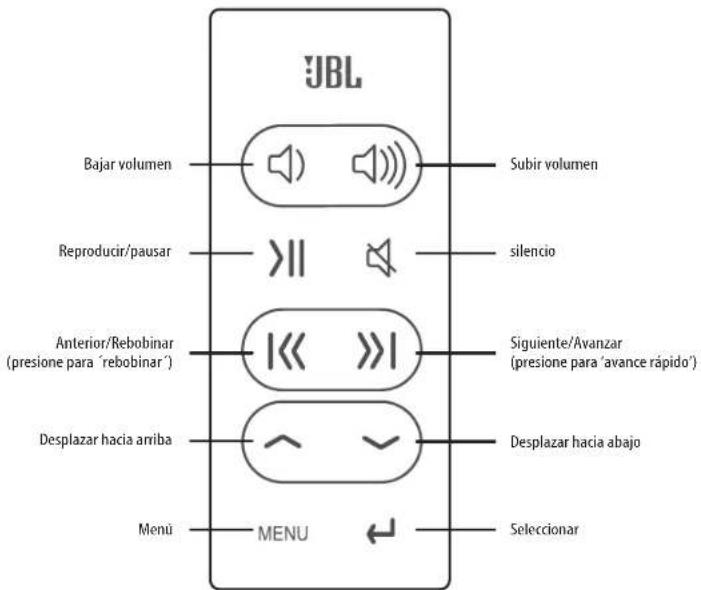
BotoneS deL mando a dIStanCla
Harman Consumer, Inc.
8500 Balboa Boulevard, Northridge, CA 91329 USA
www.JBL.com
© 2010 Harman International Industries, Incorporated. Reservados todos los derechos.
natural_image
Line drawing of a computer mouse with a finger pointing to the button (no text or symbols)www.jbl.com
aFStandSBedlenIngtoetSen
flowchart
graph TD
    A["Device with circular components"] --> B["Component with circular arrow and rotation arrow"]
natural_image
Line drawing of a computer mouse with a finger pointing to the button (no text or symbols)www.jbl.com
PuLSantl del teLeComando
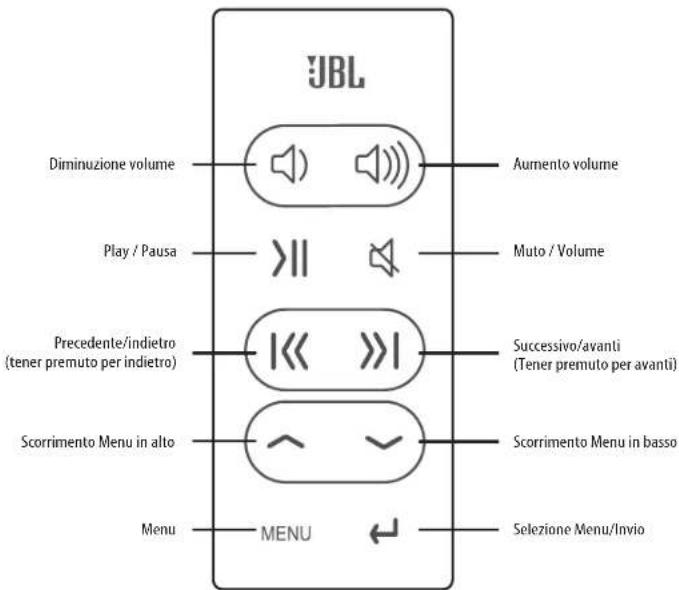
Harman Consumer, Inc.
8500 Balboa Boulevard, Northridge, CA 91329 USA
www.JBL.com
flowchart
graph TD
    A["Start"] --> B{Process Step}
    B --> C["Arrow to Right"]
    C --> D["Final Component with Box, Panel, and Board"]
flowchart
graph TD
    A["Device with circular components"] --> B["Arrow pointing inward"]
    B --> C["Component with circular arrow and rotation arrow"]
natural_image
Line drawing of a computer mouse with a finger pointing to the button (no text or symbols)www.jbl.com
STRENSON
KnaPPar PÅ FJÄrrKontroLLen
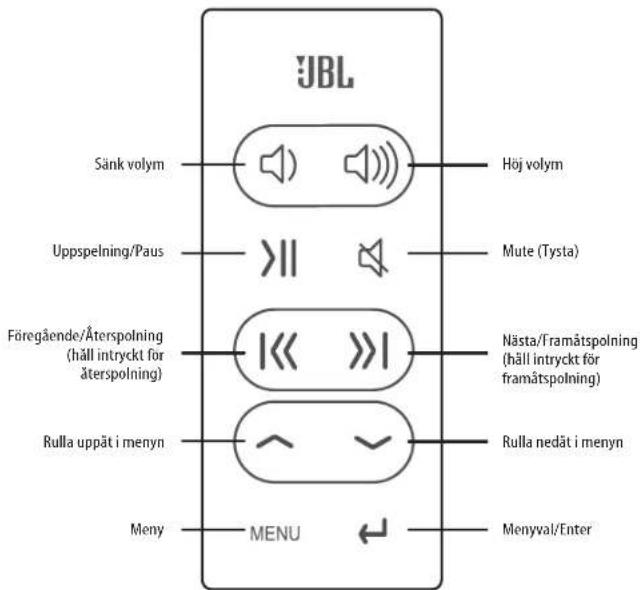
Harman Consumer, Inc.
8500 Balboa Boulevard, Northridge, CA 91329 USA
www.JBL.com
flowchart
graph TD
    A["Device with circular components"] --> B["Arrow pointing inward"]
    B --> C["Component with circular arrow and rotation arrow"]
- Anbring den passende iPod/iPhone adapter i JBL. On Stage IV's iPod og anbring iPod/iPhone i dockingkonnektoren. Kontroller, at iPod/iPhone er korrekt anbragt i konnektoren.
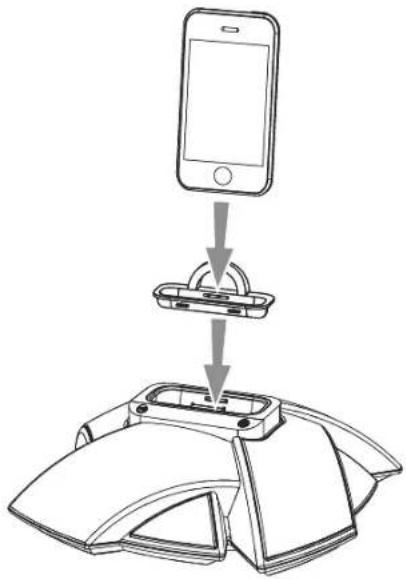
natural_image
Line drawing of a computer mouse with a finger pointing to the button (no text or symbols)www.jbl.com
KnaPPer PÅ FJernBetJenIng

iPod/iPhone OPLADNING
FeJLFinding PÅ dIn JBL on Stage IV
PROBLEM L∅SNING
Harman Consumer, Inc.
8500 Balboa Boulevard, Northridge, CA 91329 USA
www.JBL.com
© 2010 Harman International Industries, Incorporated. Alle rettigheder forbeholdes.
natural_image
Line drawing of a computer mouse with a finger pointing to the button (no text or symbols)www.jbl.com
FJernKontroLLKnaPPer

Merk: iPod touch og iPhones menynavigering kan kreve at du manuelt setter iPod/iPhone i musikkmodus.
StatuSLamPe
ProBLemL∅Sning PÅ dIn JBL on Stage IV
PROBLEM L∅SNING
Harman Consumer, Inc.
8500 Balboa Boulevard, Northridge, CA 91329 USA
www.JBL.com
© 2010 Harman International Industries, Incorporated. Alle rettigheter reserved.
flowchart
graph TD
    A["Start"] --> B{Process Step}
    B --> C["Arrow to Right"]
    C --> D["Final Component with Box, Panel, and Board"]
natural_image
Line drawing of a computer mouse with a finger pointing to the button (no text or symbols)www.jbl.com
KauKoSÄÄtImen PalmIKKeet
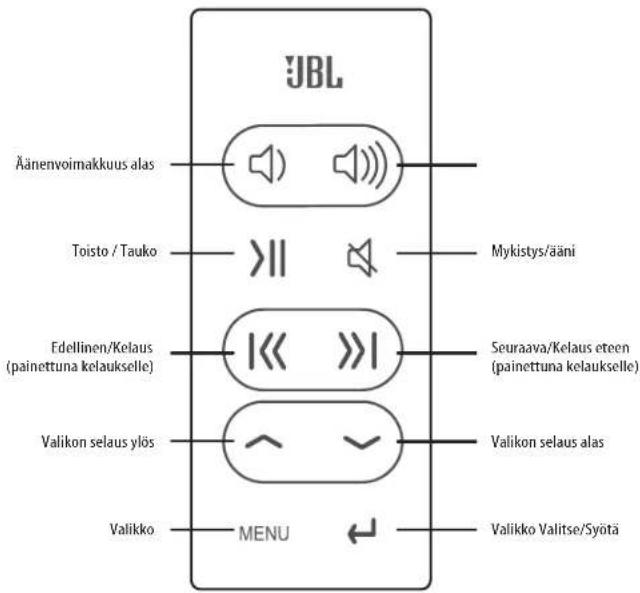
JBL on Stage IV VlanetSIntÄ
ONGELMA RATKAISU
Harman Consumer, Inc.
8500 Balboa Boulevard, Northridge, CA 91329 USA
www.JBL.com
natural_image
Diagram showing a circular component before and after rotation, with no visible text or symbolsnatural_image
Line drawing of a computer mouse with a finger pointing to the button (no text or symbols)127www.jk
리모콘 버튼

Harman Consumer, Inc.
8500 Balboa Boulevard, Northridge, CA 91329 USA
www.JBL.com
natural_image
Diagram showing a circular component being converted into a rectangular device (no text or symbols present)natural_image
Line drawing of a computer mouse with a finger pointing to the button (no text or symbols)www.jbl.com
JAPANESE
リモコンボタン

Harman Consumer, Inc.
8500 Balboa Boulevard, Northridge, CA 91329 USA
www.JBL.com
© 2010 Harman International Industries, Incorporated. 無断複写・転載を禁歯。
iPhone, iPod touch, iPod classic, iPod nano, and iTunes are trademarks of Apple, Inc., registered in the U.S. and other countries. iPod/iPhone not included.
natural_image
Diagram showing a circular component being converted into a rectangular device (no text or symbols present)natural_image
Line drawing of a computer mouse with a finger pointing to the button (no text or symbols)www.jbl.com
[Unreadable]
遥控器按钮
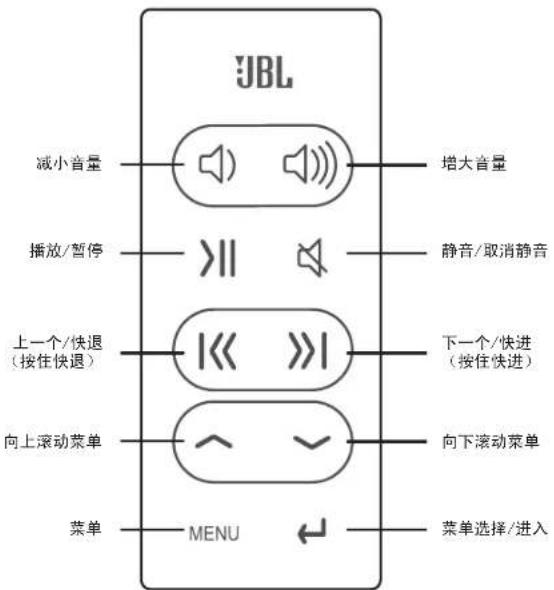
flowchart
graph TD
    A["菜单"] --> B["向上滚动菜单"]
    B --> C["上一个/快退 (按住快退)"]
    C --> D["播放/暂停"]
    D --> E["减小音量"]
    E --> F["JBL"]
    F --> G["增大音量"]
    F --> H["静音/取消静音"]
    F --> I["下一个/快进 (按住快进)"]
    F --> J["向下滚动菜单"]
    J --> K["菜单选择/进入"]
JBL on Stage IV 故障解析
故障 解决办法
Harman Consumer, Inc.
8500 Balboa Boulevard, Northridge, CA 91329 USA
www.JBL.com
natural_image
Line drawing of a computer mouse with a finger pointing to the button (no text or symbols)www.jbl.com
КНОПКИ ПУЛЬТА ДУ
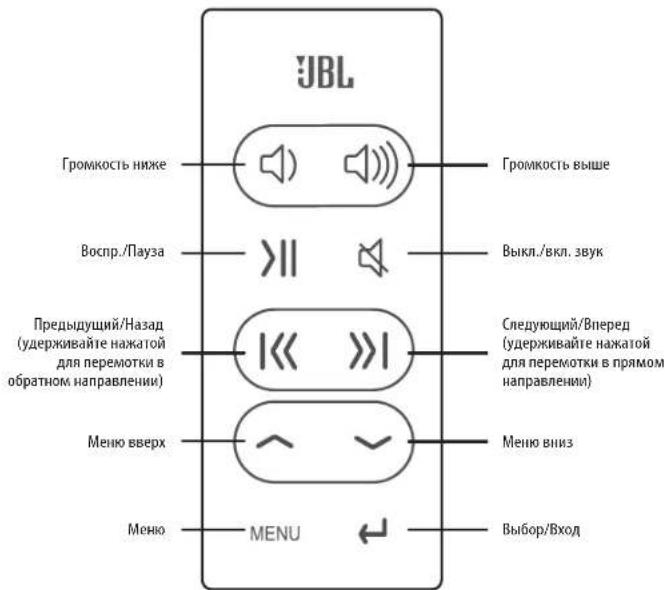
Harman Consumer, Inc.
8500 Balboa Boulevard, Northridge, CA 91329 USA
www.JBL.com
© 2010 Harman International Industries, Incorporated. Все права защищены.
natural_image
Line drawing of a computer mouse with a finger pointing to the button (no text or symbols)natural_image
Line drawing of a smartphone mounted on a base with labeled terminals (no text or symbols present)www.jbl.com
POLICE
PrZYCISKI PILota ZdaLnego StereoWanla
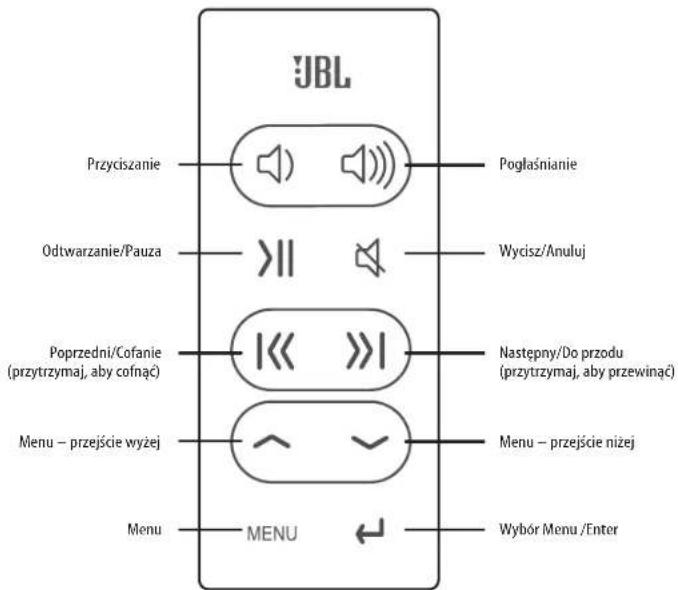
Harman Consumer, Inc.
8500 Balboa Boulevard, Northridge, CA 91329 USA
www.JBL.com
flowchart
graph TD
    A["Start"] --> B{Process Step}
    B --> C["Arrow to Right"]
    C --> D["Final Component with Internal Control Logic"]
natural_image
Diagram of a device with a connector and power outlet (no text or symbols)natural_image
Line drawing of a hand pointing at a device panel with a control knob (no text or symbols)www.jbl.com
BotÕeS do ControLo remoto

Harman Consumer, Inc.
8500 Balboa Boulevard, Northridge, CA 91329 USA
www.JBL.com
natural_image
Line drawing of a computer mouse with a finger pointing to the button (no text or symbols)www.jbl.com
遙控器按鈕

Harman Consumer, Inc.
8500 Balboa Boulevard, Northridge, CA 91329 USA
www.JBL.com
JBL on Stage ^™ IV KoLaY KuruLum KILaVuZu
natural_image
Line drawing of a computer mouse with a finger pointing to the button (no text or symbols)www.jbl.com
Sorun giderme JBL on Stage IV
SORUN ÇÖZÜM
Harman Consumer, Inc.
8500 Balboa Boulevard, Northridge, CA 91329 USA
www.JBL.com
Harman Consumer, Inc.
8500 Balboa Boulevard, Northridge, CA 91329 USA
www.JBL.com
© 2010 Harman International Industries, Incorporated. All rights reserved.
Features, specifications and appearance are subject to change without notice.
JBL is a trademark of Harman International Industries, Incorporated, registered in the United States and/or other countries. Odyssey is a trademark of Harman International Industries, Incorporated.
*The trademark On Stage is used with permission of OSA International, Inc.
iPhone, iPod, iPod nano, iTunes and iPod touch are trademarks of Apple, Inc., registered in the U.S. and other countries. iPod/iPhone not included.
"Made for iPod and "Made for iPhone" mean that an electronic accessory has been designed to connect specifically to iPod and iPhone, respectively, and has been certified by the developer to meet Apple performance standards. Apple is not responsible for the operation of this device or its compliance with safety and regulatory standards.
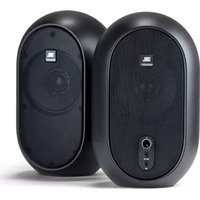

- JBL On STAGe ® IV
- ImPortant SaFetY InStruCtionS
- FCCregulationS
- Fcc inFOrMatiOn FOr users
- radi0 and teleVisiOn interference
- IC Statement and Warning
- JBL on Stage ** IV eaSY SetuP guide
- NOTES ON BATTERY USE:
- Status Led
- SYNCHRONIZING WITH iTunes
- iPod/iPhone CHARGING
- trouBLeShooting Your JBL on Stage IV
- HARMAN
- n0ta iMpOrtante para t0d0s 10s pr0duct0s electrônic0s:
- iPod/iPhone OPLADNING
- FeJLFinding PÅ dIn JBL on Stage IV
- StatuSLamPe
- ProBLemL∅Sning PÅ dIn JBL on Stage IV
- JBL on Stage IV VlanetSIntÄ
- JBL on Stage IV 故障解析
- JBL on Stage ™ IV KoLaY KuruLum KILaVuZu
- Sorun giderme JBL on Stage IV
Brand : JBL
Model : On Stage IV
Category : Docking Station