
MB-D10 MULTI-POWER BATTERY PACK - Photo Accessories NIKON - Free user manual and instructions
Find the device manual for free MB-D10 MULTI-POWER BATTERY PACK NIKON in PDF.

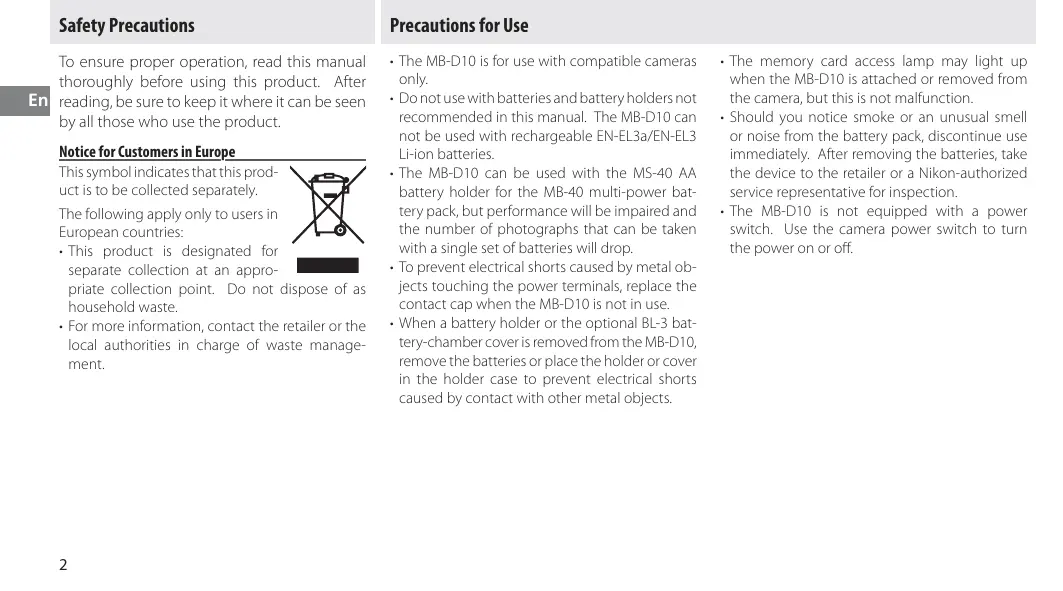


| Product Type | Power grip for Nikon digital SLR cameras |
| Brand | NIKON |
| Model | MB-D10 |
| Dimensions (L × H × D) | Approx. 150.5 × 52 × 75.5 mm |
| Weight | Approx. 290 g (with MS-D10EN, without batteries) |
| Power source | Li-ion rechargeable battery EN-EL3e, EN-EL4a, EN-EL4 or 8 AA batteries (alkaline LR6, Ni-MH HR6, lithium FR6, nickel-manganese ZR6) |
| Operating temperature | 0 °C to 40 °C |
| Main functions | Vertical shutter release button, multi-selector, main and sub command dials, AF-ON button, command lock |
| Compatibility | Compatible Nikon digital SLR cameras (e.g., D300, D700, D2X, etc.) |
| Supplied accessories | MS-D10EN holder (for EN-EL3e), MS-D10 holder (for AA batteries), holder box, contact cap, user manual, warranty |
| Maintenance and cleaning | Use a dry, soft cloth; do not use solvents or abrasive products |
| Safety | Use only recommended batteries; avoid contact with metal objects; stop use if smoke or abnormal odor occurs |
| Spare parts and repairability | Contact an authorized Nikon service center; the BL-3 main housing cap is available separately |
| General information | Complies with Canadian NMB-003 standard; class B |
Frequently Asked Questions - MB-D10 MULTI-POWER BATTERY PACK NIKON
User questions about MB-D10 MULTI-POWER BATTERY PACK NIKON
0 question about this device. Answer the ones you know or ask your own.
Ask a new question about this device
Download the instructions for your Photo Accessories in PDF format for free! Find your manual MB-D10 MULTI-POWER BATTERY PACK - NIKON and take your electronic device back in hand. On this page are published all the documents necessary for the use of your device. MB-D10 MULTI-POWER BATTERY PACK by NIKON.
USER MANUAL MB-D10 MULTI-POWER BATTERY PACK NIKON
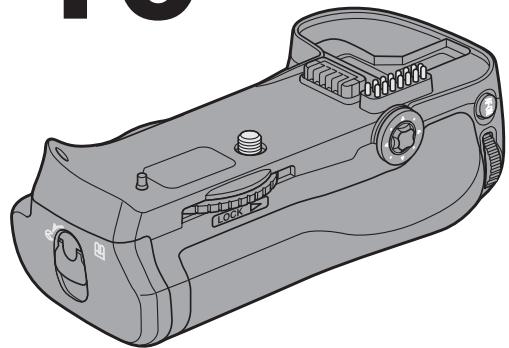
Multi-Power Battery Pack
MB-D10
使用說明書
User's Manual
Benutzerhandbuch
PykoBOCTBO nIb30BaTeTn
Gebruikshandeliding
Manual do utiliser
Manuale d'uso
Instrukcja obstugi
用户手册
使用說明書
音歌皂
Jp
En
De
Fr
Es
Se
Fi
Ru
NI
Pt
It
PI
Ck
Ch
Kr
A
B
C
E
D
目次
マルチバイヤーバックリーバック
MB-D10
使用說明書
安全上の注意 2
本製品の使用上の注意. 5
はしに 6
本体と付属品 6
MB-D10 6
嘆仄リ一室力亻BL-3にて(別壳)
各部名称. 7
緇位置紳士夕一木夕、
縷位置马刺手レクタ一、
MB-D10 Multi-Power Battery Pack
User's Manual
Safety Precautions 2
Notice for Customers in Europe 2
Precautions for Use 2
Introduction 4
The MB-D10 and Accessories 4
The MB-D10 and Supplied Accessories 4
The BL-3 Battery-Chamber Cover (Available
Separately) 4
Parts of the MB-D10 5
The MB-D10 Shutter-Release Button, Multi Selector,
Command Dials, and AF-ON Button 5
The MB-D10 Control Lock 5
Using the Battery Pack 6
Attaching the Battery Pack 6
Removing the Battery Pack. 6
Inserting Batteries 7
Removing Batteries. 9
Specifications. 10
Safety Precautions
En
To ensure proper operation, read this manual thoroughly before using this product. After reading, be sure to keep it where it can be seen by all those who use the product.
Notice for Customers in Europe
This symbol indicates that this product is to be collected separately.
The following apply only to users in European countries:
- This product is designated for separate collection at an appropriate collection point. Do not dispose of as household waste.
- For more information, contact the retailer or the local authorities in charge of waste management.


Precautions for Use
- The MB-D10 is for use with compatible cameras only.
- Do not use with batteries and battery holders not recommended in this manual. The MB-D10 can not be used with rechargeable EN-EL3a/EN-EL3 Li-ion batteries.
- The MB-D10 can be used with the MS-40 AA battery holder for the MB-40 multi-power battery pack, but performance will be impaired and the number of photographs that can be taken with a single set of batteries will drop.
- To prevent electrical shorts caused by metal objects touching the power terminals, replace the contact cap when the MB-D10 is not in use.
-
When a battery holder or the optional BL-3 battery-chamber cover is removed from the MB-D10, remove the batteries or place the holder or cover in the holder case to prevent electrical shorts caused by contact with other metal objects.
-
The memory card access lamp may light up when the MB-D10 is attached or removed from the camera, but this is not malfunction.
- Should you notice smoke or an unusual smell or noise from the battery pack, discontinue use immediately. After removing the batteries, take the device to the retailer or a Nikon-authorized service representative for inspection.
- The MB-D10 is not equipped with a power switch. Use the camera power switch to turn the power on or off.
Notice for Customers in the U.S.A.
Federal Communications Commission (FCC) Radio Frequency Interference Statement
This equipment has been tested and found to comply with the limits for a Class B digital device, pursuant to Part 15 of the FCC rules. These limits are designed to provide reasonable protection against harmful interference in a residential installation. This equipment generates, uses, and can radiate radio frequency energy and, if not installed and used in accordance with the instructions, may cause harmful interference to radio communications. However, there is no guarantee that interference will not occur in a particular installation. If this equipment does cause harmful interference to radio or television reception, which can be determined by turning the equipment off and on, the user is encouraged to try to correct the interference by one or more of the following measures:
- Reorient or relocate the receiving antenna.
- Increase the separation between the equipment and receiver.
- Connect the equipment to an outlet on a circuit different from that to which the receiver is connected.
- Consult the dealer or an experienced radio/TV technician for help.
Nikon
MB-D10

Tested To Comply With FCC Standards
FOR HOME OR OFFICE USE
CAUTION
Modifications: The FCC requires the user to be notified that any changes or modifications made to this device that are not expressly approved by Nikon Corporation may void the user's authority to operate the equipment.
Nikon Inc.,
1300 Walt Whitman Road, Melville, New York
11747-3064,U.S.A.
Tel.: 631-547-4200
Notice for Customers in Canada
CAUTION
This Class B digital apparatus complies with Canadian ICEs-003.
ATTENTION
Thank you for your purchase of an MB-D10 multi-power battery pack for use with all Nikon single-lens reflex digital cameras that list the MB-D10 as a compatible accessory in the camera manual. The MB-D10 takes one EN-EL3e, EN-EL4a, or EN-EL4 rechargeable battery or eight AA batteries (alkaline, Ni-MH, lithium, or nickel-manganese) and includes an alternate shutter-release button, AF-ON button, multi selector, and main and sub-command dials for taking pictures in "tall" (portrait) orientation. Camera menu options allow the user to choose whether the camera battery or the batteries in the MB-D10 are used first; see the camera manual for details.
The MB-D10 and Accessories
The MB-D10 and Supplied Accessories
Confirm that the following items are supplied with the MB-D10 (batteries are sold separately).
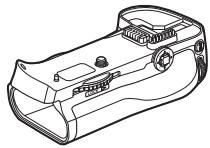
MB-D10
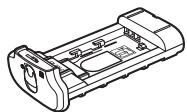
MS-D10EN holder for EN-EL3e batteries
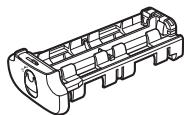
MS-D10 holder for AA batteries
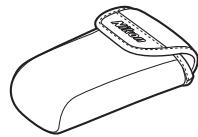
Holder case
The MS-D10EN is inserted in the MB-D10 at shipment. See "Inserting Batteries" for information on removing the battery holder.
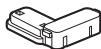
Contact cap
- User's manual (this manual)
Warranty
The BL-3 Battery-Chamber Cover (Available Separately)
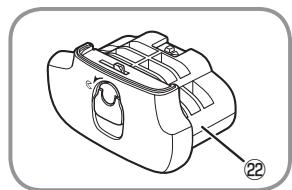
A BL-3 battery-chamber cover (available separately) is required when using EN-EL4a or EN-EL4 batteries.
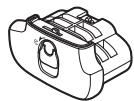
BL-3 battery-chamber cover
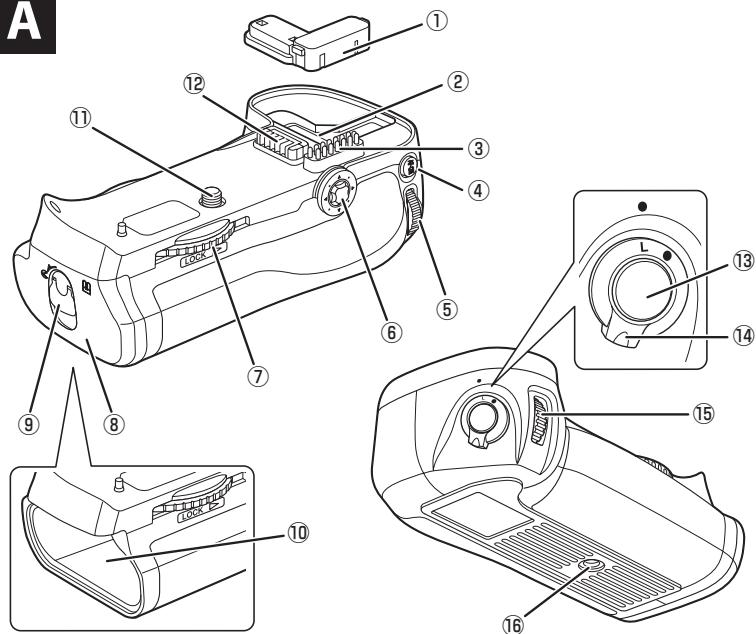
Parts of the MB-D10 (Figure A)
① Contact cap
② Holder for camera contact cover
③ Signal contacts
④ AF-ON button
⑤ Main command dial
⑥ Multi selector
⑦ Attachment wheel
⑧ Battery-chamber cover
⑨ Battery-chamber latch
10 Battery chamber
① Mounting screw
12 Power terminals
⑬ Shutter-release button
14 Control lock
15 Sub-command dial
16 Tripod socket
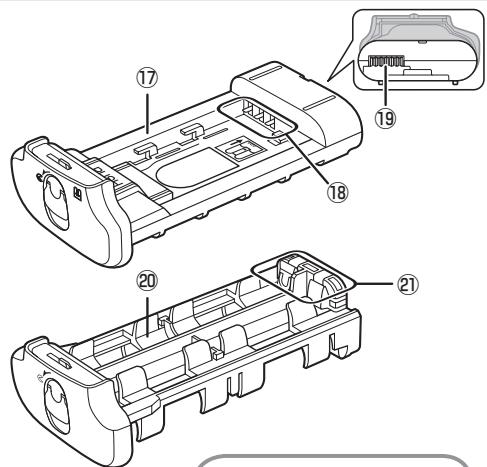
17 MS-D10EN holder for EN-EL3e batteries
18 Power terminals
19 Power terminals (EN-EL3e battery holder)
20 MS-D10 holder for AA batteries
② Power terminals (AA battery holder)
② BL-3 battery-chamber cover (available separately)
The MB-D10 Shutter Release Button, Multi Selector, Command Dials, and AF-ON Button
The MB-D10 is equipped with a shutter-release button (Figure A-13), multi selector (Figure A-6), main command dial (Figure A-5), sub-command dial (Figure A-15), and AF-ON button (Figure A-4) for use when taking photographs in vertical ("tall," or portrait) orientation. These controls perform the same functions as the corresponding controls on the camera and are affected by changes to options in the Custom Settings menu (Group a for the AF-ON button, Group f for other controls) that affect these camera controls. See the camera manual for more information.
The MB-D10 Control Lock
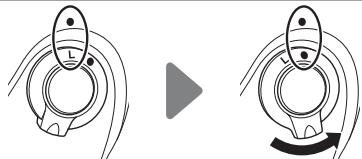
The control lock (Figure A-14) locks the controls on the MB-D10 to prevent unintended use. Before using these controls to take photographs in vertical (portrait) orientation, select to release the lock as shown at right.
The control lock is not a power switch. Use the camera power switch to turn the camera on and off.
Using the Battery Pack
Attaching the Battery Pack
En
Before attaching the battery pack, be sure that the camera is off and that the MB-D10 control lock (Figure A-14) is in the L position (the illustrations show the D300).
1 Remove the contact cap (Figure A- ① ) from the battery pack.
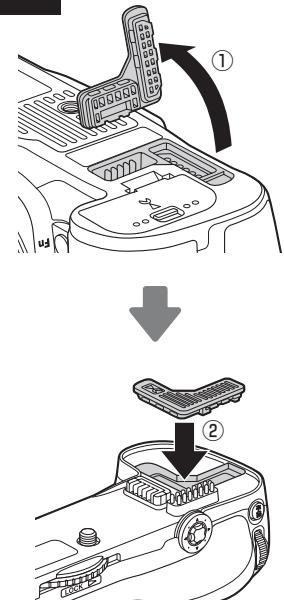
2 The contacts for the MB-D10 are in the base of the camera, where they are protected by a contact cover. Remove the contact cover as shown in Figure B-① and place it in the contact cover holder on the MB-D10 (Figure B-②).
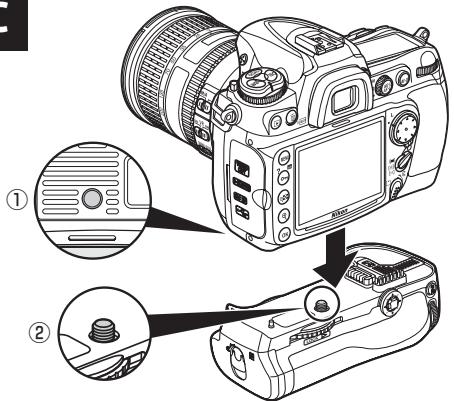
3 Insert the MB-D10 (Figure C), keeping the MB-D10 mounting screw (C-②) aligned with the camera tripod socket (C-①). There is no need to remove the battery from the camera before connecting the MB-D10. At default settings, the battery inserted in the camera will be used only after the battery in the MB-D10 is exhausted. The [Battery order] option in the camera Custom Settings menu (Group d) can be used to change the order in which the batteries are used. See the camera manual for details.
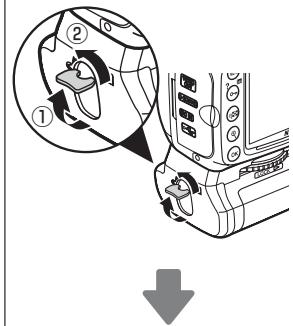
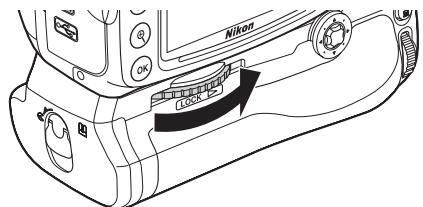
4 Tighten the attachment wheel by rotating it in the direction shown by the LOCK arrow (Figure D).
Be sure to place the camera contact cover in the contact cover holder to prevent loss.
A PB-6D and PK-13 auto-extension ring are required when using PB-6 bellows with the MB-D10.
Removing the Battery Pack
To remove the MB-D10, turn the camera off and set the control lock on the MB-D10 to L, then loosen the attachment wheel and remove the MB-D10. Be sure to replace the contact cover on the camera and the contact cap on the MB-D10 when the battery pack is not in use.
Inserting Batteries
The MB-D10 can be used with one EN-EL3e, EN-EL4a, or EN-EL4 rechargeable Li-ion battery, or with eight AA batteries. A BL-3 battery-chamber cover (available separately) is required when using an EN-EL4a or EN-EL4 battery.
Before inserting batteries, be sure that the camera is off and that the MB-D10 control lock is in the L position.
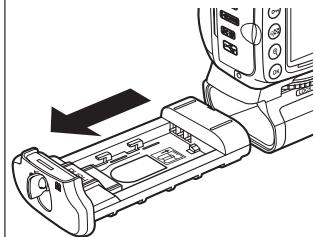
1 Turn the MB-D10 battery-chamber latch to and remove the battery holder (Figure E).
2 Ready the batteries as described below.
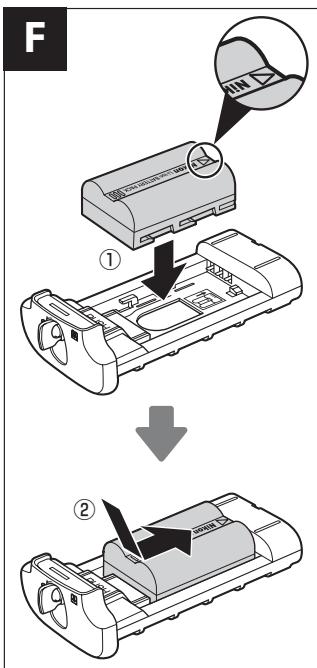
EN-EL3e: Matching the indentations on the battery to the projections on the MS-D10EN holder, insert the battery with the arrow (▲) on the battery toward the battery holder power terminals (Figure F-①). Press the battery lightly downward and slide it in the direction of the arrow until the power terminals click into place (Figure F-②).
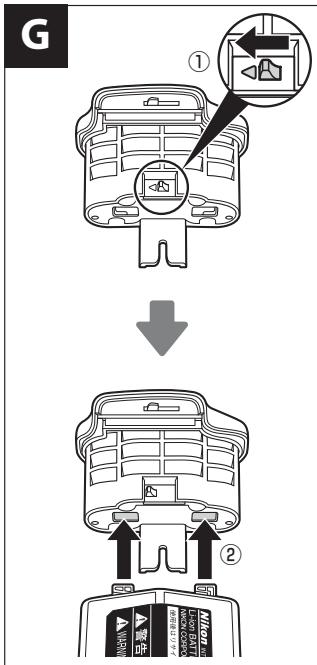
EN-EL4a/EN-EL4: If the battery release on the optional BL-3 battery-chamber cover is positioned so that the arrow () is visible, slide the battery release to cover the arrow (Figure G-1). Insert the two projections on the battery into the matching slots on the BL-3 (Figure G-2) and slide the BL-3 battery lock release to reveal the arrow.
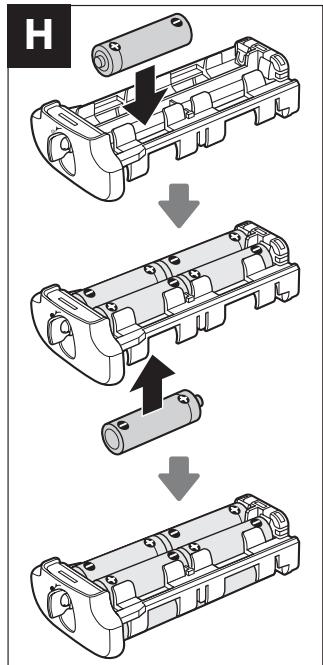
AA: Place eight AA batteries in the MS-D10 battery holder as shown in Figure H, making sure that the batteries are in the correct orientation.
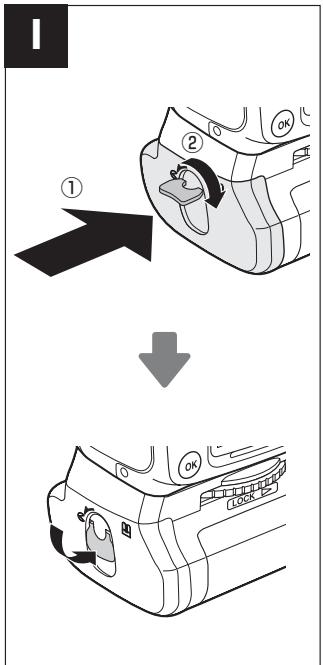
3 Insert the battery or battery holder in the MB-D10 and latch the battery-chamber cover (Figure l). Make sure the battery or holder is fully inserted before turning the latch.
4 Turn the camera on and check the battery level in the control panel or viewfinder. If the camera does not turn on, check that the battery is correctly inserted.
Battery Level
The camera displays battery level as follows:
EN-EL3e, EN-EL4a, and EN-EL4 Batteries
| Control panel | Viewfinder | Description |
| — | Battery fully charged. | |
| — | Battery partially discharged. | |
| Low battery. Ready spare batteries. | ||
| (blinks) | (blinks) | Battery exhausted. Shutter release disabled. |
AA Batteries
| Control panel | Viewfinder | Description |
| √XXXX | — | Charge remaining. |
| √M | — | Low batteries. Ready spare batteries. |
| √A (blinks) | √B (blinks) | Batteries exhausted. Shutter release disabled. |
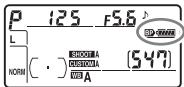
An option in Group d of the camera Custom Settings menu can be used to change the order in
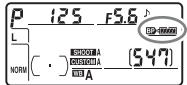
which the batteries are used. When the camera is drawing power from the MB-D10, a BP icon is displayed in the control panel.
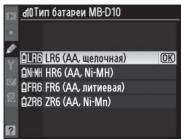
To ensure that the camera shows the correct battery level when AA batteries are used, choose the appropriate option for [MB-D10 battery type]
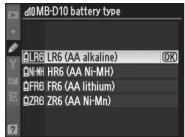
in the camera Custom Settings menu (Group d). If the correct option is not selected, the camera may fail to function as expected.
| Option | Battery type |
| ΩLR6 LR6 (AA alkaline) | AA alkaline (LR6) |
| ΩN+MH HR6 (AA Ni-MH) | AA Ni-MH (HR6) |
| ΩFR6 FR6 (AA lithium) | AA Lithium (FR6) |
| ΩZR6 ZR6 (AA Ni-Mn) | AA nickel-manganese (ZR6) |
Remove the batteries when the MB-D10 is not in use.
Battery Info
Battery information (including calibration information for EN-EL4a and EN-EL4 batteries) can be viewed from the camera setup menu
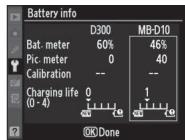
(the camera battery is listed on the left, the MB-D10 on the right). Only the battery level is listed when AA batteries are used. See the camera manual for details.
Note: The illustrations on this page are from the D300.
Removing Batteries
Be careful not to drop batteries, the holder, or the optional battery-chamber cover.
1 Turn the MB-D10 battery-chamber latch to and remove the battery holder (Figure E).
2 Remove the battery or batteries from the holder or optional battery-chamber cover.
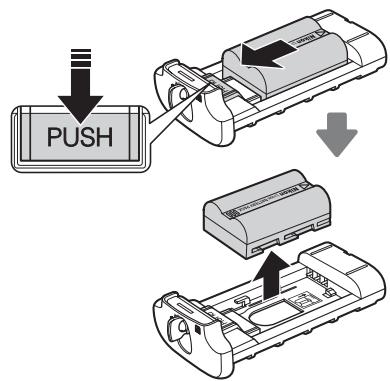
EN-EL3e
While pressing the holder PUSH button, slide the battery toward the button. The battery can then be removed as shown.
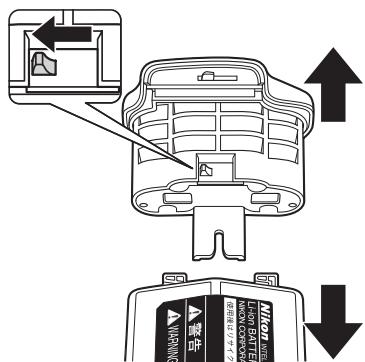
EN-EL4a/EN-EL4
Slide the battery release in the direction indicated by the arrow () and remove the battery-chamber cover.
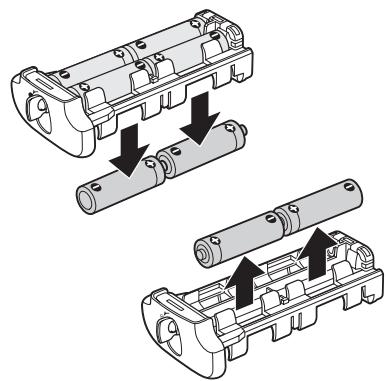
AA Batteries
Remove the batteries as shown. Be careful not to drop the batteries when removing them from the holder.
Specifications
| Power source | One EN-EL3e, EN-EL4a, or EN-EL4 rechargeable Li-ion battery or eight LR6 alkaline, HR6 Ni-MH, FR6 lithium, or ZR6 nickel-manganese AA batteries |
| Operating temperature | 0 – 40°C (32 – 104°F) |
| Dimensions (W × H × D) | Approx. 150.5 × 52 × 75.5 mm/5.9 × 2.0 × 3.0 in. |
| Weight | Approx. 290 g (10.2 oz), with MS-D10EN but excluding batteries |
Specifications and design are subject to change without notice.
EN-EL3e, EN-EL4a, and EN-EL4 Batteries
The performance of EN-EL3e, EN-EL4a, and EN-EL4 batteries drops at temperatures below about 10^ (50^) . Be sure the battery is fully charged and keep a warm spare battery on hand ready to exchange as necessary. Cold batteries will recover some of their charge when warmed.
AA Batteries
Due to their limited capacity, AA LR6 alkaline and ZR6 nickel-manganese batteries should be used only when no other alternative is available. Use is not recommended at low temperatures. In general, AA batteries have less capacity than other power sources when used in the MB-D10; EN-EL3e, EN-EL4a, and EN-EL4 batteries are recommended for best performance.
The capacity of AA batteries varies with make and storage conditions and may in some instances be extremely low; in some cases, AA batteries may cease to function before their expiry date. Note that the capacity of AA batteries may drop at temperatures below 20^ (68^) .
V Frame Advance Rate
EN-EL4a/EN-EL4 and AA batteries support higher frame advance rates than the EN-EL3e. For more information on frame advance rates, see the camera manual.
Inhalt
Federal Communications Commission (FCC) Radio Frequency Interference Statement
Tested To Comply With FCC Standards
FOR HOME OR OFFICE USE
1300 Walt Whitman Road, Melville, New York
11747-3064,U.S.A.
Tel.: 631-547-4200

This Class B digital apparatus complies with Canadian ICES-003.
Présentation
Tested To Comply With FCC Standards
FOR HOME OR OFFICE USE
PRECAUCIONES
1300 Walt Whitman Road, Melville, New York
11747-3064, EE.UU.
Tel.: 631-547-4200
MepbI npedoctopoXHoctn npn nCnoB30BaHH
PyKoTkaMB-D10npedHa3NaueHaIJaIncNoB3ObaHnToJIbKO C COBMecTmblMn FOToaPiNapTaMn.
He nCnOJb3yIte 3dEJIe C 6bATApEIMN I dEkXaTeJIHMn 6bAtePey, He pEKOMEnIIOBaHbIMn B hAcToIaIe mpyKoBOpCTBe. PkyoRTy MB-D10 HEnb3a NcONJb3OBAtB C.IITNI-NIOHBMn AKKyMnyTApOBHmB 6bATApEIMN EN-EL3a/EN-EL3.
-PykoTky MB-D10 MoXHO NcPOnIb3ObTa cDepKATEmEBaTepey MS-40 AA IJnYHInePcAJIbHOro 6bTaPeYINHOROTcEka MB-40, Ondako 30 BydET BnIaTb Ha paBoTy, INOJIWueCTBO FOToCHIMKOK, KOTOpOE MoXHO tCHTBa CODHM KOMPiNEKTOM 6bTapeY, MeHbUINTC.
- UTo6bl He IOnyctNTb KOpOTKOrO 3aMbKaHnI, KOtOpe MoKet IpnO3oHTn PnI CONpIKKOCHOBEHn MetaJIInuecknx IpeMeTob C KOtAKTAMn IITaNHe, 3aKpbBaIte KOtA.KbPbIKoN, KOrDa MB-D10 He NCNoJIb3yETcR.
Iocne n3BnueHnna depKatae 6aTaep ne KpbluN dnONHnHbHO 6aTepeHoro OTCEKa n3 pyKoAtnk MB-D10,BbHte 6aTaep ne Nm oPmeCTne depKatae Iu Nk PkbluY B KOHTeHep, YTOb6 npDeOpTbpATnTb KOPOTKoe 3aMbKahHe npn COnpNIKOCHOBEHn C BHEUHMM MetaJIINueCKHMn PpeDMETAm.
EN-EL3e: CoBMeuAa BbIeMn Ha 6aTapee C bByCTyamn Ha dEpaKaTele MS-D10EN, BcTaBte 6aTapeio Ta, UTO6bI cTpeKa (▲) Ha 6aTapee 6bJa HapPabHeHa KaHTaKTbI pTuHnHa dEpaKaTeia 6aTapei (PcCyHok F-①). CJIerKa Haxmite Ha 6aTapeio N BcTaBte eB HAnpabHeHH, Yka3aHHOM cTpeKoJ, Do Tex nOp, POKa KOHTaKTbI pTuHnHa He 3aUeKNHyTCra Ha MeCe (PcCyHok F-②).
EN-EL4a/EN-EL4: Ecnm MexaHm3M OCBO6OJDeHn Ha KpbIke DOnoJIHnTeJIbHOro 6aTapeHOrO OTeKa BL-3 HaxOJITcB NNoJOKeHn, pIn KOTOpOM BnHa CTpeKka () , CdbINbTe MEXaHm3M OCBO6OJDeHn TaK, UTo6bI 3aKpbIb 3Tu CTpeJIky (PcSyHOK G-①). BCTabIte DaBaBCTyNa Ha 6aTapeKe B COOTBeCTByIOUne OTBepCTna HA BL-3 (PcSyHOK G-②) n CdbINbTe OCBO6OJDaIOUnn MEXaHm3M BL-3 B TakoE NOJOKeHne, UTo6bI CTpeKka BbIaNHa.
AA:Bctabte Bocemb 6aTapei AA B depkaTeB 6aTapei MS-D10, KaK noka3aHn Ha pucyHke H, co6liOdaan noJrphocTb.
3 BCTaBtBe 6bapeIO B depKataJIb B pykoTKe MB-D10 n 3aIeIKNHTe KpbIshKy 6bapeHOrO OTcKa (PncyHok I).Y6eIITecb B TOM, YTO 6aTapeI nn depKataJIb BCTaBHeBI NpIoHocTbIO nepeI NOBOPOTOM 3aIeIKN.
4BknIOHTpe foTOaIpaTn npOBepBe ypoBEb 3apraJa 6aTapeN Ha KOHTpOJIbHOM IINCIJIe NII IN BUNIOCKaTeJe. EcIn fOToaIpaTn He BKIOUaETc, npOBepBe npaBnIbHOCTb yCTaHOBKn 6aTapeN.
YpOBeHb3aPda6aTapeu
YpOBeHb 3aPja 6aTapeo OTo6paKaetc
ΦOTOKaMePoI CneJeUoM o6pa3OM.
Bamapeu EN-EL3e, EN-EL4a, u EN-EL4
IzhnekaTe 6aTapeu, KOrTa MB-D10 He nCnoIb3yeTc.
HΦopmaizn06batape
MB-D10 Multi-Power Battery Pack
Gebruikshandleiding
Inhoudsopgave
MB-D10 Bedieningsvergrendeling. 4
Retirar as baterias 8
Especificações 9
Multi power battery pack MB-D10
Manuale d'uso
Multi power battery pack MB-D10 e accessory
Multi power battery pack MB-D10 e accessori in dotazione
Part del multi power battery pack MB-D10 (Figura A)
Babrili BnRiBnRiBnRiBnRiBnRiBnRiBnRiBnRiBnRiBnRiBnRiBnRiBnRiBnRiBnRiBnRiBnRiBnRiBnRiBnRiBnRiBnRiBnRiBnRiBnRiBnRi
S 12
阿徒的
音用前「」。