
SF-100 - Photo Accessories NIKON - Free user manual and instructions
Find the device manual for free SF-100 NIKON in PDF.


| Product Type | Automatic slide feeder for 35 mm slides |
| Brand | Nikon |
| Model | SF-100 |
| Category | Photo accessories |
| Main material | ABS plastic |
| Color | Black |
| Dimensions (L x l x h) | 150 x 100 x 50 mm (estimated) |
| Weight | 200 g (estimated) |
| Power supply | Via host device power connector |
| Loading capacity | Up to 50 slides |
| Compatible slide type | 35 mm slides mounted in standard frames |
| Main functions | Automatic feeding, jam detection |
| Maintenance and cleaning | Clean with a soft dry cloth; avoid solvents |
| Safety | Complies with standards EN55022 class B, EN50082-1 |
| Spare parts and repairability | Parts available from Nikon after-sales service |
| General information | Compliant with EEC directive 89/336/EEC |
| Country of manufacture | Japan |
Frequently Asked Questions - SF-100 NIKON
User questions about SF-100 NIKON
0 question about this device. Answer the ones you know or ask your own.
Ask a new question about this device
Download the instructions for your Photo Accessories in PDF format for free! Find your manual SF-100 - NIKON and take your electronic device back in hand. On this page are published all the documents necessary for the use of your device. SF-100 by NIKON.
USER MANUAL SF-100 NIKON
1.1 Features
1.2 Operating Environment
2. Before Operation
2.1 Inspection
2.2 Accessories
2.3 Notes on Use
2.4 ! Cleaning the Unit
3. Parts Identification
4. Operation of the SF-100
4.1 Mounting on the LS-1000
4.2 Setting Mounted Slides
4.3 Removing Mounted Slides
4.4 Removing the Auto Slide Feeder
4.5 What to Do If a Mounted Slide is Jammed
Appendix: Specifications
Index

Cautions
- The reproduction of all or part of this manual without our permission is prohibited.
- The information contained in this manual is subject to change without notice.
- We have made every effort to produce a perfect manual, but should you find any mistakes, we would be grateful if you would kindly let us know.
- We shall take no responsibility for consequences resulting from the operation of this product, despite the terms mentioned above.
Trademark Information
Macintosh is a registered trademark of Apple Computer, Inc.
Microsoft is a registered trademark and Windows is a trademark of Microsoft Corporation.
IBM PC/AT is a trademark of International Business Machines Corporation.
Other brand or product names are the trademarks or registered trademarks of their respective holders.

Indication
The ⚠️ indications in this manual signify important safety precautions. In order to use this product safely, please read every section where these indications are placed before beginning operation, this product. These indications are also placed in the table of contents so users can find them easily.

Indication
The √ indications in this manual signify the need for caution when using the products. These indications are placed in sections that should be read by users before beginning operation, in order to avoid damage to the product.
Federal Communications Commission (FCC) Radio Frequency Interference Statement
This equipment has been tested and found to comply with the limits for a Class B digital device, pursuant to Part 15 of the FCC Rules. These limits are designed to provide reasonable protection against harmful interference in a residential installation. This equipment generates, uses, and can radiate radio frequency energy and, if not installed and used in accordance with the instructions, may cause harmful interference to radio communications. However, there is no guarantee that interference will not occur in a particular installation. If this equipment does cause harmful interference to radio or television reception, which can be determined by turning the equipment off and on, the user is encouraged to try to correct the interference by one or more of the following measures:
• Reorient or relocate the receiving antenna.
- Increase the separation between the equipment and receiver.
- Connect the equipment into an outlet on a circuit different from that to which the receiver is connected.
- Consult the dealer or an experienced radio/TV technician for help.
CAUTIONS
Modifications
The FCC requires the user to be notified that any changes or modifications made to this device that are not expressly approved by Nikon Corporation may void the user's authority to operate the equipment.
Notice for customers in Canada CAUTION
This class B digital apparatus meets all requirements of the Canadian interference Causing Equipment Regulations.
ATTENTION
If unusual noise, odor or smoke occurs, switch the LS-1000 off immediately and disconnect the power cord and the SCSI cable. Contact your retailer or Nikon sales representative in your country.

Storage and Operating Locations
Proper storage will ensure the long life of the Unit. In order to avoid internal dust while being stored, it is recommended that an appropriate cover be used on the Unit.
Do not store or use where:
- The temperature is above 95^ F ( 35^ C) or below 50^ F ( 10^ C), the temperature changes drastically, or condensation occurs.
• The humidity exceeds 80%. - The Unit is exposed to direct sunlight.
• The atmosphere is excessively dusty. - The Unit may be subjected to excessive vibration or physical shocks.
- The Unit is exposed to noise from other equipment nearby.
When Taking the Unit Out of The Country
The use of this product may violate local laws and restrictions in some countries. If this is the case, we cannot bear any responsibility for any violations resulting from the use of this product.
Notice concerning prohibition of copying or reproduction
Note that simply being in possession of material which has been copied or reproduced by means of a scanner may be punishable by law.
- Items prohibited by law from being copied or reproduced
Do not copy or reproduce paper money, coins, securities, government bonds, or local government bonds, even if such copies or reproductions are stamped “Sample”.
The copying or reproduction of paper money, coins, or securities which are circulated in a foreign country is prohibited.
The copying or reproduction of unused postage stamps or post cards issued by the government without obtaining approval from the government is prohibited.
The copying or reproduction of stamps issued by the government and certified documents stipulated by law is prohibited.
• Cautions on certain copies and reproductions
The government has issued cautions on copies or reproductions of securities issued by private companies (shares, bills, checks, gift certificates, etc.), commuter passes, or coupon tickets, except when a minimum of necessary copies are to be provided for business use by a company. Also, do not copy or reproduce passports issued by the government, licenses issued by public agencies and private groups, ID cards, and tickets, such as passes and meal coupons.
• Comply with copyright notices
The copying or reproduction of works such as books, music, paintings, woodcut prints, maps, drawings, movies, and photographs which are copyrighted creative works is prohibited except when it is done for personal use at home or for similar restricted and non-commercial use.

I. Overview
Thank you for purchasing the NIKON Auto Slide Feeder for the 35mm Film Scanner LS-1000. This manual describes the procedures unpacking, setting up, and connecting the unit, with emphasis on hardware use and cautions.
Please read this manual thoroughly to ensure proper operation of your scanner.
We hope that you will find this manual helpful.
I.1 Features
The SF-100 is an Auto Slide Feeder designed specifically for use with the NIKON 35mm Film Scanner LS-1000. It allows consecutive automatic scanning of mounted 35mm slides.
- Enables consecutive scanning using the software provided with the LS-1000.
- Holds up to 72.1.1 mm thick mounted slides. (Magazine space of 80mm.)
- Can be attached to the LS-1000 without using connecting cables.
I.2 Operating Environment
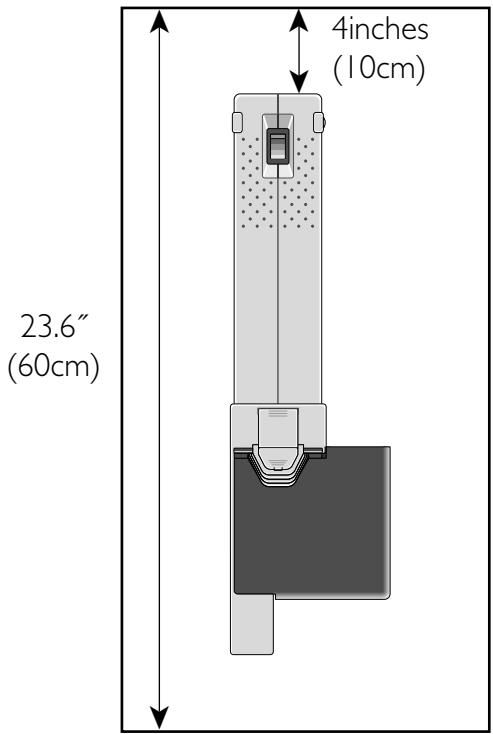
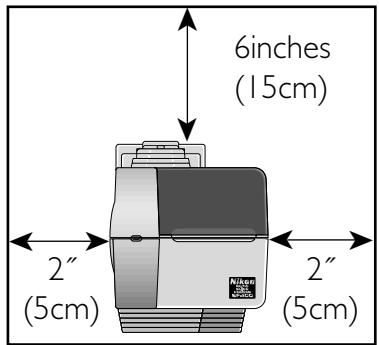
Leave extra space around and above the unit to ensure smooth operation. Please refer to the drawing at right for the amount of space to be provided.
If possible, place a suitable cover over the unit to avoid dust accumulating when it is stored.
The necessary space when the Auto Slide Feeder SF-100 is attached is shown below.
2. Before Operation
2.1 Inspection
Inspect the package to see whether any damage has occurred during shipment. If there is any damage to the package, please contact your retailer directly and do not unpack the unit.
2.2 Accessories
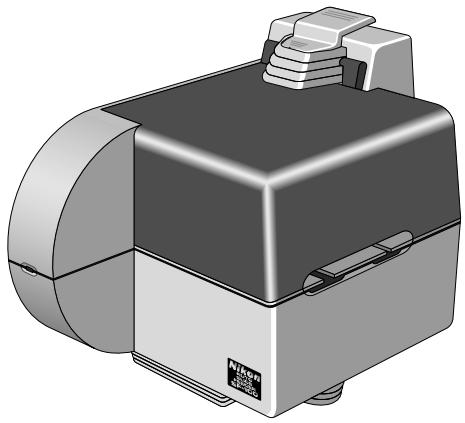
The following items are included with your SF-100. When you open the package, check whether all the items are present. If there are any missing items, please contact your retailer immediately.
natural_image
3D rendering of a mechanical device with no visible text or symbolsSF-100 (I)
SF-100 user's manual (I)
2.3 √Notes on Use
- Don't use a slide mount neither less than 1.1 mm nor more than 3.0 mm thick. If the slide mount is not flat on its surface, you may feel some roughness when mounting or unmounting the slide.
- Don't force the slide-mount into or out of the unit if it does not move smoothly.
- When scanning a film, don't touch or unmount the slide-mount or strip film holder.
- Keep the unit in a horizontal position.
- Do not use slides with rounded mount edges, as the feeding mechanism may not work properly with such slides.
Viewed from above
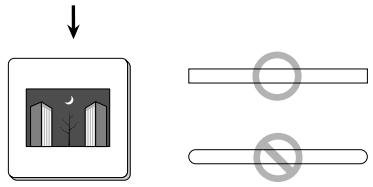
The following kinds of slide mounts should not be used as they may cause a mount jam or prevent proper reading of the image.
- Warped slide mounts
- Slide mounts with peeling or burred edges
- Slide mounts with a sticker or label affixed
- Slide mounts with sharp corners
2.4

Cleaning the Unit
When carrying out routine maintenance and cleaning, ensure that no volatile liquids such as alcohol, benzine, or thinner come into contact with the SF-100 as this may cause a failure, fire, or electric shock.
Please observe the following points:
- Before cleaning, always turn the power off, and pull out the power plug.
- Since the cover is made from plastic material, remove dust with a blower or a dry cloth.
Use a soft, dry cloth to remove dust from the metal panel at the rear.
- If the unit has become badly soiled, clean with a cloth moistened with neutral liquid detergent, then dry with a dry cloth.
Avoid harsh substances such as alcohol, benzine, thinner, or pesticides, as they may damage the surface, or remove the exterior finish.
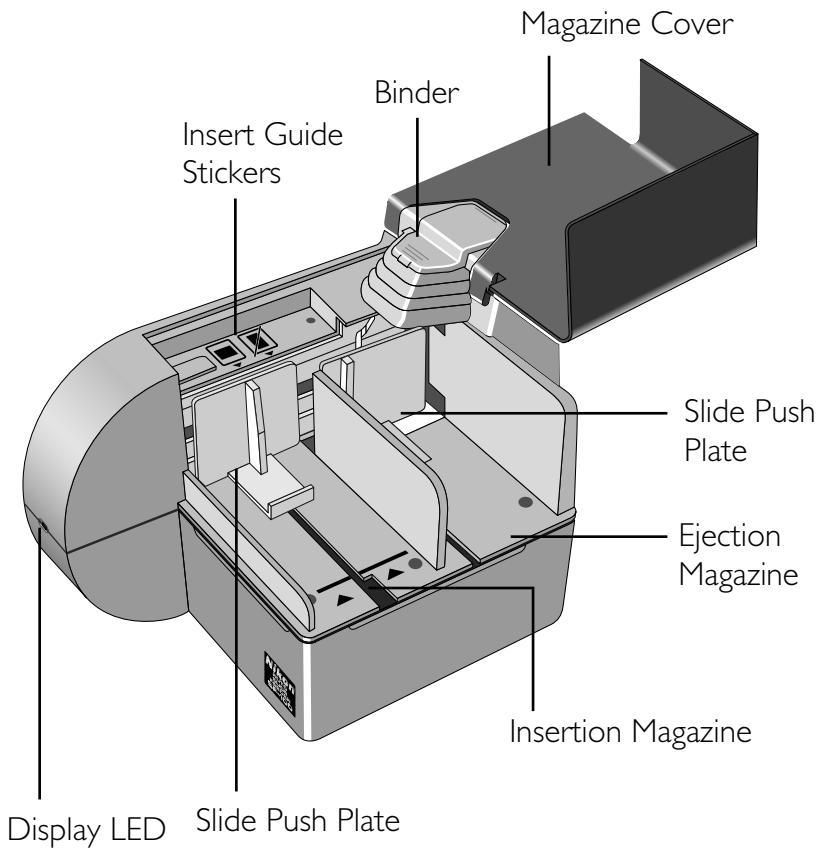
3. Parts Identification
4. Operation of the SF-100
4.1 Mounting on the LS-1000
Before connecting, confirm that the LS-1000 is turned off.
Step I
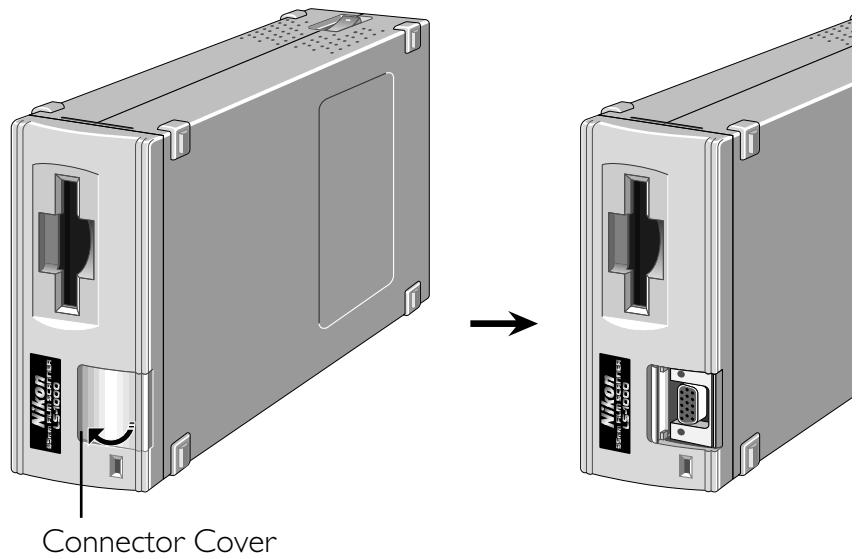
Place the LS-1000 on its side, with the film slot toward the top. (The on/off switch will be on the uppermost side.) Open the connector cover on the front panel, and slide the cover into the panel.
Step 2
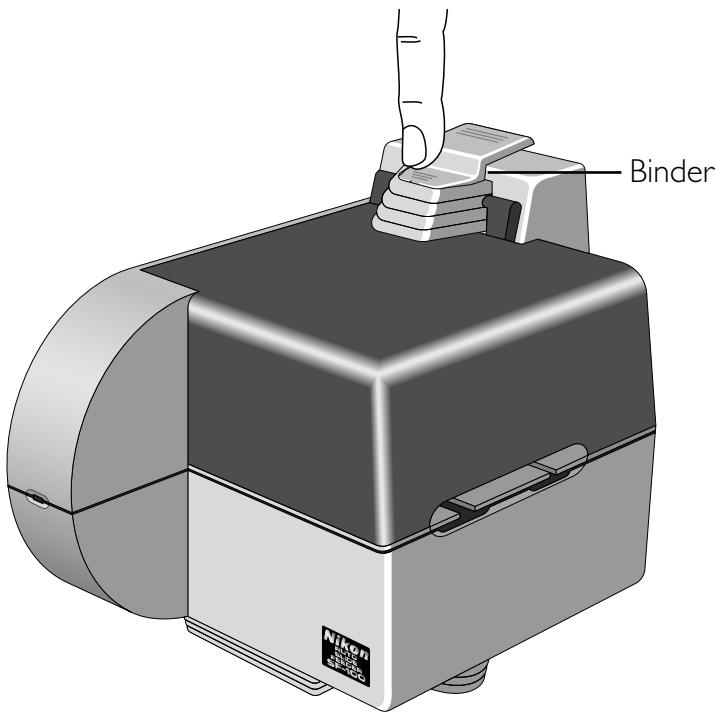
Raise the binder by pressing the end above the magazine cover.
Step 3
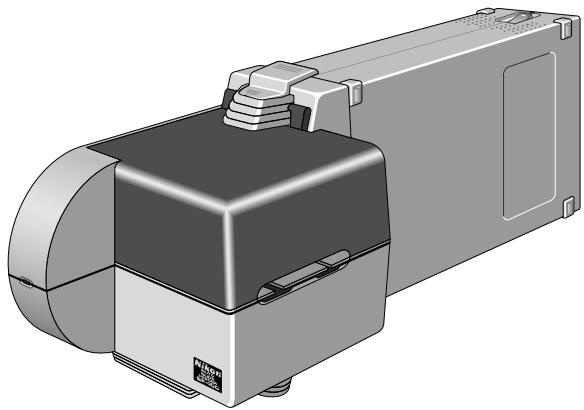
Place the SF-100 in front of the LS-1000, and insert the SF-100 connector fully into the LS-1000 connector.
natural_image
3D rendering of a mechanical device with a black housing and mounting bracket (no visible text or symbols)Step 4
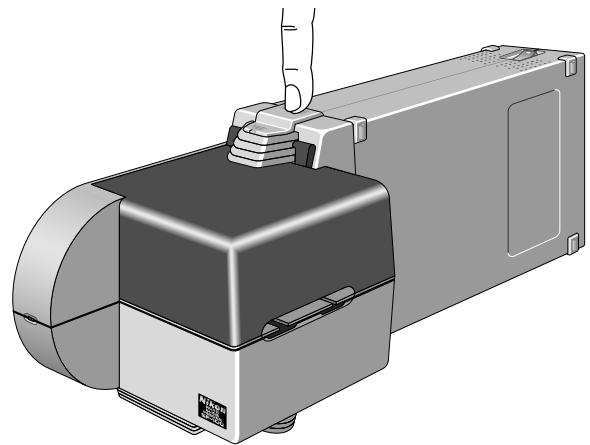
Press the binder to be engaged with the groove on the top of the LS-1000, to fix the feeder to the LS-1000. Make sure that the lock is fully engaged (the surface of the lock should be perfectly horizontal).
natural_image
Illustration of a hand pressing a button onto a device component (no text or symbols visible)√ Do not lift or move the scanner with the feeder attached. Always detach the feeder before the scanner is moved.
4.2 Setting Mounted Slides
Set the slides to be read by LS-1000 in the insertion side of the magazine.
Step I
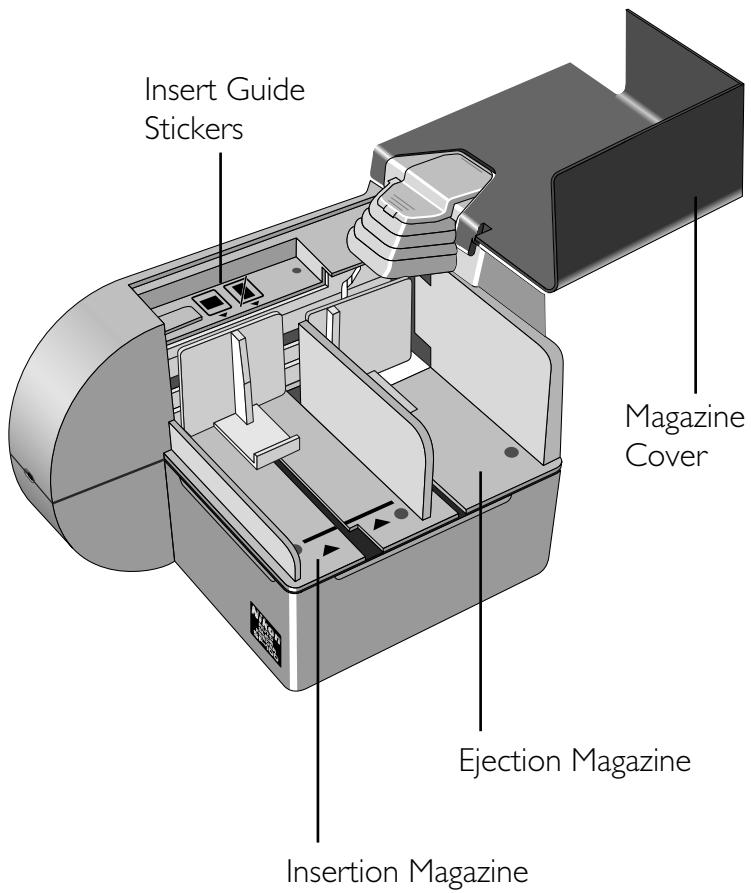
Open the magazine cover.
Step 2
Next, grip the slide push plate in the insertion side with your fingers, pull it back against the spring, and catch it in the notch so that it cannot return to its original position.
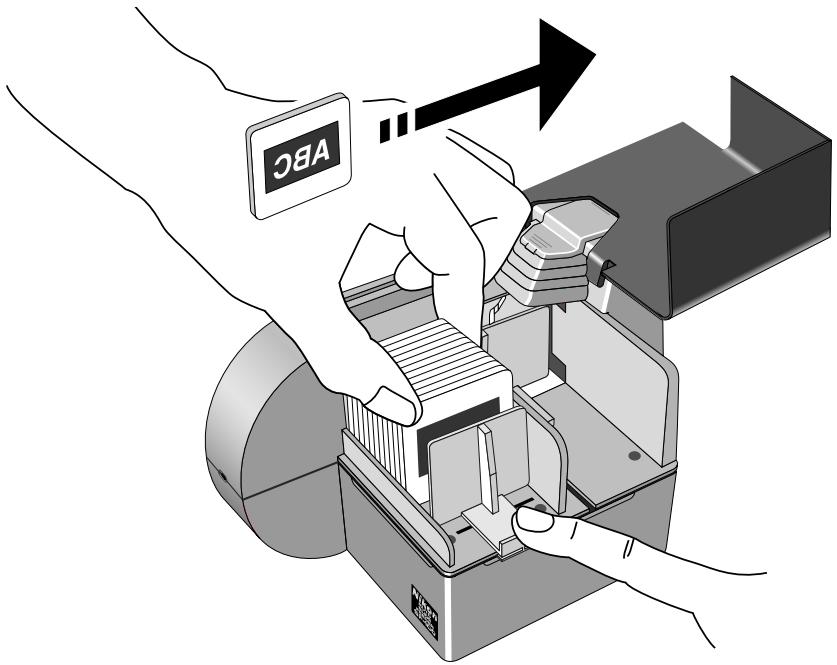
Note: Make sure that the slides are inserted with the emulsion surface (rough surface) toward the slide push plate.
Note: Make sure that the slides are inserted with the longer sides of the film at the top and bottom. Inserting the slide with the shorter sides at the top and bottom may result in damage to the film or mount.
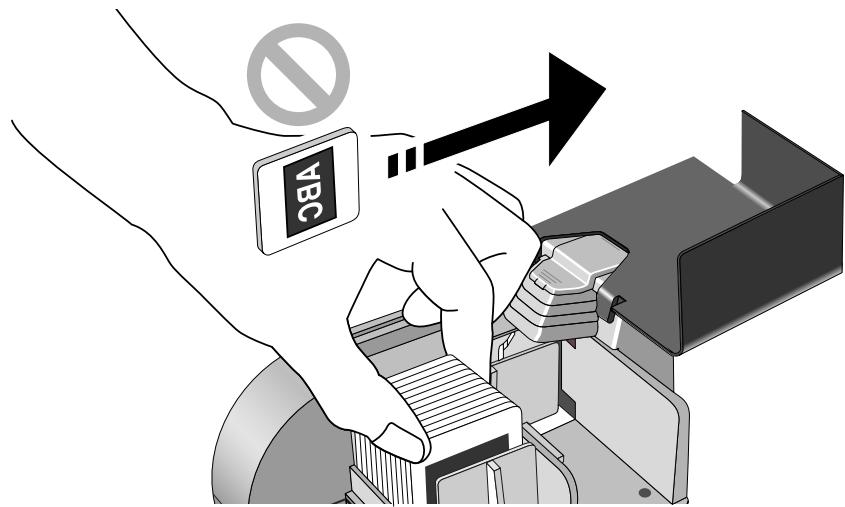
Note: Insert Guide Stickers shown below help you to insert slides correctly.
Insert Guide Stickers

natural_image
Two square icons with a diagonal line crossing, no text or symbols presentMagazine side
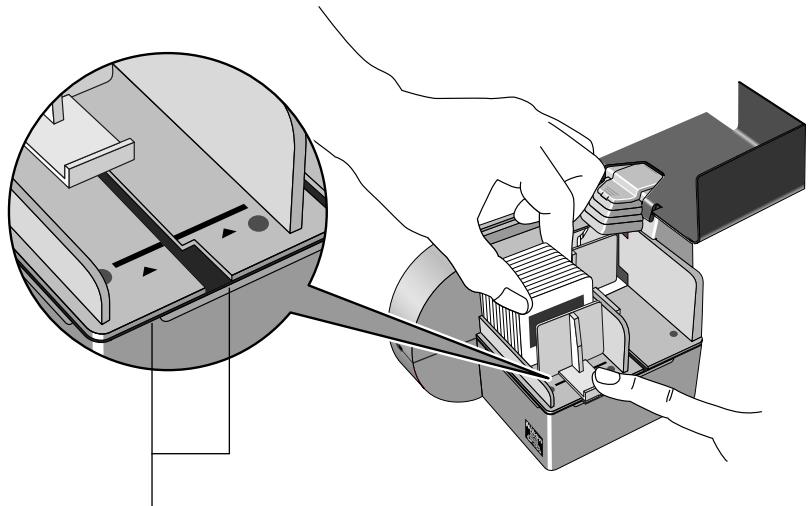
Place the slides in the insertion side of the magazine.
Slides can be placed in the insertion side of the magazine up to the reference mark.
√ Remarks
Do not insert slides beyond the reference mark, as this may cause them to jam.
natural_image
Illustration of a hand using a tool to adjust or install electronic components, with no visible text or symbols.Reference Marks
The slide push plate should be set to the locking position where the notch is given.
Step 3
Set the slides with their apertures vertically oriented with respect to the LS-1000, and with the emulsion surface facing the slide push plate.
√ Remarks
Do not set the auto slide feeder horizontally, as this will prevent scanning of both ends of the film, and may also cause the slides to jam inside the auto slide feeder.
Step 4
Disengage the slide push plate from the notch and release it gently so that it is pressing against the slides.
Close the cover.
4.3 Removing Mounted Slides
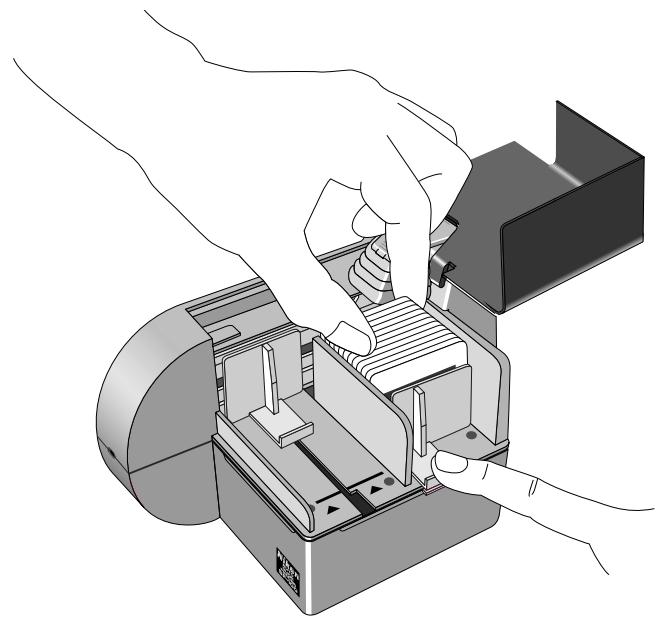
Once a slide has been scanned in the LS-1000, it will be ejected into the ejection side of the magazine.
Step I
Grip the slide push plate, which presses against the slides ejected from LS-1000, and pull it out against the spring.
Step 2
Remove the mounted slides.
natural_image
Illustration of hands operating a mechanical device with a clamped component (no text or symbols visible)√ Remarks
If you continue scanning after the ejection side of the magazine is full of slides, it may cause a slide jam. Always remove slides promptly.
4.4 Removing the Auto Slide Feeder
To remove the auto slide feeder, follow the installation steps in reverse.
Step I
Confirm that the LS-1000 is turned off.
Step 2
Close the magazine cover.
Step 3
Press down the lock toward the auto slide feeder side, disengaging it from the groove in the top of the LS-1000.
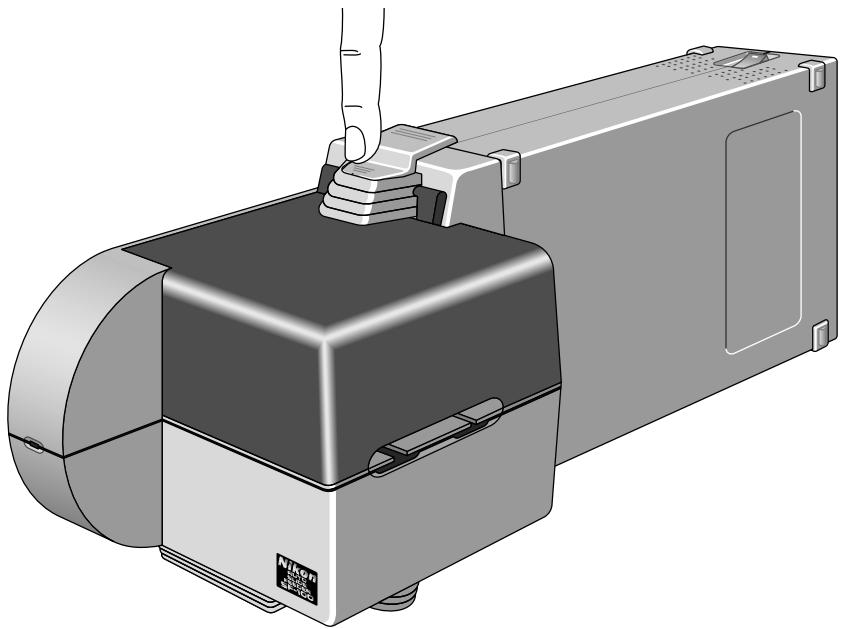
natural_image
Illustration of a hand pressing a button onto a device component (no text or symbols visible)Step 4
Remove the connector by sliding the auto slide feeder away from the LS-1000.
4.5 What to Do If a Mounted Slide is Jammed
If a slide is jammed inside the auto slide feeder, remove it as described below.
What to do if a jam occurs
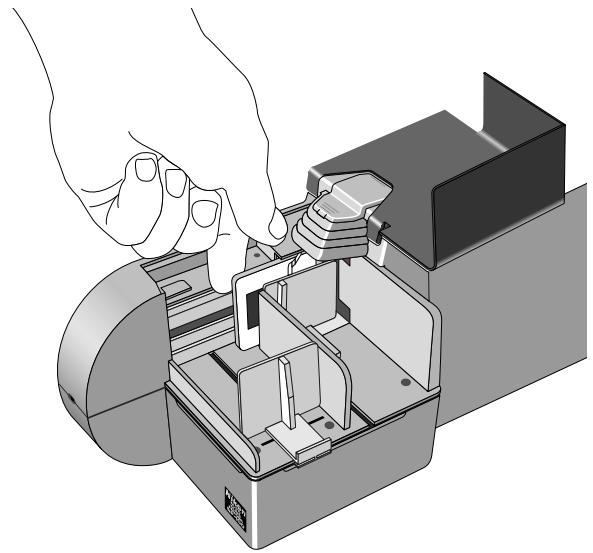
I. Open the magazine cover.
2. Grip the mounted slide with your fingers or tweezers and remove from the magazine. Be careful not to damage the slide or the SF-100.
natural_image
Illustration of hands assembling a mechanical device into a housing (no text or symbols visible)If a jam occurs between the slide autofeeder and the LS-1000
I. Switch the power off after terminating scan operation of the LS-1000.
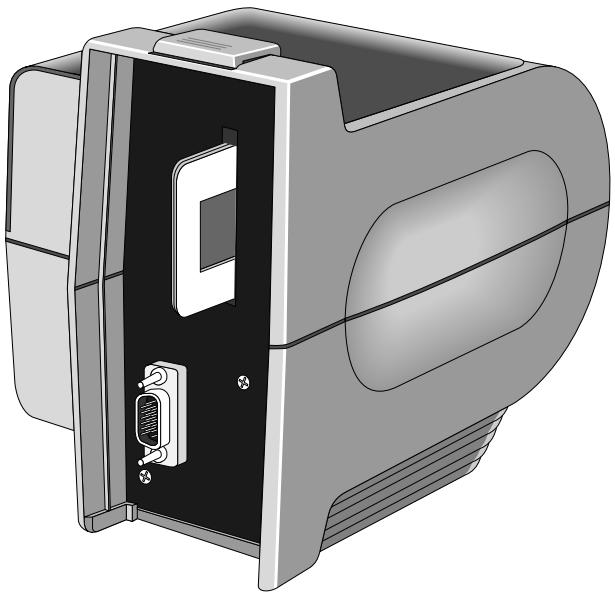
2. Remove the binder and remove the auto slide feeder from the LS-1000.
3. Grip the jammed mounted slide with your fingers or tweezers from the slot in the LS-1000 or from the slide autofeeder. Be careful not to damage the slide or the SF-100.
natural_image
Illustration of a computer monitor case with an internal panel and a connected port (no text or symbols visible)Appendix: Specifications
Film used: 35mm mounted slides of 1.1 - 3.0mm in thickness
Maximum number of slides:
About 50 1.6mm thick mounted slides (Magazine space: approx. 80mm)
Connection: Directly connected to front panel connector of vertically installed LS-1000.
Reference insertion/ejection time:
Insertion: approx. 10 seconds Ejection: approx. 10 seconds
Power source: Supplied by LS-1000. DC 12V 350mA or lower, DC 5V 30mA or lower.
Size: 5.1(W) × 7.8(D) × 6.2(H) inches (130 × 199 × 156.5mm)
Weight: Approx. 1.8 lbs (0.8kg)

Index
A
accessories 8
D
display LED 9
E
ejection Magazine 9
/
insertion magazine 9
J
jams, clearing 17
M
magazine cover 9 mounting the SF-100 on the LS-1000 10
O
operating environment 7
P
power source 18
R
removing mounted slides 15 removing the auto slide feeder 16
S
setting mounted slides 12 specifications 18

EC DECLARATION OF CONFORMITY
We
Name: Nikon UK Limited
Address: Nikon House, 380 Richmond Road, Kingston, Surrey KT2 5PR, UK
declare that the product
Product Name: Auto Slide Feeder SF-100
Manufacturer's Name: Nikon Corporation
Manufacturer's Address: Fuji Bldg., 2-3, Marunouchi 3-chome, Chiyoda-ku, Tokyo 100, Japan
is in conformity with the following Standards
EN55022 Class B
EN50082-1
IEC801-2: 1991 4kV
IEC801-3: 1984 3V/m
IEC801-4: 1988 |kV AC, 0.5kV I/O
following the provisions of the EMC Directive (89/336/EEC)
DECLARATION DE CONFORMITE DE LA CEE
Nous
Nom: Nikon UK Limited
Adresse: Nikon House, 380 Richmond Road, Kingston, Surrey KT2 5PR, UK
Name: Nikon UK Limited
Anschrift: Nikon House, 380 Richmond Road, Kingston, Surrey KT2 5PR, UK