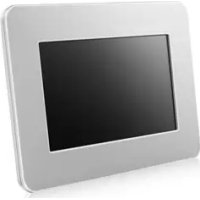
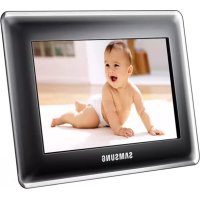
SPF-71E-W - Digital photo frame SAMSUNG - Free user manual and instructions
Find the device manual for free SPF-71E-W SAMSUNG in PDF.



User questions about SPF-71E-W SAMSUNG
0 question about this device. Answer the ones you know or ask your own.
Ask a new question about this device
Download the instructions for your Digital photo frame in PDF format for free! Find your manual SPF-71E-W - SAMSUNG and take your electronic device back in hand. On this page are published all the documents necessary for the use of your device. SPF-71E-W by SAMSUNG.
USER MANUAL SPF-71E-W SAMSUNG
Thank you for purchasing this Samsung product. To receive more complete service, please register your product at www.samsung.com/register
Model ____ Serial No. ____
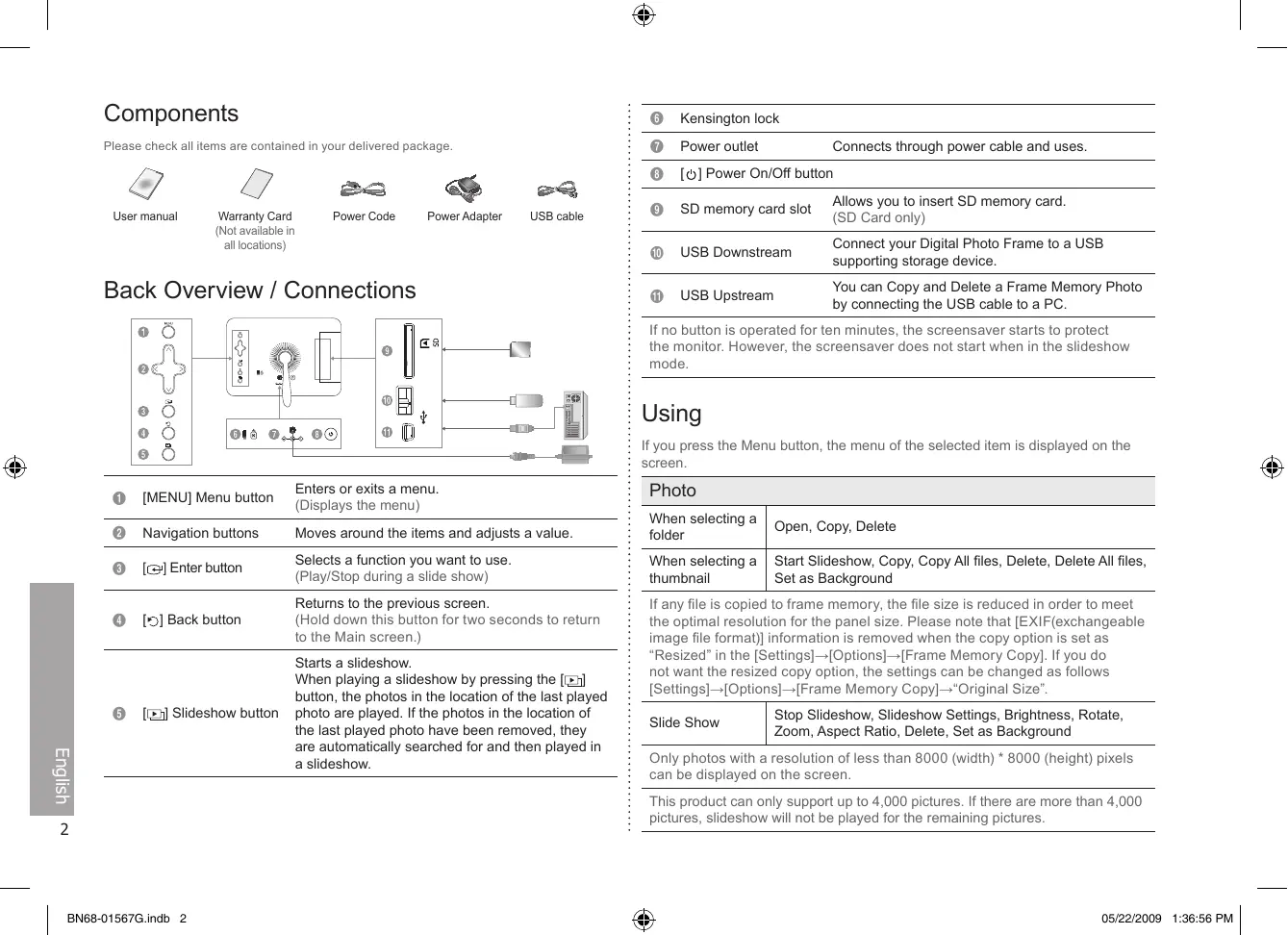
Please check all items are contained in your delivered package.

User manual

Warranty Card (Not available in all locations)

Power Code

Power Adapter

USB cable
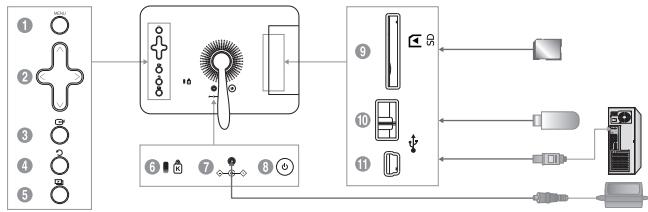
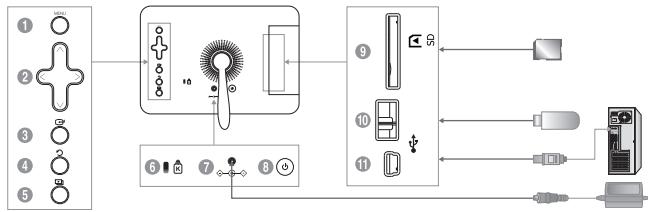
Back Overview / Connections
flowchart
graph LR
    A["1 ○"] --> B["2 ○"]
    B --> C["3 ○"]
    C --> D["4 ○"]
    D --> E["5 ○"]
    E --> F["6 ▲ 7 ● 8 ●"]
    F --> G["Camera 10"]
    G --> H["9 ▲ 10 ◆"]
    H --> I["11 ◆"]
    I --> J["Output 10"]
    J --> K["Audio"]
| 1 | [MENU] Menu button | Enters or exits a menu. (Displays the menu) |
| 2 | Navigation buttons | Moves around the items and adjusts a value. |
| 3 | [⊕] Enter button | Selects a function you want to use. (Play/Stop during a slide show) |
| 4 | [⊖] Back button | Returns to the previous screen. (Hold down this button for two seconds to return to the Main screen.) |
| 5 | [⇨] Slideshow button | Starts a slideshow. When playing a slideshow by pressing the [⇨] button, the photos in the location of the last played photo are played. If the photos in the location of the last played photo have been removed, they are automatically searched for and then played in a slideshow. |
6 Kensington lock
7 Power outlet Connects through power cable and uses.
8 [⏻] Power On/Off button
9 SD memory card slot Allows you to insert SD memory card. (SD Card only)
USB Downstream Connect your Digital Photo Frame to a USB supporting storage device.
USB Upstream You can Copy and Delete a Frame Memory Photo by connecting the USB cable to a PC.
If no button is operated for ten minutes, the screensaver starts to protect the monitor. However, the screensaver does not start when in the slideshow mode.
Using
If you press the Menu button, the menu of the selected item is displayed on the screen.
Photo
| When selecting a folder | Open, Copy, Delete |
| When selecting a thumbnail | Start Slideshow, Copy, Copy All files, Delete, Delete All files, Set as Background |
| If any file is copied to frame memory, the file size is reduced in order to meet the optimal resolution for the panel size. Please note that [EXIF(exchangeable image file format)] information is removed when the copy option is set as “Resized” in the [Settings]→[Options]→[Frame Memory Copy]. If you do not want the resized copy option, the settings can be changed as follows [Settings]→[Options]→[Frame Memory Copy]→“Original Size”. | |
| Slide Show | Stop Slideshow, Slideshow Settings, Brightness, Rotate, Zoom, Aspect Ratio, Delete, Set as Background |
Only photos with a resolution of less than 8000 (width) * 8000 (height) pixels can be displayed on the screen.
This product can only support up to 4,000 pictures. If there are more than 4,000 pictures, slideshow will not be played for the remaining pictures.
Clock
Date and Time, Time Format, Date Format, Clock Type
Settings
| Options | Language, Brightness, Auto Fit Portrait Photo, Frame Memory Copy |
| Preference | Starting Mode, Screen Saver, Home Background, Auto Picture On/Off |
| Update/Reset | Firmware Update, Reset Settings, Product Information |
Updating the firmware
| Preparations | |
| • Digital Photo Frame, Firmware update file, SD card or USB memory stick | |
| Updating | |
| 1 | Please visit the Download Center (http://www.samsung.com) and download the firmware by searching the model name. |
| 2 | Please download appropriate firmware and decompress it. |
| 3 | Please copy the decompress file (***.isp) to either an SD card or USB memory stick and connect to the Digital Photo Frame. |
| 4 | Please select [Settings]→[Update/Reset]→[Firmware Update] for firmware update. |
| 5 | When update is completed, please turn off, then turn on the Digital Photo Frame. |
The firmware version can be checked through [Settings]→[Update/Reset]→[Product Information].
Troubleshooting
| Symptoms | Causes and Actions |
| I have connected an external storage device but it is not recognized. | Check the connection between product and external storage.Connect to PC and check the operation state. |
| It takes time to display the next photo. | When the resolution is high or the file size is large, it takes some time to display on the screen. |
Specifications
| Items | Specifications | ||
| Model Name | SPF-71E | SPF-71ES | |
| Panel | Type | 7 inch (17 cm) TFT (Analog) | |
| Resolution | 480 x 234 | ||
| Supported Formats | JPEG (Progressive, CMYK JPEG is not supported.) | ||
| Built-in Memory | 120 MB | 1 GB | |
| USB | Host (USB 1.1) / Device (USB 2.0) | Host (USB 2.0) / Device (USB 2.0) | |
| Power | Rating | External DC power adapter (12 V) | |
| Consumption | Normal mode : 4.8 WPower off mode : under 1 W | ||
| General | Dimensions(W x H x D) | 217.5 mm x 156.5 mm x 43 mm(8.56 inch x 6.16 inch x 1.69 inch) | |
| Weight | 496.3 g (1.09 lbs) | ||
The product design may differ according to the model, and specifications are subject to change without prior notice for product performance enhancement.
Important Safety Instructions
WARNING : RISK OF ELECTRIC SHOCK DO NOT OPEN.
- TO REDUCE THE RISK OF ELECTRIC SHOCK, DO NOT REMOVE COVER (OR BACK). THERE ARE NO USER SERVICEABLE PARTS INSIDE. REFER ALL SERVICING TO QUALIFIED PERSONNEL.
- The slots and openings in the cabinet and in the back or bottom are provided for necessary ventilation. To ensure reliable operation of this apparatus, and to protect it from overheating, these slots and openings must never be blocked or covered.
- Do not cover the slots and openings with a cloth or other materials.
- Do not block the slots and openings by placing this apparatus on a bed, sofa, rug or other similar surface.
- Do not place this apparatus in a confined space, such as a bookcase, or builtin cabinet, unless proper ventilation is provided.
- Do not place this apparatus near or over a radiator or heat resistor, or where it is exposed to direct sunlight.
- Do not place a water containing vessel(vases etc.) on this apparatus, as this can result in a risk of fire or electric shock.
- Do not expose this apparatus to rain or place it near water(near a bathtub, washbowl, kitchen sink, or laundry tub, in a wet basement, or near a swimming pool etc.). If this apparatus accidentally gets wet, unplug it and contact an authorized dealer immediately. Make sure to pull out the power cord from the outlet before cleaning.
- Do not overload wall outlets, extension cords or adaptors beyond their capacity, since this can result in fire or electric shock.
- Power-supply cords should be routed so that they are not likely to be walked on or pinched by items placed upon or against them, paying particular attention to cords at plug end, adaptors and the point where they exit from the appliance.
- To protect this apparatus from a lightning storm, or when it is left unattended and unused for long periods of time, unplug it from the wall outlet and disconnect the antenna or cable system.
This will prevent damage to the set due to lightning and power line surges.
- Before connecting the AC power cord to the DC adaptor outlet, make sure the voltage designation of the DC adaptor corresponds to the local electrical supply.
-
Never insert anything metallic into the open parts of this apparatus. Doing so many create a danger of electric shock.
-
To avoid electric shock, never touch the inside of this apparatus. Only a qualified technician should open this apparatus.
- Make sure to plug the power cord in until it is firmly inserted. When removing the power cord, make sure to hold the power plug when pulling the plug from the outlet. Do not touch the power cord with wet hands.
- If this apparatus does not operate normally - in particular, if there are any unusual sounds or smells coming from it
- unplug it immediately and contact an authorized dealer or service center.
- Be sure to contact an authorized service center, when installing your set in a location with heavy dust, high or low temperatures, high humidity, chemical substances and where it operates for 24 hours such as the airport, the train station etc. Failure to do so may cause serious damage to your set.
- Use only a properly grounded plug and receptacle.
- An improper ground may cause electric shock or equipment damage. (Class I Equipment only.)
- To disconnect the apparatus from the mains, the plug must be pulled out from the mains socket, therefore the mains plug shall be readily operable.
- Do not allow children to hang onto the product.
- Store the accessories (battery, etc.) in a location safely out of the reach of children.
- Do not install the product in an unstable location such as a shaky self, a slanted floor or a location exposed to vibration.
- Do not drop or impart any shock to the product. If the product is damaged, disconnect the power cord and contact a service center.
- Unplug the power cord from the power outlet and wipe the product using a soft, dry cloth. Do not use any chemicals such as wax, benzene, alcohol, thinners, insecticide, air freshener, lubricant or detergent. This may damage the appearance or erase the printing on the product.
- Apparatus shall not be exposed to dripping or splashing.
- WARNING - TO PREVENT THE SPREAD OF FIRE, KEEP CANDLES OR OTHER OPEN FLAMES AWAY FROM THIS PRODUCT AT ALL
TIMES.
Součásti
Date and Time, Time Format, Date Format, Clock Type
| Settings | |
| Options | Language, Brightness, Auto Fit Portrait Photo, Frame Memory Copy |
| Preference | Starting Mode, Screen Saver, Home Background, Auto Picture On/Off |
| Update/Reset | Firmware Update, Reset Settings, Product Information |
text_image
Diagram showing connections between a device panel, audio equipment, and connected devices via USB cable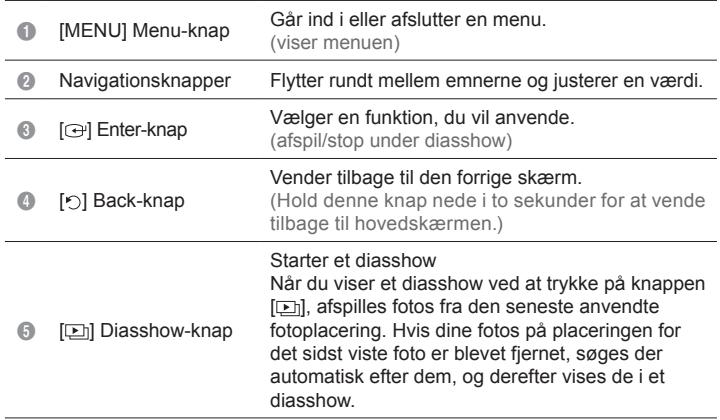 |
Date and Time, Time Format, Date Format, Clock Type
Settings
| Options | Language, Brightness, Auto Fit Portrait Photo, Frame Memory Copy |
| Preference | Starting Mode, Screen Saver, Home Background, Auto Picture On/Off |
| Update/Reset | Firmware Update, Reset Settings, Product Information |
Opdatering af firmwaren
flowchart
graph TD
    A["Control Panel 1"] --> B["Display"]
    C["Control Panel 2"] --> B
    D["Control Panel 3"] --> B
    E["Control Panel 4"] --> B
    F["Control Panel 5"] --> B
    B --> G["USB Interface"]
    G --> H["Internal Control Panel 9"]
    G --> I["Internal Control Panel 10"]
    G --> J["Internal Control Panel 11"]
    H --> K["External Display"]
    I --> L["External Display"]
    J --> M["External Display"]
Date and Time, Time Format, Date Format, Clock Type
| Settings | |
| Options | Language, Brightness, Auto Fit Portrait Photo, Frame Memory Copy |
| Preference | Starting Mode, Screen Saver, Home Background, Auto Picture On/Off |
| Update/Reset | Firmware Update, Reset Settings, Product Information |
text_image
Diagram showing connections between a device panel, audio equipment, and audio equipment via ports and cablesSlide Show Stop Slideshow, Slideshow Settings, Brightness, Rotate, Zoom, Aspect Ratio, Delete, Set as Background
Date and Time, Time Format, Date Format, Clock Type
Settings
| Options | Language, Brightness, Auto Fit Portrait Photo, Frame Memory Copy |
| Preference | Starting Mode, Screen Saver, Home Background, Auto Picture On/Off |
| Update/Reset | Firmware Update, Reset Settings, Product Information |
text_image
Diagram showing connections between a device panel, audio equipment, and audio equipment via ports and cablesDate and Time, Time Format, Date Format, Clock Type
Settings
| Options | Language, Brightness, Auto Fit Portrait Photo, Frame Memory Copy |
| Preference | Starting Mode, Screen Saver, Home Background, Auto Picture On/Off |
| Update/Reset | Firmware Update, Reset Settings, Product Information |
text_image
Diagram showing connections between a device panel, audio equipment, and connected devices via USB cableDate and Time, Time Format, Date Format, Clock Type
Settings
| Options | Language, Brightness, Auto Fit Portrait Photo, Frame Memory Copy |
| Preference | Starting Mode, Screen Saver, Home Background, Auto Picture On/Off |
| Update/Reset | Firmware Update, Reset Settings, Product Information |
Date and Time, Time Format, Date Format, Clock Type
| Settings | |
| Options | Language, Brightness, Auto Fit Portrait Photo, Frame Memory Copy |
| Preference | Starting Mode, Screen Saver, Home Background, Auto Picture On/Off |
| Update/Reset | Firmware Update, Reset Settings, Product Information |
/ This EEE is compliant with RoHS
部件
请检查包装内的部件是否齐全。

用户手册

保修卡
(部分地区提供)

电源线

电源线

USB 缆线
后视图 / 连接
flowchart
graph LR
    A["1"] --> B["2"]
    B --> C["3"]
    C --> D["4"]
    D --> E["5"]
    E --> F["6"]
    F --> G["7"]
    G --> H["8"]
    H --> I["9"]
    I --> J["10"]
    J --> K["11"]
    K --> L["12"]
    L --> M["13"]
    M --> N["14"]
    N --> O["15"]
    O --> P["16"]
    P --> Q["17"]
    Q --> R["18"]
    R --> S["19"]
    S --> T["20"]
    T --> U["21"]
    U --> V["22"]
    V --> W["23"]
    W --> X["24"]
    X --> Y["25"]
    Y --> Z["26"]
| 在選擇資料夾時。 | Open, Copy, Delete |
| 選擇縮圖時。 | Start Slideshow, Copy, Copy All files, Delete, Delete All files, Set as Background |
| Slide Show | Stop Slideshow, Slideshow Settings, Brightness, Rotate, Zoom, Aspect Ratio, Delete, Set as Background |
Date and Time, Time Format, Date Format, Clock Type
Settings
| Options | Language, Brightness, Auto Fit Portrait Photo, Frame Memory Copy |
| Preference | Starting Mode, Screen Saver, Home Background, Auto Picture On/Off |
| Update/Reset | Firmware Update, Reset Settings, Product Information |
更新韌體
準備工作
Regulatory Compliance Statements
Your Samsung product is marked to indicate its compliance class
- Federal Communications Commission (FCC) - USA
- Industry Canada Equipment Standard for Digital Equipment (ICES-003) - Canada
- Voluntary Control Council for Interference (VCCI) - Japan
- Bureau of Standards Metrology and Inspection (BSMI) - Taiwan
- Ministry of Information and Communication (MIC) - Republic of Korea
- Italian Post Ministry (Homologation) - Italy
FCC Class B Notice
This device complies with part 15 of the FCC Rules. Operation is subject to the following two conditions:
- This device may not cause harmful interference, and
- This device must accept any interference received, including interference that may cause undesired operation.
NOTE:
This equipment has been tested and found to comply with the limits for a Class B digital device, pursuant to Part 15 of the FCC Rules. These limits are designed to provide reasonable protection against harmful interference in a residential installation. This equipment generates, uses and can radiate radio frequency energy and, if not installed and used in accordance with the instructions, may cause harmful interference to radio communications. However, there is no guarantee that interference will not occur in a particular installation. If this equipment does cause harmful interference to radio or television reception, which can be determined by turning the equipment off and on, the user is encouraged to try to correct the interference by one or more of the following measures:
-- Reorient or relocate the receiving antenna.
-- Increase the separation between the equipment and receiver.
-- Connect the equipment into an outlet on a circuit different from that to which the receiver is connected.
-- Consult the dealer or an experienced radio/TV technician for help.
User Information
Changes or modifications not expressly approved by the party responsible for compliance could void the user's authority to operate the equipment. If necessary, consult with your dealer or an experienced radio/television technician for additional suggestions. You may find the booklet called How to Identify and Resolve Radio/TV Interference Problems helpful.
This booklet was prepared by the Federal Communications Commission. It is available from the U.S. Government Printing Office.
Washington, DC 20402, Stock Number 004-000-00345-4.
The party responsible for product compliance:
SAMSUNG ELECTRONICS CO., LTD.
America QA Lab of Samsung
3351 Michelson Drive
Suite #290, Irvine, CA92612 USA
Warning
User must use shielded signal interface cables to maintain FCC compliance for the product.
Provided with this monitor is a detachable power supply cord with IEC320 style terminations.
It may be suitable for connection to any UL Listed personal computer with similar configuration.
Before making the connection, make sure the voltage rating of the computer convenience outlet is the same as the monitor and that the ampere rating of the computer convenience outlet is equal or exceeds the monitor voltage rating.
For 120 Volt applications, use only UL Listed detachable power cord with NEMA configuration 5-15P type(parallel blades) plug cap. For 240 Volt applications use only UL Listed detachable power supply cord with NEMA configuration 6-15P type (tandem blades) plug cap.
This television receiver provides display of television closed captioning in accordance with Section 15.119 of the FCC rules.
(TV broadcast receivers with picture screens 13 inches or larger in diameter models only)
ICES-003 Class B Notice - Avis NMB-003, Classe B
This Class B digital apparatus complies with Canadian ICES-003.
European Notice(Europe Only)
Products with the CE marking comply with the EMC Directive(89/336/EEC), (92/31/EEC),(93/68/EEC) and the Low Voltage Directive(73/23/EEC) issued by the Commission of the European Community.
Compliance with these directives implies conformity to the following European Norms:
- EN55022: Radio Frequency Interference
- EN55024: Electromagnetic Immunity of Information Technology Equipment
- EN61000-3-2: Power Line Harmonics
- EN61000-3-3: Voltage Fluctuations
- EN55013: Radio disturbance characteristics of broadcast receivers and associated equipments
- EN55020: Electromagnetic immunity of broadcast receivers and associated equipments
Wiring the Mains Power Supply Plug(UK Only)
IMPORTANT NOTICE
The mains lead on this equipment is supplied with a moulded plug incorporating a fuse. The value of the fuse is indicated on the pin face of the plug and, if it requires replacing, a fuse approved to BSI1362 of the same rating must be used. Never use the plug with the fuse cover omitted if the cover is detachable. If a replacement fuse cover is required, it must be of the same colour as the pin face of the plug. Replacement covers are available from your dealer. If the fitted plug is not suitable for the power points in your house or the cable is not long enough to
reach a power point, you should obtain a suitable safety approved extension lead or consult your dealer for assistance. However, if there is no alternative but to cut off the plug, remove the fuse and then safely dispose of the plug.
Do NOT connect the plug to a mains socket as there is a risk of shock hazard from the bared flexible cord.
IMPORTANT
The wires in the mains lead are coloured in accordance with the following code:
As these colours may not correspond to the coloured markings identifying the terminals in your plug, proceed as follows :
The wire coloured BLUE must be connected to the terminal marked with the letter N or coloured BLUE or BLACK. The wire coloured BROWN must be connected to the terminal marked with the letter L or coloured BROWN or RED.
WARNING:
DO NOT CONNECT EITHER WIRE TO THE EARTH TERMINAL, WHICH IS MARKED WITH THE LETTER E OR BY THE EARTH SYMBOL ⏻, OR COLOURED GREEN OR GREEN AND YELLOW.
Service Centers
Contact SAMSUNG WORLD-WIDE
If you have any questions or comments relating to Samsung products, please contact the SAMSUNG customer care center.
| North America | ||
| U.S.A | 1-800-SAMSUNG(726-7864) | http://www.samsung.com/us |
| CANADA | 1-800-SAMSUNG(726-7864) | http://www.samsung.com/ca |
| MEXICO | 01-800-SAMSUNG(726-7864) | http://www.samsung.com/mx |
| Latin America | ||
| ARGENTINA | 0800-333-3733 | http://www.samsung.com/ar |
| BRAZIL | 0800-124-421, 4004-0000 | http://www.samsung.com/br |
| CHILE | 800-SAMSUNG(726-7864) | http://www.samsung.com/cl |
| COLOMBIA | 01-8000112112 | http://www.samsung.com/co |
| COSTA RICA | 0-800-507-7267 | http://www.samsung.com/latin |
| ECUADOR | 1-800-10-7267 | http://www.samsung.com/latin |
| EL SALVADOR | 800-6225 | http://www.samsung.com/latin |
| GUATEMALA | 1-800-299-0013 | http://www.samsung.com/latin |
| HONDURAS | 800-7919267 | http://www.samsung.com/latin |
| JAMAICA | 1-800-234-7267 | http://www.samsung.com/latin |
| NICARAGUA | 00-1800-5077267 | http://www.samsung.com/latin |
| PANAMA | 800-7267 | http://www.samsung.com/latin |
| PUERTO RICO | 1-800-682-3180 | http://www.samsung.com/latin |
| REP. DOMINICA | 1-800-751-2676 | http://www.samsung.com/latin |
| TRINIDAD & TOBAGO | 1-800-SAMSUNG(726-7864) | http://www.samsung.com/latin |
| VENEZUELA | 0-800-100-5303 | http://www.samsung.com/latin |
| Europe | ||
| AUSTRIA | 0810 - SAMSUNG(7267864, € 0.07/min) | http://www.samsung.com/at |
| BELGIUM | 02 201 2418 | www.samsung.com/be(Dutch)www.samsung.com/be_fr(French) |
| CZECH REPUBLIC | 800 - SAMSUNG (800-726786) | http://www.samsung.com/cz |
| Distributor pro Českou republiku:Samsung Zrt., Česká organizační složka, Oasis Florenc,Sokolovská394/17, 180 00, Praha 8 | ||
| DENMARK | 8 - SAMSUNG (7267864) | http://www.samsung.com/dk |
| EIRE | 0818 717 100 | http://www.samsung.com/ie |
| FINLAND | 30 - 6227 515 | http://www.samsung.com/fi |
| FRANCE | 01 4863 0000 | http://www.samsung.com/fr |
| GERMANY | 01805 - SAMSUNG(7267864, € 0.14/Min) | http://www.samsung.de |
| HUNGARY | 06-80-SAMSUNG(726-7864) | http://www.samsung.com/hu |
| ITALIA | 800-SAMSUNG(726-7864) | http://www.samsung.com/it |
| LUXEMBURG | 02 261 03 710 | http://www.samsung.com/lu |
| NETHERLANDS | 0900-SAMSUNG(0900-7267864) (€ 0,10/Min) | http://www.samsung.com/nl |
| NORWAY | 3 - SAMSUNG (7267864) | http://www.samsung.com/no |
| POLAND | 0 801 1SAMSUNG(172678)022 - 607 - 93 - 33 | http://www.samsung.com/pl |
| PORTUGAL | 808 20 - SAMSUNG (7267864) | http://www.samsung.com/pt |
| SLOVAKIA | 0800-SAMSUNG(726-7864) | http://www.samsung.com/sk |
| SPAIN | 902 - 1 - SAMSUNG(902 172 678) | http://www.samsung.com/es |
| SWEDEN | 075 - SAMSUNG (726 78 64) | http://www.samsung.com/se |
| SWITZERLAND | 0848 - SAMSUNG(7267864, CHF 0.08/min) | http://www.samsung.com/ch |
| U.K | 0845 SAMSUNG (7267864) | http://www.samsung.com/uk |
| CIS | ||
| ESTONIA | 800-7267 | http://www.samsung.com/ee |
| LATVIA | 8000-7267 | http://www.samsung.com/lv |
| LITHUANIA | 8-800-77777 | http://www.samsung.com/lt |
| KAZAKHSTAN | 8-10-800-500-55-500 | http://www.samsung.com/kz_ru |
| KYRGYZSTAN | 00-800-500-55-500 | |
| RUSSIA | 8-800-555-55-55 | http://www.samsung.ru |
| TADJIKISTAN | 8-10-800-500-55-500 | |
| UKRAINE | 8-800-502-0000 | http://www.samsung.ua |
| UZBEKISTAN | 8-10-800-500-55-500 | http://www.samsung.com/kz_ru |
| Asia Pacific | ||
| AUSTRALIA | 1300 362 603 | http://www.samsung.com/au |
| CHINA | 800-810-5858400-810-5858010-6475 1880 | http://www.samsung.com/cn |
| HONG KONG : 3698-4698 | http://www.samsung.com/hk | |
| INDIA | 3030 82821-800-3000-82821800 110011 | http://www.samsung.com/in |
| INDONESIA | 0800-112-8888 | http://www.samsung.com/id |
| JAPAN | 0120-327-527 | http://www.samsung.com/jp |
| MALAYSIA | 1800-88-9999 | http://www.samsung.com/my |
| NEW ZEALAND | 0800 SAMSUNG (0800 726 786) | http://www.samsung.com/nz |
| PHILIPPINES | 1-800-10-SAMSUNG(726-7864)1-800-3-SAMSUNG(726-7864)02-5805777 | http://www.samsung.com/ph |
| REPUBLIC OF KOREA | 1588-3366 | http://www.sec.co.kr |
| SINGAPORE | 1800-SAMSUNG(726-7864) | http://www.samsung.com/sg |
| THAILAND | 1800-29-3232, 02-689-3232 | http://www.samsung.com/th |
| TAIWAN | 0800-329-999 | http://www.samsung.com/tw |
| VIETNAM | 1 800 588 889 | http://www.samsung.com/vn |
| Middle East & Africa | ||
| SOUTH AFRICA | 0860-SAMSUNG(726-7864 ) | http://www.samsung.com/za |
| TURKEY | 444 77 11 | http://www.samsung.com/tr |
| U.A.E | 800-SAMSUNG(726-7864)8000-4726 | http://www.samsung.com/ae |
■MEMO
■MEMO
■MEMO
natural_image
Close-up of a hand pressing down on a computer monitor with a grid display (no visible text or symbols)
natural_image
Black-and-white photo of a Samsung portable electronic device on a textured surface, with a pen and ruler nearby (no visible text or symbols on the device itself)
natural_image
Hand inserting a white cable into a white electronic device (no visible text or symbols)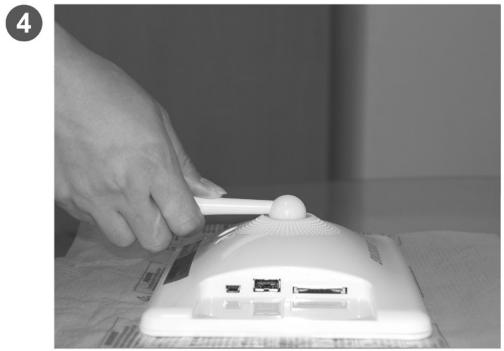
natural_image
Hand using a power tool to press or install a white electronic device on a surface (no visible text or symbols)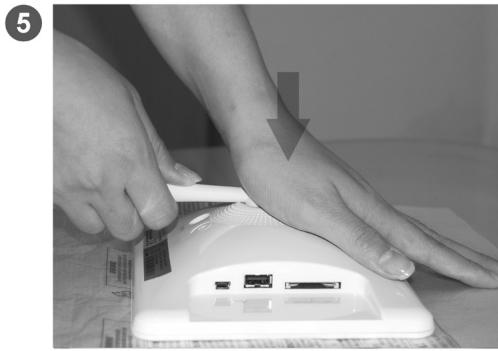
natural_image
Close-up of hands using a medical or electronic device to address the foot with a visible card and ports (no text or symbols)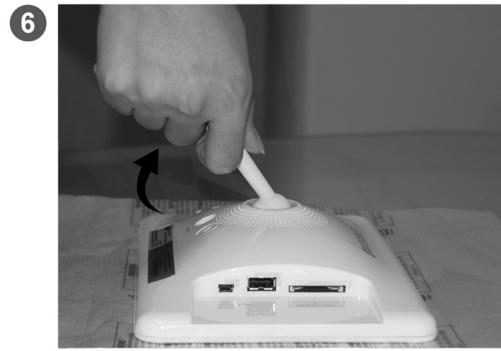
natural_image
Hand inserting a cable into a white wireless router device (no visible text or symbols)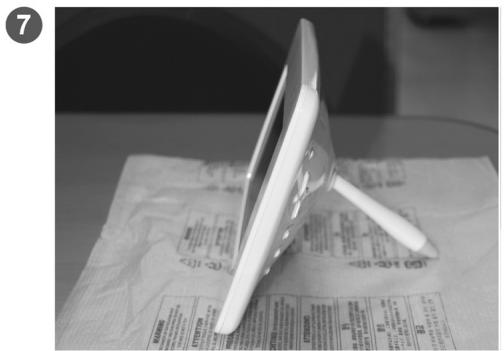
natural_image
White electronic device with a tripod stand placed on a printed surface, no visible text or symbols.
natural_image
Black and white circular diagram with a hand holding a pipette over a dome-shaped object, no text or symbols present.SAMSUNG