
BT DRIVE FREE 111 - Bluetooth hands-free kit BLAUPUNKT - Free user manual and instructions
Find the device manual for free BT DRIVE FREE 111 BLAUPUNKT in PDF.



| Product Type | Bluetooth Hands-free Kit |
| Brand | BLAUPUNKT |
| Model | BT Drive Free 111 |
| Bluetooth Technology | Bluetooth 1.2, ISM band 2.4 GHz, 79 frequencies, 1600 hops/s |
| Bluetooth Profiles | Headset and Hands-free Profile |
| Range | 10 meters (class II) |
| Dimensions (main unit) | 115 x 45 x 15 mm |
| Weight (main unit) | 61 g |
| Battery | Lithium-ion 3.7 V, 650 mAh, replaceable (compatible with Nokia BL-5B) |
| Charging time | Less than 3 hours |
| Talk time | Up to 10 hours |
| Standby time | Up to 400 hours |
| Power (charger) | 5 V - 6 V DC, 300 mA (12 V DC vehicle adapter and USB cable included) |
| Mounting | Clip for attachment to sun visor |
| Main functions | Answer call, end call, redial last number, volume adjustment, microphone mute, call transfer, reset |
| LED indicator | Blue and red: on, flashing or off depending on state (power on, standby, communication, charging, etc.) |
| Volume adjustment | + and - keys during a call |
| Microphone mute (Mute) | MODE key: press to mute/unmute the microphone |
| Call transfer | To phone: press + and - simultaneously; to kit: press MFB |
| Reset | In standby mode, press + and - for 10 s until red/blue flashing, then press + and - for 2 s until two beeps |
| Safety | Do not open, do not expose to moisture or excessive heat, use the provided charger |
| Maintenance | Protect from shocks, moisture and extreme temperatures; clean with a dry cloth |
| Spare parts | Commercially available Nokia BL-5B compatible battery |
| Warranty | Manufacturer's warranty for EU; terms at www.blaupunkt.com |
| Declaration of conformity | Compliant with Directive 1999/5/EC; available at www.blaupunkt.com |
Frequently Asked Questions - BT DRIVE FREE 111 BLAUPUNKT
User questions about BT DRIVE FREE 111 BLAUPUNKT
0 question about this device. Answer the ones you know or ask your own.
Ask a new question about this device
Download the instructions for your Bluetooth hands-free kit in PDF format for free! Find your manual BT DRIVE FREE 111 - BLAUPUNKT and take your electronic device back in hand. On this page are published all the documents necessary for the use of your device. BT DRIVE FREE 111 by BLAUPUNKT.
USER MANUAL BT DRIVE FREE 111 BLAUPUNKT
Installation and Sonnenblende
Bluetooth technology. 12
Safety and general information 13
Disposal notes 13
Scope of delivery 13
Overview 14
Replacing the battery. 15
Installation at the sun visor. 15
Switching BT Drive Free 111 on/off 16
Pairing (connecting) with the cell phone. 16
Re-pairing. 17
Exiting the connection to the cell phone. 17
Using the BT Drive Free 111. 17
Resetting the BT Drive Free 111. 18
LED indicators. 19
Declaration of conformity. 19
Warranty 20
Troubleshooting 20
Technical data. 20
BT Drive Free 111
This hands-free system designed specifically for users who prefer the freedom of wireless communication. This device can be used as a conference or office equipment as well as in the car. With an improved microphone system and D.S.P. technology for echo and noise reduction, it achieves an excellent voice communication quality.
Bluetooth technology
Bluetooth TM is a registered trademark of Bluetooth SIG, Inc. Bluetooth is a wireless communication technology with short range. It enables wireless connections between Bluetooth devices, such as mobile phones, Personal Digital Assistants (PDA), desktop and laptop computers, input/output devices (mouse, keyboard, printer) and household appliances.
Bluetooth refers to a worldwide standard for operating on the internationally recognised ISM frequency band (Industrial Scientific & Medical). Within the ISM band (2.4 GHz to 2.48 GHz), the Bluetooth transmission operates 1,600 times per second between 79 separate frequencies with a data transmission range of approx. 10 metres (Class II).
Safety and general information
- Carefully read the operating instructions and follow the instructions.
- To avoid any damages, do not drop the device from an elevated height.
- Protect the device against humidity, water and other liquids. If it cannot be avoided, do not use the device until it is completely dry; otherwise, it may result in injuries or lead to short circuits and damages that can no longer be repaired.
- Do not expose the device to extreme heat or direct sunlight (this may lead to damages that cannot be repaired).
- Do not attempt to open the device or perform any modifications. It will immediately void the warranty.
- Do not place any heavy objects on the device.
- Use only the supplied charger.
- Repairs may be performed only by the manufacturer.
- If the device is not used for an extended period of time, disconnect it from the mains charger; or in case of thunder and lightning, switch the device completely off.
Disposal notes

Use the return and collection systems available to dispose of the old device.
Do not discard any batteries in the household trash; instead, return them to the corresponding collection sites.
Scope of delivery
The scope of delivery includes:
BT Drive Free 111
- 12-volt DC vehicle charger adapter
Lithium-ion battery
USB charger cable
- Operating instructions
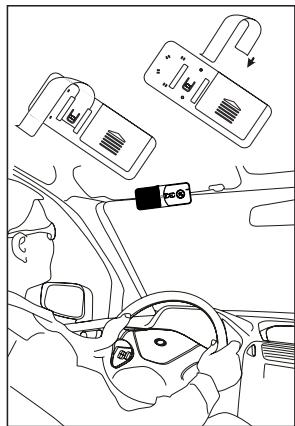
Mounting clip for sun visor
Overview
Follow the following steps for simple operation:
- Completely charge the BT Drive Free 111 before using it for the first time. The regular charging time is approx. 3 hours.
- For the pairing (connecting with the cell phone), both devices should be located within one metre of each other (the closer, the better).
- When using the BT Drive Free 111, the cell phone must be located within approx. 10m .
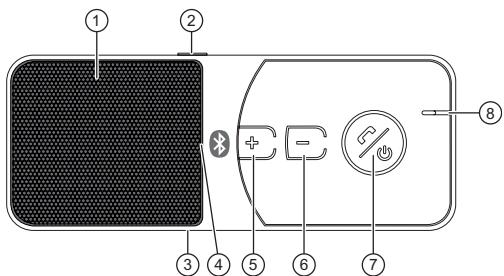
① Loudspeaker
② MODE button (muting)
③ Charging socket (5-pin mini USB)
4 LED
⑤ Increase volume (V + )
Decrease volume (V-)
MFB button (multifunction button)
⑧ Microphone
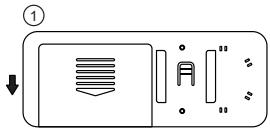
Replacing the battery
The device is operated with a battery that is identical with Nokia BL-5B.
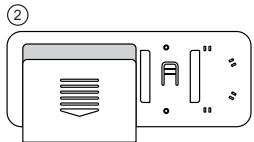
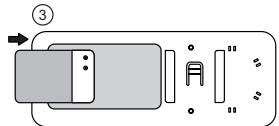
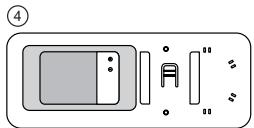
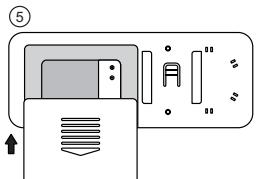
Installation at the sun visor
Switching BT Drive Free 111 on/off
Switch-on: With switched-off device.
Hold the MFB button pressed for approx. 3 seconds until you hear a short sound. The blue LED is on for 3 seconds.
Switch-off: The device is in standby mode (switched on).
Hold the MFB button pressed for approx. 3 seconds until you hear a long sound. The red LED is on for 3 seconds. Afterwards, the device is switched off.
IMPORTANT: After every switch-on, briefly press the MFB button again to establish the connection. The initial pairing is described below.
Pairing (connecting) with the cell phone
Before you can use the BT Drive Free 111, you must connect it with the respective Bluetooth-ready cell phone (pairing). The following steps explain the general procedure for pairing.
The distance between the two devices must be less than 1 metre.
- The BT Drive Free 111 must be switched off.
- Hold the MFB button pressed for approx. 6 seconds until you hear a long sound. The LED starts to alternately flash red and blue.
- Activate the Bluetooth function on your cell phone and look for "Audio accessories". (For further details, please read the operating instructions your cell phone.)
- Select "BT DF 111" from the displayed list.
Upon request to enter the PIN code, enter "0000" and confirm with "OK". After successful pairing, you will hear a long sound and the LED is on for approx. 3 seconds. The device is now in standby mode, which is indicated every 3 seconds by the blue LED flashing briefly. (Note: The PIN code is preprogrammed and cannot be changed).
- The range between cell phone and the device is limited to 10m . The shorter the distance, the better the connection.
IMPORTANT: If the pairing is not completed within 2 minutes, the LED goes out and the device switches off again. In this case, start the pairing from the beginning.
Re-pairing
After successful pairing, the BT Drive Free 111 is in standby mode. Before making a phone call, ensure that the headphone icon on the display of your cell phone is displayed, otherwise proceed as follows:
- On the cell phone: In the Bluetooth menu, select "Paired devices", followed by "BT Speaker" or "BT Drive Free 111".
- On the BT Drive Free 111: Briefly press the MFB button and confirm (accept) it on your cell phone.
IMPORTANT: Always perform this brief activation if the headphone icon is not shown (e.g. after extended switch-off of one of the devices or if you were outside the range). (If your device supports automatic connection, briefly pressing the MFB button is sufficient.)
Exiting the connection to the cell phone
If you want to connect the BT Drive Free 111 with other cell phones, you must first disconnect this connection.
- Switch off the BT Drive Free 111.
- Select "Disconnect" on your cell phone.
IMPORTANT: If the connection is lost, the BT Drive Free 111 sends three sounds every minute. After 10 minutes, the BT Drive Free 111 completely switches off.
Using the BT Drive Free 111
After the pairing has been successfully performed and the battery has been charged, the following functions can be performed:
- Call answering
To answer a call, briefly press the MFB button or the answer button of your cell phone.
Ending a call
Briefly press the MFB button or the end button of your cell phone.
Rejecting a call
Hold the MFB button pressed for approx. 3 seconds until you hear a short sound.
Redialing the last number
In standby mode, press the MFB button twice.
- Setting the volume
During a call, repeatedly press the "+" or "-" button on the BT Drive Free 111.
- Mute on/off
To mute the microphone, press the MODE button. The red LED starts flashing.
To switch the microphone on again, press the MODE button again.
Call transfer
From BT Drive Free 111 to cell phone: During a phone call, press the volume buttons + / - at the same time to transfer the call to the cell phone.
From cell phone to BT Drive Free 111: Press the MFB button and the call is transferred.
Resetting the BT Drive Free 111
To reset the device to factory settings, proceed as follows:
- The BT Drive Free 111 must be in standby mode.
- Press the volume buttons +/- at the same time for approx. 10 seconds until the LED alternately flashes red and blue.
Press the two volume buttons again at the same time for approx. 2 seconds until two short sounds are emitted and the LED stops flashing. The BT Drive Free 111 switches off and the factory settings are restored. - After resetting the device and switching it on again, the red LED flashes every 3 seconds and 3 sounds are emitted every minute. This is normal and ends again with the next pairing.
LED indicators
| Device status | Red LED | Blue LED | Sounds |
| OFF mode | Off | Off | |
| Switching on | On for 3 sec. | Short sound | |
| Switch-off | On for 3 sec. | Long sound | |
| Standby before pairing | Flashes every 3 sec. | 3 sounds every minute | |
| Standby after pairing | Flashes every 3 sec. | ||
| Standby – battery nearly depleted | Flashes every 3 sec. | 3 sounds every minute | |
| During a call | Flashes every 15 sec. | ||
| During pairing | Flashes alternately | ||
| Pairing terminated | Flashes every 3 sec. | Long sound | |
| Mute | Constantly on | ||
| While charging | Constantly on | ||
| Charging complete | Off | Off | |
Declaration of conformity
The Blaupunkt AudioVision GmbH & Co. KG declares that this product complies with the basic requirements and the other relevant regulations of the directive 1999/5/EC. The declaration of conformity can be found on the Internet under www.blaupunkt.com.
Warranty
We provide a manufacturer's warranty for products bought within the European Union. For devices purchased outside the European Union, the warranty terms issued by our respective responsible domestic agency are valid. The warranty terms can be called up from www.blaupunkt.com.
Troubleshooting
If a connection between BT Drive Free 111 and cell phone cannot be established, try the following first:
- Check whether the devices are connected (paired).
- Ensure that the Bluetooth function is activated on your cell phone.
- Check whether the distance between the devices is less than 10m or whether walls or other electronic devices are located between them. If necessary, shorten this distance.
- Should none of these steps be successful, remove the battery from the BT Drive Free 111 for approx. 2 minutes.
- If none of these measures is successful, please contact the service department of your distributor.
Technical data
| Bluetooth technical data | Compatible with version 1.2 |
| Supported Bluetooth profile | Profiles for headphones and hands-free systems |
| Frequency range Operating range | 2.4 GHz spectrum, 10 metres (Class 2) |
| Dimensions (main device) | 115 (L) x 45 (W) x 15 (D) mm |
| Weight (main device) | 61 g |
| Charging time | Less than 3 hours |
| Talk time | Up to 10 hours |
| Standby operating time | Up to 400 hours |
| Battery | Lithium-lon 3.7 V; 650 mAh removable (BL-B5 compatible) |
| Charger | 5 V - 6 V DC, 300 mA |
Subject to change!
Table des matieres
BT Drive Free 111. 21
Technologie Bluetooth 21
Trocar accumulator 42
Instalacao na pala. 42
Ligar/desligar o BT Drive Free 111.43
Conectare/deconnectare BT Drive Free 111 97
Conectare/deconnectare BT Drive Free 111
BkIIOUbaHe/N3KJIIOUbaHe Ha BT Drive Free 111
BkIOUOBAHe: Pp n 3KIOUeH anapat.
HaTNCHe MHOFOyHKUOHaHnH6byoN (MFB) npu6n. 3sdoKaTo cyteKpaTbK cunHaJcHnATCBTOIDCBETn NOCTOHHo 3a 3 s.
Изклioьанe:AnapatbTe bpezm"rotobhoct"(Standby)(Вклioчeн).
HATiSchHe MHOOfoYHKUMOHaJIHnIg 6yToH (MFB) npu6I.3 s,doKato yyeTe npoDbIjNkTIenEn CunHAI. HcpBeHNIT cBeTOnIOd CBETN NOCTOARHNO 3a 3 s. CneI ToBAnapatbIc Te izKlnOuBa.
BAXHO:Bcekn bTcIe BkIOUbaHe HATICKAte MHOROFOHyKNUHOAHNIA 6y-TOH (MFB) Kpatko OSe BeHNbZ, 3a Da n3rpaDnte Bp3kata. TpbBOHaayHnTo Cb5pBaHe (Pairing) e OniCAHO no-dOny.
Cbpb3BaHe (Pairing) c mo6nne TeneoH
Ppea da npiCTbNTne KbM h3nOPIBaHa NT Bt Drive Free 111, Tp6Ba da ro CbpbjTe cBcCbOTBeTHNa MoIbnHeTaleHOn C Bluetooth (Pairing). CpeBaunite etanu 06aHOBAR oBuHAnHOTPOUeDInaPn e ChbPb3Aae (Pairing).
- Pa3ctoHHeTo Mekdy DbaTa anapaTa Tp86Ba da e no-MaIko ot 1 m.
- AnapatbT BT Drive Free 111tpra6Ba da e n3KlnoueH.
- Hataichihe MeHOrOdyuHKUIOHOAHNH6 8yToH (MFB) pN6b.6s,doKaTO cytepeIbJxNtEnen CnHAn. CBeToDnOdbT 3aNoCb Da mHa rPeDyBaKn YepBeHo nCnHb.
Cera aktnbiparate Bleuoth yhknuieta Ha Baunna Mo6nien H Tepeoh n TbpceTe "Aynio pnpHaBnEKnHcOnTn. (3a cIeTa npOyehTe B PbKOBOCTBO 3a pa60ta Ha BaunnaT M6nien TeneoH). - Ot noka3aHnT cnncbK n36epeTe "BT DF 111".
-ПиИЗСКВае 3a ВьБжДан ha PIN kOД, ВьБeДeTe "0000"и roNotврдeTe c "OK".СnéДус néшно CBvрзВае (Pairing) учate eudin proDobJxKITENeH CnHAnI n CBTOДоНь CBETN NOCTHNO np6Ib.3S.Cera anaparTb ce HaMina B pexIM "TOTOBHocT" (Standby), Koeto ce uHdInkaPpe3 BCuKHTe 3 sЧчe3 кратКМогАн ha CnHЯ CBTOДоИ. (3aБeNEЖka: PIN kOДt e nporpmaipan ПпeВарNTeHNo и He мочда ACEпомEHn). - Paɪnúcβt ḤádèiCTBmE MækjU Mó6bɪŋHɪ TeneΦoHɪ Ḍaɪpʌtə t e Orρaɪnɪe H a MaKc. 10 m. KoɪkOTO pa3ctɔrHmEto e N-o-Maɪko, TɔlɪKOBa Bpɜkata e nO-dO6pa.
BAXHO: AкоCBp3BAHeto (Pairing) He 3abbpin B pAMKITE ha 2 min, CBtoIIOdbT n3racBa anapaTb Ce n3KIOUba OTHOBO. B To3n cnyaua 3aOpHete OTHaQuo CBp3BAHeto (Pairing).
IopHOBeNo Cbbp3BaHe
Cne ycneho CbP3BaHe (Pairing) anapatBT Drive Free 11 e B pexm "rotobnoct" (Standby). Ppei da npoBedepe paoBop no Tenefoha ce ybepe, Ye cmbonT cnuwaIka ce nok3aHa hncnner Ha Baunr Mobnien TenefoH, B npotBEN cnuay noc7bnete KAKTO cneBa:
Моблиен Teleфон: Изберете в мени癫痫病 "Свьрэн anapatу" и там Изберетe "BT Speaker", pecn. "BT Drive Free 111".
BT Drive Free 111:HaTnchete KpaTko MHOrOfoHyKnUHOHAnHn6yToH (MFB) nOTBbPdTe (npneMeTe) ToBa Ha BaunrMoBuInen TelefoH.
BAXKHO: IpaBeTe TOBa KpTaKO aKTbINbPaHe BnHaRn, KORATo cUMBOJbT CNYaANKaHc Ce NOKa3Ba (HAPr. Cnpd bIbIro N3KIOUbAbe Ha eDyHt O anapatITE, pecn. KORato Te ca 6bnu IN3bHbN 6bxAT). AKO BaWnIa TAnapat Tp8Ba Da noDnOMORHe ABOTMaTHUO PeNCTPnPAhe, DocTaTbHc EeNO KpTaKO HAtNCsKeHae MHOrOfoHyKzIOHOAHnHn6byT0M(FB).
PpIKIIOUBaHe Ha CBbP3BaHeTo C Mo6nIeH TeJeO
Korato nkaTe da cBpKeTe anapata BT Drive Free 111 c dpyrMo6nHn TeneoHn, pBPO TpA6Ba da npEkbChete cbseCTbYBaaTa Bpb3Ka.
-Изклioуete anapata BT Drive Free 111.
- N36epete "PpeKbcBaHe Na Bpb3kata" Ha Baunia Mo6nien TeeneoH.
BAXHO: Ako b3kata ce panahe, anapatbBT BT Drive Free 111 npedaba BcKa Mnyta 3 CnHana. Cnel 10 MNHynt anapatbBT BT Drive Free 111 ce n3KJIOvBA HnblHO.
U3noJ3BaHe Ha BT Drive Free 111
Korato Cbpr3baHeTo (Pairing) e 3abBpwnIO ycneHNO n akymyIaTOpbt e 3apeH, MoKeJa ce ocBsqctBBABat cneHNte fHKn:
- PpneMaHe Ha NOBnKBaHe
3aДапемете NOBUKBAHe,HaTUCHETe KpaTko MHOrofoyHKUOHaHINH 6yToH (MFB) INI 6yToHa 3a OTBapAne Ha BaSIna MObIne TenefoH.
- PpNKIOUbaHe Ha 06aKaHaTeO
HaTNCHe T KpATKO MHOrOfoYHKUHOHANHn6bTOH (MFB) nIN 6yToHa 3a 3aTbApHe Ha Ba7nMo6uHEn TelefoH.
- OTKa3BaHe Ha NOBnKBaHeTo
HaTnCHeTe 3a npi6b. 3 s MHOyHKuHOHaHnIg 6yToH (MFB),doKaTo cyYe eEIN KpaTbK CunHAn.
-Повторецнаи36иразецныпослдногHomep
B pexim "rotoboct" (Standby) HATINCHTe DBA NbTu MHOROyHKUHOHAN HN 6yToH (MFB).
HactpoBaHe Ha cunata Ha 3Byka
Поваме наразвора натусятЕ мhorokратою "+",пес".-"на.apараз BT Drive Free 111.
BknIOUbaHe/u3KNIIOUbaHe Ha 3Byka (Mute)
3a da n3KJIQUHTe MKNpOfoHa, HATncHete 6yToHa PEXIM (MODE). YepBeHnrt CBeTOndoD 3AnOuBa da Mra.
3aДаВКЛIOчNTe OTHOB MINKPpOfoHa,HaTUCHETe OTHOB6yToHa PEXIM (MODE).
PpexBpIneHa pa3roBopa
OT anapata BT Drive Free 111 KbM MO6HNNH TelenΦOH: NO bPeme Ha TelenΦHHNpaTASOBROPATINCHETe eHNOBPEMeHHO 6bTyOHNTa 3a CnIATA Na 3bYka +/-, 3a da npexBbPJIneTAPAOBROPA KbM MO6HNNH TelenΦOH.
OTMo6uHnIaTeNoH KbMa npapata BT Drive Free 111:HaTncHeMe MHorOfHyHKuHOHaHnIg 6yToH (MFB) n pa3roBopbt Ce npexBbPna.
Hynipane ha BT Drive Free 111
3a BpTaHe KbM 3aBOcknTe HaCTpoKn NocTbNeTe KaKTo CneDbA:
- AnapaTbT BT Drive Free 111 Tpr6Ba da e b pexim "rotoboct" (Standby).
HaTnchete eHOBpeMeHHo 6yToHHe 3a CnIaTa Ha 3Byka +/− 3a npIn6b. 10s,doKaTO CBTeOIODbT 3anOpHe da Mrra peDyBaIK N cepBEno n CnHbO.
Cera haTncheTe OTHOBO dBaTa 6yToHa 3a cInata Ha 3Byka 3a np6bn.2 s DOKATO npo3BvUAT 2 kpatKn CnHnAa n CBeTOIObDt pIeCTaHe da Mmra. AnapatbT BT Drive Free 111 ce n3KlIOuBa n 3aBoDcKnte HAcTPOKnCe Bb3CTAOHBBArOTHOBO. - Cnied HynipaHe HA anapata npn pnoHOBeHTo BKNUbaHe YpeBHeNHT CBtOndIO MIna H BceKn 3 s u BCsKa MmHyTa npo3ByuBaBat 3 cInrHa. ToBa e HOpMaHNo H ue npKJIOu npn cneBdaQTO CbP3BaAe (Pairing).
CbeToaNoaHn HnKauHH
3aana3eHNO npaBO 3a n3MeHeHnI!
FCC-Statements
All following FCC statements are valid for the Industry Canada Standard (IC) as well.
1. General
Interference Warning: (according to FCC part 15.19)
This device complies with Part 15 of the FCC Rules. Operation is subject to the following two conditions:
(1) this device may not cause harmful interference, and
(2) this device must accept any interference received, including interference that may cause undesired operation
Caution: (pertaining to FCC part 15.21)
Modifications not expressly approved by this company could void the user's authority to operate the equipment.
- Installation and Sonnenblende
- BT Drive Free 111
- Bluetooth technology
- Safety and general information
- Disposal notes
- Scope of delivery
- Overview
- Replacing the battery
- Installation at the sun visor
- Switching BT Drive Free 111 on/off
- Pairing (connecting) with the cell phone
- Re-pairing
- Exiting the connection to the cell phone
- Using the BT Drive Free 111
- Resetting the BT Drive Free 111
- Declaration of conformity
- Warranty
- Troubleshooting
- Table des matieres
- Conectare/deconnectare BT Drive Free 111
- BkIIOUbaHe/N3KJIIOUbaHe Ha BT Drive Free 111
- Cbpb3BaHe (Pairing) c mo6nne TeneoH
- IopHOBeNo Cbbp3BaHe
- PpIKIIOUBaHe Ha CBbP3BaHeTo C Mo6nIeH TeJeO
- U3noJ3BaHe Ha BT Drive Free 111
- Hynipane ha BT Drive Free 111
- FCC-Statements
- General
Brand : BLAUPUNKT
Model : BT DRIVE FREE 111
Category : Bluetooth hands-free kit