
ACP414 - Air conditioner BLAUPUNKT - Free user manual and instructions
Find the device manual for free ACP414 BLAUPUNKT in PDF.


| Product Type | Portable Air Conditioner |
| Brand | Blaupunkt |
| Model | ACP414 |
| Cooling Capacity | 12000 BTU/h |
| Power Supply | 220-240V ~ 50Hz |
| Rated Power Input | 1200 W |
| Dimensions (W x D x H) | 35 x 30 x 70 cm |
| Net Weight | 25 kg |
| Refrigerant | R290 (Propane) |
| Dehumidification | Yes, up to 1.5 L/h |
| Air Flow Rate | 400 m³/h |
| Noise Level | ≤ 55 dB(A) |
| Timer | 24-hour programmable timer |
| Remote Control | Included, with LCD display |
| Modes | Cool, Fan, Dehumidify, Sleep, Auto |
| Filter | Washable, easy access |
| Maintenance | Clean filter every 2 weeks |
| Safety Features | Overheat protection, auto restart |
| Repairability | Spare parts available via authorized service |
| Warranty | 2 years |
Frequently Asked Questions - ACP414 BLAUPUNKT
User questions about ACP414 BLAUPUNKT
0 question about this device. Answer the ones you know or ask your own.
Ask a new question about this device
Download the instructions for your Air conditioner in PDF format for free! Find your manual ACP414 - BLAUPUNKT and take your electronic device back in hand. On this page are published all the documents necessary for the use of your device. ACP414 by BLAUPUNKT.
USER MANUAL ACP414 BLAUPUNKT
Enjoy it.

Important notes
| Symbol | Alert typeSymbol | Description | |
 Caution: risk of fireAlert type: WARNING-Description:This symbol indicates that the device contains flammable refrigerant. A fire hazard exists if the refrigerant leaks and comes into contact with an external ignition source. Caution: risk of fireAlert type: WARNING-Description:This symbol indicates that the device contains flammable refrigerant. A fire hazard exists if the refrigerant leaks and comes into contact with an external ignition source. |  | NOTE | This symbol indicates the need to read the instructions manual carefully. |
 | NOTE | This symbol indicates that a service specialist should perform the required works in accordance with the installation manual. | |
 | NOTE | This symbol indicates that information is available in the instructions manual or installation manual. |
- Store the device in a room where there are no permanent ignition sources (e.g., operating gas equipment) and ignition sources (e.g., operating electric heater).
- Store the device in a way that prevents mechanical damage. Do not pierce or expose to fire.
- Any person involved in servicing or working on a refrigerant circuit should have a current valid certificate issued by an accredited organisation that confirms their qualifications regarding the safe handling of refrigerants according to requirements. Servicing works must be performed only according to the device manufacturer's guidelines.
- Maintenance or repair works that require the assistance of other trained personnel should be performed under the supervision of a person competent in the use of flammable refrigerants. Before performing any works on circuits containing
flammable refrigerants, it is essential to perform a safety inspection to minimise ignition risks. Works should be performed according to a control procedure to minimise the risk of flammable gas or vapours being present during the works. All maintenance personnel and other persons working in the vicinity must be instructed in the nature of the work. Avoid working in confined spaces. Isolate the area around the workplace. Ensure that the area has been inspected by means of the control of flammable materials.
Refrigerant may be odourless. The device contains a determined amount (in grams) of R290 refrigerant (see the nameplate). R290 is a refrigerant that meets the requirements of the European directives concerning environmental protection. Do not pierce any element of the refrigerant circuit. When installing, operating or storing the device in a place without adequate ventilation, the room must be designed in such a way that no refrigerant will accumulate (in case of leakage). Refrigerant accumulation can cause a fire or explosion due to the presence of electric heaters, stoves or other sources of ignition. Transport of equipment containing flammable refrigerant: see transport regulations. Equipment symbol designation: see local regulations. Disposal of equipment containing flammable refrigerant: see national regulations. Equipment/devices storage: store in compliance with the manufacturer's guidelines. Storage of packed (unsold) equipment: The protective packaging of stored equipment should prevent the refrigerant from leaking in case of mechanical damage to the
equipment. The maximum number of items of equipment to be stored together is specified in local regulations.
To achieve the utmost in enjoyment and performance, and in order to become familiar with its features, please read this manual carefully before attempting to operate this product.
Before using this device read the instruction manual and follow the instructions inside. The manufacturer is not liable for any damages caused by the misuse of this device due to inappropriate handling. Please keep this manual for future reference.
- This device is for domestic use only. Do not use it for any other purposes.
- The device should only be connected to an earthed socket with values corresponding to those on the rating label.
- It is necessary to check that the total current consumption of all devices plugged into the wall outlet does not exceed the fuse rating in the circuit.
- If you are using an extension cord, make sure that the total power consumption of the equipment plugged into the extension cord does not exceed the extension cord's power rating. Extension cords should be arranged in such a way as to avoid tripping hazards.
- Make sure the cable is grounded, with 3 cores, a socket, and an earth cable.
- Do not let the cord hang over the edge of a counter or touch any hot surface.
- The device is not designed to be controlled via an external timer, separate remote control, or other equipment that can turn the device on automatically.
- Before maintenance work, always disconnect the unit from the power supply.
- When unplugging the power cord from the electrical outlet, hold it by the plug only and remove the plug carefully. Never pull the cable, as it may cause damage to the plug or power cord.
- Damage to the power cord or plug can lead to an electrocution hazard.
- Never leave the product connected to the power source without supervision.
- Never put the power cable, the plug, or the whole device into water or any other liquids.
- The device should be cleaned regularly, complying with the recommendations described in the section on cleaning and maintenance.
- Do not place the device near sources of heat, flame, an electric heating element, or a hot oven. Do not place it on any other device.
- This equipment can be used by children aged 8 years and over, as long as supervision is provided. People with reduced physical or mental capabilities, as well as people with no previous experience of using this equipment, must be supervised and made aware of the risks. The instruction manual should be used as a reference for the safe use of this equipment. Children should not play with the equipment.
• Children without ensured supervision should not be allowed to perform the cleaning and maintenance of equipment.
• Additional precautions should be taken when using this device in the presence of children or pets. Do not allow children to play with the device.
- Never use the product close to combustibles.
- Never expose the product to atmospheric conditions such as direct sunlight or rain, etc. Never use the product in humid conditions (like bathroom or camping house).
• The power cable should be periodically checked for damage.
- If the power cable is damaged, the product should be taken to a professional service location to be fixed or replaced to prevent any hazards from arising.
- Never use the product with a damaged power cable or if it was dropped or damaged in any other way or if it does not work properly. Do not try to repair the defective product by yourself as it can lead to electric shock. Always return the damaged device to a professional service in order to repair it.
- All repairs should only be performed by authorized service professionals. Any attempted unauthorized repairs performed can be a hazard to the user.
- Only original accessories should be used, as well as accessories recommended by the manufacturer. Using accessories which are not recommended by the manufacturer may result in damage to the device and may render the device unsafe for use.
- The air-intake and outlet ventilation grilles should be cleaned on a regular basis.
- Do not cover the unit or the ventilation grilles. Do not place any objects on the unit.
- Do not use the unit near solvents, paints, insecticides, or any other chemicals.
- Do not place or use the unit in areas where it could be exposed to water, e.g., near showers, bathtubs, washbasins, etc.
- Do not tilt the unit if you suspect that there is any water in the water tank.
- Place the unit on a surface with a load-carrying capacity of at least 40 kg.
• Do not use the unit in spaces smaller than 10 m².
• Do not insert any objects into the inlet or outlet grilles. - Do not direct the air flow towards animals or plants. - The water which accumulates in the air conditioner is unsuitable for consumption (it is highly demineralised). It should be discharged into the waste-water system. • The unit can be used at temperatures 5-35°C. - Before the first use, remove all protective elements such as cardboard, foil, and foamed polystyrene. - Wait at least 3 hours before switching on the unit following transportation, or if it has been turned upside down (i.e. placed in non-vertical position).
C6 Conformity
Hereby, Bláupunkt Competence Center 2N-Everpol Sp. z o.o., declares that this equipment is in compliance with the essential requirement and other relevant provisions of Directive 2014/53/EU. Declaration of conformity can be obtained from the product page at www.blaupunkt.com.
Responsible party: 2N-Everpol Sp. z o.o, Puławska 403A, 02-801 Warsaw, Poland, Phone: +48 22 688 08 00, E-mail: info@everpol.pl

When this crossed-out wheeled bin symbol is attached to a product it means that the product is covered by the European Directive 2012/19/EU. Please inform yourself about the local separate collection system for electrical and electronic products. Used appliance should be delivered to the dedicated collecting points due to hazardous components, which may affect the environment. Do not dispose this appliance In the common waste bin.
Environmental information
All unnecessary packaging has been omitted. We have tried to make the packaging easy to separate into three materials: cardboard (box), polystyrene foam(buffer) and poly ethylene (bags, protective foam sheet). Your system consists of material which can be recycled and reused if disassembled by a specialized company. Please observe the local regulations regarding the disposal of packaging materials, exhausted batteries and old equipment.

Your products is designed a manufactured with high quality materials and components, which can be recycled and reused.
TECHNICAL SPECIFICATIONS
Cooling capacity: 4100 W / 14k BTU
High energy efficiency, EER 2.6, energy class A
Air flow: 390 m³/h
Dehumidification efficiency: 1.8 l/h
Max noise level: LPA: 56 dB, LWA: 65 dB
Rated power (energy consumption): 1560 W
Power supply: 220-240V~50Hz
Permissible excessive operating pressure for suction: 0.7 Mpa
Maximum allowable pressure: 3.2 Mpa
WiFi transmitter frequency range: 2.400 to 2.4835 GHz
WiFi transmitter power: ≤17.5 dBm
CONTROL PANEL DESCRIPTION
- Control panel
1.1 On/Off switch (POWER)
1.2 MODE button
1.3 Operating mode indicator
1.4 NIGHT MODE button
1.5 Decrease button (temperature or timer value)
1.6 SWING button – automatic oscillating change of air direction
1.7 Button for air volume control (SPEED)
1.8 Fan speed and Wi-Fi network indicators
1.9 Timer setting button
1.10 Increase button (temperature or timer value)
1.11 Display
- Air supply
- Front panel
- Air intake grille with filter
- Handles
- Air exhaust
- Water drain with plug
- Wheels
PREPARING THE APPLIANCE FOR OPERATION
The air conditioner requires air to be vented to the outside of the room being cooled. Connect the exhaust air pipe to the air conditioner, direct the other end to the outside through a tilt window or to a ventilation grille prepared for this purpose. Take care to keep the outlet pipe as short as possible. Note that the discharge pipe heats up and the heat will stay in the room. If necessary, use a longer heat removal pipe. It is advisable to use insulation such as cladding the pipe with wool or polystyrene.
The air conditioner does not normally require installing a condensate drainage pipe. In very high humidity conditions, or if you want to dehumidify the air in the room, this solution may be recommended. The water should be discharged using a hose to a drain to the sewage system. The water will be heavily demineralised and is not suitable for drinking or watering plants.
Place the air conditioner in a location where the air flow will not be blocked. Leave at least 50 cm of free space around the air conditioner. Pay particular attention to curtains and other textiles so that they do not restrict the airflow. Do not place the air conditioner near heat sources, in direct sunlight, in places subject to vibration and shock, in dusty rooms, inside pieces of furniture that could restrict air flow and on uneven surfaces.
Install an air discharge pipe. Connect the tube to the connector. At the other end, screw the fixing to the window seal.
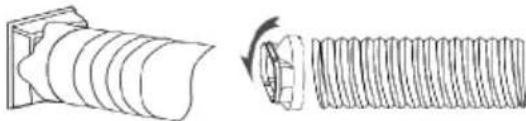
Place the discharge pipe in the window, then stretch it so that it reaches the air conditioner. Avoid kinks and angles on the pipe. Reduction in airflow will result in a decrease in the unit's performance.
DEVICE OPERATION
- Connect the appliance to the power source.
- Switch on the air conditioner using the POWER switch (1.1)
- Select the operating mode between cooling, dehumidification, fan by pressing the MODE selection button (1.2).
- To adjust the direction of the airflow, select the SWING fan function by pressing the oscillation button (1.6) and switch it off again by pressing the button when the grille is in the expected position.
- Set the expected temperature using the up and down arrow keys (1.10, 1.5).
- The blowing force can be changed by pressing the SPEED blowing control button (1.7).
- Timer function:
Activating the TIMER mode when the unit is switched off sets the number of hours after which the unit will switch on.
Activating the TIMER mode when the unit is switched on sets the number of hours after which the unit will switch off.
The timer is set using the up and down arrow keys (1.10, 1.5) after pressing the timer button (1.9).
When the TIMER function is set, the unit will enter the off/on timer mode. In this mode, the air conditioner will operate according to the selected setting.
To switch the timer off, set the timer value to 00 or press the POWER switch (1.1).
- Night mode function:
When this mode is activated, the air conditioner raises the target temperature by one degree after 1 hour, and by another degree after the next.
- NOTE: the air conditioner has an automatic defrost function. If the automatic defrost mode is activated, the fan will run and the power on indicator will flash. Once the defrosting process is complete, the air conditioner will resume operation.
- If the condensate drip tray overflows, the unit will stop operation. Disconnect the air conditioner from the power supply and then place a vessel under the water drain. Remove the plug and wait for the water to drain. Then plug the drain hole again. Do not tilt the air conditioner during this operation as water may spill out of the drip tray.
- You can connect a condensate drainage pipe. It should be connected to the upper drain hole. Ensure that the pipe slopes steadily towards the external vessel or drain grille.

RESETTING THE APPLIANCE SETTINGS AND ESTABLISHING A NEW CONNECTION
To connect the device to the local WiFi network, reset the WiFi connection settings. The device should be in sleep mode. Press the "TIMER" buttons and hold for about 5 seconds. When the WiFi LED will flash quickly, the appliance will be ready to search. CAUTION: the appliance operates only with 2.4 GHz wireless networks. The network should use WPA2-PSK encryption and AES protocol.
CONNECTING THE APPLICATION WITH THE APPLIANCE USING WIFI AND BLUETOOTH
Press the "add device" button after starting the application. The appliance should be found after about 15 seconds. Press the button to continue adding. Select the available WiFi network and enter the appropriate password. Press the button to continue. After a while, a message indicating that the appliance has been added correctly should be displayed.
CONNECTING THE APPLICATION WITH THE APPLIANCE USING WIFI
Press the "add device" button after starting the application. In the "Add manually" section, select the product group "small appliances..." and then the "air conditioner". Then select the available WiFi network and enter the appropriate password. The application should disconnect from the current WiFi network, connect with the appliance and provide configuration parameters. The application should return to the previous network. After a while, a message indicating that the appliance has been added correctly should be displayed.

CLEANING AND MAINTENANCE
Before you start cleaning the product, ensure that it has been disconnected from the power supply and has fully cooled down.
Keep the inlet and outlet openings free of dust. Clean the outer surface of the unit with a slightly damp cloth, and then wipe it dry.
The water tank should be cleaned on a regular basis with a sponge and dishwashing liquid, then rinsed and wiped dry, again with the sponge.
Clean the air filter on a regular basis.
RESETTING DEVICE SETTINGS AND CREATING A NEW CONNECTION
CLEANING AND MAINTENANCE
RESETTING THE DEVICE AND CREATING A NEW CONNECTION.
CLEANING AND MAINTENANCE
RESETTING DEVICE SETTINGS AND CREATING A NEW CONNECTION
CLEANING AND MAINTENANCE
RESETTING THE DEVICE AND CREATING A NEW CONNECTION
CLEANING AND MAINTENANCE
RESETTING DEVICE SETTINGS AND CREATING A NEW CONNECTION
To connect the device to a local WiFi network, you must reset the WiFi connection settings. The device should be in standby mode. Press the "TIMER" buttons for about 5 seconds. The WiFi LED will blink rapidly, and the device is ready for search. NOTE: The device works only with 2.4 GHz wireless networks. The network should use WPA2-PSK encryption and AES protocol.
CONNECTING THE APP TO THE DEVICE VIA WIFI AND BLUETOOTH
After launching the app, press the "add device" button. After about 15 seconds, the device will be recognized. Press the button to continue the process. Then select the available WiFi network and enter the corresponding password. Press the button to continue. After a short time, you should see a message that the device was successfully added.
CONNECTING THE APP TO THE DEVICE VIA WIFI
CLEANING AND MAINTENANCE
Before cleaning the device, make sure it is unplugged and has completely cooled down.
The air inlet and outlet openings must be free of dust. Gently wipe the device with a damp cloth and then dry it.
The water tank should be regularly wiped with a sponge with a little dishwashing detergent, then rinsed and dried.
The air filter should be cleaned regularly.
Caution: risk of fire Symbol: WARNING… EXPLANATIONS:
RESETTING THE DEVICE SETTINGS AND CREATING A NEW CONNECTION
CLEANING AND MAINTENANCE
RESETTING THE DEVICE SETTINGS AND CREATING A NEW CONNECTION
- Place the unit on a surface with a load-carrying capacity of at
least 40 kg.
RESETTING THE DEVICE SETTINGS AND CREATING A NEW CONNECTION
CLEANING AND MAINTENANCE
Before you start cleaning the product, ensure that it has been disconnected from the power supply and has completely cooled down.
02-801 Warsaw, Poland
phone: +48 22 688 08 00
e-mail: info@everpol.pl
www.blaupunkt.com
In case of questions or problems
Please contact our service.
Tel. 00 48 22 688 08 33
E-mail: sda@blaupunkt.pl
All rights reserved. All brand names are registered trademarks of their
respective owners. Specifications are subject to change without prior notice.
Enjoy it.



- C6 CONFORMITY
- ENVIRONMENTAL INFORMATION
- TECHNICAL SPECIFICATIONS
- CONTROL PANEL DESCRIPTION
- PREPARING THE APPLIANCE FOR OPERATION
- DEVICE OPERATION
- RESETTING THE APPLIANCE SETTINGS AND ESTABLISHING A NEW CONNECTION
- CONNECTING THE APPLICATION WITH THE APPLIANCE USING WIFI AND BLUETOOTH
- CONNECTING THE APPLICATION WITH THE APPLIANCE USING WIFI
- CLEANING AND MAINTENANCE
- RESETTING DEVICE SETTINGS AND CREATING A NEW CONNECTION
- RESETTING THE DEVICE AND CREATING A NEW CONNECTION
- CONNECTING THE APP TO THE DEVICE VIA WIFI AND BLUETOOTH
- CONNECTING THE APP TO THE DEVICE VIA WIFI
- RESETTING THE DEVICE SETTINGS AND CREATING A NEW CONNECTION
Brand : BLAUPUNKT
Model : ACP414
Category : Air conditioner