
EI-YP322 - Joystick SAMSUNG - Free user manual and instructions
Find the device manual for free EI-YP322 SAMSUNG in PDF.

 FR
FR
 BG
BG
 CS
CS
 DA
DA
 DE
DE
 EL
EL
 EN
EN
 ES
ES
 ET
ET
 FI
FI
 HU
HU
 IT
IT
 KK
KK
 KO
KO
 LT
LT
 LV
LV
 NL
NL
 NO
NO
 PL
PL
 PT
PT
 RO
RO
 RU
RU
 SK
SK
 SL
SL
 SV
SV
 TR
TR
 UK
UK
 ZH
ZH
| Product type | Game controller (Joystick) |
| Brand | Samsung |
| Model | EI-YP322 |
| Power supply | 2 AAA batteries (non-rechargeable) |
| Connectivity | Bluetooth 4.x (2.4 GHz) |
| Bluetooth range | Up to 10 m (without obstacles) |
| Compatibility | Bluetooth-compatible mobile devices, Gear VR (sold separately) |
| Main functions | Action buttons, L/R triggers, analog stick, menu button, Bluetooth pairing |
| Indicator light | LED: blue flashing (connected), red (low battery), red-green-blue (pairing) |
| Care and cleaning | Clean with a soft, dry cloth. Do not use abrasive products. |
| Safety | Do not expose to moisture. Use only recommended batteries. Do not disassemble. |
| Spare parts and repairability | Contact a Samsung service center for any repairs. |
| Included accessories | Game controller, quick start guide |
| Dimensions (estimated) | Approximately 140 x 90 x 50 mm |
| Weight (estimated) | Approximately 150 g (without batteries) |
Frequently Asked Questions - EI-YP322 SAMSUNG
User questions about EI-YP322 SAMSUNG
0 question about this device. Answer the ones you know or ask your own.
Ask a new question about this device
Download the instructions for your Joystick in PDF format for free! Find your manual EI-YP322 - SAMSUNG and take your electronic device back in hand. On this page are published all the documents necessary for the use of your device. EI-YP322 by SAMSUNG.
USER MANUAL EI-YP322 SAMSUNG
Please read this manual before using the device to ensure safe and proper use.
- Images may differ in appearance from the actual product. Content is subject to change without prior notice.
- Before using the gamepad, make sure the mobile device you want to connect to is compatible with this gamepad.
Instructional icons

Warning: situations that could cause injury to yourself or others

Caution: situations that could cause damage to your device or other equipment

Notice: notes, usage tips, or additional information
Getting started
Package contents
Check the product box for the following items:
- Gamepad
- Quick start guide

- The items supplied with the device and any available accessories may vary depending on the region or service provider.
- The supplied items are designed only for this device and may not be compatible with other devices.
- Appearances and specifications are subject to change without prior notice.
- You can purchase additional accessories from your local Samsung retailer. Make sure they are compatible with the device before purchase.
- Use only Samsung-approved accessories. Using unapproved accessories may cause the performance problems and malfunctions that are not covered by the warranty.
- Availability of all accessories is subject to change depending entirely on manufacturing companies. For more information about available accessories, refer to the Samsung website.
Device layout
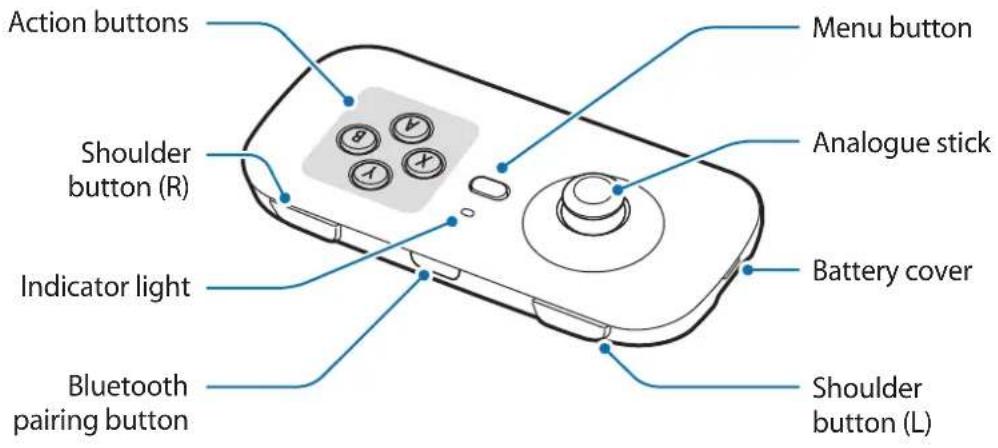
Buttons
| Name Function | |
| Action buttons | Press to perform certain actions specified in games. |
| Shoulder button (R) / Shoulder button (L) | Press to perform certain actions specified in games. |
| Bluetooth pairing button | Press and hold for approximately three seconds to enter Bluetooth pairing mode. |
| Menu button | When the connected mobile device is attached to the Gear VR:Press to open the Universal menu on the Gear VR.Press and hold to display the pop-up window to access the Oculus Home screen on the Gear VR. |
| Analogue stick | Move the cursor or control directions in games.Press to perform certain actions specified in games. |
Indicator light
The indicator light alerts you to the gamepad's status.
| Colour Status | |
| Red → Green → Blue | Bluetooth pairing mode |
| Flashing blue three times | Connected to a mobile device via Bluetooth |
| Off | During use or in sleep mode |
| Flashing red | The battery is low. |
Installing the batteries
Insert batteries before using the gamepad. When the indicator light flashes red, replace the batteries.

Do not recharge the provided batteries.
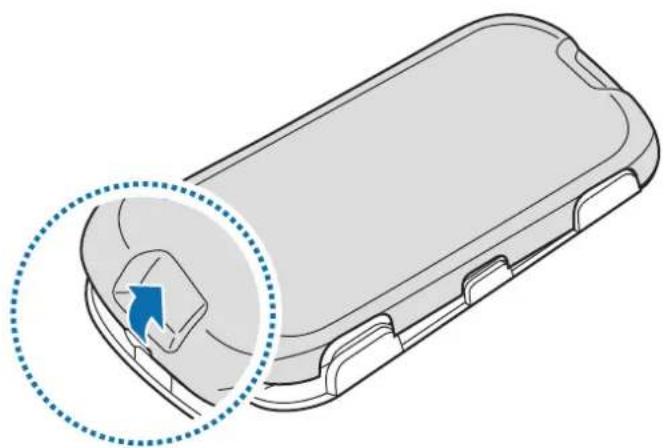
1 Remove the battery cover from the back of the gamepad.
natural_image
Diagram of a smartphone rear panel with a highlighted circular component and blue arrow indicating rotation (no text or symbols)
Be careful not to damage your fingernails when you remove the battery cover.

Do not bend or twist the battery cover excessively. Doing so may damage the cover.
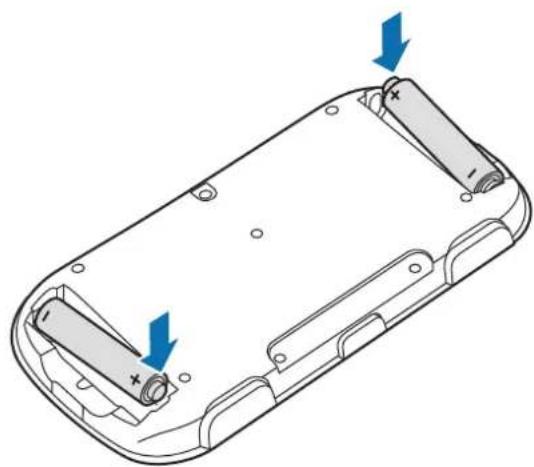
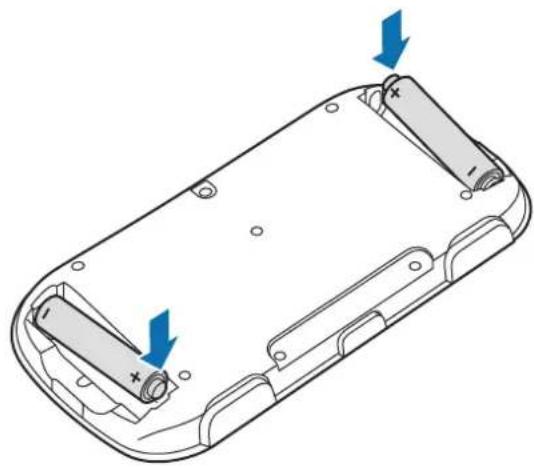
2 Insert AAA batteries with the positive and negative terminals properly aligned with the + and - symbols on the gamepad.
natural_image
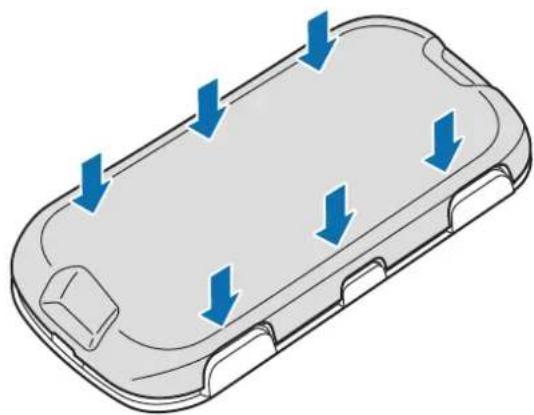
Diagram of a device casing with two blue arrows indicating directional changes (no text or symbols present)3 Reattach the battery cover to the back of the gamepad.
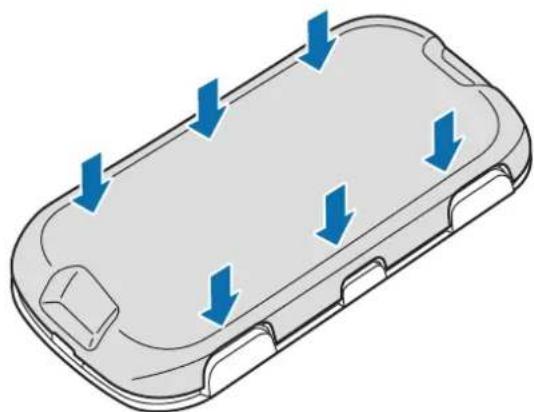
Place the cover on the back of the gamepad and press the edges together to reassemble the gamepad.
natural_image
3D diagram of a mobile phone casing with blue directional arrows indicating flow or movement (no text or symbols)Using the gamepad
Connecting devices via Bluetooth
To use the gamepad, pair it with a mobile device. When the devices are paired, the gamepad will try to connect to the mobile device whenever you press the Bluetooth pairing button.
1 Gamepad Press the Bluetooth pairing button to enter Bluetooth pairing mode.
The indicator light will flash red, green, and blue.

- When you insert batteries into the gamepad, it enters Bluetooth pairing mode automatically.
- When the gamepad is not connected with other mobile devices for more than three minutes, the gamepad will enter sleep mode.
2 Mobile device Activate the Bluetooth feature and search for Bluetooth devices.
For more information, refer to the mobile device's user manual.
3 Mobile device Tap Gamepad for Gear VR (0000) from the list of available devices.
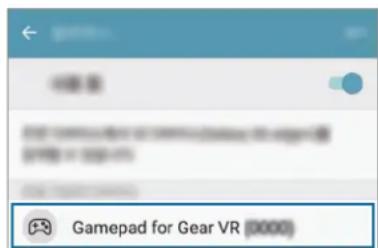

- The PIN for the headset is the four-digit number in parenthesis displayed on the mobile device's Bluetooth settings screen. The number differs depending on the gamepad.
- If the Bluetooth connection fails or the mobile device cannot locate the gamepad, remove the device's information from the mobile device's list. Then, try to connect again.
Disconnecting or reconnecting devices
If the gamepad and the mobile device are not kept within the Bluetooth connection range (10 m), the devices will be disconnected. To connect the devices again, bring the devices closer together and then press the Bluetooth pairing button on the gamepad.

- If the batteries are removed from the gamepad or the Bluetooth feature is deactivated in the mobile device, the devices will be disconnected. When you reinsert batteries or activate the Bluetooth feature, the devices will be connected again.
- If the Bluetooth connection is lost due to a problem with the connected mobile device, access the Bluetooth menu on the mobile device to pair the devices again.
Connecting to other mobile devices
After disconnecting the gamepad and the mobile device, you can connect the gamepad to other mobile devices.
1 Press and hold the Bluetooth pairing button for approximately three seconds to enter Bluetooth pairing mode.
The gamepad and the mobile device will be disconnected and the gamepad will enter Bluetooth pairing mode.
2 Connect the gamepad to the other mobile device.
Notices for using Bluetooth
Bluetooth is a wireless technology standard that uses a 2.4 GHz frequency to connect to various devices over short distances. It can connect and exchange data with other Bluetooth enabled devices, such as mobile devices, computers, printers, and other digital home appliances, without connecting via cables.
- To avoid problems when connecting your gamepad to another device, place the devices close to each other.
-
Ensure that your gamepad and the other Bluetooth device are within the Bluetooth connection range (10 m). The distance may vary depending on the environment the devices are used in.
-
Ensure that there are no obstacles between the gamepad and a connected device, including human bodies, walls, corners, or fences.
- Do not touch the Bluetooth antenna of a connected device.
- Bluetooth uses the same frequency as some industrial, scientific, medical, and low power products and interference may occur when making connections near these types of products.
- Some devices, especially those that are not tested or approved by the Bluetooth SIG, may be incompatible with your gamepad.
- Do not use the Bluetooth feature for illegal purposes (for example, pirating copies of files or illegally tapping communications for commercial purposes).
Using the gamepad
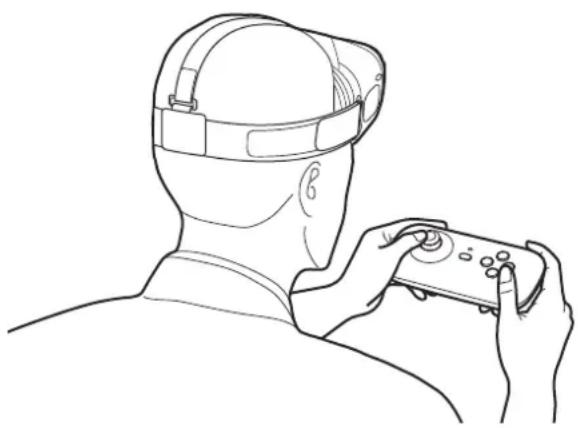
Enjoy the games on the connected mobile device using the buttons and analogue stick on the gamepad. When you attach a mobile device to the Gear VR, you can enjoy the VR games.

- The gamepad does not have a power on/off function. If the gamepad is not used for a specified period, it will enter sleep mode.
• The Gear VRs are sold separately.
natural_image
Line drawing of a person wearing a headlamp and holding a controller (no text or symbols)Storing the gamepad
You can keep the gamepad attached to the Gear VR when you are not using it.
Remove the front cover of the Gear VR, hold the gamepad with the front facing the Gear VR, and then attach the gamepad to the Gear VR as shown in the image below.
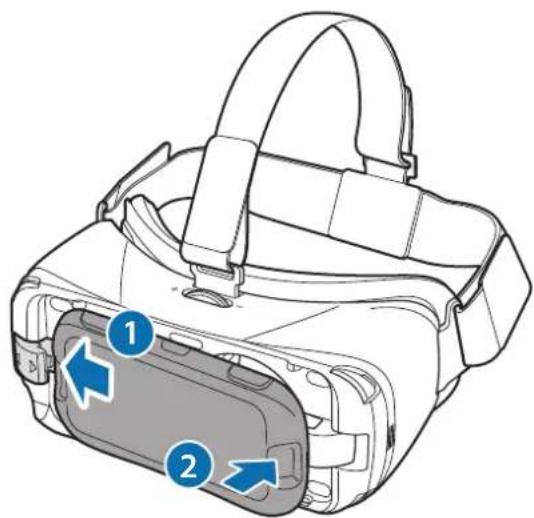

Attach the gamepad to the Gear VR properly. If it is not securely attached, the gamepad may accidentally separate from the Gear VR and be damaged.
Appendix
Troubleshooting
Before contacting a Samsung Service Centre, please attempt the following solutions.
Your gamepad cannot be used
When the batteries are completely discharged, your gamepad cannot be used. Replace the batteries.
Your gamepad freezes
Press and hold the Bluetooth pairing button for approximately three seconds to enter Bluetooth pairing mode. When the gamepad enters Bluetooth pairing mode, connect the devices again, and then check the operation of the gamepad.
If the problem is still not resolved, contact a Samsung Service Centre.
Another Bluetooth device cannot locate your gamepad
- Ensure that your gamepad is in Bluetooth pairing mode.
- Ensure that your gamepad and the other Bluetooth device are within the Bluetooth connection range (10 m).
If the problem is still not resolved, contact a Samsung Service Centre.
Your gamepad cannot connect to another Bluetooth device
- Ensure that your gamepad and the other Bluetooth device are within the maximum Bluetooth range (10 m).
- On the device you want to connect with, disconnect all paired devices and try to connect again.
Bluetooth connection is often disconnected
- If there are obstacles between the devices, the operating distance may be reduced.
- Ensure that your gamepad and the other Bluetooth device are within the maximum Bluetooth range (10 m).
- When using the gamepad with other Bluetooth devices, the connection may be affected by electromagnetic waves. Use the gamepad in environments with fewer wireless devices present.
The gamepad works differently as described in the manual
Available functions may differ depending on the connected device.
Copyright
Copyright © 2016 Samsung Electronics
This manual is protected under international copyright laws.
No part of this manual may be reproduced, distributed, translated, or transmitted in any form or by any means, electronic or mechanical, including photocopying, recording, or storing in any information storage and retrieval system, without the prior written permission of Samsung Electronics.
Trademarks
• SAMSUNG and the SAMSUNG logo are registered trademarks of Samsung Electronics.
- Bluetooth ^ is a registered trademark of Bluetooth SIG, Inc. worldwide.
• All other trademarks and copyrights are the property of their respective owners.
natural_image
Diagram of a mobile phone casing with a highlighted internal component (no text or symbols)
natural_image
Diagram of a battery pack with two arrows indicating direction of movement (no text or symbols present)natural_image
3D diagram of a mobile phone casing with blue directional arrows indicating flow or movement (no text or symbols)natural_image
Line drawing of a person wearing a VR headset and holding a game controller (no text or symbols)
Copyright © 2016 Samsung Electronics
natural_image
Diagram of a smartphone case with a highlighted circular component and blue arrow indicating rotation (no text or symbols)
natural_image
Technical line drawing of a device casing with two blue arrows indicating directional changes (no text or symbols present)natural_image
3D diagram of a mobile phone casing with blue directional arrows indicating flow or movement (no text or symbols)Gamepad verwenden
natural_image
Line drawing of a person wearing a headlamp and holding a controller (no text or symbols)Gamepad aufbewahren

Copyright © 2016 Samsung Electronics
natural_image
Diagram of a mobile phone casing with a highlighted internal component and blue arrow indicating rotation (no text or symbols)
natural_image
Diagram of a battery pack with two arrows indicating direction of movement (no text or symbols present)natural_image
3D diagram of a mobile phone casing with blue directional arrows indicating flow or movement (no text or symbols)natural_image
Line drawing of a person wearing a headlamp and holding a controller (no text or symbols)
Copyright © 2016 Samsung Electronics
natural_image
Diagram of a mobile phone casing with a highlighted internal component (no text or symbols)
natural_image
Diagram of a battery pack with two arrows indicating direction of movement (no text or symbols present)natural_image
3D diagram of a device casing with blue directional arrows indicating flow or movement (no text or symbols)Utilizar el mando
Conectarse a dispositivos mediante Bluetooth
natural_image
Line drawing of a person wearing a head-mounted device, viewed from behind (no text or symbols)Guardar el mando

Copyright © 2016 Samsung Electronics
natural_image
Diagram of a mobile phone casing with a highlighted internal component (no text or symbols)
natural_image
Technical line drawing of a battery pack with two blue arrows indicating direction (no text or symbols)natural_image
3D diagram of a mobile phone casing with blue directional arrows indicating flow or movement (no text or symbols)natural_image
Line drawing of a person wearing a head-mounted VR headset, holding a controller (no text or symbols)
Copyright © 2016 Samsung Electronics
natural_image
Diagram of a mobile phone casing with a highlighted internal component and a blue arrow indicating rotation (no text or symbols present)
natural_image
Diagram of a battery pack with two arrows indicating direction of movement (no text or symbols present)natural_image
3D diagram of a mobile phone casing with blue directional arrows indicating flow or movement (no text or symbols)Korzystanie z pada
natural_image
Line drawing of a person wearing a head-mounted device, viewed from behind (no text or symbols)Przechowywanie pada

Copyright © 2016 Samsung Electronics
natural_image
Diagram of a mobile phone casing with a highlighted internal component and blue arrow indicating rotation (no text or symbols)
natural_image
Diagram of a battery pack with two arrows indicating direction of movement (no text or symbols present)natural_image
3D diagram of a smartphone casing with blue directional arrows indicating flow or movement (no text or symbols)natural_image
Line drawing of a person wearing a cap and holding a game controller (no text or symbols)
natural_image
Diagram of a mobile phone casing with a highlighted internal component and blue arrow indicator (no text or symbols)
natural_image
Technical line drawing of a device casing with two blue arrows indicating directional changes (no text or symbols present)natural_image
3D diagram of a mobile phone casing with blue directional arrows indicating flow or movement (no text or symbols)natural_image
Line drawing of a person wearing a headlamp and holding a controller (no text or symbols)
Copyright © 2016 Samsung Electronics
natural_image
Diagram of a smartphone case with a highlighted internal component and a blue arrow indicating rotation (no text or symbols present)
natural_image
Technical line drawing of a battery pack with two arrows indicating direction (no text or symbols)3 Ponovno pričvrstite poklopac baterije na stražnji dio igraćeg kontrolera.
natural_image
3D diagram of a smartphone casing with blue directional arrows indicating flow or movement (no text or symbols)natural_image
Line drawing of a person wearing a headlamp and holding a controller (no text or symbols)Pohranjivanje igraćeg kontrolera
Kada ga ne koristite, možete ostaviti igraći kontroler pričvršćen s uređajem Gear VR.
Uklonite prednji poklopac uređaja Gear VR, držite igraći kontroler tako da je prednja strana okrenuta prema uređaju Gear VR, a zatim pričvrstite igraći kontroler na uređaj Gear VR kao što je prikazano na narednoj slici.
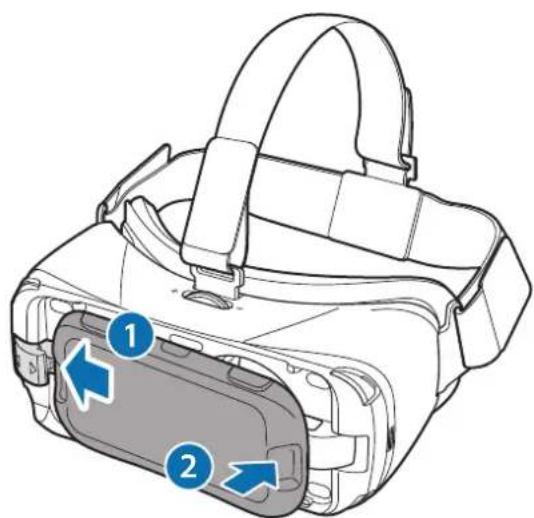

Pravilno pričvrstite igraći kontroler na uređaj Gear VR. Ako nije pravilno pričvršćen, igraći kontroler može se slučajno odvojiti od uređaja Gear VR i oštetiti.
Dodatak
Rješavanje problema
Copyright © 2016 Samsung Electronics
natural_image
Diagram of a smartphone case with a highlighted internal component and a blue arrow indicating rotation (no text or symbols present)
Vodite računa da prilikom skidanja poklopca baterije ne oštetite nokte.

Ne savijajte i ne uvrćite poklopac baterije preterano. To može da dovede do oštećenja poklopca.
natural_image
Technical line drawing of a battery pack with two arrows indicating direction (no text or symbols)3 Ponovo stavite poklopac baterije na poledinu gejmpeda.
Stavite poklopac na poleđinu gejmpeda i pritisnite ivice zajedno da biste ponovo sklopili gejmped.
natural_image
3D diagram of a smartphone casing with blue directional arrows indicating flow or movement (no text or symbols)Korišćenje gejmpeda
Povezivanje uređaja preko „Bluetooth“ funkcije
natural_image
Line drawing of a person wearing a headlamp and holding a controller (no text or symbols)Čuvanje gejmpeda

Pravilno spojite gejmped na „Gear VR“. Ako nije čvrsto spojen, gejmped može slučajno da se odvoji od „Gear VR“-a i da se ošteti.
Dodatak
Rešavanje problema
Copyright © 2016 Samsung Electronics
Ovaj priručnik je zaštićen međunarodnim zakonima o autorskim pravima.
Nijedan deo ovog priručnika se ne sme reprodukovati, distribuirati, prevoditi niti prenositi ni u jednom obliku niti bilo kojim putem, elektronskim niti mehaničkim, što podrazumeva fotokopiranje, snimanje i skladištenje u okviru bilo kog skladišta informacija i sistema za preuzimanje, bez prethodne dozvole kompanije Samsung Electronics u pisanom obliku.
Trgovačke marke
- SAMSUNG i SAMSUNG logotip su registrovane trgovačke marke kompanije Samsung Electronics.
- Bluetooth® je registrovana trgovačka marka kompanije Bluetooth SIG, Inc. širom sveta.
- Sve ostale trgovačke marke i autorska prava su vlasništvo njihovih vlasnika.
Leia primeiro
natural_image
Diagram of a mobile phone casing with a highlighted internal component and blue arrow indicating rotation (no text or symbols)
natural_image
Diagram of a battery pack with two arrows indicating direction of movement (no text or symbols present)natural_image
3D diagram of a device casing with blue directional arrows indicating flow or movement (no text or symbols)Utilizar o comando
natural_image
Line drawing of a person wearing a headlamp and holding a controller (no text or symbols)Guardar o comando

Copyright © 2016 Samsung Electronics
Este manual está protegido pelas leis internacionais de copyright.
natural_image
Diagram of a smartphone case with a highlighted internal component and a blue arrow indicating rotation (no text or symbols present)
natural_image
Technical line drawing of a battery pack with two arrows indicating direction (no text or symbols)natural_image
3D diagram of a mobile phone casing with blue directional arrows indicating flow or movement (no text or symbols)natural_image
Line drawing of a person wearing a headlamp and holding a controller (no text or symbols)
natural_image
Diagram of a mobile phone casing with a highlighted internal component and blue arrow indicating rotation (no text or symbols)
natural_image
Technical line drawing of a battery pack with two arrows indicating direction (no text or symbols)natural_image
3D diagram of a smartphone casing with blue directional arrows indicating flow or movement (no text or symbols)natural_image
Line drawing of a person wearing a headlamp and holding a controller (no text or symbols)
natural_image
Diagram of a mobile phone casing with a highlighted internal component and blue arrow indicating rotation (no text or symbols)
natural_image
Technical line drawing of a battery pack with two arrows indicating direction (no text or symbols)natural_image
3D diagram of a mobile phone casing with blue directional arrows indicating flow or movement (no text or symbols)natural_image
Line drawing of a person wearing a head-mounted device, viewed from behind (no text or symbols)Mängupuldi hoiustamine

Copyright © 2016 Samsung Electronics
natural_image
Diagram of a mobile phone case with a highlighted internal component and blue arrow indicating rotation (no text or symbols present)
natural_image
Diagram of a battery pack with two arrows indicating direction of movement (no text or symbols present)natural_image
3D diagram of a mobile phone casing with blue directional arrows indicating flow or movement (no text or symbols)natural_image
Line drawing of a person wearing a VR headset and holding a game controller (no text or symbols)De gamepad opbergen

Copyright © 2016 Samsung Electronics
natural_image
Diagram of a mobile phone casing with a highlighted internal component and blue arrow indicating rotation (no text or symbols)
natural_image
Diagram of a device casing with two battery cells and directional arrows indicating movement (no text or symbols)natural_image
3D diagram of a smartphone casing with blue directional arrows indicating flow or movement (no text or symbols)natural_image
Line drawing of a person wearing a headlamp and holding a controller (no text or symbols)
Copyright © 2016 Samsung Electronics
natural_image
Diagram of a smartphone rear panel showing a blue arrow pointing to the internal component (no text or symbols present)
Vær forsiktig så du ikke skader fingerneglene dine når du tar av batteridekselet.

Ikke bøy eller vri batteridekselet unødvendig. Dette kan føre til skader på dekselet.
2 Sett inn AAA-batteriene med den positive polen og den negative polen i overensstemmelse med pluss- og minussymbolene i spillkontrollen.
natural_image
Technical line drawing of a battery pack with two arrows indicating direction (no text or symbols)natural_image
3D diagram of a smartphone casing with blue directional arrows indicating flow or movement (no text or symbols)natural_image
Line drawing of a person wearing a headlamp and holding a controller (no text or symbols)Oppbevare spillkontrollen

Copyright © 2016 Samsung Electronics
natural_image
Diagram of a mobile phone casing with a highlighted internal component and blue arrow indicator (no text or symbols)
natural_image
Technical line drawing of a battery pack with two arrows indicating direction (no text or symbols)natural_image
3D diagram of a smartphone casing with blue directional arrows indicating flow or movement (no text or symbols)natural_image
Line drawing of a person wearing a headlamp and holding a controller (no text or symbols)
Copyright © 2016 Samsung Electronics
natural_image
Diagram of a smartphone rear panel showing a blue arrow pointing to the internal component (no text or symbols present)
natural_image
Diagram of a battery pack with two arrows indicating direction of movement (no text or symbols present)3 Monter batterilåget på din gamepads bagside igen.
natural_image
3D diagram of a smartphone casing with blue directional arrows indicating flow or movement (no text or symbols)Brug af din gamepad
natural_image
Line drawing of a person wearing a headlamp and holding a controller (no text or symbols)Opbevaring af din gamepad

natural_image
Diagram of a smartphone case with a highlighted internal component and blue arrow indicating rotation (no text or symbols present)
natural_image
Technical line drawing of a battery pack with two blue arrows indicating direction (no text or symbols)natural_image
3D diagram of a mobile phone casing with blue directional arrows indicating flow or movement (no text or symbols)natural_image
Line drawing of a person wearing a headlamp and holding a controller (no text or symbols)
natural_image
Diagram of a smartphone case with a highlighted internal component and a blue arrow indicating rotation (no text or symbols present)
natural_image
Technical line drawing of a device casing with two battery cells and directional arrows indicating movement (no text or symbols)natural_image
3D diagram of a mobile phone casing with blue directional arrows indicating flow or movement (no text or symbols)natural_image
Line drawing of a person wearing a head-mounted device, viewed from behind (no text or symbols)
natural_image
Diagram of a mobile phone casing with a highlighted circular component and blue arrow indicating rotation (no text or symbols)
Pri odstraňovaní krytu batérií dávajte pozor, aby ste si neporanili nechty.

natural_image
Diagram of a battery pack with two arrows indicating direction of movement (no text or symbols present)natural_image
Diagram of a smartphone casing with blue directional arrows indicating flow or movement (no text or symbols)natural_image
Line drawing of a person wearing a cap and holding a game controller (no text or symbols)
Copyright © 2016 Samsung Electronics
natural_image
Diagram of a mobile phone casing with a highlighted internal component and arrow indicator (no text or symbols)
natural_image
Technical line drawing of a battery pack with two blue arrows indicating direction (no text or symbols)natural_image
3D diagram of a device casing with blue directional arrows indicating flow or movement (no text or symbols)Používání gamepadu
natural_image
Line drawing of a person wearing a head-mounted device, viewed from behind (no text or symbols)Skladování gamepadu

Copyright © 2016 Samsung Electronics
natural_image
Diagram of a mobile phone casing with a highlighted internal component and blue arrow indicating rotation (no text or symbols)
natural_image
Technical line drawing of a device casing with battery terminals and directional arrows indicating movement (no text or symbols)natural_image
3D diagram of a mobile phone casing with blue directional arrows indicating flow or movement (no text or symbols)natural_image
Line drawing of a person wearing a head-mounted device, holding a controller (no text or symbols)Oyun pedini saklama

Telif hakkı © 2016 Samsung Electronics
natural_image
Diagram of a mobile phone casing with a highlighted internal component and blue arrow indicating rotation (no text or symbols present)natural_image
Technical line drawing of a device casing with two blue arrows indicating directional changes (no text or symbols present)natural_image
3D diagram of a mobile phone casing with blue directional arrows indicating flow or movement (no text or symbols)natural_image
Line drawing of a person wearing a headlamp and holding a controller, viewed from behind (no text or symbols)natural_image
Line drawing of a VR headset with blue directional arrows indicating movement or flow (no text or symbols)natural_image
Diagram of a mobile phone casing with a highlighted internal component (no text or symbols)natural_image
Technical line drawing of a device casing with two blue arrows indicating directional changes (no text or symbols present)natural_image
3D diagram of a mobile phone casing with blue directional arrows indicating flow or movement (no text or symbols)natural_image
Line drawing of a person wearing a headlamp and holding a game controller (no text or symbols)natural_image
Line drawing of a VR headset with blue directional arrows indicating movement or force (no text or symbols)Copyright © 2016 Samsung Electronics
olerance that is in the
natural_image
Diagram of a smartphone rear panel with a highlighted circular component and blue arrow indicating rotation (no text or symbols)
natural_image
Technical line drawing of a device casing with two blue arrows indicating fasteners or battery positions (no text or symbols present)natural_image
3D diagram of a mobile phone casing with blue directional arrows indicating flow or movement (no text or symbols)natural_image
Line drawing of a person wearing a headlamp and holding a controller (no text or symbols)Хранение геймпада

© Samsung Electronics, 2016.
natural_image
Diagram of a mobile phone casing with a highlighted internal component and a blue arrow indicating rotation (no text or symbols present)
natural_image
Technical line drawing of a battery pack with two blue arrows indicating direction (no text or symbols)natural_image
3D diagram of a device casing with blue directional arrows indicating flow or movement (no text or symbols)natural_image
Line drawing of a person wearing a headlamp and holding a controller (no text or symbols)Зберігання геймпада

© Samsung Electronics, 2016
natural_image
Diagram of a mobile phone casing with a highlighted internal component and a blue arrow indicating rotation (no text or symbols present)
natural_image
Technical line drawing of a battery pack with two arrows indicating direction (no text or symbols)natural_image
3D diagram of a mobile phone casing with blue directional arrows indicating flow or movement (no text or symbols)Геймпадты пайдалану
natural_image
Line drawing of a person wearing a headlamp and holding a controller (no text or symbols)Геймпадты сактау

Copyright © 2016 Samsung Electronics
Please read this manual before using the device to ensure safe and proper use.
- Images may differ in appearance from the actual product. Content is subject to change without prior notice.
- Before using the gamepad, make sure the mobile device you want to connect to is compatible with this gamepad.
Instructional icons

Warning: situations that could cause injury to yourself or others

Caution: situations that could cause damage to your device or other equipment

Notice: notes, usage tips, or additional information
Getting started
Package contents
Check the product box for the following items:
- Gamepad
- Quick start guide

- The items supplied with the device and any available accessories may vary depending on the region or service provider.
- The supplied items are designed only for this device and may not be compatible with other devices.
- Appearances and specifications are subject to change without prior notice.
- You can purchase additional accessories from your local Samsung retailer. Make sure they are compatible with the device before purchase.
- Use only Samsung-approved accessories. Using unapproved accessories may cause the performance problems and malfunctions that are not covered by the warranty.
- Availability of all accessories is subject to change depending entirely on manufacturing companies. For more information about available accessories, refer to the Samsung website.
Device layout
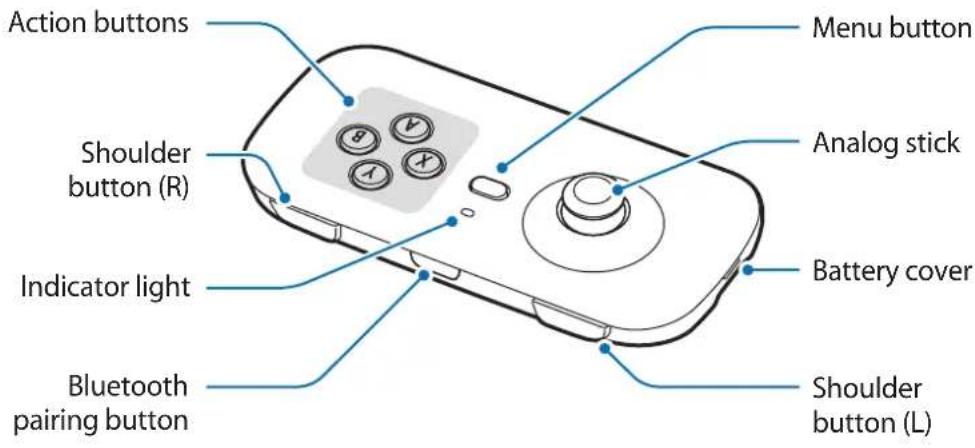
Buttons
| Name Function | |
| Action buttons | Press to perform certain actions specified in games. |
| Shoulder button (R) / Shoulder button (L) | Press to perform certain actions specified in games. |
| Bluetooth pairing button | Press and hold for approximately three seconds to enter Bluetooth pairing mode. |
| Menu button | When the connected mobile device is attached to the Gear VR:Press to open the Universal menu on the Gear VR.Press and hold to display the pop-up window to access the Oculus Home screen on the Gear VR. |
| Analog stick | Move the cursor or control directions in games.Press to perform certain actions specified in games. |
Indicator light
The indicator light alerts you to the gamepad's status.
| Color Status | |
| Red → Green → Blue | Bluetooth pairing mode |
| Flashing blue three times | Connected to a mobile device via Bluetooth |
| Off | During use or in sleep mode |
| Flashing red | The battery is low. |
Installing the batteries
Insert batteries before using the gamepad. When the indicator light flashes red, replace the batteries.

Do not recharge the provided batteries.
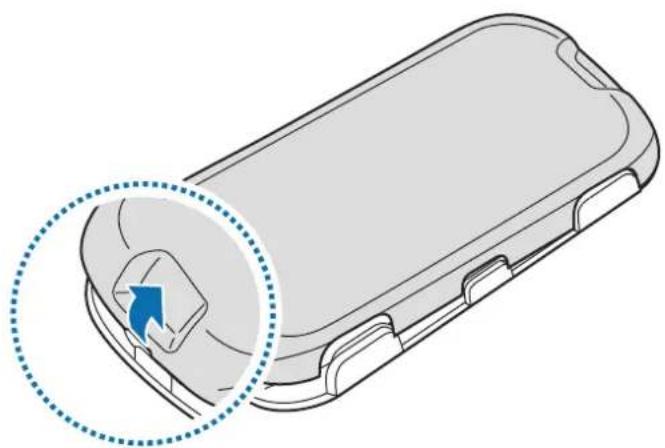
1 Remove the battery cover from the back of the gamepad.
natural_image
Diagram of a mobile phone casing with a highlighted internal component and a blue arrow indicating rotation (no text or symbols present)
Be careful not to damage your fingernails when you remove the battery cover.

Do not bend or twist the battery cover excessively. Doing so may damage the cover.
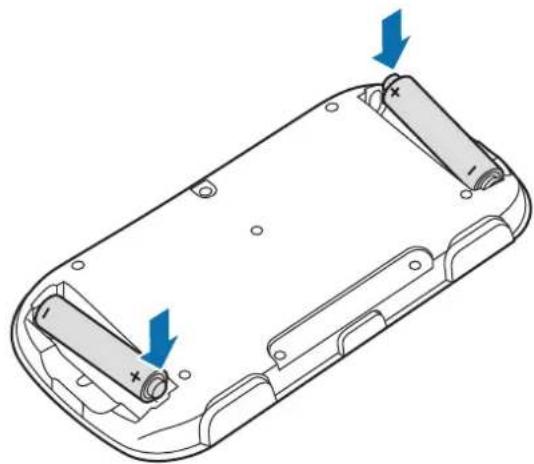
2 Insert AAA batteries with the positive and negative terminals properly aligned with the + and - symbols on the gamepad.
natural_image
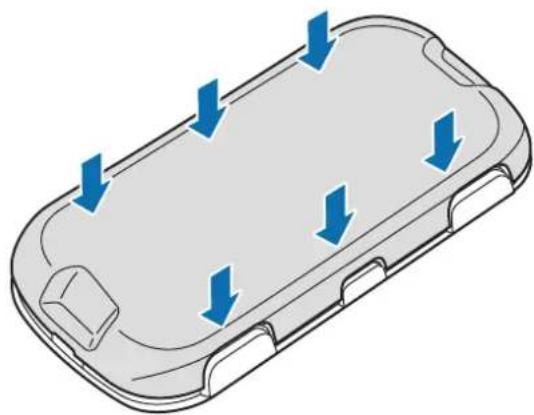
Diagram of a device casing with two blue arrows indicating directional changes (no text or symbols present)3 Reattach the battery cover to the back of the gamepad.
Place the cover on the back of the gamepad and press the edges together to reassemble the gamepad.
natural_image
3D diagram of a mobile phone casing with blue directional arrows indicating flow or movement (no text or symbols)Using the gamepad
Connecting devices via Bluetooth
To use the gamepad, pair it with a mobile device. When the devices are paired, the gamepad will try to connect to the mobile device whenever you press the Bluetooth pairing button.
1 Gamepad Press and hold the Bluetooth pairing button for approximately three seconds to enter Bluetooth pairing mode.
The indicator light will flash red, green, and blue.

- When you insert batteries into the gamepad, it enters Bluetooth pairing mode automatically.
- When the gamepad is not connected with other mobile devices for more than three minutes, the gamepad will enter sleep mode.
2 Mobile device Activate the Bluetooth feature and search for Bluetooth devices.
For more information, refer to the mobile device's user manual.
3 Mobile device Tap Gamepad for Gear VR (0000) from the list of available devices.
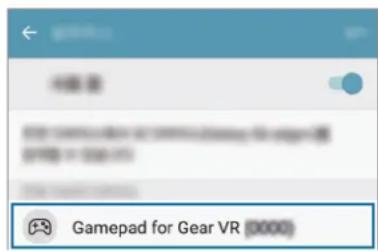

- The PIN for the headset is the four-digit number in parenthesis displayed on the mobile device's Bluetooth settings screen. The number differs depending on the gamepad.
- If the Bluetooth connection fails or the mobile device cannot locate the gamepad, remove the device's information from the mobile device's list. Then, try to connect again.
Disconnecting or reconnecting devices
If the gamepad and the mobile device are not kept within the Bluetooth connection range (10 m), the devices will be disconnected. To connect the devices again, bring the devices closer together and then press the Bluetooth pairing button on the gamepad.

- If the batteries are removed from the gamepad or the Bluetooth feature is deactivated in the mobile device, the devices will be disconnected. When you reinsert batteries or activate the Bluetooth feature, the devices will be connected again.
- If the Bluetooth connection is lost due to a problem with the connected mobile device, access the Bluetooth menu on the mobile device to pair the devices again.
Connecting to other mobile devices
After disconnecting the gamepad and the mobile device, you can connect the gamepad to other mobile devices.
1 Press and hold the Bluetooth pairing button for approximately three seconds to enter Bluetooth pairing mode.
The gamepad and the mobile device will be disconnected and the gamepad will enter Bluetooth pairing mode.
2 Connect the gamepad to the other mobile device.
Notices for using Bluetooth
Bluetooth is a wireless technology standard that uses a 2.4 GHz frequency to connect to various devices over short distances. It can connect and exchange data with other Bluetooth enabled devices, such as mobile devices, computers, printers, and other digital home appliances, without connecting via cables.
- To avoid problems when connecting your gamepad to another device, place the devices close to each other.
-
Ensure that your gamepad and the other Bluetooth device are within the Bluetooth connection range (10 m). The distance may vary depending on the environment the devices are used in.
-
Ensure that there are no obstacles between the gamepad and a connected device, including human bodies, walls, corners, or fences.
- Do not touch the Bluetooth antenna of a connected device.
- Bluetooth uses the same frequency as some industrial, scientific, medical, and low power products and interference may occur when making connections near these types of products.
- Some devices, especially those that are not tested or approved by the Bluetooth SIG, may be incompatible with your gamepad.
- Do not use the Bluetooth feature for illegal purposes (for example, pirating copies of files or illegally tapping communications for commercial purposes).
Using the gamepad
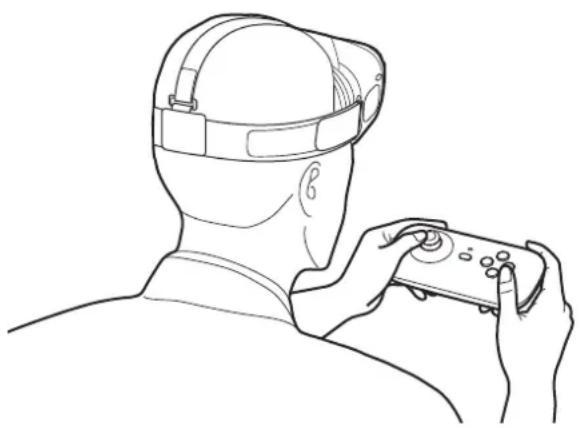
Enjoy the games on the connected mobile device using the buttons and analog stick on the gamepad. When you attach a mobile device to the Gear VR, you can enjoy the VR games.

- The gamepad does not have a power on/off function. If the gamepad is not used for a specified period, it will enter sleep mode.
• The Gear VRs are sold separately.
natural_image
Line drawing of a person wearing a VR headset and holding a game controller (no text or symbols)Storing the gamepad
You can keep the gamepad attached to the Gear VR when you are not using it.
Remove the front cover of the Gear VR, hold the gamepad with the front facing the Gear VR, and then attach the gamepad to the Gear VR as shown in the image below.
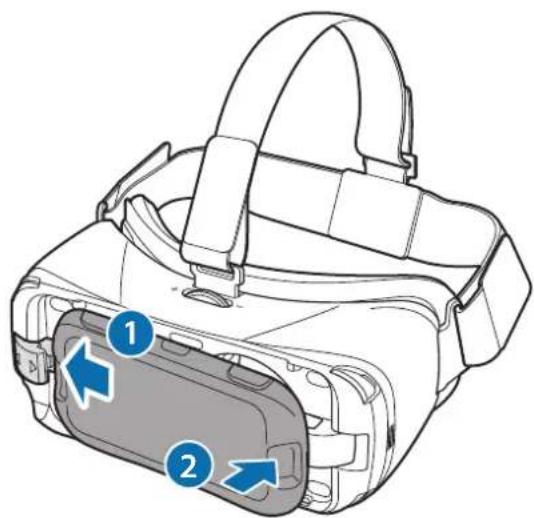

Attach the gamepad to the Gear VR properly. If it is not securely attached, the gamepad may accidentally separate from the Gear VR and be damaged.
Appendix
Troubleshooting
Before contacting a Samsung Service Center, please attempt the following solutions.
Your gamepad cannot be used
When the batteries are completely discharged, your gamepad cannot be used. Replace the batteries.
Your gamepad freezes
Press and hold the Bluetooth pairing button for approximately three seconds to enter Bluetooth pairing mode. When the gamepad enters Bluetooth pairing mode, connect the devices again, and then check the operation of the gamepad.
If the problem is still not resolved, contact a Samsung Service Center.
Another Bluetooth device cannot locate your gamepad
- Ensure that your gamepad is in Bluetooth pairing mode.
- Ensure that your gamepad and the other Bluetooth device are within the Bluetooth connection range (10 m).
If the problem is still not resolved, contact a Samsung Service Center.
Your gamepad cannot connect to another Bluetooth device
- Ensure that your gamepad and the other Bluetooth device are within the maximum Bluetooth range (10 m).
- On the device you want to connect with, disconnect all paired devices and try to connect again.
Bluetooth connection is often disconnected
- If there are obstacles between the devices, the operating distance may be reduced.
- Ensure that your gamepad and the other Bluetooth device are within the maximum Bluetooth range (10 m).
- When using the gamepad with other Bluetooth devices, the connection may be affected by electromagnetic waves. Use the gamepad in environments with fewer wireless devices present.
The gamepad works differently as described in the manual
Available functions may differ depending on the connected device.
Copyright
Copyright © 2016 Samsung Electronics
This manual is protected under international copyright laws.
No part of this manual may be reproduced, distributed, translated, or transmitted in any form or by any means, electronic or mechanical, including photocopying, recording, or storing in any information storage and retrieval system, without the prior written permission of Samsung Electronics.
Trademarks
• SAMSUNG and the SAMSUNG logo are registered trademarks of Samsung Electronics.
- Bluetooth ^ is a registered trademark of Bluetooth SIG, Inc. worldwide.
• All other trademarks and copyrights are the property of their respective owners.
natural_image
Diagram of a mobile phone casing with a highlighted internal component (no text or symbols)
natural_image
Diagram of a battery pack with two arrows indicating direction of movement (no text or symbols present)natural_image
3D diagram of a smartphone casing with blue directional arrows indicating flow or movement (no text or symbols)Uso del Gamepad
natural_image
Line drawing of a person wearing a VR headset and holding a game controller (no text or symbols)
Copyright © 2016 Samsung Electronics
natural_image
Diagram of a mobile phone casing with a highlighted internal component and a blue arrow indicating rotation (no text or symbols present)
取下電池蓋時請小心不要傷及指甲。

natural_image
Diagram of a device casing with two blue arrows indicating directional changes (no text or symbols present)3 將電池蓋放回遊戲手柄底部。
natural_image
3D diagram of a device casing with blue directional arrows indicating flow or movement (no text or symbols)使用遊戲手柄
透過藍牙連接裝置
natural_image
Line drawing of a person wearing a headlamp and holding a game controller (no text or symbols)儲存遊戲手柄

版權 © 2016 Samsung Electronics
本手册受國際版權法保護。
natural_image
Diagram of a mobile phone casing with a highlighted circular component and blue arrow indicating rotation (no text or symbols)
當您取下電池蓋時,請小心不要傷及指甲。

natural_image
Diagram of a device casing with two blue arrows indicating directional changes (no text or symbols present)3 重新裝上遊戲手把背面的電池蓋。
natural_image
3D diagram of a device casing with blue directional arrows indicating flow or movement (no text or symbols)使用遊戲手把
透過藍牙連接裝置
natural_image
Line drawing of a person wearing a VR headset and holding a controller (no text or symbols)存放遊戲手把

Copyright © 2016 Samsung Electronics
本手册受國際版權法保護。
natural_image
Diagram of a mobile phone casing with a highlighted internal component (no text or symbols)
natural_image
Diagram of a battery pack with two arrows indicating direction of movement (no text or symbols present)natural_image
3D diagram of a smartphone casing with blue directional arrows indicating flow or movement (no text or symbols)natural_image
Line drawing of a person wearing a head-mounted device, viewed from behind (no text or symbols)
© Samsung Electronics, 2016.
natural_image
Diagram of a mobile phone casing with a highlighted internal component and blue arrow indicating rotation (no text or symbols)
natural_image
Technical line drawing of a battery pack with two arrows indicating direction (no text or symbols)natural_image
3D diagram of a smartphone casing with blue directional arrows indicating flow or movement (no text or symbols)Usando o controle
Conectando dispositivos via Bluetooth
natural_image
Line drawing of a person wearing a headlamp and holding a controller (no text or symbols)Guardar o controle

natural_image
Diagram of a smartphone rear panel showing a blue arrow pointing to the internal component (no text or symbols present)
natural_image
Diagram of a device casing with two blue arrows indicating directional changes (no text or symbols present)3 건전지 덮개를 닫으세요.
natural_image
3D diagram of a mobile phone casing with blue directional arrows indicating flow or movement (no text or symbols)제품 사용하기
블루투스로 기기 연결
natural_image
Line drawing of a person wearing a headlamp and holding a controller (no text or symbols)제품 보관 방법

- Instructional icons
- Getting started
- Package contents
- Device layout
- Buttons
- Indicator light
- Installing the batteries
- Using the gamepad
- Connecting devices via Bluetooth
- Disconnecting or reconnecting devices
- Connecting to other mobile devices
- Notices for using Bluetooth
- Storing the gamepad
- Appendix
- Troubleshooting
- Your gamepad cannot be used
- Your gamepad freezes
- Another Bluetooth device cannot locate your gamepad
- Your gamepad cannot connect to another Bluetooth device
- Bluetooth connection is often disconnected
- The gamepad works differently as described in the manual
- Copyright
- Trademarks
- Gamepad verwenden
- Gamepad aufbewahren
- Utilizar el mando
- Conectarse a dispositivos mediante Bluetooth
- Guardar el mando
- Korzystanie z pada
- Przechowywanie pada
- Pohranjivanje igraćeg kontrolera
- Dodatak
- Rješavanje problema
- Korišćenje gejmpeda
- Povezivanje uređaja preko „Bluetooth“ funkcije
- Čuvanje gejmpeda
- Rešavanje problema
- Trgovačke marke
- Leia primeiro
- Utilizar o comando
- Guardar o comando
- Mängupuldi hoiustamine
- De gamepad opbergen
- Oppbevare spillkontrollen
- Brug af din gamepad
- Opbevaring af din gamepad
- Používání gamepadu
- Skladování gamepadu
- Oyun pedini saklama
- Хранение геймпада
- Зберігання геймпада
- Геймпадты пайдалану
- Геймпадты сактау
- Uso del Gamepad
- 使用遊戲手柄
- 透過藍牙連接裝置
- 儲存遊戲手柄
- 使用遊戲手把
- 存放遊戲手把
- Usando o controle
- Conectando dispositivos via Bluetooth
- Guardar o controle
- 제품 사용하기
- 블루투스로 기기 연결
- 제품 보관 방법
Brand : SAMSUNG
Model : EI-YP322
Category : Joystick