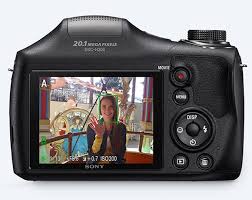
DSC H300 & CYBER-SHOT DSC-H300 - Camera SONY - Free user manual and instructions
Find the device manual for free DSC H300 & CYBER-SHOT DSC-H300 SONY in PDF.



User questions about DSC H300 & CYBER-SHOT DSC-H300 SONY
0 question about this device. Answer the ones you know or ask your own.
Ask a new question about this device
Download the instructions for your Camera in PDF format for free! Find your manual DSC H300 & CYBER-SHOT DSC-H300 - SONY and take your electronic device back in hand. On this page are published all the documents necessary for the use of your device. DSC H300 & CYBER-SHOT DSC-H300 by SONY.
USER MANUAL DSC H300 & CYBER-SHOT DSC-H300 SONY
© 2013 Sony Corporation Printed in China
text_image
Black and white barcode image with vertical lines and dots4476545110
Cyber-shot

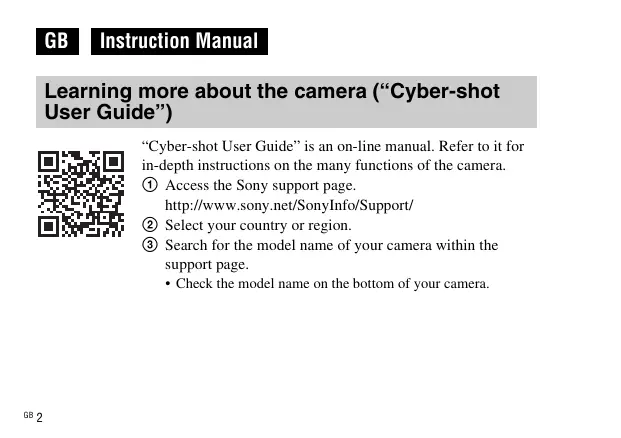
Learning more about the camera (“Cyber-shot User Guide”)

text_image
QR code image containing encoded data, no visible human-readable text“Cyber-shot User Guide” is an on-line manual. Refer to it for in-depth instructions on the many functions of the camera.
① Access the Sony support page.
http://www.sony.net/SonyInfo/Support/
② Select your country or region.
③ Search for the model name of your camera within the support page.
- Check the model name on the bottom of your camera.
Checking the supplied items
The number in parentheses indicates the number of pieces.
- Camera (1)
• LR6 (size AA) alkaline batteries (4)
• Dedicated USB cable (1) (Sony Corporation 1-837-783-) - Shoulder strap (1)
- Lens cap (1)/Lens cap strap (1)
- Instruction Manual (this manual) (1)
Owner's Record
The model and serial numbers are located on the bottom. Record the serial number in the space provided below. Refer to these numbers whenever you call your Sony dealer regarding this product.
Model No. DSC-H300
Serial No. ____
WARNING
To reduce fire or shock hazard, do not expose the unit to rain or moisture.
CAUTION
Replace the battery with the specified type only. Otherwise, fire or injury may result.
For Customers in the U.S.A.
UL is an internationally recognized safety organization.
The UL Mark on the product means it has been UL Listed.
If you have any questions about this product, you may call:
Sony Customer Information Center
1-800-222-SONY (7669)
The number below is for the FCC related matters only.
Regulatory Information
Declaration of Conformity
Trade Name: SONY
Model No.: DSC-H300
Responsible Party: Sony Electronics Inc.
Address: 16530 Via Esprillo,
San Diego, CA 92127 U.S.A.
Telephone No.: 858-942-2230
This device complies with Part15 of the FCC Rules. Operation is subject to the following two conditions: (1) This device may not cause harmful interference, and (2) this device must accept any interference received, including interference that may cause undesired operation.
I CAUTION
You are cautioned that any changes or modifications not expressly approved in this manual could void your authority to operate this equipment.
I Note:
This equipment has been tested and found to comply with the limits for a Class B digital device, pursuant to Part 15 of the FCC Rules.
These limits are designed to provide reasonable protection against harmful interference in a residential installation. This equipment generates, uses, and can radiate radio frequency energy and, if not installed and used in accordance with the instructions, may cause harmful interference to radio communications. However, there is no guarantee that interference will not occur in a particular installation. If this equipment does cause harmful interference to radio or television reception, which can be determined by turning the equipment off and on, the user is encouraged to try to correct the interference by one or more of the following measures:
– Reorient or relocate the receiving antenna.
– Increase the separation between the equipment and receiver.
- Connect the equipment into an outlet on a circuit different from that to which the receiver is connected.
- Consult the dealer or an experienced radio/TV technician for help.
The supplied interface cable must be used with the equipment in order to comply with the limits for a digital device pursuant to Subpart B of Part 15 of FCC Rules.
For Customers in Europe
Notice for the customers in the countries applying EU Directives
Manufacturer: Sony Corporation, 1-7-1 Konan Minato-ku Tokyo, 108-0075 Japan For EU product compliance: Sony Deutschland GmbH, Hedelfinger Strasse 61, 70327 Stuttgart, Germany
Notice
If static electricity or electromagnetism causes data transfer to discontinue midway (fail), restart the application or disconnect and connect the communication cable (USB, etc.) again.
This product has been tested and found compliant with the limits set out in the EMC regulation for using connection cables shorter than 3 meters (9.8 feet).
The electromagnetic fields at the specific frequencies may influence the picture and sound of this unit.
Disposal of Old Electrical & Electronic Equipment (Applicable in the European Union and other European countries with separate collection systems)

natural_image
Symbol of a trash bin crossed out by two diagonal lines (no text or numbers present)
This symbol on the product or on its packaging indicates that this product shall not be treated as household waste. Instead it shall be handed over to the applicable collection point for the recycling of electrical and electronic equipment. By ensuring this product is disposed of correctly, you will help prevent potential negative consequences for the environment and human health, which could otherwise be caused by inappropriate waste handling of this product. The recycling of materials will help to conserve natural resources. For more detailed information about recycling of this product, please contact your local Civic Office, your household waste disposal service or the shop where you purchased the product.
Disposal of waste batteries (applicable in the European Union and other European countries with separate collection systems)

natural_image
Symbol of a trash bin crossed out by two diagonal lines (no text or numbers present)This symbol on the battery or on the packaging indicates that the battery provided with this product shall not be treated as household waste.
On certain batteries this symbol might be used in combination with a chemical symbol. The chemical symbols for mercury (Hg) or lead (Pb) are added if the battery contains more than 0.0005% mercury or 0.004% lead.
By ensuring these batteries are disposed of correctly, you will help prevent
potentially negative consequences for the environment and human health which could otherwise be caused by inappropriate waste handling of the battery. The recycling of the materials will help to conserve natural resources.
In case of products that for safety, performance or data integrity reasons require a permanent connection with an incorporated battery, this battery should be replaced by qualified service staff only.
To ensure that the battery will be treated properly, hand over the product at end-of-life to the applicable collection point for the recycling of electrical and electronic equipment.
For all other batteries, please view the section on how to remove the battery from the product safely. Hand the battery over to the applicable collection point for the recycling of waste batteries.
For more detailed information about recycling of this product or battery, please contact your local Civic Office, your household waste disposal service or the shop where you purchased the product.
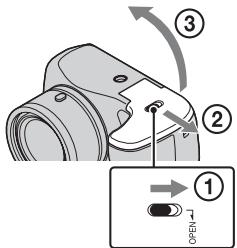
Inserting the batteries/a memory card (sold separately)
text_image
Diagram showing a camera lens adjustment step with numbered instructions and a close-up of the lens component.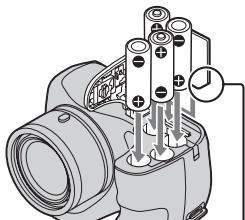
natural_image
Technical line drawing of a camera with attached components (no text or symbols)Ensure the notched corner faces correctly.
1 Open the cover.
2 Insert the memory card (sold separately).
3 Match +/- and insert the batteries.
Batteries you can and cannot use with your camera
In the table below, indicates the battery can be used, while — indicates the one cannot be used.
| Battery type | Supplied | Supported |
| LR6 (size AA) alkaline batteries | √ | √ |
| HR15/51: HR6 (size AA) Nickel-Metal Hydride batteries | — | √ |
| Lithium batteries* | — | — |
| Manganese batteries* | — | — |
| Ni-Cd batteries* | — | — |
* Operating performance cannot be ensured if voltage drops or other problems are caused by the nature of the battery.
- Nickel-Metal Hydride batteries can be charged using a battery charger (sold separately).
- The performance of your camera differs depending on the manufacturer and the type of battery you use. Also, battery-performance may decline dramatically under low temperatures. Especially, at temperatures below 5^ (41 °F), your camera may get turned off unexpectedly as you turn it on or switch the playback mode to the shooting mode.
For more details on batteries, see “Batteries” in “Cyber-shot User Guide”.
- Please note that we cannot guarantee full performance of your camera when using the batteries not indicated as “supported” in the above table.
Battery life and number of images you can record/view
| Battery life | Number of images | |
| Shooting (still images) | Approx. 175 min. | Approx. 350 images |
| Actual shooting (movies) | Approx. 85 min. | — |
| Continuous shooting (movies) | Approx. 150 min. | — |
| Viewing (still images) | Approx. 400 min. | Approx. 8,000 images |
- The number is based on the CIPA standard.
(CIPA: Camera & Imaging Products Association)
To remove the memory card
Push the memory card in once to eject the memory card.
Setting the clock
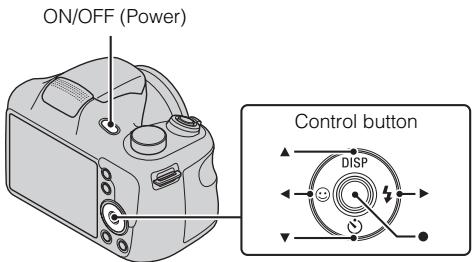
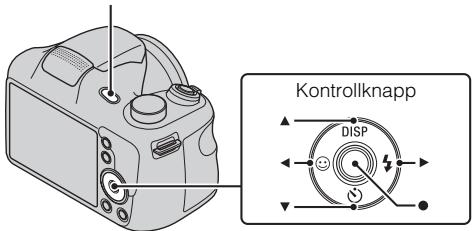
1 Press the ON/OFF (Power) button.
2 Select a desired language.
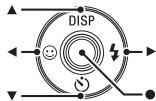
3 Select a desired geographic location by following the on-screen instructions, then press ● on the control button.
4 Set [Date & Time Format], [Summer Time] and [Date & Time], then select [OK].
5 Follow the instructions on the screen.
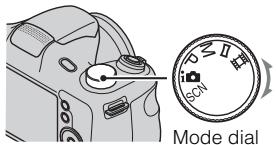
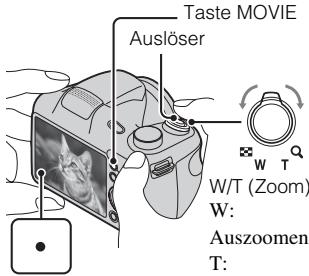
Shooting still images/movies
text_image
SCN Mode dial
: Intelligent Auto

: Sweep Panorama

Movie Mode
text_image
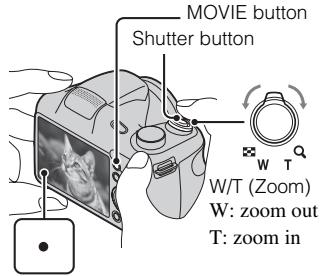
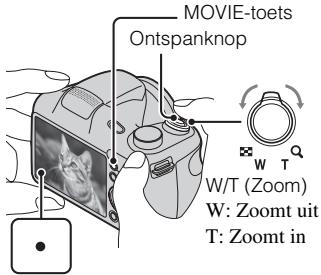
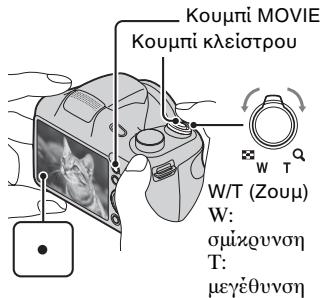
MOVIE button Shutter button W/T (Zoom) W: zoom out T: zoom inShooting still images
1 Press the shutter button halfway down to focus.
2 Press the shutter button fully down to shoot an image.
Shooting movies
1 Press the MOVIE (Movie) button to start recording.
2 Press the MOVIE button again to stop recording.
Viewing images
text_image
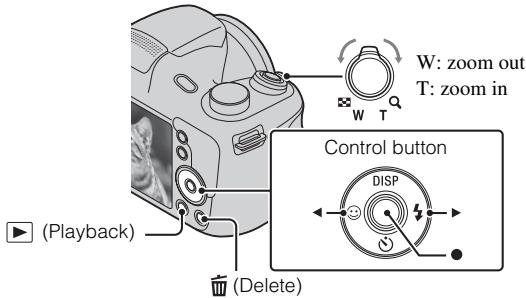
W: zoom out T: zoom in Control button DISP (Playback) (Delete)1 Press the ▶ (Playback) button.
Selecting next/previous image
Select an image by pressing ▶ (next)/◀ (previous) on the control button. Press
- in the center of the control button to view movies.
■ Deleting an image
① Press the ☑ (Delete) button.
② Select [This Image] with ▲ on the control button, then press ●.
Features of "PlayMemories Home"
The software “PlayMemories Home” allows you to import still images and movies to your computer and use them.
natural_image
Two individuals in a hospital setting, one pointing at another's face (no visible text or symbols)
natural_image
Black-and-white photo of two soccer players kicking a ball during a match, framed within a filmstrip border (no text or symbols)
Importing images from your camera
Organizing
text_image
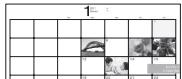
1 2 3 4 5 6 7 8 9 10 11 12 13 14 15 16 17 18 19 20 21 22Viewing images on Calendar*

natural_image
Gray right-pointing arrow icon on white background (no text or symbols)
natural_image
Simple line drawing of a laptop computer with blank screen (no text or symbols)Sharing images

YouTube™

PlayMemories Online

natural_image
Two people sitting and conversing, one holding a document (no visible text or symbols)Uploading images to network services*
Sharing images on "PlayMemories Online"
* There is the difference between Windows and Mac.

Downloading "PlayMemories Home"
You can download “PlayMemories Home” from the following URL:
www.sony.net/pm/
- For software applications supporting Mac, please download from the following URL:
Recommended computer environment
The following computer environment is recommended when using the software “PlayMemories Home.”
Windows
| OS (pre-installed) | Windows Vista* SP2/Windows 7 SP1/Windows 8 |
| CPU | Intel Pentium III 800 MHz or faster |
| Memory | Windows Vista/Windows 7/Windows 8: 1 GB or more |
| Hard Disk (Disk space required for installation) | Approximately 600 MB |
| Display | 1,024×768 dots or more |
* Starter (Edition) is not supported.
Mac
| OS (pre-installed) | Mac OS X v10.6 to v10.8 |
Notes on using the camera
On use and care
Avoid rough handling, disassembling, modifying, physical shock, or impact such as hammering, dropping or stepping on the product. Be particularly careful of the lens.
Notes on recording/playback
- Before you start recording, make a trial recording to make sure that the camera is working correctly.
- The camera is neither dust-proof, nor splash-proof, nor water-proof.
- Avoid exposing the camera to water. If water enters inside the camera, a malfunction may occur. In some cases, the camera cannot be repaired.
- Do not aim the camera at the sun or other bright light. It may cause the malfunction of the camera.
- If moisture condensation occurs, remove it before using the camera.
- Do not shake or strike the camera. It may cause a malfunction and you may not be able to record images. Furthermore, the recording media may become unusable or image data may be damaged.
Warning on copyright
Television programs, films, videotapes, and other materials may be copyrighted.
Unauthorized recording of such materials may be contrary to the provisions of the copyright laws.
No compensation for damaged content or recording failure
Sony cannot compensate for failure to record or loss or damage of recorded content due to a malfunction of the camera or recording media, etc.
Specifications
Camera
[System]
Image device: 7.76 mm (1/2.3 type) CCD, Primary color filter
Total pixel: Approx. 20.4 Megapixels
Effective pixel: Approx. 20.1 Megapixels
Lens: 35× zoom lens
f = 4.5 mm - 157.5 mm (25 mm - 875 mm (35 mm film equivalent))
F3.0 (W) - F5.9 (T)
While shooting movies (16:9): 30.3 mm – 1 060 mm
While shooting movies (4:3): 27.8 mm – 973 mm
SteadyShot: Optical
Burst shooting (when shooting with the largest pixel number):
Approx. 0.80 images/second (up to 100 images)
File format:
Still images: JPEG (DCF, Exif, MPF Baseline) compliant, DPOF compatible
Movies: MPEG-4 AVC/H.264
Recording media: Internal Memory (Approx. 55 MB), “Memory Stick Duo” media, “Memory Stick Micro” media, SD cards, microSD memory cards
Flash: Flash range (ISO sensitivity (Recommended Exposure Index) set to Auto):
Approx. 4.0 m to 6.8 m (1.3 ft. to 22.3 ft.) (W)
Approx. 1.5 m to 3.6 m (4.9 ft. to 11.8 ft.) (T)
[Input and Output connectors]
USB / A/V OUT jack:
Video output
Audio output
USB communication
USB communication: Hi-Speed USB (USB 2.0)
[Screen]
LCD screen: 7.5 cm (3.0 type) TFT drive
Total number of dots: 460 800 dots
[Power, general]
Power: LR6 (size AA) alkaline batteries (4), 6 V
HR15/51: HR6 (size AA) Nickel-Metal Hydride batteries (4) (sold separately), 4.8 V
Power consumption (during shooting): Approx. 1.6 W
Operating temperature: 0^ C to 40^ C ( 32^ F to 104^ F)
Storage temperature: -20^ to +60^ (-4^ to +140^)
Dimensions (CIPA compliant):
127.5 mm × 89.0 mm × 91.7 mm (5 1/8 inches × 3 5/8 inches × 3 5/8 inches) (W/H/D)
Mass (CIPA compliant) (including four batteries and “Memory Stick Duo” media):
Approx. 590 g (1 lb 4.8 oz)
Microphone: Monaural
Speaker: Monaural
Exif Print: Compatible
PRINT Image Matching III: Compatible
Design and specifications are subject to change without notice.
Trademarks
- The following marks are trademarks of Sony Corporation.
Cyber-shot, “Cyber-shot,” “Memory Stick Duo,” “Memory Stick Micro,” “PlayMemories Home,” “PlayMemories Online” and “PlayMemories Online” logo
- Windows is registered trademark of Microsoft Corporation in the United States and/or other countries.
• Mac and Mac OS are registered trademarks of Apple Inc.
- SDXC logo is a trademark of SD-3C, LLC.
- Facebook and the "f" logo are trademarks or registered trademarks of Facebook, Inc.
- YouTube and the YouTube logo are trademarks or registered trademarks of Google Inc.
- In addition, system and product names used in this manual are, in general, trademarks or registered trademarks of their respective developers or manufacturers. However, the ^TM or ^ marks are not used in all cases in this manual.
Additional information on this product and answers to frequently asked questions can be found at our Customer Support Website.
http://www.sony.net/

text_image
QR code image containing encoded data, no visible human-readable textResponsible : Sony Electronics Inc.
Adresse : 16530 Via Esprillo, San Diego, CA 92127 É.-U.
natural_image
Symbol of a trash bin crossed out by two diagonal lines (no text or numbers present)
natural_image
Symbol of a trash bin crossed out by two diagonal lines (no text or numbers present)text_image
Diagram showing a camera component with numbered parts and an instructional arrow indicating rotation or adjustment.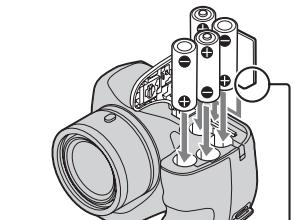
natural_image
Technical illustration of a camera assembly with multiple cylindrical components and wiring (no text or symbols)(CIPA : Camera & Imaging Products Association)
ON/OFF (Alimentation)

natural_image
Illustration of a camera body with adjustment knobs and buttons (no text or symbols)Bouton de commande
flowchart
graph TD
    A["Start"] --> B["Diplift Icon"]
    B --> C["Circle with Dot at center"]
    C --> D["Arrow to Center"]
    D --> E["Downward Arrow"]
    E --> F["Right Arrow"]
    F --> G["Upward Arrow"]
    G --> H["Downward Arrow"]
    H --> I["Left Arrow"]
    I --> J["Upward Arrow"]
    J --> K["Downward Arrow"]
natural_image
Line drawing of a camera's front and side views (no text or symbols)
text_image
P II i SCNSélecteur de mode
natural_image
Two people interacting, one pointing at a document (no visible text or symbols)
natural_image
Black-and-white photo of two soccer players kicking a ball during a match, framed within a filmstrip border (no text or symbols)
natural_image
Gray right-pointing arrow icon on white background (no text or symbols)
natural_image
Line drawing of a laptop computer with blank screen (no text or symbols)Partage d'images

YouTube™

PlayMemories Online
natural_image
Two people sitting and conversing, one holding a document (no visible text or symbols)
text_image
QR code image containing encoded data, no visible human-readable textnatural_image
Symbol of a trash bin crossed out by a diagonal line, representing no waste or discharge (no text or labels)
natural_image
Symbol of a trash bin crossed out by two diagonal lines (no text or numbers present)text_image
Diagram showing camera mode shift process with numbered steps and a close-up of the mode labeled 'OPEN'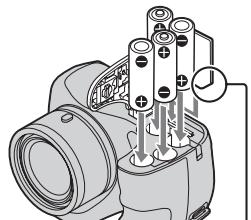
natural_image
Technical diagram of a camera with attached components and wiring (no text or symbols)(CIPA: Camera & Imaging Products Association)
natural_image
Line drawing of a DSLR camera face showing lens, aperture, and screen (no text or symbols)
text_image
P II i SCNManopola del modo
i: Intelligente autom.
natural_image
Two individuals in a hospital setting, one pointing at another's face (no visible text or symbols)
natural_image
Black-and-white action photo of two soccer players kicking a ball during a match (no text or symbols visible)
natural_image
Gray right-pointing arrow icon on white background (no text or symbols)
natural_image
Line drawing of a laptop computer with blank screen (no text or symbols)natural_image
Two people sitting and conversing, one holding a document (no visible text or symbols)
Cyber-shot, “Cyber-shot”, “Memory Stick Duo”, “Memory Stick Micro”, “PlayMemories Home”, “PlayMemories Online” e il logo “PlayMemories Online”
text_image
QR code image containing encoded data, no visible human-readable textnatural_image
Symbol of a trash bin crossed out by two diagonal lines (no text or numbers present)
natural_image
Symbol of a trash bin crossed out by two diagonal lines (no text or numbers present)text_image
Diagram showing a camera component with numbered steps and an open button labeled 'OPEN'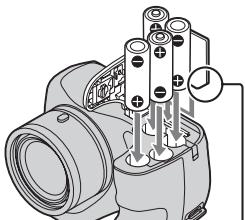
natural_image
Technical diagram of a camera with attached components and wiring (no text or symbols)(CIPA: Camera & Imaging Products Association)
natural_image
Two people interacting, one pointing at a document (no visible text or symbols)
natural_image
Black-and-white photo of two soccer players kicking a ball during a match, framed within a filmstrip border (no text or symbols)
natural_image
Simple gray arrow pointing right, no text or symbols present
natural_image
Line drawing of a laptop computer with blank screen (no text or symbols)Compartir imágenes

YouTube™
natural_image
Two people sitting and conversing, one holding a document (no visible text or symbols)
text_image
QR code image containing encoded data, no visible human-readable textnatural_image
Symbol of a trash bin crossed with a diagonal line, representing no waste or discharge (no text or numbers present)
natural_image
Symbol of a trash bin crossed out by two diagonal lines (no text or numbers present)text_image
Diagram showing camera mode shift process with numbered steps and a close-up of the mode labeled 'OPEN'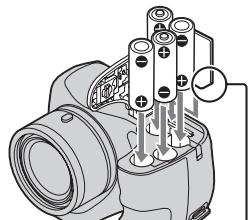
natural_image
Technical diagram of a camera with attached components and wiring (no text or symbols)(CIPA: Camera & Imaging Products Association)
natural_image
Black-and-white photo showing a child and adult interacting with a soccer ball, alongside a filmstrip icon of a camera (no text or symbols)natural_image
Gray right-pointing arrow icon on white background (no text or symbols)
natural_image
Simple line drawing of a laptop computer with blank screen (no text or symbols)Partilhar imagens

YouTube™

PlayMemories Online

natural_image
Two people sitting and conversing, one holding a document (no visible text or symbols)Cyber-shot, “Cyber-shot”, “Memory Stick Duo”, “Memory Stick Micro”, “PlayMemories Home”, “PlayMemories Online” e logótipo “PlayMemories Online”
text_image
QR code image containing encoded data, no visible human-readable textnatural_image
Symbol of a trash bin crossed out by two diagonal lines (no text or numbers present)
natural_image
Symbol of a trash bin crossed out by two diagonal lines (no text or numbers present)text_image
Diagram showing a camera lens adjustment step with numbered instructions and a close-up of the lens component.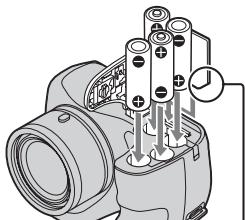
natural_image
Technical line drawing of a camera with attached components (no text or symbols)(CIPA: Camera & Imaging Products Association)
natural_image
Line drawing of a DSLR camera face showing lens, aperture, and screen (no text or symbols)
text_image
P I i SCNModuswahlknopf
i: Intelligente Automatik
: Schwenk-Panorama
Filmmodus
natural_image
Two individuals in a hospital setting, one pointing at another's face (no visible text or symbols)
natural_image
Black-and-white action photo of two soccer players kicking a ball, framed within a filmstrip border (no text or symbols)
natural_image
Gray right-pointing arrow icon on white background (no text or symbols)
natural_image
Simple line drawing of a laptop computer with blank screen (no text or symbols)Bilder austauschen

YouTube™
natural_image
Two people sitting and conversing, one holding a document (no visible text or symbols)
text_image
QR code image containing encoded data, no visible human-readable textnatural_image
Symbol of a trash bin crossed out by two diagonal lines (no text or numbers present)
natural_image
Symbol of a trash bin crossed out by two diagonal lines (no text or numbers present)text_image
Diagram showing a camera component with numbered steps and a close-up view of the switch labeled '1'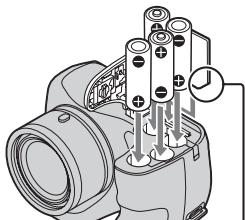
natural_image
Technical line drawing of a mechanical device with cylindrical components and mounting holes (no text or symbols)(CIPA: Camera & Imaging Products Association)
natural_image
Line drawing of a DSLR camera's head and neck (no text or symbols)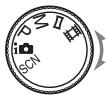
text_image
P I i SCNFunctiekeuzeknop
i: Intelligent automatisch
: Draaipanorama
: Bewegende beeldn
natural_image
Two individuals in a hospital setting, one pointing at another's face (no visible text or symbols)
natural_image
Black-and-white action photo of two soccer players kicking a ball, framed within a filmstrip border (no text or symbols)
natural_image
Gray right-pointing arrow icon on white background (no text or symbols)
natural_image
Simple line drawing of a laptop computer with blank screen (no text or symbols)Beelden delen

YouTube™

PlayMemories Online

natural_image
Two people sitting and conversing, one holding a document (no visible text or symbols)"PlayMemories Home" downloaden
text_image
QR code image containing encoded data, no visible human-readable textnatural_image
Symbol of a trash bin crossed out by two diagonal lines (no text or numbers present)
natural_image
Symbol of a trash bin crossed out by two diagonal lines (no text or numbers present)text_image
Diagram showing a camera component with numbered parts and a close-up view of the internal component labeled '1' with '70-40'.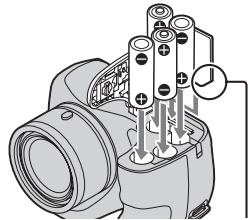
natural_image
Technical diagram of a mechanical assembly with cylindrical components and a labeled connection point (no text or symbols present)natural_image
Line drawing of a camera's head and neck components (no text or symbols)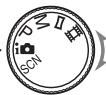
text_image
P II i SCNPokrętło trybu
natural_image
Two individuals in a hospital setting, one pointing at another's face (no visible text or symbols)
natural_image
Black-and-white action photo of two soccer players kicking a ball during a match (no text or symbols visible)
natural_image
Gray right-pointing arrow icon on white background (no text or symbols)
natural_image
Simple line drawing of a laptop computer with blank screen (no text or symbols)Udostępnianie zdjęć

YouTube™

PlayMemories Online

natural_image
Two people sitting and conversing, one holding a document (no visible text or symbols)text_image
QR code image containing encoded data, no visible human-readable textnatural_image
Symbol of a trash bin crossed out by two diagonal lines (no text or numbers present)
natural_image
Symbol of a trash bin crossed out by two crossed lines (no text or numbers present)text_image
Diagram showing camera component rotation with numbered steps and a close-up view of the internal component labeled '1'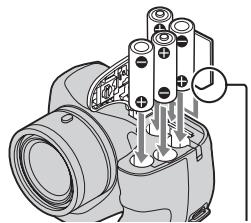
natural_image
Technical diagram of a camera module with labeled components (no text or symbols present)(CIPA: Camera & Imaging Products Association)
natural_image
Two individuals in a hospital setting, one pointing at another's face (no visible text or symbols)
natural_image
Black-and-white action photo of two soccer players kicking a ball, framed within a filmstrip border (no text or symbols)
natural_image
Gray right-pointing arrow icon on white background (no text or symbols)
natural_image
Simple line drawing of a laptop computer with blank screen (no text or symbols)Sdílení snímků

YouTube™

PlayMemories Online

natural_image
Two people sitting and conversing, one holding a document (no visible text or symbols)text_image
QR code image containing encoded data, no visible human-readable textnatural_image
Symbol of a trash bin crossed out by two diagonal lines (no text or numbers present)
natural_image
Symbol of a trash bin crossed out by two diagonal lines (no text or numbers present)text_image
Diagram showing a camera component with numbered steps and a schematic diagram of the switch mechanism.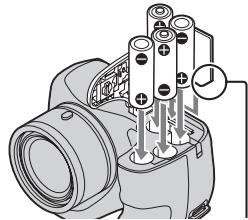
natural_image
Technical line drawing of a camera with multiple screw holes and a connecting rod (no text or symbols)(CIPA: Camera & Imaging Products Association)
natural_image
Two individuals in a hospital setting, one pointing at another's face (no visible text or symbols)
natural_image
Black-and-white action photo of two soccer players kicking a ball, framed within a filmstrip border (no text or symbols)
natural_image
Gray right-pointing arrow icon on white background (no text or symbols)
natural_image
Simple line drawing of a laptop computer with blank screen (no text or symbols)Képek megosztása

YouTube™
natural_image
Two people sitting and conversing, one holding a document (no visible text or symbols)
text_image
QR code image containing encoded data, no visible human-readable textnatural_image
Symbol of a trash bin crossed out by two diagonal lines (no text or numbers present)
natural_image
Symbol of a trash bin crossed out by two crossed lines (no text or numbers present)text_image
Diagram showing camera component rotation with numbered steps and a close-up view of the internal component labeled '1'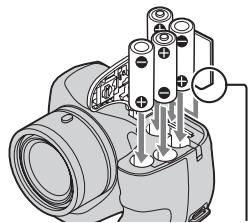
natural_image
Technical diagram of a camera module with labeled components (no text or symbols present)(CIPA: Camera & Imaging Products Association)
natural_image
Line drawing of a DSLR camera face showing lens, aperture, and screen (no text or symbols)
text_image
P II i SCNnatural_image
Two individuals in a hospital setting, one pointing at another's face (no visible text or symbols)
natural_image
Black-and-white action photo of two soccer players kicking a ball, framed within a filmstrip border (no text or symbols)
natural_image
Gray right-pointing arrow icon on white background (no text or symbols)
natural_image
Simple line drawing of a laptop computer with blank screen (no text or symbols)Zdiel'anie záberov

YouTube™

PlayMemories Online

natural_image
Two people sitting and conversing, one holding a document (no visible text or symbols)text_image
QR code image containing encoded data, no visible human-readable textnatural_image
Symbol of a trash bin crossed out by two diagonal lines (no text or numbers present)
natural_image
Symbol of a trash bin crossed out by two diagonal lines (no text or numbers present)text_image
Diagram showing a camera component with numbered parts and an open button labeled 'OPEN'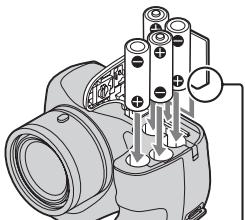
natural_image
Technical diagram of a camera with attached components and wiring (no text or symbols)natural_image
Two people interacting, one pointing at a document (no visible text or symbols)
natural_image
Black-and-white photo of two soccer players kicking a ball during a match, framed within a filmstrip border (no text or symbols)
natural_image
Simple gray arrow pointing right, no text or symbols present
natural_image
Line drawing of a laptop computer with blank screen (no text or symbols)Dela bilder

YouTube™
natural_image
Two people sitting and conversing, one holding a document (no visible text or symbols)
text_image
QR code image containing encoded data, no visible human-readable textnatural_image
Symbol of a trash bin crossed out by two diagonal lines (no text or numbers present)
natural_image
Symbol of a trash bin crossed out by two diagonal lines (no text or numbers present)text_image
Diagram showing a camera component with numbered steps and an open button labeled 'OPEN'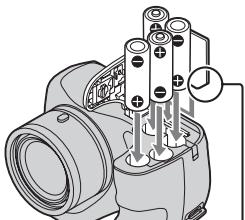
natural_image
Technical diagram of a camera with attached components and wiring (no text or symbols)(CIPA: Camera & Imaging Products Association)
natural_image
Two people interacting, one pointing at a document (no visible text or symbols)
natural_image
Black-and-white photo of two soccer players kicking a ball during a match, framed within a filmstrip border (no text or symbols)
natural_image
Simple gray arrow pointing right, no text or symbols present
natural_image
Line drawing of a laptop computer with blank screen (no text or symbols)Kuvien jakaminen

YouTube™
natural_image
Two people sitting and conversing, one holding a document (no visible text or symbols)
text_image
QR code image containing encoded data, no visible human-readable textnatural_image
Symbol of a trash bin crossed out by two diagonal lines (no text or numbers present)
natural_image
Symbol of a trash bin crossed out by two diagonal lines (no text or numbers present)Dette symbolet på batteriet eller på forpakningen betyr at batteriet ikke skal behandles som vanlig husholdningsavfall.
text_image
Diagram showing a camera component with numbered steps and an open button labeled 'OPEN'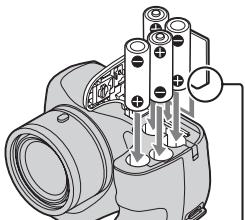
natural_image
Technical diagram of a camera with attached components and wiring (no text or symbols)(CIPA: Camera & Imaging Products Association)
Ta ut minnekortet
ON/OFF-knapp (strømbryter)
text_image
Kontrollknapp DISP1 Trykk på ON/OFF-knappen (strømbryter).
2 Velg ønsket språk.
natural_image
Two people interacting, one pointing at a document (no visible text or symbols)
natural_image
Black-and-white photo of two soccer players kicking a ball during a match, framed within a filmstrip border (no text or symbols)
natural_image
Simple gray arrow pointing right, no text or symbols present
natural_image
Line drawing of a laptop computer with blank screen (no text or symbols)
PlayMemories Online
natural_image
Two people sitting and conversing, one holding a document (no visible text or symbols)
Nedlasting "PlayMemories Home"
Du kan laste ned "PlayMemories Home" fra følgende internettadresse: www.sony.net/pm/
text_image
QR code image containing encoded data, no visible human-readable textProducent: Sony Corporation, 1-7-1 Konan Minato-ku Tokyo, 108-0075 Japan
Overensstemmelse med EU lovgivning: Sony Deutschland GmbH, Hedelfinger Strasse 61, 70327 Stuttgart, Tyskland
Bemærk!
natural_image
Symbol of a trash bin crossed out by two diagonal lines (no text or numbers present)
natural_image
Symbol of a trash bin crossed out by two diagonal lines (no text or numbers present)text_image
Diagram showing a camera component with numbered steps and an open button labeled 'OPEN'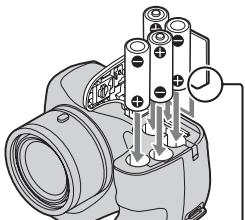
natural_image
Technical diagram of a camera with attached components and wiring (no text or symbols)(CIPA: Camera & Imaging Products Association)
natural_image
Two people interacting, one pointing at a document (no visible text or symbols)
natural_image
Black-and-white photo of two soccer players kicking a ball during a match, framed within a filmstrip border (no text or symbols)
natural_image
Simple gray arrow pointing right, no text or symbols present
natural_image
Line drawing of a laptop computer with blank screen (no text or symbols)Deling af billeder

YouTube™
natural_image
Two people sitting and conversing, one holding a document (no visible text or symbols)
text_image
QR code image containing encoded data, no visible human-readable text»Korisnički priručnik za Cyber-shot« je online priručnik. Konzultirajte ga za detaljne upute o mnogim funkcijama fotoaparata.
① Pristupite stranici za Sony podršku.
http://www.sony.net/SonyInfo/Support/
② Odaberite svoju zemlju ili regiju.
③ Potražite naziv modela svog fotoaparata na stranici podrške.
- Naziv modela provjerite na donjem dijelu fotoaparata.
natural_image
Symbol of a trash bin crossed with no text or numbers, representing waste sorting or disposal (no text present)
natural_image
Symbol of a trash bin crossed out by two diagonal lines (no text or numbers present)Ova oznaka na bateriji ili na ambalaži označava da se baterija ne smije zbrinjavati kao ostali kućni otpad.
Na nekim baterijama se uz ovaj simbol može nalaziti kemijski simbol. Kemijski simboli za živu (Hg) ili olovo (Pb) dodaju se ako baterija sadrži više od 0,0005% žive ili 0,004% olova.
text_image
Diagram showing a camera component with numbered steps and a close-up view labeled 'OPEN'.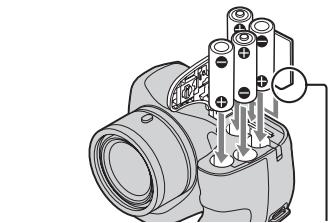
natural_image
Technical line drawing of a camera with attached components (no text or symbols)(CIPA: Camera & Imaging Products Association)
Za vađenje memorijske kartice
natural_image
Two individuals in a clinical setting, one appearing to be examining the other's abdomen (no visible text or symbols)
natural_image
Black-and-white photo of two soccer players kicking a ball during a match, framed within a filmstrip border (no text or symbols)
Uvoz slika iz fotoaparata
Slaganje
text_image
1 2 3 4 5 6 7 8 9 10 11 12 13 14 15 16 17 18 19 20 21 22Pregledavanje slika na Kalendaru*

natural_image
Gray right-pointing arrow icon on white background (no text or symbols)
natural_image
Simple line drawing of a laptop computer with blank screen (no text or symbols)Dijeljenje slika

YouTube™
natural_image
Two people sitting and conversing, one holding a document (no visible text or symbols)
text_image
QR code image containing encoded data, no visible human-readable textnatural_image
Symbol of a trash bin crossed with no text or numbers, representing waste sorting or disposal (no text present)
natural_image
Symbol of a trash bin crossed out by two diagonal lines (no text or numbers present)text_image
Diagram showing camera component rotation with numbered steps and a close-up view of the component labeled '1' with 'HENS' indicator.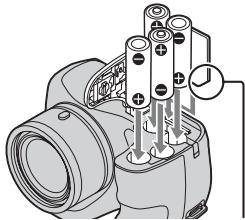
natural_image
Technical line drawing of a mechanical assembly with cylindrical components and mounting holes (no text or symbols)(CIPA: Camera & Imaging Products Association)
natural_image
Line drawing of a camera's head and neck components (no text or symbols)
text_image
P II i SCNnatural_image
Two individuals in a hospital setting, one pointing at another's face (no visible text or symbols)
natural_image
Black-and-white action photo of two soccer players kicking a ball during a match (no text or symbols visible)
natural_image
Gray right-pointing arrow icon on white background (no text or symbols)
natural_image
Simple line drawing of a laptop computer with blank screen (no text or symbols)Partajați imaginile

YouTube™
natural_image
Two people sitting and conversing, one holding a document (no visible text or symbols)
127,5 mm × 89,0 mm × 91,7 mm (L/I/I)
text_image
QR code image containing encoded data, no visible human-readable textnatural_image
Symbol of a trash bin crossed out by two diagonal lines (no text or numbers present)
natural_image
Symbol of a trash bin crossed out by two diagonal lines (no text or numbers present)text_image
Diagram showing a camera component with numbered steps and a close-up view of the component labeled '1'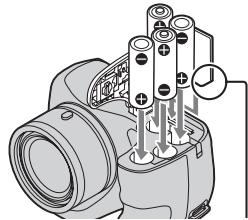
natural_image
Technical line drawing of a mechanical assembly with cylindrical components and a labeled joint (no text or symbols present)(CIPA: Camera & Imaging Products Association)
natural_image
Illustration of a camera's head and neck showing the nose, lens, and screen (no text or symbols)
text_image
P II i SCNΚαντράν
λειτουργιών

: Ευφυές αυτόματο

:Ημκυκλικό Πανόραμα

Λειτουργία ταινίας
natural_image
Two people interacting, one pointing at a document (no visible text or symbols)
natural_image
Black-and-white photo of two soccer players kicking a ball during a match, framed within a filmstrip border (no text or symbols)
natural_image
Simple gray arrow pointing right, no text or symbols present
natural_image
Line drawing of a laptop computer with blank screen (no text or symbols)Κοινή χρήση εικόνων

YouTube™
natural_image
Two people sitting and conversing, one holding a document (no visible text or symbols)
