
OneShred 8CC - Shredder HP - Free user manual and instructions
Find the device manual for free OneShred 8CC HP in PDF.
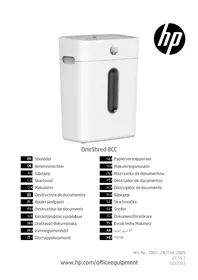


| Brand | HP |
| Model | OneShred 8CC |
| Product type | Particle-cut document shredder |
| Dimensions (W x D x H) | 320 x 190 x 416 mm |
| Weight | 4.3 kg |
| Power supply | 220-240 V~, 50/60 Hz, 1.2 A, 200 W |
| Maximum cutting capacity | 8 sheets (80 g/m²) or 1 credit card |
| Security level (DIN 66399-2) | P-4 (particles ≤ 160 mm², strip width ≤ 6 mm) |
| Particle size | 5 x 18 mm |
| Feed width | 220 mm |
| Bin capacity | 15 liters |
| Noise level | 68 dB |
| Continuous operation / cooling | 4 min / 50 min |
| Working speed | 1.8 m/min |
| Cut type | Particles |
| Main functions | Automatic and manual shredding, forward/reverse, thermal and overload protection, oiling of cutting unit |
| Safety | Double insulation (Class II), GS mark, auto stop on overheating, auto reverse on overload, cover lock |
| Care and cleaning | Clean with a soft dry cloth; oil regularly with oiled sheets or HP special oil |
| Spare parts and repairability | Oiled sheets and special oil available from HP; repairs reserved for qualified personnel |
| General information | For household use only; manufactured by GO Europe GmbH, Germany |
Frequently Asked Questions - OneShred 8CC HP
User questions about OneShred 8CC HP
0 question about this device. Answer the ones you know or ask your own.
Ask a new question about this device
Download the instructions for your Shredder in PDF format for free! Find your manual OneShred 8CC - HP and take your electronic device back in hand. On this page are published all the documents necessary for the use of your device. OneShred 8CC by HP.
USER MANUAL OneShred 8CC HP
OneShred 8CC
EN Shredder DE Aktenvernichter BG: Шредер Skartovač DA Makulator ES Destructora de documentos FI Asiakirjasilppuri FR Destructeur de documents GR Καταστροφέας εγγράφων HR Uništavač dokumenata HU Iratmegsemmisítő IT Distruggidocumenti
NL Papierversnipperaar NO Makuleringsmaskin PL Niszczarka do dokumentów PT Destruidor de documentos RO Distrugător de documente RU: Шредер SK Skartovačka SR Šreder SV Dokumentförstörare TR Evrak İmha Makinesi AR آلّة مزيق الورق HE כְרָה
EN
Read the Operating Manual 10
Intended Use 10
Observe the Safety Information 10
Checking the Package Contents 12
General View of the Shredder....13
Positioning the Shredder and Starting It Up 14
Operating the Shredder 15
Troubleshooting 15
Technical Data 18
Disposal....18
Information on Storage 19
Queries and Service 19
Declaration of Conformity....19
Manufacturer 20
DE
Read the Operating Manual

Read this operating manual through carefully, observing all the information contained regarding handling and using the shredder. Keep the operating manual close by for future reference.
Intended Use
The shredder has been designed to shred paper, credit cards, paper clips and staples. The shredder is only intended for private use indoors.
Any other use is considered unintended use. Unauthorised modifications or reconstructions are not permitted and lead to loss of rights to claims under the terms of guarantee.
Observe the Safety Information
Read and observe all the warnings to protect yourself and the environment from any harm.

Warning!
Risk of injury through the insertion mechanism. Loose items could catch in the insertion slot and cause injuries. Keep fingers, hair, scarves, ties, jewellery etc. away from the insertion slot.

Warning!
Risk of injury through electric shock. Handling the shredder improperly could lead to an electric shock. Unauthorised modifications or reconstructions to the shredder are not permitted. Do not operate the shredder if the power cable is damaged. Switch off the shredder immediately in the case of damage or improper functioning and disconnect the power plug.
Repairs may only be carried out by properly qualified specialists. Ensure the shredder is set up near an easily accessible power socket so it can be disconnected from the power supply in an emergency. Never handle the shredder with wet hands. Avoid any contact with water.
Always unplug the power plug when the device is not in use. Only use the power cable supplied.

Warning!
Risk of suffocation due to small parts, packaging, or protective foils. Children can swallow or choke on small parts, packaging, and protective foils. Keep the device and its packaging materials out of reach of children.

Warning!
This device can be used by children aged eight and above and by persons with reduced physical, sensory, or mental capabilities or lack of experience and/or knowledge if they are supervised or have been instructed on the safe use of the device and understand the risks involved. Children must not play with the device. Children must not perform cleaning or maintenance on the device without supervision.

Caution!
Risk of tripping due to improperly laid power cable. Lay the power cable so that nobody can trip over it. Ensure the power plug and cable cannot be damaged.

Important!
Risk of property damage. Avoid exposing the device to environmental influences such as smoke, dust, vibration, chemicals, moisture, heat, or direct sunlight.
Only use the shredder indoors and within the permissible ambient conditions specified in the Technical Data.
Observe the following information to ensure the shredder always functions as expected.

Read the operating instructions thoroughly before starting to use the device.
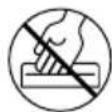
Never reach into the insertion slot.

Keep long hair away from the shredder. Keep children and pets away from the shredder.

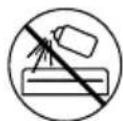
Do not spray any inflammable gases in the direction of the shredder.
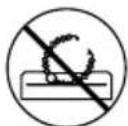
Keep all loose pieces of clothing, jewellery or other loose items away from the shredder.
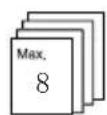
Insert a maximum of 8 sheets into the shredder at one time.
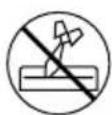
Keep ties and scarves away from the shredder.
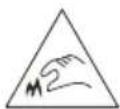
Caution! Risk of injury through sharp edge of cutting mechanism!

General indication of potential risks, so that particular care is required.
Credit cards must be inserted vertically.
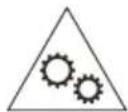
Warning! This equipment is not intended for use by children. Avoid touching the media feed opening with the hands, clothing or hair, Unplug this equipment when not in use for an extended period of time. Hazardous moving part is in this equipment, keep body parts away from moving parts.


Only use the product indoors. The symbol indicates that the

design of the product complies with Protection Class II (double insulation).
A safety connection to the electrical earthing (ground) is not necessary.

The «Geprüfte Sicherheit» mark (GS tested safety mark) certifies that the product satisfies the requirements defined by the German Product Safety Act (ProdSG).
The GS tested safety mark indicates that when implemented for its intended use and in the event of foreseeable misuse the identified product will not endanger the safety and health of the user. It concerns a voluntary safety mark which was issued by an authorized testing institute.
Checking the Package Contents
Check the package contents of your shredder before putting the shredder into operation.
If anything is missing or damaged, do not use the shredder. Contact our Service department.
■ OneShred 8CC shredder with waste bin for cuttings ■ Operating manual ■ 1 oiled sheet
General View of the Shredder
The following figure illustrates the shredder in detail.
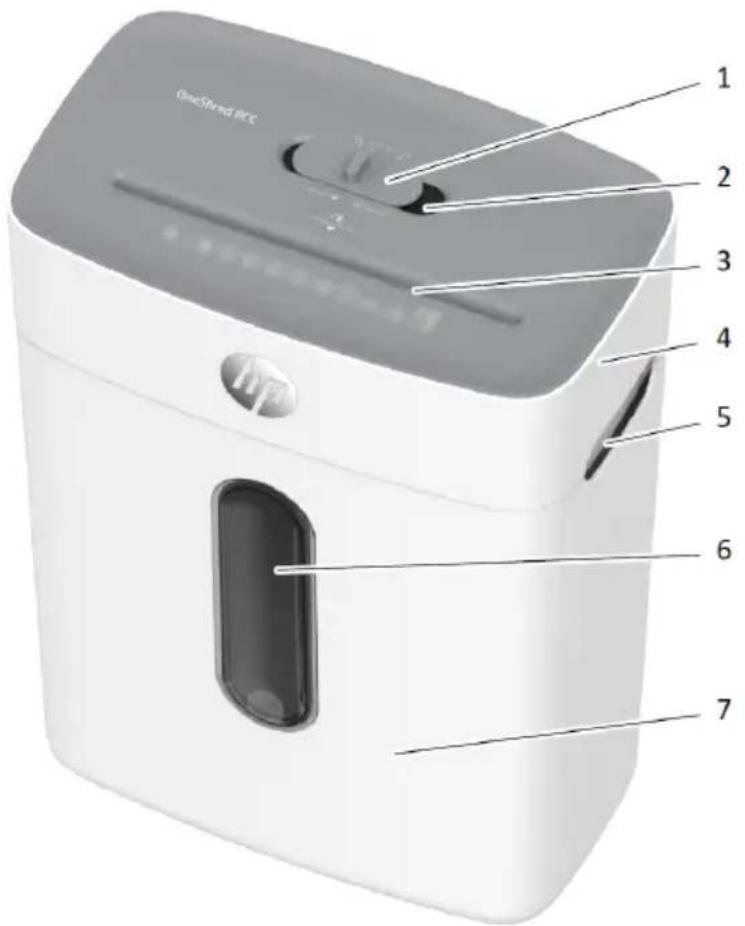
| 1 Main switch 5 Viewing window | ||
| 2 Insertion slot 6 Grip | ||
| 3 Shredder attachment 7 Status indicator | ||
| 4 Waste bins | ||
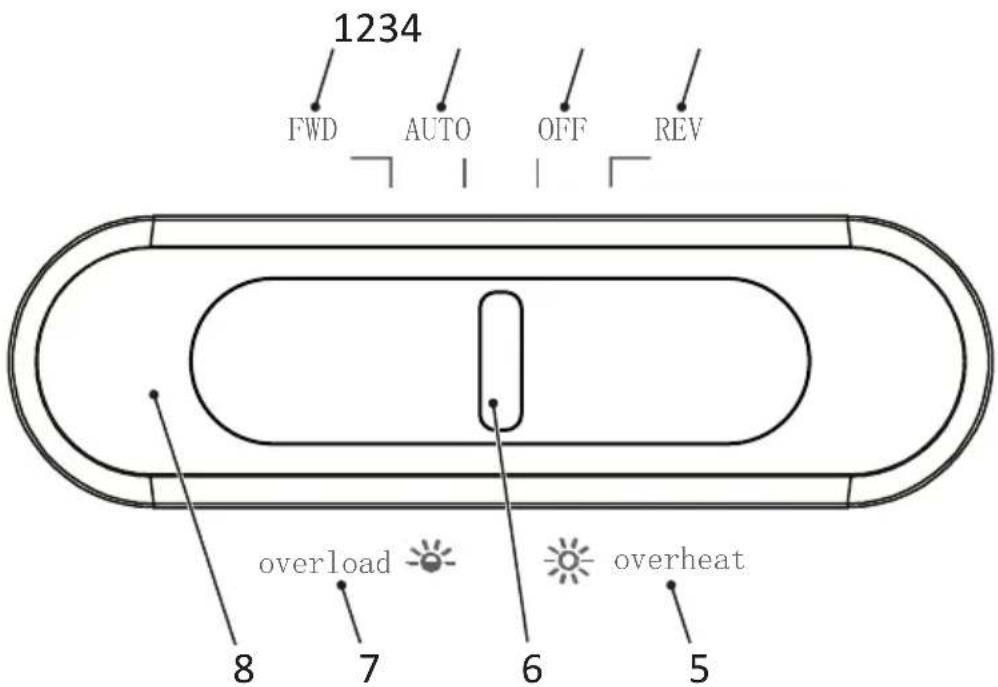
| 1 Manual operation (forward) 5 Overheating | ||
| 2 Automatic operation 6 Main switch | ||
| 3 Power OFF 7 Overloading | ||
| 4 Reverse operation 8 Status indicator |
Positioning the Shredder and Starting It Up
The shredder only operates when the waste bin supplied is fitted. Do not position the shredder near any sources of heat and maintain a distance of at least 10 cm to walls. This ensures the shredder is sufficiently cooled.
1 Set the waste bin down on a stable, level, horizontal surface and in the vicinity of an easily accessible power socket. 2 Mount the shredder attachment on the waste bin. The shredder attachment latches audibly in place. If the shredder attachment is not fitted properly on the waste bin, the shredder cannot be switched on.

Caution!
Risk of injury through sharp edge of cutting mechanism! The underside of the cutting mechanism has sharp edges and corners. Only take hold of the cutting mechanism by the grips.

Only use the power cable supplied.
3 Slide the main switch to OFF and connect the power plug to the power socket.
4 Slide the main switch to AUTO.
→ You have put the shredder into operation. The status indicator lights up blue.
Operating the Shredder
The shredder works using an automatic shredding mechanism. The shredder functions are operated by sliding the main switch to the respective positions.
Shredding Material Automatically
Observe the maximum permissible cutting capacity and other specifications defined in Section "Technical Data".

Warning!
This equipment is not intended for use by children. Avoid touching the media feed opening with the hands, clothing or hair. Unplug this equipment when not in use for an extended period of time. Hazardous moving parts are in this equipment; keep body parts away from moving parts.
Important!
Risk of property damage through material jam! Observe the maximum cutting capacity of the insertion slot.
1. Feed the material to be shredded in the centre of the insertion slot.
→ The insertion slot draws the material in automatically and stops when no more material is fed in.
Shredding Material Manually
On rare occasions, it is possible that the sensors do not detect the material inserted.
1. Slide the main switch to FWD.
→ The material is then drawn in and shredded.
2. Slide the main switch to OFF.
Switching the Shredder Off
Switch the shredder off when you no longer need to use it.
1 Slide the main switch to OFF.
→ The shredder is switched off.
2 Disconnect the power plug from the power socket if the shredder will not be used for a longer period of time.
Troubleshooting
The following information should provide help if something is not working as would be expected.
Overheating Protection
The shredder switches off automatically in the event of overheating. The status indicator lights up red.
1 Wait at least 50 minutes until the shredder has cooled down. Observe the minimum clearance to walls and the information on continuous operation in Technical Data.
→ When the cool down phase has elapsed, the status indicator lights up blue and shredding is resumed.
Overload Protection
If you have inserted more material than is specified in Section "Technical Data", the status indicator flashes red and the shredder automatically starts reverse operation for 5 seconds.
1 Pull the material out of the shredder.
→ The blockage has now been cleared.
After the material has been removed from the shredder, the cutting mechanism continues to run for 3 seconds to clean itself. Wait until the shredder has stopped and the status indicator lights up blue.
Oiling the Cutting Mechanism
If you want to increase the working life of the shredder, you should oil the shredder's cutting mechanism at regular intervals.
Special oil and oiled sheets are available for the shredder from HP.
Important!
Risk of property damage through using the wrong oil! Do not use spray oils. Only use a special oil intended for shredders.
There are various ways to oil the cutting mechanism.
Oiling Using Self-Oiled Paper:
1 Apply the special oil for shredders in several lines horizontally across a sheet of paper.
2 Insert the oiled sheet of paper in the insertion slot.
→ The paper with oil applied is inserted and oils the cutting mechanism.
Oiling Using Oiled Sheets
1 Insert the oiled sheet in the paper infeed.
→ The paper with oil applied is inserted and oils the cutting mechanism.
Emptying the Waste Bin
Check the fill level of the waste bin through the viewing window at regular intervals and when it is about 80% full, empty it. This prevents the shredded material from accumulating, which could lead to malfunctions.
1. Slide the main switch to OFF.
2. Disconnect the power plug from the power socket.

Caution!
Risk of injury through sharp edge of cutting mechanism! The underside of the cutting mechanism has sharp edges and corners. Only take hold of the cutting mechanism by the grips.
3. Lift the shredder attachment from the waste bin. 4. Empty the waste bin.

Caution!
Risk of injury through sharp edge of cutting mechanism! The underside of the cutting mechanism has sharp edges and corners. Only take hold of the cutting mechanism by the grips.
5. Mount the shredder attachment on the waste bin.
→ The waste bin latches audibly in place.
Clearing Residual Material
If the shredder no longer shreds material as you expect, remove any residual material from the cutting mechanism.
1. Slide the main switch to REV. The cutting mechanism runs in reverse and releases any material remaining in the cutting mechanism. 2. Slide the main switch to OFF. 3. Disconnect the power plug from the power socket. 4. Lift the shredder attachment from the waste bin.

Caution!
Risk of injury through sharp edge of cutting mechanism! Take the utmost care when removing the material residue.
5 Remove the residual material carefully from the cutting mechanism using an appropriate pointed object. 6 Mount the shredder attachment on the waste bin.
Cleaning the Shredder
Clean the shredder at regular intervals.

Caution!
Risk of injury through flash flame! Such flash flames can occur when using air sprays. Never use air sprays.
1 Slide the main switch to OFF. 2 Disconnect the power plug from the power socket.
EN
3 Clean the surface of the housing with a soft, dry, lint-free cloth. Do not use any aerosols, solvents or cleaning agents.
Technical Data
| Model OneShred 8CC | |
| Dimensions (mm) | W: 320L: 190H: 416 |
| Security level compliant with DIN 66399-2 P-4 | |
| Cuttings size (thickness × width, mm) 5 ×18 | |
| Max. cutting capacity (sheets / credit cards) 8 / 1 | |
| Working width (mm) 220 | |
| Power supply 220-240 V~, 50/60 Hz, 1.2 A, 200 W | |
| Max. ambient temperature [°C] 25 | |
| Capacity, waste bin (l) 15 | |
| Weight (kg) 4,3 | |
| Volume (dB) 68 | |
| Continuous operation (min) / Cool down phase (min) | 4 / 50 |
| Operating speed (m/min) 1,8 | |
| Shred type Cross cut |
We declare that this device, with regard to its task of the destruction of documents, fulfils the conditions defined for Security Level P-4 in accordance with DIN 66399.
PP-4: Recommended for data media containing particularly sensitive and confidential data. Material particle area ≤ 160 mm² and for consistent particles: strip width ≤ 6 mm (e.g. particles 4 × 40 mm).
Disposal

Find out about the possibilities of taking back used appliances free of charge from your dealer.
The adjacent symbol indicates laws dictate that electrical and electronic apparatus no longer required must be disposed of separate from domestic waste. Dispose of your device at a collection point provided by your local public waste authority. Packaging materials must be disposed of according to local regulations.

We the identification on the packaging materials during the waste sorting process; they are identified by abbreviations (b) and numbers (a) which have the following significance: 1–7: plastic/20–22: paper and cardboard/80–98: composite materials

Packaging materials must be disposed of according to local regulations.
The packaging is made of environmentally friendly materials that you can dispose of at local recycling points. Advice on the options with which to dispose of your old device can be obtained from your municipal or local administration offices.
The logo is only applicable to Italy.
The Triman logo is only relevant for France.

Information on Storage
The shredder must be stored safely after use. Observe the following information:
Store the shredder
■ in its original packaging ■ in a dry, clean location ■ in a cooled state
Queries and Service
Dear customer,
we are delighted that you have chosen this equipment.
In the case of a defect, please return the device together with the receipt and original packing material to the point of sale.
Further information is available under the heading Contact & Service on our website:
www.hp.com/officeequipment
EN
Declaration of Conformity

The CE Mark on the device confirms conformity.
The Declaration of Conformity is available at www.hp.com/officeequipment

The UKCA mark on the device confirms its conformity.

The Declaration of Conformity can be read online at www.hp.com/officeequipment
Manufacturer
GO Europe GmbH
Zum Kraftwerk 1
D-45527 Hattingen
Germany
www.go-europe.com
www.hp.com/officeequipment.
Declaration of Conformity

www.hp.com/officeequipment

| 1 Ručni radni režim 5 Pregrijavanje | ||
| 2 Automatski radni režim 6 Glavni prekidač | ||
| 3 Uređaj isklj. 7 Preopterećenost | ||
| 4 Povrat 8 Prikaz statusa |
Setting up the document shredder and putting it into operation
Your document shredder only works with the container. Do not place the document shredder near heat sources. Leave a gap of at least 10 cm to the wall. This will allow the device to cool sufficiently.
1 Place the container so that it stands stable, i.e. on a flat, horizontal surface and near an easily accessible socket. 2 Place the cutting unit onto the container. The cutting unit will click into place with a characteristic sound. If the cutting unit does not fit correctly onto the container, the device cannot be switched on.

Caution!
Risk of injury from the blades of the cutting mechanism! The underside of the cutting unit has sharp edges. Only hold the cutting unit by the handles.

Only use the mains cable supplied with the device.
3 Push the main switch to the OFF position and plug the mains plug into the socket. 4 Push the main switch to the AUTO position.
Insert credit cards only vertically.

You can find the declaration of conformity at www.hp.com/officeequipment.
Manufacturer
GO Europe GmbH
Zum Kraftwerk 1
D-45527 Hattingen
Germany
www.go-europe.com
| 1 Glavni prekidač 5 Ručka | ||
| 2 Prikaz statusa 6 Okno | ||
| 3 Uvlačenje 7 Prihvatna posuda | ||
| 4 Nastavak jedinice za sečenje | ||
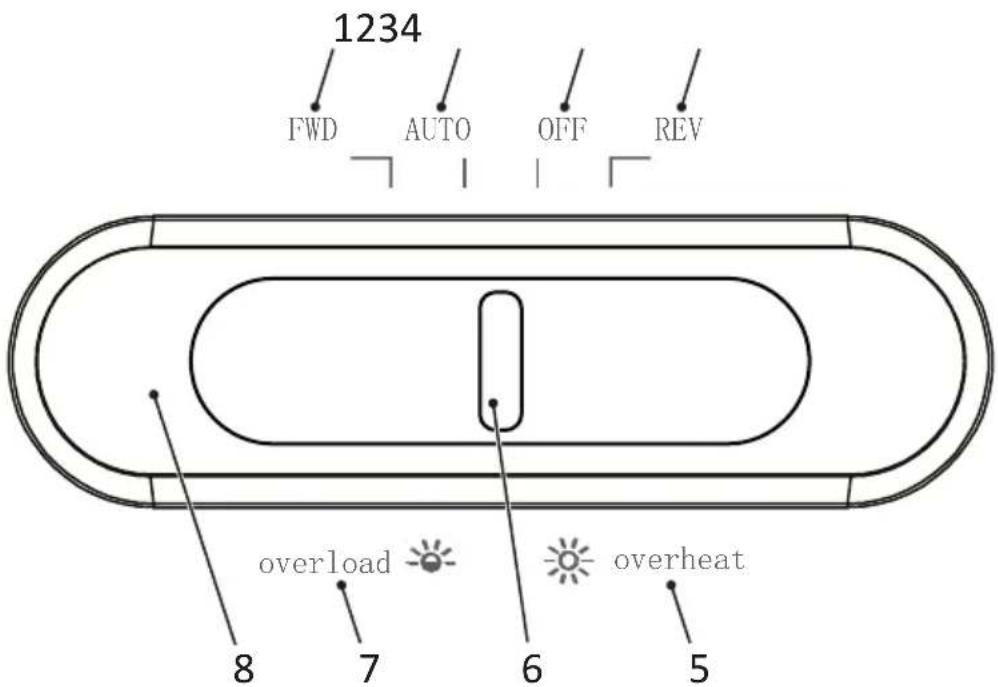
| 1 Manuelni pogon 5 Pregrejavanje | ||
| 2 Automatski pogon 6 Glavni prekidač | ||
| 3 Uređaj isklj. 7 Preopterećenje | ||
| 4 Pogon unazad 8 Prikaz statusa |
Place the shredder and start it up
Your shredder only works with the collection container. Do not place the shredder near heat sources and keep a distance of at least 10 cm from the wall. This ensures optimal cooling of the shredder.
1 Place the collection container on a flat, horizontal surface and near an easily accessible power outlet. 2 Place the cutting unit attachment onto the collection container. The cutting unit attachment clicks into place audibly. If the cutting unit attachment is not correctly placed on the collection container, the shredder cannot be switched on.

Caution!
Risk of injury from sharp edges of the cutting unit! The underside of the cutting unit contains sharp corners. Only hold the cutting unit by its handles.

Only use the supplied power cord.
3 Push the main switch to the OFF position and plug the plug into the outlet. 4 Push the main switch to the AUTO position.
→ You have started your shredder. The status indicator lights up blue.
Using the shredder
Your shredder operates with automatic shredding. The shredder is controlled by moving the main switch.
Automatic shredding of material
Observe the maximum permissible cutting capacity and other specifications listed in the technical data.

Warning!
Danger of injury due to automatic feed! Feeding starts automatically as soon as material is inserted. Keep long hair, ties, jewelry, loose clothing, and other loose objects away from the feed opening on your shredder.
Important!
Material damage due to paper jam! Follow the maximum cutting capacity of the feed opening.
1 Insert material to be shredded into the feed opening in the center.
The feed opening pulls in the material and stops when no further material is added.
Manual shredding of material
In rare cases, sensors do not detect inserted material.
1 Push the main switch to the FWD position.
→ Material is manually fed and shredded.
2 Push the main switch to the OFF position.
Turn off the shredder



GO Europe GmbH
Zum Kraftwerk 1
D-45527 Hattingen
Germany
www.go-europe.com

3.5r
4.A
All your office needs under one brand

HP is a trademark of HP Inc. or its affiliates, used by GO Europe GmbH under license from HP Inc.
GO Europe GmbH
Zum Kraftwerk 1, 45527 Hattingen (Germany)
www.hp.com/officeequipment
UK Authorised Representative (for authorities only)
ProductIP (UK) Ltd.
- ONESHRED 8CC
- EN
- DE
- READ THE OPERATING MANUAL
- INTENDED USE
- OBSERVE THE SAFETY INFORMATION
- WARNING
- CAUTION
- IMPORTANT
- CHECKING THE PACKAGE CONTENTS
- GENERAL VIEW OF THE SHREDDER
- POSITIONING THE SHREDDER AND STARTING IT UP
- OPERATING THE SHREDDER
- SHREDDING MATERIAL AUTOMATICALLY
- SHREDDING MATERIAL MANUALLY
- SWITCHING THE SHREDDER OFF
- TROUBLESHOOTING
- OVERHEATING PROTECTION
- OVERLOAD PROTECTION
- OILING THE CUTTING MECHANISM
- OILING USING SELF-OILED PAPER
- OILING USING OILED SHEETS
- EMPTYING THE WASTE BIN
- CLEARING RESIDUAL MATERIAL
- CLEANING THE SHREDDER
- DISPOSAL
- INFORMATION ON STORAGE
- QUERIES AND SERVICE
- DECLARATION OF CONFORMITY
- MANUFACTURER
- SETTING UP THE DOCUMENT SHREDDER AND PUTTING IT INTO OPERATION
- PLACE THE SHREDDER AND START IT UP
- USING THE SHREDDER
- AUTOMATIC SHREDDING OF MATERIAL
- MANUAL SHREDDING OF MATERIAL
- TURN OFF THE SHREDDER
- ALL YOUR OFFICE NEEDS UNDER ONE BRAND
Brand : HP
Model : OneShred 8CC
Category : Shredder