Bolero Squad I 4700 TitanicZone - Cooker CECOTEC - Free user manual and instructions
Find the device manual for free Bolero Squad I 4700 TitanicZone CECOTEC in PDF.


| Product type | Built-in induction hob |
| Brand | Cecotec |
| Model | Bolero Squad I 4700 TitanicZone |
| Total power | 7400 W |
| Rated voltage | 220-240 V ~ 50/60 Hz or 380-415 V 3N~ |
| Number of cooking zones | 4 (including 2 flexible zones and 1 TitanicZone) |
| Hob dimensions | 590 x 520 x 53 mm (W x D x H) |
| Cut-out dimensions | 560 x 480 mm |
| Weight (approx.) | 12 kg |
| Surface material | Ceramic glass |
| Control type | Touch control with sliders |
| Cooking zones | 4 individual burners (2200/3300 W each), 1 flexible zone (38.5 x 23 cm), 1 TitanicZone (30-40 cm diameter) |
| Booster function | Yes, available on all burners (max 10 min, 5 min for flexible zone) |
| Timer | Yes, programmable per burner/zone, up to 99 minutes |
| Pause function | Yes |
| Child lock | Yes (touch) |
| Automatic shut-off | Yes (depending on power level, from 1.5 h to 8 h) |
| Residual heat indicator | Yes ('H' display) |
| Pan detection | Yes, shut-off after 1 min without pan |
| Energy consumption | 184.2 Wh/kg (average) |
| Cleaning and maintenance | Special induction hob cleaner; avoid abrasive sponges; remove sugary spills immediately |
| Safety | Overheating protection, cooling fan, automatic cut-out |
| After-sales service | Cecotec SAT (tel. +34 9 63 21 07 28) |
| Included accessories | Instruction manual, sealing strip |
Frequently Asked Questions - Bolero Squad I 4700 TitanicZone CECOTEC
User questions about Bolero Squad I 4700 TitanicZone CECOTEC
0 question about this device. Answer the ones you know or ask your own.
Ask a new question about this device
Download the instructions for your Cooker in PDF format for free! Find your manual Bolero Squad I 4700 TitanicZone - CECOTEC and take your electronic device back in hand. On this page are published all the documents necessary for the use of your device. Bolero Squad I 4700 TitanicZone by CECOTEC.
USER MANUAL Bolero Squad I 4700 TitanicZone CECOTEC
EU01_108060_Bolero Squad I 4700 TitanicZone
EN • The coding in this manual is generic and applies to all code variants of the appliance.
Read these instructions thoroughly before using the appliance. Keep this instruction manual for future reference or new users.
- The installation and connection of the appliance must be carried out by authorised specialists. The manufacturer is not liable for damage caused by installation or connection errors.
- The appliance must be properly fitted and installed in a suitable and approved kitchen unit and worktop.
- This appliance is designed for domestic use only and is not intended for bars, restaurants, farmhouses, hotels, motels, and offices.
- WARNING: if the surface is cracked, unplug the appliance to avoid electric shock.
- The appliance heats up during use. Avoid touching the heating elements inside.
- WARNING: the appliance and its accessible parts may heat up during use. Be careful with the heating elements. Children under 8 years of age should be kept away from the appliance unless continuously supervised.
- Do not steam-clean the appliance.
- Metal objects such as knives, forks, spoons, and lids should not be placed on the surface of the hob, as they could become hot.
- After every use, switch off the hob using the control panel. Do not wait until the hob turns off automatically as there are no longer any pots and pans placed on it.
- The appliance is not intended to operate by means of an external timer or a separate remote-control system.
- WARNING: unattended cooking on a greasy or oily hob can be dangerous and may result in a fire. NEVER attempt to
extinguish a fire with water. Switch off the appliance and cover the flames, e.g., with a fireproof lid or blanket.
- CAUTION: always supervise the cooking process.
Continuously monitor the cooking during operation. - WARNING: fire hazard. Do not place objects on the cooking surfaces.
- WARNING: only use hob protectors designed by the kitchen-appliance manufacturer or found to be suitable by the latter in the instructions for use, or corresponding built-in hob protectors. The use of unsuitable protectors can cause accidents.
- Do not install the appliance behind a decorative panel to avoid overheating.
- This appliance can be used by children aged from 8 years and above and people with reduced physical, sensory or mental capabilities or lack of experience and knowledge if they have been given supervision or instruction concerning use of the appliance in a safe way and understand the hazards involved. Children must not play with the appliance. Cleaning and user maintenance should not be carried out by unsupervised children.
- Remove all labels and stickers from the ceramic glass.
- Do not modify the appliance in any way.
- The induction hob cannot be used as a support or work surface.
- The appliance must be earthed in accordance with local regulations.
- Do not place the appliance on top of a dishwasher or tumble dryer to avoid steam damage.
- Turn off the cooking zones after use.
- Monitor the cooking of very fatty or oily foods to avoid fire.
- Risk of fire: Do not place any objects on the cooking surface.
-
superficies de cocción.
-
Be careful not to burn yourself while or after using the appliance.
- Make sure that no cords of any fixed or mobile appliance touch the glass or hot cookware.
- If the power cord is damaged, it must be replaced by the official Cecotec Technical Support Service or by a similarly qualified person to prevent hazards.
- Magnetic objects (credit cards, calculators, etc.) must not be placed near the appliance when plugged in.
- Never cover the appliance with a cloth or protective film to prevent overheating and fire.
- Cookware with worn or damaged bottoms can damage the ceramic glass.
- Sand or other abrasive materials may damage the ceramic glass.
- Prevent objects of any size from falling onto the ceramic-glass panel.
- Avoid hitting the edges of the hob with cookware.
- Make sure the appliance is sufficiently ventilated according to these instructions.
- Do not place or leave empty cookware on the induction hob.
- Sugar, synthetic materials, or aluminium foil must not come into contact with the cooking zones. These may cause breakage or other damage to the ceramic-glass panel due to cooling: switch on the appliance and remove them from the cooking area immediately (being careful not to burn yourself).
- Never place hot containers on the control panel.
-
If there is a drawer under the built-in appliance, make sure there is enough space between the contents of the drawer and the bottom of the appliance (at least 2 cm). This is essential to ensure proper ventilation.
-
Never store flammable objects (e.g., aerosols) in the drawer under the induction hob. Drawers and their contents must be heat resistant.
- Precautions in the event of a fault: if you notice a fault, switch off and unplug the appliance.
- The appliance must be repaired by qualified professionals. Do not try to fix the appliance yourself.
- Always make sure that cookware is well centred on the cooking area. The bottom of the cookware should cover as much of the cooking area as possible.
- The magnetic field of the appliance may affect the operation of pacemakers. For further information, please contact the purchase store or refer to a doctor. These devices must comply with EU Council Directive 90/385/EEC of 20 June 1990 and with EN 45502-2-1, EN 45502-2-2.
- Do not use aluminium or synthetic containers to prevent them from melting due to the residual heat of the cooking zones.
- Never try to put out the fire with water, switch off the appliance and cover the flame, for example, with a lid or a fireproof blanket.
- USING POOR QUALITY COOKWARE OR ANY INDUCTION ADAPTER FOR NON-MAGNETIC COOKWARE IS A BREACH OF WARRANTY. CECOTEC IS NOT LIABLE FOR ANY DAMAGE CAUSED TOTHEINDUCTION HOBAND/ORITSSURROUNDINGS.
INSTRUCTIONS DE SÉCURITÉ
- 2200/3300 W zone (max.)
- 3300/3700 W free induction zone
- 2200/3300 W zone (max.)
- Control panel
Fig. 2
Control panel
- Booster function icon
- Timer icon
- Booster function icon
- Timer icon
- Titanic Zone Icon
- Timer icon
- Booster function icon
- Timer icon
- Booster function icon
- Touch slider control
- Flex zone icon
- Touch slider control
- Pause/Lock icon
- Touch slider control
- Flex zone icon
- Touch slider control
- Power icon
NOTE:
The graphics in this manual are schematic representations and may not exactly match the product.
2. BEFORE USE
- This appliance is packaged in a way as to protect it during transport. Take the appliance out of its box and remove all packaging materials. You can keep the original box and other packaging elements in a safe place. This will help you prevent damage to the machine when transporting it in the future. In case the original packaging is disposed of, make sure all packaging materials are recycled accordingly.
- Make sure all parts and components are included and in good conditions. If any of them
are missing or damaged, please contact the official Cecotec Technical Support Service immediately.
- Do not remove the serial number of the appliance in order to keep a correct traceability of it in case of assistance.
Box content
- Induction hob
- Instruction manual
3. INSTALLATION
Before installing the hob
- The worktop is level and square-shaped, and no structural elements violate the space requirements.
- The worktop is made of heat-resistant and insulated material.
- If you install the hob over an oven, the latter must have a built-in cooling fan.
- Make sure that the installation complies with all safety requirements and applicable standards and regulations.
- Make sure that the hob has an isolator that allows it to be completely disconnected from the mains, which has been installed and positioned in accordance with local electrical rules and regulations.
- Make sure that the isolator is of an approved model and that it provides 3 mm contact separation on all poles (or on all active [phase] conductors if local wiring regulations allow this variation of requirements).
- Make sure that the user can easily access the isolator with the hob installed.
- Use heat-resistant and easy-to-clean finishes (such as ceramic tiles) on the walls surrounding the hob.
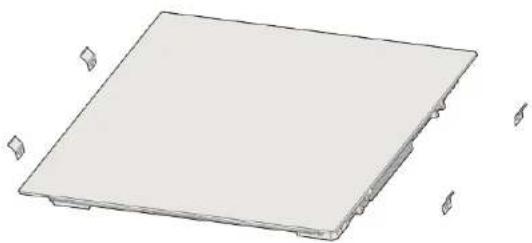
Before installing the hob on the worktop, the sealing strip must be glued to the bottom of the hob. Fig. 3
To do so:
- Turn the hob over so that the glass surface is face down.
- Remove the sealing strip from the bag and remove the double-sided adhesive from the back of the strip.
- Then, glue the strip to the back of the hob.
- The strip must not extend beyond the edge of the hob.
Fig. 3
- Bottom of the hob
- Sealing strip
ENGLISHENGLISH
Worktop preparation
- Cut out the worktop according to the dimensions shown in figure 4.
- For installation and use, you must keep a space of at least 5 cm around the recess. Make sure that the thickness of the worktop is at least 30 mm. Make sure the worktop is made of a heat-resistant and insulated material (wood or other similar fibrous or hygroscopic materials should not be used unless impregnated) to avoid electric shock or deformation caused by heat radiation from the hob.
Note: The safety distance between the sides of the hob and the interior surfaces of the counter must be at least 3 mm.
| L (mm) | W (mm) | H (mm) | D (mm) | A (mm) | B (mm) | F (mm) |
| 590 | 520 | 53 | 49 | 560 ± 1 | 480 ± 1 | 50 mm |

Ventilation
Make sure the hob is well ventilated, and the air inlet and outlet are not blocked. Check whether the hob is working properly.
Note: The safety distance between the hob and the cabinet above it must be at least 760 mm.
See figure 5 to ensure proper ventilation of the hob.
| A (mm) | B (mm) | C (mm) | D | E |
| 760 min | 15 min | 20 min | Air inlet | Air outlet 2 mm |

Warning: Ensure proper ventilation.
- Always make sure the hob is well ventilated, and the air inlet and outlet are not blocked. To prevent accidental contact with the hot hob base, or electric shock during use, you must install a wooden insert, fixed with screws, at a minimum distance of 15 mm from the bottom of the hob. Fig. 6.
- There are ventilation gaps around the exterior of the hob. You must ensure these gaps are not blocked by the worktop when installing the hob.
Please note that the adhesive joining the plastic or wooden material to the furniture must withstand temperatures above 150°C to prevent the coating from detaching. Therefore, the rear wall and adjacent and surrounding surfaces must be able to withstand a temperature of 90°C.
After installing the hob, make sure that:
- The power cord shall not be accessible through cabinet doors or drawers.
- There is an adequate flow of fresh air from the exterior of the cabinet to the hob base.
- If the hob is placed above drawers or cabinets, you must install a thermal protection barrier under the hob base.
- Make sure that the isolation switch is easily accessible to the user.
Before attaching the fixing brackets:
You must place the unit on a stable and smooth surface (you can use the packaging). Do not exert pressure on the control panel of the hob.
Adjusting the bracket position
- Secure the hob to the worktop by screwing the four brackets to the hob base as shown in figure 7.
- Adjust the brackets position to suit the thickness of the worktop.
Fig. 7 key
- Bracket
Bracket
Brackets must not, under any circumstance, touch the interior surface of the worktop after installation.

WARNINGS
- The hob must be installed by qualified personnel or technicians. Never carry out the operation by yourself.
- Do not install the hob directly above a dishwasher, refrigerator, freezer, washing machine or tumble dryer, as moisture may damage the hob's electric system.
- The hob must be installed in a way that ensures better heat radiation.
- The wall and the area above the worktop surface must be heat resistant.
- To avoid any damage, the adhesive used for the hob's installation must be heat resistant.
- Do not use a steam cleaner to clean the induction hob.

Connecting the hob to the mains
The hob must be connected to the mains by a suitably qualified person. Before connecting the hob to the mains, check that:
- Your home wiring system is suitable for the power consumption of the hob.
- The mains voltage matches the voltage stated on the rating label of the appliance.
- The power cord sections can withstand the load specified on the product rating label.
ENGLISHENGLISH
- Do not use adapters, reducers or branching devices to connect the hob to the mains, as they may cause overheating or fire.
The power cord is not in contact with any hot parts and positioned to avoid its temperature exceeding 75 °C.

Check with an electrician whether your home wiring system is suitable without modifying it. Any modifications should only be carried out by a qualified electrician. Fig. 8
If the cord is damaged or needs to be replaced, avoid fixing it yourself and contact the official Cecotec Technical Support Service to avoid any accidents.
- If the appliance is connected directly to the mains, an omnipolar circuit breaker with an opening of at least 3 mm between the contacts must be installed.
The person in charge of the installation must ensure that a correct electrical connection has been made and that it complies with current safety regulations.
- Do not bend or press the cable.
The cable should be checked periodically. Only a qualified technician can replace it.

The bottom surface and the power cord of the hob should not be accessible after installation.
4. OPERATION
Induction cooking is a safe, advanced, efficient and economical cooking technology. The induction hob works by electromagnetic vibrations that generate heat directly in the cookware, rather than indirectly by heating the surface of the glass. The glass heats up by itself because the cookware eventually heats it up. Fig. 9
Fig. 9 key:
- Cookware
- Magnetic circuit
- Glass ceramic hob
- Induction cell
- Induced currents
Icons
- The icons react to touch, so there is no need to apply any pressure.
- Use the base of your finger, not the tip. Fig. 10
You will hear a beep every time the hob detects a finger. - Make sure the icons are always clean and dry and that no objects (for example, a utensil
or a cloth) are covering them. Even a thin layer of water can hinder the proper operation of the icons.
Choosing the right cookware
- Only use cookware with a base suitable for the induction hob.
- Look for the induction symbol on the packaging or at the bottom of the cookware.
- You can check if your cookware is suitable with a magnet test. Move a magnet towards the base of the cookware. If it sticks or is attracted by the utensil, this means that the utensil is compatible with the induction hob.
- If you do not have a magnet:
-
Pour some water into the utensil to be tested.
-
If does not appear on the display flashing and water heats up, the frying pan is suitable.
- Cookware made of the following materials is not suitable: pure stainless steel, aluminium or copper without magnetic base, glass, wood, porcelain, ceramic, and earthenware.
Cookware with aluminium bases. These reduce the ferromagnetic area, which means less heat is emitted. In addition, this type of cookware is difficult for the hob to detect, resulting in insufficient heating.
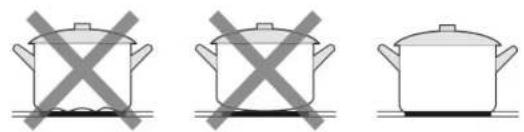
- Do not use cookware with concave or convex bases. Fig. 11
- Make sure the base of the cookware is smooth, flat against the glass, and of same size as the cooking zone. Use cookware whose diameter is the same as the selected cooking zone. The use of a slightly wider cookware will increase the efficiency of the energy used. If you use cookware with a smaller diameter, efficiency will be affected. Always place the cookware in the centre of the cooking zone. Fig. 12
- Always lift the cookware off the induction hob; do not slide it, as it could scratch the glass surface. Fig. 13
Cookware size
The cooking zones are delimited and automatically adapt to the diameter of the cookware. However, you should try to match the diameter of the cookware as closely as possible to the diameter of the cooking zone. To get the most out of the induction hob, place the cookware in the centre of the cooking zone.
| Cooking zone Induction compatible cookware base diameter | ||
| 1,2,3,4 | 120 The size of the cookware must not exceed the mark delimiting the cooking zone. | |
| Flex zone | 250 | |
| Titanic Zone | 300 | |
ENGLISHENGLISH
Start cooking
- Press the power icon ①. After switch-on, you will hear a beep, and the control panel will display "-" to indicate that the appliance has entered standby mode.
- Place a suitable cookware on the cooking zone you wish to use.
Note: Make sure the base of the cookware and the cooking zone surface are clean and dry. - Each cooking zone has its own power level slider control and timer, so that power and cooking time can be set independently for each cooking zone.
- Select a power level by sliding your finger on the slider control. Power increase. Fig. 14.
- If power is not selected within 20 seconds, the hob will turn off automatically. You must turn it on again and retry from step 1.
- You can change the power any time while cooking.

and the power setting flash alternately on the display:
- You have not placed the cookware on the correct cooking zone.
- The cookware you are using is not suitable for the induction hot
- The cookware is too small or not in the centre of the cooking zone.
If no suitable cookware is placed on the cooking zone, the latter will not switch on.
The display will automatically switch off after 1 minute if no cookware is placed on the hob.
Finish cooking
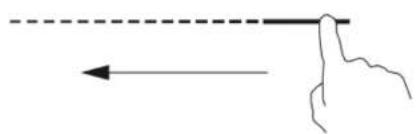
- Slide your finger to the left on the power level slider control of the selected cooking zone to switch it off. Fig. 15
Make sure that number "0" is shown on the display. After three seconds, the cooking zone will switch off and the corresponding display will show "-".

tch the induction hob off by pressing the power icon ①.
- Be careful, the surface may be hot.
The "H/h" symbol indicates that the corresponding cooking zone is still hot. It will disappear when the surface has cooled down and reached a safe temperature. If you want to heat up more cookware, use the zone that is still hot to save energy.
Using the Booster function
Activating the Booster function
- Press the power icon Ⓐ. After switch-on, you will hear a beep, and the control panel will display "-" to indicate that the appliance has entered standby mode.
- Press the Booster function icon >>; the corresponding symbol will appear on the display and the hob will start heating at full power.
Deactivating the Booster function
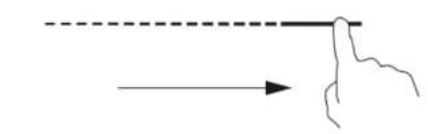
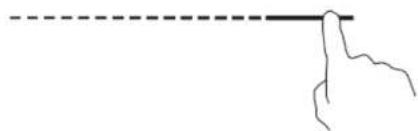
- If you slide your finger over the touch slider control (Fig. 16), the Booster function will be deactivated. In addition, the display of the selected cooking zone will show the power level that has been set using the touch slider control.
- Once the operating time has elapsed, the Booster function will be automatically deactivated, and the hob will operate at the power that was selected before activating this function. If this power was 0, the hob will operate at power 9.
Note:
- This function can be activated in any cooking zone.
- The cooking zone will return to the original setting after 10 minutes.
- The flex zone will return to the original setting after 5 minutes.
- The Booster function will switch to power 9 if you switch on another cooking zone.
- If the original power setting is 0, it will return to 9 when the Booster function time is over.
Flex zone
- The flex zone can be used as a single cooking zone or as two separate cooking zones, depending on your cooking needs.
- The flex zone consists of two independent inductors that can be controlled separately. When operating as a single zone, the part on which no cookware is placed will automatically switch off after a few seconds. Use suitable cookware for this hob.
-
To ensure correct detection and even heat distribution, the cookware must be positioned:
-
At the front or rear of the flexible zone, if the cookware is less than 25 cm long.
- Anywhere, if the cookware used is larger.
Using the flex zone as an individual cooking zone
- To use the flex zone as an individual cooking zone, press the ● , □ , □ or □ ● icons.
- The power of this zone is adjusted in the same way as the other zones.
- If you wish to add another cookware press the corresponding icons again so that the zone detects it.
Using the flex zone as two separate cooking zones
- To use the flex zone as two separate cooking zones with different power settings, press the br icons
- Use suitable cookware for this hob.
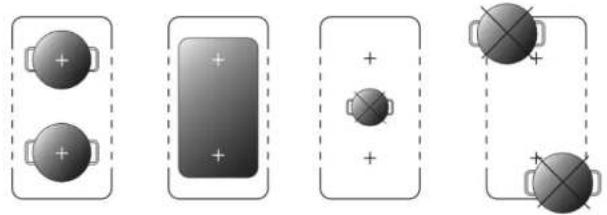
*Examples of correct and incorrect cookware placement shown in figure 17.
Locking the icons
- You can lock the icons to avoid any unintentional use (e.g. children accidentally turning on the cooking areas).
- When you activate the lock, all the icons will be disabled, except for the power icon.
ENGLISHENGLISH
Activating the Lock function
To do so, press the Lock function icon ^11 @o" will appear on the display.
Deactivating the Lock function
Press and hold the Lock function icon to unlock the icons.

When the hob is locked, all icons are disabled except for the power icon in case of danger, you can switch off the hob by pressing this icon. However, to perform any other operation, you must unlock the hob (even after switching it back on).
Timer icons
- Each cooking zone has icons to increase or decrease the time.
- Pressing either of these two icons briefly will increase/decrease the time by 1 minute. However, if you hold it down, the time will increase/decrease by 10 minutes.
- If you activate the flex zone, you can set the timer using the icons of the cooking zones on the flex zone.
- When the flex zone is activated, if you have selected the cooking time, it will be maintained even if you deactivate the zone.
- If you activate the flex zone, the time setting will be disabled by default.
- The maximum setting time of the power you have selected is the default time for that power.
- Once you have set the timer, the remaining time will be shown on the display. Press the slider to check the selected power. If you want to change it, just slide your finger.
-
When the time reaches "0:00", this value will no longer appear on the corresponding display if no operation is performed after 3 seconds.
-
To increase the time, you can make either a short or a long press on the icon.
-
To reduce the time, you can make either a short or a long press on the icon
-
If you press and hold the increase and decrease time icons simultaneously for 1 second, the timer will be deactivated.
Pausing the cooking process
-
When the cooking zones are in operation, press the pause icon ^II|B . The displays of all cooking zones will show "II" and will heat up to power level 2. Only the Pause/Lock ^II|B and power ^① icons will be enabled at this time.
-
Press the pause icon II|B again and the display will show the original setting. The cooking zones will continue to heat up.
Titanic Zone
- It can be used as a large cooking zone, depending on your needs.
- It consists of four independent inductors that can be controlled separately. When operating as a single zone, the area where no cookware is placed will automatically switch off after
a few seconds and the Titanic Zone will be deactivated. Use suitable cookware for this hob.
- To ensure correct detection and even heat distribution, the cookware diameter should be between 30 and 40 cm.
Activating the Titanic Zone
To do so, simply press the 📄 icon.
Deactivating the Titanic Zone
To do so, simply press the 📄 icon again.
Default operating time
The induction hob features an automatic protection shutdown function. The hob will switch off automatically if you ever forget to do so. The default operating times for different power levels are shown in the table below:
| Power level | Pause | 1 | 2 | 3 | 4 | 5 | 6 | 7 | 8 | 9 |
| Default operating time (hours) | 8 | 8 | 8 | 6 | 6 | 4 | 4 | 2 | 2 | 1.5 |
When the cookware is removed, the hob will stop heating immediately and switch off automatically after 1 minute.
Users with a pacemaker should seek medical advice before using this hob.
Preliminary considerations

Be careful when frying, as oil and fat heat up very quickly, especially if you use the Booster function. At extremely high temperatures, oil and grease can burn, posing a serious fire hazard.
Advice for cooking
- When food starts boiling, reduce the power.
- Using a lid will reduce the cooking time and save energy due to heat retention.
- Reduce the amount of liquid or grease to shorten cooking times.
- Start cooking with a high-power setting and reduce it as food heats up.
Simmering and cooking rice
- Simmering occurs below boiling point, at around 85 °C. It is essential for preparing some soups and tender stews, as it enhances flavours without overcooking the food. Egg-based and flour-thickened sauces should also be cooked below boiling point.
- Some recipes may require a higher setting than the minimum for the food to cook properly in the recommended time.
ENGLISHENGLISH
Cooking pork chops
For juicy and tasty results:
1. Leave the meat at room temperature for about 20 minutes before cooking it.
2. Preheat a heavy based frying pan.
3. Brush both sides of the meat with oil. Spray a small amount of oil in the hot frying pan and place the meat.
Stir-frying
- Choose a flat-bottomed wok compatible with induction hobs or a large frying pan
- Have all ingredients ready. The stir-frying process is quick. If cooking large quantities of food, cook them in smaller batches.
- Preheat the cookware briefly and add two tablespoons of oil.
- Cook meat first, set it aside and keep it warm.
- Stir-fry vegetables. When vegetables are hot but still crunchy, choose a lower power for the cooking zone, place the meat in the frying pan again and add a sauce.
- Gently stir the ingredients to heat through.
- Serve them immediately.
Detection of small objects
If you place an unsuitably sized or non-magnetic cookware (e.g., aluminium) or any other small object (e.g., knife, fork, key) on the induction hob; the latter will automatically enter standby mode.
Setting the power level
The following settings are for guidance only. The exact setting will depend on different factors, such as cookware and the amount of food to be cooked. Test the induction hob to find the settings that suit you best.
| Power setting Suitable for | |
| 1-2 Lightly heat smal | amounts of foodTo melt chocolate and butter |
| 3-4 Reheating | Cooking quicklyCooking rice |
| 5-6 Making pancakes | |
| 7-8 Stir-frying | Cooking pasta |
| 9/P Stir-frying at higher temperature in a wokSealingBoiling soupBoiling water |
- CLEANING AND MAINTENANCE
| Soiling type Cleaning Notes | ||
| Usual dirt on the glass (fingerprints marks, food stains, etc.). | 1. Disconnect the power supply.2. Use a hob cleaner while the glass is still tempered (but not hot).3. Rinse the appliance and dry the glass with a clean cloth or paper towel.4. Switch on the induction hob. | When the hob is switched off, there will be no warning that the surface is hot, but that does not mean that it is not hot. Be especially careful.Abrasive cloths, some nylon scouring pads and strong cleaning products can scratch the glass.Always read the label to check if your cleaning product or scouring pad is suitable.Never leave any cleaning remains on the hob, as glass may get stained. |
| Spillage of sugary products on the glass. | Remove them immediately with a spatula or a suitable scraper for induction hobs but be careful with the hot surfaces of the cooking zone.1. Disconnect the power supply.2. Hold the scraper at an angle of 30° and drag the dirt onto a cool area of the hob.3. Wipe up the spillage with a cloth or paper towel.4. Follow steps 2 to 4 in the section 'Usual dirt on the glass'. | Remove melted sugary food stains or spills as soon as possible. If left to cool down on the glass, they may be difficult to remove or may even permanently damage the surface.Cutting hazard: the blade of the scraper may be very sharp. be careful when removing the guard.Use it with extreme care and always store it safely and out of the reach of children. |
ENGLISHENGLISH
| Spills on icons. | 1. Disconnect the power supply.2. Blot the spill.3. Wipe the touch icons with a clean, damp sponge or cloth.4. Dry the area completely with a paper towel.5. Switch on the induction hob. | The induction hob may beep and switch off, and the icons may not work if wet.Be sure to dry the touch icons before switching the induction hob back on. |
- TROUBLESHOOTING
| Problem Possible causes Possible solutions | ||
| The induction hob does not switch on. | No power supply. Make sure the | hub is connected to the mains, and it is switched on.Check if there has been a power failure. After these checks, if the problem persists, please contact the official Cecotec Technical Support Service. |
| Icons do not respond. Touch | Icons are locked. Unlock the icons | To do so,please refer to the relevant section on this manual. |
| The glass is scratched. You have used cookware with a rough base.You have used inappropriate and abrasive scouring pads or cleaning products. | Use cookware with flat and smooth bases.To do so, please refer to the relevant section on this manual.To do so, please refer to the relevant section on this manual. | |
| Some cookware makes crackling or popping noises. | This may be due to their composition (layers of different metals that vibrate differently). | This is normal and not a fault. |
| The induction hob makes a slight humming sound when a high-power level is selected. | This is due to the induction cooking technology. | Although this is a normal phenomenon, the noise should decrease or disappear completely when reducing the power. |
| Fan noise is heard coming from the induction hob. | The cooling fan built into the induction hob has been activated to prevent overheating of the electronic components. It may still operate even after turning off the induction hob. | This is normal and there is no need to worry.Do not unplug the hob from the mains while the fan is still running. |
| Cookware does not heat up and does not appear on the display. | The hob does not detect the cookware because it is not suitable for induction cooking.The hob does not detect the cookware because it is too small for the cooking zone or not well centred on it. | Only use cookware compatible with the induction hob.Centre the cookware and make sure its base matches the size of the cooking zone. |
| The induction hob or one of the cooking zones has turned off unexpectedly, emits a sound, and an error code is displayed (usually alternating with one or two digits on the cooking timer display). | Technical fault. Note down the | error codes, disconnect the induction hob from the power supply and contact a qualified technician. |
Faults and error codes
The induction hob is fitted with a self-diagnostic function. With this function, the technician can check the operation of different components without having to disassemble the hob or remove it from the worktop.
ENGLISHENGLISH
| Problem Possible causes Possible solutions | ||
| E1, E2, E7 | Temperature sensor fault. | Contact the official Cecotec Technical Support Service. |
| E3, E4 IGBT transistor temperature sensor fault. | Contact the official Cecotec Technical Support Service. | |
| EU The connection between the display board and the main board fails or there is a problem with the touch control panel. | Contact the official Cecotec Technical Support Service. | |
| EL/EH Abnormal supply voltage. Check that there has not been a power failure. After making sure that the power supply is normal, reconnect the hob. | ||
| C1 The temperature of the induction hob sensor is too high. | Let the hob cool down and restart it. | |
| C2 IGBT transistor sensor temperature is too high. | Let the induction hob cool down and restart it. | |
| F5, F6 Fan fault. | Contact the official Cecotec Technical Support Service. | |
| EF | Two or more icons are pressed for a long time. | Clean the control panel. |
Specific faults and solutions
| Fault | Problem | Solution A | Solution B |
| The LED indicator light does not turn on when the hole is plugged in. | There is no electricity. | Check if the plug is properly connected to the mains and if the latter works. | |
| The auxiliary power board and the board connected to the display malfunction. | Check the connections. |
| Fault | Problem | Solution A | Solution B |
| The auxiliary power board is damaged. | Replace the power board. | ||
| The display is damaged. | Replace the display board. | ||
| Some icons do not respond, or the display does not work normally. | The display is damaged. | Replace the display board. | |
| The power level indicator light turns on, but the hob does not heat up. | High temperature of the cooking hob. | The room temperature may be high. The air inlet or outlet may be blocked. | |
| The fan is faulty. | Check if the fan is working properly, if not, replace it. | ||
| The power board is damaged. | Replace the power board. | ||
| Heating stops suddenly during operation and "u" flashes on the display. | The cookware used is not suitable. | Use a suitable cookware. | |
| The cookware diameter is too small. | The cookware detection circuit is damaged, replace the power supply board. | ||
| The hob has overheated. | Wait for the hob temperature to return to normal. Press the power Icon to restart the hob. | ||
| When trying to heat zones on the same size, the display shows "u". | The power board and the board connected to the display malfunction. | Check the connections. |
ENGLISHENGLISH
| Fault Problem Solution A | Solution B | ||
| The display board of the communication unit is damaged. | Replace the display board. | ||
| The main board is damaged. | Replace the power board. | ||
| The fan motor produces unusual noises. | The motor fan is damaged. Replace the fan. |
Refer to these instructions to repair common faults. Do not try to disassemble the appliance on your own to avoid hazards and damages to the induction hob.
7. TECHNICAL SPECIFICATIONS
Reference: EU01_108060
Model: Bolero Squad | 4700 TitanicZone
Total power: 7400 W
Rated voltage: 220-240 V\~ or 380-415 V 3 N\~
Rated frequency: 50/60 Hz
A: 2200 W / 3300 W (B)
B: 2200 W / 3300 W (B)
C: 2200 W / 3300 W (B)
D: 2200 W / 3300 W (B)
| Symbol | Value | Unit | |
| Model reference | EU01_108060 Bolero Squad I 4700 TitanicZone | ||
| Type of cooking hob | Built-in cooking hob | ||
| Number of cooking zones | 2 | ||
| Heating technology (induction cooking zones and hotplates, radiant cooking zones, solid hotplates) | Induction cooking zones | ||
| Symbol | Value | Unit | |
| For circular hotplates or cooking zones: diameter of the usable surface of each electric cooking zone, rounded to the nearest 5 mm | -- cm | ||
| For non-circular hotplates or cooking zones: width and length of the usable surface of each hotplate or electric cooking zone, rounded to the nearest 5 mm | L Zone 1 | L: 38.5Zone 2:L: 38.5 | cm |
| W Zone : | W: 23Zone 2:W: 23 | ||
| Energy consumption per lamp or cooking zone, calculated per kg (*) | EC _electric heating | Zone 1: 183.1Zone 2: 185.3 | Wh/kg |
| Energy consumption of the hob, calculated per kg (*) | EC _electric hob | 1842 Wh/kg | |
Technical specifications may change without prior notification to improve product quality. Made in China | Designed In Spain
8. DISPOSAL OF OLD ELECTRICAL AND ELECTRONIC APPLIANCES

This symbol indicates that, according to the applicable regulations, the product and/or batteries must be disposed of separately from household waste. When this product reaches the end of its shelf life, you should dispose of the cells/batteries/accumulators and take them to a collection point designated by the local authorities.
For detailed information on how to properly dispose of electrical and electronic appliances and/or batteries, consumers should contact their local authorities.
Compliance with the above guidelines will help protecting the environment.
FRANÇAISENGLISH
9. TECHNICAL SUPPORT AND WARRANTY
Cecotec shall be liable to the end user or consumer for any lack of conformity that exists at the time of delivery of the product under the terms, conditions and deadlines established by the applicable regulations.
Repairs should be carried out by qualified personnel.
If at any moment you detect any problem with your product or have any doubt, do not hesitate to contact the official Cecotec Technical Support Service at +34 96 321 07 28.
10. COPYRIGHT
The intellectual property rights over the texts in this manual belong to CECOTEC INNOVACIONES, S.L. All rights reserved. The contents of this publication may not, in whole or in part, be reproduced, stored in a retrieval system, transmitted, or distributed by any means (electronic, mechanical, photocopying, recording or similar) without the prior authorization of CECOTEC INNOVACIONES, S.L.
11. SIMPLIFIED EU DECLARATION OF CONFORMITY
CE Cecotec Innovaciones hereby declares that this appliance complies with the essential requirements and other relevant provisions of the regulations applicable in the European Union. This appliance has been designed, manufactured and tested in compliance with required safety and quality standards. The full text of the EU Declaration of Conformity can be found on the following website: https://cecotec.es/es/information/declaration-of-conformity
1. PIÈCES ET COMPOSANTS
Image 1
m = 311
A: 2200 W/3300 W (B)
B: 2200 W/3300 W (B)
C: 2200 W/3300 W (B)
D: 2200 W/3300 W (B)
Pred instalaci desky
A: 2200 W/3300 W (B)
B: 2200 W/3300 W (B)
C: 2200 W/3300 W (B)
D: 2200 W/3300 W (B)
ČEŠTINA ČEŠTINA
Fig./Img./Abb./Afo./Rys. 5
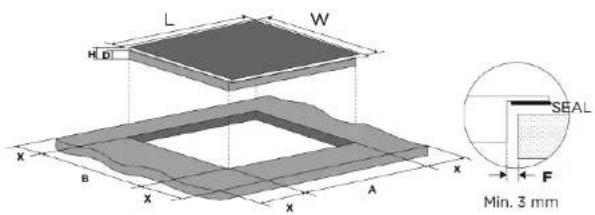
Fig./Img./Abb./Afb./Rys.4
natural_image
3D rendering of a flat rectangular electronic component with mounting holes and a small inset showing a small leaf-like feature (no text or symbols)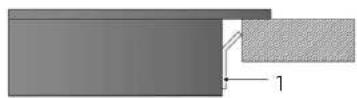
Fig./Img./Abb./Afo./Rys.7
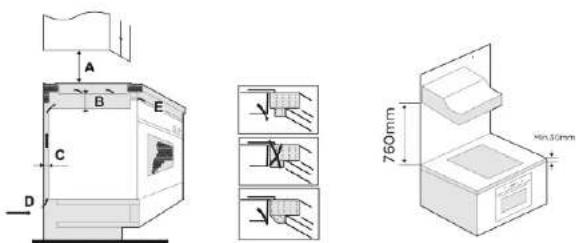
Fig./Img./Abb./Afo./Rys.5
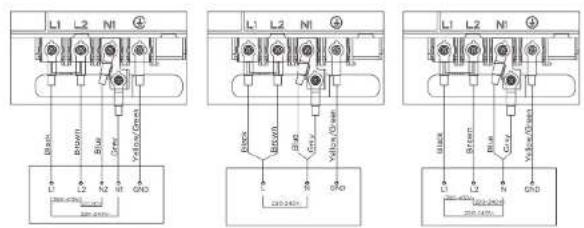
Fig./Img./Abb./Afb./Rys.8
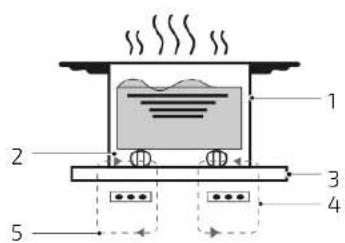
Fig./Img./Abb./Afb./Rys.9
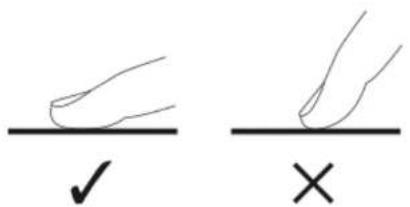
Fig./Img./Abb./Afb./Rys.10
natural_image
Three identical cooking pots with crossed X marks, no text or symbols presentFig./Img./Abb./Afo./Rys.11

natural_image
Four identical illustrations of a cooking pot with crossed x marks, shown in different orientations (no text or symbols)Fig./Img./Abb./Afo./Rys.12
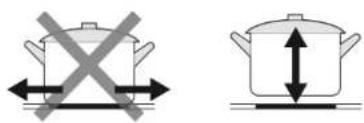
Fig./Img./Abb./Afo./Rys.13
natural_image
Simple line drawing of a hand holding a finger with an arrow indicating direction (no text or symbols)Fig./Img./Abb./Afb./Rys.14
natural_image
Simple line drawing of a hand pointing to a horizontal line with an arrow, no text or symbols presentFig./Img./Abb./Afb./Rys.15
natural_image
Simple line drawing of a hand pointing to a dashed horizontal line (no text or symbols)Fig./Img./Abb./Afb./Rys.16
natural_image
Diagram showing four battery cell configurations with positive and negative charge indicators, no text or symbols present.Fig./Img./Abb./Afo./Rys.17
www.cecotec.es