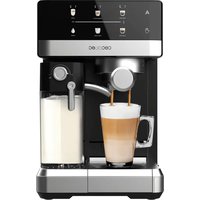
Power Espresso 20 Touch & Cream - Coffee machine CECOTEC - Free user manual and instructions
Find the device manual for free Power Espresso 20 Touch & Cream CECOTEC in PDF.


| Brand | Cecotec |
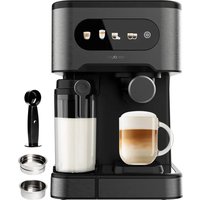
| Model | Power Espresso 20 Touch & Cream |
| Product type | Automatic espresso machine with integrated milk reservoir |
| Power supply | 220-240 V ~ 50/60 Hz |
| Pressure | 20 bars |
| Water tank | Removable, capacity not specified (estimated 1.2 L) |
| Milk reservoir | Removable, capacity not specified (estimated 0.5 L) |
| Main functions | Single/double espresso, single/double cappuccino, single/double latte, milk foam, manual espresso |
| Control panel | Touch icons with beverage selection and cleaning |
| Portafilter | Metal, with single and double filters |
| Measuring spoon | Included with tamper |
| Auto shut-off | After 25 minutes of inactivity |
| Cleaning | Automatic cleaning function of the milk system; manual descaling |
| Maintenance | Wash removable parts with soapy water; do not immerse the body |
| Safety | Auto shut-off, overheat protection |
| Spare parts | Filters, portafilter, reservoirs, gaskets |
| Dimensions (approx.) | Not specified (estimated 30 x 25 x 35 cm) |
| Weight (approx.) | Not specified (estimated 5 kg) |
Frequently Asked Questions - Power Espresso 20 Touch & Cream CECOTEC
User questions about Power Espresso 20 Touch & Cream CECOTEC
0 question about this device. Answer the ones you know or ask your own.
Ask a new question about this device
Download the instructions for your Coffee machine in PDF format for free! Find your manual Power Espresso 20 Touch & Cream - CECOTEC and take your electronic device back in hand. On this page are published all the documents necessary for the use of your device. Power Espresso 20 Touch & Cream by CECOTEC.
USER MANUAL Power Espresso 20 Touch & Cream CECOTEC
natural_image
Exterior view of a modern CBOO BC coffee maker with digital display and control buttons (no visible text or symbols on the device itself)- Parts and components 20
- Before use 20
- Operation 24
- Cleaning and maintenance 26
- Troubleshooting 29
- Copyright 33
- Simplified EU Declaration of Conformity 33
SOMMAIRE
EN • The coding in this manual is generic and applies to all code variants of the appliance.
A. Control panel
B. Power ON/OFF button
C. Drip tray grid
D. Drip tray float
E. Drip tray
F. Water tank lid
G. Water tank grip
H. Water tank
1. Milk container lid
J. Milk froth level adjustment knob
K. Frothed milk dispensing tube guide lever
L. Frothed milk dispensing tube
M. Milk inlet tube
N. Removable milk container
0. Metal portafilter
P. Portafilter handle
Q. Two coffee filters (single and double)
R. Measuring spoon
Fig. 2
- Auto indicator light
- Auto Espresso touch icon (single and double Espresso)
- Auto Cappuccino touch icon (single and double Cappuccino)
- Auto Latte touch icon (single and double Latte)
- Cleaning touch icon
- Frothed Milk touch icon
- Manual Espresso touch icon
- Manual indicator light
NOTE:
The graphics in this manual are schematic representations and may not exactly match the product.
2. BEFORE USE
- This appliance comes in a packaging designed to protect it during transport. Take the appliance out of its box and remove all packaging materials. You can keep the original box
ENGLISH
and other packaging materials in a safe place to prevent damage to the appliance if you need to transport it in the future. If you wish to dispose of the original packaging, make sure all items are recycled properly.
- Check that all parts and components are included and in good condition. If any of them are missing or damaged, please contact Cecotec's Official Technical Support Service immediately.
Box content
- Coffee machine
- Portafilter
- Double-cup filter
- Single-cup filter
- Measuring spoon
- Dosing ring
- Tamper
- Instruction manual
- Do not remove the product's serial number in order to keep proper traceability if technical assistance is required.
Cleaning the coffee machine before first use
Before the first use, clean the product to ensure that the first cup of coffee tastes excellent. The steps are as follows:
- Make sure that all parts are intact.
- Pour filtered water into the water tank, ensuring the water level does not exceed the "MAX" mark on the tank. Then close the water tank lid.
- Remove the stickers that hold the pieces together. Do not remove the warning stickers.
- First remove and wash the water tank, the filter holder, the two filters and the measuring spoon in a mixture of mild detergent and water. Rinse them thoroughly and put them back in the unit.
- Place the filter (1 cup or 2 cups, as needed) in the filter holder. To do this, align the filter protrusion with the filter holder recess. When the filter is inserted, turn it so that the projection of the filter no longer coincides with the dip of the filter holder.
Note: It is recommended to start the machine for the first time without ground coffee. Make sure that the filter is correctly positioned in the filter holder.
Note: To remove the filter from the filter holder, perform the installation steps, but in reverse. Rotate the filter by matching the protrusion of the filter with the dip of the filter holder. The filter can then be removed.
Warning: Make sure that the filter has cooled down before attempting to remove it from the portafilter.
ENGLISH
-
Insert the filter holder in the space provided in the coffee machine. You can secure it firmly by turning it counterclockwise from the "UNLOCK" position to the "LOCK" position. Place a large cup under the coffee spout, making sure that the frothing tube of the milk tank is also aligned with the inside of the cup.
-
To clean the inside of the appliance, follow the steps indicated in the "CAPPUCCINO PREPARATION" section using water in both tanks and without ground coffee in the filter. Do not immerse the main body of the appliance or the power cord in water or reach into any of its internal parts.
Eliminate excess air from the machine
To remove excess air from the machine, run the frothed milk cycle following the steps below:
- Fill the water tank with filtered water. The water level should be between the "MIN" and "MAX" levels. Then replace the water tank back into the unit.
- Refill filtered water into the milk tank. The water level must not exceed the "MAX" mark. Replace the milk container in the appliance by simultaneously lifting and sliding it back into the appliance, holding it by the lid. You should notice that the milk tank snaps into place. Remove and lock again (Fig. 3).
- Connect the machine to the power supply, press the ON/OFF button. The 6 touch icons will start flashing until the coffee machine preheats and enters standby mode. When they are stable, press the Milk frothed touch icon. Please be careful not to place any part of your body under the coffee or milk spout. Use a cup or container to collect the water and avoid burns.
- Once this process is completed, the product is ready for use.
Choosing the right cup
It is recommended to choose blended coffee beans, fresh and of medium to intense roast. Before preparing a drink, be sure to choose the right size cup according to the table below:
| Types of drinks Suggested cup capacity | ||
| Espresso |   Single Double Single Double | 50 ml 100 ml |
| Cappuccino | Small  Large Large  | 150 ml 300 ml |
| Latte | Small [4WC6] Large  | 200 ml 350 ml |
Note: The above amounts are the suggested cup capacity, not the amount of coffee. The total amount of the drink may vary depending on the type of milk and the level of froth generated.
Choosing the right coffee
1. Coffee
The coffee must be freshly ground and will only retain its flavour for the first 7 to 8 days, as long as it is stored in an airtight container and in a cool, dark place. Do not store in the refrigerator or freezer. It is recommended to grind the beans just before use.
2. Grinding
This is a fundamental step in the espresso brewing process.
- If the grind is too fine, the water will flow through the coffee with greater difficulty, so the extraction will be slower.
- If the grind is too coarse, the water will flow through the coffee with less difficulty, so the extraction will be faster.
- Be sure to use a good-quality grinder for uniform consistency.
Filling the water tank
- Fill up the water tank. You can use a jug to fill it directly or remove it from the coffee machine and fill it under the tap. Fill the tank with the desired amount of water below the "MAX" level of the tank. Never use hot water to fill the water tank, always use room temperature or cold water.
- Close the water tank lid. If you removed the tank from the brewer to fill it with water, be sure to put it firmly back in place.
Filling the milk container
If you are brewing a cappuccino or latte, remove the milk tank from the appliance by lifting it up and sliding it out. Next, pour in the amount of cold milk you estimate you will need, making sure it is below the "MAX" mark on the reservoir. Once finished, slide the milk reservoir back into the brewer making sure it fits securely. You should feel the milk reservoir snap into place.
NOTE: You can use any type of milk, whole, semi-skimmed, soy, etc.
Filter choice
Select the filter to be used as follows:
a. Simple espresso: use the filter for a single coffee.
b. Double espresso: use the double-coffee filter.
By placing two small espresso cups under the filter holder, you can prepare two espresso pods at the same time.
Insertion of the filter in the filter holder (Fig. 4)
Place the filter (1 cup or 2 cups, as needed) in the filter holder.
ENGLISH
a. To do this, align the filter protrusion with the filter holder recess.
b. When the filter is inserted, turn it so that the projection of the filter no longer coincides with the dip of the filter holder.
Note: To remove the filter from the filter holder, perform the installation steps in reverse.
Rotate the filter by matching the protrusion of the filter with the dip of the filter holder. The filter can then be removed.
Filling of coffee (Fig. 5)
a. Fill the filter with finely ground fresh espresso coffee to about 2 mm from the edge (DO NOT overfill).
b. Using the tamping part of the scoop, push the coffee grounds down as far as the tamp reaches to make the espresso grounds compact and uniform.
c. Wipe any excess coffee from the rim to ensure a proper fit under the brew head.
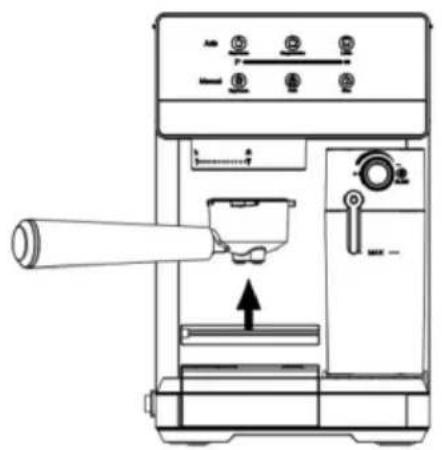
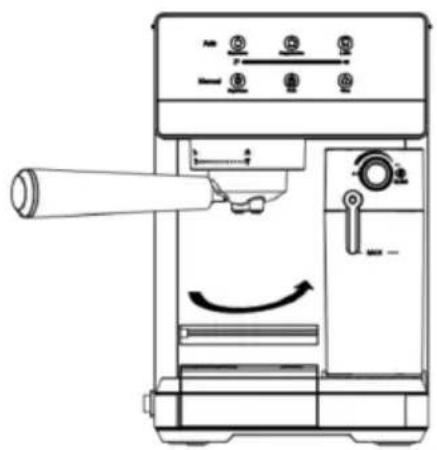
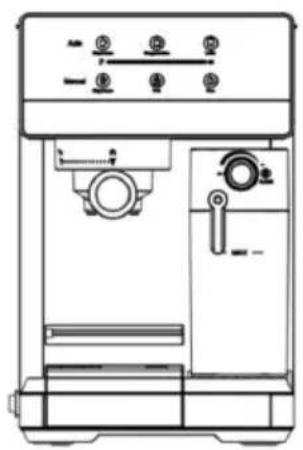
Insertion of the filter holder (Fig. 6)
a. Place the filter holder under the infusion head.
b. Position the handle so that it is aligned with the open lock icon and snaps into the slot.
c. Then slowly turn it clockwise until the handle is aligned with the locking mark.
Coffee cup placement
a. Place the cup on the drip grid if you are brewing a single serve coffee.
b. Remove the grid from the removable drip tray and place a larger cup if you are making a cappuccino or latte.
CAUTION: When preparing a cappuccino or latte, be sure to adjust the milk dispensing tube guide lever to position the milk froth dispensing tube inside the cup you are using.
Switching on the coffee machine
a. Make sure the unit is plugged into the proper outlet.
b. Turn the unit on by operating the ON/OFF switch located on the left side of the unit.
The touch icons on the control panel will start flashing during the heating process. Once the touch icons light up, the appliance is ready for operation.
Warning: If the milk tank is not placed in the correct position, the Cappuccino and Latte touch icons will not light up.
3. OPERATION
Brewing Espresso coffee
Make sure that the filtered water in the water tank is between the "MIN" and "MAX" level.
1. Brewing Espresso:
a. Press the Auto Espresso touch icon once to prepare a single espresso. The touch icon will light up. It will start flashing, indicating that a single espresso is being prepared.
b. Press the Auto Espresso touch icon twice to prepare a double espresso. The touch icon will light up. It will start flashing, indicating that a double espresso is being prepared.
The unit will stop automatically after the preparation process and the touch icon will become steady, indicating that the cycle has been completed.
NOTE: If you wish to brew less than the preset amount of coffee, press the Auto Espresso touch icon at any time during the brewing process to stop when the desired amount of coffee is reached.
c. Press the Manual Espresso touch icon 📁 to customize the preparation of your Espresso according to your preferences or desired quantity. For safety, the unit will stop automatically after the MAX preparation time.
2. Brewing Cappuccino:
a. Press the Auto Cappuccino touch icon once to prepare a single Cappuccino. The touch icon will light up. It will start blinking, indicating that a single Cappuccino is being prepared.
b. Press the Auto Cappuccino touch icon twice to prepare a double Cappuccino. The touch icon will light up. It will start blinking, indicating that a double Cappuccino is being prepared.
The unit will stop automatically after the preparation process and the touch icon will become steady, indicating that the cycle has been completed.
NOTE: If you wish to brew less than the preset amount of coffee, press the Auto Cappuccino touch icon at any time during the brewing process to stop when the desired amount of coffee is reached.
Before preparing your Cappuccino, adjust the milk froth level to your preference by turning the milk froth level adjustment knob to the left for more froth (Cappuccino) and to the right for less froth (Latte).
NOTE: The froth level can be adjusted during the brewing cycle.
3. Brewing Latte:
a. Press the Auto Latte touch icon once to prepare a simple latte. The touch icon will light up. It will start flashing, indicating that a plain latte is being prepared.
b. Press the Auto Latte touch icon twice to prepare a double latte. The touch icon will light up. It will start flashing, indicating that a double latte is being prepared.
The unit will stop automatically after the preparation process and the touch icon will become steady, indicating that the cycle has been completed.
ENGLISH
NOTE: If you wish to prepare less than the preset amount of coffee, press the Auto Latte touch icon at any time during the preparation process so that it stops when the desired amount of coffee is reached.
Before preparing your Latte, adjust the milk froth level to your preference by turning the milk froth level adjustment knob to the left for more froth (Cappuccino) and to the right for less froth (Latte).
NOTE: The froth level can be adjusted during the brewing cycle.
After preparing milk drinks
Once you have finished preparing your milk beverage, you can store the milk tank of the coffee machine directly in the refrigerator (ready to be used next time) or discard the leftover milk.
Automatic shut-off function
After pressing the ON/OFF button, if no operation is performed within 25 minutes, the unit will automatically shut down.
4. CLEANING AND MAINTENANCE
Unplug the coffee machine from the mains and allow it to cool down completely before cleaning. Regularly clean the housing of the coffee machine with a damp cloth and regularly rinse the water tank, drip tray and milk tank.
Note: Do not clean with alcohol or solvent cleaner. Do not immerse the coffee machine in water for cleaning.
Remove the portafilter by turning it clockwise, dispose of the coffee residues inside and rinse it with clean water.
Clean all accessories and dry them thoroughly.
Cleaning of the milk tank and frothed milk dispensing tube
Although it is possible to store the milk tank with leftover milk in the refrigerator, it is important to clean the tank and the frothed milk dispensing tube regularly to avoid clogging and residue build-up. To clean the milk container, follow the instructions below:
- Remove the milk tank from the unit by simultaneously lifting it up and sliding it out.
- Remove the container lid. Discard excess milk.
- Remove the frothed milk dispenser tube from the cap and clean it. Remember to close it again after cleaning.
- Empty excess milk, rinse the milk tank and lid thoroughly with warm water mixed with cleaning agent. Be sure to rinse and dry thoroughly. Do not use abrasive cleaning
ENGLISH
agents or scouring pads as they may scratch the milk container and surface.
- Fill the milk reservoir with filtered water, without exceeding the MAX fill mark. Replace the milk tank in the unit by simultaneously lifting and sliding it back into the unit, holding the tank by the lid. You should feel the milk reservoir snap into place.
Warning: If the milk tank is not placed in the correct position, the Cappuccino and Latte touch icons will not light up.
-
Place a large empty cup under the frothed milk dispensing tube.
-
Press the Cappuccino 🎨 or Latte 🔊 touch icons. The unit will begin to release hot water through the frothed milk dispensing tube. Let the cleaning cycle run until you no longer see milk coming out of the tube. Repeat several cycles.
-
Turn the milk froth level adjustment knob to the cleaning position and press the Cleaning touch icon. The icon will light up and the unit will start releasing hot steam through the frothed milk dispensing tube. Repeat several cycles.
Note: Make sure that the filtered water in the water tank is between the "MIN" and "MAX" levels.
- Remove any remaining water in the water tank and milk tank, then rinse and wash the water tank and milk tank thoroughly with warm, soapy water. Be sure to rinse and dry them well. Do not use abrasive cleaners or scouring pads as this will scratch the finish.
Cleaning the brewing system, portafilter and filters
-
Press the On/Off button to turn off the machine and unplug the coffee machine from the electrical outlet.
-
Some of the metal parts may still be hot. Do not touch them until they have cooled completely.
-
Remove the filter holder and discard the coffee grounds. Thoroughly wash the filter holder and filter with warm, soapy water. Be sure to rinse and dry them well.
-
Clean the coffee outlet with a damp cloth to remove any coffee grounds that may remain.
-
Replace the filter holder (without any filter) in the unit's extraction group and lock it in place.
-
Place a large empty cup under the portafilter.
-
Plug the power cord into the mains socket. Press the ON/OFF button to switch on the machine.
-
Press the Auto Espresso touch icon once and let the coffee machine brew until it stops automatically.
Cleaning the water tank
-
Eliminate excess water by removing the water tank. It is recommended to empty the water tank between uses.
-
Wash the water tank and lid thoroughly with warm, soapy water. Be sure to rinse and dry them well.
ENGLISH
NOTE: Do not wash the water tank or its cover in the dishwasher.
CAUTION: Do not immerse the main body of the appliance, the power cord or the plug in water or any other liquid.
Cleaning of the coffee machine
- Clean the housing with a soft, damp cloth. Do not use abrasive cleaners or scouring pads as this will scratch the finish.
- Do not store any of the filter holders in the extraction group. This may adversely affect the seal between the brew head and the filter holder while preparing espresso.
CAUTION: Do not immerse the main body of the appliance, the power cord or the plug in water or any other liquid.
Descaling function
The build-up of mineral deposits in the machine will affect its operation. Your coffee machine should be descaled when you begin to notice an increase in the time required to prepare an Espresso, or when there is an excess of steam. In addition, you may observe an accumulation of white deposits on the surface of the extraction unit. The frequency of descaling depends on the hardness of the water used. The recommended cleaning intervals are given in the table below.
| Water type Cleaning frequency | |
| Filtered water After 80 - 100 | extractions |
| Tap water After 40 - 50 | extractions |
1. Descaling the water tank
- Fill the water tank with white vinegar.
- Let the filled tank sit overnight with the vinegar solution in the water tank.
- Discard the vinegar.
- Rinse the water tank thoroughly with tap water by filling it halfway and pouring it back into the sink, repeating this step until no vinegar remains in the tank.
2. Descaling of internal components
- Be sure to descale the inside of the water tank first by following the descaling steps above.
- Make sure the machine is switched off and the power cord is disconnected from the mains. Fill the tank with any product intended for descaling coffee machines. Follow the instructions of the manufacturer of the descaling product.
- Insert the portafilter (with filter and without coffee) and place a large empty cup on top of the drip tray and under the portafilter.
- Plug the power cord into the mains socket.
ENGLISH
-
Press the ON/OFF button to turn on the coffee machine.
-
Place a large empty cup under the frothed milk dispensing tube (at least 500 ml).
-
The touch icons on the control panel will start flashing during the heating process. Once the touch icons light up, the appliance is ready for operation.
-
Press the Cappuccino 🎨 or Latte 🔔 touch icons. The unit will begin to release hot water through the frothed milk dispensing tube. Let the cleaning cycle run until you no longer see milk coming out of the tube. Repeat several cycles.
-
Turn the milk froth level adjustment knob to the cleaning position and press the Cleaning touch icon . The icon will light up and the unit will start releasing hot steam through the frothed milk dispensing tube. Repeat several cycles.
-
Then repeat steps 8 and 9 with filtered water in the water tank to rinse the remaining descaling product from the machine.
5. TROUBLESHOOTING
| Problem | Possible cause | Possible solution |
| The machine does not work. | The coffee machine is not properly plugged into a power socket. | Plug the machine correctly into a wall socket. |
| The machine makes weak coffee. | The size of the ground coffee is too thick. | Use finer ground coffee. |
| The quantity of ground coffee is inadequate. | Not enough ground coffee, use more ground coffee. | |
| Ground coffee too little pressure is applied. | Press the ground coffee harder. | |
| I cannot rotate the filter holder in the extraction group. | The silicone head gasket is new. | Keep using it. This gasket will settle during the first few uses and become easier to turn. |
| There is too much ground coffee in the portafilter. | Add less ground coffee in the filter holder |
ENGLISH
| The portafilter is loose or comes out during espresso extraction. | The filter holder is not correctly fixed. | Make sure that the three tabs of the filter holder are completely closed. inserted in the extraction group |
| The filter is not inserted in the filter holder. Insert the filter into the filter holder. | ||
| The silicone gasket on the brewing unit is damaged or worn out. | Contact Cecotec's Official Technical Support Service. | |
| Coffee drips from the side of the filter holder during extraction. | The coffee grind is too fine. | Switch to a coarser grind setting. |
| Too much ground coffee. | Dose less ground coffee. | |
| Over-pressed ground coffee. | Apply less pressure to the ground coffee. | |
| The upper edge of the filter has not been cleaned of loose coffee beans. | Clean the edge of the filter before inserting it into the extraction head. | |
| The edge of the extraction head, the silicone gasket or the shower head is dirty. | Clean the parts with the cleaning brush and a damp cloth. | |
| The silicone gasket on the extraction head is damaged or worn. | Contact Cecotec's Official Technical Support Service. | |
| The filter holder is not installed correctly. | Reinstall it correctly. | |
| Both outlets of the portafilter are blocked. are obstructed. | Clean the outlets. | |
| Filter orifices are obstructed. | Soak the filter in clean water for about half an hour. Then clean it Clean them with a brush. | |
| The coffee comes out cold. | The cup or glass was cold before pouring the Espresso. | Pour hot water from the vaporizer in the cup before extracting the Espresso. |
| The extraction head or filter was not heated prior to use. | Hold the filter holder under the extraction head and press the coffee touch icon. Let the hot water run. | |
| No coffee comes out. | No water in the water tank. | Fill the water tank with cold filtered water. Purge the machine to remove excess air. Let the water run. |
| The ground coffee is too fine. | Switch to a coarser grind setting. | |
| Too many coffee beans have been used. | Dose less ground coffee. | |
| Over-pressed ground coffee. | Apply less pressure to the ground coffee. | |
| Filter blocked. | Soak the filter in clean water for about half an hour. Then clean it Clean them with a brush. | |
| The extraction head is blocked. | Descaling is required. | |
| The extraction head is dirty. | Cleanliness required. | |
| Air inside blocking the water/steam outlet. | Follow the steps in the section Eliminating excess air from the unit. | |
| Espresso drops. | The ground coffee is too fine. | Switch to a coarser grind setting. |
| Too many coffee beans have been used. | Dose less ground coffee. | |
| Over-pressed ground coffee. | Apply less pressure to the ground coffee. | |
| The coffee machine has lime scale dirt accumulated. | Descaling is required. | |
| Espresso does not has cream. | The ground coffee is too coarse. | Switch to a finer grind setting. |
| Not enough ground coffee has been used. | Dose more ground coffee. | |
| The ground coffee has not been sufficiently pressed. | Apply more pressure to the ground coffee. | |
| Espresso tastes bitter. | Type of coffee. Try different brands of coffee. | |
| The coffee pod comes out very wet after extraction. | A little water remains on the coffee pods. | This is normal. If the coffee is ground coarser, the pellet will be less moist. |
| Not enough ground coffee has been used. | Dose more ground coffee. | |
| The ground coffee has not been pressed down sufficiently. | Press more ground coffee. | |
| The espresso is poured into the cup in an irregular pattern. | The ground coffee has been pressed unevenly. | Make sure that the ground coffee is pressed evenly |
| Blockage in the extraction head or filter holder. | Check that there is nothing obstructing the extraction head or the filter holder and clean them. | |
| The light of the coffee machine does not turn on after pressing the ON/OFF button. | The coffee machine is not plugged into the mains socket. | Insert the plug into the socket and switch on the coffee machine. |
6. COPYRIGHT
The intellectual property rights over the texts in this manual belong to CECOTEC INNOVACIONES, S.L. All rights reserved. The content of this publication may not, either in part or in its entirety, be reproduced, stored in a retrieval system, transmitted or distributed by any means (electronic, mechanical, photocopying, recording or similar) without prior authorisation from CECOTEC INNOVACIONES, S.L.
7. SIMPLIFIED EU DECLARATION OF CONFORMITY
CE Cecotec Innovaciones hereby declares that this product complies with the essential requirements and other relevant provisions of the regulations applicable in the European Union. This product has been designed, manufactured and tested in compliance with the required safety and quality standards. The full text of the EU Declaration of Conformity can be found on the following website: https://cecotec.es/es/information/declaration-of-conformity
FRANÇAIS
1. PIÈCES ET COMPOSANTS
Img. 1
5. PROBLEEMOPLOSSING
E. طي Pharmaceuticals
F. هایملا نازخ عاطغ
G. هایملا نازخ قضبق
H. هایملا نازخ
بيّلْحَلَا نازخ عاطغ 1.
natural_image
Diagram of a mechanical component with a cylindrical shaft and circular housing, showing rotational motion (no text or symbols)Fig./Img./Abb./Afb./Rys. 4
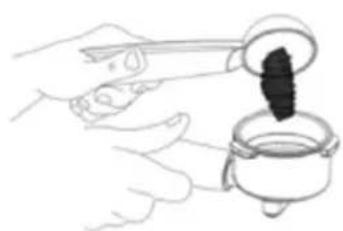
natural_image
Illustration of hands pouring dark liquid from a container into a glass (no text or symbols)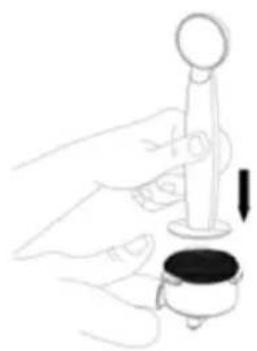
natural_image
Illustration of a hand holding a small object with a circular top and a downward arrow, no text or symbols present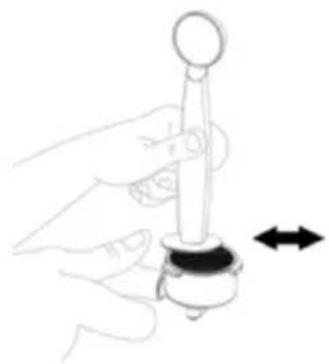
natural_image
Hand holding a mechanical component with a circular head and arrow indicator (no text or symbols)Fig./Img./Abb./Afb./Rys. 5
natural_image
Technical line drawing of a mechanical device with control panel and base mount (no text or symbols)Fig./Img./Abb./Afb./Rys. 6
www.cecotec.es
- SOMMAIRE
- Fig. 2
- NOTE:
- BEFORE USE
- ENGLISH
- Box content
- Cleaning the coffee machine before first use
- Eliminate excess air from the machine
- Choosing the right cup
- Choosing the right coffee
- Coffee
- Grinding
- Filling the water tank
- Filling the milk container
- Filter choice
- Insertion of the filter in the filter holder (Fig. 4)
- Filling of coffee (Fig. 5)
- Insertion of the filter holder (Fig. 6)
- Coffee cup placement
- Switching on the coffee machine
- OPERATION
- Brewing Espresso coffee
- Brewing Espresso:
- Brewing Cappuccino:
- Brewing Latte:
- After preparing milk drinks
- Automatic shut-off function
- CLEANING AND MAINTENANCE
- Cleaning of the milk tank and frothed milk dispensing tube
- Cleaning the brewing system, portafilter and filters
- Cleaning the water tank
- Cleaning of the coffee machine
- Descaling function
- Descaling the water tank
- Descaling of internal components
- TROUBLESHOOTING
- COPYRIGHT
- SIMPLIFIED EU DECLARATION OF CONFORMITY
- FRANÇAIS
- PIÈCES ET COMPOSANTS
- Img. 1
- PROBLEEMOPLOSSING
Brand : CECOTEC
Model : Power Espresso 20 Touch & Cream
Category : Coffee machine