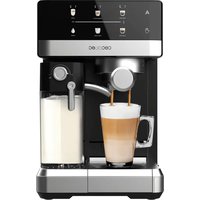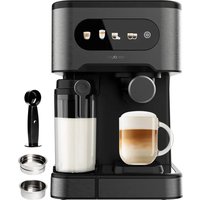
Power Instant-ccino 20 Chic - Coffee machine CECOTEC - Free user manual and instructions
Find the device manual for free Power Instant-ccino 20 Chic CECOTEC in PDF.


| Brand | Cecotec |
| Model | Power Instant-ccino 20 Chic (Nera/Bianca) |
| Product type | Automatic coffee machine with integrated milk tank |
| References | 01590 / 01594 |
| Power supply | 220-240 V ~ 50 Hz, 1230-1470 W |
| Water tank capacity | Approximately 1 L (not precisely specified, estimate) |
| Milk tank capacity | Approximately 500 ml (not precisely specified, estimate) |
| Pressure | 20 bars (model name "20" refers to pressure) |
| Types of coffee prepared | Espresso, double espresso, cappuccino, latte macchiato, hot milk, milk froth |
| Included filters | 1-cup filter, 2-cup filter, pod filter |
| Main functions | Espresso preparation, cappuccino, latte, milk froth, volume customization, automatic shutdown, automatic cleaning, descaling |
| Control panel | Touch buttons with indicator lights for espresso, cappuccino, latte, cleaning |
| Steam nozzle | Adjustable height and swiveling steam nozzle for milk froth |
| Cup tray | Adjustable height, removable |
| Automatic shutdown (Standby) | After 15 minutes of inactivity |
| Maintenance and cleaning | Manual cleaning of removable parts (soapy water), automatic cleaning cycle, descaling recommended every 40 to 80 uses |
| Safety | Overheating protection, hot surface warning, automatic shutdown, arm locking |
| Spare parts and repairability | Filters, water tank, milk tank, filter holder arm, measuring spoon, pod accessory – available via Cecotec after-sales service |
| General information | Made in China, designed in Spain. Warranty and after-sales service provided by Cecotec (tel. +34 63 2107 28) |
Frequently Asked Questions - Power Instant-ccino 20 Chic CECOTEC
User questions about Power Instant-ccino 20 Chic CECOTEC
0 question about this device. Answer the ones you know or ask your own.
Ask a new question about this device
Download the instructions for your Coffee machine in PDF format for free! Find your manual Power Instant-ccino 20 Chic - CECOTEC and take your electronic device back in hand. On this page are published all the documents necessary for the use of your device. Power Instant-ccino 20 Chic by CECOTEC.
USER MANUAL Power Instant-ccino 20 Chic CECOTEC
-
Garantia SAT 10
-
Copyright
40
INHALT
Read these instructions thoroughly before using the product. Keep this instruction manual for future reference or new users.
- All safety instructions must be closely followed when using the device.
- This appliance can be used by children aged 8 years and above and persons with reduced physical, sensory, or mental capabilities or lack of experience and knowledge if they have been given supervision or instruction concerning use of the appliance in a safe way and understand the hazards involved. Children must not play with the appliance. Cleaning and user maintenance should not be carried out by children unless they are over 8 years old and are under supervision. Keep this appliance and its power cord out of reach of children under the age of 8.
-
Check the power cord regularly for visible damage. If the power cord is damaged, it must be replaced by the Technical Support Service of Cecotec or similar qualified personnel to avoid risks.
This symbol means "Caution, Hot Surface". Accessible surfaces are likely to heat up during use. -
This appliance is designed for domestic use only and is not intended for bars, restaurants, farmhouses, hotels, motels, and offices.
-
WARNING: the filling opening must not be opened during operation.
- WARNING: take precautions to avoid spillage of liquids on the cord.
- WARNING: incorrect or improper use can be dangerous for both the appliance and the user. Use the appliance only for the purposes described in this manual. The surface of the
heating element is subject to residual heat after use.
- Ensure that the mains voltage matches the voltage specified on the product rating label and that the plug is earthed.
- Do not immerse the cord, plug, or any non-removable part of the appliance in water or any other liquid or expose electrical connections to water. Make sure your hands are dry before handling the plug or switching on the appliance.
- Turn off and unplug the appliance from the mains supply when not in use and before cleaning it. Pull from the plug, not the cord, to disconnect it from the outlet.
- The temperature of accessible surfaces may be high while the product is in use and could cause burns. Do not touch hot surfaces while in use or immediately after. Use gloves.
- Do not twist, bend, pull, or damage the power cord. Protect it from sharp edges and heat sources. Do not allow the cord to touch hot surfaces. Do not let the cord hang over the edge of the working surface or worktop.
- Place the device on a dry, stable, and heat-resistant surface.
- Make sure the tank is properly fixed to the appliance and that the lid is closed before operation. Do not remove it while the device is turned on.
- Do not use sugar-roasted ground coffee or sugar-roasted coffee beans, as these will clog the filter and damage the appliance.
- Do not operate the device empty.
- Do not use the appliance under the following circumstances:
- On or near a gas or electric hob, in heated ovens, or near open flames.
- On soft surfaces (such as carpets) or where it may tip over during use.
- Outdoors or in areas with high humidity levels.
- This device is not intended to be operated by means of an
external timer or separate remote-control system.
- Never leave the appliance running unattended.
- Caution should be taken when moving the appliance with hot liquid inside.
- Do not remove the portafilter while brewing coffee.
- Turn off the device before unplugging it.
- Do not use the appliance with accessories not recommended or provided by Cecotec, as this could result in fire, electric shock, or injury to yourself or others.
- Make sure the device is completely turned off before removing any of the parts or accessories.
Supervise children to prevent them from playing with the appliance. Close supervision is necessary when the appliance is being used by or near children.
Note: this product has undergone a quality control previous to its commercialisation with the aim of ensuring its correct operation. After the quality control testing, the appliance is cleaned thoroughly, therefore, although it is unlikely to occur, there may still be some water inside.
INSTRUCTIONS DE SECURITÉ
Fig.1.
1. Water tank cover
2. Removable water tank
3. Latte/auto-cleaning button with light indicator
4.Portafilter
5. Adjustable cup tray
6. Dril tray
7. Espresso/customisation button with light indicator
8. Cappuccino/froth button with light indicator
9. Power switch
10. Steamer adjustment lever
11. Height-adjustable steamer
12. Milk tank cover
13. Removable milk tank
14.Portafilter
15. Single-coffee filter
16. Double coffee filter
17. Measuring spoon with tamper
18. Filter for coffee pods
NOTE:
The graphics in this manual are schematic representations and may not exactly match the product.
2. BEFORE USE
This appliance is packaged in a way as to protect it during transport. Take the appliance out of its box and remove all packaging materials. You can keep the original box and other packaging elements in a safe place. This will help you prevent product damage when transporting it in the future. In case the original packaging is disposed of, make sure all packaging materials are recycled accordingly.
- Make sure all parts and components are included and in good conditions. If there is any piece missing or in bad conditions, contact the official Cecotec Technical Support Service immediately.
ENGLISHENGLISH
Box content
- Power Instant-cino 20 Chic Serie Nera/Blanca coffee machine
- Single-coffee filter
Double-coffee filter
-Portafilter
-Filter for coffee pods - Measuring spoon with tamper
Instruction manual
Warning
Clean the product before first use to remove manufacturing residues.
Cleaning parts and components
- Make sure the device and all the lights are off. Make sure it is unplugged from the power supply.
- Remove the water tank, the milk tank, the portafilter, all filters, and the measuring spoon and wash them with water and cleaning agent. Rinse all of them thoroughly and dry them completely before placing them back in their position.
Warning
To keep the coffee machine in proper working order, clean it after every use.
Cleaning the Inside
- Fill the water tank above the Min. mark and below the Max. mark.
- Fill the milk tank with water above the Min. mark and below the Max. mark.
- Select one of the filters and place it inside the portafilter. Place the portafilter in the unit ensuring it is properly locked and place a cup under it. Make sure the dispensing tube is inside the cup.
- Plug the device into a power supply.
Turn the coffee machine on by moving the switch to the "I" position. - The light indicators on the device panel will start flashing. Once the lights remain steady, press the Cappuccino button twice.
- Once this process is over, the coffee machine will be clean and ready to brew coffee.
3. OPERATION
Warning:
- Never remove the water tank or the portafilter from the machine during the coffee-brewing or milk-frothing process to avoid burns or damage due to steam and hot water.
Make sure the three indicator lights are on before you remove the portafilter to make
additional cups of coffee.
- If you need to add more water or milk to the tank, make sure the 3 light indicators are on and make sure to switch off the unit by pressing the side switch. Make sure you move the power switch to the "0" position.
Control panel
Fig.2
Coffee
The coffee should be freshly ground and dark roasted. You may want to try a French or Italian roast ground for espresso. Pre-ground coffee will only retain its flavour for 7-8 days, provided it is stored in an airtight container and in a cool, dark area. Do not store in a refrigerator or freezer. Whole beans are recommended to be ground just before use. Coffee beans stored in an airtight container will retain their flavour for up to 4 weeks.
Coffee grinding
This is a vital step in the espresso-making process if you are grinding your own coffee and takes practice. The coffee must be of a fine grind. The correct grind should look like salt. If coffee is ground too finely, water will not filter through it, even at a higher pressure. These grinds look like powder and feel like flour when rubbed between fingers. If ground too coarse, water will pass through the beans too quickly, preventing the coffee from being extracted to the maximum for top flavour. Be sure to use a quality grinder for uniform consistency.
Filling the water tank
Remove the water tank, fill it up with water. Fill the tank above the "Min." and below the "Max." marks on the tank. Then, place the tank back in its correct position and make sure it is properly fixed.
Note: Never use warm or hot water to fill the water tank.
Filling the milk tank
Remove the milk tank and open the cover. Fill the tank with cold milk above the 'Min' mark, and below the 'Max.' marks on the tank. Once it is full, close it again and place it back in its correct position making sure it is properly fixed.
Note: The device is suitable for whole milk, low-fat milk, organic, soy milk, etc. However, it is suggested to use whole milk for optimum results.
ENGLISHENGLISH
Selecting the filter
- Use the small filter for one shot of ground coffee. Fig. 3.
- Use the larger filter for a double shot or two shots of ground coffee. Fig. 4
Inserting the filter
- To install the filter, first align the notch on the filter with the groove inside the portafilter. Fig. 5.
Then, turn the filter to the left or right to lock it in place. This will secure the filter in the portalfilter.
Fitting the filter for coffee pods. Fig. 6
- Remove the coffee filter from inside the portafilter.
- Remove the plug at the bottom of the filter by lifting it up as shown in Figure 6.
- Insert the pod. The smooth side of the pod should be in contact with the cap when closed.
- Close the cap and make sure that it stays in place and does not open.
- Place the filter inside the portalfilter.
Filling ground coffee. Fig. 7
Use the measuring spoon to pour coffee into the selected filter.
- Press it firmly and evenly with the spoon's tamper.
Clean any excess coffee from the rim before placing it in its position.
Note: The ground coffee cannot exceed the Max. mark.
Placing the portafilter. Fig. 8
- Move the retainer clip back and fix the portafilter in its correct position.
- Place the portafilter's handle so that it is aligned with the open-lock icon on the unit and fits into the groove.
Turn it to the right until the retention clip is aligned with the closed lockicon on the device.
Placing the cups
- Pull out the height-adjustment tray and set it to the desired height depending on if you wish to brew a simple or double espresso.
- Keep the height-adjustment tray inside its compartment if you are using a larger cup to brew cappuccino or latte.
Warning: When brewing cappuccino or latte, make sure to adjust the froth-dispensing tube lever so that the tube is inside the cup to be used. The tube can be detached by rotating it in order to clean it.
Turning the device on
Make sure the device is plugged to a power supply.
- Turn on the device's power switch. The icons will blink 3 times and the machine will beep. The icons will blink during the preheating process until water reaches the optimal temperature.
Once the icon lights turn steady, the machine is ready to be used.
Functions
Espresso
- Press the espresso button once to brew one small espresso.
- Press the espresso button twice to brew a large cup of espresso.
Hold down the espresso button for 3 seconds to customize the brewing to your preference. When done, press the espresso button once again to stop brewing.
The unit will start brewing the espresso according to your selection. The unit will turn off automatically and the lights will stay steady on indicating that the cycle has been completed. - To stop brewing coffee manually, press the button when the desired amount of coffee has been brewed.
Cappuccino
Before making a cappuccino, turn the froth knob to select the desired amount of frothed milk to the left for more froth, to the right for less froth.
Fig. 9.
Note:
The amount of froth can be adjusted during the brewing cycle.
- Press the cappuccino button once to brew one small cappuccino.
- Press the cappuccino button twice to brew a large cup of cappuccino.
- The unit will start brewing the cappuccino according to your settings.
To stop brewing coffee manually, press the button when the desired amount of coffee has been brewed.
Macchiato/Latte
Prior to preparing your macchiato, adjust the quantity of frothed milk according to your preference by turning the froth knob to the left for more froth and to the right for less froth. Fig. 9
Note: The amount of froth can be adjusted during the brewing cycle.
- Press the macchiato/latte button once to brew a macchiato.
- Press the macchiato/latte button twice to brew a latte.
To stop brewing coffee manually, press the button when the desired amount of coffee has been brewed.
ENGLISHENGLISH
Hot milk/Milk froth
Hold down the cappuccino button for 3 seconds to obtain hot milk or you want to add some more milk froth to the previously prepared coffees.
To stop brewing milk manually, press the button when the desired amount of milk has been poured into the cup.
- Once you are done preparing your beverage with milk, store the unit's milk tank directly in the refrigerator (ready to be used for the next time) or dispose of the leftover milk.
Note: The amount of milk froth will vary depending on different factors, such as the type of milk, the quantity, temperature, etc.
Self-cleaning
Hold down the macchiato/latte button for 3 seconds (approx.) to activate the auto-cleaning function.
Auto switch-off
The device will automatically enter standby mode after 15 minutes of no operation. Press any of the buttons to start it again.
Descending
- Limescale deposits have an adverse effect not only on the quality of the espresso and the water, but they also cause power losses and shorten the lifespan of the device.
Possible signs that indicate that descending is required are a large amount of steam being produced and slower brewing.
Note:
- It is suggested to descale the device every 80 brew cycles when using filtered water, or every 40 brew cycles when using tap water.
After 500 cycles and with the milk tank in place, the appliance will remind the user to perform descending by lighting the Cappuccino and Latte indicators alternately. When this happens: - Fill the water tank with 600 mL of water and vinegar: 50 % of each.
Press the espresso and macchiato/latte buttons simultaneously. The 6 indicators will start flashing slowly.
After 30 minutes approx, the 6 light indicators will start flashing quickly. At this moment, empty the water tank and refill it with another 600~ml of clean water. - Press the espresso and macchiato/latte buttons simultaneously again. The device will repeat the descending process and will finish after 30 minutes approx.
- Once it has finished, the device will enter standby mode.
Discard vinegar inside the tank.
Rinse the water tank thoroughly with tap water. Fill half the tank with water. - Empty water, rinse and empty again
Note: This process can be carried out manually before reaching 500 cycles.
Note:
- Even if the device starts reminding the need to descale, it will operate normally when any of its coffee buttons are pressed.
- The descaling process can be stopped at any time by pressing any button. Then, the appliance will continue to remind to perform descaling later on.
- It is suggested to descale the machine periodically to ensure proper operation and to keep it in good conditions.
4. CLEANING AND MAINTENANCE
Milk tank and steam tube
Even though the milk tank can be stored in the fridge with leftover milk, it is important to clean the milk tank regularly.
- Remove the milk tank from the unit.
- Remove the milk tank cover.
- The steam tube connector can be detached by rotating it and can be cleaned under running water with soap. After cleaning, assemble it onto the milk tank cover by rotating it again.
- When cleaning the milk tank, remove the silicone air nozzle (don't pull it out). wash it with tap water and soap, and place it back in its position.
- Pour out any milk left, rinse and wash the milk tank and its lid thoroughly with warm soapy water. Rinse again and dry well.
- Do not use abrasive cleaners or scouring pads, as they will damage the product. The milk tank is dishwasher safe (top rack). Do not wash the milk tank cover in the dishwasher.
- Place a large empty cup under the steam tube.
-
Turn the froth knob clockwise to the clean position, then press and hold the macchiato/ latte button for 3 seconds and release to activate the auto-cleaning function. The unit will start releasing steam through the steam tube. Let it run for a few seconds until no more milk is observed. When done, press the macchiato/latte button once to stop the process.
-
Empty out any water left on the milk tank and place it back in the unit.
Note: To remove the tank form the unit, lift it slightly up and then pull it out.
Fig. 10.
Fig. 11.
ENGLISHENGLISH
Spout, portafilter, and filter
- Switch the power button on the side of the unit to the off position "0" and unplug the power cord from the power outlet.
-
Allow the device to cool completely down before touching it.
-
Remove the portafilter and discard the coffee grounds. Wash both the portafilter and filter with warm soapy water and rinse them well. Do not wash the portafilter and filters in the dishwasher.
- Wipe the lower part of the spout with a damp cloth or paper towel to remove any coffee grounds.
- Place the portafilter (without any filter) back in the unit.
- Place an empty large cup under the portalfilter
- Press the espresso button once and let the unit brew with water only until it stops automatically.
Water tank
Empty the water tank after each use.
- Use soapy water to clean it, empty it and then rinse it with clean water. Dry it before installing it back in the device.
The water tank can be washed in the dishwasher.
Coffee machine
- Use a soft, clamp cloth to clean the surface of the device.
-
Do not use abrasive cleaners or scouring pads to clean the product.
If you are not going to use the device for a while, store it in a dry and safe place. -
TROUBLESHOOTING
| Problem Possible causes | Possible solutions | |
| Coffee does not come out. | No water in tank.Coffee grind is too fine.There is too much coffee in the filter.The appliance was not turned on or plugged in.Coffee has been tamped/compressed too much. | Add water.Grind medium-ground coffee.Fill filter with less coffee.Plug unit and turn it on.Refill filter basket with coffee.do not tamp too much. |
| Coffee comes out around the edge of the portafilter. | Portafilter not rotated to full lock position.Coffee grounds around the filter basket rim.There is too much coffee in the filter. | Rotate filter holder to full lock position.Wipe off the rim.Fill with less coffee. |
| Milk is not foamy after frothing or it is not coming out of the steam tube. | Ran out of steam. Steam tube is blocked. | Ensure there is enough water in the tank. Follow the Instructions to clean the milk tank and the steam tube. |
| Coffee comes out too quickly. | Ground coffee is too coarse. Not enough coffee in filter. The coffee was too lightly pressed. | Use a finer grind. Use more coffee. Tamp coffee a bit harder. |
| Coffee is too weak. Using | small filter for double shot of espresso. Ground coffee is too coarse. | Use large filter for double shot of espresso. Use a finer grind. |
| The 3 panel light indicators flash. | Water tank is out of water. Add water | to tank. |
6. TECHNICAL SPECIFICATIONS
Reference:01590/01594
Model: Power Instant-ccino 20 Chic Serie Nera/Bianca
Power:1230-1470W
Voltage:220-240V
Frequency: 50 Hz
Technical specifications may change without prior notification to improve product quality.
Made In China Designed in Spain
7. DISPOSAL OF OLD ELECTRICAL AND ELECTRONIC APPLIANCES

This symbol indicates that, according to the applicable regulations, the product and/or batteries must be disposed of separately from household waste. When this product reaches the end of its shelf life, you should dispose of the cells/batteries/accumulators and take them to a collection point designated by the local authorities.
Consumers must contact their local authorities or retailer for information concerning the correct disposal of old appliances and/or their batteries.
Compliance with the above guidelines will help protecting the environment.
8. TECHNICAL SUPPORT AND WARRANTY
Cecotec shall be liable to the end user or consumer for any lack of conformity that exists at the time of delivery of the product under the terms, conditions and deadlines established by the applicable regulations.
It is recommended that repairs be carried out by qualified personnel.
If at any moment you detect any problem with your product or have any doubt, do not hesitate to contact the official Cocotec Technical Support Service at +34 963 210 728.
9. Copyright
The intellectual property rights over the texts in this manual belong to CECOTEC INNOVACIONES, S.L. All rights reserved. The contents of this publication may not. In whole or in part, be reproduced, stored in a retrieval system, transmitted, or distributed by any means (electronic, mechanical, photocopying, recording or similar) without the prior authorization of CECOTEC INNOVACIONES, S.L.
1. PIECES ET COMPOSANTS
Img.1.
Made in China | Designed in Spain
7. RECYKLING URZADZENEKTRYCZNYCH I ELEKTRONICZYCH

Reference:01590/01594
Modelo: Power Instant-ccino 20 Chic Serie Nera/Bianca
Vykon:1230-1470W
Napeti 220-240V
Frekvence:50Hz
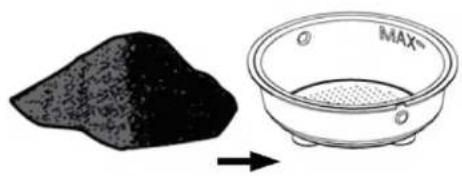
Fig./Img/Abb/Afb/Rys/Obr.3
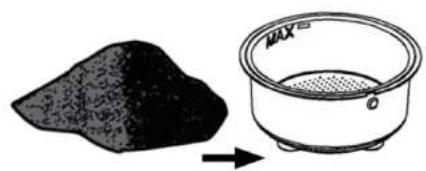
Fig./Img./Abb./Afb./Rys./Obr.4
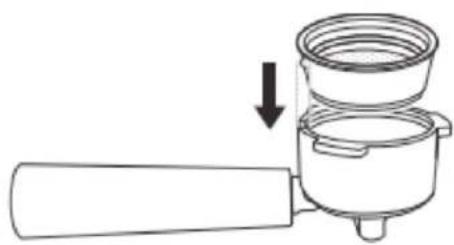
Fig./Img./Abb./Afb./Rys./Obr.5
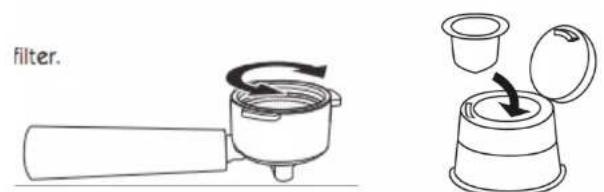
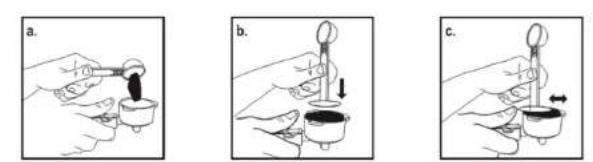
Fig./img./Abb./Afb./Rys./Obr.6
Fig./img./Abb/Afb./Rys./Obr.7
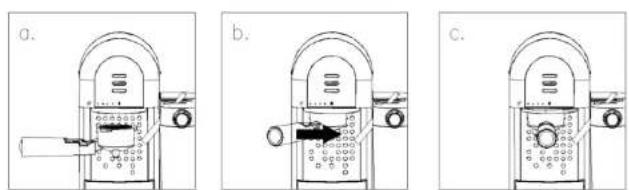
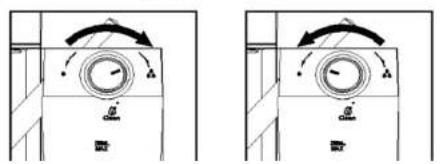
Fig./Img./Abb./Afo./Rys/Obr.8
Fig./img./Abb./Afb./Rys./Obr.9
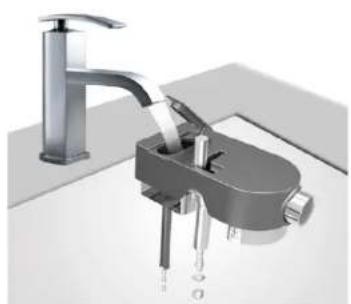
Fig./Img./Abb./Afb./Rys./Obr.10
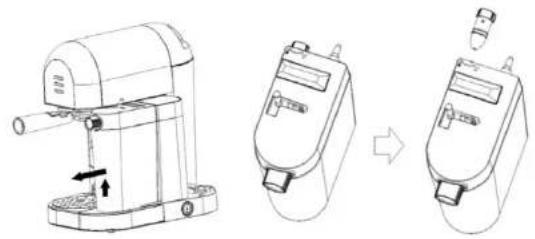
Fig./Img./Abb./Afb./Rys./Obr.11
www.ceotec.es