
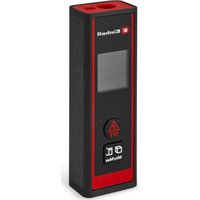
TC-LD 60 R - Laser rangefinder EINHELL - Free user manual and instructions
Find the device manual for free TC-LD 60 R EINHELL in PDF.
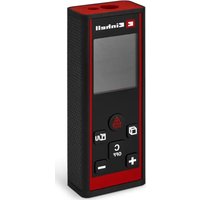


| Product type | Laser distance meter |
| Brand | Einhell |
| Model | TC-LD 60 R |
| Power supply | 2 AAA batteries (LR03) 1.5 V |
| Laser class | 2 |
| Laser wavelength | 630-640 nm |
| Laser power | < 1 mW |
| Measuring range | 60 m (estimated based on model) |
| Accuracy | ± 2 mm typical (depending on conditions) |
| Measurement units | m, ft, in, pi |
| Measurement functions | Distance, area, volume, continuous measurement, indirect measurement (Pythagoras), addition/subtraction, deviation measurement |
| Reference points | 3: front edge, rear edge, tripod |
| Memory | Last 20 measurements |
| Display | Backlit LCD screen |
| Auto power off | Yes, after inactivity |
| Splash water protection | Not specified (probably IP20) |
| Included accessories | Pouch, instruction manual |
| Care and cleaning | Clean with a damp cloth and mild soap; avoid water entering the device |
| Safety instructions | Do not look directly into the laser beam; class 2; keep out of reach of children |
| Storage | Dark, dry, frost-free place, temperature 5-30 °C |
Frequently Asked Questions - TC-LD 60 R EINHELL
User questions about TC-LD 60 R EINHELL
0 question about this device. Answer the ones you know or ask your own.
Ask a new question about this device
Download the instructions for your Laser rangefinder in PDF format for free! Find your manual TC-LD 60 R - EINHELL and take your electronic device back in hand. On this page are published all the documents necessary for the use of your device. TC-LD 60 R by EINHELL.
USER MANUAL TC-LD 60 R EINHELL
GB Original operating instructions Laser distance meter
F Instructions d'origine Telemetre laser
2
3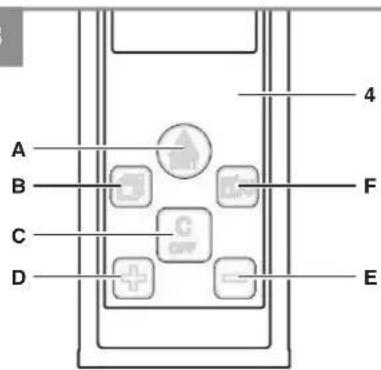
-2-
14

-5-
D
Danger!
Laser power: ....../< 1 mW
When using the equipment, a few safety precautions must be observed to avoid injuries and damage. Please read the complete operating instructions and safety regulations with due care. Keep this manual in a safe place, so that the information is available at all times. If you give the equipment to any other person, hand over these operating instructions and safety regulations as well. We cannot accept any liability for damage or accidents which arise due to a failure to follow these instructions and the safety instructions.
Explanation of the symbols used (see Fig. 14)
- Danger! - Read the operating instructions to reduce the risk of injury.
1. Safety regulations
The corresponding safety information can be found in the enclosed booklet.
Danger!
Read all safety regulations and instructions. Any errors made in following the safety regulations and instructions may result in an electric shock, fire and/or serious injury.
Keep all safety regulations and instructions in a safe place for future use.
Special information about the laser

Caution: Laser radiation Do not look into the beam Laser class 2
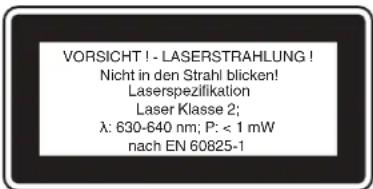
• Never look directly into the laser path. - Never direct the laser beam at reflecting surfaces or persons or animals. Even a low output laser beam can inflict injury on the eye. - Caution: It is vital to follow the work procedures described in these instructions. Using the equipment in any other way may result in
hazardous exposure to laser radiation.
• Never open the laser module. - It is prohibited to carry out any modifications to the laser to increase its power. - The manufacturer cannot accept any liability for damage due to non-observance of the safety information.
Safety information on the batteries
Use of the batteries
- Inserting the batteries when the laser is switched on can cause accidents.
- If the equipment is not used correctly, the batteries may leak. Avoid contact with the battery fluid. If you come into contact with battery fluid, clean the affected body part with running water. If you get battery fluid in your eyes, seek immediate medical assistance.
- Escaped battery fluid can cause skin irritation and acid burns.
- Never expose the batteries to excess heat such as sunshine, fire or similar. • Never recharge batteries that are not suitable for recharging. There is a risk of explosion!
- Keep batteries away from children, do not short circuit batteries or disassemble.
- Seek a doctor's advice immediately if a battery is swallowed.
- If necessary, clean the contacts on the battery and equipment before inserting the batteries.
- Ensure that you insert the batteries the right way round.
- Remove flat batteries immediately from the equipment. There is an increased risk of leakage. • Always change all batteries in one go.
- Insert only batteries of the same type, do not use different types of batteries or used and new batteries together. • Make sure that the equipment is switched off after use.
- Remove the batteries if the equipment is not used over a longer period.
2. Layout and items supplied
2.1 Layout (Fig. 1)
- Sensor
- Laser
- Display
- Keypad
- Battery compartment cover
GB
2.2 Items supplied
Please check that the article is complete as specified in the scope of delivery. If parts are missing, please contact our service center or the sales outlet where you made your purchase at the latest within 5 working days after purchasing the product and upon presentation of a valid bill of purchase. Also, refer to the warranty table in the service information at the end of the operating instructions.
- Open the packaging and take out the equipment with care.
- Remove the packaging material and any packaging and/or transportation braces (if available).
- Check to see if all items are supplied.
- Inspect the equipment and accessories for transport damage.
- If possible, please keep the packaging until the end of the guarantee period.
Danger!
The equipment and packaging material are not toys. Do not let children play with plastic bags, foils or small parts. There is a danger of swallowing or suffocating!
• Laser distance meter Bag • Original operating instructions
3. Proper use
The laser is designed for measuring distances, areas and volumes.
The equipment is to be used only for its prescribed purpose. Any other use is deemed to be a case of misuse. The user / operator and not the manufacturer will be liable for any damage or injuries of any kind caused as a result of this.
Please note that our equipment has not been designed for use in commercial, trade or industrial applications. Our warranty will be voided if the machine is used in commercial, trade or industrial businesses or for equivalent purposes.
4. Technical data
Range: 0.05 - 60 m Accuracy: +/- 2 mm / 60 m Power supply: 2 x 1.5V; type AAA (LR03) Laser class: 2 Wavelength of laser: 630-640 nm Laser output: ....../< 1 mW
5. Before using the equipment
Inserting/changing batteries (Fig. 2)
- Switch off the equipment.
- Remove the battery compartment cover (5) by pressing in the fastener (a) and flipping up the battery compartment cover.
- Insert the batteries, ensuring that you fit them the right way round.
- Fit the battery compartment cover back on, making sure that the fastener snaps into place.
6. Operation
Important!
The measuring distance and measuring accuracy can be hindered by ambient conditions such as sunlight or poor reflection.
6.1 Description of the function buttons (Fig. 3)
A ON/Measuring button B Measurement options button C OFF/Delete button D Addition E Subtraction F Selection of the reference point for distance measurement / Selection of the measuring unit
6.2 Switching the laser on/off
- To switch the laser on, press the ON/Measuring button (A).
- To switch off the laser, press the OFF button (C) and keep it pressed for about 1 second.
6.3 Setting the unit of measurement (Fig. 3, Item 4, F)
The default unit of measurement is the metric meter (m). However, you can also select from three other unit settings. To do so, press and hold the F button until the unit changes. Repeat this until the unit you require is displayed.
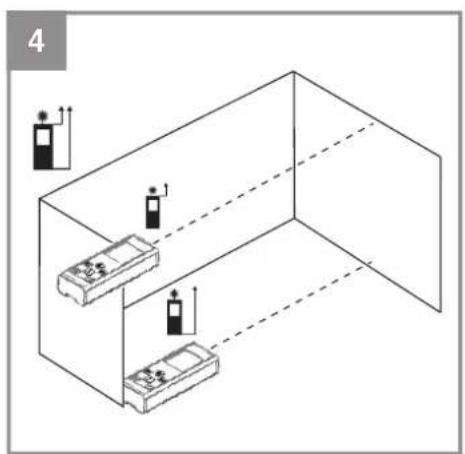
6.4 Setting the reference point (Fig. 3 - 4)
Measurements can be performed from two different reference points on the equipment. To do so, briefly press the F button and select the reference point you require.
• Front edge reference point (see Fig.) • Rear edge reference point (see Fig.)
6.5 Using the measurement functions
Note:
The laser beam switches off automatically after each measurement. Press the ON/Measuring button.
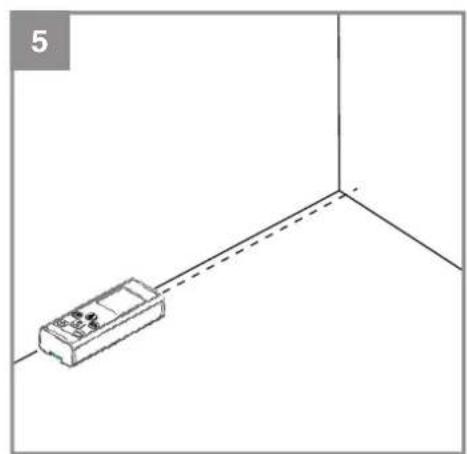
6.5.1 Function: "Measure single distance"
"No symbol" (Fig. 5)
Procedure:
- Press button A once: Switch on the equipment
- Press button F if necessary: Select the reference point on the equipment
- Press button A once: Switch on the laser
- Align the laser
- Press button A once: Measure → The result is displayed at the bottom in m
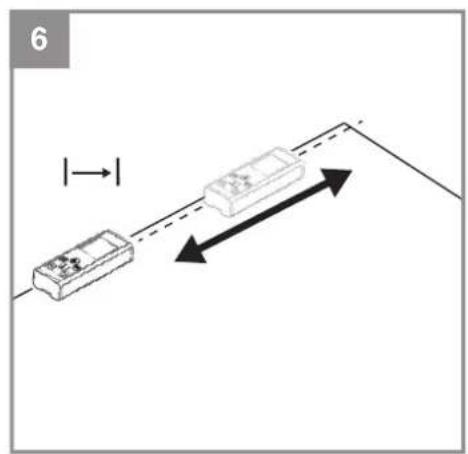
6.5.2 Function: "Measure continuous distance (min/max)"
"Symbol |→|" (Fig. 6)
Procedure:
- Press button A once: Switch on the equipment
- Button F if necessary: Select the reference point on the equipment • Press button A once: Switch on the laser
- Align the laser
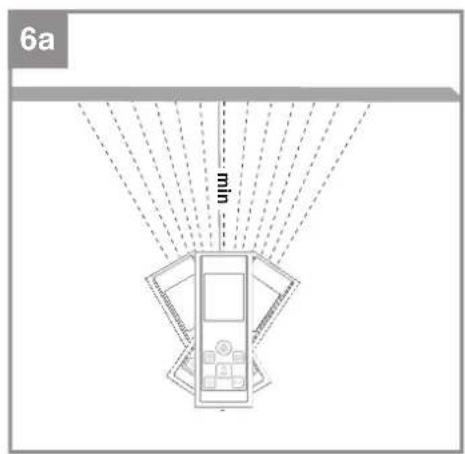
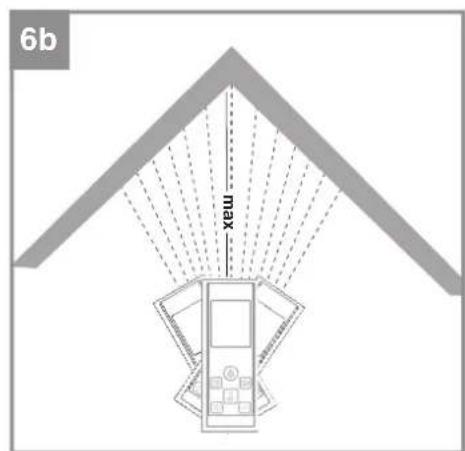
- Press button A for 2 seconds: Continuous measurement → Min: The lowest measurement result is displayed (Fig. 6a) → Max: The highest measurement result is displayed (Fig. 6b) The current measurement result is displayed
right at the bottom in real time
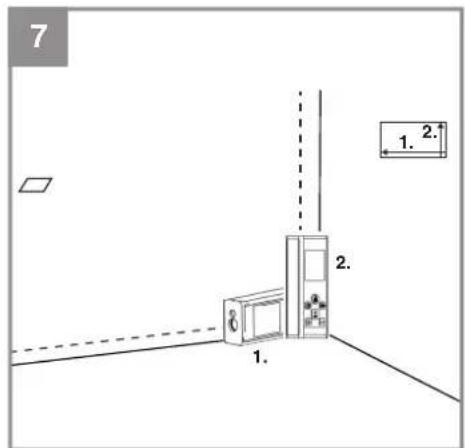
6.5.3 Function: "Measure areas"
"Symbol □" (Fig. 7)
Procedure:
• Press button A once: Switch on the equipment • Press button B once: Select function - Button F if necessary: Select the reference point on the equipment • Press button A once: Switch on the laser - Align the laser • Press button A once: Measure the area length • Press button A once: Switch on the laser - Align the laser - Press button A once: Measure the area width → The result is displayed at the bottom in m²
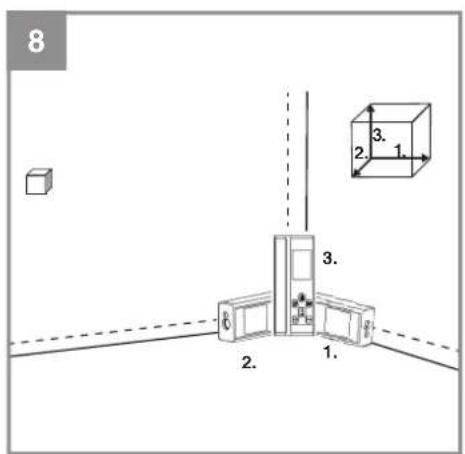
6.5.4 Function: "Measure volumes"
"Symbol (Fig. 8)
Procedure:
- Press button A once: Switch on the equipment • Press button B twice: Select function
- Button F if necessary: Select the reference point on the equipment • Press button A once: Switch on the laser
- Align the laser
- Press button A once: Measure the room length • Press button A once: Switch on the laser
- Align the laser
- Press button A once: Measure the room width • Press button A once: Switch on the laser
- Align the laser
- Press button A once: Measure the room height → The result is displayed at the bottom in m³
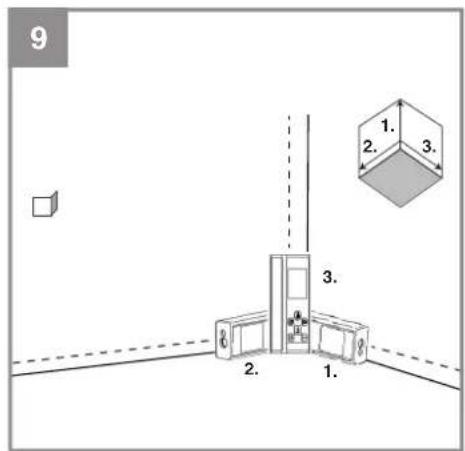
6.5.5 Function: "Measure two adjacent areas"
"Symbol (Fig. 9)
Procedure:
• Press button A once: Switch on the equipment • Press button B three times: Select function - Button F if necessary: Select the reference point on the equipment • Press button A once: Switch on the laser
GB
- Align the laser
- Press button A once: Measure the area width • Press button A once: Switch on the laser
- Align the laser
- Press button A once: Measure the first area length • Press button A once: Switch on the laser
- Align the laser
- Press button A once: Measure the second area length → The result is displayed at the bottom in m²
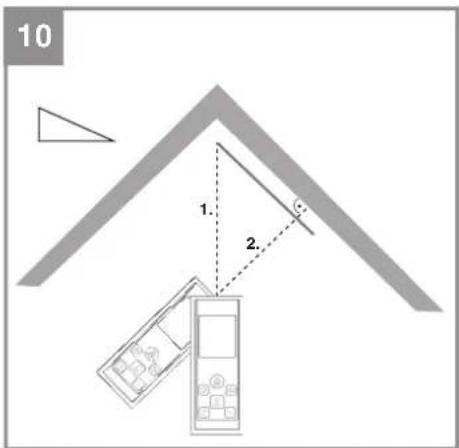
6.5.6 Function: "Indirect distance measurement"
Symbol (Fig. 10)
2 reference points (using the Pythagoras rule) Procedure:
• Press button B four times: Select function - Button F if necessary: Select the reference point on the equipment
Caution!
The hypotenuse (1.) is measured first, then the adjacent side (2.), which must be at right-angles to the required distance (opposite side). The set reference point on the equipment and the measuring position must be the same when both points are set!
- Press button A once: Switch on the laser
- Align the laser
- Button A once: Set the first point (hypotenuse) of the distance to be calculated • Press button A once: Switch on the laser
- Align the laser
- Press button A once: Set the second point (adjacent side) of the distance to be calculated → The result is displayed at the bottom in m
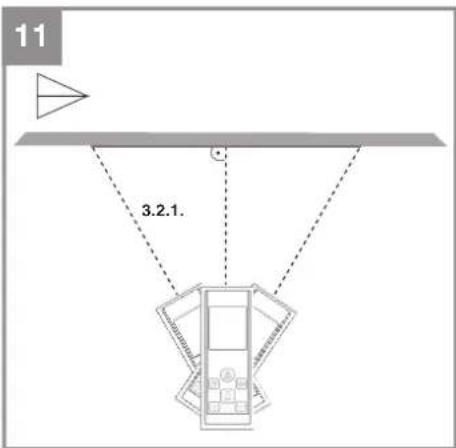
6.5.7 Function: "Indirect distance measurement
3 reference points (using the Pythagoras rule)"

Procedure:
- Press button A once: Switch on the equipment
- Press button B five times: Area measurement function
- Button F if necessary: Select the reference point on the equipment
Caution!
The hypotenuse (1.) is measured first, then the adjacent side (2.), which must be at right-angles to the required distance (opposite side).
The set reference point on the equipment and the measuring position must be the same when both points are set!
- Press button A once: Switch on the equipment
- Button A twice: Set the first point (hypotenuse 1) of the distance to be calculated • Press button A once: Switch on the laser
- Align the laser
- Button A once: Set the second point (adjacent side) of the distance to be calculated • Press button A once: Switch on the laser
- Align the laser
- Press button A once: Set the third point (hypotenuse 2) of the distance to be calculated → The result is displayed at the bottom in m.
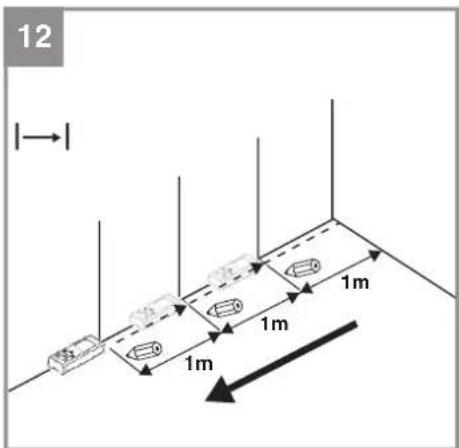
6.5.8 Function: "Staking out function (min. 10 cm = 0.1m)"
"Symbol |→|" (Fig. 12)
Procedure:
• Press button A once: Switch on the equipment. • Press button B six times: Select function. - Press button F if necessary: Select the reference point on the equipment. - Press button D (+): Select digit. - Press button E (-): Select size. • Press button A once: Measurement. - Move the equipment towards the back from the reference point → Rapid beeping signals that the required spacing has been reached.
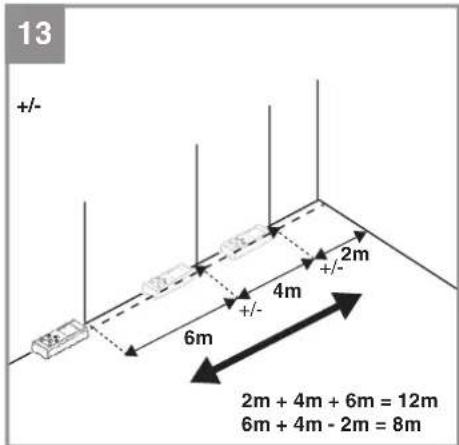
6.5.9 Function: "Add/subtract results"
"Symbol +/-" (Fig. 13)
Procedure:
- Press button A once: Switch on the equipment.
- Press button F: Select required function (distance, area, volume). • Measure results (as described above).
- Press button D (+) once: Add the new measurement. • Press button E (-) once: Subtract the new
GB
measurement.
→ The result is displayed at the bottom in m.
6.6 Deleting values (Fig. 3 / Item 4)
To delete any wrongly measured values again, press button C briefly. You can then perform the measurement again.
6.7 Memory (Fig. 3 / Item 4 D, E, C)
The last 20 measured values are automatically saved in the memory. To enter the memory, press button D (+) or E (-). You can also use these buttons to search the memory. To delete the saved values, press button C.
7. Cleaning, maintenance and ordering of spare parts
Danger!
Always pull out the mains power plug before starting any cleaning work.
7.1 Cleaning
- Keep all safety devices, air vents and the motor housing free of dirt and dust as far as possible. Wipe the equipment with a clean cloth or blow it with compressed air at low pressure. We recommend that you clean the device immediately each time you have finished using it.
- Clean the equipment regularly with a moist cloth and some soft soap. Do not use cleaning agents or solvents; these could attack the plastic parts of the equipment. Ensure that no water can seep into the device. The ingress of water into an electric tool increases the risk of an electric shock.
7.2 Maintenance
There are no parts inside the equipment which require additional maintenance.
7.3 Ordering spare parts and accessories
Please provide the following information when ordering spare parts:
- Type of unit • Article number of the unit • ID number of the unit
- Spare part number of the required spare part. For our latest prices and information please go to www.Einhell-Service.com

Tip! For good results we recommend high-quality accessories from !kwb www.kwb.eu welcome@kwb.eu
8. Disposal and recycling
The equipment is supplied in packaging to prevent it from being damaged in transit. The raw materials in this packaging can be reused or recycled. The equipment and its accessories are made of various types of material, such as metal and plastic. Never place defective equipment in your household refuse. The equipment should be taken to a suitable collection center for proper disposal. If you do not know the whereabouts of such a collection point, you should ask in your local council offices.
9. Storage
Store the equipment and accessories in a dark and dry place at above freezing temperature. The ideal storage temperature is between 5 and 30 °C. Store the electric tool in its original packaging.
GB
Disposal

Power tools, rechargeable batteries, accessories and packaging should be sorted for environmental-friendly recycling.
Do not dispose of power tools and batteries/rechargeable batteries into household waste!
Only for EU countries:
According to the Directive 2012/19/EU on waste electrical and electronic equipment and its transposition into national law, power tools that are no longer usable, and, according to the Directive 2006/66/EC, defective or drained batteries must be collected separately and disposed of in an environmentally correct manner.
If disposed incorrectly, waste electrical and electronic equipment may have harmful effects on the environment and human health, due to the potential presence of hazardous substances.
Only for United Kingdom:
According to The Waste Electrical and Electronic Equipment Regulations 2013 (SI 2013/3113) (as amended) and the Waste Batteries and Accumulators Regulations 2009 (SI 2009/890) (as amended), products that are no longer usable must be collected separately and disposed of in an environmentally friendly manner.
The reprinting or reproduction by any other means, in whole or in part, of documentation and papers accompanying products is permitted only with the express consent of the Einhell Germany AG.
Subject to technical changes.
Danger!
Laser power: ....../< 1 mW
Laser wavelength: 630-640 nm
Laser power: ....../< 1 mW
6.2 Laser On/Off
Noise: measured LWA = dB (A) ; guaranteed LWA = dB (A)
P = kW; L/∅ = cm
Notified Body:
□2012/46/EU_(EU)2016/1628
Emission No.:
Standard references: EN 60825-1; EN 61326-1
Subject to change without notice
Archive-File/Record: NAPR028853
Documents registrar: Georg Riedel
Wiesenweg 22, D-94405 Landau/Isar
- GR Laser distance meter - Tõltämtte a laser - Misatore laser di distenza - OKN Laser-attänstmär - S Laserdänstmärte - CZ Lasercy d'inkemir - SK Lasercy d'inkemir - NL Laserdantismeter - E Telemeter por laser - FIN Laser-dässymattir - SLO Laserki disk ramaite - PL-Lačet-tavolgämmater - RÖ Aparat de mäurar distenta cusi ušr. GR Märttemir sposttava na dačka - Telecoro o laser - NR/6NN Laserki impérat ramaku - RS Laser merai eastopana - PL Lászeni dinitlanionari iamerontialny pröper - TR Laser Morte - PUS Lászerni dinitlanionari - 1000000000000000000000000000000000000000000000000000000000000000000000000000

Declaration of conformity
We, Einhell UK Ltd
Champions Business Park, First Floor Unit 10, Arrowe Brook Rd, Upton, Wirral CH49 0AB, United Kingdom
declare the conformity to UK standards and legislation was assessed for:
Laser Measuring Tool TC-LD 60 R (Einhell)
UK legislation
□ Simple Pressure Vessels (Safety) Regulation □ Electrical Equipment (Safety) Regulation □ Radio Equipment Regulation □ Personal Protective Equipment Regulation □ The Ecodesign for Energy-Related Products and Energy Information Regulation X The Restriction of the Use of Certain Hazardous Substances in Electrical and Electronic Equipment Regulation □ Noise Emission in the Environment by Equipment for use Outdoors Regulation ☒ Electromagnetic Compatibility Regulation □ Measuring Instruments Regulation □ Pressure Equipment (Safety) Regulation [Non-Text] Information Regulation ces in Electrical and Electronic Equipment Regulation e Outdoors Regulation
Annex V
Annex VI
Noise: measured L ww = dB (A); guaranteed L ww = dB (A) P = kW; L/∅ = cm UK Approved Body:
□ Supply of Machinery (Safety) Regulation
□ Annex IV
UK Approved Body:
UKTE Certificate No.:
[Non-Text]
[Non-Text]
[Non-Text]
[Non-Text]
[Non-Text]
[Non-Text]
[Non-Text]
[Non-Text]
[Non-Text]
[Non-Text]
[Non-Text]
[Non-Text]
[Non-Text]
[Non-Text]
[Non-Text]
[Non-Text]
[Non-Text]
[Non-Text]
[Non-Text]
[Non-Text]
[Non-Text]
[Non-Text]
[Non-Text]
[Non-Text]
[Non-Text]
[Non-Text]
[Non-Text]
[Non-Text]
[Non-Text]
[Non-Text]
[Non-Text]
[Non-Text]
[Non-Text]
[Non-Text]
[Non-Text]
[Non-Text]
[Non-Text]
[Non-Text]
[Non-Text]
[Non-Text]
[Non-Text]
[Non-Text]
[Non-Text]
.
.
EH 02/2025 (01)
- D
- DANGER
- EXPLANATION OF THE SYMBOLS USED (SEE FIG. 14)
- SAFETY REGULATIONS
- SPECIAL INFORMATION ABOUT THE LASER
- SAFETY INFORMATION ON THE BATTERIES
- USE OF THE BATTERIES
- LAYOUT AND ITEMS SUPPLIED
- LAYOUT (FIG. 1)
- GB
- ITEMS SUPPLIED
- PROPER USE
- TECHNICAL DATA
- BEFORE USING THE EQUIPMENT
- INSERTING/CHANGING BATTERIES (FIG. 2)
- OPERATION
- IMPORTANT
- DESCRIPTION OF THE FUNCTION BUTTONS (FIG. 3)
- SWITCHING THE LASER ON/OFF
- SETTING THE UNIT OF MEASUREMENT (FIG. 3, ITEM 4, F)
- SETTING THE REFERENCE POINT (FIG. 3 - 4)
- USING THE MEASUREMENT FUNCTIONS
- NOTE
- FUNCTION: "MEASURE SINGLE DISTANCE
- NO SYMBOL" (FIG. 5)
- FUNCTION: "MEASURE CONTINUOUS DISTANCE (MIN/MAX)
- FUNCTION: "MEASURE AREAS
- FUNCTION: "MEASURE VOLUMES
- FUNCTION: "MEASURE TWO ADJACENT AREAS
- FUNCTION: "INDIRECT DISTANCE MEASUREMENT
- SYMBOL (FIG. 10)
- CAUTION
- PROCEDURE
- THE SET REFERENCE POINT ON THE EQUIPMENT AND THE MEASURING POSITION MUST BE THE SAME WHEN BOTH POINTS ARE SET
- FUNCTION: "STAKING OUT FUNCTION (MIN. 10 CM = 0.1M)
- SYMBOL |→|" (FIG. 12)
- FUNCTION: "ADD/SUBTRACT RESULTS
- SYMBOL +/-" (FIG. 13)
- MEASUREMENT
- DELETING VALUES (FIG. 3 / ITEM 4)
- MEMORY (FIG. 3 / ITEM 4 D, E, C)
- CLEANING, MAINTENANCE AND ORDERING OF SPARE PARTS
- CLEANING
- MAINTENANCE
- ORDERING SPARE PARTS AND ACCESSORIES
- DISPOSAL AND RECYCLING
- STORAGE
- DISPOSAL
- ONLY FOR EU COUNTRIES
- ONLY FOR UNITED KINGDOM
- LASER ON/OFF
- STANDARD REFERENCES: EN 60825-1; EN
- DECLARATION OF CONFORMITY
- LASER MEASURING TOOL TC-LD 60 R (EINHELL)
- UK LEGISLATION
Brand : EINHELL
Model : TC-LD 60 R
Category : Laser rangefinder