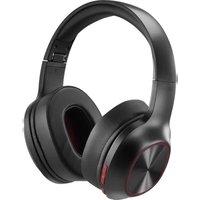
Spirit Calypso III 00221779 - Earphones HAMA - Free user manual and instructions
Find the device manual for free Spirit Calypso III 00221779 HAMA in PDF.


| Product type | Over-ear Bluetooth headset |
| Brand | Hama |
| Model | Spirit Calypso III 00221779 |
| Weight | 180 g |
| Headphone impedance | 32 Ω |
| Frequency response (headphone) | 20 Hz - 20 kHz |
| Frequency response (microphone) | 100 Hz - 10 kHz |
| Sensitivity (headphone) | 100 dB |
| Sensitivity (microphone) | -42 dB |
| Bluetooth range | 10 m |
| Bluetooth version | 5.3 + EDR |
| Bluetooth profiles | HFP V1.6.2, A2DP V1.3.2, AVRCP V1.6.2 |
| Power supply | Li-Po battery 3.7 V, 490 mAh (min.) |
| Battery life (playback/talk) | Up to 60 h |
| Standby time | Up to 180 days |
| Charging time | Up to 2.5 h |
| Audio input | 3.5 mm jack socket |
| Charging port | USB-C |
| Microphone | Built-in (hands-free kit) |
| Main functions | Extra Bass, voice assistant (Siri/Google), multipoint, auto power-off |
| Package contents | Headset, user manual, safety instructions |
| Care and cleaning | Slightly damp lint-free cloth, no harsh detergents |
| Safety | Warnings: excessive volume, magnetic fields, battery, do not repair yourself |
Frequently Asked Questions - Spirit Calypso III 00221779 HAMA
User questions about Spirit Calypso III 00221779 HAMA
0 question about this device. Answer the ones you know or ask your own.
Ask a new question about this device
Download the instructions for your Earphones in PDF format for free! Find your manual Spirit Calypso III 00221779 - HAMA and take your electronic device back in hand. On this page are published all the documents necessary for the use of your device. Spirit Calypso III 00221779 by HAMA.
USER MANUAL Spirit Calypso III 00221779 HAMA
Operating Instructions
D
Bedienungsanleitung
F
Mode d'emploi
E
GB Operating Instructions
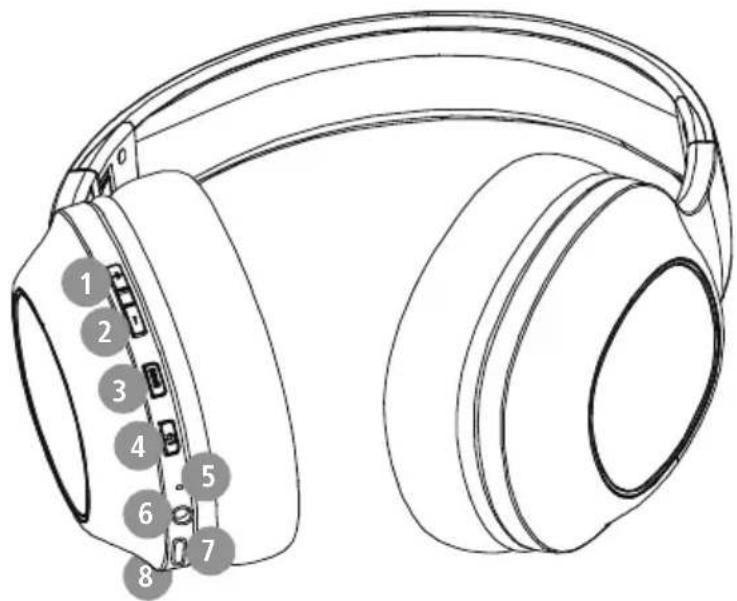
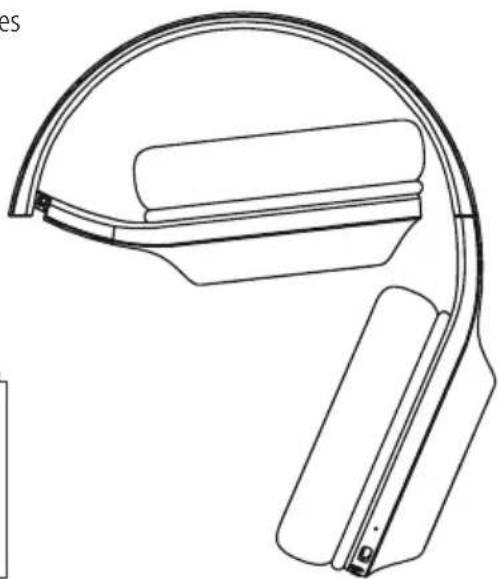
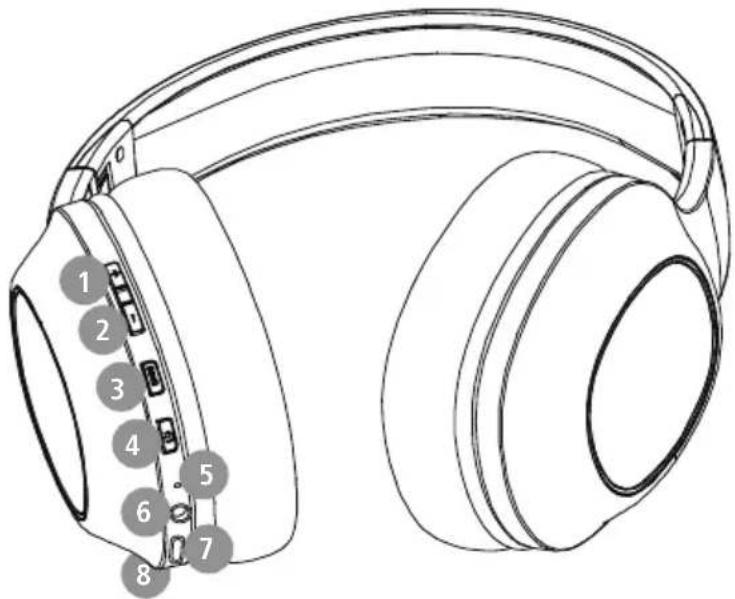
Controls and displays
Thank you for choosing a Hama product.
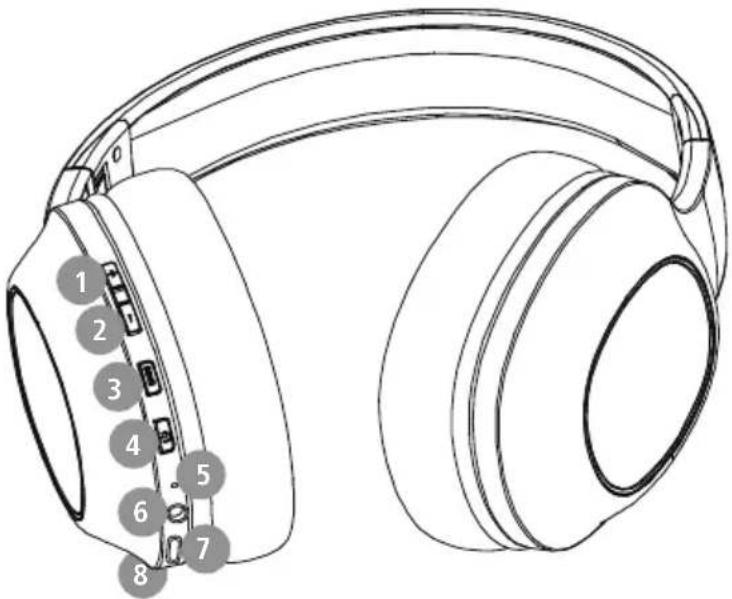
Take your time and read the following instruction. + key
and information completely. Please keep these 2. - key
instructions in a safe place for future reference 3. Extra bass
you sell the device, please pass these operating 4. Multi-function key (MFB)
instructions on to the new owner. 5.Status LED
- Audio input (3.5 mm)
- USB-C connection
- microphone
1. Explanation of warning symbols and notes
Warning

This symbol is used to indicate safety instructions or to draw your attention to specific hazards and risks.
Note

This symbol is used to indicate additional information or important notes
2. Package contents
1 "Spirit Calypso III" Bluetooth ear stereo headphones
1 x quick guide
1 x warning and safety instructions
3. Safety instructions
The product is intended for private, non-commercial use only
- Use the product only for the intended purpose.
- Children should be supervised to ensure that the do not play with the product
- Do not use the product in areas in which electronic products are not permitted
- Do not attempt to service or repair the product yourself. Leave any and all service work to qualified experts
- Do not open the device or continue to operate it becomes damaged
- Do not bend or crush the cable.
- Do not drop the product and do not expose any major shocks.
- Dispose of packaging material immediately in accordance with the locally applicable regulations.
- Do not modify the product in any way. Doing voids the warranty
- Protect the product from dirt, moisture and overheating and use it in dry environments only
- Do not use the product in the immediate vicinity of heaters, other heat sources or in direct sunlight.
- Only use the article under moderate climatic conditions.
- As with all electrical products, this device should be kept out of the reach of children
- Do not operate the product outside the power limits specified in the technical data
- Do not use the product in a damp environment and avoid splashing water
While driving a car or using sports equipment, not allow yourself to be distracted by your pro and keep an eye on the traffic situation and y surroundings.
The battery is permanently installed and cannot be removed; dispose of the product as a whole accordance with the statutory regulations
- Do not incinerate the battery or the product.
- Do not tamper with or damage/heat/disassemble the batteries/rechargeable batteries
- Do not use the product during the charging process!
eWarning - rechargeable battery

- Only use suitable charging devices or USB connections to charge the product.
- Do not use defective chargers or USB ports and do not attempt to repair them.
- Do not overcharge the product or allow the battery to completely discharge.
it Avoid storing, charging and using in extreme temperatures and at extremely low atmospheric pressures (such as at high it apitudes). - Charge regularly (at least quarterly) during periods of prolonged storage.
Warning - magnets


This product generates magnetic fields. Persons with a cardiac pacemaker should consult a doctor before using this product, as the pacemaker's proper function could be affected.
t Do not store bank or similar cards with magnetic strips near the charging box or earphones. The data on the cards could be damaged or completely deleted
Warning - high volume

High sound pressure!
- There is a risk of hearing damage.
- To prevent any loss of hearing, avoid listening at loud volumes for prolonged periods.
do Always keep the volume at a sensible level.uctoud volumes, even over short periods, can purcause hearing loss.
- Using this product limits your perception of ambient noise. For this reason, do not inoperate any vehicles or machines while using this product.

4. Switching on/off

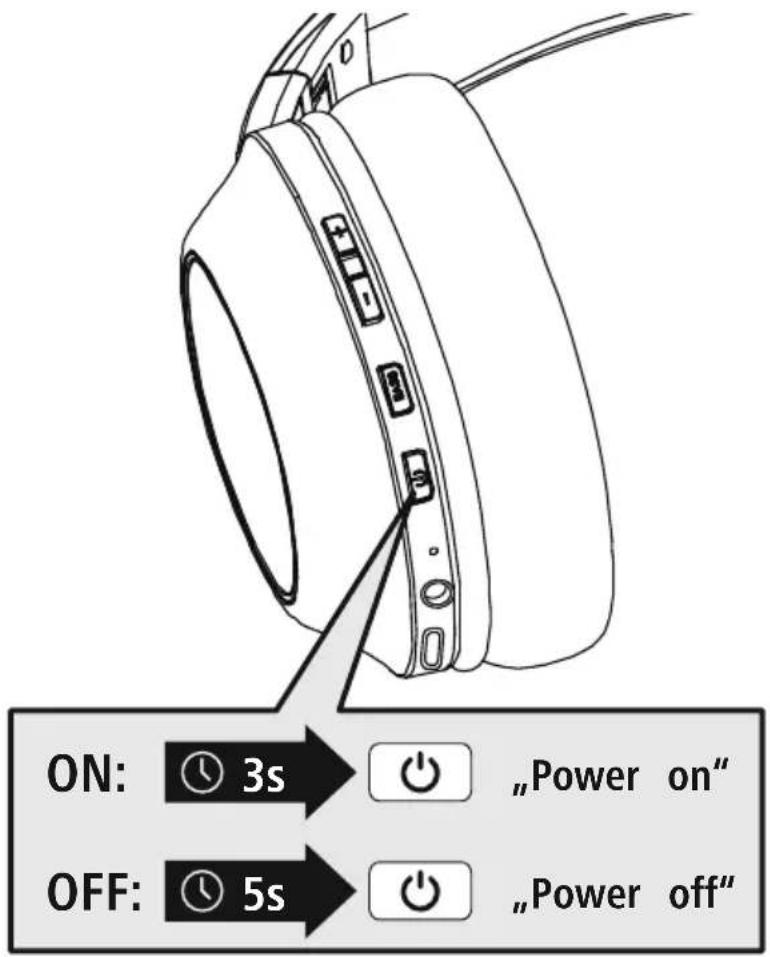
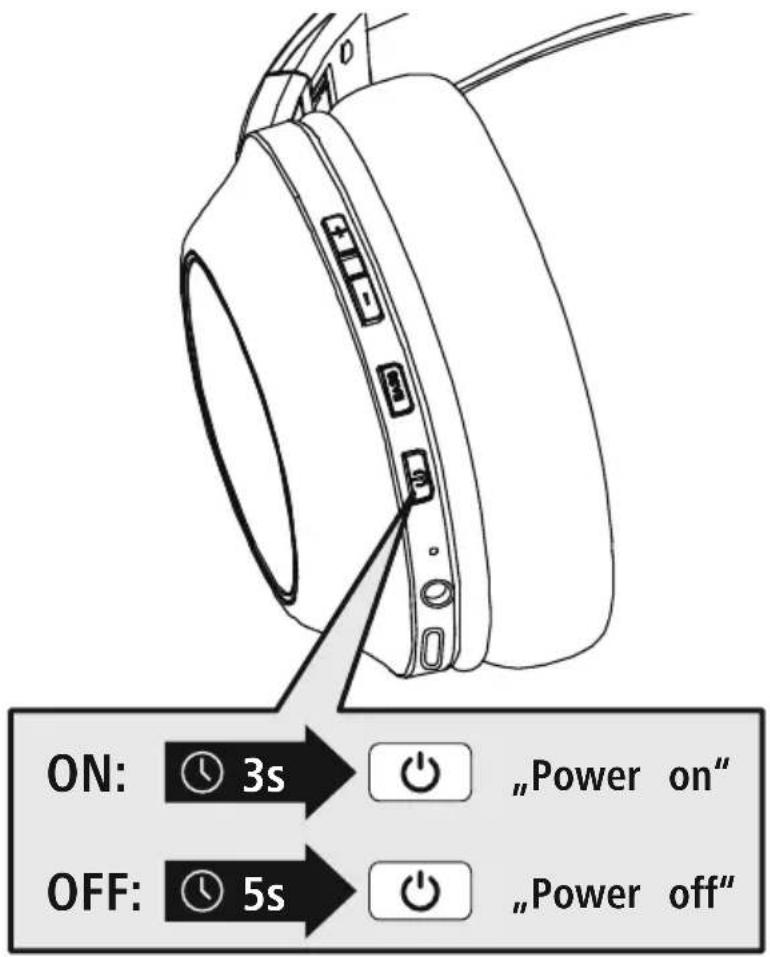
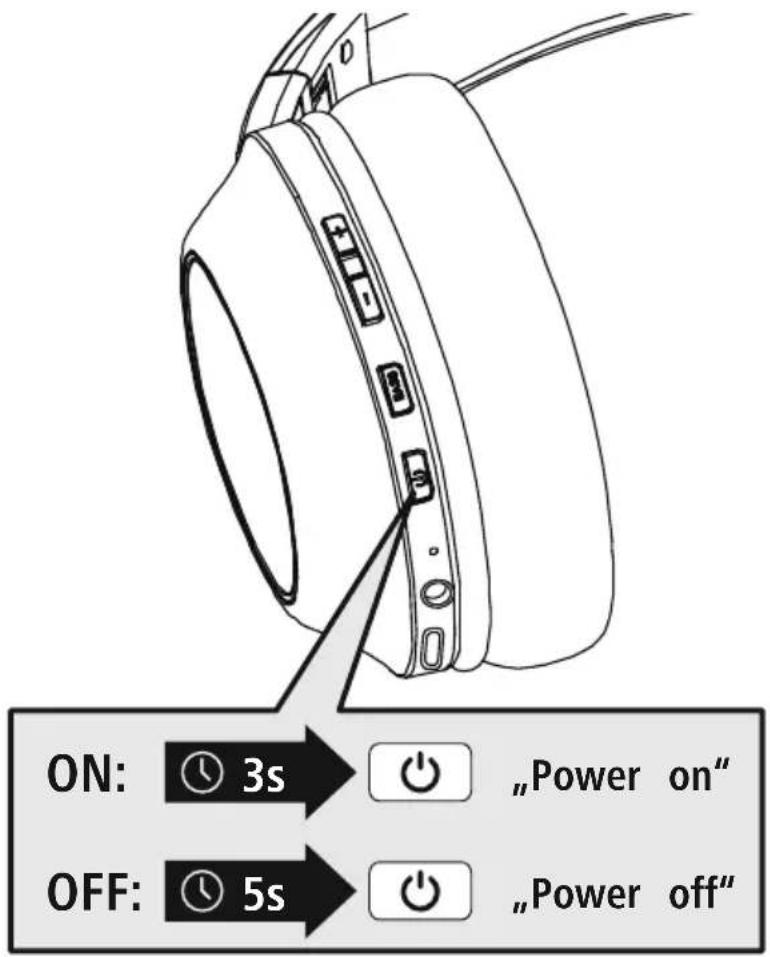
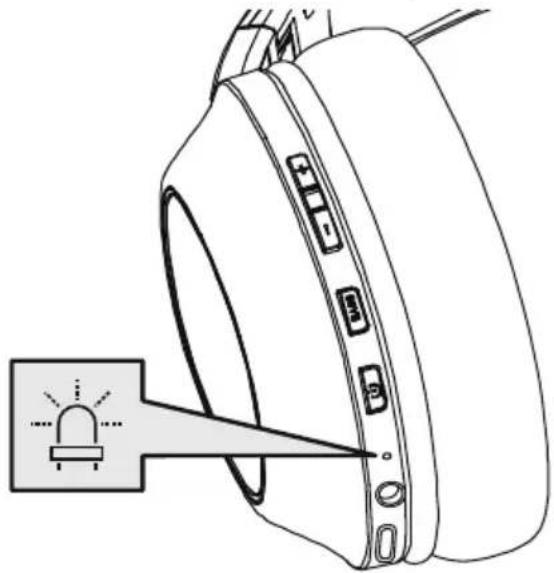
Press the MFB key (4) for approx. 3 seconds until the announcement "Power ON" is heard and the LED (5) flashes blue.

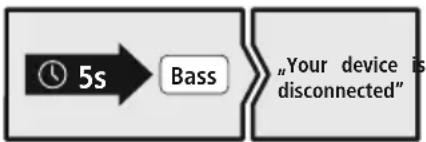
To switch off, press the MFB key (4) for approx. 5 seconds until the announcement "Power OFF" is heard, the LED (5) flashes red and then goes out.
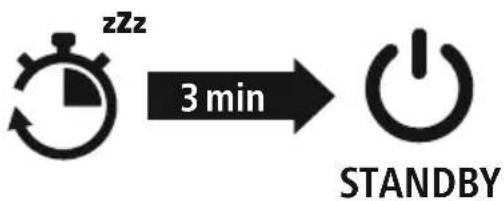
Note - Automatic switch-off of the headphones

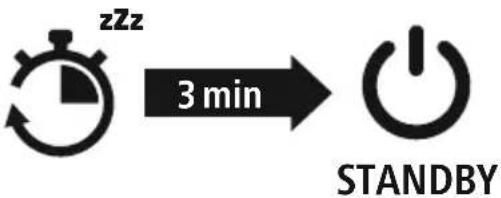
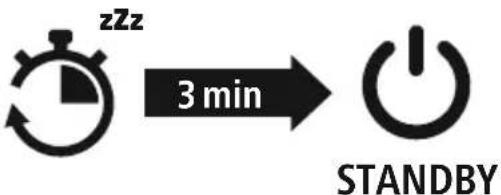
The headphones are equipped with an automatic switch-off mechanism. If there is no connection to your device within 3 minutes, they switch off automatically

5. Charging
Fully charge the headphones once before using them for the first time.
Switch off the headphones and connect them
Ensure that the headphones are switched off before charging them.
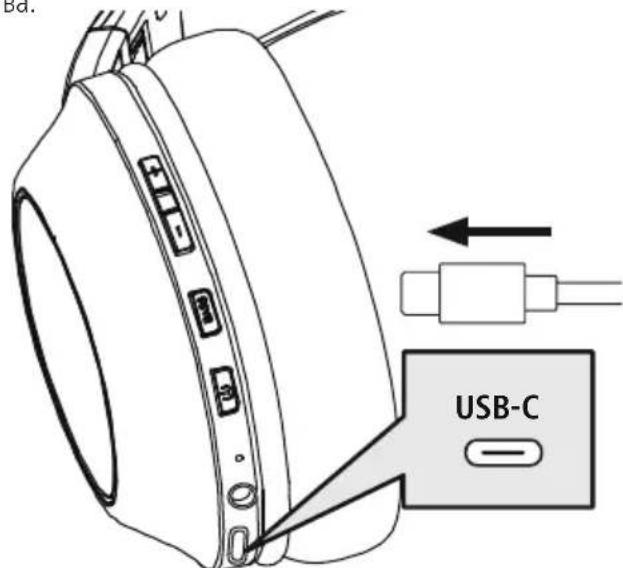
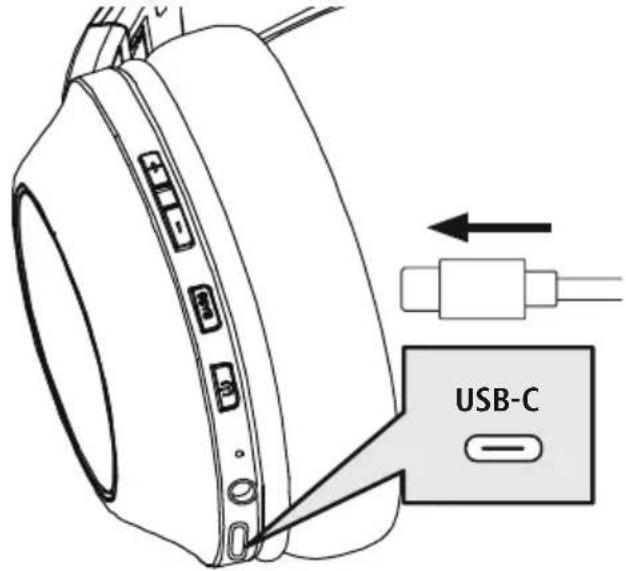
Connect a suitable USB-C charging cable to the charging socket (7) on the charging case. Connect the free plug on the USB-C charging cable to a suitable USBTochage, consult the operating instructions for the USB charger you are using.
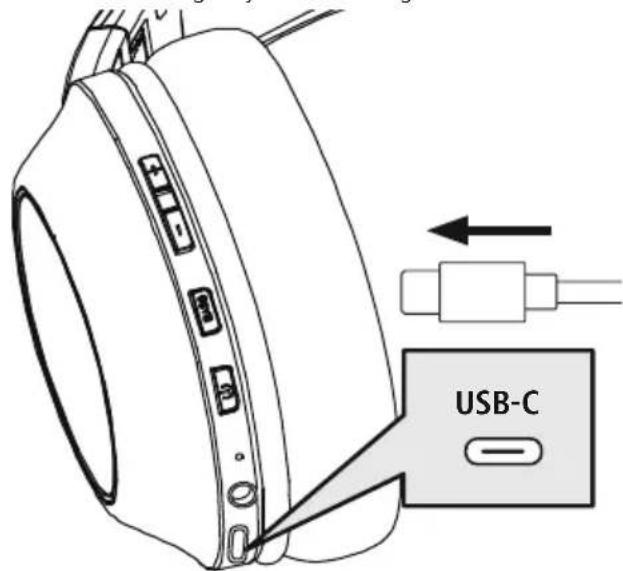
2 Charging process for the headphones
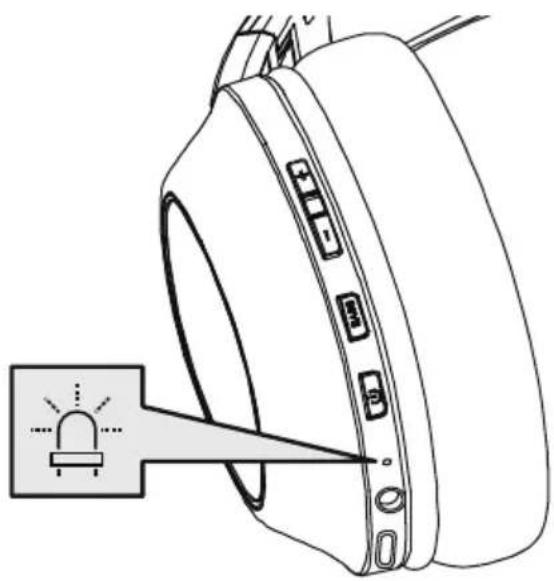
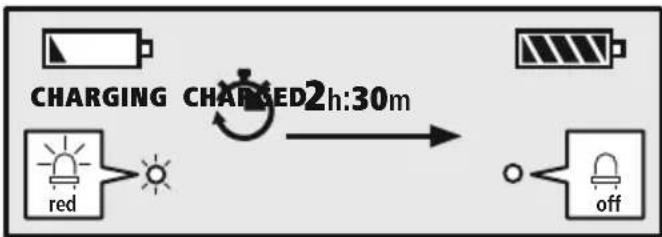
The LED (5) lights up solid red during the charging process.
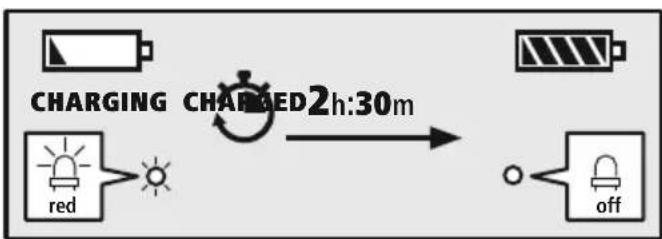
Once the charging process is complete, the LED (5) goes out.
It can take up to 2.5 hours for the battery to be fully charged.
3 Battery capacity
When the headphone battery capacity is low, the LED (5) flashes red and the announcement
"Battery Low" is heard
Note

During the charging process, the Bluetoad connection is automatically disconnected.
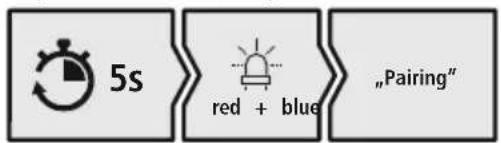
6. Bluetooth pairing
Note - Pairing

- Make sure that your Bluetooth device is switched on and that Bluetooth activated.
- For more information, please refer to the operating instructions of your device.
The headphones and the device should not be more than 1 metre apart. The shorter the distance, the better.
Switch the headphones on using the MFB key (4).
1 Check the status of the status LED (5) and the announcements
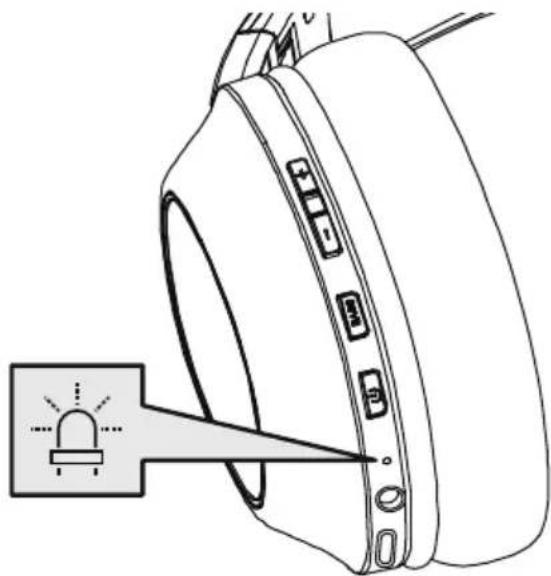
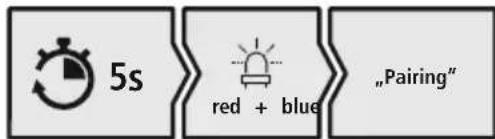
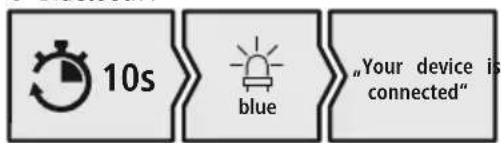
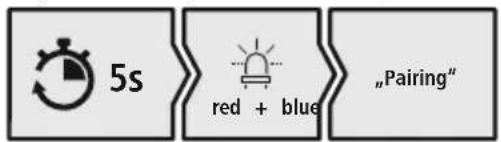
If the LED (5) is flashing alternately and the announcement is: Headphones searching for a Bluetooth connection.
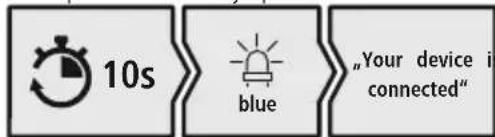
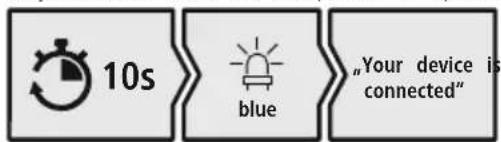
If the LED (5) is flashing and the announcement is: Headphones already paired with a Bluet device.
2 Search using your device for the headphones (only required on the first connection)
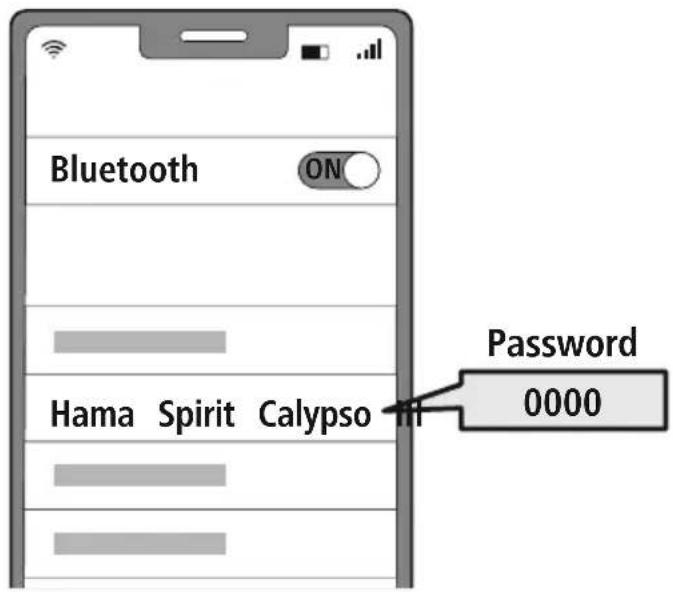
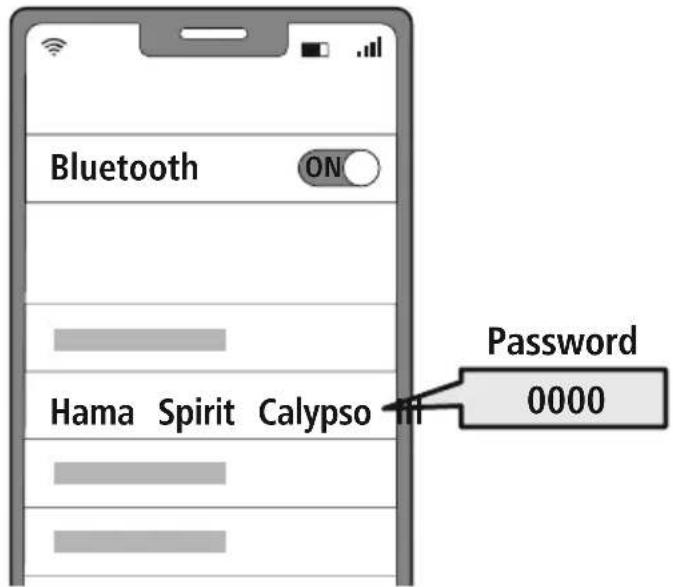
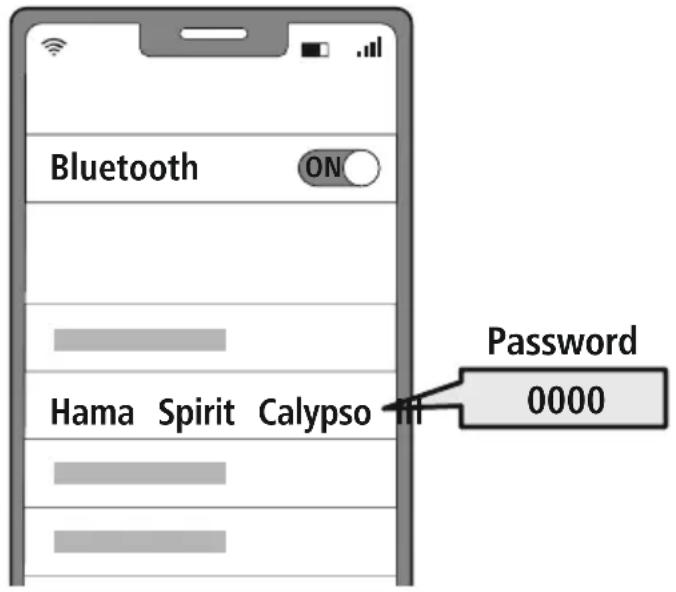
Open the Bluetooth settings on your device and wait until the list of found Bluetooth shows Hama Spirit Calypso. III
Select Hama Spirit Calypso III and wait until the headphones are shown as connected in your device's Bluetooth settings.
Note - Bluetoothpassword

Some devices require a password in order to connect to another Bldwiceth
- If your device requests a password to connect to the headphones, enter 0000.
3 Multi-point technology
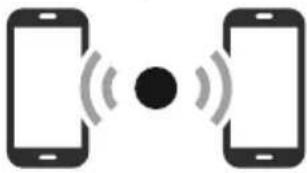
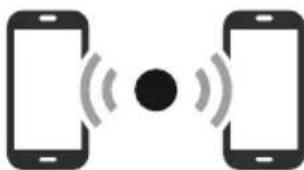
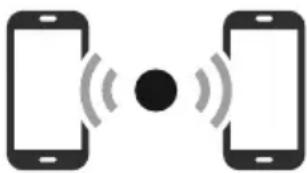
These headphones can connect to two Bluetooth-bleed devices simultaneously (multi-point).
- First connect the first device to the headphones.
- Then deactivate the Bluetooth function on this device.
- Then connect the second device to the headphones.
- Activate the Bluetooth function on the first device again. The headphones then connect to this device too.
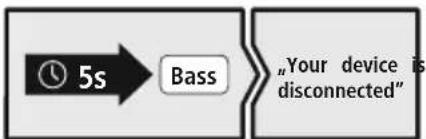
4 Disconnecting the Bluetoothconnection
Disconnect the headphones via your device's Bluetooth settings.
Alternative:
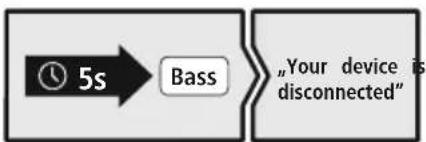
7. Controls
Note
- Please be aware that your terminal device must support some functions if they are to be used.
- For more information, please refer to the operating instructions of your device.
7.1 Voice assistant function
Siri/ Google
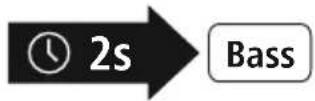
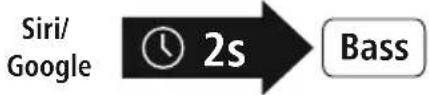
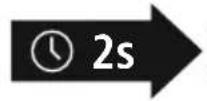
Press and hold the BASS button (3) for around 2 seconds to initiate communication with Siri or the Google Assistant. As soon as you hear a signal tone, your voice assistant is ready to assist you.
Note - Siri
Siri is only available on suitable devices running iOS 5 (iPhone 4s or later) or higher.
Note - Google Assistant
- The Google Assistant is only available on suitable devices running Android 5.0 or higher with Google Play Services, >1.5 GB of free memory and a minimum screen resolution of 720P.
- The Google Assistant App must be available on your device and be set as the default voice assistant.
7.2 Additional bass amplification
Note
Please note that this function is only possible when a Bloatation is active.
Extra Bass Boost

Bass
These headphones are equipped with an extra bass function to amplify the bass effect. Press the Bass (3) key to switch on this function while playing music. To switch this function off again, press the Bass (3) key again.
7.3 Hands-free function
It is possible to use the earphones like a hands-free facility for your mobile phone
1 Make a call
Dial the number directly via your device to make a call.
2 Accept a call
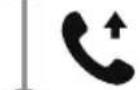
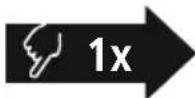
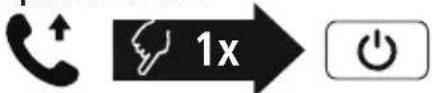
Press the MFB key (4) to accept an incoming call.
3 Reject a call

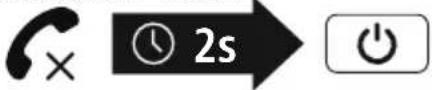
Press and hold the MFB key (4) for around 2 seconds or use your device to reject an incoming call.
4 End a call
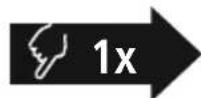
During the call, press the MFB key (4) once to end the call.
5 Last number radial
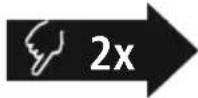
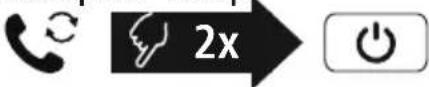
Press the MFB key (4) twice to redial the last number.
Note
The "Last number redial" function is only available for the device which was paired first in a multi-pairing situation.


7.4 Audio playback
Note

Please note that this function is only possible when a Bloch condition is active.
1 Start playback on your device.
2 Play / Pause

Press the MFB key (4) once to pause or start audio playback.
3 Next track

Press and hold the + key (1) for around 2 seconds to skip to the next track.
4 Previous track
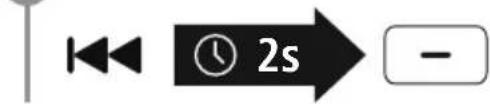
Press and hold the -key (2) for around 2 seconds to skip to the previous track.
7.5 Volume control
1 Increase volume
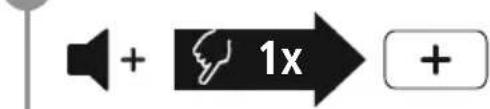
Press the ^+ key (1) once to increase the volume. Once the maximum volume is reached, the announcement "Maximum volume" is heard
2 Reduce volume

Press the -key (2) once to reduce the volume. Once the minimum volume is reached, you will hear "beep beep".
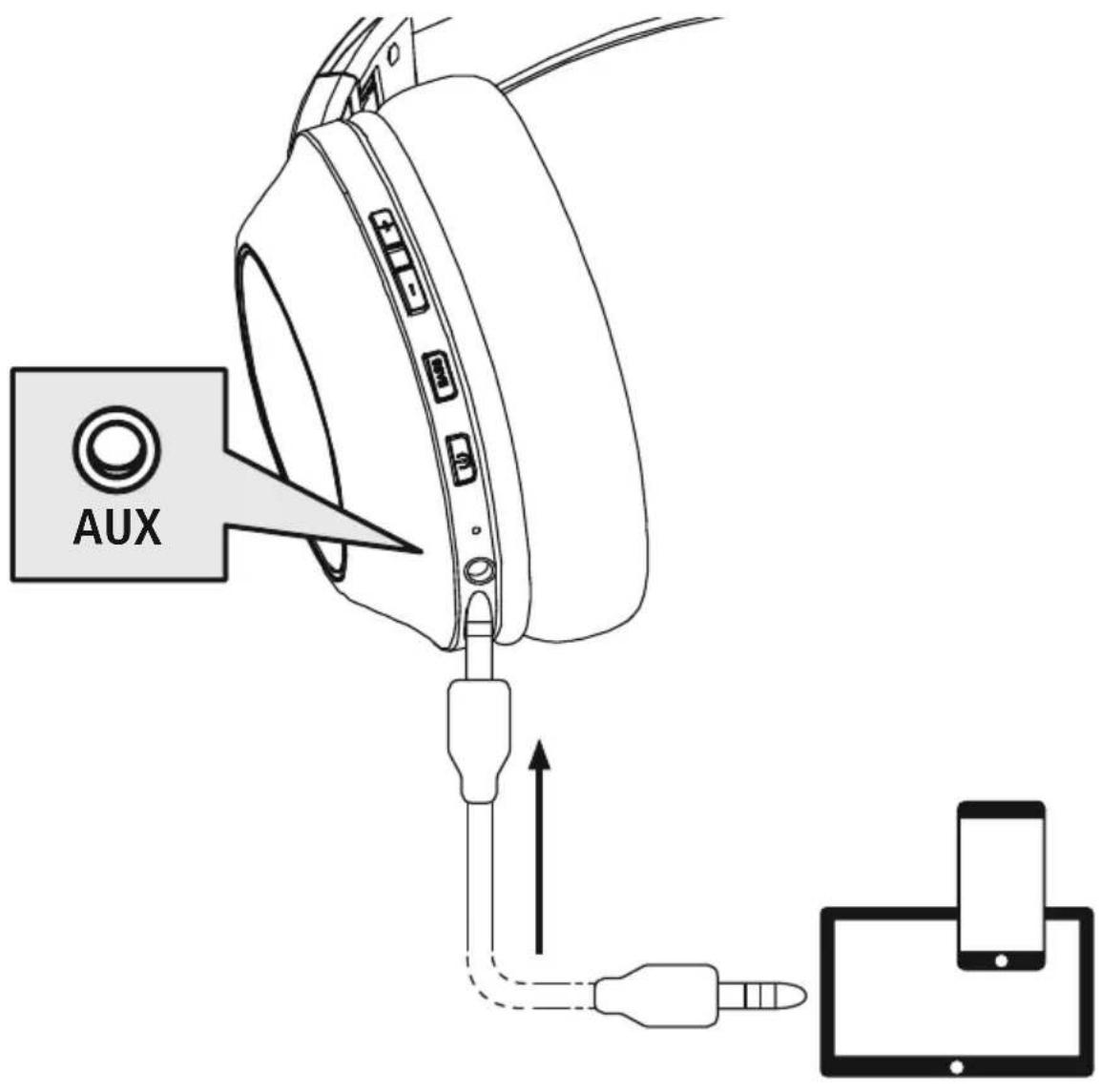
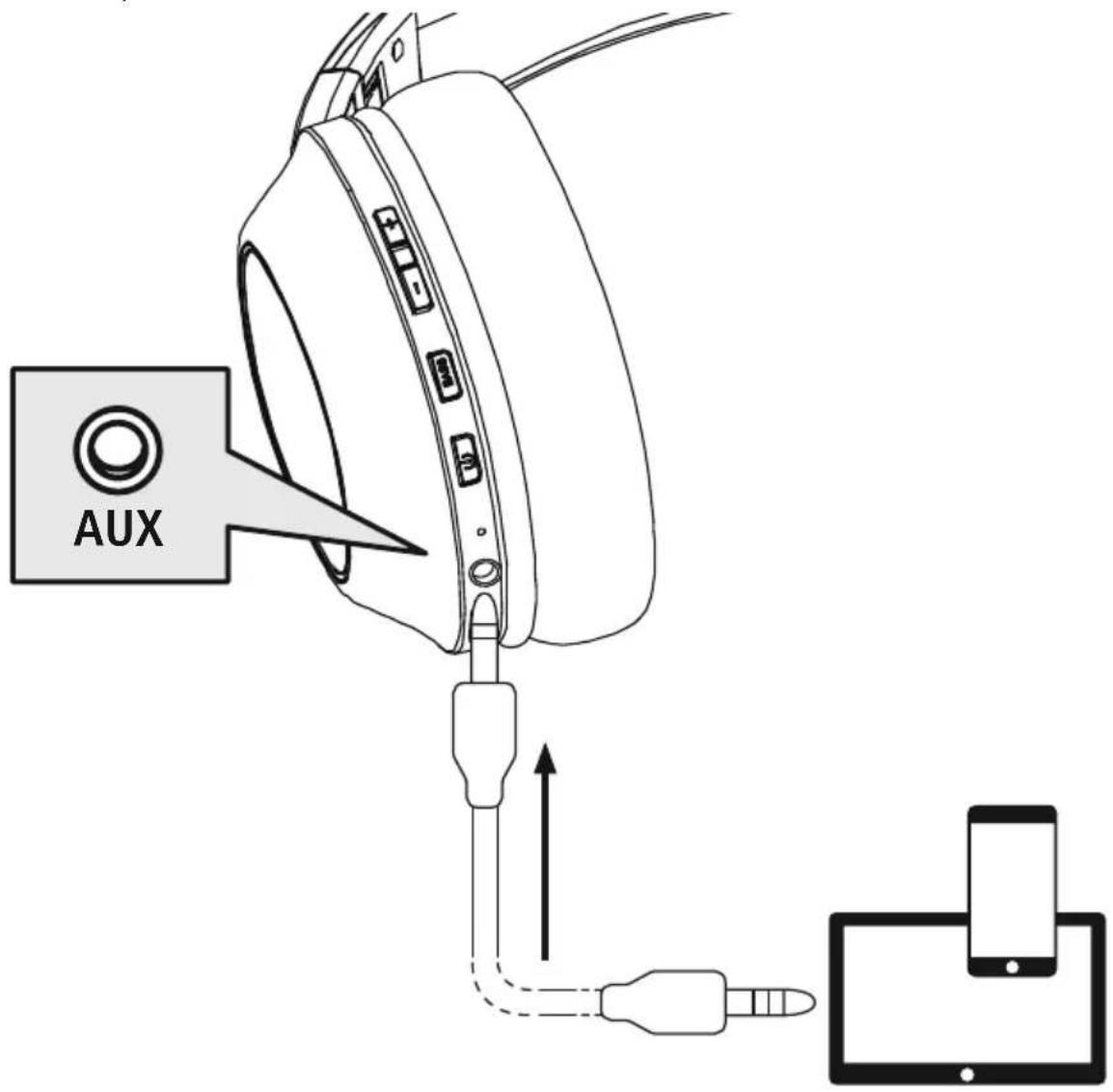
7.6 Audio playback via an audio cable (Not included in the package contents) In addition to the connection via Bluetooth can also connect these headphones using an AUX cable. To do this, plug one end into the device and the other end into the audio input (6). When the audio cable is inserted, the Bluetooth connection is automatically disconnected. The headphones now function like cabled headphones.
8. Technical data
| Bluetooth® headphones | |
| Impedance headphones / microphone | 32Ω / < 2.2kΩ |
| Frequency headphones / microphone | 20 Hz - 20kHz / 100 Hz - 10kHz |
| Sensitivity headphones / microphone | 100dB / -42dB |
| Range max. 10 m | |
| Bluetooth® technology v5 | .3 + EDR |
| Profiles HFP V1.6.2 / A2DP V1.3.2 / AVRCP V1.6.2 | |
| Transmission frequency 2 | .4 - 2.48GHz |
| Rechargeable battery Li-Po 3.7V | |
| Min. capacity 490 mAh | |
| Power consumption max | .250 mA |
| Charging voltage max. 5 V USB | |
| Total weight 180 | g |
| Standby / music / talk time | max. 180 d / 60h / 60h |

9. Care and Maintenance
Only clean this product with a slightly damp, lint-free cloth and do not use aggressive cleaning agents.
10. Warranty Disclaimer
Hama GmbH & Co KG assumes no liability and provides no warranty for damage resulting from improper installation/mounting, improper use of the product or from failure to observe the operating instructions and/or safety notes
11. Service and Support
Please contact Hama Product Consulting if you have any questions about this product.
Hotline: +49 9091 502-0 (German/English)
Further support information can be found here: http://www.sgcc.com
13. Declaration of Conformity
CE Hama GmbH & Co KG hereby declares that the radio equipment type [00221779, 0022178] is in compliance with Directive 2014/53/EU. The full text of the EU declaration of conformity can be found on the following website:
https://support.hama.com/00221779
https://support.hama.com/00221780
Frequency band(s) 2402MHz - 2480MHz
Maximum radio-frequency power transmitted 2,5mW E.I.R.P.
14. Specifications according to Regulation (EU) 2023/826
Information regarding energy consumption can be found at:
https://support.hama.com/00221779,
https://support.hama.com/00221780
6. Bluetooth Verbinding (Pairing)
Hinweis - Pairing

https://support.hama.com/00221779
https://support.hama.com/00221780
https://support.hama.com/00221779,
https://support.hama.com/00221780
F Mode d'emploi
Remarque - Google Assistant
https://support.hama.com/00221779
https://support.hama.com/00221780
https://support.hama.com/00221779,
https://support.hama.com/00221780

Nota - Google Assistant
https://support.hama.com/00221779
https://support.hama.com/00221780
Banda o bandas de Frequencia 2402MHz - 2480MHz
https://support.hama.com/00221779,
https://support.hama.com/00221780

https://support.hama.com/00221779
https://support.hama.com/00221780
Frequenieband(en) 2402MHz - 2480MHz
Maximaal radiofrequent vermogen 2,5mW E.I.R.P.
14. Informatie overeenkomstig Verordening (EU) 2023/826
https://support.hama.com/00221779,
https://support.hama.com/00221780
https://support.hama.com/00221779
https://support.hama.com/00221780
https://support.hama.com/00221779,
https://support.hama.com/00221780
Wskazowska - Google Assistant

https://support.hama.com/00221779
https://support.hama.com/00221780
https://support.hama.com/00221779,
https://support.hama.com/00221780
H Hasznalati utmutato
https://support.hama.com/00221779
https://support.hama.com/00221780
https://support.hama.com/00221779,
https://support.hama.com/00221780
Avertizare - Accumulator

https://support.hama.com/00221779
https://support.hama.com/00221780
Banda (benzile) de freventa 2402MHz - 2480MHz
Puterea maxima 2,5mW E.I.R.P.
14. Indicati li conform Directivei (UE) 2023/826
https://support.hama.com/00221779,
https://support.hama.com/00221780
CZ
Návod k použiti
Vystraha - Akumulator

3 Multipoint technology
https://support.hama.com/00221779
https://support.hama.com/00221780
Kmitoctové pásmo/kmitoctová pásma 2402MHz - 2480MHz
Maximánlí radiofrekvenčné vykon vysilany 2,5mW E.I.R.P.
https://support.hama.com/00221779,
https://support.hama.com/00221780

https://support.hama.com/00221779
https://support.hama.com/00221780
Frekvencné pásmo/frekvencné pásma 2402MHz - 2480MHz
Vyžarovaný maximány prenosový vykon 2,5mW E.I.R.P.
14. Udaje podla nariadenia (EU) 2023/826
Informáce o spotrebe energia najdete na:
https://support.hama.com/00221779,
https://support.hama.com/00221780
7.1 Funcão Voice Assistant
Siri/ Google
Bass
https://support.hama.com/00221779
https://support.hama.com/00221780
Banda(s) de Frequencias 2402MHz - 2480MHz
https://support.hama.com/00221779,
https://support.hama.com/00221780
S Bruksanvisning
https://support.hama.com/00221779
https://support.hama.com/00221780
Frekvensband 2402MHz - 2480MHz
Max. sandareffekt 2,5mW E.I.R.P.
14. Uppgifter enlistigt forordning (EU) 2023/826
https://support.hama.com/00221779,
https://support.hama.com/00221780
RUS RykoBoDCTBO NO 3KcPnyatauIN
Blaorapm BAC 3a To,TO BBI Bbipann npOdyKeMeHtbl ynpabHeHn m HndKaTObbl
Hama!
Ipepi nCnoJIb3OBAHnEM BHNMaTeJIbHO npouTIne CJeNyIOUne INHCTpyKcnn I yKa3aHn XpaHIne DaHHoe pyKOBoCTBO IIO EKcNlYaTaUIN B HAdexHOM MeCTe, YTO6bl B Cnyae HeoBxOAnMoCTn y Bac BCerda 6bl IocTyn K Hemy. Ppi npOdaXe yCTpOiCTBa nepeJaTe pyKOBoCTBO HOBOMy BlaJeIbUy.
- Khonka "+"
- Khonka "-"
- Extra Bass
- MHorOdyHKUHOHaJIbHaJ KHONKa (MFB)
- CBeToDIOOHN HINDKaTOP COCTOHHN
- AynOBxoJ (3,5 MM)
- Pa3beM USB-C
- MmKpooh
1x kpaTkoe pyKOBOCTBO
1x6poWIOpa c npdeynpeINTeIbHbIMN
yka3aHnMaM N yka3aHnMaN NO TEXHnKe 6e3onacHOCTn

3. Yka3aHnno TeXnKe 6e3OnaCHOCTn N3dJIne B OROhB
- N3dene npedha3haueH OJRA DOMaHero, HnppomblneHHoro npimehenia
- INcnoIb3yIte n3dJeNne NCKIOHHTeJIbHO BnpedymOTpeHHbIX cIeJAX
-He no3BOJnTe TeTm nIpaTb C n3dJIeHem.
He npmeHnTe n3dene B 3ohax, rDe NcnoJIb3OBAHnE 3NeKtpoHHbIX yCTpOINCTB 3aIpeUeHO
He nbitaeTcB cAmOCToATEbHO BbINOHTb TexHnueckoe 06CnyXuBaHne IIN peMOHT n3dJIpe MOHT pa3peWaaTeI npOn3BODHTb TOnbKO KbALINΦnUPOBaHHOMy nepcoHaJy
He BCKpbIbAte n3dJIne He NCNOJIb3yIte erOpn HAnuH NoBpeXDeHn
He crn6aIte n He nepekmaIte Ka6eIb.
-ИЗбeraиTe nadeHnI N3dEInn I He noDBeprAITe erO cINbHbIM Bn6paunM
Cpa3y yTnIn3npyIe ynaKOBOHybIM MaTePnA1 COrJaCHO DeIcTByUoM MeCTHbIM IpeDnucHnM NO yTnIn3aU
He BHOCTe Bn3dne KOHcTpyKTHBHe i3MeHen. B pe3yNbTaTe 3TOrIO JIO6bIe rapaHTnHbIe 06a3aTeNbCTBa TepaOT CBOIO CNy
He IONYCKaIe 3arpa3HEnnua3dennna 3aunuauTe ero ot Bnarn n neperpeae uCNOb3ynt E3dneep npn BbICOKO BlaxKHOCTN
He nCnoIb3yIte n3dJIe N B HenocpeIcTBehHO 6n3OCTn OT CNTem OTOnJIeHn,pynx nCToUHKnOB TEnJa nn NOJ npMbIMn COJIHeuHbIMn Jyamn - I cNoIb3yIte n3dJIeNe TOnbKO npn npneMJIeMbIX KInMaTnuecknx ycNOBmX
Данhoeидени,кakИВCEл ektpnueckne npibopbl,ClenyetbepebOTdTei!
Ппи Испьзовани Идени He Дonyckай Te npевышениnpedena MOUHOCTN, yka3aHHORO B TexHHeCKNX xapakTeprnCTNKax
He nCnoB3yIe n3dJIe Bo BnaxHoi cpe, n36eraiTe 6pb13r
Bo Bpem e3bl Ha aBTOMo6nne nnn 3aHrTn aKTHBbIMN BWdAmn cnoTa He OTBLeKaITeCb, a CneDnte 3a DOpOXHOObCTaHOBKOIN OKpyKeHHem. - AkkymyIATop ABJETcR cTauOHApHbIM n He NODJIeKNT DEMOHTaKy, yTNIN3uPyTe N3dEInne CEJIHKOM B COOTBETCTBnC 3aKOHOdaTeNbHbIMn PpeINCAHnARM
He 6pocai Te aKkyMnyIaTOpHyo 6taapeio nn
He n3MeHnTe, He deΦopMpyuTe, He HArpeBaIte, He pa3bnpaIte aKKyMnyTOpbl/6batapeKn
He nCnoIb3yIe I3dEJIe BO BpMa 3apAdkn!
PpeynpeXdHne aKKymyTOp

Pa3pewaetca nCnoJb3ObaTb,Ia 3apJKn TOnbKo coBmecTmbie 3apJHbIe yctpoNCTBa n USBpa3beMbl.
He nCnoIb3yIte HeucnpaBhIe 3apAHbIe yCTpoIcTBA nn USB-pa3bEmbln He nbITaHTecb nx peMOHTnPOBaTb.
He donyckaTe n36bItoHOn 3apAdkn ngy6oko pa3pAdkn n3deJna
He xpaHnte, He 3apXaIte n He nCnOJIb3yIte yCTPOIcTB Opi OChEB Hn3Knx N OChEB BbICOKNX TEMNepaTpyax N OChEB Hn3KOM aTMocqepHom DaBLeHH (HaNPIMep, Ha 6oJIbWx BbcOTax).
- Пи дintelbHOM xpaHeHn peYyIrpHo 3apxKaIte n3dJIe (He pexe oDHoro pa3a B KBaptan).
PpeynpeKdEHe - MarHnTb


- N3dJIe co3daet MarHHTbIe noJI. PpHNCNoB3OBaHmKapDIOCTMMyJrTOPOB npOKOHcyIbTnpyITecb C BpaHOM Ha IpeDMET COBMECTMIOCTN N3dJIeNc TAKIMU yCTPOINCTBaAM
He xpaHnTe 6aHKOBCKne nIIN aHaJIOrnHbIe KapTbIC MaHHTHOI NOLOCO prdOM C 3apIHBIM 6OKCOM IIN HayuHnKaMTO MOXET npIBcTNI K NOBpeJDeHIO Kap TIIyJaJIeHNo COxpaHEnHO HnIX INHOpMaUIn
IpeDynpexJeHne BBICOKa rPOMKoCTb

- BbICOKa 3ByKOba Harpy3Ka!
CyuectByeT pnck yxudeneHn cnyxa.
YTo6bI He DoNyCTnTb Notepn Cnyxa,He IcNoJIb3yIte HayuHnKn PpN BbICOKOM ypoBHe rPOMKOCTN B TeueHne DInTeJbHorO BpeMeHN - POndepxuBaTe HOpMaJIbHyO rPOMKoCTb. Bo3dIeCTBnE rPOMKOro 3ByKa, B T.y. B TeueHne KOpOTKOro BpeMeHn, MoXeT npNBecTu K NobpeXJeHIO opraHOB clyxa.
Bo Bpem 3Kcnpnyataunn n3dennn CHnxKaetc TeneHb BocnpnTn Okpykaioux 3BykOB m Shymob. 3anpeaertc nCnoIb30BaTb n3dne
BO Bpem BoXdHnabTOMO6nJ n ynpaBHeHnMaunHaM.

4. BkIIOueHne/BBIKIOueHne

Haxmnte KhoNky MFB (4) n ydepXuBaIte ee HaxaToB TeueHne npImepHo 3 c, noKa He pa3daCTcYCTHoe onOBeUeHne "Power ON" n He 3amraet CnHIM CBeToND (5).

Длг Вькюченя hab KMITE KhoNky MFB (4)и удрхиBaIte ee habatOB B TeueHne 5 c, noka He pa3dactcra yCTHoe onObeHne "Power OFF", He 3amrAet KpaChbIM CBToIOnO
(5), KOTOpBn 3aTeM norachET
PpIMeayHne - aBTOMaTHueckoe BbIKIOueHne HayuHKnOB
HayuHnKIOcHaSeHbCnCTeMoI aTOMaTneCKOro BbIKLIOueHn. EcNnB TeueHne 3 MmH coeINHeHne c OKOHeHbIM yCTpOINCTBOM OTCyTCTByET, OHn aTOMaTneCKn BbIKLIOuaOTcra.

5.Заряда
IpeepnepBbIM npmHeHnEM Heo6xOIMO NOHOCtBu 3apAINTb HayuHNK
1 BbIKIIOUeHne n noKIOUeHne HayuHnKOB
Y6eIntecb TOM, YTO nepei 3apKoH HayuHnKn BbIKNoeHbl.
IopKIOHHTe npnlaemb 3apAnb Ka6enb USB-C K 3apAnHomy rHe3dy (7) 3apAnHO 60kca. IopKIOHHTe cBO6oHbN b TeKepe 3apAnHO r Ka6eNa USB-C K COOTBeTcByHOeMy 3apAnHO My yCTPOHCTBy c USB-pa3bEmom. Co6nOaTe pyKOoDcTO No 3KcnnyatauIN NcNoB3yeMOro 3apAnHO r USB-yCTPOHCTBa.
2)Ppocecc3apAKnHayuHnKOB
Bo Bpem3apn CBeToHIO5 (5) NoctoHHO rOpHT KpaChbIM CBeTom.

Iocne 3aBepuHn3apAKn CBeToDnO (5) rachet.
Дл поног зараздкakkyмлгота можетnotpe60BaTbсdo2,5ч.
3 EMKoCTb aKKymyIaTopa
Ipn Hn3KOM ypOBHe 3apraa akkymyTAOpa HayuHnKOB CBeToDIO, (5) Mmraet KpaChbIM npa3daTcY cTHOe onoBSeHne "Battery Low"
Приимechане
Bo BpeMa 3apAaKn CoeHHeHne BluetoBbTOMaTuYeCK N BbIKHOaETcA.
6. CoeHHeHne Bluetooth(conpJxKeHne)
ykaahne — conpjxehne

- Y6eINTEcB, yTO OKOHeHoe yCTpOInCTBO C BO3MOxHocTbIO COeINHeHnAYepe3 Bluetooth® BKNIOueHo nbluetooth®-coeINHeHne yCTaHOBJeHO.
- Co6HIOaIe COOTBeTCTByOuIe yKa3aHnI pyKOBoDcTBa nO EKcnIyatauIN BaWero OKoHeuHOYcTPOIcTBa.
HayuHnKu N OKOHeHoe yCToPcTBO DOJXHbI HaxOaNTbcra Ha paCCToaHm He 6oJIbSe 1 M dpYr OT dpyra.
YeMeHbSe paCCToaHme, TeM lyUWe.
BkIIOUHTe HayuHnKn HaxaTneM KhoNk MFB (4).
1 PpOBepbTe cTaTyc CBeToMDnHO rHnKaTopa coCToHn (5) n yCThble onOBeueHn.
Pn nonepemehHom mraHn CBeToNDoA (5) n yCTHom onOBeueHN:
HayuHnKn nblTaIOTc yCTaHOBnTb coeHNHeHne BluToth
Pn MrraHnn CBeToAnOda (5) n yCTHom onOBeueHN:
HayuHnKnyxye yctaHOBNL COeHNHeHne (CnHXPOHN3NPOBaHbI) C OKoHeuHbIM yCTpOINCTBOM C Bluetooth.
2 NaHnTe Ha BaWeM OKOHeuHom yCTpoiCTBe HayuHnKn (Tpe6yeTcra Toblko npn nepBOM coeHNHeHH).
OtkpoTe MeHIO HAcTpoEe BluetoHa BaIeM OKOHeuHOM yCtpoICTBe N NOdoXdTe, Noka B CnICKe HauDeHHbIX BluteoThe NoBITcra Hama Spirit Calypso III
Bb6epnte Hama Spirit Calypso III n nooXnTe, noka HayuHnKHe oTo6pa3rC B KaueCTBe nokJIouehHoro yctpoiCTBa B NaCTpoiKaX Bluetobawero OKoHeHoro yctpoiCTBa.
YkaaHne -napoB Bluetooth

IJIa HeKOTOpbIX OKOHeuHbIX yCTpOINCTB npn yCTaHOBJeHHn CoeHNHeHH n C pyrIM Bluetooth -yCTpOINCTBOM Tpe6yeTcnaPOnb
- Ecnn BaWe OKoHeuHoe yCTpOInCTBO Tpe6yEt erO BBoa, BBeINTe dJa CoeINHeHn C HayuHKamn napoiB 0000.
3 TexHoiJorM Mulpoint
3TN HayuHnKMOxHO CnHxpoHn3npoBaTb OndHOBpeMeHHO C DByMRAOKHeHbIMN yCTpOCTBaMn, noDnepXnBAIOUcMMn fynKcuio Bluetooth(TexHOnorna Multipoint)
- Chauana cnHxpoHn3npyIe c HayuHKamN nepBoe OKoHeuHoe yCTPOINCTBO.
3aTeM DeakTbPyuTe cyHKuHo BluteoHa 3Tom OKOHeyHom yCTpOInCTBe. - Iocne 3Toro cHxpoHn3npyTe c HayshnKaMn BTOPOe OKoHeuHoe yCTpOINCTBO
- Choba akTNbPyuTe FyHKuIO Bluetooth NaepBOM OKOHeHOM yCTpOInCTBe. Tenepb HayuHnKn CnHXPOHN3NpyOTc N C 3TNM OKOHeHbIM yCTpOINCTBOM.
4 Pa3beHHeHne coeHHeHn Bluetooth
Pa3beHnHTe coeHHHeHne HayuHKnOB B HAcTpOaKax Bluetao zero OKOHeHoro yCTpOcTba.
AJIbTePhaTHBbI BapHaHT:
7. ΘЛeMeHTbI ynpaBJIeHnI
PpmeaHne

- 06patnte BHHMaHne, yTo no. depkKa HeKOTopbIX cyHKcun 3aBcNt OT BaIero OKoHeuHO yCtpoiCTBa.
- Co6IaTe COOTBETCTByUHne yKa3aHnry PyKOBoDcTBa No 3KcJIyatauINBaWero OKOHeHrO YoCTpoiCTBa.
7.1Функци Интелктуальноюпомошнka
Haxmnte u ydepkuaite Khonky BASS (3) haxaon ok. 2 cekynd, t06b1 3anyctntb C8a3b C Siri nn Google AccncteHTOM. Korda pa3daactc3Byk cnHaIa, 3To 6ydet O3haatb, TTO BAI FOLOCOBON NMOUHK FOTOB NMOOb Bam.
YkaaHne — Siri

CepBnC Siri doctyneH toIbKO Ha COOTBeTCTByIOx OKOHeuHbIX yCTpoiCTBax c iOS 5 (HaunHa c iPhone 4s) nn 60nee no3dneh Bepcnei.
Yka3aHne — Google Assistant

CepBnC Google Assistant DOCTyIeH TOIbKO Ha COOTBeTCTByIOUx OKOHeuHbIX yCTpoIcTBax C Android 5.0 nnn 6oJIe e no3dne BepCne c cepBncamn Google Play Services,>1,5Γ6 CB06OJHOI pAMrN mMHmAbIbHbIM pa3peSeHem EKpHa7 720 nIKceJe.
- Ppnoxne Google Assistant 0JXHO 6bIb DOCTyHNO Ha BaWem OKoHeHOM yCTpoiCTBe HAcTpoeHO B KaueCTBE CtAnDapTHOrO rOLOCOBOrO NOMUHNka.
7.2Функцу ДОпОЛнHTeьHOrO yCnJIeHnI 6acOB
PpmeaHne

UyTnTe, yTo 3a cyHKZnI DOCTynH aTOJbKO npu aKTHBHom Bluoteoth -coeHNHeHH.

3TN HayuHnKU OCHaueHbI cyHKUnei "Extra Bass" nla yCunHeHna 6acOB. HaxMnte KhoNky Bass (3) oIN pa3, TTo6bl BKIOHTb 3Ty cyHKUIO BO BpEM npOurpbBaHn My3bIKu. TTo6bl CHOBA BBKIOHTb 3Ty cyHKUIO, HaxMnte KhoNky Bass (3) NOBTOPO
7.3ФункцягомковCBЯЗN
Bb taKxe MoXeTe NcNoIb3ObaTb HayuHnKn B KaueCTBe yCTpoNCTBa IJIra TpOMKO TepeOHHO CBaI IN CBOero MObNbHoro TepeHa.
1 CobepuHTb Bbl3OB
BbI6epnte Homep HenocpeCTBeHHo Ha OKOHeHOM yCTpoNCTBe, TTO6bl COBepuNTb Bb13OB.
2 PpHrTb Bbl3OB
Ondokpatno haxmte KhoNky MFB (4), 706bl npnHrtb BXoJusn Bbl3OB.
3 OTKJOHHTb Bbl3OB
Haxmnte u ydepkmbaite KhoNky MFB (4) haxatoB TeueHne npimepno 2 c nnnncnolb3yte Baale okoheuhoe yctpoiCTBO, T06bl OTKIOHHT BxOJaIIN BB13OB
4 3aBepuNTb Bbl3OB

Bo Bpempa3roBopa OndHOKpaTHo HaxMnte KhoNky MFB (4),T06bl 3aBepuNTb Bbl3OB.
5 NOBTOpHbIn Ha6Op
Двaxдынхмite KhoNky MFB (4),уTo6bI ha6paTb NocJeDHyn Ha6paHbI HOMep.
PpumeyaHne

Функця NOВTOPHOrO Habopa DoCTyHa TOnbKO IЯ OKOHeuHOrO yCTpoIcTBA, KOTOpoe 6blIo ChauJa CnHXPOHn3npoBaHO.
7.4 Bocnpo3BeDeHne ayDnO3aNcEi
PpimmeaHne

Uyntte, yTo 3a fynkucn IocTynHa Toblko npn aKtubHom Bluoteoth-coeHHeHH.
1 BkIIOUHTe BocnpOn3BeJeHne Ha OKOHeuHOM yCTpoiCTBE.
2 Bocnpoun3BedeHne/nay3a

Ondokpatno haxmte KhoNky MFB (4), To6bl npnoctaHOBNTb 3anyCTnTb npOnrpblBaHne My3bIK.
3 Cnedyuon Tpek

Для nepexoаксдуошemy tpeky haxmnte uydepxHBaTe KhoNky + (1)В TeueHne npimepHo 2 c.
4 PpebIyuzn TpeK
https://support.hama.com/00221779
https://support.hama.com/00221780
https://support.hama.com/00221779,
https://support.hama.com/00221780
BG Pa60THa INHCTpyKcIy
Blaorodapm Bn, ye cte n36paan npoynk Ha Hama!
OTeIe BpeMe n npoYe I3uNo CneBaunTe HnCTpyKuHn Uka3aHnCneTobA 3ana3eToBa pkoBOcTB0 3a eKcnloatauaHa cnHypHO MAcTO, 3a Da MoXeTe Da npaBte CnpaBKn B H npn Hyxda Ako npoJaTe ypeDa, npedaiTe TOBa pkoBOcTB0 3a eKcnloatauaHa HOBnrc6CTBeHnK.
Elenentn 3a ynpabJeHne n HndkaTopn
- ByTOH +
- ByToH -
3.ФункциExtra Bass - MyntnФункционан 故TOH (MFB)
50 CBeToOnIO3aCTaTyc
- Aynobxo3(3,5 mm)
- USB-C Bpb3ka
- Minkpooh
1. 06a3eHHe Ha npedynpeDteHN CnMBoN yka3aHna
PpeynpeKdneHc

I3noJI3Ba ce, 3a da 06o3Haayaba yka3aHne 3a 6e3OnaCHOCT nIn 3a Da HAcOu BHMaHHeTO KbM KOHKpeTHn ONaCHOCTn n PnCKOBe
Yka3aHne

N3noJI3Ba ce, 3a Da 06o3Haayaba DonbHnHTenHa HOpMaunu Baxnn yka3aHH.
2. CbДьрЖане Ha onaKOBkata
1x Bluetooth® Over-Ear CTpeo CnyuzaKn "Spirit Calypso III"
1x KpaTka HHTpyKUIN
1xHnCTpykun 3a npdynpexdHe n
n OcHpypBaHe Ha 6e30NaCHOCTTa
3. Yukazama 3a 6e3onachoct
-П рожкът e прдин 3a Лчна, HectonaHCKa ь�ота уnotpe6a
- I3noI3BaIte npOyKta cAmO 3a npEbnIeHaT a ceI.
- Deuata Tp6Ba da 6bDat noi Ha3Op, 3a da ce rapaHTnpa, ye HMa Da cn nIpaT c npOyKta.
He n3no3BaIte npOyKTA B 30Hn, B KOnTo He ca pa3peuHen eNeKtpoHH ypeiN
He ce onntBaTe cAm Na o6CnykBaTe nn peMOHTnupate npOdykTa OCTaBeTe BCraKaBa texHnuecka nOdPbXka Ha KOMnTeHTHNTE CneuaJIncTn.
He OTBapnTe npOdykTa n npn nobpeHa He npoDbJIkaBaIte Da ro m3noJ3BaTe
He npeynbaIte Hne npntckaTe Ka6ena.
He no3B0JIaIe Ha npOyKta da naDa u He ro n3JaraIte Ha cnHn Bn6paun
I3XbPnTe onaKOBbHnMaTePnA1BcHara CbIaCHO DeIcTBaUHTe Ha MrcTo pa3npE6n 3a I3XBbPnHe Ha OTnaDbu
- He npabete npomeHn B ypeHa. Taka ue 3arybnte npabo Ha BCaKbN rapaHcNoHHn npTeHcnn
Ia3eTnpOdykTaOT3AmbpcBaHe,BlaRa INpeprBaHe Iro N3noJ3BaTe cMo B CyxN NOMeueHn.
He n3no3BaTe npOdyKaT B HEnocpeDCTBeHa 6JIn3OCT Do OTOnJIteHn ypeiN,dpYr N3ToUHnCn Ha TOnJIHa nn Ha dIneKTHa CbHYeBa CBETJlnHa
- N3noJI3BaIte npOyKta cMo npu yMepeHn KInMaTNUH yCIOBna
Iop06HO Ha BCNUeKTPnueCKn npOyKTn,TO3n npOyKT He 6bBa da nonada B pbuteHa neca!
He n3no3BaIte npOdykTa n3BbH HerOBnTe rpaHnCi Ha MOUHOCTTa, NOCOeHN B TEXHnueCKNTE daHHN.
He n3noJI3BaIte npOdykTa BbB BnaJHa CpeJa n 136raBaIte BoHNn npbckn
- Pn BpeMe Ha NbTyBaHTo C MNC nn CnpTe Hype He pa3peWabAte Da 6bDeTe OTKNoHBAHNOT Baunr npOdyKT n BHMaBaite 3a noJoxHeTo npn DnVxHne n Baata OkonHa cpeDa
Akymylatopnata 6atepe n HenoDbNxHo BrpaJeHa H He Moxe da ce Maxa, N3XbPneTe npOyKta KaTo Uno Cnpoe3aKOHOBITE pa3npoep6n
- He xBbPnIe 6aTepeTnI npOyKTA B OYbH.
He npomeHnTe n/nn He neΦopMnpaTe/ HarpBaTe/pa3rno6BaTe aKymlaTOpHnTe
6aTeepn/6aTeepntte.
He n3noJ3BaIte npOyKta no BpeMe Ha 3apeXdaHe!

PpeynpeKdHne -BaTepeN
- 3a 3apejdahe n3noJ3BaIte cAmo noJxOJaun 3apJHn yCTpoJCTBa nn USB n3BOJn.
- Pn npHnH He n3noJ3BaIte DeΦeKTHn 3apAHH yCTpoiCTBa IIN USB n3BOuN He ce OINTBaIte Da rN nonpaBATE
He no3B0JIaIe npOyKta da ce 3apeXda nOBeue ot Heo6xOIMOTO nn da ce pa3peXda HnblHo - 1368raBae cBxaHene, 3apeKdahe n H3noJ3BaHe npn ekTpeMHn Tempeatypn n3KJIIOHTeJIHO HnCKO HaIraHe Ha Bb3dYxa (kato HanpImep Ha rOleMn BvcouHN)
- Ppi no-npOdbJnxKeTEnHO cbxpaHHeHneD03apexJaTe nepNoOnuHo (nohe BeNdbX HaTpni Mececa)
PpeynpeKdHne -MarHnTm


- PpOdyKbT reHepnpa MarHHTn noJeTa. JIuata cbc cbpeuHn CTmUyIaTOP np6Ba da ce KOHCyIeTp a C nekap npedn ynoTpe6a Ha npOdyKTA, TbN KATO yHKunraHa cbpeHn CTmUyIaTOP moKe da 6bNe HApyuSha.
- EC nnn Dpyrnn PNOOBn Kaptn C MaHnHTn JeHTn He 6nBa Da ce CbXpaHnBt B 6n30ct Do 3apAnHTo yCTpOyCTBO nn CnyuAaKnte. DaHHnte ot KapTata Morat da 6bDat NOBpeHn nnn n3TpNTn.
PpeynpexKeHne - cIneH 3ByK

「ToJMyo aKcTmHOn HaJIraHa!
CbueCTbByBa onaCHOCT OYBpeXdaHe Ha Cnyxa.
3a da 6bne npedotBpateHa 3ary6a Ha cnyxa, n36raBaTe CnyuhaHTo Ha cnIeH 3Byk 3a Dblr nepnoD OT BpeMe
IopnbpxaTe cnlaTa Ha 3Byka BnHaHn Ha pa3ymHO HnBO TOnMaTAtc nla Ha 3Byka MoKe -DOpn N npN MaNkA npOdbJxnteHoct - Da IOBede Do yBpeXdaHna Ha Cnyxa
- YnOtnpe6ata Ha npOdykTa orpaHnUaBa BB3npHemaHTo Bn Ha shymoBe ot OKoJHaTcpeDa 3aTOba no Bpeme yNtpe6ata He ynpabnaBaTe ABTOMO6uHN Nm MaunHn.

4. BkJIOUyBaHe/u3KJIOUyBaHe

HaTnCHHe 6yToH MFB (4) 3a Okono 3 cekyn,doKaTo yyeTe cbo6eHneTo "Power ON" mCBetOnIOBt (5) 3anOHe da Mrra B CnHbO.

3a nKIOUbaHe haTcHete 6yToH MFB (4) 3a OKoIoo 5 cekyHn, dOKaTO yyeTe cbo6eHneTo "Power OFF" n CBeToOnIObT (5) 3aNoOHe da Mra B YepBHeO, cJeKD KoETo n3rAcBa.


5. 3apexkahe
Ppei npbPaTa ynoTpe6a 3apeTe HnblHo Cnyuaknte
1 N3KIOUbaHe n Cbbp3BaHe Ha cnlywaJknte
IpeNi 3apeKdahe Tp86Ba da ce yBepnte, ye cnyaalknTe ca n3KnIOueHn.
Bkniohe npinoxhenu USB-C Ka6eJ 3a 3apeXdaHe KbM 6yKcata (7) Ha Kytnra 3a 3apeXdaHe. Cbpxte cbo6oHnna 3eKepe Ha USB-C Ka6eNa 3a 3apeXdaHe KbM nOxOJaIO USB 3apAnHO yctpOCTBO. 3a ceNTa cna3BaIte mNCTpyKcunTa 3a o6CnyXbaHe Ha n3non3BaHOTo USB 3apAnHO
2
3apeKdahe Ha cnyuwaanKeTe
CBeToIIOIObT (5) CBeTn NocToHNO B UepBeHO No BpeMe Ha 3apExKaHeTO.
Cne3aBpWbAHe Ha 3apeXdaHTo CBTeOnIOJbT (5) n3raCBA.
IbHTo 3apeXdaHe Ha akymyNatopHata 6aTepy MoKe da OTheme do 2,5 yaca.
KanaunTeHa akymylaTophata 6atepna
Ipn HnCKo HnBO Ha 3apraHa akyMylatopHata 6aTepeHn Ha cnUaKnte CBeToNIObT (5) Mna B cepBHeO n ce CyBa cbo6uHneTo "Battery Low".
yka3aHne
No Bpeme Ha 3apexKaHTo BluetoBpb3kata ce N3KJIIOUyBa aBTOMaTNUHO
6. Bluetooth Bpb3ka (cDBOBAHe)
Yka3aHne 3a cDBoBaHe

- YBepete ce, Ye BaSeTo noIbpxaIo Bluetooth® kpaHNo yCTpOietBO e BKnIOyeHO n Ye Bluteoth aKTNIBpuH.
- 3a Ta3n cIe n C7BaIte yKa3aHnIaT o TpbKOBoDCTB0To 3a yNtpe6a Ha BaIeTo KpaHo yCtpoNCTBO.
Cnyuaknte n kpaHOTO yctpoNCTBO Tp6Ba Da 6bDaT Ha pa3cToHne p1 MeTbp. KojKOTo no-MaNKoe ToBa pa3cToHne, ToNKOBa No-dO6pe.
BkIoueTe cIywaIaKnTe C 6yToH MFB (4).
1 PpOBepTe cBCTOHNHeTo Ha CBeTOnIOJa 3a CTaTyc (5) n rIacobnTe cbo6eHnA
Korato CBetoOnobt (5) Mura nocJeObaTeHNo n ce CyBa cbo6ueHne:
Cnywanknt Tbpctn BluteoBp3ka.
Korato cBeToaNoTbT (5) Mra n ce yBa cbo6eHne:
Cnyuankte Buece ca Cbbp3aHn c KpaHNo yctpoCTBO c Bltooth
2 TbpceTe cnyaJIKeTe c BaIeTo KpaHNo yCTpoiCTBO (Heo6xOIMo e camo npn nbpBO yCTaHOBRAHe Ha Bpb3Ka)
OTbopete NaCTpOKnTe 3a BluetothHa BaWeTo KpaHNo yCTpoNCTBO n N3uKaIte,doKato B cnncbka Ha HamepeHnTe BluetohtyCTpoNCTBa He ce NOKaKe Hama Spirit Calypso III.
N36ePeTe Hama Spirit Calypso III n N3uKaIte,doKATO CnyUaJIkTe He ce NOKaKAT KaTO CBbp3AHn B NaCTpOKnTe 3a BluetoTHa BaWeTo KpaHNo yCTpoNCTBO.
Yka3aHne - Bluetoothnapona

HЯко Краину устюп CTBA ce hyждяг OT napona 3a Habстюкata Ha Bpb3kata C pyro Bluetooth® устюCTBO.
- 3a Cbbp3BaHe CbC CnyuJaKite BbBedeTe napoJaTa 0000, KOraTo 6bJeTe noKaHeH/a 3a ToBa ot BaWeTo KpaHNo yCTpoiCTBO
3 TexHoiIorua Multipoint
Te3n CnyuapanKmoRat da ce cBbpxaT eHOBpeMeHHo C dBe KpaHn yCTpoiCTBa c Bluetooth® (Multipoint).
CbpxTe npBtO KpaHOb yctpOcTBO cbc cnUaKnTe.
- Cnéi TOBa De3aKtBnBpaIe Blueto0hΦpyHKzIyTa Ha TOBa KpaIHO yCTpoIcTBo
CbpxKeTe BTOPOTo KpaHNo yCTpOcTBO cbc CnyuAknTe.
- AKTINBIPaIe OTHOBo BlueteotyHKnIraHa NpBPbTO KpaHOn yCTpoNCTBO.Cera CnyUaJIKITc Ce CBbp3BaT n CTOBA KpaHOn yCTpoNCTBO.
4 NpeKbcBaHe Ha BluetoothBpb3KaTa
IpeKbCHete Bpb3kata Ha cnyuwaanKITE ot hactpoiKITE 3a Bluetooth® Ha BaWeTo KpaHNo yCTPOICTBO.
AntepHaTmBHO:
7. ElenemTe 3a ynpabJeHne
Yka3aHne

-ObbpHTe BnMaHHe, Ye noDbPkaHTo Ha HAKoN OT cyHKunTe 3aBcNOT BaJeTO KpaHOr yCtpoiCTBO.
- 3a Ta3n ZeI cnA3BaIte yka3aHnIaT O T pBkoBOdCTBOTo 3a ynoTpe6a Ha BaIeTO KpaHNo yctpOInCTBO.
7.1ФункцяЗаг�ов acncteHT
Siri/ Google
Bass
HaTnchTe H3aDpBxTe 6yToHa BASS (3) 3a OK. 2 cekyHn, 3a Da CTapTnpate KOMyHnKaUc n Baunr Siri nn Google AcnteHT. Korato yyeTe 3ByKOB cnHan, Baunr rJacob acnteHT e roTOB da Bu nomara.
Yka3aHne - Siri

Siri ce npednara cmo Ha noDxOaun KpaHn ycTpoNCTBa c iOS 5 (ot iPhone 4s) uJn no-BncoKa.
Yka3aHne - Google AcnCTeHT

Google AcnteHT ce npednara cmo Ha noDxOaun KpaHn ycTpoiCTBa C Android 5.0 nn no-Bncoka c Ycnyrna 3a Google Play, >1,5 GB cbo6oHa namet mMnHmAlHa pa3dienTeHa cnoc6hocr Ha ekpana 720 P
- PpIIOXeHMeTo Google AcnCTeHT TpI6BaJa e HAIuH Ho Ha BaIeTo KpaIHO yCTpoNCTBO n Da e NaCTPOeHO KaTO CTAHApTeH rIacOB acnCTeHT.
7.2ДоьнгелноусиBaHeHa6aca

Yka3aHne
06bphTe BHMHne, ye Ta3n cyHKUe E B3MOxHa cAmo npa AKTUBHa Bluetooth® Bp3ka.
Extra Bass Boost
Bass
Te3n cnlyuajkn Imat yHkun Extra Bass 3a ycuiBaHe Ha 6aca. Hatnche Te BeHbX 6yToHa Bass (3), 3a Da BKIOUHTe cyHKunra, DOKATO ce cnlyua My3nka. 3a Da N3KIOUHTe OTHOBO cyHKunra, Hatnche ToHOBO 6yToHa Bass (3).
7.3Функця "cbo6oHn pbce"
CbueCTByBa Bb3MOxHOCCTT a Da n3nON3Bate CnyuAaKITE KATO yCTPOINCTBO "CBO6OHN pue" 3a Baun MOpHEn TepeOH.
06aXdahe
HahepeHomepa HapaboOT BaWeto KpaHNo yCTpoNCTBO, 3a Da HapabNTe o6aKdaHe.
2 PnpemaHa NaOBNKBaHe


HaTnchTe BeHbX 6yToH MFB (4), 3a da npneMeTe BXOJaIIO NOBnKBaHe.
3 OTKa3BaHe Ha NOBnKBaHe

HaTnchTe 3aApbXte 6yToH MFB (4) 3a Okono 2 cekyni nn n3non3BaIte BaIeTo KpaHNo yCTpOInCTBO, 3a Da OTkaxTe npHeMaHTo Ha BXoJaio 06axdahe.
4 PpNKIOUbaHe Ha NOBUKBaHe


No Bpeme Ha pa3roBopa HATnCHTe BeHbX 6yToH MFB (4), 3a Da npKlOuHTe oaxdaHeTo.
5 NobTapAne Ha H6upaHeTo

HaTnchTe IBa IIbTu 6yToH MFB (4), 3a Da HaBepeTe OTHOBO NocJeHnHaBnpaH HOMep.
Yka3aHne

ФункцутАТ"ПОВТAPЯне Ha HбираHTo"MOKe Да ce n3пол3Ba cmo 3a КраиHo yCTpoIcTBO, KoTe e 6nIO CBp3aHO nbpBO npN Multipairing.
7.4 Bb3npo3Bexkahe Ha aydno
Yka3aHne

06bphTe BHMaHHe, ye Ta3n fynKzue e Bb3MoXHa cAmo npn aKTuBHa Bluetooth® Bp3ka.
1 CtaptnpaTe Bb3npOn3BexJaHeTo Ha aydno Ha BaWeTo KpaHNo yCTpoNCTBO.
2 Bb3npoN3BexKaHe/Nay3a

HaTnchete BeHbX 6yToH MFB (4), 3a da cnpete nn 3a da CTaptnpate Bb3npOn3BexJaHeTo Ha aydno.
3 CnEgBaUo 3aRJaBne


HaTnchete n 3aIpbjXte 6yToH + (1) 3a Okono 2 cekyni, 3a Da npceKoUHe KbM CneIbAaTO 3aflaBne.
4празишоЗаглаве

HaTnchete n 3aIpbXte 6byToH - (2) 3a Okono 2 cekyHn, 3a da ce BbPheTe KbM npeduHoto 3aIabne.
7.5 PerynnpaHe Ha cnlaTa Ha 3Byka
1 YBeIuYBaHe Ha cInaTa Ha 3Byka

HaTncheTe BeHbX 6yToH + (1), 3a Da yBEnuHTe CnIata Ha 3Byka. Pnp DoCTnraHe Ha MaKcMaHnHa Tcna Ha 3Byka ce CyBa cbo6eHneTo "Maximum Volume".
2 HaMaJIaBaHe Ha cINaTa Ha 3ByKa

HaTnchete BeHb6 6yToH-(2),3a Da HamaJIte CnIata Ha 3Byka. PpN DoCTnraHe Ha MNHmAJHaTa CnJa Ha 3Byka ige yyeTe 3ByKO BcHHaJ "beep beep".
7.6 Bb3npo3Bexkahe Ha ayno npe3 aynokaben (He e BKIOueH B CbIbpxKaHneTo Ha ONaKOBkata)
Ocben Ype3 Bluetooth moxete da CbpxeTe Te3n Cnyuankn n C nomoxta Ha AUX Ka6en. 3a Ta3n ueBkIouhe TeDHHKpaB KpaHOTo yCTPOJCTBO, a Dpyrna-BayIOBXOda (6).PnBVKIOUbaHe Ha ayDnOKa6ena Bluetooth BPb3kata ce npekbcBa ABTOMATNUHO. Cera Cnyuankte fynKcnoHnpat kato Ka6elenn Cnyuakn.
- TexHnueckn daHHN
https://support.hama.com/00221779
https://support.hama.com/00221780
YeCTOTHaJIeHTa/YeCTOTHNJIeHTN
2402MHz-2480MHz
MaKcMaJHa n3IbYBaTeJIH a MoUHOCT 2,5mW E.I.R.P.
14.Дансьгласо PerlaMeHT (EC) 2023/826
HOpMaun3a KOHCymaunTaHa eHepm MoKeTe da HamepuTe Ha:
https://support.hama.com/00221779,
https://support.hama.com/00221780

GR O8nyiec xpno
https://support.hama.com/00221779
https://support.hama.com/00221780
Zwyn ouxvoiTsw / Zwves ouxvoiTsw 2402MHz - 2480 MHz
https://support.hama.com/00221779,
https://support.hama.com/00221780

TR Kullanma kilavuzu
https://support.hama.com/00221779
https://support.hama.com/00221780
| Frekans bandi/frekans bantlari | 2402 MHz – 2480 MHz |
| iletilen(Maximum radyo frekansGPCU) | 2,5mW E.I.R.P. |
https://support.hama.com/00221779,
https://support.hama.com/00221780
FIN
Käyttoohje
https://support.hama.com/00221779
https://support.hama.com/00221780
https://support.hama.com/00221779,
https://support.hama.com/00221780