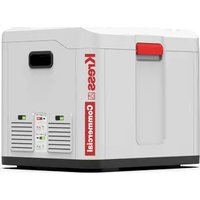
KAC843 - Battery charger KRESS - Free user manual and instructions
Find the device manual for free KAC843 KRESS in PDF.


| Product Type | 4-Port Extended Charging Hub |
| Brand | Kress |
| Model | KAC843 |
| Input voltage / current | 60 V - 30 A (with KAC840/KAC841/CyberTank) |
| Output voltage / current | 60 V - 30 A (with KAC840/KAC841/CyberTank) |
| Number of battery ports | 4 |
| Compatible battery types | Kress 60 V Li-Ion batteries (CyberPack, CyberCapsule) |
| Charging time (1 battery 4.0 Ah) | 12 minutes (with KAC841 or KAC840) |
| Charging time (4 batteries 4.0 Ah) | 48 minutes |
| Weight | 23 kg |
| Protection rating | IPX5 |
| Protection class | II (double insulation) |
| Ambient temperature range | -20 °C to 55 °C |
| Recommended charging temperature | 15 °C to 25 °C |
| Connectivity | Bluetooth 2402-2480 MHz, max power 4 dBm |
| Main functions | Sequential charging, standby mode, warming mode, adjustable ventilation, mobile app |
| Maintenance | Clean drains and vents with water, wipe with a dry cloth |
| Safety | Overload, abnormal temperature, short-circuit protection; use only with approved charger and CyberTank |
| Spare parts | Batteries and dedicated connection cable (available from Kress) |
| Repairability | No user-serviceable components; have it serviced by a qualified technician |
| Warranty | Contact the dealer or Kress customer service |
| Compliance standards | CE, EN IEC 62368-1, EN 55014, EN 300328, RoHS |
Frequently Asked Questions - KAC843 KRESS
User questions about KAC843 KRESS
0 question about this device. Answer the ones you know or ask your own.
Ask a new question about this device
Download the instructions for your Battery charger in PDF format for free! Find your manual KAC843 - KRESS and take your electronic device back in hand. On this page are published all the documents necessary for the use of your device. KAC843 by KRESS.
USER MANUAL KAC843 KRESS
natural_image
Open white and gray plastic container with internal compartments (no visible text or symbols)| 4-Port Extended Charging Case | EN | P03 |
| 4-Port Erweiterte Ladehülle | D | P18 |
| Étui de charge prolongée à 4 ports | F | P33 |
| Custodia di ricarica estesa a 4 porte | I | P50 |
| Estuche de carga extendida de 4 puertos | ES | P64 |
| Estojo de carregamento estendido com 4 portas | PT | P78 |
| Uitgebreide oplaadhoes met 4 poorten | NL | P92 |
| 4-portos speciális töltődoboz | HU | P107 |
| Baza de încărcare extinsă cu 4 porturi | RO | P122 |
| Rozszerzona obudowa ładująca z 4 portami | PL | P136 |
| Rozšířené nabíjecí pouzdro se 4 porty | CZ | P151 |
| Rozšírené nabíjacie puzdro so 4 portami | SK | P165 |
| Razširjeno polnilno ohišje s 4 priključki | SL | P179 |
| Proširena torbica za punjenje s 4 priključka | HR | P193 |
| Udvidet opladningsetui med 4 porte | DK | P207 |
| Laajennettu latauskotelo, jossa on 4 porttia | FIN | P221 |
| Utvidet ladekasse med 4 porter | NOR | P235 |
| Fyrports utökad laddningsväska | SV | P248 |
KAC843
TABLE OF CONTENTS
Introduction....3
Component list....4
Product safety....5
Operating instruction....11
Maintenance....13
Troubleshooting....14
Technical data....14
Environmental protection....15
Declaration of conformity....16
INTRODUCTION
Dear Customer,
Thank you for buying this Kress Commercial product. We are dedicated to developing high quality products to meet your commercial landscaping requirements.
The Kress brand is synonymous with premium quality service. Over the years of your product's life, if you have any questions or concerns about your product, please contact your dealer or our Customer Service Team for assistance.
We are confident you will enjoy working with your Kress product for years to come.
INTENDED USE
The 4-port extended charging case needs to be connected with an approved charger (KAC840/KAC841) or CyberTank to charge all battery packs sequentially overnight.
EN
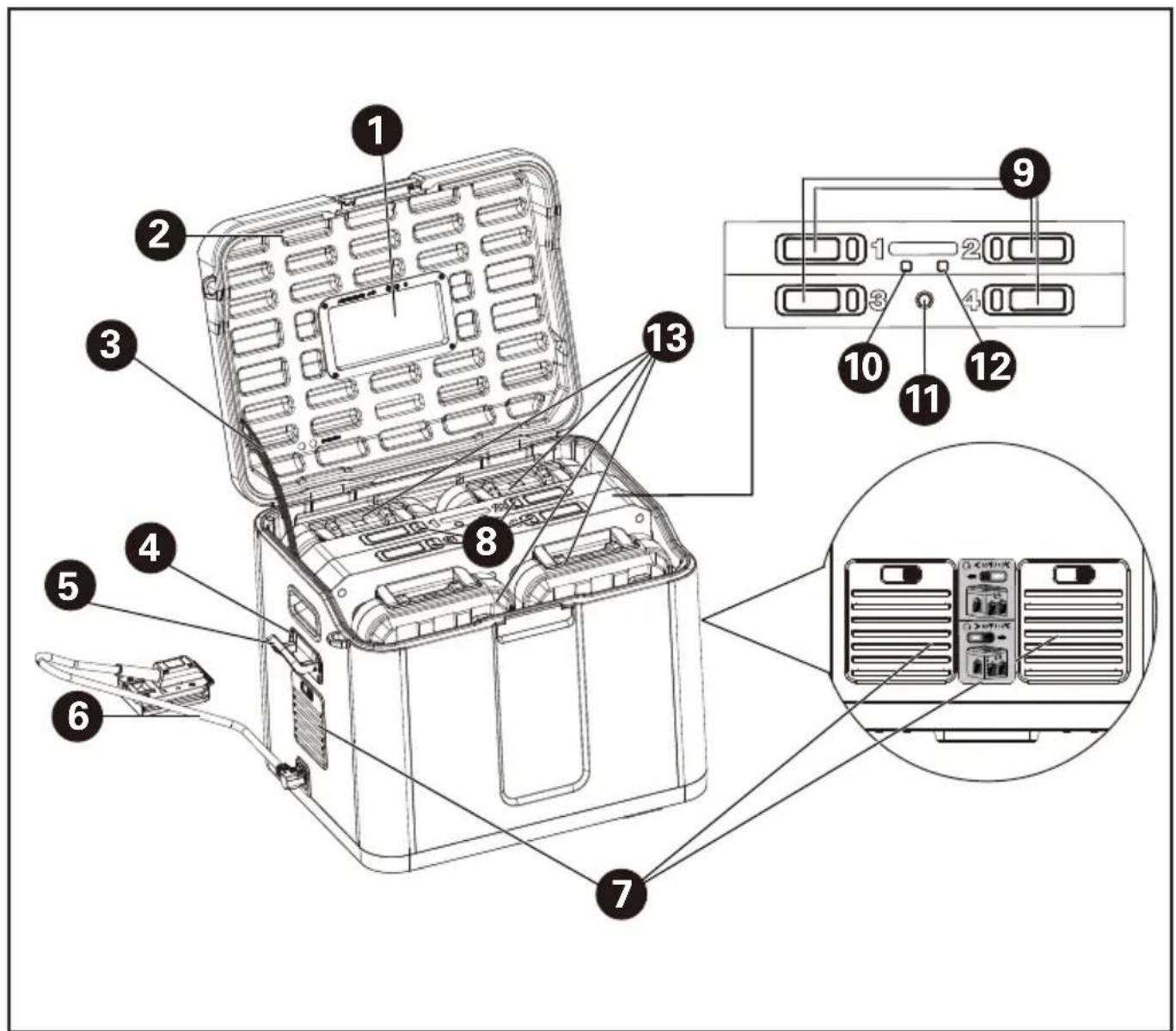
COMPONENT LIST
- CASE WINDOW
- CASE COVER
- HINGE
- HOOK BOLTS (4 PCS)
- CABLE HOOK
- CONNECTING CABLE (WITH BATTERY ADAPTOR)
- AIR VENTS
- CHARGE INDICATOR LIGHTS
- BATTERY PACK RELEASE BUTTONS
- BLUETOOTH INDICATOR LIGHT
- ON/OFF SWITCH
- WARMING INDICATOR LIGHT
- BATTERY PACK*
PRODUCT SAFETY GENERAL SAFETY WARNINGS

WARNING Read all safety warnings and all
instructions. Failure to follow the warnings and instructions may result in electric shock, fire and/or serious injury.
Save all warnings and instructions for future reference.
This appliance is not intended for use by persons (including children) with reduced physical, sensory or mental capabilities, or lack of experience and knowledge, unless they have been given supervision or instruction concerning use of the appliance by a person responsible for their safety.
Children should be supervised to ensure that they do not play with the appliance.
Cleaning and user maintenance shall not be made by children without supervision.
SAFETY INSTRUCTIONS FOR YOUR 4-PORT EXTENDED CHARGING CASE
- Read all the instructions before using the product.
- This equipment design typically applies to
commercial or industrial equipment expected to be installed in locations where only adults are normally present. This equipment is not suitable for use in locations where children are likely to be present. Do not open the equipment and keep it out of the reach of children.
3. WARNING: THIS EXTENDED CHARGING CASE IS APPROVED TO USE WITH THE FOLLOWING CYBERTANK FOR CHARGING THE BATTERY PACKS: CYBERTANK MODLE1:KAC875E CYBERTANK MODLE2:KAC877E
- WARNING: THIS EXTENDED CHARGING CASE IS ALSO APPROVED TO USE WITH THE FOLLOWING CHARGERS AND DEDICATED CONNECTING CABLE, AND THE MENTIONED CHARGERS CAN BE CONNECTED TO THE PORT FOR CHARGING THE BATTERY PACKS. CHARGER MODEL1: KAC841 CHARGER MODEL2: KAC840 DEDICATED
CONNECTING CABLE MODEL: THE DEDICATED CONNECTING CABLE SPECIFIED BY THE MANUFACTURER
-
WARNING: NEVER USE THE EXTENDED CHARGING CASE WITH NON-APPROVED CHARGER OR CYBERTANK. Use of an attachment not recommended or sold by the manufacturer may result in serious risk of fire, electric shock, or injury to persons.
-
The 4-port extended charging case can be connected to a recommended CyberTank, or used with a recommended charger and a dedicated connection cable, and the approved charger can be connected to the port to charge the battery packs. It can only charge battery packs of the models provided by Kress and recommended in this manual.
-
CAUTION-To reduce risk of injury, charge only Kress 60V batteries. Other types of batteries may burst causing personal injury and damage.
- Do not use the extended charging case for work
other than that for which they are designed. Do not charge the batteries of other manufactures or ill-suited models.
-
Do not put fingers or hands into the product.
-
Do not use a battery pack or appliance that is damaged or modified. Damaged or modified batteries may exhibit unpredictable behavior resulting in fire, explosion or risk of injury.
-
Do not recharge non-rechargeable batteries, as they can overheat and break.
12.Do not charge a leaking battery.
13.Do not operate the extended charging case in rain or wet conditions. This may increase the risk of electric shock. If the unit gets wet in the rain during operation, the extended charging case and the battery should be dried before storing or charging. Remove the battery and reinsert it if the extended charging case fails to turn on. Keep battery connection free of dirt and debris, and clean with a soft and dry brush or cloth.
14.Risk of electric shock. Do
not insert metal objects, like pushpins, wires, nails, small scissors or other metal objects into the outlet slots and air vents. Keep the slots free of foreign objects and protect against dirt and humidity. Store in a dry and frost-free place.
-
When charging, ensure that the extended charging case is in a well-ventilated area and away from inflammable materials. Ensure that your equipment is not left unsupervised during charging.
-
Longer life and better performance can be obtained if your battery pack is charged when the air temperature is between 15 °C and 25 °C. For the maximum and minimum charging temperatures of the battery pack, please refer to the battery pack manual of the specific model.
17.Do not expose the appliance or battery to excessive temperatures.
-
Disconnect from your equipment when not charging or the charging is complete.
-
Risk of electric shock. Do not disassemble the appliance. Take it to a
qualified service person when service or repair is required. Incorrect reassembly may result in a risk of fire or electric shock.
20.CAUTION! Risk of Electric Shock. Do not remove cover. No user serviceable parts inside. Refer servicing to qualified service personnel.
- To reduce the risk of electric shock, remove the battery pack from the appliance before attempting any instructed servicing.
22.WARNING – RISK OF EXPLOSIVE GASES. To reduce risk of battery explosion, follow these instructions and those published by battery manufacturer and manufacturer of any equipment you intend to use in vicinity of the battery. Review cautionary marking on these products and on engine.
- PERSONAL PRECAUTIONS.
a) Have plenty of fresh water and soap nearby in case battery acid contacts skin, clothing, or eyes.
b) Wear complete eye protection and clothing protection. Avoid touching eyes while working near
battery.
c) If battery acid contacts skin or clothing, wash immediately with soap and water. If acid enters eye, immediately flood eye with running cold water for at least 10 minutes and get medical attention immediately.
d) NEVER smoke or allow a spark or flame in vicinity of battery and the charging case
e) Be extra cautious to reduce risk of dropping a metal tool onto battery. It might spark or short-circuit battery or other electrical part that may cause explosion.
- Under abusive conditions, liquid may be ejected from the battery; avoid contact. If contact accidentally occurs, flush with water. If liquid contacts eyes, additionally seek medical help. Liquid ejected from the battery may cause irritation or burns.
25.Do not expose a charging case to fire or excessive temperature. Exposure to fire or temperature above 130°C may cause explosion.
26.WARNING! Risk of Explosion. This equipment has arcing or sparking parts which should not
be exposed to flammable vapors.
- Place the charging case on a horizontal surface with no undulations and stable place. Otherwise the product may fall or tip over.
28.Do not operate the charging case in explosive atmospheres, such as in the presence of flammable liquids, gases or dust. A small static charge or spark may ignite the dusts or fumes, creating a fire or explosion.
-
When carrying the charging case, disconnect the power source and battery packs connected to output port. Otherwise falling or dropping accident may occur.
-
When carrying the charging case, always hold the carrying handles firmly with both hands. Do not carry the charging case by holding any other part. Otherwise falling accident may occur.
-
Do not use the charging case with wet hands.
32.Do not step on the charging case or giving a strong impact to the charging case such as dropping. It may cause malfunction which results in electric shock.
-
Check for misalignment or binding of moving parts, breakage of parts and any other condition that may affect the operation. If damaged, have the appliance repaired before use. Many accidents are caused by poorly maintained appliances.
-
Do not allow anything to cover or clog the air vents or the radiators. Use the charging case where nothing interference the air vent. It may cause overheat, fault or fire.
-
Be careful not to trip over the cord during operation. Put the cord into the cord pocket.
-
In order to ensure good performance and long-term service life, pay attention to protect the charging case from the following conditions.
- Corrosive gas and liquid
- Salt mist and oil mist
- Mechanical impact and vibration
- High humidity
- Extreme temperature (too cold or too hot)
- The suitable ambient temperature range is between -20 °C and 55 °C.
- Electromagnetic noise (e.g. electric welding machine,
high-power equipment)
- Radioactive material
-
Store Idle Appliances Indoors - When not in use, appliances should be stored indoors in a dry and high or locked-up place with the battery pack removed - out of reach of children.
-
When not use for a long time, remove the battery pack from the charging case before storing.
-
Follow the technical data given by the manufacturer if you use the device.
40.WARNING: Use only with the battery packs recommended by the manufacture and listed in this manual. Use of any other battery may cause injury and/or fire.
For battery pack safety instructions, see the battery pack manual of the specific model.
USER MANUAL REQUIREMENTS FOR WIRELESS PRODUCT
a) Operation of this device is subject to the following two conditions:
(1) This device may not cause harmful interference,
and
(2) this device must accept any interference received, including interference that may cause undesired operation.
b) Caution: Changes or modifications to this unit not expressly approved by the party responsible for compliance could void the user's authority to operate the equipment.
c) NOTE: This equipment generates, uses and can radiate radio frequency energy and, if not installed and used in accordance with the instructions, may cause harmful interference to radio communications. However, there is no guarantee that interference will not occur in a particular installation. If this equipment does cause harmful interference to radio or television reception, which can be determined by turning the equipment off and on, the user is encouraged to try to correct the interference by one or more of the following measures:
- Reorient or relocate the receiving antenna.
- Increase the separation between the equipment and
receiver.
- Connect the equipment into an outlet on a circuit different from that to which the receiver is connected.
- Consult the dealer or an experienced radio/TV technician for help.
SYMBOLS
 | Read the operator's manual |
 | Caution |
 | WARNING: Hazardous Voltage Circuits |
 | Positive terminal |
 | Negative terminal |
 | The symbol on the packaging is for France only. |
 | Waste electrical products must not be disposed of with household waste. Please recycle where facilities exist. Check with your local authorities or retailer for recycling advice. |
NOTE: Before using the charging case, read the instruction book carefully.
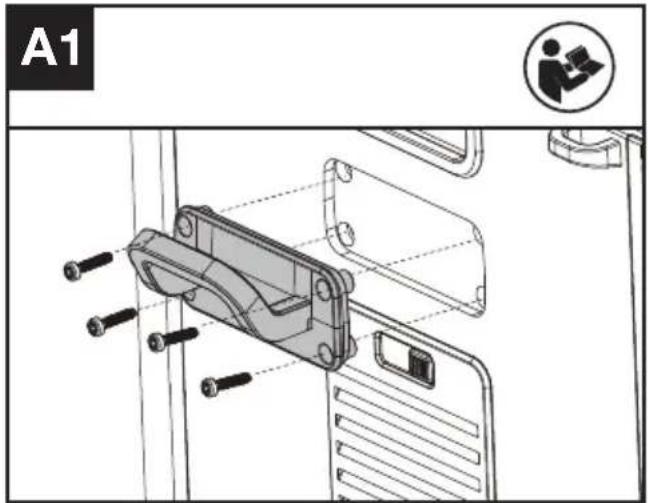
CABLE HOOK ASSEMBLY (SEE FIG. A1)
NOTE: The cable hook can be used to fix the cable.
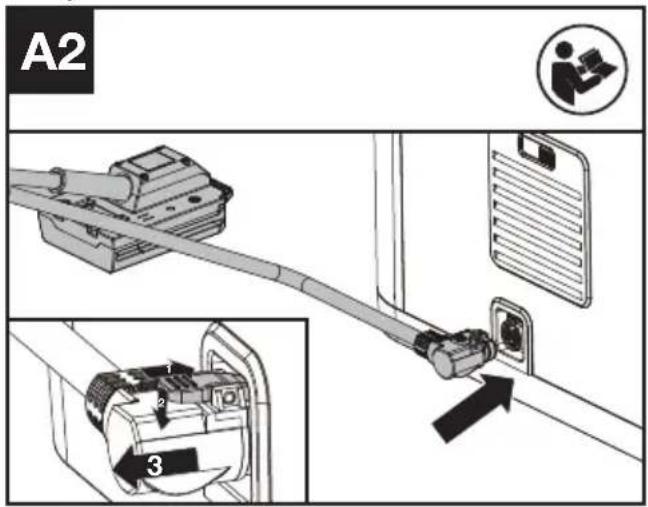
CONNECTING CABLE ASSEMBLY(SEE FIG. A2)
Plug the connecting cable into the charging case until you hear a sound of "click".
CHARGING
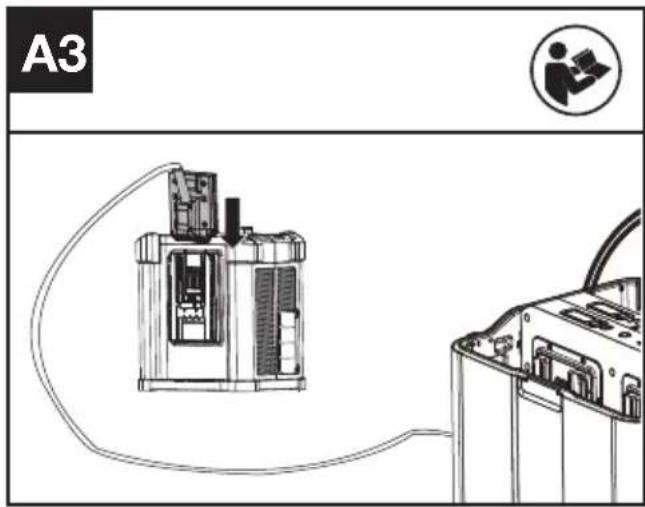
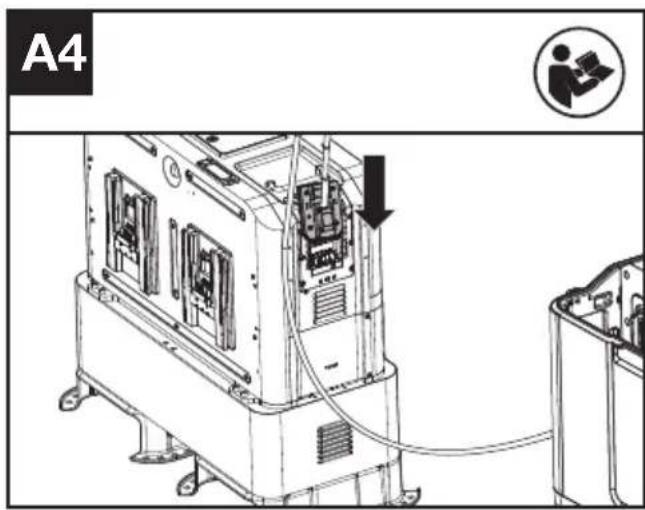
- Connect the charging case with the CyberPlug charger or CyberTank. (See Fig. A3, A4)
- Connect the CyberPlug charger or the CyberTank to a power source.
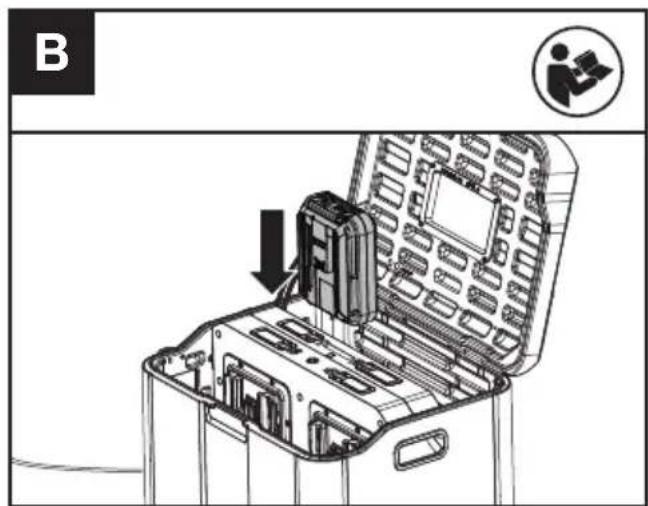
- Insert the battery packs into the charging case. (See Fig. B)
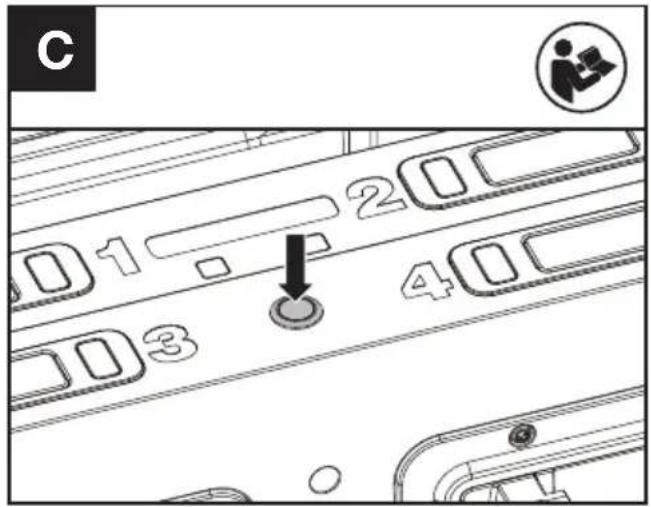
- Press the on/off switch to start charging procedure. (See Fig. C)
NOTE: When there is no battery pack inserted in the charging case, the charging case can not be turned on.
- Close the case cover.
NOTE: The hinge creates a pinch point, use caution to keep and away from this location.
CHARGING PROCEDURE
- The charging case will charge all battery packs sequentially. The battery pack installed first will be charged first. When one battery pack is fully charged, the charging case starts to charge the next battery pack.
- The battery packs inserted at the same time will be charged in the order of port 1, port 2, port 3 and port 4.
- If one battery pack is defective or has an abnormal temperature, the charging will be suspended and the charging case starts to charge the next battery pack in sequence.
STANDBY MODE
When all the battery packs are fully charged, the charging case will enter standby mode. If there is no further action, the charging case will automatically turn off 10 minutes later.
POWER OFF
Method 1:
Press the on/off switch to turn off the charging case.
Method 2:
Press the battery pack release button and remove all the battery packs, the charging case will turn off automatically.
CHARGING INDICATOR
This charging case is designed to provide you information on the status of your battery charge. Indicator lights in the table below will show the charging status.
If you receive a defective charge indicator light (red on), insert a new battery to determine if the charging case is OK. If the new battery charges correctly, then the original battery is defective and should be returned to an authorized Kress dealer. If the new battery displays the same problem as the original battery, have the charging case tested at an authorized service center.
CHARGE INDICATOR LIGHT
| Remarks ON / flash Status | ||
| Yellow on | Standby mode | |
| Green flash | Charging | |
| Green on | Fully charged | |
| Red on | Abnormal charging | |
 Red flash Red flash | Battery temperature protection | |
WARMING MODE
When the battery temperature is below 5 °C, the charging case will enter warming mode and the warming indicator light turns on.
Once the battery packs return to the normal temperature, the warming indicator light turns off.
NOTE: Close the air vents when the charging case enters warming mode.
NOTE: If the ambient temperature is low and warming mode is needed, first confirm that the battery pack is updated to the following version or higher.
• KAC800/KAC815: F-2_0_0_0-rel (or higher)
• KAC804/KAC810: F-2_113_0_0-rel (or higher)
NOTE: The warming mode is NOT intended for KA3000/KA3001/KA3002/KA3008.
To use the CyberTank IoT data transmission, connect the charging case to port 3 on the CyberTank. Ensure that the CyberTank has been updated to version F-3_3_0_0-rel or higher.
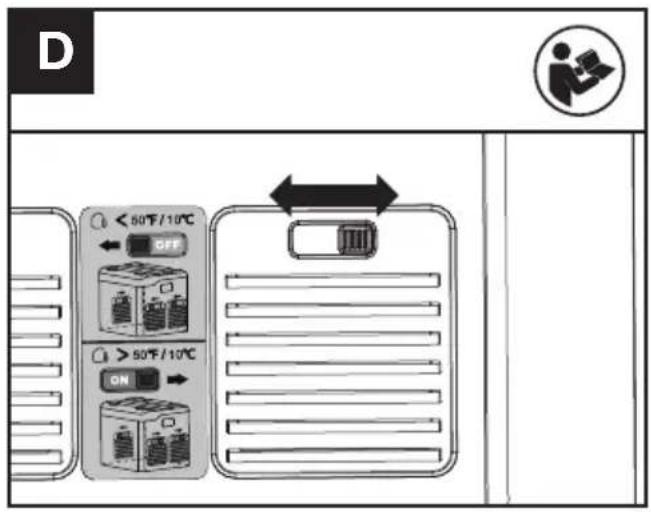
OPEN/CLOSE THE AIR VENTS (SEE FIG. D)
Close the air vents when the charging case enters warming mode or when the temperature is low (such as in winter).
Open the air vents when the temperature is high (such as in summer).
IMPORTANT CHARGING NOTES
- When charging, it is normal that the charging case and battery pack may become warm to touch.
- If the battery pack can not be charged properly:
a. Check if the battery packs or the charging case are damaged
b. If the charging problem persists, take the battery pack and charging case to an authorized service center. - Under certain conditions the exposed charging contacts inside the charging case can be shorted by foreign material. Foreign materials of a conductive nature such as metallic particles should be kept away from charging case cavities. Always remove the battery packs and disconnect the charging case with your CyberPlug charger or CyberTank before attempting to clean.
- Disconnect the charging case with your CyberPlug charger or CyberTank before transporting the charging case.
CONNECT TO APP
BLUETOOTH CONNECTION
With the bluetooth function, your charging case can be connected to APP. For connection, please refer to the APP Download and Connection Guide.
NOTE: For Bluetooth usage, please first connect the charging case to your charger or CyberTank, and insert a battery pack into the charging case.
MAINTENANCE
- Disconnect the charging case with the CyberPlug charger or CyberTank and remove all the battery packs before carrying out any adjustment, servicing or maintenance.
- If there is dust in the drains(a) of the 4 ports, carefully rinse them with clean water. (See Fig. E) Wipe clean with a dry cloth. Always locate your battery, charging case and power tool in a dry place.
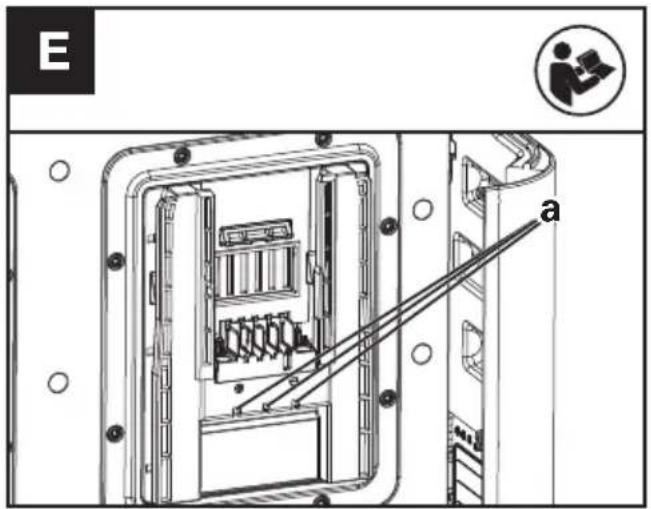
- If there is dust on the air vents, close the air vents and wipe clean with water.
TROUBLE SHOOTING
The following table gives checks and actions that you can perform if your machine does not operate correctly. If these do not identify/remedy the problem, contact your service agent.
| Problems Causes Solutions | ||
| The charging case cannot be turned on | The charging case is not connected correctly with the CyberPlug charger or CyberTank. | Connect the charging case with the CyberPlug charger or CyberTank correctly. |
| The CyberPlug charger or CyberTank is not in good condition. | Contact your Kress dealer for further solutions. | |
| The battery packs cannot be charged. | The charging case is not connected correctly with the CyberPlug charger or CyberTank. | Connect the charging case with the CyberPlug charger or CyberTank correctly. |
| The CyberPlug charger or CyberTank is not in good condition. | Contact your Kress dealer for further solutions. | |
| The battery pack is defective. | Replace with a new battery pack. | |
| The battery temperature is too low. | Close the air vent.The charging case will enter warming mode when the battery temperature is below 5 °C.Wait until the battery temperature returns to normal status. | |
| The battery temperature is too high. | Open the air vent.If the battery temperature is too high, allow the battery packs to cool. Wait until the battery temperature returns to normal status. | |
| There are foreign objects between the electrodes. | Clean the foreign objects between the electrodes. | |
| The battery temperature is too low but the battery packs cannot be warmed up. | The battery packs are not the latest version. Connect the battery packs to the APP and upgrade them if necessary. | |
| The battery model number is KA3000, KA3001, KA3002 or KA3008. | ||
| The charge indicator lights are still illuminated after all the battery packs are removed. | There are foreign objects between the electrodes. | Clean the foreign objects between the electrodes. |
TECHNICAL DATA
Type Designation: KAC843 (843-designation of machinery, representative of 4-port extended charging case)
| Input voltage/current | 60 V --- 30 A(Paired with KAC840/ KAC841/ CyberTank) |
| Output voltage/current | 60 V --- 30 A(Paired with KAC840/ KAC841/ CyberTank) |
| Charge battery | Li-Ion |
| Charging time (approx.) (When connected with KAC841 or KAC840)* | |
| 1 pc 4 pcs | |||
| Battery Pack (60 V) | 4.0 Ah(CyberPack) | 12 min 48 min | |
| 11.0 Ah(CyberPack) | 25 min 100 min | ||
| 4.0 Ah(CyberPack Nano) | 30 min 120 min | ||
| 25.0 Ah(CyberCapsule) | 90 min 360 min | ||
| Battery ports | 4 | ||
| Degree of protection | IPX5 | ||
| Protection class | ☐/II | ||
| Machine weight | 23 kg | ||
*Charging time varies with different temperature and different types of the charger or CyberTank. For the technical data of the types, the number of cells and the rated capacity of the batteries that can be charged, please refer the nameplate of the battery pack supplied by Kress.
Technical data for Bluetooth
| Frequency bands for Bluetooth, MHz | 2402-2480 |
| Maximum Output Power for Bluetooth, dBm | 4 dBm |
ENVIRONMENTAL PROTECTION

Waste electrical products must not be disposed of with household waste. Please recycle where facilities exist. Check with your local authorities or retailer for recycling advice.
DECLARATION OF CONFORMITY
We,
Positec Germany GmbH
Postfach 680194, 50704 Cologne, Germany
On behalf of Positec declare that the product
Description 4-port extended charging case
Type KAC843 (843-designation of machinery, representative of 4-port extended charging case)
Function Used with approved charger or CyberTank and dedicated connecting cable to charge the battery packs
Complies with the following Directives, this 4-port extended charging case must not be put into service until the final equipment into which it is to be incorporated has been declared in conformity with the provisions of low-voltage directive. The final equipment to which this 4-port extended charging case is installed with the recommended charger and dedicated connecting cable, or CyberTank listed in this instruction manual complies with this Declaration of Conformity:
2014/35/EU, 2014/30/EU, 2011/65/EU &
Standards conform to
EN IEC 62368-1: 2020 + A11:2020, EN IEC 55014-
1, EN IEC 55014-2, EN IEC 63000, EN 300328
V2.2.2, EN 301489-1 V2.2.3, EN 301489-17 V3.2.4,
EN IEC 62311:2020
The person authorized to compile the technical file,
Name Marcel Filz
Address Positec Germany GmbH
Postfach 680194, 50704 Cologne, Germany


2024/06/07
Allen Ding
Deputy Chief Engineer, Testing & Certification
Positec Technology (China) Co., Ltd
18, Dongwang Road, Suzhou Industrial
Park, Jiangsu 215123, P. R. China
DECLARATION OF CONFORMITY
We,
Positec Germany GmbH
Postfach 680194, 50704 Cologne, Germany
On behalf of Positec declare that the product
Description 4-port extended charging case
Type KAC843 (843-designation of
machinery, representative of 4-port extended charging case)
Function Used with approved charger or CyberTank and dedicated connecting cable to charge the battery packs
Complies with the following regulations, this 4-port extended charging case must not be put into service until the final equipment into which it is to be incorporated has been declared in conformity with the provisions of Electrical Equipment (Safety) Regulations 2016. The final equipment to which this 4-port extended charging case is installed with the recommended charger and dedicated connecting cable, or CyberTank listed in this instruction manual complies with this Declaration of Conformity:
Electromagnetic Compatibility Regulations 2016
The Restriction of the Use of Certain Hazardous Substances in Electrical and Electronic
Equipment Regulations
Radio Equipment Regulations 2017
Standards conform to
BS EN IEC 62368-1: 2020 + A11:2020, BS EN IEC
55014-1, BS EN IEC 55014-2, BS EN IEC 63000
BS EN 300328 V2.2.2, BS EN 301489-1 V2.2.3, BS
EN 301489-17 V3.2.4, BS EN IEC 62311:2020
The person authorized to compile the technical file,
Name Jim Kirkwood
Address Positec (UK & Ireland) Ltd,
PO Box 6242, Newbury, RG14 9LT, UK

UK CA
2024/06/07
Allen Ding
Deputy Chief Engineer, Testing & Certification
Positec Technology (China) Co., Ltd
18, Dongwang Road, Suzhou Industrial
Park, Jiangsu 215123, P. R. China
INHALTSVERZEICHNIS
Einführung....18
Komponenten....19
KOMPONENTEN
18, Dongwang Road, Suzhou Industrial
Park, Jiangsu 215123, P. R. China
SOMMAIRE
Introduction....33
LISTE DES COMPOSANTS
- FENÊTRE DU BOÎTIER
- COUVERCLE DU BOÎTIER
- CHARNIÈRE
- BOULONS CROCHETS (4 PIÈCES)
- CROCHET DE CÂBLE
- CÂBLE DE CONNEXION (AVEC ADAPTATEUR DE BATTERIE)
- ÉVENTS D'AÉRATION
- VOYANTS DE CHARGE
- BOUTONS DE LIBÉRATION DU PACK DE BATTERIE
- VOYANT BLUETOOTH
- INTERRUPTEUR MARCHE/ARRÊT
- VOYANT DE RÉCHAUFFEMENT
- PACK BATTERIE*
LA SÉCURITÉ DES PRODUITS MESURES DE SECURITE
DECLARATION OF CONFORMITY
Nous
Positec Germany GmbH
Postfach 680194, 50704 Cologne, Germany
18, Dongwang Road, Suzhou Industrial
Park, Jiangsu 215123, P. R. China
EXIGENCES D'ÉTIQUETAGE DES PRODUITS DE TRIMAN FRANCE
ELEMENTI DELL'APPARECCHIO
- FINESTRA DEL CASE
- COPERCHIO DEL CASE
- CERNIERA
- BULLONI A GANCIO (4 PEZZI)
- GANCIO PER CAVO
- CAVO DI CONNESSIONE (CON ADATTATORE PER BATTERIA)
- APERTURE DI VENTILAZIONE
- LUCI INDICATRICI DI CARICA
- PULSANTI DI RILASCIO DEL PACCO BATTERIE
- LUCE INDICATRICE BLUETOOTH
- INTERRUTTORE ON/OFF
- LUCE INDICATRICE DI RISCALDAMENTO
- UNITÀ BATTERIA*
• KAC800/KAC815: F-2_0_0_0-rel (o superiore)
• KAC804/KAC810: F-2_113_0_0-rel (o superiore)
18, Dongwang Road, Suzhou Industrial
Park, Jiangsu 215123, P. R. China
ÍNDICE
Introducción....64
18, Dongwang Road, Suzhou Industrial
Park, Jiangsu 215123, P. R. China
ÍNDICE
• KAC800/KAC815: F-2_0_0_0-rel (ou superior)
• KAC804/KAC810: F-2_113_0_0-rel (ou superior)
18, Dongwang Road, Suzhou Industrial
Park, Jiangsu 215123, P. R. China
INHOUDSOPGAVE
Inleiding....92
DRIE SNELHEIDSINSTELLINGEN
- KOFFERVENSTER
- KOFFERDEKSEL
- SCHARNIER
- HAAKBOUTEN (4 STUKS)
- KABELHAAK
- VERBINDINGSKABEL (MET BATTERIJADAPTER)
- LUCHTROOSTERS
- OPLAADINDICATORLAMPEN
- KNOPPEN OM HET ACCUPAKKET LOS TE KOPPELEN
- BLUETOOTH-INDICATORLICHT
- AAN-/UITSCHAKELAAR
- VERWARMINGSINDICATORLICHT
- ACCUPACK*
PRODUCTVEILIGHEID ALGEMENE VEILIGHEIDSWAARSCHUWINGEN
Cleaning and user maintenance shall not be made by children without supervision.
VEILIGHEIDSINSTRUCTIES VOOR UW VERLENGDE OPLADER MET 4 POORTEN
• KAC800/KAC815: F-2_0_0_0-rel (of hoger)
• KAC804/KAC810: F-2_113_0_0-rel (of hoger)
18, Dongwang Road, Suzhou Industrial
Park, Jiangsu 215123, P. R. China
TARTALOMJEGYZÉK
Bevezető....107
EN IEC 62368-1: 2020 + A11:2020, EN IEC
55014-1, EN IEC 55014-2, EN IEC 63000,
EN 300328 V2.2.2, EN 301489-1 V2.2.3, EN
301489-17 V3.2.4, EN IEC 62311:2020
18, Dongwang Road, Suzhou Industrial
Park, Jiangsu 215123, P. R. China
CUPRINS
Introducere....122
LISTĂ DE COMPONENTE
- FEREASTRA BAZEI
- CAPACUL BAZEI
- BALAMA
- BOLTURI CU GĂURI (4 BUCĂȚI)
- CLEMĂ DE CABLU
- CABLU DE CONECTARE (CU ADAPTOR DE BATERIE)
- ORIFICII DE VENTILATIE
- INDICATOARE DE ÎNCĂRCARE (LUMINILE DE ÎNCĂRCARE)
- BUTON (E) DE ELIBERARE A ACUMULATORILOR
- INDICATOARE DE BLUETOOTH
- COMUTATOR ON/OFF (PORNIRE/OPRIRE)
- INDICATOARE DE ÎNCĂLZIRE
- ACUMULATOR*
BEZPIECZEŃSTWO PRODUKTÓW INSTRUCTIUNI DE SIGURANTĄ
- KAC800/KAC815: F-2_0_0_0-rel (sau superioară) - KAC804/KAC810: F-2_113_0_0-rel (sau superioară)
CONECTARE LA APPLICATIE
CONEXIUNE BLUETOOTH
Adjunct Inginer şef, Testare si certificare Positec Technology (China) Co., Ltd
18, Dongwang Road, Suzhou Industrial
Park, Jiangsu 215123, P. R. China
SPIS TREŚCI
Wprowadzenie....136
LISTA KOMPONENTÓW
- OKNO OBUDOWY
- POKRYWA OBUDOWY
- ZAWIAS
- ŚRUBY HAKOWE (4 SZT.)
- HAK NA KABEL
- KABEL ŁACZACY (Z ADAPTEREM BATERII)
- OTWORY WENTYLACYJNE
- WSKAŹNIKI ŁADOWANIA
- PRZYCISKI ZWALNIAJĄCE PAKIET BATERII
- WSKAŻNIK BLUETOOTH
- WYŁACZNIK WŁĄCZ/WYŁĄCZ
- WSKAŹNIK OGRZEWANIA
- POJEMNIK BATERYJNY*
BEZPIECZEŃSTWO PRODUKTÓW OGÓLNE PRZEPISY BEZPIECZEŃSTWA
• KAC800/KAC815: F-2 0 0 0-rel (lub nowsza)
• KAC804/KAC810: F-2 113 0 0-rel (lub nowsza)
18, Dongwang Road, Suzhou Industrial
Park, Jiangsu 215123, P. R. China
OBSAH
Úvod....151
SEZNAM KOMPONENT
- OKÉNKO POUZDRA
- VÍKO POUZDRA
- ZÁVĚS
- ŠROUBY K UPEVNĚNÍ DRŽÁKU (4 KS)
- DRŽÁK NA KABEL
- PROPOJOVACÍ KABEL (S ADAPTÉREM PRO BATERIE)
- VĚTRACÍ OTVORY
- KONTROLKY NABÍJENÍ
- UVOLŇOVACÍ TLAČÍTKO BATERIE
- KONTROLKA BLUETOOTH
- VYPÍNAČ
- KONTROLKA ZAHŘÍVÁNÍ
- AKUMULÁTOR*
BEZPEČNOST PRODUKTU VŠEOBECNÉ BEZPEČNOSTNÍ VÝSTRAHY
18, Dongwang Road, Suzhou Industrial
Park, Jiangsu 215123, P. R. China
OBSAH
Úvod....165
ZOZNAM SÚČASTÍ
- OKNO PUZDRA
- KRYT PUZDRA
- ZÁVES
- SKRUTKY S HÁČIKOM (4 KS)
- KÁBLOVÝ HÁČIK
- PRIPOJOVACÍ KÁBEL (S ADAPTÉROM BATÉRIB)
- VETRACIE OTVORY
- KONTROLKA NABÍJANIA
- TLAČIDLÁ NA UVOL'NENIE BATÉRIOVÉHO BLOKU
- SVETELNÁ KONTROLKA BLUETOOTH
- VYPÍNAČ
- KONTROLKA ZAHRIEVANIA
- JEDNOTKA BATÉRIÍ*
BEZPEČNOST PRODUKTU VŠEOBECNÉ BEZPEČNOSTNÉ UPOZORNENIA

VAROVANIE:
18, Dongwang Road, Suzhou Industrial
Park, Jiangsu 215123, P. R. China
KAZALO VSEBINE
Uvod....179
Sestavni deli....180
Varnostizdelka....181
Navodila za uporabo....187
Vzdrževanje....189
SESTAVNI DELI
- OKNO PUZDRA
- KRYT PUZDRA
- ZÁVES
- HÁČIKOVÉ SKRUTKY (4 KS)
- DRŽIAK KÁBLOV
- PRIPOJOVACÍ KÁBEL (S BATÉRIOVÝM ADAPTÉROM)
- VETRACIE OTVORY
- INDIKAČNÉ SVETLÁ NABITIA
- TLAČIDLÁ UVOL'NENIA BATÉRIOVÉHO BALÍKA
- INDIKAČNÉ SVETLO BLUETOOTH
- VYPÍNAČ ZAPNUTIA/VYPNUTIA
- INDIKAČNÉ SVETLO OHREVU
- AKUMULATOR*
VARNOST IZDELKA SPLOŠNA VARNOSTNA OPOZORILA
! OPOZORILO!
18, Dongwang Road, Suzhou Industrial
Park, Jiangsu 215123, P. R. China
SADRŽAJ
Uvod....193
Popis komponenti....194
POPIS KOMPONENTI
- PROZOR KUĆIŠTA
- POKLOPAC KUĆIŠTA
- ŠARKA
- KUKE VIJCI (4 KOM.)
- KUKA ZA KABL
- POVEZNI KABEL (S BATERIJSKIM ADAPTEROM)
- ZRAČNI OTVORI
- INDIKATOR PUNJENJA
- GUMB (I) ZA OTPUŠTANJE BATERIJSKOG PAKETA
- INDIKATOR BLUETOOTHA
- PREKIDAČ ZA UKLJUČIVANJE/ISKLJUČIVANJE
- INDIKATOR GRIJANJA
- BATERIJSKI KOMPLETI*
SIGURNOST PROIZVODA OPĆA SIGURNOSNA UPOZORENJA
! UPOZORENJE:
Treba pročitati sve napomene o sigurnosti i upute. Ako se ne bi poštivale napomene o sigurnosti i upute to bi moglo uzrokovati strujni udar, požar i/ili teške ozljede.
• KAC800/KAC815: F-2_0_0_0-rel (ili više)
• KAC804/KAC810: F-2_113_0_0-rel (ili više)
NAPOMENA: Način zagrijavanja NIJE namijenjen za KA3000/KA3001/KA3002/KA3008.
EN IEC 62368-1: 2020 + A11:2020, EN IEC
55014-1, EN IEC 55014-2, EN IEC 63000, EN 300328 V2.2.2, EN 301489-1 V2.2.3, EN 301489-17 V3.2.4, EN IEC 62311:2020
18, Dongwang Road, Suzhou Industrial
Park, Jiangsu 215123, P. R. China
INDHOLDSFORTEGNELSE
Introduktion....207
(1) This device may not cause harmful interference, and
• KAC800/KAC815: F-2_0_0_0-rel (eller nyere)
- KAC804/KAC810: F-2_113_0_0-rel (eller nyere)
BEMÆRK: Opvarmningstilstanden er IKKE beregnet til KA3000/KA3001/KA3002/KA3008.
18, Dongwang Road, Suzhou Industrial
Park, Jiangsu 215123, P. R. China
SISÄLLYSLUETTELO
Johdanto....221
Komponenttiluettelo....222
KOMPONENTTILUETTELO
- KOTELOIKKUNA
- KOTELON KANSI
- SARANA
- KOUKKUPULTIT (4 KPL)
- KAJOUS
- LIITÄNTÄJOHTO (AKKUADAPTERILLA)
- ILMANVAIHDOT
- LATAUSMERKKIVALOT
- AKKUPAKETTIN VAPAUTUSPAINIKKEET
- BLUETOOTH-MERKKIVALO
- PÄÄLLE/POIS-KYTKIN
- LÄMMITYKSEN MERKKIVALO
- AKKUPAKKAUS*
TUOTETURVALLISUUS TURVALLISUUSOHJEET
18, Dongwang Road, Suzhou Industrial
Park, Jiangsu 215123, P. R. China
INNHOLDFORTEGNELSE
Introduksjon....235
Komponentliste....236
KOMPONENTLISTE
- ETUI-VINDU
- ETUI-DEKSEL
- HENGSEL
- KROKER (4 STK)
- KABELKROK
- TILKOBLINGSKABEL (MED BATTERIADAPTER)
- LUFTVENTILER
- LADEINDIKATORLYS
- KNAPPER FOR BATTERIPAKKEL∅SNING
- BLUETOOTH-INDIKATORLYS
- PÅ/AV-BRYTER
- OPPVARMINGSINDIKATORLYS
- BATTERIPAKKE*
BLUETOOTH TILKOBLING
Med Bluetooth-funksjonen kan ladeetuiet ditt kobles til en app. For tilkobling, se APPnedlastings-og tilkoblingsveiledningen.
18, Dongwang Road, Suzhou Industrial
Park, Jiangsu 215123, P. R. China
INNEHÅLLSFÖRTECKNING
Introduktion....248
Komponenter....249
Produktsäkerhet....250
KOMPONENTER
- FÖNSTER I VÄSKAN
- VÄSKANS LOCK
- GÅNGJÄRN
- KROKSKRUVAR (4ST)
- KABELKROK
- ANSLUTNINGSKABEL (MED BATTERILADDARE)
- LUFTVENTILER
- INDIKATORLAMPA FÖR LADDNING
- FRIGÖRINGSKNAPPP FÖR BATTERIPAKET
- INDIKATORLAMPA TILL BLUETOOTH
- STRÖMBRYTARE PÅ/AV
- VARNINGSINDIKATORLAMPA
- BATTERIPAKET*
PRODUKTSÄKERHET SÄKERHETSINSTRUKTIONER
• KAC800/KAC815: F-2_0_0_0-rel (eller högre)
• KAC804/KAC810: F-2_113_0_0-rel (eller högre)
18, Dongwang Road, Suzhou Industrial
Park, Jiangsu 215123, P. R. China

Copyright © 2025, Positec. All Rights Reserved.
V3-EU-KAC843-M-20241225