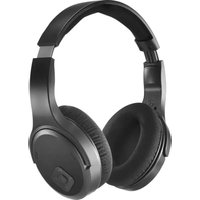
00221847 - Earphones HAMA - Free user manual and instructions
Find the device manual for free 00221847 HAMA in PDF.


| Product type | Wireless TV headset |
| Brand | Hama |
| Model | 00221847 |
| Connection technology | 2.4 GHz and Bluetooth 5.3 |
| RF range | 100 m |
| Bluetooth range | 10 m |
| Transmission frequency | 2402 - 2480 MHz |
| Max transmission power | 2.5 mW EIRP |
| Frequency response | 20 Hz - 20 kHz |
| Sensitivity | 90 dB/mW |
| Impedance | 32 Ω |
| Speaker diameter | 40 mm |
| Battery life | 16 h |
| Charging time | up to 2.5 h |
| Battery capacity | 380 mAh (min) |
| Power supply | 5 V, 240 mA via USB-C |
| Connectivity | USB-C (charging), 3.5 mm stereo jack, USB-A (dongle) |
| Audio functions | Normal, Full, Voice modes |
| Microphone | Built-in |
| Call control | Phone button (answer/reject/hang up) |
| Auto-off | after 3 minutes of inactivity |
| Cleaning | Slightly damp lint-free cloth |
| Safety | Use only indoors, avoid moisture |
| Package contents | Headset, USB-C cable, 2.4 GHz dongle, audio cable, instruction manual |
Frequently Asked Questions - 00221847 HAMA
User questions about 00221847 HAMA
0 question about this device. Answer the ones you know or ask your own.
Ask a new question about this device
Download the instructions for your Earphones in PDF format for free! Find your manual 00221847 - HAMA and take your electronic device back in hand. On this page are published all the documents necessary for the use of your device. 00221847 by HAMA.
USER MANUAL 00221847 HAMA
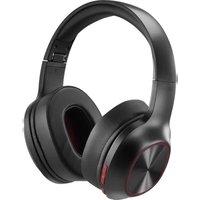
1.Integratedmicrophone
2.USB-Ccharqingsocket
3.3.5mmjacksocket
- Telephone Answer - Reject - Hang up
5.Volume+
6.Volume
7.0n/Offswitch
- Mode button (Full - Voice - Normal)
9.FunctionLED
10.Pairingbutton(2.4GHz)
- 3.5mm jack socket (audio signal IN - from TV)
Thankyouforchoosinga H amaproduct.
Takeyourtimeandreadthefollowinginstructionsandinformation completely. Please keep these instructions in a safe place for future reference. If you sell the device, please pass these operating instructionsontthenewowner.
2.Explanationofwarningssymbolsandnotes
Warning

Thisysymbolisusedtoindicatesafetyinstructionsortodraw you or attention to specific hazards and risks.
Note

Thissymbolisusedtoindicateadditional information or importantnotes.
3.Explanationofproductmarkingsymbols
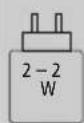
Thepowerofthechargermustrange rom a minimum power of 2.0 watt required by the radio system to a maximum power of 2.0 watt required to achieve t hemaximumchargespeed.
ThestandardisedUSBinterfacemeansthata chargerwithahigheroutputpowercanalsobe used.
4.Packagecontents
- 1xTVheadphones
- 1 x USB-Cchargingcable
- 1 x 2 .4GHzdongle
-1 x audiocable
-1 x instructionmanual
5.Safetyinstructions
The product is intended for private, non-commercial use only.
- U setheproductonlyforthenthendpurpose.
- Children should be supervised to ensure that they do not play with the product.
- Do not use the product in areas in which electronic products are not permitted.
- Do not attempt to service or repair the product yourself. Leave any and all service work to qualified experts.
- Donotopenthedevicerecontinueto operateitifitbecomes damaged.
- Do not bend or crush the cable.
- Do not drop the product and do not expose it to any major shocks.
- Dispose of packaging material immediately in accordance with the locally applicable regulations.
- Do not modify the product in any way. Doing so voids the warranty.
- Protect the product from dirt, moisture and overheating and use it in dry environments only.
- Do not use the product in the immediate vicinity of heaters, other heatsourcesorindirectsunlight.
- O nlyusethearticleundermoderateclimaticconditions.
- As with all electrical products, this device should be kept out of the reach of children!
- D o n otoperatetheproductoutsidethepowerlimitsgiveninthe specifications.
- Do not use the product in a damp environment and avoid splashing water
- While driving a car or using sports equipment, do not allow yourself to be distracted by your product and keep eye on the traffic situation and yours surroundings.
- The battery is permanently installed and cannot be removed; dispose of the productasa w holeinaccordancewiththestatutory regulations.
- Donotincineratethebatteryortheproduct.
- Donottamperwithordamage/heat/disassemblethebatteries/rechargeablebatteries.
- Do not use the product during the charging process!
Warning - rechargeable battery

- Only use suitable charging devices or USB ports to charge the product.
- Do not use defective chargers or USB ports and do not attempt to repair them.
- Do not overcharge the product or allow the battery to completely discharge.
- Avoid storing, charging and using in extreme temperatures andatextremelylowatmosphericpressures(suchasathigh altitudes).
- When stored over a long period of time, batteries should be charged regularly (at least every three months).
Warning-magnets


- This product generates magnetic fields. Individuals with cardiac pacemakers should consult a doctor before using this productasitmayaffectthepacemaker'sproperfunction.
- Do not store bank or similar cards with magnetic strips near the charging case or earphones. The data on the cards could be damaged or completely deleted.
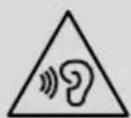
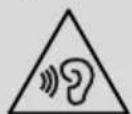
Warning- highvolume

- Highsoundpressure!
- There is a risk of hearing damage.
- To prevent any loss of hearing, avoid listening at loud volumes for prolonged periods.
- Always keep the volume at a reasonable level. Loud volumes can damage hearing - even over short periods.
- Using this product limits your perception of ambient noise. For this reason, do not operate any vehicles or machines while using this product.
6.Installationandcommissioning
6.1 Transmitterinstallation
- Connect the 2.4 GHz dongle to a suitable USB port on your TV for powsupply.
- Now connect the audio output of your TV to the jack socket of the dongleusingtheaudiocablesupplied.
6.2 Receiverinstallation
- Charge the headphones fully before using them for the first time. LEDsupred.
- Switch the headphones on (7). LED flashes cyan.
Theheadphonesautomaticallyrecognisethe2.4GHzsignaland theLEDlightsupblue. - Alternatively, the headphones can be operated via BT. If the headphones do not receive a signal from the 2.4 GHz transmitter, they automatically switch to BT reception. Select "hama TV-Headphones Dongle" in your playback source. After successfulpairing, theLEDlightsupgreen.
6.3Switchingon/off
ON: Press the On/Off button (7) for approx. 2 seconds, the announcement"PowerOn"sounds.
OFF: To switch off, press the On/Off button (7) for approx. 3 seconds, the announcement "PowerOFF" sounds.
Note - Automatic switch-off of the headphones

Theheadphonesare equippedwithanAutomaticsswitch-off mechanism.If there is no connection to your device within 3 minutes,theyswitchoffautomatically.
7. Charging
Fully charge the headphones once before using them for the first time.
7.1 Switch off the headphones and connect them
Ensure that the headphones are switched off before charging them.
Connect the USB charging cable included to the charging socket (2). Connect the free plug on the USB-C charging cable to a suitable USB charger. To do this, consult the operating instructions for the USB charger you are using.
7.2Chargingprocessfortheheadphones
The LED (9) lights up solid red during the charging process.
Once the charging process is complete, the LED (9) goes out. It can take up to 2.5 hours for the battery to be fully charged.
7.3Batterycapacity
When the headphone battery capacity is low, the LED (9) flashes red and the announcement "Battery Low" is heard.
8.Bluetooth connection (pairing) - Alternative use directlywithoutdongle
Note-pairing

- Ensure that the Bluetooth®-enableddeviceissswitchedonand thattheBluetooth®functionisactivated.
- Please refer to the operating instructions of your device for more information.
The headphones and the device should not be more than 1 metre apart. Theshortherthedistance, thebetter.
Switch the headphones on using the On/Off button (7).
Press the Vol+ (5) and Vol- (6) buttons simultaneously for 3 seconds until you hear "Pairing".
If the LED (9) is flashing alternately blue and the announcement:
Headphonesearchingfora Bluetobonnection.
When the LED (9) lights up green and the announcement:
The headphones are already paired with a Bluetooth device.
9.Controlelements
9.1Mode
You can select from 3 different modes using the Mode button (8).
Normalmode:neutralplayback
Full mode: Treble and bass amplified
Voicemode:Speechemphasised
Todothis, pressthebuttononcetoswitchtothenextmode
9.2Phone
You can use the Phone button (4) to accept and end phone calls in Bluetooth mode
9.3 Volume control
Increasevolume
Press the ^+ button (5) once to increase the volume. When the maximumvolumeisreached,a signalisheard.
Decreasevolume
Press the -button (6) once to decrease the volume.
10.Audiplaybackviaanaudiocable
Alternatively, y oucanalsoconnecttheseheadphonesusingan AUXcable.Todothis,plugoneendintothedeviceandtheother endintotheaudioinput(3).
11.Careandmaintenance
| Note |
| Disconnectthedevicefromthemainsbefore c leaningand duringprolongedperiodsofnon-use. |
Only clean this product using a lint-free, slightly damp cloth and donotuseanyharshcleaners.
- Ensure that no water is able to enter the product.
12.Warranty disclaimer
HamaGmbH& Co KG a ssumesnoliabilityand provides no warrantyfordamageresultingfromimproperinstallation/ mounting,improperuseoftheproductorfromfailure to o b s e rve the o peratinginstructionsand/orsafetynotes.
- Technical data
| Headphones | |
| SignalreceptionRadio/ B luetooth®5.3 | |
| Transmission frequency | 2.4 GHz / 2402 - 2480 MHz |
| Range | 100m (RF) / 10m (BT) |
| Frequencyrange20Hz- 2 0 kHz | |
| Sensitivity90dB/ m W | |
| Impedance32Ω | |
| Diameter | 40mmspeaker |
| Runtime | 16h |
| Connection | USB-C(forcharging) 3.5mmstereo(forwired u se) |
| Currentconsumption | 5V ~ 240mA |
| Min.capacity | 380mAh |
| Dongle | |
| Connection | USB-A, 3.5 mm stereo (for audio transmission) |
| Signaltransmission | Radio |
| Transmissionfrequency | 2402-2480MHz |
| Range | 100m |
14.Declarationofconformity
CE HamaGmbH& Co KG herebydeclaresthatthe radioequipmenttype[00221847]isincompliance with Directive 2014/53/EU. The full text of the EU declaration of conformity is available at the following Internet address:https://support.hama.com/00221847
Frequencybands2402MHz-2480MHz
Maximum radio-frequency power transmitted
2.5mWE.I.R.P.
- Specifications according to Regulation (EU) 2023/826
Informationregardingenergyconsumptioncanbefoundat: https://support.hama.com/00221847
https://support.hama.com/00221847
https://support.hama.com/00221847
https://support.hama.com/00221847
https://support.hama.com/00221847
1. Elementosdecontrole indiciadores
1.Microfoincorporado
2.TomadecarqaUSB-C
3.Tomajack3,5mm
4. TelefonoContestar- Rechazar-Colgar
5. Volumen+
6.Volumen
7.Botónon/off
8. Botón de modo (Full - Voice - Normal)
9.LEDdefuncionamento
10.Botondeemparejamento(2,4GHz)
11. Tomajackde3,5mm(entradadesenalde a udiodeltelevator)
https://support.hama.com/00221847
https://support.hama.com/00221847
| Frequentieband(en) | 2402 MHz-2480 MHz |
| Maximaalradiofrequent vermogen | 2.5m WE .I.R.P. |
15.InformatieovereenkomstigVerordering(EU) 2 023/826
https://support.hama.com/00221847
| Bandedifrequency | 2402MHz-2 480MHz |
| Massimapotenzaaradiofrequenztrasmessa | 2.5mWE.I.R.P. |
15.Specifichecondoilregolamento(UE)2023/826
Informazionisulconsumodienergiasonodisponbilin: https://support.hama.com/00221847
https://support.hama.com/00221847
https://support.hama.com/00221847
https://support.hama.com/00221847
| Banda/benzile de frecventa | 2402 MHz - 2480 MHz |
| Puterea maxima radiata | 2,5 mW E.I.R.P. |
15.Indicati conformDriectivei(UE)2023/826
Informatii despre consumul de energia puteti gashi la: https://support.hama.com/00221847
https://support.hama.com/00221847
1.Ovladacieprkya u k az o vatele
1.zabudovanymikrofon
2.NabijacionazsuvkaUSB-C
3.Zásuvka3,5mmjackásuvka
4.Prijatietelefónu- odmiétrutie- z a v e s en i e
5.Hlasitost+
6.Hlasitost-
7.Zapinač/vypinač
8. Tlačidlo režimu (Full - Voice - Normal)
9(LEDdiódafunkcii
10.Tlačidlopárovania(2,4GHz)
11.3,5mmjackzásuvka(audiosignalIN - z TV)
https://support.hama.com/00221847
https://support.hama.com/00221847
https://support.hama.com/00221847
https://support.hama.com/00221847
1.Manoverelementochindikeringar
1.Inbyggdmikrofon
2.USB-Claddingningsuttag
3.3,5mmteleplugg
- Telefonsamtal Ta emot-Awisa-Laggpa
5.Volym+
6.Volym
-
Strömbrytrare
-
Mode-knapp (Full - Voice - Normal)
9.Functions-LED
10.Pairing-knapp(2,4GHz)
11.3,5mmuttag(ljudsignaIIN-f ranTV)
TackforattduvaldeenHama-product!
https://support.hama.com/00221847
https://support.hama.com/00221847
1.3JeMeHTbIyIpaBHeHnN HdNKaTOpbl
1.BCTpoeHHbIMMkPofoH
2.Pa3bemdIa3apdIaKNUSB-C
3.Pa3beMTRS3,5MM
4. PnHHbBb3OB-OTKIOHHTb Bb3OB-NoIOXHTb Tpy6Ky
5.POMKoctb+
6.POMKOCTb
7.Khonka"BkJ./BbIK."
8. Khonka pekma (Poihbi - FOnocob - HopMaHbH)
9.CbetoIIOIpyHKnui
10.Khonkacopqxhenr(2,4Tt)
11. Pa3bem TRS 3,5 MM (BXOД ayDIOOCrHnAа -OT TeIeBn30pa)
BlaqoIapuMBAc3aBbIbOpnpOdyKunHama!
IpeepncnoJIb3OBaHmEhBMHaMaTeJIbHOpPouTHeCJeIyUOuHnHCTpyKUnnYka3aHn. XpaHnTe daHHoe pyKOoDCTBO NO kcnJyataunB HAdexHom MeTe, YTo6bl B Cnyae Heo6xOaMocTynBa BCerda 6bn Doctyn K Hemy.PnpnoJaXe yCTpOHTBa IpeepaIte pyKOoDCTBO HOBOMBylaJeNcy.
Ipeynpexdene-akkymnytop

-ⅡIa3apAiknncnoB3yTeToIbKOIOXOJaIe3apAHHle yctpoiCTBaunlUSB-pa3bembl.
He nnonb3ynte HnncpabHbte 3apdHbte yctpoiCTBa nn USB-pa3bembl He nbTaNTEcb nx pemOHnpoBaTb.
He onyckaIte n36bItoHoi 3apAkn I rny6okn pa3pAkn n3dennia.
He xpaHnTe, He 3apJkaIte n He nCIOJIb3yIte yCTPOINCTBO npOueHb Hn3Knx N OueHb BbICOKNX TEMpepatypax N OueHb Hn3KOM aTMocΦepHOM dABNeHN (HaNPmEp, Ha 6oNbux BBICOTAX).
- PnI DInTeJIbHOM XpaHeHmpeYJrphO 3apXaIte N3dEJIne (He pexe OndHO r pa3a B KBaptan).
PpeynpeXdEHeMaHHTbI


-3dennec03aetMarHHTbIeNoJ.PnncnoB3OBAHnKapnOCTmmyJATopoB npOKOHcybTnpyTeCb C BpaOM HaPpeMET COBMeCTmOCtN 3dJeNur C TaKIMN yCTpoiCTBaMn.
-HexpaHnte6aHKOBckneHaHaNoTHyIeKapTbMc HnHTHOIOLOCOpydOM C3 aprHbIM6OKCOMNJ HayuHKAMN.3To MOKeT npNBecTN K NOBpeKDeHNIO KapT uyn ydaJIeHHIOCOxApaHeHHOHaHHINHΦopMaun.
PpeynpexdHne-BbICKaIrpomKocTb

- BbIcOka3BykOBaHaHarpy3ka!
CyuectByet pnc kyydueneHcIyxa.
YTObIHeDOnyCTnTBnOTepNClyxHa,HeNcNoJIb3yIne HayuHNI KpnpBbICOKOM yOBHE rPOMKoCTN BTeEHNE DINTeJIbHORO BpeMeHN.
IopndepkmbaTe HOpMaIbHyIO rpmKocTb.Bo3neCTBne rpOMKOrO 3Byka,B.T.H.B TeueHne KopoTKoro BpemeHN,MOXET npNBecTN K NOBpeXDeHIO OpraHOB Cnyxa.
-BoBpeM3Kcnnyataunn3denncCHNxxaetcSTeneHb
BOCpnaTnOKpykaIOUIMX3BYKOBuI yMOB. 3anpeaaetcN CNOJIb3OBAt b NdEne BO BpeMa BOxDeHnraBtOMo6nIaIynpaBHeHn MaHHAM.
6. MoTAn BvBnB 3KcNpyaunH
6.1 MoHTaXnpePaTuNka
ДлгэлкрпогинnoДКИЧITEаадпет2,4Гцк noDxOJaMyUSB-pa3bemyTeJIeBn30pa.
Tenepb noKIOUHTe ayINOBbIXoBaIeero TEJIeBnOpa K pa3bemy TRS aanTepea c nOMOuio ayNOKaBeJ, BxoJaEero B KOMIIJEKT I OCTaKN.
6.2YcTaHOBKanpneMHnka
ПОЛНСТБИЗАРДИТЕНУSHИКИ ПЕДИЕРБВIM
ИСПОЛБ30ВАHиEM.CБETOДЮДROPITКРACHьМ.
BKNIOHTe HAYHNNK (7).CBeTOIOID MMRaET TONYbIM.
HayuHnKn ABToMaTneCckn paCno3HaOT cnHn2,4Tt,CBETOIOIO3aIopaeTCNHNMUBETOM.
B KaeeTBeaIbTepeHaTnBbHaiuyuHKaMMoKHOynpaBJIaTb Hepe3 Bluetooth (BT).Ecn HayuHKn He noLyauOT CunHan ot nepeDaTuKa 2,4 ITU, OHN ABToMaTuYeCKn peKeJIOuAOTc H aPiem BT. B KaeeCTBe NCTOuHnKa BocPOn3BeDeHn Bb6epnte hama TV-headphone. NocJe ycNeuHoro cOpJxKeHn CBETOINOd 3arOpITc3eJIeHbIM.
6.3BkIIOueHHe/BbIKIOueHHe
BkHouHeH: YdepKnBaIte HaxaToN KHOIky BkIOUeHnBAIKIOUeHnA (7) B TeueHne np6JI. 2 cekyH, noka He yCJIbIuHTe COO6UeHne "Power On".
BbIKHoyehne:ДЯВbIKHoyehnYyepKINBaIteHaXaTOn KHOIky BKNIOUeHn-BlKJIOUeHn(7)B TeueHne np6JI. 3ceKHyN, noka He yCblIwTe OIOBeSeHne "Power OFF"3ByKn.
PpmeaHne-aBtOMaTnueckoe BblKIOUeHNHeHayuHKnOB

HayuHnKNOchaueHbICTeMoABTomAteCKOBrBikIOeHn. EcIn B TeueHne 3 Mm COeHNHeHne C OKOHeHbIMycTpoCTBOMOTCYCTByeT, OHn ABTomAteckn BIKIOaOTCA.
7.3ap8ka
IpeepBbIMnpMeHHeMHeo6xOdMMOnIOJIHOCTbIO3apAHTb HayuHKn.
7.1BbIKIoueHnei OdkIIOueHHeHaYHnKOB
Y6eINTEcB TOM, YTO nepe3aepKoHayuHKn BbIKIOHeHbI.
IopknHouTe npnlaraembI3apdNbUSB-ka6eJI K 3apdHOMy rHe3dy (2).PoiKIIIOHTe Cbo6OJbI WTEKeP 3apdHOrO Ka6eJI USB-C K npdxoJaEmy 3apdHOMy yCTpoiCTBy c USB-noptom. Co6HOnaIte pykoBODCTBO NO EKcnnyatauIN NcNoJb3yeMOrO 3apdHOrO USB-yCTPOICTBa.
7.2Poueess3apAeknHaayuHkoB
Bo Bpem3apRkCBeToDIO(9)NoCToHHO rOpNT KpaChbIM CBETOM.
Iocne 3aBepseHn3apKn CBToDnO(9) racHT.
Ipy noJHO3apKn aKKyMylTopa moXeT nOpTe6oBaTbcra
do2,5ycob.
7.3EMKoctbakkymyITopa
Пи ИЗКOM уpoBHe 3apЯдakkyMЛТОпа HayuHkoB CBToIIOJ (9) Mnaet KpaChbIM n pa3daetcra yCTHoe OOnOBeueHne "BatteryLow".
8.CoeHHeHneBluetooth (conpXeHne) aJIbTePHaTnBHOe nCnoJIb3OBAHne-HanpMyIO 6e3 aIaNTepa
Yka3aHne-conpJxKeHne

- Y6eHntecb, yTO OKOHeuHoe yCTPOINCTBO C BO3MOXHOCTbIO coeHNHeHnuepe3Bluetooth BKNIOUeHOnBluetooth COeHNHeHneYcTaHOBJIeHO.
CoBnIaTe COOTBETCTByOuHne yKa3AHn pyKOBoCTBa nO 3KcIIyataun BaWero OKoHeHOrO yCTpoNCTBa.
HayuHnKnIOKOHeHHeOyCTPoIcTBo DOJKNbI HaxoNtbcra Ha pacctoAHn He 60JIbSe 1 M pyr OT dpYra. Yem MehBse pacctoAHne, TEm JyUwe.
BkHIOHTe HayuHKn HaxaTMem KhoNK BKJ./BbIKJ. (7).
OIOHOBpeMeHHo HaxMnTe N yepKnBaIte HaxaTbIMN B TeueHne 3 cekHykONIKn Vol+ (5) n Vol- (6), noka He pa3daCTcR
"Pairing".
Ecnn CBeToNDn (9) nonepemHNO Muraet cnHm npa3daetc yCTHO onOBeueHHe:
HayuHnKn PbItaTcY cTaHOBbTo coeHHeHne Bluetooth
Ecni CBetoioo (9) ropt 3eJeHbIM CBeTom npa3daetc yCTHOeONOBueHHe:
HayuHnKnyKe y cTahOBnNtCOeDnHeHne COKoHeHbIM yCtpoIcTBomCBluetooth
9.3JIeMeHTbIynpaBLeHnA
9.1PexnM
C NOMOJIbIO KHOKNIpeXIMa(8) BblMOKeTe Bbl6paTb OINH N3 Tpex IMeIOUxxCra peXIMOB.
06bHhpeKIM:HeITpaJIbHOe BOCpOIN3BeJeHne
PonhbpeKm:ycnHHeMe BbICOKnx Hn3KNX qACTOT
TolocoB peXm: roLcoBOe ynpaBLeHne
Inpexoanda K cIeNyIOUcEmy peKmMy HAnKMnTe KHOHKnOdINH pa3
9.2TepeoH
C NOMOJIbKHOKNTeJIeΦoHa(4) BblMOKeTe pINHMaTbN 3aBepaTaTeJefoHbIeBbI3OBbIBpexIMeBluetooth
9.3PeynnpOBkarpomKoCTN
YBENHnErpOMKoCTN
IyBeHnueHnnpOMKoCTNOHOKpaTHOHaXMITEKHOKy +"(5).PpNIOCTNXeHNMaKcMmaJIbHOr pOMKOCTn pa3daETC 3ByKOBOm C mHaJ.
YMeHbWeHnErpOMKoCTN
ДяУMeHbWeHnrgPOMKoCTN OdHOKpaTHO HaxMnte KHOIky "-(6).
10.Bocnpoun3BeDeHnEmy3bKnuepe3noKnIOueHnec nCNoIb3OBaHnEmaynOka6eJia
B KaueCTBe aJIbTePHTaHbBi Bbl MoKTe NoIKJIOUHTb 3Tu HayuHNKc NOMOUsIO Ka6eJa AUX. Jnra 3TOrBOCTaBBte OINH KOHeu Ka6eBaBpa3bEm Ha OKoHeHOM yCTpOInCTBe, a Dpyro — B ayDIOBxOd (3).
11.TexHueeCKOoe6ClyxKuBaHneu y xoJ
Yka3aHne

Ipeep oucckkou npn dInTeJbHOM HeNCIOJIb3OBAHHOTKIOHHTeYCTPOCTBOOTcETN.
OuHuaTe H3dEne ToIbKO C nMOUbIO CnerKa BlaXHO 6eBOPCOBOCaIΦeTKn;HeNCnOJb3yItearpeCCNBbIe 电TAAUncpeDCTBA.
CneTe 3a TeM, TTo6bI B n3dene He nonaanda Boda.
12.VCKJIIOUeHHeoETBcTBeHHOCTN
Hama GmbH & Co. KG He hecet OTBETCBEHHOCTn 3a nobpejdeHH, BO3HkUne B pe3yIbTaTe HeHaJNeJXaUe YCTAHOBKN, MOHTaxa N HeHaJNeJxAuzero NcNoIb3OBAHN N3DeJIIN IINI Hec6NIOJeHn Tpe6oBaHn pyKoBOdCTBa No EKcNlyatauIN I/IIY kzaHn PO TexHnke 6e30NaCHOCTn.
13.TexHnuecknexapakTepeNCTKn
https://support.hama.com/00221847
MoHOCCTTah3aapnHOTOyCTpoiCTBOTp6BaDa BapnpoT MmHmAlHa MoHoc 2,0W, m3nCKBaHa OTPaHOCNTemata,DMAKmAmHaMOHOC T 2,0W, Heo6xOIma 3a noCTnHa He MaKcMmHa CKOpOCT H a 3 apexJaHe.
BlaIaOpaeHHeHaCTaHapTn3npaHnUSB nHTepcEcmOeJaCen3NoJ3BaN 3 apJHOyCTPOCTBO C IIO-BNCOKa N3XoDHa MOUHOCt.
4.CbDpXaHHeHaonakOBkata
16p.cnyuzaankn3aTeNeBn3Op
- 16p. USB-C kaebel 3a 3apexdahe
16p.0nHb2,4GHz
-16p.aynokaben
-16p.pbkoB0DCTBO3aekCnI0aTaunia
5.Yka3aHn3a6e30nachOCT
- PpOdyKtBt e npEeBnDcH 3a JnUHa, HecToIaHcKa 6ntoBa ynoTpe6a.
- 3n0J3BaIte npOyKta cAmo 3a npEdbuDeHata ceI.
-ДeцаТгбБаДбБдТпДнНадзор,3aДаCEт rapaHTnpa,ЧЕнмадсИngрагTспpoDyKTA.
He n3noJ3BaIe npOyKTA B 30H, B KOITo He ca pa3peHn eEeKTPoHHHypeiN.
He ce onntbaTe camn da ocbnykBaTe mnpemOHtnpaTe ypeJa. Octabete BcKaKbTaexHuecka NOpDpBxka Ha KOMnTeHTHnTe CneuaJIACNT.
He OTBapnTe ypeHa n npn noBpeHa He npoIbIxAbaTe da ro 3nON3BaTe. - He npueynbaIte n He npntckaIte ka6ena.
He no3B0JIaBaIte Ha npOyKta Ia naja H He ro n3JIaraiTe Ha cnJIHHb6paun.
N3XBbPnTe ONaKOBbHnMaTePnAJI BeDHaRa CbIaCHO BaJIuHHTeMeCTHnPa3NopeD6n3An3XbBpJRAHeHaOTnaBcU.
He n3BpBaIte npomeHn IIO npOykTa. Taka 3aY6nte BcKaKbONpaBOHaRapAHCuOHnHInpeTeHcun. - Na3eTe npOyKTA O3AmBpcBaHe, Bnara n nppePbaHe n ro 3N0N3BaNTecAMOB C yXINOMeHn.
He n3noJ3BaIte npOyKTA B HENOCpeICTBeHa 6n3oCTdo OTnNTeJIH ypeDn, Dpyr N3TOHnCn Ha TOnJIHa nn Ha dNPEKTHaCLbHcBACBTnHa.
-Излбайтпрдкета само пиумepehн клmaTчнусюья. - IIOIO6HO Ha BCNUK eJNEKTpuueckn npOyKT, TO3N npOyKT He 6Ibuaanonaabp bueTeHaJeca!
He n3noJ3BaIte ypeDa n3BbH HerOBIne rpaHnHa MoUHOCTTa, NOCOueHM TExHNueCKNTeaHHN.
He n3noJ3BaIte npOdykTa BbB BnaJxHa Cpea n 36BaITe BOHNIPbckn - IIO Bpeme Ha NtTyBaHTo C MNC uIn cNopten ypeI He pa3peWaaBaiTeaAbbJeTeOTKIOHBAHnOraBaunnpoKytn BHMmaBaIte 3a noIOxKeHTo np dINXeHne n BaWata OKoJHa cpeIa.
AkyMylatopHata 6aTepeH e HenoBnXHo BrpaJeHa n He MoKeJa Ce Maxa, N3XBbPte IpoNyKTA KaTO cNopeJ 3aKOHOBITE pa3npope6n.
He Xbprnne 6aepnra nn npdykta B orh.
He npomehaTe N/wn He deOpmpaTe/HarpBaTe/pa3rno6baTe aKymynatopnTe 6atepn/6atepnTe.
He n3noJ3BaIte npOyKta no BpeMe Ha 3apeXdaHe!
PpeynpexkdeHne:AcymytaTophaTepeHn

- 3a 3apekdahe n3noI3BaIte cAmo noDxOJaU 3apAHN yctpoiCTBa uIN USB n3BOuN.
-ПОпинцин He n3noI3BaIte NOBpeHn 3aPAnu yCtpoNCTBaUIN USB n3BOOnn He ce ONITBaIte da rN nonpaBAre.
He no3B0JIaBai Te npOyKta da ce 3apeXda nOBeue ot Heo6xOIMOTO nn da ce pa3peXda HanbHNO.
-368raBaiTe CbXpaHHe, 3apeXdaHe n 13no3BaHe npEKCtpeMH TeMnepaTpyn H3KIOHTeHNO HNCO HaIraHa Bb3dyxa (KaTO HanpImep Ha rOJemn BnCOuHH).
-Прно-npoIbIxIeHocbXpaHeHneO3apeKdaiTe nepnoDnHNO (Nohe BeNbXk Ha Tpr Meceua).
PpeDynpeKdEHNe-MarHnTn

- PpOdyKTbT rHeepnpa MaHHTn HNoIeta. JNuata CbC CbpDeyH NCTMMyJATOp Tp8Ba Da CE KOHCyTTnPaT CJeKap IpeHn yNtpe6Ha NpOdyKTA, Tb KaTO fYHKnraTa Ha CbpDeyH NCTMMyJATOp MoKe Da 6bDe HApyuSha.
ECnnn Dpyrnn noo6Hn Kaptn C MarHnTHn JeHTn He 6nuBa da ce cbxpaHraBt B 6n30ct Do 3apJnHoto yCTPOINCTBO nN cnUwAnkata. DaHHnte ot Kaptata Morat da 6bDat nobpeHn nnu3tpTuN.
PpeynpekdeHne-cnJen3ByK

TOnyMoAkyUHohAnraHe!
- CbueCTyBa onaCHOCT OT yBpeXdHe Ha cnYxa.
3a da 6bnde npedotbpaeta 3aryba Ha cnlyxa, n36raBaTe cnyuhaHTo HA cnIeH 3Byk 3a Dblbr nepnO ot BpeMe.
- POnDbPkaTe CnnaTa Ha 3Byka BnHaRn Ha pa3yMHO HnBO. TOrJaMaTc Cnla Ha 3Byka MoXe -DOpN n npu MaNk a npoBJIKntENHOCT--DaIOBeDeOyBpeXdaHnAChLyxa.
- Ynotpe6ata Ha npodykta orpaHnUaBa Bb3npemHaTe BuHa UyMoBe OT OkJHATA cpea.Iopadnta3nnpuHnAnOBpemeHa ynotpe6ata He ynpablaBaiTe aBTOMoHn nn MaunHH.
6. MoTaxn nyckaHb Eeknloataa
6.1HCTaJIpaHEnpeJaBaTeIa
CbpxTeOnHbna 2,4 GHz KbM eIeKtpo3axpaHbaHeTo nocpeCTBOM NOxOJaUSB NOPHa TeENBu3opa.
CneTobacBpKxTeayDnON3XoDaHaTeNeBn3OpakbM6yKcTa Ha DOHbIa C NOMOuTa Ha DoCTaBeHnA ayDnOKaBn.
6.2ИнсталпанHa npimMnka
3apeTe HnblHNO CnyuAaKNTe, PpeN da rN 3no13BaTe 3a npBpuNbT. CBeToDIObT CBETN B YepBeHo.
BKNIOHTeCJUaJIKNTe(7).CBETOIObT MnRa BCINHbO.
Cnyuajknte aBtOMaTHUHO pa3nO3Habat 2,4-rnraxepoBn CnHai nCBETOIOIOBT CBETBA B CnHbO.
AnterpaHbHO, CnywAaKNTe MoRat Da Ce ynpabnBaatpe3 BT.Ako CnywAaKNTe He nonychat cngHanOT 2,4-rnraxepoBna npedabateT, Te abTomuHNo npeBkIoucbat Ha BT npneMahe. h6epete ,hama TV-Headphones Dongle" B n30TuHa Ka H b3pnOn3BexKaDaHe.Cnei ycneHNO cDboRaHe CBTeOIONbCT CBETBA B 3eNEHo.
6.3BKnIOUbaHe/u3KnIOUbaHe
ON(BkI):HaTncHeTe 6yToHa 3a BkN./M3Kn. (7) 3a OKoNo 2 ceKynHn, np03ByuBa CbO6ueHneTo „Power On".
OFF (ИЗк.): 3a ИЗлочан haTиСHTe 6уToHa 3a BкЛ./ИЗк. (7) 3a OKоNo 3 ceKуHДn, npOЗБуЧа bCObIeHNeTo "PowerOFF".
Yka3aHHe: ABTomatNHO N3KIOUObBaHe Ha cnyuJaKNTe

Cnyuankntepa3nojaratc yHKnra3aaBtOMaTHHO nKIOUbaHe.AKO BpaMKte Ha 3 MNHyTn He ce OcbIeCTBn CBbp3BaHe C KpaHOTO yCTpoiCTBO,CnyuankTe aBTOMaTHHO CE N 3KIOUbAT.
7.3apexkanhe
Ppeunbpbataaynoptpe6aapeTeHaHbIHOyuaJIKeT.
7.1 ⅢKJIIOUBAHe n Cbbp3BaHe Ha CnywaJIaKeTe
Ipeu3apejdahe Tp6Ba da ce yBepnte, ye CnyuaKnTe ca n3KnOueHn.
BkIIOUe npIIOKeHn USB Ka6eN 3a 3apeJdaHe KbM rHe3dTo 3a 3apeXdaHe (2). CbpxTe cBO6OHNr XaK Ha USB-C Ka6ena 3a 3apeXdaHe KbM nOxOAno USB 3apAHO yCTPOINCTBO. 3a Ta3n Uen Cna3BaHTe Yka3AHnTa OT pKOBODCTBO T3a EKcPiOaTuaHn Ha mIOn3BaHOTo USB 3apAHO yCTPOINCTBO.
7.23apekdahehacnyaiknte
CBeToIOIOBt (9) CBeT N OCTOARHNO B UpeBHeNo BpeMe Ha 3apeKdaHeTo.
Cne3abpBbAbe Ha 3apeXdaheTO CBToIONbT (9) n3racBa. TbHnOto 3apeXdahe Ha akymyIaTopHaTa batePm MoKe da oTHemeo2,5aca.
7.3KanaTeTHaakymyIaTOPhata6aTePn
PnHnCKo HnBO Ha 3apraHa akyMylatopHata 6aTepeHa Cnyuajknte CBToNDIOBt (9) Mna B cepBeHO n Ce yBaCbo6ueHHeTO „Battery Low".
8.BluethoB 巴 Bp63Ka(CDBOBAHe)-AnTePhaTNBHa ynoTpe6a-dnpeKTHo,6e3doHrJI
Yka3aHne3a C DBOBAHe

- YBepete ce, ye BaWeto noDnBpKaaO Bluetooth® kpaHOn yctpoiCTBO e BKnIOueHO n Ye Bluetooth® e a KTNBpuH.
3a Ta3n 1e n Cna3BaIte yka3aHnIraT aO pkoBOIDCTBOTO 3a eknloataun Ha BaWTe KpaHNo yctpoIcBO.
Cnyuajknte n kpaHnOTo yCTPOIcTBO Tp6Ba Da 6bDaT Ha pa3CToHHe nD 1 MeTbp. KOJIKOTo NO-MaJIko e TOBa pa3CToHHe, ToNKOBa No-Do6pe.
BkIIOUe CnyuJIKnTe C 6yToHa 3a BKn./M3Kn. (7).
HaTnCHete eHOBpemeHNo 6yToHnTe Vol+ (5) n Vol- (6) 3a 3 cekyHn,doKaTo yyeTe „Pairing".
Korato cBeToaNoBt (9) Mura nocJeIOBaTeHbO B CnHbO n ce yBaCbo6eHne:
CnywankntbpcrBluetooth Bp3ka.
Korato cBeToaIObT (9) CBeTHe B 3eJeHO n Cbo6u:
Cnyuankte Bue ca CbpbzHc KpaHNo yctpoiCTBO c Bluetooth
9.EmeMeHTn3aynpaBLeHne
9.1PexnM
Moxete da n36npate oT 3 pa3nHn peXmAm c nOmoTa Ha 6yToHa Mode (Pekm) (8).
Hopmanepekm:Bb3npou3BekdaHeToe HeytpaJIHO
TbJen pexm: Bucoknte Hncknte yctotn ca ycJIeHn
Tnacob pexum:OTkpoBa ce TnaCt
3a ueTHaHTNCHe6byToHa BeHbK, 3a da npemHHe KbM CJIeDbaUAPEXIM.
9.2TeJIeΦoH
Moxete da n3non3BaTe 6yToHa Phone (TelefoH) (4) 3a npmeMaHe n pkepaTbAbe Ha TelefoHHn o6xdaHn B pexm Bluetooth.
9.3PerynnpaHeHacnnaTaHa3Byka
YBeJIuHaBaHeHacNJaTa H a 3 ByKa
HaTnchete BeHbX 6yToH ^ 一 + ^ 一 (5),3a da yBelenuHTe CnIata Ha 3Byka. PIn DoCTnraHe Ha MaKcImaJIHaTa CnJa Ha 3Byka np03ByuBa C nRHan.
HamaJIbaHeHacnlaTaHa3Byka
HaTncheTe BeHbX 6yToH ," (6), 3a Da HamaIITe CnIata Ha 3Byka.
10. Bb3npo3Bexkdahe Ha ayDno npe3 ayDnoka6eI
Moxete cBtO Taka nCa CbPKeTe Te3n CnyuAnKn C NOMoUta Ha AUX Ka6eN. 3a CENTa BkInouTe eDmHnK pAaB KpaHOTO yCTPOIcTBO, a Dpyrna -B ayDIO BXOda (3).
11. Texnuecko 06cnykBahe n noDpBkka
Yka3aHne

Pa3eHHeTe ypeDa OT MpeKata TnpEn IIOuNCTBaHTo N KOraTO HMa Da Ce N3NoJ3Ba 3a No-DbIro BpeMe.
-ПочиТаиTeTO3nПpoДуКТсамСЛякНЯнБлajXHeHaKbpna6e3BlaacHKnH e n 3ПОЛЗВa雨TearpeCUBHINNoYnCTBaU npenapatn.
BHHmabaiTe da He nonaDa BOda B npdykTa.
12.N3KJIIOUbaHeHa o TROBOPHOCT
Hama GmbH & Co KG He noema OTROBOPHO TnI rapaHnra 3a nobpei, KOTo ca pezytATOT HnPaHnHa nHCTaJIaUNa, MOHTax n yIOTpeBa Ha npOyKTA nNt OHe Hcna3BaHe Ha pKOBoDCTBOTO 3a ekCnloatauun/nnHanyKa3aHnraTa3a6e3OnaCHOCT.
13.TexHnuecknDaHHN
| Случалки | |
| Приеманы с有很大 transl. | Бezжuellebluetooth®5.3 |
| Чебota на predecessor | 2,4 GHz/2402 - 2480 MHz |
| Оьхва100m(RF)/10m(BT) | |
| Чеботен,dиапазон | 20 Hz - 20 kHz |
| Чувсангелност90dB/mW | |
| Импесанс32Ω | |
| Диаметр | 40-mлиметровВисокогорител |
| РавOTNO в рeme16часa | |
| Свьрзвае | USB-C(Заразождances) 3,5mmстeteо(Завpbзас kaбeн) |
| Консу мачаянatoK5 V | -240mA |
| Мин.kацитet | 380mAh |
| Донгл | |
| Свьрзвае | USB-A,3,5mmстeteо(эдпpehoшаЗвк) |
| Прideаванecигана | Бezжuelleнo |
| Чебota на predecessor | 2402 - 2480 MHz |
| Оьхва100m |
14.Deknapaun3acbOTBeTCTBnE

C hactoIooHamaGmbH&CoKGeknapupa, YetnblTHa p aDnnoobopdyBaHepo[00221847] cbOTBETCTBa Ha DnpeKtNbBa 2014/53/EC. PbInn
TeKCT Ha EC DeKnapaunra 3a CbOTBETCTBne e Ha pa3noJIOXeHne HacnEHNHHTepHeTaDpec:
https://support.hama.com/00221847
| Чecтона Лени/Чecтонл лени | 2402 MHz - 2480 MHz |
| Мakс.ИЗльчateлна MOUцноct | 2,5mWE.l.R.P. |
15.Даннсьгласо PerlaMeHT (EC) 2023/826
HOpMaIg OTHOCHO KOHCyMaIgTa Ha eHepnMoKeTe Da HamepuTeHa:
https://support.hama.com/00221847
1.2toiexiaxepiooukaievdelta
1.EVOWmuWevOmuKpOΦwO
2.Ytio8oxrjphioptioncUSB-Type-C
3.Yn0δoxn3,5mm
4.Antavton-AnoppuN-KeiaioutnEevov
5.Evtaoqnxyou+
6.Evtaonxou
7.ДакόπηςON/OFF
8. Kouπi λειτουρίας (Full - Voice - Normal)
9.AuxviaaEioupyiaacLED
10.Koumiouεvεηc(2,4GHz)
11. Yπoδoxn 3,5 mm (Audio-Signal IN - απ ην τηλεραση)
Sac euxapiotoume nou emilegate eva npoiov tnc Hama!
Apxik, aphiipowoteliyoxpovoyiaavaiaabaoeticnapakatw
oynieckaiunodoeic.2tnouvexia, pfalctoteoyxepidio
oyniwv o aphialec meoc yia eAiovkn xpon, av xpeiaotei.
Eav dwosete tn ouokevn o altoaoto, 0a npenei va napadwoote
toeyxepidio o oyiwotowoeiodkntn.
2.EnEynonnpoetdoonntikov O uβoawkauuOeEew
https://support.hama.com/00221847
https://support.hama.com/00221847
1.Kumandaelemanlarivegostergeler
1.Yerlesikmikrofon
2.USB-Csjarjyuvasi
3.3,5mmjaksoketi
4. Aramayi kabul et - reddet - kapat
5.Sesseviyesi+
6.Sesseviyesi
7.Açma/kapatmasalteri
8. Mod tusu (Tam - Ses - Normal)
9.FonksiyonLED'i
10. Eşleştmirdebutoju(2,4GHz)
11. 3,5 mm jak suketi (ses sinyali GIRİŞ - TV'den)
https://support.hama.com/00221847
hama
HamaGmbH& Co K G 86652Monheim/Germany
Service& Support

support.hama.com/00221847
+499091502-0
D GB

- 2.Explanationofwarningssymbolsandnotes
- Warning
- Note
- 3.Explanationofproductmarkingsymbols
- 4.Packagecontents
- 5.Safetyinstructions
- Warning - rechargeable battery
- Warning-magnets
- Warning- highvolume
- 6.Installationandcommissioning
- Transmitterinstallation
- Receiverinstallation
- 6.3Switchingon/off
- Note - Automatic switch-off of the headphones
- Charging
- Switch off the headphones and connect them
- 7.2Chargingprocessfortheheadphones
- 7.3Batterycapacity
- 8.Bluetooth connection (pairing) - Alternative use directlywithoutdongle
- Note-pairing
- If the LED (9) is flashing alternately blue and the announcement:
- When the LED (9) lights up green and the announcement:
- 9.Controlelements
- 9.1Mode
- 9.2Phone
- Volume control
- Increasevolume
- Decreasevolume
- 10.Audiplaybackviaanaudiocable
- 11.Careandmaintenance
- 12.Warranty disclaimer
- 14.Declarationofconformity
- Elementosdecontrole indiciadores
- https://support.hama.com/00221847
- 15.InformatieovereenkomstigVerordering(EU) 2 023/826
- 15.Specifichecondoilregolamento(UE)2023/826
- 15.Indicati conformDriectivei(UE)2023/826
- 1.Ovladacieprkya u k az o vatele
- 1.Manoverelementochindikeringar
- TackforattduvaldeenHama-product!
- 1.3JeMeHTbIyIpaBHeHnN HdNKaTOpbl
- Ipeynpexdene-akkymnytop
- PpeynpeXdEHeMaHHTbI
- PpeynpexdHne-BbICKaIrpomKocTb
- MoTAn BvBnB 3KcNpyaunH
- MoHTaXnpePaTuNka
- 6.2YcTaHOBKanpneMHnka
- 6.3BkIIOueHHe/BbIKIOueHHe
- PpmeaHne-aBtOMaTnueckoe BblKIOUeHNHeHayuHKnOB
- 7.3ap8ka
- 7.1BbIKIoueHnei OdkIIOueHHeHaYHnKOB
- 7.2Poueess3apAeknHaayuHkoB
- 7.3EMKoctbakkymyITopa
- 8.CoeHHeHneBluetooth (conpXeHne) aJIbTePHaTnBHOe nCnoJIb3OBAHne-HanpMyIO 6e3 aIaNTepa
- Yka3aHne-conpJxKeHne
- Ecnn CBeToNDn (9) nonepemHNO Muraet cnHm npa3daetc yCTHO onOBeueHHe:
- Ecni CBetoioo (9) ropt 3eJeHbIM CBeTom npa3daetc yCTHOeONOBueHHe:
- 9.3JIeMeHTbIynpaBLeHnA
- 9.1PexnM
- 9.2TepeoH
- 9.3PeynnpOBkarpomKoCTN
- YBENHnErpOMKoCTN
- YMeHbWeHnErpOMKoCTN
- 10.Bocnpoun3BeDeHnEmy3bKnuepe3noKnIOueHnec nCNoIb3OBaHnEmaynOka6eJia
- 11.TexHueeCKOoe6ClyxKuBaHneu y xoJ
- Yka3aHne
- 12.VCKJIIOUeHHeoETBcTBeHHOCTN
- 4.CbDpXaHHeHaonakOBkata
- 5.Yka3aHn3a6e30nachOCT
- PpeynpexkdeHne:AcymytaTophaTepeHn
- PpeDynpeKdEHNe-MarHnTn
- PpeynpekdeHne-cnJen3ByK
- MoTaxn nyckaHb Eeknloataa
- 6.1HCTaJIpaHEnpeJaBaTeIa
- 6.2ИнсталпанHa npimMnka
- 6.3BKnIOUbaHe/u3KnIOUbaHe
- Yka3aHHe: ABTomatNHO N3KIOUObBaHe Ha cnyuJaKNTe
- 7.3apexkanhe
- ⅢKJIIOUBAHe n Cbbp3BaHe Ha CnywaJIaKeTe
- 7.23apekdahehacnyaiknte
- 7.3KanaTeTHaakymyIaTOPhata6aTePn
- 8.BluethoB 巴 Bp63Ka(CDBOBAHe)-AnTePhaTNBHa ynoTpe6a-dnpeKTHo,6e3doHrJI
- Yka3aHne3a C DBOBAHe
- Korato cBeToaNoBt (9) Mura nocJeIOBaTeHbO B CnHbO n ce yBaCbo6eHne:
- Korato cBeToaIObT (9) CBeTHe B 3eJeHO n Cbo6u:
- 9.EmeMeHTn3aynpaBLeHne
- 9.2TeJIeΦoH
- 9.3PerynnpaHeHacnnaTaHa3Byka
- YBeJIuHaBaHeHacNJaTa H a 3 ByKa
- HamaJIbaHeHacnlaTaHa3Byka
- Bb3npo3Bexkdahe Ha ayDno npe3 ayDnoka6eI
- Texnuecko 06cnykBahe n noDpBkka
- 12.N3KJIIOUbaHeHa o TROBOPHOCT
- 14.Deknapaun3acbOTBeTCTBnE
- 15.Даннсьгласо PerlaMeHT (EC) 2023/826
- 1.2toiexiaxepiooukaievdelta
- 2.EnEynonnpoetdoonntikov O uβoawkauuOeEew
- 1.Kumandaelemanlarivegostergeler
Brand : HAMA
Model : 00221847
Category : Earphones