
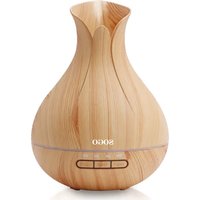
SS-21725 - Humidifier Sogo - Free user manual and instructions
Find the device manual for free SS-21725 Sogo in PDF.
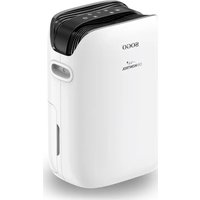


| Product type | Compact dehumidifier |
| Dehumidification capacity | 18 L/day |
| Supply voltage | AC220-240 V |
| Frequency | 50 Hz |
| Rated power | 350 W |
| Standby power consumption | < 0.8 W |
| Off mode power consumption | < 0.3 W |
| Operating modes | Standard, Rainy days, Sleep, Drying |
| Timer | 1 to 24 hours |
| Fan speed | Low and high |
| Humidity control | Adjustable from 30% to 90% and continuous mode (CO) |
| Defrost function | Automatic |
| Full tank protection | Automatic shutdown and audible alarm |
| Filter | Washable |
| Maintenance | Regular cleaning of filter and tank |
| Safety | Protection against sensor faults (codes E1 to E5) |
| Usage | Indoor only, on a flat and stable surface |
| Compliance | Compliant with EU 2023/826 (ecodesign regulation) |
| After-sales service | www.sogosat.com |
Frequently Asked Questions - SS-21725 Sogo
User questions about SS-21725 Sogo
0 question about this device. Answer the ones you know or ask your own.
Ask a new question about this device
Download the instructions for your Humidifier in PDF format for free! Find your manual SS-21725 - Sogo and take your electronic device back in hand. On this page are published all the documents necessary for the use of your device. SS-21725 by Sogo.
USER MANUAL SS-21725 Sogo

Download your manual
Download your manual
Declaration of conformity, Responsibility of Electronic products disposal, Importers Details and After-sales service on the last pages.
Continuous drainage
• Always read the instruction book carefully before using. - This manual can be downloaded from our web page www.sogo.es - Keep these instructions for future reference.
Safety instructions for the user
GENERAL PRECAUTIONS
General precautions during the use of electrical equipment
equipment
- Do not use the appliance for any other purpose than described in this manual.
- Do not use or store the appliance outdoors. • Always place the appliance on a flat and even surface.
- This product is intended for indoor, non-industrial, non-commercial and only for household use. Do not use the item outdoors or for any other purpose. Misuse or improper handling may cause problems in the appliance and cause injury to the user.
- The unit must be used only for the intended purposes. No liability is accepted for damages arising from improper use or wrong handling.
- Ensure that the voltage indicated on the nameplate matches the mains voltage before plugging in the appliance.
- Always remove the plug from the power socket when the appliance is not in use. Do not leave the appliance unattended when switched on.
- Close supervision is necessary when any appliance is being used by or near children.
- Before cleaning or storing your appliance, always unplug the appliance from the power supply and let it cool down.
- The device is not completely disconnected from the power source, even after it has been turned off. To disconnect it completely, disconnect it from the mains plug.
- The appliances are not intended to be operated by means of an external timer or separate remote-control system.

Restrictions on use to avoid personal injury
- Do not let the appliance operate unattended.
- Do not place or operate this appliance near water sources.
- Do not place or operate the appliance and its power cord on or near hot surfaces (e.g., stove plates) or open flames.
- Do not leave the power cord hanging from sharp edges and keep away from hot objects and flames. Do not wind the cord around the appliance and do not bend it.
- Never use accessories that are not recommended by the manufacturer.
- The use of accessories not recommended or sold by the appliance manufacturer may result in fire, electric shock or injury to persons.
- When you want to remove the plug from the wall contact, please do this at the plug itself and not by pulling on the cable or the appliance itself.
- To avoid electric shock, make sure your hands are dry before plugging or unplugging.
- Do not use the device with wet hands, on damp floors, or when the atmosphere is humid, as there is a risk of electric shock.
- While using the appliance, make sure that the power cord is not caught or crushed.
- Do not let the motor unit, cord, or plug get wet to protect against the risk of electric shock.
- Be careful when handling electrical appliances, as the surface of the heating element is subject to residual heat after use. Any misuse may cause potential injury to the user and may damage the appliance.
- Do not touch the outer surface of the appliance as it can get very hot during operation. Instead, use the handle or mitts.
- Never immerse the appliance or the plug in water or any other liquid. In the event of the appliance falling into water, disconnect it immediately from the mains supply and take it to an authorized service agent for repair before reusing.
- Do not use the appliance if it has fallen on the floor, if there are visible signs of damage, or if it has a leak.
- Do not use the appliance if the cable or plug is damaged. If the cord is damaged, it must be replaced only by the manufacturer, its service agent, or similarly qualified persons in order to avoid a hazard.
- In case of appliance malfunction, or if it has been damaged in any manner, return the appliance to the nearest authorized service facility for examination, repair, or adjustment.
- In case of hardware problems, do not attempt to repair the product yourself. Repairs should only be carried out by qualified technicians.

Restrictions on use when used with children and elders
- The appliance is not to be used by people (including children) with reduced physical, sensory, or mental capabilities, or lack of experience and knowledge, unless they have been given supervision or instruction.
• Children should be supervised to ensure that they do not play with
the appliance.
- Appliances can be used by people with reduced physical, sensory, or mental capabilities or lack of experience and knowledge if they have been given supervision or instructions concerning use of the appliance in a safe way and understand the hazards. • Children should not play with the appliance.
- This appliance can be used by children aged from 8 years and above and people with reduced physical, sensory or mental capabilities or lack of experience and knowledge if they have been given supervision or instruction concerning use of the appliance in a safe way and understand the hazards involved.
- Cleaning and user maintenance shall not be made by children.
- Keep the appliance and its cord out of reach of children.

Instructions to follow when using the appliance
- To avoid electric shock and fire, do not allow water, liquid or any flammable detergent to get into or to clean the product.
- Do not spray insecticide, perfume or other flammable spray around the product.
- Before connecting the power supply, please check whether the voltage of the product is consistent with the local power supply voltage.
- This product cannot replace normal ventilation, daily dust collection or oil pumping when cooking.
- Ensure the product is used and kept in a well-ventilated area.
- Leave at least 30cm of space on the back and sides of the product, and at least 50cm of space above the product when using.
- Ensure both the filter and its cover are properly installed before using.
- Do not insert fingers or other things into the air outlet/inlet to prevent physical damage or trouble.
- Please do not pull out the silicone rubber
- This appliance shall be installed according to local wiring regulations.
- Please pull off the plug before cleaning or storing the dehumidifier.
- Do not immerse the appliance in water or place it near a water source (e.g., swimming pool, etc.).
- Do not sit on this appliance.
- Drain the water tank as required.
- Do not use this appliance in a sealed environment to avoid fire hazards.
- Ensure the drain pipe is installed downward so that condensate can be discharged continuously.
3. TECHNICAL SPECIFICATIONS
| Voltage Frequency Power | ||
| AC220-240V 50Hz 350W | ||
This product complies with EU regulation 2023/826 under directive 2009/125/EC on ecodesign requirements.
Power consumption in off mode: <0.3W
Power consumption in standby mode: <0.8W
Time after which the product enters off mode: 0 min.
4. PARTS DESCRIPTION
- Power Cord
- Water Tank
- Water Shutoff Plug (Continuous Drain)
- Control Panel
- Filter Net
- Handle
5. CONTROL PANEL
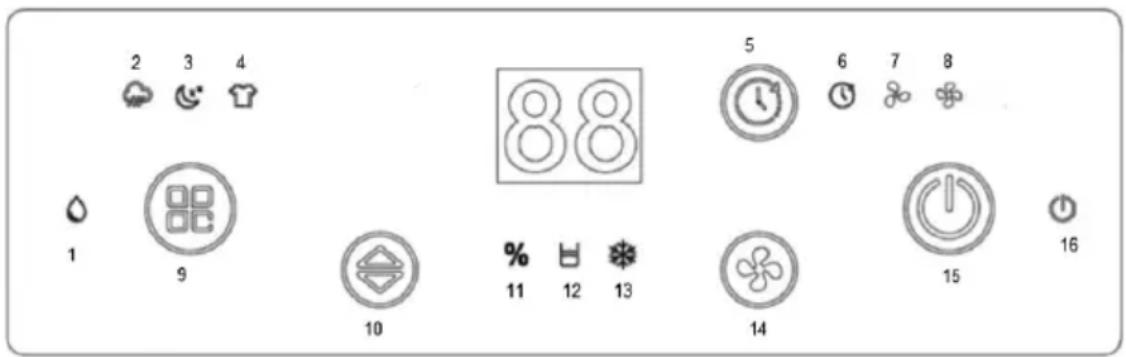
- Standard Dehumidification indicator light
- Rainy Days Dehumidification indicator light
- Sleeping Dehumidification indicator light
- Drying Dehumidification indicator light
- Timer Button
- Time indicator light
- Low Wind Speed indicator
- High Wind Speed indicator
- Mode Button
- Up/Down Button
- Humidity indicator light
- Water indicator light
- Defrosting indicator light
- Wind Speed Button
- Power Button
- Power indicator light
6. INSTRUCTIONS FOR USE
1. MODE BUTTON:
This button can be used to switch from one mode to another mode as detailed: I. Standard dehumidification mode, II. Rainy days dehumidification mode, III. Sleeping dehumidification mode, IV. Drying dehumidification mode.
I. Standard Dehumidification Mode
(1) Standard dehumidification indicator light turns on.
(2) Humidity level can be adjusted with button. (3) Wind speed as well can be adjusted with wind speed button. (4) Indicator light stays continuously illuminated while in dehumidification state.
II. Rainy Days Dehumidification Mode
(1) Rainy days dehumidification indicator light turns on. (2) Appliance enters into "AU" comfortable dehumidification mode. (3) Humidity level is automatically adjusted based on ambient temperature sensor. (4) Indicator light stays continuously illuminated while operating.
III. Sleeping Dehumidification Mode
(1) Standard dehumidification indicator light and sleeping indicator light both turn on. (2) Appliance is locked in low wind operation. (3) Settings cannot be changed. (4) Standard indicator light stays continuously illuminated during operation.
IV. Drying Dehumidification Mode
(1) Drying dehumidification indicator light turns on. (2) Appliance enters into "CO" continuous dehumidification state. (3) Locked in high wind speed, and humidity level can't be adjusted. (4) Indicator light stays continuously illuminated while in use.
2. ON-OFF BUTTON:
Turn the appliance on or off with the power button. After the appliance starts working, the power indicator light is always on, displaying the current humidity. The initial default humidity is the standard dehumidification mode and "CO" continuous dehumidification state; the compressor should start immediately to start dehumidification. After the appliance is shut down, the fan continues to work for 30 seconds and then stops.
3. TIMER BUTTON:
Timer setting function.
A. In the power-on mode, press the timer button to set the time. In the shutdown or standby mode, press the timer button to set the timing, which is the timing startup. B. Timer range: 01 ~ 24 hours, timing setting sequence: 00 → 01 → 02 → ... → 23 → 24 → 00 in cycle. C. When the timer button is pressed, the mode changes continuously in the above cycling sequence with a frequency of 0.5 seconds. D. When the timer is set to start, the timer is set and the time is displayed. When the timer is set to shut down, the timer is set and the humidity is displayed after 5 seconds. E. Timing boot can set the status after booting.
4. UP/DOWN BUTTON:
With the help of buttons, we can adjust humidity in the sequence: CO → 30% → 35% → ... → 90% → AU → CO, in a cycle of every 0.5 seconds. Default is CO continuous at first startup.
5. WIND SPEED BUTTON:
The appliance can adjust the wind speed through the wind speed button.
7. FUNCTION INSTRUCTION
1. HUMIDITY AUTOMATIC CONTROL
A. When unit is set into "CO" (continuous) operation dehumidification mode, then dehumidifier will continue to operate (compressor and fan operate) regardless of the humidity at that time. B. If the indoor humidity is higher than or equal to 3% of the setting humidity, the compressor will start to operate for dehumidification, the compressor and fan will operate, and the compressor operation mode indicator will be on. C. After dehumidification, when the humidity drops below 2% of the setting humidity, the compressor stops dehumidification, the mode indicator light starts flashing, and the compressor enters into three-minutes protection mode. D. When dehumidifier stops dehumidification and if the indoor humidity rises to higher than or equal
to over 3% of the setting humidity, and the compressor has passed the three-minute protection state, the compressor will restart the dehumidification process.
E. According to the above cycling operation, the indoor humidity can be maintained at the setting humidity.
2. COMFORT MODE (DISPLAY "AU")
- Controller stops if room temperature < 5°C.
- At 5°C ≤ Temp < 20°C: Set humidity automatically to 60%.
- At 20°C ≤ Temp ≤ 27°C: Set humidity automatically to 55%.
- If Temp > 27°C: Set humidity automatically to 50%.
3. FULL WATER PROTECTION
If a full water condition persists for 3 seconds, the controller stops working while the fan continues to run for 30 seconds. All other functions turn off, the full water indicator lights up, and the buzzer sounds 15 times. Pressing any button immediately stops the buzzer. When the full water condition is resolved, the system returns to standby mode.
4. DEFROST FUNCTION:
A. While in defrosting mode, the compressor shuts down, the fan is defrosted with high air, and the defrosting indicator light is always on. B. Room temperature < 16°C:
Temp < 5°C: Appliance stops;
5°C ≤ Temp < 12°C: Compressor runs 30 min, defrost 10 min cycle;
12°C ≤ Temp < 16°C: Compressor runs 45 min, defrost 10 min cycle.
C. Room temperature < 16°C:
When the compressor runs for 45 minutes, check the coil temperature. If the coil temperature is less than -2°C, stop the compressor for defrosting for 10 minutes.
5. COMPRESSOR DELAY PROTECTION:
A. Every time the compressor is turned on, it should be allowed to function immediately. B. Once the compressor shuts down, it must not be started again until at least 3 minutes have passed.
6. SENSOR FAULT HANDLING:
| Screen Display | Reason of Fault State of Appliance | |
| E1 Temperature and humidity sensor fault not affect normal use | ||
| E2 | Evaporator coil sensor short circuit or open circuit | not affect normal use |
| E3 Full water alarm | No operation, drainage treatment | |
| E4 | The temperature of the product is higher than 40 °C or lower than 5 C | No operation |
| E5 | Operate for 8 hours, shutdown and rest, continue operating automatically in 10 minutes | Proceed according to procedure |
Water tank drainage
When the water tank is full, the indicator light will turn on. The buzzer will sound 15 times to warn the user, and then the appliance will stop automatically. The water in the tank must be emptied in order to restore the functioning of the appliance.
Water tank emptied
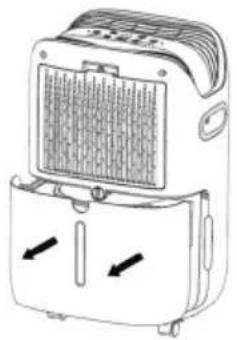
- Emptied water from the tank
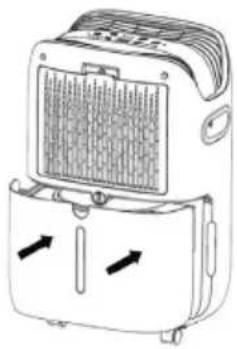
Note: Do not remove the float from the water tank. If the float of the water tank is removed, the water full sensor will not be able to detect the water level normally, which will affect the appliance's functioning.
- If the water tank is dirty, clean it with cold or warm water. Do not use detergent, steel wool, chemical dust cloth, gasoline, benzene, thinner, or other solvents, because they might damage the water tank and cause water leakage.
- Close the water tank tightly with both hands when placing it back. If the water tank is not placed properly, the full water sensor will still be activated, but the dehumidifier won't work.
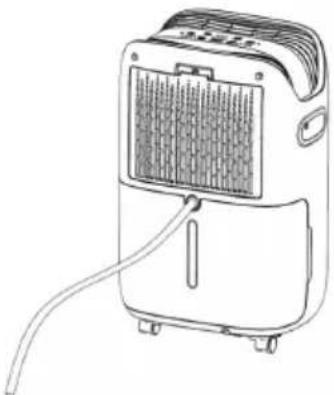
Continuous drainage
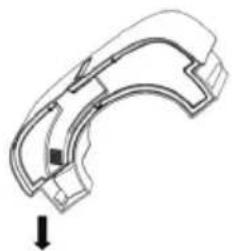
This dehumidifier has a continuous drain hole. First, remove the water plug of the drain hole and keep it.
Then insert the drain pipe into the drain hole of the middle partition plate and straighten out the drain pipe.
Finally, the water in the appliance can be drained through the continuous drain hole.
8. MAINTENANCE
CLEANING & STORAGE
- Empty the water in the tank.
- Roll up the power cord.
- Clean the filter.
- Wipe the body with a soft, slightly wet cloth.
- Place in a fresh and dry environment.
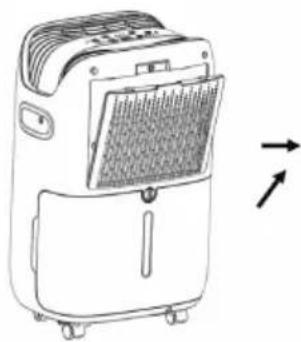
1. Filter Cleaning
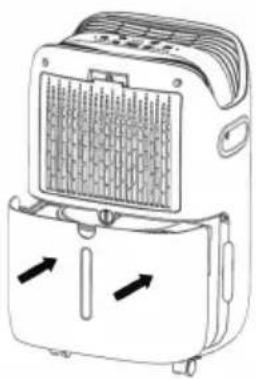
Remove the filter first.
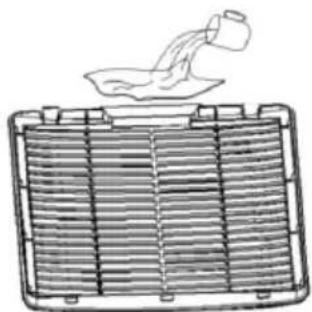
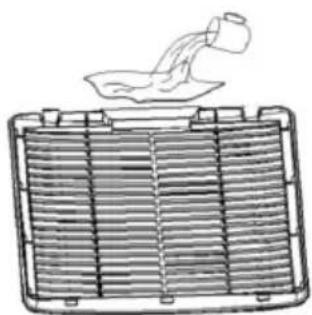
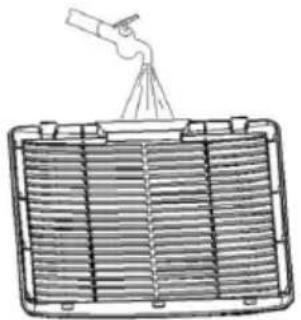
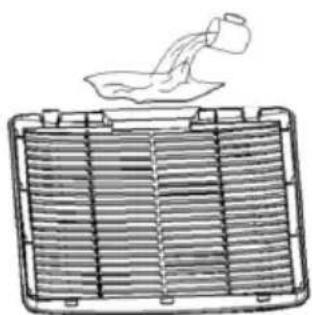
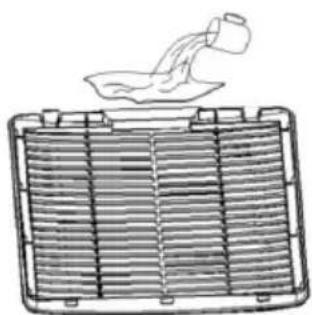
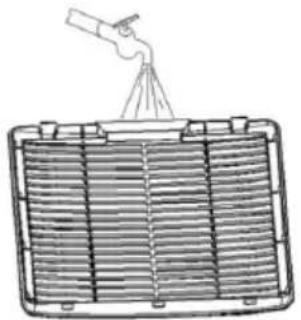
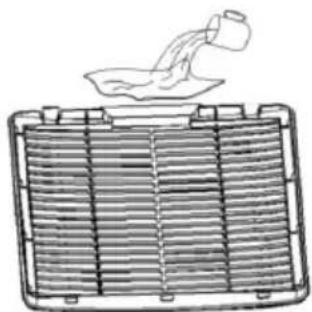
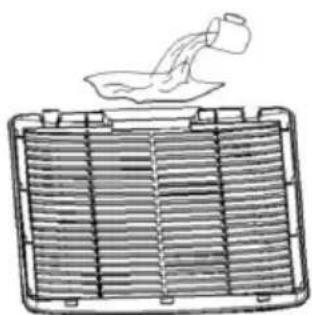
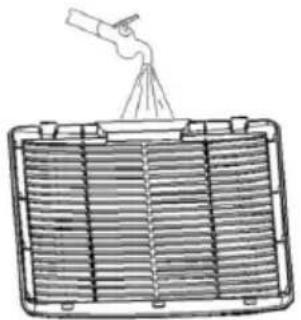
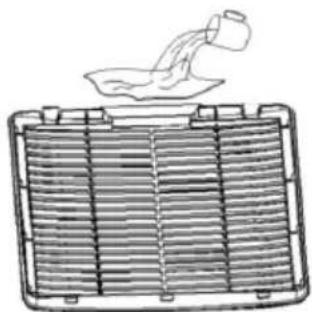
2. Clean the filter
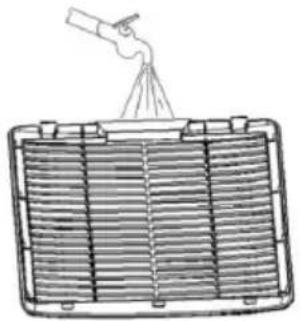
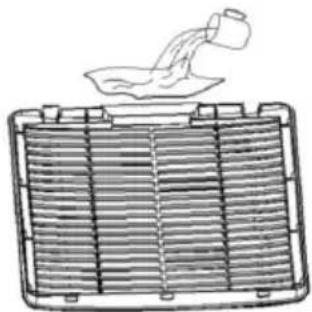
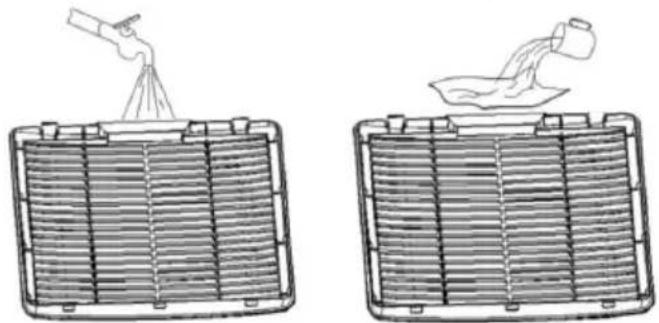
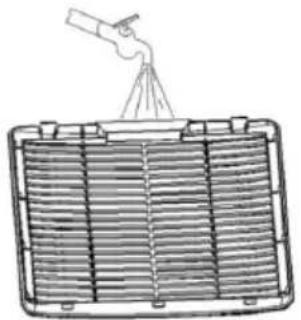
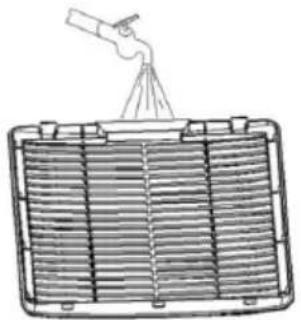
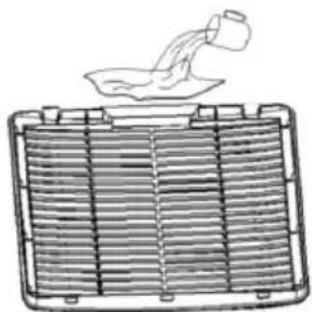
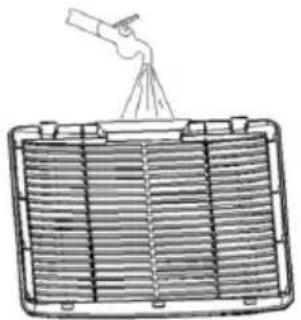
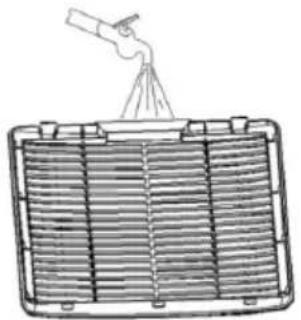
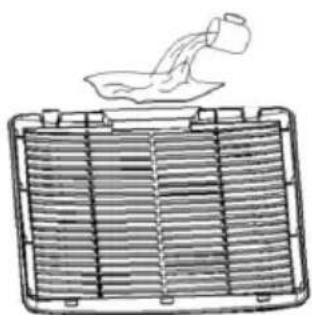
Use a vacuum cleaner to gently absorb the dust on the surface of the filter. If the filter is very dirty, wipe it with warm water and soft detergent and let it cool down completely.
3. Filter Install
Insert the filter into the appliance slowly, and then push the two hooks of the filter into place.
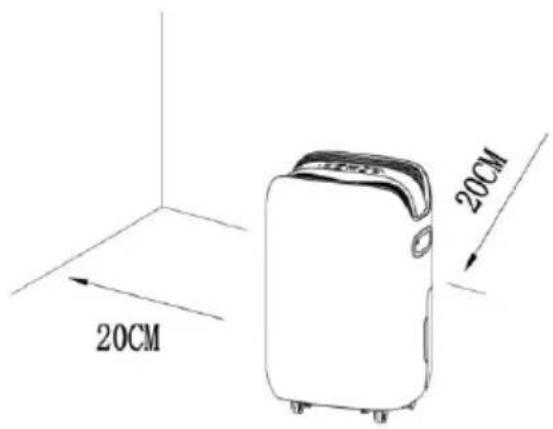
Space distance
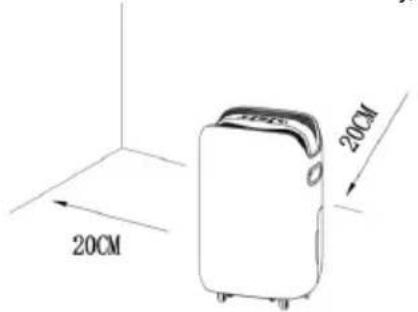
When the dehumidifier is working, make sure that the minimum spacing around it is as shown in the figure below.
- TROUBLESHOOTING
| Fault Description | Potential Reason of Fault Solution | |
| No operation | Is the power cord properly connected? | Connect well the plug and socket |
| Is the full water indicator on? (water tank is full or not in place) | Drain the water from the tank and put in place | |
| Is the room temperature above 40°C or below 5°C? | The protection device starts, and the appliance can not work | |
| The dehumidification function can not be started | Is the filter blocked? | Clean the filter according to the "dehumidifier cleaning instructions" |
| Is the air inlet or outlet blocked? | Remove the obstruction from the air inlet or outlet | |
| No wind entering is | the filter blocked?. | Clean the filter according to the "dehumidifier cleaning instructions" |
| Big noise when operating | Is the appliance tilted? | Move the appliance to a flat and firm position. |
| Is the filter blocked? | Clean the filter according to the "dehumidifier cleaning instructions" |

REGARDING:
1. Press
Continuous drainage
Distance
Continuous drainage
3. Install filter
Continuous drainage
2. Clean the filter
3. Install filter
- Drained water from the tank
2. Clean the filter
3. Install filter
- Gently press both sides of the tank and pull it out with both hands.
Continuous water drainage
- Gently press both sides of the tank and pull out the tank with both hands.
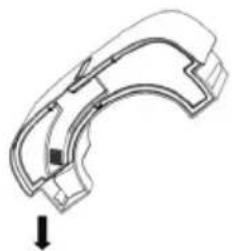
Note: Do not remove the float mechanism from the water tank. If the float is removed, the full tank sensor will not be able to detect the water level properly, which will affect the operation of the device.
- If the water tank is dirty, clean it with cold or warm water. Do not use detergents, steel wool, chemical dust cloths, gasoline, benzene, thinners, or other solvents, as this may damage the water tank and cause leakage.
- Firmly close the water tank with both hands when returning it to its place. If the tank is not properly installed, the full tank sensor will still be activated, but the dehumidifier will not work.
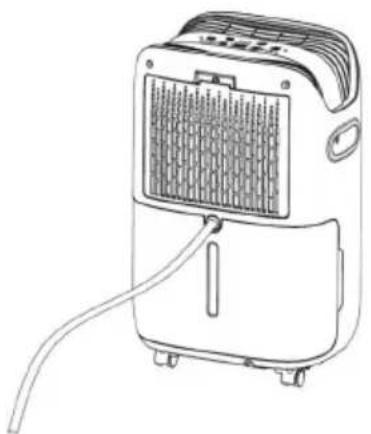
Continuous water drainage
This dehumidifier has a continuous water drainage outlet. First, remove the plug from the drainage outlet and keep it safe. Then insert the drain hose into the drainage outlet on the middle partition and align the hose. Finally, water from the device can be drained through the continuous drainage outlet.
8. MAINTENANCE
CLEANING AND STORAGE
1- Empty the water from the tank. 2- Wind the power cord. 3- Clean the filter. 4- Wipe the body of the device with a soft, slightly damp cloth. 5- Store the device in a cool, dry place.
1. Cleaning the filter First, remove the filter.
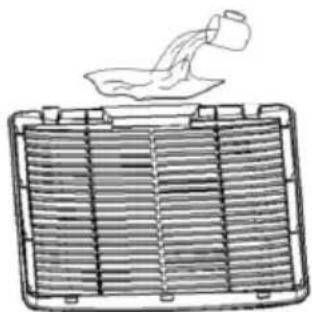
2. Clean the filter
Use a vacuum cleaner to gently vacuum the dust off the filter surface. If the filter is very dirty, wash it with warm water and a mild detergent, and let it dry completely.
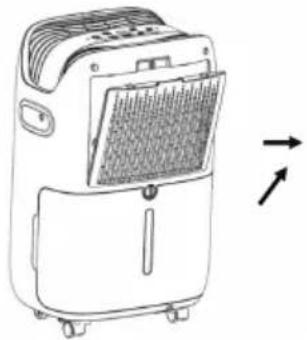
3. Inserting the filter
Slowly insert the filter into the device, then press the two filter hooks into place.
Clearance around the device
When the dehumidifier is operating, ensure that the minimum clearance around it is as shown in the figure below.
9. TROUBLESHOOTING
| Opis problema Mogući uzrok problema Rješenje | ||
| Ne radi | Je li kabel za napajanje pravilno priključen? | Pravilno spojite utikač i utičnicu. |
| Je li uključen indikator punog spremnika? (spremnik je pun ili nije pravilno postavljen) | Ispraznite vodu iz spremnika i pravilno ga postavite. | |
| Je li sobna temperatura iznad 40°C ili ispod 5°C? | Zaštitni uređaj je aktiviran i uređaj ne može raditi. | |
| Funkcija odvlaživanja se ne može pokrenuti | Je li filter začepljen? | Očistite filter prema uputama za čišćenje odvlaživača. |
| Je li ulaz ili izlaz zraka blokiran? | Uklonite prepreku sa ulaza ili izlaza zraka. | |
| Nema protoka zraka Je | li filter začepljen? | Očistite filter prema uputama za čišćenje odvlaživača. |
| Velika buka tijekom rada | Je li uređaj nagnut? | Pomaknite uređaj na ravnu i čvrstu površinu. |
| Je li filter začepljen? | Očistite filter prema uputama za čišćenje odvlaživača. | |

2. COMFORT MODE (DISPLAY "AU")
- The regulator stops if the room temperature is < 5°C.
- If 5°C ≤ Temp < 20°C: Automatically set humidity to 60%.
- If 20°C ≤ Temp ≤ 27°C: Automatically set humidity to 55%.
- If Temp > 27°C: Automatically set humidity to 50%.
3. FULL WATER PROTECTION
Continuous drainage
2. Clean the filter
Continuous drainage
DECLARATION OF CONFORMITY
DECLARATION OF CONFORMITY
This device complies with EU Low Voltage Directive 2014/35/EC.
Electromagnetic Compatibility Directive 2014/30/EU. Directive 2015/863/EU on the restriction of the use of certain hazardous substances in electrical and electronic equipment.
Directive 2009/125/EC on the eco-design requirements applicable to energy-related products.

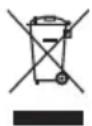
This symbol on the product or on the packaging indicates that this product cannot be disposed of as normal rubbish or household waste. All electrical, electronic equipment and battery-operated units must be recycled in a proper manner and according to local municipal laws. You can recycle them by taking them to government-authorized disposal centers or specialized bins, which you can find in any nearby large supermarkets, electronics or electro-domestic products stores, or malls that have these types of facilities available.
Designed by: SOGO based on European quality standards Imported by: Sanysan Appliances S.L, NIF: B98753056, C/ Barcas 2, 2, 46002 Valencia, Spain Product manufactured in CHINA. After-sales service: www.sogosat.com sogosat@sogosat.com / 0034 902 222 161
- CONTINUOUS DRAINAGE
- SAFETY INSTRUCTIONS FOR THE USER
- GENERAL PRECAUTIONS
- GENERAL PRECAUTIONS DURING THE USE OF ELECTRICAL EQUIPMENT
- EQUIPMENT
- RESTRICTIONS ON USE TO AVOID PERSONAL INJURY
- RESTRICTIONS ON USE WHEN USED WITH CHILDREN AND ELDERS
- INSTRUCTIONS TO FOLLOW WHEN USING THE APPLIANCE
- TECHNICAL SPECIFICATIONS
- PARTS DESCRIPTION
- CONTROL PANEL
- INSTRUCTIONS FOR USE
- MODE BUTTON
- STANDARD DEHUMIDIFICATION MODE
- RAINY DAYS DEHUMIDIFICATION MODE
- SLEEPING DEHUMIDIFICATION MODE
- DRYING DEHUMIDIFICATION MODE
- ON-OFF BUTTON
- TIMER BUTTON
- UP/DOWN BUTTON
- WIND SPEED BUTTON
- FUNCTION INSTRUCTION
- HUMIDITY AUTOMATIC CONTROL
- COMFORT MODE (DISPLAY "AU")
- FULL WATER PROTECTION
- DEFROST FUNCTION
- COMPRESSOR DELAY PROTECTION
- SENSOR FAULT HANDLING
- WATER TANK DRAINAGE
- WATER TANK EMPTIED
- MAINTENANCE
- CLEANING & STORAGE
- FILTER CLEANING
- CLEAN THE FILTER
- FILTER INSTALL
- SPACE DISTANCE
- REGARDING
- PRESS
- DISTANCE
- INSTALL FILTER
- CONTINUOUS WATER DRAINAGE
- CLEANING AND STORAGE
- CLEANING THE FILTER FIRST, REMOVE THE FILTER
- INSERTING THE FILTER
- CLEARANCE AROUND THE DEVICE
- TROUBLESHOOTING
- DECLARATION OF CONFORMITY
Brand : Sogo
Model : SS-21725
Category : Humidifier