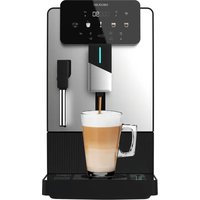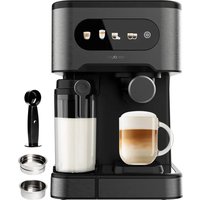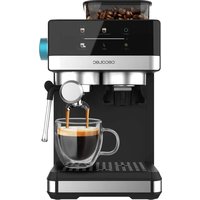
Power Espresso 20 Grind - Coffee machine CECOTEC - Free user manual and instructions
Find the device manual for free Power Espresso 20 Grind CECOTEC in PDF.


| Product type | Coffee machine with built-in grinder |
| Brand | Cecotec |
| Model | Power Espresso 20 Grind |
| Power supply | 220-240 V ~ 50/60 Hz, 1450 W |
| Water tank capacity | 1.5 L (estimated) |
| Bean hopper capacity | Approximately 200 g (estimated) |
| Pump pressure | 20 bar (estimated) |
| Housing material | Stainless steel and plastic |
| Main functions | Hot and cold espresso, steam for milk, hot water, built-in grinder |
| Preparation types | Single espresso, double, cappuccino, latte, cold coffee |
| Grind adjustment | Manual, rotary selector (levels 5-10) |
| Flow adjustment | Customizable for single and double (30-400 g) |
| Heating system | Thermoblock (estimated) |
| Screen / Display | Touch icons with indicators |
| Automatic shut-off | Yes, after 25 minutes of inactivity |
| Descaling function | Alert after 500 cycles, built-in procedure |
| Maintenance and cleaning | Regular cleaning of removable parts, periodic descaling |
| Safety | Overheat protection, automatic shut-off, filter holder locking |
| Provided spare parts | Filter holder, single and double filters, measuring spoon with tamper, funnel |
| Repairability | Official Cecotec technical service, do not disassemble yourself |
| Dimensions (estimated) | 30 x 25 x 35 cm |
| Weight (estimated) | 5 kg |
Frequently Asked Questions - Power Espresso 20 Grind CECOTEC
User questions about Power Espresso 20 Grind CECOTEC
0 question about this device. Answer the ones you know or ask your own.
Ask a new question about this device
Download the instructions for your Coffee machine in PDF format for free! Find your manual Power Espresso 20 Grind - CECOTEC and take your electronic device back in hand. On this page are published all the documents necessary for the use of your device. Power Espresso 20 Grind by CECOTEC.
USER MANUAL Power Espresso 20 Grind CECOTEC
natural_image
Exterior view of a modern coffee machine (no signage or text visible on the device body)-
Parts and components 16
-
Before use 16
-
Operation 17
-
Cleaning and maintenance 22
-
Troubleshooting 23
-
Copyright 25
-
Simplified EU Declaration of Conformity 25
SOMMAIRE
F Rubber steam wand grip
G Steam / hot water wand
H Steam / hot water outlet
I Removable drip tray
J Float cover (full drip tray indicator)
K Drip tray
L Water tank lid
M Water tank handle
N Water tank
O Portafilter holder
P Portafilter handle
Q Filters (for single and double espresso)
R Measuring spoon and tamper
S Funnel
T Grinding level knob
NOTE:
The graphics in this manual are schematic representations and may not exactly match the product.
2. BEFORE USE
- This appliance comes in a packaging designed to protect it during transport. Take the appliance out of its box and remove all packaging materials. You can keep the original box and other packaging materials in a safe place to prevent damage to the appliance if you
need to transport it in the future. If you wish to dispose of the original packaging, make sure all items are recycled properly.
- Check that all parts and components are included and in good condition. If there is any piece missing or in bad conditions, contact the official Cecotec Technical Support Service Immediately.
Box content
- Coffee machine
- Funnel
- Double-cup filter
- Single-cup filter
- Measuring spoon
- Instruction manual
- Do not remove the product's serial number in order to keep proper traceability if technical assistance is required.
Cleaning the coffee machine before first use
To ensure the first cup of coffee has an excellent taste, it is important to clean the coffee machine before its first use. Follow the steps below:
- Pour filtered water into the water tank, ensuring the water level does not exceed the "MAX" mark on the tank. Then close the water tank lid.
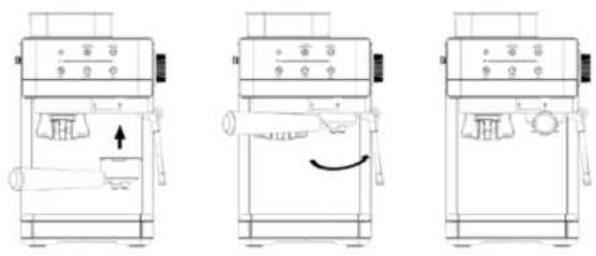
- Place the double-cup filter into the portafilter. Make sure the portafilter is aligned with the machine's groove. Insert the portafilter into the coffee machine from the "UNLOCK" position and turn it firmly counterclockwise until it reaches the "LOCK" position. Fig. 2
- Connect the coffee machine to a power supply and press the power touch icon. Then press the hot espresso touch icon for the coffee machine to preheat and enter standby mode.
- Turn the steam/hot water knob to the hot water position. Make sure the steam/hot water wand is aligned with a cup or container to avoid burns.
- Press the single / double espresso touch icon. Be careful and keep all body parts away from beneath the portafilter. Use a cup or container to collect the water and avoid burns.
- Turn the portafilter clockwise to the "UNLOCK" position, remove the coffee filter, and clean both the portafilter and filter with lukewarm water.
3. OPERATION
Make sure the level of filtered water in the tank is between the "MIN" and "MAX" marks.
ENGLISHENGLISH
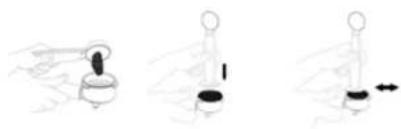
Brewing with ground coffee. Fig. 3
- Fill the filter with fine ground coffee to about 2 mm from the edge (do not overfill).
-
Use the tamper to compact the ground coffee uniformly.
-
Clean any excess coffee from the rim to ensure proper fit under the brew head.
Cold extraction
- Press the power touch icon once to start heating.
- Press the cold espresso touch icon to put the coffee machine in standby mode. The grinding touch icon will light up, allowing you to prepare coffee directly.
Note: Cold extraction does not heat the water. You can add cold water to the tank to obtain a better result. Please note that you will not be able to use hot water or steam while cold coffee is being made since the heating element is turned off.
Hot extraction
- Plug the coffee machine to a power supply and press the power touch icon to start preheating.
- Press the hot espresso touch icon until the entire machine is fully preheated and enters standby mode.
Note: The coffee, hot water and steam function cannot be performed simultaneously.
Preheating
- Press the power touch icon once to start the heating process
- Press the hot espresso touch icon until the entire coffee machine is completely preheated and enters standby mode. At the same time, the grinding touch icon will light up.
Standby mode
When the coffee machine is fully preheated, the power, hot espresso, grinding, single/double espresso and steam touch icons will illuminate, indicating that all functions are available.
Single espresso brewing
- Place the single-cup filter in the portafilter and fill it with about 7 g of ground coffee.
- Compact the coffee with the tamper and place the portafilter in the coffee machine from the "UNLOCK" position, turning it counterclockwise to the "LOCK" position.
- Place a cup in the drip tray and press the single/double espresso touch icon once. The light of the single/double espresso touch icon will be white. The extraction will stop automatically when 40 ml is reached.
Double espresso brewing
- Place the double-cup filter in the portafilter and fill it with about 14 g of ground coffee.
- Compact the coffee with the tamper and place the portafilter in the coffee machine from the "UNLOCK" position and turn it to the "LOCK" position.
- Place a cup of coffee in the drip tray, press the single/double espresso touch icon twice. The light of the single/double espresso touch icon will be red. The extraction will stop automatically when 80 ml is reached.
Flow rate adjustment
For single espresso
- Press and hold the single/double espresso touch icon for 5 seconds to enter the flow rate adjustment mode. The single/double espresso touch icon will illuminate with a white light, and will remain lit.
- Press the single/double espresso touch icon again to brew coffee, the white light of a cup will flash at the same time. When the required coffee flow rate is reached, press the Single/Double Espresso touch icon again to stop brewing and the setting is complete.
The system will register the adjustment made by the user. When the user uses it again, the flow rate of the single cup will be adjusted according to the last flow rate set by the user. The setting range for a single cup: from 30 g to 400 g.
For double espresso
- Press and hold the single/double espresso touch icon for 10 seconds to enter the flow rate adjustment mode. The single/double espresso touch icon will illuminate with a red light, and will remain lit.
- Press the single/double espresso touch icon again to brew coffee, and the red double cup light will flash at the same time. When the required coffee flow rate is reached, press the Single/Double Espresso touch icon again to stop brewing and the setting is complete.
The system will register the adjustment made by the user. When the user uses it again, the flow rate of the single cup will be adjusted according to the last flow rate set by the user. Adjustment range for double cup: from 30 g to 400 g.
Hot water preparation
- Fill the tank with purified water, without exceeding the "MAX" mark.
- Connect the coffee machine to the mains and wait for the preheating to finish.
- Place a cup under the steam/hot water wand beforehand.
- When preheating is complete, turn the steam/hot water knob to the "ON" position.
- Hot water will then come out of the steam/hot water wand.
- When the desired amount of hot water is obtained, turn the knob to the off position.
ENGLISHENGLISH
Milk frothing
The steam wand can be used to froth milk or prepare hot beverages such as drinking chocolate and water.
- Press the steam touch icon, the steam touch icon will ash. When the steam touch icon is steady, preheating is nished.
- Prepare the espresso according to the above instructions.
- Fill a jug with about 100 ml of milk for each cappuccino you want to prepare. It is recommended to use cold whole milk.
Note: When choosing the size of the jug, it is recommended that the diameter should not be less than 70 ± 5 mm and taking into account that milk increases in volume 2 times, make sure that the height of the jug is sufficient.
- Insert the steam/hot water wand into the milk about two cm, then turn the steam/hot water knob to the " " position, steam will come out of the steam outlet. Froth the milk by moving the container up and down.
Note: When steaming, the portal iter must be mounted in position. Before frothing the milk, let the steam escape for 10 seconds.
-
When the desired foam is reached, turn the knob to the “” position.
-
Pour the frothed milk into the prepared espresso, now the cappuccino is ready.
Note: After frothing the milk, if you wish to prepare coffee again, the machine must be cooled down.
After pressing the single/double Espresso touch icon or the single/dnuble Espresso touch icon, if the temperature is too high, the light will ash rapidly and warn you. The machine should then be cooled as follows:
- Place an empty cup under the steam/hot water wand, turn the steam/hot water knob to the “” position and hot water will come out to cool down the machine.
- When it has finished cooling, the hot water will stop coming out, turn the steam/hot water knob to the “” position and you will then be able to prepare espressos again.
Coffee grinding
Grinding coffee beans is a crucial step in the espresso brewing process, and repeated practice is recommended.
This product has a function to grind coffee beans. Before using this function, make sure that all parts are installed correctly.
- Add an adequate amount of coffee beans to the coffee bean hopper. To avoid humidity and oxidation of the coffee beans, which can affect the grind, the malavour of the coffee and the extraction effect, do not put too many coffee beans in the hopper.
- Place the portaliter in the portaliter holder located on the left side of the machine
- Press the grinding touch icon to start grinding the grains. When the set amount is
reached, the grinding function stops automatically. To stop grinding, press this touch icon again.
The correct ground co-ee should appear as thick and ne as salt. If the co-ee beans are ground too ne and the water nw is blocked, it can cause the extracted co-ee liquid to be intermittent or unable to be extracted. If the co-ee beans are ground too coarsely and the water owns through the ground co-ee too quickly, it will not be able to effectively extract the oil and aromatic components of the co-ee, which will a ect the avour.
4. Adjust the grind level to 5-10 by turning the grind size selector.
Dose of ground co ee:
- One cup = 7 g of ground coffee.
- Twn cups = 14 g of ground coffee.
Note: You can adjust the thickness of the ground co-ee by adjusting the grinding gear and there may be differences in the variety, degree of roast, freshness and quality of the co-ee beans you use. Therefore, it is necessary to correctly set and adjust the size and grinding gear to achieve the best extraction effect. - Compact the coffee with the tamper.
DIY grinding adjustment
The default grinding time is 15 seconds.
Warning: The maximum continuous use time is 3 minutes. If it exceeds 3 minutes of continuous operation, the grinding touch icon will ash as a warning, and the grinder will forcibly stop for 6 minutes. In order to continue using the grinder it will be necessary to unplug and plug in the co-ee machine or restore the factory settings. After the interval time reaches 6 minutes, the system will automatically lift this restriction, and the grinding system will return to normal.
- Press and hold the grinding touch icon for 5 seconds for the co-ee machine to enter the DIY grind time setting.
- Automatically, after 5 seconds, the grinder will start to grind coffee, and it will be necessary to press the grinding touch icon again to stop the grinder and memorise the time it has been running. The next time the grinding touch icon is pressed, the previously memorised time will run. If the touch icon is not pressed to stop grinding, the machine will grind for a maximum of 20 seconds. You can return to the initial time by restoring the factory settings.
Resetting to factory settings
Press and hold the hot espresso touch icon and the cold espresso touch icon simultaneously
ENGLISHENGLISH
for 3 seconds. Both touch icons light up and beep once, which means that the factory settings have been reset. Press the power touch icon to turn on the coffee machine.
Automatic shut-off function
A. If the hot water reaches about 200 ml, the electromagnetic pump will stop automatically, and the indicator light will flash rapidly.
B. If the steam time reaches 180 seconds, the electromagnetic pump will stop automatically.
C. If there is no operation after 25 minutes, the coffee machine will switch to automatic shut-off mode. All touch icon lights will turn off. To reactivate the machine, press the power touch icon, the machine will return to standby mode.
4. CLEANING AND MAINTENANCE
Unplug the coffee machine from the mains and allow it to cool down completely before cleaning.
Regularly clean the housing of the coffee machine with a moisture-resistant sponge and regularly wipe the water tank, drip tray and drip plate dry.
Note: Do not clean with alcohol or solvent cleaner. Do not immerse the coffee machine in water for cleaning.
Remove the portafilter by turning it clockwise and dispose of the coffee residues inside. You can use a cleaning agent if needed, rinsing it well with running water afterwards.
Clean all accessories in water and dry them thoroughly.
Descaling function
To ensure that your coffee machine works efficiently, that the internal pipes are clean and that the coffee flavour is optimal, the coffee machine needs to be descaled, cleaned and maintained periodically.
When the appliance has performed 500 cycles, all the touch icons will flash for 5 times, which means that the coffee machine needs to be descaled, and then the appliance will return to its normal state.
The descaling warning will be displayed every time you switch on the coffee machine if you do not cancel it.
a. When the descaling warning appears, fill the water tank with a specific descaling product for coffee machines.
b. Place a 500 ml container under the coffee spout and another 500 ml container under the
steam/hot water wand and use the hot water and brewing functions to decalcify.
c. Once descaling has been completed, you must cancel it. To cancel descaling, press and hold the single/double espresso touch icon and the steam touch icon simultaneously for 3 seconds.
- TROUBLESHOOTING
| Problem | Possible cause | Possible solution |
| Espresso drips too slowly. | The coffee is ground too fine or has been over-tampered. | Choose slightly coarser ground coffee. |
| Water leaks from the bottom of the coffee machine. | The coffee machine does not work properly. | Please contact Cecotec's Official Technical Support Service. |
| There is too much water in the drip tray. | Clean the drip tray. | |
| Water leaks from the edge of the filter. | There is some ground coffee on the edge of the filter. | Make sure that there is no coffee residue on the edge of the filter. |
| The coffee tastes sour. | The coffee machine has not been properly cleaned. | Clean the coffee machine. |
| The coffee is in bad condition. | Use freshly ground coffee and store it in a cool, dry place. | |
| The coffee machine does not work properly. | The plug is not properly inserted into the socket. | If the appliance still does not work, contact Cecotec's Official Technical Support Service. |
ENGLISHENGLISH
| Problem | Possible cause | Possible solution |
| Steam does not foam. | The steam touch icon is not illuminated. | Only after the steam touch icon is illuminated can steam be used for frothing. |
| The container is too large, or the shape is not suitable. | Use a higher and narrowercontainer. | |
| You have used skimmed milk. | Use cold whole or semi-skimmed milk. | |
| The steam touch icon is flashing rapidly. | Steam has been applied for 180 seconds, and the steam/hot water knob has not been set to the initial position 'OFF' | Set the knob to the 'OFF' position. |
| The steam touch icon and the single/double espresso touch icon are flashing rapidly. | 200 ml of hot water has been prepared, and the steam/hot water knob has not been set to the initial position 'OFF' | Set the knob to the 'OFF' position. |
| The steam/hot water knob does not return to the initial position 'OFF' after the coffee machine has lowered its temperature. | Set the knob to the 'OFF' position. | |
| The boiler's temperature is too high. | Drop hot water through the steamer to reduce the temperature. | |
| When the coffee machine is switched on, the steam/hot water knob is not in the 'OFF' position. | Set the knob to the 'OFF' position. | |
| All touch icons flash 5 times. | Descaling warning. | Follow the instructions to descale first and then cancel the descaling. |
Do not disassemble the coffee machine yourself if you cannot find the cause of the fault, contact Cecotec's Official Technical Support Service.
6. COPYRIGHT
The intellectual property rights over the texts in this manual belong to CECOTEC INNOVACIONES, S.L. All rights reserved. The contents of this publication may not, in whole or in part, be reproduced, stored in a retrieval system, transmitted, or distributed by any means (electronic, mechanical, photocopying, recording or similar) without the prior authorization of CECOTEC INNOVACIONES, S.L.
7. SIMPLIFIED EU DECLARATION OF CONFORMITY
CE Cecotec Innovaciones hereby declares that this appliance complies with the essential requirements and other relevant provisions of the regulations applicable in the European Union. This appliance has been designed, manufactured and tested in compliance with required safety and quality standards. The full text of the EU Declaration of Conformity can be found on the following website: https://cecotec.es/es/Information/declaration-of-conformity
FRANÇAISFRANÇAIS
1. PIÈCES ET COMPOSANTS
Img.1
Fig./Img./Abb./Afb./Rys./Orb 1
natural_image
Three line drawings of a sewing machine with different front and side views, showing internal components and motion indicators (no text or symbols)Fig./Img./Abb./Afb./Rys./Orb 2
natural_image
Three-step diagram showing a hand holding a small object, with no visible text or symbolsFig./Img./Abb./Afb./Rys./Orb 3
www.cecotec.es