C31TRI4KDPDPRO100 - Docking station i-TEC - Free user manual and instructions
Find the device manual for free C31TRI4KDPDPRO100 i-TEC in PDF.


| Product Type | USB-C Docking Station |
| Brand | i-TEC |
| Model | C31TRI4KDPDPRO100 |
| Dimensions (L x W x H) | 113 x 113 x 31.2 mm |
| Weight | 340 g |
| Power Supply | USB-C PD power adapter (not included); up to 100 W input, internal consumption 5-10 W |
| Host Connectivity | Integrated 1 m USB-C cable (USB-C, USB4, Thunderbolt 3/4 compatible) |
| Video Ports | 2x DisplayPort (DP++), 1x HDMI |
| Supported Resolutions (DP 1.4 host with DSC) | 1 monitor: up to 5K/60 Hz (DP) or 4K/144 Hz (DP) or 1440p/144 Hz (HDMI); 2 monitors: up to 2x 4K/60 Hz; 3 monitors: up to 3x 1080p/60 Hz |
| USB Ports | 1x USB-C 3.2 Gen.2 (10 Gbps), 1x USB-C 3.2 Gen.2 (10 Gbps) with PD, 3x USB-A 3.2 Gen.1 (5 Gbps), 2x USB 2.0 |
| Network Port | 1x Ethernet GLAN RJ-45 |
| Audio Port | 1x 3.5 mm combo jack (mic input/headphone output) |
| Additional Features | LED backlit power button; MAC address cloning (via i-tec Docker Pro software); Kensington lock support |
| Compatible Operating Systems | Windows 10/11, macOS, iPadOS, Android*, Chrome OS, Linux |
| Maintenance and Cleaning | Disconnect the device, clean with a soft dry cloth. Do not use liquid or abrasive products. |
| Safety | Do not expose to moisture or extreme temperatures; avoid stressing the USB-C cable; turn off the dock at the end of the day. |
| Spare Parts and Repairability | No user-serviceable parts. Contact technical support for any issues. |
Frequently Asked Questions - C31TRI4KDPDPRO100 i-TEC
User questions about C31TRI4KDPDPRO100 i-TEC
0 question about this device. Answer the ones you know or ask your own.
Ask a new question about this device
Download the instructions for your Docking station in PDF format for free! Find your manual C31TRI4KDPDPRO100 - i-TEC and take your electronic device back in hand. On this page are published all the documents necessary for the use of your device. C31TRI4KDPDPRO100 by i-TEC.
USER MANUAL C31TRI4KDPDPRO100 i-TEC
EN Please read the entire instruction manual carefully. Detailed manual is available on our website www.i-tec.cz/en/ in the tab „Manuals, drivers". In case of any issues, please contact our technical support at: support@itecproduct.com
Declaration of Conformity 68-69
FCC. 70
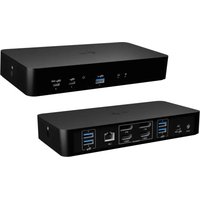
DESCRIPTION
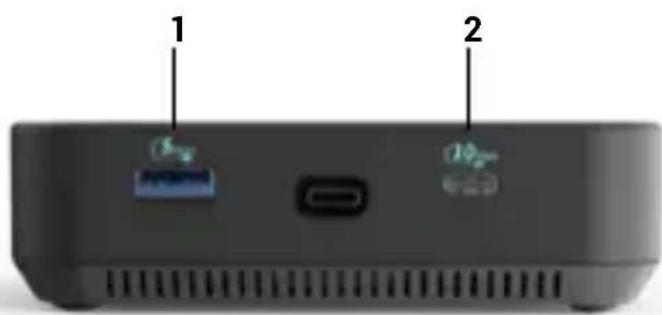
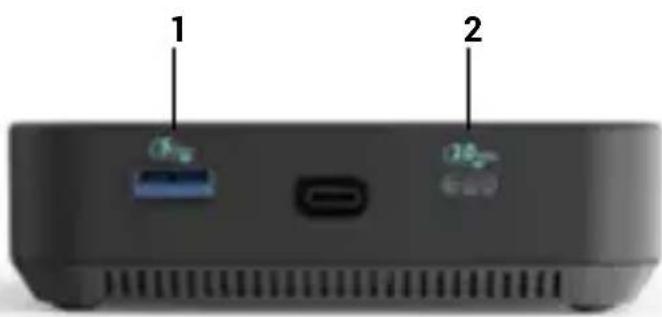
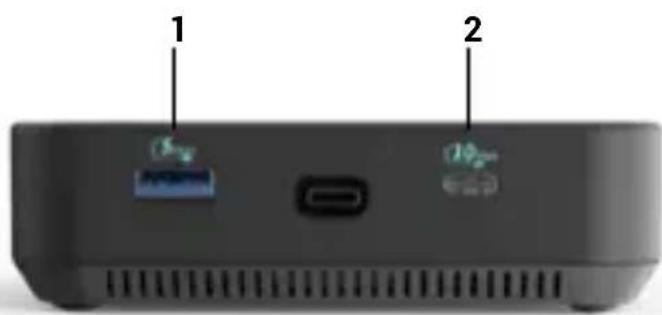
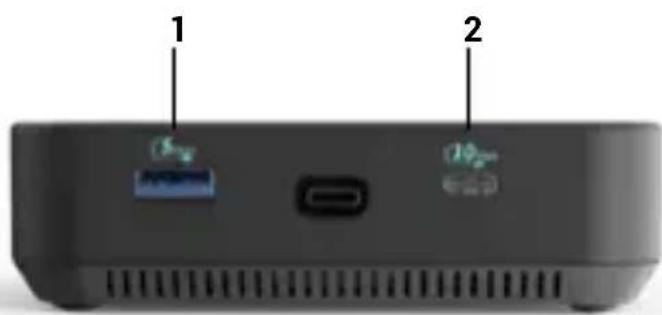
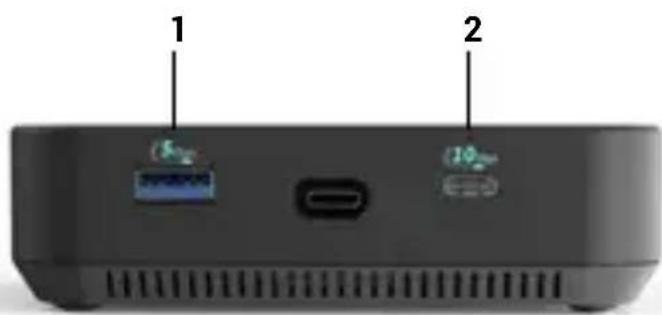
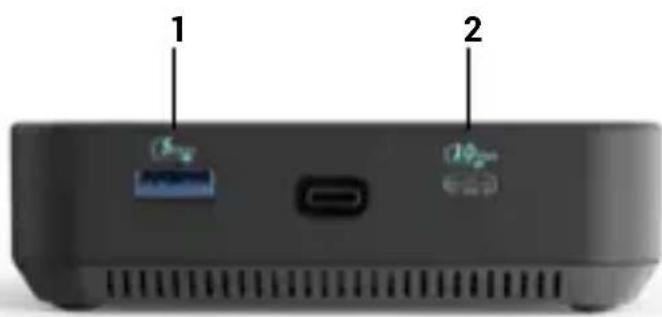
Front panel:
- USB-C 3.2 Gen.2 port
- USB 3.2 Gen.2 port
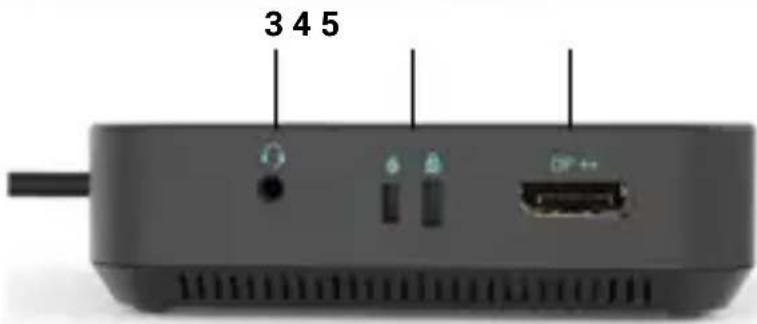
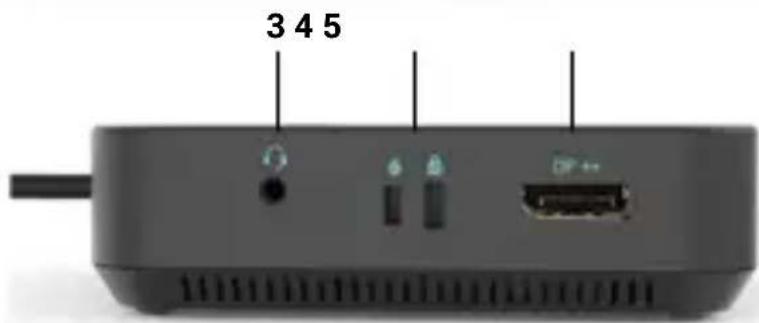
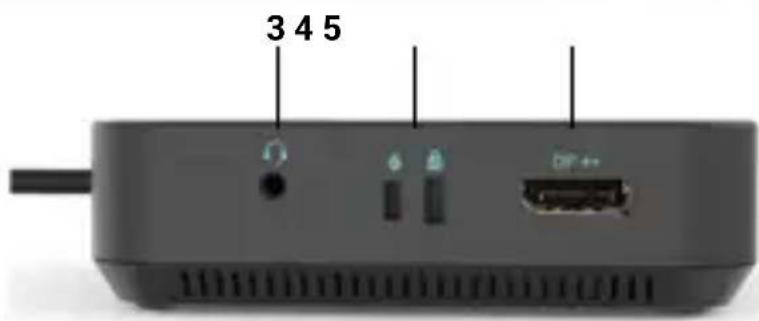
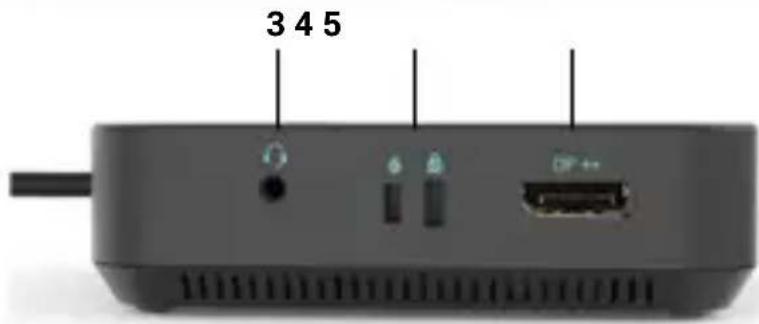
Right Panel:
- Audio combo jack
- Support for Kensington lock
- DisplayPort (with DP++ support)
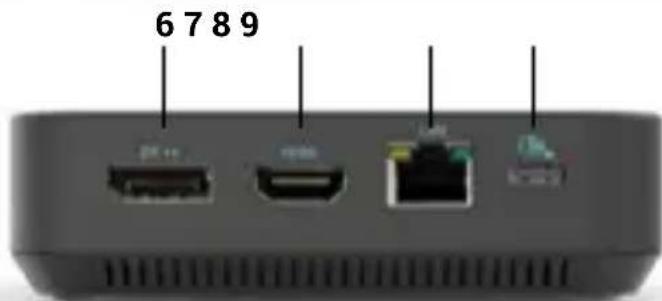
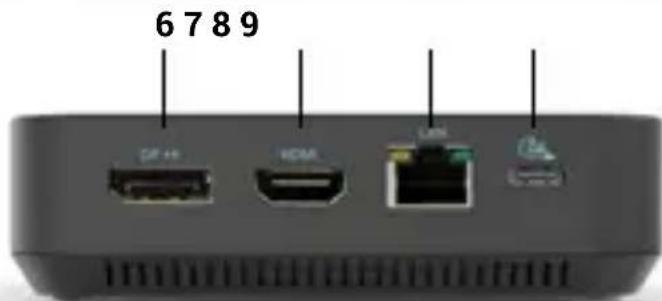
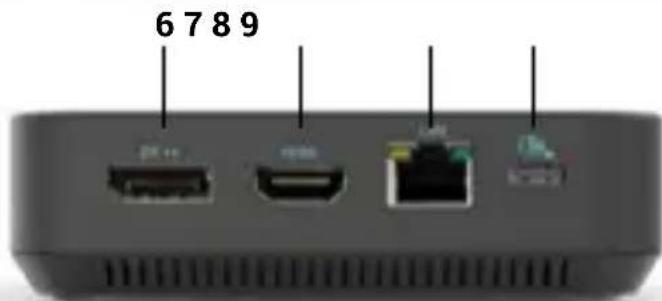
Back panel:
- DisplayPort (with DP++ support)
7.HDMI port - Ethernet GLAN RJ-45 Port
- USB-C PD port.
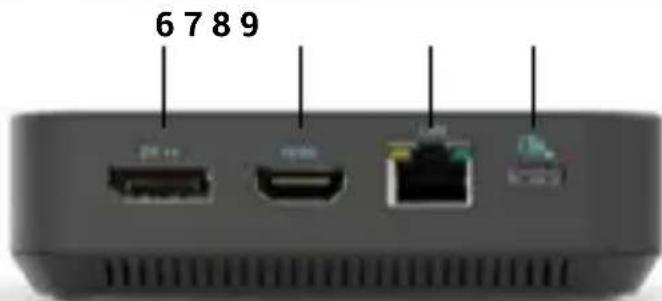
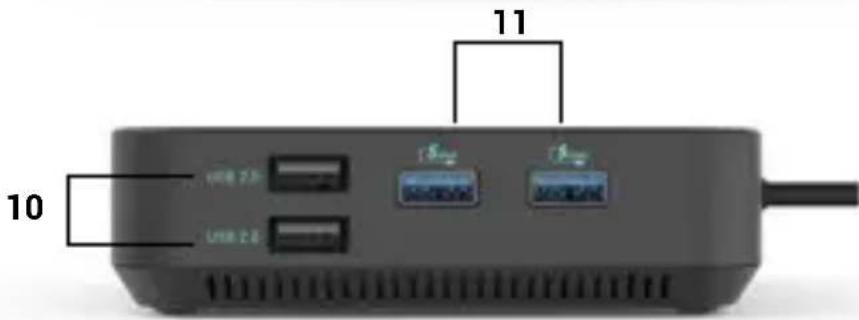
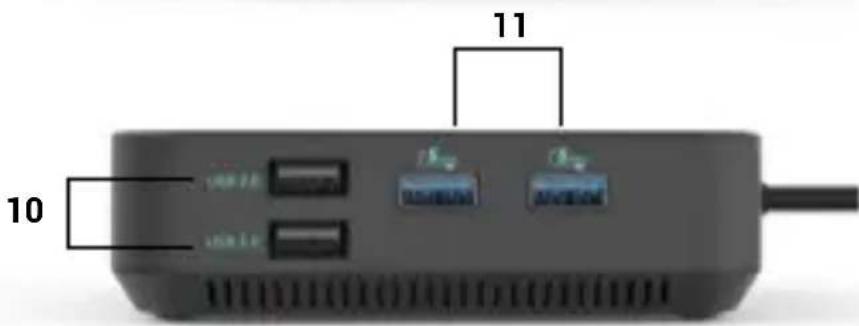
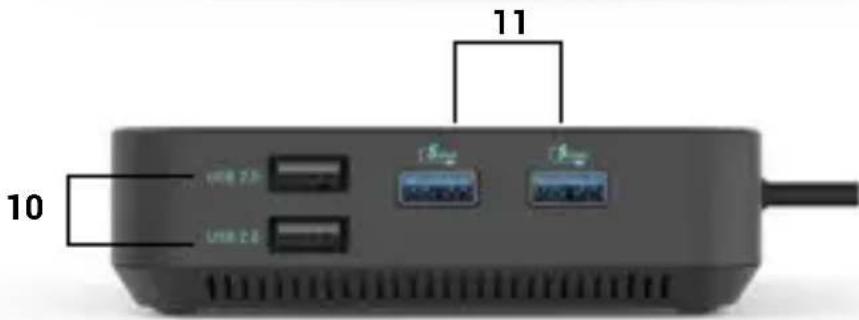
Left panel:
10.2x USB 2.0 port
11. 2x USB 3.2 port Gen.1
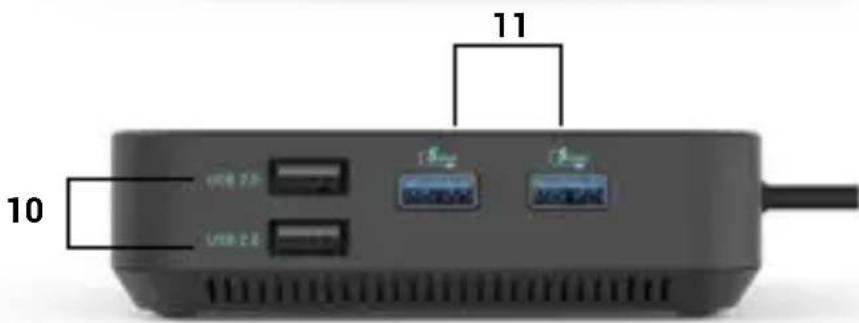
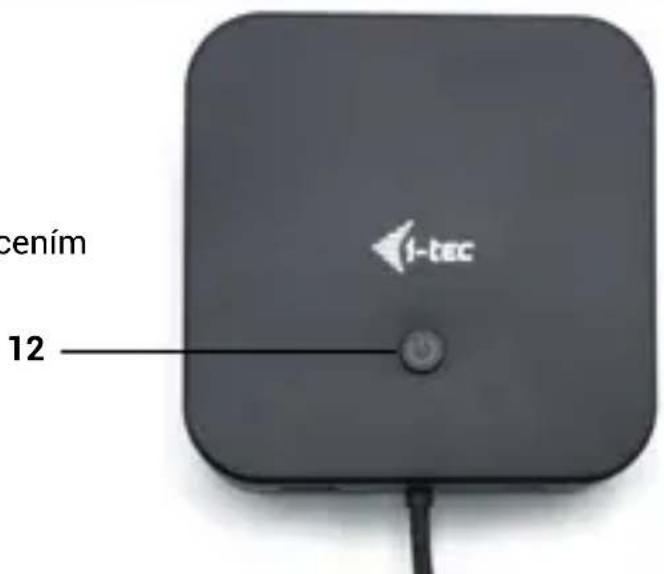
Top Panel:
- LED-backlit button to turn the docking station on and off.
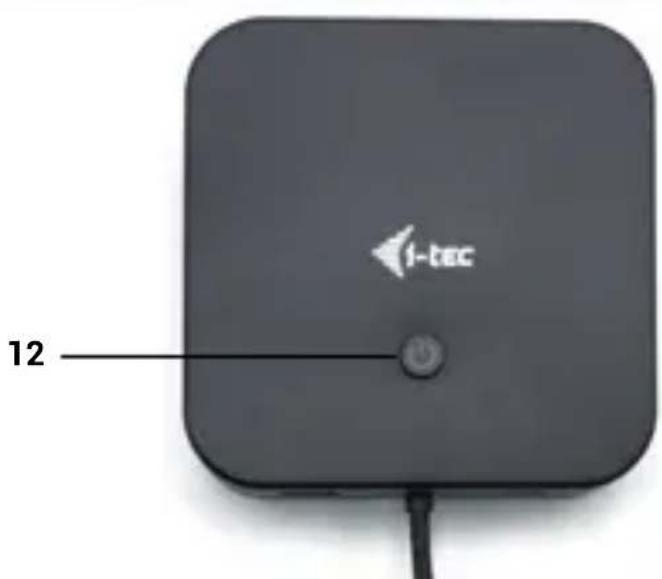
SPECIFICATIONS
- 1x integrated USB-C cable for connection to the device (100 cm)
- Docking station technology: USB-C (MST)
Power Delivery: up to 100 W - Internal power consumption: 5-10W (more info here)
Video Ports: 2x DisplayPort (supporting DP++, 1x HDMI
Resolution:
-
Host device with DisplayPort 1.2 support:
-
1 monitor - 1x HDMI or DP - up to 4K/30Hz
- 1 monitor - 1x HDMI or DP → up to 1080p/120Hz
- 2 monitors - 1x DP + 1x HDMI → up to 2x 1080p/60Hz*.
- 2 monitors - 2x DP → up to 2x 1080p/60Hz*
-
3 monitors - 1x HDMI + 1x DP + 1x DP → up to 1x 1080p/60Hz + up to 2x 720p/60Hz*
-
Host device with DisplayPort 1.4 support:
-
1 monitor - 1x HDMI → up to 4K/60Hz
- 1 monitor - 1x DP → up to 4K/60Hz
- 2 monitors - 1x DP + 1x HDMI → up to 2x 1440p/60Hz*
- 2 monitors - 1x DP + 1x HDMI → up to 2x 4K/30Hz
2 monitors - 2x DP → up to 2x 4K/30Hz -
3 monitors - 1x HDMI + 1x DP + 1x DP → up to 3x 1080p/60Hz*
-
DisplayPort 1.4 host device with DSC support:
-
1 monitor - 1x HDMI → up to 4K/60Hz
- 1 monitor - 1x DP → up to 5K/60Hz
- 1 monitor - 1x HDMI → up to 1440p/144Hz or 1080p/240Hz
- 1 monitor - 1x DP → up to 4K/144Hz or 1440p/240Hz or 1080p/360Hz
- 2 monitors - 1x DP + 1x HDMI → up to 2x 4K/60Hz*
- 2 monitors - 1x DP + 1x HDMI or DP → up to 2x 1440p/144Hz*
-
3 monitors - 1x HDMI + 1x DP + 1x DP → up to 3x 4K/30Hz*
-
1x USB-C 3.2 Gen.2 port (10 Gbps)
- 1x USB-C 3.2 port Gen.2 (10 Gbps) + PD (Power delivery)
- 3x USB-A 3.2 port Gen. 1 port (5 Gbps)
- 2x USB 2.0 port
- 1x Ethernet GLAN RJ-45 port
- 1x3.5mmComboAudioport
- LED indication
ON/OFF switch to turn the docking station on and off - MAC address cloning: yes (using i-tec Docker Pro software)
VOL: S1, S2, S3 - Support for Kensington lock
- OS: Windows 11, Windows 10, macOS, iPadOS, Android*, Chrome OS and Linux with the latest updates
- Product dimensions: 113 × 113 × 31.2 mm
- Product weight: 340 g
Package dimensions: 250 × 242 × 50 ~mm
Specification notes:
- The macOS operating system doesn't support Multi Stream Transport (MST), which means that when connected to macOS, the same image will be projected on all connected monitors.
** iPadOS, Android do not support multi-screen video transfer technology, nor the extended screen option. This means that when connected to an external monitor, only the mirrored screen will be displayed. (Not valid for androids with DEX and Easy Projection extension)
The docking station can be used without a power adapter connected. In this case, the video outputs, LAN (RJ-45), audio/mic and both USB 2.0 ports will always be functional. However, the USB 3.2 ports and the USB-C data port may not work when connecting devices with higher power requirements (e.g. SSDs, especially NVMe drives). In this case, the docking station may shut down We recommend using the docking station with the power adapter connected to ensure that all ports are used and that maximum data transfer speeds are achieved.
Note: If connected to an Android device, the dock will only work with the power adapter connected. The adapter is not included.
SYSTEM REQUIREMENTS
Hardware requirements:
Devices with a free USB-C, USB4 or Thunderbolt™ 3/4 port
Requirements for the Power Delivery function:
Devices with a free USB-C, USB4 or Thunderbolt™ 3/4 port with Power Delivery support
Video output requirements:
Devices with a free USB-C or USB4 port that supports DisplayPort Alternate Mode or Thunderbolt™ 3/4 port
Operating system:
-
Windows 10 / 11, macOS, iPadOS, Android*, Chrome OS and Linux with the latest updates
-
macOS does not support Multi Stream Transport (MST). Connecting two monitors to a macOS station will cause both monitors to display the same image.
iPadOS, Android systems do not support multi-screen image transfer technology or the expanded screen option. This means that only the mirrored screen will be displayed when connected to an external monitor. (Not valid for Android devices with DEX and Easy Projection extensions).
INSTALLING DRIVERS
Windows:
Only if a problem is detected with the LAN adapter, e.g.:
In case of outages, slow network and in case of poor or no LAN detection.
You can download LAN drivers here in the Manuals, Drivers section:
https://i-tec.pro/product/c31triple4kdockpdpro/
MacOS:
No need to install drivers.
SAFETY INSTRUCTIONS FOR USING THE DOCKING STATION
- Do not expose to extreme temperatures and humidity.
- Use the device on flat pads to avoid slipping and falling on the ground. Keep the controls and manual for later use.
- Avoid straining the USB-C port or cable.
- Restart the product periodically using the ON/OFF button or by unplugging it from the mains.
- Do not plug USB-C PD adapters into USB-C ports that are not marked as ports to connect USB-C PD power adapter.
It is recommended that you switch off the docking station at the end of the day.
In cooperation with the service department:
- Check functionality after falling into water or on the ground.
- Verify functionality when the cover is cracked.
- Complain about the device not working according to the manual.
FREQUENTLY ASKED QUESTIONS
Available on our website www-i-tec.pro under "FAQ" for this product
GLOSSARY OF TERMS
Interface / port / connector / input / slot - the place where two devices are physically connected.
Controller - a semiconductor component (called a chipset) in a notebook/tablet that ensures the operation of one of the ports.
Thunderbolt™ - is a fast hardware interface that allows you to connect devices (peripherals) to your computer via an expansion bus. Thunderbolt combines PCI-Express and DisplayPort into a serial data interface. It allows daisy chaining of up to 6 additional Thunderbolt™ devices, with Thunderbolt™ 3/4 transfer rates of up to 40Gbit/s.
USB-C / USB Type-C / USB4 / Thunderbolt™ 3/4 - is a symmetrical connector Allows faster charging, power, dual-role (not only host, but also guest), support for alternative modes - Alt Mode (DisplayPort, MHL, Thunderbolt 3, Power Delivery) and error notification via Billboard device.
USB-C Power Delivery (USB-C PD) - optional feature of the USB-C connector. A connector with this support can both charge and be charged, and supports loads from 10W to 240W
USB 3.2 / 3.1 / 3.0 / 2.0 - standard for USB interface / port for connecting various USB devices. Various USB devices can be connected to the docking station or adapter using USB Type-A interface. The USB Type B port is used to connect the docking station or adapter to a laptop/tablet.
HDMI / Display Port - A standard for a digital graphics interface/port used to connect monitors and other graphic display devices.
LAN (Local Area Network) - a local computer network, now the most common is the so-called Ethernet, which at the docking station reaches a theoretical transfer rate of up to 2.5 Gbit/s.
Audio - a term for an audio input (microphone) or output device (headphones/speakers).
BESCHREIBUNG
Frontplatte:
- Port USB-C 3.2 Gen.2
- Port USB 3.2 Gen.2
Panneau de droite:
QUESTIONS FREQUEMENT POSÉES
- Puerto USB-C 3.2 Gen.2
- Puerto USB 3.2 Gen.2
Panel derecho:
- USB-C 3.2 port Gen.2
- USB 3.2 port Gen.2
Pravy Panel:
- Audio combo jack
- Podpora pro Kensington lock
- DisplayPort (s podporou DP++)
Zadni panel:
- DisplayPort (s podporou DP++)
7.HDMI Port - Ethernet GLAN RJ-45 Port
- USB-C PD port.
Levy panel:
- 2x USB 2.0 port
- 2x USB 3.2 port Gen.1
Vrchní Panel:
- Tlacitko pro zapnuti a vypnuti dokovaci stanice s LED podsvicenim station on and off.
SPECIFIKACE
CASTO KLADENE OTÁZKY
- Port USB-C 3.2 Gen.2
- Port USB 3.2 Gen.2
Prawy panel:
- Gniazdo combo audio
- Obsluga blokady Kensington
- DisplayPort (z obstuga DP++)
Panel tylny:
- DisplayPort (z obstuga DP++)
- Port HDMI
- Port Ethernet GLAN RJ-45
9.Port USB-C PD
Lewy panel:
- 2x port USB 2.0
- 2x port USB 3.2 Gen.1
Panel gorny:
- Port USB-C 3.2 Gen.2
- Port USB 3.2 Gen.2
Pravy Panel:
- Kombinovany audio konektor
- Podpora zámku Kensington
- DisplayPort (s podporou DP++)
Zadny panel:
- DisplayPort (s podporou DP++)
- Port HDMI
- Port Ethernet GLAN RJ-45
9.Port USB-C PD.
Lavy panel:
- 2x port USB 2.0
- 2x port USB 3.2 Gen.1
Horny panel:
CASTO KLADENE OTÁZKY
K disposzicii na našej webovej stránke www-i-tec.pro v Časti “FAQ” pre tento produkt
SLOVNIK POJMOV
- USB-C 3.2 Gen.2 port
- USB 3.2 Gen.2 port
Höger panel:
- Kombijack for ljud
- Stöd für Kensingtonlåset
- DisplayPort (med stöd für DP++)
Bakre panel:
- DisplayPort (med stöd für DP++)
7.HDMI-port - Ethernet GLAN RJ-45-port
- USB-C PD-port.
Vänster panel:
10.2x USB 2.0 port
11. 2x USB 3.2 port Gen.1
Toppanel:
This equipment is marked with the above recycling symbol. It means that at the end of the life of the equipment you must dispose of it separately at an appropriate collection point and not place it in the normal domestic unsorted waste stream. This will benefit the environment for all. (European Union only)
DEUTSCH
709 00 Ostrava - Marianske Hory, Czech Republic
declares that this product / erklart hiermit, dass das Produkt / déclare que ce produit / déclara que este produit / dichiara che il seguente prodotto / tínto prohlasuje, ze vyrobek / tymto prehlasuje, ze vyrobok / deklaruje, ze produit / siuo pareiskia, kad gaminys / verklaart hierbij dat het product / forsakrar attenna produit / déclara que este produits
Manufacturer, Der Hersteller, Le fabricant, Fabricante, Produttore, Vyrobce, Vyrobca, Producent, Gamintojas, De fabrikant, Tillverkare, Fabricante:
i-tec USB-C HDMI Dual DP Docking Station with PD 100 W
Model, Modell, Modèle, Modelo, Modello, Model, Model, Model, Modelis, Model, Modell, Modello: C31TRIPLE4KDOCKPDPRO
Determination, Bestimmung, La détermination, Determinación, Determinazione, Určení, Určenie, Opcje, Ustatymas, Doel, Fastställande, Determinação:
Product is determined for using in PC as equipment. / Das Produkt ist für Austattung und als Zubehör von Computern bestimmt. / Le produit est déterminé pour une utilisation sur PC comme équipement. / El produit se détermina para usability en PC como equipo. / Destinato per essere usato come attrezzatura informatica o come accessorio per computer / Vyrobek je urcen pro pristrojové vyaveni a jako prisluosenstvi do počitaču. / Vyrobok je urceny pre pristrojové vyavenie a jako prisluosenstvo do počitačov. / Produkt jest przyznaczony do wspólpracy z komputerem jako akcesorium. / Gaminys yra skirtas jrangai papildyi ir naudiojas kaip priedas kompiuteri-ams. / Het product is bedoeld als uitrusting voor apparaten en als computeraccessaire. / Produktten ar avsedd for använding som PC-tillbehör. / O produit destină-se a ser utiliser como accesório para PCs.
We declare under our sole responsibility that the above named product is in conformity with the following European Union directives:
This equipment has been tested and found to comply within the limits of a Class B digital device pursuant to Part 15 of the FCC Rules. These limits are designed to provide reasonable protection against harmful interference in a residential installation.