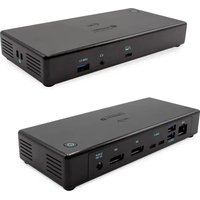
TB3CDUALDPDOCKPD - Docking station i-TEC - Free user manual and instructions
Find the device manual for free TB3CDUALDPDOCKPD i-TEC in PDF.


| Product Type | Thunderbolt 3 Docking Station |
| Brand | i-TEC |
| Model | TB3CDUALDPDOCKPD |
| Dimensions | 197 x 78 x 31 mm |
| Weight | 405 g |
| Power Supply | External power adapter 20V/6.75A (135W) |
| Thunderbolt 3 Port (upstream) | 1x Thunderbolt 3, 85W power delivery |
| Video Ports | 2x DisplayPort |
| Maximum Video Resolutions | 8K (7680x4320) @30Hz (DP 1.4) or 5K (5120x2880) @60Hz (DP 1.2) |
| Multi-Monitor Configuration | Up to 2 monitors at 4K @60Hz |
| USB-C Ports | 2x USB-C 3.1 Gen 2 (10 Gbps) |
| USB-A Ports | 3x USB-A 3.1 Gen 1 (5 Gbps) including 1 with BC 1.2 fast charging (10 Gbps) |
| Ethernet Port | 1x RJ-45 Gigabit (Realtek RTL8153) |
| Audio Port | 1x 3.5 mm combo (headphones + microphone) |
| System Compatibility | Windows 10, macOS, Linux |
| Power Switch | Yes |
| Kensington Lock | Supported |
| Included Cable | Thunderbolt 3 Cable (70 cm) |
| Package Contents | Docking station, Thunderbolt 3 cable, power adapter, quick start guide |
| Operating Temperature | Avoid extreme temperatures (estimated 0-40°C) |
| Humidity | Avoid excessive humidity |
| Cleaning | Use a dry, soft cloth. Do not use abrasive products. |
| Repairability | Contact i-TEC support for any repairs |
| Warranty | Refer to applicable legal terms |
Frequently Asked Questions - TB3CDUALDPDOCKPD i-TEC
User questions about TB3CDUALDPDOCKPD i-TEC
0 question about this device. Answer the ones you know or ask your own.
Ask a new question about this device
Download the instructions for your Docking station in PDF format for free! Find your manual TB3CDUALDPDOCKPD - i-TEC and take your electronic device back in hand. On this page are published all the documents necessary for the use of your device. TB3CDUALDPDOCKPD by i-TEC.
USER MANUAL TB3CDUALDPDOCKPD i-TEC
natural_image
Black rectangular electronic device with ports and ventilation slots (no visible text or symbols)User guide • Gebrauchsanweisung • Mode d'emploi Manual de instrucciones • Manuale • Uživatelská príručka Instrukcje obsługi • Uživatel'ská príručka • Vartotojo vadovas Handleiding
EN Please read the entire instruction manual carefully. Detailed manual is available on our website www.i-tec.cz/en/ in the tab „Manuals, drivers“. In case of any issues, please contact our technical support at: support@itecproduct.com
www.i-tec.pro/en
TB3/USB-C DUAL DISPLAYPORT 4K DOCKING STATION + POWER ADAPTER 135 W
ENGLISH....05-08
DEUTSCH....09-12
FRANÇAIS....13-16
ESPAÑOL....17-20
ITALIANO....21-24
ČESKY.... 25–28
POLSKI.... 29-32
SLOVENSKY.... 33-36
LIETUVOS....37-40
NEDERLANDS....41-44
WEEE....45-46
Declaration of Conformity....47–48
FCC....49
European Ecodesign Directive.... 50–52
INTRODUCTION
Thank you for purchasing the i-tec Thunderbolt™ 3 Docking Station, which allows you to connect your favourite devices to your Thunderbolt™ 3 port equipped laptop or tablet quickly and easily using just a single Thunderbolt™ 3 cable. The docking station is built on the Intel Titan Ridge chipset and thus also has the ability to connect to devices with a USB-C port, but in this case, the transfer rate of the connected devices may be reduced due to the maximum transfer rate of the USB-C port is 10Gb/s.
The docking station offers 2x DisplayPort, 2x USB-C, 1x Ethernet GLAN RJ-45 port, 3x USB-A 3.0 port (one BC 1.2 fast charging port), 1x Combo Audio port (headphones and microphone), 1x external power input DC.
Important note about 8K resolution: The docking station supports the resolution up to 8K (7680x4320/30Hz), but this resolution can only be set if supported by your laptop - Thunderbolt™ 3 must support DisplayPort 1.4. In case Thunderbolt™ 3 of your laptop only supports DisplayPort 1.2, the maximum resolution is just 5K 5120x2880/60Hz.
* Important notice about the USB-C port connection: The docking station is built on the Titan Ridge chipset and supports also the USB-C port connection, but it also must be supported by the laptop. USB-C is an open standard, which means that laptop manufacturers can freely customize the USB-C protocol. Unfortunately, this means that docking stations built on the Intel Titan Ridge chipset may not work properly on all devices with the USB-C port.
SPECIFICATION
- 1x Thunderbolt™ 3 port for connecting to a laptop
• Power Delivery: 85.0W
• Video ports: 2x DisplayPort - Resolution:
Thunderbolt™ 3 with DisplayPort 1.4 support
1 monitor - 1x DP - up to 8K/30Hz
2 monitors - 1x DP + 1x DP - up to 2x4K/60Hz
Thunderbolt™ 3 with DisplayPort 1.2 support
1 monitor - 2x DP - up to 5K/60Hz
2 monitors - 1x DP + 1x DP- up to 2x4K/60Hz
USB-C with DisplayPort 1.4 support
1 monitor - 1x DP - up to 4K/60Hz
2 monitors - 1x DP + 1x DP - up to 2x4K/60Hz
USB-C with DisplayPort 1.2 support
1 monitor - 1x DP - up to 4K/30Hz
2 monitors - 1x DP + 1x DP - up to 2x 1920x1080/60Hz
• 2x USB-C 3.1 ports Gen.2 (10 Gbps)
• 2x USB-A 3.1 port Gen.1 (5 Gbps)
• 1x USB-A 3.1 port Gen.2 (10 Gbps), with fast charge support (BC 1.2)
• 1x Ethernet GLAN RJ-45 port (Realtek RTL8153)
- 1x 3,5mm Audio combo connector
• 1x power input (20.0V/6.75A)
- ON/OFF switch for turning the docking station on and off
• Kensington lock support
- Thunderbolt™ 3 cable (70 cm)
- OS: Windows 10, macOS and Linux with the latest updates
• Dimensions: 197 x 78 x 31 mm - Weight: 405 g
PACKAGE CONTENTS
- i-tec Thunderbolt™ 3 Docking Station
- Thunderbolt™ 3 cable (70 cm)
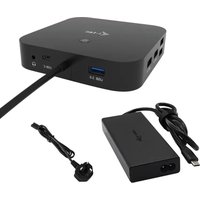
• Power adapter (output DC: 20.0V / 6.75A, DC cable 160 cm. AC cable 170 cm) - Quick Start
SPECIFICATION AND DESCRIPTION
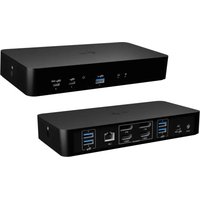
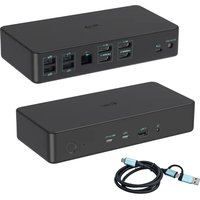
Front panel:
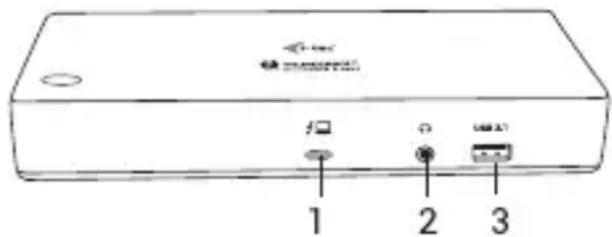
- Thunderbolt™ 3 data port / Power Delivery - for connecting a docking station to the Thunderbolt™ 3 laptop port. This port is capable of delivering up to 85.0W for the device.
- 3.5 mm Combo Audio Jack
- USB-A 3.1 port Gen. 2 (10 Gbps) with a quick charge, BC 1.2 specification
Rear panel:
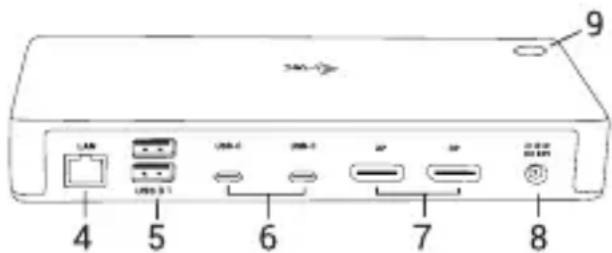
- Ethernet GLAN RJ-45 port – supports 10/100/1000 Mbps
- 2x USB-A 3.1 port Gen. 1 (5 GBps)
- 2x USB-C 3.1 port Gen. 2 (10 GBps)
- 2x DisplayPort - allows to connect up to one 8K/30Hz monitor. Only if the main GPU and Thunderbolt™ 3 support DisplayPort 1.4.
- Power input (20.0V/6.75A) External power supply exclusively for use with TB3CDUALDPDOCKPD.
- ON/OFF switch for turning the docking station on and off
SYSTEM REQUIREMENTS
Hardware requirements: Device with a free Thunderbolt 3 or USB-C* port
Power Delivery requirements: a device with a free Thunderbolt 3 or USB-C* port with „Power Delivery“ support.
Operating system: Windows 10, macOS and Linux with the latest updates
To play Ultra HD 4K/5K/8K videos, your computer must be able to decode this video with its graphics processor. Especially in less powerful laptops, they can handle 4K/5K/8K video playback, but the result is not ideal (interruption, video tearing).
INSTALLING THE DRIVERS
The docking station can be connected directly, the drivers are included in the operating system. For Windows 10, please make sure that you have the latest Thunderbolt™ 3 drivers from your laptop manufacturer installed in your computer.
HARDWARE INSTALLATION (CONNECTING THE DOCKING STATION TO LAPTOP / TABLET)
- Turn on the laptop / tablet and connect the power adapter to the docking station.
- Connect the docking station power adapter to the AC 110 V / 230 V network
- Connect the Thunderbolt™ 3 cable to the Thunderbolt™ 3 port on the front panel of the docking station.
- Connect the second end to a free Thunderbolt™ 3 / USB-C* port of your laptop / tablet.
- In Windows OS, permit a new Thunderbolt™ 3 device – see figure
- In Linux, enable the new Thunderbolt™ 3 device. Must be displayed as Enabled
- Subsequently, the automatic installation of ports in each system starts.
- After finishing installation, we recommend that you restart the laptop / tablet.
CONNECTING THE DISPLAYPORT MONITOR
For connection of the monitor to the docking station, use a DisplayPort cable. During the installation of an additional monitor, the laptop / tablet monitor may may blink, this is a normal state. Docking station supports up to two monitors. Graphic Interface: 2x DisplayPort
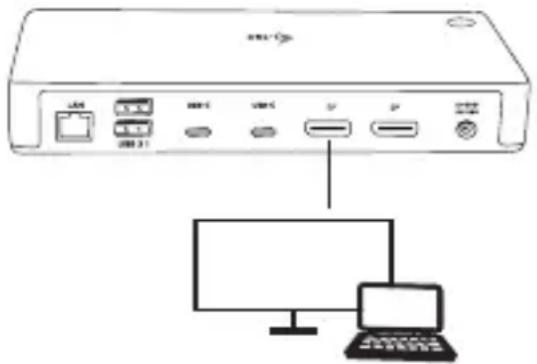
1 monitor connected through 1 DisplayPort cable - resolution up to 8K 7680x4320/30Hz
8K resolution is supported only if Thunderbolt™ 3 connector of your laptop supports DisplayPort 1.4.
If Thunderbolt™ 3 only supports DisplayPort 1.2, the maximum resolution is 5K 5120x2880/60Hz
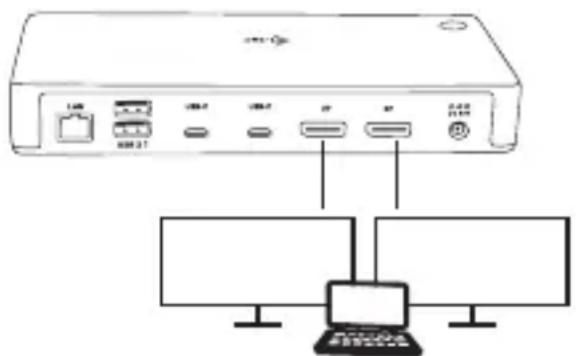
2 monitors connected simultaneously 2x DisplayPort, resolution up to 4K 4096x2160@60Hz
The resolution, the frame rate and the maximum number of connected external monitors depends on the capabilities of the host PC/laptop.
Note: The majority of problems with the docking station and the connected peripheral devices can be solved by disconnecting the Thunderbolt™ 3 cable of the docking station from the Thunderbolt™ 3 port of the PC / Mac / smartphone and reconnecting after approximately 10 s.
SAFETY INSTRUCTIONS
- Do not expose to extreme temperatures and air humidity.
- Use the device on flat surfaces – this will prevent it from slipping and potentially causing damage to the product.
- Keep the user manual for future reference.
In co-operation with the service department:
- Check the functionality if the product receives any damage.
- Send the device back if it does not work in accordance with the user manual.
FREQUENTLY ASKED QUESTIONS
Available on our website www.i-tec.cz/en/ on the "FAQ" tab of this product.
EINLEITUNG
INSTRUCTIONS DE SÛRETÉ
2x monitor - 1x DP + 1x DP - fino a 2x 1920x1080/60Hz
2 monitory pripojené zároveň 2x DisplayPort rozlíšenie max. 4K 4096x2160 @ 60Hz
1 monitorius prijungtas per 1 „DisplayPort“ kabelj
- rezoliucija netgi 8K 7680x4320 / 30Hz
2 monitoriai prijungti tuo pačiu metu 2x DisplayPort, skiriamoji geba iki 4K 4096x2160@60Hz
This equipment is marked with the above recycling symbol. It means that at the end of the life of the equipment you must dispose of it separately at an appropriate collection point and not place it in the normal domestic unsorted waste stream. This will benefit the environment for all. (European Union only).
DEUTSCH
This equipment has been tested and found to comply within the limits of a Class B digital device pursuant to Part 15 of the FCC Rules. These limits are designed to provide reasonable protection against harmful interference in a residential installation.
EN Amendment to user manual providing all necessary information required by COMMISSION REGULATION (EU) 2019/1782. (This product meets all the requirements laid down by the above regulation).
DE Ergänzung zum Produkthandbuch, in welchem alle erforderlichen Informationen aufgeführt sind, welche durch die Vorschrift VERORDNUNG DER KOMMISSION (EU) 2019/1782 verlangt werden. (Dieses Produkt erfüllt alle Anforderungen, welche durch die vorgenannte Vorschrift verlangt werden).
FR Avenant au manuel d'instructions dans lequel vous trouverez toutes les informations nécessaires exigées par le Règlement (UE) 2019/1782 de la Commission. (Ce produit satisfait à toutes les exigences qui sont fixées par la réglementation susmentionnée).
ES Complemento del manual del producto que incluye todas las informaciones necesarias, exigidas por el REGLAMENTO (UE) 2019/1782 DE LA COMISIÓN. (Este producto cumple todos los requerimientos que exige en reglamento antes citado).
IT Integrazione al manuale sui prodotti nel quale sono riportate tutte le necessarie informazioni dettagliate prescritte dal REGOLAMENTO (UE) 2019/1782 DELLA COMMISSIONE. (Questo prodotto soddisfa tutti i requisiti previsti dalla norma di cui sopra).
CZ Doplněk k produktovému manuálu, ve kterém jsou uvedeny veškeré potřebné informace, vyžadované předpisem NAŘÍZENÍ KOMISE (EU) 2019/1782. (Tento produkt splňuje všechny požadavky, které jsou výše uvedeným předpisem vyžadovány).
PL Uzupełnienie instrukcji produktu, która zawiera wszystkie niezbędne informacje wymagane w ROZPORZĄDZENIU KOMISJI (UE) 2019/1782. (Ten produkt spełnia wszystkie wymagania określone przez powyższe rozporządzenie).
SK Doplnok k produktovému manuálu, v ktorom sú uvedené všetky potrebné informácie, vyžadované predpisom NARIADENIE KOMISIE (EÚ) 2019/1782. (Tento produkt spíňa všetky požiadavky, ktoré sú vyššie uvedeným predpisom vyžadované).
LT Vartotojo vadovo, kuriame pateikiama visa reikalinga informacija, kurios reikalaujama KOMISIJOS REGLAMENTAS (ES) 2019/1782, pakeitimas. (Šis produktas atitinka visus aukščiau nurodyto reglamento reikalavimus).
NL Aanvulling op de producthandleiding, die alle nodige informatie bevat welke vereist wordt door de VERORDENING (EU) 2019/1782 VAN DE COMMISSIE. (Dit product voldoet aan alle vereisten van de bovenstaande verordening).
| Information publishedVeröffentlichte AngabenInformation publiéeInformación publicadaInformazioni pubblicateZveřejňované informacePublikowane informacjeZverejňované informáciePaskelbta informacijaBekendgemaakte informatie | Value and precisionWert undGenauigkeitValeur et précisionValor y precisiónValore e precisioneHodnota a přesnostWartość i stopieńdokładnościHodnota a presnosťVertė ir tikslumasWaarde en precisie | UnitEinheitUnitéUnidadUnitàJednotkaJednostkaVienetasEenheid |
| Manufacturer’s name or trade mark, commercialregistration number and address / Name oderHandelsmarke des Herstellers, Handelsregisternummerund Anschrift / Raison sociale, numéro d’enregistrementau registre du commerce et adresse du fabricant / Nombreo marca, número del registro mercantil y dirección delfabricante / Nome o marchio del fabbricante, numero di iscrizione nel registro delle imprese e indirizzo del fabbricante / Název výrobce, obchodní registrační číslo a adresa / Nazwa producenta, numer rejestru handlowego i adres / Názov výrobcu, obchodné registračné číslo a adresa / Gamintojo pavadinimas arba prekės ženklas,komercinis registracijos numeris ir adresas / Naam ofhandelsmerk van de fabrikant, handelsregisternummeren adres: | Chicony Power Technology Co.,LTD.,24284436,30F No. 69, Sec. 2,Guangfu Rd., Sanchong Dist.,New Taipei City 241, Taiwan | |
| Model identifier / Modellkennung / Référence dumodelle / Identificador del modelo / Identificativo delmodello / Identifikační značka modelu/ Identyfikatormodelu / Identifikačný kód modelu / Modelio žymuo /Typeaanduiding | A16-135P1A | |
| Input voltage / Eingangsspannung / Tension d’entrée /Tensión de entrada / Tensione di ingresso / Vstupnífrekvence / Napięcie wejściowe / Vstupné napätie /lėjimo įtampa / Voedingsspanning | 100-240 V | |
| Input AC frequency / Eingangswechselstromfrequenz /Fréquence du CA d’entrée / Frecuencia de la CAde entrada / Frequenza di ingresso CA / Vstupnífrekvence / Napięcie wyjściowe / Frekvencia vstupného striedavého prúdu / lėjimo kintamosios srovės dažnis /Voedingsfrequentie | 50/60 Hz | |
| Output voltage / Ausgangsspannung / Tension de sortie /Tensión de salida / Tensione di uscita / Výstupní napětí /Výstupné napätie / lšėjimo įtampa / Uitgangsspanning | DC 20.0 | V |
| Output current / Ausgangsstrom / Courant de sortie /Intensidad de salida / Corrente di uscita / Výstupníproud / Prąd wyjściowy / Výstupný prúd / lšėjimo srovė /Uitgangsstroom | 6.75 A | |
| Output power / Ausgangsleistung / Puissance de sortie / Potencia de salida / Potenza di uscita / Výstupní výkon / Moc wyjściowa / Výstupný výkon / Išejimo galia / Uitgangsvermogen | 135.0 W | |
| Average active efficiency / Durchschnittliche Effizienz im Betrieb / Rendement moyen en mode actif / Eficiencia media en activo / Rendimento medio in modo attivo / Průměrná účinnost v aktivním režimu / Šrednia sprawność podczas pracy / Priemerná účinnosť v aktívnom režime / Vidutinis aktyviosios veiksenos efektyvumas / Gemiddelde actieve efficiëntie | 90.2 % | |
| Efficiency at low load (10 %) / Effizienz bei geringer Last (10 %) / Rendement à faible charge (10 %) / Eficiencia a baja carga (10 %) / Rendimento a basso carico (10 %) / Účinnost při malém zatížení (10%) / Sprawność przy niskim obciążeniu (10 %) / Účinnosť pri nízkej záťaži (10 %) / Efektyvumas esant mažai apkrovai (10 %) / Efficiëntie bij lage belasting (10 %) | 88.5 % | |
| No-load power consumption / Leistungsaufnahme bei Nulllast / Consommation électrique hors charge / Consumo eléctrico en vacío / Potenza assorbita nella condizione a vuoto / Spotřeba energie ve stavu bez zátěže / Zużycie energii w stanie bez obciążenia / Spotreba energie v stave bez záťaže / Vartojamoji galia be apkrovos / Energieverbruik in niet-belaste toestand | 0.17 W | |