CADUAL4KDOCKPD2 - Docking station i-TEC - Free user manual and instructions
Find the device manual for free CADUAL4KDOCKPD2 i-TEC in PDF.


User questions about CADUAL4KDOCKPD2 i-TEC
0 question about this device. Answer the ones you know or ask your own.
Ask a new question about this device
Download the instructions for your Docking station in PDF format for free! Find your manual CADUAL4KDOCKPD2 - i-TEC and take your electronic device back in hand. On this page are published all the documents necessary for the use of your device. CADUAL4KDOCKPD2 by i-TEC.
USER MANUAL CADUAL4KDOCKPD2 i-TEC
natural_image
Abstract graphic with diagonal stripes and a stylized lowercase 'i' (no text or symbols)i-tec
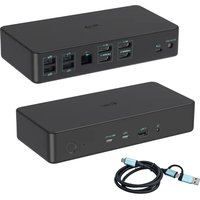
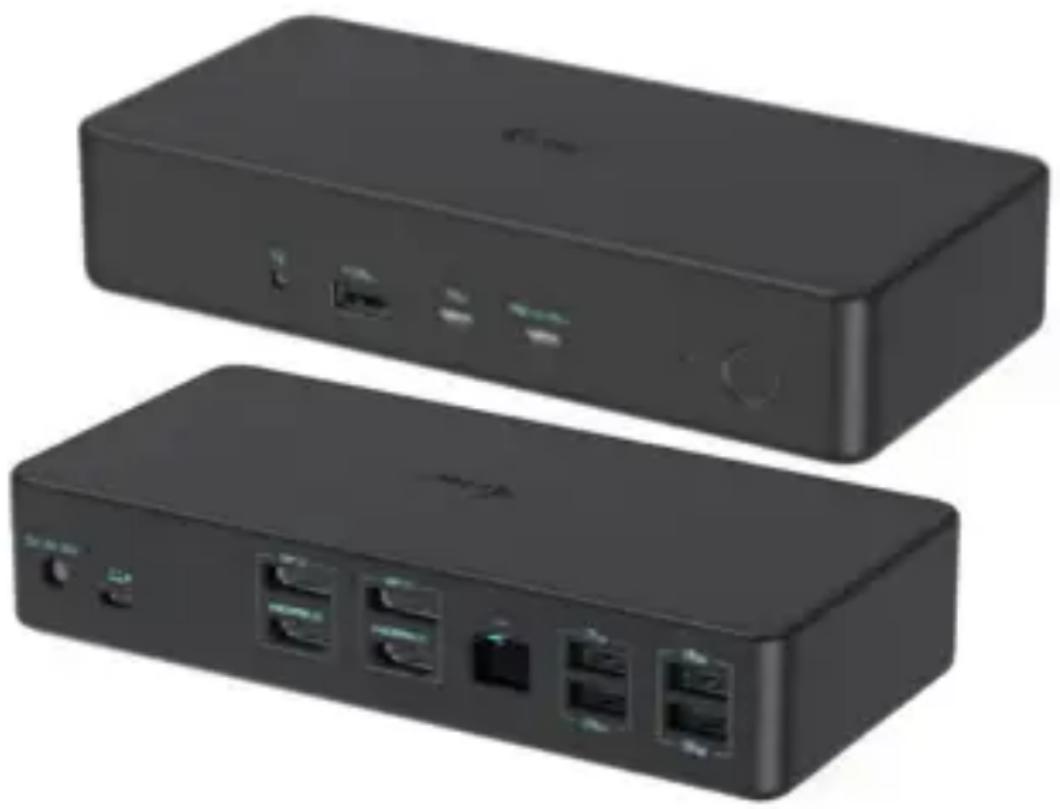
i-tec USB 3.0 / USB-C / Thunderbolt 3 Professional Dual 4K Display Docking Station Generation 2 + Power Delivery 100W
natural_image
Two black rectangular electronic devices with ports and connectors, shown from different angles (no visible text or symbols)User guide • Gebrauchsanweisung • Mode d'emploi Manual de instrucciones • Manuale • Uživatelská príručka Instrukcje obsługi • Užívatel'ská príručka
• Vartotojo vadovas Handleiding • Användarhandbok • Guia do utilizador
EN Please read the entire instruction manual carefully. Detailed manual is available on our website www.i-tec.pro/en/ in the tab „Manuals, drivers“. In case of any issues, please contact our technical support at: support@itecproduct.com
ENGLISH.... 06-09
DEUTSCH....10-13
FRANÇAIS....14-17
ESPAÑOL....18-21
ITALIANO....22-25
ČESKY.... 26–29
POLSKI.... 30-33
SLOVENSKY.... 34-37
LIETUVOS.... 38-41
NEDERLANDS....42-45
SVENSKA 46-49
PORTUGUÊS.... 50-53
WEEE....54-55
Declaration of Conformity.... 56–57
FCC....58
DESCRIPTION
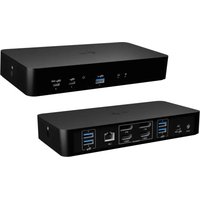
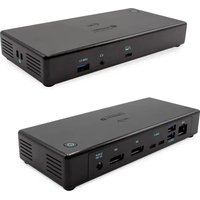
Front panel:
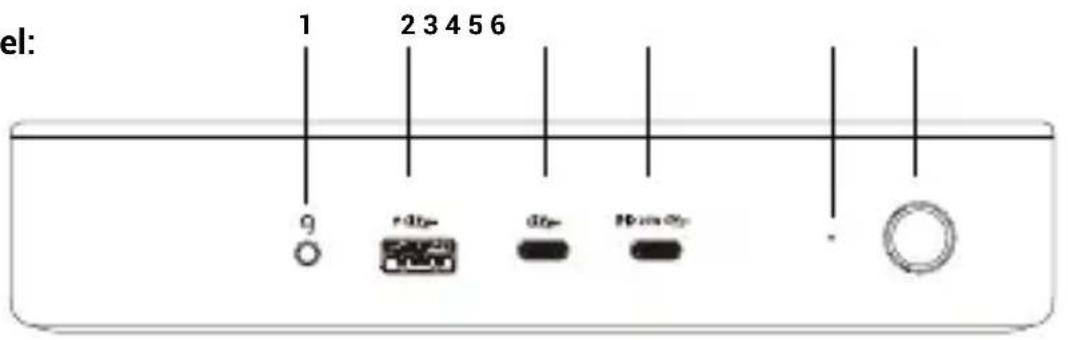
- 3.5mm Audio combo connector
- 1x USB 3.2 Gen 2, BC 1.2 port
- 1x USB-C 3.2 Gen 2 port (data only), BC 1.2
- 1x USB-C 3.2 Gen 2 port, PD 20W
- LED indication
- On/Off button to turn the docking station on and off
Back panel:
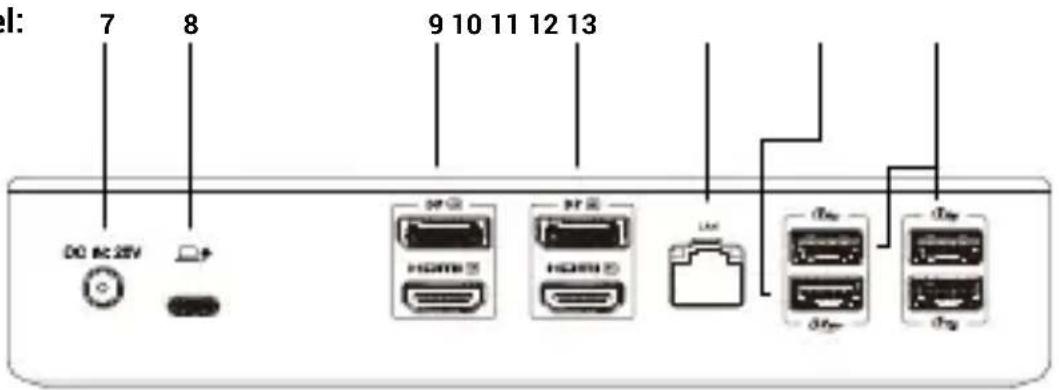
- Input for power supply
- USB-C port for connecting the dock to a laptop
- Zone 1 - HDMI/DP (HDMI or DP can be connected)
- Zone 2 - HDMI/DP (HDMI or DP can be connected)
- Ethernet GLAN RJ-45 port (DisplayLink DL-6950)
- 1x USB 3.2 Gen 2 port
- 3x USB 3.2 Gen 1 port
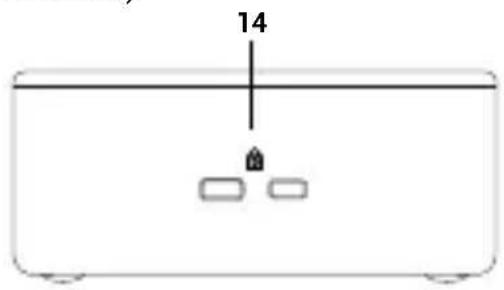
Side panel:
- Support for Kensington lock
SPECIFICATIONS
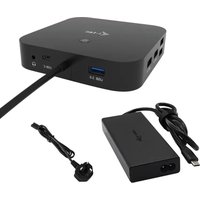
- 1x USB-C port for connecting to a host device with a USB-C or USB-A port (USB-C cable and USB-C to USB 3.0 adapter included)
- Docking station technology: DisplayLink + USB-C PD
• Power Delivery: up to 100 W
- Video Ports:
- 2x Display Port (DP++ support)
- 2x HDMI
• Supported resolutions:
- 1 monitor - 1x DP → up to 4K/60Hz
- 1 monitor - 1x HDMI → up to 4K/60Hz
- 1 monitor - 2x DP → up to 5K/60Hz*
- 2 monitors - 1x DP + 1x DP → up to 2x 4K/60Hz
- 2 monitors - 1x DP + 1x HDMI → up to 2x 4K/60Hz
- 2 monitors - 1x HDMI + 1x HDMI → up to 2x 4K/60Hz
• 1x USB-C 3.2 Gen 2 port (data only), BC 1.2
• 1x USB-C 3.2 Gen 2 port, PD 20W
• 1x USB 3.2 Gen 2 port, BC 1.2
- 1x USB 3.2 Gen 2 port
• 3x USB 3.2 Gen 1 port
- 1x Ethernet GLAN RJ-45 port (DisplayLink DL-6950)
- 1x 3.5 mm combined audio port, supporting high quality 32bit/192 kHz sampling rate and recording
- 1x power input (DC 20V/7.5A)
- MAC address cloning: yes (using i-tec Docker Pro software)
• WOL: S1, S2, S3
- Switch to turn the docking station on and off
- LED indicator
- Kensington lock support
• VESA mounting support
- USB-C cable with USB-C to USB-A adapter (100 cm)
- Operating system: Windows 10/11, macOS, Android 5 or later, Chrome OS R51 or later, Linux Ubuntu
- Easy driver installation (Windows, MacOS, Ubuntu, Android (external link))
• Product dimensions: 190 x 88 x 37 mm
• Product weight: 539 g
- Package dimensions: 253 x 200 x 54 mm
* 5K resolution is only supported by Windows
SYSTEM REQUIREMENTS
Hardware requirements:
- Devices with a free USB-A, USB-C, USB4 or Thunderbolt™ 3/4 port.
Requirements for the Power Delivery function:
- Devices with a free USB-C, USB4 or Thunderbolt™ 3/4-enabled port with "Power Delivery".
Operating system:
- Windows 10/11, macOS, Linux Ubuntu, Android 5 and higher, Chrome OS R51 and higher
If the docking station is connected via USB 3.0, charging of laptops and tablets is not supported
INSTALLING DRIVERS
Windows:
1) Download and run DisplayLink Cleaner: https://www.synaptics.com/products/displaylink-graphics/downloads/windows-installation-cleaner
2) Restart your laptop
3) Download and install the DisplayLink driver: https://www.synaptics.com/products/displaylink-graphics/downloads/windows
4) Restart your laptop
5) Connect the docking station
macOS:
1) Download and install DisplayLink Manager: https://www.synaptics.com/products/displaylink-graphics/downloads/macos
2) The installation will prompt you to enable Screen Recording
a. Go to the APPLE tab / System Preferences / Security & Privacy / Privacy
b. Find Screen Recording in the Privacy tab
c. Click on the lock in the bottom left corner
d. Enter your password
e. Check the box next to DisplayLink Manager
3) After installation, open DisplayLink Manager from Launchpad
4) Find the DisplayLink icon in the top menu bar and open it
5) Select "Run the application automatically after login"
6) Connect the docking station
SAFETY INSTRUCTIONS FOR USING THE DOCKING STATION
- Do not expose to extreme temperatures and humidity.
- Use the device on flat pads to avoid slipping and falling on the ground.
- Keep the drivers and manual for later use.
- Avoid straining the USB-C port or cable.
- Restart the product periodically using the ON/OFF button or by unplugging it from the mains.
- Do not plug USB-C PD adapters into USB-C ports that are not marked as ports to connect USB-C PD power adapter.
- It is recommended that you switch off the docking station at the end of the day.
In cooperation with the service department:
- Check functionality after falling into water or on the ground.
- Verify functionality when the cover is cracked.
- Complain about the device not working according to the manual.
FREQUENTLY ASKED QUESTIONS
Available on our website www.i-tec.pro under "FAQ" for this product
GLOSSARY OF TERMS
Interface / port / connector / input / slot - the place where two devices are physically connected.
Controller - a semiconductor component (called a chipset) in a notebook/tablet that ensures the operation of some from the ports.
Thunderbolt™ - is a fast hardware interface that allows you to connect devices (peripherals) to your computer via an expansion bus. Thunderbolt combines PCI-Express and DisplayPort into a serial data interface. It allows daisy chaining of up to 6 additional Thunderbolt™ devices, with Thunderbolt™ 3/4 transfer rates of up to 40Gbit/s.
USB-C / USB Type-C / USB4 / Thunderbolt™ 3/4 - is a symmetrical connector Allows faster charging, power, dual-role (not only host, but also guest), support for alternative modes - Alt Mode (DisplayPort, MHL, Thunderbolt 3, Power Delivery) and error notification via Billboard device.
USB-C Power Delivery (USB-C PD) - optional feature of the USB-C connector. Connector with this support can both charge and be charged, and supports loads from 10W to 240W
USB 3.2 / 3.1 / 3.0 / 2.0 - standard for USB interface / port for connecting various USB devices. Various USB devices can be connected to the docking station or adapter using USB Type-A interface the USB Type B port is used to connect the docking station or adapter to a laptop/tablet.
HDMI/Display Port - A standard for a digital graphics interface/port used to connect monitors and other graphic display devices.
LAN (Local Area Network) - local area network, now the most common is the so-called Ethernet, which is used by The docking station achieves theoretical transfer rates of up to 2.5 Gbit/s.
Audio - a term for an audio input (microphone) or output device (headphones/speakers).
BESCHREIBUNG
Frontplatte:

natural_image
Simple line drawing of a rectangular container with two small rectangular blocks and a vertical line labeled '14' (no text or symbols beyond the number)SPEZIFIKATIONEN
- 2x Display Port (DP++ support)
- 2x HDMI
- 2x Display Port (DP++ support)
- 2x HDMI
natural_image
Simple line drawing of a rectangular container with two small rectangular blocks and a vertical line labeled '14' (no text or symbols beyond the number)ESPECIFICACIONES
natural_image
Simple line drawing of a rectangular container with two small rectangular blocks and a vertical line labeled '14' (no text or symbols beyond the number)SPECIFICHE
- 2x Display Port (DP++ support)
- 2x HDMI
1) Scaricare ed eseguire DisplayLink Cleaner: https://www.synaptics.com/products/displaylink-graphics/downloads/windows-installation-cleaner
2) Riavviare il computer portatile
3) Scaricare e installare il driver DisplayLink: https://www.synaptics.com/products/displaylink-graphics/downloads/windows
4) Riavviare il computer portatile
5) Collegare la docking station
macOS:
natural_image
Simple line drawing of a rectangular container with two small rectangular blocks and a vertical line labeled '14' (no text or symbols beyond the number)SPECIFIKACE
- 2x Display Port (DP++ support)
- 2x HDMI
- 2x Display Port (DP++ support)
- 2x HDMI
natural_image
Simple line drawing of a container with two small rectangular objects and a vertical line labeled '14' (no text or symbols beyond the number)ŠPECIFIKÁCIE
- 2x Display Port (DP++ support)
- 2x HDMI
natural_image
Simple line drawing of a rectangular container with two small rectangular blocks and a vertical line labeled '14' (no text or symbols beyond the number)SPECIFIKACIJOS
- 1x USB-C prievadas USB-C arba USB-A jrenginiams prijungti (pridedamas USB-C kabelis ir USB-C j USB 3.0 adapteris)
- Prisijungimo stotelès technologija: DisplayLink + USB-C PD
• Maitinimas: iki 100 W
• Vaizdo prievadai:
- 2x "Display Port" (DP++ support)
- 2x HDMI
• Palaikomos skiriamosios gebos:
- 1 monitorius - 1x DP → iki 4K/60Hz
- 1 monitorius - 1x HDMI → iki 4K/60Hz
- 1 monitorius - 2x DP → iki 5K/60Hz*
- 2 monitoriai - 1x DP + 1x DP → iki 2x 4K/60Hz
- 2 monitoriai - 1x DP + 1x HDMI → iki 2x 4K/60Hz
- 2 monitoriai - 1x HDMI + 1x HDMI → iki 2x 4K/60Hz
• 1x USB-C 3.2 Gen 2 prievadas (tik duomenys), BC 1.2
• 1x USB-C 3.2 Gen 2 prievadas, PD 20W
• 1x USB 3.2 Gen 2 prievadas, BC 1.2
• 1x USB 3.2 Gen 2 prievadas
• 3x USB 3.2 Gen 1 prievadas
• 1x Ethernet GLAN RJ-45 prievadas (DisplayLink DL-6950)
- 2x Display Port (DP++ support)
- 2x HDMI
- Ondersteunde resoluties:
- 1 monitor - 1x DP → tot 4K/60Hz
- 1 monitor - 1x HDMI → tot 4K/60Hz
- 1 monitor - 2x DP → tot 5K/60Hz*
- 2 monitoren - 1x DP + 1x DP → tot 2x 4K/60Hz
- 2 monitoren - 1x DP + 1x HDMI → tot 2x 4K/60Hz
- 2 monitoren - 1x HDMI + 1x HDMI → tot 2x 4K/60Hz
• 1x USB-C 3.2 Gen 2-poort (alleen data), BC 1.2
• 1x USB-C 3.2 Gen 2-poort, PD 20W
• 1x USB 3.2 Gen 2-poort, BC 1.2
• 1x USB 3.2 Gen 2-poort
• 3x USB 3.2 Gen 1-poort
• 1x Ethernet GLAN RJ-45-poort (DisplayLink DL-6950)
natural_image
Simple line drawing of a rectangular container with two small rectangular blocks and a vertical line labeled '14' (no text or symbols beyond the number)SPECIFICATIONER
- 2x Display Port (DP++ support)
- 2x HDMI
This equipment is marked with the above recycling symbol. It means that at the end of the life of the equipment you must dispose of it separately at an appropriate collection point and not place it in the normal domestic unsorted waste stream. This wil benefit the environment for all. (European Union only)
DEUTSCH
We declare under our sole responsibility that the above named product is in conformity with the following European Union directives:
Ing. Lumír Kraina
Executive Name and Signature, Geschäftsführer, Exécutif et signature, Nombre y firma del gerente, Amministratore, Jednatel, Konatel, Nazwisko osoby upowaznionej, Vadovas, Zaakvoerder, Chefens namn och underskrift, Nome e assinatura do executivo
FCC COMPLIANCE STATEMENT
This equipment has been tested and found to comply within the limits of a Class B digital device pursuant to Part 15 of the FCC Rules. These limits are designed to provide reasonable protection against harmful interference in a residential installation.